1
UMTS/HSPA Module Series
UC20 EVB User Guide
Contents
About the Document ................................................................................................................................... 2
Contents ....................................................................................................................................................... 3
Table Index ................................................................................................................................................... 4
Figure Index ................................................................................................................................................. 5
1
Introduction .......................................................................................................................................... 6
1.1.
Safety Information ................................................................................................................... 6
2
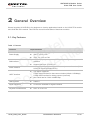
General Overview ................................................................................................................................. 8
2.1.
Key Features ........................................................................................................................... 8
2.2.
System Overview..................................................................................................................... 9
2.3.
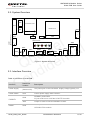
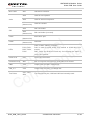
Interface Overview................................................................................................................... 9
2.4.
EVB View ............................................................................................................................... 11
2.5.
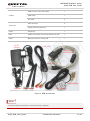
EVB Accessories ................................................................................................................... 11
3
Interface Application ......................................................................................................................... 13
3.1.
Power Interface ..................................................................................................................... 13
3.2.
USB Device Interface ............................................................................................................ 14
3.3.
Audio Interface ...................................................................................................................... 15
3.3.1. Loud Speaker (J402) ...................................................................................................... 16
3.3.2. Earphone (J404) ............................................................................................................ 16
3.3.3. Handset (J401) ............................................................................................................... 18
3.4.
SIM Card Interface ................................................................................................................ 19
3.5.
UART Interface ...................................................................................................................... 21
3.6.
Switch and Buttons ................................................................................................................ 22
3.7.
Status LEDs ........................................................................................................................... 23
3.8.
Test Points ............................................................................................................................. 24
4
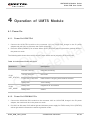
Operation of UMTS Module ............................................................................................................... 26
4.1.
Power On ............................................................................................................................... 26
4.1.1. Power On UC20-TE-A.................................................................................................... 26
4.1.2. Power On UC20 Mini PCIe ............................................................................................ 26
4.2.
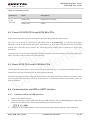
Power Off UC20-TE-A and UC20 Mini PCIe ......................................................................... 27
4.3.
Reset UC20-TE-A and UC20 Mini PCIe ............................................................................... 27
4.4.
Communication via USB or UART Interface ......................................................................... 27
4.4.1. Communication via USB Interface ................................................................................. 27
4.4.2. Communication via UART Interface............................................................................... 28
4.5.
Firmware Upgrade ................................................................................................................. 28
5
6
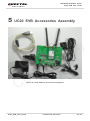
UC20 EVB Accessories Assembly ................................................................................................... 29
Appendix Reference .......................................................................................................................... 30
l
e
l
t
a
c
i
t
e
n
u
e
Q id
d
n
o
C
UC20_EVB_User_Guide
Confidential / Released
3 / 30