1
Chapter
1
How Borland SQL Links work
Chapter 1
This chapter provides a general overview of the Borland SQL Links and how they work
with a Borland Database Engine (BDE) application.
Introduction
If you work in a setting where you need to share access to files or printers, you are
probably familiar with the idea of a local area network, or LAN. A LAN enables
workstation users to share files, software, and printer resources stored on dedicated
machines called servers. Workstations connect to network servers through a system of
cabling, communications hardware, and software. In large user populations, two or
more LANs can connect through gateways to form wide area networks, or WANs.
In a network environment, your workstation uses the network server in much the same
way as it uses its own hard disk. If your workstation needs access to data stored on the
server’s hard disk it requests that data from the server. The server sends the requested
data over the network and back to your workstation where it is processed locally.
However, the network server differs from the workstation in that server data can be
accessed by more than one user at the same time.
The database server
A database server is a computer that processes high-level database requests. Although
other types of network servers let most processing occur on the user’s workstation,
database servers are active, with most processing occurring on the database server itself.
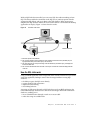
If your workstation needs access to data stored in a database server, you query the server
directly. The database server processes the query itself and sends only the answer over
the network and back to your workstation.
Since the processing is performed at the server and not at the workstation that
originated the request, the workstation becomes a client of the database server. In a
client/server system, multiple clients (users) request the services of the database server
Chapter 1, How Borland SQL Links work
5