1
Section
Troubleshooting
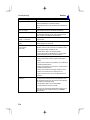
Message
Insufficient flash memory.
12
Probable Cause and Countermeasure
An error has occurred in flash memory. Data cannot be
saved because of insufficient available flash memory.
• Either make the region to be registered smaller, or clear
unneeded regions from memory.
If the same error message appears after the regions have
been reduced, it may mean that flash memory is faulty.
Contact your OMRON representative.
Insufficient work memory.
No more regions can be registered because of insufficient
available work memory.
• Either make the model or region to be registered
smaller, or clear unneeded models or regions.
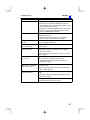
Intelligent Lighting is not
selected.
In SYS/Device settings, make the settings required for
using an Intelligent Light Source.
Programmable Controller is
not in monitor mode.*
Change the mode of the Programmable Controller to
Monitor mode.
Select midpoint between 2
regions for X and Y.
If the relative angle of the 2 regions is set for the position
compensation setting θ, the midpoint of the 2 regions
must be set for X and Y.
• Either set midpoint of 2 regions for X and Y, or change
the θ setting.
Select same region number
for θ, X and Y.
If position compensation region 0 or 1 is set for θ, then X
and Y must be set to the same region number.
• Either set the same region number for X and Y, or
change the θ setting.
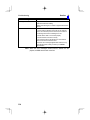
Set parameters so that
Output Period y Gate ON
delay + Gate ON time.
The communications specifications for the terminal block
are set incorrectly.
Setting calibration
parameters is failed.
The Camera magnification is outside the permitted setting
range.
• Make the settings so that output period y GATE ON
delay + GATE ON time.
• Re-perform sampling so that the magnification is in the
range 0.01 to 9.999.
Sampling has only been performed once.
• Perform sampling in at least 2 places.
327