1
8.3 Set the deposit suppression (option)
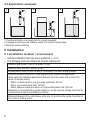
This setting largely suppresses deposits in the tank and on the probe. Previous
settings are not changed.
►► Empty the tank until the medium is at least 20 mm below the end of the probe
end. If the unit is set as NO unit (→ 8.1), the yellow LED goes off, if it is set as
NC unit, it lights.
►► If the unit is set as NO unit: press [OUT OFF] and keep it pressed for at least
6 s.
>> The yellow LED flashes slowly, after 6 s it flashes quickly. When the button is
UK
released, it goes out.
If the unit is set as NC unit: After emptying the tank press [OUT ON] instead of
[OUT OFF]. After releasing the pushbutton, the yellow LED lights continuously.
8.4 Lock / unlock the unit
The unit can be locked electronically to prevent unintentional settings.
►► Press both setting pushbuttons simultaneously for at least 10 s in the operating
mode.
>> The yellow LED temporarily changes its status:
-- If it lights at the beginning of the setting operation, it goes out for a few
seconds.
-- If is does not light in the beginning, it lights for a few seconds.
Then the unit is locked or unlocked.
On delivery: unlocked.
9 Operation
When the supply voltage has been applied, the unit is in the operating mode. It
carries out its measurement and evaluation functions and switches the output.
Operation indication by LED:
unit ready for operation, output closed
unit ready for operation, output open
LED green
OFF
ON
LED yellow
ON
OFF
11