1
Mounting and terminal (continuation)
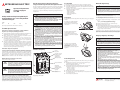
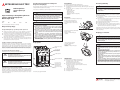
Suitable power switch
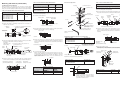
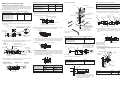
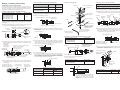
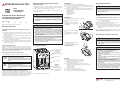
2. Switch for rear connection
When mounting in a control panel the rear connection is used for cabling
the switch from behind. Terminal and bus bar connections are available.
Rear connection kits, including insulation material, are optionally available.
Cable connection with flat terminals NF125/160/250
Suitable power switch
Screw A
Tightening torque
[Nm]
NF125-SGW NF125-HGW
NF160-SGW NF160-HGW
NF250-SGW NF250-HGW
NF125-RGW NF125-UGW
NF250-RGW NF250-UGW
M6
7.8 – 11.7
Overview of components
Cable connection with flat terminals NF400/630/800
Tightening torque
[Nm]
Screw A
NF400-SEW/HEW/REW/UEW(3P)
M8
NF630-SEW/HEW/REW
20
NF400-UEW(4P)
NF800-SEW/HEW/REW
30
M10
Countersunk screw
NF32-SW, NF63-SW, NF63HW
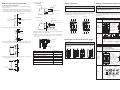
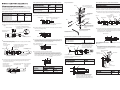
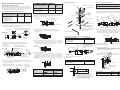
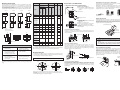
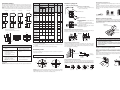
Proceed as follows to fasten the switch on the control panel and electrically
connect it with terminal screws. Please refer to the catalogue for dimensions for mounting and cutout openings.
햲 Place the terminal screw and insulating mounting base from the rear in
the power switch. Fasten the terminal screw with screw A.
Proceed as follows to fasten the switch on the control panel and electrically
connect it to flat terminals. Please refer to the catalogue for dimensions for
mounting and cutout openings.
Insulating
mounting base
Flat terminal
햲 Clean the contact surfaces.
Power switch
Nut C
Insulating
mounting
base
Screw A
Insulating mounting base
Flat terminal
Assembly hole
Power
switch
Wave spring
washer
Washers
Nut B
Screw
Mounting plate
Rotating in 30° steps
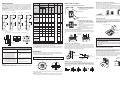
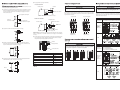
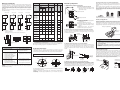
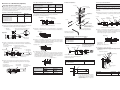
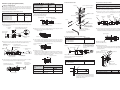
햲 Prepare the switch for retrofitting a model for front connection to a
switch for rear connection.
1. Carefully pry off terminal bracket with
flat-blade screwdriver
Suitable power switch
Screw A
Terminal cover
Proceed as follows to fasten the switch on the control panel and electrically
connect it to flat terminals. Please refer to the catalogue for dimensions for
mounting and cutout openings.
3. Remove
terminal
Cable connection with terminal screws
Clean these contact surfaces.
Slots against eddy flow
(prescribed for models
from 400 A)
햳 Place the terminal and the insulation from the rear in the power switch.
Fasten the terminal with screw A (see Table top).
Power switch,
front panel
Power switch
Check nut and flat spring only
in no-thread assembly holes.
Tighten screw A with
wrench
Screw B
Clean these contact surfaces.
햳 Fasten the switch to the control panel with the enclosed fastening
screws. Use the assembly holes of the switch provided for this purpose.
If there is no thread in the control panel, use screws with counter nuts for
fastening.
Power switch
2. Remove terminal
bracket
햳 Place the terminal and the insulation from the rear in the power switch.
Fasten the terminal with screw A (see Table top).
Screw M6
(tightening torque
7.8–11.7 Nm)
Power
switch
1. Re-insert terminal (pay attention to
mounting direction!)
Clean these contact
surfaces.
4.
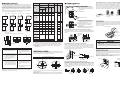
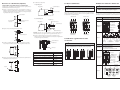
Additional installation instructions for special models
Screw A
햴 Fasten the switch to the control panel with the enclosed fastening
screws. Use the mounting holes of the switch provided for this purpose.
If there is no thread in the control panel, use screws with counter nuts for
fastening.
Suitable power switch
Processing step
NF400-SEW/HEW/REW
NF630-SEW/HEW/REW
NF800-SEW/HEW/REW
햳
Control panel
Countersunk screw
Terminal cover
Screw A
Use the terminal cover for rear
connection since this differs in
the length from the terminal
cover for the front connection.
Power switch
3. Insert flat
terminal
Mounting bolt of
switch A
(raised head M4×0.7×35)
Control panel
햴 Attach the terminal screws.
When tightening or unscrewing the cap nut, hold up the check nut with
a wrench. See to it that the terminal screws are not twisted.
Service cable
Pay attention to position
of the hump
2. Insert insulating
mounting base
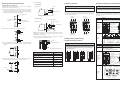
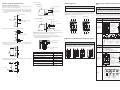
햵 Connect the flat terminals.
When connecting avoid unnecessary mechanical stresses on the terminals. Fasten (bundle) the connected lines at a distance as indicated
in following table. The dimensions describe the distances from the
upper surface of the control panel. If you use terminal bars, the
distances can increase.
Terminal
햴 Fasten the switch to the control panel with the enclosed fastening
screws. Use the mounting holes of the switch provided for this purpose.
Mounting bolt of switch A
(raised head M4×0.7×73)
Control panel,
mounting plate
Flat terminal,
rotating in 45° steps
Screw
Washers, brass,
galvanized
Insulating
mounting base
L-shaped terminal
Mount the L-shaped terminals as shown here.
Suitable power switch
Processing step
NF400-SEW/HEW/REW/UEW(3P)
NF630-SEW/HEW/REW
햵
Nut B
Nut C, brass,
galvanized
Insulating sleeve
Hold up
Alignment of flat terminals
Power switch
Applying the
parking brake
Size of the power switch Horizontal
(
)
Vertical
(
100 A, 250 A
max. 200 mm
max. 120 mm
Other
max. 350 mm
max. 200 mm
)
Suitable power switch
Screw A: M4
Screw B: M6
NF32-SW, NF63-SW, NF63HW
1 Nm
2 Nm
Table: tightening torques of screws A and B
Table: distance for bundling lines
Guide an insulating sleeve through the
middle terminal before cabling the switch.
In 4-pole switches also insulate the neutral
pole with an insulating sleeve.