1
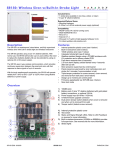
SR150: Wireless Siren w/Built-In Strobe Light
Included Items:
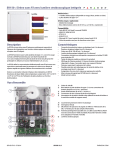
Lenses
•
•
Red
1 strobe lens (available in red, blue, amber, or clear)
3 type “D” alkaline batteries
Required/Optional Items:
•
•
Blue
Mounting hardware
8-16Vac, or 9-20Vdc external power supply (optional)
Compatibility:
•
•
•
•
•
•
Amber
Clear
MG/SP series V4.0 (EVO coming soon)
MG6130/MG6160 V3.0
RTX3 V1.5
K32LCD V1.3
WinLoad V4.7 (with In-Field Upgrade Software V2.3)
For latest updates visit paradox.com
Description
Features
The SR150 is a weatherproof, stand-alone, and fully supervised
wireless siren with built-in strobe light and wireless transceiver.
•
•
•
•
•
The SR150 operates using 3 size “D” alkaline batteries. With normal
use, the SR150 will function up to 3 years without the need to replace
the batteries (battery life can be extended by using an optional AC or
DC power supply).
•
•
The SR150 uses 2-way wireless communication, which provides
continuous supervision between the panel and siren with fast response •
to alarm signals of up to 4 seconds.
•
With its tough weatherproof construction, the SR150 will operate
reliably from -30ºC to 50ºC (-22ºF to 122ºF) when using alkaline
batteries or power supply.
•
•
•
•
Internal protective plastic cover (see A below)
Built-in transceiver
100db wireless siren (see 1 below)
Integrated strobe light (see E below)
Weather-resistant design using a PC/ABS enclosure with UV
protection and a silicone coated PCB
Fast alarm response time (4 seconds)
2.5 hour alarm display (strobe flashes every 4 seconds after bell
cut-off)
Siren presence supervised by control panel
Panel presence supervised by siren (activates siren and strobe for
5 minutes if communication is lost)
Triple tamper protection for screw removal, cover removal, and
removal from wall (see 5 and 6 below)
Assign up to 4 sirens per control panel
Firmware upgradeable via 307USB (see 4 below)
Siren test mode
Overview
1
A
2
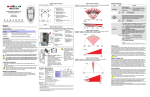
1) 100dB siren
2) Battery pack (3 size “D” alkaline batteries) with gold plated battery
connections, or optional 3.6Vdc
3) Power supply input (8-16Vac / 9-20Vdc)
4) In-field firmware upgrade connector
5) Dual-action tamper switch (detects when cover is removed and
when unit is removed from wall)
6) Tamper switch (detects screw removal)
A)
B)
C)
D)
B
3
4
5
E)
Internal protective plastic cover
Test switch
Status and Signal Strength LEDs. Refer to LED Feedback on
reverse for more information.
Antenna (can be extended using an RG6 or RG59 coaxial cable
with standard male F connectors. Attach the antenna using a
female/female F adaptor.)
Strobe lights
C
D
E
6
SR150-EI09 04/2010
SR150 V2.0
PARADOX.COM
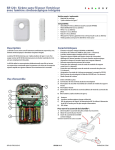
LED Feedback
Specifications
Remove cover to view
LED status
TX
RX
PSSI
Status
Sending data
Receiving data
Signal strength siren is receiving from panel
Flash 4x - strong signal
Flash 3x - good signal
Flash 2x - weak signal
Flash 1x - very weak signal (relocate)
No flash - no signal
Flash once/sec. - Processor is on
Flash once/4 sec. - Power save mode
Power
Battery life
Consumption
RF frequency
Siren
Dimensions
Operating
Temperature
RF range
4.5Vdc (3 size “D” alkaline batteries)
Optional: 8-16Vac / 9-20Vdc external power
Up to 3 years based on normal use (e.g. 2 alarms per
year with strobe for 2.5 hours and 8 squawks per day
at an average of 25ºC (77ºF). Using optional power
source will extend battery life.
Sleep: 22uA, Standby: 130uA, Alarm: 550mA
433MHz or 868MHz
100dB (1 meter)
24cm X 6.cm X 18cm (9.5in X 2.3in X 7in)
Battery only: -30ºC to 50ºC (-22ºF to 122ºF)
70m (229ft)
Programming
MG/SP
Feature
Details
[683]
[684]
[685]
[686]
Learn Siren #1
Learn Siren #2
Learn Siren #3
Learn Siren #4
Press and hold “TEST” switch for 3 seconds after entering the
section to learn the siren.
WARNING: When you press the “TEST” switch, the SR150 will
squawk and the strobe light will flash five times to confirm
registration to the panel.
[687]
[688]
[689]
[690]
Display Signal Strength Siren #1
Display Signal Strength Siren #2
Display Signal Strength Siren #3
Display Signal Strength Siren #4
Press and hold “Test” switch for 3 seconds after entering the
section to display, on a K32LCD V1.3 or higher, the signal
strength the panel is receiving from the siren.
[691]
[692]
[693]
[694]
Label Siren #1
Label Siren #2
Label Siren #3
Label Siren #4
These labels are used when reporting events via e-mail through
the IP100 and for troubleshooting purposes. Maximum 16
characters.
[695]
Temporary Tamper Switch Deactivation
for Maintenance
Press the [ENTER] key after entering the section to deactivate
tamper alarm until the cover is replaced or after 30 minutes.
[587]
Option [3]
Option [4]
Option [5]
Option [6]
Panel Supervision of Siren
Siren #1 (OFF/ON)
Siren #2 (OFF/ON)
Siren #3 (OFF/ON)
Siren #4 (OFF/ON)
OFF = disabled ON = enabled (default)
The control panel supervises the presence of the SR150. If lost,
the control panel will follow global supervision loss option set in
the panel.
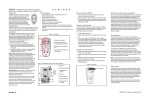
Upgrading the Firmware
The SR150 firmware can be upgraded through WinLoad using the 307USB Direct Connect Interface. Refer to the firmware upgrade instructions
found at: paradox.com - Software - WinLoad -Firmware Upgrade Instructions.
NOTE: Ensure that the SR150 Wireless Siren is awake before beginning the firmware upgrade. To wake up the siren, press the “test’ button. The
siren will provide you with a 60 second delay in order to begin the update.
Siren Supervises Panel/RTX3
The SR150 supervises the control panel and the RTX3 every 5 minutes (with external power supply) or every 25 minutes (with battery power
only). If after 3 attempts SR150 Wireless does not receive a response, the siren will squawk every 4 seconds and the strobe light will flash every
4 second for a period of 5 minutes. When this occurs, the siren/strobe can be stopped by pressing the disarm button on any of the first 10
remotes assigned to the system.
Tamper Supervision
If a tamper is detected, the SR150 will sound an alarm and the strobe light will flash for 4 minutes. The control panel will follow the global
supervision options set in the panel.
For complete warranty information, please visit www.paradox.com/terms. Your use of the Paradox product signifies your acceptance of all warranty terms and conditions. Magellan, Spectra SP, EVO, and
WinLoad are trademarks or registered trademarks of Paradox Security Systems Ltd. or its affiliates in Canada, the United States and/or other countries. For the latest product approvals, such as UL and CE,
please visit www.paradox.com. © 2010 Paradox Security Systems Ltd. All rights reserved. Specifications may change without prior notice. One or more of the following US patents may apply: 7046142,
6215399, 6111256, 6104319, 5920259, 5886632, 5721542, 5287111, 5119069, 5077549 and RE39406 and other pending patents may apply. Canadian and international patents may also apply.
Changes or modifications not expressly approved by the party responsible for compliance could void the user’s authority to operate the equipment.
SR150-EI09 04/2010
SR150 V2.0
PARADOX.COM