1
13/07/05
17:00
Page 1
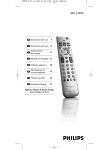
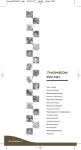
The ROC 4505 is a universal remote control (4 in 1). It can replace 4 remote controls thanks to its
4 mode keys TV, DVD, VCR, … It is compatible with the majority of television sets, video cassette recorders, DVD players, satellite and cable receivers as well as terrestrial digital television (DVBT), amplifiers
and other audio equipment provided they are controlled by infra red signals. It has 4 additional function keys (L1 to L4) that can be used as additional device keys. It incorporates a home cinema mode
that transforms your installation by bringing together virtually all devices and considering them as a single device, each part of the remote control then controls parts of this ensemble.
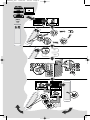
This remote control has been factory programmed to allow you to use it immediately with the majority of Thomson Group devices. We therefore advise you to try it before beginning to program it. If
programming is necessary, follow one of the methods A, B, C or D that are given in this manual. But
first, install 2 batteries (AAA) in the remote control.
Keep these instructions and the separate list of codes in a safe place so that you can later reprogram your remote
control.
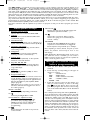
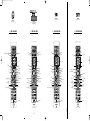
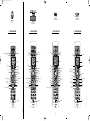
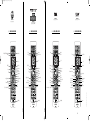
Description of keys
14
PIP
and
Display and removal of the PIP image and
information (channel number, …).
1 Remote control mode
Selects device to control TV, DVD,VCR, …
15
2 Teletext
Selects the connectors (AV) to which
devices are going to be connected (TV
source / video).
Activates and controls Teletext,Videotext
and Fastext pages.
3 Numbered keys
16
Selects channels having one or 2 figures (--),
inputs numeric values, selects macro (A, B, C).
MACRO
Linked with keys A, B, C, this key allows
sequences of commands to be triggered.
Each sequence may include up to 10 keys.
4 Channels and Sound
Keys for zapping, adjusting sound volume
and muting sound.
Note: depending on devices, brands, and year of manufacture, the functions covered may be more or less
wide-ranging.
5 Navigation
Activates and controls menus (display,
deleting, selection, confirmation).
DVBT (Digital Video Broadcast Terrestrial): in those countries where this service is available, you can control a
DVBT receiver by entering its code from the separate list
under a mode key (SAT or other).
6 Colour keys
Use of teletext (Fastext) or the specific
functions of certain devices
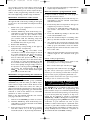
Testing the remote control
before programming
7 Keys L1, L2, L3, L4
Keys dedicated to the Learning function.
Become additional function keys able to
copy other keys.
1. Turn on the device that you wish to
control.
8 Play keys
2. Press the key corresponding to the type of
device to control:
For use with cassettes (VCR) or discs
(DVD, CD, …).
TV
DVD
VCR
SAT
AUDIO
9 Programmable keys
HOME CINEMA: puts
the remote control in a
mode allowing control of several pieces of
equipment generally found in typical Home
Cinema installations (TV, amplifier, DVD
player (page 5).
FAV: allows you to return to one of your 2
favourite channels and toggle from one to
the other (page 6).
: television set,
: DVD player,
: video cassette recorder,
: satellite / cable,
: Hifi.
3. Point the remote control at the device you
wish to control and try to turn it off using
the
key. If the device does not turn off,
you must program the remote control using
one of the methods A, B, C or D as described
below.
10 On / Standby
or Standby only depending on devices.
Note 1: Except for the TV key,each mode key (DVD, VCR,…)
can be programmed to control a different device from that
indicated on the key. It is therefore possible to allocate, for
example, the Satellite mode to the DVD key.You need to
enter the code corresponding to the manufacturer and the
device you wish to program by following one of the methods
given in this manual. However, method D (automatic code
search) will simplify the task greatly. It is only necessary to
enter the code from the list corresponding to the type of
device (e.g.: 603 for a Thomson satellite receiver) then to run
the automatic search procedure. The remote control will
then test all the codes until it finds those that control the
receiver.
11
Turns key backlight ON or OFF.
12 Installation / adjustment keys
LEARN: used
for the learning codes
procedure (key copying) (page 4).
SETUP: used for various adjustment
procedures and remote control
programming.
13
Record key. Can be used in any remote
control mode.
1
EN
ROC4505_en