1
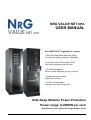
NRG VALUE NET DPA
USER MANUAL
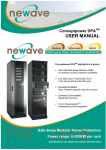
VALUENET DPATM highlights at a glance
DPA with Safe-Swap Modules (SSM)
For premium power protection availability
Low total Cost of Ownership (TCO)
Cost saving during entire life-cycle
Flexibility/Scalability
Ease of power upgrade, pay as you grow
Enhanced Serviceability
Rapid fault recovery
Link to Valuenetwatch
Instantaneous fault recognition
Safe-Swap Modular Power Protection
Power range: 8-200KW per rack
Specifications are subject to change without notice
NRG VALUENET DPA USER MANUAL
Page 1/5
Section-0
GENERAL CONTENTS OF THE
USER MANUAL VALUENET DPATM
1
SECTION-1:
1.1
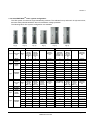
MECHANICAL CHARACTERISTICS MD*-FRAMES AND MODULES
1.2
MECHANICAL CHARACTERISTICS MX*-FRAMES AND MODULES
1.3
SAFETY INSTRUCTIONS
1.3.1
1.3.2
1.3.3
1.3.4
1.3.5
1.3.6
1.3.7
1.4
SYSTEM DESCRIPTION
1.4.1
1.4.2
1.4.3
1.4.4
1.4.5
1.4.6
1.4.7
1.5
INTRODUCTION
RECEIPT OF THE UPS AND VISUAL INSPECTION
UNPACKING
NAMEPLATE
BATTERIES AND STORAGE
SITE PLANNING AND POSITIONING
1.6.1
1.6.2
1.7
GENERAL SYSTEM DESCRIPTION
VALUENET DPATM BASIC SYSTEM CONFIGURATION
QUALITY STANDARDS AND UPS CLASSIFICATION CODE
SINGLE/PARALLEL-MODULES OPERATION
SINGLE/MULTI-CABINET CONFIGURATIONS
WARRANTY
EXTENDED WARRANTY
DELVERY – TRANSPORT - STORAGE
1.5.1
1.5.2
1.5.3
1.5.4
1.5.5
1.6
GENERAL SAFETY INTRODUCTION
DESCRIPTION OF SYMBOLS USED IN THIS MANUAL
SYMBOLS, CONTROLS, AND INDICATORS
OPERATOR PRECAUTIONS
ENVIRONMENTAL CONSIDERATIONS
DECLARATION OF SAFETY CONFORMITY AND CE MARKING
INQUERIES
PLANNING BEFORE THE INSTALLATION
POSITIONING OF UPS AND BATTERY CABINET
ELECTRICAL INSTALLATION
1.7.1
1.7.2
PREPARATION FOR THE INPUT CABLING
INSTALLATION CHECKLIST
*MD-Frames: MID Range Frames
MX-Frames: MAX Range Frames
NRG VALUENET DPA USER MANUAL
Page 2/5
Section-0
2
SECTION-2:
2.1 BLOCK DIAGRAM
2.1.1
2.1.2
2.1.3
WIRING AND BLOCK DIAGRAMS FOR ALL FRAMES AND MODULES
RECOMMENDED CABLE SECTIONS & FUSE RATINGS
BLOCK DIAGRAM VALUENET DPATM
2.2 FRONT VIEW
2.2.1
2.2.2
FRONT VIEW OF MD-FRAMES
FRONT VIEW OF MX-FRAMES
2.3 BATTERY CONNECTIONS
2.3.1
2.3.2
3
INTERNAL BATTERY MODULES
EXTERNAL BATTERY CABINET AND BATTERY CONNECTION
SECTION-3:
3.1 INTERFACING
3.1.1
3.1.2
3.1.3
3.1.4
3.1.5
4
SMART PORT (SERIAL RS 232)
DRY PORT (VOLT-FREE CONTACTS) SEE AS WELL SECTION 9 (1.2 AND 1.3)
JD11 / RS232 COMPUTER INTERFACE
JD12 / RS232 INTERFACE FOR MULTIDROP
USB/2 COMPUTER INTERFACE
SECTION-4:
4.1 OPERATION
4.1.1
4.1.2
4.1.3
4.1.4
5
COMMISSIONING
CONTROL PANEL
DESCRIPTION OF THE LCD
OPERATING MODES
SECTION-5:
5.1 OPERATION–PROCEDURES (FOR MULTI-CABINET CONFIGURATION SEE SECTION 6)
5.1.1
5.1.2
5.1.3
5.1.4
START-UP PROCEDURE
SHUTDOWN PROCEDURE
LOAD TRANSFER: FROM INVERTER OPERATION TO MAINTENANCE BYPASS
LOAD TRANSFER: FROM MAINTENANCE BYPASS TO INVERTER OPERATIONS
5.1.5
REPLACEMENT OF UPS-MODULE
5.1.6
5.1.7
5.1.8
REPLACEMENT OF UPS-MODULE IN SINGLE-MODULE SYSTEMS
REPLACEMENT OF UPS-MODULE IN REDUNDANT MULTI-MODULE SYSTEM
REPLACEMENT OF A MODULE IN CAPACITY MULTI-MODULE SYSTEM
NRG VALUENET DPA USER MANUAL
Page 3/5
Section-0
6
6.1
SECTION-6:
MULTI-CABINET CONFIGURATION
6.1.1
6.1.2
6.1.3
7
7.1
SECTION-7:
MAINTENANCE
7.1.1
7.1.2
7.1.3
7.1.4
8
8.1
9.1
INTRODUCTION
USER RESPONSIBILITIES
ROUTINE MAINTENANCE
BATTERY TEST
SECTION-8:
TROUBLESHOOTING
8.1.1
8.1.2
8.1.3
9
CONCEPT OF MULTI-CABINET CONFIGURATION
INSTALLATION INSTRUCTIONS
COMMISSIONING OF MULTI-CABINET CONFIGURATION
ALARMS
MENU, COMMANDS, EVENT LOG, MEASUREMENTS,
FAULT IDENTIFICATION AND RECTIFICATION
SECTION-9:
OPTIONS
9.1.1
9.1.2
9.1.3
9.1.4
9.1.5
9.1.6
INTRODUCTION
REMOTE SHUTDOWN (RSD)
GENERATOR ON FACILITIES (GEN ON)
WAVEMON SHUTDOWN AND MANAGEMENT SOFTWARE
SNMP CARD/ADAPTER FOR NETWORK MANAGEMENT /REMOTE MONITORING
MODEM/ETHERNET CARD / VALUENETWATCH MANAGEMENT SOFTWARE
NRG VALUENET DPA USER MANUAL
Page 4/5
Section-0
10 SECTION-10: TECHNICAL DATA SHEET
10.1
VALUENET DPA SYSTEM DESCRIPTION
10.2
TECHNICAL CHARACTERISTICS
10.2.1
10.2.2
10.2.3
10.3
MECHANICAL CHARACTERISTICS MD-FRAMES AND MODULES
MECHANICAL CHARACTERISTICS MX-FRAMES AND MODULES
POWER SELECTION TABLE VALUENET DPA MODULES
INPUT CHARACTERISTICS
10.3.1
10.3.2
GRAPH: INPUT PF VERSUS % LOAD
GRAPH: INPUT DISTORTION THDI VERSUS % LOAD
10.4
BATTERY CHARACTERISTICS
10.5
OUTPUT CHARACTERISTICS
10.5.1
10.5.2
GRAPH: AC – AC EFFICIENCY
GRAPH: OUTPUT POWER IN KW AND KVA VERSUS COSPHI
10.6
ENVIRONMENTAL CHARACTERISTICS
10.7
STANDARDS
10.8
COMMUNICATION
10.8.1
10.8.2
10.8.3
10.8.4
10.8.5
10.8.6
10.9
OPTIONS
10.9.1
10.9.2
10.9.3
10.10
MD
MD
MX
MX
MODULES : EXAMPLES OF INTERNAL BATTERY AUTONOMY
MODULES : EXAMPLES OF EXTERNAL BATTERY AUTONOMY
MODULES: EXAMPLES OF INTERNAL BATTERY AUTONOMY
MODULES: EXAMPLES OF EXTERNAL BATTERY AUTONOMY
INSTALLATION PLANNING
10.11.1
10.12
MODEM/ETHERNET CARD / VALUENETWATCH MANAGEMENT SOFTWARE
SNMP CARD / WAVEMON MANAGEMENT SOFTWARE
BATTERY CABINETS
BATTERY AUTONOMIES
10.10.1
10.10.2
10.10.3
10.10.4
10.11
POWER MANAGEMENT DISPLAY (PMD)
MIMIC DIAGRAM
DISPLAY
CUSTOMER INTERFACES (TERMINALS X1….X4)
CUSTOMER INPUTS DRY PORTS: TERMINAL BLOCK X1
CUSTOMER OUTPUTS DRY PORTS: TERMINA BLOCKS X2, X3, X4
HEAT DISSIPATION PER MODULE WITH NON-LINEAR LOAD
WIRING AND BLOCK DIAGRAMS FOR ALL FRAMES AND MODULE
10.12.1
10.12.2
10.12.3
TERMINAL CONNECTIONS OVERVIEW
SINGLE FEED INPUT
DUAL FEED INPUT
NRG VALUENET DPA USER MANUAL
Page 5/5
Section-1
CONTENTS SECTION-1
1.1
MECHANICAL CHARACTERISTICS MD-FRAMES AND MODULES .............................................. 2
1.2
MECHANICAL CHARACTERISTICS MX-FRAMES AND MODULES .............................................. 3
1.3
SAFETY INSTRUCTIONS................................................................................................................... 3
1.3.1
GENERAL SAFETY INTRODUCTION........................................................................................ 3
1.3.2
DESCRIPITON OF SYMBOLS USED IN THIS MANUAL........................................................... 3
1.3.3
Symbols, Controls, and Indicators............................................................................................... 4
1.3.4
OPERATOR precautions ............................................................................................................. 5
1.3.5
Environmental Considerations..................................................................................................... 6
1.3.6
Declaration of Safety conformity and CE marking....................................................................... 6
1.3.7
Inquiries ....................................................................................................................................... 6
1.4
SYSTEM DESCRIPTION .................................................................................................................... 7
1.4.1
GENERAL SYSTEM DESCRIPTION .......................................................................................... 7
1.4.1.1
Feature : Unique “Hot Swappable” Modules ....................................................................... 7
1.4.1.2
Feature : Advanced-Booster Technology ............................................................................ 7
1.4.1.3
Feature : Flexible Battery Management (FBM) ................................................................... 8
1.4.1.4
Feature : DPA Technology - Decentralized Parallel Architecture....................................... 8
1.4.2
VALUENET DPATM basic system configuration ......................................................................... 9
1.4.3
Quality Standards and ups classification code .......................................................................... 10
1.4.4
Single/Parallel-Modules operation............................................................................................. 11
1.4.5
Single/Multi-Cabinet Configurations .......................................................................................... 11
1.4.6
Warranty .................................................................................................................................... 12
1.4.7
Extended Warranty .................................................................................................................... 12
1.5
DELVERY – TRANSPORT - STORAGE .......................................................................................... 13
1.5.1
Introduction ................................................................................................................................ 13
1.5.2
Receipt of the UPS and visual inspection.................................................................................. 13
1.5.3
Unpacking .................................................................................................................................. 14
1.5.4
Nameplate.................................................................................................................................. 15
1.5.5
Batteries And Storage................................................................................................................ 15
1.5.5.1
Storage of battery .............................................................................................................. 15
1.5.5.2
Storage of UPS .................................................................................................................. 16
1.6
SITE PLANNING AND POSITIONING ............................................................................................. 16
1.6.1
PLANNING BEFORE THE INSTALLATION.............................................................................. 16
1.6.2
POSITIONING OF UPS AND BATTERY CABINET.................................................................. 17
1.6.2.1
Final Transport................................................................................................................... 17
1.6.2.2
Positioning ......................................................................................................................... 18
1.7
ELECTRICAL INSTALLATION......................................................................................................... 19
1.7.1
PREPARATION FOR THE INPUT CABLING ........................................................................... 20
1.7.1.1
Earthing and Connection of Mains Supply ........................................................................ 20
1.7.1.2
Single Input Feed............................................................................................................... 21
1.7.1.3
Dual Input Feed ................................................................................................................. 21
1.7.1.4
Preparation for the Output Cabling .................................................................................... 21
1.7.1.5
Connection of the Load...................................................................................................... 22
1.7.2
Installation Checklist .................................................................................................................. 23
VALUENET DPA USER MANUAL
Page 1/23
Modifications reserved
Section-1
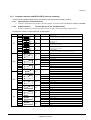
1.1
MECHANICAL CHARACTERISTICS MD-FRAMES AND MODULES
Σφάλµα! Λανθασµένη σύνδεση.
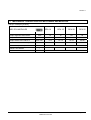
MD- DPA MODULES
DPA 10
DPA 15
DPA 20
DPA 25
Output Apparent Rated Power
KVA
10
15
20
25
Output Active Rated Power
KW
8
12
16
20
KVA / kW
8/8
12 / 12
16 /16
20 /20
Variable Number of 12V Battery Blocks
No.
30 – 50
30 – 50
30 – 50
40 - 50
Dimensions (WxHxD)
mm
Weight UPS Module
kg
Output Power with Load PF=1
483 x 225 x 700
28.5
31
Front :
Colours
VALUENET DPA USER MANUAL
33
35
RAL 9007
Page 2/23
Modifications reserved
Section-1
MECHANICAL CHARACTERISTICS MX-FRAMES AND MODULESΣφάλµα! Λανθασµένη σύνδεση.
1.2
SAFETY INSTRUCTIONS
1.2.1 GENERAL SAFETY INTRODUCTION
The UPS System operates with mains, battery or bypass power. It contains components that carry high
currents and voltages. The properly installed UPS System is grounded to earth and IP 20 rated against
electrical shock and foreign objects. Installation and service have to be done by the manufacturer’s qualified
technicians or their authorized service partners.
WARNING!
Operations inside the UPS must be performed by a service engineer from the manufacturer or
from an agent authorized by the manufacturer.
This user manual contains guidelines to check delivery, installing and commissioning of the UPS and is
intended for people who plan the installation, install, commission and use or service the UPS. The reader is
expected to know the fundamentals of electricity, wiring, electrical components and electrical schematic
symbols
!
NOTE!
CAREFULLY READ THE USER MANUAL BEFORE OPERATING OR WORKING ON THE UPS
1.2.2 DESCRIPITON OF SYMBOLS USED IN THIS MANUAL
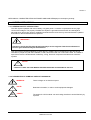
!
!
KG
WARNING!
There is danger of an electrical impact
NOTE!
Read the information, in order to avoid equipment damages
HEAVY !
The weight of a UPS module can reach 60kg, therefore it can be lifted only by
2 person
VALUENET DPA USER MANUAL
Page 3/23
Modifications reserved
Section-1
1.2.3 Symbols, Controls, and Indicators
PROTECTIVE GROUNDING TERMINAL
A terminal which must be connected to earth ground prior to making any
other connection to the equipment.
A terminal to which or from which a direct current or voltage may be
applied or supplied.
This symbol indicates the word “phase”.
ON
The principal power switch is in the “ON” position
OFF
The principal power switch is in the “OFF” position.
C
St
CAUTION: REFER TO MANUAL
Refer to the Operator’s Manual for more information
DANGER: RISK OF ELECTRIC SHOCK
There is a risk of electric shock present, and you should observe
associated warnings. The UPS contains high voltages.
VALUENET DPA USER MANUAL
Page 4/23
Modifications reserved
Section-1
1.2.4 OPERATOR precautions
The only user operations permitted are:
•
Use of the LCD control panel (LCD Display) and of the Maintenance Bypass
•
Start up and shut down of the UPS of the user field (excluding the commissioning start up)
•
Operation of additional connectivity modules:
•
SNMP adapters and their software
•
Modem/GSM or Modem/Ethernet adapters and their software
•
Multidrop Kit for paralleling connectivity information between multi-frame configurations
The user must follow the precautions and only perform the described operations. Also in these measures the
operator of the USP System must adhere to the instructions in this manual. Any deviations from the
instructions could be dangerous to the user or cause accidental load loss.
NIGICO SA DOES NOT TAKE ANY RESPONSIBILITY FOR DAMAGES CAUSED THROUGH WRONG
MANIPULATIONS OF THE UPS SYSTEM.
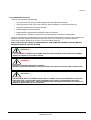
WARNING!
IT IS PROHIBITED TO REMOVE ANY SCREWS FROM THE UPS SYSTEM OR FROM THE BATTERY CABINET.
THERE IS A DANGER OF ELECTRICAL SHOCK.
WARNING!
HIGH FAULT CURRENTS (LEAKAGE CURRENTS):
BEFORE CONNECTING THE MAINS YOU MUST ENSURE THAT THERE IS A PROPER EARTH CONNECTION!
WARNING!
THE USER MUST DISPLAY A WARNING SHIELD ON ALL PRIMARY UPS CIRCUIT BREAKERS. THE SERVICE
PERSONNEL HAS TO BE INFORMED ABOUT DANGEROUS VOLTAGES. THE WARNING PANELS MUST
CONTAIN THE FOLLOWING TEXT: “ BEFORE STARTING WITH THE MAINTENANCE WORK ON THE CIRCUIT
BREAKERS MAKE SURE THE UPS IS ISOLATED
VALUENET DPA USER MANUAL
Page 5/23
Modifications reserved
Section-1
1.2.5 Environmental Considerations
The UPS must be installed according to the recommendations in this manual. To operate the UPS at peak
efficiency, your installation site should meet the environmental parameters outlined in this manual. Excessive
amount of dust in the operating environment of UPS may cause damage or lead to malfunction. The UPS
should be always protected from the outside weather and sunshine. If you intend to operate the system at an
altitude higher than 1000 meters, contact your local sales or service office for important information about high
altitude operation. The operating environment must meet the weight, airflow, size and clearance requirements
specified in the technical datasheet.
Under no circumstances the UPS should be installed in an airtight room, in the presence of flammable gases,
or in an environment exceeding the specification.
The basic environmental requirements of the UPS system are:
•
Ambient Temperature Range:
0 to +40˚C
(32 – 104˚F)
•
Recommended Operating Range:
+20 to +25˚C
(68 – 77˚F)
•
Maximum Relative Humidity:
95% (non-condensing)
The UPS cabinet uses forced air cooling to regulate internal component temperature. Air inlets are in the
bottom sides and front of the cabinet, and outlets in the rear of the cabinet. You must allow clearance in back
of the cabinet for proper air circulation. Refer to Section 4, 4.2.2 POSITIONING for clearance requirements.
1.2.6 Declaration of Safety conformity and CE marking
The product has the CE marking in compliance with the following European directives:
•
Low Voltage Directive:
2006/95/EC
•
EMC Directive:
2004/108/EC
Declaration of conformity with UPS harmonized standards and directives EN 62040-1-1 (Safety)
and EN 62040-2 (EMC) are available on the web site on request
Safety Standard:
Electromagnetic Compatibility Standard (EMC)
Performance Standard:
EN 62040-1-1:2003
EN 60950-1:2001/A11:2004
EN 62040-2:2005
EN 61000-3-2:2000
EN 6100-3-3:1995/A1:2001
EN 61000-6-2:2001
EN 61000-6-4:2001
EN 62040-3:2001
1.2.7 Inquiries
Address inquiries about the UPS and battery cabinet to the local office or agent authorized by the
manufacturer.
Please note the type code and the serial number of the equipment and contact your nearest agent authorized
by the manufacturer
The Code and the serial no. are shown on the nameplate see Section 3, 3.1.2 Nameplate
VALUENET DPA USER MANUAL
Page 6/23
Modifications reserved
Section-1
1.3
SYSTEM DESCRIPTION
The product described in this manual is a transformerless Uninterruptible Power System (UPS). It is a true
online, continuous duty, double conversion, solid state, three-phase system, providing conditioned and
uninterruptible AC power to protect the customer’s load from all nine power failures.
1.3.1 GENERAL SYSTEM DESCRIPTION
The UPS’s are used to protect sensitive equipment and prevent loss of valuable electronic information,
minimise equipment downtime, and minimise the adverse effect on production equipment due to unexpected
power problems.
The UPS system continually monitors incoming electrical power and removes the surges, spikes, sags, and
other irregularities that are inherent in commercial utility power. Working with a building‘s electrical system, the
UPS system supplies clean, consistent power that sensitive electronic equipment requires for reliable
operation. During brownouts, blackouts, and other power interruptions, batteries provide emergency power to
safeguard operation.
The UPS system is housed in single freestanding cabinets. The cabinets line up and match in style and colour,
and have safety shields behind the doors for hazardous voltage protection.
1.3.1.1
Feature : Unique “Hot Swappable” Modules
The unique Hot Swappable feature of the Modules indicates the ability to insert and extract the
electronic/power modules from a larger assembly while it is powered (hot). The hot swappable design allows
live powered modules to be attached to and removed from a powered set without causing disturbance to the
operation of the load and without need to go to bypass.
1.3.1.2
Feature : Advanced-Booster Technology
Traditional input THD filters are no longer needed with this UPS product. The build-in advanced booster
technology of UPS modules provides perfect sinusoidal input power quality at 0.99 input power factor with
harmonic content less than 3% THD(i). This leads to more reliable total system operation and savings in
generator and transformer sizing as losses in the windings are minimised.
Due to the active front booster, regulating each individual phase, the UPS is comparable to a clean resistor
load (unity) from the mains perspective. Thus, the high input power factor provides minimised cabling and
fusing costs due to no reactive power consumption. The low harmonic currents are due to high input power
factor and provide the benefits:
•
No additional losses in wires and cables
•
No extra heating of transformers and generators with shortened service life
•
No over sizing of generators
•
No false circuit breaker tripping and malfunction
•
No erratic operation of computers, telecommunication, monitors, electronic test equipment etc.
•
No Resonance with power factor correction capacitors
VALUENET DPA USER MANUAL
Page 7/23
Modifications reserved
Section-1
1.3.1.3
Feature : Flexible Battery Management (FBM)
The Flexible Battery Management (FBM) has been designed with the goal to avoid the deterioration of battery
age. The FBM – Key Features protect the battery from environmental negative impacts (high temperature and
false manipulations) and avoid deterioration of battery life by advanced management of battery charging and
preventive failure diagnostics. The implemented features result in benefits not only for the end user, but also to
the environment. The battery user will be required to replace his batteries less often. This translates into
financial and environmental benefits. Last but not least a well protected and managed battery is a healthy
battery and hence it enhance the overall availability of the UPS system.
The major benefits are:
•
AC-Ripple free battery charging due to DC-DC charger separated from the rectifier and inverter
•
Wide range of number of battery blocks (30-50 blocks of 12V)
•
UPS’S wide input voltage window tolerance extends the battery life due to less discharge cycles
•
Battery discharge protection caused by load jumps
•
Proactive battery protection from false manipulations and inadequate charging voltages
•
Proactive battery failure detection thanks to Advanced Battery Diagnosis (ABD) - Algorithm
•
User selectable battery tests
•
Optional temperature compensated charging to enhance battery life
Hence, the function of FBM system is to prolong the battery life considerably compared to traditional systems.
In a traditional online UPS the inverter also causes ripple-current to be fed to batteries causing corrosion.
1.3.1.4
Feature : DPA Technology - Decentralized Parallel Architecture
The UPS product features DPA paralleling technology that provides N+X redundancy without introducing a
single-point-of-failure. The products utilizing the DPA technology are completely autonomous be means of
individual Power Units, Bypasses, CPU’s, Control Panels and separate battery configuration for each single
module.
The DPA technology makes it more reliable than traditional paralleling techniques. A parallel UPS system
means the linking together of two or more UPS units in parallel so that in the unlikely event one fails the other
can automatically take up the load. Traditionally a parallel redundancy configuration is achieved by having a
random or fixed master-slave relationship among the UPS units. This master logic gives out individual
commands to all the slaves units. Unfortunately this can lead to a single-point-of-failure for the whole system
because if the master logic or communication to slaves fails, and causes the whole UPS system to be in
trouble.
The DPA technology was developed as a Multi-Master logic concept with separated independent regulation
and logic buses to allow parallel capacity system and to maintain the highest system availability. An industry
leading paralleling technology in its own right, the DPA technology enables you to set up a parallel redundant
system giving you 100% conditioned power at all times. Its unique decentralized design eliminates the system
level single point of failure inherent in traditional parallel UPS, and exponentially increases the reliability of the
overall system.
DPA technology allows up to ten UPS modules to cover the same load in parallel and redundant configuration.
No vulnerable master logic is needed in this design. It provides automatic load sharing and module level
redundancy with nothing other than the power connecting to the VALUENET DPATM version of UPS modules.
VALUENET DPA USER MANUAL
Page 8/23
Modifications reserved
Section-1
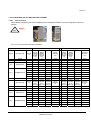
1.3.2 VALUENET DPATM basic system configuration
The UPS system is housed in single freestanding cabinets. The cabinets line up and match in style and colour,
and have safety shields behind the doors for hazardous voltage protection.
The following basic UPS systems configuration are available:
Fig.1)
Fig. 2)
Fig. 3)
Description
Figures
Fig. 1
Fig. 2
Fig. 3
UPS Frame
Type
Module
CLASSICDPA-25
TRIPLEDPA-75
UPGRADEDPA-125
UPS Frame
Type
Fig. 4
Fig. 5
Fig. 6
Module
CLASSICDPA-50
TRIPLEDPA-150
UPGRADEDPA-250
Fig. 4)
Fig. 5)
Fig. 6)
UPS Unpacked
UPS Packed
Packed
Weight
with DPA
10 or 15
w/o Batt. in
kg
Packed
Weight
with DPA
20 or 25
w/o Batt. in
kg
Packed
Dimension
mm
Unpacked
Weight with
DPA 10 or 15
w/o Batt. in kg
Unpacked
Weight
with DPA
20 or 25
w/o Batt. in
kg
Unpacked
Dimension
mm
31
35
WxHxD
31
35
WxHxD
1
231
235
700x1800x890
211
215
550x1650x780
1
271
275
700x2120x890
249
253
550x1975x780
2
302
310
700x2120x890
280
288
550x1975x780
3
333
345
700x2120x890
311
323
550x1975x780
1
224
228
700x2120x890
202
206
550x1975x780
2
255
263
700x2120x890
233
241
550x1975x780
3
286
298
700x2120x890
264
276
550x1975x780
4
317
333
700x2120x890
295
311
550x1975x780
5
348
368
700x2120x890
326
346
550x1975x780
Packed
Weight
with DPA
30 w/o
Batt. in kg
44
Packed
Weight
with DPA
40 w/o
Batt. in kg
53
Packed
Weight
with DPA
50 w/o
Batt. in kg
56
Packed Weight
with DPA 30
w/o Batt. in kg
WxHxD
44
Packed
Weight
with DPA
40 w/o
Batt. in kg
53
Packed
Weight
with DPA
50 w/o
Batt. in kg
56
1
329
338
341
890x1800x920
306
315
318
730x1650x800
1
308
317
320
890x2120x920
283
292
295
730x1975x800
2
352
370
376
890x2120x920
327
345
351
730x1975x800
3
396
423
432
890x2120x920
371
398
407
730x1975x800
1
274
283
286
890x2120x920
249
258
261
730x1975x800
2
318
336
342
890x2120x920
293
311
317
730x1975x800
3
362
389
398
890x2120x920
337
364
373
730x1975x800
4
406
442
454
890x2120x920
381
417
429
730x1975x800
5
450
495
510
890x2120x920
425
470
485
730x1975x800
Module
no.
Module
no.
Packed
Dimension
mm
VALUENET DPA USER MANUAL
Unpacked
Dimension
mm
WxHxD
Page 9/23
Modifications reserved
Section-1
1.3.3 Quality Standards and ups classification code
The VALUENET DPATM will provide your critical equipment with a steady and reliable power supply for many
years.
The unique and modular UPS VALUENET DPATM belongs to the newest generation of midrange 3phase UPSSystems. High reliability, low operating cost and excellent electrical performance are only some of the
highlights of this innovative UPS solution.
UPS has the Classification Code VFl-SS-111.
Safety Standard:
Electromagnetic Compatibility Standard (EMC)
Performance Standard:
EN 62040-1-1:2003
EN 60950-1:2001/A11:2004
EN 62040-2:2005
EN 61000-3-2:2000
EN 6100-3-3:1995/A1:2001
EN 61000-6-2:2001
EN 61000-6-4:2001
EN 62040-3:2001
VALUENET DPA USER MANUAL
Page 10/23
Modifications reserved
Section-1
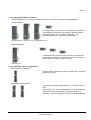
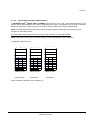
1.3.4 Single/Parallel-Modules operation
The VALUENET DPATM has unique paralleling features. We distinguish: Single or Parallel-Modules
A) Single-Module
If a configuration consists of one single Module it is defined as a
Single-Module Configuration even being in different cabinets
like CLASSIC DPA-25 or-50, TRIPLE DPA-75 or -150,
UPGRADE DPA-125 or -250 with a single Module.
CLASSIC DPA-25 TRIPLE DPA-75 UPGRADE DPA-125
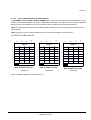
B) Parallel-Module:
+
+
A Parallel-Module is a Module that is operating in parallel with
other equivalent Modules, but still within the same cabinet (e.g.
TRIPLE DPA-75) using the DPA technology
TRIPLE DPA-75
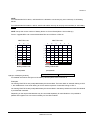
1.3.5 Single/Multi-Cabinet Configurations
Single-Cabinet Configuration:
A single-cabinet configuration means, that there are no cabinets
operating in a chain.
Multi-Cabinet Configurations:
It is possible to parallel VALUENET DPATM CLASSIC DPA-25
or-50,
TRIPLE DPA-75 or -150, UPGRADE DPA-125 or -250 Cabinets
into a Multi-Cabinet Configuration (including total up to 10
Modules) in order to increase the number of paralleled Modules.
VALUENET DPA USER MANUAL
Page 11/23
Modifications reserved
Section-1
1.3.6 Warranty
The UPS supplied is warranted against defects in design, materials for a period of twelve (12) months from its
original date of commissioning or fifteen (15) months from the date of original delivery, whichever is the sooner.
Transportation cost of warranted material is not included in the warranty and has to be paid by the end-user.
Any product must be returned with transportation charges prepaid and must be accompanied by a description
of the failure. Products without description will not be handled.
The warranty is invalidated, if the UPS is put into operation without having been commissioned by a fully
trained personal which is authorized by NIGICO.
This warranty does not apply to any damage or losses caused by misuse, abuse, negligence, neglect,
unauthorized repair or modification, incorrect installation, inappropriate environment, accident, act of God or
inappropriate application.
If the UPS fails to conform to the above within the warranty period then NIGICO SA or an authorized service
centre will, at its sole option, repair or replace the UPS or parts of it. All repaired or replaced parts will remain
the property of NIGICO or of the authorized service centre.
NIGICO is not liable for any costs resulting from a failure, if the installation, commissioning, repair, alternation,
or ambient conditions of the equipment do not fulfill the requirements specified in the documentation delivered
with the unit and other relevant documentation, such as loss of profits or revenue, loss of equipment, loss of
data or software, cost of substitutes, claims by third parties or otherwise.
Under no circumstances shall NIGICO, its suppliers or subcontractors be liable for special, indirect, incidental
or consequential damages, losses or penalties. The technical data, information and specifications are valid at
the time of printing. The UPS manufacturer reserves the right to modifications without prior notice.
As general policy, NIGICO does not recommend the use of any of its products in life support applications
where failure or malfunction of the NIGICO product can be reasonably expected to cause failure of the life
support device or to significantly affect us safety or effectiveness. NIGICO does not recommend the use of any
of its products in direct patient care. NIGICO will not knowingly sell its products for use in such applications
unless it receives in writing assurances satisfactory to NIGICO that the risks of injury or damage have been
minimized, the customer assumes all such risks and the liability of NIGICO is adequately protected under the
circumstances.
The UPS may contain batteries that must be re-charged for a minimum of 24 hours every 6 months
to prevent deep discharging. Batteries that have been, for whatever reason, deep discharged are
not covered by the warranty. See Section3- Point 3.4.1
1.3.7 Extended Warranty
The local office or distributor may grant a Extended Warranty period different to the above twelve (12) months
and refer to local terms of liability as defined in the supply agreement or maintenance contract.
For more details please contact the nearest local office or agent authorized by the manufacturer.
VALUENET DPA USER MANUAL
Page 12/23
Modifications reserved
Section-1
1.4
DELVERY – TRANSPORT - STORAGE
1.4.1 Introduction
This chapter contains all the necessary information for the correct unpacking, positioning, cabling and
installation of the UPS
The UPS and accessories are delivered on a specifically designed pallet that is easy to move with a forklift or a
pallet jack. Keep the UPS always in upright position and do not drop the equipment. Do not either stack the
pallets because of high-energy batteries involved and the heavy weight
!
NOTE!
IF THE UPS IS NOT IMMEDIATELY INSTALLED THE FOLLOWING GUIDELINES MUST BE FOLLOWED:
TRANSPORT:
UPS CABINETS AND/OR BATTERY CABINET CAN FALL OVER. USE THE SHIPPING BRACKETS ON THE REAR
AND FRONT TO SECURE THE CABINETS. DO NOT TILT THEM MORE THAN 10° FROM VERTICAL, OTHERWISE
CABINETS MAY TIP OVER.
POTENTIAL DANGERS:
-
TILTING THE CABINET MIGHT DAMAGE THE SYSTEM AND THEREFORE SHOULD NO LONGER BE
CONNECTED TO THE MAINS.
WEIGHT OF THE UPS SYSTEM COULD CAUSE SERIOUS INJURIES TO PERSONS OR ANYTHING IN THE
SURROUNDING AREA.
-
STORAGE:
THE UPS SHOULD BE STORED IN THE ORIGINAL PACKING AND SHIPPING CARTON
THE RECOMMENDED STORING TEMPERATURE FOR THE UPS SYSTEM AND BATTERIES IS
BETWEEN +5 °C AND +40°C.
THE UPS SYSTEM AND THE BATTERIE SETS MUST BE PROTECTED FROM HUMIDITY < 90% RF (NONCONDENSING)
1.4.2 Receipt of the UPS and visual inspection
Upon receiving the UPS, carefully examine the packing container and the UPS for any sign of physical
damage. The outside ’Tip&Tel’ ( "FRAGILE" and "ARROW") indicator should be intact if the equipment has
been transported in the upright position. In case of rupture or suspect inform immediately:
•
The carrier and
•
NIGICO SA.
Ensure that the received UPS corresponds to the material indicated in the delivery note.
The packing container of the UPS protects it from mechanical and environmental damage. To increase its
protection the UPS is wrapped with a plastic sheet.
!
NOTE!
VISIBLE TRANSPORT DAMAGES MUST BE CLAIMED TO THE CARRIER IMMEDIATELY AFTER RECEIPT !!
OTHER CLAIM FOR SHIPPING DAMAGE MUST BE FILED IMMEDIATELY TOO AND THE CARRIER MUST
BE INFORMED WITHIN 7 DAYS OF RECEIPT OF THE EQUIPMENT. THE PACKING MATERIALS SHOULD
BE STORED FOR FURTHER INVESTIGATION.
VALUENET DPA USER MANUAL
Page 13/23
Modifications reserved
Section-1
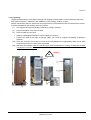
1.4.3 Unpacking
Unpack the equipment by removing the packing and shipping materials. Make a visual inspection and check
that ’Tip&Tel’ indicator ( "FRAGILE" and "ARROW") on the packing container is intact.
Perform the following steps to unpack the UPS equipment from the pallet and make sure that the floor surface
is solid and suitable for the wheeling and heavy weight:
(1)
Cut wrappers and remove packing container by pulling it upwards;
(2)
Remove the plastic cover from the UPS;
(3)
Remove pallet from the UPS;
•
Retain the packaging materials for future shipment of the UPS;
•
Examine the UPS for any sign of damage. Notify your carrier or supplier immediately if damage is
apparent.
(4a) Open the UPS-door and make sure that all the UPS-Modules are appropriately fitted in their UPSCompartment and if the UPS system is provided
(4b) Without a UPS-module make sure that the empty UPS-compartment is correctly covered with the UPScompartment protection cover.
!
KG
VALUENET DPA USER MANUAL
HEAVY !
Page 14/23
Modifications reserved
Section-1
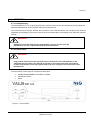
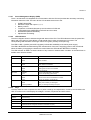
1.4.4 Nameplate
The technical specifications of the Equipment are provided on the nameplate, which is situated at the front of
the UPS. Check if it corresponds to the purchased material mentioned in the delivery note.
UPS Module
Serial No.
Production
Date
Made in Switzerland
Output Power
kVA
Output Power
Input voltage
V+N
Output voltage
Input current
A
kW
V+N
Output Freq.
Hz
1.4.5 Batteries And Storage
The standard batteries of the UPS are sealed, maintenance-free batteries, mounted usually in an external
battery cabinet and will typically be connected when the UPS is commissioned.
The battery life depends very much on the ambient temperature. A temperature range between +18° and
+23°C will achieve the optimum battery life.
If the UPS is delivered without batteries, NIGICO is not responsible for any damage or malfunctioning caused
to the UPS by incorrect wiring.
!
KG
1.4.5.1
HEAVY !
Storage of battery
The battery life depends very much on the ambient temperature. It is therefore important not to store the
battery longer than 6 months at 20°C, 3 months at 30°C and 2 months at 35°C storage temperature without a
battery recharge. For long-term storage make sure that the battery is fully recharged every 6 months. Before
and after storing, charge the battery.
Always store the batteries in a dry, clean, cool environment in their original packaging. If the packing container
is removed protect the batteries from dust and humidity.
WARNING!
SEALED BATTERIES MUST NEVER BE STORED IN A DISCHARGED OR PARTIALLY DISCHARGED STATE.
EXTREME TEMPERATURE, UNDER- AND OVERCHARGE AND OVERDISCHARGE WILL DESTROY BATTERIES!
VALUENET DPA USER MANUAL
Page 15/23
Modifications reserved
Section-1
1.4.5.2
Storage of UPS
If you plan to store the UPS prior to use, keep the UPS unpacked in a dry, clean and cool storage room with an
ambient temperature between (+5 °C to +40°C) and humidity of less than 90%.
If the packing container is removed protect the UPS from dust.
!
NOTE!
THE UPS SYSTEM, THE BATTERY CABINET AND THE BATTERIES ARE HEAVY AND MAY TIP DURING
TRANSPORTATION CAUSING SERIOUS INJURY IF UNPACKING INSTRUCTIONS ARE NOT CLOSELY
FOLLOWED.
1.5
SITE PLANNING AND POSITIONING
1.5.1 PLANNING BEFORE THE INSTALLATION
The equipment must be installed and transported in a upright position. The equipment requires space to
bottom/front and back to enable cooling airflow. It is required to arrange ventilation of the UPS room.
All parts of the UPS for service and user access are accessible from the front and rear, making it a servicefriendly and maintenance-friendly UPS. Reserve enough space from the front (min. 600 mm)
The UPS should be located where:
•
Humidity (< 90 % non-condensing) and temperature (+15° and +25°C ) are within prescribed limits
•
Fire protection standards are respected
•
Cabling can be performed easily
•
Available front accessibility for service or periodic maintenance
•
Requested air cooling flow should be granted
•
The air conditioning system should have sufficient amount of air cooling needed to keep the max. room
temperature rise at desired level:
•
Dust or corrosive/explosive gases must be absent
•
The place is vibration free
•
Only front access is necessary for service and maintenance.
•
If the UPS will be installed in bayed enclosures, partition walls have to be installed as well.
An ambient temperature of 15 to 25 Celsius degrees is recommended to achieve a long life of the UPS and
batteries. The cooling air entering the UPS must not exceed +40 °C. Avoid high ambient temperature, moisture
and humidity. The floor material should be non-flammable and strong enough to support the heavy load.
VALUENET DPA USER MANUAL
Page 16/23
Modifications reserved
Section-1
1.5.2 POSITIONING OF UPS AND BATTERY CABINET
1.5.2.1
Final Transport
Check before transporting the surface loading and use a adequate forklift to move the equipment to the final
position.
!
KG
HEAVY !
Fig. 3.6.3 Floor surface must support loading
Description
Figures
UPS Frame Type
Fig. 1
CLASSIC- DPA-25
UPS Packed
Module
no.
Packed
Weight
with DPA
10 or 15
w/o Batt.
in kg
31
35
WxHxD
31
35
WxHxD
1
231
235
700x1800x890
211
215
550x1650x780
1
271
275
700x2120x890
249
253
550x1975x780
2
302
310
700x2120x890
280
288
550x1975x780
Module
Fig. 2
Fig. 3
TRIPLE-DPA-75
UPGRADE-DPA-125
UPS Frame Type
Fig. 5
Fig. 6
CLASSIC- DPA-50
TRIPLE-DPA-150
UPGRADE-DPA-250
Packed
Weight
with DPA
20 or 25
w/o Batt.
in kg
Packed
Dimension
mm
Unpacked
Weight
with DPA
10 or 15
w/o Batt.
in kg
Unpacked
Weight
with DPA
20 or 25
w/o Batt.
in kg
Unpacked
Dimension
mm
3
333
345
700x2120x890
311
323
550x1975x780
1
224
228
700x2120x890
202
206
550x1975x780
2
255
263
700x2120x890
233
241
550x1975x780
3
286
298
700x2120x890
264
276
550x1975x780
4
317
333
700x2120x890
295
311
550x1975x780
5
348
368
700x2120x890
326
346
550x1975x780
Module
no.
Packed
Weight
with DPA
30 w/o
Batt. in kg
Packed
Weight
with DPA
40 w/o
Batt. in kg
Packed
Dimension
mm
Packed
Weight
with DPA
30 w/o
Batt. in kg
Packed
Weight
with DPA
40 w/o
Batt. in kg
44
53
56
WxHxD
44
53
56
WxHxD
1
329
338
341
890x1800x920
306
315
318
730x1650x800
1
308
317
320
890x2120x920
283
292
295
730x1975x800
2
352
370
376
890x2120x920
327
345
351
730x1975x800
3
396
423
432
890x2120x920
371
398
407
730x1975x800
1
274
283
286
890x2120x920
249
258
261
730x1975x800
2
318
336
342
890x2120x920
293
311
317
730x1975x800
3
362
389
398
890x2120x920
337
364
373
730x1975x800
4
406
442
454
890x2120x920
381
417
429
730x1975x800
5
450
495
510
890x2120x920
425
470
485
730x1975x800
Module
Fig. 4
UPS Unpacked
Packed
Weight
with DPA
50 w/o
Batt. in kg
VALUENET DPA USER MANUAL
Packed
Weight
with DPA
50 w/o
Batt. in kg
Unpacked
Dimension
mm
Page 17/23
Modifications reserved
Section-1
Positioning
UPS : A minimum 20 cm rear space from the UPS to an obstruction is recommended for proper cooling as the
air enters at bottom/front and exits at unit rear (see Fig. 6.2.1 and 6.2.2)
External Battery : It’s recommended to install external battery cabinet(s) next to the UPS unit. The external
battery can be placed on either side of the UPS unit, but it is recommended to install on left hand side.
Check before the installation that the battery voltage values in the type plate of the UPS and external battery
cabinets are the same.
WARNING!
THE UPS CONTAINS HIGH DC VOLTAGES. A QUALIFIED PERSON MUST DO THE CONNECTIONS BETWEEN
THE UPS AND THE EXTERNAL BATTERY CABINET(S). THE BATTERY CABINET IS CONNECTED
ELECTRICALLY IN PARALLEL WITH THE INTERNAL BATTERIES OF THE UPS.
WARNING!
IF AVAILABLE, THE INTERNAL BATTERY HAS TO BE DISCONNECTED FIRST BECAUSE THE EXTERNAL
BATTERY TERMINALS ARE HAZARDOUS DUE TO THE PARALLEL BATTERY STRING.
Battery Racks : External battery racks shall be sized to take the voltage drop in the cable into account. To obtain
support and help contact the local office or agent authorized by the manufacturer.
Σφάλµα! Λανθασµένη σύνδεση.
VALUENET DPA USER MANUAL
Page 18/23
Modifications reserved
Section-1
1.6
ELECTRICAL INSTALLATION
The customer has to supply the wiring to connect the UPS to the local power source see Section 2, chapter
1.1. The electrical installation procedure is described in the following text. The installation inspection and initial
start up of the UPS and extra battery cabinet must be carried out by a qualified service personnel such as a
licensed service engineer from the manufacturer or from an agent authorised by the manufacturer.
WARNING!
THE INSTRUCTION IN THIS USER MANUAL HAVE ALWAYS TO BE FOLLOWED IN ORDER TO AVOID INJURIES
FROM ELECTRICAL IMPACTS.
WARNING!
ALL THE OPERATIONS IN THIS MANUAL MUST BE PERFORMED BY AUTHORISED ELECTRICIANS OR BY
QUALIFIED INTERNAL PERSONNEL.
DO NOT OPERATE IN CASE OF PRESENCE OF WATER OR MOISTURE.
BY OPENING OR REMOVING THE UPS-COVERS YOU RUN RISK OF EXPOSURE TO DANGEROUS
VOLTAGES
PHYSICAL INJURY OR DEATH MAY FOLLOW, OR DAMAGE MAY OCCUR TO THE UPS, OR THE LOAD
EQUIPMENT IF THESE INSTRUCTIONS ARE IGNORED
To ensure correct operation of the UPS and its ancillary equipment it is necessary to provide the mains cables
with appropriate fuse protection. See Section 2, chapter 1.2
The UPS unit has the following power connections:
Rectifier (In) :
Three-phase (1L1, 1L2, 1L3), Neutral (1N) and protective earth (PE)
connection for the rectifier input
Bypass (In) :
Three-phase (2L1, 2L2, 2L3), Neutral (2N) and protective earth (PE)
connection for the bypass if used as Dual Feed input
Load (Out) :
Three-phase (3L1, 3L2, 3L3), Neutral (3N) and protective earth (PE)
connection for the load output
External Battery :
Plus (+), Common (N), Minus (-) and protective earth (PE)
connection for the external batteries
!
NOTE!
INPUT NEUTRAL IS REQUIRED TO OPERATE THE RECTIFIER.
VALUENET DPA USER MANUAL
Page 19/23
Modifications reserved
Section-1
1.6.1 PREPARATION FOR THE INPUT CABLING
NOTE!
!
Before proceeding read the chapter ELECTRICAL INSTALLATION (Section 1)
and insure before starting connecting the cable to the UPS that:
•
Mains voltage (INPUT VOLTS) and frequency (FREQUENCY) correspond to the values indicated on
the Nameplate of the UPS.
•
Earthing is performed in accordance with the prescribed IEC Standards or with local regulations;
•
UPS is connected to the mains through a Low Voltage (LV)-Distribution Board with a separate mains
line (protected with a circuit breaker or fuse) for the UPS.
Provide input fuses and cables according to Section 2, chapter 1.2 or in accordance with the prescribed IEC
Standards or with the local regulations.
The input of the UPS must be fitted with circuit breakers or other kind of protection. The circuit breakers will be
connected between the mains supply and the UPS and will provide additional protection to the UPS in the
event of overloads and short circuits.
1.6.1.1
Earthing and Connection of Mains Supply
To ensure protection of personnel during the installation of UPS make sure that the connections are performed
under the following conditions:
•
No mains voltage is present
•
All Loads are shut down and disconnected
•
UPS is shut down and voltage-free
•
UPS-Module is fitted in its correct position
•
Maintenance Bypass IA1 is open and in position OFF;
•
Parallel Isolators IA2-1, IA2-2, IA2-3, IA2-4, IA2-5 (depending of the UPS type) are in position OFF
•
Remove Terminal cover of the UPS
1. Connect first the Earthing wire coming from the Low Voltage-Distribution Board to the terminal
"PE".
2. Connect the input power cable coming from the Low Voltage-Distribution Board to the
terminals of the UPS showed in Section 2, chapter 1.2
3. Keep the phase rotation in clock-wise sense.
!
NOTE!
INPUT NEUTRAL IS REQUIRED TO OPERATE THE RECTIFIER.
Under the connection terminal of the UPS there is a cable-fixing rail to ensure that the cables have been
fastened properly.
NOTE: The UPS is provided with facilities for both single feed (one common input cable for rectifier and
bypass) and dual feed (separate input cable for rectifier and bypass).
VALUENET DPA USER MANUAL
Page 20/23
Modifications reserved
Section-1
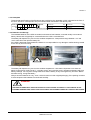
1.6.1.2
Single Input Feed
To achieve correct Input Cabling see Drawing Section 2, chapter 1.2
For single input feed connect the mains input cable to UPS Terminal Block according to the following table:
MAINS INPUT CABLE
Phase L1
Phase L2
Phase L3
NEUTRAL
EARTH
UPS TERMINAL
1L1
1L2
1L3
1N
PE
For minimum recommended Input Cable Sections and Fuse Ratings Section 2, chapter 1.2
Under the connection terminal of the UPS there is a cable-fixing rail to ensure that the cables have been
fastened properly.
1.6.1.3
Dual Input Feed
To achieve correct input cabling see Terminal Block in Section 2, chapter 1.2
NOTE: The UPS is supplied (as standard version) with facilities for a single cable feed (for rectifier and
bypass).
If dual feed is required unscrew the terminal bridges between
UPS TERMINAL
Rectifier
1L1
1L2
1L3
1N
PE
UPS TERMINAL
Bypass
2L1
2L2
2L3
2N
PE
For dual input feed connect the mains input cables to UPS Terminal according to following tables:
MAINS INPUT CABLE
Phase L1
Phase L2
Phase L3
NEUTRAL
EARTH
UPS TERMINAL
Rectifier
1L1
1L2
1L3
1N
PE
BYPASS INPUT CABLE
Phase L1
Phase L2
Phase L3
NEUTRAL
EARTH
UPS TERMINAL
Bypass
2L1
2L2
2L3
2N
PE
For minimum recommended Input Cable Sections and Fuse Ratings Section 2, chapter 1.2
Under the connection terminal of the UPS there is a cable-fixing rail to ensure that the cables have been
fastened properly.
1.6.1.4
Preparation for the Output Cabling
Before you start connecting the loads, ensure that the sum of the indicated UPS-module rated powers
(OUTPUT POWER) on the nameplates (on the front side of the UPS-modules) is equal to or larger than the
total load requirements.
The output of the UPS must be fitted with circuit breakers or other kind of protection. These circuit breakers will
be connected between the loads and the UPS and will provide additional protection to the UPS in the event of
overloads and short circuits.
These circuit breakers will enable the protection of each load separately.
The size of the circuit breakers depends on the load rating of the load sockets.
The circuit breakers must comply with the prescribed IEC Standards. It is recommended to provide a separate
output distribution board for the load.
VALUENET DPA USER MANUAL
Page 21/23
Modifications reserved
Section-1
The following values should be indicated on the output distribution board:
Maximum total load rating;
Maximum load rating of the load sockets.
If a common distribution board is used (sockets for Mains and UPS voltage), ensure that on each socket there
is an indication of the applied voltage (“Mains” or “UPS”).
Output power cable ratings should be in accordance with the recommended cable sections and fuses ratings
or in accordance with the prescribed IEC Standards or with the local regulations.
Under the connection terminal of the UPS there is a cable-fixing rail to ensure that the cables have been
fastened properly.
Ensure that the earthing is performed in accordance with the prescribed IEC Standards or with the local
regulations.
1.6.1.5
Connection of the Load
To ensure protection of the personnel during the installation of the UPS make sure that the connections are
performed under the following conditions:
No mains voltage is present;
All loads are shut down and disconnected;
PMC is shut down and voltage-free.
Before connecting the output power cables make sure that:
UPS-Module is fitted in its correct position;
Maintenance bypass is in position OFF;
Parallel Isolators IA2 is in position OFF
Remove the terminal cover of the UPS.
Connect the output power cable coming from the LV-Distribution Board to the terminals of the UPS as shown
in drawing in Section 2 / Chapter 2 (Front view of the VALUENET DPA TM ’s)
VALUENET DPA USER MANUAL
Page 22/23
Modifications reserved
Section-1
1.6.2 Installation Checklist
All packing materials and restraints have been removed from each cabinet.
Each cabinet in the UPS system is placed in the installed location.
All conduits and cables are properly routed to the UPS and auxiliary cabinets.
All power cables are properly sized and terminated.
A ground conductor is properly installed.
If the cabinet does not use all module mounting locations, the provided protective covers
are installed on the front and back of the cabinet.
Battery cabinet installation instructions have been completed.
Air conditioning equipment is installed and operating properly.
The area around the installed UPS system is clean and dust-free. (It is recommended that
the UPS be installed on a level floor suitable for computer or electronic equipment.
Adequate workspace exists around the UPS and other cabinets.
Adequate lighting is provided around all UPS equipment.
Any optional accessories are mounted in their installed location and properly wired.
Summary alarms and/or building alarms are wired appropriately. (OPTIONAL)
Startup and operational checks performed by authorized service personnel.
All network connections are completed.
VALUENET DPA USER MANUAL
Page 23/23
Modifications reserved
Section-2
CONTENTS SECTION-2
2.1
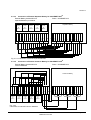
BLOCK DIAGRAM.......................................................................................................................2
2.1.1
WIRING AND BLOCK DIAGRAMS FOR ALL FRAMES AND MODULES...........................2
2.1.2
RECOMMENDED CABLE SECTIONS & FUSE RATINGS ..................................................2
2.1.2.1
Terminal connections overview ......................................................................................2
2.1.3
BLOCK DIAGRAM VALUENET DPA ....................................................................................3
2.1.3.1
Single Feed input (Standard Version) ............................................................................3
2.1.3.2
Dual feed input (Optional Version) .................................................................................4
2.2
FRONT VIEW ...............................................................................................................................5
2.2.1
FRONT VIEW OF MD FRAMES ...........................................................................................5
2.2.1.1
Front View CLASSIC DPA-25 and Connection Terminals .............................................5
2.2.1.2
Front View TRIPLE DPA-75 and Connection Terminals ................................................6
2.2.1.3
Front View UPGRADE DPA-125 and Connection Terminals.........................................7
2.2.2
FRONT VIEW OF MX FRAMES ...........................................................................................8
2.2.2.1
Front View CLASSIC DPA-50 and Connection Terminals .............................................8
2.2.2.2
Front View TRIPLE DPA-150 and Connection Terminals ..............................................9
2.2.2.3
Front View UPGRADE DPA-250 and Connection Terminals.......................................10
2.3
BATTERY CONNECTIONS .......................................................................................................11
2.3.1
INTERNAL BATTERY MODULES ......................................................................................11
2.3.1.1
Internal Battery Modules CLASSIC DPA-25 ................................................................11
2.3.1.2
Internal Battery Modules TRIPLE DPA-75 ...................................................................12
2.3.1.3
Internal Battery Modules CLASSIC DPA-50 ................................................................13
2.3.1.4
Internal Battery Modules TRIPLE DPA-150 .................................................................14
2.3.2
EXTERNAL BATTERY CABINET AND BATERIY CONNECTION .....................................15
2.3.2.1
External Battery Configuration .....................................................................................15
2.3.2.2
Connection of External Battery Cabinet for VALUENET DPA......................................17
2.3.2.3
Connection of External Separate Battery for VALUENET DPATM ................................18
2.3.2.4
Connection of External Common Battery for VALUENET DPATM ................................18
USER MANUAL NRG VALUENET DPA
Page 1/18
Modifications reserved
Section-2
2.1
BLOCK DIAGRAM
2.1.1 WIRING AND BLOCK DIAGRAMS FOR ALL FRAMES AND MODULES
The customer has to supply the wiring to connect the UPS to the local power source. The installation inspection
and initial start up of the UPS and extra battery cabinet must be carried out by a qualified service personnel
such as a licensed service engineer from the manufacturer or from an agent authorized by the manufacturer.
2.1.2 RECOMMENDED CABLE SECTIONS & FUSE RATINGS
2.1.2.1
Terminal connections overview
Σφάλµα! Λανθασµένη σύνδεση.
USER MANUAL NRG VALUENET DPA
Page 2/18
Modifications reserved
Section-2
2.1.3
BLOCK DIAGRAM VALUENET DPA
2.1.3.1
Single Feed input (Standard Version)
Σφάλµα! Λανθασµένη σύνδεση.
USER MANUAL NRG VALUENET DPA
Page 3/18
Modifications reserved
Section-2
2.1.3.2
Dual feed input (Optional Version)
Σφάλµα! Λανθασµένη σύνδεση.
USER MANUAL NRG VALUENET DPA
Page 4/18
Modifications reserved
Section-2
2.2
FRONT VIEW
2.2.1
FRONT VIEW OF MD FRAMES
2.2.1.1
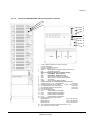
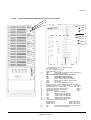
Front View CLASSIC DPA-25 and Connection Terminals
23
24
22
1
2
3
19
14
13
4
5
6
7
8
9
1
2
3
4
5
6
7
8
9
10
11
12
13
14-(18)
19-(21)
22
23
24
10 11 12
X1-X4 Customer interface on Phoenix Terminals:
X1 Customer Inputs
X2…X4 = Potential free contacts
(detail see Section 3 / 1.2 )
SW1-9
Multi-Cabinet Configuration Switch (see section 4)
JD8
Parallel BUS connector
ONLY For paralleling cabinets use optional adapter:
JD5
Parallel BUS - Input Connector
JD6
Parallel BUS - Output Connector
JD11
RS232 / Sub D9/ female, PC interface
JD12
RS232/ Sub D9 / male for Multidrop ONLY
USB
PC Interface
SNMP
Slot for optional SNMP card ONLY
Newavewatch Slot for optional Modem/Ethernet card ONLY
Battery terminal + / N / - for
16/25 mm2
Input Bypass terminal for Dual Input feed
10/16 mm2
Input Rectifier terminal for Single feed
10/16 mm2
Output Load terminal
10/16 mm2
IA1
Maintenance Bypass
IA2-1 Parallel Isolator UPS-Module 1
F4 Battery Fuse Holder Module 1
14x51/ 50A Fast Acting
F2 Bypass Line Fuse on each module
Module DPA 10
14x41 / 25A Pronorm
Module DPA 15
14x41 / 32A Pronorm
Module DPA 20
14x41 / 32A Pronorm
Module DPA 25
14x41 / 40A Pronorm
JD1
Smart Port- RS232 (Sub-D9P) (see section 3 / 1.1)
JD7
Connector for Control Panel
USER MANUAL NRG VALUENET DPA
Page 5/18
Modifications reserved
Section-2
2.2.1.2
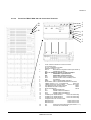
Front View TRIPLE DPA-75 and Connection Terminals
23
24
22
14
15
16
1
2
3
4
20
21
22
13
5
6
7
8
9 /9*
1
2
3
4
5
6
7
8
9
9*
10
11
12
13
14
15
16
19
20
21
22
23
24
10
11
12
X1-X4 Customer interface on Phoenix Terminals:
X1 Customer Inputs
X2…X4 = Potential free contacts
(detail see Section 3 / 1.2 )
SW1-9 Multi-Cabinet Configuration Switch (see section 4)
JD8
Parallel BUS connector
ONLY For paralleling cabinets use optional adapter:
JD5
Parallel BUS - Input Connector
JD6
Parallel BUS - Output Connector
JD11
RS232 / Sub D9/ female, PC interface
JD12
RS232/ Sub D9 / male for Multidrop ONLY
USB
PC Interface
SNMP
Slot for optional SNMP card ONLY
1 ONLY
Newavewatch Slot for optional Modem/Ethernet card
9 Battery terminal + / N / - for separate bat.
216/25 mm2
3 Battery terminal for common battery for M6 + PE 1x 16mm2
335/50 mm2
Input Bypass terminal for Dual Input feed
Input Rectifier terminal for Single feed
35/50 mm2
Output Load terminal
35/50 mm2
IA1
Maintenance Bypass
4
IA2-1
Parallel Isolator UPS-Module 1
IA2-2
Parallel Isolator UPS-Module 2
5
IA2-3
Parallel Isolator UPS-Module 3
F4 Battery Fuse Holder Module 1
14x51/ 50A6Fast Acting
F5 Battery Fuse Holder Module 2
14x51/ 50A Fast Acting
F6 Battery Fuse Holder Module 3
14x51/ 50A Fast Acting
7
F2 Bypass Line Fuse on each module
Module DPA 10
14x41 / 25A
8 Pronorm
Module DPA 15
14x41 / 32A Pronorm
Module DPA 20
14x41 / 32A Pronorm
Module DPA 25
14x41 / 40A Pronorm
JD1
Smart Port- RS232 (Sub-D9P) (see section 3 / 1.1)
JD7
Connector for Control Panel
USER MANUAL NRG VALUENET DPA
Page 6/18
Modifications reserved
Section-2
2.2.1.3
Front View UPGRADE DPA-125 and Connection Terminals
23
24
22
1
2
3
4
5
6
7
8
9 /9*
1
2
3
4
5
6
7
8
9
9*
10
11
12
13
14
15
16
17
18
22
23
24
10
11
12
X1-X4 Customer interface on Phoenix Terminals:
X1 Customer Inputs
X2…X4 = Potential free contacts
(detail see Section 3 / 1.2 )
SW1-9
Multi-Cabinet Configuration Switch (see section 4)
JD8
Parallel BUS connector
ONLY For paralleling cabinets use optional adapter:
JD5
Parallel BUS - Input Connector
JD6
Parallel BUS - Output Connector
JD11
RS232 / Sub D9/ female, PC interface
JD12
RS232/ Sub D9 / male for Multidrop ONLY
USB
PC Interface
SNMP
Slot for optional SNMP card ONLY
Valuenetwatch Slot for optional Modem/Ethernet card ONLY
9 Battery terminal + / N / - for separate bat.
16/25 mm2
3 Battery terminal for common battery
for M10 + PE 1x 50 mm2
Input Bypass terminal for Dual Input feed
70/95 mm2
Input Rectifier terminal for Single feed
70/95 mm2
Output Load terminal
70/95 mm2
IA1 Maintenance Bypass
IA2-1
Parallel Isolator UPS-Module 1
IA2-2
Parallel Isolator UPS-Module 2
IA2-3
Parallel Isolator UPS-Module 3
IA2-4
Parallel Isolator UPS-Module 4
IA2-5
Parallel Isolator UPS-Module 5
F2 Bypass Line Fuse on each module
Module DPA 10
14x41 / 25A Pronorm
Module DPA 15
14x41 / 32A Pronorm
Module DPA 20
14x41 / 32A Pronorm
Module DPA 25
14x41 / 40A Pronorm
JD1 Smart Port- RS232 (Sub-D9P) (see section 3 / 1.1)
JD7 Connector for Control Panel
USER MANUAL NRG VALUENET DPA
Page 7/18
Modifications reserved
Section-2
2.2.2
FRONT VIEW OF MX FRAMES
2.2.2.1
Front View CLASSIC DPA-50 and Connection Terminals
23
24
22
1
2
3
19
14
13
4
5
6
7
8
9
1
2
3
4
5
6
7
8
9
10
11
12
13
14-(18)
19-(21)
22
23
24
10 11 12
X1-X4 Customer interface on Phoenix Terminals:
X1 Customer Inputs
X2…X4 = Potential free contacts
(detail see Section 3 / 1.2 )
SW1-9
Multi-Cabinet Configuration Switch (see section 4)
JD8
Parallel BUS connector
ONLY For paralleling cabinets use optional adapter:
JD5
Parallel BUS - Input Connector
JD6
Parallel BUS - Output Connector
JD11
RS232 / Sub D9/ female, PC interface
JD12
RS232/ Sub D9 / male for Multidrop ONLY
USB
PC Interface
SNMP
Slot for optional SNMP card ONLY
Newavewatch Slot for optional Modem/Ethernet card ONLY
Battery terminal + / N / - for
16/25 mm2
Input Bypass terminal for Dual Input feed
16/25 mm2
Input Rectifier terminal for Single feed
16/25 mm2
Output Load terminal
16/25 mm2
IA1
Maintenance Bypass
IA2-1
Parallel Isolator UPS-Module 1
F4 Battery Fuse Holder Module 1
14x51/ 50A Fast Acting
F2 Bypass Line Fuse on each module
Module DPA 30
22x58 / 50A Pronorm
Module DPA 40
22x58 / 63A Pronorm
Module DPA 50
22x58 / 63A Pronorm
JD1
Smart Port- RS232 (Sub-D9P) (see section 3 / 1.1)
JD7
Connector for Control Panel
USER MANUAL NRG VALUENET DPA
Page 8/18
Modifications reserved
Section-2
2.2.2.2
Front View TRIPLE DPA-150 and Connection Terminals
23
24
22
1
2
3
14 15 16
14 19 15 20
21
16
13
4
5
6
7
8
9
1
2
3
4
5
6
7
8
9
9*
10
11
12
13
14
15
16
19
20
21
22
23
24
10 11
12
X1-X4 Customer interface on Phoenix Terminals:
X1 Customer Inputs
X2…X4 = Potential free contacts
(detail see Section 3 / 1.2 )
SW1-9
Multi-Cabinet Configuration Switch (see section 4)
JD8
Parallel BUS connector
ONLY For paralleling cabinets use optional adapter:
JD5
Parallel BUS - Input Connector
JD6
Parallel BUS - Output Connector
JD11
RS232 / Sub D9/ female, PC interface
JD12
RS232/ Sub D9 / male for Multidrop ONLY
USB
PC Interface
SNMP
Slot for optional SNMP card ONLY
Newavewatch Slot for optional Modem/Ethernet card ONLY
9 Battery terminal + / N / - for separate bat.
16/25 mm2
3 Battery terminal for common battery
for M10 + PE 1x M10
Input Bypass terminal for Dual Input feed
3xM10
Input Rectifier terminal for Single feed
4xM10
Output Load terminal
4xM10
IA1
Maintenance Bypass
IA2-1
Parallel Isolator UPS-Module 1
IA2-2
Parallel Isolator UPS-Module 2
IA2-3
Parallel Isolator UPS-Module 3
F4 Battery Fuse Holder Module 1
14x51/ 50A Fast Acting
F5 Battery Fuse Holder Module 2
14x51/ 50A Fast Acting
F5 Battery Fuse Holder Module 3
14x51/ 50A Fast Acting
F2 Bypass Line Fuse on each module
Module DPA 30
22x58 / 50A Pronorm
Module DPA 40
22x58 / 63A Pronorm
Module DPA 50
22x58 / 63A Pronorm
JD1
Smart Port- RS232 (Sub-D9P) (see section 3 / 1.1)
JD7
Connector for Control Panel
USER MANUAL NRG VALUENET DPA
Page 9/18
Modifications reserved
Section-2
2.2.2.3
Front View UPGRADE DPA-250 and Connection Terminals
23
24
1
2
3
22
14
15
16
17
4
18
5
6
13
10 / 11
1
2
3
4
5
6
7
8
9
9*
10
11
12
13
14
15
16
17
18
22
23
24
7
8
12
9 /9*
X1-X4 Customer interface on Phoenix Terminals:
X1 Customer Inputs
X2…X4 = Potential free contacts
(detail see Section 3 / 1.2 )
SW1-9
Multi-Cabinet Configuration Switch (see section 4)
JD8
Parallel BUS connector
ONLY For paralleling cabinets use optional adapter:
JD5
Parallel BUS - Input Connector
JD6
Parallel BUS - Output Connector
JD11
RS232 / Sub D9/ female, PC interface
JD12
RS232/ Sub D9 / male for Multidrop ONLY
USB
PC Interface
SNMP
Slot for optional SNMP card ONLY
Newavewatch Slot for optional Modem/Ethernet card ONLY
15 Battery terminal + / N / - for separate bat.
16/25 mm2
3 Battery terminal for common battery
for M12 + PE 1x M12
Input Bypass terminal for Dual Input feed
3xM12
Input Rectifier terminal for Single feed
4xM12
Output Load terminal
4XM12
IA1
Maintenance Bypass
IA2-1
Parallel Isolator UPS-Module 1
IA2-2
Parallel Isolator UPS-Module 2
IA2-3
Parallel Isolator UPS-Module 3
IA2-4
Parallel Isolator UPS-Module 4
IA2-5
Parallel Isolator UPS-Module 5
F2 Bypass Line Fuse on each module
Module DPA 30
22x58 / 50A Pronorm
Module DPA 40
22x58 / 63A Pronorm
Module DPA 50
22x58 / 63A Pronorm
JD1
Smart Port- RS232 (Sub-D9P) (see section 3 / 1.1)
JD7
Connector for Control Panel
USER MANUAL NRG VALUENET DPA
Page 10/18
Modifications reserved
Section-2
2.3
BATTERY CONNECTIONS
2.3.1
INTERNAL BATTERY MODULES
2.3.1.1
Internal Battery Modules CLASSIC DPA-25
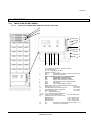
In VALUENET DPATM CLASSIC DPA-25 FRAME there is space for up to 200 x 9Ah internal batteries. In the
drawing below different Battery and System configurations are shown.
NOTE: For UPS-Systems DPA 10kVA, DPA 15kVA and DPA 20kVA it is allowed to use 30-50 (only even
numbers) of 12V-battery blocks.
For UPS-System DPA 25kVA use only 40-50 (only even numbers) of 12V-battery blocks.
NOTE: Set-up the correct number of battery blocks on Control Panel (Menu: Service-Set-Up).
VALUENET CLASSIC DPA-25
A
B
C
A
B
A
C
B
C
A
B
7
10x7Ah
10x7Ah
7
7
7
6
10x7Ah 2x5x7Ah 10x7Ah
6
6
6
10x7Ah
5
10x7Ah 10x7Ah 10x7Ah
5
10x7Ah 10x7Ah 10x7Ah
5
5
2x5x7Ah
4
10x7Ah 10x7Ah 10x7Ah
4
10x7Ah 10x7Ah 10x7Ah
4
10x7Ah 10x7Ah 10x7Ah
4
10x7Ah
3
2x5x7Ah 2x5x7Ah 2x5x7Ah
3
2x5x7Ah2x5x7Ah2x5x7Ah
3
10x7Ah 10x7Ah 10x7Ah
3
10x7Ah
2
10x7Ah 10x7Ah 10x7Ah
2
10x7Ah 10x7Ah 10x7Ah
2
10x7Ah 10x7Ah 10x7Ah
2
2x5x7Ah
1
10x7Ah 10x7Ah 10x7Ah
1
10x7Ah 10x7Ah 10x7Ah
1
10x7Ah 10x7Ah 10x7Ah
1
10x7Ah
F1
CLASSIC 25 frame
(4x50)x7Ah
F1
F1
CLASSIC 25 frame
(3x50)x7Ah
CLASSIC 25 frame
(3x40)x7Ah
C
F1
CLASSIC 25 frame
(2x30)x7Ah
Other combination possible : refer to Section 10
USER MANUAL NRG VALUENET DPA
Page 11/18
Modifications reserved
Section-2
2.3.1.2
Internal Battery Modules TRIPLE DPA-75
In VALUENET DPATM TRIPLE DPA-75 FRAME there is space for up to 180 x 9Ah internal batteries. In the
drawing below different Battery and System configurations are shown. The batteries may be used as separate
batches for each UPS-module or they can be used as common batteries for all three UPS-Modules.
NOTE: For UPS-Systems DPA 10kVA, DPA 15kVA and DPA 20kVA it is allowed to use 30-50 (only even
numbers) of 12V-battery blocks.
For UPS-System DPA 25kVA use only 40-50 (only even numbers) of 12V-battery blocks.
NOTE: Set-up the correct number of battery blocks on Control Panel (Menu: Service-Set-Up).
VALUENET TRIPLE DPA-75
A
B
C
A
B
A
C
B
C
10x7Ah 10x7Ah 10x7Ah
2x5x7Ah 2x5x7Ah 2x5x7Ah
10x7Ah 10x7Ah 10x7Ah
10x7Ah 10x7Ah 10x7Ah
10x7Ah 10x7Ah 10x7Ah
10x7Ah 10x7Ah 10x7Ah
10x7Ah 10x7Ah 10x7Ah
10x7Ah 10x7Ah 10x7Ah
2x5x7Ah2x5x7Ah2x5x7Ah
2x5x7Ah 2x5x7Ah 2x5x7Ah
10x7Ah 10x7Ah 10x7Ah
10x7Ah 10x7Ah 10x7Ah
10x7Ah 10x7Ah 10x7Ah
10x7Ah 10x7Ah 10x7Ah
10x7Ah 10x7Ah 10x7Ah
F1
F2
F3
F1
F2
F1
F3
TRIPLE 75 frame
TRIPLE 75 frame
3x(2x30)x7Ah
(3x50)x7Ah
F2
F3
TRIPLE 75 frame
(3x40)x7Ah
Other combination possible : refer to Section 10
USER MANUAL NRG VALUENET DPA
Page 12/18
Modifications reserved
Section-2
2.3.1.3
Internal Battery Modules CLASSIC DPA-50
In VALUENET DPATM CLASSIC DPA-50 FRAME there is space for up to 280 x 9Ah internal batteries. In the
drawing below different Battery and System configurations are shown. The batteries may be used as separate
batches for each UPS-Module or they can be used as common batteries for all tree UPS-Modules.
NOTE: For UPS-Systems DPA 30kVA and DPA 50kVA it is allowed to use 40-50 (only even numbers) of 12Vbattery blocks.
NOTE: Set-up the correct number of battery blocks on Control Panel (Menu: Service-Set-Up).
VALUENET CLASSIC DPA-50
A
B
C
D
A
UPS 1
B
C
D
A
UPS 1
B
C
UPS 1
7
10x7Ah
10x7Ah
7
7
6
10x7Ah 2x5x7Ah 10x7Ah
6
6
5
10x7Ah 10x7Ah 10x7Ah 10x7Ah
5
10x7Ah 10x7Ah 10x7Ah 10x7Ah
5
4
10x7Ah 10x7Ah 10x7Ah 10x7Ah
4
10x7Ah 10x7Ah 10x7Ah 10x7Ah
4
10x7Ah 10x7Ah 10x7Ah
3
2x5x7Ah 2x5x7Ah 2x5x7Ah 2x5x7Ah
3
2x5x7Ah 2x5x7Ah 2x5x7Ah 2x5x7Ah
3
10x7Ah 10x7Ah 10x7Ah
2
10x7Ah 10x7Ah 10x7Ah 10x7Ah
2
10x7Ah 10x7Ah 10x7Ah 10x7Ah
2
10x7Ah 10x7Ah 10x7Ah
1
10x7Ah 10x7Ah 10x7Ah 10x7Ah
1
10x7Ah 10x7Ah 10x7Ah 10x7Ah
1
10x7Ah 10x7Ah 10x7Ah
F1
F1
DPA CLASSIC 50 frame
F1
DPA CLASSIC 50 frame
(5x50)x7Ah
D
(4x50)x7Ah
DPA CLASSIC 50 frame
(3x40)x7Ah
Other combination possible : refer to Section 10
USER MANUAL NRG VALUENET DPA
Page 13/18
Modifications reserved
Section-2
2.3.1.4
Internal Battery Modules TRIPLE DPA-150
In VALUENET DPATM CLASSIC DPA-50 FRAME there is space for up to 240 x 9Ah internal batteries. In the
drawing below different Battery and System configurations are shown. The batteries may be used as separate
batches for each UPS-Module or they can be used as common batteries for all tree UPS-Modules.
NOTE: For UPS-Systems DPA 30kVA and DPA 50kVA it is allowed to use 40-50 (only even numbers) of 12Vbattery blocks.
NOTE: Set-up the correct number of battery blocks on Control Panel (Menu: Service-Set-Up).
VALUENET TRIPLE DPA-150
A
B
C
D
UPS 3
UPS 2
UPS 1
6
10x7Ah 10x7Ah 10x7Ah 10x7Ah
5
10x7Ah 10x7Ah 10x7Ah 10x7Ah
4
10x7Ah 10x7Ah 10x7Ah 10x7Ah
3
10x7Ah 10x7Ah 10x7Ah 10x7Ah
2
10x7Ah 10x7Ah 10x7Ah 10x7Ah
1
10x7Ah 10x7Ah 10x7Ah 10x7Ah
F1
F2
F3
3x(2x40)x7Ah
Other combination possible : refer to Section 10
USER MANUAL NRG VALUENET DPA
Page 14/18
Modifications reserved
Section-2
2.3.2
EXTERNAL BATTERY CABINET AND BATERIY CONNECTION
WARNING!
KEEP OUT OF BATTERY POLES WHICH CONTAIN DANGEROUS DC-VOLTAGES CAUSING FATAL
ACCIDENTS.NOTE:
MANIPULATION ON THE BATTERY SYSTEM SHOULD ONLY BE DONE BY TRAINED SERVICE AND
MAINTENANCE PERSONEL OF THE MANUFACTURER OR HIS AUTHORISED SERVICE PARTNERS.
INAPPROPRIATE MANIPULATIONS OF THE BATTERIES CAN CAUSE LIGHTNING SPARKS. WHILE
OPERATING ON BATTERY SYSTEMS IT IS MANDATORY TO WEAR GLASSES.
2.3.2.1
External Battery Configuration
In the UPS-cabinet of the VALUENET DPA TM UPGRADE DPA 125 or UPGRADE DPA 250 there is no space
provided for batteries.
There are 2 external matching battery cabinets available:
• CBAT DPA-120 for Separate or Common battery configurations of 24Ah or 28Ah blocks (max. 120 Blocks)
• CBAT DPA-200 for Separate or Common battery configurations for 24Ah or 28Ah blocks (max. 200 Blocks)
Σφάλµα! Λανθασµένη σύνδεση.
For detailed information and layout of the battery cabinets please refer to section 10 / Options
USER MANUAL NRG VALUENET DPA
Page 15/18
Modifications reserved
Section-2
NOTE:
For UPS-Modules DPA 10kVA, 15kVA 20kVA it is allowed to use 30-50 (only even numbers) of 12V-battery
blocks.
For UPS-Modules DPA 25kVA, 30kVA, 40kVA and 50kVA use only 40-50 (only even numbers) of 12V-battery
blocks.
NOTE: Set-up the correct number of battery blocks on Control Panel (Menu: Service-Set-Up)
Frame: Upgrade DPA 125 or 250 with Modules DPA 25 or DPA 30 or DPA 50
CBAT DPA-120
A
B
CBAT DPA-200
C
A
B
C
F
E
D
8
5x28Ah 5x28Ah 5x28Ah
7
5x28Ah 5x28Ah 5x28Ah 5x28Ah 5x28Ah 5x28Ah
7
5x28Ah 5x28Ah 5x28Ah
6
5x28Ah 5x28Ah 5x28Ah 5x28Ah 5x28Ah 5x28Ah
6
5x28Ah 5x28Ah 5x28Ah
5
5x28Ah 5x28Ah 5x28Ah 5x28Ah 5x28Ah 5x28Ah
5
5x28Ah 5x28Ah 5x28Ah
4
5x28Ah 5x28Ah 5x28Ah 5x28Ah 5x28Ah 5x28Ah
4
5x28Ah 5x28Ah 5x28Ah
3
5x28Ah 5x28Ah 5x28Ah 5x28Ah 5x28Ah 5x28Ah
3
5x28Ah 5x28Ah 5x28Ah
2
5x28Ah 5x28Ah 5x28Ah
5x28Ah 5x28Ah
2
5x28Ah 5x28Ah 5x28Ah
1
5x28Ah 5x28Ah 5x28Ah
5x28Ah 5x28Ah
1
5x28Ah 5x28Ah 5x28Ah
F1
F2
F3
Battery Cabinet 120
(3x40)x28Ah
F1
F2
F3
F4
F5
Battery Cabinet 200
(5x40)x28Ah
CBAT DPA-120
CBAT DPA-200
Σφάλµα! Λανθασµένη σύνδεση.
For detailed information and layout of the battery cabinets please refer to section 10
Examples:
On drawing CBAT DPA-120 (3x40)x28Ah battery blocks are fitted. The lower batch of 40x24Ah belong to UPS
1, the middle batch of 40x 24Ah belong to UPS 2 and the top batch of 40x24Ah belong to UPS 3.
On drawing CBAT DPA-200 (5x40)x28Ah battery blocks are fitted in the battery cabinet and each UPS-Module
is provided with 40x28Ah.
Depending on the request the batteries may be connected separately for each Module or it is possible to
parallel them together into one common battery for five UPS-modules.
USER MANUAL NRG VALUENET DPA
Page 16/18
Modifications reserved
Section-2
2.3.2.2
Connection of External Battery Cabinet for VALUENET DPA
It is normally recommended for redundant Multi-Module systems to provide each UPS-Module with its own
separate battery. In this way the redundancy is extended also to the batteries. In the Figure 3.2.3 and Fig. 3.2.4
the drawing shows how to connect the batteries in the external battery cabinet and the Upgrade DPA frames.
!
NOTE!
ALL THE OPERATIONS IN THIS MANUAL MUST BE PERFORMED BY AUTHORISED ELECTRICIANS OR BY
QUALIFIED INTERNAL PERSONNEL.
DO NOT OPERATE IN CASE OF PRESENCE OF WATER OR MOISTURE.
BY OPENING OR REMOVING THE UPS-COVERS YOU RUN RISK OF EXPOSURE TO DANGEROUS VOLTAGES!
If the five battery batches are desired to be used as one common battery for all five UPS-Modules then Battery
Links may be connected as shown below.
!
To ensure protection of the personnel during the installation of the UPS make sure that the connections
are performed under the following conditions:
• No mains voltage is present in the UPS
• All the loads are disconnected
• The UPS and the external battery are voltage-free
To verify the complete shut down of the VALUENET DPATM perform following steps:
1) Make sure that the fuses feeding the UPS in the input Distribution Board are all open and no power is
fed to the UPS.
2) Make sure the "MAINTENANCE BYPASS"(IA1) is open (position "OFF”)
3) Make sure the battery fuses in the external battery cabinet and on the UPS are open.
4) Connect Earth (PE) between the UPS and external battery cabinet.
5) Connect the corresponding + , N, - terminals between UPS and external battery cabinet according to
drawing
USER MANUAL NRG VALUENET DPA
Page 17/18
Modifications reserved
Section-2
Connection of External Separate Battery for VALUENET DPATM
External Battery Cabinet DPA for
separate Batteries per Module
Frame : UPGRADE DPA
1 -
2 -
3 -
4 -
5 -
2 -
3 -
4 -
5 -
N
1 -
N
N
N
5 +
4 +
3 +
PE
2 +
PE
5 -
5 +
N
N
Seperate Battery
Battery
Fuses
for
UPS 5
4 -
N
4 +
N
3 -
N
3 +
N
2 -
Battery
Fuses
for
UPS 4
2 +
Battery
Fuses
for
UPS 3
1 -
Battery
Fuses
for
UPS 2
1 +
Battery
Fuses
for
UPS 1
1 +
2.3.2.3
Fig. 3.2.3 Connection of external separate batteries
Connection of External Common Battery for VALUENET DPATM
2.3.2.4
External Battery Cabinet DPA for
common Batteries
Frame : UPGRADE DPA
Battery
Fuses
for
UPS 1
Battery
Fuses
for
UPS 2
Battery
Fuses
for
UPS 3
Battery
Fuses
for
UPS 4
N
N
N
N
N
5 +
4 +
3 +
PE
2 +
PE
1 +
N
C -
C +
N
5 -
5 +
N
4 -
4 +
N
3 -
3 +
N
2 -
2 +
N
1 -
1 +
Common Battery
Battery
Fuses
for
UPS 5
Fig. 3.2.4
Connection of external Common batteries
USER MANUAL NRG VALUENET DPA
Page 18/18
Modifications reserved
Section-3
SECTION-3
3.1
INTERFACING .............................................................................................................................2
3.1.1
SMART PORT JD1 on each module (Serial RS 232 / Sub D9 / male)..................................2
3.1.2
Customer interface and DRY PORTs (volt-free contacts) .....................................................3
3.1.2.1
Input Interfaces Terminal block X1................................................................................3
3.1.2.2
Output Interfaces Terminal blocks X2, X3, X4 (DRY PORTs).......................................3
3.1.3
JD11 / RS232 Computer Interface .......................................................................................4
3.1.4
JD12 / RS232 Interface for Multidrop ....................................................................................4
3.1.5
USB/2 Computer Interface ....................................................................................................4
NRG VALUENET DPA USER MANUAL
Page 1/4
Modifications reserved
Section-3
3.1
INTERFACING
Each UPS cabinet is provided with communication port on each single module and a communication card,
which provides system information
On the Module :
•
JD1 / RS232 Sub D9 / male: SMART PORT Interface (one per Module)
Communication card (next to the distribution) :
3.1.1
•
Input Interfaces
X1 (Phoenix terminals)
•
Output Interfaces :
X2, X3, X4 DRY PORTs ,volt-free contacts (Phoenix terminals)
•
JD11 / RS232 Sub D9 / female :
Interface (UPS system to computer)
•
JD12 / RS232 Sub D9 / male
Interface for Multidrop connection between several UPS cabinets
•
USB
Interface (UPS system to computer)
SMART PORT JD1 on each module (Serial RS 232 / Sub D9 / male)
The SMART PORT JD1 located on the Modules itself is an intelligent RS 232 serial port that allows the UPS
Module to be connected to a computer. The connector is a standard D-Type, 9-pin, male.
When installed the optional SMART PORT, the software WAVEMON allows the computer to monitor the
mains voltage and the UPS status continuously.
In the event of any changes the computer terminal will display a message.
(For details see our Monitoring Package: WAVEMON ).
The Fig. 1.1 shows how to connect a PC to the UPS with different Sub-D connectors.
a)
Interface Cable (UPS End)
(9-Pin, D-Type Male)
Connects to UPS
SMART PORT
Interface cable (Computer End)
(9-Pin, D-Type Female)
1
1
2
2
3
3
5
5
.
.
.
.
9
Connects to
Computer
9
Figure 1.1 Connector Cable - PC Serial Port with 9-Pin Connection
NRG VALUENET DPA USER MANUAL
Page 2/4
Modifications reserved
Section-3
3.1.2
Customer interface and DRY PORTs (volt-free contacts)
All the Input and Output interfaces are connected to Phoenix terminals (cable 0.5 mm2)
3.1.2.1
Input Interfaces Terminal block X1
Connection of Remote Shut down facilities, Generator Operation, Customers specials (see Section 9, chapter 1.2 OPTIONS)
3.1.2.2
Output Interfaces
Terminal blocks X2, X3, X4 (DRY PORTs)
Provision of signals for the automatic and orderly shutdown of servers, AS400 or Automation building systems
All voltage free contacts are rated 60 VAC max. and 500 mA max.:
Block
X1
Terminal
Contact
X3
X4
On Display
Function
Remote Shut down
IN
X1 / 2
GND
GND
(Do not remove the factory mounted bridge until external Remote Shut down is connected)
X1 / 3
IN
+ 3.3 Vdc
Generator Operation
X1 / 4
GND
GND
(NC = Generator ON)
X1 / 5
IN
+ 3.3 Vdc
Customer IN 1
X1 / 6
GND
GND
(Function on request, to be defined)
X1 / 7
IN
+ 3.3 Vdc
Customer IN 2
X1 / 8
GND
GND
(Function on request, to be defined)
X1 / 9
IN
+ 3.3 Vdc
Temperature Battery
GND
GND
X1 / 10
X2
Signal
X1 / 1
X2 / 1
NO
X2 / 2
NC
X2 / 3
C
X2 / 4
NO
X2 / 5
NC
X2 / 6
C
X2 / 7
NO
X2 / 8
NC
X2 / 9
C
X2 / 10
NO
X3 / 1
NC
X3 / 2
C
X3 / 3
NO
X3 / 4
NC
X3 / 5
C
X3 / 6
NO
X3 / 7
NC
X3 / 8
C
X3 / 9
NO
X3 / 10
NC
X4 / 1
C
X4 / 2
NO
X4 / 3
NC
X4 / 4
C
X4 / 5
NO
X4 / 6
NC
X4 / 7
C
X4 / 8
NO
X4 / 9
NC
X4 / 10
C
Figure 1.2
+ 3.3 Vdc
(If connected , the battery charger current if depending of the battery temp.)
MAINS_OK
Mains Present
Mains Failure
ALARM
Common
LOAD_ON_INV
Message
Load on Inverter
(Load on Mains bypass)
Common
BATT_LOW
ALARM
Battery Low
Battery OK
Common
LOAD_ON_MAINS
Message
Load on bypass (Mains)
(Load on Inverter)
Common
COMMON_ALARM
ALARM
Common Alarm (System)
NO Alarm Condition
Common
MODUL_ALARM1
ALARM
Module 1 Alarm
NO Alarm Condition
Common
MODUL_ALARM2
ALARM
Module 2 Alarm
NO Alarm Condition
Common
MODUL_ALARM3
ALARM
Module 3 Alarm
NO Alarm Condition
Common
MODUL_ALARM4
ALARM
Module 4 Alarm
NO Alarm Condition
Common
Module 5 Alarm
ALARM
NO Alarm Condition
Common
Phoenix Terminals (X1…X4) Connection
NRG VALUENET DPA USER MANUAL
Page 3/4
Modifications reserved
Section-3
On the Interface board are located two LED’s:
• Green LED showing the status of the Interface:
- Fast Blinking: 2 times/sec = Interface is Master (1st Cabinet of a parallel System)
- Slow Blinking: 1 times/sec = Interface is Slave ( 2nd,.. 5th cabinet of a //- System)
Red LED Board Alarm (indicates a possible replacement of the board)
On the Master board the following ports are active:
• The Input ports (X1)
• The Output port (X2, X3, X4)
On the Salve boards the following parts are active.
• The Output ports X3/6 … X3/10 and X4/1 …X4/10 (Means Alarm . Module 1 , 2, 3 ,4, 5)
All other input or output ports on the Slave boards are not activated.
3.1.3
JD11 / RS232 Computer Interface
The Computer Interface JD11 (4) located on the distribution part is an intelligent RS 232 serial port that allows
the UPS system to be connected to a computer. The connector JD11 is a standard D-Type, 9-pin, female.
When installed the Computer Interface, the optional WAVEMON software allows the computer to monitor the
mains voltage and the UPS system status continuously.
In the event of any changes the computer terminal will display a message.
(For details see our optional Monitoring Package: WAVEMON).
3.1.4
JD12 / RS232 Interface for Multidrop
The Computer Interface JD12 (5) located on the distribution part is an intelligent RS232 serial port that allows
to get from several UPS cabinets which are connected in parallel the complete system information by using the
Multidrop connection kit. (For details see user manual Multidrop kit). The connector JD12 is a standard D-Type,
9-pin, male.
3.1.5
USB/2 Computer Interface
The Computer Interface USB (6) located on the distribution part and is in parallel with the intelligent
RS 232 serial port JD11.
When installed the USB Computer Interface trough, the optional WAVEMON software allows the computer to
monitor the mains voltage and the UPS system status continuously.
In the event of any changes the computer terminal will display a message.
(For details see our optional Monitoring Package: WAVEMON).
1
2
3
4
1
2
3
5
6
7
8
4
5
6
7
8
X1-X4 Customer interface on Phoenix Terminals:
X1 Customer Inputs
X2…X4 = Outputs Potential free contacts
SW1-9
Multi-Cabinet Configuration Switch
JD8
Parallel BUS connector
ONLY For paralleling cabinets use optional adapter:
JD5
Parallel BUS - Input Connector
JD6
Parallel BUS - Output Connector
JD11
RS232 / Sub D9/ female, PC interface
JD12
RS232/ Sub D9 / male for Multidrop ONLY
USB
PC Interface
SNMP
Slot for optional SNMP card ONLY
Valuenetwatch Slot for optional Modem/Ethernet card ONLY
Example : Distribution Interfaces
NRG VALUENET DPA USER MANUAL
Page 4/4
Modifications reserved
Section-4
CONTENTS SECTION-4
4.1
OPERATION ................................................................................................................................2
4.1.1
Commissioning......................................................................................................................2
4.1.2
Control Panel.........................................................................................................................2
4.1.2.1
Power Management Display (PMD) ...............................................................................3
4.1.2.2
LED Indicators................................................................................................................3
4.1.2.3
Keys ...............................................................................................................................3
4.1.2.4
ON/OFF Start-up and Shutdown Buttons.......................................................................4
4.1.2.5
Definition of a Single/Parallel-Module System (DIP Switch SW1-1) ..............................4
4.1.2.6
Definition of a Single/ Multi-Cabinet Chain (DIP Switch SW1-9)....................................4
4.1.3
Description of the LCD ..........................................................................................................5
4.1.3.1
Status Screens...............................................................................................................5
4.1.3.2
Main Menu Screen .........................................................................................................5
4.1.3.3
Event Log Screen...........................................................................................................6
4.1.3.4
Measurements Screen ...................................................................................................6
4.1.3.5
Commands Screen ........................................................................................................6
4.1.3.6
UPS Data .......................................................................................................................7
4.1.3.7
Set-Up User ...................................................................................................................7
4.1.3.8
Set-Up Service ...............................................................................................................7
4.1.4
Operating Modes...................................................................................................................8
4.1.4.1
Mode "ON LINE" (INVERTER MODE) ...........................................................................8
4.1.4.2
Mode"OFF-LINE"(ECO- or BYPASS MODE).................................................................8
4.1.4.3
"MAINTENANCE BYPASS" - Mode ...............................................................................9
4.1.4.4
Parallel Isolator (IA2)......................................................................................................9
NRG VALUENET DPA USER MANUAL
Page 1/9
Modifications reserved
Section-4
4.1
OPERATION
4.1.1 Commissioning
The VALUENET DPA TM is a high quality electronic machine, that must be commissioned by a fully trained and
authorized NIGICO field service engineer before being put into use.
The commissioning of the UPS involves the connection of the UPS and battery, the checking of the electrical
installation and operating environment of the UPS, the controlled start-up and testing of the UPS and customer
training.
WARNING!
Operations inside the UPS must be performed by a service engineer from the
manufacturer or from a agent authorized by the manufacturer.
4.1.2 Control Panel
WARNING!
Only persons which have been trained by service technicians of the manufacturer or his
authorized service partners are allowed to operate on the control panel with closed doors.
all other interventions on the ups system have to be done only by service technicians of the
manufacturer.
The user-friendly control panel is composed of three parts:
•
POWER MANAGEMENT LCD DISPLAY (PMD);
•
LED INDICATORS;
•
KEYS.
Figure 1.1 Control Panel
NRG VALUENET DPA USER MANUAL
Page 2/9
Modifications reserved
Section-4
4.1.2.1
Power Management Display (PMD)
The 2 x 20 character LCD simplifies the communication with the UPS and provides the necessary monitoring
information about the UPS. The menu driven LCD enables the access to the:
•
•
•
•
•
•
•
4.1.2.2
EVENT REGISTER;
Monitor the input and output U, I, f, P,
Battery runtime;
To perform commands like start-up and shut-down of UPS and
Load transfer from INVERTER to BYPASS and vice-versa;
DIAGNOSIS (SERVICE MODE);
Adjustments and testing.
LED Indicators
The mimic diagram serves to indicate the general status of the UPS. The LED-indicators show the power flow
status and in the event of mains failure or load transfer from inverter to bypass and vice-versa. The
corresponding LED-indicators will change colours from green (normal) to red (warning).
The LED’s LINE 1 (rectifier) and LINE 2 (bypass) indicate the availability of the mains power supply.
The LED’s INVERTER and BYPASS if green indicate which of the two is supplying power to the critical load.
When the battery is supplying the load due to mains failure the LED-indicator BATTERY is flashing.
The LED-indicator ALARM is a visual indication of any internal or external alarm condition. At the same time an
audible alarm will be activated.
INDICATOR
INDICATOR STATUS
MEANING
ALARM
OFF
No alarm condition
RED
Alarm conditiont
GREEN
Mains rectifier available
RED
Mains rectifier not available
GREEN
Mains bypass available
RED
Mains bypass not OK or not available
OFF
UPS is turned off
LINE 1
LINE 2
BY-PASS
INV
BATTERY
4.1.2.3
GREEN
Load on bypass (Bypass-or Eco-Mode)
OFF
Bypass not operating (switched-off)
GREEN
Load on inverter
RED
Inverter fault or load not transferable to inverter
OFF
Inverter not operating (switched-off)
GREEN
Battery OK
RED
Battery fault or battery is discharged
Flashing GREEN
Battery in discharge or battery fuse open
Keys
The keys allow the user to operate the UPS to perform settings and adjustments, to start-up and shutdown the
UPS, to monitor on the LCD display the voltages, currents, frequencies and other values.
KEYS
ON/OFF
ON/OFF
FUNCTION
Serve to switch-on (press both keys simultaneously), or shutdown the UPS (press both keys
simultaneously)
UP (Ï)
Move upwards through the menu
DOWN (Ð)
Move downwards through the menu.
RESET
Cancel the audible alarm. If the alarm condition was only transient the LED-indicator
ALARM would also extinguish otherwise it will remain on (red).
ENTER
Confirms a chosen menu item.
NRG VALUENET DPA USER MANUAL
Page 3/9
Modifications reserved
Section-4
4.1.2.4
ON/OFF Start-up and Shutdown Buttons
.
!
NOTE!
in the case that the parallel ups system has to be turned off, then both on/off buttons on all ups
modules have to be pushed. in this case the power supply to the load will be interrupted
4.1.2.5
Definition of a Single/Parallel-Module System (DIP Switch SW1-1)
By means of the DIP Switch SW1-1, which is located on the front of a Module, it is possible to determine
whether the Module is a:
4.1.2.6
•
Single UPS (Switch Position LOW). On the right hand corner of the LCD you can read S (for Single)
•
Parallel UPS (Switch Position HIGH). On the right hand corner of the LCD of the respective UPSModules you can read P01 (Master), P02 (slave) and P03 (Slave)
Definition of a Single/ Multi-Cabinet Chain (DIP Switch SW1-9)
By means of the DIP Switch SW1-9, which is located on the front of a Cabinet, it is possible to determine the
“position” of the Cabinets in Multi-Cabinet Chain:
•
“First” in the Multi-Cabinet Chain
•
“Middle” in the Multi-Cabinet Chain (there may be more than one)
•
“Last” in the Multi-Cabinet Chain.
If a Cabinet is a Single Cabinet then it is seen as the “First” and “Last” in an imaginary Chain.
NOTE:
So the positions of the DIP Switch SW1-9 must be set as shown below:
SW1-9
1
2
3
4
5
6
7
8
9
Single
Cabinet
ON
ON
ON
ON
ON
ON
ON
ON
ON
First
Cabinet
ON
ON
ON
ON
ON
ON
ON
ON
OFF
Middle
Cabinet
OFF
OFF
OFF
OFF
OFF
OFF
OFF
OFF
OFF
Last
Cabinet
ON
ON
ON
ON
ON
ON
ON
OFF
ON
NRG VALUENET DPA USER MANUAL
Page 4/9
Modifications reserved
Section-4
4.1.3 Description of the LCD
4.1.3.1
Status Screens
DESCRIPTION
LCD-DISPLAY
Load
is
protected
by
UPS
power
(load
is
supplied
LOAD
1
2
3
4
by inverter(Normal Operation)
Load is not protected by UPS power it is supplied
by mains power (load on bypass)
Load supply completely interrupted. UPS has
been switched off by “ON/OFF” buttons
The UPS/module is not supplying load anymore.
The output switch is open
Unit:01/1
PROTECTED
LOAD
Unit:01/1
NOT PROTECTED
LOAD OFF
Unit:01/1
SUPPLY FAILURE
LOAD DISCONNECTED
Unit:01/1
PARALLEL SWITCH OPEN
NOTE:
On the right hand side of the LCD there is a 4 digit indicator defining the Module number of the
modules with two digits e.g Unit : 06 and the “Position” or Slot within the cabinet e.g. 04 (Unit : 06/4).
The position “4” is related to the Dry port relays contact on the communication card
e.g. Alarm of Module 4:
DESCRIPTION
LCD-DISPLAY
Single Systems
Parallel System e.g. First cabinet / Master
Modules no. 02 in slot 2
Parallel System e.g. second cabinet / Slave
Modules no. 05 in slot 3
Parallel System e.g. second cabinet / Slave
Modules no. 06 in slot 4
SYSTEM CONFIGURATION
SINGLE
SYSTEM CONFIGURATION
PARALLEL
LOAD OFF
SUPPLY FAILURE
LOAD DISCONNECTED
PARALLEL SWITCH OPEN
Unit:01/1
Unit:02/2
Unit:05/3
Unit:06/4
The max no. of module units is 10 . The position number can very from 1 to 5
The definition of the Cabinet “Position” is achieved in the Menu Service Set-Up.
4.1.3.2
Main Menu Screen
DESCRIPTION
1 Logging Control. A log of the last 64 events is
2
3
4
5
6
stored in the Power Management Display.
In Menu Measurements: monitor voltages,
power,frequencies, currents, autonomy etc.
The Command Menu enables to perform the
commands “Load to inverter”, Load to bypass,
battery test.
The UPS Data are the UPS personalized
information “serial number”
Various settings can be performed by the user:
Date/Time, automatic battery test, etc.
Various adjustments can be performed by the
service staff
NRG VALUENET DPA USER MANUAL
LCD-DISPLAY
Æ EVENT LOG
MEASUREMENTS
Æ MEASUREMENTS
COMMANDS
Æ COMMANDS
UPS DATA
Æ SET-UP DATA
SET-UP USER
Æ SET-UP USER
SET-UP SERVICE
Æ SET-UP SERVICE
NO MORE MENU
Page 5/9
Modifications reserved
Section-4
4.1.3.3
Event Log Screen
DESCRIPTION
1 Logging Control; a log of the last 64 events is
2
3
4.1.3.4
LCD-DISPLAY
01
05-10-00
stored in the Power Management Display.
LOAD TO INV.
Every stored event is identified with a sequential 02
05-10-00
number and time stamp.
LOAD TO BYP.
05-10-00
All events and alarms are indicated with their date 03
LOAD
OFF
and time of appearance.
14-38-56
14-37-14
Measurements Screen
DESCRIPTION
1 Battery Runtime
LCD-DISPLAY
2
UPS-Output Frequency
3
Bypass Frequency.
4
Battery Voltage
5
Battery Charger Current
6
Discharge Current.
7
Rectifier Voltage of all three phases
8
Bypass Voltage of all three phases
9
Output Voltage of all three phases
BATT. RUN TIME (MIN)
00h 00m
OUTPUT FREQUENCY (HZ)
50.00
BYPASS FREQUENCY (HZ)
50.00
BATTERY VOLTAGE (V)
+ 0.0
- 0.0
BATT. CHARGE CUR. (A)
+ 0.0
- 0.0
DISCHARGE CURRENT (A)
00.00
RECTIFIER VOLTAGE (V)
230
230
230
BYPASS VOLTAGE (V)
230
230
230
OUTPUT VOLTAGE (V)
230
230
230
OUTPUT CURRENT (A)
00.00
00.00
00.00
ACTIVE POWER (KW)
00.00
00.00
00.00
REACTIVE POWER (kVAr)
00.00
00.00
00.00
APPARENT POWER (KVA)
00.00
00.00
00.00
OUTPUT POWER (%)
00.00
00.00
00.00
BATT. CAPACITY (%)
00.00
10 Output Current of all three phases
11 Active Output Power of all three phases
12 Reactive Output Power of all three phases
13 Apparent Output Power of all three phases
14 Output Power of all three phases
15 Battery capacity
4.1.3.5
14-38-59
Commands Screen
DESCRIPTION
1 Transfer Load to inverter
2 Transfer Load to bypass.
3 Battery Test
LCD-DISPLAY
Æ LOAD TO INVERTER
LOAD TO BYPASS
Æ LOAD TO BYPASS
PERFORM BATT.TEST
Æ PERFORM BATT.TEST
NO MORE COMMANDS
NRG VALUENET DPA USER MANUAL
Page 6/9
Modifications reserved
Section-4
4.1.3.6
UPS Data
DESCRIPTION
LCD-DISPLAY
1 These general UPS Data are installed at the
manufacturing plant
2 Manufacturing date
3 EPROM Version
4 Actual Date and Time
4.1.3.7
Set-Up User
DESCRIPTION
LCD-DISPLAY
1 Set-up Language
Æ SET LANGUAGE
SET DATE AND TIME
(not active yet)
ENGLISH
FRANCAIS
POLISH
Æ SET-UP DATE/TIME
SET-UP BATT. TEST
DD-MM-YY HH-MM-SS
2 Set-up Date and Time
Æ SET BATTERY TEST
SET GENERATOR OP.
DAY OF MONTH
(1-31)
HOUR OF DAY
(1-24)
REPETITIVE (Y/N)
YES/NO
Æ SET GENERATOR OP.
NO MORE SETTINGS
BATT.CHARGE LOCK
YES/NO
BYPASS LOCK
YES/NO
3 Set-up battery test
4 Set-up operation with Gen-Set
4.1.3.8
UPS SERIAL NUMBER
NW-nnnnn
DATE OF MANUFACTURE
15-01-2003
EPROM VERSION
V-000
DATE
TIME
dd-mm-yyyy
hh:mm:ss
Set-Up Service
DESCRIPTION
LCD-DISPLAY
1 This Menu is reserved for authorized service
Æ SET-UP SERVICE
PASSWORD
Æ PASSWORD.
engineers. It is not to be used by End-Users
2 Type in password
Password is necessary to enter: Service Manual
NRG VALUENET DPA USER MANUAL
Page 7/9
Modifications reserved
Section-4
4.1.4 Operating Modes
4.1.4.1
Mode "ON LINE" (INVERTER MODE)
The ON-LINE-Mode is the UPS-Operating Mode in which the load is supplied through the RECTIFIER and
INVERTER.
LED Indicator
LINE 1
LINE 2
BYPASS
INVERTER
BATTERY
Colour
Green
Green
OFF
Green
Green
Using the control panel (see figure 1.1), the UPS can easily be transferred to the ON-LINE-Mode. The ONLINE-Mode provides the highest degree of protection, especially in the event of a mains disturbance or failure.
This operating mode is always recommended if the critical loads (computer systems) will not tolerate any
interruption of the supply (not even the shortest).
In the unlikely event of an inverter fault or overload condition the UPS will transfer the load automatically and
without interruption to the static bypass-mains supply (transfer time = 0).
4.1.4.2
Mode"OFF-LINE"(ECO- or BYPASS MODE)
In the "OFF-Line Mode”, the load is supplied from the mains through the static bypass.
Using the control panel (see figure 1.1), the UPS may be easily transferred to "Bypass Mode”.
LED Indicator
LINE 1
LINE 2
BYPASS
INVERTER
BATTERY
Colour
Green
Green
Green
OFF
Green
When the UPS is operating in "Bypass Mode”, the efficiency of the system is higher. In the event of a mains
failure the load will automatically be transferred from mains to inverter within 5 msec (this is valid for single and
parallel systems). The battery charger remains active in the "Bypass-Mode”.
The "Bypass-Mode”, is recommended only if the loads can tolerate interruptions of 3-5 ms (transfer time from
Bypass Mode to ON-LINE Mode).
!
NOTE!
to have to most essential security level, we recommend to run the ups on normal
operation mode, means ups mode.
NRG VALUENET DPA USER MANUAL
Page 8/9
Modifications reserved
Section-4
4.1.4.3
"MAINTENANCE BYPASS" - Mode
The Maintenance Bypass Mode is performed by means of the IA1 BYPASS SWITCH on the front of the UPS:
POSITION OF
EFFECT
SWITCH
ON
Bypass-Switch Closed (Load supplied directly from mains)
LCD-indication: “MANUAL BYP IS CLOSED” LED Indicators will indicate
as shown in table below.
Bypass-Switch Open – Normal operating condition
OFF
(Load supplied by inverter)
LCD-indication “MANUAL BYP IS OPEN”
LED Indicators will indicate as shown in table below.
MAINTENANCE
BYPASS
MAINS
LOAD
LED Indicator
LINE 1
LINE 2
BYPASS
INVERTER
BATTERY
ON
Green
Green
Green
RED
Green
OFF
Green
Green
OFF
Green
Green
UPS
Before transferring the load to Maintenance Bypass (IA1) always make sure all the UPS-modules are in
the "Bypass-Mode” or “ECO-Mode”.
NOTE!
!
on operation mode „manual bypass“ the load is not protected against any mains
failures or mains disturbances.
4.1.4.4
Parallel Isolator (IA2)
Every UPS-unit (module) is provided with an output parallel isolator (IA2) which, when opened isolates the
corresponding unit (module) from the PARALLEL BUS and from the LOAD. Once IA2 is open there is no power
coming from its inverter.
In redundant parallel configurations it is used to isolate a unit from the parallel system without the need of
transferring the load to bypass.
POSITION
ON
OFF
EFFECT
Normal Operation (Load supplied by UPS)
UPS-Module isolated from Parallel Bus for maintenance or module
replacement (UPS-Module not supplying load)
NRG VALUENET DPA USER MANUAL
Page 9/9
Modifications reserved
Section-5
CONTENTS SECTION-5
5.1
OPERATION - PROCEDURES....................................................................................................2
5.1.1
Start-Up Procedure ...............................................................................................................2
5.1.2
Shutdown Procedure.............................................................................................................5
5.1.3
Load Transfer: from Inverter operation to Maintenance Bypass ...........................................6
5.1.4
Load Transfer: from Maintenance Bypass to Inverter operations..........................................7
5.2
REPLACEMENT OF UPS-MODULE ...........................................................................................8
5.2.1
Replacement of UPS-Module in Single-Module Systems .....................................................8
5.2.1.1
How to Extract a UPS-Module in SINGLE MODULE Systems ......................................8
5.2.1.2
How to Fit Back a UPS-Module in SINGLE-MODULE-Systems ....................................9
5.2.2
Replacement of UPS-Module in Redundant Multi-Module System .....................................11
5.2.2.1
How to Extract a Module in Redundant Multi-Module System .....................................11
5.2.2.2
How to insert a module in a Redundant Multi Module System.....................................12
5.2.3
Replacement of a Module in Capacity Multi-Module System ..............................................14
5.2.3.1
How to Extract a Module in a Capacity Multi-Module System......................................14
5.2.3.2
How to Fit Back a Module in a Capacity Multi-Module System ....................................15
NRG VALUENET DPA USER MANUAL
Page 1/16
Modifications reserved
Section-5
5.1
OPERATION - PROCEDURES
5.1.1
Start-Up Procedure
WARNING!
The operations described in this chapter must be performed by a service engineer from the
manufacturer or from a agent authorized by the manufacturer.
Situation of UPS-System before switching it on:
1.
2.
3.
4.
5.
6.
7.
Make sure the fuses for the supply of UPS-System in the Input Distribution Board on site are open.
Make sure all the input and output cabling has been performed correctly and check the input phase
rotation.
Verify that all Parallel Isolator Switches IA2-1, IA2-2, IA2-3, IA2-4, IA2-5 (depending of the UPS
frames) are open (Position OFF).
Verify that the Maintenance Switch IA1 is open and in Position OFF.
Make sure all the internal battery fuses in the UPS (if any) and the external battery cabinets are open.
Bypass fuses F2 on all UPS-modules are inserted.
Check the Position of the DIP Switches SW1-9. This is a Single- Cabinet Configuration, and the DIP
Switches SW1-9 must be set according to positions shown in section 4 Table of Paragraph 1.2.6
Start up procedure of VALUENET DPA TM:
1.
Insert fuses for the supply of UPS-System in the Input Distribution
- The LED-indicators LINE 1 and battery on UPS-Module is lit – green
- On LCD-Display “LOAD OFF, SUPPLY FAILURE” will appear.
2.
UPS-Module 1:
Press both “ON/OFF” Main Buttons to switch on UPS.
LCD panel must display: “LOAD DISCONNECTED PARALLEL SWITCH OPEN” and the LEDindicator will appear as shown below:
LED Indicator
LINE 1
LINE 2
BYPASS
INVERTER
BATTERY
3.
Colour
Green
Green
Green
OFF
Flashing Green
Check Command: LOAD TO INVERTER
LED indicator will appear as shown below:
NRG VALUENET DPA USER MANUAL
Page 2/16
Modifications reserved
Section-5
LED Indicator
LINE 1
LINE 2
BYPASS
INVERTER
BATTERY
Colour
Green
Green
OFF
Green
Flashing Green
4.
Scroll through the menu measurement and check their correctness
5.
Module 2: Repeat same procedure as for Module 1:Steps 2)-4).
6.
Module 3: Repeat same procedure as for Module 1:Steps 2)-4).
7.
Module 4: Repeat same procedure as for Module 1:Steps 2)-4).
8.
Module 5: Repeat same procedure as for Module 1:Steps 2)-4).
9.
Check battery polarity and voltage.
10.
If the battery polarity and voltage is correct insert internal (if any) and external battery fuses
(breakers).
11.
Testing of Parallel Functions
(The load fuses in output Distribution Board are still open i.e. the loads are disconnected!).
All UPS-Modules are on INVETER MODE
12.
Press simultaneously the two ON/OFF buttons on the UPS-control panel (PMD) on all control panels
to turn the modules OFF. On the LCD’s message “LOAD OFF, SUPPLY FAILURE” will appear
13.
Close Parallel Isolator IA2-1 (position ON) of Module 1, on LCD: “PARALLEL SW CLOSED” will
appear.
Close Parallel Isolator IA2-2 (position ON) of Module 2, on LCD: “PARALLEL SW CLOSED” will
appear.
Close Parallel Isolator IA2-3 (position ON) of Module 3, On LCD: “PARALLEL SW CLOSED” will
appear.
Close Parallel Isolator IA2-4 (position ON) of Module 4, On LCD: “PARALLEL SW CLOSED” will
appear
Close Parallel Isolator IA2-5 (position ON) of Module 5, On LCD: “PARALLEL SW CLOSED” will
appear
14.
Press simultaneously the two ON/OFF buttons on the UPS-control panel (PMD) on all control panels
to turn the modules ON. On output Terminal Block there is now UPS power and on all LCD’s: “LOAD
PROTECTED” will appear.
15.
Load transfer to Maintenance Bypass
Go to Menu COMMANDS and choose command “LOAD TO BYPASS” and transfer the load to mains
on control panel of any one of the UPS-modules.
Close Maintenance Bypass Switch IA1 (position ON)
On LCD: “MANUAL BYP IS CLOSED” will appear and the LED-indicator will indicate as shown
below:
LED Indicator
LINE 1
LINE 2
BYPASS
INVERTER
BATTERY
Colour
Green
Green
Green
RED
Green
NRG VALUENET DPA USER MANUAL
Page 3/16
Modifications reserved
Section-5
16.
Connect Load to the UPS Output
Insert fuses in output Distribution Board
Verify on control Panel that the load is on bypass
17.
Open Maintenance Bypass Switch IA1
On LCD: “MANUAL BYP IS OPEN” will appear followed by “LOAD NOT PROTECTED”
18.
Check on LCD the Output Powers, Voltages Currents and Frequencies.
19.
Load transfer to Inverter
Go to Menu COMMANDS and choose command “LOAD TO INVERTER” and transfer the load to
inverter on control panel of any one of the three UPS-modules.
On all LCD’s: “LOAD PROTECTED” will appear followed by
20.
Check the output Voltages and Currents once again.
THE LOAD IS NOW PROTECTED BY THE VALUENET DPA
NRG VALUENET DPA USER MANUAL
Page 4/16
Modifications reserved
Section-5
5.1.2
Shutdown Procedure
WARNING!
The operations described in this chapter must be performed by a service engineer from the
manufacturer or from a agent authorized by the manufacturer.
The VALUENET DPA may be shutdown completely, if the load does not need input power for an extended
period of time.
It may be switched to Maintenance Bypass Mode for service or maintenance purposes, or transferred to the
OFF-LINE Mode (ECO-Mode), if the load does not need the highest degree of protection.
The load may be disconnected by means of the two ON/OFF (LOAD-OFF) buttons for security reasons.
Complete Shutdown procedure of VALUENET DPA:
Only in case there is no need to supply the load, the UPS System can be completely shutdown. The following
procedures can only be executed after the load has completely been de-energized.
!
NOTE!
in the case that the parallel ups system has to be turned off, then both on/off buttons on all ups
modules have to be pushed. in this case the power supply to the load will be interrupted.
1.
Verify that the loads are shutdown and that there is no need for power supply to the load.
2.
If the loads are all disconnected, press simultaneously both ON/OFF-Buttons on UPS-Control Panel
on all three Control Panels.
On the LCD: “LOAD OFF, SUPPLY FAILURE” will appear and the LED-indicator will indicate as
shown below:
LED Indicator
LINE 1
LINE 2
BYPASS
INVERTER
BATTERY
Colour
Green
OFF
OFF
OFF
Green
3.
Open all Parallel Isolator Switches IA2-1, IA2-2, IA2-3, IA2-4, IA2-5 (depending of the UPS frames).
4.
Open battery fuses/breakers on internal (if any) and external battery cabinets or racks.
5.
Open the mains fuses/breaker in the building distribution panel.
!
NOTE!
Make sure the internal DC-Capacitors (ELCO) have been discharged waiting at least 10 minutes.
THE VALUENET DPA IS NOW VOLTAGE FREE.
NRG VALUENET DPA USER MANUAL
Page 5/16
Modifications reserved
Section-5
5.1.3
Load Transfer: from Inverter operation to Maintenance Bypass
If it is necessary to perform service or maintenance on the UPS it is possible to transfer the UPS to
MAINTENANCE BYPASS.
WARNING!
The operations described in this chapter must be performed by a service engineer from the
manufacturer or from a agent authorized by the manufacturer.
Situation of UPS-System before starting the Transfer Procedure to Maintenance Bypass:
The load is protected by PMC running in normal operation. (The UPS-Module is operating on inverter).
1.
Using LDC panel, select the COMMANDS menu and choose command “LOAD TO BYPASS” and
transfer the load to mains on control panel of any one of the three UPS-modules
On LCD panel “LOAD NOT PROTECTED” will appear.
2.
Close Maintenance Bypass Switch IA1 (position ON).
On LCD: “MANUAL BYP IS CLOSED” will appear and the mimic panel will show:
LED Indicator
LINE 1
LINE 2
BYPASS
INVERTER
BATTERY
3.
Colour
Green
Green
Green
RED
Green
Press simultaneously the two ON/OFF buttons on the UPS-control panel (PMD) on all control panels.
On the LCD’s message “LOAD OFF, SUPPLY FAILURE” will appear and the mimic panel will show:
LED Indicator
LINE 1
LINE 2
BYPASS
INVERTER
BATTERY
Colour
Green
OFF
OFF
OFF
Flashing Green
4.
Open Parallel Isolators IA2-1, IA2-2, IA2-3, IA2-4, IA2-5 (depending of the UPS frames).
5.
Open battery fuses/breakers on the internal (if any) and the external battery cabinets or racks.
!
NOTE!
the ups system is still powered (dangerous voltage).
!
NOTE!
The load is now supplied by mains and is therefore not protected through the UPS.
NRG VALUENET DPA USER MANUAL
Page 6/16
Modifications reserved
Section-5
5.1.4
Load Transfer: from Maintenance Bypass to Inverter operations
This procedure describes the sequence of operations to be done in order to restart the UPS and restore ONLINE mode (Load on Inverter).
WARNING!
The operations described in this chapter must be performed by a service engineer from the
manufacturer or from a agent authorized by the manufacturer.
Situation of UPS-System before starting the Transfer Procedure to ON-LINE mode:
The load is supplied directly by Input Mains power and the UPS is OFF.
1.
Close battery fuses/breakers in the external battery cabinets or racks.
2.
On the LCD’s: “LOAD OFF, SUPPLY FAILURE” will appear and the mimic panel will show:
LED Indicator
LINE 1
LINE 2
BYPASS
INVERTER
BATTERY
Colour
Green
OFF
OFF
OFF
Flashing/Green
3.
Close Parallel Isolators IA2-1, IA2-2, IA2-3, IA2-4, IA2-5 (depending of the UPS frames) and check
message “PARALLEL SW CLOSED” on LCD of each module.
4.
Press simultaneously the two ON/OFF buttons on the UPS-control panel (PMD) on all control panels.
Unit will start-up and after about 60 seconds the mimic panel will show:
LED Indicator
LINE 1
LINE 2
BYPASS
INVERTER
BATTERY
Colour
Green
Green
Green
RED
Green
5.
Make sure that the bypass LED is green, then open the Maintenance Bypass Switch IA1 (position
OFF).
6.
Using LDC panel, select the COMMANDS menu and choose command “LOAD TO INVERTER”. This
will transfer the LOAD to Inverter on the complete system (all units). On LCD panel “LOAD
PROTECTED” will appear.
THE LOAD IS NOW SUPPLIED BY INVERTER POWER AND IS PROTECTED
NRG VALUENET DPA USER MANUAL
Page 7/16
Modifications reserved
Section-5
5.2
REPLACEMENT OF UPS-MODULE
5.2.1
Replacement of UPS-Module in Single-Module Systems
WARNING!
The operations described in this chapter must be performed by a service engineer from the
manufacturer or from a agent authorized by the manufacturer.
5.2.1.1
How to Extract a UPS-Module in SINGLE MODULE Systems
WARNING!
the weight of a UPS module can reach 60kg, therefore it can be lifted only by 2 persons.
potential dangers:
the ups module due to its heavy weight, if removed inappropriately, can cause serious injury or
damage should the module fall down.
note:
it is forbidden that the modules are handled by single persons.
SUITABLE LIFTING TOOLS RESPECTIVELY SAFEGUARD PLATFORMS AGAINST EVT. FALL DOWN
ARE TO BE PLANNED. The module must never be carried by one person only.
If your VALUENET DPA consists of only one single UPS-Module then perform following steps to extract the
module:
1.
Reset the Alarm on faulty Module. The audible noise will stop.
If the Alarm condition persists (the LED-Indicator ALARM will remain red) it means that there is a fault
in the UPS-Module.
2.
If the load is supplied by the mains in Bypass-Mode (Eco-Mode) the Maintenance Bypass (IA1) may
be closed by turning it to position “ON”.
NOTE: If the load is on inverter then before closing the Maintenance Bypass IA1, transfer load to
bypass by means of the command “LOAD TO BYPASS” in submenu COMMANDS. On LCD: “LOAD
NOT PROTECTED” will appear.
3.
Close Maintenance Bypass Switch IA1 (position ON)
On LCD: “MANUAL BYP IS CLOSED” will appear and the LED-indicator will indicate as shown
below:
LED Indicator
LINE 1
LINE 2
BYPASS
INVERTER
BATTERY
Colour
Green
Green
Green
RED
Green
The load is now directly supplied by mains and is not protected
NRG VALUENET DPA USER MANUAL
Page 8/16
Modifications reserved
Section-5
!
NOTE!
THE LOAD IS NOW DIRECTLY SUPPLIED BY MAINS AND IS NOT PROTECTED.
4.
5.
6.
7.
8.
9.
Open the Parallel Isolator Switch IA2 (switch to position “OFF”) of the faulty UPS-Module. The UPSModule is now disconnected from output;
Press both ON/OFF Buttons on UPS-Module simultaneously;
Open battery fuses/breakers on the internal (if any) and the external battery cabinet or rack;
Disconnect cables from connectors JD7
Unscrew the four screws on the front side of the module that are fixing it to the UPS-frame;
Pull Module only partly horizontally by means of the 2 black handles until the rear connectors are
disconnected.
WARNING!
Before drawing the UPS-Module completely out, wait 2 minutes until the internal DC-Capacitors are
discharged.
10.
Draw UPS-Module by pulling it out horizontally:
NOTE: Two persons are needed to pull out the module from the UPS-Frame. The weight of a
DPA 50, 40 kW module is 60kg (the weight of DPA 10 , 8kW module is 24kg)
11.
Insert new UPS-Module or cover the opening (UPS-Module Compartment) with appropriate
protection cover immediately and fix with four screws.
!
WHILE THE UPS IS OPERATING IN THE MAINTENANCE BYPASS-MODE THE LOAD IS NOT PROTECTED
AND IN THE EVENT OF A MAINS FAILURE THE LOAD SUPPLY WILL BE INTERRUPTED AND THE LOAD
WILL CRASH.
5.2.1.2
How to Fit Back a UPS-Module in SINGLE-MODULE-Systems
If your VALUENET DPA consists of only one single UPS-Module then perform following steps to fit back the
new module:
1.
Remove UPS-Module compartment protection cover by unscrewing four screws on the front.
2.
Slide two thirds of UPS-Module into dedicated UPS-compartment (make sure not to plug the UPSModule into the rear connector).
Connect Control Panel cable to connector JD7.
Push UPS-module to its final position and push strongly to assure good contact on the rear plugs.
NOTE: Two persons are needed to pull out the module from the UPS-Frame. The weight of a
DPA 50, 40 kW module is 60kg (the weight of DPA 10 , 8kW module is 24kg)
3.
Tighten the four screws on the front of module.
NRG VALUENET DPA USER MANUAL
Page 9/16
Modifications reserved
Section-5
4.
Check if the LED LINE1 and battery is green. If yes, mains voltage is OK;
On the LCD: “LOAD OFF, SUPPLY FAILURE” will appear and the LED-indicator will indicate as
shown below:
LED Indicator
LINE 1
LINE 2
BYPASS
INVERTER
BATTERY
Colour
Green
OFF
OFF
OFF
Flashing Green
5.
Make sure the bypass fuses F2 are inserted (front of Module);
6.
Close internal and external battery fuses/breaker (if available);
7.
Press simultaneously both “ON/OFF” Buttons to start-up UPS.
LCD panel must display: “LOAD DISCONNECTED PARALLEL SWITCH OPEN” and the LEDindicator will appear as shown below:
LED Indicator
LINE 1
LINE 2
BYPASS
INVERTER
BATTERY
Colour
Green
Green
OFF
Green
Green
8.
Transfer load to mains and inverter for testing using submenu COMMANDS
9.
Transfer Load to Bypass-Mode by means of COMMAND “LOAD TO BYPASS”
10.
Verify the status (Load on Bypass, Eco-Mode) by checking the LED-indicators as shown below:
LED Indicator
LINE 1
LINE 2
BYPASS
INVERTER
BATTERY
Colour
Green
Green
Green
OFF
Green
11.
Close Parallel Isolator (IA2);
12.
Open Maintenance Bypass (IA1) by turning it to position “OFF”. The load is now supplied by the static
bypass.
13.
Transfer load to Inverter-Mode by means of COMMAND “LOAD TO INVERTER”. On LCD: “LOAD
PROTECTED” will appear.
THE LOAD IS NOW PROTECTED BY THE PMC
NRG VALUENET DPA USER MANUAL
Page 10/16
Modifications reserved
Section-5
5.2.2
Replacement of UPS-Module in Redundant Multi-Module System
WARNING!
the weight of a ups module can reach 60kg, therefore it can be lifted only by 2 persons. The module
must never be carried by one person only
WARNING!
Make sure the internal DC-Capacitors (ELCO) have been discharged waiting at least 10 minutes.
How to Extract a Module in Redundant Multi-Module System
5.2.2.1
How to Extract a Module in Redundant Multi-Module System
If in a redundant parallel system a UPS-module is faulty, the load will continue to be protected by the operating
modules On-Line-Mode (Inverter-Mode) and the faulty Module may be replaced without having to transfer the
load to bypass!
To extract the faulty module from the UPS-Frame in a Redundant Multi- Module Configuration proceed as
follows:
1.
Identify the faulty Module with the Alarm condition and RESET the Alarm. The audible noise will stop.
If the Alarm conditions persists (the LED-Indicator ALARM is red) there is a fault in the UPS-Module.
2.
Verify that load is supplied by inverter of the other modules running by checking the LCD indication
LOAD PROTECTED. Verify load measures on the operating modules.
3.
Turn the faulty module OFF by pressing simultaneously both “ON/OFF” buttons.
On the LCD: “LOAD OFF, SUPPLY FAILURE” should appear and the LED-indicator will indicate as
shown below:
LED Indicator
LINE 1
LINE 2
BYPASS
INVERTER
BATTERY
Colour
Green
OFF
OFF
OFF
Flashing Green
4.
Open the corresponding Parallel Isolator Switch IA2. LCD panel must show: PARALLEL SW OPEN.
5.
Remove the 4 fixation screws and slide out the UPS-Module (10cm) paying particular attention to the
cable connected to JD7. This operation will disconnect module by the power connection located on
the back of the cabin.
6.
7.
With the module OFF, disconnect any connected cable as JD7.
Pull the module out.
ATTENTION: BEFORE DRAWING THE UPS-MODULE COMPLETELY OUT, WAIT 2 MINUTES UNTIL
THE INTERNAL DC-CAPACITORS ARE DISCHARGED.
NOTE: Two persons are needed to pull out the module from the UPS-Frame. The weight of a
DPA 50, 40 kW module is 60kg (the weight of DPA 10 , 8kW module is 24kg)
8.
Screw the protection cover on the empty area left empty by the module with the 4 fixation screws.
NRG VALUENET DPA USER MANUAL
Page 11/16
Modifications reserved
Section-5
5.2.2.2
How to insert a module in a Redundant Multi Module System
WARNING!
the weight of a ups module can reach 60kg, therefore it can be lifted only by 2 persons. The module
must never be carried by one person only
In a Redundant Parallel system one module can be re-introduced on its original location without affecting
normal system operation. Load will be protected by the other modules running ON-LINE.
Module must be previously set according to system personalization. Please make sure with your nearest
service centre for correct settings.
1.
Remove the protection cover by unscrewing the 4 fixation screws on the front.
2.
Lift the module to its destination position. See above note concerning weights.
3.
Slide two thirds of UPS module into dedicated compartment (make sure not to plug the UPS-Module into
the rear connector). Connect Control Panel cable to connector JD7.
Push UPS-module to its final position and push strongly to assure good contact on the rear plugs.
Tighten the four screws on the front of module;
4.
Check if LED LINE1 and battery is green. If yes, mains voltage is OK;
On the LCD: “LOAD OFF, SUPPLY FAILURE” will appear and the LED-indicator will indicate as
shown below:
LED Indicator
LINE 1
LINE 2
BYPASS
INVERTER
BATTERY
5.
6.
7.
8.
Make sure the bypass fuse F2 is inserted (front of Module);
Close internal and/or external battery fuses/breaker of the new Module
Press both “ON/OFF” Buttons simultaneously to start-up UPS.
Wait 60 seconds, LCD panel must display: “LOAD DISCONNECTED PARALLEL SWITCH OPEN”
and the LED-indicator will appear as shown below:
LED Indicator
LINE 1
LINE 2
BYPASS
INVERTER
BATTERY
9.
Colour
Green
Green
Green
OFF
Flashing/Green
Transfer load to Inverter-Mode by means of COMMAND “LOAD TO INVERTER” of the control panel.
LED-indicator will appear as shown below:
LED Indicator
LINE 1
LINE 2
BYPASS
INVERTER
BATTERY
10.
Colour
Green
OFF
OFF
OFF
Flashing Green
Colour
Green
Green
OFF
Green
Green
Stop the module by pressing simultaneously both “ON/OFF” buttons.
NRG VALUENET DPA USER MANUAL
Page 12/16
Modifications reserved
Section-5
11.
12.
Close the Parallel Isolator Switch IA2 corresponding to the module.
LCD panel must show the message PARALLEL SW CLOSED.
Press simultaneously both “ON/OFF” buttons.
Module will restart automatically connecting load to inverter and run in parallel with other ON LINE
modules. LCD panel must show LOAD PROTECTED indication.
THE LOAD IS NOW PROTECTED BY THE VALUENET DPA
NRG VALUENET DPA USER MANUAL
Page 13/16
Modifications reserved
Section-5
5.2.3
Replacement of a Module in Capacity Multi-Module System
WARNING!
the weight of a ups module can reach 60kg, therefore it can be lifted only by 2 persons. The module
must never be carried by one person only
5.2.3.1
How to Extract a Module in a Capacity Multi-Module System
If in capacity parallel system a UPS-Module experiences a fault and there is not enough capacity left to protect
the load by the remaining operating UPS-Modules, the load will automatically be transferred to bypass
(Bypass-Mode or Eco-Mode) and will continue to be supplied by the mains power supply.
To extract the faulty module from the UPS-Frame in a Capacity Multi-Module System proceed as follows:
1.
2.
Identify the faulty Module with the Alarm condition and RESET the Alarm. The audible noise will stop.
If the Alarm conditions persists (the LED-Indicator ALARM is red) there is a fault in the UPS-Module.
Verify that the load is on Bypass and is supplied by the mains power (Bypass-Mode or Eco-Mode) on
all three UPS-Modules; in the majority of the events the LED-indicators on Control Panel of the Faulty
Module will show:
LED Indicator
LINE 1
LINE 2
BYPASS
INVERTER
BATTERY
3.
Colour
Green
Green
Green
RED
Green
Whereas the LED-indicators on the Control Panels of the other two Operating Modules will show
LED Indicator
LINE 1
LINE 2
BYPASS
INVERTER
BATTERY
Colour
Green
Green
Green
OFF
Green
4.
Close Maintenance Bypass Switch IA1 (position ON)
5.
On LCD: “MANUAL BYP IS CLOSED” will appear and the LED-indicator will indicate as shown
below:
LED Indicator
Colour
LINE 1
Green
LINE 2
Green
BYPASS
Green
INVERTER
RED
BATTERY
Green
The load is now directly supplied by mains and is not protected
6.
Open the Parallel Isolator Switch IA2 (switch to position “OFF”) of UPS-module to be replaced. The
UPS-module is now disconnected from the output;
NRG VALUENET DPA USER MANUAL
Page 14/16
Modifications reserved
Section-5
7.
8.
9.
10.
Press both ON/OFF Buttons on UPS-Module simultaneously;
Open corresponding battery fuses;
Remove the 4 fixation screws and slide out the UPS-Module (10cm) paying particular attention to the
cable connected to JD7. This operation will disconnect module by the power connection located on
the back of the cabin.
Disconnect cables from connectors JD7.
ATTENTION: BEFORE DRAWING THE UPS-MODULE COMPLETELY OUT, WAIT 2 MINUTES UNTIL
THE INTERNAL DC-CAPACITORS ARE DISCHARGED.
11.
Draw UPS-Module by pulling it out horizontally:
NOTE:
Two persons are needed to pull out the module from the UPS-Frame. The weight of a
DPA 40 , 40 kW module is 60kg (the weight of the DPA 10, 8kW is 24 kg).
12.
Insert new UPS-Module or cover the opening (UPS-Module Compartment) with appropriate
protection cover immediately and fix with four screws.
WARNING!
Make sure the internal DC-Capacitors (ELCO) have been discharged waiting at least 10 minutes
WARNING!
The load is now directly supplied by mains and is not protected
5.2.3.2
How to Fit Back a Module in a Capacity Multi-Module System
To replace a Faulty Module in a Capacity Multi-Module System perform following steps:
1.
Remove UPS-Module compartment protection cover by unscrewing four screws on the front.
2.
Slide two thirds of UPS-Module into dedicated UPS-compartment (make sure not to plug the UPSModule into the rear connector).
Connect Control Panel cable to connector JD7.
Push UPS-module to its final position and push strongly to assure good contact on the rear plugs.
NOTE: Two persons are needed to pull out the module from the UPS-Frame. The weight of a
DPA 40 , 40 kW module is 60kg (the weight of the DPA 10, 8kW is 24kg).
3.
Tighten the four screws on the front of module;
4.
Check if LED LINE1 and battery are green.
On the LCD: “LOAD OFF, SUPPLY FAILURE” will appear and the LED-indicator will indicate as
shown below:
LED Indicator
LINE 1
LINE 2
BYPASS
INVERTER
BATTERY
Colour
Green
OFF
OFF
OFF
Flashing Green
5.
Make sure the bypass fuse F2 is inserted (front of Module);
6.
Close internal and/or external battery fuses/breaker of the new Module
NRG VALUENET DPA USER MANUAL
Page 15/16
Modifications reserved
Section-5
7.
Press both “ON/OFF” Buttons simultaneously to start-up UPS.
LCD panel must display: “LOAD DISCONNECTED PARALLEL SWITCH OPEN” and the LEDindicator will appear as shown below:
LED Indicator
LINE 1
LINE 2
BYPASS
INVERTER
BATTERY
8.
9.
10.
Colour
Green
Green
Green
OFF
Green
Transfer load to mains and inverter for testing using submenu COMMANDS
Transfer Load to Bypass-Mode by means of COMMAND “LOAD TO BYPASS
Verify the status LOAD ON BYPASS
LED Indicator
LINE 1
LINE 2
BYPASS
INVERTER
BATTERY
Colour
Green
Green
Green
OFF
Green
11.
12.
Verify that the remaining UPS-Modules are also on Bypass;
If all three UPS-Modules are on Bypass, Close Parallel Isolator Switch IA2 of New Module (position
ON); on LCD should appear “PARALLEL SW IS CLOSED”.
13.
Open Maintenance Bypass (IA1) by turning it to position “OFF”. The load is now supplied by the static
bypass of all three Modules. Check LED-indicators on control panels.
14.
Transfer load to Inverter-Mode by means of COMMAND “LOAD TO INVERTER” on any one of three
control panels. On LCD: “LOAD PROTECTED” will appear and the LED-indicator will indicate as
shown below:
LED Indicator
LINE 1
LINE 2
BYPASS
INVERTER
BATTERY
Colour
Green
Green
OFF
Green
Green
THE LOAD IS NOW PROTECTED BY THE VALUENET DPA
NRG VALUENET DPA USER MANUAL
Page 16/16
Modifications reserved
Section-6
CONTENTS SECTION-6
6.1
MULTI-CABINET CONFIGURATION ..........................................................................................2
6.1.1
Concept of Multi-Cabinet Configuration ................................................................................2
6.1.2
Installation Instructions..........................................................................................................3
6.1.2.1
Introduction ....................................................................................................................3
6.1.2.2
Paralleling of UPS-Cabinets...........................................................................................3
6.1.2.2.1 Connection of Parallel Communication Cables (BUS-lines) .......................................3
6.1.2.2.2 Parallel Adapter and DIP-Switch SW2-2 ....................................................................4
6.1.2.3
DIP-Switch SW1-9 Settings ...........................................................................................4
6.1.2.4
DIP Switch SW1-9..........................................................................................................4
6.1.2.5
ON/OFF – Main Buttons.................................................................................................5
6.1.2.6
Parallel Isolator (IA2)......................................................................................................5
6.1.2.7
Maintenance Bypass (IA1) .............................................................................................5
6.1.2.7.1 Redundant Parallel Configuration...............................................................................5
6.1.2.7.2 Capacity Parallel Configuration ..................................................................................5
6.1.2.8
ECO-MODE (BYPASS MODE) in Parallel Systems ......................................................5
6.1.3
Commissioning of Multi-Cabinet Configuration .....................................................................6
6.1.3.1
Start-up of a Multi-Cabinet Configuration.......................................................................6
6.1.3.2
Shutdown of Multi-Cabinet Configuration.......................................................................6
6.1.3.3
Replacement of a Faulty UPS-Module in a Multi-Cabinet Configuration........................6
NRG VALUENET DPA USER MANUAL
Page 1/6
Modifications reserved
Section-6
6.1
MULTI-CABINET CONFIGURATION
6.1.1
Concept of Multi-Cabinet Configuration
The VALUENET DPA Cabinets may be paralleled for power capacity or for redundancy indefinitely. Every
standard VALUENET DPA is provided with the parallel option and therefore no time-consuming upgrading is
necessary on site.
UPS 1
UPS 2
…
UPS n
Fig. 1.1. VALUENET DPA Multi-Cabinet Chain.
The Multi-Cabinet Chain is based on a decentralized bypass architecture i.e. every UPS is provided with its
own static bypass. In a parallel system there is always one Master Module and the other Modules are slaves. If
at any time the master is faulty the next UPS (former slave) will immediately take over the master function and
the former master will switch off.
Every UPS unit in a parallel configuration is provided with a proper output parallel Isolator (IA2) which, when
opened isolates the corresponding unit from the parallel system. Once the parallel isolator (IA2) of a unit is
open that unit (module) is isolated from the rest of the parallel system and therefore does not provide power to
the output.
For example if you perform the command “LOAD TO BYPASS” on any unit, all the units will transfer the load
simultaneously to mains and if you perform the command “LOAD TO INVERTER” on any unit all the UPS’s will
simultaneously transfer the load to the inverters.
The VALUENET DPA is paralleled for redundancy (highest availability) or for power parallel systems.
IMPORTANT:
The BYPASS MODE (ECO-MODE) function of a parallel systems is the same as in single
units of VALUENET DPA. If in a parallel UPS system the load is transferred to the BYPASS (load on mains)
and if the mains fails, the UPS’s will all be automatically transferred to inverter within 5msec.
!
NOTE!
In order to provide the load with maximum protection RITTAL always recommends that the load be
supplied by the inverter (ON-LINE-Mode).
NRG VALUENET DPA USER MANUAL
Page 2/6
Modifications reserved
Section-6
6.1.2
Installation Instructions
6.1.2.1
Introduction
WARNING!
The operations described in this chapter must be performed by a service engineer from the
manufacturer or from a agent authorized by the manufacturer.
NOTE:
IN ORDER TO ACHIEVE EQUAL LOAD SHARING BETWEEN THE UPS-CABINETS, THE INPUT CABLE
LENGTHS FROM THE INPUT DISTRIBUTION BOARD TO THE UPS AND FROM THE OUTPUT CABLE TO THE
OUTPUT DISTRIBUTION BOARD SHOULD BE THE SAME RESPECTIVELY.
WHEN CABLING THE UPS’S BEWARE TO CONNECT INPUT AND OUTPUT WIRES TO THE CORRESPONDING
TERMINALS,
RESPECTING
THE
SAME
PHASE
SEQUENCE
ON
ALL
UPS
CABINETS.
EXAMPLE: PHASE1 OF UPS1 = PHASE1 OF UPS2 = …… = PHASE1 OF UPS n
6.1.2.2
Paralleling of UPS-Cabinets
6.1.2.2.1
Connection of Parallel Communication Cables (BUS-lines)
For the correct performance of different parallel functions and operations the parallel units communicate
continuously between each other. This is achieved by means of the so-called communication BUS-Lines.
After terminating the input and output cabling of each single UPS, it is necessary to connect the units together
to form the parallel system. For this purpose a communication BUS line is connected sequentially between the
units. Connect communication BUS lines according to Figure 1.2.
NOTE!
!
Connect the bus cables only with switched off UPS and opened parallel isolators IA2. Respect the
following connection sequences.
1.
2.
Fit the Parallel Adapter over the Connector JD8 on all UPS-cabinets
Set DIP Switch SW2-2 on each Parallel Adapter depending on the UPS Cabinet in the parallel
cabinet configuration (see section 6 chapter 1.2.2.2)
Connect PORT JD6 on Parallel Adapter of UPS-Cabinet 1and PORT JD5 of Parallel Adapter of UPSCabinet 2 with the corresponding BUS-Cable;
Connect PORT JD6 on Parallel Adapter of UPS-Cabinet 2 and PORT JD5 of UPS-Cabinet 3 with the
corresponding BUS-Cable
Continue in the same manner for the remaining UPS-Cabinets.
3.
4.
5.
UPS-Cabinet 1
Parallel Adapter
Master-Slave
Output
Master-Slave
Input
JD6
JD5
SW2-2
UPS-Cabinet 2
UPS-Cabinet n-1
Parallel Adapter
Master-Slave
Output
Master-Slave
Input
JD6
JD5
SW2-2
Parallel Adapter
Master-Slave
Output
Master-Slave
Input
JD6
JD5
SW2-2
UPS-Cabinet n
Parallel Adapter
Master-Slave
Output
Master-Slave
Input
JD6
JD5
SW2-2
Figure 1.2.Connection of the Bus Lines when paralleling UPS-Cabinets by means of Parallel Adapters.
NRG VALUENET DPA USER MANUAL
Page 3/6
Modifications reserved
Section-6
6.1.2.2.2
Parallel Adapter and DIP-Switch SW2-2
If the UPS-CABINETS are paralleled the Parallel Adapter will be placed on the Connector JD8 on the
distribution panel and the communications cables between the cabinets will be connected through the
connectors JD5 and JD6, as we are doing now.
NOTE: set the Switch SW2-2 correctly according to the corresponding cabinet configuration.
Parallel
Adapter
JD8
JD 5
SW2-2
JD6
6.1.2.3
SW 1
SW 2
SingleUnit First Unit Middle Unit Last Unit
ON
OFF
OFF
ON
ON
ON
OFF
OFF
DIP-Switch SW1-9 Settings
Before starting up the parallel system it is necessary to set the DIP Switches SW1-1 and SW1-9 to their correct
positions.
6.1.2.4
DIP Switch SW1-9
The DIP Switch SW1-9 is located on every Cabinet (VALUENET DPA TM) With this switch it is possible to
determine the “position of an VALUENET DPA TM - Cabinet” in a Multi-Cabinet Chain. Define each
VALUENET DPA TM - Cabinet in a Multi-Cabinet Chain as:
1. The “First”,
2. The “Middle” (there may be more than one) and
3. The “Last”
Cabinet in the Multi-Cabinet Chain by setting the DIP Switch SW1-9 on each cabinet according to the Table
below:
SW1-9 Single
Cabinet
1
ON
2
ON
3
ON
4
ON
5
ON
6
ON
7
ON
8
ON
9
ON
First
Cabinet
ON
ON
ON
ON
ON
ON
ON
ON
OFF
Middle
Cabinet
OFF
OFF
OFF
OFF
OFF
OFF
OFF
OFF
OFF
Last
Cabinet
ON
ON
ON
ON
ON
ON
ON
OFF
ON
After having set the SW1-9 on all the VALUENET DPA TM - Cabinets correctly the UPS’s may be
commissioned
NRG VALUENET DPA USER MANUAL
Page 4/6
Modifications reserved
Section-6
6.1.2.5
ON/OFF – Main Buttons
The ON/OFF-Buttons serve to shutdown the UPS-system for service or maintenance or for emergency
reasons.
NOTE!
!
when both on/off buttons on all ups modules in a parallel system are pushed the power supply to
the load will be interrupted
6.1.2.6
Parallel Isolator (IA2)
Every UPS-unit (Means each Module) is provided with a parallel isolator IA2. The parallel isolator is an
important element of the UPS-unit, that allows the isolation of a Modul from the parallel system without the
need to transfer the load to bypass.
NOTE!
!
IA2 OPEN:
THE CORRESPONDING UPS-MODULE IS ISOLATED FROM THE OUTPUT. THERE IS NO
COMMUNICATION BETWEEN THE ISOLATED UNIT AND THE REST OF THE PARALLEL SYSTEM.
THE ISOLATED UPS-MODULE MAY BE REPLACED WITHOUT COMPROMISING THE REST OF THE
SYSTEM.
IA2 CLOSED:
THE CORRESPONDING UPS IS BEING ADDED TO THE REST OF THE PARALLEL SYSTEM.
IMPORTANT: BEFORE CLOSING THE IA2 OF A UPS-MODULE BE SURE THAT THE STATUS OF
THAT UPS-MODULE IS THE SAME AS OF THE REST OF THE OPERATING UPS-MODULE WITH
CLOSED IA2. EXAMPLE: IF ALL UPS’s WITH CLOSED IA2 ARE ON INVERTER, MAKE SURE THAT
THE UNIT ON WHICH ISOLATOR IA2 IS BEING CLOSED IS ALSO ON INVERTER
6.1.2.7
Maintenance Bypass (IA1)
There are two types of Parallel System Configurations: redundant and capacity parallel systems
(see SECTION 5).
6.1.2.7.1
Redundant Parallel Configuration
In a redundant parallel system a UPS-module may easily be isolated from the parallel system by opening the
respective isolator (IA2). It is now possible to operate or shut down this unit without influencing the rest of the
parallel system. The rest of the parallel system will continue to protect the load. The isolated UPS-Module may
be replaced without the need of transferring the load to bypass by means of the Maintenance Bypass (IA1).
6.1.2.7.2
Capacity Parallel Configuration
In the event of a fault in one of the UPS-Modules in a capacity parallel system the load will automatically be
transferred to static bypass (mains). In order to replace the faulty module the load must be transferred to mains
by means of Maintenance Bypass (IA1).
6.1.2.8
ECO-MODE (BYPASS MODE) in Parallel Systems
The Eco-Mode function in a Parallel System is the same as in Single Systems. If in a VALUENET DPA TM
Parallel System the load is supplied by the mains(load on mains) and in the event of mains failure, all UPS’s
will automatically transfer the load back to the inverters with 5msec.
!
In order to provide the load with maximum protection NIGICO always recommends that the load
be supplied by the inverter (ON-LINE-Mode).
NRG VALUENET DPA USER MANUAL
Page 5/6
Modifications reserved
Section-6
6.1.3
Commissioning of Multi-Cabinet Configuration
WARNING!
The operations described in this chapter must be performed by a service engineer from the
manufacturer or from a agent authorized by the manufacturer.
6.1.3.1
Start-up of a Multi-Cabinet Configuration
Before starting up a Multi-Cabinet Configuration verify that:
1.
All the input and output cabling has been performed correctly according to section 2 of this User
Manual;
The parallel communication cables have been connected correctly according to Paragraph 1.2.2
All the DIP Switches for the Modules and VALUENET DPA TM - Cabinets been set correctly according
to Paragraph 1.2.3
All the internal (if any) and /or external battery cabinets/racks have been connected correctly
2.
3.
4.
The start-up of a Multi-Cabinet Configuration may be performed in analogy to the start-up procedures for a
single VALUENET DPA TM - Cabinet described in Paragraph 1.1 of section 5.
6.1.3.2
Shutdown of Multi-Cabinet Configuration
Before shutting-down of a Multi-Cabinet Configuration make sure that the loads do need power protection and
that they are disconnected.
!
The UPS may be shut down completely if the loads do not need any power supply. Therefore the
steps in this Paragraph are to be performed only after the load has been disconnected and does
not need any power supply.
To perform a complete shutdown of a Multi-Cabinet Configuration proceed in analogy to the shutdown
procedures described in Paragraph 1.2 of section 5.
6.1.3.3
Replacement of a Faulty UPS-Module in a Multi-Cabinet Configuration
If in a Multi-Cabinet Configuration a UPS-Module fails proceed in replacing the UPS-Module in analogy with the
replacement procedures described in section 5 of this User Manual
NRG VALUENET DPA USER MANUAL
Page 6/6
Modifications reserved
Section-7
CONTENTS SECTION-7
7.1
MAINTENANCE ...........................................................................................................................2
7.1.1
Introduction............................................................................................................................2
7.1.2
User Responsibilities.............................................................................................................2
7.1.3
Routine Maintenance ............................................................................................................2
7.1.4
Battery Test ...........................................................................................................................2
NRG VALUENET DPA USER MANUAL
Page 1/2
Modifications reserved
Section-7
7.1
MAINTENANCE
7.1.1
Introduction
WARNING!
The operations described in this chapter must be performed by a service engineer from the
manufacturer or from a agent authorized by the manufacturer.
To ensure an optimum operation of the VALUENET DPA and a continuous and efficient protection of the
connected load it is recommended to check the batteries every 6 months, depending on the ambiance
temperature.
7.1.2
User Responsibilities
There are no user serviceable parts contained within the UPS so the maintenance responsibilities of the user are
minimal. To maximize the useful working life and reliability of the UPS and its batteries, the environment in which
the UPS operates should be kept cool, dry, dust and vibration free. The batteries should be hold fully charged.
7.1.3
Routine Maintenance
The UPS is designed to receive regular preventative maintenance inspections. These preventative
maintenance inspections are essential to ensure that both the useful working life and the reliability of the UPS
are maximized. When the UPS is commissioned, the commissioning field service engineer will attach a service
record book to the front of the UPS and this will be used to record the full service history of the UPS.
Preventative maintenance inspections involve working inside the UPS, which contains hazardous AC and DC
voltages. Only NIGICO trained or agreed service personnel and authorized field service engineers are fully
aware of all of the hazardous areas within the UPS.
During a preventative maintenance inspection the field service engineer will carry out the following checks:
•
Site/enivrement conditions;
•
Integrity of electrical installation;
•
Cooling airflow;
•
Rectifier operation and calibration;
•
Inverter operation and calibration;
•
Static switch operation;
•
Battery status;
•
Load characteristics;
•
Integrity of alarm and monitoring systems;
•
Operation of all installed options
7.1.4
Battery Test
The battery test takes approx. 3 minutes and should be performed only if:
•
there are no alarm conditions
•
the battery is fully charged
•
mains is present.
The battery testing can be carried out independently of the operation mode (OFF-LINE or ON-LINE) and
whether or not the load is connected. The battery test procedure can be performed from the UPS front panel.
See “Operation” section 4 / 1.3.5.
NRG VALUENET DPA USER MANUAL
Page 2/2
Modifications reserved
Section-8
CONTENTS SECTION-8
8.1
TROUBLESHOOTING .................................................................................................................2
8.1.1
Alarms ...................................................................................................................................2
8.1.2
Menu, Commands, Event Log And Measurements...............................................................2
8.1.3
Fault Identification and Rectification......................................................................................2
NRG VALUENET DPA USER MANUAL
Page 1/2
Modifications reserved
Section-8
8.1
TROUBLESHOOTING
WARNING!
The operations described in this chapter must be performed by a service engineer from the
manufacturer or from a agent authorized by the manufacturer.
8.1.1
Alarms
In the event of an alarm condition the red LED-Indicator “Alarm” and the audible alarm will turn on.
In this case proceed as follows:
1.
Silence the audible alarm by pressing the button "Reset".
2.
Identify the cause of the alarm condition by means of the EVENT LOG in the MAIN menu.
3.
In case of doubts please contact the nearest Service centre.
4.
Fault identification and rectification information is given on the following pages.
8.1.2
Menu, Commands, Event Log And Measurements
In section 4 there is a detailed description of the Menu, Commands, Event Log and Measurements that can be
operated and displayed on the LCD. The List of Alarms and Messages are shown in the Annexe.
8.1.3
Fault Identification and Rectification
The major alarm conditions that will be encountered are:
Alarm Condition
Meaning
Suggested Solution
UPS FAULT
There is a fault in the UPS and therefore
normal operation cannot be guaranteed
Call the authorised service centre for assistance
MAINS BYP/RECT
FAULT
Mains power supply is outside prescribed
tolerance
The input power to UPS is too low or missing.
If site power appears to be OK, check the input circuit
breakers etc. supplying the UPS
OUTPUT SHORT
There is a short circuit at the output of UPS
(on load side)
Check all output connections and repair as required.
OVERLOAD
Load exceeds the UPS rated power
Identify which piece of equipment is causing the overload
and remove it from the UPS.
Do not connect laser printers, photocopiers, electric
heaters, kettles etc. to the UPS
OVERTEMPERATURE
UPS temperature has exceeded the
allowed value
Check the ambient temperature of the UPS is less than
30° C.
If the ambient temperature is normal call the authorised
service centre for assistance.
BATTERY CHARGER
OFF
The attached battery and the battery
charger set-up do not correspond or
battery charger fault
Call the authorised service centre for assistance.
INVERTER FAULT
Inverter is faulty.
Call the authorised service centre for assistance.
SYNCHRON FAULT
The inverter and mains are not
synchronised.
The frequency of the input voltage to the UPS is outside
operational limits and the UPS static bypass has been
temporarily disabled.
BATTERY IN
DISCHARGE
Battery is near end of autonomy
Shutdown load connected to UPS before the UPS
switches itself off to protect its batteries
MANUAL BYP IS
CLOSED
Maintenance Bypass closed. Load
supplied by mains
This alarm is only displayed if the UPS is on
Maintenance Bypass
NRG VALUENET DPA USER MANUAL
Page 2/2
Modifications reserved
Section-9
CONTENTS SECTION-9
9.1
OPTIONS .....................................................................................................................................2
9.1.1
Introduction............................................................................................................................2
9.1.2
Remote SHUT DOWN...........................................................................................................2
9.1.3
Generator ON Facilities.........................................................................................................3
9.1.4
Wavemon Shutdown and ManagementSoftware ..................................................................3
9.1.4.1
Why is UPS Management important? ............................................................................3
9.1.4.2
WAVEMON Shutdown and Monitoring Software ...........................................................3
9.1.5
SNMP CARD/ADAPTER For Network Management /Remote Monitoring ............................5
9.1.6
MODEM/ETHERNET CARD / Valuenetwatch MANAGEMENT SOFTWARE ......................6
NRG VALUENET DPA USER MANUAL
Page 1/7
Modifications reserved
Section-9
9.1
OPTIONS
9.1.1
Introduction
The VALUENET DPA is provided with the following accessories:
9.1.2
•
REMOTE SHUT DOWN FACILITIES
•
GENERATOR ON FACILITIES
•
2 CUSTOMER IN FUNTIONS (ON REQUEST)
•
TEMPERATURE SENSOR FOR TEMP. DEPENDING BATTERY CHARGERING
•
SOFTWARE FOR AUTOMATIC SHUTDOWN AND MONITORING
•
SNMP INTERFACES FOR NETWORK MANAGEMENT AND REMOTE MONITORING
•
MODEM/ETHERNET INTERFACE FOR VALUENETWATCH TM MANAGEMENT SOFTWARE
Remote SHUT DOWN
The REMOTE SHUT DOWN must use a normally closed contact, which opens to operate the remode shut
down sequence.
The remote shutdown on terminal port X1/1.. X1/2 is located at the bottom of the VALUENET DPA frame on
communication card with terminal blocks X1 …X4. See section 3 / 1.2.1 for details.
In order to allow removal, maintenance or testing of any remote shut down facility without disturbing the normal
operation of the UPS, it is recommended that a terminal block, with linking facilities, be installed between the
UPS and the stop button.
1.
Use a screened cable with 1 pair (section of wires 0.5 mm2) and maximum length of 100 m.
2.
Connect the cable as shown in Fig. 1.2
REMOTE SHUT DOWN SWITCH
(N.C. = Normally Closed)
UPS
Remote shut down
(X1)
Terminal Block
X4
X1
X1/1
X1/2
Fig 1.2 Drawing of the wiring for the REMOTE SHUT DOWN SWITCH.
NRG VALUENET DPA USER MANUAL
Page 2/7
Modifications reserved
Section-9
9.1.3
Generator ON Facilities
The Generator ON facility must use a normally open contact that closes to indicate that a generator is running
and supplying input power to UPS. It is located at the bottom of the VALUENET DPA frame on communication
card with terminal blocks X1 …X4. See section 3 / 1.2.1 for details
When used, this facility disables the UPS static bypass and prevents the UPS from transferring the load onto
the generator power supply.
Generator alarm panel
UPS
Generator port
X4
X1
X1/3
X1/4
Figure 1.3: Generator ON Connection
9.1.4
Wavemon Shutdown and ManagementSoftware
9.1.4.1
Why is UPS Management important?
By combining a UPS with network management products, such as an SNMP protocol, System-administrators
are guaranteed their data and their system will constantly be protected from corruption or data loss even in the
event of an extended power failure or when batteries reach a critical low state. In the event of a power
disturbance system administrators can also monitor their network from a central location, allowing an early
detection of problems. In fact utility power is unreliable at times, ensuring that all network systems have
constant power can be a difficult task. The situation becomes even more complex if systems are managed
across a Local Area Network (LAN) or Wide Area Network (WAN) around the world.
When a power failure occurs action can be taken to protect the system and its valuable data. If no action is
initiated by the operator, this event can seriously damage the system. The UPS software will react
automatically in such a case and shutdown the operating system. NIGICO has found it important to have a
complete solution for its UPS and is able to offer a wide range of monitoring/remote controls for assuring the
maximum protection degree to the NIGICO customers.
9.1.4.2
WAVEMON Shutdown and Monitoring Software
WAVEMON Software is an external monitoring and shutdown software which was designed to operate with all
NIGICO UPS products, both with the DRY PORT (Relays) on Terminal block X2 …X4 and RS232 port JD11 on
the communication card
The software packet consists of a CD ROM for most diffused operating systems (Windows, Unix, OS/2, DEC
VMS, Novell, Apple), a standard connection and a user manual.
The dry port X2…X4 with voltage-free contacts may also be used for automatic shutdown in connection with
WAVEMON Software. It is necessary to provide a cable of 0.5 mm2 to connect Terminals X2..X4 of the UPS
and the serial port of the server.
NRG VALUENET DPA USER MANUAL
Page 3/7
Modifications reserved
Section-9
Figure 1.4.2. Monitoring image.
The main characteristics of WAVEMON Software are:
•
Automatic unattended master/slave shutdown in heterogeneous networks
•
On-screen autonomy time / battery time countdown
•
On-screen server log off and shutdown procedure
•
Extensive logging of all UPS activity and power quality data, with timestamp
•
Scheduled UPS economy mode, service mode, other systems status
•
Graphical user interface for Windows compatible platforms
•
Automatic unattended local shutdown
•
Special software modules to close and save open MS-Office documents.
•
Compatible for all optional modules like UPSDIALER, SNMP adapters, Temperature sensors, etc.
The UPS-Management Software is a client-/server-application for networks and local workstations. Basically
WAVEMON-Software consists of two parts: the server-module of the UPS-Management Software is UPSServ,
which communicates via RS-232 cable with the UPS. Working as a background process the UPSServ collects
messages, received from the UPS. The UPSServ interprets received messages and makes them available to
the client-module UPSCli and to any SNMP-based management station.
When UPSServ detects voltage variations or a power failure it can execute various so called system „event
routines“, which for example may shutdown the server or send warning to connected users. These system
event routines which are a part of the UPS-Management Software can be adjusted to your demands.
The UPS management software includes with every serial number the licence for using the UPS service on
one server with one UPS and an unlimited numbers of connected WINDOWS workstations. When operating
with two or more servers a licence for every additional server is required. It doesn’t matter if the UPS service
runs at that location or if the server is halted by a UPS service via remote command. The same regulations are
applicable to the use of remote send/receive modules RCCMD and multiserver shutdown under NT, UNIX and
other operating systems. The service programs are generally delivered as a single-licence. To use a single CD
ROM to shutdown multiple servers you have to purchase additional CD license keys.
Parallel/redundant UPS systems are also manageable by the software.
The main principle is: let introduce a shutdown of a Server only when strictly necessary. A correct Parallel
Handling has therefore to manage a parallel system as a whole and always considering redundancy. Following
statements apply:
NRG VALUENET DPA USER MANUAL
Page 4/7
Modifications reserved
Section-9
-
Every alarm on any unit is immediately notified, but …
… a reaction to a severe fault is introduced only when the minimum number of UPS –Modules
necessary to supply the load exhibits an alarming situation.
The real Battery autonomy time of the (whole) parallel system is computed continuously.
Maintenance on a redundant unit may be executed without annoyance to the management system
(supervisor).
In order to be managed, a NIGICO UPS can be integrated into a network in two ways:
1. By means of the server which is being powered by the UPS and is integrated in the network. In most
of the cases the server is used as sub-agent and you only need the PMC-Software without any
SNMP Adapter. You need a standard serial connection between the RS232 JD11 port of the UPS
and the RS232 port of the computer/server.
2. In some situations it is preferable to interface the network via an SNMP adapter. By this way up to 50
computers can be shut down in a RCCMD environment. RCCMD (Remote Console Command) is an
additional software module, which can be triggered by the SNMP device to executes a command
(typically a shutdown command) on a remote system.
9.1.5
SNMP CARD/ADAPTER For Network Management /Remote Monitoring
The Simple Network Management Protocol (SNMP) is a worldwide-standardized communication-protocol. It is
used to monitor any device in the network via simple control language. The UPS-Management Software also
provides its data in this SNMP format with its internal software agent. The operating system you are using must
support the SNMP protocol. We offer our software with SNMP functionality for Novell, OS/2, all Windows
running on INTEL and ALPHA, DEC VMS, Apple.
Two types of SNMP interfaces with identical functionality are available: an external SNMP-Adapter (Box) and
an internal SNMP-Card. Both can manage a parallel system (N modules) and return either global values which are consistent for the whole parallel system - or specific values from the single modules.
UPS
External SNMP-Adapter
9
Ethernet
Internal SNMP-Card
Figure 1.5 SNMP Adapter
The adapter may be configured via Telnet, HTTP (Web-Browser) or serial connection (Terminal). For normal
operation at least one network connection (Ethernet) is required.
The SNMP adapter can be used, utilising the RCCMD send function, for an automatic network wide shut down
or just for informing connected users. The shut down procedure can be initiated on a low residual battery
autonomy time (downtime) or by a countdown timer which is started at the beginning of the alarm. A shut down
is therefore possible without extra input from the operator, and is fully software controlled.
NRG VALUENET DPA USER MANUAL
Page 5/7
Modifications reserved
Section-9
The small (125x70 mm) External SNMP adapter comes with following interfaces:
1. RJ-45 connector for 10/100 Base-T(autoswitchable)
2. Serial Port for configuration (COM2) or optional ModBus interface.
3. Error/Link LED for UPS status
4. Aux Port
5. DIP Switch
6. Serial Port to the UPS (COM1)
7. DC Supply (9 VDC or 9-36 VDC supply, depending on model);
Figure 1.5.1 External SNMP Adapter
The Internal SNMP-Card can be inserted into an appropriate extension slot
of the PMC. This adapter communicates via the serial port of the UPS and
makes a direct multiple server shut down possible without additional SNMP
management software.
Figure 1.5.2 Internal SNMP Adapter
For detailed information please see Software Manual provided with the PMC-Software CD ROM.RCCMD Remote Console Command module for a multi-server shutdown. This stand-alone software module is
designed to receive and execute a command issued by a remote device. Thanks to RCCMD it is possible to
execute a shutdown in an heterogeneous multiplatform network. The new release RCCMD2 is an application
available for all Operating Systems, analogous to PMC-Software. Our SNMP Interfaces are compatible to
RCCMD.
9.1.6
MODEM/ETHERNET CARD / VALUENETwatch MANAGEMENT SOFTWARE
Valuenetwatch is a redundant remote monitoring and management service which is a part of the Premium
Power Protection Concept, providing you with peace-of-mind protection, knowing the mission critical facility is
under careful, continuous watch 24/7/365. There are two different solution cards Modem/Ethernet or
Modem/GSM to connect the UPS to the outside world.
Continuous monitoring is an affordable insurance policy to detect and warn before they become a crisis.
Acquire key performance parameter and productivity information in real-time to empower you with the details
needed to better understand machine performance and faster troubleshoot downtime events.
Early warning system, so problems can be addressed before they become a real threat to the load.
Professional experts, your virtual service technician onside.
Total transparency of information and actions performed like Notification of all critical status changes,
Coordination of equipment service, Reporting of all alarms with priorities.
What are the features?
•
Redundant and secure communication
•
Alarm acknowledgment
•
Priority driven Management (with escalation)
NRG VALUENET DPA USER MANUAL
Page 6/7
Modifications reserved
Section-9
Comprehensive Management System
•
Reception and management of alarm calls from UPS
•
Storage of UPS Data in a database exportable in a CVS-format for easy handling in Excel
•
Unlimited number of UPS that can be managed
•
User administration with passwords and permission-level
•
Administration of Log file
•
Data logging with statistical analysis and diagnostics, report
•
Visualization of the UPS data
◊ Current status (“single” and “parallel” operation)
◊
Measured values for single or three phase
◊
Recording function including graphs with zooming capabilities for selected measured values
◊
Display of event log file
◊
Display of UPS Parameters
◊
Web Server functionality, for data access from any Web Browser
UPS systems
1 ….1000
Management
Station
SSL
INTERNET
Optional
Interface Card
1 ….10
MODEM
Call back
Alarm
Situation
Problem in
the System
Modem
GSM
Communication
Interface (PLC’s)
MODEM
Modem
Network interface
(ethernet)
Communication
Interface (PLC’s)
INTERNET
NRG VALUENET DPA USER MANUAL
Page 7/7
Modifications reserved