1
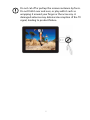
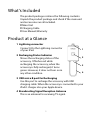
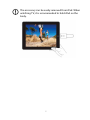
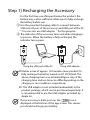
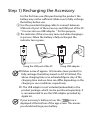
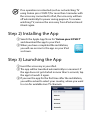
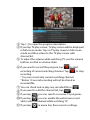
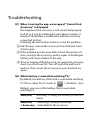
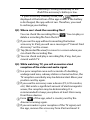
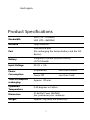
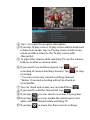
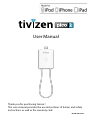
User Manual Thank you for purchasing tivizen ! This user manual provides the use instructions of tivizen and safety instructions as well as the warranty card. ROA-00193A Sometimes the battery of the product will be discharged, even when you purchased the product newly. The battery will also discharge itself, if you do not use the product for a certain period of time. Please make sure that the product has enough remaining battery power when you plug the product to work. In case the battery discharged completely, the app will not work when you plug the product in iPhone/iPad/iPod touch and will show a pop-up message to ask for you to recharge the battery. Caution Note Non-compliance with the instruction may cause damage to the product Useful information that you might consider System Requirements Apple with Lightning connector ▪ iPhone 5, iPhone 5s, iPhone 5c, iPad 4th generation, iPad mini, iPad mini 2, iPad Air, iPod touch 5th generation This app may automatically update in order to enhance the performance of your supported model and to support new features without notice. Depending on the iPhone/iPad/iPod touch model or TV reception conditions, reception of the TV signal may not be stable. 2 Product Features This product is a dedicated accessory to iPhone/iPad/iPod touch with Lightning connector which supports the followings: * Hereafter, the “iPhone/iPad/iPod touch” is referred to as an “iPad”, and the product will be referred to as an “accessory”. Watching Live TV Program The accessory is a mobile TV receiver that enables you to watch Live TV program on your iPad. To enjoy Live TV, you need to install the app (tivizen pico 2 DVB-T) on your iPad. Providing Program Guide (EPG) Info Further to the Live TV channel list that is currently available, the product also provides detailed TV program information. Support Web Browser You can enable the web browser while watching TV, or add or edit a bookmark. Various View Modes You can select a preferred view mode for watching the program. 3 Do not cut off or pull up the receiver antenna by force. Do not fold it over and over, or play with it such as wrapping it around your finger or the accessory. A damaged antenna may deteriorate reception of the TV signal, leading to product failure. 4 What's Included The product package contains the following contents. Unpack the product package and check if the main unit and accessories are all included. Main Unit Charging Cable User Manual/Warranty Product at a Glance 1 Lightning connector Connect it to the Lightning connector of your iPad. 2 Recharging Status Indicator Shows the recharging status of the accessory. It flashes red while recharging the accessory; when the accessory is fully recharged, it turns green. However, it does not turn on in any other condition. 1 2 3 4 3 USB micro B port for Recharging Use this port to recharge the accessory with USB charging cable. When the accessory is connected to your iPad it charges also your Apple device. 4 Broadcasting Signal Reception Antenna This is an antenna for receiving TV signal. 5 The accessory can be easily removed from iPad. When watching TV, it is recommended to hold iPad on the body. 6 Step 1) Recharging the Accessory For the first time use after purchasing the product, the battery may not be sufficient. Make sure to fully recharge the battery before use. ① Use the provided charging cable to connect between USB micro B port of the accessory and USB port of the PC. * You can also use USB adaptor 1 for this purpose. ② The indicator of the accessory turns red while charging is in process. When the battery is fully recharged, the indicator turns green. Using the USB port of the PC Using USB adaptor 1 It takes a max of approx. 120 minutes (new product) to fully recharge the battery based on DC 5V 500mA. The above charging time is an estimated figure. Any of the charging time and use time can differ depending on the charging or use conditions, respectively. 1: The USB adaptor is not included (unbundled) in the product package, which can be purchased separately. It is recommended to use the USB adaptor provided by Apple Inc. If your accessory’s battery is low, the icon is displayed at the bottom of the app screen. This means you should recharge your battery. 7 Step 1) Recharging the Accessory For the first time use after purchasing the product, the battery may not be sufficient. Make sure to fully recharge the battery before use. ! Use the provided charging cable to connect between USB micro B port of the accessory and USB port of the PC. * You can also use USB adaptor 1 for this purpose. " The indicator of the accessory turns red while charging is in process. When the battery is fully recharged, the indicator turns green. Using the USB port of the PC Using USB adaptor 1 # It takes a max of approx. 120 minutes (new product) to fully recharge the battery based on DC 5V 500mA. The above charging time is an estimated figure. Any of the charging time and use time can differ depending on the charging or use conditions, respectively. # 1: The USB adaptor is not included (unbundled) in the product package, which can be purchased separately. It is recommended to use the USB adaptor provided by Apple Inc. If your accessory’s battery is low, the icon is displayed at the bottom of the app screen. This means you should recharge your battery. If no operation is instructed (such as not watching TV using tivizen pico 2 DVB-T) for more than 5 minutes with the accessory connected to iPad, the accessory will turn off automatically for power saving purpose. To resume watching TV, remove the accessory from iPad and insert it back again. Step 2) Installing the App ① Search the Apple App Store for “tivizen pico 2 DVB-T” and download the app to your iPad. ② When you have completed the installation, you will see an icon to the app on your iPad as shown. Step 3) Launching the App ① Insert the accessory in your iPad. ② The app will be launched automatically in a moment. If the app does not get started in more than 5 seconds, tap the app to launch it again. ③ If you run the app for the first time after the installation, you will be asked to select your country, where you want to scan for available Live TV channels. 8 * The next time you run the app, the above step will be skipped. * When you move to other city or region, you may have to scan channels again since each city or region may use different frequencies for the same channels. ④ If you select the country and tap the [Scan], the app starts to scan for all available channels in your selected country and local area. ⑤ Wait until the channel scanning is completed. When done, tap [Done]. ⑥ After scanning, the channel list with the information will be displayed on the screen and the first channel will be shown. * If the program is not displayed properly or nothing is >[Channels] and try the displayed, move to channel scan again. Step 4) Watching TV ① If you insert the accessory in your iPad, the app will launch automatically and the last played channel will be displayed. ② Select a desired channel from the channel list. 9 ③ Tap [ i ] to open the program description. ④ If you tap TV play screen, TV play screen will be displayed in full screen mode. Tap on TV play screen in full screen mode, and then return to the TV play screen with channel list. ⑤ To adjust the volume while watching TV, use the volume buttons on iPad or volume slider. ⑥ If you want to record the program, tap to start to stop recording of current watching channel. Tap recording. * You can record only current watching channel. * Below 10 second recording will not be stored as recorded file. . ⑦ You can check and re-play any recorded file in . ⑧ If you want to edit the channel list, tap , you can search or reserve TV programs. ⑨ If you tap , you can enable the web browser and ⑩ If you tap add or edit a bookmark while watching TV. in menu bar, then move to settings. ⑪ If you tap 10 Troubleshooting Q1) When I running the app, a message of “Cannot Find Accessory” is displayed. This happens if the accessory is not connected properly to iPad, or if you do nothing for more than 5 minutes (1 minute if the battery is insufficient) with the accessory connected to iPad. Following the instructions below to solve the problem. ① Exit the app, remove the accessory from iPad and insert it back again. ② If the problem persists even after at least three times of tries, recharge the accessory and try again. A discharged battery will cause a failure of the app. ③ This can happen if iPad does not recognize the accessory due to an error from iOS. Turn off your iPad and turn it back on. Then, insert the accessory in your iPad and try again. Q2) Which battery is used while watching TV? By default, the battery of the iPad is used while watching TV. This is called “Host” mode. In > [tivizen] > [Use Battery], you can set the battery that is used while watching TV. Host(iOS) Watching TV using the battery of the iPad (Host). Host(iOS) - Watching TV using the battery + Accessory embedded in the accessory. 11 - Watching TV using the battery of the iPad if the accessory’s battery is low. * If your accessory’s battery is low, the icon is displayed at the bottom of the app screen. If the battery is discharged, the app will not run. Therefore, you need to recharge your battery. Q3) Where can I check the recording files? . You can play or You can check the recording file in delete a recording file from the list. ① If you run the app without connecting the tivizen accessory to iPad, you will see a message of "Cannot Find Accessory" on the screen. ② Tap [Recorded file view] to move to a screen where you can check the recording files. ③ You can check and play a recording file, if any, but you cannot watch TV. Q4) While watching TV, you will encounter a bad reception of the video and audio signal. ① In a poor reception area such as inside of a building, underground area, subway station or tunnel section, the TV reception sensitivity may be deteriorated. Move your position and try again. ② If you use the accessory near a device (PC, LCD monitor, etc.) that emits a significant amount of electromagnetic waves, the reception may be deteriorating. It is recommended to keep your phone at least 30cm away from those devices. of the app, select a country and try the ③ From channel scanning again. ④ If you encounter a poor reception of the TV signal, exit the app, remove the accessory from iPad and insert it 12 back again. Product Specifications Bandwidth VHF (170 – 240MHz) UHF (470 – 860MHz) Antenna Loop Antenna Port USB Micro B port (for recharging the tivizen battery and the iOS device) Battery Integrated Lithium-polymer Battery (3.7V 250mAh) Input Voltage DC 5V ± 5% Power Consumption In operation Less than 340mW Power Off Less than 1mW Time to complete recharging Approx. 120 min. Operation Temperature 0-40 degrees in Celsius Dimension 51.6x30x12 mm (WxDxH) (inc. protrusion, exc. antenna) Weight Approx. 20g (only the accessory) 13 Safety Instructions The safety instructions are provided for your safety to prevent a possible physical damage from an accident and damage to the product. Please read them through carefully before starting the product, and keep it in a safe place for later use. Warning: Non-compliance with the instruction may cause a severe physical injury, leading to death. Keep the product and charging cable away from a heating source. - Otherwise, it may cause an explosion, or product deformation or failure. Do not use it in a place of high temperature or humidity. - High humidity or liquid may adversely affect the component parts including the circuits of the product. - The product is equipped with an integrated lithium-ion battery. Using the product in a high temperature/humidity may cause an explosion of the battery or product failure. - Recharging the battery in a high temperature will be interrupted by the protective circuit for safety purpose. - If the product gets wet with water or liquid, the label turns color. (The label is attached inside of the product) This case is not covered by the warranty. Keep the contact points (metal terminals) of the component parts away from a conductive object. Do NEVER impact on the product with a sharp-edged object. - Otherwise, short-circuit may cause a risk of explosion. Use only the provided cable for recharging the battery along with the certified charger by Apple Inc. And do NEVER use them for other purposes than charging the battery. - Otherwise, it may cause a shortened product life or explosion, or damage to the product itself. The above case is not covered by the warranty. Keep the product out of reach of infants, children or pets. - Putting the product into mouth or using a damaged product may affect your physical body, causing electric shock or exposure to the electromagnetic wave. - Keep the product out of children's reach lest that the cover (including the antenna) or any other part should be put into the child's mouth. Otherwise, the child may be suffocated. 14 Do not dismantle or impact on the product by yourself. - Otherwise, it may cause electric shock or fire. Do not use the product in a restricted area such as in the hospital or on the airplane. - Otherwise, it may affect the electric devices of the hospital or airplane. Do not use the product while walking or driving a vehicle. - Otherwise, it can distract your attention, causing a risk of accident. - On board of a vehicle, do not put the product near the air-bag system. A blown air bag may cause a serious injury. Do not use the product and unplug the power cable when it thunders, has lightning or storms badly. - A stroke of lightning may cause a serious injury or fire. When recharging the battery, plug the cable firmly. Secure both accessory and charging cable when removing them. - A short-circuited wire may cause an explosion or fire. - Do not impact on the charging cable, and do not use the cable if it's loose. A damaged cable may cause a fire or electric shock. - Do not put a heavy object on the product or the charging cable, or do not let any of them be pinned under a device. Otherwise, it may cause a fire or electric shock. - Do not plug the power cable of the product if it's wet, and do not touch the product or charging cable with wet hand. - If you don't intend to use the product, remove the charging cable and keep it for later use. Do not use the product in a place of risk of explosion. - Otherwise, it may affect the high-frequency devices nearby. It is safer to turn off the power when refueling your vehicle. Do not use chemical substances (alcohol, benzene, thinner, etc) or detergent for cleaning purpose. Otherwise, it may cause a fire. - Use a soft cloth to wipe out the product gently. Caution: Non-compliance with the instruction may cause a slight injury or damage to the product. Do not put force on the antenna. - A broken antenna may disable the reception of the TV signal. An intentional break of the antenna is not covered by the warranty. 15 - If you carry the product with iPad connected, the antenna may get loose and fall, causing to be damaged. - Do not apply force to the antenna. Otherwise, the antenna may get broken or loose, causing to be damaged. - Do not touch the antenna by hand, and do not get it in contact with your body. An extended use of the product may generate excessive heat, causing to deteriorate the performance. Be sure to hold your iPad while in connection with the product. - The product inserted in iPad can get loose easily. So be sure to hold iPad when using the product in connection with iPad. - When removing the product that is inserted in iPad, take the product by the body. If not using the product for an extended time, fully recharge the battery and keep it in a safe place in room temperature. - If you use the product that has been kept for while, it is better to recharge the battery before use. However, recharging may not work in too high or too low temperature. Note that a fully recharged product can shorten the use time due to a lowered voltage with time. Keep the product away from dust or heating source. - When cleaning the product, remove the charging cable and dust off the connector pins. - Keep the product away from impurities such as sand, dust, cigarette ash, etc. Do not drop the product. Protect it from an external impact. - Otherwise, it may cause damage to the product, specifically the internal circuit board. Depending on your constitution, you may have an allergic reaction. - Painting the product may cause deformation of the appearance or operational failure. If you have an allergic reaction from peeled-off coating, remove the product (if connected to iPad) and consult with a doctor immediately. Take caution not to cause people inconvenience in a public place. - Note that the product may affect very few of the surrounding electronic/electric devices. Do not connect it to other products in different ways that are not specified in the user manual. 16 Warranty This product is manufactured and shipped under strict quality control and tests. The icube Corporation guarantees the product as below: If you encounter a problem or product failure, carry the purchase receipt and warranty card with you and contact the retailer for service repair. (If this is not available, contact the nearest customer center.) Product Name tivizen pico 2 Model Name iEU-200 Serial No. Purchase Date MM DD YY Name Telephone Address Retailer Call Center Manufacturer icube Corp. ■ Warranty Period: One (1) year from the date of purchase You must carry and present the purchase receipt and warranty card to the retailer or customer center if you want to repair the product by the warranty. If the purchase date is not confirmed, we calculate the warranty period based on the initial shipment date. 17 ■ Free of charge You can get free-of-charge service repair if you encounter a problem in normal use conditions within the warranty period. ■ Chargeable If the warranty period expires, or if the problem is considered chargeable even within the warranty period. 1. Mistake by the customer If the customer dismantled or modified the product at will, or if the problem is caused by a customer mistake (fall, getting wet, etc) Intentional or unintentional mistake by the customer If the problem is caused by a technician who is not certified by the manufacturer or customer center If the problem is caused by a failure of the connected device to the product (charger, etc) If the problem is caused by a broken antenna (A broken antenna is applicable to chargeable service) If the problem is caused by use of consumables or accessories that are not specified by the Company If the problem is caused by an error of the power source itself 2. Natural disaster (fire, flood, salt damage, lightning stroke, etc) 3. If an expendable part expires (battery, connection terminals, labels, etc) 4. If the problem is caused by non-compliance with the "Cautions" section of the user manual 5. A request for service repair will charge you with service fee if the product is found not defective. ■ When purchasing the product, fill the purchase date and retailer name in the warranty card and be sure to get signature of the retailer. 18 19 Product Disposal You should replace the tivizen battery only with a battery pack designed for tivizen. Caution: Risk of explosion if battery is replaced by an incorrect type. Dispose of used batteries according to their instructions. Do not Short circuit, disassemble or expose the battery to fire or water. Keep battery out of the reach of children. Disposal and Recycling Information When this product reaches its end of life, please dispose of it according to your local environmental laws and guidelines. European Union-Disposal Information The symbol means that according to local laws and regulations your product should be disposed of separately from household waste. When this product reaches its end of life, take it to a collection point designated by local authorities. Some collection points accept products for free. The separate collection and recycling of your product at the time of disposal will help conserve natural resources and ensure that it is recycled in a manner that protects human health and the environment. 20 If no operation is instructed (such as not watching TV using tivizen pico 2 DVB-T) for more than 5 minutes with the accessory connected to iPad, the accessory will turn off automatically for power saving purpose. To resume watching TV, remove the accessory from iPad and insert it back again. Step 2) Installing the App ! Search the Apple App Store for “tivizen pico 2 DVB-T” and download the app to your iPad. " When you have completed the installation, you will see an icon to the app on your iPad as shown. Step 3) Launching the App ! Insert the accessory in your iPad. " The app will be launched automatically in a moment. If the app does not get started in more than 5 seconds, tap the app to launch it again. # If you run the app for the first time after the installation, you will be asked to select your country, where you want to scan for available Live TV channels. * The next time you run the app, the above step will be skipped. * When you move to other city or region, you may have to scan channels again since each city or region may use different frequencies for the same channels. $ If you select the country and tap the [Scan], the app starts to scan for all available channels in your selected country and local area. % Wait until the channel scanning is completed. When done, tap [Done]. & After scanning, the channel list with the information will be displayed on the screen and the first channel will be shown. * If the program is not displayed properly or nothing is >[Channels] and try the displayed, move to channel scan again. Step 4) Watching TV ! If you insert the accessory in your iPad, the app will launch automatically and the last played channel will be displayed. " Select a desired channel from the channel list. # Tap [ i ] to open the program description. $ If you tap TV play screen, TV play screen will be displayed in full screen mode. Tap on TV play screen in full screen mode, and then return to the TV play screen with channel list. % To adjust the volume while watching TV, use the volume buttons on iPad or volume slider. & If you want to record the program, tap to start to stop recording of current watching channel. Tap recording. * You can record only current watching channel. * Below 10 second recording will not be stored as recorded file. . ' You can check and re-play any recorded file in . ( If you want to edit the channel list, tap , you can search or reserve TV programs. ) If you tap , you can enable the web browser and * If you tap add or edit a bookmark while watching TV. in menu bar, then move to settings. + If you tap - Watching TV using the battery of the iPad if the accessory’s battery is low. * If your accessory’s battery is low, the icon is displayed at the bottom of the app screen. If the battery is discharged, the app will not run. Therefore, you need to recharge your battery. Q3) Where can I check the recording files? . You can play or You can check the recording file in delete a recording file from the list. ! If you run the app without connecting the tivizen accessory to iPad, you will see a message of "Cannot Find Accessory" on the screen. " Tap [Recorded file view] to move to a screen where you can check the recording files. # You can check and play a recording file, if any, but you cannot watch TV. Q4) While watching TV, you will encounter a bad reception of the video and audio signal. ! In a poor reception area such as inside of a building, underground area, subway station or tunnel section, the TV reception sensitivity may be deteriorated. Move your position and try again. " If you use the accessory near a device (PC, LCD monitor, etc.) that emits a significant amount of electromagnetic waves, the reception may be deteriorating. It is recommended to keep your phone at least 30cm away from those devices. of the app, select a country and try the # From channel scanning again. $ If you encounter a poor reception of the TV signal, exit the app, remove the accessory from iPad and insert it