1
38
7.2
Firmware Update
From your computer via RS-232 port
It is possible to transfer a new firmware to the digital receiver
from your computer by connecting them with a RS-232 cable.
You need TFD-Down, a firmware transfer utility for this, which
is available from the website, http://www.i-topfield.com.
To update the firmware with this method, perform the following steps:
1. Download a new firmware applicable to
your digital receiver from the Topfield
website.
2. Turn off the digital receiver.
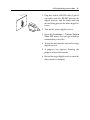
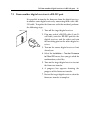
3. Plug one end of a RS-232 cable (9 pin Dsub cable) into the RS-232 port on the
digital receiver, and the other end into the
matching port on your computer.
4. Run TFD-Down.
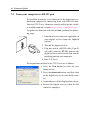
The instructions on how to use TFD-Down are as follows:
1. Press the Find button to select the new
firmware file.
2. Press the download button, and then turn
on the digital receiver to start the file transfer.
3. A countdown will be displayed on screen
4. Restart the digital receiver when the file
transfer is complete.