1
ENG
User’s Manual
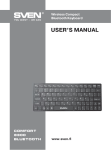
COMfort 8500
Bluetooth
Congratulations on your purchase of the Sven Wireless Keyboard!
Please read this User’s Manual before using the unit and retain this User’s Manual in a safe place for
future reference.
COPYRIGHT
© 2014. SVEN PTE. LTD. Version 1.0 (V 1.0).
This Manual and information contained in it are copyrighted. All rights reserved.
TRADEMARKS
All trademarks are the property of their legal holders.
NOTICE OF RESPONSIBILITY RESTRICTION
Despite the exerted efforts to make this Manual more exact, some discrepancies may occur. The
information in this Manual is given on “as is” terms. The author and the publisher do not bear any
liability to a person or an organization for loss or damage which has arisen from the information
contained in this Manual.
UNPACKING
Unpack the device carefully. Make sure there are no accessories left in the box. Check up the
device for damage; if the product was damaged during transportation, address the firm which
carried out the delivery; if the product functions incorrectly, address the dealer at once.
CONTENTS
1. SPECIAL FEATURES ...............................................................................
2. PACKAGE CONTENTS ..............................................................................
3. SYSTEM REQUIREMENTS .........................................................................
4. DESCRIPTION ........................................................................................
5. INSTALLATION .......................................................................................
6. BUILT-IN BATTERY CHARGING ...................................................................
7. DESCRIPTION OF SHORTCUT KEYS FUNCTIONS ..............................................
8. TROUBLESHOOTING ............................................................................
9. TECHNICAL SPECIFICATIONS ...................................................................
2
2
2
2
2
3
3
4
4
Technical support is on www.sven.fi
1