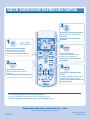
1
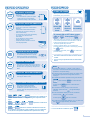
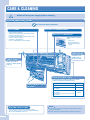
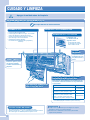
CARE & CLEANING
Switch off the power supply before cleaning
e-ion AIR PURIFYING SYSTEM
Do not touch during operation
e-ion FILTERS
ACTIVE e-ion POWER MODULE
• Clean the filters regularly.
• Wash/rinse the filters gently with water to avoid
damage to the filter surface.
• Dry the filters thoroughly under the shade, away
from fire or direct sunlight.
• Replace any damage filter.
Part no.: CWD00K1001 (Left and Right)
ACTIVE e-ion GENERATOR
Clean with dry cotton
bud.
• Active e-ion
generator cleaning is
recommended every 6
months.
INDOOR UNIT
Wipe the unit
gently with a
soft, dry cloth.
FRONT PANEL
Raise and pull to
remove. Wash gently
and dry.
Remove
AUTO OFF/ON BUTTON
To operate the air-conditioner when the remote
control is misplaced or malfunctioned.
AIRFLOW DIRECTION
LOUVER
Action
Press once.
Mode
Automatic
Press and hold until you hear one beep,
then release.
Cooling
Press and hold until you hear one beep
then release.
Press and hold until you hear two beeps
then release.
Heating
• To turn off, press the AUTO OFF/ON button again.
WASHING INSTRUCTIONS
• Do not use benzene, thinner or scouring powder.
• Use only soap ( pH7) or neutral household detergent.
• Do not use water hotter than 40°C.
6
Hints
■ Clean the filter regularly for best performance and to reduce
power consumption.
■ Please consult your nearest dealer for seasonal inspection.