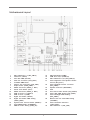
1
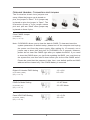
E. To activate the front mic.
For Windows® XP / XP 64-bit OS:
Select “Mixer”. Select “Recorder”. Then click “FrontMic”.
For Windows® 7 / 7 64-bit / VistaTM / VistaTM 64-bit OS:
Go to the “FrontMic” Tab in the Realtek Control panel. Adjust “Recording Volume”.
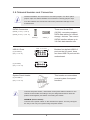
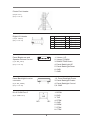
Chassis Fan Connector
(3-pin CHA_FAN1)
(see p.1 No. 6)
Please connect the fan cable to the fan connector and match the black wire to the ground pin.
CPU Fan Connector
(4-pin CPU_FAN1)
(see p.1 No. 4)
Please connect the CPU fan
cable to the connector and
match the black wire to the ground pin.
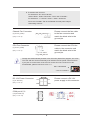
Though this motherboard provides 4-Pin CPU fan (Quiet Fan) support, the 3-Pin CPU fan still can work successfully even without the fan speed control function. If you plan to connect the 3-Pin CPU fan to the CPU fan connector on this motherboard, please connect it to Pin 1-3.
Pin 1-3 Connected
3-Pin Fan Installation
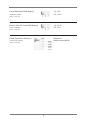
DC 12V Power Connector
(4-pin DC12V1)
(see p.1 No. 3)
12V
12V
GND
GND
COM port 4,5,6
(10-pin COM4,5,6)
(see p.1 No. 19)
6
Please connect a DC 12V power supply to this connector.