1
CONTENTS
Contents
Product Overview .................................................................................................................................................... 5
About the MultiConnect Cell Modem........................................................................................................................... 5
Documentation ........................................................................................................................................................... 5
Descriptions of LEDs...................................................................................................................................................... 5
Side Panels .................................................................................................................................................................... 7
Specifications ................................................................................................................................................................ 8
Power Draw MTC-G3 .................................................................................................................................................... 9
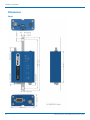
Dimensions.................................................................................................................................................................. 10
Serial ......................................................................................................................................................................... 10
USB............................................................................................................................................................................ 11
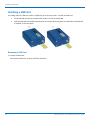
Installing a SIM Card ................................................................................................................................................... 12
Removing a SIM Card................................................................................................................................................ 12
Installing and Using the Device .............................................................................................................................. 13
Installing the Device.................................................................................................................................................... 13
Placing Serial Devices in Power Save Mode.............................................................................................................. 13
USB Cable Recommendations................................................................................................................................... 14
Mounting Device to Flat Surface................................................................................................................................. 14
Antenna and Activation Information...................................................................................................................... 15
Antenna....................................................................................................................................................................... 15
Antenna Information................................................................................................................................................... 15
Antenna Requirements/Specifications ..................................................................................................................... 15
Antenna System Cellular Devices................................................................................................................................ 15
Account Activation for Cellular Devices ..................................................................................................................... 15
Device Phone Number ................................................................................................................................................ 16
Using Linux ............................................................................................................................................................ 17
Shell Commands.......................................................................................................................................................... 17
Testing Serial Ports.................................................................................................................................................... 17
Create a PPP Connection ............................................................................................................................................ 17
Example..................................................................................................................................................................... 17
Configuring and Communicating with Your Device................................................................................................. 19
Interacting with Your Device Overview ...................................................................................................................... 19
Before You Begin......................................................................................................................................................... 19
Using Command Mode and Online Data Mode.......................................................................................................... 19
Verifying Signal Strength............................................................................................................................................. 20
Example .................................................................................................................................................................... 21
Checking Network Registration................................................................................................................................... 21
Sending and Receiving Data........................................................................................................................................ 21
MultiConnect® Cell GPRS MTC-G3 User Guide
3