1
Operations
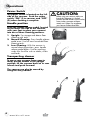
Power Switch
The power switch is located on the left
side of the vacuum. Push the rocker
switch “ON” (l) to vacuum, and “OFF”
(O) when cleaning is complete.
Handle position
Press the handle release pedal, located
on the lower left side of the vacuum,
with your foot to place your vacuum
into one of three cleaning positions.
1.Upright- For storage and above floor
cleaning with tools.
2. Normal Cleaning- Press handle release
pedal once. Use for most household floor
cleaning tasks.
3. Low Cleaning- With the vacuum in
normal cleaning position, press handle
release pedal again. Use for reaching
under low furniture such as tables, chairs
and beds.
caution:
Before using your vacuum, make sure
that the dirt container is in locked
position and that all filters (inner circular,
outer circular, pre-motor and postmotor) are in place. Do not operate
your vacuum without these filters.
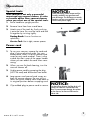
Transporting cleaner
To move your vacuum from room to
room, put the handle in the upright
position, tilt the vacuum back on its rear
wheels and push forward.
The vacuum can also be moved by
using the carry handle.
1
6
www.bissell.com
2