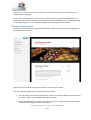
1
WordPress User Guide
For WordPress 3.4 and above
19th June 2012
Version 3.4
User Guide for WordPress 3.4+ | speed-net.co.uk | 01832 280 032
Page 1
Table of Contents
WordPress User Guide.......................................................................................................................... 1
Table of Contents .......................................................................................................................... 2
Introduction .......................................................................................................................................... 4
Guide Method ................................................................................................................................... 4
Using WordPress................................................................................................................................... 5
First Concepts.................................................................................................................................... 5
Great Things About WordPress......................................................................................................... 5
Getting Started .................................................................................................................................. 6
Navigating Around the Administration Panel ................................................................................... 9
The Tool bar................................................................................................................................. 12
Screen Options ............................................................................................................................ 12
Understanding the difference between pages and posts ............................................................... 13
Adding and Editing Content ............................................................................................................ 14
Formatting text using the rich editor .......................................................................................... 14
Formatting text using the HTML editor ....................................................................................... 16
Writing a post .............................................................................................................................. 17
Adding links to your posts ........................................................................................................... 18
Opening a link in a new window vs. using the current window .................................................. 20
Adding images to your posts ....................................................................................................... 20
Adding a gallery of images .......................................................................................................... 27
Adding video clips to your posts ................................................................................................. 31
Setting posting and page options ................................................................................................ 33
Post Formats................................................................................................................................ 34
Saving & publishing your post or page ........................................................................................ 35
Creating and managing your categories...................................................................................... 37
Writing Pages and Structuring Them .............................................................................................. 42
Writing Pages............................................................................................................................... 42
Publishing Content Created by Other Contributors........................................................................ 47
Moderating Comments ................................................................................................................... 47
Managing Links................................................................................................................................ 50
Creating link categories ............................................................................................................... 51
Creating links ............................................................................................................................... 52
Administering WordPress ................................................................................................................... 55
Managing Users............................................................................................................................... 55
Adding users ................................................................................................................................ 56
Remove users .............................................................................................................................. 56
Edit the details of a user .............................................................................................................. 57
Manage the content created by a user ....................................................................................... 59
Managing Options and Settings ...................................................................................................... 60
Managing the Look & Feel of your website .................................................................................... 61
Appearance ................................................................................................................................. 61
Theme Customiser....................................................................................................................... 62
Widgets........................................................................................................................................ 63
Custom Headers .......................................................................................................................... 66
Custom Backgrounds ................................................................................................................... 68
User Guide for WordPress 3.4+ | speed-net.co.uk | 01832 280 032
Page 2
Creating Custom Menus.................................................................................................................. 75
Defining a Menu .......................................................................................................................... 75
Adding Items to a Menu .............................................................................................................. 77
Deleting a menu item .................................................................................................................. 78
Customising Menu Items ............................................................................................................. 78
Creating multi-level menus ......................................................................................................... 79
The Menu in Action ..................................................................................................................... 81
Site Tips ............................................................................................................................................... 82
Structuring a Site ............................................................................................................................. 82
Engaging with visitors ..................................................................................................................... 82
Search Engines ................................................................................................................................ 83
WordPress As A Service (WAAS) ......................................................................................................... 84
Going Further...................................................................................................................................... 85
Do you need something special? .................................................................................................... 85
Beware of strangers bearing gifts ................................................................................................... 85
All Done! ............................................................................................................................................. 87
User Guide for WordPress 3.4+ | speed-net.co.uk | 01832 280 032
Page 3
Introduction
Welcome to the wonderful world of WordPress, one of the most powerful and expandable content
management systems on the internet, being the system behind more than 55 million websites it is
also one of the most widely supported in the world.
This guide is to help you, the administrator of a shiny new WordPress website, understand the
system and learn how to use it to its full potential.
Guide Method
This guide covers the basics in each section, trying to take a progressive approach so that each
section builds on knowledge and skill acquired earlier in the guide.
There are also some exercises here and there which can help you to practice your new skills.
Please note that this is a guide for people learning about WordPress – it’s not a complete manual.
User Guide for WordPress 3.4+ | speed-net.co.uk | 01832 280 032
Page 4
Using WordPress
First Concepts
WordPress (WP) has really moved the game forward for non-experts who want to maintain their
own websites. Previously they had to either write their sites with clunky, proprietary site-builder
software, or use expensive and difficult to learn packages like Dreamweaver which could require an
understanding of often difficult to grasp languages and code such as HTML and CSS. With
WordPress you have the system to manage the content along with easy to install themes that look
after the visual presentation of the site. These can be paid for, or downloaded for free from sites
such as http://wordpress.org or theme clubs such as http://woothemes.com, http://ithemes.com
and more.
What WordPress also does is to make possible the building of a well structured website or blog
which makes the job of search engines easier. It provides an excellent platform for building
everything from simple blogs, to significant news platforms like http://telecoms.com . The biggest
limit is imagination, and the beauty of this system is that you get to spend less time fighting your
website and more time on being creative.
Great Things About WordPress
1.
2.
3.
4.
5.
6.
7.
It's easy to learn
It's stable
It's used by millions of people around the globe
It scales well
It's simple, yet flexible
Developers love working with it
It has a huge range of free and premium themes which can add functionality and style to
your site
8. It has a vast selection of plugins that can add new features and tricks to your site
9. If you do learn html, css or php you can extend what you’ve got
As you learn more about WordPress you’ll learn a lot about what it can (and can’t) do. But work
within its relatively few limitations and you have a powerful and flexible friend managing your
website.
User Guide for WordPress 3.4+ | speed-net.co.uk | 01832 280 032
Page 5
Getting Started
When you get WordPress installed you won't have any content in your site beyond what comes as
vanilla – which is a single category, a set of blog links you probably don’t want, a page and a post.
So the first thing to do is: Log In!
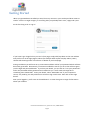
If you haven’t got a login link on your site’s front page, simply add /wp-admin to the root address
and you’ll arrive at the login page as above (for example www.mysite.com/wp-admin). Many
themes will show login links in the footer or sidebar of your homepage.
During installation you will have set up a username and been told of your password which will have
been auto-generated. Alternatively, if someone installed the site for you he or she will have given
you the login and password details. If you lose your details, you can click on “Lost your password?”
and a new password will be generated and e-mailed to you. You’ll need to change this to
something more memorable. Enter your details, select “Remember me” if your computer is
secure, only used by you and you’d like not to have to log in each time. Then click on the Login
button.
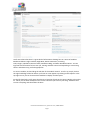
Now you're logged in, you'll arrive at the Dashboard – a screen that gives a range of information
about your website:
User Guide for WordPress 3.4+ | speed-net.co.uk | 01832 280 032
Page 6
You’ll notice here that there’s a great deal of information showing here in a series of modules.
WordPress delivers eight modules, Right Now, Recent Comments, Incoming
Links, Plugins, QuickPress, Recent Drafts, WordPress Blog, and Other WordPress News. You can
organise this information to best suit you, moving modules around and expanding or contracting
them in whichever way you find appropriate.
To move a module, click and drag the title bar of the module around. To roll it up, simply click on
the right hand edge of the bar where you’ll see an arrow appear. By clicking Screen Options in the
top right corner you can choose which modules to display and the layout.
On the left hand side, you’ll notice that there’s a large list of links such as Posts, Media, Links and so
on. What you see here will depend a lot on the user level you have on your blog. Administrators
can see everything and subscribers the least.
User Guide for WordPress 3.4+ | speed-net.co.uk | 01832 280 032
Page 7
QUICK EXERCISES:
1. Try moving the modules around – for example, place
Recent Comments at the bottom of the right hand column.
What happened?
2.
Extend the QuickPress module – what do you think this
is for? Try writing something there. What happened?
3. Arrange the entire page in a way you feel would be most
useful to you. Experiment – you can always change this page
again in the future.
User Guide for WordPress 3.4+ | speed-net.co.uk | 01832 280 032
Page 8
Navigating Around the Administration Panel
Navigation of the admin panels in WordPress is pretty straightforward, but it can feel like there is a
bewildering range of options to choose from.
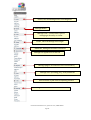
You’ll notice that to the left of the dashboard you have a series of links that you can quickly and
easily click on – these then expand down to show you other sub pages. If you hover your mouse
over a link the sub-pages show as “fly-outs” and you can move your mouse right and click to
navigate to the required sub page. The quick reference overleaf reveals the range of functions,
with a brief explanation alongside.
User Guide for WordPress 3.4+ | speed-net.co.uk | 01832 280 032
Page 9
Create, Edit and Manage Posts and Categories
Manage Media
Manage Links – mostly used if you’re
managing a directory or similar
Create, Edit and Manage static Pages
Moderate, Manage and Delete Comments
Manage the Appearance of the site
Manage plugins to extend the site’s functionality
Manage users (including you), reset passwords
Tools to assist in jobs such as exporting content
Settings that control how the site functions
User Guide for WordPress 3.4+ | speed-net.co.uk | 01832 280 032
Page 10
There’s also an alternative, less screen hungry option which is great for those of you with smaller
monitors – simply click on the Collapse menu button at the bottom of the section to make it
smaller:
When you click it, you will get a smaller icon-only version of the menu. When in this collapsed
mode sub pages again appear as “fly-outs” when hovering the mouse over a link (See Tools link
below):
User Guide for WordPress 3.4+ | speed-net.co.uk | 01832 280 032
Page 11
The Tool bar
Since WP 3.3, the Admin Bar has been renamed as the Tool Bar.
At the top of your WordPress site you will see the tool bar. This is shown when you are logged into
the administration area and website, you can also (optionally) turn it on for when you are viewing
your website. Find this option in under Users/Your Profile:
The tool bar itself provides you with quick access to the administration area in the following ways:
•
•
•
•
•
•
•
WordPress Logo: Quick links to Wordpress.org, version information, credits and official
support forums
Site Name: Shown here as ‘WordPress Sandbox’ with Quick links to the Dashboard, theme
selection, widgets and menus admin areas
Updates: This shows plugin and theme updates that are available – clicking will take you to
the updates admin page
Comments: A link to the comments administration area which will indicate how many
comments are awaiting approval if any
+ New: A dropdown to quickly add content to your site
Edit Post/Page: A link to edit the current Post/Page or any other post type will appear if
you’re logged in and viewing content
The user section (on the right), quick links to your profile editing screen, and logout link
In the above example, we’re using an SEO plugin which has added its own entry to the toolbar –
this shows that not all tool bars will look the same!
Screen Options
One thing that many people don’t notice is the Screen Options drop down in the top right of the
screen, next to the Help drop down.
This is a really useful (and not to say, important!) feature, allowing you to control the amount of
items you can see on a screen. When you click it, a set of options will slide down, much like this
one below:
User Guide for WordPress 3.4+ | speed-net.co.uk | 01832 280 032
Page 12
So if you ever read this guide, or see one online and think “Nope, that tool or field isn’t available to
me” then remember to check if it’s been enabled in Screen Options.
Similarly, if you want to simplify your administration pages, either for yourself or for someone else
who is using the site, then you can choose to do so in order to only concentrate on what really
matters to you.
Understanding the difference between pages and
posts
Before we start working on your site, it’s important to have a clear understanding of the difference
between pages and posts:
Pages are usually those which have a static purpose in life. For example an about page,
résumé page or contact forms. They do not usually contain information about news items,
for example, which are added to the site on a regular basis. Pages are generally defined so
that they are always accessible from the front page. Some people build entire sites with just
Pages – this is especially the case for sites with little need for dynamic content and is very
popular with small businesses who simply want an online brochure.
Posts usually contain semantically and chronographically arranged information – for
example, news reports, event results, and of course blog entries! The semantic structure is
defined by categories and tags, and whilst making it easy for people to navigate your site will
also help search engines to understand the content of your site and so improve the
relevance of search results.
Other Post Types in WordPress plugins and themes may add other post types which look a
bit like Posts or Pages but behave in different ways.
User Guide for WordPress 3.4+ | speed-net.co.uk | 01832 280 032
Page 13
Adding and Editing Content
Rather than go on too much about the concepts above, website structure and methods, sometimes
it’s better to simply get cracking, so let’s start to get some content into the site right away. You’re
now going to go to Posts and add a new one.
WordPress provides a number of tools – for editing, and for image management. It allows you to
easily manage your content with a familiar editing interface. You don’t need to learn HTML – just
the skills you’ve already acquired using word processors like Microsoft Word.
Formatting text using the rich editor
You can easily enter format text using the rich editor if you're familiar with any word processing
packages.
Let's create a news article – just go to Posts and Add New in the left hand toolbar (if you’re writing
a static Page, you go to Pages and Add New instead):
As you can see from the buttons, it’s possible to format text in a number of ways using the buttons
and they’ll be familiar to any user of word processor software. You can also extend the size of the
box by dragging on the bottom right of it.
User Guide for WordPress 3.4+ | speed-net.co.uk | 01832 280 032
Page 14
By default you’ll only see one line of buttons, not the two below – that’s because you need to press
the Advanced Options button (also known as the Kitchen Sink) on the far right to see them.
Un-ordered list
(Bullet points)
Strike-out
Ordered List
Link/Unlink
Italic
Block Quote
Bold
Text
Alignment
More Break
Full-screen Editing
Spell-Check
Show advanced options
(as shown here)
Text
Style
Undo/Redo
Underline
Justify/align
Text
Text Colour
Paste
Text/Paste
Text from
Word
Indent
Left/Right
Help!
Contains lots
of useful
information
Custom
Characters
Remove
Formatting
Don’t forget – if you get stuck, hovering over the buttons will describe what they do, and the short
cut to use them quickly from the keyboard.
Essentially, what you’re working with should be familiar to you – it’s rather like using WordPad or
some other similar low-end word processor.
On the page you’ll also see Tags and Category options. You’ll see a full description of all these
options in Setting Posting and Page Options
User Guide for WordPress 3.4+ | speed-net.co.uk | 01832 280 032
Page 15
Text Styling Notes:
When you’re writing you may have a style guide or content strategy to work with and you should
follow its guidance. If this is your own site, the following will be useful to you when choosing what
text styles to apply in your content:
1. Heading 1 through to Heading 6 – in most themes headings within a post or page will
start at Heading 3 (H3), going down to H6. The higher the value, the more important a
search engine will consider it, but remember that H1 is usually reserved for the site title
at the top of the page, and H2 for the post or page’s title.
2. Use Unordered or Ordered lists for lists that are relatively short, but resist the
temptation to use them for lists of paragraphs – instead, use the Heading styles.
3. Use Bold and Italic in moderation. Do NOT use bold as a substitute for heading styles –
bold is not as important to a search engine.
4. Some themes may override your styling decisions – for example, enforcing alignment,
what an italic actually looks like and so on. You should experiment and test.
5. Most themes will highlight links in a different colour and with hover properties.
6. Many themes will set editor styles so that what you see in the visual editor reflects how
your content will look on the site.
The above tips can also help with search engine optimisation as they give a structure to your
content.
Formatting text using the HTML editor
You can also click on the HTML tab on the editor and input text in HTML – the language that
describes web pages. This is for the more technically inclined and does have the advantage of
making it easier for you to create more sophisticated designs. It’s worth noting that WordPress in
Multisites mode (used on sites such as WordPress.com and Edublogs) will, by default; filter out a lot
of HTML, which will limit your options. You should also make sure that you understand the
importance of closing tags and labelling items correctly.
IMPORTANT: When using the html editor it's essential that you close all tags, or ask WordPress to
do it for you by pressing the 'Close Tags' button. If you don't then your site's layout will be broken
whenever that posting or page is displayed.
IMPORTANT (2): If a page or posting has been written using the html editor then any attempt to
edit that article using the visual rich editor may result in content or formatting being lost. This isn’t
the problem it used to be.
User Guide for WordPress 3.4+ | speed-net.co.uk | 01832 280 032
Page 16
Writing a post
If you are an Editor or Administrator on the site, you have a Publish button. Once pressed the post
becomes available on the website. Before the post is ready, however, you can save it and keep it as
a draft. Since WordPress 2.5, autosave came into place, and since 2.6 you then had a revision
history, making it possible to see changes and revert to older versions of posts and pages.
Let’s make this a short article about launching the website. Place the text below into it the text
box, with the title Our First News:
Today we launched a new website. We'll be producing news and
articles here for your enjoyment.
Scroll back up and press Publish. Your article is on the website!
Now create a couple of articles for testing with – one called “Interesting cats for 2011”, and one
called “WordPress Is Great”. Enter any text you like in the post box. Don’t forget to add tags as
well!
One great new feature of WordPress (from version 3.2) is the distraction-free writing (or Zen)
mode. Click the Full-Screen Editing button and all of the widgets, menus, buttons, and interface
User Guide for WordPress 3.4+ | speed-net.co.uk | 01832 280 032
Page 17
elements fade away to allow you to compose and edit your thoughts in a completely clean
environment conducive to writing, but when you move your mouse to the top of the screen your
most-used shortcuts re-appear. If you’re using one of the latest Browsers try pressing F11 to
remove all browser tabs, menus etc., giving a completely clean space to write!
Adding links to your posts
One of the most important things you can do on your website is to link out to other sites. Those
other sites will appreciate the links, but it also shows where you get your information from. This is
useful to the reader and also a sign of an experienced and skilful blogger who cites his references.
There’s also absolutely nothing wrong with linking within your own site. Of course, it takes a little
extra time, but it’s worth it for the extra engagement.
To create a link in text, highlight the text you wish to link, and then click on the link icon in the
editor:
User Guide for WordPress 3.4+ | speed-net.co.uk | 01832 280 032
Page 18
First, select the text that you want to turn into a link
Then click on the link icon
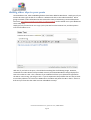
Once the link icon is selected, you have a pop-up dialog:
Simply insert the web address you want to link to in URL, a Title to give meaning to the link and
which will show on hovering over the link, and choose whether or not to open the link in a new
window/tab or stay in the current window/tab.
Once you’re done, click Add Link and the link has been created. It’s always worth testing links in
case a mistake was made.
User Guide for WordPress 3.4+ | speed-net.co.uk | 01832 280 032
Page 19
WordPress also makes it easy to create links internally within your website. Click on the Link to
existing content text and use the search box to find a post or page. When you find the one you
want click on it. The text you highlighted in the editor will now link to that post or page.
Opening a link in a new window vs. using the current window
Many site owners are tempted to open links in new windows, because then it means their site
remains in the browser. However, web convention is that a link should keep you in the current
window – otherwise after an hour of browsing the user could have dozens of windows open that all
need to be closed down. In other words, opening a link in a new window is usually an
inconvenience for a site visitor.
There are some situations where a new window works – usually this is to pop something up where
you just know that the visitor will want to quickly look at and then close – however, in blogging this
is relatively rare, so the best advice is to try and stick to opening links in the current window.
Adding images to your posts
You can easily add images using the standard WordPress tools. Again, like so much of WordPress,
there have been some dramatic improvements in recent versions – including the automatic sizing
of images, thumbnailing and image management.
User Guide for WordPress 3.4+ | speed-net.co.uk | 01832 280 032
Page 20
To add media to your post, you’ll see a number of tools added. You may find that on a lot of
custom installations of WordPress MU you only have the small button that looks like a sun, on the
right. If that’s the case then for most things you can use that image, but you may be limited with
items such as YouTube videos. This is often done for security reasons. If the feature is necessary,
speak to your support team.
If you press the Add Media button
you’ll be presented with a pop-up window:
You can close this window with the small X in the top-right corner, or by clicking outside of the box.
Generally you won’t upload images from a URL and will use the ‘Select Files’ button. Alternatively,
you can drag files into the media uploader ‘drop area’ bounded by the dashes. Once you have
dragged a file over the drop area the boundary dashes will turn green to indicate that you can
‘drop’ the file.
You can upload one or many images. On most servers you’ll be limited to images of 8MB or less in
size, so if you have a very high resolution digital camera you might need to resize the images before
uploading.
To upload multiple images simply select the different images while holding CTRL:
User Guide for WordPress 3.4+ | speed-net.co.uk | 01832 280 032
Page 21
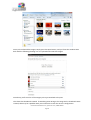
Once you’ve selected the images, simply press the Open button, and you’ll see the window come
back with the following showing in it as it uploads and resizes the images:
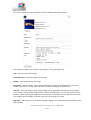
Once done, you’ll see a list of the images you’ve just attached to the post.
This shows the thumbnails created. If something went wrong at this stage and no thumbnails were
created, there may be a problem with your connection or with the server’s configuration.
User Guide for WordPress 3.4+ | speed-net.co.uk | 01832 280 032
Page 22
So – click on ‘Show’ for each image and you’ll get a dialog expanding into place:
This dialogue provides a lot of options and controls – let’s go through them:
Title – this is the title of the image.
Alternative Text- a brief description of the image.
Caption – the caption text for the image.
Description – the description. Not used by all themes, but handy to complete and may be used
further in the future. It’s often just seen when you view an image as an attachment.
Link URL – this is the address of the original image you’ve uploaded, by default, but it also allows
you to create a link to another website here – quickly and effectively. You can also press the three
buttons – None, meaning the image has no link, File URL, the default, and Post URL which will show
your image within the design of the site rather than as an image on its own.
Alignment – This allows you to set how the image is aligned. The small icons show the effect on the
text-wrapping.
User Guide for WordPress 3.4+ | speed-net.co.uk | 01832 280 032
Page 23
Size – you’ll want to choose how big the image is. If it’s not too massive, you can use the Full Size
image – just make sure it fits into the space available. Otherwise, a Thumbnail, by default is a
150x150px square, and Medium is cropped to fit in a 300x300px space. The default thumbnail size
can be changed under Settings | Media.
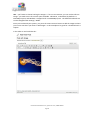
Once you’ve selected your options, you press the Insert into Post button to add the image to where
your cursor was when you chose to Add Images. In this example we’ve gone for a thumbnail with a
caption.
In the editor it now looks like this:
User Guide for WordPress 3.4+ | speed-net.co.uk | 01832 280 032
Page 24
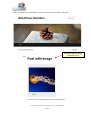
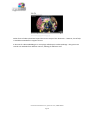
And if you press the preview button, you can see that on the website, it looks like:
New post with an image
imported into it
User Guide for WordPress 3.4+ | speed-net.co.uk | 01832 280 032
Page 25
If you click on the picture within the visual editor you’ll see two icons appear as shown to the right,
one a red circle with a line, and another a little panorama. The red circle is for deleting the image,
and the panorama (which is mostly used only by advanced users) allows you to change some
settings in the image, but without actually changing the attachment details.
After uploading, if you forgot to add images to a post you can still press the Add Images button and
then click on the Gallery tab. In there you can see all images attached to this post, and insert them
individually.
User Guide for WordPress 3.4+ | speed-net.co.uk | 01832 280 032
Page 26
Adding a gallery of images
One new feature that came with WordPress 2.5 was galleries – this allows you to present a grid of
image thumbnails in a post or page which people can click on to enlarge.
To insert a gallery into a post, you can upload a number of images (which are then attached to this
post), click the Save All Changes button in the bottom left-hand corner and then click on the
Gallery tab:
From here, you can adjust the order by dragging and dropping, insert the individual images into the
post or, insert a gallery of attached images.
To insert a gallery, click on ‘Insert gallery’ and the gallery graphic will be inserted into your post:
User Guide for WordPress 3.4+ | speed-net.co.uk | 01832 280 032
Page 27
Image Gallery graphic
User Guide for WordPress 3.4+ | speed-net.co.uk | 01832 280 032
Page 28
Now press the preview button and see how the gallery looks on the website. Note I’ve changed the
standard thumbnail size to 150 x 150 under Settings | Media in the Dashboard in order to improve
visual appearance.
User Guide for WordPress 3.4+ | speed-net.co.uk | 01832 280 032
Page 29
How much space you have to place and size images and galleries will, to a large extent, be
controlled by which WordPress theme is in use. You may not have much control if you’re using a
corporate theme. Here I’m using the standard WordPress 3.3 "Twenty Eleven" theme. I’ve added
more images into the gallery and changed to a four column layout – you may have noticed when
you added the gallery there was an option for the number of columns.
User Guide for WordPress 3.4+ | speed-net.co.uk | 01832 280 032
Page 30
Adding video clips to your posts
Since WordPress 2.9, video embedding facilities have been added to WordPress. Simply put, all you
need to do now is get the link for a video on a website and click on the video link button. We’re
going to embed a video called Dot that was released as a way of advertising a new mobile phone.
The link is http://www.youtube.com/watch?v=olPDrqC2MGM and to embed it into your WordPress
site is really easy.
Simply put, all you need to do is to copy (ctrl+c) the URL from the browser bar, and then paste it
into the text editor as so:
And now, if you look at the post, it should look something like the following image: However,
sometimes the video doesn’t always embed correctly and instead WordPress simply displays the
URL to the video as a link. This is because if you embed a link from your clipboard as opposed to
the URL as a text string, you will get a link. If you do experience the problem then one way to work
around this problem is to click on the HTML tab in the editor and paste the URL in there. Save as a
draft and you’ll see that the video has now embedded correctly!
User Guide for WordPress 3.4+ | speed-net.co.uk | 01832 280 032
Page 31
Other forms of video upload are beyond the current scope of this document – however, lots of help
is available on WordPress’s support forums.
A shortcut for video embedding is to use a plugin called Viper’s Video Quicktags – this gives more
control over embeds from different sources, allowing for different sizes.
User Guide for WordPress 3.4+ | speed-net.co.uk | 01832 280 032
Page 32
Setting posting and page options
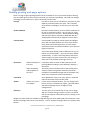
There is a large range of posting options that are available to you if you look around the writing
area and which give you finer control over how your content is presented. The order can change
according to user preferences – what’s important are the titles.
Excerpt
Use this to create a short introductory text (you can add
HTML if you desire) about your post. This is used by
some themes and plugins, as well as by your site’s RSS
feed.
Send Trackbacks
Not often used these days, but this allows trackbacks to
be sent to a specific location. You can use it to notify
certain sites of your new post. Other WordPress blogs,
and sites that support a protocol called XML-RPC are
automatically informed if you happen to link to them.
Custom Fields
Custom fields are used by certain themes and plugins.
Some will use these fields but you won’t ever have to
touch them, others will require you to input values.
Information on this should be included in your theme or
plugin instructions.
Top-of-the-range themes tend to add boxes for you to
tick but use custom fields – you may see values added
automatically. In some cases being able to edit these
values will give you finer control over your posting, or
allow you to fix problems that might come up.
Discussion
Allow Comments on If checked, allows a visitor to add comments to the
This Post
posting albeit according to rules defined in Settings |
Discussion
Allow Trackbacks
and Pingbacks on
this post
Comments
Author
This means that if someone links to the posting from
another website using similar software you will be
notified on the Dashboard page and the trackback may
show in the comments section if authorised.
Since WordPress 2.9 you can view, reply to, moderate
and edit comments from the edit panel.
Allows you to set a
Post Author
If your site has multiple authors, you can change them
here if you have a suitable user rights – generally Editor
and above although this can change on some
configurations.
Revisions
You can revert to an old version of your post or page,
and can track the changes made to a post. This option
will not normally be visible when you are creating a new
post/page.
Roughly the same fields are available in Page writing, with some added and some removed. Some
themes and plugins may return some options – such as excerpts for pages which are used by some
themes.
User Guide for WordPress 3.4+ | speed-net.co.uk | 01832 280 032
Page 33
The additional options for writing pages are covered in the section Writing Pages.
Post Formats
When you are creating or editing a post you have a choice of post formats. These allow posts to be
displayed in different ways. Up to 10 post formats are available. Which ones are in use (if any)
depends on the theme being used by your website.
The Twenty Eleven theme that comes as standard with WordPress 3.3 has 7 post formats.
1. Standard
This is a regular post as has been described above
2. Aside
This format displays only the post content with no title or link.
3. Gallery
The gallery format displays a thumbnail of one of the images uploaded to the post and the
total number of images associated with the post. You still need to insert the image gallery
into the post content as described earlier.
4. Link
A link to another site.
5. Status
A short status update similar to a Twitter update.
User Guide for WordPress 3.4+ | speed-net.co.uk | 01832 280 032
Page 34
6. Quote
A quotation – for example, something somebody said about your blog. Be proud!
7. Image
A single image. The first <img /> tag in the post could be considered the image.
Alternatively, if the post consists only of a URL, that will be the image URL and the title of
the post (post_title) will be the title attribute for the image.
Saving & publishing your post or page
Once you’ve written your masterpiece you’ll want to save it… and then publish it (i.e. Make it
visible on the site) for the whole world to see – you’ve probably already pushed that publish
button, but we’re returning to it because there are various options that are worth learning:
The Publish box above is usually at the top right of the page. By default it looks like the above.
As you can see, the simplest way to publish your content is simply to press that big blue Publish
button.
If you’re a contributor, you’ll have found that you can’t do much in WordPress beyond contribute
words, and your Publish box will actually look like this:
User Guide for WordPress 3.4+ | speed-net.co.uk | 01832 280 032
Page 35
The following table gives a breakdown of the different functionality available here:
Preview
This button allows you to preview how the content will
look.
Status
This shows the Status of your post, for example, whether
it is visible
Publish
(immediately)
edit
Private
If you want to keep the post from prying eyes you can do
this. If a post is private only registered members of the
site can see it.
Public
If you click on Edit the box will expand to offer you the
facility to edit the date on which this page will become
published. This allows you to create content in advance
– handy for holidays or embargoes.
Password Protected You can also create posts that are protected with a
password which you will have to distribute amongst
readers. This can be useful where you want to give a
selected few advance access to content.
Save Draft
This saves the post or page, instead you will be working
on the currently live version of the page (WordPress only
has modest workflow and versioning capabilities) and
the Publish button will change to say Update Post or
Update Page.
Publish/Submit
for Review
The moment you push this button, the content becomes
visible on the site.
If you’re a Contributor you will not be able to Publish but
instead only submit for review.
Move To Trash
This option will move the post/page to the “Trash” area
(the “Trash” area is a bit like the Recycle Bin in
Windows.)
User Guide for WordPress 3.4+ | speed-net.co.uk | 01832 280 032
Page 36
Creating and managing your categories
Organising categories can be one of the greatest influences in how easy it is to navigate your site. It
can also be one of the hardest things to get right, and there’s many a site owner who ends up
having to re-categorise all their content later down the line.
Adding a new category is always easy and straightforward and can even be done while you create a
post, if you have the appropriate user level:
For the categories we're going to use we need to go to Posts and then Categories in the WordPress
administration area. For this site we want to create categories called ‘News’, ‘Trivia’, and
‘WordPress’. To do this, go back to your site Admin and click on Posts, and then the Categories link
beneath that. You should see something like the screenshot below:
User Guide for WordPress 3.4+ | speed-net.co.uk | 01832 280 032
Page 37
As you can see, there’s already a category called Uncategorized which comes with the standard
installation of WordPress.
You now need to add a series of new categories. It’s easy – simply go down to the area of the
screen marked Add Category, and get started. You have the following fields to consider:
Category Name
Category Slug
Category Parent
Description
This is the nice, short name of the category. Try
to avoid length descriptions. One or two words
are best, and easiest to read on most websites
This is an advanced option – it’s automatically
populated if you don’t put anything in. Until
you get to more advanced techniques you can
leave this field alone. It describes the permalink
path to the category when the permalinks
option in WordPress is set. Read the permalinks
section of this document to learn more about
the subject.
If you’re creating a subcategory, this allows you
to define which category is a parent.
Optional, but can be helpful – especially if you
have multiple contributors to your site. Explain
concisely but clearly what the purpose of the
category is.
Let’s create three categories on this site – called News, Trivia, and WordPress. Your Categories
screen should look like this now:
User Guide for WordPress 3.4+ | speed-net.co.uk | 01832 280 032
Page 38
If you create a category in error, you can also delete it here by selecting the category you want to
delete in the box to the left, then clicking the delete button. Be careful – there’s no undo function
here!
You’ll notice you can’t delete Uncategorized – that’s because it’s the default category used if you
don’t assign one to a post. You can change your default category in Settings | Writing.
You also have the possibility of creating a hierarchical tree for your categories – for example, under
News you could have Politics and Entertainment.
Now you have added your categories try going back to your existing posts under Posts | All Posts.
Edit each of your three posts in turn assigning categories to each one.
User Guide for WordPress 3.4+ | speed-net.co.uk | 01832 280 032
Page 39
And wow! Suddenly your website is looking a lot more complete and full.
You've now completed the basic part of how to structure your website. There are a range of tasks
that you will need to do and these are covered in forthcoming sections. Depending on your user
level these include setting up users, how to do more sophisticated formatting in posts, uploading
images, administering the options for how the site is laid out, advanced publishing options and so
on.
User Guide for WordPress 3.4+ | speed-net.co.uk | 01832 280 032
Page 40
QUICK EXERCISES:
1. Create an article with an introduction (you can cut and
paste the actual text for the purposes of this exercise) and
break it up with titles for each section.
2.
Highlight in bold the lead sentence. Italicise some
words for emphasis.
3.
4.
Create some links to external sites.
Create an image gallery using some of the images on
your computer.
5.
Add your favourite YouTube video to a post.
User Guide for WordPress 3.4+ | speed-net.co.uk | 01832 280 032
Page 41
Writing Pages and Structuring Them
Pages are essentially similar to Posts, but as explained in Understanding the difference between
pages and posts they differ in that they contain information that is by and large static – your
résumé, your contact details, your terms and conditions – that kind of thing.
Writing Pages
Writing a page is essentially the same as writing a post, so there’s little to learn, but we’ll go
through some things again.
Already on the site there is a page called Sample Page – every default WordPress install has such a
page. You can leave that page for the moment – let us, instead, create an ‘About’ page.
Click on Pages and then Add New:
If you need help with the editor and advanced options read the section Adding and Editing Content
for more information.
You now just need to add a Title, put in some content and you’re building the static content.
Type in the title of your page (in this case, ‘About’) and a little content about your website and why
it’s there. For now don’t worry too much about getting clever with your text formatting, adding
images and files and so on – we’ll cover the editor in much more depth later on.
Once you’ve completed your About page, press the Publish button to the right but while you’re
writing and before you press Publish you can always click on Preview this Page to see how it’s
looking.
User Guide for WordPress 3.4+ | speed-net.co.uk | 01832 280 032
Page 42
You can Save at any point without publishing, and that will create a draft of the page if it hasn’t yet
been published.
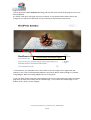
So, where is the link to the page you’ve just created? In the Twenty Eleven Theme that we are
using here you will see the About link on your website just beneath the main picture:
Links to About and Sample Page(s)
In some themes, you’ll be able to see a list of links to the site’s pages on the right-hand side.
However, such a list is not displayed by default in the Twenty Eleven Theme though it is possible
using Widgets. We’ll be covering widgets later on in this guide.
If you now have another look at the list of pages on the site you will see the two pages: the ‘About’
page that you have just created, and the ‘Sample Page’. Let’s remove the Sample Page; it’s not
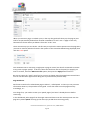
difficult to do. Here’s our list of pages:
User Guide for WordPress 3.4+ | speed-net.co.uk | 01832 280 032
Page 43
When you remove a page, or indeed a post, in the way this guide will show you, the page or post
itself is not permanently deleted but retained in WordPress “Trash” area. A page or Post only
becomes lost forever when you delete it from the “Trash” area.
There are two ways you can do this: The first way is to place the mouse pointer over the page entry
you want to remove (which will result in the options in the screenshot below being displayed) then
click the Trash option.
This method is fine for removing a single post or page at a time, but what if we wanted to remove
many posts or pages quickly? To do this, select the check box next to the post(s) or page(s) you
want to remove, select the Move To Trash option, then press the Apply button next to it.
Be sure to empty the “Trash” area if you’re sure you no longer want the pages/posts moved there.
You can use the same approach for doing this as you did for the previous step.
Page Attributes
We’ll now create the first subordinate page to ‘About’ – called Speed. In there you can put some
information about us, the providers of this guide. You’ll also need to set the page hierarchy
accordingly, so…
First things first, you need to create your ‘Speed’ page if you haven’t already done so before
continuing.
In the dashboard, select Pages from the Pages menu and hover over the mouse pointer over the
page entry titled “Speed” to bring up the menu (As you did when removing posts.)
User Guide for WordPress 3.4+ | speed-net.co.uk | 01832 280 032
Page 44
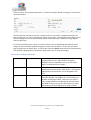
From the menu, click the Quick Edit option. A number of options should now appear, as shown the
screenshot below:
The three options we need to concern ourselves with here are Parent, Template and Order. The
Parent option lets you select the hierarchical level of your page. The Template option allows you to
choose a design for your site and the Order option selects the order in which your page appears
(more of that later).
To set the parent option for a page, you need to click on the corresponding drop down box and
change its value from Main Page to the page you want to be the parent. In this case, the About
page is going to be our parent here, so we can just select the About option from the drop down box
then click the Update button in the bottom right-hand corner to save the changes.
Explanation of Page Attributes
Page Parent
This allows you to set a parent page that introduces a
navigational hierarchy. Most themes will display
subpages either in drop-down menus, on alternative
pages, or indented in lists of pages.
Page Template
Your website's theme design may include templates – for
example with contact forms. Other forms – for example
application forms and similar, can be designed in this
way.
Page Order
By assigning numbers to pages in this field, you can set
the order of pages. We suggest you use increments of
10 when setting page orders. That way if you wish to
insert a page between one identified as 10 and another
identified as 20 you can just use the number 15, rather
than finding yourself changing all the page numbers.
User Guide for WordPress 3.4+ | speed-net.co.uk | 01832 280 032
Page 45
QUICK EXERCISES:
1. Create pages entitled ‘Another New Page’, ‘Child Page 1’,
‘Child Page 2’ and ‘Level 1’. We’ll use these pages in another
exercise later on.
2.
Create a subpage to the About page, called WordPress
where you can say a few nice things about WordPress.
User Guide for WordPress 3.4+ | speed-net.co.uk | 01832 280 032
Page 46
Publishing Content Created by Other Contributors
If you're an Administrator or Editor you can publish the work created by Contributors. Authors can
publish their own work but cannot publish the work of other users.
As an Editor you'll need to be aware of drafts that are awaiting publication. Usually the contributor
should inform you that they've completed a document and, when you select Posts and Edit in the
administration panel you will see a list of Other's Drafts as pending:
A Pending Post from a contributor awaiting
approval from an Editor/Higher
When you select a draft you will be taken to page where you can review the contribution, see the
preview, edit it if necessary, add media and publish – just like it was your own post.
You can also change the post author if you have multiple users defined who have the facility to
create posts, should you require it, and any other details, including post-dating the article so it
appears after an embargo, for example.
Moderating Comments
One of the tasks an Editor or Administrator may do, so long as the 'moderate comments' option is
switched is to check that comments that have been made against posts are suitable for publication.
We recommend you always opt to moderate comments as otherwise you may find problems with
people using the facility to advertise their companies – 'comment spam' as it's known. You may
also wish to implement some anti-spam filtering. WordPress comes with Akismet included as a
plugin, which does an excellent job. If you run a personal blog it’s free, and if you run a commercial
blog you can pay for various license levels. Alternatively, ‘Captcha’ plugins are available.
When a user posts a comment, they will be able to see their own comment and a line telling them
that their comment is awaiting moderation. By default, you will receive an e-mail to the
administrator's e-mail account advising you that a comment is waiting to be approved (this e-mail
can be turned off) and you can click directly on a link within the email in order to approve the
User Guide for WordPress 3.4+ | speed-net.co.uk | 01832 280 032
Page 47
comment. Once signed in you will be asked for confirmation – click yes and the comment will now
be visible to all site visitors. You can also carry out bulk moderation by going to the Comments link.
If you have comments to moderate the tab will show the number of comments waiting. Click it and
you'll see a list of comments awaiting moderation in the queue.
Here you'll have a set of options for each comment ('Approve', ‘Reply’, ‘Quick Edit’, ‘Edit’, ‘Spam’
and 'Trash') which you can also access by placing the mouse pointer over each comment. You can
also edit comments to remove unsuitable words or information, and you can delete individual
comments.
You can mark all comments in one block as well – that's useful when you get some spam bots that
cheerfully comment a load of marketing nonsense all over your site and needs to be deleted
quickly. Just press the links at the bottom of the screen.
Once you've set all the options for each comment, press the Moderate Comments button and the
changes will be saved.
As you can see, the facility is designed to work with quiet and busy sites alike. As some of the
internet's busiest sites run WordPress the software has been well designed for this kind of use.
User Guide for WordPress 3.4+ | speed-net.co.uk | 01832 280 032
Page 48
QUICK EXERCISES:
1. Write an offensive (we don’t mean with swear words,
just something harsh!) comment on your blog. Then
delete it through comment moderation!
2. Add a few comments on your blog while signed out.
3.
Reply to a comment on your blog (even if it’s one of
your own!) to see how it looks.
User Guide for WordPress 3.4+ | speed-net.co.uk | 01832 280 032
Page 49
Managing Links
Most websites run a links section. With many it's simply a page or a post full of links and
connections. With WordPress you can do this if you wish, but a more powerful feature is to use the
proper link management tools. Then you can display your links in the site’s sidebar or, if the theme
provides it, using a links page template. In the administration menu, click on Links then Edit to
manage your links, and you will see the following:
As you can see, the initial installation is already populated with links. As these aren't relevant to
your website, you can delete them all if you wish: Simply select each link you don't want, then
select Delete in the Bulk Actions drop down and click the Apply button.
You’ll see also that you can filter this view – particularly useful if you manage a large number of
links.
User Guide for WordPress 3.4+ | speed-net.co.uk | 01832 280 032
Page 50
Creating link categories
Before creating new links, you need first to create some suitable categories, so click on the 'Link
Categories' link in the menu to do this.
In here, create a link category called News, and another called WordPress so the list looks as
follows:
It’s also possible to create categories on the fly – just like when writing posts. This is more limited
in power, but useful.
You can’t delete the Blogroll category while it’s the default category. To change your default
category go to Settings, then Writing and change the Default Link Category value. For now we’ll
leave it at Blogroll.
User Guide for WordPress 3.4+ | speed-net.co.uk | 01832 280 032
Page 51
Creating links
Now we’ve created our Link Categories above, you can create some links quickly and easily.
To create a new one, click Add New and you’ll see the following:
The most commonly used items are on display first and you should create the link and categorise it
accordingly. Let’s create a link to the BBC News website:
User Guide for WordPress 3.4+ | speed-net.co.uk | 01832 280 032
Page 52
You also have a number of advanced options available to you which are in the extending boxes
below – Target, Link Relationship, and Advanced. Please note the importance of using http://
before a link.
Target
Target is a strangely marked and named option if you’re new to the web:
The following table illustrates the different effects of each target option:
_blank
_top
_none
Will open the link in a new window – handy where you need a link to not take
someone away from your website, but should only be used with good reason
as people hate getting a new window after following every link.
Opens the link in the top most frame or window. This is very rarely used and
should only be considered if you’ve got good reason for it – it can be incredibly
annoying to visitors!
Conventional behaviour – the link will open in the current window – this is
generally the best option to use.
User Guide for WordPress 3.4+ | speed-net.co.uk | 01832 280 032
Page 53
Link relationship (XFN)
Links can be related to your site – you can either create your own relationship, or use one of those
attached. They’re mostly ignored and little used, however, and will make little difference to visitor
experience. They can, however, help to inform search engines and directories of the relationships
between websites which may help with search engine performance.
Advanced
In the Advanced Links options you have a range of options:
Image Address
RSS Address
Notes
Rating
You can insert a link to an image here – be careful, you should prepare images
with care – to the correct size and resolution, in order for them to look good.
Many people who use this option tend to end up with untidy websites.
If there is also and RSS feed available at the site you’re linking to, you can
include it here. Some themes, widgets and plugins will use this information
and show an RSS icon to match.
You can keep notes about links here.
This is used in some themes, widgets and plugins as a way of ordering links.
User Guide for WordPress 3.4+ | speed-net.co.uk | 01832 280 032
Page 54
Administering WordPress
This section describes the range of tasks usually carried out only by Administrators.
Managing Users
WordPress has the incredibly useful ability to define different levels of users. It doesn't have the
level of power that you get with full content management systems where tens of pages of content
are being created daily. However, managing users in a complex system can quickly become a full
time job and the level of control in WordPress is usually perfect for the smaller organisation.
You have five levels (roles) of user:
Administrator
The very highest level of user – the Administrator can do anything other users
can do, as well as:
• Change all settings
• Switch themes
• Activate & edit plugins
• Edit users
• Edit files
• Manage options
• Import
Editor
We recommend that the highest level that someone is assigned is Editor – even
the administrator will find that the Editor level is adequate for most tasks while
preventing the possibility of inadvertently making a critical change to the site.
An Editor can do anything a lower level of user can do as well as:
• Moderate comments
• Manage categories
• Manage links
• Enter unfiltered html (as in html with any content at all – a
potentially dangerous facility!)
• Edit published posts
• Edit other contributor's posts
• Edit pages
Author
Most people creating content through posts on the website will be Authors. An
Author can do anything a lower level of user can do as well as:
• Upload files
• Publish posts
Contributor
A contributor really doesn't have a great deal of power. Contributors can
create and edit their own posts, but they can't upload images. They can still
insert images that have already been uploaded.
Subscriber
A subscriber can read content on the website and make comments. Although
depending on your settings for your site, it's possible for non-subscribers to
make comments also.
User Guide for WordPress 3.4+ | speed-net.co.uk | 01832 280 032
Page 55
There are a number of tasks around users that you may wish to carry out:
1.
2.
3.
4.
5.
Update your own details
Add new users
Remove users
Edit the details of a user
Manage the content created by a user
You can manage and set up users by clicking on the Users link in the menu:
Adding users
It’s very simple to add a new user to WordPress, simply select Add New (as for Posts, Pages, etc.)
and then fill in the user’s details, making sure you get the correct user level. You’ll also need to set
a password here – make sure it’s a strong one!
Remove users
To remove a user select the ‘Users’ link from the Users menu in the dashboard.
On this page you will see a list of users and the roles which they have. Select the check box on the
left of the Username. Further down you will see the Bulk Actions Drop Down. Select delete then
press apply.
You will then be asked for confirmation, as well as a request as to whether to delete all the posts
and links belonging to the user, or to transfer the users’ posts and links to another user. Be careful!
Delete all posts and all the content by that author will be removed from your website. It's usually
better, unless that user was filling your site with nonsense, to attribute their posts to another user:
User Guide for WordPress 3.4+ | speed-net.co.uk | 01832 280 032
Page 56
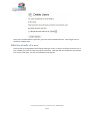
Once you're satisfied with the selection, press the Confirm Deletion button. Don't forget you can
do this for multiple users.
Edit the details of a user
You may wish to change details and settings relating to a user, in which case when you hover over a
user’s details you’ll see the ‘edit’ link pop into existence. Click Edit and you should then see the Edit
User screen. From here, you can see and edit the user details.
User Guide for WordPress 3.4+ | speed-net.co.uk | 01832 280 032
Page 57
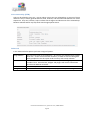
From this page you can set various options which are generally self-explanatory, such as name,
whether that user is using the visual editor, what colour scheme they use in the administration
panels and so on.
User Guide for WordPress 3.4+ | speed-net.co.uk | 01832 280 032
Page 58
Manage the content created by a user
You will see that in the User List you have a number against each user in the Posts column. This
shows the number of postings made by that user. If you click on that number you will be taken to
the Posts page, showing the posts as made by that user and from there you can edit or delete posts
to your heart’s content.
User Guide for WordPress 3.4+ | speed-net.co.uk | 01832 280 032
Page 59
Managing Options and Settings
The WordPress software allows you to control many settings on your website. Click on Settings,
and you will see seven links, within which you can change many options. Most are clearly explained
on the control panels, but for extra detail we believe you may find useful see below:
General
Allows you to set the title of your website, its tagline, URL (the web address)
information and date representation.
Writing
Here you can set the various options surrounding how you can write posts. It also
allows you to set the size (number of lines) of the textbox in the Post editor, as
well as the default category used for newly created links and posts.
You can also create a secret email address to which you can send new entries for
your site – this can be good if you need to update the site from difficult locations
or via a smartphone.
Reading
This shows settings for reading the website – for example how many posts will be
shown at a time on a page. You can also select a Post or Page to be displayed on
the front page of the site.
It also sets options for syndication – this is a system that allows people to use
readers to access your information remotely.
Discussion
Here you will set options relating to how people can make comments, for
example whether the comments need authorising before showing on the site
(advisable to prevent comment spam), the default comment settings for articles,
and so on.
Media
Here you will be able to set the default sizes for images in Posts or Pages, the path
to the ‘wp-content/uploads’ folder on the server and specify whether you want
uploaded files to be organised into month and year based folders.
Privacy
This sets up how the site is seen by search engines. However, hiding from Google
doesn’t mean every search engine will skip you – some aren’t very good at using
these settings and still go ahead – the result is that you can still be indexed – so
your content isn’t ever 100% private.
Permalinks
Permalinks are a way of structuring your website so that the address to an article
makes some sense to humans and search engines. So instead of
www.website.com/?p=101 the permalink could read
www.website.com/index.php/news-feature as defined in the post's slug (created
when writing, or automatically from the title). You may need to modify a file on
your system called .htaccess – if in doubt, simply ask your administrator or
friendly techie to help.
User Guide for WordPress 3.4+ | speed-net.co.uk | 01832 280 032
Page 60
Managing the Look & Feel of your website
Appearance
In WordPress you have the easy facility to switch between different layouts for your site. Select the
Themes option from the Appearance menu and you will see a list of available themes on your
installation. Usually that will include the themes installed on your server, and usually the default
theme (known as the “Twenty Eleven” theme) that is supplied by default with WordPress. It's
possible that your WordPress installer has supplied you with variations on your theme – perhaps a
Xmas one or another designed for special company occasions like product launches or for sponsors.
To select a theme, simply click on it – this will then give you a preview of how your site will look
using that theme in a pop-up window.
If you like the look, you can then activate the theme by clicking on the ‘Activate’ link in the top
right-hand corner of the preview box.
An expert can actually edit their themes from the Theme Editor tab. However, we don't
recommend doing it this way. You may also find that your webserver configuration will prevent
User Guide for WordPress 3.4+ | speed-net.co.uk | 01832 280 032
Page 61
this as it can, in certain circumstances, present a security threat to your site if .php files can be
modified from a webpage.
If you have an advanced theme, such as many of those from the premium theme suppliers and
developers, you will find that there may be additional options available to you, for example during
the writing of a page or post, in category management, and through a control panel.
Theme Customiser
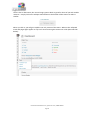
WordPress 3.4 introduced the Theme Customizer which offers you an easy way to change some of
the options on your theme.
The menu bar on the left side gives you options to customise your theme.
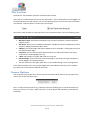
The Twenty Eleven theme allows the following customisations:
1. You can change your site title and tagline or choose if you wish to display the header text at
all. Colors: allows you to change the background colour.
2. Header and background images can be changed and you can upload from a saved image or
use the default images from within the theme.
User Guide for WordPress 3.4+ | speed-net.co.uk | 01832 280 032
Page 62
3. There is also an option to choose a static front page (from one of your saved pages).
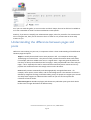
All changes can be previewed in the browser window and once you are happy with the look click
Save and Publish. More in depth customisation options are explained in the sections below.
Widgets
Since WordPress introduced widget support they have become increasingly used as a way to
display additional information on the website – sometimes to a very sophisticated degree. If you
look at a site like http://www.telecoms.com you quickly realise that most sections and feature
pages are complex arrangements of widgets that go beyond the conventional single sidebar
arrangement.
A widget is simply a block, usually with control over what it displays, which can be moved around.
For example, you can place in a sidebar a widget that displays the latest comments on your site.
Some themes provide a large selection of widget spaces which allow you to place content in a wide
range of spaces. Really advanced themes create widget spaces on the fly – for example, if you
create a page according to a certain template. That can make for a very sophisticated website.
With the theme we’re using (the default WordPress Twenty Eleven theme), you have one main
sidebar and an additional ‘Showcase’ sidebar area, as well as three footer widget areas. Different
themes will have other numbers/types of widget areas. If you have a fresh install and no widgets
have been installed you will see that the sidebar is empty.
However, you’ll remember that there’s definitely content in the sidebar of the site. Why is that?
Well, it’s because most themes insert default items into the sidebar when there’s nothing set in the
widgets. Now let’s have some fun with the sidebar.
If you look at the screen, you have widgets that are available to you on the left, and places to put
them on the right. To add them to the sidebar you simply grab a widget and drag it across,
dropping it into the widget space. If you have multiple widget spaces, you have more choice as to
where to place the widgets.
You also have an ‘Inactive Widgets’ space that lets you store widgets that have been configured but
which you don’t want to display at the moment. This is a very useful tool for some busier sites
because you can use this area to set up a widget before making it visible to everyone. This is a
good practice to get into.
Let’s try adding the Recent Posts widget to your sidebar. First, drag the widget into the Inactive
Widgets section. Then set it up as below:
User Guide for WordPress 3.4+ | speed-net.co.uk | 01832 280 032
Page 63
As you can see, you can set the title and the number of posts to display. Now press Save.
Next you need to move it into the sidebar. Simply drag the widget from the Inactive Widgets space
and into the Sidebar widget space:
Drag Widget to Main Sidebar
Right, now you know how to use widgets we can now turn our attention to getting the Page and
Category lists to show in the sidebar by dragging the “Pages” and “Categories” widgets into the
Primary Widget Area.
You can specify your own titles for the Pages and Categories widgets if you want and these titles
will appear as headings on the site’s sidebar above the content generated by the Widget.
User Guide for WordPress 3.4+ | speed-net.co.uk | 01832 280 032
Page 64
Recent Posts Widget content
Categories Widget content
Pages Widget content
If you have the administrator rights you can install a great many widgets through plugins and
themes. These can dramatically enhance the features and usability of your blog or website.
One thing worth noting is that not all themes have styling for every widget to fit in every space. Be
careful as some widgets will look terrible until you’ve had a web designer add suitable styling to
your theme. It’s often worth checking new widgets out on a development environment for
aesthetics and performance. Testing things out on a live site is quick, but if you’re working on a
busy or important site then it can cause problems for visitors.
User Guide for WordPress 3.4+ | speed-net.co.uk | 01832 280 032
Page 65
Custom Headers
The Custom Header feature allows you to change the look of your site’s header area from the
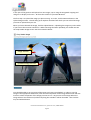
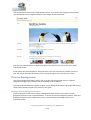
WordPress dashboard without you having to work with image editors or delve into HTML code.
This feature must be supported by the theme you are using. In the case of the Twenty Eleven
theme (which we’re using in the examples shown here) there is support for this feature.
To access the Custom Header options, select the Header option from the Appearance menu. You
should then see the Custom Header options.
Header Image Preview Area
Upload your own image from here
The options available in the Twenty Eleven theme allow you to set the background image used in
the Header section. We can use a pre-supplied image (as you can see in the Default Images
section) or upload your own image. Note also that it’s possible to show a random image on each
page which is why we’ve had a wide selection of screenshot images in this guide!
User Guide for WordPress 3.4+ | speed-net.co.uk | 01832 280 032
Page 66
In this part of the guide we will upload our own image, crop it using the integrated cropping tool
and get it to display on the site....All from the comfort of your Web Browser!
The first step is to upload the image you plan on using: To so this, click the Browse button in the
Upload Image section. This will bring up an Explorer window from which you can select the image
you want to upload from your PC.
When you have selected the image, click the Upload button. Uploading the image may take a while
if you have a slow Internet connection. When the image has been uploaded, you should now see
the Crop Header Image screen. See the screenshot below.
Image Selector
Uploaded Image Preview
You should be able to see a preview of the image you have just uploaded. In order to crop the
image to the appropriate dimensions, alter the size and position of the Image Selector box with the
mouse to select the portion of the image you want to use. Any portion of the image within the
image selector box will be used, while everything else outside it will be discarded - then click the
Crop and Publish button.
User Guide for WordPress 3.4+ | speed-net.co.uk | 01832 280 032
Page 67
You should now be back at the Custom Header screen. If you look at the image preview window,
you should now see the cropped selection of the image you selected earlier.
Click the Save Changes button in the bottom-left corner and visit your site to view your newlycustomised header.
Some themes also have support for setting the font colour for text within the header section as
well. Be sure to check that the theme you are using has support for the features you need.
Custom Backgrounds
The custom backgrounds feature allows you to set the site’s background colour or upload a
background image of your choice to use as the background for the site.
The Twenty Eleven theme has support for both custom background colours and images and both of
these options will be covered in this section of the guide.
Setting a Custom Background Colour
The first thing we’ll cover here is setting a background colour, which can be done from the
background options screen in the Dashboard. To access the custom background options, select the
Background option from the Appearance menu. You should see something similar to the
screenshot below.
User Guide for WordPress 3.4+ | speed-net.co.uk | 01832 280 032
Page 68
If you have not already configured any Custom Background options, you will see the default
settings shown for the theme you are using.
You can set the background colour using one of two methods: Using the integrated colour picker or
inputting the hexadecimal value of the colour you want to use manually into the ‘Color’ option
textbox.
We’ll be covering the colour selector method in this guide as it’s the most intuitive. If you prefer to
enter the hexadecimal colour code manually, you may find it useful to visit: http://html-colorcodes.info/ to obtain the relevant hexadecimal codes for the colour you want.
To select the colour you want to use, click on the Select a Color link to bring up the Colour Picker.
You should see something similar to the screenshot below:
Colour Selector (Drag with mouse.)
Outer Ring (Selects approx. colour.)
Save selection when finished
Shade/Tone Selection Area
User Guide for WordPress
3.4+ | speed-net.co.uk
032
Shade/Tone
Selector| 01832
(Drag280with
Page 69
mouse.)
For the sake of this example, set the background colour to blue. Place the mouse cursor over the
Colour Selector, contained in the Outer Ring, and drag it to where the blue area is on the left. As
you do this, you will see that the colour in the Image Preview area will change to reflect the
selection you have made.
If you want to alter the shade/tone of the colour you have just selected, then the process is much
the same as what you did in the previous step, but this time you will have to use the Shade/Tone
selection area.
When you have made your selection, click on the Save Changes button then take a look at the site.
You should now have a nice blue background instead of the plain boring one that was there before.
Setting a Custom Background Image
The first thing you will need to do here is upload an image from your own PC to use as the
background image. To do this click the Browse button, select the image you want to use from the
Explorer window and click upload.
When the upload has finished, you will see a preview of your image, as well as various other
options. See the screenshot below for an example:
User Guide for WordPress 3.4+ | speed-net.co.uk | 01832 280 032
Page 70
Image Preview Box
Image Positioning Options
Image Repeat Options
Attachment Options
Background colour for area not
occupied by image
You should be able to see a smaller version of your image in the Image Preview box. If you want to
use another image, you can just click the Remove Background Image button and repeat the Upload
process again.
User Guide for WordPress 3.4+ | speed-net.co.uk | 01832 280 032
Page 71
If you take a look at how your site looks at this point, you may see that the background image is
shown in one corner of the screen and the rest of the background is blank. See the screenshot
below.
User Guide for WordPress 3.4+ | speed-net.co.uk | 01832 280 032
Page 72
Don’t worry about how it looks now; we’re going to fix this using the Display Options later on.
Before we do this however, we need to know a little about each of the Display Options (Position,
Repeat, Attachment, Color) and what they do:
Display Option
Description
Position
Sets the position of the image on the page. You can set the
position to Left, Centre or Right.
Specifies whether the image should be ‘repeated’ (that is,
displayed multiple times in the background.)
Repeat
You can specify one of four values for this option: ‘No Repeat’,
‘Tile’, ‘Tile Horizontally’ and ‘Tile Vertically’
Selecting ‘No Repeat’ will set the background image to be
displayed only once.
The ‘Tile’ Option will set the background image to be repeated
(or Tiled) from the top left corner of the browser window all the
way to the bottom right corner of the browser window.
The ‘Tile Horizontally’ and ‘Tile Vertically’ options cause the
background image to repeat from left-to-right and from top-tobottom, respectively.
Attachment
Color
The ‘Scroll’ option will cause the background image to scroll
along with the page content.
The ‘Fixed’ option will stop the background image scrolling
along with the page content.
This option will allow you to set the colour which fills the space
unoccupied by the background image. We won’t be using this in
this guide.
Right, let’s make that background look a little better. What we want to do here is to left-align the
image, cause it to repeat from left to right and stop it from scrolling along with the page content.
So, set the options as follows: set Position option to Left, the Repeat option to Tile and the
Attachment option to Fixed. When you have finished setting the relevant options, click the Save
Changes button in the bottom-left corner.
User Guide for WordPress 3.4+ | speed-net.co.uk | 01832 280 032
Page 73
Depending on the image you have used, you should see something similar to the screenshot below:
Now, the background image fills the entire background area of the page. If you try scrolling down
the page, you will see that the background stays put, while the page content moves down the page.
So, our site background looks a little better now but can you see how the top-right portion of the
background looks as if it came from a separate image?
You can solve this problem in two ways – either use a very large background image and accept that
this will make your site load more slowly – especially for new visitors, or use a background image
with a repeating pattern.
There are websites like http://repeatxrepeaty.com/ which offer ready-made repeating images
which you are free to use on your own site.
You can see how different the result is when you use a background image with a repeating pattern
(especially one as psychedelic as this one) in the screenshot below:
User Guide for WordPress 3.4+ | speed-net.co.uk | 01832 280 032
Page 74
Creating Custom Menus
This guide to the WordPress Menu system (introduced in WO 3.0) covers the basic tasks a user may
carry out when using the built-in menu editor such as: Defining a menu, adding items to a menu,
customising menu items using the 'Navigation Label’ and ‘Title Attribute’ options, deleting menu
items and creating multi-level menus.
Defining a Menu
You will have to define a menu before you can work on it. The steps below outline this process:
1. Login to the WordPress Dashboard.
2. From the ‘Appearance’ menu on the left-hand side of the Dashboard select the ‘Menus’
option to bring up the menu editor. You should see something similar to the screenshot
below in your browser window:
User Guide for WordPress 3.4+ | speed-net.co.uk | 01832 280 032
Page 75
3. Enter a name for your new menu in the Menu Name box then click the Create Menu
button. For the sake of this example, we’ll give this menu the name navmenu but you can
give it any name you want. Next, make sure navmenu (or whatever you’ve called it) is
selected as our primary menu in ‘Theme Locations’ on the left hand side. The menu editor
should now look something like the screenshot below:
User Guide for WordPress 3.4+ | speed-net.co.uk | 01832 280 032
Page 76
Adding Items to a Menu
In this example, we’ll add 6 pages to the menu we created in the previous section. One of the
pages added in this example will point to the ‘Home’ page of the site. The steps you will need to
take are listed below:
●
In the left-hand corner of the menu editor screen, you should see a sub-menu titled ‘Pages’
In this sub-menu, click the View All link. This will bring up a list of all the pages that are
currently published on your site/blog. (See the screenshot below.)
•
Select the pages you want to add to your menu by clicking the checkbox to the left of each
item’s title. In this example, the ‘Home’, ‘About’, ‘Another New Page’, ‘Child Page 1’, ‘Child
Page 2’, and ‘Level 1’ Pages will be used.
When you have selected the pages you want to include, click the Add to Menu button
located in the bottom right-hand corner. You should now see a series of boxes, with the
page titles of the items you added in the previous step on the left-hand side of each box.
●
Click the Save Menu button to save the changes.
User Guide for WordPress 3.4+ | speed-net.co.uk | 01832 280 032
Page 77
Deleting a menu item
•
To access the options for the relevant menu item, find the corresponding menu item box in
the right-hand corner of the menu editor window and left-click on the arrow icon in the top
right-hand corner of it. The menu item box should then expand and the options we need to
edit should be visible. See the screenshot below for an example.
•
Click on the Remove link in the bottom left-hand corner. The menu item box for the menu
item you deleted should no longer be displayed.
•
Click the Save Menu button to save the changes you have made.
Customising Menu Items
Before we jump to the example, a little explanation about the ‘Navigation Label’ and ‘Title
Attribute’ options is needed.
The ‘Navigation Label’ option specifies the title of the menu item as it appears on the navigation
menu. This is what your users will see displayed on the navigation menu when they visit your
site/blog.
The Title Attribute’ option specifies the Alternative (or ‘Alt') text for the menu item. This is what
will be displayed when a users’ mouse hovers over a menu item, or if the user is accessing the site
using screen reader software, for example.
In the example for this section, we’ll be using the menu item titled ‘Another New Page’. The
‘Navigation Label’ option will be given value of ‘Page 2’ and the Title Attribute’ value will be
changed to a value of ‘Click here for Page 2’
The steps you will need to take are listed below:
•
Left-click on the arrow in the top right-hand corner of the menu item box. The menu item
box should then expand and the options we need to edit should be visible.
•
Enter the values for the Navigation Label and Title Attribute that you want to assign to the
menu item and then click the Save Menu button to save the changes.
User Guide for WordPress 3.4+ | speed-net.co.uk | 01832 280 032
Page 78
In the menu editor, the title for the menu item you edited should have now been changed to the
value you entered for the Navigation Label option. In the case of this example, it now has the label
‘Page 2’ instead of ‘Another New Page.
Creating multi-level menus
When planning the structure of your menu, it helps to think of each menu item as a heading in a
formal report document.
In a formal report, main section headings (Level 1 headings) are the nearest to the left of the page;
sub-section headings (Level 2 headings) are indented slightly further to the right; any other
subordinate headings (Level 3, 4, etc.) within the same section are indented even further to the
right of the page.
The WordPress 3.x menu editor allows you to create multi-level menus using a simple ‘drag and
drop’ interface. You can drag menu items up or down to change their order of appearance in the
menu, or you can drag them left or right in order to create a multi-level menu structure.
To make one menu item a subordinate of another item, then position it underneath, and drag it
slightly to the right of, the main menu item.
This section will build on the example menu used in the previous section. Currently the menu only
consists of main menu (Level 1) items, as can been seen in the screenshot below:
User Guide for WordPress 3.4+ | speed-net.co.uk | 01832 280 032
Page 79
So, with our report analogy in mind, the menu in this example will be re-structured as follows:
1. Home
2. About
3. Page 2
1. Child Page 1
2. Child Page 2
4. Level 1
In this example, the menu items ‘Home’, ’About, ‘Page 2’ and ‘Level 1’ will be the main menu
(Level 1) items, while ‘Child Page 1’ and ‘Child Page 2’ will be sub-items, subordinate to ‘Page 2’
The steps you will need to take can be found below:
•
•
•
Position the mouse over the menu item box for ‘Child Page 1’. While holding the left
mouse button, drag it to the right then release the mouse button.
Repeat the above step for ‘Child Page 2’ and make sure that ‘Child Page 1’ and ‘Child Page
2’ are both indented the same distance from the left. Your menu should now look like the
one the screenshot below:
Click the Save Menu button to save the changes. Your new menu, with the structure
described in the example, should now be created.
User Guide for WordPress 3.4+ | speed-net.co.uk | 01832 280 032
Page 80
The Menu in Action
OK, you should be all done with creating the menu now. If the theme you use supports WordPress
menus (in this example I’m using the Twenty Eleven theme, which does include menu support) then
you should only see the four main (Level 1) options.
The two sub-menu (Level 2) items created in the example should appear in a separate sub-menu
when you place your mouse cursor over the ‘Page 2’ menu item. See the screenshot below:
User Guide for WordPress 3.4+ | speed-net.co.uk | 01832 280 032
Page 81
Site Tips
Structuring a Site
One of the most important things to get right with a website or blog is the structure of its content.
This can make an incredible difference to usability and search engine performance – do it well and
users will be able to navigate your content easily and quickly. Fortunately, with WordPress the
navigation of your site will usually follow a fairly standard route.
Simple Structuring Rules:
1. Categorise and tag your content so that it's clear and easy to find without resorting to the
search tool. For example, if the main source of traffic to your site is interested in your
stories about knitting, then a category called knitting, along with perhaps some relevant
tags against posts such as ‘crochet’ and ‘machine knit’ could be the way to go.
2. Resist the temptation to clutter your website with logos, affiliate links and advertising.
There’s nothing at all wrong with links and logos, but a sea of them is confusing and
distracts people away from the main purpose of your site.
3. Edit your content carefully for spelling, grammar and suitable content. When you publish –
whether it's within a magazine or on the internet you take a certain level of responsibility
for the information you disseminate.
4. The front page of your site is important and should contain at least some information
about what/who you are and what you do – this can help not only site visitors to know
what it is you're doing online, but will also help search engines to find the content on your
website.
Engaging with visitors
You can be writing the most beautiful prose in the world but if nobody knows about it then it’s only
your mother who’s going to be reading. No, what you have to do is find ways to draw people to
your site.
1. Comment on other blogs and other blog writers may visit your site to see what you’re
about. If your comment is interesting, the blog writer’s visitors will be interested to see
what else you might discuss. Blogs relevant to your discussion area are the most useful.
2. Reply to insightful comments on your blog because people like to feel they’re involved in a
conversation with you, not just talking to some computer somewhere.
3. Link to other blogs when you talk about things that are connected and that way the blog
authors know your linking and will also be flattered about it. This may make them more
likely to write about what you write about too.
4. Use other social media because everything’s interconnected. When I blog, my Twitter feed
is filled in. You can do this with WordPress plugins, or by using a service such as
Twitterfeed. Your followers, who are clearly interested in what you say on Twitter, are
likely to be interested in what’s said on your blog.
User Guide for WordPress 3.4+ | speed-net.co.uk | 01832 280 032
Page 82
Search Engines
Search engines will bring your website traffic. Typically around 25%-35% of it. In some cases, it will
bring a lot more, and in other cases a lot less. But if search engines bring 95% of your traffic then
you’re probably doing something wrong. The following tips describe how to maximise your site for
search engine performance, but it’s not the be all and end all – great content usually means great
traffic after a while.
1. Don’t write just for the search engines because when you do that, visitors are
quickly aware of your attempts to stuff keywords into every sentence.
2. Link Out because quality links add quality to your own site.
3. Keywords are more important in headers and titles but in body text they quickly
lose their power except when linking to other pages in your site and to other
websites. For example, if you write ‘click here to read about Britney’s latest
escapade’ and link that it will perform worse than a paragraph with a link that
reads “when Britney Spears fell out of a taxi drunk”.
4. Get inward bound links by creating great content, commenting on other blogs,
engaging with other bloggers, and generally making an effort to be an active part of
the community.
5. Don’t solicit links from other bloggers because it just annoys them.
6. Use optimisation plugins but sparingly. It’s not unknown for performance to go
down after popular plugins have been utilised. However, we consider Yoast SEO
and All-in-One SEO as the leading SEO plugins available.
7. Don’t engage in link-farming if you create a site that’s purely there to link to yours
or your client sites then the search engines will eventually pick up on this and you
could find yourself heavily penalised with a de-listing.
8. The search engines don’t like being gamed any underhand tricks used to increase
your ranking could eventually lead to a de-listing. That can include inappropriate
link-purchasing, spam blogging, e-mail spam, Twitter spam and so on. Be careful.
9. If your site is hacked it can be really bad because many spammers try to hack
WordPress sites in order to insert their own hidden links. If you have a lot of poor
quality links on your site you risk losing page rank.
10. Some themes perform better than others because the way content is output is
very important. Certain layouts perform worse than others too. It’s a bit of a black
art, but a good theme alone can make a dramatic difference.
11. Concentrate on great content rather than working the search engines – trust me,
people link a lot to good stuff.
User Guide for WordPress 3.4+ | speed-net.co.uk | 01832 280 032
Page 83
WordPress As A Service (WAAS)
WordPress As A Service isn’t a new concept – WordPress.com has been around for years now, but
WAAS sites are growing in popularity.
Some are really targeting specific niches, and have customised WordPress extensively in order to
do so in a slick manner, and you may find the guide above isn’t a good fit for their service, whilst
others leave WordPress almost untouched. The guide above really refers to standalone WP
installations and avoids covering customisations, but most providers will document and assist with
their own peculiarities.
Provider
WordPress.com
Niche
Blogging
happytables
Restaurants &
Bars
Description
The big one where millions of bloggers share their
thoughts – the site is supported by advertising and the
purchase of upgrades including ones allowing you to be
ad-free, use your own domain, etc.
Built in England by a team with very specific vertical
markets in mind, this service allows you to quickly and
easily build an elegant site for your restaurant or bar
using a rather customised (but still familiar) WP backend.
User Guide for WordPress 3.4+ | speed-net.co.uk | 01832 280 032
Page 84
Going Further
WordPress is an incredibly powerful and flexible tool which is only just starting to be exploited by
web builders and designers. It provides easy functionality for the end-user, whilst also giving
developers tight control over the display of information.
There are a range of resources – some related to us as providers of this guide:
Free (GPL Licensed Themes), information and plugins.
Hosted WordPress (with some limitations and lack of
control, but free and easy)
WordPress MU information
bbPress – a related, fast and clean Forum application
BuddyPress – a social networking tool built on top of
the WordPress platform. Could you rival Facebook?
http://wordpress.org
http://wordpress.com
http://mu.wordpress.org/
http://bbpress.org
http://buddypress.org/
You can also find many more resources on the net. People often design their own sites and then
offer their themes freely – some searching on Google will quickly reveal some interesting options
and answers.
If you’re running a website, there’s a lot to consider without even thinking about technicalities –
you have performance, search engine optimisation, future proofing and so on. Getting the best out
of a website takes time, experience and sometimes just a bit of luck. Consider going to experts if
your site’s underperforming – it could save you a lot of time and grief.
Do you need something special?
If you need more from your WordPress installation, you may need some custom plugins or themes
written, or you may need to integrate your site with other tools such as membership subscription
systems or similar. For that you will need to approach a developer or company with suitable skills.
Be careful in choosing – make sure you go to someone reputable, reliable and professional. The
best will often be the most difficult to deal with – they’ll want to know exactly what you need, so
that they can deliver. The worst will throw something together that may not suit your needs, could
easily fail to work in the long term, and which could end up being an expensive mistake.
Beware of strangers bearing gifts
Apologies for the odd title, but this is worth noting:
Not all websites providing free themes and plugins are honest and reputable.
Of course most of them are. But the Internet is a dangerous place. People write code with
malicious or greedy intent – you could install a theme which is used by somebody in order to make
your server deliver spam, promote other people’s websites or similar. And if you’re not confident
of looking at the code, you can’t be sure.
User Guide for WordPress 3.4+ | speed-net.co.uk | 01832 280 032
Page 85
Consequently the safest approach is to use the likes of WordPress’s own Extend library – here code
is reviewed by others and rated. Anything malicious, or even just insecure, is more likely to be
noticed here than elsewhere. There are no guarantees, of course – everything there is GPL and
that means that if you get it from someone without any other contract in place there is not
necessarily any support or warranty.
There are professional designers and developers who provide WordPress related services, themes
and plugins. You can also pay to join some of the clubs such as Woothemes. Alternatively you can
look up the CodePoet directory at http://directory.codepoet.com/ in order to see a list of
recognised WordPress consultants from around the world.
User Guide for WordPress 3.4+ | speed-net.co.uk | 01832 280 032
Page 86
All Done!
You’re all done, you’ve read through our entire guide on the usage of WordPres and hopefully
learned a lot along the way, don’t forget if you have any questions or queries you can always get in
touch with the guys at Speed and we’ll do everything we can to explain and reiterate anything
you’re stuck with.
User Guide for WordPress 3.4+ | speed-net.co.uk | 01832 280 032
Page 87