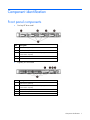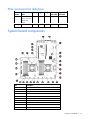
1
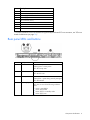
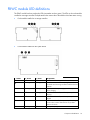
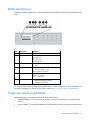
Front panel LEDs and buttons
Item
Description
Status
1
UID button/LED
Solid blue = Activated
Flashing blue (1 Hz/cycle per sec) = Remote management or
firmware upgrade in progress
Off = Deactivated
2
Power On/Standby button
and system power LED
Solid green = System on
Flashing green (1 Hz/cycle per sec) = Performing power on sequence
Solid amber = System in standby
Off = No power present*
3
Health LED
Solid green = Normal
Flashing amber = System degraded
Flashing red (1 Hz/cycle per sec) = System critical
Fast-flashing red (4 Hz/cycles per sec) = Power fault**
4
NIC status LED
Solid green = Link to network
Flashing green (1 Hz/cycle per sec) = Network active
Off = No network activity
*Facility power is not present, power cord is not attached, no power supplies are installed, power supply failure has
occurred, or the power button cable is disconnected.
**To identify components in a degraded or critical state, see the Systems Insight Display LEDs, check iLO/BIOS logs, and
reference the server troubleshooting guide.
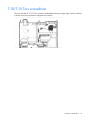
Rear panel components
Component identification 8