1
connectivity
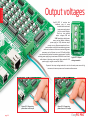
Headers Buttons
LEDs
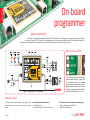
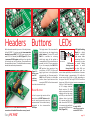
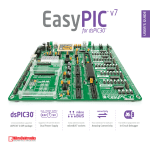
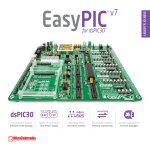
With enhanced connectivity as one of the key features
of EasyPIC PRO™ v7, we have provided two connection
headers for each PORT. I/O PORT group contains one
male IDC10 2x5 header (like CN22 Figure 6-3). There
is one more IDC10 header available on the right side
of the board, next to DIP switches. These headers are
all compatible with over 70 mikroElektronika accessory
boards, and enable simple connection.
LED (Light-Emitting
Diode) is a highly
efficient electronic
light source. When
connecting LEDs, it is
Microcontroller
neccessary to place
SMD resistor a current limiting
limiting current resistor in series
through the LED so that LEDs are
provided with the
current value specified by the manufacturer. A common
LED diode voltage is approximately 2.5V, while the
current varies from 0.2mA to 20mA, depending on
the type of the LED. The EasyPIC PRO v7 board uses
low-current LEDs with typical current consumption of
0.2mA or 0.3mA, depending
of VCC voltage selection.
Board contains 69 LEDs
which can be used for visual
indication of the logic state
on PORT pins. An active LED
indicates that a logic high
(1) is present on the pin. In
order to enable PORT LEDs,
Figure 6-6: SW6.1
it is necessary to enable the
through SW6.4
corresponding DIP switch on
switches are used to
SW6 (Figure 6-6).
enable PORT LEDs
The logic state of all microcontroller
digital inputs may be changed using
push buttons. Tri-state DIP switch
SW13 is available for selecting
which logic state will be applied to
corresponding MCU pin when button is
pressed, for each I/O port separately.
If you, for example, place SW13.3 in
VCC position, then pressing of any
push button in PORTC I/O group will
Figure 6-5:
Button press apply logical one to the appropriate
microcontroller pin The same goes for
level DIP
GND. If the DIP switch is in the middle
switches
position, then all push buttons of the
(tri-state)
associated PORT will be disconnected
from the microcontroller pin.
Reset Button
Figure 6-4: IDC10 male headers enable easy
connection with mikroElektronika accessory boards
EasyPIC PRO
In the far upper right section of the
board, there is a RESET button, which
can be used to manually reset the
microcontroller. This button is directly
connected to the microcontroller
MCLR pin.
v7
page 19