1
Using BookMyne Help
Help toolbar
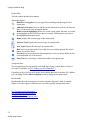
The help toolbar includes these buttons.
Button Description
Hide/Show Navigation Lets you toggle between hiding and showing the Navigation pane.
Add topic to favorites Lets you add the current open topic to a list of your favorites
that you can access in the navigation options.
Remove search highlighting When you use the search option, the terms you search
are highlighted in each of the topics that are returned. This button lets you remove
the highlighting from those terms.
Home Displays the welcome page of the online guide.
Previous Topic Displays the previous topic in contents order.
Next Topic Displays the next topic in contents order.
Back Lets you navigate back to topics that were previously displayed (like a back
button on a web browser).
Forward Lets you navigate forward through topics were previously displayed (like
a forward button on a web browser).
Print Prints the current topic, without the toolbar or navigation pane.
Navigation Pane
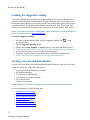
The navigation pane lets you quickly locate help topics using Content, Index, Search, or
Favorites. (For details, see See "Finding specific information ".)
Depending on how you access the guide, the navigation pane may be hidden. If it’s hidden,
you can simply click the Show navigation button to display the navigation pane.
Breadcrumbs
Breadcrumbs show the current topic's location or depth in the guide's table of contents.
Higher level topics appear as links that you can click to quickly navigate backwards.
See "Finding specific information "
See "Moving between help topics"
See "Printing a topic"
See "Displaying the navigation pane"
21
Online help features