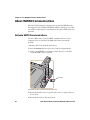
1
CV41
Vehicle
Mount Computer (Windows CE)
CV41C
User Guide
Intermec Technologies Corporation
Worldwide Headquarters
6001 36th Ave.W.
Everett, WA 98203
U.S.A.
www.intermec.com
The information contained herein is provided solely for the purpose of allowing customers to
operate and service Intermec-manufactured equipment and is not to be released, reproduced, or
used for any other purpose without written permission of Intermec Technologies Corporation.
Information and specifications contained in this document are subject to change without prior
notice and do not represent a commitment on the part of Intermec Technologies Corporation.
© 2012 by Intermec Technologies Corporation. All rights reserved.
The word Intermec, the Intermec logo, Norand, ArciTech, Beverage Routebook, CrossBar,
dcBrowser, Duratherm, EasyADC, EasyCoder, EasySet, Fingerprint, i-gistics, INCA (under license),
Intellitag, Intellitag Gen2, JANUS, LabelShop, MobileLAN, Picolink, Ready-to-Work, RoutePower,
Sabre, ScanPlus, ShopScan, Smart Mobile Computing, SmartSystems, TE 2000, Trakker Antares,
and Vista Powered are either trademarks or registered trademarks of Intermec Technologies
Corporation.
There are U.S. and foreign patents as well as U.S. and foreign patents pending.
ii
CV41 Vehicle Mount Computer (Windows CE) User Guide
Document Change Record
This page records changes to this document. The document was
originally released as Revision 001.
Version
Number
Date
Description of Change
002
7/2012
Revised to include:
• WWAN radio information.
• Intermec Dashboard information.
• ScanNGo configuration bar codes.
CV41 Vehicle Mount Computer (Windows CE) User Guide
iii
iv
CV41 Vehicle Mount Computer (Windows CE) User Guide
Contents
Contents
Before You Begin. . . . . . . . . . . . . . . . . . . . . . . . . . . . . . . . . . . . . . . . . . . . . . . . . . . . . . . . . . . . . . . . . xi
Safety Information . . . . . . . . . . . . . . . . . . . . . . . . . . . . . . . . . . . . . . . . . . . . . . . . . . . . . . . xi
Global Services and Support . . . . . . . . . . . . . . . . . . . . . . . . . . . . . . . . . . . . . . . . . . . . . . xi
Warranty Information. . . . . . . . . . . . . . . . . . . . . . . . . . . . . . . . . . . . . . . . . . . . xi
Web Support . . . . . . . . . . . . . . . . . . . . . . . . . . . . . . . . . . . . . . . . . . . . . . . . . . . . xi
Send Feedback. . . . . . . . . . . . . . . . . . . . . . . . . . . . . . . . . . . . . . . . . . . . . . . . . . . xii
Telephone Support . . . . . . . . . . . . . . . . . . . . . . . . . . . . . . . . . . . . . . . . . . . . . . xii
Service Location Support . . . . . . . . . . . . . . . . . . . . . . . . . . . . . . . . . . . . . . . . . xii
Related Documents . . . . . . . . . . . . . . . . . . . . . . . . . . . . . . . . . . . . . . . . . . . . . . . . . . . . . . xii
Patent Information . . . . . . . . . . . . . . . . . . . . . . . . . . . . . . . . . . . . . . . . . . . . . . . . . . . . . xiii
1 About the Computer
.................................................... 1
About the CV41 Vehicle Mount Computer . . . . . . . . . . . . . . . . . . . . . . . . . . . . . . . . . . . . . . . . . . 2
What’s New in This Release . . . . . . . . . . . . . . . . . . . . . . . . . . . . . . . . . . . . . . . . . . . . . . . . 4
Overview of the CV41 Features . . . . . . . . . . . . . . . . . . . . . . . . . . . . . . . . . . . . . . . . . . . . . 4
Power Supply Options. . . . . . . . . . . . . . . . . . . . . . . . . . . . . . . . . . . . . . . . . . . . . . . . . . . . . . . . . . . . . 5
About the Smart Dock . . . . . . . . . . . . . . . . . . . . . . . . . . . . . . . . . . . . . . . . . . . . . . . . . . . . . . . . . . . . 6
Attach the CV41 to the Smart Dock . . . . . . . . . . . . . . . . . . . . . . . . . . . . . . . . . . . . . . . . 6
Remove the CV41 from the Smart Dock . . . . . . . . . . . . . . . . . . . . . . . . . . . . . . . . . . . . 8
Secure the CV41 . . . . . . . . . . . . . . . . . . . . . . . . . . . . . . . . . . . . . . . . . . . . . . . . . . . . . . . . . . . . . . . . . . 9
About the LEDs. . . . . . . . . . . . . . . . . . . . . . . . . . . . . . . . . . . . . . . . . . . . . . . . . . . . . . . . . . . . . . . . . . 10
CV41 Accessories. . . . . . . . . . . . . . . . . . . . . . . . . . . . . . . . . . . . . . . . . . . . . . . . . . . . . . . . . . . . . . . . . 12
About Internal UPS Battery . . . . . . . . . . . . . . . . . . . . . . . . . . . . . . . . . . . . . . . . . . . . . . . . . . . . . . . 14
Maximize the Internal UPS Battery Usage . . . . . . . . . . . . . . . . . . . . . . . . . . . . . . . . . . 14
About the Backup Battery . . . . . . . . . . . . . . . . . . . . . . . . . . . . . . . . . . . . . . . . . . . . . . . . . . . . . . . . 15
Insert an SD Card . . . . . . . . . . . . . . . . . . . . . . . . . . . . . . . . . . . . . . . . . . . . . . . . . . . . . . . . . . . . . . . . 16
About the Touch Screen . . . . . . . . . . . . . . . . . . . . . . . . . . . . . . . . . . . . . . . . . . . . . . . . . . . . . . . . . . 17
Protect the Touch Screen . . . . . . . . . . . . . . . . . . . . . . . . . . . . . . . . . . . . . . . . . . . . . . . . . 17
Adjust the Screen Brightness . . . . . . . . . . . . . . . . . . . . . . . . . . . . . . . . . . . . . . . . . . . . . . 17
Enable the Defroster . . . . . . . . . . . . . . . . . . . . . . . . . . . . . . . . . . . . . . . . . . . . . . . . . . . . . 18
Change the Volume . . . . . . . . . . . . . . . . . . . . . . . . . . . . . . . . . . . . . . . . . . . . . . . . . . . . . . . . . . . . . . 19
CV41 Vehicle Mount Computer (Windows CE) User Guide
v
Contents
Connect an External Antenna . . . . . . . . . . . . . . . . . . . . . . . . . . . . . . . . . . . . . . . . . . . . . . . . . . . . . 19
About the Keypad . . . . . . . . . . . . . . . . . . . . . . . . . . . . . . . . . . . . . . . . . . . . . . . . . . . . . . . . . . . . . . . . 21
Use the Modifier Keys . . . . . . . . . . . . . . . . . . . . . . . . . . . . . . . . . . . . . . . . . . . . . . . . . . . . 22
Capitalize Characters. . . . . . . . . . . . . . . . . . . . . . . . . . . . . . . . . . . . . . . . . . . . . . . . . . . . . 22
Enable or Disable the Keypad Backlight. . . . . . . . . . . . . . . . . . . . . . . . . . . . . . . . . . . . 23
Set the Keypad and Display Backlight Timer . . . . . . . . . . . . . . . . . . . . . . . . . . . . . . . 24
Transfer Files To and From Your PC . . . . . . . . . . . . . . . . . . . . . . . . . . . . . . . . . . . . . . . . . . . . . . . 24
2 Understand the User Interface and Intermec Applications
. . . . . . . . 27
About the User Interface. . . . . . . . . . . . . . . . . . . . . . . . . . . . . . . . . . . . . . . . . . . . . . . . . . . . . . . . . . 28
About the Desktop Screen . . . . . . . . . . . . . . . . . . . . . . . . . . . . . . . . . . . . . . . . . . . . . . . . 28
Learn the Basic Skills . . . . . . . . . . . . . . . . . . . . . . . . . . . . . . . . . . . . . . . . . . . . . . . . . . . . . 28
Use the Touch Screen . . . . . . . . . . . . . . . . . . . . . . . . . . . . . . . . . . . . . . . . . . . . 28
Use the Taskbar. . . . . . . . . . . . . . . . . . . . . . . . . . . . . . . . . . . . . . . . . . . . . . . . . . 29
Use Pop-Up Menus. . . . . . . . . . . . . . . . . . . . . . . . . . . . . . . . . . . . . . . . . . . . . . . 30
Enter Information . . . . . . . . . . . . . . . . . . . . . . . . . . . . . . . . . . . . . . . . . . . . . . . . . . . . . . . 30
Use Transcriber . . . . . . . . . . . . . . . . . . . . . . . . . . . . . . . . . . . . . . . . . . . . . . . . . . 31
Calibrate the Screen . . . . . . . . . . . . . . . . . . . . . . . . . . . . . . . . . . . . . . . . . . . . . . . . . . . . . . 31
Set the Date and Time. . . . . . . . . . . . . . . . . . . . . . . . . . . . . . . . . . . . . . . . . . . . . . . . . . . . 31
Sync to a Local Time Server . . . . . . . . . . . . . . . . . . . . . . . . . . . . . . . . . . . . . . . 32
About Intermec Applications . . . . . . . . . . . . . . . . . . . . . . . . . . . . . . . . . . . . . . . . . . . . . . . . . . . . . 32
Applications Available On the Computer. . . . . . . . . . . . . . . . . . . . . . . . . . . . . . . . . . . 32
Applications You Can Download For the Computer . . . . . . . . . . . . . . . . . . . . . . . . 34
About Intermec Launcher . . . . . . . . . . . . . . . . . . . . . . . . . . . . . . . . . . . . . . . . 34
About Features Demo . . . . . . . . . . . . . . . . . . . . . . . . . . . . . . . . . . . . . . . . . . . . 34
About SmartSystems Foundation . . . . . . . . . . . . . . . . . . . . . . . . . . . . . . . . . 34
3 Manage the Computer
. . . . . . . . . . . . . . . . . . . . . . . . . . . . . . . . . . . . . . . . . . . . . . . . . 37
Manage the Computer in Your Network . . . . . . . . . . . . . . . . . . . . . . . . . . . . . . . . . . . . . . . . . . . 38
Manage the Computer Using SmartSystems Foundation . . . . . . . . . . . . . . . . . . . . 38
Develop and Install Applications . . . . . . . . . . . . . . . . . . . . . . . . . . . . . . . . . . . . . . . . . . . . . . . . . . 39
Package Your Application. . . . . . . . . . . . . . . . . . . . . . . . . . . . . . . . . . . . . . . . . . . . . . . . . 39
Choose a Target Location . . . . . . . . . . . . . . . . . . . . . . . . . . . . . . . . . . . . . . . . . . . . . . . . . 39
Install Applications Using SmartSystems Foundation Console. . . . . . . . . . . . . . . 40
Install Applications Using Microsoft ActiveSync . . . . . . . . . . . . . . . . . . . . . . . . . . . . 40
Install Applications Using an SD Card . . . . . . . . . . . . . . . . . . . . . . . . . . . . . . . . . . . . . 40
vi
CV41 Vehicle Mount Computer (Windows CE) User Guide
Contents
Update the Intermec Content Software . . . . . . . . . . . . . . . . . . . . . . . . . . . . . . . . . . . . . . . . . . . . 41
Update the Operating System and Low-Level Firmware. . . . . . . . . . . . . . . . . . . . . . 41
Update the Intermec Content Software . . . . . . . . . . . . . . . . . . . . . . . . . . . . . . . . . . . . 42
Update Intermec Content Using SmartSystems Foundation . . . . . . . . . 42
Update Intermec Content Using a ActiveSync . . . . . . . . . . . . . . . . . . . . . . . . . . . . . . 43
4 Configure the Computer
. . . . . . . . . . . . . . . . . . . . . . . . . . . . . . . . . . . . . . . . . . . . . . . 45
How to Configure the Computer . . . . . . . . . . . . . . . . . . . . . . . . . . . . . . . . . . . . . . . . . . . . . . . . . . 46
Use Intermec Settings on the Computer. . . . . . . . . . . . . . . . . . . . . . . . . . . . . . . . . . . . . . . . . . . . 46
Start Intermec Settings . . . . . . . . . . . . . . . . . . . . . . . . . . . . . . . . . . . . . . . . . . . . . . . . . . . 47
About the Structure of Intermec Settings . . . . . . . . . . . . . . . . . . . . . . . . . . . . . . . . . . 47
Navigate in Intermec Settings . . . . . . . . . . . . . . . . . . . . . . . . . . . . . . . . . . . . . . . . . . . . . 52
Configure Profile Settings With Intermec Settings . . . . . . . . . . . . . . . . . . . . . . . . . . 52
Restore Default Settings . . . . . . . . . . . . . . . . . . . . . . . . . . . . . . . . . . . . . . . . . . . . . . . . . . 54
Hide Menu Items in Intermec Settings . . . . . . . . . . . . . . . . . . . . . . . . . . . . . . . . . . . . . 54
Use Intermec Settings Remotely With SmartSystems Foundation . . . . . . . . . . . . . . . . . . . . 55
About Network Communications . . . . . . . . . . . . . . . . . . . . . . . . . . . . . . . . . . . . . . . . . . . . . . . . . 56
Configure 802.11a/b/g (Wi-Fi) Radio Communications . . . . . . . . . . . . . . . . . . . . . 56
Configure Bluetooth Communications . . . . . . . . . . . . . . . . . . . . . . . . . . . . . . . . . . . . 57
Connect to a Bluetooth Scanner. . . . . . . . . . . . . . . . . . . . . . . . . . . . . . . . . . . 58
Connect to a Bluetooth Printer. . . . . . . . . . . . . . . . . . . . . . . . . . . . . . . . . . . . 59
About Serial and USB Communications . . . . . . . . . . . . . . . . . . . . . . . . . . . . . . . . . . . 59
Connect to a USB Scanner . . . . . . . . . . . . . . . . . . . . . . . . . . . . . . . . . . . . . . . . 60
Connect to a Serially Tethered Scanner . . . . . . . . . . . . . . . . . . . . . . . . . . . . 60
Create an ISP Connection. . . . . . . . . . . . . . . . . . . . . . . . . . . . . . . . . . . . . . . . . . . . . . . . . 62
Create a VPN Server Connection . . . . . . . . . . . . . . . . . . . . . . . . . . . . . . . . . . . . . . . . . . 64
About Wireless Security . . . . . . . . . . . . . . . . . . . . . . . . . . . . . . . . . . . . . . . . . . . . . . . . . . . . . . . . . . 65
Choose Between Microsoft and Funk Security . . . . . . . . . . . . . . . . . . . . . . . . . . . . . . 65
Select a Funk Security Profile . . . . . . . . . . . . . . . . . . . . . . . . . . . . . . . . . . . . . 66
Select Microsoft as Your Security Choice . . . . . . . . . . . . . . . . . . . . . . . . . . . 70
Load a Certificate . . . . . . . . . . . . . . . . . . . . . . . . . . . . . . . . . . . . . . . . . . . . . . . . . . . . . . . . 75
5 Use the Auto-On Feature
. . . . . . . . . . . . . . . . . . . . . . . . . . . . . . . . . . . . . . . . . . . . . . 77
About the Auto-On Feature . . . . . . . . . . . . . . . . . . . . . . . . . . . . . . . . . . . . . . . . . . . . . . . . . . . . . . . 78
Enable the Auto-On Feature . . . . . . . . . . . . . . . . . . . . . . . . . . . . . . . . . . . . . . . . . . . . . . 78
Disable the Auto-On Feature. . . . . . . . . . . . . . . . . . . . . . . . . . . . . . . . . . . . . . . . . . . . . . 78
CV41 Vehicle Mount Computer (Windows CE) User Guide
vii
Contents
6 Use WWAN and GPS Communications
. . . . . . . . . . . . . . . . . . . . . . . . . . . . . . 81
About WWAN Communications . . . . . . . . . . . . . . . . . . . . . . . . . . . . . . . . . . . . . . . . . . . . . . . . . . 82
Activate UMTS Communications . . . . . . . . . . . . . . . . . . . . . . . . . . . . . . . . . . . . . . . . . 82
Activate CDMA Communications . . . . . . . . . . . . . . . . . . . . . . . . . . . . . . . . . . . . . . . . . 83
About GPS . . . . . . . . . . . . . . . . . . . . . . . . . . . . . . . . . . . . . . . . . . . . . . . . . . . . . . . . . . . . . . . . . . . . . . 84
Test the GPS Receiver . . . . . . . . . . . . . . . . . . . . . . . . . . . . . . . . . . . . . . . . . . . . . . . . . . . . 84
7 Enable Screen Blanking
. . . . . . . . . . . . . . . . . . . . . . . . . . . . . . . . . . . . . . . . . . . . . . . . 85
About Screen Blanking . . . . . . . . . . . . . . . . . . . . . . . . . . . . . . . . . . . . . . . . . . . . . . . . . . . . . . . . . . . 86
Install the Hardware for Screen Blanking. . . . . . . . . . . . . . . . . . . . . . . . . . . . . . . . . . . . . . . . . . . 86
Before You Install the Switch. . . . . . . . . . . . . . . . . . . . . . . . . . . . . . . . . . . . . . . . . . . . . . 86
Tools You Need . . . . . . . . . . . . . . . . . . . . . . . . . . . . . . . . . . . . . . . . . . . . . . . . . . . . . . . . . 87
Create a Custom Serial Cable . . . . . . . . . . . . . . . . . . . . . . . . . . . . . . . . . . . . . . . . . . . . . 87
Install Switch for Screen Blanking . . . . . . . . . . . . . . . . . . . . . . . . . . . . . . . . . . . . . . . . . 88
Enable Screen Blanking. . . . . . . . . . . . . . . . . . . . . . . . . . . . . . . . . . . . . . . . . . . . . . . . . . . 88
8 Troubleshoot and Maintain the Computer
. . . . . . . . . . . . . . . . . . . . . . . . . . . 89
About the Intermec Dashboard . . . . . . . . . . . . . . . . . . . . . . . . . . . . . . . . . . . . . . . . . . . . . . . . . . . 90
Troubleshoot Your Computer . . . . . . . . . . . . . . . . . . . . . . . . . . . . . . . . . . . . . . . . . . . . . . . . . . . . . 90
Troubleshoot the Wi-Fi Connection . . . . . . . . . . . . . . . . . . . . . . . . . . . . . . . . . . . . . . . 90
Troubleshoot 802.1x Security . . . . . . . . . . . . . . . . . . . . . . . . . . . . . . . . . . . . . . . . . . . . . 92
Check 802.11 Network Status . . . . . . . . . . . . . . . . . . . . . . . . . . . . . . . . . . . . . . . . . . . . . 92
Troubleshoot Reading Bar Codes. . . . . . . . . . . . . . . . . . . . . . . . . . . . . . . . . . . . . . . . . . 94
Troubleshoot Operating the Computer . . . . . . . . . . . . . . . . . . . . . . . . . . . . . . . . . . . . 96
Call Product Support. . . . . . . . . . . . . . . . . . . . . . . . . . . . . . . . . . . . . . . . . . . . . . . . . . . . . . . . . . . . . 97
Find Your Configuration Number . . . . . . . . . . . . . . . . . . . . . . . . . . . . . . . . . . . . . . . . . 97
Find Your Operating System Version . . . . . . . . . . . . . . . . . . . . . . . . . . . . . . . . . . . . . . 98
Reset the Computer . . . . . . . . . . . . . . . . . . . . . . . . . . . . . . . . . . . . . . . . . . . . . . . . . . . . . . . . . . . . . . 98
Cold Boot the Computer . . . . . . . . . . . . . . . . . . . . . . . . . . . . . . . . . . . . . . . . . . . . . . . . . 98
Warm Boot the Computer . . . . . . . . . . . . . . . . . . . . . . . . . . . . . . . . . . . . . . . . . . . . . . . . 98
Clean Boot the Computer. . . . . . . . . . . . . . . . . . . . . . . . . . . . . . . . . . . . . . . . . . . . . . . . . 99
Disconnect the UPS Battery. . . . . . . . . . . . . . . . . . . . . . . . . . . . . . . . . . . . . . . . . . . . . . . 99
Replace the Fuse . . . . . . . . . . . . . . . . . . . . . . . . . . . . . . . . . . . . . . . . . . . . . . . . . . . . . . . . . . . . . . . .100
viii
CV41 Vehicle Mount Computer (Windows CE) User Guide
Contents
Clean the Computer. . . . . . . . . . . . . . . . . . . . . . . . . . . . . . . . . . . . . . . . . . . . . . . . . . . . . . . . . . . . .101
ASpecifications and Default Settings
. . . . . . . . . . . . . . . . . . . . . . . . . . . . . . . . . 103
Physical and Environmental Specifications . . . . . . . . . . . . . . . . . . . . . . . . . . . . . . . . . . . . . . . .104
Physical Dimensions . . . . . . . . . . . . . . . . . . . . . . . . . . . . . . . . . . . . . . . . . . . . . . . . . . . .104
Environmental Specifications . . . . . . . . . . . . . . . . . . . . . . . . . . . . . . . . . . . . . . . . . . . .104
Power and Electrical Specifications . . . . . . . . . . . . . . . . . . . . . . . . . . . . . . . . . . . . . . .104
Hardware . . . . . . . . . . . . . . . . . . . . . . . . . . . . . . . . . . . . . . . . . . . . . . . . . . . . . . . . . . . . . .105
Standard Communications . . . . . . . . . . . . . . . . . . . . . . . . . . . . . . . . . . . . . . . . . . . . . .105
Wireless LAN . . . . . . . . . . . . . . . . . . . . . . . . . . . . . . . . . . . . . . . . . . . . . . . . . . . . . . . . . . .106
Default Configuration . . . . . . . . . . . . . . . . . . . . . . . . . . . . . . . . . . . . . . . . . . . . . . . . . .106
Data Collection Settings. . . . . . . . . . . . . . . . . . . . . . . . . . . . . . . . . . . . . . . . .106
Communications . . . . . . . . . . . . . . . . . . . . . . . . . . . . . . . . . . . . . . . . . . . . . . .109
Device Settings . . . . . . . . . . . . . . . . . . . . . . . . . . . . . . . . . . . . . . . . . . . . . . . . .109
Core Messaging Service Settings. . . . . . . . . . . . . . . . . . . . . . . . . . . . . . . . . .111
Device Monitor Settings . . . . . . . . . . . . . . . . . . . . . . . . . . . . . . . . . . . . . . . . .112
RFID Settings . . . . . . . . . . . . . . . . . . . . . . . . . . . . . . . . . . . . . . . . . . . . . . . . . .112
Virtual Wedge Settings . . . . . . . . . . . . . . . . . . . . . . . . . . . . . . . . . . . . . . . . . .112
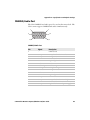
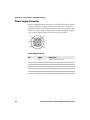
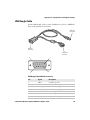
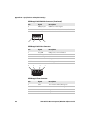
Port Pin Assignments. . . . . . . . . . . . . . . . . . . . . . . . . . . . . . . . . . . . . . . . . . . . . . . . . . . . . . . . . . . .113
COM 1 and COM 2 Ports . . . . . . . . . . . . . . . . . . . . . . . . . . . . . . . . . . . . . . . . . . . . . . . .113
USB Port . . . . . . . . . . . . . . . . . . . . . . . . . . . . . . . . . . . . . . . . . . . . . . . . . . . . . . . . . . . . . . .114
CANBUS/Audio Port. . . . . . . . . . . . . . . . . . . . . . . . . . . . . . . . . . . . . . . . . . . . . . . . . . . .115
Power Supply Connector . . . . . . . . . . . . . . . . . . . . . . . . . . . . . . . . . . . . . . . . . . . . . . . .116
USB Dongle Cable . . . . . . . . . . . . . . . . . . . . . . . . . . . . . . . . . . . . . . . . . . . . . . . . . . . . . .117
B Keypads and Keystrokes
. . . . . . . . . . . . . . . . . . . . . . . . . . . . . . . . . . . . . . . . . . . . . 119
Standard Characters . . . . . . . . . . . . . . . . . . . . . . . . . . . . . . . . . . . . . . . . . . . . . . . . . . . . . . . . . . . .120
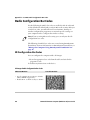
C ScanNGo Wi-Fi Configuration Bar Codes
. . . . . . . . . . . . . . . . . . . . . . . . . . . . 127
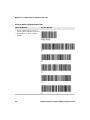
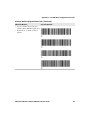
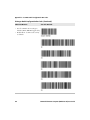
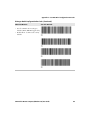
Radio Configuration Bar Codes . . . . . . . . . . . . . . . . . . . . . . . . . . . . . . . . . . . . . . . . . . . . . . . . . .128
2D Configuration Bar Codes. . . . . . . . . . . . . . . . . . . . . . . . . . . . . . . . . . . . . . . . . . . . .128
1D Configuration Bar Codes. . . . . . . . . . . . . . . . . . . . . . . . . . . . . . . . . . . . . . . . . . . . .129
CV41 Vehicle Mount Computer (Windows CE) User Guide
ix
Contents
x
CV41 Vehicle Mount Computer (Windows CE) User Guide
Before You Begin
Before You Begin
This section provides you with safety information, technical support
information, and sources for additional product information.
Safety Information
Your safety is extremely important. Read and follow cautions in this
document before handling and operating Intermec equipment. You
can be seriously injured, and equipment and data can be damaged if
you do not follow the safety cautions.
This section explains how to identify and understand cautions and
notes that are in this document.
A caution alerts you to an operating procedure, practice,
condition, or statement that must be strictly observed to prevent
equipment damage or destruction, or corruption or loss of data.
Note: Notes either provide extra information about a topic or contain
special instructions for handling a particular condition or set of
circumstances.
Global Services and Support
Warranty Information
To understand the warranty for your Intermec product, visit the
Intermec website at www.intermec.com and click Support >
Returns and Repairs > Warranty.
Disclaimer of warranties: The sample code included in this document
is presented for reference only. The code does not necessarily
represent complete, tested programs. The code is provided “as is with
all faults.” All warranties are expressly disclaimed, including the
implied warranties of merchantability and fitness for a particular
purpose.
Web Support
Visit the Intermec website at www.intermec.com to download our
current manuals (in PDF).
CV41 Vehicle Mount Computer (Windows CE) User Guide
xi
Before You Begin
Visit the Intermec technical knowledge base (Knowledge Central) at
www.intermec.com and click Support > Knowledge Central to
review technical information or to request technical support for your
Intermec product.
Send Feedback
Your feedback is crucial to the continual improvement of our
documentation. To provide feedback about this manual, please
contact the Intermec Technical Communications department directly
at [email protected].
Telephone Support
In the U.S.A. and Canada, call 1-800-755-5505.
Outside the U.S.A. and Canada, contact your local Intermec
representative. To search for your local representative, from the
Intermec website, click About Us > Contact Us.
Service Location Support
For the most current listing of service locations, click Support >
Returns and Repairs > Repair Locations.
Related Documents
This is a list of related Intermec documents.
•
Intermec Settings Command Reference Manual
•
Intermec Developer Library (IDL) Resource Kit Developer’s Guide
The Intermec website at www.intermec.com contains our documents
(as PDF files) that you can download for free.
To download documents
1 Visit the Intermec website at www.intermec.com.
2 Click the Products tab.
3 Using the Products menu, navigate to your product page. For
example, to find the CV41 computer product page, click
Computers > Fixed Vehicle Computers > CV41.
4 Click the Manuals tab.
xii
CV41 Vehicle Mount Computer (Windows CE) User Guide
Before You Begin
If your product does not have its own product page, click Support >
Manuals. Use the Product Category, the Product Family, and
Product to find your documentation.
Patent Information
Product is covered by one or more of the following patents:
5,218,191; 5,233,172; 5,241,488; 5,243,602; 5,258,606; 5,288,985;
5,308,966; 5,342,210; 5,359,185; 5,389,770; 5,397,885; 5,414,251;
5,416,463; 5,442,167; 5,464,972; 5,468,947; 5,468,950; 5,477,044;
5,486,689; 5,500,516; 5,502,297; 5,504,367; 5,514,858; 5,534,684;
5,536,924; 5,539,191; 5,541,419; 5,548,108; 5,550,362; 5,550,364;
5,565,669; 5,572,007; 5,576,529; 5,594,230; 5,598,007; 5,608,578;
5,616,909; 5,619,027; 5,640,001; 5,659,431; 5,672,860; 5,684,290;
5,719,678; 5,729,003; 5,742,041; 5,761,219; 5,764,798; 5,777,308;
5,777,309; 5,777,310; 5,786,583; 5,798,509; 5,798,513; 5,804,805;
5,811,776; 5,811,777; 5,818,027; 5,821,523; 5,834,749; 5,837,987;
5,841,121; 5,842,070; 5,854,478; 5,862,267; 5,869,840; 5,873,070;
5,877,486; 5,878,395; 5,886,338; 5,895,906; 5,902,987; 5,902,988;
5,912,452; 5,923,022; 5,936,224; 5,949,056; 5,969,321; 5,969,326;
5,979,768; 5,987,192; 5,992,750; 6,003,775; 6,012,640; 6,016,960;
6,018,597; 6,024,289; 6,034,379; 6,036,093; 6,039,252; 6,064,763;
6,095,422; 6,097,839; 6,102,289; 6,102,295; 6,119,941; 6,128,414;
6,138,915; 6,149,061; 6,149,063; 6,152,370; 6,155,490; 6,158,661;
6,164,542; 6,164,545; 6,173,893; 6,195,053; 6,234,393; 6,234,395;
6,249,008; 6,328,214; 6,330,975; 6,345,765; 6,356,949; 6,367,699;
6,375,075; 6,375,076; 6,435,411; 6,484,944; 6,641,046; 6,669,087;
6,681,994; 6,688,523; 6,732,930; 6,879,428; 6,889,903; 6,974,085;
7,035,466; 7,143,941; 7,185,819; 7,190,835; 7,232,072; 7,322,526;
6,847,620; 6,857,013; 6,944,446; 6,970,459; 6,976,062; 7,125,743;
7,139,870; 7,159,764; 7,206,338; 7,208,916; 7,210,633; 7,271,679;
7,298,791; 7,325,741; 7,327,988; 7,336,853; 7,451,441; 7,564,799;
7,572,990; 7,580,395; 7,590,425; 7,633,550; 7,669,201; 7,761,864;
7,888,913; 7,895,267; 7,924,346; 7,962,104; 8,002,173; 8,014,354;
8,064,924.
There may be other U.S. and foreign patents pending.
CV41 Vehicle Mount Computer (Windows CE) User Guide
xiii
xiv
CV41 Vehicle Mount Computer (Windows CE) User Guide
1
About the Computer
This chapter introduces the CV41 Vehicle Mount Computer
with Windows® CE operating system. Use this chapter to learn
about the basic features and available accessories.
1
Chapter 1 — About the Computer
About the CV41 Vehicle Mount Computer
The rugged CV41 Vehicle Mount Computer is designed for real-time
data collection applications in warehousing, distribution,
work-in-process, time and attendance, and stationary applications.
The CV41 is highly configurable and runs on the Microsoft Windows
CE 6.0 operating system. Additionally, the CV41 supports terminal
emulation applications, browser-based applications, and custom
applications.
The CV41 is used with the smart dock. The dock installs onto a vehicle
and provides conditioned power to the CV41. All peripheral
connections are also made on the dock. With the CV41 design, you can
easily remove the CV41 from the smart dock and attach it to another
vehicle that is equipped with a dock.
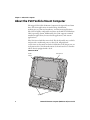
CV41 Front View
Power
button
Microphone
Speakers
2
CV41 Vehicle Mount Computer (Windows CE) User Guide
Chapter 1 — About the Computer
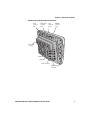
CV41 Back View with Quick Mount Smart Dock
Wi-Fi
antenna
plug
Wi-Fi (aux)
antenna
plug
GPS
antenna
plug
WWAN
antenna
plug
Strain relief
clamps
COM1
COM2
USB connector
CANBUS/audio
connector
CV41 Vehicle Mount Computer (Windows CE) User Guide
3
Chapter 1 — About the Computer
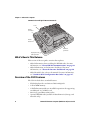
CV41 Back View with Quick Mount Smart Dock
Fuse
Power
connector
Power
button
Padlock
provision
Laptop security
cable provision
What’s New in This Release
This version of the user guide contains these updates:
•
•
•
Added information about enabling the WWAN radio. For more
information, see “About WWAN Communications” on page 82.
Added information on the Intermec Dashboard. For more
information, see “About the Intermec Dashboard” on page 90.
Added ScanNGo bar codes to the manual. For more information,
see “ScanNGo Wi-Fi Configuration Bar Codes” on page 127.
Overview of the CV41 Features
The CV41 includes these standard features:
•
•
•
•
•
4
WVGA display with a resolution of 800 x 480 pixels
1 GB of RAM memory
1 GB flash memory with user-installable expansion slot supporting
an additional 1 to 4 GB SD card
802.11a/b/g and Bluetooth® radios
Optional WWAN radio (available in North America, Europe, and
Australia only)
CV41 Vehicle Mount Computer (Windows CE) User Guide
Chapter 1 — About the Computer
•
Intel Atom 1.6 GHz processor
The CV41 Vehicle Mount Computer has an IEEE 802.11a/b/g radio
installed and Wi-Fi® certified for interoperability with other
802.11a/b/g wireless LAN devices.
Power Supply Options
To use the CV41, you must apply power to it. By default, the CV41
comes with a DC power cable that connects directly to a forklift battery
running 10-60 VDC power. Other power supply options include:
• 6-96 DC/DC Power Supply
• AC/DC Power Supply
The AC/DC power supply must be connected to a 120 V, 60 Hz supply
in North America, or to a 230 V, 50 Hz power supply outside of North
America (appropriate AC cable not included). Make sure that the
external AC power is properly grounded and provides a maximum of
15 A of overcurrent protection (10 A for 230 V circuits). For more
information on installing any of these power supply options, see the
CV41 Vehicle Mounting Kit Reference Guide.
Note: In North America, the AC power supply is intended for use with
a UL Listed ITE power supply with an output rating of 12 to 48 VDC,
minimum 15 W. Outside of North America, the power supply is
inteded for use with an IEC certified ITE power supply with an output
rating of 12 to 48 VDC, minimum 15 W.
CV41 Vehicle Mount Computer (Windows CE) User Guide
5
Chapter 1 — About the Computer
About the Smart Dock
The smart dock is secured to a forklift using a RAM mounting kit and
provides conditioned power to the CV41. The CV41 can then be
connected or removed from the smart dock at any time. With this
unique system, you can easily move the CV41 from one vehicle
equipped with the smart dock to another. Additionally, the dock
provides:
• a USB port
• two COM ports
• a CANBUS/audio port
• strain relief cable mounts
To connect any accessory such as a tethered scanner, an audio headset,
or a USB flash drive, you need to purchase the correct accessory cables.
For more information, contact your local Intermec representative.
Make sure the smart dock is powered off before you connect any cables
to it.
Attach the CV41 to the Smart Dock
Once you have secured the smart dock and connected it to power,
attach the CV41 to the smart dock.
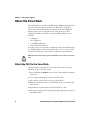
1 Press and hold the Power button on the CV41 until the computer
turns off.
2 Locate the protruding lip on the rear of the CV41.
3 Place the lip of the CV41 over the top of the dock.
4 Slide the CV41 from side-to-side until the CV41 is seated into the
smart dock.
5 Push down onto the smart dock until you hear a click.
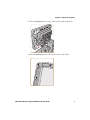
6 If necessary, adjust the viewing angle by adjusting the pivot arm on
the RAM mount.
6
CV41 Vehicle Mount Computer (Windows CE) User Guide
Chapter 1 — About the Computer
7 Press the Power button on the smart dock to turn on the dock.
8 Press the Power button on the CV41 to turn on the CV41.
CV41 Vehicle Mount Computer (Windows CE) User Guide
7
Chapter 1 — About the Computer
Remove the CV41 from the Smart Dock
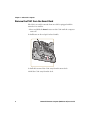
The CV41 can easily be moved from one vehicle equipped with the
smart dock to another.
1 Press and hold the Power button on the CV41 until the computer
turns off.
2 Pull down on the red quick release handle.
3 Pull the bottom of the CV41 away from the smart dock.
4 Lift the CV41 away from the dock.
8
CV41 Vehicle Mount Computer (Windows CE) User Guide
Chapter 1 — About the Computer
Secure the CV41
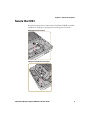
If you do not want users to remove the CV41 from a forklift, use either
a padlock or a laptop security provision to keep your CV41 safe.
Padlock Provision Location
Laptop Security Provision Location
CV41 Vehicle Mount Computer (Windows CE) User Guide
9
Chapter 1 — About the Computer
About the LEDs
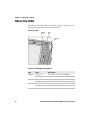
The LEDs on the CV41 tell the state of the computer. Use this section
to learn about the connection and system LEDs.
Connection LEDs
WWAN
LED
Wi-Fi
LED
Bluetooth
LED
Connection LED Status Descriptions
LED
State
Description
WWAN
Solid green
The CV41 is connected to WWAN.
Off
The CV41 is not connected to WWAN.
Wi-Fi
Solid green
The CV41 is connected to Wi-Fi.
Off
The CV41 is not connected to Wi-Fi.
Bluetooth Solid blue
Off
10
Bluetooth is turned on.
Bluetooth is turned off.
CV41 Vehicle Mount Computer (Windows CE) User Guide
Chapter 1 — About the Computer
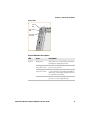
System LEDs
System
LED
UPS battery
LED
Solid state
drive LED
System LED Status Descriptions
LED
State
Description
System
Solid green
The CV41 is on, or the CV41 is on but the
backlight or display may be off.
Blinking green
every 4.5 seconds
The CV41 is in suspend mode, or external
power is not present.
Blinking green
every 1.5 seconds
The CPU temperature is less than -20 °C
(-4 °F), the heater is warming the CPU for
30 seconds, or the CV41 needs to be moved
to a warmer environment.
Off
The CV41 is off, external power is not
present, or it is in suspend mode.
CV41 Vehicle Mount Computer (Windows CE) User Guide
11
Chapter 1 — About the Computer
System LED Status Descriptions (Continued)
LED
State
Description
UPS
battery
Solid green
(External power present) The UPS battery
is charging.
(External power not present) The CV41 is
off or the UPS battery is not present.
Solid amber
(External power present) There is no UPS
battery present, the CV41 is out of
charging temperature range, a charge
timeout has occurred, or there is a
charging fault.
(External not present) UPS battery is
supplying power and is discharging.
Off
The UPS battery is fully charged, or is not
charging.
Solid state Flashing green
drive
Off
Read or write activity is occurring.
There is no read or write activity.
CV41 Accessories
The CV41 does not ship with any accessories. All accessories are sold
and ordered separately. For help, contact your local Intermec sales
representative.
CV41 Accessories
12
Accessory
Description
Quick Mount Smart Dock
The smart dock provides a mount for the
CV41, and supplies conditioned power to the
CV41. For more information, see the CV41
Vehicle Mounting Kit Reference Guide.
RAM Mounting Kit
Use this mounting kit to attach the CV41 to a
variety of surfaces, including a vehicle or to
your desktop. For more information, see the
CV41 Vehicle Mounting Kit Reference Guide.
USB Y-Cable
Use the USB cable to connect USB devices and
peripherals to the CV41.
Screen Blanking Box
Use the screen blankinig box to turn off the
CV41 display while a vehicle is in motion.
CV41 Vehicle Mount Computer (Windows CE) User Guide
Chapter 1 — About the Computer
CV41 Accessories (Continued)
Accessory
Description
CANBUS Y-Cable
Use the CANBUS Y-Cable to connect a
CANBUS interface to the CV41.
UPS Battery
Purchase a new UPS battery when the one in
your CV41 does not provide satisfactory
operating time.
Audio Cable
Use the audio cable to connect a headset to the
CV41.
Headset
Use the headset for a hands-free voice solution.
Touch Screen Protective
Film (10 pack)
Use the protective film to to reduce wear and
protect the touch screen from being damaged.
Stylus Kit (5 pack)
Use the stylus to navigate around the user
interface of the CV41.
WWAN Adhesive Mount
Antenna Kit
Purchase the WWAN antenna to provide
WWAN connectivity to a WWAN-enabled
CV41.
GPS Antenna Kit
Purchase the GPS antenna to provide GPS
connectivity to a GPS-enabled CV41.
6-96 VDC Power
Connection Kit
Use this kit to supply power to trucks that are
that run a voltage of greater than 60 VDC.
AC Power Supply
Use the AC power supply to power the CV41.
The power supply can be connected to a 120 V
or to a 230 V supply. If you are outside of the
United States, you must supply your own
power cord.
CV41 Vehicle Mount Computer (Windows CE) User Guide
13
Chapter 1 — About the Computer
About Internal UPS Battery
The CV41 contains an internal UPS battery that is automatically
charged when you place the CV41 in a powered smart dock. The UPS
battery can power the CV41 for a minimum of 30 minutes at -20 °C
(-40 °F) or higher. The UPS battery allows you to continue using the
CV41 when it is not mounted in a dock or when the vehicle battery is
being changed.
If the UPS battery becomes critically low on power, the CV41 performs
a controlled shutdown. You can recharge it by placing the CV41 into
the smart dock. You can fully charge a discharged UPS battery in
approximately 4 hours.
If you plan on shipping the CV41 to a different location, make
sure the internal UPS battery is disconnected. For help, see
“Disconnect the UPS Battery” on page 99.
Maximize the Internal UPS Battery Usage
Adjust the backlight, screen, or computer turn off times to maximize
the internal UPS battery usage. The changes you make to these settings
are cumulative. For example, if you set the backlight and screen turn
off times to 15 sec and the CV41 turn off times to 5 min, the CV41
actually turns off after 5 min and 15 sec.
Note: Disabling the backlight also disables the screen and the CV41
turn off times. Conversely, disabling the screen turn off time also
disables the CV41 turn off times.
1 Tap Start > Settings > Control Panel > Intermec Settings. The
Intermec Settings screen appears.
14
CV41 Vehicle Mount Computer (Windows CE) User Guide
Chapter 1 — About the Computer
2 Tap Device Settings > Power Management > Battery Power. The
Battery Power screen appears.
3 Adjust the Backlight, Screen, and Device turn off times in the
dropdown menus.
4 Tap OK when you are finished to save your changes.
About the Backup Battery
The CV41 has a permanent Lithium-Ion battery installed to maintain
the time, date, and CMOS setup information for a minimum of 90
days. The Lithium-Ion battery is not user-replaceable and should last
five years before it needs a replacement.
The backup battery must only be changed by authorized service
personnel. For more information, contact your local Intermec service
representative.
CV41 Vehicle Mount Computer (Windows CE) User Guide
15
Chapter 1 — About the Computer
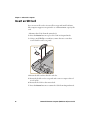
Insert an SD Card
You can use an SD card to increase file storage and install software.
The computer supports an optional 1 to 4 GB maximum capacity SD
card.
1 Remove the CV41 from the smart dock.
2 Press the Power button to place the CV41 in Suspend mode.
3 Using a small Phillips screwdriver, remove the two screws that
secure the SD card access panel.
SD card
4 Insert the SD card into the SD card slot.
5 Reattach the SD card access panel and screw to a torque value of
4 to 5 in/lbs.
6 Reattach the CV41 to the smart dock.
7 Press the Power button to resume the CV41 from Suspend mode.
16
CV41 Vehicle Mount Computer (Windows CE) User Guide
Chapter 1 — About the Computer
About the Touch Screen
The CV41 comes with an 8-inch color touch screen display with a
resolution of 800 x 480 pixels. The display also comes with an optional
heater to reduce condensation on the external surface of the display
when moving between sub-freezing temperatures and normal
temperatures.
Protect the Touch Screen
Apply the optional touch screen protective film to help protect the
screen from minor damage, scratches, and abrasions. Contact your
local Intermec representative to order protective film for your touch
screen.
1 Clean the touch screen from fingerprints, lint particles, dust, and
smudges. For more information, see “Clean the Computer” on
page 101.
2 Peel off the backing from the film to expose the adhesive.
3 Slide one edge of the film between the touch screen and display
housing.
4 Repeat Step 3 for the other three edges of the touch screen film.
Adjust the Screen Brightness
Depending on the current lighting conditions of the environment, you
may want to adjust the screen brightness of the CV41.
Note: If the ambient light sensor is enabled, you cannot adjust the
screen brightness on the CV41.
1 On the keypad, tap the ALT key to enable the secondary keys.
2 Tap F7 to increase brightness or F8 to decrease the brightness.
3 Repeat Steps 1 and 2 to increase or decrease brightness.
CV41 Vehicle Mount Computer (Windows CE) User Guide
17
Chapter 1 — About the Computer
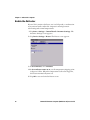
Enable the Defroster
If your CV41 contains a defroster, use it to help reduce condensation
on an external surface when the computer is moving between
sub-freezing and normal temperatures.
1 Tap Start > Settings > Control Panel > Intermec Settings. The
Intermec Settings screen appears.
2 Tap Device Settings > Heater. The Heater screen appears.
3 In Screen heater, select Enabled.
4 In Screen heater turns on at:, set the temperature tripping point
in degrees Celsius. When the temperature reaches the trip point,
the heater automatically turns on.
5 Tap OK to save and exit the Heater screen.
18
CV41 Vehicle Mount Computer (Windows CE) User Guide
Chapter 1 — About the Computer
Change the Volume
The CV41 can make sounds when you tap the screen or use an attached
scanner. You can change the CV41 volume to suit your needs and the
environment.
1 On the keypad, tap ALT to enable the secondary keys.
2 Tap F9 to increase volume or F10 to decrease the volume.
3 Repeat Steps 1 and 2 to increase or decrease volume.
Connect an External Antenna
The CV41 comes with either an internal or external Wi-Fi antenna
option. If you ordered the external antenna option, you can purchase
antennas to mount on a wall, forklift, or other flat surface using screws
or small patches of adhesive-backed hook and loop fastener material.
Note: If you have the internal 802.11 antenna option, you cannot
connect an external 802.11 antenna to your CV41. If you are using GPS
or WWAN, you must connect an external GPS or WWAN antenna.
CV41 Vehicle Mount Computer (Windows CE) User Guide
19
Chapter 1 — About the Computer
1 Using your own hardware, secure the external antenna to a wall,
forklift, or other flat surface.
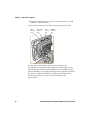
2 Secure the antenna to one of the antenna plugs on the CV41.
Wi-Fi
antenna
plug
Wi-Fi (aux)
antenna
plug
GPS
antenna
plug
WWAN
antenna
plug
Because system performance and antenna polarization are
site-dependent, a permanent mounting location may require some
experimentation. In most fixed installations, you should mount the
antenna initially in a vertically-polarized position, with the cable from
the antenna parallel to the floor and ceiling. For information on
purchasing an antenna, contact your local Intermec sales
representative.
20
CV41 Vehicle Mount Computer (Windows CE) User Guide
Chapter 1 — About the Computer
About the Keypad
The CV41 comes with one standard keypad overlay and contains a
backlight for low light conditions. Use the following sections to
understand how to use the keypad.
If you need to remap the keypad, use the Device Resource Kit. You can
download this Resource Kit from the Intermec Developer Library
website at www.intermec.com/idl.
CV41 Keypad Overlay
CV41 Vehicle Mount Computer (Windows CE) User Guide
21
Chapter 1 — About the Computer
Use the Modifier Keys
The CV41 keypad provides modifier keys to let you access additional
characters, symbols, and functions printed on the keypad overlay.
Once you understand how to use the modifier keys and key sequences,
you can access all of the additional features printed on the keypad
overlay.
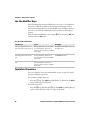
There are three modifier keys: the orange ( b ) key, the green ( Alt ) key,
and the Control ( Ctrl ) key.
Use the Color-Coded Keys
You want to:
Press:
Example:
Use an orange character or
b key (LED turns on) and then
function printed above a key. the key with the character or
function printed above it (LED
turns off).
Press b and then ¡ to select the
F11 function.
Use a green character or
function printed above the
key.
Alt key (LED turns on) and then Press Alt and then P to select
the key with the character or
the Print function.
function printed above it (LED
turns off).
Enable the Control modifier
key.
Ctrl key (LED turns on) and then
the key with the character or
function printed above it (LED
turns off)
Capitalize Characters
You can capitalize characters individually, or you can type all capital
letters by enabling Caps Lock.
To capitalize a single character:
Press the ] key. The Shift key LED flashes to show that the Shift
key is enabled for one key press.
To enable Caps lock:
•
•
22
Press the b key, and then the ] key. The Shift key LED lights up
green to show that the CV41 is in Caps Lock mode.
CV41 Vehicle Mount Computer (Windows CE) User Guide
Chapter 1 — About the Computer
To disable Caps Lock:
•
When Caps Lock is enabled, press the b key, and then the ] key.
The Shift key LED turns off to show that Caps Lock has been
disabled.
Enable or Disable the Keypad Backlight
The computer has a keypad backlight for low light conditions. By
default, the keypad backlight is enabled. Disable the keypad to
conserve power.
1 Tap Start > Settings > Control Panel > Intermec Settings. The
Intermec Settings screen appears.
2 Tap Device Settings > Backlight > Keypad Backlight. The
Keypad Backlight screen appears.
3 Clear the check box to disable the backlight, and select the check
box to enable it.
4 Tap OK to save your changes.
CV41 Vehicle Mount Computer (Windows CE) User Guide
23
Chapter 1 — About the Computer
Set the Keypad and Display Backlight Timer
The keypad backlight and the display backlight share the same timer.
When the display is on, the keypad backlight is also on. Use this section
to learn how to set the keypad and display backlight timer.
1 Tap Start > Control Panel > Intermec Settings. The Intermec
Settings screen appears.
2 Tap Device Settings > Power Management > Battery Power. The
Battery Power screen appears.
3 Select the amount of time you want the backlight timer to stay on.
4 Tap OK to save your settings.
Transfer Files To and From Your PC
You can use Microsoft ActiveSync (Windows XP or earlier) or Windows
Mobile Device Center (Windows Vista or Windows 7) to establish a
connection between the CV41 and a PC. After you connect to your PC,
you can transfer files, synchronize files, remotely debug, and perform
other device management activities. ActiveSync and Windows Mobile
Device Center are free applications available from the Microsoft
website at www.microsoft.com/download.
24
CV41 Vehicle Mount Computer (Windows CE) User Guide
Chapter 1 — About the Computer
To establish a partnership between your CV41 and a PC, you need to
physically connect your computer to your PC using a standard USB
cable, and a USB cable adapter. To buy the USB cable adapter, contact
your local Intermec representative.
1 Connect the CV41 to the smart dock.
2 Secure the USB cable adapter to the smart dock.
3 Connect the USB cable to the USB cable adapter and to your PC.
4 Download ActiveSync from the Microsoft website and install
ActiveSync on your PC.
5 Follow the onscreen instructions to establish a partnership. When
the partnership is established, the Microsoft ActiveSync screen
appears on your PC.
CV41 Vehicle Mount Computer (Windows CE) User Guide
25
Chapter 1 — About the Computer
26
CV41 Vehicle Mount Computer (Windows CE) User Guide
2
Understand the User Interface and Intermec
Applications
Use this chapter to learn about the Windows Embedded CE 6.0
user interface and how to interact with the screen. You can also
use this chapter to learn about the Intermec applications on
your computer, as well as additional Intermec applications you
can download.
27
Chapter 2 — Understand the User Interface and Intermec Applications
About the User Interface
The user interface for the Windows Embedded CE 6.0 operating
system is similar to previous versions of Windows CE. The interface is
touch-friendly and easy to navigate. Use the following sections to
understand how to interact with Windows CE.
About the Desktop Screen
When you turn on your computer, the Desktop screen is the first
screen that appears, unless Intermec Terminal Emulator (ITE) is
configured to automatically launch. The Desktop screen contains the
Desktop and the Taskbar.
Windows CE Default Screen
Windows
Desktop
Windows CE
Tasbar
Tap Start > Help, then select a topic on the computer to find
additional information on Windows CE components.
Learn the Basic Skills
This section describes the basic concepts of using and customizing the
vehicle mount computer and Windows CE.
Use the Touch Screen
Use your finger or stylus to navigate around the CV41 user interface.
28
CV41 Vehicle Mount Computer (Windows CE) User Guide
Chapter 2 — Understand the User Interface and Intermec Applications
Touch Screen Navigation
Action
Description
Tap
Tap the screen once with your stylus or finger to select
options, open or close applications, or launch menus.
Double-tap
Double-tap the screen with your stylus or finger to
launch applications.
Drag
Hold your stylus or finger on the screen and drag across
the screen to select text and images.
Tap and hold
Tap and hold your stylus or finger on an item to see a
menu of actions available for that item. On the pop-up
menu that appears, tap the action you want to perform.
Use the Taskbar
The Taskbar is located at the bottom of the screen. It displays the Start
menu icon, the current time, the Input panel icon, and the current
status of information such as external power connections, and battery
power remaining. Use the following table for CV41 specific taskbar
icons.
Taskbar Icons
Icon
Description
The remaining power for the UPS battery from 0 to 100 percent.
The UPS battery is charging.
The CV41 is connected to external power.
For more information on Windows CE 6.0 icons, tap Start > Help,
then select a topic on the computer to find additional information on
Windows CE components.
CV41 Vehicle Mount Computer (Windows CE) User Guide
29
Chapter 2 — Understand the User Interface and Intermec Applications
Use Pop-Up Menus
Use pop-up menus to quickly perform an action on an item. For
example, you can use a pop-up menu to delete or make a copy of an
item. To access a pop-up menu, tap and hold the item on which you
want to perform the action. When the menu appears, tap the action
you want to perform, or tap anywhere outside the menu to close the
menu without performing the action.
Enter Information
If you do not use the keypad, you can enter information on your
vehicle mount computer in several ways depending on the program
you are using.
Understanding the Ways to Enter Information
Action
Description
Typing
Enter typed text into the computer by tapping keys on
the onscreen keyboard or by using handwriting
recognition software.
Writing
Use the stylus to write directly on the screen.
Drawing
Use the stylus to draw directly on the screen.
Use the input panel to enter information in any program on your
computer. You can either type using the onscreen keyboard or write
using Transcriber. The characters appear as typed text.
1 Tap the Input Panel icon. The Input Panel menu appears.
2 Tap LargeKB. The large keyboard displays on the desktop of the
computer.
30
CV41 Vehicle Mount Computer (Windows CE) User Guide
Chapter 2 — Understand the User Interface and Intermec Applications
Use Transcriber
Use Transcriber to write anywhere on the screen using the stylus just
as you would on paper. You can write an entire sentence of
information, and then pause to let Transcriber change the written
characters to typed characters.
1 Double-tap the Transcriber icon on the desktop. The Transcriber
Intro help box appears on the desktop with some tips on how to use
Transcriber.
2 Click OK to close the help box. The Transcriber Input Panel
appears in the lower right corner of the desktop.
3 Write anywhere on the screen. Pause and let Transcriber change the
written characters to typed characters.
Calibrate the Screen
You may need to calibrate your screen if you tap on one area and it
registers in a different area of the screen. Make sure you use the stylus
to complete the alignment process.
1 Tap Start > Settings > Control Panel > Stylus.
2 Select the Calibration tab.
3 Tap the Recalibrate button.
4 Follow the prompts on the screen to complete the alignment
process.
Set the Date and Time
Use this section to learn how to set the date and time for the CV41.
Optionally, you can sync the date and time to a local time server.
1 Tap the clock on the taskbar. The Date/Time Properties screen
appears.
2 Set your current date, time, and time zone.
3 Select the Automatically adjust clock for daylight savings if you
want the CV41 to automatically adjust for daylight savings time.
4 Tap Apply to save your settings.
CV41 Vehicle Mount Computer (Windows CE) User Guide
31
Chapter 2 — Understand the User Interface and Intermec Applications
Sync to a Local Time Server
To keep your CV41 time and date running accurately, you can sync it
to a local time server through an internet connection.
1 Establish an ActiveSync connection.
2 On the CV41, tap My Device > Windows.
3 Copy the GrabTime.ini file and place it onto your desktop PC.
4 Open the .ini file and add the local time server domain to the top of
the .ini file.
5 (Optional) Delete the remaining time server domains from the list.
6 Save the .ini file and copy it back to the My Device\Windows folder
on the CV41.
7 On the CV41, tap Start > Settings > Control Panel > Options.
8 Select Autolaunch TimeSync and tap OK.
About Intermec Applications
Intermec provides many useful applications to help you configure,
troubleshoot, and connect your computer to other devices and
networks. You can also download additional applications from the
Intermec website to help you use all of the features of your computer.
Applications Available On the Computer
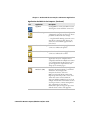
Use this table to understand some of the Intermec applications
available on your computer.
Applications Available On the Computer
Icon
32
Application
Description
Intermec Settings
Use Intermec Settings to configure your
computer. You can use Intermec Settings
to individually configure a computer or
you can use it through SmartSystems to
configure all of your computers.
CV41 Vehicle Mount Computer (Windows CE) User Guide
Chapter 2 — Understand the User Interface and Intermec Applications
Applications Available On the Computer (Continued)
Icon
Application
Description
iSpyWiFi
Use iSpyWiFi to check your 802.11 status
and diagnose issues with the connection.
Profile Settings
Use Profile Settings to easily configure the
computer for a specific use. You can choose
predefined value for Power settings.
• Tap the Profile Setting you want to use.
You will see a message that changes are
saved and a check mark appears next to
your choice.
Bluetooth Printing
Use the Bluetooth Printing application to
connect to a Bluetooth printer.
Bluetooth Scanning Use the Bluetooth Scanning application to
connect to a Bluetooth scanner.
Intermec Browser
Intermec Browser is a locked-down web
application for your computer that is
compatible with Internet Explorer 6.0. You
can configure Intermec Browser for your
specific application requirements and
design your own web pages.
Intermec Terminal
Emulator (ITE)
Intermec Terminal Emulator (ITE), part of
Intermec Client Pack (ICP), is a terminal
emulation client designed for
enterprise-level data collection.
ITE is packed with enhancements that
improve productivity, reduce errors, and
deliver fast return on investment. It
supports multiple emulation protocols in
a single client and has new features such as
session persistence, remote management
and configuration, and offers a
maintenance plan to keep you up-to-date
with the latest releases and upgrades.
CV41 Vehicle Mount Computer (Windows CE) User Guide
33
Chapter 2 — Understand the User Interface and Intermec Applications
Applications You Can Download For the Computer
You can download several Intermec applications from the website that
extend the capabilities of your computer. All of the applications
explained below are available from the Intermec website. Some of the
applications require the purchase of a license to run. To find the
application you want, go to www.intermec.com > Support >
Downloads and then enter the information to find your computer.
About Intermec Launcher
Intermec Launcher is a Microsoft Windows application, designed for
Intermec computers, that provides a platform from which other
applications may be launched while attempting to provide a
locked-down environment. You can configure Intermec Launcher for
your specific application requirements. You can download and use
Intermec Launcher for a 60-day evaluation period. After the evaluation
period expires, you will need to purchase a license.
About Features Demo
Intermec Features Demo provides a simple way to explore the key
features of your computer. You will find applications that
demonstrate scanning, document imaging, image capture, printing,
and GPS functionality. Many of the applications that are part of
Features Demo also have separate full-featured versions that you can
download and license for your computer.
About SmartSystems Foundation
SmartSystems™ is an easy-to-use software platform that provides IT
Administrators and Integrators a single, integrated portal for
hands-free provisioning, deployment, and management of Intermec
devices minimizing the effort spent on software upgrades, equipment
monitoring, maintenance and troubleshooting.
34
CV41 Vehicle Mount Computer (Windows CE) User Guide
Chapter 2 — Understand the User Interface and Intermec Applications
SmartSystems Foundation provides a consistent way to manage
Intermec devices including computers, vehicle mounted computers,
RFID readers, printers and bar code scanners, located on-site or
remote, to make the most of limited IT resources, and lower the total
cost of ownership for Intermec data collection equipment.
SmartSystems Foundation can be downloaded at no charge from the
Intermec website. For more information, visit
www.intermec.com/SmartSystems.
CV41 Vehicle Mount Computer (Windows CE) User Guide
35
Chapter 2 — Understand the User Interface and Intermec Applications
36
CV41 Vehicle Mount Computer (Windows CE) User Guide
3
Manage the Computer
Use this chapter to learn how to remotely update, configure,
and monitor your Intermec computers. You will also find
information on installing and developing software
applications as well as how to upgrade the system software.
37
Chapter 3 — Manage the Computer
Manage the Computer in Your Network
When you have multiple computers and peripherals in your network,
it is essential to have an easy way to manage updates, configure all of
the devices, and remotely troubleshoot problems. Intermec provides a
free device management software platform called SmartSystems™
Foundation to help you manage your devices. You can also purchase
third-party device management software through a vendor.
Manage the Computer Using SmartSystems Foundation
SmartSystems Foundation is a software platform that lets you manage
all of your SmartSystems-enabled devices simultaneously from a
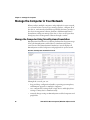
central server. The SmartSystems Foundation console displays all
SmartSystems-enabled computers and peripherals in your network.
Intermec SmartSystems Foundation Console
Through the console, you can:
•
•
•
38
drag-and-drop configuration bundles, operating system updates,
and firmware upgrades to multiple computers.
save configuration settings from a single device and deploy those
settings to many devices simultaneously.
remotely change settings on SmartSystems-enabled computers and
peripherals.
CV41 Vehicle Mount Computer (Windows CE) User Guide
Chapter 3 — Manage the Computer
The SmartSystems Foundation console can report on asset locations
and battery status, making it easier to manage your devices.
With a Provisioning license, SmartSystems Foundation can
automatically push software, configuration settings, and other files to
connected computers. You can download SmartSystems Foundation
from the Intermec website at no charge. For more information, visit
www.intermec.com/SmartSystems. To purchase a Provisioning
license, contact your local Intermec sales representative.
Develop and Install Applications
Use the Intermec Resource Kits and the CV41 Software Development
Kits to develop applications to run on the computer. The Resource
Kits are a library of C++, .NET, Java, and web components grouped by
functionality that you can use to create applications for the computer.
The Resource Kits are part of the Intermec Developer Library (IDL),
and can be downloaded from the Intermec website at
www.intermec.com/idl.
For more information, see the Intermec Developer Library Resource Kit
Developer Guide.
Package Your Application
For very simple applications, the executable file may be the only file
you need to deploy. More typically, you will have a set of files to install.
Intermec recommends using .cab files to install your applications. The
computer uses standard Windows CE .cab files and will install
third-party .cab files.
Choose a Target Location
Place your application in any of these memory locations on the
computer:
•
•
•
The ObjectStore.
The optional SD card. Depending on available disk space, consider
installing your application files on the SD card. Using a card creates
the \SD Card folder on the computer.
The \System folder. Applications and data in the \System folder
will persist through a clean boot.
CV41 Vehicle Mount Computer (Windows CE) User Guide
39
Chapter 3 — Manage the Computer
Install Applications Using SmartSystems Foundation Console
You can use the SmartSystems console to drag-and-drop Intermec
applications onto your computer. The console is part of SmartSystems
Foundation.
1 Download your application file from the Intermec website and
unzip it on your desktop PC.
2 Double-click the application file to install it. The application file
should appear in the Software Vault.
3 From the SmartSystems console in the Software Vault,
drag-and-drop the application onto each computer in your
network, or drop the application on a group of computers
contained in a folder.
Install Applications Using Microsoft ActiveSync
When you only have a few computers to update with applications, you
can copy files using Microsoft ActiveSync. This procedure assumes
that Microsoft ActiveSync is installed on your PC and is up and
running.
1 Connect to the computer using ActiveSync.
2 Copy the .cab files from your PC to the CV41.
3 Browse to the .cab files and tap the files to install them.
Install Applications Using an SD Card
Use an SD card to install applications on one computer at a time or if
you have no network connection.
1 Copy your application file to the storage card.
2 Install the SD card in the CV41.
3 On the CV41, browse to the SD Card folder and run your
application.
40
CV41 Vehicle Mount Computer (Windows CE) User Guide
Chapter 3 — Manage the Computer
Update the Intermec Content Software
The computer uses a series of cab files to update the operating system
(OS), low-level firmware, and Intermec Content files.
SSPB files deliver Intermec functionality such as data collection,
configuration, and wireless security to your CV41. As new features are
added to these components, you can upgrade your SSPB files without
needing to upgrade the operating system. Similarly, features added to
the operating system do not affect the functionality of the SSPB, and
you can choose to upgrade only the operating system.
Update the Operating System and Low-Level Firmware
Use a USB flash drive to upgrade the operating system (OS) and
low -level firmware of the CV41. Before you can update your CV41, you
need:
a USB Y-Cable.
a USB flash drive.
the upgrade .exe file. This file is available from the Intermec website
at www.intermec.com. Go to Support > Downloads >
OS/Firmware/Drivers list.
After you locate these items, you can update your computer.
•
•
•
1 Connect the USB flash drive to your PC.
2 Download and install the OS update file to your PC.
3 Click Create_CV41_Update_Drive.bat. A command window
appears and scans your PC for a connected USB flash drive.
4 In the Command window, press 3 and then Enter. The USB flash
drive is formatted and the update files are loaded onto the drive.
5 Remove the USB flash drive and insert it into the smart dock.
6 Make sure the that the smart dock is connected to power and insert
the CV41 into the dock.
7 Turn on the CV41. A screen prompt appears.
CV41 Vehicle Mount Computer (Windows CE) User Guide
41
Chapter 3 — Manage the Computer
8 Press F and then Enter to update the OS and device firmware. The
installer installs the update onto the CV41. When it is finished, the
CV41 turns off.
9 Remove the USB flash drive and press the Power button. The CV41
continues the update process. After the update is complete, the
computer boots again.
Update the Intermec Content Software
You can use these methods to update the Intermec Content software
on the CV41:
•
•
You can update individual computers, or multiple computers at
the same time using the SmartSystems console. For help, see the
next section, “Update Intermec Content Using SmartSystems
Foundation” on page 42.
You can update individual computers using ActiveSync.
Update Intermec Content Using SmartSystems
Foundation
You can use the SmartSystems console to update the Intermec
Content on your CV41. The console is part of SmartSystems
Foundation and is available from the Intermec website. Before you can
update your CV41, you need:
SmartSystems Foundation. To download SmartSystems
Foundation, go to www.intermec.com/SmartSystems and click
the Downloads tab.
• the SSPB files you want to install. These SSPB files are available
from the Intermec website at www.intermec.com. Go to Support
> Downloads > OS/Firmware/Drivers list.
After you locate these items, you can update your CV41 using
SmartSystems Foundation.
•
1 Open the SmartSystems console.
2 Make sure the computer is discovered.
3 Make sure the computer is in the powered smart dock and that
power management is disabled.
4 Download the SmartSystems bundle to your PC.
42
CV41 Vehicle Mount Computer (Windows CE) User Guide
Chapter 3 — Manage the Computer
5 Double-click the SmartSystems bundle on your PC to extract the
update files to the software vault.
6 From the SmartSystems console, locate the bundle to install and
drag it to each computer (or group in a folder) you want to update.
The SmartSystems console installs the update to your computers.
Note: The SmartSystems console indicates that your computer is
offline by displaying a red stop symbol until the computer reboots and
connects to the system.
Update Intermec Content Using a ActiveSync
Use ActiveSync to update individual computers.
1 Establish an ActiveSync partnership. For help, see “Transfer Files
To and From Your PC” on page 24.
2 From your desktop PC, download the bundle you want to install.
These bundles are available from the Intermec website at
www.intermec.com. Go to Support > Downloads >
OS/Firmware/Drivers list.
3 Transfer the bundle file to \System directory on the CV41.
4 Tap on the file on the CV41. The computer reboots. After the
computer reboots, the bundle files installs. When the installation is
finished, the CV41 reboots once again.
CV41 Vehicle Mount Computer (Windows CE) User Guide
43
Chapter 3 — Manage the Computer
44
CV41 Vehicle Mount Computer (Windows CE) User Guide
4
Configure the Computer
Use this chapter to learn about the available methods for
configuring your computer and how to use Intermec Settings.
You can also use this chapter to learn how to configure
network communications and wireless security.
45
Chapter 4 — Configure the Computer
How to Configure the Computer
You can configure many parameters on the computer such as the bar
code symbologies it decodes or the network settings. The values you
set for these parameters determine how the computer operates.
There are several ways to configure the computer:
•
Directly on the computer. You can use Intermec Settings directly
on the computer to change only the settings on that computer. For
more information, see the next section..
•
Remotely using Intermec SmartSystems Foundation. When you
use SmartSystems, you can remotely configure all of your CV41
vehicle mount computers as well as other SmartSystems-enabled
Intermec computers and peripherals. For more information, see
“Use Intermec Settings Remotely With SmartSystems
Foundation” on page 55.
You can use a third-party device management product that
supports the computer and Intermec Settings, such as Soti
MobiControl or Wavelink Avalanche. For more information, visit
the Device Management page on the Intermec website.
You can also configure the computer with configuration bundles that
you create using SmartSystems Foundation. For more information,
see the SmartSystems Foundation Online Help.
•
Use Intermec Settings on the Computer
Use Intermec Settings to configure parameters for Intermec
applications on the computer as well as some device-specific
parameters like volume. You can configure parameters for important
functions like data collection and communications.
External bar code scanners are supported by connecting the scanner to
a COM port or by Bluetooth. When configuring a scanner using
Intermec Settings, the scanner symbologies can be updated through
the CV41 data collection software.
46
CV41 Vehicle Mount Computer (Windows CE) User Guide
Chapter 4 — Configure the Computer
Start Intermec Settings
Intermec Settings is located in the Control Panel.
•
Tap Start > Settings > Control Panel > Intermec Settings. The
Intermec Settings Main Menu appears.
About the Structure of Intermec Settings
Use the following tables to help find the parameters in Intermec
Settings that you want to configure. Each table contains the
parameters for one of the Intermec Settings Main Menu options.
If you see > next to a menu option, there are more screens available in
the next level. If you see ... next to a menu option, there is only one
more screen available.
Most parameters are saved when you tap OK. Some settings , require
you to reboot the computer for the changes to take effect.
CV41 Vehicle Mount Computer (Windows CE) User Guide
47
Chapter 4 — Configure the Computer
Data Collection Menu
Data Collection Options
Parameters You Can Configure
Tethered Scanner (COM 1)
•
•
•
•
•
•
•
•
•
•
•
•
•
•
•
•
•
•
Tethered Scanner (COM 2)
Bluetooth Scanner
BT-Configure on Connect
Enable Scanner Port
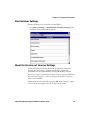
Symbologies
Symbology options
Scanner settings
Scanner port settings
Decode security
Enable Scanner Port
Symbologies
Symbology options
Scanner settings
Scanner port settings
Decode security
Symbologies
Symbology options
Scanner settings
Bluetooth scanner settings
Scanner port settings
Decode security
Bluetooth-configure on connect
Communications Menu
Communications Options
Parameters You Can Configure
Device Name
Device name
802.11 Radio
• Security choice
• Security settings (includes Wi-Fi
•
•
•
•
•
•
48
settings such as enable/disable radio)
Funk Security Settings
Microsoft Security settings
IP settings
Certificates
Radio bands
Security changes
CV41 Vehicle Mount Computer (Windows CE) User Guide
Chapter 4 — Configure the Computer
Communications Menu
Communications Options
Parameters You Can Configure
Bluetooth
Bluetooth settings (power, discoverable,
connectable, and so on)
Device Settings Menu
Device Settings Options
Parameters You Can Configure
Backlight
Keypad backlight
Date and Time
Date and time settings
Heater
Screen heater settings
IDL Runtime Versions
• ITC50 (read-only)
• ITCScan (read-only)
Keypad
Keypad settings
Power Management
• Battery power
• External power
• Auto-on
Profile Settings Application
Whether these parameter options appear
in Profile Settings:
Screen
•
•
•
•
•
Always on
Maximize battery life
Normal
Brightness settings
Screen Blanking On Motion settings
Sounds
Sound settings
System Component Versions
System component versions (read-only)
Printer Menu
Printer Options
Parameters You Can Configure
Printer (if connected through
Bluetooth)
Printer settings (Information, memory,
printer definitions, power, Bluetooth
communications, and so on)
CV41 Vehicle Mount Computer (Windows CE) User Guide
49
Chapter 4 — Configure the Computer
Note: The Printer menu displays settings for Bluetooth connected
printers. The settings that appear in the menu are dependent on the
printer that is paired with the device. The printer needs to be paired
using the Bluetooth Printing application.
Applications Menu
Application Options
Parameters You Can Configure
Intermec Browser
•
•
•
•
•
•
•
•
•
•
•
•
•
•
•
•
•
•
•
Intermec Terminal Emulation
Administration settings
Toolbar options
Key settings
Printer settings
Function key mapping
Program name (read-only)
Program version (read-only)
SIP settings
No Lockdown settings
No Auto-Start
OOR Monitor settings
Chk In License settings
Trusted App settings
Scan Control settings
Menu options
Toolbar options
Debug filters
UDP+ options
Sessions 1 - 4
Core Messaging Service Menu
Core Messaging Service Options
50
Parameters You Can Configure
Server IP
Server IP (read-only)
Associated Server IP
Associated server IP
Broadcast Name
Broadcast name
Port
Port (read-only)
Keep Alive Ping Interval
Keep alive ping interval
CV41 Vehicle Mount Computer (Windows CE) User Guide
Chapter 4 — Configure the Computer
SmartSystems Information Menu
SmartSystems Information Options Parameters You Can Configure
Identity
Identity information (hardware
version, firmware version, OS version,
and so on) (read-only)
Administrator
Administrator settings (name, phone,
and email)
Location
Location settings (country, state, city,
campus, and detail)
Information
Device Notes (read-only)
Device Monitor Menu
Device Monitor Options
Parameters You Can Configure
Device Health Controls
• Enable health data collection
• Set rule file location
• Set data refresh periods
Virtual Wedge Menu
Virtual Wedge Options
Parameters You Can Configure
Enable Virtual Wedge
Enable virtual wedge
Virtual Wedge Method
Set the virtual wedge method (adapt to
application, character mode, and block
mode)
Bar Code Scanner Wedge
Bar code scanner wedge settings (bar code
scanner grid and label encoding)
License Manager Menu
License Manager Options
Parameters You Can Configure
About
About settings (read-only)
License Vault
None (displays applications that are
licensed)
CV41 Vehicle Mount Computer (Windows CE) User Guide
51
Chapter 4 — Configure the Computer
RFID Menu
RFID Options
Parameters You Can Configure
RFID Service
RFID Service settings
For more information on all parameters in Intermec Settings, see the
Intermec Settings Command Reference Manual.
Navigate in Intermec Settings
You can easily navigate Intermec Settings to find the parameter you
need to configure.
To move down a level:
•
Tap the menu item in the list.
To move back a level:
•
Tap Back or Cancel on the Tile bar.
To save a parameter setting:
•
Tap OK.
To exit Intermec Settings:
•
Tap Menu > Exit or OK.
Configure Profile Settings With Intermec Settings
A profile is a set of predefined values that you can easily apply to the
computer to ensure optimal performance in a specific scenario. The
end user does not need to figure out the “right” settings because we
have already done that work for you. Profile Settings is available from
the Start > Programs menu so you can make it available to the end
user for easy configuration.
52
CV41 Vehicle Mount Computer (Windows CE) User Guide
Chapter 4 — Configure the Computer
Profile Settings Screen
Use Intermec Settings to determine the profiles you want the end user
to see in the Profile Settings application.
1 Go to Device Settings > Profile Settings Application.
2 Select Always on, Maximizing battery life, or Normal.
3 From the submenus, select or clear the Show option in Profile
Settings check box for the settings you want to have available to
the end user.
4 Click OK to save your selection.
CV41 Vehicle Mount Computer (Windows CE) User Guide
53
Chapter 4 — Configure the Computer
Restore Default Settings
You can easily restore a menu to its default settings or all of the
Intermec Settings parameters to their default settings if necessary.
1 Navigate to the menu that you want to restore to defaults.
2 Tap Menu > Restore Menu Defaults.
3 When prompted, tap Yes to restore the menu default settings.
4 If prompted to refresh the computer, tap Yes.
You can restore defaults settings for all parameters.
1 Tap Menu > Restore All Defaults. The applications asks if you are
sure you want to restore all defaults.
2 Tap Yes.
After several minutes, all of the default settings are restored.
Hide Menu Items in Intermec Settings
You can hide items in the Intermec Settings menus if you do not want
them available for other users to access. Hidden items are not saved
when you back up your settings in the SmartSystems console.
54
CV41 Vehicle Mount Computer (Windows CE) User Guide
Chapter 4 — Configure the Computer
On the computer, you can:
•
hide menu items by tapping and holding the item, and then
choosing Hide Menu Item from the popup list. When asked if you
want to hide the menu, tap Yes.
•
restore all hidden items in all menus, by tapping Menu > Unhide
All Items.
Note: When you restore default settings in Intermec Settings, only the
settings for visible items are restored to defaults. The settings for
hidden menu items are not affected.
Use Intermec Settings Remotely With
SmartSystems Foundation
Your computer is SmartSystems-enabled, which lets you open
Intermec Settings from the SmartSystems console to remotely
configure all of your computers. For more information on
SmartSystems, see “Manage the Computer Using SmartSystems
Foundation” on page 38.
1 In the SmartSystems console, select a computer and right-click.
2 From the menu, select Start Intermec Settings.
3 Configure the settings you need to change. As you choose
parameters from the tree structure, help for each parameter
appears in the upper right pane of Intermec Settings.
4 When you are done making changes, choose File > Save Settings.
For help using Intermec Settings, click Help > Contents. For
information on all of the parameters in Intermec Settings, see the
Intermec Settings Command Reference Manual.
CV41 Vehicle Mount Computer (Windows CE) User Guide
55
Chapter 4 — Configure the Computer
About Network Communications
You can easily add the computer to your wireless or wired data
collection network. You can connect your computer using:
•
802.11a/b/g radio communications.
•
Bluetooth communications.
•
USB and serial communications.
Configure 802.11a/b/g (Wi-Fi) Radio Communications
Make sure all components with antennas are at least 30 cm (1 ft)
apart when power is applied. Failure to comply could result in
equipment damage.
The computer contains an 802.11 radio to transfer data using wireless
communications and to support the TCP/IP network protocols. This
section of the manual assumes that your wireless network is set up,
including your access points.
By default, the 802.11 radio is enabled. If it is disabled, use the
following procedure to enable the Wi-Fi radio using Intermec Settings.
1 From the Intermec Settings main menu, tap Communications >
802.11 Radio > Radio Enabled.
56
CV41 Vehicle Mount Computer (Windows CE) User Guide
Chapter 4 — Configure the Computer
2 Select the Radio Enabled check box and tap OK. By default, the
computer uses Funk security and enables DHCP.
3 Use Intermec Settings to configure any other parameters you need
to use for communication with your network.
4 Configure 802.11 security. For help, see “About Wireless
Security” on page 65.
Configure Bluetooth Communications
Your computer is Bluetooth™-enabled, which lets you connect to
other Bluetooth devices, such as scanners or printers.
The Bluetooth radio needs to be on before you can discover and
connect to other Bluetooth devices. By default, the radio is turned on.
You can configure Bluetooth communications using Intermec
Settings or from the Start menu.
1 From the Intermec Settings main menu, tap Communications >
Bluetooth.
2 Select the on check box.
3 Tap OK.
The Bluetooth radio maintains its state through a reboot or cold
boot and maintains virtual COM ports. But, if you clean boot your
computer you need to recreate pairings to devices.
CV41 Vehicle Mount Computer (Windows CE) User Guide
57
Chapter 4 — Configure the Computer
Connect to a Bluetooth Scanner
You can connect the computer to an Intermec Bluetooth scanner, such
as the SF51 or SR61.
1 Tap Start > Settings > Control Panel > Bluetooth Scanning.
2 Tap Add Device.
3 Select Quick Connect, Search, or Manual. Follow the onscreen
instruction to add a wireless scanner.
58
CV41 Vehicle Mount Computer (Windows CE) User Guide
Chapter 4 — Configure the Computer
Connect to a Bluetooth Printer
To configure your computer for Bluetooth wireless printing, you need
to:
•
•
create an application that opens the wireless printing COM port on
your computer. For help, see the Bluetooth Resource Kit, which is
part of the Intermec Developer Library (IDL), available from the
Intermec website at www.intermec.com/idl.
select the current wireless printer on your computer. For help, see
the next procedure.
Note: You can also print wirelessly using Microsoft APIs with
Bluetooth extensions for Winsock and Bluetooth virtual COM ports.
For help, see the Bluetooth Resource Kit documentation.
1 Tap Start > Settings > Control Panel > Bluetooth Printing.
2 Tap Search to find a printer, or tap Manual to enter a device
address. Follow the onscreen instructions to select the current
wireless printer.
3 (Optional) Tap Print Test Page. The printer prints out a test page.
About Serial and USB Communications
Use a serial or USB cable to transmit and receive data from another
device through serial or USB communications. If you are using a USB
cable, you must purchase a USB Y-Cable. For more information,
contact your local Intermec representative.
CV41 Vehicle Mount Computer (Windows CE) User Guide
59
Chapter 4 — Configure the Computer
Connect to a USB Scanner
When an HID-enabled USB scanner is used with the CV41, any data
handling must be programmed into the scanner because the data
transmits to an active window as a keystroke message, and bypasses the
Intermec Data Collection wedge. You can program the scanner by:
scanning the configuration bar codes from the scanner
manufacturer.
• installing an application that accepts the incoming data.
For the SR30 or SR61T, you must purchase the correct scanner USB
cable to use with the CV41. For more information, see the following
table.
•
Required USB Cables For the SR30 or SR61T
Scanner Model
Required Cable
SR30
6.5 ft (1.9 m) cable (P/N 236-159-002)
SR61T (Gen 1)
6.5 ft (1.9 m) cable (P/N 236-182-001)
SR61T (Gen 2)
6.5 ft (1.9 m) cable (P/N 236-240-001)
Connect to a Serially Tethered Scanner
Use this procedure to connect your computer to connect a tethered
scanner and enable RS-232 communications. For the SR30 or SR61T,
you must purchase the correct serial cable to use with the CV41. For
more information, see the following table.
Required Serial Cables For the SR30 or SR61T
Scanner Model
Required Cable
SR30
6.5 ft (1.9 m) cable (P/N 236-164-002)
SR61T (Gen1, Gen 2)
• 6.5 ft (1.9 m) cable (P/N 236-197-001)
• 12 ft (3.6 m) cable (P/N 237-197-001)
1 Connect the scanner to the COM1 or COM2 port.
60
CV41 Vehicle Mount Computer (Windows CE) User Guide
Chapter 4 — Configure the Computer
2 From the Intermec Settings main menu, select Tethered Scanner
(COM 1 or COM 2).
3 Tap Scanner Settings.
4 Perform one of these items based on the type of scanner you are
connecting:
•
For an SR30 or SR61T scanner, tap Scanner Settings, select SR
Intermec Scanner, and then tap OK.
•
For an ASCII scanner, tap Scanner Settings, select ASCII, and
then tap OK. Set up the appropriate COM port settings by
selecting Scanner Port Settings.
5 Tap Enable scanner port.
CV41 Vehicle Mount Computer (Windows CE) User Guide
61
Chapter 4 — Configure the Computer
6 Check the Enable scanner port check box and tap OK.
Create an ISP Connection
You can create an Internet Service Provider (ISP) connection to send
and receive email messages using Messaging (Outlook Email) and view
web pages using Internet Explorer Mobile. You need to get your ISP
dial-up access telephone number, a user name, and a password from
your ISP.
1 Tap Start > Settings > Control Panel.
2 Double-tap Network and Dial-up Connections.
3 Double-tap Make New Connection.
4 Enter a name for the connection, such as “ISP Connection.”
62
CV41 Vehicle Mount Computer (Windows CE) User Guide
Chapter 4 — Configure the Computer
5 Select the Dial-up Connection radio button.
6 Tap Next.
7 If you are using an external modem connected to your computer
with a cable, select Hayes Compatible on COM1 from the Select
a modem list.
8 Tap Next.
9 Enter the access phone number and then tap Finish.
10 Double-tap on the connection you just created.
11 Tap Dial Properties.
CV41 Vehicle Mount Computer (Windows CE) User Guide
63
Chapter 4 — Configure the Computer
12 On the Dialing Properties screen, configure your dialing properties
and tap OK.
13 Enter the User name, Password, and Domain (if provided by an
ISP or your network administrator).
14 Tap Connect.
Create a VPN Server Connection
You can create a Virtual Private Network (VPN) connection to securely
connect to servers, such as a corporate network, through the Internet.
Before you can create a VPN connection, you need this information
from your network administrator:
• User name
• Password
• Domain name
• TCP/IP settings
• Host name or IP address of the VPN server
After you have located this information, you can create a VPN server
connection.
1 Tap Start > Settings > Control Panel.
2 Double-tap Network and Dial-up Connections.
3 Double-tap Make New Connection.
4 Double-tap either Virtual Private Network (PPTP) or Virtual
Private Network (L2TP).
5 Step through the screens to set up your VPN connection.
64
CV41 Vehicle Mount Computer (Windows CE) User Guide
Chapter 4 — Configure the Computer
About Wireless Security
The computer provides five types of security for your wireless network:
•
Wi-Fi Protected Access 2 (WPA2™)
•
Wi-Fi Protected Access (WPA)
•
•
802.1x
LEAP
• WEP
This section explains how to configure wireless security on your
computer. Intermec recommends that you implement WPA2 security
using PSK (Personal) or 802.1X (Enterprise) key management as
appropriate.
You must use either Funk or Microsoft security to implement your
security solution. For details, see the next section, “Choose Between
Microsoft and Funk Security.” Intermec recommends that you
always implement WPA2 security using PSK (Personal) or 802.1X
(Enterprise) key management.
If you are using WPA-802.1x, WPA2-802.1x, or 802.1x security, this
section also assumes that your authentication server and
authenticators are properly configured.
Note: Your security choice does not depend on your authentication
server. For example, you can choose Funk security if you use Microsoft
Active Directory® to issue certificates.
Choose Between Microsoft and Funk Security
The computer supports both Funk and Microsoft security, which
dynamically select wireless networks based on your preferences. The
option you choose depends on your network security needs.
•
If you are using the computer in a static environment that requires
a high level of security, you should use Funk security, which offers
CCX v4.0 compliance, support for LEAP and TTLS, and
configuration for up to four profiles.
To use Funk security, you need to select a profile. For help, see the
next section, “Select a Funk Security Profile.”
CV41 Vehicle Mount Computer (Windows CE) User Guide
65
Chapter 4 — Configure the Computer
•
If you are primarily using the computer to connect to Wi-Fi
hotspots, you may want to use Microsoft security.
To use Microsoft security, you need to select it as your security
choice. For help, see “Select Microsoft as Your Security Choice”
on page 70.
Select a Funk Security Profile
You can define up to four profiles for Funk security. Different profiles
let your computer communicate in different networks without having
to change all of your security settings. For example, you may want to
set up one profile for the manufacturing floor and one for the
warehouse. By default, the active profile is Profile 1.
Select a Funk Security Profile
Use the following procedure to select a Funk security profile.
1 Start Intermec Settings.
2 Choose Communications > 802.11 Radio > Funk Security.
3 Choose a profile. A list of configurable settings appears.
4 (Optional) In the Profile Label text box, enter a meaningful name
for your profile.
5 Configure your security settings. For help, see the next sections.
6 Repeat Steps 3 through 5 for each profile you want to define.
7 Set an active profile by choosing it from the Active Profile list.
8 Save your settings.
Configure WPA or WPA2 Enterprise (802.1x) Security With Funk
Use these procedures to set WPA-802.1x or WPA2-802.1x security on
your computer with Funk security.
1 Make sure the communications and radio parameters on your
computer are configured.
2 Make sure Funk is selected as your security choice.
3 Start Intermec Settings.
4 Choose Communications > 802.11 Radio > Funk Security.
66
CV41 Vehicle Mount Computer (Windows CE) User Guide
Chapter 4 — Configure the Computer
5 Select the profile you want to configure.
6 For Association, choose WPA or WPA2. Encryption
automatically defaults to TKIP or AES, respectively.
7 For 8021x, choose TTLS, PEAP, EAP-FAST, or TLS.
8 If you choose TTLS, EAP-FAST, or PEAP:
a For Prompt for Credentials, choose Enter credentials now.
b Enter a User Name and User Password.
c
For Validate Server Certificate, choose Yes.
Note: The correct date must be set on your computer when you
enable Validate Server Certificate.
9 If you choose TLS:
a Load a user and root certificate on your computer. For help, see
“Load a Certificate” on page 75.
b Enter a User Name and Subject Name.
c
For Validate Server Certificate, choose Yes.
Configure WPA or WPA2 Personal (PSK) Security With Funk
Use the following procedure to configure WPA-PSK or WPA2-PSK
with Funk security.
1 Make sure the communications and radio parameters on your
computer are configured.
2 Make sure Funk is selected as your security choice.
3 Start Intermec Settings.
4 Choose Communications > 802.11 Radio > Funk Security.
5 Select the profile you want to configure.
6 For Association, choose WPA or WPA2.
7 For 8021x, choose None.
8 For Pre-Shared Key, enter the pre-shared key or passphrase.
The pre-shared key must be a value of 32 hex pairs preceded by 0x
for a total of 66 characters. The value must match the key value on
CV41 Vehicle Mount Computer (Windows CE) User Guide
67
Chapter 4 — Configure the Computer
the access point. The passphrase must be from 8 to 63 characters.
After you enter a passphrase, the computer internally converts it to
a pre-shared key. This value must match the passphrase on the
authenticator.
9 Save your settings.
Configure 802.1x Security With Funk Security
Use the following procedure to configure 802.1x-WEP security with
Funk security. Intermec recommends that you use WPA2-802.1x
instead of 802.1x-WEP if possible.
1 Make sure the communications and radio parameters on your
computer are configured.
2 Make sure Funk is selected as your security choice.
3 Start Intermec Settings.
4 Choose Communications > 802.11 Radio > Funk Security.
5 Select the profile you want to configure.
6 For Association, choose Open.
7 For Encryption, choose WEP.
8 For 8021x, choose TTLS, PEAP, or TLS.
9 If you chose TTLS or PEAP:
a Enter a User Name.
b For Prompt for Credentials, choose Enter credentials now.
c
Enter a User Password.
d For Validate Server Certificate, choose Yes.
10 If you choose TLS:
a Load a user and root certificate on your computer. For help, see
“Load a Certificate” on page 75.
b For Validate Server Certificate, choose Yes.
c
Enter a User Name and Subject Name.
11 Save your settings.
68
CV41 Vehicle Mount Computer (Windows CE) User Guide
Chapter 4 — Configure the Computer
Configure LEAP Security With Funk
After you configure the communications and radio parameters on
your computer and select Funk as your security choice, you can
configure LEAP.
1 Start Intermec Settings.
2 Choose Communications > 802.11 Radio > Funk.
3 Select the profile you want to configure.
4 For 8021x, choose LEAP.
5 For Association, choose Open, WPA, WPA2, or Network EAP.
Encryption automatically defaults to TKIP if you choose WPA,
AES if you choose WPA2, and WEP if you choose Open or
Network EAP.
6 For Prompt for Credentials, choose Enter credentials now.
7 Enter a User Name and User Password.
8 Save your settings.
Configure Static WEP Security With Funk Security
Use the following procedure to configure static WEP security with
Funk. Intermec recommends that you use WPA2-PSK instead of WEP
if possible.
1 Make sure the communications and radio parameters on your
computer are configured.
2 Make sure Funk is selected as your security choice.
3 Start Intermec Settings.
4 Choose Communications > 802.11 Radio > Funk Security.
5 Select the profile you want to configure.
6 For 8021x choose None.
7 For Association, choose Open.
8 For Encryption, choose WEP.
CV41 Vehicle Mount Computer (Windows CE) User Guide
69
Chapter 4 — Configure the Computer
9 Define a value for the keys you want to use. You can define up to
four keys (Key 1 through Key 4).
Enter an ASCII key or a hex key that is either 5 bytes or 13 bytes
long depending on the capability of the radio. Set a 5-byte value for
64-bit WEP or a 13-byte value for 128-bit WEP. Hex keys must be
preceded by 0x and contain 5 or 13 hex pairs.
10 For Transmit key, choose the key you want to use for transmitting
data.
11 Save your settings.
Use Open (No Security) Associations with Funk
Use the following procedure to configure your computer for open
security using Funk.
1 Start Intermec Settings.
2 Choose Communications > 802.11 Radio > Funk Security.
3 Select the active profile you are using.
4 For Association, choose Open.
5 For Encryption, choose None.
6 Tap OK. Your settings are saved.
Select Microsoft as Your Security Choice
The default security setting is Funk. If you want to use Microsoft
Wireless Zero Configuration (WZC) security, you need to select it as
your security choice. After you select Microsoft as your security choice,
you will be prompted to save your settings and reset the computer for
your change to take effect.
With Microsoft as your security choice, you can configure:
70
•
WPA or WPA2
•
802.1x
•
Static WEP
CV41 Vehicle Mount Computer (Windows CE) User Guide
Chapter 4 — Configure the Computer
Select Microsoft Security
Use the following procedure to select Microsoft security.
1 Start Intermec Settings. For help, see “Start Intermec Settings”
on page 47.
2 Choose Communications > 802.11 Radio > Security Choice.
3 From the Security Choice list, select Microsoft Security. An alert
box appears telling you that you must save your settings and reboot
the computer for the new security choice to take effect.
4 Tap Yes. The computer resets and starts with Microsoft Security as
the Security Choice.
Configure WPA or WPA2 Enterprise (802.1x) Security With
Microsoft
Use these procedures to set WPA-802.1x security on your computer
with Microsoft security.
1 Make sure the communications and radio parameters on your
computer are configured.
2 Start Intermec Settings.
3 Choose Communications > 802.11 Radio > Microsoft Security.
4 For Infrastructure Mode, choose Infrastructure.
5 For Network Authentication, choose WPA or WPA2. Data
Encryption automatically defaults to TKIP for WPA and AES for
WPA2.
6 For 802.1x Authentication, choose either TLS or PEAP.
7 If you choose TLS:
a Load a user and root certificate on your computer. For help, see
“Load a Certificate” on page 75.
b Choose Properties. The Certificates dialog box appears.
c
Select the certificate you want to use from the list. The User
Logon dialog box appears.
d Enter a User Name and Domain and tap OK.
e Tap OK to exit the Certificates dialog box.
CV41 Vehicle Mount Computer (Windows CE) User Guide
71
Chapter 4 — Configure the Computer
f
Tap OK to save the Microsoft Security settings.
8 If you choose PEAP:
a Load a root certificate of the authentication server on your
computer. For help, see “Load a Certificate” on page 75.
b Tap OK to save the security settings and the User Logon dialog
box appears.
c
Tap a User Name, Password, and Domain. Select Save
Password if you want to save the password for future
authentication sessions.
d Tap OK to save the Microsoft Security settings.
Enable WPA or WPA2 Personal (PSK) Security With Microsoft
Use the following procedure to enable WPA-PSK With Microsoft
Security.
1 Make sure the communications and radio parameters on your
computer are configured.
2 Start Intermec Settings.
3 Choose Communications > 802.11 Radio > Microsoft Security.
4 For Infrastructure Mode, choose Infrastructure.
5 For Network Authentication, choose WPA-PSK. Data
Encryption automatically defaults to TKIP for WPA and AES for
WPA2.
6 For Pre-Shared Key, enter the pre-shared key or the passphrase.
The pre-shared key must be a value of 32 hex pairs preceded by 0x
for a total of 66 characters. The value must match the key value on
the authenticator. The passphrase must be from 8 to 63 characters.
After you enter a passphrase, the computer internally converts it to
a pre-shared key.
7 Save your settings.
72
CV41 Vehicle Mount Computer (Windows CE) User Guide
Chapter 4 — Configure the Computer
Configure 802.1x Security with Microsoft
Use the following procedure to configure 802.1x security with
Microsoft security. Intermec recommends that you use WPA2-802.1x
instead of 802.1x-WEP if possible.
1 Make sure the communications and radio parameters on your
computer are configured.
2 Start Intermec Settings.
3 Choose Communications > 802.11 Radio > Microsoft Security.
4 For Infrastructure Mode, choose Infrastructure.
5 For Network Authentication, choose Open.
6 For Data Encryption, choose WEP.
7 For 802.1X Authentication, choose TLS or PEAP.
8 If you choose TLS:
a Load a user and root certificate on your computer. For help, see
“Load a Certificate” on page 75.
b Choose Properties. The Certificates dialog box appears.
c
Select the certificate you want to use from the list. The User
Logon dialog box appears.
d Enter a User Name and Domain and tap OK.
e Tap OK to exit the Certificates dialog box.
f
Tap OK to save the Microsoft Security settings.
9 If you choose PEAP:
a Load a root certificate of the authentication server on your
computer. For help, see “Load a Certificate” on page 75.
b Tap OK to save the security settings and the User Logon dialog
box appears.
c
Enter a User Name, Password, and Domain. Select Save
Password if you want to save the password for future
authentication sessions.
d Tap OK to save the Microsoft Security settings.
CV41 Vehicle Mount Computer (Windows CE) User Guide
73
Chapter 4 — Configure the Computer
10 For Network Key Setting, choose Automatic.
11 Save your settings.
Configure Static WEP Security With Microsoft
Use the following procedure to configure static WEP security with
Microsoft security. Intermec recommends that you use WPA2-PSK
instead of WEP if possible.
1 Make sure the communications and radio parameters on your
computer are configured.
2 Start Intermec Settings.
3 Choose Communications > 802.11 Radio > Microsoft Security.
4 For Network Authentication, choose Open.
5 For Data Encryption, choose WEP.
6 For Network Key Setting, choose Enter Key and Index.
7 For Network Key Value, enter an ASCII key or a hex key that is
either 5 bytes or 13 bytes long depending on the capability of the
radio.
Set a 5-byte value for 64-bit WEP or a 13-byte value for 128-bit
WEP. Hex keys must be preceded by 0x and contain 5 or 13 hex
pairs.
8 For Network Key Index, select the key you want to use for data
transmission.
9 Save your settings.
Use Open (No Security) Associations With Microsoft
Use the following procedure to configure your computer for open
security using Microsoft WZC.
1 Start Intermec Settings.
2 Choose Communications > 802.11 Radio > Microsoft Security.
3 For Network Authentication, choose Open.
4 For Data Encryption, choose Disabled.
5 Tap OK. Your settings are saved.
74
CV41 Vehicle Mount Computer (Windows CE) User Guide
Chapter 4 — Configure the Computer
Load a Certificate
To use transport layer security (TLS) with WPA or 802.1x security, you
need a unique client certificate on the computer and a trusted root
certificate authority (CA) certificate. Certificates are pieces of
cryptographic data that guarantee a public key is associated with a
private key. They contain a public key and the entity name that owns
the key. Each certificate is issued by a certificate authority.
1 Start Intermec Settings.
2 Tap Communications > 802.11 Radio > Certificates. The
Certificates screen appears.
3 To import user and root certificates from a Microsoft IAS server:
a Tap Import Certificates.
b Tap Web Enrollment.
c
Enter the User, Password, and Server (IP address) to log into
the server.
d Tap OK. A dialog box appears asking if you want to load the
root certificate.
e Tap OK. The Enrollment Tool message box appears telling you
that the certificate has been added.
CV41 Vehicle Mount Computer (Windows CE) User Guide
75
Chapter 4 — Configure the Computer
f
Tap OK to close the message box.
4 To import a certificate chain:
a Tap the Import PFX tab.
b Tap Import Certificates to install the selected certificate.
c
In the CertImportUI screen, tap the <<< button next to the
Select pfx to import text field.
d Select the root certificate from the list.
e Tap Import Certificate.
76
CV41 Vehicle Mount Computer (Windows CE) User Guide
5
Use the Auto-On Feature
You can use the Auto-On feature to turn on the CV41 when
apply external power to the computer.
77
Chapter 5 — Use the Auto-On Feature
About the Auto-On Feature
The Auto-On feature turns on the CV41 when you apply external
power to the computer. When Auto-On is disabled, the CV41 monitors
the ignition input signal and turns on the computer when the ignition
on your vehicle is active.
To disable the Auto-On feature, you must wire the ignition input wire
from your CV41 to your vehicle to monitor the ignition input signal.
For more information, see the CV41 Vehicle Mounting Kit Reference
Guide.
Enable the Auto-On Feature
When Auto-On is enabled, the CV41 turns on when external power is
applied. For example, when the smart dock is powered on and:
•
•
the CV41 is placed into the dock.
the CV41 is placed into the dock and the vehicle is turned on.
1 Tap Start > Settings > Control Panel > Options. The Options
screen appears.
2 Tap the Misc tab.
3 Select Enable Auto-On and tap OK.
Disable the Auto-On Feature
When Auto-On is disabled, the CV41 is turned off, and the ignition
input signal:
• is inactive, the CV41 remains off.
• changes to active, the CV41 turns on.
When the Auto-On is disabled, the CV41 is turned on, and the ignition
input signal:
•
•
changes to active, the CV41 stays on.
changes to inactive, the CV41 is placed into Suspend mode.
1 Tap Start > Settings > Control Panel > Options. The Options
screen appears.
78
CV41 Vehicle Mount Computer (Windows CE) User Guide
Chapter 5 — Use the Auto-On Feature
2 Tap the Misc tab.
3 Make sure that Enable Auto-On is not selected and tap OK.
CV41 Vehicle Mount Computer (Windows CE) User Guide
79
Chapter 5 — Use the Auto-On Feature
80
CV41 Vehicle Mount Computer (Windows CE) User Guide
6
Use WWAN and GPS Communications
Some configurations of the CV41 come equipped with a
WWAN radio. With WWAN enabled, you can use UMTS or
CDMA communications to transmit data through cellular
wide-area networks (WANs), and use the Global Positioning
System Receiver (GPS).
81
Chapter 6 — Use WWAN and GPS Communications
About WWAN Communications
The CV41 Vehicle Mount Computer has an optional WWAN radio
that supports both CDMA and UMTS cellular technology. Use either
one of these technologies to transmit data through cellular wide-area
networks.
Activate UMTS Communications
You use a SIM card to activate UMTS communications on your
computer. You can purchase the SIM card from your network
provider.
1 Remove the CV41 from the smart dock.
2 Press the Power button to place the CV41 in Suspend mode.
3 Using a small Phillips screwdriver, remove the two screws that
secure the SIM card access panel.
SIM card
4 Insert the SD card into the SD card slot.
5 Reattach the SD card access panel and screw to a torque value of
4 to 5 in/lbs.
6 Reattach the CV41 to the smart dock.
82
CV41 Vehicle Mount Computer (Windows CE) User Guide
Chapter 6 — Use WWAN and GPS Communications
7 Connect an external WWAN antenna. For more information, see
“Connect an External Antenna” on page 19.
8 Press the Power button to resume the CV41 from Suspend mode.
9 Select Start > Programs > GobiCM > GobiCMExe.
10 In Firmware Selection, select your wireless carrier and click
Update Firmware.
11 Select the UMTS tab.
12 In Data Connection Test, tap Connect.
13 Tap Save Connection Data.
Activate CDMA Communications
To activate the CDMA radio module in your computer, you need to
contact your wireless carrier and set up an account for each computer.
The following table lists the carriers that Intermec currently supports.
If your carrier is not listed in the table, please contact Intermec product
support to see if it is now supported.
Currently Supported Carriers
Country
Carriers
United States
Verizon
The carrier requires the Mobile Equipment Identifier (MEID) to start
the activation process. You can find the MEID:
in the Gobi Connection Manager menu. Tap Start > Settings >
Control Panel > Gobi Connection Manager > CDMA tab.
After you supply the MEID to your carrier, the carrier responds with
values that you must enter in the Gobi Connection Manager (if
required). Your carrier sales contact and an Intermec representative
can guide you through the process.
•
1 Press the Power button to place the CV41 in Suspend mode.
2 Connect an external WWAN antenna. For more information, see
“Connect an External Antenna” on page 19.
3 Press the Power button again to turn on the CV41.
CV41 Vehicle Mount Computer (Windows CE) User Guide
83
Chapter 6 — Use WWAN and GPS Communications
4 Select Start > Programs > GobiCM > GobiCMExe.
5 In Firmware Selection, select your wireless carrier and click
Update Firmware.
6 Select the CDMA tab, enter *22899 in the Activation Code field,
and tap Save Connection Data.
7 Tap Activate.
8 Tap Save Connection Data.
About GPS
The GPS receiver in the CV41 delivers standards-based National
Marine Electronics Association (NMEA) data strings to GPS
applications. To use the GPS receiver, you need to:
enable WWAN communications. For more information, see “Use
WWAN and GPS Communications” on page 81.
• install an external GPS antenna to the CV41. For more
information, see “Connect an External Antenna” on page 19.
For more information on purchasing an external GPS antenna,
contact your local Intermec representative.
•
Test the GPS Receiver
Use this section to learn how to test the GPS receiver on the CV41
using the Gobi Connection Manager.
1 Make sure WWAN communications is enabled. For more
information, see “Use WWAN and GPS Communications” on
page 81.
2 Make sure an external GPS antenna is connected. For more
information, see “Connect an External Antenna” on page 19.
3 Select Start > Programs > GobiCM > GobiCMExe.
4 Select the GPS tab and tap Start. The Gobi Connection Manager
shows your current location.
5 Tap Stop to finish the test.
84
CV41 Vehicle Mount Computer (Windows CE) User Guide
7
Enable Screen Blanking
Enable screen blanking on your computer to turn off the computer
screen while your vehicle is in motion.
85
Chapter 7 — Enable Screen Blanking
About Screen Blanking
The CV41 supports screen blanking. When motion is detected, a screen
blanking box or switch turns off the computer screen to avoid
uneccessary driver distractions. Once the vehicle is stationary, the
screen turns back on. To enable screen blanking on your computer,
you must purchase one of the following:
• Screen blanking box
• Switch
Intermec recommends that you use the screen blanking box to enable
screen blanking on the CV41. If your vehicle lacks an electrical signal
that detects vehicle motion, use a switch to enable screen blanking.
You can install the switch in a variety of ways, but Intermec
recommends you install a switch that closes when the user presses the
accelerator pedal on a vehicle.
Intermec does not sell a switch for screen blanking, but you can
purchase a screen blanking box from Intermec. For more information,
contact your local Intermec representative.
Install the Hardware for Screen Blanking
This section explains how to install theswitch to enable screen
blanking on your computer. To install the screen blanking box, see the
instructions that came with the screen blanking box.
Installation of the screen blanking box or switch should be done
by trained service personnel only.
Before You Install the Switch
Before you install the switch or relay for screen blanking, you need to
supply power to the vehicle mount computer. For more information,
see the CV41 Vehicle Mounting Kit Reference Guide.
86
CV41 Vehicle Mount Computer (Windows CE) User Guide
Chapter 7 — Enable Screen Blanking
Tools You Need
To install the switch , you need the following parts and tools:
Switch
Mounting hardware and tools
Custom serial cable
•
•
•
Create a Custom Serial Cable
To install the switch , you need to create a custom serial cable with a
DB9 connector built to the following specifications outlined below.
5
1
6
9
USB Dongle Cable D9 Male Connector
Pin
Signal
Description
1
Not used
2
Not used
3
Not used
4
Not used
5
Not used
6
Not used
7
RTS
Request to send output
8
CTS
Clear to send input
9
Not used
CV41 Vehicle Mount Computer (Windows CE) User Guide
87
Chapter 7 — Enable Screen Blanking
Install Switch for Screen Blanking
This section explains how mount, connect, and enable the switch for
screen blanking.
1 Using your own mounting hardware, secure the switch sensor to
the vehicle.
2 Connect the serial cable to the switch. Make sure that Pin 7 connects to
the switch connection and Pin 8 connects to the other terminal.
Pin 8 Pin 7
3 Connect the serial cable to the COM1 or COM2 port on your computer.
Enable Screen Blanking
After you have wired and mounted the motion switch sensor, you must
enable screen blanking in Intermec settings on the vehicle mount
computer.
1 In Intermec Settings, select Device Settings > Screen Blanking on
Motion.
2 In Screen Blanking on Motion, select the COM port the custom
serial cable is connected to.
3 In Screen-on delay after motion stops (sec), enter the amount of
time in seconds that you want the display to turn on after the
vehicle is stationary.
4 Tap OK. Screen blanking is enabled.
88
CV41 Vehicle Mount Computer (Windows CE) User Guide
8
Troubleshoot and Maintain the Computer
If you encounter any problems while using the computer, look
in this chapter to find a possible solution. You will also find
information on routine maintenance.
89
Chapter 8 — Troubleshoot and Maintain the Computer
About the Intermec Dashboard
The Intermec Dashboard is designed to provide proactive monitoring
of your mobile computers to prevent downtime. You can easily see the
health of the device and can help pinpoint the source of a problem to
determine if it is hardware or software related. Intermec Dashboard
displays information such as the status of network connections,
battery usage, storage space, and internal devices. It also provides
system information such as the operating system, firmware, and
hardware configuration.
• Press the Intermec Dashboard button ( ? ) on the keypad.
Intermec Dashboard is highly integrated with SmartSystems
Foundation. You can use SmartSystems Foundation to remotely
monitor the health of your computers. For more information, refer to
the SmartSystems online help.
Troubleshoot Your Computer
Use the troubleshooting tables in this section to fix problems with the
Wi-Fi connection, 802.1x security, or general problems with operating
the computer.
Note: If you send the computer in for service, it is your responsibility
to save the computer data and configuration. Intermec is responsible
only for ensuring that the hardware matches the original
configuration when repairing or replacing the computer.
Troubleshoot the Wi-Fi Connection
Use this troubleshooting table to help solve problems with your
802.11 radio connection.
Problems With the Wi-Fi Connection
Problem
Solution
When you turn on the computer after it
was suspended for a while (10 to 15
minutes or longer), it can no longer send
or receive messages over the network.
Host may have deactivated or lost current terminal
emulation session. In a TCP/IP direct connect network,
turn off the “Keep Alive” message from host to
maintain the TCP session while the computer is
suspended.
90
CV41 Vehicle Mount Computer (Windows CE) User Guide
Chapter 8 — Troubleshoot and Maintain the Computer
Problems With the Wi-Fi Connection (Continued)
Problem
Solution
The computer is connected to the network Move closer to an access point or to a different location
and you move to a new site to collect data. to reestablish communications until you reconnect
with the network.
Your computer now shows you are not
connected to the network.
The computer appears to be connected to
the network, but you cannot establish a
terminal emulation session with the host
computer.
There may be a problem with the host computer, or
with the connection between the access point and the
host computer. Check with the network administrator
to make sure the host is running and allowing users to
log in to the system.
The computer appears to be connected to
the network, but the host computer is not
receiving any information from the
computer.
There may be a problem with the connection between
the access point and the host computer. Check with the
network administrator or use your access point user’s
manual.
A network connection icon appears in the The computer may not be communicating with the
toolbar, but then disappears.
intended access point. Make sure the network name
matches the access point network name.
The access point may not be communicating with the
server. Ensure the access point is turned on, properly
configured, and has 802.1x security enabled.
CV41 Vehicle Mount Computer (Windows CE) User Guide
91
Chapter 8 — Troubleshoot and Maintain the Computer
Troubleshoot 802.1x Security
Use the following table to troubleshoot problems with your 802.1x
security that will prevent you from connecting to your network, such
as an incorrect password.
Problems With 802.1x Security
Problem
Solution
The computer indicates it is not
authenticated.
Make sure that:
• the User Name and Password parameters on the computer
must match the user name and password on authentication
server. You may need to reenter the password on both the
computer and authentication server.
• on your authentication server, the user and group are
allowed and the group policy is allowed to log into the
server. For help, see the documentation that shipped with
your authentication server software.
• the IP address and secret key for access point must match the
IP address and secret key on the authentication server. You
may need to reenter the IP address and secret key on both
your access point and authentication server.
• the authentication server software is running on the server
PC.
You receive a message saying “The Date and time are not saved when you perform a clean boot.
server certificate has expired or Reenter the date and time, and then save your changes.
your system date is incorrect”
after you perform a clean boot on
the computer.
Check 802.11 Network Status
If you have trouble connecting to your 802.11 wireless network:
•
•
92
Make sure you have correctly set network parameters on the
computer.
Check your wireless security settings.
CV41 Vehicle Mount Computer (Windows CE) User Guide
Chapter 8 — Troubleshoot and Maintain the Computer
Follow the next procedure to verify available access points and
networks, check signal strength, and view other diagnostics. If you
need to contact Intermec Product Support, this information can be
helpful in troubleshooting wireless network connection issues.
1 Tap Start > Programs > iSpyWiFi. The iSpyWiFi application
launches.
The iSpyWiFi tab shows:
•
MAC address and IP address of the 802.11 radio.
•
network association status, including the SSID and MAC
address of the access point.
•
security configuration.
• radio transmit power and signal strength information.
2 Tap the Scan tab to view a list of available 802.11 networks. The list
includes the signal strength, channel, and MAC address for each
network.
• Tap Scan to refresh the screen.
3 Tap the Supp tab to view radio supplicant information, including
a list of supplicant events and authentication status.
•
To verify the settings for the currently active security profile, tap
Configure Profile. Intermec Settings launches for you to
configure 802.11 Radio settings.
•
To try reconnecting to the network, tap Reconnect.
•
To delete the events in the list, tap Clear Events.
4 Tap the Ping tab to run a ping test to the host.
a In the Host field, enter the IP address of the host.
b From the Repetitions list, choose the number of times the
computer will ping the host.
c
Tap Ping. The graph shows the amount of time it takes for the
host to return the ping. Tap List to see this information in a list
format.
CV41 Vehicle Mount Computer (Windows CE) User Guide
93
Chapter 8 — Troubleshoot and Maintain the Computer
5 Tap the RSSI tab to view the received signal strength of the host
signal.
The information box includes the current signal strength, host
SSID name, MAC address, data rate, and transmit power.
• Tap Mark to place an arrow marker above the graph.
6 Tap the Conf tab to set up a log file that lists RSSI history.
This screen includes the 802.11 radio driver version and available
radio modes.
a Check the Log to File check box.
b (Optional) Change the sample period and number of samples
displayed.
c
Tap Log File. The Save As screen appears.
d (Optional) Change the name of the saved log file, the folder to
which the file will be saved, the content type (log or text), and
the location.
e Tap OK.
Troubleshoot Reading Bar Codes
Use this section to troubleshoot problems that may prevent you from
being able to read a bar code with an Intermec scanner. If you cannot
find the solution in the following table, refer to your scanner user
guide for more information.
Problems Reading Bar Codes
Problem
Solution
You cannot see the illumination • You may be too far away from the bar code label. Try moving
beam or frame from the scanner
closer to the bar code label and scan it again.
when you press the Scan button • You may be reading the bar code label “straight on.” Change
and aim the imager at a bar code
the reading angle and try again.
label.
• The imager hardware trigger might be disabled in Intermec
Settings. To check the setting go to Start > Settings >
Control Panel > Intermec Settings > Data Collection >
Scanner Settings. Hardware trigger should be checked.
94
CV41 Vehicle Mount Computer (Windows CE) User Guide
Chapter 8 — Troubleshoot and Maintain the Computer
Problems Reading Bar Codes (Continued)
Problem
Solution
When you release a Scan button The Good Read light remains on if you configure the
or handle trigger, the Good Read computer to use continuous/edge triggering. If you configure
light does not turn off.
the computer for level triggering and the Good Read light
remains on, there may be a problem. Press one of the Scan
buttons or pull the trigger again without scanning a bar code
label. If the light is still on, contact your local Intermec
representative.
The scanner will not read the bar • Aim the scanner beam to cross the entire bar code label in
code label.
one pass. Vary the scanning angle.
• Check the quality of the bar code label. Scan a bar code label
that you know will scan. Compare the two bar code labels to
see if the bar code quality is too low. You may need to replace
the label that you cannot scan.
• Make sure the bar code symbology is enabled and
configured correctly. Use Intermec Settings to check the
symbologies. Expand Data Collection > Symbologies
beneath devices listed (scanner, virtual wedge) to check and
enable symbologies, then scan the bar code label again.
• Make sure the computer application is expecting input from
a bar code. You may need to type this information instead
• Check to see if the right scanner model is selected. To check
the setting go to Start > Settings > Control Panel >
Intermec Settings > Data Collection > Scanner Settings.
• Check to see if the scanner cable is damaged.
The scanner does not read the bar The scanner window may be dirty. Clean the window with a
code labels quickly, or the
solution of ammonia and water. Wipe dry. Do not allow
scanning beam seems to be faint abrasive material to touch the window.
or obscured.
When Enable Scanner Port is
checked in Intermec Settings, the
“COM port is busy. Another
application may be using the
port” error message appears.
Confirm that no other application is currently using the COM
port or select another COM port for the scanner. If that does
not work, try to restart the computer to see if the COM port
becomes available.
The scanner does not read the bar • Check to see if the Scanner Port Settings in Intermec
code or is corrupted when it is
Settings match those settings programmed in the scan
enabled as an ASCII scanner.
engine.
• The scanner may be in an unknown state. Reset the scanner
to the factory default settings by scanning the
manufacturer’s configuration bar code, and reconnect the
scanner.
CV41 Vehicle Mount Computer (Windows CE) User Guide
95
Chapter 8 — Troubleshoot and Maintain the Computer
Problems Reading Bar Codes (Continued)
Problem
Solution
You scan a valid bar code label to
enter data for your application.
The data decoded by the scanner
does not match the data encoded
in the bar code label.
The scanner may have decoded the bar code label in a
symbology other than the label’s actual symbology. Try
scanning the bar code label again. Make sure you scan the
entire label.
The input device attached to the Set the Scanner Model command to the specific attached input
computer does not work well or device. Check enabled bar code symbologies and enable only
read bar code labels very quickly. the symbologies being used.
Troubleshoot Operating the Computer
Use this section to troubleshoot problems that may prevent you from
being able to operate the computer.
Problems Operating the Computer
Problem
Solution
You press the Power button and Try the following solutions:
nothing happens.
• Make sure that power is connected to the computer, and
that the Power switch on the smart dock is on.
• If your computer is not connected to the smart dock, you
may have run out of battery power.
The computer appears to be
locked up and you cannot enter
data.
• Disconnect the UPS battery and turn the power back on. For
help, see “Disconnect the UPS Battery” on page 99.
• Perform a cold boot. For help, see “Cold Boot the
Computer” on page 98.
• Perform a warm boot. For help, see “Warm Boot the
Computer” on page 98
• Perform a clean boot. For help, see “Clean Boot the
Computer” on page 99.
• If the computer does not boot or reset, contact your
Intermec representative for help.
You tap the screen and nothing
happens.
Align your screen. For help, see “Calibrate the Screen” on
page 31.
You cannot type a character on
the keypad or you can only type
uppercase or lowercase letters.
You may have locked a modifier key on the keypad. Press the
necessary key sequence to unlock the key.
96
CV41 Vehicle Mount Computer (Windows CE) User Guide
Chapter 8 — Troubleshoot and Maintain the Computer
Call Product Support
If you cannot find the answer to your problem in the
“Troubleshooting the Computer” section, you can visit the Intermec
technical knowledge base (Knowledge Central) at
intermec.custhelp.com to review technical information or to request
technical support. If you still need help after visiting Knowledge
Central, you may need to call Product Support.
To talk to an Intermec Product Support representative, call:
1-800-755-5505
Before you can call Intermec Product Support, make sure you have the
following information ready:
Configuration number
Serial number
Operating system version
If you are using security, know the type (Funk or Microsoft) and the
full set of parameters
• Power management settings
• If you are using Intermec Terminal Emulator (ITE), know the
version and protocol. If you are not using ITE, know the language
your custom application was written in and the tools you used to
create it.
You can find most of the information listed above in Intermec
Settings. Consult your application developer for information on your
custom application.
•
•
•
•
Find Your Configuration Number
Use the following procedure to help you find the configuration
number of your computer.
•
Look at the label on the back of the computer.
CV41 Vehicle Mount Computer (Windows CE) User Guide
97
Chapter 8 — Troubleshoot and Maintain the Computer
Find Your Operating System Version
Use the following procedure to find the OS version of your computer.
•
Tap Start > Settings > Control Panel > About. The OS version
is displayed in the Version tab as the Intermec Content version.
Reset the Computer
If the computer does not resume after pressing the Power button, or if
the computer or an application locks up, you may need to reset the
computer. The computer uses the configuration currently saved in
flash memory during the boot process. There are four ways to reset the
computer:
•
•
•
•
Cold boot
Warm boot
Clean boot
Disconnect the UPS battery
Cold Boot the Computer
If the computer seems to be locked up, try cold booting it. Cold
booting the CV41 restarts the computer and RAM is cleared, while the
registry and files under \System folder are preserved.
1 Tap Start > Settings > Control Panel > Registry.
2 Tap the Coldboot button.
Warm Boot the Computer
Warm booting the CV41 restarts the computer, while the file system
and registry settings are preserved.
1 Tap Start > Settings > Control Panel > Registry.
2 Tap the Warmboot button.
98
CV41 Vehicle Mount Computer (Windows CE) User Guide
Chapter 8 — Troubleshoot and Maintain the Computer
Clean Boot the Computer
In some cases where the computer completely stops responding, it may
be necessary to perform a clean boot. Because clean booting may result
in data loss, use this method only if all other recovery methods have
failed. This returns the computer back to its factory default settings.
Note: Clean booting the device erases all files in the ObjectStore
including any file or registry changes. Any files that are present in the
\System folder are preserved.
1 Tap Start > Settings > Control Panel > Registry.
2 Tap the Load Factory Defaults button.
Disconnect the UPS Battery
If the CV41 stops responding, or you plan on shipping the CV41, you
need to disconnect the UPS battery.
1 Remove the CV41 from the smart dock. For help, see “Remove the
CV41 from the Smart Dock” on page 8.
2 Using a Phillips head screwdriver, remove the two screws that
secure the SIM card access panel.
CV41 Vehicle Mount Computer (Windows CE) User Guide
99
Chapter 8 — Troubleshoot and Maintain the Computer
3 Press the UPS Battery Disconnect button located below the SIM
card slot.
4 Reinstall the SIM card access panel and tighten the screws to a
torque to a value of 4-5 in/lbs.
Once power external power is reconnected to the CV41, the UPS
battery automatically reconnects.
Replace the Fuse
The CV41 uses a 10 A time delay (slow blow) fuse, which is located on
the smart dock. If you need to replace the fuse, make sure that you
replace it with the same size, rating, and type of fuse (Littelfuse 03260
10 MXP or equivalent).
1 Remove the CV41 from the smart dock. For help, see “Remove the
CV41 from the Smart Dock” on page 8.
2 Disconnect the smart dock from power.
3 Using a flathead screwdriver, remove the fuse holder from the
CV41.
4 Replace the fuse.
5 Secure the fuse holder back into the CV41.
100
CV41 Vehicle Mount Computer (Windows CE) User Guide
Chapter 8 — Troubleshoot and Maintain the Computer
Clean the Computer
To keep the computer in good working order, you may need to clean
the touch screen. Clean the touch screen as often as needed for the
environment in which you are using the computer. To clean the
computer, use a solution of ammonia and water.
1 Press the Power button to suspend the computer.
2 Dip a clean cloth towel in the ammonia solution and wring out the
excess.
3 Wipe off the touch screen. Do not allow any abrasive material to
touch these surfaces.
4 Wipe dry.
CV41 Vehicle Mount Computer (Windows CE) User Guide
101
Chapter 8 — Troubleshoot and Maintain the Computer
102
CV41 Vehicle Mount Computer (Windows CE) User Guide
A
Specifications and Default Settings
103
Appendix A — Specifications and Default Settings
Physical and Environmental Specifications
Physical Dimensions
CV41 dimensions
21.4 x 26.8 x 4.3 /6.6 cm (8.4 x 10.6 x 1.7/2.6 in)
CV41 weight
2.1 kg (5.6 lbs)
Smart dock dimensions
15.5 x 18 x 6.4 cm (6.1 x 7.1 x 2.5 in)
Smart dock weight
1.2 kg (3.2 lbs)
Environmental Specifications
Standard operating temperature
Non-condensing: -20 °C to 50 °C (-4 °F to 122 °F)
Extreme operating temperature
Condensing: -30 °C to 50 °C (-22 °F to 122 °F)
Storage temperature
Non-condensing: -30 °C to 60 °C (-22 °F to 148 °F)
Relative humidity
Up to 90% non-condensing at 40 °C (104 °F) with extended
temperatures up to 100%
Water and dust
IP66
ESD
15 kV
Vibration
MIL-STD-810F, composite wheeled vehicles
Crash
SAE-J 1455
Power and Electrical Specifications
Input power
DC input voltage: 10 to 60 VDC
Input current: 4.6 A
Input fuse: 10 A time delay
External power supply
Internal power supply: 10-60 VDC
AC adapter: 90-240 VAC
DC power supply : 6-96 VDC
Backup battery (CMOS)
Field replaceable, rechargeable lithium-ion battery, 30
minutes of life at -20 °C (-4 °F).
104
CV41 Vehicle Mount Computer (Windows CE) User Guide
Appendix A — Specifications and Default Settings
Hardware
Touch Screen
20 cm (8 in) color WVGA 800 x 480 LED backlit display.
Standard display:
•
•
•
•
400 NIT indoor display
Ambient light sensor
Glove compatible
Field-replaceable resistive touch screen
Optional display:
• 900 MIT outdoor display
• Defroster
Keypad
Backlit 64 QWERTY keyboard with number pad and 10
function keys. Univeral keyboard overlay legend and supports
VT220, 3270, 5250. All keys (except modifiers and the power
button) are mappable.
Processor
Intel Atom Z530 at 1.6 GHz
Memory
1 GB total mappable memory with 512 MB as system memory
in Windows CE.
Integrated radio
802.11a/b/g
Intefaces
USB 2.0 host port, USB 1.1 client port, two RS-232 COM
ports, a CANBUS/audio port, DC power input and ignition
input, and RF antenna ports for Wi-Fi, WWAN, and GPS.
Antennas
Dual internal anennas or optional external antennas
Removable storage
Secure Digital
Operating system
Microsoft Windows CE 6.0
Standard Communications
•
•
•
•
•
802.11a/b/g
WWAN (Optional and only available in North America, Europe,
and Australia)
Bluetooth
USB
Serial
CV41 Vehicle Mount Computer (Windows CE) User Guide
105
Appendix A — Specifications and Default Settings
Wireless LAN
Data rates
Supports all 802.11a/b/g data rates.
Security
WPA, WPA2, 802.1x (EAP-TLS, TTLS, LEAP, PEAP,
EAP-FAST), WEP
Cisco compatibility
CCX v4 certified
Default Configuration
The following tables list the default values of the configuration
settings supported on the computer. If you restore the computer to
factory default settings, the computer uses these values.
The settings are grouped by function and reflect the organization of
Intermec Settings. Not all of the configuration settings are listed in
this appendix. For detailed information on most of the settings, see the
Intermec Settings Command Reference Manual.
Data Collection Settings
Use data collection settings to configure the Bluetooth or tethered
scanner and to configure the bar codes that you want the imager to be
able to read.
Data Collection Settings
Data Collection Setting
Default Value
Enable Scanner
Off
BT-Configure On Connect
Overwrite with computer
settings
Symbology Settings
106
Symbology
Default Value
AustraliaPost
Disable
Aztec
Disable
BPO
Disable
CanadaPost
Disable
CV41 Vehicle Mount Computer (Windows CE) User Guide
Appendix A — Specifications and Default Settings
Symbology Settings (Continued)
Symbology
Default Value
Codabar
Disable
Codablock A
Disable
Codablock F
Disable
Code 11
Disable
Code 39
Enable
Code 93
Disable
Code 128/GS1-128
Enable Code 128, GS1-128,
GS1-128 identifier
DataMatrix
Enable
DutchPost
Disable
EAN/UPC
Enable UPC A, UPC E, EAN
8, EAN 13
GS1 Composite
Disable
GS1 DataBar Expanded
Disable
GS1 DataBar Limited
Disable
GS1 DataBar Omni-Directional
Disable
JapanPost
Disable
KoreaPost
Disable
Matrix 2 of 5
Disable
Maxicode
Disable
Micro PDF417
Disable
MSI
Disable
PDF417
Enable
Planet
Disable
Plessey
Disable
Postnet
Disable
QR Code
Disable
Standard 2 of 5
Disable
Telepen
Disable
TLC 39
Disable
CV41 Vehicle Mount Computer (Windows CE) User Guide
107
Appendix A — Specifications and Default Settings
Symbology Option Settings
Symbology Option Settings
Default Value
Preamble
None (Disable)
Postamble
None (Disable)
Symbology Identifier
Disable
Multicode
Disable
Scanner Settings
Scanner Settings
Default Value
Scanner Model
SR Intermec Scanner
Trigger Mode
Level
Aimer Mode
Typical aimer
Hardware Trigger
Enable
Trigger Timeout (sec)
2
Aiming Duration (msec)
500
Turn Off After Good Read
Enable/One-shot
Number of Good Read Beeps
One
Scanner Port Settings
Scanner Port Settings
Default Value
Baud Rate
57600
Decode Security Settings
108
Decode Security Settings
Default Value
Consecutive Data Validation
0
Identical Consecutive Timeout
300 ms
Different Consecutive Timeout
0
Center Decoding
Disable
Center Decoding Tolerance
0
CV41 Vehicle Mount Computer (Windows CE) User Guide
Appendix A — Specifications and Default Settings
Communications
Use communications settings to configure how the computer
communicates with the network.
Communications Settings
Communications Setting
Default Value
Device Name
Intermec CV41
802.11 Radio Settings
802.11 Radio Setting
Default Value
Radio Enabled
Off
Security Choice
Funk
Microsoft Security
Disable
Active Profile
Profile 1
DHCP
Enable
Import Root Certificates
False
Import User Certificates
False
Import Pac Files
False
Radio Bands
Indeterminate
Allow Security Changes
Enable
Bluetooth Settings
Bluetooth Setting
Default Value
Bluetooth Power
On
Device Settings
Use device settings to configure settings on the computer.
Backlight Settings
Backlight Setting
Default Value
Keypad Backlight
Enable
CV41 Vehicle Mount Computer (Windows CE) User Guide
109
Appendix A — Specifications and Default Settings
Heater Settings
Screen Setting
Default Value
Screen Heater
Enabled
Screen Heater Turns Off at
0°C
Keypad Settings
Keypad Setting
Default Value
Caps Lock on Reboot
Disabled
Power Management Settings
Battery Power Setting
Default Value
Backlight Turns On After (Battery Power)
3 seconds
Screen Turns Off After (Battery Power)
15 seconds
Device Turns Off After (Battery Power)
5 minutes
Backlight Turns On After (External Power)
2 minutes
Screen Turns Off After (External Power)
2 minutes
Device Turns Off After (External Power)
5 minutes
Auto-on
Disable
Profiles Settings Application
Profiles Settings
110
Default Value
Always On
Show Option in Profile Settings
Maximize Battery Life
Show Option in Profile Settings
Normal
Show Option in Profile Settings
CV41 Vehicle Mount Computer (Windows CE) User Guide
Appendix A — Specifications and Default Settings
Screen Settings
Screen Settings
Default Value
Brightness
High
Screen Blanking On Motion
Disable
Screen-On Delay After Motion Stops (sec) 1.0
Sound Settings
Sound Setting
Default Value
Beeper and Voice
15
Headset Beeper
0
Screen Taps
Off
Key Clicks
Off
Core Messaging Service Settings
Use core messaging service settings to configure the message routers
between client and server software applications.
Core Messaging Service
Core Messaging Service Setting
Default Value
Associated Server IP
Null
Broadcast Name
INTERMEC
Port
62241
Keep Alive Ping Interval
30 Seconds
CV41 Vehicle Mount Computer (Windows CE) User Guide
111
Appendix A — Specifications and Default Settings
Device Monitor Settings
Use device monitor settings to configure how the computer monitors
the network.
Device Health Controls
Device Health Setting
Default Value
Enable Health Data Collection
On
Set Rule File Location
\SmartSystems\HealthRules.txt
Set Data Refresh Periods
Asset Msg Send Period
System Device Health
Network Device Health
Printer
0 seconds
90 seconds
45 seconds
0
Network Device Health Refresh (seconds) 45
RFID Settings
Use RFID settings to enable the RFID service.
RFID Settings
RFID Settings
Default Value
Enable RFID Service
Off
Virtual Wedge Settings
Use virtual wedge settings to configure the virtual wedge.
Virtual Wedge Setting
112
Virtual Wedge Settings
Default Value
Virtual Wedge
Enable
Virtual Wedge Method
Adapt to Application
Barcode Scanner Grid
Null
Label Encoding (Code Page)
1252(D)-ANSI Win3.1 US
CV41 Vehicle Mount Computer (Windows CE) User Guide
Appendix A — Specifications and Default Settings
Port Pin Assignments
Use this section to learn about the ports pin assignments on the CV41,
smart dock, and cables.
COM 1 and COM 2 Ports
The COM 1 and COM 2 ports are located on the smart dock. By
default, Pin 9 is configured to provide + 5 V for an external bar code
scanner, or it can be configured to provide RI.
1
5
9
6
COM 1 and COM 2 Port Pin Assignments
Pin
Signal
Description
1
DCD
Data carrier detect (input)
2
RXD
Receive data (input)
3
TXD
Transmit data (output)
4
DTR
Data terminal ready (output)
5
GND
Signal/power ground
6
DSR
Data set ready (input)
7
RTS
Request to send (output)
8
CTS
Clear to send (input)
9
+5 VDC or RI
Bar code scanner power (500 mA max) or
Ring indicator (input)
Shell
CGND
Chassis ground
CV41 Vehicle Mount Computer (Windows CE) User Guide
113
Appendix A — Specifications and Default Settings
USB Port
The USB port is located on the back of the smart dock.
1
5
9
6
USB Port
114
Pin
Signal
Description
1
GND
Common ground
2
USBC_D+
USB client data signal
3
USBC_D-
USN client data signal
4
USB_H1_PWR
USB host 1 (5 V output power)
5
GND
Common ground
6
GND
Common ground
7
USB_H1_D+
USB host 1 data signal
8
USB_H1_D-
USB host 1 data signal
9
USBC_VBUS
USB client (5 V detect from attached host)
CV41 Vehicle Mount Computer (Windows CE) User Guide
Appendix A — Specifications and Default Settings
CANBUS/Audio Port
The CV41 CANBUS and audio port is located on the smart dock. The
CV41 cannot support CANBUS and audio simultaneously.
1
5
10
6
15
11
CANBUS/Audio Port
Pin
Signal
Description
1
-
CAN reserved
2
CAN_L
CAN_L bus line dominant low
3
CAN_GND
CAN ground
4
-
CAN reserved
5
GND
Optional ground
6
Audio return
Headset return
7
Audio output
Headset output
8
Mic input
Microphone input
9
Mic retun
Microphone return
10
Audio return
11
GND
12
CAN_SHLD
13
CAN_H
CAN_H bus line dominant high
14
-
CAN reserved
15
CAN_V+
Optional CAN external power supply
Optional ground
CV41 Vehicle Mount Computer (Windows CE) User Guide
115
Appendix A — Specifications and Default Settings
Power Supply Connector
Power is supplied from the smart dock to the CV41 through the power
connector. The power supply connector also provides a connection
point for the vehicle chassis ground to be connected internally to the
conductive chassis of the computer. The CV41 internal power supply
can accept DC input voltages in the range of 10 to 60 VDC.
4
5
6
3
2
1
Power Supply Connector
116
Pin
Signal
Description
1
V In+
10-60 nominal DC input +
2
V In+
10-60 nominal DC input +
3
V In-
Input -
4
V In-
Input -
5
GND
Chassis ground
6
Ignition
+0 V to 60 V to start terminal
CV41 Vehicle Mount Computer (Windows CE) User Guide
Appendix A — Specifications and Default Settings
USB Dongle Cable
Use the USB dongle cable to connect USB devices, such as a USB flash
drive to the smart dock and CV41.
USB host
connector
D9 male
connector
USB client
connector
5
1
6
9
USB Dongle Cable D9 Male Connector
Pin
Signal
Description
1
GND
Common ground
2
USBC_D+
USB client data signal
3
USBC_D_
USN client data signal
4
USB_H1_PWR
USB host 5 V output power
5
GND
Common ground
6
GND
Common ground
7
USB_H1_D+
USB host 1 data signal
CV41 Vehicle Mount Computer (Windows CE) User Guide
117
Appendix A — Specifications and Default Settings
USB Dongle Cable D9 Male Connector (Continued)
Pin
Signal
Description
8
USB_H1_D-
USB host 1 data signal
9
USBC_VBUS
USB client 5 V detect from attached host
4
3
2
1
USB Dongle Cable Host Connector
Pin
Signal
Description
1
5V_USB
USB power, current limited
2
USB2N_A
USB D-
3
EUSB2PA_A
USB D+
4
DGND
USB power return
Shell
CGND
Chassis ground
4
3
2
1
USB Dongle Client Connector
118
Pin
Signal
Description
1
V In+
12 to 48 V nominal DC input +
2
V In+
12 to 48 V nominal DC input +
3
V In-
Input -
4
V In-
Input -
CV41 Vehicle Mount Computer (Windows CE) User Guide
B
Keypads and Keystrokes
119
Appendix B — Keypads and Keystrokes
Standard Characters
Use the following tables to learn how to enter standard and other
available characters and functions with the keypad. If there is no
sequence of keystrokes for a particular character or function, it is only
available through the soft input panel (SIP), which you can access by
tapping the keyboard icon on the touch screen.
CV41 Alphanumeric Characters
To Enter
Keypad
a
A
B
C
D
E
F
G
H
I
J
K
L
M
N
O
P
Q
R
S
b
c
d
e
f
g
h
i
j
k
l
m
n
o
p
q
r
s
120
CV41 Vehicle Mount Computer (Windows CE) User Guide
Appendix B — Keypads and Keystrokes
CV41 Alphanumeric Characters (Continued)
To Enter
Keypad
t
T
U
V
W
X
Y
Z
u
v
w
x
y
z
CV41 Function Keys
To Enter
Keypad
F1
¡
¢
£
¤
¥
¦
§
¨
©
ª
b¡
b¢
b£
b¤
b¥
F2
F3
F4
F5
F6
F7
F8
F9
F10
F11
F12
F13
F14
F15
CV41 Vehicle Mount Computer (Windows CE) User Guide
121
Appendix B — Keypads and Keystrokes
CV41 Function Keys (Continued)
To Enter
Keypad
F16
b¦
b§
b¨
b©
bª
Alt ¡
Alt ¢
Alt £
Alt ¤
F17
F18
F19
F20
F21
F22
F23
F24
CV41 Special Keys
To Enter
Keypad
* (asterik)
b*
bW
b#
b&
b%
bD
bF
bJ
bR
bQ
bL
b5
. or b K
@ (at symbol)
# (pound)
& (ampersand)
% (percentage)
: (colon)
; (semicolon)
, (comma)
$ (dollar)
! (exclamation)
? (question mark)
- (hyphen or minus)
. (period)
122
CV41 Vehicle Mount Computer (Windows CE) User Guide
Appendix B — Keypads and Keystrokes
CV41 Special Keys (Continued)
To Enter
Keypad
+ (plus)
b8
bH
b2
bM
bu
bV
bC
bO
bP
bB
bN
bZ
bX
bs
bS
bA
bG
b4
b6
b{
b|
j
{
u
d
‘ (apostrophe)
= (equals)
_ (underscore)
^ (caret)
> (greater than)
< (less than)
( (left parenthesis)
) (right parenthesis)
[ (left square bracket)
] (right square bracket)
{ (left curly brace)
} (right curly brace)
~ (tilde)
\ (backslash)
/ (forward slash)
“ (quotes)
Insert
Delete
¦ (broken vertical bar)
̀ (grave)
Forward Tab
Backspace
Up Arrow
Down Arrow
CV41 Vehicle Mount Computer (Windows CE) User Guide
123
Appendix B — Keypads and Keystrokes
CV41 Special Keys (Continued)
To Enter
Keypad
Left Arrow
Esc
l
r
b]
e
Alt o
]
s
? or b ?
|
Alt
Alt
Ctrl
Ctrl
Intermec Dashboard
?
Right Arrow
CapsLock
Enter
ok
Shift
Space
Start (Windows)
CV41 Intermec Terminal Emulator Keys
To Enter
Keypad
Attention
Alt A
Autolog
Alt S
Clear
Alt 6
Duplicate
Alt D
EEOF
Alt W
Erase
Alt E
Find
Alt F
Field +
b1
Alt 2
Alt G
Field Fieldmark
124
CV41 Vehicle Mount Computer (Windows CE) User Guide
Appendix B — Keypads and Keystrokes
CV41 Intermec Terminal Emulator Keys (Continued)
To Enter
Keypad
Help
Return
b3
Alt I
Alt H
Alt K
Alt M
Alt O
Alt N
b9
Alt T
Alt Y
Alt U
Alt u
Alt P
b7
Alt R
Alt |
Alt e
Roll Down
Alt 5
Roll Up
Alt 8
Select
Alt Z
System Request
Alt Q
View Down
bd
bu
Hex
Home
Keypad
Menu
Mode
New Line
Next Screen
PA1
PA2
PA3
Page
Print
Previous Screen
Remove
Reset
View Up
CV41 Vehicle Mount Computer (Windows CE) User Guide
125
Appendix B — Keypads and Keystrokes
126
CV41 Vehicle Mount Computer (Windows CE) User Guide
C
ScanNGo Wi-Fi Configuration Bar Codes
You can use the ScanNGo Wi-Fi configuration bar codes to
quickly configure the 802.11 radio in your computer.
127
Appendix C — ScanNGo Wi-Fi Configuration Bar Codes
Radio Configuration Bar Codes
Use the following ScanNGo bar codes to enable the 802.11 radio and
set the defaults for either Funk security or Microsoft security. After you
scan the bar codes, you will still need to use Intermec Settings or
another configuration program to set network-specific settings on
your computer and to configure the wireless security.
Note: If you are using Microsoft security, you can only use the 1D
configuration bar codes.
The following ScanNGo bar codes were created using SmartSystems
Foundation. For more information on SmartSystems Foundation, see
“Manage the Computer Using SmartSystems Foundation” on
page 38.
2D Configuration Bar Codes
You can configure the computer with a 2D imager.
1 Scan the appropriate bar code from the table and wait for the
program to start.
2 Follow any instructions on the device.
2D Imager Radio Configuration Bar Codes
When You Want To:
Scan This Bar Code
• Set all communication settings to defaults
(Wi-Fi, WWAN if applicable)
• Enable Wi-Fi - set Funk security to defaults
128
CV41 Vehicle Mount Computer (Windows CE) User Guide
Appendix C — ScanNGo Wi-Fi Configuration Bar Codes
1D Configuration Bar Codes
You can configure the computer with a 1D imager.
1 Scan the START HERE bar code from the table and wait for the
program to start.
2 Scan the 1/9 bar code.
3 Scan the rest of the bar codes in any order.
4 Follow any instructions on the device.
CV41 Vehicle Mount Computer (Windows CE) User Guide
129
Appendix C — ScanNGo Wi-Fi Configuration Bar Codes
1D Imager Radio Configuration Bar Codes
When You Want To:
Scan This Bar Code
• Set all communication settings to
defaults (Wi-Fi, WWAN if applicable)
• Enable Wi-Fi - set Funk security to
defaults
130
CV41 Vehicle Mount Computer (Windows CE) User Guide
Appendix C — ScanNGo Wi-Fi Configuration Bar Codes
1D Imager Radio Configuration Bar Codes (Continued)
When You Want To:
Scan This Bar Code
• Set all communication settings to
defaults (Wi-Fi, WWAN if applicable)
• Enable Wi-Fi - set Funk security to
defaults
CV41 Vehicle Mount Computer (Windows CE) User Guide
131
Appendix C — ScanNGo Wi-Fi Configuration Bar Codes
1D Imager Radio Configuration Bar Codes (Continued)
When You Want To:
Scan This Bar Code
• Set all communication settings to
defaults (Wi-Fi, WWAN if applicable)
• Enable Wi-Fi - set Microsoft security
to defaults
132
CV41 Vehicle Mount Computer (Windows CE) User Guide
Appendix C — ScanNGo Wi-Fi Configuration Bar Codes
1D Imager Radio Configuration Bar Codes (Continued)
When You Want To:
Scan This Bar Code
• Set all communication settings to
defaults (Wi-Fi, WWAN if applicable)
• Enable Wi-Fi - set Microsoft security
defaults
CV41 Vehicle Mount Computer (Windows CE) User Guide
133
Appendix C — ScanNGo Wi-Fi Configuration Bar Codes
134
CV41 Vehicle Mount Computer (Windows CE) User Guide
Worldwide Headquarters
6001 36th Avenue West
Everett, Washington 98203
U.S.A.
tel 425.348.2600
fax 425.355.9551
www.intermec.com
© 2012 Intermec Technologies
Corporation. All rights reserved.
CV41 Vehicle Mount Computer (Windows CE) User Guide
*934-066-002*
P/N 934-066-002