1
This writes a binary output file out.bin. Suppose that the working directory of R is
the Grapham main directory. The file out.bin can be read to R and visualised with
the commands
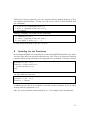
> source("tools/grapham_read.r")
> data <- grapham_read("out.bin")
> plot(data)
Similarly, in Matlab, one could use the commands
>> addpath(’tools’)
>> data = grapham_read(’out.bin’)
>> plot(data.z,data.x_2_,’.’)
to read and plot the data in the file out.bin.
8
Speeding Up the Simulation
Even though Grapham is not intended to be the fastest MCMC simulation tool, there
are some ways that may speed the simulation up a bit. First of all, instead of defining
a density function that just passes the arguments to a predefined C-function, such as
...
parents = {"m", "v"},
density = function(x,m,v)
return dnorm(x,m,v)
end
...
one may define the above as
...
parents = {"m", "v"},
density = "dnorm"
...
in which case one call of Lua function is avoided, as the C-function dnorm is called
directly with the arguments x,m,v.
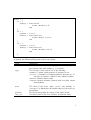
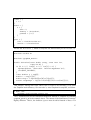
Also, the user may define custom densities in C. An example model specification:
14