1
RF Programmable solenoid valve User guide
Pag. 1
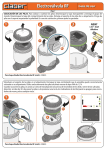
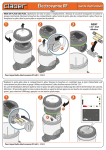
FITTING THE BATTERIES. Fitting / replacement procedure: unscrew the transparent cover and remove the control unit.
Unscrew the cap of the battery housing. Draw the battery holder out of the housing. Remove flat batteries, if in place, and fit
the new ones in the holder, observing the correct polarity.
1
2
3
NEW!
+
2xAA
ES
LV
VA
1,5V - AAA
Alkaline
-
A
W
LO
OK
+
ES
LV
VA
68 d
IP teste
+
2xA
-
AA
W
LO
OK
AA
A
LO
W
a
+
-
A
68 d
IP teste
ES
LV
VA
+
2xAA
b
OK
68 d
IP teste
b
a
For Aqua-Radio Programmable solenoid valve (code): 90835
Replace the battery holder in the housing. Retighten the cap, checking that the seal is positioned correctly in its seat. Use
only 2 new AAA 1.5V alkaline batteries.
Once the batteries are fitted, an initialization routine will start (display Leds light up in sequence, valves close in sequence).
Warning: 30 seconds after having fitted the batteries or pressed any button, the Leds on the panel will go out; to refresh the
display, press any button.
1
2
3
OK
S
E
LV
VA
S
E
LV
VA
W
LO
+-
2xAA
A
OK
LOW
68 d
IP teste
68 d
IP teste
b
OK
+
a
LOW
+
IP68
tested
OK
E
LV
VA
S
2xAA
+
-
A
68 d
IP teste
For Aqua-Radio Programmable solenoid valve (code): 90835
RF Programmable solenoid valve User guide
Pag. 2
INSTALLING THE SOLENOID VALVE. The programmable solenoid valve is fully watertight and will function even when
installed permanently under water at a depth of up to one metre (IP68 ingress protection). It can be installed in the open, or
in an underground valve box, positioned either horizontally or vertically. To ensure the product remains watertight, make
certain also that the control unit is aligned with and fully inserted in its seat, and that the transparent cover is securely
screwed on, with the seal properly positioned in its seat.
Warning: be certain to install the programmable solenoid valve observing the water flow direction indicated by the arrow:
"FLOW".
cod. 90524 ø3/4”
cod. 90374 ø1”
cod. 90918 Ø 3/4”
cod. 90917 Ø 1”
cod. 90524 ø3/4”
cod. 90374 ø1”
cod. 90380 ø3/4” (19-25 mm) 25m
cod. 90385 ø3/4” (19-25 mm) 50m
cod. 90390 ø1” (25-32 mm) 25m
cod. 90395 ø1” (25-32 mm) 50m
For Aqua-Radio Programmable solenoid valve (code): 90835
MANUAL ACTIVATION OF RF SOLENOID VALVE.
To activate the display, press any button.
Select the line to be opened manually, using the
buttons. Number 1 will blink.
Press
to open the valve. Press
a second time to close the valve.
1
b
2
OK
3
a
+-
2xAA
A
LO
W
S
S
A
E
LV
VA
E
LV
VA
+-
2xAA
a
LO
W
O
K
K
O
68 d
IP teste
68 d
IP teste
LOW
IP68
tested
OK
E
LV
VA
A
S
+-
2xAA
LO
W
K
O
68 d
IP teste
a
b
For Aqua-Radio Programmable solenoid valve (code): 90835
b
RF Programmable solenoid valve User guide
Pag. 3
RADIO REMOTE CONTROL. FITTING THE BATTERIES. Remove the cover of the battery housing and fit the 2
batteries in the holder, observing the correct polarity; use only 2 new AAA 1.5V alkaline batteries. Reposition and
close the cover of the battery housing. The first time that the batteries are fitted, the initial TIME/DAY page appears on the display, indicating 12:00 and S for Sunday.
1
2
1,5 V
AAA Alkaline
+
a
+
a
a
3
2 sec.
1
LOW BATT
A
B
2
%
LINE PROG
ERR
A A A A A A A 14
B B B B B B B 15
OK
S M T W T
F
S
EXIT
b
LOW BATT
A
B
1
2
3
4
%
LINE PROG
BA
TT
LO
W
A
B
ERR
A A A A A A A 14
B B B B B B B 15
OK
S M T W T
F
S
EXIT
EX
IT
14 15
S
PR
OG
LINE R
ER
%
S
2
1
4
A
B A
B A
M B A
T B A
W B A
T B A
F B
b
3
OK
+
+
For Aqua-Radio Programmable solenoid valve (code): 90835
RADIO REMOTE CONTROL. SETTING THE TIME AND DAY. Press the
button repeatedly to display the TIME/DAY page.
To set the time, press — the OK symbol will blink — then proceed to set the required time (e.g. 08:30) using the
buttons. Press to confirm the time, and the page for programming the day of the week will appear.
1
2
b
LOW BATT
A
B
3
4
%
a
3
14
3
4
%
S
BATT
LOW
EXIT
a
LIN
ER E
R PRO
EX
IT
15
14
A
A B
A B
F
A B
T
A B
A B
W
T
AB B
M
AB
G
O
K
F
%
S M T W T
4
A A A A A A A 14
B B B B B B B 15
OK
3
ERR
2
15
IT
S
S
1
LIN
ER E
R PRO
G
2
LINE PROG
EX
1
2
A
A B
A B
F
A B
T
A B
A B
W
T
AB B
M
AB
BATT
LOW
1
S
%
4
3
PR
OG
LO
W
BA
TT
1
EX
IT
15
2
15
E
S
S
M
K
O
O
K
ER
R
M
14
A
A B
A B
F
A B
T
A B
A B
W
T
AB B
AB
LIN
S
S
R
PR
OG
AB
EX
IT
3
14
A
A B
A B
F
A B
T
A B
A B
W
T
AB B
2
%
1
4
BA
TT
3
LO
W
2
E
A
B
1
LIN
LOW BATT
ER
c
4
%
O
K
S
3
EXIT
AB
LIN
ER E
R PRO
G
BATT
LOW
15
14
A
A B
A B
F
A B
T
A B
A B
W
T
AB B
M
2
S
1
F
IT
S M T W T
EX
A A A A A A A 14
B B B B B B B 15
OK
4
ERR
%
LINE PROG
S
3
4
%
O
K
S
IT
b
S
R
E
S
O
K
ER
LIN
EX
2
1
AB
PR
OG
BATT
LOW
15
14
A
A B
A B
F
A B
T
A B
A B
W
T
AB B
M
For Aqua-Radio Programmable solenoid valve (code): 90835
a
b
LOW BATT
A
B
1
2
3
4
%
LINE PROG
ERR
A A A A A A A 14
B B B B B B B 15
OK
S M T W T
F
S
EXIT
RF Programmable solenoid valve User guide
Pag. 4
RADIO REMOTE CONTROL. SETTING THE DAY OF THE WEEK. Use the
buttons to select the day of the week: S=Sunday
– M=Monday – T=Tuesday – W=Wednesday – T=Thursday – F=Friday – S=Saturday. To confirm and quit, press ; the main
screen will appear with the current time and day blinking.
1
2
b
1
LOW BATT
A
B
2
3
4
b
%
LOW BATT
A
B
LINE PROG
A A A A A A A 14
B B B B B B B 15
OK
S M T W T
T
M
W
F
S
T
3
4
%
LINE PROG
EXIT
F
2
ERR
A A A A A A A 14
B B B B B B B 15
OK
S M T W T
F
S
EXIT
S
%
S
ERR
1
3
4
a
1
PR
OG
E
LIN
R
IT
ER
15
IT
S
M
R
E
S
O
K
ER
LIN
S
EX
2
AB
PR
OG
BATT
LOW
EX
1
2
A
A B
A B
F
A B
T
A B
A B
W
T
AB B
M
S
15
14
A
A B
A B
F
A B
T
A B
A B
W
T
AB B
AB
O
K
3
4
%
a
14
BATT
LOW
For Aqua-Radio Programmable solenoid valve (code): 90835
CONNECTION OF REMOTE CONTROL WITH RF PROGRAMMABLE SOLENOID VALVE.
On the radio remote control select the unit to be connected; in this instance 1---- or 2----. After selecting the unit (for example
“1”), the Leds will blink in red.
Press any button on the valve to light up the display.
Press the three buttons of the valve simultaneously, until they blink in red
.
1
1
LOW BATT
A
B
2
3
4
%
LINE PROG
A A A A A A A 14
B B B B B B B 15
OK
S M T W T
4
3
AB
PR
OG
BATT
LOW
15
IT
+-
2xAA
A
LO
W
O
K
ER
R
E
S
b
E
LV
VA
+-
S
2xAA
A
OK
S
68 d
IP teste
LIN
a
OK
EXIT
EX
1
2
A
A B
A B
F
A B
T
A B
A B
W
T
AB B
M
S
S
14
F
2
E
LV
VA
%
ERR
LO
W
OK
68 d
IP teste
For Aqua-Radio Programmable solenoid valve (code): 90835
LOW
IP68
RF Programmable solenoid valve User guide
Pag. 5
While the valve display keeps blinking, press the hidden button on the radio remote control with the tip of a
paper clip. The display will start to blink and the symbol
will appear. The connection will be successfully completed when the message
appears on the remote control and the valve starts an initialization cycle (Leds
light up in sequence, valves close in sequence).
A
B
PROG
2
3
4
%
1
14
15 IT
EX
3
W
T
G
PRO
R
S
E
LIN
M
B
T
A
F
S
1
2
A
A B
A B
A B
A B
A B
AB B
BATT
LOW
ER
OK
1
LOW BATT
A
B
2
%
1
LOW BATT
A
B
2
3
4
%
LINE PROG
LINE PROG
ERR
A A A A A A A 14
B B B B B B B 15
OK
S M T W T
A A A A A A A 14
B B B B B B B 15
OK
S M T W T
F
EXIT
S
EXIT
S
3
4
%
F
ERR
IT
O
K
ER
R
S
N
E
M
S
EX
IT
15
G
PRO
LI
OK
14
A
B A
B A
B A
T B A
W B A
T B A
F B
1
AB
T
BAT
LOW
S
S
%
4
3
2
R
ER
EX
2
1
PR
OG
E
LIN
15
14
A
A B
A B
F
A B
T
A B
A B
W
T
AB B
M
AB
T
BAT
LOW
For Aqua-Radio Programmable solenoid valve (code): 90835
S1
PROGRAMMING. Set the duration of the watering cycles (RUN TIME) for RF Unit 1.
On the TIME/DAY page, press the
button: this activates the UNIT page and the red Leds on RF Unit 1 will blink. Press to access
the RUN TIME page. Press to set the run time (the OK symbol will blink): use the
buttons to set the minutes of watering (e.g.:
10 min.) (keeping the buttons pressed down, the numbers will scroll faster).
Press
to confirm the selected time. Press to display the next programming page.
1
LOW BATT
A
B
2
3
4
2
%
b
A
B
LINE PROG
2
3
4
%
LINE PROG
ERR
A A A A A A A 14
B B B B B B B 15
OK
S M T W T
EXIT
OK
S M T W T
4
3
IT
EX
2
1
S
S
E
LIN
15
14
A
A B
A B
F
A B
T
A B
A B
W
T
AB B
M
AB
PR
OG
BATT
LOW
EXIT
S
O
K
S
O
K
3
4
%
1
4
A A A A A A A 14
B B B B B B B 15
ERR
A A A A A A A 14
B B B B B B B 15
OK
S M T W T
EXIT
OK
S M T W T
PR
OG
E
S
S
1
O
K
ER
R
LIN
14 15
3
2
4
c
%
14 15
A
A B
A B
F
A B
T
A B
A B
W
T
AB B
M
S
c
4
4
3
3
1
PR
OG
AB
LIN
R
E
S
O
K
For Aqua-Radio Programmable solenoid valve (code): 90835
M
EX
IT
EX
BATT
LOW
15
14
A
A B
A B
F
A B
T
A B
A B
W
T
AB B
2
IT
15
S
S
ER
AB
A
B
1
2
3
4
%
LINE PROG
14
2
BATT
LOW
LOW BATT
S
EXIT
S
%
F
A
A B
A B
F
A B
T
A B
A B
W
T
AB B
M
1
c
S
B
ERR
F
%
A
A B
A B
F
A B
T
A B
A B
W
T
AB B
M
BA
TT
LINE PROG
3
2
%
2
EX
IT
1
B
A
B
LIN
ER E
R PRO
G
15
IT
EX
LOW BATT
O
K
%
4
S
d
LIN
ER E
R PRO
G
%
K
4
O
3
EX
IT
2
BA
TT
1
A
A
B
LO
W
LOW BATT
LO
W
O
K
S
F
a
%
S
R
%
4
3
1
AB
LIN
ER E
R PRO
G
BATT
LOW
IT
15
EX
IT
F
a
14
A
A B
A B
F
A B
T
A B
A B
W
T
AB B
M
2
%
4
S
EX
S
15
F
a
3
2
1
A
B
EXIT
3
2
1
PR
OG
S
E
LIN
1
LOW BATT
S M T W T
14
R
b
OK
A
A B
A B
F
A B
T
A B
A B
W
T
AB B
M
ER
3
A A A A A A A 14
B B B B B B B 15
LINE PROG
O
K
%
ERR
S
AB
4
LINE PROG
d
BATT
LOW
3
A A A A A A A 14
B B B B B B B 15
14
AB
2
ERR
A
A B
A B
F
A B
T
A B
A B
W
T
AB B
M
LIN
ER E
R PRO
G
BATT
LOW
1
LOW BATT
ER
b
A
1
S
ERR
A A A A A A A 14
B B B B B B B 15
OK
S M T W T
d
F
S
EXIT
RF Programmable solenoid valve User guide
Pag. 6
PROGRAMMING. Set up to 4 START TIMES for the watering cycle programmed on RF Unit 1.
Press
to set start time 1 — the n° 1 symbol remains permanently alight. Use the
buttons to set start time n° 1 (e.g.: 21.00)
(keeping the buttons pressed down, the numbers will scroll faster). Press to confirm the selected time. Press to set the subsequent start times 2, 3, 4 and repeat the steps described above: start times can also be set to OFF, using the
buttons, so as to
skip the relative watering cycle if not required. Press to display the next programming page.
1
b
1
LOW BATT
A
B
2
3
4
%
LINE PROG
ERR
A A A A A A A 14
B B B B B B B 15
OK
S M T W T
%
4
3
15
IT
S
A
B
1
2
3
4
3
%
LINE PROG
ERR
A A A A A A A 14
B B B B B B B 15
OK
S M T W T
3
ER
O
K
S
b
EXIT
IT
S
LOW BATT
A
B
1
2
3
4
%
LINE PROG
ERR
A A A A A A A 14
B B B B B B B 15
OK
S M T W T
F
S
EXIT
R
E
S
O
K
ER
LIN
EX
2
1
AB
PR
OG
BATT
LOW
15
14
A
A B
A B
F
A B
T
A B
A B
W
T
AB B
M
F
a
4
E
LOW BATT
%
PR
OG
EXIT
S
R
LIN
EX
2
1
AB
BATT
LOW
S
b
a
14
A
A B
A B
F
A B
T
A B
A B
W
T
AB B
M
F
2
3
4
%
a
14
AB
S
15
IT
S
M
ER
R
EX
2
A
A B
A B
F
A B
T
A B
A B
W
T
AB B
1
BATT
LOW
%
PR
OG
4
E
3
LIN
A
B
2
ER E
R PRO
G
IT
EX
BA
TT
LO
W
O
K
14 15
S
S
O
O
F
%
K
K
LIN
S
4
A
A B
A B
F
A B
T
A B
A B
W
T
AB B
M
A
S M T W T
3
2
B
OK
1
LIN
ER E
R PRO
G
A A A A A A A 14
B B B B B B B 15
B
ERR
S
IT
14 15
EX
%
A
A B
A B
F
A B
T
A B
A B
W
T
AB B
M
BA
TT
LO
W
4
3
2
1
LINE PROG
A
d
1
LOW BATT
EXIT
S
c
2
d
B
for PROG
3
4
repeat as for
1
3
4
%
c
IT
EX
2
1
S
M
O
K
ER
R
LIN
E
S
15
14
A
A B
A B
F
A B
T
A B
A B
W
T
AB B
AB
PR
OG
BATT
LOW
A
repeat as for
PROG
For Aqua-Radio Programmable solenoid valve (code): 90835
PROGRAMMING. Select the days of the week on which to activate the programmed watering cycles (WEEKLY SCHEDULE).
Press to access weekly programming (the S symbol blinks for Sunday). Press the
button to cycle through the days of the
week, which will blink when selected. Press the
button repeatedly to skip watering on the day selected (in this example,
Wednesday is skipped, W = WEDNESDAY). To quit, press the
buttons so as to select EXIT; when EXIT starts blinking, press OK.
Press to display the next programming page.
1
2
3
4
%
2
b
ERR
A A A A A A A 14
B B B B B B B 15
EXIT
OK
S M T W T
1
2
3
4
1
2
%
4
3
3
4
AB
S
15
S
M
%
LINE PROG
A A A A A A A 14
B B B B B B B 15
ERR
A A A A A A A 14
B B B B B B B 15
OK
S M T W T
EXIT
OK
S M T W T
BATT
LOW
AB
S
For Aqua-Radio Programmable solenoid valve (code): 90835
b
3
4
%
EXIT
BATT
LOW
S
M
IT
15
14
A
A B
A B
F
A B
T
A B
A B
W
T
AB B
AB
EX
for 4
2
c
S
1
15
EX
IT
S
M
F
PR
OG
4
3
14
A
A B
A B
F
A B
T
A B
A B
W
T
AB B
2
S
1
c
F
%
ERR
LIN
ER E
R PRO
G
15
IT
EX
A
B
O
K
%
4
S
LOW BATT
14
A
A B
A B
F
A B
T
A B
A B
W
T
AB B
2
15
EX
IT
for 2
d
%
BATT
LOW
E
A
B
a
EXIT
1
%
4
2
15
EX
IT
3
S
M
O
K
S
S
a
14
A
A B
A B
F
A B
T
A B
A B
W
T
AB B
AB
LIN
ER E
R PRO
G
BATT
LOW
F
LIN
ER E
R PRO
G
S
1
%
4
LOW BATT
3
O
K
F
a
3
2
1
3
2
1
PR
OG
LIN
O
K
ER
R
E
S
M
%
S M T W T
S
14
A
A B
A B
F
A B
T
A B
A B
W
T
AB B
AB
4
OK
LINE PROG
BATT
LOW
3
LINE PROG
M
d
2
A A A A A A A 14
B B B B B B B 15
O
K
S
1
ERR
14
A
A B
A B
F
A B
T
A B
A B
W
T
AB B
AB
LIN
ER E
R PRO
G
BATT
LOW
A
B
EX
IT
LINE PROG
LOW BATT
LIN
A
B
R
LOW BATT
ER
b
O
K
1
S
RF Programmable solenoid valve User guide
Pag. 7
RAIN SENSOR.
Press the
button to access activation/deactivation of the Rain Sensor; the OK message will blink. Pressing the
buttons, the option can be toggled between YES (sensor activated) and NO (sensor deactivated). Press to
confirm. Press the button to display the next programming page.
1
b
1
LOW BATT
A
B
2
3
4
%
2
3
LINE PROG
ERR
A A A A A A A 14
B B B B B B B 15
OK
S M T W T
%
4
3
15
IT
EX
2
1
PR
OG
b
EXIT
S
1
LOW BATT
A
B
2
3
4
%
LINE PROG
ERR
A A A A A A A 14
B B B B B B B 15
OK
S M T W T
F
S
EXIT
E
S
4
3
1
LOW BATT
A
B
2
3
4
15
IT
S
M
O
K
ER
R
LIN
E
S
EX
2
AB
O
K
d
14
A
A B
A B
F
A B
T
A B
A B
W
T
AB B
1
15
IT
EX
2
1
LIN
BATT
LOW
ER
R
E
S
S
M
PR
OG
3
4
a
14
A
A B
A B
F
A B
T
A B
A B
W
T
AB B
AB
PR
OG
BATT
LOW
a
%
%
O
K
ER
R
LIN
S
a
14
A
A B
A B
F
A B
T
A B
A B
W
T
AB B
M
AB
BATT
LOW
F
%
LINE PROG
ERR
A A A A A A A 14
B B B B B B B 15
OK
S M T W T
%
4
3
15
IT
EX
2
1
EXIT
S
E
S
O
K
ER
R
LIN
S
c
14
A
A B
A B
F
A B
T
A B
A B
W
T
AB B
M
AB
PR
OG
BATT
LOW
F
For Aqua-Radio Programmable solenoid valve (code): 90835
RADIO REMOTE CONTROL. TEST/MANUAL WATERING. Press the
button to activate communication between remote control and RF
programmable solenoid valve; the TEST message will blink briefly. The display shows line 1 and the message OFF; press
to activate
watering for a preset time of 5 minutes. Press a second time to stop watering before the end of the preset time. To quit the function, press
until the TEST message appears, then press . Press
to go back to the UNIT page. To go back to the TIME/DAY page, press the "UNIT"
button twice.
4
%
2
b
A
B
%
EXIT
A
B
1
%
2
3
4
b
%
LOW BATT
A
B
ERR
A A A A A A A 14
B B B B B B B 15
OK
S M T W T
F
S
4
O
K
S
IT
EX
S
2
3
4
%
f
For Aqua-Radio Programmable solenoid valve (code): 90835
AB
S
M
IT
EX
2
BATT
LOW
15
14
A
A B
A B
F
A B
T
A B
A B
W
T
AB B
1
d
ERR
A A A A A A A 14
B B B B B B B 15
OK
S M T W T
EXIT
3
AB
15
14
A
A B
A B
F
A B
T
A B
A B
W
T
AB B
M
1
LINE PROG
PR
OG
%
4
3
BATT
LOW
F
a
S
%
c
S M T W T
4
PR
OG
LOW BATT
%
A A A A A A A 14
B B B B B B B 15
M
LINE PROG
2
S
4
ER
e
LIN
ER E
R PRO
M
EX
IT
2
1
PR
OG
O
K
ER
R
E
S
15
14
A
A B
A B
F
A B
T
A B
A B
W
T
AB B
S
3
O
K
e
1
3
4
%
F
S
E
4
2
OK
14
A
A B
A B
F
A B
T
A B
A B
W
T
AB B
AB
LIN
3
S M T W T
AB
BATT
LOW
R
2
1
ERR
3
%
4
3
S
E
15
IT
EX
2
S
S
a
14
G
OK
F
A
B
LINE PROG
M
A A A A A A A 14
B B B B B B B 15
ERR
LIN
S M T W T
LOW BATT
c
O
K
1
LINE PROG
BATT
LOW
EXIT
ER
A
B
A A A A A A A 14
B B B B B B B 15
OK
b
O
K
LOW BATT
ERR
A
A B
A B
F
A B
T
A B
A B
W
T
AB B
AB
LIN
ER E
R PRO
G
BATT
LOW
M
O
K
d
3
%
2
EXIT
1
%
4
3
2
1
S
ER
R
LIN
E
S
F
a
S
4
LIN
S M T W T
14
A
A B
A B
F
A B
T
A B
A B
W
T
AB B
AB
PR
OG
BATT
LOW
3
1
A A A A A A A 14
B B B B B B B 15
OK
2
LINE PROG
LINE PROG
ERR
1
LOW BATT
15
3
IT
2
EX
1
R
A
B
15
LOW BATT
IT
b
EX
1
S
a
F
S
EXIT
S
EXIT
RF Programmable solenoid valve User guide
Pag. 8
TRANSFER OF PROGRAMMING DATA TO THE SOLENOID VALVE. On the UNIT page, press the
button. The RF icon will start
blinking on the display of the remote control for few seconds, with the green reception signal blinking on the solenoid valve. The
disappearance of the RF symbol
indicates that the update has been completed successfully, and the watering programmes will
start automatically. In case that the ERR message appears on the remote control, bring the device closer to the valve and repeat the
operation described previously. To go back to the TIME/DAY page, press the
button twice.
1
b
LOW BATT
A
B
1
2
3
4
%
2
a
A A A A A A A 14
B B B B B B B 15
OK
S M T W T
3
4
%
ERR
A A A A A A A 14
B B B B B B B 15
OK
S M T W T
F
S
3
EXIT
%
A
B
3
4
LOW BATT
AB
PR
OG
BATT
LOW
S
IT
EX
3
4
%
O
K
O
K
A
B
2
3
4
%
BATT
LOW
AB
S
IT
EX
1
1
15
14
A
A B
A B
F
A B
T
A B
A B
W
T
AB B
2
LOW BATT
PR
OG
b
%
E
4
LIN
3
R
2
3
4
%
ERR
A A A A A A A 14
B B B B B B B 15
OK
S M T W T
S
a
F
S
EXIT
for 2
M
ER
A
B
1
2
O
K
d
LOW BATT
1
LINE PROG
S
M
ER
R
LIN
E
M
15
14
2
15
IT
EX
2
b
A
A B
A B
F
A B
T
A B
A B
W
T
AB B
1
%
4
3
2
1
S
1
EXIT
ER
R
LIN
E
S
S
a
14
A
A B
A B
F
A B
T
A B
A B
W
T
AB B
AB
PR
OG
BATT
LOW
F
A
B
LINE PROG
LINE PROG
ERR
LOW BATT
LINE PROG
LINE PROG
ERR
A A A A A A A 14
B B B B B B B 15
OK
EXIT
F
S
A A A A A A A 14
B B B B B B B 15
OK
S M T W T
F
S
EXIT
%
S M T W T
ERR
15
IT
4
3
15
IT
EX
2
1
S
ER
R
LIN
E
S
M
O
K
E
S
R
14
A
A B
A B
F
A B
T
A B
A B
W
T
AB B
AB
BATT
LOW
O
K
ER
LIN
EX
2
1
AB
S
PR
OG
3
4
%
c
14
A
A B
A B
F
A B
T
A B
A B
W
T
AB B
M
PR
OG
BATT
LOW
For Aqua-Radio Programmable solenoid valve (code): 90835
RF RAIN SENSOR. FITTING THE BATTERIES.
Fitting/replacement procedure: press on the tab firmly and pull downwards. Remove the cover of the battery
housing, draw the battery holder out of the housing and fit the 2 batteries in the holder, observing the correct
polarity. Reposition the battery holder in the housing and refit its cover.
1
2
3
a
+
+
AA
b
AA
Led
AA
a
1,5 V
b AA Alkaline
For Aqua-Radio Programmable solenoid valve (code): 90835
For further information, please refer to the instruction manual supplied with the product.
+
a
+
AA
c
b