1
What’s in the box?
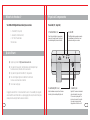
Your DWG-1000 Digital Wireless Guitar System contains:
•
•
•
•
1 - Transmitter (Tx / Gray Unit)
1 - Receiver (Rx / Dark Green Unit)
2 - 1/4” to 1/8” Guitar Cables
This User Guide
Physical Components
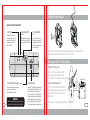
Transmitter (Tx / Gray Unit)
1. Function Button (”FN”)
2. Link LED
Press the Function Button to change channels
(see section, Changing Channels). Use the end
of an unfolded paper clip to access the button.
The LED lights solid when a wireless connection
is made between the Tx and Rx units, and
pulses when waiting for a connection.
Quick Start
FN
LINK LOW B
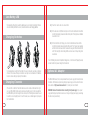
1) Register your product at http://www.braceaudio.com.
2) Plug cable from Receiver (Rx / Dark Green) Audio Out into amplifier input.
If audio buzz is heard, move the unit to a new location.
3) Plug cable from guitar into Transmitter (Tx / Gray) Audio In.
4) The Link LED light will light solid on both the Tx and RX units
to show a successful wireless connection.
5) You are now ready to play.
Plugging the cable into the Tx or Rx units switches the unit on. To save battery life, unplug the
cable to switch the unit off when not in use. Upon plugging in the cable, the Link LED will pulse
steadily while it is waiting to make the wireless connection.
4
3. Low Battery LED (”LOW B”)
4. Audio In Jack
When the batteries are low (less than 15 minutes
of battery life), the Low Battery LED lights solid.
Plug the 1/8” connector on the included
cable into the Audio In Jack, and the
1/4” connector into your guitar. This
jack also acts as a switch, turning the
unit on when the plug is inserted.
Unplug the cable to turn the unit off.
5