Transcript
SPHQ MECHANICAL TIMESWITCH CLOCK
OPERATING INSTRUCTIONS
SPHQ/24HOUR 24 Hour Timeswitch Clock
SPHQ/7DAY 7 Day Timeswitch Clock
1. INSTALLATION
(a) Mounting
Surface Mount
Remove transparent front cover. Unscrew the front corner screws. Separate the base from the clock
and remove terminal shroud. Fix the base to the wall with screws.
DIN Rail Mount
Remove transparent front cover. Unscrew the front corner screws. Separate the base from the clock
and remove terminal shroud. Clip the base onto DIN rail.
Panel Mount
Remove transparent front cover. Unscrew the front corner screws. Separate the base from the clock
and remove terminal shroud. Position the timeswitch clock through the panel and push panel mount
clip firmly from behind the panel.
(b) Connect appliance to power supply - see wiring diagram below. The installation and assembly
of electrical equipment should only be carried out by a skilled or qualified person. Replace
terminal shroud on base, attach clock onto the base and replace front corner screws and transparent
front cover.
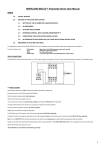
WIRING DIAGRAM
2. PROGRAMMING
(a) Ensure the timeswitch clock is in operation by observing the central spindle rotating. This can
take up to 10 minutes from the time the power supply is connected. Rotate this central spindle until
the timeswitch clock hands are reading the correct time.
(b) Place the green tappets on the outside gear wheel at the selected times for ON operation. Place
the red tappets on the outside gear wheel at the selected times for OFF operation. Ensure that there
are equal numbers of red and green tappets and that they are alternating in position.
Note: The minimum switching interval for the SPHQ/24HOUR is 30 minutes and for the
SPHQ/7DAY is 3 hours.
(c) The indicator in the top right hand corner of the timeswitch clock indicates the ON or OFF status.
If the white line points towards '0' the timeswitch clock is in an OFF period whilst if the white line
points towards '1' the timeswitch clock is in an ON period. This indicator can be rotated for manual
override control.
Note: If the power supply is removed or fails, the timeswitch will continue operating for 100
hours after an uninterrupted 48 hours of charge.
Eltime Controls: Hall Road, Maldon, Essex, CM9 4NF England.
Telephone: +44 (0)1621 859500 Fax: +44 (0)1621 855335 Email: [email protected] Web : www.eltime.co.uk