1
You could try all of these anyhow, regardless of whether the device
indicates a problem.
If there is still no luck, contact your CI centre.
If you think that the Fine Tuner is not working, remove the battery
for a few minutes and then put it back. There is no need to resynchronize the tuner at this point.
If there is still no luck, contact your CI centre.
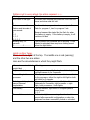
Red indicator light on Opus 2
This can be deactivated. However if it starts to flash refer to the
table below:
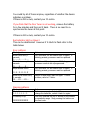
Error patterns
Blinking pattern
Blinks once every 2
seconds
I..........I……….I…….
Blinks twice every 2
seconds.
II………II……….II….
Rapid double blinks.
II…II…II…II…II…II
Blinks three times every
2 seconds.
III…….III……..III……
Action
Turn processor off and switch back on again. If
blinking persists, processor must be replaced.
Switch to a different program. If blinking persists,
processor needs to be reprogrammed.
Turn processor off and switch back on again. If
blinking persists, processor must be replaced.
Switch off and switch back on again. If still a
problem, refer to CI clinic.
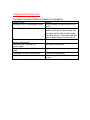
Warning patterns
Blinking pattern
Blinks once every second.
I…I…I…I…I…I…I..
Constantly lit up
IIIIIIIIIIIIIIIIIIIIIII
Action
Batteries are empty. Switch off the processor,
change the batteries, switch it back on again.
You have reached the top or bottom of the volume
or sensitivity range. Stop pressing the buttons on
the fine tuner.