1
Installation/Troubleshooting
Problem
Cause and Remedy
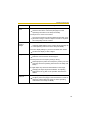
The Top page is • The default gateway address may be wrong.
displayed on the
Assign the correct default gateway address (see page 29 of
LAN, but not
the Operating Instructions in the Setup CD-ROM).
displayed from
the Internet.
• UPnPTM is disabled on the router.
Enable UPnPTM on the router following the router manual.
• Port forwarding is not enabled on the router (see page 12).
Enable port forwarding seeing the router manual for details.
• Firewalls such as packet filtering on the router is blocking
camera access.
Set the router to allow access to the camera seeing the
router manual for details.
• You are accessing the camera with an IP address for local
camera access.
Access the camera with the global IP address of the router
and port number of the camera.
• The router does not allow access to the camera under the router
with the global IP address.
If you access the camera on the LAN, access with the
address for local camera access.
Authentication
windows are
consequently
displayed.
• User name and password for the administrator or general users
are changed.
Only half of the
image is
displayed.
• You are using Internet Explorer 4.xx or lower.
Close the web browser, and access the camera again.
Upgrade Internet Explorer to version 6.0 or greater.
21