1
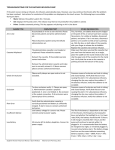
 Troubleshooting Guide : e‐learning “I have forgotten my password” Your password can be re‐set quickly and easily. Contact the Learning and Development Team responsible for e‐learning to have your password re‐set. “My username/password is not recognised” Please re‐check your login details on your welcome e‐mail for the course to be completed. Passwords can be case sensitive. “It is very slow moving from page to page” This is usually caused by network problems. Try once more at a different time of day, and if the speed is not improved, contact the Learning and Development Team. You should also try a different webpage to ensure your internet connection is working. If not, you should contact the IT helpdesk on 7777 8888 or 0191 370 8888. “I can’t hear the sound” Not all courses have sounds, although most do. If you believe the course you are using has sound and you cannot hear it, please contact the Learning and Development Team to request a pair of headphones. Page 1 of 3 “Some of the pages are blank / incomplete” Try refreshing the screen using the button. If the problem reoccurs it may be that your computer has an out of date version of flash player. If you are learning at work contact the IT Helpdesk by e‐mail, or by telephone on 0191 370 8888 /VPN 7777 8888 and ask them to install the most recent version of flash player onto your PC. If you are learning at home you should be able to do this yourself when prompted by the learning. “The course is not recording my learning” You would normally notice this problem if after you complete a lesson the status box does not change colour This problem is usually due to a google toolbar being installed in internet explorer. The best thing to do is uninstall the toolbar until you have completed the course. To do this go to the control panel (you will find this by clicking on the start button), click on “add or remove programs”. Select the google toolbar and click uninstall. For further help, contact the Learning and Development Team. Page 2 of 3 “My learning is showing as incomplete” You may think you have completed a lesson but the status shows as incomplete (see example below). The courses are designed for you to work through them at a pace that allows you to read each page. If you move through the course in a quick page‐turning fashion and all the features on the page are not able to load the learning management system can record the lesson as incomplete. The best way to resolve this is to complete the lesson again ensuring that all the text is shown on screen before you move onto the next page. . Should the information provided not solve your problem, please contact the Learning and Development Team using the contact details below: Barbara Dent
Tel: 0191 383 3839
VPN: 7700 3839
E-mail: [email protected]
Rachel Tallentire
Tel: 0191 383 5730
VPN: 7700 5730
E-mail: [email protected]
Page 3 of 3