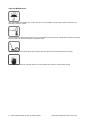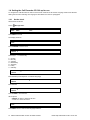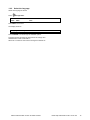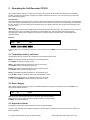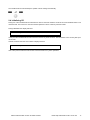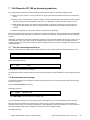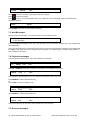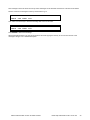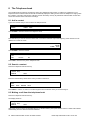
1
Call Recorder CD300 Manual INSTALLATION AND OPERATING INSTRUCTIONS (Model number 300) The Call Recorder CD 300 1. 2. 3. 4. 5. 6. 7. 8. 9. 10. 2 Menu-keys Backlight Display Function keys Speaker Alpha-Numerical keys CryptoCard reader CD Drive Recorder keys Speakerphone key Volume adjustment Manual Call Recorder CD 300 © Retell Ltd 2003 Need help? Call Retell on 0871 42 42 444 Connection 1. 2. 3. 4. 5. 6. 7. 8. 9. 10. Power Ethernet/LAN RS 232 Serial Switch Loudspeaker Microphone Handset Handset Phone line Out Phone line In Manual Call Recorder CD 300 © Retell Ltd 2003 Need help? Call Retell on 0871 42 42 444 3 Recorder-keys The recorder keys have specific functions in different situations although the operation is always very similar. During recording and playback the keys have the standard recorder key functions as explained below. Record Backward Stop Pause/Play Forward Skip The and keys can be used to scroll through numbers in the telephone book or through a settings menu. If no recording or playback is taking place these keys always have an Up/Down or Left/Right function. The key will always exit the current operation. Function-keys 4 Manual Call Recorder CD 300 © Retell Ltd 2003 Need help? Call Retell on 0871 42 42 444 Alphanumerical functions Manual Call Recorder CD 300 © Retell Ltd 2003 Need help? Call Retell on 0871 42 42 444 5 Care and Maintenance Keep the Call Recorder CD 300 dry. If it gets wet, wipe it dry immediately. Liquids might contain minerals that can corrode the electronic circuits. Use and store the Call Recorder CD 300 only in normal temperature environments. Temperature extremes can shorten the life of electronic devices and distort or melt plastic parts. Keep the Call Recorder CD 300 away from excessive dust and dirt that can cause premature wear of parts. Do not use harsh chemicals, cleaning solvents or strong detergents to clean the Call Recorder CD 300. 6 Manual Call Recorder CD 300 © Retell Ltd 2003 Need help? Call Retell on 0871 42 42 444 Table of contents 1 Getting started ......................................................... 10 1.1 1.2 1.3 1.3.1 1.3.2 1.4 1.4.1 1.4.2 2 Automatic recording........................................................................................................ 18 Copy recordings to CD ................................................................................................... 18 Making a CD suitable for the PC..................................................................................... 18 Notification...................................................................................................................... 18 Recording quality ............................................................................................................ 19 Fax Recording ................................................................................................................ 19 Recording from the microphone...................................................................................... 19 Microphone mode ........................................................................................................... 20 Automatic Gain Control .................................................................................................. 20 Voice activated recording ............................................................................................... 20 Signal settings ................................................................................................................ 20 Search recordings .......................................................................................................... 22 Search according to date ................................................................................................ 22 Search according to code ............................................................................................... 23 Free time left on CD ....................................................................................................... 24 Copy the memory to CD ................................................................................................. 24 Copy a recording from CD to memory ............................................................................ 24 Create CD directory ........................................................................................................ 25 Play audio CD ................................................................................................................ 25 Erase CD Re-writable ..................................................................................................... 25 Erase memory ................................................................................................................ 26 Total recordings .............................................................................................................. 26 Software update ............................................................................................................. 27 Call Recorder CD 300 as Telephone ....................... 29 6.1 6.2 6.3 6.4 7 Frequently used key indicators ....................................................................................... 16 Save Changes ................................................................................................................ 16 Adjust the Volume .......................................................................................................... 16 Initializing CD ................................................................................................................. 17 Operating the CD recorder ....................................... 24 5.1 5.2 5.3 5.4 5.5 5.6 5.7 5.8 5.9 6 Set the clock ................................................................................................................................. 14 Select the language ..................................................................................................................... 15 Search and play recordings ..................................... 22 4.1 4.2 4.3 5 Setting the Call Recorder CD 300 up for use .................................................................. 14 Recording calls ........................................................ 18 3.1 3.2 3.3 3.4 3.5 3.6 3.7 3.8 3.9 3.10 3.11 4 Connecting to an analog telephone line ....................................................................................... 12 Connecting to a digital telephone ................................................................................................. 13 Operating the Call Recorder CD 300 ....................... 16 2.1 2.2 2.3 2.4 3 Out of the box ................................................................................................................. 10 Connecting the power supply ......................................................................................... 11 Connecting to the record source ..................................................................................... 11 Headset / Speakerphone ................................................................................................ 29 Start a call ...................................................................................................................... 29 Accept a call ................................................................................................................... 30 End a call ....................................................................................................................... 30 Call Recorder CD 300 as Answering machine ......... 31 7.1 7.2 Turn the answering machine On ..................................................................................... 31 Record welcome message ............................................................................................. 31 Manual Call Recorder CD 300 © Retell Ltd 2003 Need help? Call Retell on 0871 42 42 444 7 7.3 7.4 7.5 8 The Telephone book ................................................ 34 8.1 8.2 8.3 8.4 8.5 8.6 9 New Messages. .............................................................................................................. 32 Playback messages........................................................................................................ 32 Remove messages ......................................................................................................... 32 Add a contact ................................................................................................................. 34 Search a contact ............................................................................................................ 34 Making a call from the telephone book ........................................................................... 34 Edit a contact.................................................................................................................. 35 Remove a contact........................................................................................................... 35 Call History ..................................................................................................................... 35 Using the CryptoCard .............................................. 36 9.1 9.2 9.3 9.4 Insert CryptoCard into Call Recorder CD 300 ................................................................. 36 The CryptoCard and its PIN and PUC code .................................................................... 36 Making an encrypted recording....................................................................................... 36 Playing an encrypted recording ...................................................................................... 37 10 The Network Interface .............................................. 38 10.1 10.2 The Possibilities ............................................................................................................. 38 Network configuration ..................................................................................................... 38 11 Settings .................................................................... 39 11.1 11.2 11.3 Record Source ............................................................................................................... 39 Start method ................................................................................................................... 39 Telephone settings ......................................................................................................... 40 11.3.1 11.3.2 11.3.3 11.3.4 11.3.5 11.3.6 11.3.7 11.3.8 11.3.9 11.3.10 11.3.11 11.3.12 11.4 Recorder Settings ........................................................................................................... 43 11.4.1 11.4.2 11.4.3 11.4.4 11.4.5 11.4.6 11.4.7 11.4.8 11.4.9 11.4.10 11.4.11 11.4.12 11.4.13 11.4.14 11.4.15 11.5 CryptoCard ................................................................................................................................ 43 Automatic CD Copy .................................................................................................................. 43 Notification ................................................................................................................................ 44 Ask Store/Delete ....................................................................................................................... 44 Beep after store ........................................................................................................................ 44 Minimum call time ..................................................................................................................... 44 Start period ............................................................................................................................... 45 Silence period ........................................................................................................................... 45 Recording Quality ..................................................................................................................... 45 Fax Recording ....................................................................................................................... 46 Microphone mode .................................................................................................................. 46 Microphone amplification ....................................................................................................... 46 Automatic gain control ........................................................................................................... 46 Hum filter ............................................................................................................................... 46 Footswitch .............................................................................................................................. 47 Network settings ............................................................................................................. 47 11.5.1 11.5.2 11.5.3 11.5.4 11.5.5 8 Put on hold ................................................................................................................................ 40 Flash time ................................................................................................................................. 40 Wait after dial ............................................................................................................................ 40 Caller ID .................................................................................................................................... 41 K-break detection ...................................................................................................................... 41 Rings to answer on ................................................................................................................... 41 Rings always answer ................................................................................................................ 41 Ring Variation ........................................................................................................................... 41 Ring Volume ............................................................................................................................. 42 Ring frequency....................................................................................................................... 42 Speaker after answer ............................................................................................................ 42 Maximum message time ........................................................................................................ 42 Network active .......................................................................................................................... 47 FTP active ................................................................................................................................. 47 FTP user ................................................................................................................................... 47 FTP password ........................................................................................................................... 48 FTP server port ......................................................................................................................... 48 Manual Call Recorder CD 300 © Retell Ltd 2003 Need help? Call Retell on 0871 42 42 444 11.5.6 11.5.7 11.5.8 11.5.9 11.5.10 11.6 11.7 11.8 11.9 DHCP server ............................................................................................................................. 48 IP address ................................................................................................................................. 49 IP subnet mask ......................................................................................................................... 49 Gateway .................................................................................................................................... 49 IP name ................................................................................................................................. 50 Clock .............................................................................................................................. 50 Password ....................................................................................................................... 51 Language ....................................................................................................................... 51 Reset all Values ............................................................................................................. 51 12 Call Recorder CD 300 Quick CD Access System software 12.1 12.2 12.3 12.4 12.5 12.6 12.7 12.8 12.9 53 Install the software.......................................................................................................... 53 Start ............................................................................................................................... 53 View recordings on CD ................................................................................................... 53 Create an archive on Hard disk ...................................................................................... 54 Recycle bin ..................................................................................................................... 54 Export recordings ........................................................................................................... 55 On Line software update................................................................................................. 55 Search recordings .......................................................................................................... 55 Software Settings ........................................................................................................... 56 13 Accessories.............................................................. 58 14 Conformation with directive 1999/5/EC and Class 1 of the R&TTE 59 15 Guarantee Conditions .............................................. 60 16 Legality of Recording ............................................... 61 17 Index ........................................................................ 62 . Manual Call Recorder CD 300 © Retell Ltd 2003 Need help? Call Retell on 0871 42 42 444 9 1 Getting started In this Chapter the connections of the Call Recorder CD 300 are described. 1.1 Out of the box In the box of the Call Recorder CD 300 you will find: Call Recorder CD 300 7,5 volt AC power adapter Flat telephone cable with two RJ 11 connectors CD RW Software CD Manual 10 Manual Call Recorder CD 300 © Retell Ltd 2003 Need help? Call Retell on 0871 42 42 444 1.2 Connecting the power supply The Call Recorder CD 300 is powered through a wall socket power adapter. First connect the AC power adapter to the wall socket. Then connect the mini jack of the adapter to the Power connector on the backside of the Call Recorder CD 300. 1.3 Connecting to the record source The Call Recorder CD 300 can record from analog phones and from digital phones. When recording from an analog phone follow instructions in § 1.3.1. When recording from a digital phone follow instructions in § 1.3.2. The Call Recorder CD 300 can also be used as a regular recorder to record from a microphone. The Call Recorder CD 300 can record from the Speakerphone microphone (internal microphone) or record from an external microphone connected to the microphone connection at the back of the device. See § 3.7 for details. Manual Call Recorder CD 300 © Retell Ltd 2003 Need help? Call Retell on 0871 42 42 444 11 1.3.1 Connecting to an analog telephone line Connect the Call Recorder CD 300 between your telephone line wall socket and your telephone. Use your existing telephone line of your telephone to connect the Call Recorder CD 300 to the telephone line wall socket. The telephone line is connected to the Phone line In port. Use the supplied flat cable with two RJ11 connectors to connect your telephone to the Call recorder CD. Connect the cable to the Phone line Out port on the Call Recorder CD 300. Continue with the settings in § 1.4 12 Manual Call Recorder CD 300 © Retell Ltd 2003 Need help? Call Retell on 0871 42 42 444 1.3.2 Connecting to a digital telephone Connect the Call Recorder CD 300 between your telephone and the telephone handset. Use your existing telephone handset cable from your telephone to connect the Call Recorder CD 300 to the telephone. Use the supplied curled cable with two RJ10 connectors to connect your telephone handset to the Call recorder CD. Continue with the settings in § 1.4. After the normal settings have been made you need to continue with the Voice activated recording settings in § 3.10. Manual Call Recorder CD 300 © Retell Ltd 2003 Need help? Call Retell on 0871 42 42 444 13 1.4 Setting the Call Recorder CD 300 up for use To configure the Call Recorder CD 300 for use the Clock needs to be set and the Language needs to be selected. Setting the Clock and selecting the Language is described in the next two paragraphs. 1.4.1 Set the clock Set the clock as follows: Press Configuration. Record from: NEXT MENU Line STOP Press NEXT five times The display will show: Clock: Mon 12-06-03 STOP 10:31 NEXT CHANGE Press CHANGE to set the clock Clock: █on 12-06-03 CANCEL 10:31 STORE << >> 10:31 STORE << >> █0:31 STORE << >> 10:31 STORE << >> Press keys 1 - 7 to set the day: 1 = Sunday 2 = Monday 3 = Tuesday 4 = Wednesday 5 = Thursday 6 = Friday 7 = Saturday Clock: Mon █2-06-03 CANCEL Enter the date (format depends on selected language) Clock: Mon 12-06-03 CANCEL Enter the time Clock: █on 12-06-03 CANCEL Press STORE to save the time. Other options: CANCEL to return to previous set time. << and >> to move the cursor. Clock: Mon 12-06-03 STOP 10:31 NEXT CHANGE Press NEXT twice to continue with language selection. 14 Manual Call Recorder CD 300 © Retell Ltd 2003 Need help? Call Retell on 0871 42 42 444 1.4.2 Select the language Select the language as follows: Press Configuration. Record from: NEXT MENU Line STOP Press NEXT seven times The display will show: Language: English NEXT CHANGE STOP Press CHANGE to scroll through the available options. Together with the Language the date format can change also: Standard date format is: DD-MM-YY When set to "American" the format is changed to: MM-DD-YY Manual Call Recorder CD 300 © Retell Ltd 2003 Need help? Call Retell on 0871 42 42 444 15 2 Operating the Call Recorder CD 300 The Call Recorder CD 300 has a common menu driven user interface. Most function and operations are initiated by pressing a function key followed by a sequence of display determined menu keys. The use of function keys and menu keys is indicated as follows: Function keys The most frequently used functions of the Call Recorder CD 300 have been grouped in the function keys. Throughout the entire manual figures representing the function keys are used to indicate the function key corresponding to the described function. Pressing one of the function keys will always result in a display where the various options are assigned to the four menu keys. Menu keys After pressing a function key the available options are assigned to the four menu keys. The operation of the menu keys is determined by the text in the display right above the corresponding key. Throughout the entire manual figures representing the display with or without the menu keys are used to show the required action corresponding to the described feature. Example: Record from: NEXT MENU Handset STOP █████ ▓▓▓▓▓ █████ █████ In this example you are instructed to press the menu key below the text MENU in order to open the General setting menu. 2.1 Frequently used key indicators The following menu key functions are consistently used throughout the manual. MENU in the display indicates the presence of an underlying menu Press MENU to open the underlying menu NEXT in the display indicates the presence of more menu items Press NEXT to jump to the following menu item BACK in the display indicates the presence of an embracing menu Press BACK to return to the embracing menu STOP in the display indicates the absence of an embracing menu Press STOP to return to operating mode of the Call Recorder CD 300 CHANGE will toggle the item in the display between "On" and "Off" In some cases CHANGE is used to increase or decrease a value. 2.2 Save Changes After making settings the user is forced to press YES or NO before returning to operation mode. Press STOP in the menu and the display will show: Save Changes? YES NO CANCEL YES returns the Call Recorder CD 300 to normal use with changed settings NO returns the Call Recorder CD 300 to normal use without changed settings CANCEL returns to the settings 2.3 Adjust the Volume The speaker volume of the Call Recorder CD 300 can be adjusted easily. Use the + and - keys below the speaker to adjust the volume. Both for speakerphone and handset use the volume can be set separately. 16 Manual Call Recorder CD 300 © Retell Ltd 2003 Need help? Call Retell on 0871 42 42 444 The Call Recorder CD 300 will keep the speaker volume settings automatically. 2.4 Initializing CD During use of the Call Recorder CD 300 there are various moments where the CD drive has to be initialized before it can read and write. This can be if a new CD has been replaced or when a directory has been made. During initialization the display will show: Initializing CD At this point the Call Recorder CD 300 cannot be used for any other functions. The initialization of the CD may take up to 30 seconds. At other moments when the CD is used the display will show: One moment please! Also at this point the Call Recorder CD 300 cannot be used for any other operations. Manual Call Recorder CD 300 © Retell Ltd 2003 Need help? Call Retell on 0871 42 42 444 17 3 Recording calls By default factory settings all telephone calls are recorded. Recordings are primarily stored in flash memory. If a call is ended the recording is automatically copied to CD. The recording also remains in memory. The Automatic copying of recordings to CD can be configured in the Disk menu, see § 3.2. When Automatic copying is disabled recordings can be copied to CD manually as described in § 5.2. When recordings have been copied to CD the Call Recorder CD 300 can play them back but not yet on a PC. For the PC to be able to play the recordings the CD has to have a PC compliant directory. See § 3.3 for a description. 3.1 Automatic recording By default all calls are recorded automatically. Automatic recording is determined by the Start Method in the configuration, see § 11.2 for a description. When the recording Start Method is set to "Manual" recordings can be started manually using the recorder keys. There is one exception to Automatic recording: When the use of the announcement message has been enabled recording of outgoing calls need to be started manually. For incoming calls the recording announcement message is played when the phone is picked up. For outgoing calls it is not possible to determine what the correct moment to play the message is. It has therefore been made that the recording can only be started manually and the message is played directly after the recording is started. The display will show START when the announcement message has been selected in the menu. 3.2 Copy recordings to CD During a call the recording is stored in the memory of the Call Recorder CD 300. Once the call has ended the recording is copied to CD. The automatic copying of recordings from memory to CD can be turned ON and OFF in the Recording Settings menu. If Automatic copy to CD is disabled the unwanted recordings can be removed from the memory. When all undesired recordings have been removed the remaining recordings can be copied to CD. The copying of recordings from memory to CD is described in § 5.2. 3.3 Making a CD suitable for the PC A PC can only read a CD when the CD contains a directory of all the files that are stored on the CD. For the Call Recorder CD 300 this is not the case. The Call Recorder CD 300 can read the recordings on the CD without the directory. Creating a directory on the CD is described in § 5.3. A CD can have more then one directory made. The advantage of having a directory is that the CD can be read by the PC and the search for a recording by the Call Recorder CD 300 is performed much faster, certainly when there are a large number of recordings on the CD. The downside to creating a directory on the CD is that it takes up 16 MB of storage space on the CD that is taken away from the storage capacity of the CD. 3.4 Notification In certain countries or regions the recording of the telephone call has to be announced to the remote caller. There are two ways to let the remote caller know the call is being recorded Notification tone. The notification tone is a regularly returning beep. The beep can be heard both by the local and the remote caller. The Call Recorder CD 300 features a smart notification tone where the beep is sounded only when a silence occurs during the call. This way you can always be sure the remote caller will hear the beep. Notification message: The notification message is a spoken message that can notify the callers the call is being recorded. The message has to be recorded first. The sounding of the notification message is different for incoming and outgoing calls. For incoming calls the message is sounded when the phone is being picked up. For outgoing calls the moment of playing the message is determined manually. The reason being that the Call Recorder CD 300 cannot determine when the remote side picks up the phone. Even when Automatic recording is enabled the recording of outgoing calls has to be 18 Manual Call Recorder CD 300 © Retell Ltd 2003 Need help? Call Retell on 0871 42 42 444 started manually when the notification message is enabled. Pressing START in the display starts the recording. The notification message is played when the recording is started. The notification tone and message can be enabled separately and together. See § 11.4.3 for details. 3.5 Recording quality The recording quality refers to the format the of file that the recording is stored in. The file format is determined by the way the recording is compressed. The compression in turn determines the file size and the quality of the recording. A high compression rate generally has a poorer quality. The Call Recorder CD 300 supports 5 different formats. The table below shows the relation between recording quality and storage capacity for a standard 700 MB CD recordable. Only Digitalk is not a Microsoft supported compression method. The others all are. Recording quality CD capacity Bit stream G.711 A-law 25 hours 8000Bs G.711 u-law 25 hours 8000Bs Digitalk 191 hours 1062.5Bs G.723 High rate 254 hours 800Bs G.723 Low rate 307 hours 662.5Bs By default the Call Recorder CD 300 is set to record in G.723 High rate compression format. 3.6 Fax Recording Fax recording is used for the recording of fax transmissions. A fax machine can be connected to the phone connection next to the line connection. As an option the Call Recorder CD 300 Quick CD Access System software or the Call Recorder Archiving System software can be acquired with the ability to reconvert fax recordings back to the original fax image. If fax recording is enabled a few recording properties are set automatically. Notification is turned off because it interferes with the fax. Automatic Gain control is turned off because it influences the recording volume. Recording quality is set to G.711 A-Law. Setting Fax recording is described in § 11.4.10. 3.7 Recording from the microphone Microphone recordings can be started when the telephone is idle. Press the Rec. key. Wednesday 23-07-03 22:46 Record from Microphone Keep the Rec. key pressed and press the Play key to start the recording. Record from Microphone Wednesday 23-07-03 22:46 The display will indicate that a microphone recording is taking place. Manual Call Recorder CD 300 © Retell Ltd 2003 Need help? Call Retell on 0871 42 42 444 19 Press the Stop key to stop the recording. Code = _ _ _ _ _ _ _ _ _ _ STORE 59 DELETE Enter a Code to store with the recording Press STORE to store the recording The Call Recorder CD 300 has two different microphones to record from. See the next paragraph for details. 3.8 Microphone mode The Call Recorder CD 300 has two separate microphones. The Handset microphone and the speakerphone microphone. The Call Recorder CD 300 has another separate microphone connection that is associated with the option to connect a headset. It is also possible to connect a tabletop microphone to the headset microphone port. In the settings of the Call Recorder CD 300 the different microphones can be selected to record from. This setting has consequences for the microphone recordings and the recording of the welcome and notification messages. The microphone mode is set in § 11.4.11. 3.9 Automatic Gain Control Automatic Gain Control adjusts the recording level of the local and remote voice to attain similar audio levels during playback of the recording. Default the Automatic Gain Control is enabled to ensure the recording quality for the local and remote voice. When Fax recording is enabled the Automatic Gain Control is disabled. Automatic Gain Control is set in § 11.4.13. 3.10 Voice activated recording The principle behind voice-activated recording is quite simple. When the Call Recorder CD 300 detects a "certain" amount of audio signal on the handset it will assume a call is taking place. The "certain" amount is a level that can be set in the Signal settings (§ 3.11). This level is called the Start-level. The Start-level determines the level above which the Call Recorder CD 300 will assume a call is taking place and start recording. More or less the same principle applies to the stopping of the recording. When the CRCD detects that the audio level falls below the set Stop level (§ 3.11) the CRCD will assume the call has ended. However, it is not correct to abruptly stop recording, you may have been put on hold for instance. Therefore a feature called Silence timeout has been incorporated. The Silence timeout is a period of time in seconds that can be set in the Call Recorder CD 300 and it prevents a recording to be stopped prematurely when the audio level drops below the Stop level. The recording will be stopped only if the audio level remains below the Stop level for the time of the set Silence timeout. Now when a silence occurs in a call the recording continues for at least the Silence timeout. If during the recording in the Silence timeout period the audio level exceeds the Stop level again the recording will continue as if nothing had happened in between. When a call has ended the audio level will drop below the Stop level and the recording will be stopped after the Silence timeout has passed. The setting up of voice activated recording concerns finding the correct level for the Start and Stop levels and a comfortable time for the Silence timeout. These settings can vary substantially between different situations and are subject to personal preferences. Voice activated recording can also be used for making microphone recordings, for instance during the recording of meetings. 3.11 Signal settings The Signal settings appear in the settings menu only when Voice activated recording has been selected, see § 11.2. Following from the Start method setting the display will show: Telephone Settings NEXT CHANGE STOP 20 Manual Call Recorder CD 300 © Retell Ltd 2003 Need help? Call Retell on 0871 42 42 444 Press CHANGE to open the signal settings. The display will show: LI..||.......... << >> BACK The Start level is indicated with the S sign. The Stop level is indicated with the X sign. The Start level can be moved with the << and >> menu keys. The Stop level can be moved with the << and >> recorder keys. When the handset of the connected telephone is picked up the audio level is in the display as a black bard. The dial tone must exceed the Start level, the Stop level should be just above the audio level when there is a silence on the line. The Silence timeout setting is located in the Recorder Settings menu. See § 11.4.8. Start with a relatively short Silence timeout of 5 seconds and begin varying the Start and Stop level. Begin with a relatively low Start level where the dial tone will start a recording and where speaking in the handset will keep the recording to continue longer then the 5 seconds of the Silence timeout. Then start raising the Stop level until you find a setting where not speaking into the handset actually stops the recording after the 5 seconds of the silence timeout. Once a correct setting for the Start and Stop level has been found the Silence timeout can be raised. A comfortable setting would be a time of 20 - 30 seconds. This will lift the recording over most silences in telephone calls and will hardly join two consecutive calls into a single recording. If you follow this procedure you will be able to automatically record your calls without trouble. Manual Call Recorder CD 300 © Retell Ltd 2003 Need help? Call Retell on 0871 42 42 444 21 4 Search and play recordings The Call Recorder CD 300 has three different kinds of recordings. They are: Call recordings, Microphone recordings, Answering machine messages. Search and playback of these recordings is initiated with the corresponding function keys. Each recording type has its own Search and playback function key. For search and playback of recorded calls For search and playback of microphone recordings For search and playback of answering machine messages The search and playback menus and operation thereof for the different recordings are virtually the same. Recordings can be searched for according to Date and Code. For all recordings the date of the recording is stored with the recording. The Code of a recording can be addressed when storing the recording. By default the dialed number or the caller ID is used as Code of a recording. When a search is started one has to choose between searching the CD or the memory. Searching the CD or the memory is done in exactly the same way. The only difference between the two is that recordings can be removed from memory. Search and playback from memory is therefore always accompanied by a menu key ERASE. During the search the character can be used as a wildcard. The wildcard is default used for the Code search string. This way the search is performed on Date and time only. In the next paragraphs the searching for the various recordings is described. 4.1 Search recordings In this example the Playback Calls is used. Press one of the Playback function keys. Playback Calls CD MEMORY LAST STOP Options: Press CD to search the CD for the desired recordings Press MEMORY to search the memory for the desired recordings. Press LAST to play the last recorded call. (If available) When CD or MEMORY is chosen the search continues as below. 4.2 Search according to date Following from the previous paragraph the display will show: Calls from: █8-06-03 SEARCH CODE STOP Enter the date of the call you want to search for. Press SEARCH to execute the entered query. The display will show: 22 Manual Call Recorder CD 300 © Retell Ltd 2003 Need help? Call Retell on 0871 42 42 444 18-06-03 09:48 SEARCH CODE 1/23 STOP In this example 23 recordings were found. Now the recorder keys can be used to select and play the recordings. Other options are: SEARCH to start a new search CODE to expand the search to the code of the recording. The code search is described below. STOP to quit searching. 4.3 Search according to code In the previous paragraph the search according to date has been described. The search can be expanded to incorporate the code of the recording. Throughout the search the code can be incorporated as follows: Press CODE when you are in the search menu. The display will show: Code = SEARCH █________________ DATE STOP Enter the desired code you want to search for. Press SEARCH to search for the entered code. 18-06-03 09:48 SEARCH CODE 1/12 STOP Now the recorder keys can be used to select and play the found recordings. Example: The date search string "-03-03 will return all the calls from March 2003. The code searches string 234 will return all the calls that contain the number 234. Manual Call Recorder CD 300 © Retell Ltd 2003 Need help? Call Retell on 0871 42 42 444 23 5 Operating the CD recorder The CD recordable has become the standard as carrier for digital data. The following paragraphs describe the operation of the CD functions that are grouped in the disk menu. The disk menu is started with the Disk function key. For a detailed description of the features themselves we refer to Chapter 3. 5.1 Free time left on CD Press the Disk key to enter the disk menu. The display will show: Free time on CD = 252:48 NEXT EJECT STOP The number in the display is an indication for the available recording space on the CD. Effectively the available recording space is slightly smaller due to space consumed when a directory is being made. The available time free on disk also depends on the kind of compression used. See § 3.3 for details. 5.2 Copy the memory to CD Press the Disk key to enter the disk menu and press NEXT once. The display will show: Copy Memory to CD NEXT EJECT START STOP Press START to copy the recordings in Memory to CD. The display will show: Copy Memory to CD YES Start? NO Press YES to start copying the recordings. When the Call Recorder CD 300 is finished copying the display will show: Copy completed EJECT STOP Press STOP to finish. After copying the memory to CD the memory is cleared and the Call Recorder CD 300 returns to idle. 5.3 Copy a recording from CD to memory It is also possible to copy a recording from the CD back to memory. Select the recording you want to copy to memory. Press the Disk key. The display will show: Copy from CD to Memory YES Start? NO Press YES to start copying the recording to memory. 24 Manual Call Recorder CD 300 © Retell Ltd 2003 Need help? Call Retell on 0871 42 42 444 When the Call Recorder CD 300 is finished it will show the playback screen where the copied recording was selected but with the next recording selected. Only one recording at the time can be copied to memory. By having the next recording selected one can copy the next recording just by pressing the Disk key again. 5.4 Create CD directory Creating a directory on the CD is done to make the CD readable for the PC as described in § 3.3 Press the Disk key to enter the disk menu and press NEXT twice. The display will show: Create CD Directory NEXT EJECT START STOP Press START to start creating a directory. The display will show: Create CD Directory OPEN CLOSE CANCEL Press OPEN or CLOSED to create an open or closed directory. An open directory leaves the remaining space on the CD open for recording. A closed directory disables the CD for further recording. 5.5 Play audio CD The Call Recorder CD 300 is able to play regular audio CDs. Press the Disk key to enter the disk menu and press NEXT three times. The display will show: Play Audio CD NEXT EJECT START STOP Press START to start playing the Audio CD. If no Audio CD is available you will be prompted to insert an Audio CD. The recorder keys can be used to start/stop, FF and FW or skip the recordings. 5.6 Erase CD Re-writable If a CD-rewritable is used the recordings on the CD can be erased selectively. Press the Disk key to enter the disk menu and press NEXT four times. The display will show: Erase CD Re-Writable? NEXT EJECT START STOP Press START to proceed erasing the CD The display will show: Manual Call Recorder CD 300 © Retell Ltd 2003 Need help? Call Retell on 0871 42 42 444 25 Erase CD Re-Writable? QUICK FULL BACK Press QUICK or FULL to proceed Choose QUICK to erase the CD directories only. Choose FULL to erase the entire CD. The display will show: CD Quick Erase YES Start? NO Press YES to start erasing. When the Call Recorder CD 300 is finished erasing the display will show: CD Erase completed EJECT STOP Press STOP to finish. 5.7 Erase memory The memory of the Call Recorder CD 300 can be erased as follows: Press the Disk key to enter the disk menu and press NEXT five times. The display will show: Erase memory NEXT START STOP Press START to proceed erasing the memory. The display will show: Erase memory YES Start? NO Press YES to start erasing the memory. When the Call Recorder CD 300 is finished the display will show: Memory erase completed. STOP Press STOP to finish. 5.8 Total recordings The Call Recorder CD 300 has a few statistical abilities. The total amount of recordings and the oldest recording can be found easily, both for the recordings on CD and for the recordings in memory. Press the Disk key to enter the disk menu and press NEXT six times. The display will show: 26 Manual Call Recorder CD 300 © Retell Ltd 2003 Need help? Call Retell on 0871 42 42 444 Total recordings NEXT CD MEMORY STOP Press CD or MEMORY to find the total number of recordings in memory or on CD. The display will show: Total on CD = 234 NEXT CD MEMORY STOP Press NEXT to proceed to Oldest recording. The display will show: Oldest recording NEXT CD MEMORY STOP Press CD or MEMORY to find the oldest recording in memory or on CD. The display will show: Oldest on CD = NEXT CD MEMORY STOP Press STOP to finish. 5.9 Software update The Call Recorder CD 300 has the ability to update its software from CD. Press the Disk key to enter the disk menu and press NEXT eight times. The display will show: Software update EJECT START STOP Place the CD with the software update in the CD drive and press START It may take a few seconds for the Call Recorder CD 300 to recognize the CD. The display will show: Software update YES Start? NO Press YES to start the software update. While searching for the update the display will show: Software update Busy...... The various software parts will be updated automatically when newer versions have been found. During the updating the display will show: One moment please! Manual Call Recorder CD 300 © Retell Ltd 2003 Need help? Call Retell on 0871 42 42 444 27 WARNING! Do not interrupt the Call Recorder CD 300 in any way at this point! Interrupting the software update may cause un-restorable failure in the Call Recorder CD 300! When the Call Recorder CD 300 is finished the display will show: Update finished STOP Press STOP to finish. The recordings in memory and your settings will remain intact after the software update. 28 Manual Call Recorder CD 300 © Retell Ltd 2003 Need help? Call Retell on 0871 42 42 444 6 Call Recorder CD 300 as Telephone The Call Recorder CD 300 is a Call Recorder aimed at the automatic recording of telephone conversations. For this purpose the Call Recorder CD 300 is equipped with a CD recorder. The Call Recorder CD 300 can be connected to any regular analog telephone line. It has the ability to automatically record telephone calls as they are being made. Telephone calls are recorded in flash memory during the call. After the calls have ended the recordings are copied to CD. Both CD recordable and CD rewritable’s can be used in the Call Recorder CD 300. As an option the Call Recorder CD 300 can also be used as headset telephone. The Call Recorder CD 300 has a standard headset interface to which the optional headset can be connected. The Call Recorder CD 300 also features a speakerphone function. Other features of the Call Recorder CD 300 include the phonebook and microphone recording ability. Recordings can be encrypted using the CryptoCard option. Encrypted recordings can only be played using the same or a matching card to the card the recording was made with. The telephone can even be disabled without a CryptoCard present. 6.1 Headset / Speakerphone An optional headset can be connected to the Call Recorder CD 300. When the headset is used the Hook control function key can be used for On and Off hook. The Call Recorder CD 300 features a hook-control function key speakerphone key control Hook contact. and speakerphone. Both the hook-control and the The hook-control function key takes precedence over the speakerphone. If the hook-control function key is Off the hook, press the Speakerphone key to transfer the call to the speakerphone. The display will show “Speakerphone ON”. Press speakerphone key again to transfer the call back to the hook-control function key. The display will show “Speakerphone OFF”. If the call is on speakerphone and the handset is off the hook then pressing the hook-control function key will end the call. 6.2 Start a call There are two ways to start a call. Push the hook-control function key and wait for the dial tone. The display will show: Number: Dial the number and wait for the remote phone to ring. It is also possible to use the Call Recorder CD 300 using mobile phone style: First enter the number. The display will show: Number: 0018563234543 STORE CLEAR STOP Then push the hook-control function key The display will show: Dial: 0018563234543 The number is dialed Instead of pushing the hook-control function key the speakerphone key can be used as well. It is also possible to start a call from the Telephone book. See § 8.3 Manual Call Recorder CD 300 © Retell Ltd 2003 Need help? Call Retell on 0871 42 42 444 29 6.3 Accept a call When the phone is ringing the display will show: Monday 07-07-03 Telephone ringing 11:57 1x The Call Recorder CD 300 will keep track of the number of rings that have passed and show it in the display. Push the hook-control function key to accept the call. The speakerphone key can also be used to accept the call. 6.4 End a call A call is ended by pushing the hook-control function key speakerphone was used. 30 Manual Call Recorder CD 300 © Retell Ltd 2003 or by pressing the speakerphone key when the Need help? Call Retell on 0871 42 42 444 7 Call Recorder CD 300 as Answering machine The Call Recorder CD 300 has a simple answering machine with 30 welcome messages. Settings include: Number of rings to answer on. This is the amount of rings to pass before the Call Recorder CD 300 answers the phone Number of rings to always answer. This is the amount of rings to pass before the Call Recorder CD 300 answers the phone when the Answering Machine was turned off. Hereafter the answering machine stays turned on. Enable speaker after answer. This function turns the speaker on when the Call Recorder CD 300 answers an incoming call. The playing of the welcome message and the caller leaving a message sounds through the speaker. Maximum message time. This function restricts the duration of the messages. When new messages have been left on the machine the display will indicate so. When messages have been listened to the Call Recorder CD 300 will prompt you whether or not to save the messages. For playback of the stored messages see § 7.3. Depending on whether recordings are automatically copied to CD the messages will either be stored in memory only, or when Automatic copy to CD mode is active the messages will be copied to CD as well. Once messages have been copied to CD they cannot be removed anymore. When messages are saved in memory messages can be selected and erased individually. 7.1 Turn the answering machine on When the Call Recorder CD 300 is idle the answering machine can be turned on without entering the settings menu. Wednesday xxxx 18-06-03 xxxx xxxx 15:25 xxxx Press the far right menu key. Answering Machine ON OFF STOP Press ON to turn the answering machine On. To disable the answering machine follow the same instructions as above and press OFF to turn the answering machine Off. 7.2 Record welcome message The welcome message is the message the Call Recorder CD 300 answers an incoming call with when the answering machine is turned on. Press the announcements function key. The display will show: Playback Messages CD MEMORY WELCOME STOP Press WELCOME to enter the welcome message menu. In the Call Recorder CD 300 you can record 30 welcome messages that you can set as default welcome message. Enter the number of the welcome message that you want to record. Use the numerical keys to enter the welcome message number. Press 0-9 for welcome messages 0-9. Press 0-9 for welcome messages 10-19. Press #0-#9 for welcome messages 20-29. For the example we will record welcome message 15 (5). The display will show: Manual Call Recorder CD 300 © Retell Ltd 2003 Need help? Call Retell on 0871 42 42 444 31 Welcome message 15 SYSTEM DELETE STOP Press to start the recording of the selected welcome message. Press to stop the recording. Press to listen to the recording before saving. It is possible to record the message again as described above. The display will show: Welcome message 15 STORE CANCEL Press STORE to save the recorded welcome message. 7.3 New Messages. When there are new messages on the Call Recorder CD 300 the display will say: Wednesday 18-06-03 3 new messages 16:23 Press the Playback messages function key to start listening to the new messages. Playback of the new messages will start immediately. All the new messages have to be listened to before they can be saved. During playback messages can be skipped with the (skip)>>> key. When all the new messages have been played or scrolled through you will be prompted whether to save or delete the messages. 7.4 Playback messages Press Playback messages function key to start searching for messages. Playback Messages CD MEMORY LAST STOP Press CD or MEMORY depending on where the messages you are looking for are located Messages from: SEARCH CODE █8-06-03 STOP Enter the date of the messages or use * as a wildcard to leave date month or year open. Press SEARCH to execute the entered query. Or Press CODE to search according to code. Code = SEARCH █________________ DATE STOP Press SEARCH to execute the entered query. 18-06-03 SEARCH 09:48 CODE 1/23 STOP Now the recorder keys can be used to select and play the found messages. 7.5 Remove messages 32 Manual Call Recorder CD 300 © Retell Ltd 2003 Need help? Call Retell on 0871 42 42 444 New messages need to be saved in memory before messages can be selected and removed. This is done as follows: Perform a search for messages in memory as described in § 7.4. 18-06-03 SEARCH 09:48 CODE ERASE 1/23 STOP Then use the recorder keys to select the message that has to be removed. 18-06-03 SEARCH 09:48 CODE ERASE 9/23 STOP Press ERASE to remove the message. When all messages that do not need to be saved are removed copying the memory to CD can save the rest of the messages. See § 5.2 for a detailed description. Manual Call Recorder CD 300 © Retell Ltd 2003 Need help? Call Retell on 0871 42 42 444 33 8 The Telephone book The Call Recorder CD 300 has an extensive History and Telephone book function. If Caller ID is configured on your telephone line the Call Recorder CD 300 will automatically display the dialing number when the telephone is ringing. Both the numbers of incoming and outgoing calls are stored in the history memory. By default the Call Recorder CD 300 also stores the numbers as the code of the recordings. 8.1 Add a contact Type in the number that you want to add to the telephone book 123 STORE CLEAR STOP Press STORE to add the number to the telephone book. Name: STOP Enter the name you want to store the number with. Consult the character map at the beginning of the manual for more details how to enter the name. Name: CHARLY CLEAR STORE STOP Press STORE to store the number CHARLY 123 YES store? NO Press YES to store the entry in the Telephone book. 8.2 Search a contact Press the Telephone book function key Telephone book (Press A-Z) SEARCH STOP Press the numerical key closest to the name you want to search for. Allison 456 NEXT EDIT DELETE STOP Press NEXT or use the << and >> to scroll through the list to locate the name you are searching for. 8.3 Making a call from the telephone book Press the Telephone book function key. The display will show: Telephone book (Press A-Z) SEARCH STOP Search the contact in the list as described above. To dial the number, pick up the handset and the number will be dialed automatically when the dial tone has been detected. 34 Manual Call Recorder CD 300 © Retell Ltd 2003 Need help? Call Retell on 0871 42 42 444 8.4 Edit a contact Go through the steps above to locate the entry in the telephone book you want to edit. Allison 456 NEXT EDIT DELETE STOP Press EDIT to edit the entry. An identical display is shown as when adding a number to the telephone book. 8.5 Remove a contact Go through the steps above to locate the entry in the telephone book you want to edit. Allison 456 NEXT EDIT DELETE STOP Press DELETE to remove the entry from the telephone book. 8.6 Call History Numbers can also be added to the telephone book through the Call history function. When the telephone is on hook the Flash key (R) has a call history function. Call history keeps track of remote numbers of all your calls. The numbers for outgoing calls are always known. The numbers for incoming calls can only be detected if Caller ID is enabled. Press FKR to enter the call history. The display will show: History #1 ► 15-07 10:35 006538728364 STORE CLEAR STOP The first call in the history table is the last made call. The arrow indicates an outgoing call. Date and time was 15-07 at 10:35 hours. The << and >> keys can be used to scroll through the call history. Press STORE to move the number to the Telephone book. Follow the instructions as described in § 8.1. Manual Call Recorder CD 300 © Retell Ltd 2003 Need help? Call Retell on 0871 42 42 444 35 9 Using the CryptoCard Encrypting recordings is done to prevent unauthorized playback of and listening to recordings. The Call Recorder CD 300 uses a CryptoCard to encrypt recordings. The CryptoCard is a chip card that holds the key to the encryption and decryption. Encrypted recordings can only be played back together with the original or a matching CryptoCard. The Call Recorder CD 300 is equipped with a card reader specifically for this purpose; it is located on the front side of the device. CryptoCards can be obtained from your Call Recorder CD 300 supplier. The use of the CryptoCard encryption function is default enabled by inserting a CryptoCard. 9.1 Insert CryptoCard into Call Recorder CD 300 Insert the CryptoCard into the Call Recorder CD 300 as shown in the figure. 9.2 The CryptoCard and its PIN and PUC code The CryptoCard is supplied with a PIN code and a PUC code. The PIN code is a four-digit code and is requested by the Call Recorder CD 300 to enable playback of recordings. The PUC code is a twelve-digit code and is used only when the card has been disabled. The PIN code can be changed with the Call Recorder CD 300. See § 11.4.1. A CryptoCard allows for two invalid PIN code entries. After the third invalid Pin code entry the CryptoCard is disabled. The next time the Call Recorder CD 300 will ask for the PUC code to enable the card again. The CryptoCard allows for four invalid PUC code entries. After the fifth invalid PUC code entry the Call Recorder CD 300 will disable the card definitively. It is advised to keep the PUC code in a safe place. 9.3 Making an encrypted recording To make encrypted recordings only it is essential that the Use CryptoCard function is enabled in the Recorder Settings menu. Enable the Use CryptoCard function as described in § 11.4.1. With Use CryptoCard enabled it is no longer possible to make normal, unencrypted recordings without disabling the Use CryptoCard function again. Insert the CryptoCard in the card reader of the Call Recorder CD 300. The display will show: Monday 22-04-02 card inserted. 11:03 36 Manual Call Recorder CD 300 © Retell Ltd 2003 Need help? Call Retell on 0871 42 42 444 When a valid CryptoCard has been inserted all recordings made thereafter will be encrypted as long as the card remains inserted. Removing the card disables recording automatically. Encrypted recordings are stored as such and can be played only with a matching CryptoCard inserted. Encrypted recordings can also be played with a PC with the Call Recorder CD 300 software; however, they cannot be played on the PC without a CryptoCard matching the card used when the recording was made. See the following section for a detailed explanation. 9.4 Playing an encrypted recording Encrypted recordings can only be played back with the original or a matching CryptoCard. For playback of an encrypted recording on the Call Recorder CD 300 this works quite simply. Search and select the desired recording as described in Chapter 4. If playback of the encrypted recording is started the Call Recorder CD 300 will automatically ask for the Card code. The display will show: Card code: ▓ CANCEL After entering your PIN code the menu key function CONTINUE is added in the display. Press CONTINUE to start playback of the selected recording. It is not necessary to enter your card code every time. Your supplier of the Call Recorder CD 300 can supply you with a Card reader for your PC together with the necessary drivers. The Call Recorder CD 300 application will show whether recordings are encrypted or not in the "Use of CryptoCard" column. When an encrypted recording is played the Call Recorder CD 300 application will prompt you for the insertion of a matching card and the belonging code. After that the recording will play. The Call Recorder CD 300 application has the ability to remove the encryption. Encrypted recordings can be exchanged with other PC's just as any other recording. Encrypted recordings can be played on any PC with Call Recorder CD 300 application on it and with the original or matching CryptoCard. Manual Call Recorder CD 300 © Retell Ltd 2003 Need help? Call Retell on 0871 42 42 444 37 10 The Network Interface Every Call Recorder has been provided with a 10/100BaseT Ethernet interface. This type of interface is the most common one for local area networks and connection to the Internet. The protocol chosen for communication via the Network is TCP/IP, the Internet protocol that can be used on most local area networks. 10.1 The Possibilities The main reason for developing the network interface is to offer the possibility to centrally archive the recordings, or to make a back-up copy of the recordings. The optionally available Call Recorder Archive Software can be used for archiving a maximum of 250 recorders. The biggest advantage of the network interface is the high transfer speed of big audio files; another is that they can be retrieved both via the internal network and via the Internet. There are other possibilities, however, and these are listed below: Archiving by own applications with the help of FTP. The recorder works as a normal FTP server. Audio monitor function; recordings can be listened to remotely via the loudspeakers of a PC Remote configuration by system managers There are various ways in which the connection can be made, so that it is almost always possible to archive or listen remotely. The various possibilities are discussed below, from very simple to very elaborate. Connecting one PC with one recorder is possible by supplying the PC with a network card and connecting the PC via a special (crossed) cable. An even simpler way is to use a USB to Ethernet adapter, available as a cable. They produce a very fast connection between the PC and the recorder. Connecting a PC with various recorders in the same building is possible by connecting all recorders and the PC onto the local network. A good example of a simple solution to get access to a number of recorders at a distant location is to work with an ISDN router with hub, as provided by several manufacturers such as Cisco or Intel. The recorders are connected to a hub, and a PC with our archive software is connected to the hub via its ISDN software. In a large scale application, PC’s and recorders are connected via the Internet. 10.2 Network configuration Configuring the network function of a Call Recorder for local use is not especially difficult, although within a company environment it is advisable for the network manager to enable the network function of the recorder. He or she is the person best suited to judge how the recorder should be configured to function properly with the other systems on the network. The remote use of the recorder via the Internet or an intranet is less simple. The system manager should allow for the interaction between the recorders and the router/gateway/firewall combination that connect the local network and the wide area network. The Network configuration parameters are described in § 11.5. 38 Manual Call Recorder CD 300 © Retell Ltd 2003 Need help? Call Retell on 0871 42 42 444 11 Settings All the settings start with the Configuration function key followed by the menu keys whose function is determined by the text in the display. As described in Chapter 2. Record Source Start Method Telephone settings (underlying menu) Recorder Settings (underlying menu) Network settings (underlying menu) Clock Password Language Reset all Values The settings exist in various shapes. It can be a question that can be answered with YES or NO, it can also be a function that can be turned ON or OFF. Other settings allow for the setting of numerical values or for the selection of a given number of options. The kind of setting unfolds in the description in the menu and from the display text. The settings appear in a sequence of questions. The settings are described in exactly that same sequence. If you require to change one specific setting you can scroll through the settings pressing MORE consecutively or by using the << and >> keys to scroll forwards and backwards through the list. Press the Configuration function key to enter the settings. 11.1 Record Source The Record source is described in § 1.3. The display will show: Record from: Line NEXT CHANGE STOP Press CHANGE to select the desired Record source: Select Line, Handset or Microphone. Press NEXT to move on to the next menu item. 11.2 Start method The Start method is described in § xxx. Following from the previous setting the display will show: Start: NEXT Line CHANGE STOP Press CHANGE to select the desired Start method: The available options are: Series off-hook (if the telephone is connected in series) Parallel off-hook (if the telephone is connected in parallel) Series + Parallel Voice activated (for automatic recording when recording from the handset, see § 3.10) Close contact (when the recording start is initiated with a start/stop switch on your telephone or pabx) Manually (for manual recording) If Voice activated is selected the next menu item will be Signal setting. See § 3.11 for a detailed description. Press NEXT to move on to the next menu item. Manual Call Recorder CD 300 © Retell Ltd 2003 Need help? Call Retell on 0871 42 42 444 39 11.3 Telephone settings Following from the previous setting the display will show: Telephone Settings NEXT MENU STOP Press MENU to enter the Telephone settings menu. The first item in the Telephone Settings is the Telephone mode. The display will show: Telephone mode: NEXT CHANGE On BACK Press CHANGE to enable the telephone function of the Call Recorder CD 300. Press NEXT to move on to the next menu item. 11.3.1 Put on hold Following from the previous setting the display will show: Put on hold: NEXT Hook-Flash CHANGE BACK Press CHANGE to switch between Hook-Flash and Earth-Flash. Check with your PBX or service provider for information. Hook-Flash is most commonly used. Press NEXT to move on to the next menu item. 11.3.2 Flash time Following from the previous setting the display will show: Hook-Flash time: 110mS NEXT CHANGE BACK Press CHANGE to alter the Hook-Flash time. Flash time refers to the switch time of the Hook or Earth flash. Standard setting for the Hook-Flash is 110 mSeconds. Check with your PBX or service provider for information. Press NEXT to move on to the next menu item. 11.3.3 Wait after dial The Wait after dial is the time the Call Recorder CD 300 waits to start recording after the first number is dialed. Default the Wait after dial is set to 4.0 seconds. A shorter time may cause the Call Recorder CD 300 to record the dialing of the number. A longer wait after dial may cause the Call Recorder CD 300 not to record the beginning of the conversation. Following from the previous setting the display will show: Wait after dial: NEXT - CHANGE + 4.0s BACK Press + or – to increase or decrease the value. Press NEXT to move on to the next menu item. 40 Manual Call Recorder CD 300 © Retell Ltd 2003 Need help? Call Retell on 0871 42 42 444 11.3.4 Caller ID Following from the previous setting the display will show: Caller ID: NEXT DTMF-pola CHANGE BACK Press CHANGE to set the type of Caller ID. Choose between DTMF-ring, DTMF-pola, FSK-ring and FSK-pola. You can also turn the Caller ID Off. Press NEXT to move on to the next menu item. 11.3.5 K-break detection This menu item will only appear when the Call Recorder CD 300 language is set to English. Following from the previous setting the display will show: K-break detection: NEXT CHANGE No BACK Press CHANGE enable or disable K-break detection. This service needs to be supported by your PABX or your telephone service provider. Press NEXT to move on to the next menu item. 11.3.6 Rings to answer on Following from the previous setting the display will show: Rings to answer on: NEXT CHANGE 1 BACK Press CHANGE to alter the number of rings to answer on. Sets the amount of rings before the Call Recorder CD 300 answers the phone. Press NEXT to move on to the next menu item. 11.3.7 Rings always answer Following from the previous setting the display will show: Rings always answer: NEXT CHANGE Off BACK Press CHANGE to alter the number of rings to always answer on Set the amount of rings before the Call Recorder CD 300 answers the phone when the answering machine is off. After picking up the phone the answering machine is automatically turned on. If you don't want the Call Recorder CD 300 to answer the phone when the answering machine is off select Off. It might be sensible to set this option to 20 (the maximum). This way you will always be able to enter the remote control menu for example to turn the answering machine on. Press NEXT to move on to the next menu item. 11.3.8 Ring Variation Following from the previous setting the display will show: Manual Call Recorder CD 300 © Retell Ltd 2003 Need help? Call Retell on 0871 42 42 444 41 Ring variation: NEXT CHANGE 2x5 BACK Press CHANGE to change the Ring variation property. Ring variation determines the variation in the sound of the ring. Select a value between 1x3 and 3x12. Press NEXT to move on to the next menu item. 11.3.9 Ring Volume Following from the previous setting the display will show: Ring volume: NEXT CHANGE 3 BACK Press CHANGE to change the Ring volume property. The Ring volume determines the volume of the ringer Select a value between 0 and 12. Press NEXT to move on to the next menu item. 11.3.10 Ring frequency Following from the previous setting the display will show: Ring frequency: NEXT CHANGE 2x5 BACK Press CHANGE to change the Ring frequency property. Ring frequency determines the pitch of the ring. Select a value between 400+50 and 3400+350. Press NEXT to move on to the next menu item. 11.3.11 Speaker after answer Following from the previous setting the display will show: Speaker after answer: Off NEXT CHANGE BACK Press CHANGE enable or disable Speaker after answer. Turns the speaker on when the Call Recorder CD 300 answers the phone. Press NEXT to move on to the next menu item. 11.3.12 Maximum message time The Maximum message time determines the maximum duration of a message. Default the Max. Message time is set to 120 seconds. Following from the previous setting the display will show: Max. message time: - CHANGE + 120s BACK Press - or + to set the Maximum message time . 42 Manual Call Recorder CD 300 © Retell Ltd 2003 Need help? Call Retell on 0871 42 42 444 Maximum message time is the last menu item in the Telephone Settings. Press BACK to exit the Telephone settings menu. Press NEXT to move on to the Recorder settings. 11.4 Recorder Settings Following from the previous setting the display will show: Recorder Settings NEXT MENU STOP Press MENU to enter the Recorder Settings menu. 11.4.1 CryptoCard The CryptoCard function is used to encrypt recordings. The CryptoCard function is described in Chapter 9. The CryptoCard is the first item in the Recorder Settings. The display will show: CryptoCard: NEXT Off CHANGE BACK Press CHANGE to enable or disable the CryptoCard function. CryptoCard: NEXT On CHANGE BACK Only in case a CryptoCard is inserted the personal code of the card can be set or changed. Insert your CryptoCard and press NEXT to set the personal code of your card. The display will show: Change Card Code NEXT CHANGE BACK Press CHANGE to change Card code. The display will show: Card Code: █ STORE CANCEL First enter the original code of the card and press CONTINUE. The display will show: New Card Code: STORE █ CANCEL Enter a numerical code and press STORE. Repeat Card Code: STORE █ CANCEL Repeat the code and press STORE again to store the code. CryptoCard: NEXT On CHANGE BACK Press NEXT to move on to the next menu item. 11.4.2 Automatic CD Copy The Automatic CD copy is described in § 3.2. Manual Call Recorder CD 300 © Retell Ltd 2003 Need help? Call Retell on 0871 42 42 444 43 Following from the previous setting the display will show: Automatic CD copy: On NEXT CHANGE BACK Automatic CD copy can be turned on or off. Press CHANGE to disable Automatic CD copy. Press NEXT to move on to the next menu item. 11.4.3 Notification The Notification is described in § 3.2. The Notification options are: Off Tone Message Tone + Message Following from the previous setting the display will show: Notification: NEXT Off CHANGE BACK Press CHANGE to select the required Notification method. If the notification Message has been selected the next menu item will be the recording of the message. To start recording press the Rec key. Leaving the menu saves the recording. Press DELETE to remove the recording. Press NEXT to move on to the next menu item. 11.4.4 Ask Store/Delete The Ask Store/Delete function enables the user to determine after the recording has taken place whether you want to keep the recording or not. If Ask Store/Delete is enabled the Call Recorder CD 300 will prompt the user after every recording whether to save or delete the recording. There is a period of 60 seconds where you can decide. After the 60 seconds the recording will automatically be stored. Following from the previous setting the display will show: Ask Store/Delete: Off NEXT CHANGE BACK Press CHANGE to enable Ask Store/Delete. Press NEXT to move on to the next menu item. 11.4.5 Beep after store The Beep after store function sounds a beep after a recording is stored. Following from the previous setting the display will show: Beep after store: Off NEXT CHANGE BACK Press CHANGE to enable Beep after store. Press NEXT to move on to the next menu item. 11.4.6 Minimum call time 44 Manual Call Recorder CD 300 © Retell Ltd 2003 Need help? Call Retell on 0871 42 42 444 The Minimum call time is the minimum duration of a recording to be stored. Default the Minimum call time is set to 5 seconds. Recordings shorter then 5 seconds will not be stored. Following from the previous setting the display will show: Minimum call time: NEXT - CHANGE + 5s BACK Press + or – to increase or decrease the value. Press NEXT to move on to the next menu item. 11.4.7 Start period The Start period setting will only appear when Voice activated recording is enabled. The Start period is described in § 3.10. Following from the previous setting the display will show: Start period: 200ms NEXT - CHANGE + BACK Press + or – to increase or decrease the value. Press NEXT to move on to the next menu item. 11.4.8 Silence period The Silence period setting will only appear when Voice activated recording is enabled. The Silence period is described in § 3.10. Following from the previous setting the display will show: Silence period: NEXT - CHANGE + 10s BACK Press + or – to increase or decrease the value. Press NEXT to move on to the next menu item. 11.4.9 Recording Quality The Recording quality is described in § 3.5. The Recording quality options are: G.711-A G.711-u Digitalk G.723-L G.723-H Following from the previous setting the display will show: Recording quality: G.723-H NEXT CHANGE BACK Press CHANGE to select the desired Recording quality. Press NEXT to move on to the next menu item. Manual Call Recorder CD 300 © Retell Ltd 2003 Need help? Call Retell on 0871 42 42 444 45 11.4.10 Fax Recording The Fax recording function is described in § 3.6. Following from the previous setting the display will show: Fax recording: Off NEXT CHANGE BACK Press CHANGE to enable Fax recording. Press NEXT to move on to the next menu item. 11.4.11 Microphone mode The microphone options are described in § 3.7. The Microphone mode options are: Internal External Handset Following from the previous setting the display will show: Microphone mode: Internal NEXT CHANGE BACK Press CHANGE to select the desired Microphone mode. Press NEXT to move on to the next menu item. 11.4.12 Microphone amplification The Microphone amplification determines the amplification of the microphone signal: Following from the previous setting the display will show: Mic. amplification: 4 NEXT CHANGE BACK Press CHANGE to adjust the Microphone amplification. Press NEXT to move on to the next menu item. 11.4.13 Automatic gain control The Automatic Gain control function is described in § 3.6. Following from the previous setting the display will show: Auto. Gain control: Off NEXT CHANGE BACK Press CHANGE to enable Automatic Gain control. Press NEXT to move on to the next menu item. 11.4.14 Hum filter The Hum filter can help you get rid of power supply noise on the line. Following from the previous setting the display will show: 46 Manual Call Recorder CD 300 © Retell Ltd 2003 Need help? Call Retell on 0871 42 42 444 50 Hz humm filter : Off NEXT CHANGE BACK Press CHANGE to enable Hum filter. Press NEXT to move on to the next menu item. 11.4.15 Footswitch The Footswitch function allows you to use a footswitch for playback of recordings. Footswitch : Off CHANGE BACK Press CHANGE to enable Footswitch use. Footswitch is the last menu item in the Telephone Settings. Press BACK to exit the Recorder settings menu. Press NEXT to move on to the Network settings. 11.5 Network settings Following from the previous setting the display will show: Network Settings NEXT MENU STOP Press MENU to enter the Network Settings menu. 11.5.1 Network active The first item in the Network Settings is the Network active item. The display will show: Network active: No NEXT CHANGE BACK Press CHANGE to enable the network. Press NEXT to move on to the next menu item. 11.5.2 FTP active FTP stands for File Transfer Protocol. This is the protocol used by the Call Recorder CD 300 to communicate over the network. This is a widely used protocol that is also being used for Internet. Following from the previous setting the display will show: FTP active: NEXT No CHANGE BACK Press CHANGE to enable FTP. Press NEXT to move on to the next menu item. 11.5.3 FTP user The Ftp user is user name of the Call Recorder CD 300. It is used by the Archive software to log on to the Call Recorder CD 300. Following from the previous setting the display will show: FTP user: 0000 NEXT CHANGE BACK Press CHANGE to change the Ftp user name. Manual Call Recorder CD 300 © Retell Ltd 2003 Need help? Call Retell on 0871 42 42 444 47 FTP user: ▓ STORE CLEAR CANCEL Use the numerical keys to enter the Ftp user name. Use the characters. to switch between upper case and lower case Press STORE to save the Ftp user name. Press NEXT to move on to the next menu item. 11.5.4 FTP password The Ftp password of the Call Recorder CD 300 is the password that goes with the FTP user name of the Call Recorder CD 300. It is used by the Archive software to log on to the Call Recorder CD 300. Following from the previous setting the display will show: FTP pwd: 0000 NEXT CHANGE BACK Press CHANGE to change the Ftp password. FTP pwd: STORE ▓ CLEAR CANCEL Use the numerical keys to enter the Ftp password. Press STORE to save the Ftp password. Press NEXT to move on to the next menu item. 11.5.5 FTP server port Ftp server port is the port number through which the Archive software can log on to the Call Recorder CD 300. The Ftp server port is default set to 21, as is the setting of the port number in the Archive software. If there is no direct reason to change the Ftp server port it is best left unchanged. Following from the previous setting the display will show: FTP server port: 21 NEXT CHANGE BACK Press CHANGE to change the Ftp server port number. FTP-server port: ▓ STORE CLEAR CANCEL Use the numerical keys to enter the Ftp server port number. Press STORE to save the Ftp server port number. Press NEXT to move on to the next menu item. 11.5.6 DHCP server In case a DHCP server is used on the network the DHCP server must be enabled. In case a DHCP server is not used on the network the DHCP server must be disabled. Following from the previous setting the display will show: Use DHCP server: No NEXT CHANGE BACK Press CHANGE to enable DHCP server. 48 Manual Call Recorder CD 300 © Retell Ltd 2003 Need help? Call Retell on 0871 42 42 444 Use DHCP server: Yes NEXT CHANGE BACK Press NEXT to move on to the next menu item. 11.5.7 IP address As part of the network the Call Recorder CD 300 needs an IP address. In case a DHCP server is used (see previous item) the DHCP server will assign the Call Recorder CD 300 an IP address. In case a DHCP server is not used a static IP address must be given to the Call Recorder CD 300. Following from the previous setting the display will show: IP addr: 0:0:0:0 NEXT CHANGE BACK Press CHANGE to enter the IP address of the Call Recorder CD 300. IP addr: ▓00:000:000:000 STORE CLEAR CANCEL Use the numerical keys to enter the IP address of the Call Recorder CD 300. Press STORE to save the IP address of the Call Recorder CD 300. Press NEXT to move on to the next menu item. 11.5.8 IP subnet mask The IP subnet mask is used by the Call Recorder CD 300 if access from outside the network is required. In this case the Gateway will need to be entered as well. In case the used SMTP server is not on the local network the IP mask and gateway need to be entered. Following from the previous setting the display will show: IP mask: 255:255:255:000 NEXT CHANGE BACK Press CHANGE to change the IP subnet mask of the CALL RECORDER CD. IP mask: ▓55:255:255:000 STORE CLEAR CANCEL Use the numerical keys to enter the IP subnet mask of the Call Recorder CD 300. Press STORE to save the IP subnet mask of the Call Recorder CD 300. Press NEXT to move on to the next menu item. 11.5.9 Gateway The Gateway is used by the Call Recorder CD 300 if access from outside the network is required. If so the Gateway and the IP subnet mask will need to be entered. For instance, if the used SMTP server is not on the local network the IP mask and gateway are required. Following from the previous setting the display will show: Gateway: 0:0:0:0 NEXT CHANGE BACK Press CHANGE to enter the Gateway of the Call Recorder CD 300. Manual Call Recorder CD 300 © Retell Ltd 2003 Need help? Call Retell on 0871 42 42 444 49 Gateway: ▓00:000:000:000 STORE CANCEL Use the numerical keys to enter the Gateway of the Call Recorder CD 300. Press STORE to save the Gateway of the Call Recorder CD 300. Press NEXT to move on to the next menu item. 11.5.10 IP name Aside from the IP address the Call Recorder CD 300 can also be addressed by an IP name if your DNS server supports this function. Following from the previous setting the display will show: IP name: AM3-00041 NEXT CHANGE BACK Press CHANGE to enter an IP name for the Call Recorder CD 300. IP name: ▓ STORE CANCEL Use the numerical keys to enter an IP name for the Call Recorder CD 300. Press STORE to save an IP name for the Call Recorder CD 300. Press NEXT to move on to the next menu item. 11.6 Clock Following from the previous setting the display will show: Clock: Mon 12-06-03 STOP 10:31 NEXT CHANGE Press CHANGE to set the clock Clock: █on 12-06-03 CANCEL 10:31 STORE << >> STORE << >> █0:31 STORE << >> 10:31 STORE << >> Press keys 1 - 7 to change the day beginning with 1 for Sunday Clock: Mon █2-06-03 CANCEL 10:31 Enter the date (format depending on selected language) Clock: Mon 12-06-03 CANCEL Enter the time Clock: █on 12-06-03 CANCEL Press STORE to save the time. Other options: CANCEL to return to previous set time. << and >> to move the cursor. 50 Manual Call Recorder CD 300 © Retell Ltd 2003 Need help? Call Retell on 0871 42 42 444 Clock: Mon 12-06-03 STOP 10:31 NEXT CHANGE Press NEXT to move on to the next menu item. 11.7 Password Following from the previous setting the display will show: Password protection is provided as a minimum level of prevention against unauthorized setting changes. When Password protection is enabled all the settings and play back functions are disabled. Following from the previous setting the display will show: Password: NEXT Off CHANGE STOP Press CHANGE to enable Password protection. The display will show: New Password: STORE █ CANCEL Enter a numerical password. Press STORE Repeat Password: STORE █ CANCEL Repeat the password. Press STORE again to store the password. Password: NEXT On CHANGE STOP For every time the Password protection is enabled a new password has to be entered. This is to prevent the password protection to be enabled without the password being known. Press NEXT to move on to the next menu item. 11.8 Language Following from the previous setting the display will show: Language: English NEXT CHANGE STOP Press CHANGE to scroll through the available options. Together with the Language the date format can change also: Standard date format is: DD-MM-YY When set to American the format is changed to: MM-DD-YY 11.9 Reset all Values The Reset all values prompt is used to revert the Call Recorder CD 300 to factory settings. Warning: Reverting to factory settings may cause personal settings to be lost. Following from the previous setting the display will show: Reset all values: No CHANGE STOP Manual Call Recorder CD 300 © Retell Ltd 2003 Need help? Call Retell on 0871 42 42 444 51 Press CHANGE to enable reset all values operation. Reset all Values in the last item in the settings. Press BACK to leave the settings. Leaving any of the previously described settings will prompt you with the option to save or cancel the changes made as described in § 2.2. 52 Manual Call Recorder CD 300 © Retell Ltd 2003 Need help? Call Retell on 0871 42 42 444 12 Call Recorder CD 300 Quick CD Access System software The Call Recorder CD 300 comes with special PC software, The Call Recorder CD 300 Quick CD Access System. The object of the software is to be able to locate and play recordings quickly. Place the CD with the recordings in the CD player of your PC and the Call Recorder CD 300 Quick CD Access System will quickly create a clear list of the recordings on the CD. Recordings are by default sorted according to date and time. Recordings can be selected and played from the CD. Remember that the CD has to be made suitable for the PC by making a CD directory on the Call Recorder CD 300, see § 3.3. It is also possible to create an archive on your hard disk. Recordings in the archive on your hard disk can also be given a name. All recordings with the same remote number will acquire the same name automatically. An extensive query screen allows for the definition of a query to be executed in the current archive. Queries can be made according to date and time, remote number, name, incoming and outgoing calls, answering machine messages and microphone recordings. 12.1 Install the software Placing the CD-ROM in your computer starts software installation. If the installation is not started automatically, locate the file setup.exe on the CD and start it by double-clicking. Follow the instructions on the screen. 12.2 Start Click “Start“ in the lower left corner on your desktop. Go to Programs/Vidicode and click on “Call Recorder CD 300 Quick CD Access System”. The application will start right away. The main dialog looks like this: 12.3 View recordings on CD Start the Call Recorder CD 300 software. Place a CD from the Call Recorder CD 300 into the CD drive. Select File in the menu Select Archive on CD Select show the archive on CD The key is a shortcut to the above described function. The software will now start to read the recordings on the CD and create a list. Every row in the list represents a recording on the CD. The recording properties are displayed in the various columns. Recording properties are: Date and Time, Duration, Source e.g. Call, message or microphone recording, Incoming or outgoing, Manual Call Recorder CD 300 © Retell Ltd 2003 Need help? Call Retell on 0871 42 42 444 53 Name, Telephone number or Code, CryptoCard number, Compression Technique used, And the filename. At the bottom of the application dialog other general properties of the CD are displayed like: Number of recordings on the CD, The Recorder ID Date and time of the first recording, Date and time of the last recording, And the total recording time on the CD. To locate an archive in another location choose: File=>Archive on CD=>Path for the archive on CD. 12.4 Create an archive on Hard disk To create an archive on your hard disk you need to view an archive on CD first as described above. Select the recordings you want to transfer to your hard disk. Select Action in the menu, Select Transfer to PC, Select Selected Records. The key is a shortcut to the above described function. Your selection of records will now be copied to the archive on the hard disk. Default the hard disk archive is located in the Archive folder in the directory where the program was installed. Default the program is installed in C:\Program Files\Vidicode\Call Recorder CD 300. To view an Archive on HD: Select File in the menu, Select Archive on hard disk. Select show the current archive on hard disk. The key is a shortcut to the above described function. The application will now make a list of the recordings in the default archive on your hard disk. To locate a different archive on your hard disk: Select File in the menu, Select Archive on hard disk, Select Locate another archive on hard disk. There are two tool buttons to show the archives on CD and on your hard disk: To show the archive on CD and To show the archive on hard disk 12.5 Recycle bin Once an archive on hard disk has been created it is also possible to remove recordings from that archive. Select the recordings you want to remove from the archive, Select Action in the menu, Select Delete Selection. The key is a shortcut to the above described function. The selection of recordings in now moved to the recycle bin. The recycle bin works like the standard Windows Recycle Bin. Recording removed from an archive are placed in the recycle bin. Recordings can be restored from the recycle bin. Recordings removed from the recycle bin are lost. To view recordings in the recycle bin: Select File in the menu, 54 Manual Call Recorder CD 300 © Retell Ltd 2003 Need help? Call Retell on 0871 42 42 444 Select Recycle bin. The program will now generate a list of recordings in the recycle bin. The key is a shortcut to the above described function. In the recycle bin recordings can be selected to be removed or restored. Both options are available in the Action menu. 12.6 Export recordings Recordings can be exported from the application. Select the recording you want to export, Select Action in the menu, Select Export. You now have the option to export the file in the same format as the recording is or to export the recording as a WAV file. 12.7 On Line software update The Call Recorder CD 300 Quick CD Access System has the ability to perform an automatic on Line update. You need an open Internet connection for this feature to work. Select Information in the menu Select Update product on Line The following dialog appears: Click Check for updates to check for available updates. The available update will be listed. Click Execute Update to install the update. Keep in mind that an update may be of considerable size that can take a while to download. 12.8 Search recordings The Call Recorder CD 300 Quick CD Access System has an extensive query screen to search and select recordings. The query screen looks like this: Manual Call Recorder CD 300 © Retell Ltd 2003 Need help? Call Retell on 0871 42 42 444 55 To the left a group of radio buttons can be selected to view recordings from the specified interval. Check Use Calendar to select a date range within the calendars. Select the starting date in the left calendar Select the end date in the right calendar. Click OK to execute the selected query. 12.9 Software Settings The settings of the software are located in a separate dialog. Settings are divided over 5 tab pages as you can see in the following dialog: Selected changes are executed when the options screen is left clicking Apply. Click Cancel to return to the main dialog retaining the original settings. In the Database tab the various recording properties columns can be selected to show in the main dialog. Click Font to change the font of the list of recordings. Other settings include: Fax conversion settings in the Fax Conversion tab CryptoCard settings in the CryptoCard tab 56 Manual Call Recorder CD 300 © Retell Ltd 2003 Need help? Call Retell on 0871 42 42 444 Password protection in the Security tab The Language tab will allow you to select a desired language. For a detailed description of the settings we refer to the help-files of the program. These are always in compliance with the software version and the available settings. Manual Call Recorder CD 300 © Retell Ltd 2003 Need help? Call Retell on 0871 42 42 444 57 13 Accessories There are several accessories available for your Call Recorder: Call Recorder Archive software for Microsoft Windows (versions 95/98/ME/XP/2000/NT4), order number 932 The function of this software is to archive the recordings of your Call Recorders on a PC. These recordings can be played directly from the archive via the loudspeakers of the PC. This software can be used with all model Call Recorders that possess a network interface. It is therefore possible to build up a combined archive of recordings made with Call Recorders ISDN and Call Recorders for analogue lines. The software approaches Call Recorders as FTP servers. This method of connecting can be used in almost every type of network connection. For more information see Chapter Error! Reference source not found.. The most important functions of the software are: Retrieving the contents of 1 to 4 recorders and displaying them in a database Searching for recordings in an often very extensive database with the help of queries (search commands) Transferring all recordings or a selection of them to the hard disk of the PC Playing via the loudspeakers of a PC Exporting to standard PC format for sending to a third party via e-mail or another medium Making sub-archives for storage on CD or DVD with the help of a CD recorder or DVD recorder The Archive Software can also be used to automatically retrieve all recordings, so that there is always a back up of them present in the recorders. The Archive Software is an almost indispensable accessory of the Call Recorder ISDN. Crypto Card option, order numbers 930 and 931 This option has been extensively described in chapter Error! Reference source not found.. Crypto Cards can be supplied in two different ways: Part 930, set of 3 identical cards Part 931, set of 4 x 3 different normal cards and 3 master cards that can be used to play the recordings of the other cards. Article 931 is meant to be used as security in combination with Call Recorder Archive Software that can archive the recordings of four recorders in a PC via LAN, Internet or intranet. Monitor Software, order number 933 Monitor Software makes it possible to listen in to the recordings of a Call Recorder via a LAN or via Internet. The user can choose from a list of recorders. Crypto Card reader for the PC, order number 934 The Crypto Card reader is needed for playing recordings made with a Crypto Card on a PC. It can be used both with Call Recorder Archive Software and with Monitor Software. Table top Microphone for Recording Meetings, order number 922 When the Call Recorder is regularly used for recording meetings, some users prefer a tabletop microphone to use of the headset microphone. Various common models can be used. The microphone referred to here is one especially designed for video conferencing, eminently suitable for recording group conferences. Multimedia Loudspeakers, order number 218 When the internal loudspeakers do not suffice, multi media loudspeakers with built-in amplifiers can be connected to the LS-connector of the recorder. 58 Manual Call Recorder CD 300 © Retell Ltd 2003 Need help? Call Retell on 0871 42 42 444 14 Conformation with directive 1999/5/EC and Class 1 of the R&TTE Hereby Retell declares that this telephone conversation recorder is in compliance with the essential requirements and other relevant provisions of directive 1999/5/EC. Retell declares that your telephone conversation recorder meets the requirements of Class 1 of the R&TTE directive and so is designed as not to adversely affect the operation of the telecommunication network. A full copy of the certificate is available from the address below Retell Ltd 53 Thames Street Sunbury on Thames Middlesex TW16 5QH England Manual Call Recorder CD 300 © Retell Ltd 2003 Need help? Call Retell on 0871 42 42 444 59 15 Guarantee Conditions This chapter gives a general overview of the guarantee conditions. We can send you a copy of the complete text on request. Your Call Recorder has a 12-month factory guarantee. The guarantee is effective for normal use only. We would like to emphasize that the guarantee is not valid under exceptional environmental conditions, such as extreme temperatures or humidity levels, nor in the unlikely event of a lightning strike. The guarantee is also not valid if the machine has not been handled properly, for example when it has been dropped, or bumped into. Hard disks are fragile. In order to qualify for guarantee, you should contact your supplier, and show the receipt. If your supplier cannot help you, you should contact the manufacturer. The manufacturer reserves the right to determine the final date of the guarantee period on the basis of the date of production. Costs of transport to and from the supplier or the manufacturer are for the buyer’s account. We would like to stress that the guarantee is for parts only, and does not cover any costs resulting from the breakdown of the Call Recorder or its software. Subject to the conditions listed below Retell will repair or at its option replace the equipment supplied by them which in Retell's opinion is faulty or below standard as a result of inferior workmanship or materials. This does not affect your statutory rights. Applies to issues raised within one year of purchase. Please keep your invoice to prove date of purchase. Does not cover any faults or defects caused by accident, misuse, fair wear and tear, neglect, tampering with the equipment or any attempt at adjustment or repair except by Retell. RETELL EXPRESSLY EXCLUDES TO THE EXTENT PERMITTED BY LAW LIABILITY FOR CONSEQUENTIAL LOSS, LOSS OF RECORDINGS OR DATA, CONSEQUENCES OF ANY UNSATISFACTORY DATA BACKUP OR SECURITY, DAMAGE OR INJURY ARISING FROM OR IN CONNECTION WITH ANY OF ITS PRODUCTS. Retell gives no guarantee that the product will be suitable for the user's purposes or that the product is compatible with the user's telephone system or lines. Retell's maximum remedy for any and all issues is the refund of the cost of the product up to the normal retail price. 60 Manual Call Recorder CD 300 © Retell Ltd 2003 Need help? Call Retell on 0871 42 42 444 16 Legality of Recording Ofcom says that you should make every reasonable effort to inform all parties to a call that it may or will be recorded, silently monitored or intruded into. They say that it is up to you how you do this and that acceptable options, depending on circumstances, might include warning tones, pre-recorded messages, spoken warnings by the operator or written warnings included in publicity material, telephone directories, contracts, terms of business, staff notices etc. Ofcom says that it may not always be possible to warn first time callers with whom you have had no previous contact but what is important is that you have a systematic procedure in place, which provides the necessary information where this is a realistic possibility. Ofcom also suggest following on a ruling from the European Court of Human Rights that staff are told of a phone that they can call from which will not be recorded. If you require further information or for the latest updates since this leaflet was printed contact www.ofcom.org.uk or contact them direct at: Phone: 0845 456 3000 or 020 7981 3040. Email:[email protected], Fax: 0845 456 3333 Post: Ofcom Contact Centre, Riverside House, 2a Southwark Bridge Road London, SE1 9HA (Note that Ofcom has taken over Ofcom's responsibilities) Check www.retellrecorders .co.uk for information on recording staff or individuals. Manual Call Recorder CD 300 © Retell Ltd 2003 Need help? Call Retell on 0871 42 42 444 61 17 Index A Accept a call, 30 accessories, 58 Add a contact, 34 Analog telephone, 12 Answering machine, 31 Archive, 54 Archive software for Windows, 58 Ask Store/Delete, 44 Audio signal, 20 Automatic Gain Control, 20 Automatic recording, 18 B Beep after store, 44 C Caller ID, 41 Clock, 14 Connections, 10 Copy from CD to memory, 24 Copy Memory to CD, 24 Copy recordings to CD, 18 Create CD directory, 25 Crypto Card option, 58 Crypto Card reader PC, 58 CryptoCard, 36 D I Initialize CD, 17 Install, 53 IP address, 49 IP name, 50 L Language, 15 M Making a CD, 18 Maximum message time, 42 Menu keys, 16 Menu-key indicators, 16 Messages, 32 microphone for recording meetings, 58 Microphone mode, 20 Minimum call time, 44 Monitor Software, 58 N Network Ftp active, 47 gateway, 49 Notification, 18 O On Line software update, 55 DHCP server, 48 Digital telephone, 13 P E Edit a contact, 35 Encrypted recording, 36 End a call, 30 Erase CD Re-Writable, 25 Erase memory, 26 Export, 55 PIN and PUC code, 36 Play audio CD, 25 Playback, 32 Power adapter, 11 Put on hold, 40 R F Fax Recording, 19 Flash time, 40 Footswitch, 47 Free time left, 24 Function keys, 16 Record source, 11 Recording calls, 18 Recording quality, 19 Recycle bin, 54 Remove a contact, 35 Ring, 41 S G Gateway, 49 Guarantee Conditions, 60 H Hang-up detection, 41 Hard disk, 54 Headset, 29 Humm filter, 46 62 Manual Call Recorder CD 300 © Retell Ltd 2003 Search, 22 according to code, 23 according to date, 22 Search a contact, 34 Server port, 48 Settings, 39 Set-up Wizard, 53 Signal settings, 20 Silence timeout, 20 software installation, 53 Software Settings, 56 Software update, 27 Need help? Call Retell on 0871 42 42 444 Speakerphone, 29 Start, 53 Start a call, 29 Start-level, 20 Stop-level, 20 Subnet mask, 49 User name, 47 V Voice activated recording, 20 Volume, 16 T Telephone book, 34 Telnet protocol, 38 Total recordings, 26 W Welcome message, 31 Record, 31 Wizard, 53 U USB to Ethernet, 38 User interface, 16 Manual Call Recorder CD 300 © Retell Ltd 2003 Need help? Call Retell on 0871 42 42 444 2 Retell Ltd 53 Thames Street, Sunbury on Thames Middlesex TW16 5QH England Tel: +44 (0)1932 779755 Fax: +44 (0)1932 780383 Email: [email protected] www.retellrecorders.co.uk © Retell 2004 2 Manual Call Recorder CD 300 © Retell Ltd 2003 Need help? Call Retell on 0871 42 42 444