1
Chapter 1
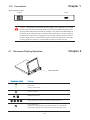
1.10 Connection
Internal power version
Power
VGA
Caution : The Rackmount LCD Drawer are hot-pluggable, but components of connected
devices, such as the servers and KVM switch, may not be hot-pluggable. Plugging and unplugging cables while servers and KVM are powered on may cause irreversible damage of
the servers, KVM and Rackmount LCD Drawer. Before attempting to connect anything to
the Rackmount LCD Drawer, we suggest that turn off power to all devices before connecting them. Apply power to connected devices again only after the Rackmount LCD Drawer
receiving power.The company is not responsible for damage caused in this way.
Chapter 2
2.1 On-screen Display Operation
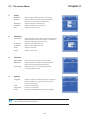
LCD membrane
Power light
Green = On
Orange = Power saving
Power on / off LCD
Display the OSD menu
Scrolls through menu options and adjusts the displayed control
Exit the OSD screen
Shortcut key to auto adjustment by pressed the button for 5 seconds or
Toggle analog, digital & video connection (DVI-D and video options only)
P.7