1
STANDARD EMBOSSING FOLDERS
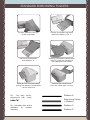
Position material inside the
embossing folder.
Position the embossing folder
between platforms ‘A’ & ‘C’.
Stack the combination
onto platform ‘D’.
Keeping the platform combination
straight, guide into the eBosser
with steady forward motion.
Release when the rollers begin
pulling the platform combination
into the machine.
Remove the combination
once the motor stops running.
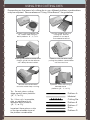
Tip:
For best results,
experiment with scrap
Tip: Use both sides of the
platforms
to
prevent
warping.
Platform A
Embossing Folder
+ Material
Platform C
Platform D