1
CAVIAR
2.2.3
WorkPackage 5
Deliverable D35
Subscribe panel
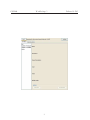
The name of the tab is the name of the variable. On this tab, we found a table. This
table displays the successive modification of the variable since the opening of the subscribe
panel, or since the last click on the ’clear’ button. The modifications are displayed in the
right column. The left column presents a timestamp associated to the instant when the
GUI has received the event of modification.
At the bottom, there are three buttons.
• The button ’clear’ reset the table.
• The button ’export’ save the successive modification in a file.
• The button ’unsubscribe’ send a request to stop the reception of event about the
modification of this variable.
2.2.4
Graph panel
This panel offers a graphic representation of the connections to the service. For each input
or output, an arrow links this input or output to the connected service represented by a
box.
The service associated to the control panel is represented by a box with all its inputs
and outputs. The connected services are represented by a box with a name. This name is
the service name if there is a service registered on DNS-SD with the good id, else the name
is the id written in hexadecimal format. If the connection is created by the GUI, the name
is ”This GUI”. There is no details about the input or output implied in the connection for
the connected service.
3
In/Output Viewer/Manipulator
The In/Output Viewer/Manipulator are tools to view output or to manipulate input. Basic
tools are implemented and can be used in the GUI. But other tools can be implemented
and then loaded by the user to be added to the basic tools.
7