1
Contents
Page No.
Background and Introduction
Program Input
Program Outputs
Structure of the User Guide
Installing the Program
Running the Program
Help and Advice
1.0
2.0
4
4
4
5
5
5
6
Understanding the User Interface
7
1.1
Main Window
1.1.1 Main Workspace
1.1.2 Menu Options
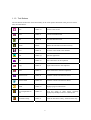
1.1.3 Tool Buttons
1.1.4 General Tips on Navigation and Using Lists
7
7
8
9
10
1.2
Select Stand Window
12
1.3
The Stand Manager Window
1.3.1 Tab Sheets in the Stand Manager Window
13
14
1.4
Windows Relating to Monitoring Assessments
1.4.1 The Monitoring Assessment Tab Sheet
1.4.2 The Monitoring Assessment Window
1.4.3 The Monitoring Plot Window
1.4.4 The Monitoring Species Window
15
15
16
18
20
1.5
The Report Window
1.5.1 Number and Size of Trees
1.5.2 Basal Area per Hectare
1.5.3 Diameter Distribution
1.5.4 Number of Saplings per Hectare
1.5.5 Number of Seedlings per Hectare
1.5.6 Vegetation Type
22
24
26
27
28
30
32
1.6
Windows Relating to Ancillary Monitoring Information
1.6.1 The Stand Position Tab Sheet
1.6.2 The Diary Entry Tab Sheet
1.6.3 The Diary Entry Window
1.6.4 The Fixed Point Tab Sheet
1.6.5 The Fixed Point Window
1.6.6 The Image Window
1.6.7 The Transformation Plan Tab Sheet
33
33
34
35
36
37
38
39
Step-by-Step Guide
40
2.1
40
40
40
Creating New Stands and Saving Information
2.1.1 Creating a New Stand
2.1.2 Saving Stand Details to the Database
2