1
Decay Solenoid User Manual
6. If the fridge has been idle for a long time and/or there is any suspicion of air ingress,
then it is good to clean the air inside the magnet. Only a small flow is acceptable in
order not to put strain on the turbines.
i.
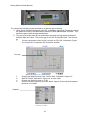
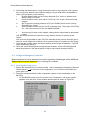
Change State Control on the ‘Decay Solenoid Cryo’ mimic to ‘Manual’ and
then to ‘Start Cool Down’.
ii.
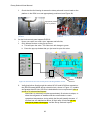
On the Coldbox mimic, open valve CV3170 by 10% to get a flow around the
magnet.
iii.
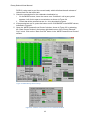
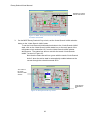
Aim to get the incoming pressure at FI21 at ~5mBar (shown on the ‘Decay
Solenoid Cryo’ mimic)
iv.
On the Coldbox mimic check CV3125 is partially open. Then open CV3135 by
3% - this is the return line from the radiation shields.
v.
Once the gas is clean in the magnet, change all the valves back to aurtomatic
control.
N.B. Be aware that the flow rates do not vary linearly with the % opening of the
valves.
Also it will not be possible to open PV 5510 manually at this point to clean the gas in
that line, as the fridge will not allow it to be opened unless it considers it to be ‘ready’.
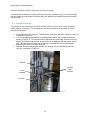
7. Once the gas is clean, close the valves allowing flow through the absorber - HV2153
valve followed by HV2253.
8. Close the valves allowing flow through the gas analyser. Close HV21523 first and
allow the pressure in the gas analyser to drop to zero before closing HV2252.
3.4 Fridge and Magnet Cooldown
Method statement and risk assessment must be agreed by Hall Manager and/or MOM and
Authorisation to work obtained prior to starting the cooldown.
3.4.1 Starting the Compressor
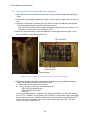
1. Ensure the Compressor is in remote control - this is changed by pressing the Remote
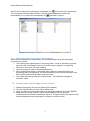
Control button ( ) on the front of the compressor. It is in remote control when the
green light is on.
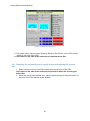
2. Check the start permissives of the compressor system on the visualisation in the
MLCR by:
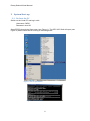
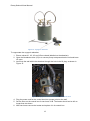
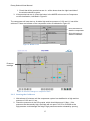
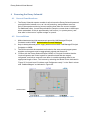
i. On the MODE screen hover the mouse over ‘Compressor’ until a pen symbol
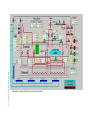
appears, then left click. A new window should open as shown in Figure 20.
Figure 20: Compressor start permissives window
16