1
Connecting the VM-10HDxl
6
Connecting the VM-10HDxl
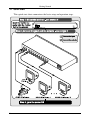
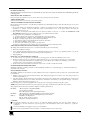
To connect the VM-10HDxl, as illustrated in the example in Figure 2, do the
following1:
1.
Connect an HD-SDI/SD-SDI video source (for example, an SDI camera)
to the VIDEO IN BNC connector.
2.
Connect up to2 10 VIDEO OUTPUT BNC connectors to the appropriate
HD-SDI/SD-SDI video acceptors (for example, displays).
3.
Connect the power cord (not illustrated in Figure 2).
Figure 2: Connecting the VM-10HDxl 3G 1:10 HD/SD - SDI Distribution Amplifier
1 Switch OFF the power on each device before connecting it to your VM-10HDxl. After connecting your VM-10HDxl,
switch on its power and then switch on the power on each device
2 You do not have to connect all the outputs, connect only those that are required and leave the other output(s) unconnected
7