1
Function and Control
6. Function and Control
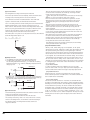
6.1 Remote Control Operations
1
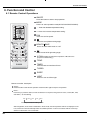
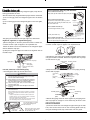
ON/OFF
Press this button to start or stop operation.
2
MODE
Press it to select operation mode(AUTO/COOL/DRY/FAN/HEAT).
FAN
AUTO
OPER
AIR HEALTH X-FAN
HUMIDITY
FILTER
TURBO
HOUR
3
- : Press it to decrease temperature setting.
4
+ : Press it to increase temperature setting.
5
FAN
ON/OFF
Press it to set fan speed.
6
Press it to set up &down swing angle.
2
1
ON/OFF
MODE
7
3
4
Press it to select health mode on or off.
6
5
8
FAN
Press it to set left & right swing angle.
8
7
9
10
X-FAN
TEMP
12 TURBO13 SLEEP
TIMER
HEALTH SAVE
9
11
LIGHT
X-FAN(X-FAN is the alternative expression of BLOW for the
purpose of understanding.)
14
10
TEMP
11
TIMER
Press it set auto-on timer/auto-off timer.
12
TURBO
13
SLEEP
14
LIGHT
Press it to turn on/off the light.
Remote controller description
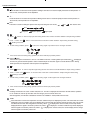
1 ON/OFF :
Press this button to start the unit operation .Press this button again to stop the unit operation.
2 MODE :
Each time you press this button,a mode is selected in a sequence that goes from AUTO, COOL,DRY, FAN,
and HEAT*, as the following
:
AUTO
COOL
DRY
FAN
HEAT
*
*Note:Only for models with heating function.
After energization, AUTO mode is defaulted. In AUTO mode, the set temperature will not be displayed on the
LCD, and the unit will automatically select the suitable operation mode in accordance with the room temp
erature to make indoor room comfortable.
24