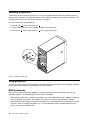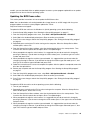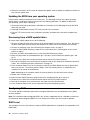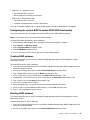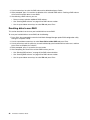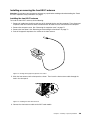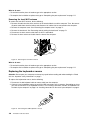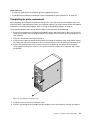
1
ThinkStation P300
User Guide
Machine Types: 10DA, 30AG, and 30AH
Note: Before using this information and the product it supports, be sure to read and understand the “Read
this first: Important safety information” on page v and Appendix E “Notices” on page 15.
First Edition (June 2014)
© Copyright Lenovo 2014.
LIMITED AND RESTRICTED RIGHTS NOTICE: If data or software is delivered pursuant a General Services Administration
“GSA” contract, use, reproduction, or disclosure is subject to restrictions set forth in Contract No. GS-35F-05925.
Contents
Read this first: Important safety
information . . . . . . . . . . . . . . . v
Service and upgrades . . . . . .
Static electricity prevention . . . .
Power cords and power adapters .
Extension cords and related devices
Plugs and outlets. . . . . . . .
External devices . . . . . . . .
Heat and product ventilation . . .
Operating environment . . . . .
Laser compliance statement . . .
Power supply statement . . . . .
Cleaning and maintenance . . . .
.
.
.
.
.
.
.
.
.
.
.
.
.
.
.
.
.
.
.
.
.
.
.
.
.
.
.
.
.
.
.
.
.
.
.
.
.
.
.
.
.
.
.
.
.
.
.
.
.
.
.
.
.
.
.
.
.
.
.
.
.
.
.
.
.
.
. v
. v
. vi
. vi
vii
vii
vii
viii
viii
. ix
. ix
Chapter 1. Product overview . . . . . . 1
Locations. . . . . . . . . . . . . . . . .
Locating connectors, controls, and indicators
on the front of your computer . . . . . . .
Locating connectors on the rear of your
computer . . . . . . . . . . . . . . .
Locating components . . . . . . . . . .
Locating parts on the system board . . . .
Locating internal drives . . . . . . . . .
Machine type and model label . . . . . . .
Features . . . . . . . . . . . . . . . . .
Specifications . . . . . . . . . . . . . . .
Lenovo programs . . . . . . . . . . . . .
Accessing Lenovo programs on the Windows
7 operating system . . . . . . . . . . .
Accessing Lenovo programs on the Windows
8.1 operating system . . . . . . . . . .
An introduction to Lenovo programs . . . .
Chapter 2. Using your computer . . .
Registering your computer . . . . . . .
Using keyboard shortcuts . . . . . . .
Using the fingerprint reader. . . . . . .
Using the wheel mouse . . . . . . . .
Setting the computer volume . . . . . .
Setting the volume from the desktop .
Setting the volume from Control Panel
Using a disc. . . . . . . . . . . . .
Using the optical drive . . . . . . .
Handling and storing a disc . . . . .
Playing and removing a disc . . . .
Recording a disc . . . . . . . . .
Navigating among screens on the Windows
operating system. . . . . . . . . . .
© Copyright Lenovo 2014
. .
. .
. .
. .
. .
. .
. .
. .
. .
. .
. .
. .
8.1
. .
.
1
.
2
.
.
.
.
.
.
3
5
6
7
8
8
12
12
12
13
14
17
.
.
.
.
.
.
.
.
.
.
.
.
17
17
17
18
18
19
19
19
19
20
20
21
.
21
Accessing Control Panel on the Windows 8.1
operating system. . . . . . . . . . . . . .
Frequently asked questions . . . . . . . . .
22
23
Chapter 3. You and your computer . .
25
Accessibility and comfort . . . . . . . .
Arranging your workspace . . . . . .
Comfort . . . . . . . . . . . . .
Glare and lighting . . . . . . . . . .
Air circulation . . . . . . . . . . .
Electrical outlets and cable lengths . . .
Accessibility information . . . . . . .
Moving your computer to another country or
region . . . . . . . . . . . . . . . .
Voltage-selection switch . . . . . . .
Replacement power cords . . . . . .
.
.
.
.
.
.
.
25
25
25
26
26
26
26
. .
. .
. .
30
30
30
Chapter 4. Security . . . . . . . . . .
31
Security features . . . . . . . . . .
Locking the computer cover . . . . .
Attaching a Kensington-style cable lock.
Attaching a cable lock. . . . . . . .
Using passwords. . . . . . . . . .
BIOS passwords . . . . . . . .
Windows passwords . . . . . .
Configuring the fingerprint reader . . .
Using and understanding firewalls . . .
Protecting data against viruses . . . .
.
.
.
.
.
.
.
.
.
.
.
.
.
.
.
.
.
.
.
.
.
.
.
.
.
.
.
.
.
.
.
.
.
.
.
.
.
31
31
33
34
34
34
35
35
35
35
Chapter 5. Advanced configuration . .
37
Using the Setup Utility program . . . . . .
Starting the Setup Utility program . . .
Viewing and changing settings . . . .
Using BIOS passwords . . . . . . .
Enabling or disabling a device . . . . .
Selecting a startup device . . . . . .
Enabling ErP LPS compliance mode . .
ICE performance mode . . . . . . .
ICE thermal alert . . . . . . . . . .
Exiting the Setup Utility program . . . .
Updating or recovering the BIOS . . . . .
Using system programs . . . . . . .
Updating the BIOS from a disc . . . .
Updating the BIOS from your operating
system . . . . . . . . . . . . . .
Recovering from a BIOS update failure .
Configuring RAID. . . . . . . . . . . .
.
.
.
.
.
.
.
.
.
.
.
.
.
.
.
.
.
.
.
.
.
.
.
.
.
.
.
.
.
.
.
.
.
.
.
.
37
37
37
38
39
40
40
41
41
42
42
42
43
. .
. .
. .
44
44
44
i
RAID Level . . . . . . . . . . . . . .
Configuring the system BIOS to enable SATA
RAID functionality. . . . . . . . . . . .
Creating RAID volumes . . . . . . . . .
Deleting RAID volumes . . . . . . . . .
Resetting disks to non-RAID . . . . . . .
45
45
45
46
Chapter 6. Preventing problems . . .
47
Keeping your computer current . . . . . .
Getting the latest device drivers for your
computer . . . . . . . . . . . . .
Updating your operating system . . . .
Using System Update . . . . . . . .
Cleaning and maintenance . . . . . . . .
Basics . . . . . . . . . . . . . .
Cleaning your computer . . . . . . .
Good maintenance practices . . . . .
Moving your computer . . . . . . . . .
44
. .
47
.
.
.
.
.
.
.
.
.
.
.
.
.
.
.
.
47
47
48
48
48
48
49
50
Chapter 7. Troubleshooting and
diagnostics . . . . . . . . . . . . . .
51
Basic troubleshooting . . . . . . . . . . .
Troubleshooting procedure . . . . . . . . .
Troubleshooting . . . . . . . . . . . . .
Audio problems . . . . . . . . . . .
CD problems . . . . . . . . . . . .
DVD problems . . . . . . . . . . . .
Intermittent problems . . . . . . . . .
Problems with the keyboard or mouse . .
Monitor problems. . . . . . . . . . .
Networking problems . . . . . . . . .
I have connected an option to my computer,
but it does not work . . . . . . . . . .
Performance and lockup problems . . . .
The printer does not work . . . . . . .
Serial connector cannot be accessed . . .
Software problems . . . . . . . . . .
My USB connectors cannot be accessed .
Lenovo Solution Center . . . . . . . . . .
.
.
.
.
.
.
.
.
.
.
51
52
52
53
53
54
55
55
56
57
.
.
.
.
.
.
.
59
59
60
60
60
61
61
Chapter 8. Recovery information . . .
63
Recovery information for the Windows 7 operating
system . . . . . . . . . . . . . . . . . .
Creating and using recovery media . . . . .
Performing backup and recovery operations .
Creating and using a rescue medium . . . .
Reinstalling programs and device drivers . .
Solving recovery problems . . . . . . . .
Recovery information for the Windows 8.1
operating system. . . . . . . . . . . . . .
Refreshing your computer . . . . . . . .
ii
ThinkStation P300 User Guide
63
63
64
66
66
68
68
68
Resetting your computer to the factory default
settings. . . . . . . . . . . . . . . .
Using the advanced startup options . . . .
Recovering your operating system if Windows
8.1 fails to start. . . . . . . . . . . . .
Chapter 9. Installing or replacing
hardware . . . . . . . . . . . . . . .
Handling static-sensitive devices . . . . . .
Installing or replacing hardware . . . . . . .
Installing external options . . . . . . .
Removing the computer cover. . . . . .
Removing and reinstalling the front bezel .
Installing or replacing a PCI card . . . . .
Installing or replacing a memory module . .
Installing or replacing a device in the optical
drive bay . . . . . . . . . . . . . .
Replacing the front audio and USB
assembly . . . . . . . . . . . . . .
Replacing the battery . . . . . . . . .
Replacing the power supply assembly . .
Replacing the heat sink and fan assembly .
Installing or replacing the solid-state drive .
Installing or replacing the mSATA solid-state
drive . . . . . . . . . . . . . . . .
Replacing the primary hard disk drive . . .
Replacing the secondary hard disk drive. .
Installing the tertiary hard disk drive . . .
Replacing the front fan assembly . . . .
Replacing the rear fan assembly . . . . .
Replacing the Wi-Fi units . . . . . . . .
Installing or removing the rear Wi-Fi
antenna . . . . . . . . . . . . . .
Installing or removing the front Wi-Fi
antenna . . . . . . . . . . . . . .
Replacing the keyboard or mouse . . . .
Completing the parts replacement . . . .
68
69
69
71
.
.
.
.
.
.
.
71
71
71
71
72
73
76
.
78
.
.
.
.
.
81
82
83
84
86
.
.
.
.
.
.
.
90
93
95
96
100
101
102
.
107
.
.
.
109
110
111
Chapter 10. Getting information, help,
and service . . . . . . . . . . . . . 113
Information resources . . . . . . . . . .
Lenovo ThinkVantage Tools . . . . . .
Help and Support. . . . . . . . . .
Safety and Warranty. . . . . . . . .
Lenovo Web site . . . . . . . . . .
Lenovo Support Web site. . . . . . .
Help and service . . . . . . . . . . . .
Using the documentation and diagnostic
program . . . . . . . . . . . . .
Calling for service. . . . . . . . . .
Using other services . . . . . . . .
Purchasing additional services . . . .
.
.
.
.
.
.
.
.
.
.
.
.
.
.
113
113
113
113
113
114
114
.
.
.
.
.
.
.
.
114
114
115
115
System memory speed . . . . . . . . . 1
Appendix A. Regulatory information . . 3
Export classification notice . . . . . . .
Electronic emissions notices . . . . . .
Federal Communications Commission
Declaration of Conformity . . . . .
Eurasian compliance mark . . . . . . .
Brazil regulatory notice . . . . . . . .
Mexico regulatory notice . . . . . . . .
Additional regulatory information . . . .
. . . .
. . . .
3
3
.
.
.
.
.
3
5
5
5
5
.
.
.
.
.
.
.
.
.
.
.
.
.
.
.
Appendix B. WEEE and recycling
information . . . . . . . . . . . . . . . 7
Important WEEE information . . . . .
Recycling information for Japan . . . .
Recycling information for Brazil . . . .
Battery recycling information for Taiwan .
© Copyright Lenovo 2014
.
.
.
.
.
.
.
.
.
.
.
.
.
.
.
.
.
.
.
.
7
7
8
8
Battery recycling information for the European
Union . . . . . . . . . . . . . . . . . . .
8
Appendix C. Restriction of Hazardous
Substances Directive (RoHS) . . . . . 11
European Union RoHS
China RoHS. . . . .
Turkish RoHS . . . .
Ukraine RoHS . . . .
India RoHS . . . . .
.
.
.
.
.
.
.
.
.
.
.
.
.
.
.
.
.
.
.
.
.
.
.
.
.
.
.
.
.
.
.
.
.
.
.
.
.
.
.
.
.
.
.
.
.
.
.
.
.
.
.
.
.
.
.
11
11
11
12
12
Appendix D. ENERGY STAR model
information . . . . . . . . . . . . . .
13
Appendix E. Notices . . . . . . . . . .
15
Trademarks . . . . . . . . . . . . . . . .
16
Index. . . . . . . . . . . . . . . . . .
17
iii
iv
ThinkStation P300 User Guide
Read this first: Important safety information
CAUTION:
Before using this manual, be sure to read and understand all the related safety information for this
product. Refer to the information in this section and the safety information in the Safety, Warranty, and
Setup Guide that you received with this product. Reading and understanding this safety information
reduces the risk of personal injury and damage to your product.
If you no longer have a copy of the Safety, Warranty, and Setup Guide, you can obtain a Portable Document
Format (PDF) version from the Lenovo® Support Web site at http://www.lenovo.com/UserManuals. The
Lenovo Support Web site also provides the Safety, Warranty, and Setup Guide and this User Guide in
additional languages.
Service and upgrades
Do not attempt to service a product yourself unless instructed to do so by the Customer Support Center or
your documentation. Only use a Service Provider who is approved to repair your particular product.
Note: Some computer parts can be upgraded or replaced by the customer. Upgrades typically are
referred to as options. Replacement parts approved for customer installation are referred to as Customer
Replaceable Units, or CRUs. Lenovo provides documentation with instructions when it is appropriate for
customers to install options or replace CRUs. You must closely follow all instructions when installing or
replacing parts. The Off state of a power indicator does not necessarily mean that voltage levels inside a
product are zero. Before you remove the covers from a product equipped with a power cord, always ensure
that the power is turned off and that the product is unplugged from any power source. For more information
on CRUs, refer to Chapter 9 “Installing or replacing hardware” on page 71. If you have any questions or
concerns, contact the Customer Support Center.
Although there are no moving parts in your computer after the power cord has been disconnected, the
following warnings are required for your safety.
CAUTION:
Hazardous moving parts. Keep fingers and other body parts away.
CAUTION:
Before replacing any CRUs, turn off the computer and wait three to five minutes to let the computer
cool before opening the cover.
Static electricity prevention
Static electricity, although harmless to you, can seriously damage computer components and options.
Improper handling of static-sensitive parts can cause damage to the part. When you unpack an option
© Copyright Lenovo 2014
v
or CRU, do not open the static-protective package containing the part until the instructions direct you
to install it.
When you handle options or CRUs, or perform any work inside the computer, take the following precautions
to avoid static-electricity damage:
• Limit your movement. Movement can cause static electricity to build up around you.
• Always handle components carefully. Handle adapters, memory modules, and other circuit boards by the
edges. Never touch exposed circuitry.
• Prevent others from touching components.
• When you install a static-sensitive option or CRU, touch the static-protective package containing the
part to a metal expansion-slot cover or other unpainted metal surface on the computer for at least two
seconds. This reduces static electricity in the package and your body.
• When possible, remove the static-sensitive part from the static-protective packaging and install the part
without setting it down. When this is not possible, place the static-protective packaging on a smooth,
level surface and place the part on it.
• Do not place the part on the computer cover or other metal surface.
Power cords and power adapters
Use only the power cords and power adapters supplied by the product manufacturer.
The power cords shall be safety approved. For Germany, it shall be H05VV-F, 3G, 0.75 mm2, or better. For
other countries, the suitable types shall be used accordingly.
Never wrap a power cord around a power adapter or other object. Doing so can stress the cord in ways that
can cause the cord to fray, crack, or crimp. This can present a safety hazard.
Always route power cords so that they will not be walked on, tripped over, or pinched by objects.
Protect power cord and power adapters from liquids. For instance, do not leave your power cord or power
adapter near sinks, tubs, toilets, or on floors that are cleaned with liquid cleansers. Liquids can cause a
short circuit, particularly if the power cord or power adapter has been stressed by misuse. Liquids also can
cause gradual corrosion of power cord terminals and/or the connector terminals on a power adapter,
which can eventually result in overheating.
Ensure that all power cord connectors are securely and completely plugged into receptacles.
Do not use any power adapter that shows corrosion at the ac input pins or shows signs of overheating (such
as deformed plastic) at the ac input or anywhere on the power adapter.
Do not use any power cords where the electrical contacts on either end show signs of corrosion or
overheating or where the power cord appears to have been damaged in any way.
Extension cords and related devices
Ensure that extension cords, surge protectors, uninterruptible power supplies, and power strips that you use
are rated to handle the electrical requirements of the product. Never overload these devices. If power strips
are used, the load should not exceed the power strip input rating. Consult an electrician for more information
if you have questions about power loads, power requirements, and input ratings.
vi
ThinkStation P300 User Guide
Plugs and outlets
If a receptacle (power outlet) that you intend to use with your computer equipment appears to be damaged
or corroded, do not use the outlet until it is replaced by a qualified electrician.
Do not bend or modify the plug. If the plug is damaged, contact the manufacturer to obtain a replacement.
Do not share an electrical outlet with other home or commercial appliances that draw large amounts of
electricity; otherwise, unstable voltage might damage your computer, data, or attached devices.
Some products are equipped with a three-pronged plug. This plug fits only into a grounded electrical outlet.
This is a safety feature. Do not defeat this safety feature by trying to insert it into a non-grounded outlet. If
you cannot insert the plug into the outlet, contact an electrician for an approved outlet adapter or to replace
the outlet with one that enables this safety feature. Never overload an electrical outlet. The overall system
load should not exceed 80 percent of the branch circuit rating. Consult an electrician for more information
if you have questions about power loads and branch circuit ratings.
Be sure that the power outlet you are using is properly wired, easily accessible, and located close to the
equipment. Do not fully extend power cords in a way that will stress the cords.
Be sure that the power outlet provides the correct voltage and current for the product you are installing.
Carefully connect and disconnect the equipment from the electrical outlet.
External devices
Do not connect or disconnect any external device cables other than 1394 and Universal Serial Bus (USB)
cables while the computer power is on; otherwise, you might damage your computer. To avoid possible
damage to attached devices, wait at least five seconds after the computer is shut down to disconnect
external devices.
Heat and product ventilation
Computers, power adapters, and many accessories can generate heat when turned on and when batteries
are charging. Always follow these basic precautions:
• Do not leave your computer, power adapter, or accessories in contact with your lap or any part of your
body for an extended period when the products are functioning or when the battery is charging. Your
computer, power adapter, and many accessories produce some heat during normal operation. Extended
contact with the body could cause discomfort or, potentially, a skin burn.
• Do not charge the battery or operate your computer, power adapter, or accessories near flammable
materials or in explosive environments.
• Ventilation slots, fans, and heat sinks are provided with the product for safety, comfort, and reliable
operation. These features might inadvertently become blocked by placing the product on a bed, sofa,
carpet, or other flexible surface. Never block, cover, or disable these features.
Inspect your desktop computer for dust accumulation at least once every three months. Before inspecting
your computer, turn off the power and unplug the computer's power cord from the electrical outlet; then
remove any dust from vents and perforations in the bezel. If you notice external dust accumulation, then
examine and remove dust from the inside of the computer including heat sink inlet fins, power supply vents,
and fans. Always turn off and unplug the computer before opening the cover. If possible, avoid operating
your computer within two feet of high-traffic areas. If you must operate your computer in or near a high-traffic
area, inspect and, if necessary, clean your computer more frequently.
© Copyright Lenovo 2014
vii
For your safety and to maintain optimum computer performance, always follow these basic precautions
with your desktop computer:
• Keep the cover closed whenever the computer is plugged in.
• Regularly inspect the outside of the computer for dust accumulation.
• Remove dust from vents and any perforations in the bezel. More frequent cleanings might be required for
computers in dusty or high-traffic areas.
• Do not restrict or block any ventilation openings.
• Do not store or operate your computer inside furniture, as this might increase the risk of overheating.
• Airflow temperatures into the computer should not exceed 35°C (95°F).
• Do not install air filtration devices. They may interfere with proper cooling.
Operating environment
The optimal environment in which to use your computer is 10°C–35°C (50°F–95°F) with humidity ranging
between 35% and 80%. If your computer is stored or transported in temperatures less than 10°C (50°F),
allow the cold computer to rise slowly to an optimal operating temperature of 10°C–35°C (50°F–95°F) before
use. This process could take two hours in extreme conditions. Failure to allow your computer to rise to an
optimal operating temperature before use could result in irreparable damage to your computer.
If possible, place your computer in a well-ventilated and dry area without direct exposure to sunshine.
Keep electrical appliances such as an electric fan, radio, high-powered speakers, air conditioner, and
microwave oven away from your computer because the strong magnetic fields generated by these
appliances can damage the monitor and data on the hard disk drive.
Do not place any beverages on top of or beside the computer or other attached devices. If liquid is spilled on
or in the computer or an attached device, a short circuit or other damage might occur.
Do not eat or smoke over your keyboard. Particles that fall into your keyboard can cause damage.
Laser compliance statement
CAUTION:
When laser products (such as CD-ROMs, DVD drives, fiber optic devices, or transmitters) are
installed, note the following:
• Do not remove the covers. Removing the covers of the laser product could result in exposure to
hazardous laser radiation. There are no serviceable parts inside the device.
• Use of controls or adjustments or performance of procedures other than those specified herein
might result in hazardous radiation exposure.
DANGER
Some laser products contain an embedded Class 3A or Class 3B laser diode. Note the following:
Laser radiation when open. Do not stare into the beam, do not view directly with optical
instruments, and avoid direct exposure to the beam.
viii
ThinkStation P300 User Guide
Power supply statement
Never remove the cover on a power supply or any part that has the following label attached.
Hazardous voltage, current, and energy levels are present inside any component that has this label attached.
There are no serviceable parts inside these components. If you suspect a problem with one of these parts,
contact a service technician.
Cleaning and maintenance
Keep your computer and workspace clean. Shut down the computer and then disconnect the power
cord before cleaning the computer. Do not spray any liquid detergent directly on the computer or use
any detergent containing flammable material to clean the computer. Spray the detergent on a soft cloth
and then wipe the computer surfaces.
© Copyright Lenovo 2014
ix
x
ThinkStation P300 User Guide
Chapter 1. Product overview
This chapter provides the following information:
• Locations of connectors
• Locations of components
• Locations of parts on the system board
• Locations of internal drives
• Computer features
• Software programs provided by Lenovo
Locations
This section provides the following topics:
•
“Locating connectors, controls, and indicators on the front of your computer” on page 2
•
“Locating connectors on the rear of your computer” on page 3
•
“Locating components” on page 5.
•
“Locating parts on the system board” on page 6
•
“Locating internal drives” on page 7
•
“Machine type and model label” on page 8
Note: The components in your computer might look slightly different from the illustrations.
© Copyright Lenovo 2014
1
Locating connectors, controls, and indicators on the front of your
computer
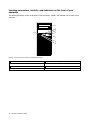
The following illustration shows the locations of the connectors, controls, and indicators on the front of your
computer.
Figure 1. Front connector, control, and indicator locations
2
1 Optical drive eject/close button
2 USB 3.0 connectors (2)
3 Hard disk drive activity indicator
4 Power indicator
5 Power button
6 Microphone connector
7 Headphone connector
8 Card-reader slot (available on some models)
ThinkStation P300 User Guide
Locating connectors on the rear of your computer
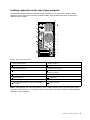
The following illustration shows the locations of the connectors on the rear of your computer. Some
connectors on the rear of your computer are color-coded to help you determine where to connect the
cables on your computer.
Figure 2. Rear connector locations
1 Power-cord connector
2 Serial connector
3 VGA connector
4 DisplayPort® connectors
5 USB 3.0 connectors (4)
6 USB 2.0 connectors (2)
7 Microphone connector
8 PCI/PCI-Express card area (different cards provide
different connectors)
9 Audio line-in connector
10 Optional serial connector
11 Cable-lock slots
12 Padlock loop
13 Audio line-out connector
14 Ethernet connector
15 PS/2 keyboard and mouse connectors (available on
some models)
16 Security-lock slot
Note: If your computer has a discrete graphics card, a network interface card, or an audio card installed
in one of the PCI card slots, ensure that you use the connectors on the card instead of the corresponding
connectors on the computer.
Chapter 1. Product overview
3
Connector
Description
Audio line-in connector
Used to receive audio signals from an external audio device, such as a stereo
system. When you attach an external audio device, a cable is connected between
the audio line-out connector of the device and the audio line-in connector of the
computer.
Audio line-out connector
Used to send audio signals from the computer to external devices, such as powered
stereo speakers (speakers with built-in amplifiers), headphones, multimedia
keyboards, or the audio line-in connector on a stereo system or other external
recording device.
DisplayPort connector
Used to attach a high-performance monitor, a direct-drive monitor, or other devices
that use a DisplayPort connector.
Ethernet connector
Used to attach an Ethernet cable for a local area network (LAN).
Note: To operate the computer within FCC Class B limits, use a Category 5 Ethernet
cable.
Microphone connector
Used to attach a microphone to your computer when you want to record sound or if
you use speech-recognition software.
PS/2 keyboard connector
(available on some models)
Used to attach a keyboard that uses a Personal System/2 (PS/2) keyboard
connector.
PS/2 mouse connector
(available on some models)
Used to attach a mouse, a trackball, or other pointing devices that use a PS/2
mouse connector.
Serial connector
Used to attach an external modem, a serial printer, or other devices that use a
9-pin serial connector.
USB 2.0 connector
Used to attach a device that requires a USB 2.0 connector, such as a USB
keyboard, a USB mouse, a USB scanner or a USB printer. If you have more than
eight USB devices, you can purchase a USB hub, which you can use to connect
additional USB devices.
USB 3.0 connector
Used to attach a device that requires a USB 2.0 or 3.0 connector, such as a USB
keyboard, a USB mouse, a USB scanner or a USB printer. If you have more than
eight USB devices, you can purchase a USB hub, which you can use to connect
additional USB devices.
VGA connector
Used to attach a VGA monitor or other devices that use a VGA connector.
4
ThinkStation P300 User Guide
Locating components
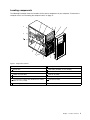
The following illustration shows the locations of the various components in your computer. To remove the
computer cover, see “Removing the computer cover” on page 71.
Figure 3. Component locations
1 Heat sink and fan assembly
2 Memory module
3 Optical drive
4 Card reader (available on some models)
5 Front audio and USB assembly
6 Front bezel
7 mSATA solid-state drive
8 Front fan assembly
9 Hard disk drives
10 Graphics card (available on some models)
11 Cover presence switch (also called intrusion switch)
(available on some models)
12 Rear fan assembly
13 Power supply assembly
Chapter 1. Product overview
5
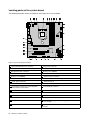
Locating parts on the system board
The following illustration shows the locations of the parts on the system board.
Figure 4. System board part locations
1 PS/2 keyboard and mouse connector
2 4-pin power connector
3 Battery
4 Microprocessor
5 Microprocessor fan connector
6 Memory slot 1 (DIMM1)
7 Memory slot 2 (DIMM2)
8 Memory slot 3 (DIMM3)
9 Memory slot 4 (DIMM4)
10 Thermal sensor connector
11 Hard disk drive fan connector
12 4-pin SATA power connectors (2)
13 14-pin power connector
14 eSATA connector
15 SATA 3.0 connectors (4)
16 Power fan connector
17 Front panel connector (for connecting LED
indicators and the power button)
18 Front USB 3.0 connector
19 USB 2.0/card-reader connector
20 USB hardware disable header
21 Clear CMOS/Recovery jumper
22 Serial (COM2) connector
23 Internal speaker connector
24 Front audio connector
25 PCI card slot
26 PCI Express x16 card slot (negotiable link width x4, x1)
6
27 PCI Express x1 card slot
28 PCI Express x16 graphics card slot (graphics card available
on some models)
29 System fan connector
30 Cover presence switch connector (intrusion switch
connector)
ThinkStation P300 User Guide
Locating internal drives
Internal drives are devices that your computer uses to read and store data. You can add drives to your
computer to increase storage capacity and enable your computer to read other types of media. Internal
drives are installed in bays.
When installing or replacing an internal drive, it is important to note the type and size of the drive that you
can install or replace in each bay and correctly connect the cables to the drive installed. Refer to the
appropriate section in “Installing or replacing hardware” on page 71 for instructions on how to install or
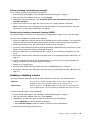
replace internal drives for your computer.
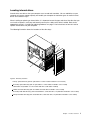
The following illustration shows the locations of the drive bays.
Figure 5. Drive-bay locations
1 Primary optical-drive bay (with an optical drive or a flex module installed in some models)
2 Secondary optical-drive bay (with an optical drive or a flex module installed in some models)
3 Card-reader slot (available on some models and with a card reader installed)
4 mSATA solid-state drive bay (with an mSATA solid-state drive installed in some models)
5 Secondary hard-disk-drive bay (with a hard disk drive, solid-state drive, or hybrid drive installed in some models)
6 Primary hard-disk-drive bay (with a hard disk drive, solid-state drive, or hybrid drive installed in some models)
Chapter 1. Product overview
7
Machine type and model label
The machine type and model label identifies your computer. When you contact Lenovo for help, the machine
type and model information helps support technicians to identify your computer and provide faster service.
The following is a sample of the machine type and model label.
Figure 6. Machine type and model label
Features
This section introduces the computer features. The information covers a variety of models.
Microprocessor
To view the microprocessor information of your computer, do the following:
• On the Microsoft® Windows® 7 operation system, click Start, right-click Computer, and select Properties
to view the information.
• On the Microsoft Windows 8.1 operating system, go to the desktop and move your pointer to the
top-right or bottom-right corner of the screen to display the charms. Then click Settings ➙ PC info to
view the information.
Memory
Your computer supports up to four double data rate 3 unbuffered dual inline memory modules (DDR3
UDIMMs).
To determine the amount of memory installed on your computer, do the following:
• On the Microsoft Windows 7 operation system, click Start, right-click Computer, and select Properties
to view the information.
8
ThinkStation P300 User Guide
• On the Microsoft Windows 8.1 operating system, go to the desktop and move your pointer to the
top-right or bottom-right corner of the screen to display the charms. Then click Settings ➙ PC info to
view the information.
For more information, see “Installing or replacing a memory module” on page 76.
Internal drives
• Card reader (available on some models)
• SATA hard disk drive
• SATA hybrid drive (available on some models)
• Optical drive
• SATA solid-state drive (available on some models)
Video features
• Integrated graphics supports the following connectors on your computer:
– DisplayPort connector
– Digital Video Interface (DVI) connector
– Video Graphics Array (VGA) connector
• Discrete graphics card installed in one of the Peripheral Component Interconnect (PCI) Express x16
graphics card slots (available on some models) (the connectors vary by graphics card)
Audio features
• Integrated audio controller supports the following connectors and devices on your computer:
– Audio line-in connector
– Audio line-out connector
– Headphone connector
– Internal speaker
– Microphone connector
• Discrete audio card installed in one of the PCI card slots (available on some models) (the connectors
vary by audio card)
Input/Output (I/O) features
• 100/1000 Mbps Ethernet connector
• 9-pin serial connectors
• Audio connectors (audio line-in connector, audio line-out connector, microphone connector, and
headphone connector)
• Display connectors (DisplayPort connectors, DVI connector, and VGA monitor connector)
• eSATA connector (available on some models)
• Institute of Electrical and Electronics Engineers (IEEE) 1394 connector (available on some models)
• Personal System/2 (PS/2) keyboard connector (available on some models)
• PS/2 mouse connector (available on some models)
• USB 2.0 connectors
• USB 3.0 connectors
For more information, see “Locating connectors, controls, and indicators on the front of your computer” on
page 2 and “Locating connectors on the rear of your computer” on page 3.
Chapter 1. Product overview
9
Expansion
• Card-reader slot (available on some models)
• Hard disk drive bays
• Memory slots
• Optical-drive bays
• PCI card slot
• PCI Express x1 card slot
• PCI Express x16 card slot (negotiable link width x4, x1)
• PCI Express x16 graphics card slot (graphics card available on some models)
For more information, see “Locating internal drives” on page 7 and “Locating parts on the system board”
on page 6.
Power supply
• 280-watt automatic 85% voltage-sensing power supply
• 450-watt automatic 92% voltage-sensing power supply
Wireless features
Depending on your computer model, the following wireless features are supported:
• Wireless LAN
• Bluetooth
System management features
• Ability to store power-on self-test (POST) hardware test results
• Desktop Management Interface (DMI)
Desktop Management Interface provides a common path for users to access information about all
aspects of a computer, including processor type, installation date, attached printers and other peripherals,
power sources, and maintenance history.
• ErP LPS compliance mode
The energy-related products directive (ErP) lowest power state (LPS) compliance mode reduces the
consumption of electricity when your computer is in sleep or off mode. For more information, see
“Enabling ErP LPS compliance mode” on page 40.
• Intel® Standard Manageability
Intel Standard Manageability is hardware and firmware technology that builds certain functionality
into computers in order to make them easier and less expensive for businesses to monitor, maintain,
update, upgrade, and repair.
• Intel Matrix Storage Manager
Intel Matrix Storage Manager is a device driver that provides support for SATA RAID 5 arrays and SATA
RAID 10 arrays on specific Intel chipset system boards to enhance hard disk performance.
• Preboot Execution Environment (PXE)
The Preboot Execution Environment is an environment to start computers using a network interface
independent of data storage devices (such as the hard disk drive) or installed operating systems.
10
ThinkStation P300 User Guide
• Intelligent Cooling Engine (ICE)
The Intelligent Cooling Engine is a system thermal management solution that enables your computer
to run with better thermal and acoustic performance. The ICE function also monitors the thermal
performance of your computer to identify thermal problems. For more information, see “ICE performance
mode” on page 41 and “ICE thermal alert” on page 41.
• System Management (SM) Basic Input/Output System (BIOS) and SM software
The SM BIOS specification defines data structures and access methods in a BIOS that allows a user or
application to store and retrieve information specific about the computer in question.
• Wake on LAN
Wake on LAN is an Ethernet computer networking standard that allows a computer to be turned on
or woken up by a network message. The message is usually sent by a program running on another
computer on the same local area network.
• Windows Management Instrumentation (WMI)
Windows Management Instrumentation is a set of extensions to the Windows Driver Model. It provides an
operating system interface through which instrumented components provide information and notification.
Security features
• Ability to enable and disable a device
• Ability to enable and disable USB connectors individually
• Computrace Agent software embedded in firmware
• Cover presence switch (also called intrusion switch) (available on some models)
• Keyboard with fingerprint reader (shipped with some models)
• Power-on password (POP), administrator password, and hard disk drive password to deter unauthorized
use of your computer
• Startup sequence control
• Startup without keyboard or mouse
• Support for a cable lock
• Support for a Kensington-style cable lock
• Support for a padlock
• Trusted Platform Module (TPM)
For more information, see Chapter 4 “Security” on page 31.
Preinstalled operating system
Your computer is preinstalled with one of the following operating systems:
• Microsoft Windows 7 operating system
• Microsoft Windows 8.1 operating system
Operating system(s), certified or tested for compatibility (varies by model type)
The operating system(s) listed here are being certified or tested for compatibility at the time this publication
goes to press. Additional operating systems might be identified by Lenovo as compatible with your computer
following the publication of this manual. This list is subject to change. To determine if an operating system
has been certified or tested for compatibility, check the Web site of the operating system vendor.
• Linux®
Chapter 1. Product overview
11
Specifications
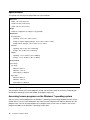
This section lists the physical specifications for your computer.
Dimensions
Width: 175 mm (6.89 inches)
Height: 376 mm (14.80 inches)
Depth: 426 mm (16.77 inches)
Weight
Maximum configuration as shipped: 13 kg (28.66 lb)
Environment
• Air temperature:
Operating: 10°C to 35°C (50°F to 95°F)
Storage in original shipping package: -40°C to 60°C (-40°F to 140°F)
Storage without package: -10°C to 60°C (14°F to 140°F)
• Humidity:
Operating: 20% to 80% (non-condensing)
Storage: 20% to 90% (non-condensing)
• Altitude:
Operating: -15.2 to 3048 m (-50 to 10 000 ft)
Storage: -15.2 to 10 668 m (-50 to 35 000 ft)
Electrical input
Input voltage:
• Low range:
Minimum: 100 V ac
Maximum: 127 V ac
Input frequency: 50/60 Hz
• High range:
Minimum: 200 V ac
Maximum: 240 V ac
Input frequency: 50/60 Hz
Lenovo programs
Your computer comes with Lenovo programs to help you work more easily and securely. Depending on
the Windows operating system preinstalled, the programs might vary.
Accessing Lenovo programs on the Windows 7 operating system
You can access Lenovo programs on the Windows 7 operating system through Windows Search or from
Control Panel. The icon name displayed in the search result or Control Panel might be different from the
program name. You can find the program by its program name or icon name as shown in the Lenovo
programs available on the Windows 7 operating system table.
12
ThinkStation P300 User Guide
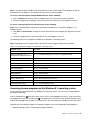
Note: If you do not find the program you need, open the Lenovo ThinkVantage® Tools program to find the
dimmed icon for the program. Then double-click the icon to install the program.
To access Lenovo programs through Windows Search, do the following:
1. Click the Start button and then type the program name or the icon name into the search box.
2. Locate the program by the program name or the icon name and then click the program to launch it.
To access Lenovo programs from Control Panel, do the following:
Note: Some Lenovo programs might not be displayed in Control Panel. To find these programs, use
Windows Search.
1. Click Start ➙ Control Panel. Change the view of Control Panel from Category to Large icons or Small
icons.
2. Locate the program by the icon name and then click the program to launch it.
The following table lists the programs available on the Windows 7 operating system.
Note: Depending on your computer model, some of the Lenovo programs might not be available.
Table 1. Lenovo programs available on the Windows 7 operating system
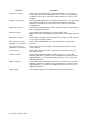
Program name
Icon name
Communications Utility
Lenovo - Web Conferencing
Fingerprint Manager Pro or
ThinkVantage Fingerprint Software
Lenovo - Fingerprint Manager Pro or Lenovo - Fingerprint Reader
Lenovo Bluetooth Lock
Lenovo Bluetooth Lock
Lenovo QuickCast
Lenovo QuickCast
Lenovo Solution Center
Lenovo - System Health and Diagnostics
Lenovo ThinkVantage tools
Lenovo Thinkvantage tools
Password Manager
Lenovo - Password Vault
PC Cloud Manager
PC Cloud Manager
Power Manager
Lenovo - Power Controls
Recovery Media
Lenovo - Factory Recovery Disks or Create Recovery Media
Rescue and Recovery®
Lenovo - Enhanced Backup and Restore
System Update
Lenovo - Update and Drivers
View Management Utility
Lenovo - View Management Utility
Accessing Lenovo programs on the Windows 8.1 operating system
If your computer is preinstalled with the Windows 8.1 operating system, you can access Lenovo programs
by doing the following:
Press the Windows key
to go to the Start screen. Click a Lenovo program to launch it. If you cannot find
the program you need, click the arrow icon in the bottom-left corner of the screen to go to the Apps screen.
Find the desired program in the apps list or search for it in the search box in the top-right corner of the screen.
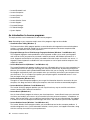
Depending on your computer model, your computer supports some of the following Lenovo programs:
• Fingerprint Manager Pro or ThinkVantage Fingerprint Software
Chapter 1. Product overview
13
• Lenovo Bluetooth Lock
• Lenovo Companion
• Lenovo QuickCast
• Lenovo Reach
• Lenovo Solution Center
• Lenovo Support
• Password Manager
• PC Cloud Manager
• System Update
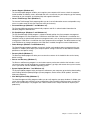
An introduction to Lenovo programs
This topic provides a brief introduction to some Lenovo programs.
Note: Depending on your computer model, some of the programs might not be available.
• Communications Utility (Windows 7)
The Communications Utility program provides a central location for integrated camera and microphone
settings. It controls advanced settings for the integrated microphone and camera to optimize Web
conferencing and Voice over IP (VOIP) experience.
• Fingerprint Manager Pro or ThinkVantage Fingerprint Software (Windows 7 and Windows 8.1)
The integrated fingerprint reader provided on some keyboards enables you to enroll your fingerprint
and associate it with your power-on password, hard disk password, and Windows password. As a
result, fingerprint authentication can replace passwords and enable simple and secure user access. A
fingerprint reader keyboard is available with select computers or can be purchased for computers that
support this option.
• Lenovo Bluetooth Lock (Windows 7 and Windows 8.1)
The Lenovo Bluetooth Lock program enables you to use a Bluetooth device (such as your smartphone) as
a proximity-based unit for locking or unlocking your computer automatically. By detecting the distance
between your computer and the predefined Bluetooth device that you are carrying, the Lenovo Bluetooth
Lock program automatically locks your computer when you walk away and unlocks your computer when
you come back. This is a simple way to protect your computer against unauthorized access in case
that you forget to lock your computer.
• Lenovo Companion (Windows 8.1)
Through the Lenovo Companion program, you can get the information about the accessories for your
computer, view blogs and articles about your computer, and check for other recommended programs.
• Lenovo QuickCast (Windows 7 and Windows 8.1)
The Lenovo QuickCast program provides you with a quick and easy way to send files and uniform
resource locators (URLs) between two devices.
• Lenovo Reach (Windows 8.1)
Use the Lenovo Reach program to enhance your cloud experience. Lenovo Reach keeps you connected
at all times and enables you to access all your favorite items from personal computers, smartphones, or
tablets. With Lenovo Reach, you can add your favorite Web services to your cloud desktop; stay logged
in to Web sites with the cloud password manager; and access, edit, and share your files from anywhere.
• Lenovo Solution Center (Windows 7 and Windows 8.1)
The Lenovo Solution Center program enables you to troubleshoot and resolve computer problems. It
combines diagnostic tests, system information collection, security status, and support information, along
with hints and tips for maximum system performance.
14
ThinkStation P300 User Guide
• Lenovo Support (Windows 8.1)
The Lenovo Support program enables you to register your computer with Lenovo, check the computer
health condition and battery status, download and view user manuals for your computer, get the warranty
information of your computer, and explore help and support information.
• Lenovo ThinkVantage Tools (Windows 7)
The Lenovo ThinkVantage Tools program guides you to a host of information sources and provides easy
access to various tools to help you work more easily and securely.
• Password Manager (Windows 7 and Windows 8.1)
The Password Manager program automatically captures and fills in authentication information for
Windows programs and Web sites.
• PC Cloud Manager (Windows 7 and Windows 8.1)
The PC Cloud Manager (PCM) program is a browser-based solution for client-computer management.
The PCM program has two components: PCM Server and PCM Client. PCM Server is installed on the
computer, where the administrator performs management work, such as power management and security
management. PCM Client is installed on the client computers to be managed. The administrator can log
in to PCM Server to manage computers with PCM Client installed, through the Internet Web browser.
• Power Manager (Windows 7 and Windows 8.1)
The Power Manager program provides convenient, flexible, and complete power management for your
computer. It enables you to adjust your computer power settings to achieve the best balance between
performance and power saving.
• Recovery Media (Windows 7)
The Recovery Media program enables you to restore the contents of the hard disk drive to the factory
default settings.
• Rescue and Recovery (Windows 7)
The Rescue and Recovery program is a one-button recovery and restore solution that includes a set of
self-recovery tools to help you diagnose computer problems, get help, and recover from system crashes,
even if you cannot start the Windows operating system.
• System Update (Windows 7 and Windows 8.1)
The System Update program helps you keep the software on your computer up-to-date by downloading
and installing software update packages (Lenovo programs, device drivers, BIOS updates, and other
third party programs).
• View Management Utility (Windows 7)
The View Management Utility program enables you to easily organize your open windows. It divides your
screen into multiple parts and then resizes and positions open windows into different parts to make the
best use of your desktop. The program also is able to work across multiple monitors to improve your
productivity.
Chapter 1. Product overview
15
16
ThinkStation P300 User Guide
Chapter 2. Using your computer
This chapter provides information about the following topics:
•
“Registering your computer” on page 17
•
“Using keyboard shortcuts” on page 17
•
“Using the fingerprint reader” on page 17
•
“Using the wheel mouse” on page 18
•
“Setting the computer volume” on page 18
•
“Using a disc” on page 19
•
“Navigating among screens on the Windows 8.1 operating system” on page 21
•
“Accessing Control Panel on the Windows 8.1 operating system” on page 22
•
“Frequently asked questions” on page 23
Registering your computer
When you register your computer, information is entered into a database, which enables Lenovo to contact
you in case of a recall or other severe problem. After you register your computer with Lenovo, you will receive
quicker service when you call Lenovo for help. In addition, some locations offer extended privileges and
services to registered users.
To register your computer with Lenovo, do one of the following:
• Go to http://www.lenovo.com/register and follow the instructions on the screen to register your computer.
• Register your computer through a preinstalled registration program with your computer connected to
the Internet:
– For Windows 7: The preinstalled Lenovo Product Registration program launches automatically after you
have used your computer for a time. Follow the instructions on the screen to register your computer.
– For Windows 8.1: Open the Lenovo Support program. Then, click Registration and follow the
instructions on the screen to register your computer.
Using keyboard shortcuts
Depending on the model, your computer comes with either a standard keyboard or a fingerprint-reader
keyboard. The Microsoft Windows keyboard shortcuts are provided on both types of keyboards.
A keyboard shortcut is one key or combination of multiple keys. By pressing a keyboard shortcut, you can
perform a task that requires a mouse or other pointing device. When you work with Windows and other
programs, keyboard shortcuts make it easier to interact with your computer and save your time and effort.
For more information about the keyboard shortcuts, go to http://windows.microsoft.com, and then type any
of the following keywords for searching: keyboard shortcuts, key combinations, shortcut keys.
Using the fingerprint reader
The integrated fingerprint reader provided on some keyboards enables you to enroll your fingerprint and
associate it with your power-on password, hard disk password, and Windows password. As a result,
fingerprint authentication can replace passwords and enable simple and secure user access. A fingerprint
© Copyright Lenovo 2014
17
reader keyboard is available with select computers or can be purchased for computers that support this
option.
To open Fingerprint Manager Pro or ThinkVantage Fingerprint Software and use the fingerprint reader,
do the following:
• On the Windows 7 operating system, see “Accessing Lenovo programs on the Windows 7 operating
system” on page 12.
• On the Windows 8.1 operating system, see “Accessing Lenovo programs on the Windows 8.1 operating
system” on page 13.
Follow the on-screen instruction. For more information about using the fingerprint reader, refer to the help
system of Fingerprint Manager Pro or ThinkVantage Fingerprint Software.
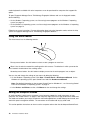
Using the wheel mouse
The wheel mouse has the following controls:
1
Primary mouse button: Use this button to select or start a program or menu item.
2 Wheel: Use the wheel to control the scrolling action of the mouse. The direction in which you rotate the
wheel controls the direction of the scrolling action.
3
Secondary mouse button: Use this button to display a menu for the active program, icon, or object.
You can view and change the settings of your mouse by doing the following:
1. On the Windows 7 operating system, click Start ➙ Control Panel ➙ Hardware and Sound. On the
Windows 8.1 operating system, open Control Panel and click Hardware and Sound.
Note: For detailed information on how to open Control Panel on Windows 8.1, see “Accessing Control
Panel on the Windows 8.1 operating system” on page 22.
2. In the Devices and Printers section, click Mouse to view and change the settings.
Setting the computer volume
An audio controller is built into the computer system board to support the audio connectors on your
computer. See “Audio features” on page 9. Your computer might also have a high-performance audio card.
The audio card enables you to enjoy sound with multimedia applications, record and play back sound, and
work with speech-recognition software. The connectors on the audio card vary by audio card.
This section provides instructions on how to set the computer volume from the desktop and Control Panel.
18
ThinkStation P300 User Guide
Setting the volume from the desktop
To set the computer volume from the desktop, do the following:
1. Click the volume icon on the taskbar. You can locate the taskbar at the bottom-right corner of the
desktop.
2. Move the slider up to increase or down to decrease the volume. Click the mute-speaker icon to turn off
the audio.
If the volume icon is not on the taskbar, add the volume icon to the taskbar. To add the volume icon,
do the following:
• For Windows 7:
1. From the Windows desktop, click Start ➙ Control Panel ➙ Appearance and Personalization.
2. In the Taskbar and Start Menu section, click Customize icons on the taskbar.
3. Click Turn system icons on or off and change the volume behaviors from Off to On.
4. Click OK to save the new settings.
• For Windows 8.1:
1. Open Control Panel, and click Appearance and Personalization.
Note: For detailed information on how to open Control Panel on Windows 8.1, see “Accessing
Control Panel on the Windows 8.1 operating system” on page 22.
2. In the Taskbar and Navigation section, click Customize icons on the taskbar.
3. Click Turn system icons on or off and change the volume behavior from Off to On.
4. Click OK to save the new settings.
Setting the volume from Control Panel
To set the computer volume from Control Panel, do the following:
1. On the Windows 7 operating system, click Start ➙ Control Panel ➙ Hardware and Sound. On the
Windows 8.1 operating system, open Control Panel and click Hardware and Sound.
Note: For detailed information on how to open Control Panel on Windows 8.1, see “Accessing Control
Panel on the Windows 8.1 operating system” on page 22.
2. In the Sound section, click Adjust system volume.
3. Move the slider up to increase or down to decrease the volume.
Using a disc
This section provides information about the following topics:
•
“Using the optical drive” on page 19
•
“Handling and storing a disc” on page 20
•
“Playing and removing a disc” on page 20
•
“Recording a disc” on page 21
Using the optical drive
Depending on the model, your computer is equipped with one of the following optical drives:
• CD-ROM drive: Used to read CDs only.
• DVD-ROM drive: Used to read DVDs and CDs.
Chapter 2. Using your computer
19
• BD-ROM drive: Used to read blu-ray discs (BDs), DVDs, and CDs.
• Recordable optical drive: Used to read and record a disc.
When using the optical drive, follow these guidelines:
• Do not place the computer in a location where the drive is exposed to any of the following conditions:
– High temperature
– High humidity
– Excessive dust
– Excessive vibration or sudden shock
– An inclined surface
– Direct sunlight
• Do not insert any object other than a disc into the drive.
• Do not insert damaged discs into the drive. Warped, scratched, or dirty discs can damage the drive.
• Before moving the computer, remove the disc from the drive.
Handling and storing a disc
When handling and storing a disc, follow these guidelines:
• Hold the disc by its edges. Do not touch the surface of the side that is not labeled.
• To remove dust or fingerprints, wipe the disc with a clean, soft cloth from the center to the outside. Wiping
the disc in a circular direction might cause loss of data.
• Do not write or stick paper on the disc.
• Do not scratch or mark the disc.
• Do not place or store the disc in direct sunlight.
• Do not use benzene, thinners, or other cleaners to clean the disc.
• Do not drop or bend the disc.
Playing and removing a disc
To play a disc, do the following:
1. With the computer on, press the eject/close button on the front of the optical drive. The tray slides
out of the drive.
2. Insert a disc into the tray. Some optical drive has a snap hub in the center of the tray. If your drive has a
snap hub, support the tray with one hand and then push center of the disc until it snaps into place.
3. Press the eject/close button again or gently push the tray forward to close the tray. The disc player
program starts automatically. For more information, refer to the help system of the disc player program.
To remove a disc from the optical drive, do the following:
1. With the computer on, press the eject/close button on the front of the optical drive. The tray slides
out of the drive.
2. Carefully remove the disc from the tray.
3. Press the eject/close button again or gently push the tray forward to close the tray.
Note: If the tray does not slide out of the drive when you press the eject/close button, turn off your computer.
Then, insert a straightened paper clip into the emergency-eject hole adjacent to the eject/close button.
Use the emergency eject only in an emergency.
20
ThinkStation P300 User Guide
Recording a disc
If your computer is installed with a recordable optical drive, you can use the drive to record a disc.
To record a disc, do the following:
• On the Windows 7 operating system, use either the Corel DVD MovieFactory Lenovo Edition program or
the Power2Go program installed on your computer.
– To run the Corel DVD MovieFactory Lenovo Edition program, click Start ➙ All Programs ➙ Corel
DVD MovieFactory Lenovo Edition ➙ Corel DVD MovieFactory Lenovo Edition. Follow the
instructions on the screen.
– To run the Power2Go program, click Start ➙ All Programs ➙ PowerDVD Create ➙ Power2Go.
Follow the instructions on the screen.
• On the Windows 8.1 operating system, run the Power2Go program by doing the following:
1. On the Start screen, click the down arrow
in the bottom-left corner to go to the Apps screen. Then
type Power2Go in the search box in the top-right corner of the screen.
2. Click Power2Go in the search result to open the program.
3. Follow the instructions on the screen.
Navigating among screens on the Windows 8.1 operating system
To navigate among the desktop, the Start screen, and applications that were opened from the Start screen
on the Windows 8.1 operating system, do one of the following:
• From the Start screen, do one of the following to navigate to the most recently accessed workspace
(application, setting, or desktop):
– Using a pointing device: Move the pointer to the extreme bottom-left corner of the screen until the
is displayed; then click the icon.
Windows screen-control icon
– Using a touch screen: Swipe in and out on the left edge of the screen. Representations of all available
workspaces are displayed along the left edge of the screen. Tap the Windows screen-control icon
at the bottom.
Note: The Windows screen-control icon
is displayed only when you have at least one active
workspace in the background of the system.
• From the desktop or any other workspace that is opened from the Start screen, do one of the following to
navigate to the Start screen:
– Using a pointing device:
– From the desktop, click the Windows screen-control icon
in the bottom-left corner of the screen.
– From any other workspace, move the pointer to the extreme bottom-left corner of the screen until
the Windows screen-control icon
is displayed; then click the icon.
– Using a touch screen: Do one of the following:
– From the desktop, tap the Windows screen-control icon
in the bottom-left corner of the screen.
– From any other workspace, do one of the following:
• Swipe in and out on the left edge of the screen. Representations of all available workspaces
are displayed along the left edge of the screen. Tap the Windows screen-control icon
at
the bottom.
• Swipe in from the right edge of the screen to display the charms; then tap Start.
Chapter 2. Using your computer
21
• From any workspace (Start screen, desktop, PC settings, or application opened from the Start screen),
use any of the following procedures to go to another workspace that you have previously opened:
– To navigate to a previously accessed workspace (application, setting, or desktop), do one of the
following:
– Using a pointing device:
1. Do one of the following:
• Move the pointer to the extreme top-left corner of the screen and then move the pointer
downward along the left edge of the screen.
• Move the pointer to the extreme bottom-left corner of the screen and then move the pointer
upward along the left edge of the screen.
Representations of all available workspaces are displayed along the left edge of the screen.
Note: Only active workspaces that you have accessed during the current Windows session are
displayed along the left edge. If you close an active workspace, its representation will not be
displayed along the left edge of the screen.
2. Click the representation.
– Using a touch screen:
• Method 1
1. Swipe in and out on the left edge of the screen. Representations of all available workspaces
are displayed along the left edge of the screen.
2. Tap the desired workspace.
• Method 2
1. Swipe in from the left edge of the screen to navigate to the next available workspace.
2. Repeat step 1 until you navigate to the desired workspace.
– To navigate to the most recently accessed workspace (application, PC settings, or desktop), do one
of the following:
– Using a pointing device: Move the pointer to the extreme top-left corner of the screen until the
Windows screen-control icon
is displayed; then click the icon.
– Using a touch screen: Swipe in from the left edge of the screen.
For information about using other features of the Windows 8.1 operating system, open the Help+Tips
application from the Start screen or Apps screen, or refer to the Windows Help and Support information
system. For more information, see “Help and Support” on page 113.
Accessing Control Panel on the Windows 8.1 operating system
On the Windows operating system, you can view and change computer settings through Control Panel. To
access Control Panel on the Windows 8.1 operating system, do one of the following:
• From the desktop
1. Move the pointer to the top-right or bottom-right corner of the screen to display the charms.
2. Click Settings.
3. Click Control Panel.
• From the Start screen
1. Click the down arrow
in the bottom-left corner of the screen to go to the Apps screen.
2. Scroll to the right side, and click Control Panel in the Windows System section.
22
ThinkStation P300 User Guide
Frequently asked questions
The following are some of the frequently asked questions and their answers. The answers can help you
optimize the use of your computer.
For the answers to more frequently asked questions about using your computer, go to:
http://www.lenovo.com/support/faq
How can I get my user guide in another language?
The user guide is available in various languages at:
http://www.lenovo.com/UserManuals
How can I restore my computer settings?
Your computer provides a program that enables you to restore the computer settings. For more information,
see Chapter 8 “Recovery information” on page 63.
Additionally, in case of a hard-disk-drive failure, you can order a recovery disc set from the Lenovo Customer
Support Center. For information about contacting the Customer Support Center, see Chapter 10 “Getting
information, help, and service” on page 113. Before using the recovery disc set, refer to the documentation
that comes with the disc set.
Note: A recovery disc set might contain multiple discs. Ensure that you have all of the discs ready before
starting the recovery process. During the recovery process, you might be prompted to change discs.
Where can I find help about the Windows operating system?
The Windows Help and Support information system provides you with detailed information about using
the Windows operating system. To access the Windows Help and Support information system, do one
of the following:
• On the Windows 7 operating system, click Start ➙ Help and Support.
• On the Windows 8.1 operating system, move your pointer to the top-right or bottom-right corner of the
screen to display the charms. Then click Settings ➙ Help. Additionally, the Windows 8.1 operating
system provides a Help+Tips application that you can open from the Start screen or Apps screen.
How can I change the Windows 8.1 startup behavior to open either the desktop or the Start screen?
On the Windows 8.1 operating system, you can set the computer to open either the desktop or the Start
screen by default. To set the default startup screen, do the following:
1. On the desktop, right-click on the taskbar at the bottom of the screen.
2. Click Properties. The “Taskbar and Navigation properties” window is displayed.
3. On the Navigation tab, locate the Start screen section, and then do one of the following:
• To set the desktop as your default startup screen, select When I sign in or close all apps on a
screen, go to the desktop instead of Start so a check is visible.
• To set the Start screen as your default startup screen, clear the When I sign in or close all apps on
a screen, go to the desktop instead of Start checkbox.
4. Click OK to save the new setting.
Chapter 2. Using your computer
23
24
ThinkStation P300 User Guide
Chapter 3. You and your computer
This chapter provides information about accessibility, comfort, and relocating your computer to other
countries or regions.
Accessibility and comfort
Good ergonomic practice is important to get the most from your personal computer and to avoid discomfort.
Arrange your workplace and the equipment you use to suit your individual needs and the kind of work
that you perform. In addition, use healthy work habits to maximize your performance and comfort while
using your computer.
The following topics provide information about arranging your work area, setting up your computer
equipment, and establishing healthy work habits.
Arranging your workspace
To get the most from your computer, arrange both the equipment you use and your work area to suit your
needs and the kind of work you do. Your comfort is of foremost importance, but light sources, air circulation,
and the location of electrical outlets can also affect the way you arrange your workspace.
Comfort
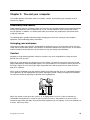
Although no single working position is ideal for everyone, here are a few guidelines to help you find a
position that suits you best.
Sitting in the same position for a long time can cause fatigue. The backrest and seat of your chair should
adjust independently and provide good support. The seat should have a curved front to relieve pressure on
the thighs. Adjust the seat so that your thighs are parallel to the floor and your feet are either flat on the
floor or on a footrest.
When using the keyboard, keep your forearms parallel to the floor and your wrists in a comfortable position.
Use a light touch on the keyboard and your hands and fingers relaxed. Change the angle of the keyboard
for maximum comfort by adjusting the position of the keyboard feet.
Adjust the monitor so the top of the screen is at, or slightly below, eye level. Place the monitor at a
comfortable viewing distance, usually 51 to 61 cm (20 to 24 inches), and position it so you can view it
without having to twist your body. Also, position other equipment you use regularly, such as the telephone or
a mouse, within easy reach.
© Copyright Lenovo 2014
25
Glare and lighting
Position the monitor to minimize glare and reflections from overhead lights, windows, and other light sources.
Reflected light from shiny surfaces can cause annoying reflections on your monitor screen. Place the
monitor at right angles to windows and other light sources, when possible. Reduce overhead lighting, if
necessary, by turning off lights or using lower wattage bulbs. If you install the monitor near a window, use
curtains or blinds to block the sunlight. You can adjust the brightness and contrast controls on the monitor
as the room lighting changes throughout the day.
Where it is impossible to avoid reflections or to adjust the lighting, an antiglare filter placed over the screen
might be helpful. However, these filters might affect the clarity of the image on the screen; try them only after
you have exhausted other methods of reducing glare.
Dust buildup compounds problems associated with glare. Remember to clean your monitor screen
periodically using a soft cloth as directed in your monitor documentation.
Air circulation
Your computer and monitor produce heat. The computer has a fan that pulls in fresh air and forces out hot
air. The monitor lets hot air escape through vents. Blocking the air vents can cause overheating, which might
result in a malfunction or damage. Place the computer and monitor so that nothing blocks the air vents;
usually, 51 mm (2 inches) of air space is sufficient. Also, ensure that the vented air is not blowing on people.
Electrical outlets and cable lengths
The location of electrical outlets, the length of power cords and cables that connect to the monitor, printer,
and other devices might determine the final placement of your computer.
When arranging your workspace:
• Avoid the use of extension cords. When possible, plug the computer power cord directly into an electrical
outlet.
• Keep power cords and cables neatly routed away from walkways and other areas where they might
get kicked accidentally.
For more information about power cords, see “Power cords and power adapters” on page vi.
Accessibility information
Lenovo is committed to providing people with disabilities greater access to information and technology.
Some technologies are already provided in your operating system. Others can be purchased through
vendors.
Users also can use the Ease of Access Center provided in the Windows operating system to configure their
computers to suit their physical and cognitive needs. The Ease of Access Center is a central location that
you can use to configure the accessibility settings and programs available in the Windows operating system.
To use the Ease of Access Center, open Control Panel and click Ease of Access ➙ Ease of Access Center.
The following information provides ways to help users who have hearing, vision, and mobility limitations get
the most out of their computer experience.
On-screen notification
On-screen notification helps hearing-impaired people be aware of the status of their computer. On-screen
notification replaces sounds with visual cues or text captions to indicate that activity is happening on the
computer. As a result, system alerts are noticeable even when they are not heard. For example, when you
26
ThinkStation P300 User Guide
select one object with your keyboard, the object is highlighted. When you move the pointer to one object
with your mouse, the introductory text of the object is displayed.
To use on-screen notification, open Control Panel, click Ease of Access ➙ Ease of Access Center, and
then click Use text or visual alternatives for sounds.
Audio notification
Audio notification helps visually impaired people or people with weak sight be aware of the status of their
computer.
To use audio notification, open Control Panel, click Ease of Access ➙ Ease of Access Center ➙ Use the
computer without a display, and then select Turn on Audio Description.
Narrator
Narrator is a screen reader that reads what is displayed on the screen aloud and describes events like
error messages.
To open Narrator, do the following:
• For Windows 7: Click the Start button. Then, type Narrator into the search field. In the list of results,
click Narrator.
• For Windows 8.1: Move your pointer to the top-right or bottom-right corner of the screen to display the
charms and click Search. Then, type Narrator into the search field. In the list of results, click Narrator.
For more information about how to use and configure Narrator, see the Windows Help and Support
information system.
Screen-reader technologies
Screen-reader technologies are primarily focused on software program interfaces, help information systems,
and a variety of online documents. For additional information about screen readers, see the following:
• Using PDFs with screen readers:
http://www.adobe.com/accessibility.html?promoid=DJGVE
• Using the JAWS screen reader:
http://www.freedomscientific.com/jaws-hq.asp
• Using the NVDA screen reader:
http://www.nvaccess.org/
Speech Recognition
Speech Recognition enables you to control your computer by voice.
Using only your voice, you can start programs, open menus, click buttons and other objects on the screen,
dictate text into documents, and write and send e-mails. Everything you do with the keyboard and mouse
can be done with only your voice.
To open Speech Recognition, do the following:
• For Windows 7: Click the Start button. Then, type Speech Recognition into the search field. In the list
of results, click Speech Recognition.
• For Windows 8.1: Move your pointer to the top-right or bottom-right corner of the screen to display the
charms and click Search. Then, type Speech Recognition into the search field. In the list of results,
click Speech Recognition.
Chapter 3. You and your computer
27
For more information about how to use and configure Speech Recognition, see the Windows Help and
Support information system.
Customizable text size
Depending on your preference, you can change only the text size instead of changing the size of everything
on the desktop. To change the text size, open Control Panel and click Appearances and Personalization ➙
Display. Then, go to Change only the text size and set a text size that meets your needs.
Magnifier
Your computer is equipped with the Microsoft Magnifier to help visually impaired people use the computer
more comfortably. Magnifier is a useful utility that enlarges the entire screen or part of the screen so that you
can see the words and images better. You can open Magnifier from the Ease of Access Center.
To open Magnifier, do the following:
• For Windows 7: Click the Start button, click All Programs ➙ Accessories ➙ Ease of Access, and
then click Magnifier.
• For Windows 8.1: Move your pointer to the top-right or bottom-right corner of the screen to display the
charms and click Search. Then, type Magnifier into the search field. In the list of results, click Magnifier.
For more information about how to use and configure Magnifier, see the Windows Help and Support
information system.
Note: For touch-screen computer models, you also can zoom in and zoom out by using touch gestures
instead of the keyboard. See “Zoom” on page 28.
Zoom
You can use the zoom feature to enlarge or reduce the size of text, pictures, maps, or other objects.
• From the keyboard:
– Zoom in: Press the Windows logo key + the plus-sign key (+) to enlarge the size of text, pictures,
maps, or other objects.
– Zoom out: Press the Windows logo key + the minus-sign (-) key to reduce the size of text, pictures,
maps, or other objects.
• From the touch screen:
– Zoom in: Move two fingers farther apart on the touch screen to enlarge the size of text, pictures,
maps, or other objects.
– Zoom out: Move two fingers closer together on the touch screen to reduce the size of text, pictures,
maps, or other objects.
Screen resolution
You can make your documents easier to read by adjusting the screen resolution of your computer. To adjust
the screen resolution, right click anywhere on the desktop, click Screen resolution, and then adjust the
settings as you prefer.
Note: Setting too low of a resolution might prevent some items from fitting on the screen.
For alternatives on increasing the size of text and other objects, see the following:
•
“Customizable text size” on page 28
•
“Magnifier” on page 28
•
“Zoom” on page 28
28
ThinkStation P300 User Guide
Ease of Access keyboard shortcuts
The following table contains keyboard shortcuts that can help make your computer easier to use.
Keyboard shortcut
Function
Windows logo key + U
Open the Ease of Access Center
Right Shift for eight seconds
Turn Filter Keys on or off
Shift five times
Turn Sticky Keys on or off
Num Lock for five seconds
Turn Toggle Keys on or off
Left Alt+Left Shift+Num Lock
Turn Mouse Keys on or off
Left Alt+Left Shift+PrtScn (or PrtSc)
Turn High Contrast on or off
For more information, go to http://windows.microsoft.com/, and then type any of the following keywords
for searching: keyboard shortcuts, key combinations, shortcut keys.
On-Screen Keyboard
If you prefer to type or enter data into your computer without using a physical keyboard, you can use
On-Screen Keyboard. On-Screen Keyboard displays a visual keyboard with all the standard keys. You can
select keys using the mouse or another pointing device, or you can tap to select the keys if your computer
supports multi-touch screen.
To open On-Screen Keyboard, do the following:
• For Windows 7: Click the Start button. Then, type On-Screen Keyboard into the search field. In the list of
results, click On-Screen Keyboard.
• For Windows 8.1: Move your pointer to the top-right or bottom-right corner of the screen to display the
charms and click Search. Then, type On-Screen Keyboard into the search field. In the list of results,
click On-Screen Keyboard.
For more information about how to use and configure On-Screen Keyboard, see the Windows Help and
Support information system.
Personalized keyboard
The tactile bumps on the keyboard provide a reference point from which you can easily locate all keys on
the keyboard without visual assistance.
To adjust your keyboard settings, open Control Panel, click Ease of Access ➙ Ease of Access Center,
and then click Make the keyboard easier to use.
Industry-standard connectors
Your computer provides industry-standard connectors that enable you to connect assistive devices,
if needed.
For more information on the location and function of the connectors, see “Locating connectors, controls,
and indicators on the front of your computer” on page 2 and “Locating connectors on the rear of your
computer” on page 3.
TTY/TDD conversion modem
Your computer supports the use of the text telephone (TTY) or the telecommunications device for the
deaf (TDD) conversion modem. The modem must be connected between your computer and a TTY/TDD
telephone. Then, you can type a message on your computer and send it to the telephone.
Chapter 3. You and your computer
29
Documentation in accessible formats
Lenovo provides electronic documentation in accessible formats. Lenovo electronic documentation, such as
properly tagged PDF files or HyperText Markup Language (HTML) files, is developed to ensure that visually
impaired users can read the documentation through a screen reader. Each image in the documentation also
includes adequate alternative text to explain the image so that visually impaired users can understand the
image when they use a screen reader.
Moving your computer to another country or region
When you move your computer to another country or region, you must take local electrical standards into
consideration. This section provides information on the following:
•
“Voltage-selection switch” on page 30
•
“Replacement power cords” on page 30
Voltage-selection switch
Some computers are equipped with a voltage-selection switch located near the power-cord connection
point on the computer and some computers do not have a voltage-selection switch. Before you install
your computer or relocate your computer to another country or region, you must be certain that you have
matched your computer to the voltage available at your electrical outlet.
CAUTION:
You must know the voltage of the electrical connection (outlet) where your computer will be
connected. If you do not know the voltage, contact your local electric company or refer to official
Web sites or other literature for travelers to the country or region where you are located.
If your computer has a voltage-selection switch, you must set the switch to match the voltage available at
your electrical outlet. Setting the voltage-selection switch incorrectly will cause the computer to malfunction
and might cause permanent damage to the computer. Do not connect the computer to an electrical
outlet until you have verified that the voltage-selection switch setting matches the voltage available at the
electrical outlets.
If your computer does not have a voltage-selection switch, inspect the voltage-rating label on the bottom of
the computer and note the following:
• If the voltage-rating label shows a range of either “100-127 V” or “200-240 V,” you must ensure that the
voltage provided at the electrical outlet matches the voltage rating on the computer label. If it does
not match, do not attempt to connect the computer to the electrical outlet, unless an external device
such as a voltage-converting transformer is used.
• If the voltage-rating label shows a dual range of “100-127 V” and “200-240 V,” this signifies that the
computer is suitable for worldwide operation and the computer will automatically adjust to the voltage at
the electrical outlet regardless of the country or region where the computer is being connected.
Replacement power cords
If you relocate your computer to a country or region that uses an electrical outlet style different from the
type you are currently using, you will have to purchase either electrical plug adapters or new power cords.
You can order power cords directly from Lenovo.
For power cord information and part numbers, go to:
http://www.lenovo.com/powercordnotice
30
ThinkStation P300 User Guide
Chapter 4. Security
This chapter provides information about how to protect your computer from theft and unauthorized use.
Security features
The following security features are available on your computer:
• Computrace Agent software embedded in firmware
The Computrace Agent software is an IT asset management and computer theft recovery solution.
The software detects if changes have been made on the computer, such as hardware, software, or
the computer call-in location.
Note: You might have to purchase a subscription to activate the Computrace Agent software.
• Cover presence switch (also called intrusion switch) (available on some models)
The cover presence switch prevents your computer from logging in to the operating system when the
computer cover is not properly installed or closed. To enable the cover presence switch connector
on the system board, do the following:
1. Start the Setup Utility program. See “Starting the Setup Utility program” on page 37.
2. Set the administrator password. See “Setting, changing, and deleting a password” on page 39.
3. From the Security submenu, select Chassis Intrusion Detection ➙ Enabled. The cover presence
switch connector on the system board is enabled.
When the cover presence switch detects that your computer cover is not properly installed or closed
when you turn on the computer, an error message will be displayed. To bypass the error message and
log in to the operating system, do the following:
1. Properly install or close your computer cover. See “Completing the parts replacement” on page 111.
2. Press F1 to enter the Setup Utility program. Then press F10 to save and exit the Setup Utility
program. The error message will not be displayed again.
• Ability to enable and disable devices and USB connectors
For more information, see “Enabling or disabling a device” on page 39.
• Integrated fingerprint reader (available on some models)
Depending on the models of your computer, the keyboard may have an integrated fingerprint reader.
By enrolling your fingerprint and associating it with a power-on password, a hard disk password, or
both passwords beforehand, you can start the computer, log on to the system, and enter the Setup
Utility program by swiping your finger over the reader, without typing a password. Thus fingerprint
authentication can replace passwords and enable simple and secure user access.
• Trusted Platform Module (TPM)
Trusted Platform Module is a secure cryptoprocessor that can store cryptographic keys that protect
information stored in your computer.
Locking the computer cover
Locking the computer cover helps prevent unauthorized people from gaining access to the inside of your
computer. Your computer comes with a padlock loop so that the computer cover cannot be removed
when a padlock is installed.
© Copyright Lenovo 2014
31
Figure 7. Installing a padlock
32
ThinkStation P300 User Guide
Attaching a Kensington-style cable lock
You can use a Kensington-style cable lock to secure your computer to a desk, table, or other non-permanent
fixture. The cable lock attaches to the security-lock slot at the rear of your computer and is operated with a
key or combination depending on the type selected. The cable lock also locks the buttons used to open the
computer cover. This is the same type of lock used with many notebook computers. You can order such a
cable lock directly from Lenovo by searching for Kensington at:
http://www.lenovo.com/support
Figure 8. Kensington-style cable lock
Chapter 4. Security
33
Attaching a cable lock
A cable lock can be used to secure devices, such as the keyboard and the mouse, by locking the device
cables to your computer. The cable lock attaches to the cable-lock slots on the rear of your computer. See
“Locating connectors on the rear of your computer” on page 3.
To install a cable lock, do the following:
1. Insert the clip 1 into the cable-lock slot 4 .
2. Pull the cables you want to lock through the dents in the cable lock.
3. Press the clip 2 into the cable-lock slot 3 until it snaps into position.
Figure 9. Installing a cable lock
Using passwords
You can set a variety of passwords through the Microsoft Windows operating system and through the BIOS
of your computer to help deter unauthorized use of your computer.
BIOS passwords
You can use the BIOS Setup Utility program to set passwords to prevent unauthorized access to your
computer and data. The following types of passwords are available:
• Power-on password: When a power-on password is set, you are prompted to type a valid password each
time the computer is turned on. The computer cannot be used until the valid password is typed in.
• Hard disk password: Setting a hard disk password prevents unauthorized access to the data on the hard
disk drive. When a hard disk password is set, you are prompted to type a valid password each time
you try to access the hard disk drive.
34
ThinkStation P300 User Guide
• Administrator password: Setting an administrator password deters unauthorized users from changing
configuration settings. If you are responsible for maintaining the configuration settings of several
computers, you might want to set an administrator password.
For more information about BIOS passwords, see “Using BIOS passwords” on page 38.You do not have to
set any passwords to use your computer. However, using passwords improves computing security.
Windows passwords
Depending on your version of the Windows operating system, you can use passwords for a variety of
features, including controlling login access, access to shared resources, network access, and individual user
settings. For more information, see “Help and Support” on page 113.
Configuring the fingerprint reader
If your keyboard has a fingerprint reader, you can configure the fingerprint reader in the Setup Utility program.
The Fingerprint Setup submenu under the Security menu of the Setup Utility program provides the
following options:
• Preboot Authentication: enables or disables the fingerprint authentication for accessing the BIOS.
• Erase Fingerprint Data: clears the fingerprint data stored in a fingerprint reader.
To configure the fingerprint reader, do the following:
1. Start the Setup Utility program. See “Starting the Setup Utility program” on page 37.
2. From the Setup Utility program main menu, select Security ➙ Fingerprint Setup, and press Enter.
The Fingerprint Setup window opens.
3. Select Preboot Authentication or Erase Fingerprint Data as desired, and press Enter.
4. Select the desired settings and press Enter.
5. Press F10 to save changes and exit the Setup Utility program. Press Enter when prompted to confirm
the exit.
Using and understanding firewalls
A firewall can be hardware, software, or a combination of both depending on the level of security required.
Firewalls work on a set of rules to determine which inbound and outbound connections are authorized. If
your computer is preinstalled with a firewall program, it helps protect against computer Internet security
threats, unauthorized access, intrusions, and Internet attacks. It also protects your privacy. For more
information about how to use the firewall program, refer to the help system of your firewall program.
The Windows operating system preinstalled on your computer provides the Windows Firewall. For details on
using the Windows Firewall, refer to “Help and Support” on page 113.
Protecting data against viruses
Your computer is preinstalled with an antivirus program to help you guard against, detect, and eliminate
viruses.
Lenovo provides a full version of antivirus software on your computer with a free 30-day subscription. After
30 days, you must renew the license to continue receiving the antivirus software updates.
Note: Virus definition files must be kept up-to-date to guard against new viruses.
Chapter 4. Security
35
For more information about how to use your antivirus software, refer to the help system of your antivirus
software.
36
ThinkStation P300 User Guide
Chapter 5. Advanced configuration
This chapter provides the following information to help you configure the computer:
•
“Using the Setup Utility program” on page 37
•
“Updating or recovering the BIOS” on page 42
•
“Configuring RAID” on page 44
Using the Setup Utility program
The Setup Utility program is used to view and change the configuration settings of your computer, regardless
of which operating system you are using. However, the operating system settings might override any similar
settings in the Setup Utility program.
Starting the Setup Utility program
To start the Setup Utility program, do the following:
1. Ensure that your computer is turned off.
2. Repeatedly press and release the F1 key when turning on the computer. When you hear multiple
beeps or see a logo screen, release the F1 key.
Note: If a power-on password or an administrator password has been set, the Setup Utility program
menu will not be displayed until you enter the correct password. For more information, see “Using
BIOS passwords” on page 38.
When the POST detects that the hard disk drive has been removed from your computer or the memory
module size has decreased, an error message will be displayed when you start the computer and you will be
prompted to do one of the following:
• Press F1 to enter the Setup Utility program.
Note: After you enter the Setup Utility program, press F10 to save changes and exit the Setup Utility
program. Press Enter when prompted to confirm the exit. The error message will not be displayed again.
• Press F2 to bypass the error message and log in to the operating system.
Note: You have to enable the configuration change detection feature for the POST to detect the removal of
the hard disk drive. To enable the configuration change detection feature, do the following:
1. Start the Setup Utility program.
2. From the Setup Utility program main menu, select Security ➙ Configuration Change Detection,
and press Enter.
3. Select Enabled and press Enter.
4. Press F10 to save changes and exit the Setup Utility program. Press Enter when prompted to confirm
the exit.
Viewing and changing settings
The Setup Utility program menu lists various items about the system configuration. To view or change
settings, start the Setup Utility program. See “Starting the Setup Utility program” on page 37. Then, follow
the instructions on the screen.
© Copyright Lenovo 2014
37
You can use either the keyboard or the mouse to navigate through menu choices. The keys used to perform
various tasks are displayed at the bottom of each screen.
Using BIOS passwords
By using the Setup Utility program, you can set passwords to prevent unauthorized access to your computer
and data.
You do not have to set any passwords to use your computer. However, using passwords improves computer
security. If you decide to set any passwords, read the following topics.
Setup Utility program password types
The following types of passwords are available:
• Power-on password
When a power-on password is set, you are prompted to enter a valid password each time the computer is
turned on. The computer cannot be used until the valid password is entered.
• Administrator password
Setting an administrator password deters unauthorized users from changing configuration settings. If you
are responsible for maintaining the configuration settings of several computers, you might want to set
an Administrator password.
When an administrator password is set, you are prompted to enter a valid password each time you
try to access the Setup Utility program. The Setup Utility program cannot be accessed until a valid
password is entered.
If both the power-on password and administrator password are set, you can enter either password.
However, you must use your Administrator password to change any configuration settings.
• Hard disk password
Setting a hard disk password prevents unauthorized access to the data on the hard disk drive. When a
hard disk password is set, you are prompted to enter a valid password each time you try to access the
hard disk drive.
Notes:
– After you set a hard disk password, your data on the hard disk drive is protected even if the hard disk
drive is removed from one computer and installed in another.
– If the hard disk password is forgotten, there is no way to reset the password or recover data from the
hard disk drive.
Password considerations
A password can be any combination of up to 64 alphabetic and numeric characters. For security reasons, it
is recommended to use a strong password that cannot be easily compromised.
Note: The Setup Utility program passwords are not case sensitive.
To set a strong password, consider the following guidelines:
• Have at least eight characters in length
• Contain at least one alphabetic character and one numeric character
• Not be your name or your user name
• Not be a common word or a common name
• Be significantly different from your previous passwords
38
ThinkStation P300 User Guide
Setting, changing, and deleting a password
To set, change, or delete a password, do the following:
1. Start the Setup Utility program. See “Starting the Setup Utility program” on page 37.
2. From the Setup Utility program main menu, select Security.
3. Depending on the password type, select Set Power-On Password, Set Administrator Password, or
Hard Disk Password.
4. Follow the instructions on the right side of the screen to set, change, or delete a password.
Note: A password can be any combination of up to 64 alphabetic and numeric characters. For more
information, see “Password considerations” on page 38.
Erasing lost or forgotten passwords (clearing CMOS)
This section provides instructions on how to erase lost or forgotten passwords, such as a user password.
To erase a lost or forgotten password, do the following:
1. Remove all media from the drives and turn off all attached devices and the computer. Then, disconnect
all power cords from electrical outlets and disconnect all cables that are connected to the computer.
2. Remove the computer cover. See “Removing the computer cover” on page 71.
3. Locate the Clear Complementary Metal Oxide Semiconductor (CMOS)/Recovery jumper on the system
board. See “Locating parts on the system board” on page 6.
4. Move the jumper from the standard position (pin 1 and pin 2) to the maintenance position (pin 2 and
pin 3).
5. Reinstall the computer cover and connect the power cord. See “Completing the parts replacement” on
page 111.
6. Turn on the computer and leave it on for approximately 10 seconds. Then, turn off the computer by
holding the power button for approximately five seconds.
7. Repeat step 1 through step 2.
8. Move the Clear CMOS /Recovery jumper back to the standard position (pin 1 and pin 2).
9. Reinstall the computer cover and connect the power cord. See “Completing the parts replacement” on
page 111.
Enabling or disabling a device
This section provides information on how to enable or disable user access to the following devices:
USB Setup
Use this option to enable or disable a USB connector. When a USB connector is
disabled, the device connected to the USB connector cannot be used.
SATA Controller
When this feature is set to Disable, all devices connected to the SATA connectors
(such as hard disk drives or the optical drive) are disabled and cannot be accessed.
To enable or disable a device, do the following:
1. Start the Setup Utility program. See “Starting the Setup Utility program” on page 37.
2. From the Setup Utility program main menu, select Devices.
3. Depending on the device you want to enable or disable, do one of the following:
• Select USB Setup to enable or disable a USB device.
• Select ATA Drive Setup to enable or disable an internal or external SATA device.
4. Select the desired settings and press Enter.
Chapter 5. Advanced configuration
39
5. Press F10 to save changes and exit the Setup Utility program. See “Exiting the Setup Utility program”
on page 42.
Selecting a startup device
If your computer does not start up from a device such as the disc or hard disk drive as expected, do one of
the following to select the startup device you want.
Selecting a temporary startup device
Use this procedure to select a temporary startup device.
Note: Not all discs and hard disk drives are bootable.
1. Turn on or restart your computer.
2. When you see the logo screen, repeatedly press and release the F12 key. The Startup Device Menu
window is displayed.
3. Select the desired startup device and press Enter. The computer will start up from the device you
selected.
Note: Selecting a startup device from the Startup Device Menu window does not permanently change
the startup sequence.
Selecting or changing the startup device sequence
To view or permanently change the configured startup device sequence, do the following:
1. Start the Setup Utility program. See “Starting the Setup Utility program” on page 37.
2. From the Setup Utility program main menu, select Startup.
3. Select the devices for the Primary Startup Sequence, the Automatic Startup Sequence, and the Error
Startup Sequence. Read the information displayed on the right side of the screen.
4. Press F10 to save changes and exit the Setup Utility program. See “Exiting the Setup Utility program”
on page 42.
Enabling ErP LPS compliance mode
Lenovo computers meet the eco-design requirements of the ErP Lot 3 regulation. For more information, go
to:
http://www.lenovo.com/ecodeclaration
You can enable ErP LPS compliance mode in the Setup Utility program to reduce the consumption of
electricity when your computer is off or in sleep mode.
To enable ErP LPS compliance mode in the Setup Utility program, do the following:
1. Start the Setup Utility program. See “Starting the Setup Utility program” on page 37.
2. From the Setup Utility program main menu, select Power ➙ Enhanced Power Saving Mode, and
press Enter.
3. Select Enabled and press Enter.
4. From the Power menu, select Automatic Power On and press Enter.
5. Select Wake on Lan and press Enter.
6. Select Disabled and press Enter.
7. Press F10 to save changes and exit the Setup Utility program. Press Enter when prompted to confirm
the exit.
When ErP LPS compliance mode is enabled, you can wake up your computer by doing one of the following:
40
ThinkStation P300 User Guide
• Press the power button
• Enable the wake up on alarm feature
The wake up on alarm feature enables your computer to wake up at a set time. To enable the wake
up on alarm feature, do the following:
1. Start the Setup Utility program.
2. From the Setup Utility program main menu, select Power ➙ Automatic Power On, and press Enter.
3. Select Wake Up on Alarm and press Enter. Then follow the instructions on the screen.
4. Press F10 to save changes and exit the Setup Utility program. Press Enter when prompted to
confirm the exit.
• Enable the after power loss feature
The after power loss feature enables your computer to wake up when the power supply resumes after a
sudden loss of electricity. To enable the after power loss feature, do the following:
1. Start the Setup Utility program.
2. From the Setup Utility program main menu, select Power ➙ After Power Loss, and press Enter.
3. Select Power On and press Enter.
4. Press F10 to save changes and exit the Setup Utility program. Press Enter when prompted to
confirm the exit.
ICE performance mode
You can adjust the acoustic and thermal performance of your computer through the ICE Performance
Mode menu. Two choices are available:
• Better Acoustic Performance (default setting)
• Better Thermal Performance
By enabling Better Acoustic Performance, your computer will run with less noise at a normal thermal
level. By enabling Better Thermal Performance, your computer will run at a better thermal level with
normal acoustic performance.
To configure the ICE performance mode, do the following:
1. Start the Setup Utility program. See “Starting the Setup Utility program” on page 37.
2. From the Setup Utility program main menu, select Power.
3. Select Intelligent Cooling Engine (ICE). The Intelligent Cooling Engine (ICE) window is displayed.
4. Select ICE Performance Mode. The ICE Performance Mode window is displayed.
5. Select Better Acoustic Performance or Better Thermal Performance as desired.
6. Press F10 to save changes and exit the Setup Utility program. See “Exiting the Setup Utility program”
on page 42.
ICE thermal alert
You can monitor the thermal function of your computer under critical thermal situations through the ICE
Thermal Alert menu. Two choices are available:
• Enabled (default setting)
• Disabled
Chapter 5. Advanced configuration
41
After enabling the ICE thermal alert function, when critical thermal situations occur, such as malfunctioning
fans, abnormally high temperature, and poor cooling performances, an alert log will be written into the
Windows system log. The alert log can help you identify the thermal problems.
To configure the ICE thermal alert function, do the following:
1. Start the Setup Utility program. See “Starting the Setup Utility program” on page 37.
2. From the Setup Utility program main menu, select Power.
3. Select Intelligent Cooling Engine (ICE). The Intelligent Cooling Engine (ICE) window is displayed.
4. Select ICE Thermal Alert. The ICE Thermal Alert window is displayed.
5. Select Enabled or Disabled as desired.
6. Press F10 to save changes and exit the Setup Utility program. See “Exiting the Setup Utility program”
on page 42.
Exiting the Setup Utility program
After you finish viewing or changing settings, press Esc to return to the Setup Utility program main menu.
You might have to press Esc several times. Do one of the following:
• If you want to save the new settings, press F10 to save changes and exit the Setup Utility program.
• If you do not want to save the settings, select Exit ➙ Discard Changes and Exit, and then press Enter.
When the Reset Without Saving window displays, select Yes, and then press Enter to exit the Setup
Utility program.
• If you want to return to the default settings, press F9 to load the default settings, and then press F10 to
save and exit the Setup Utility program.
Updating or recovering the BIOS
Lenovo might make changes and enhancements to the BIOS. When updates are released, they are available
as downloadable files on the Lenovo Web site at http://www.lenovo.com/drivers. Instructions for using the
BIOS updates are available in a TXT file that is included with the update files. For most models, you can
download either an update program to create a system-program-update disc or an update program that
can be run from the operating system.
This chapter provides information about updating the BIOS, and how to recover from a BIOS update failure.
Using system programs
System programs are the basic layer of software built into your computer. System programs include the
POST, the BIOS, and the Setup Utility program. The POST is a set of tests and procedures that are
performed each time you turn on your computer. The BIOS is a layer of software that translates instructions
from other layers of software into electrical signals that the computer hardware can execute. You can use the
Setup Utility program to view or change the configuration settings of your computer. See “Using the Setup
Utility program” on page 37 for detailed information.
Your computer system board has a module called electrically erasable programmable read-only memory
(EEPROM, also referred to as flash memory). You can easily update the POST, the BIOS, and the Setup
Utility program by starting your computer with a system-program-update disc or running a special update
program from your operating system.
Lenovo might make changes and enhancements to the POST and BIOS. When updates are released, they
are available as downloadable files on the Lenovo Web site at http://www.lenovo.com. Instructions for using
the POST and BIOS updates are available in a TXT file that is included with the update files. For most
42
ThinkStation P300 User Guide
models, you can download either an update program to create a system-program-update disc or an update
program that can be run from the operating system.
Updating the BIOS from a disc
This section provides instructions on how to update the BIOS from a disc.
Note: You can download a self-starting bootable disc image (known as an ISO image) with the system
program updates to create a system-program-update disc. Go to:
http://www.lenovo.com/support
To update the BIOS from a disc on the Windows 8.1 (64-bit) operating system, do the following:
1. Start the Setup Utility program. See “Starting the Setup Utility program” on page 37.
2. From the Setup Utility program main menu, select Exit ➙ OS Optimized Default ➙ Disabled.
3. Select Yes in the window displayed and press Enter to confirm your selection.
4. Press F10 to save changes and exit the Setup Utility program. See “Exiting the Setup Utility program”
on page 42.
5. Repeatedly press and release F12 when turning on the computer. When the Startup Device Menu
window opens, release F12.
6. From the Startup Device Menu window, select the desired optical drive as the startup device. Then,
insert the disc into this optical drive and press Enter. The update begins.
7. When prompted to change the serial number, it is suggested that you do not make this change by
pressing N. However, if you do want to change the serial number, press Y, and then type in the serial
number and press Enter.
8. When prompted to change the machine type and model, it is suggested that you do not make this
change by pressing N. However, if you do want to change the machine type and model, press Y, and
then type in the machine type and model and press Enter.
9. Follow the instructions on the screen to complete the update. After the update is completed, remove the
disc from the optical drive.
10. Restart your computer and start the Setup Utility program. See “Starting the Setup Utility program”
on page 37.
11. From the Setup Utility program main menu, select Exit ➙ OS Optimized Default ➙ Enabled.
12. Select Yes in the window displayed and press Enter to confirm your selection.
13. Press F10 to save changes and exit the Setup Utility program. See “Exiting the Setup Utility program”
on page 42.
To update the BIOS from a disc on other operating systems, do the following:
1. Turn off your computer.
2. Repeatedly press and release the F12 key when turning on the computer. When the Startup Device
Menu window opens, release the F12 key.
3. From the Startup Device Menu window, select the desired optical drive as the startup device. Then,
insert the disc into this optical drive and press Enter. The update begins.
4. When prompted to change the serial number, it is suggested that you do not make this change by
pressing N. However, if you do want to change the serial number, press Y, then type in the serial number
and press Enter.
5. When prompted to change the machine type and model, it is suggested that you do not make this
change by pressing N. However, if you do want to change the machine type and model, press Y, then
type in the machine type and model and press Enter.
Chapter 5. Advanced configuration
43
6. Follow the instructions on the screen to complete the update. After the update is completed, remove the
disc from the optical drive.
Updating the BIOS from your operating system
Lenovo makes constant improvements to its Web sites. The Web page contents are subject to change
without notice, including the contents referenced in the following procedure. To update the BIOS from
your operating system, do the following:
1. Go to http://www.lenovo.com/drivers and follow the instructions on the Web page to locate the BIOS
driver that you need.
2. Download the BIOS driver and the TXT file that contains the instructions.
3. Print the TXT file that contains the installation instructions and follow the instructions to update your
BIOS.
Recovering from a BIOS update failure
To recover from a BIOS update failure, do the following:
1. Remove all media from the drives and turn off all attached devices and the computer. Then, disconnect
all power cords from electrical outlets and disconnect all cables that are connected to the computer.
2. Remove the computer cover. See “Removing the computer cover” on page 71.
3. Locate the Clear CMOS /Recovery jumper on the system board. See “Locating parts on the system
board” on page 6.
4. Remove any cables that impede access to the Clear CMOS /Recovery jumper.
5. Move the jumper from the standard position (pin 1 and pin 2) to the maintenance position (pin 2 and
pin 3).
6. Reconnect any cables that were disconnected and reinstall the PCI card if removed.
7. Reinstall the computer cover and reconnect the power cords for the computer and monitor to electrical
outlets. See “Completing the parts replacement” on page 111.
8. Press the power button to turn on the computer and insert the BIOS update disc into the optical drive.
Wait a few minutes. The recovery process begins. After the recovery process is completed, your
computer will be turned off automatically.
Note: Depending on the computer model, the recovery process will take two to three minutes.
9. Repeat step 1 through step 4.
10. Move the Clear CMOS /Recovery jumper back to the standard position (pin 1 and pin 2).
11. Reconnect any cables that were disconnected and reinstall the PCI card if removed.
12. Reinstall the computer cover and reconnect any cables that were disconnected.
13. Press the power button to turn on the computer and restart the operating system.
Configuring RAID
This section provides information about how to configure Redundant Array of Independent Disks (RAID)
for your computer.
Note: The information about configuring RAID in this section is applicable only for a Windows environment.
For information about configuring RAID in a Linux environment, contact your Linux software provider.
RAID Level
Your computer must have the minimum number of SATA hard disk drives installed for the supported level of
RAID below:
44
ThinkStation P300 User Guide
• RAID Level 0 – Striped disk array
– Two hard disk drives minimum
– Better performance without fault tolerance
• RAID Level 1 – Mirrored disk array
– Two hard disk drives minimum
– Improved read performance and 100% redundancy
To install a secondary hard disk drive, refer to “Replacing the secondary hard disk drive” on page 95.
Configuring the system BIOS to enable SATA RAID functionality
This section describes how to configure the system BIOS to enable SATA RAID functionality.
Note: Use the arrow keys on the keyboard to make selections.
To enable SATA RAID functionality, do the following:
1. Start the Setup Utility program. See “Starting the Setup Utility program” on page 37.
2. Select Devices ➙ ATA Drive Setup.
3. Select Configure SATA as and press Enter.
4. Select RAID Mode and press Enter.
5. Press F10 to save the new settings and exit the Setup Utility program.
Creating RAID volumes
This section describes how to use the Intel Matrix Storage Manager option ROM configuration utility to
create RAID volumes.
To create RAID volumes, do the following:
1. Press Ctrl+I when prompted to enter the Intel Matrix Storage Manager option ROM configuration utility
during the computer startup.
2. Use the up and down arrow keys to select Create RAID Volume and press Enter.
3. Type a proper RAID Volume name in the Name field and press Tab.
4. Use the arrow keys to select a RAID level in the RAID Level field and press Tab.
5. If appropriate, use the arrow keys to select a Stripe Size in the Stripe Size field and press Tab.
6. Type a volume size in the Capacity field and press Tab.
7. Press Enter to initiate volume creation.
8. When prompted, press Y to accept the warning message and create the volume.
9. Return to step 2 to create additional RAID volumes, or select Exit and press Enter.
10. Press Y when prompted to confirm the exit.
Deleting RAID volumes
This section describes how to use the Intel Matrix Storage Manager option ROM configuration utility to
delete RAID volumes.
To delete RAID volumes, do the following:
1. Press Ctrl+I when prompted to enter the Intel Matrix Storage Manager option ROM configuration utility
during the computer startup.
2. Use the up and down arrow keys to select Delete RAID Volume and press Enter.
Chapter 5. Advanced configuration
45
3. Use the arrow keys to select the RAID volume to be deleted and press Delete.
4. When prompted, press Y to confirm the deletion of the selected RAID volume. Deleting a RAID volume
will reset the hard disk drives to non-RAID.
5. After deleting a RAID volume, you can:
• Return to step 2 to delete additional RAID volumes.
• See “Creating RAID volumes” on page 45 for RAID volume creation.
• Use the up and down arrow keys to select Exit and press Enter.
Resetting disks to non-RAID
This section describes how to reset your hard disk drives to non-RAID.
To reset your hard disk drives to non-RAID, do the following:
1. Press Ctrl+I when prompted to enter the Intel Matrix Storage Manager option ROM configuration utility
during the computer startup.
2. Use the up and down arrow keys to select Reset Disks to Non-RAID and press Enter.
3. Use the arrow keys and the space key to mark individual physical hard disk drives to be reset, and then
press Enter to complete the selection.
4. When prompted, press Y to confirm the reset action.
5. After completing the Reset Disks to Non-RAID function, you can:
• See “Deleting RAID volumes” on page 45 for RAID volume deletion.
• See “Creating RAID volumes” on page 45 for RAID volume creation.
• Use the up and down arrow keys to select Exit and press Enter.
46
ThinkStation P300 User Guide
Chapter 6. Preventing problems
This chapter provides information that can help you avoid common problems and keep your computer
running smoothly.
Keeping your computer current
In some situations you might find it necessary to have the most current software programs, device drivers, or
operating system. This section explains how to get the latest updates for your computer.
Getting the latest device drivers for your computer
Note: Because Lenovo makes constant improvements to its Web sites, the contents on the Web page are
subject to change without notice, including the contents referenced in the following procedure.
To get the latest device drivers for your computer, do the following:
1. Go to http://www.lenovo.com/support.
2. Click Drivers & Software.
3. Select your product by doing one of the following:
• Enter your machine information in the quick path.
• Choose from the product options.
4. Select the category of device and the operating system for which you need the device driver.
5. In the filtered list, download and install the appropriate device driver.
Attention: Do not download the latest device drivers from the Windows Update Web site. The device drivers
provided on the Windows Update Web site have not been tested by Lenovo and using them might cause
unexpected problems. Obtain the latest device drivers from Lenovo.
Updating your operating system
You can update your operating system through the system update feature provided by the operating system.
System updates could include security fixes, new versions of Windows components (such as Windows
Media® Player), fixes to other portions of the Windows operating system, or enhancements.
To update your operating system, do the following:
Note: Ensure that your computer is connected to the Internet.
• For Windows 7:
1. From the Windows desktop, click Start ➙ All Programs ➙ Windows Update.
2. Click Check for updates.
3. If any updates are available, select the updates you need and click Install updates.
• For Windows 8.1:
1. Move the pointer to the top-right or bottom-right corner of the screen to display the charms. Click
Settings ➙ Change PC settings ➙ Update and recovery ➙ Windows Update.
2. Click Check now.
3. If any updates are available, click View details, select the updates you need, and click Install.
© Copyright Lenovo 2014
47
Using System Update
The System Update program (hereinafter referred to as System Update) provides regular access to system
and software updates for your computer to keep your system and software up-to-date. System Update
gathers information from the Lenovo Help Center about new updates for your computer, and then sorts and
displays each update as critical, recommended, or optional to help you understand the importance. You
have complete control of which updates to download and install. After you select the updates you want,
System Update automatically downloads and installs the updates without any further intervention from you.
System Update is preinstalled on most Lenovo computers and is ready to run. The only prerequisite is
an active Internet connection. You can start the program manually, or you can use the schedule feature
to enable the program to search for updates automatically at specified intervals. You also can predefine
scheduled updates to search by severity (critical updates, critical and recommended updates, or all updates)
so the list you choose from contains only those update types that are of interest to you.
To open System Update, see “Accessing Lenovo programs on the Windows 7 operating system” on page 12
or “Accessing Lenovo programs on the Windows 8.1 operating system” on page 13.
If System Update is not currently installed on your computer, you can download it from the Lenovo Support
Web site at:
http://www.lenovo.com/support
Cleaning and maintenance
With appropriate care and maintenance your computer will serve you reliably. The following topics offer
information to help you keep your computer in top working order.
Basics
Here are some basic points about keeping your computer functioning properly:
• Keep your computer in a clean, dry environment. Ensure that the computer rests on a flat, steady surface.
• Do not cover any of the vents in the computer or monitor. These vents provide airflow to keep your
computer from overheating.
• Keep food and drinks away from all parts of your computer. Food particles and spills might make the
keyboard and mouse stick and unusable.
• Do not get the power switches or other controls wet. Moisture can damage these parts and cause an
electrical hazard.
• Always disconnect a power cord by grasping the plug instead of the cord.
Cleaning your computer
It is a good practice to clean your computer periodically to protect the surfaces and ensure trouble-free
operation.
CAUTION:
Be sure to turn off the computer and monitor before cleaning the computer and monitor screen.
Computer
Use only mild cleaning solutions and a damp cloth to clean the painted surfaces of the computer.
Keyboard
To clean your computer keyboard, do the following:
1. Apply some isopropyl rubbing alcohol to a soft, dust-free cloth.
48
ThinkStation P300 User Guide
2. Wipe each keytop surface with the cloth. Wipe the keys one by one; if you wipe several keys at a time,
the cloth may hook onto an adjacent key and possibly damage it. Ensure that no liquid drips onto
or between the keys.
3. To remove any crumbs or dust from beneath the keys, you can use a camera blower with a brush
or cool air from a hair dryer.
Note: Avoid spraying cleaner directly onto the keyboard.
Optical mouse
An optical mouse uses a light-emitting diode (LED) and an optical sensor to navigate the pointer. If the
pointer on the screen does not move smoothly with the optical mouse, you might need to clean the mouse.
To clean an optical mouse, do the following:
1. Turn off your computer.
2. Disconnect the mouse cable from the computer.
3. Turn the mouse upside down to check the lens.
• If there is a smudge on the lens, gently clean the area with a plain cotton-tipped swab.
• If there is debris in the lens, gently blow the debris away from the area.
4. Check the surface on which you are using the mouse. If you have a very intricate picture or pattern
beneath the mouse, it may be difficult for the digital signal processor (DSP) to determine changes
in the mouse position.
5. Reconnect the mouse cable to the computer.
6. Turn your computer back on.
Display screen
Dust buildup compounds problems associated with glare. Remember to clean your monitor screen
periodically. See “Cleaning a flat-panel monitor surface” on page 49 or “Cleaning a glass-screen surface”
on page 49.
Cleaning a flat-panel monitor surface
To clean the flexible film surface of a flat-panel computer display, wipe it gently with a soft, dry cloth, or
blow on the screen to remove grit and other loose particles. Then moisten a cloth with LCD cleaner and
wipe the screen surface.
Many computer supply stores carry the special cleaning fluids for displays. Use cleaning fluids developed for
LCD displays only. First apply the fluid to a lint-free, soft cloth, then clean the LCD display. Some computer
supply stores carry pre-moistened towelettes for LCD maintenance.
Cleaning a glass-screen surface
To clean a glass-screen surface, wipe it gently with a soft, dry cloth, or blow on the screen to remove grit and
other loose particles. Then use a soft cloth moistened with a nonabrasive liquid glass cleaner.
Good maintenance practices
By performing a few good maintenance practices, you can maintain good computer performance, protect
your data, and be prepared in case of a computer failure.
• Empty your recycle bin on a regular basis.
• Use the disk defragmentation or disk optimization feature of your operating system occasionally to
prevent performance problems caused by an excessive number of fragmented files.
• Clean out your Inbox, Sent Items, and Deleted Items folders in your e-mail application on a regular basis.
Chapter 6. Preventing problems
49
• Make backup copies of critical data on removable media memory, such as discs and USB storage
devices, at regular intervals and store the removable media in a safe location. The frequency of making
backup copies depends on how critical the data is to you or your business.
• Back up your entire hard disk drive on a regular basis.
• Keep your computer software, device drivers, and operating system up-to-date. See “Keeping your
computer current ” on page 47 for more information.
• Keep a log book. Entries might include major software or hardware changes, device-driver updates,
intermittent problems and what you did to resolve them, and any minor issues you might have
experienced. A log book can help you or a Lenovo technician determine if a problem is related to change
in hardware, change in software, or some other action that might have taken place.
• Create Product Recovery discs. See “Creating and using recovery media” on page 63 for more information
about using Product Recovery discs to restore the hard disk drive to the factory default settings.
• Create rescue media. See “Creating and using a rescue medium” on page 66 for more information about
using a Rescue medium such as a disc or a USB hard disk drive to recover from failures that prevent
you from gaining access to the Windows environment or the Rescue and Recovery workspace on your
hard disk drive.
Moving your computer
Take the following precautions before moving your computer.
1. Back up all files and data from the hard disk drive. There are a variety of backup programs available
commercially. If you use the Windows 7 operating system, Lenovo provides the Rescue and Recovery
program to help you back up and restore data. See “Performing backup and recovery operations”
on page 64.
2. Remove all media from your computer, such as discs, USB storage devices, memory cards, and so on.
3. Turn off the computer and all attached devices. Your hard disk drive automatically parks the read/write
head in a nondata area. This prevents damage to the hard disk drive.
4. Unplug the power cords from electrical outlets.
5. Disconnect communication cables, such as modem or network cables, from the outlets first, and then
disconnect the other ends from the computer.
6. Note where any remaining cables are attached to the computer; then, remove them.
7. If you saved the original shipping cartons and packing materials, use them to pack the units. If you are
using different cartons, cushion the units to avoid damage.
50
ThinkStation P300 User Guide
Chapter 7. Troubleshooting and diagnostics
This chapter provides information about diagnosing and troubleshooting computer problems. If your
computer problem is not described here, see Chapter 10 “Getting information, help, and service” on page
113 for additional troubleshooting resources.
Basic troubleshooting
The following table provides some basic instructions to help you troubleshoot your computer problems.
Note: If you cannot correct the problem, have the computer serviced. For a list of service and support
telephone numbers, refer to the Safety, Warranty, and Setup Guide that comes with your computer or go to
the Lenovo Support Web site at:
http://www.lenovo.com/support/phone
Symptom
The computer does not start
when you press the power
button.
Action
Ensure that:
• The power cord is correctly connected to the rear of the computer and to a
working electrical outlet.
• If your computer has a secondary power switch on the rear of the computer,
ensure that it is switched on.
• The power indicator on the front of the computer is on.
• The computer voltage matches the voltage available at the electrical outlet for
your country or region.
The monitor screen is blank.
Ensure that:
• The monitor signal cable is correctly connected to the monitor and to the
appropriate monitor connector on the computer.
• The monitor power cord is correctly connected to the monitor and to a working
electrical outlet.
• The monitor is turned on and the brightness and contrast is set correctly.
• The computer voltage matches the voltage available at the electrical outlet for
your country or region.
• If your computer has a discrete graphics card installed, be sure to use a monitor
connector on the discrete graphics card.
The keyboard does not work.
Ensure that:
• The computer is turned on.
• The keyboard is securely connected to a PS/2 keyboard connector or a USB
connector on the computer.
• No keys are stuck.
The mouse does not work.
Ensure that:
• The computer is turned on.
• The mouse is securely connected to a PS/2 mouse connector or a USB
connector on the computer.
• The mouse is clean. Refer to “Optical mouse” on page 49 for further information.
© Copyright Lenovo 2014
51
Symptom
Action
The operating system does not
start.
Ensure that the startup sequence includes the device where the operating system
resides. Usually, the operating system is on the hard disk drive. For more
information, see “Selecting a startup device” on page 40.
The computer beeps multiple
times before the operating
system starts.
Ensure that no keys are stuck.
Troubleshooting procedure
Use the following procedure as a starting point for diagnosing problems you are experiencing with your
computer:
1. Ensure that the cables for all attached devices are connected correctly and securely.
2. Ensure that all attached devices that require ac power are connected to properly grounded, functioning
electrical outlets.
3. Ensure that all attached devices are enabled in the BIOS settings of your computer. For more information
about accessing and changing the BIOS settings, refer to “Using the Setup Utility program” on page 37.
4. Go to “Troubleshooting” on page 52 and follow the instructions for the type of problem you are
experiencing. If the Troubleshooting information does not help you resolve a problem, continue with the
next step.
5. Try using a previously captured configuration to see if a recent change to hardware or software settings
has caused a problem. Before restoring a previous configuration, capture your current configuration in
case the older configuration settings do not solve the problem or have adverse effects. To restore a
captured configuration, do the following:
• For Windows 7: Click Start ➙ Control Panel ➙ System and Security ➙ System ➙ System
Protection ➙ System Restore.
• For Windows 8.1: Open Control Panel, and then click System and Security ➙ System ➙ System
Protection ➙ System Restore.
Note: For detailed information on how to open Control Panel on Windows 8.1, see “Accessing
Control Panel on the Windows 8.1 operating system” on page 22.
If this does not correct the problem, continue with the next step.
6. Run the diagnostic program. See “Lenovo Solution Center” on page 61 for more information.
• If the diagnostic program detects a hardware failure or if you are unable to run the diagnostic
program, contact the Lenovo Customer Support Center. See Chapter 10 “Getting information, help,
and service” on page 113 for more information.
• If the diagnostic program does not detect a hardware failure, continue with the next step.
7. Use an antivirus program to see if your computer has been infected by a virus. If the program detects a
virus, remove the virus.
8. If none of these actions solve the problem, seek technical assistance. See Chapter 10 “Getting
information, help, and service” on page 113 for more information.
Troubleshooting
Use the troubleshooting information to find solutions to problems that have definite symptoms.
If the symptom that your computer is experiencing occurred immediately after you installed new software or
a new hardware option, do the following before referring to the troubleshooting information:
52
ThinkStation P300 User Guide
1. Remove the new hardware option or software. If you must remove the computer cover to remove a
hardware option, ensure that you review and follow the electrical safety information provided with your
computer. For your safety, do not operate the computer with the cover removed.
2. Run the diagnostic program to ensure your computer is operating correctly.
3. Reinstall the new hardware option or software following the instructions provided by the manufacturer.
Audio problems
This section provides solutions to audio-related problems.
No audio in Windows
Solutions:
• If you are using powered external speakers that have an On/Off control, ensure that the On/Off control is
set to the On position and the speaker power cable is connected to a properly grounded, functional ac
electrical outlet.
• If your external speakers have a volume control, ensure that the volume is not set too low.
• On the Windows desktop, click the speaker icon in the Windows notification area. Then click Mixer.
Ensure that the mute speakers settings are not selected and none of the volume settings is set too low.
• Some models have a front audio panel you can use to adjust volume. If you have a front audio panel,
ensure that the volume is not set too low.
• Ensure that your external speakers (and headphones, if used) are connected to the correct audio
connector on the computer. Most speaker cables are color-coded to match the connector.
Note: When external-speaker or headphone cables are attached to the audio connector, the internal
speaker, if present, is disabled. In most cases, if an audio adapter is installed in one of the expansion
slots, the audio function built into the system board is disabled; use the audio connectors on the adapter.
• Ensure that the program you are running is designed for use in the Microsoft Windows operating system.
If the program is designed to run in DOS, the program does not use the Windows sound feature and must
be configured to use SoundBlaster Pro or SoundBlaster emulation.
• Ensure that the audio device drivers are correctly installed. See Windows Help and Support information
system for more information.
Sound comes from one external speaker only
Solutions:
• Ensure that the speaker cable is inserted completely into the connector on the computer.
• Ensure that the cable that attaches the left speaker to the right speaker is securely connected.
• Click the speaker icon in the Windows notification area. Then click the speaker icon on top of the volume
control. Click the Levels tab and ensure that the Balance settings are set correctly.
CD problems
This section provides solutions to CD-related problems.
An audio disc or AutoPlay-enabled disc does not automatically play when it is
inserted into a CD drive
Solutions:
• If you have multiple CD or DVD drives installed (or a combination of CD and DVD drives), try inserting the
disc into the other drive. In some cases, only one of the drives is connected to the audio subsystem.
• If this does not correct the problem, follow the solutions for “A CD or DVD does not work” on page 54.
Chapter 7. Troubleshooting and diagnostics
53
A CD or DVD does not work
Solutions:
• Ensure that the disc is inserted correctly, with its label up.
• Ensure that the disc you are using is clean. To remove dust or fingerprints, wipe the disc clean with a soft
cloth from the center to the outside. Wiping a disc in a circular motion might cause loss of data.
• Ensure that the disc you are using is not scratched or damaged. Try inserting another disc that you know
is good. If you cannot read from a known-good disc, you might have a problem with your CD or DVD
drive or the cabling to your CD or DVD drive. Ensure that the power cable and signal cable are securely
connected to the drive.
Unable to use a bootable recovery medium, such as the Product Recovery CD, to
start your computer
Solution: Ensure that the CD or DVD drive is in the startup sequence before the hard disk drive. Refer to
“Selecting or changing the startup device sequence” on page 40 for information on viewing and changing
the startup sequence. Note that on some models the startup sequence is permanently set and cannot
be changed.
DVD problems
This section provides solutions to DVD-related problems.
Black screen instead of DVD video
Solutions:
• Restart the DVD player program.
• Try a lower screen resolution or color depth.
• Close any open files, and then restart the computer.
DVD movie will not play
Solutions:
• Ensure that the disc surface is clean and not scratched.
• Check the disc or package for regional coding. You might need to purchase a disc with coding for
the region where you are using your computer.
No audio or intermittent audio while playing a DVD movie
Solutions:
• Check the volume control settings on your computer and on your speakers.
• Ensure that the disc surface is clean and not scratched.
• Check all cable connections to and from the speakers.
• Use the DVD menu for the video to select a different audio track.
Playback is slow or choppy
Solutions:
• Disable any background programs, such as AntiVirus or Desktop Themes.
• Ensure that video resolution is set to less than 1152 x 864 pixels.
Invalid disc or no disc found message
Solutions:
54
ThinkStation P300 User Guide
• Ensure that a DVD disc is in the drive with the shiny side of the disc facing down.
• Ensure that video resolution is set to less than 1152 x 864 pixels.
• On computers that have a CD-ROM or CD-RW drive in addition to a DVD-ROM drive, ensure that the
DVD disc is in the drive labeled “DVD”.
Intermittent problems
Some problems occur only occasionally and are difficult to repeat.
Solutions:
• Ensure that all cables and cords are securely connected to the computer and attached devices.
• Ensure that when the computer is on, the fan grill is not blocked (there is air flow around the grill), and the
fans are working. If airflow is blocked or the fans are not working, the computer might overheat.
• If Small Computer System Interface (SCSI) devices are installed, ensure that the last external device in
each SCSI chain is terminated correctly. For more information, see your SCSI documentation.
Problems with the keyboard or mouse
This section provides solutions to keyboard-related and mouse-related problems.
Keys on the keyboard do not work
Solutions:
• Connect the keyboard cable to a USB connector or PS/2 keyboard connector.
• If you are using a USB keyboard, enable the USB connectors in the BIOS settings. For more information,
see “Enabling or disabling a device” on page 39.
• If you are using an Enhanced Performance USB keyboard, use the help system in the Enhanced
Performance Customization Keyboard program to help diagnose problems.
To open the Enhanced Performance Customization Keyboard program, do one of the following:
– On Windows 7:
1. Click Start ➙ Control Panel.
2. Click Hardware and Sound.
3. Click Devices and Printers.
4. Double-click USB Enhanced Performance Keyboard.
– On Windows 8.1:
1. Open Control Panel. For more information, see “Accessing Control Panel on the Windows 8.1
operating system” on page 22.
2. Click Hardware and Sound.
3. Click Devices and Printers.
4. Double-click USB Enhanced Performance Keyboard.
The mouse does not work
Solutions:
• Connect the mouse cable to a USB connector or PS/2 mouse connector.
Note: Depending on your keyboard, integrated USB connectors might be available to be used to
connect a USB mouse.
• Install the device drivers for the mouse.
Chapter 7. Troubleshooting and diagnostics
55
• If you are using a USB mouse, enable the USB connectors in the BIOS settings. For more information,
see “Enabling or disabling a device” on page 39.
The pointer on the screen does not move smoothly with the mouse
Solution: Clean the mouse. For more information, see “Optical mouse” on page 49.
The fingerprint reader on the keyboard does not work
Solutions:
• Enroll your fingerprint correctly.
• Never scratch the surface of the reader with a hard, pointed object.
• Never scrap the surface of the reader with your nail or anything hard.
• Use or touch the reader with a clean finger.
• Ensure that the surface of your finger is the same with the one when you last enrolled.
The wireless keyboard does not work
Solutions:
• If the transceiver communications LED is not on, reconnect the transceiver and the keyboard.
• If the wireless keyboard does not work when the transceiver communications LED is on, restart your
computer.
If the problem persists after the restart, ensure that:
• The batteries are installed correctly.
• The batteries still retain their current.
• The distance from the wireless keyboard to the transceiver is less than 10 m (393.7 inches).
• The transceiver is installed fully.
Monitor problems
This section provides solutions to monitor-related problems.
My screen goes blank while the computer is on
Solutions: Your screen saver or power management might have been enabled. Do one of the following:
• Press a key to exit the screen saver.
• Press the power button to resume the computer from sleep or hibernation mode.
The monitor works when I turn on the computer, but goes blank when I start some
application programs
Solutions:
• Connect the monitor signal cable from your monitor to an appropriate connector on the computer. A
loose cable might cause intermittent problems.
• Install the device drivers for the application programs. Refer to the documentation for the affected
application program to check whether any device drivers are required.
The image appears to be flickering
Solution: Reset the refresh rate.
1. Open Control Panel.
56
ThinkStation P300 User Guide
Note: To open Control Panel on Windows 8.1, see “Accessing Control Panel on the Windows 8.1
operating system” on page 22
2. Click Hardware and Sound ➙ Adjust screen resolution ➙ Advanced settings.
3. Click the Monitor tab to reset the refresh rate.
Set the refresh rate to be the highest, noninterlaced refresh rate supported on your computer. Refer to
the documentation that comes with your monitor for the supported refresh rates.
The image is discolored
Solutions: The monitor might be affected by interference from nearby equipment. Move fluorescent desk
lighting or any equipment that produces magnetic fields further away from the monitor. If the problem
persists, do the following:
1. Turn off the monitor.
2. Adjust the placement of the monitor and other devices so that they are at least 305 mm (12 inches) apart.
3. Turn on the monitor.
Networking problems
This section provides solutions to networking-related problems.
Ethernet problems
My computer cannot be connected to the network
Solutions:
• Connect the cable from the Ethernet connector to the RJ45 connector of the hub.
• Have the latest device driver installed on your computer.
To check whether you are using the latest device driver, do one of the following:
– On Windows 7:
1. Click Start ➙ Control Panel.
2. Click Hardware and Sound.
3. Click Device Manager. Type the administrator password or provide confirmation if prompted.
4. If an exclamation mark is displayed next to an adapter name under Network adapters, you
might not be using the latest driver or the driver is disabled. Right-click the highlighted adapter
to update the driver.
5. Click Update Driver Software, and then follow the instructions on the screen.
– On Windows 8.1:
1. Open Control Panel. For more information, see “Accessing Control Panel on the Windows 8.1
operating system” on page 22
2. Click Hardware and Sound.
3. Click Device Manager. Type the administrator password or provide confirmation if prompted.
4. If an exclamation mark is displayed next to an adapter name under Network adapters, you might
not be using the correct driver or the driver is not enabled. Right-click the highlighted adapter
to update the driver.
5. Click Update Driver Software, and then follow the instructions on the screen.
• Set the same duplex for the switch port and the adapter.
If you configured the adapter for full duplex, ensure that the switch port is also configured for full duplex.
Setting the wrong duplex mode might degrade performance, cause data loss, or result in lost connections.
Chapter 7. Troubleshooting and diagnostics
57
• Install all networking software that is necessary for your network environment.
Check with your LAN administrator for the necessary networking software.
The adapter stops working for no reason
Solution: The network driver files might be corrupt or missing. Update the driver by referring to the “Solution”
description for the previous problem to ensure that the latest device driver is installed.
The Wake On LAN feature is not working
Solution: Enable the Wake On LAN (WOL) feature in the BIOS program.
My computer is a Gigabit Ethernet model and I use a speed of 1000 Mbps, but the connection fails
or errors occur
Solution: Connect the network cable to the Ethernet connector using Category 5 wiring and a 100 BASE-T
hub/switch (not 100 BASE-X).
My computer is a Gigabit Ethernet model, but it cannot be connected to the network at 1000 Mbps,
but at only 100 Mbps
Solutions:
• Try another cable.
• Set the link partner to auto-negotiate.
• Set the switch to be 802.3ab-compliant (gigabit over copper).
I cannot connect to a wireless LAN using the built-in wireless networking card
Solutions:
• Install the latest wireless LAN drivers.
• Place your computer within the range of a wireless access point.
• Enable the wireless radio.
• Check Network Name (SSID) and your password.
– On Windows 7:
1. Click Start ➙ Lenovo ThinkVantage Tools ➙ Access Connections.
2. Switch to the Advanced view, and then click the Mobile Hotspot tab to check your SSID and
password.
– On Windows 8.1:
1. Open Control Panel. For more information, see “Accessing Control Panel on the Windows 8.1
operating system” on page 22.
2. Click Network and Internet ➙ Network and Sharing Center to check your SSID and password.
Sound does not come from the Bluetooth headset or headphone but comes from
the local speaker even though the headset or headphone is connected using the
Headset profile or AV profile
Solution:
1. Exit the application that uses the sound device (for example, Windows Media Player).
2. Open Control Panel.
Note: For detailed information on how to open Control Panel on Windows 8.1, see “Accessing Control
Panel on the Windows 8.1 operating system” on page 22.
3. Click Hardware and Sound ➙ Sound.
58
ThinkStation P300 User Guide
4. Select the Playback tab.
5. If you are using the Headset profile, select Bluetooth Hands-free Audio, and then click Set Default. If
you are using the AV profile, select Stereo Audio, and then click Set Default.
6. Click OK.
Note: Bluetooth is supported only on some computer models.
I have connected an option to my computer, but it does not work
Solution: Refer to the documentation that comes with the option to ensure that you have connected the
option correctly.
Performance and lockup problems
This section provides solutions to performance-related problems of your computer.
Insufficient free hard disk drive space
Solution: Free up hard disk drive space.
• Method 1
1. Click Start ➙ Computer on Windows 7 or open File Explorer on Windows 8.1.
2. Right-click your C drive entry and then click Properties.
3. Click Disk Cleanup, and then follow the instructions on the screen.
• Method 2
1. Open Control Panel.
Note: For detailed information on how to open Control Panel on Windows 8.1, see “Accessing
Control Panel on the Windows 8.1 operating system” on page 22.
2. Click Programs.
3. Click Turn Windows features on or off, and then follow the instructions on the screen.
• Method 3
1. Click Start ➙ Computer on Windows 7 or open File Explorer on Windows 8.1.
2. Right-click your C drive entry and then click Properties.
3. Click Disk Cleanup.
4. Click Clean up system files.
5. Click the More Options tab.
6. Click Clean up in the Programs and Features area, and then follow the instructions on the screen.
• Clean out your Inbox, Sent Items, and Deleted Items folders from your e-mail application. The folder
names and procedures vary depending on your e-mail application. If you need assistance, see the
help system for your e-mail application.
Excessive number of fragmented files
Solution: Use the Windows disk defragmentation or disk optimization feature to clean up the files.
Note: Depending on the volume of the hard disk drives and amount of data currently stored on the hard disk
drives, the disk-defragmentation process might take up to several hours.
• On Windows 7:
1. Close any open programs and windows.
Chapter 7. Troubleshooting and diagnostics
59
2. Click Start ➙ Computer.
3. Right-click your C drive entry and then click Properties.
4. Click Defragment now under the Tools tab to start a disk-defragmentation process.
• On Windows 8.1:
1. Close any open programs and windows.
2. Open File Explorer.
3. Right-click your C drive entry and then click Properties.
4. Click Optimize under the Tools tab to start a disk-defragmentation process.
Insufficient memory
Solution: Install additional memory modules. For instructions on installing memory modules, see “Installing
or replacing a memory module” on page 76.
To purchase memory modules, go to:
http://www.lenovo.com
The printer does not work
Solutions:
• If you are using IEEE-approved printer signal cables, do the following:
1. Connect the printer signal cable firmly to the correct parallel, serial, or USB connector on the
computer.
2. Load the paper correctly.
3. Turn on the printer and keep the printer online.
• If you are using non-IEEE-approved printer signal cables, do the following:
1. Correctly install device drivers and software that come with the printer.
2. Assign the printer port correctly in your operating system, application program, or BIOS settings. For
more information about BIOS settings, see “Using the Setup Utility program” on page 37.
If the problem persists, run the tests described in the documentation that comes with your printer. If you
cannot correct the problem, have the computer serviced. See Chapter 10 “Getting information, help, and
service” on page 113.
Serial connector cannot be accessed
Solutions:
• Connect the serial cable to the serial connector on the computer and to the serial device. If the serial
device has its own power cord, attach the power cord to a grounded electrical outlet.
• Turn on the serial device and keep the device online.
• Install any application programs supplied with the serial device. Refer to the documentation that comes
with the serial device for more information.
• If you added one serial-connector adapter, install the adapter correctly.
Software problems
This section provides solutions to software-related problems.
60
ThinkStation P300 User Guide
When using a sort feature, dates cannot be sorted in the correct order
Solution: Some application programs developed before the year 2000 used only the last two digits of
a year to sort dates, assuming the first two digits were 19. Consequently, dates cannot be sorted in the
correct order. Check with your software manufacturer to see if any updates are available. Many software
manufacturers make updates available from the World Wide Web.
Some application programs do not work as expected
Solutions:
• If you are having difficulty with performing a specific task within an application program, refer to the
help system for the program.
• If you are having difficulty with the Windows operating system or one of its components, refer to the
Windows help system.
• Check whether the problems are caused by a newly-installed application program.
1. Ensure that the software is compatible with your computer. Refer to the information supplied with the
software for more information.
2. Verify that other software works correctly on your computer.
3. Verify that the software you are using works on another computer.
• If you received any error messages while using the application program, see the printed documentation
that comes with the program or the help system for the solutions to the problem.
• Check if any updates are available from your manufacturer or Web site. Many software manufacturers
make updates available from the World Wide Web.
• If the software program used to work correctly, but does not work correctly now, uninstall the application
program and reinstall it.
My USB connectors cannot be accessed
Solutions:
• Connect the USB cable from the USB connector to the USB device. If the USB device has its own power
cord, attach the power cord to a grounded electrical outlet.
• Turn on the USB device and keep the device online.
• Install any device drivers or application programs supplied with the USB device. Refer to the
documentation that comes with the USB device for more information.
• Detach and reattach the USB connector to reset the USB device.
Lenovo Solution Center
The Lenovo Solution Center program enables you to troubleshoot and resolve computer problems. It
combines diagnostic tests, system information collection, security status, and support information, along
with hints and tips for maximum system performance.
• Your can download the Lenovo Solution Center program from http://www.lenovo.com/diags.
• If you are using a Windows operating system other than Windows 7 or Windows 8.1, go to
http://www.lenovo.com/diags for the latest information on diagnostics for your computer.
To run the Lenovo Solution Center program, see “Lenovo programs” on page 12.
Note: If you are unable to isolate and repair the problem yourself after running the program, save and print
the log files. You will need the log files when you speak to a Lenovo technical support representative.
For additional information, refer to the Lenovo Solution Center help system.
Chapter 7. Troubleshooting and diagnostics
61
62
ThinkStation P300 User Guide
Chapter 8. Recovery information
This chapter provides information about the recovery solutions. There are a variety of methods to choose
from when considering how to recover from a software- or hardware-related problem. Some methods
vary depending on the type of operating system that is installed. You can restore the computer settings
using a program or the recovery disc set. For more information about using the recovery disc set, see
the documentation that comes with the disc set.
This chapter contains the following topics:
•
“Recovery information for the Windows 7 operating system” on page 63
•
“Recovery information for the Windows 8.1 operating system” on page 68
Recovery information for the Windows 7 operating system
The recovery information in this section only applies to the computers that have the Rescue and Recovery
program or the Product Recovery program installed. If the Enhanced Backup and Restore icon in the
Lenovo ThinkVantage Tools program is dimmed, it indicates that you must install the Rescue and Recovery
program manually before enabling its features. To install the Rescue and Recovery program, do the following:
1. Click Start ➙ All Programs ➙ Lenovo ThinkVantage Tools, and double-click Enhanced Backup
and Restore.
2. Follow the instructions on the screen.
3. When the installation process finishes, the Enhanced Backup and Restore icon is activated.
This section contains the following topics:
•
“Creating and using recovery media” on page 63
•
“Performing backup and recovery operations” on page 64
•
“Creating and using a rescue medium” on page 66
•
“Reinstalling programs and device drivers” on page 66
•
“Solving recovery problems” on page 68
Creating and using recovery media
Recovery media enable you to restore the hard disk drive to the factory default state and put the computer in
an operational state after all other methods of recovery have failed. Recovery media are useful if you transfer
the computer to another area, sell the computer, or recycle the computer. As a precautionary measure, it is
important to create recovery media as early as possible. The data on the recovery media can be used for
the following purposes:
• Reinstall the programs and device drivers on your computer
• Reinstall the operating system
• Modify the data files on the hard disk drive using the Additional Files
Note: The recovery operations you can perform using recovery media vary depending on the operating
system from which the recovery media were created. The recovery media might contain a boot medium
and a data medium. Your Microsoft Windows license permits you to create only one data medium, so it is
important that you store the recovery media in a safe place after you have made them.
© Copyright Lenovo 2014
63
Creating recovery media
Note: On the Windows 7 operating system, you can create recovery media using discs or external USB
storage devices.
To create recovery media on the Windows 7 operating system, click Start ➙ All Programs ➙ Lenovo
ThinkVantage Tools ➙ Factory Recovery Disks. Then, follow the instructions on the screen.
Using recovery media
Attention: When you use recovery media to restore the contents of the hard disk to the factory default state,
all the files currently on the hard disk drive will be deleted and replaced by the factory default files.
To use recovery media on the Windows 7 operating system, do the following:
1. Depending on the type of your recovery media, connect the boot medium (memory key or other USB
storage device) to the computer, or insert the boot disc into the optical drive.
2. Turn on or restart your computer.
3. When you see the logo screen, repeatedly press and release the F12 key. The Startup Device Menu
window is displayed.
4. Select the desired startup device and press Enter. The restore process begins.
5. Follow the instructions on the screen to complete the operation.
Note: After restoring your computer hard disk drive to the factory default state, you might have to reinstall
device drivers for some devices. See “Reinstalling programs and device drivers” on page 66.
Performing backup and recovery operations
The Rescue and Recovery program enables you to back up all your hard disk drive contents including
the operating system, data files, software programs, and personal settings. You can store the backup at
the following locations:
• The Rescue and Recovery workspace
• The secondary hard disk drive if a secondary hard disk drive is installed in your computer
• An external USB hard disk drive connected to your computer
• A network drive
• Recordable discs (a recordable optical drive is required for this option)
After you have completed the backup operation, you can restore parts or whole of the data on the hard
disk drive.
Performing a backup operation
To perform a backup operation using the Rescue and Recovery program on the Windows 7 operating
system, do the following:
1. From the Windows desktop, click Start ➙ All Programs ➙ Lenovo ThinkVantage Tools ➙ Enhanced
Backup and Restore. The Rescue and Recovery program opens.
2. In the Rescue and Recovery main window, click the Launch advanced Rescue and Recovery arrow.
3. Click Back up your hard drive and select backup operation options. Then, follow the instructions on
the screen to complete the backup operation.
Performing a recovery operation
This section provides the following topics:
•
64
“Performing a recovery operation from Windows 7” on page 65
ThinkStation P300 User Guide
•
“Performing a recovery operation from the Rescue and Recovery workspace” on page 65
Performing a recovery operation from Windows 7
To perform a recovery operation using the Rescue and Recovery program on the Windows 7 operating
system, do the following:
1. From the Windows desktop, click Start ➙ All Programs ➙ Lenovo ThinkVantage Tools ➙ Enhanced
Backup and Restore. The Rescue and Recovery program opens.
2. In the Rescue and Recovery main window, click the Launch advanced Rescue and Recovery arrow.
3. Click the Restore your system from a backup icon.
4. Follow the instructions on the screen to complete the recovery operation.
Performing a recovery operation from the Rescue and Recovery workspace
The Rescue and Recovery workspace resides in a protected and hidden area of your hard disk drive that
operates independently from the Windows operating system. The Rescue and Recovery workspace enables
you to perform recovery operations even if you cannot start the Windows operating system. You can perform
the following recovery operations from the Rescue and Recovery workspace:
• Rescue files from your hard disk drive or from a backup:
You can locate files on your hard disk drive and transfer them to a network drive or other recordable
media, such as a USB device or a disc. This solution is available even if you did not back up your files or if
changes were made to the files since your last backup operation. You also can rescue individual files from
a Rescue and Recovery backup located on your local hard disk drive, a USB device, or a network drive.
• Restore your hard disk drive from a Rescue and Recovery backup:
If you have backed up your hard disk drive using the Rescue and Recovery program, you can restore the
hard disk drive from a Rescue and Recovery backup, even if you cannot start the Windows operating
system.
• Restore your hard disk drive to the factory default state:
You can restore the complete contents of your hard disk drive to the factory default state even if you
cannot start the Windows operating system. If you have multiple partitions on your hard disk drive, you
have the option to restore the C: partition and leave the other partitions intact.
Attention: If you restore the hard disk drive from a Rescue and Recovery backup or restore the hard disk
drive to the factory default settings, all files on the primary hard disk drive partition (usually drive C:) will be
deleted in the recovery process. If possible, make copies of important files. If you are unable to start the
Windows operating system, you can use the rescue files feature of the Rescue and Recovery workspace to
copy files from your hard disk drive to other media.
To perform a recovery operation from the Rescue and Recovery workspace, do the following:
1. Turn on or restart your computer.
2. When you see the logo screen, press Enter, and then press F11 to enter the Rescue and Recovery
workspace.
3. If you have set a Rescue and Recovery password, enter your password when prompted. The Rescue
and Recovery workspace opens after a short delay.
Note: If the Rescue and Recovery workspace fails to open, see “Solving recovery problems” on page 68.
4. Do one of the following:
• To rescue files from your hard disk drive, click Rescue files and follow the instructions on the screen.
• To restore your hard disk drive from a Rescue and Recovery backup or to restore your hard disk drive
to the factory default settings, click Full Restore and follow the instructions on the screen.
Note: After restoring your computer hard disk drive to the factory default state, you might have to
reinstall device drivers for some devices. See “Reinstalling programs and device drivers” on page 66.
Chapter 8. Recovery information
65
For more information about the features of the Rescue and Recovery workspace, click Help.
Creating and using a rescue medium
With a rescue medium, such as a disc or a USB hard disk drive, you can recover the computer from failures
that prevent you from gaining access to the Rescue and Recovery workspace on your hard disk drive.
Notes:
• The recovery operations you can perform using a rescue medium vary depending on the operating system.
• The rescue disc can be started in all types of optical drives.
Creating a rescue medium
To create a rescue medium on the Windows 7 operating system, do the following:
1. From the Windows desktop, click Start ➙ All Programs ➙ Lenovo ThinkVantage Tools ➙ Enhanced
Backup and Restore. The Rescue and Recovery program opens.
2. In the Rescue and Recovery main window, click the Launch advanced Rescue and Recovery arrow.
3. Click the Create Rescue Media icon. The “Create Rescue and Recovery Media” window opens.
4. In the Rescue Media area, select the type of the rescue medium you want to create. You can create a
rescue medium using a disc, a USB storage device with sufficient capacity, or a secondary internal
hard disk drive.
5. Click OK and follow the instructions on the screen to create a rescue medium.
Using a rescue medium
Depending on whether you have created a rescue medium using a disc or a USB hard disk drive, do one
of the following:
• If you have created a rescue medium using a disc, do the following:
1. Turn on or restart your computer.
2. When you see the logo screen, repeatedly press and release the F12 key. The Startup Device Menu
window is displayed.
3. Select the desired optical drive as the first boot device. Then, insert the rescue disc into the optical
drive and press Enter. The rescue medium starts.
• If you have created a rescue medium using a USB hard disk drive, do the following:
1. Connect the USB hard disk drive to one of the USB connectors on your computer.
2. Turn on or restart your computer.
3. When you see the logo screen, repeatedly press and release the F12 key. The Startup Device Menu
window is displayed.
4. Select the USB hard disk drive as the first boot device and press Enter. The rescue medium starts.
When the rescue medium starts, the Rescue and Recovery workspace opens. The help information for
each feature is available from the Rescue and Recovery workspace. Follow the instructions to complete
the recovery process.
Reinstalling programs and device drivers
This section provides the following items:
•
“Reinstalling preinstalled programs and device drivers” on page 67
•
“Reinstalling programs and device drivers that are not preinstalled” on page 67
66
ThinkStation P300 User Guide
Reinstalling preinstalled programs and device drivers
Your computer enables you to reinstall preinstalled programs and device drivers.
Reinstalling preinstalled programs
To reinstall programs preinstalled on your Lenovo computer, do the following:
1. Turn on the computer.
2. Go to C:\SWTOOLS.
3. Open the apps folder and locate the subfolder that is named after the program preinstalled on your
computer.
4. Open the subfolder and locate the EXE file.
5. Double-click the EXE file and follow the instructions on the screen to complete the installation.
Reinstalling preinstalled device drivers
Attention: Reinstalling device drivers will change the current configuration of your computer. Reinstall
device drivers only when it is necessary to correct a problem with your computer.
To reinstall the device driver for a factory-installed device, do the following:
1. Turn on the computer.
2. Go to C:\SWTOOLS.
3. Open the DRIVERS folder and locate the subfolder that is named after the factory-installed device in
your computer, such as AUDIO or VIDEO.
4. Open the subfolder.
5. Do one of the following:
• Locate the EXE file. Double-click the EXE file and follow the instructions on the screen to complete
the installation.
• Locate the readme file with the .txt extension. The device driver installation information is included in
the readme file. Follow the instructions to complete the installation.
• If the device subfolder contains a file with the .inf extension and you want to install the device driver
using the INF file, see the Windows Help and Support information system for detailed information.
Note: For more information about the latest device drivers, see “Getting the latest device drivers for your
computer” on page 47
Reinstalling programs and device drivers that are not preinstalled
Your computer enables you to reinstall programs and device drivers that are not preinstalled.
Reinstalling programs that are not preinstalled
If a software program you installed on your computer is not working correctly, you might need to uninstall
and then reinstall it. Reinstalling a program overwrites the existing program files and usually fixes any
problems that you might have had with the program.
To uninstall a program from your system, refer to the Microsoft Windows help system.
To reinstall most commercially available programs on your system, refer to the Microsoft Windows help
system together with the documentation provided with the program.
Reinstalling device drivers that are not preinstalled
To reinstall a device driver for an option you installed, refer to the documentation that comes with the option.
Chapter 8. Recovery information
67
Note: Reinstall device drivers will change the current configuration of your computer. Reinstall device drivers
only when it is necessary to correct a problem with your computer.
Solving recovery problems
Note: Ensure that your rescue device is set as the first boot device in the startup device sequence in
the Setup Utility program. See “Selecting a startup device” on page 40 for detailed information about
temporarily or permanently changing the startup device sequence. For more information about the Setup
Utility program, see “Using the Setup Utility program” on page 37.
If you cannot access the Rescue and Recovery workspace or the Windows environment, do one of the
following:
• Use a rescue medium to start the Rescue and Recovery workspace. See “Creating and using a rescue
medium” on page 66.
• Use recovery media if all other methods of recovery have failed and you need to restore the hard disk
drive to the factory default settings. See “Creating and using recovery media” on page 63.
It is important to create a rescue medium and a set of recovery media as early as possible and store them
in a safe place for future use.
Recovery information for the Windows 8.1 operating system
This section contains the following topics:
•
“Refreshing your computer” on page 68
•
“Resetting your computer to the factory default settings” on page 68
•
“Using the advanced startup options” on page 69
•
“Recovering your operating system if Windows 8.1 fails to start” on page 69
Refreshing your computer
If your computer does not perform well and the problem might be caused by a recently installed program,
you can refresh your computer without losing your personal files or changing your settings.
Attention: If you refresh your computer, the programs that come with your computer and the programs that
you installed from Windows Store will be reinstalled, but all other programs will be uninstalled.
To refresh your computer, do the following:
1. Move the pointer to the top-right or bottom-right corner of the screen to display the charms. Click
Settings ➙ Change PC settings ➙ Update and recovery ➙ Recovery.
2. In the Refresh your PC without affecting your files section, click Get started.
Resetting your computer to the factory default settings
You can reset your computer to the factory default settings. Resetting the computer will reinstall the
operating system and all the programs that come with your computer.
Attention: If you reset your computer, all your personal files and settings will be deleted. To avoid data loss,
make a backup copy of all the data that you want to keep.
To reset your computer, do the following:
1. Move the pointer to the top-right or bottom-right corner of the screen to display the charms. Click
Settings ➙ Change PC settings ➙ Update and recovery ➙ Recovery.
68
ThinkStation P300 User Guide
2. In the Remove everything and reinstall Windows section, click Get started.
Using the advanced startup options
Advanced startup options enable you to change the startup settings of your Windows operating system,
start the computer from an external device, or restore the Windows operating system from a system image.
To use the advanced startup options, do the following:
1. Move the pointer to the top-right or bottom-right corner of the screen to display the charms. Click
Settings ➙ Change PC settings ➙ Update and recovery ➙ Recovery.
2. In the Advanced startup section, click Restart now ➙ Troubleshoot ➙ Advanced options.
3. Restart your computer following the instructions on the screen.
Recovering your operating system if Windows 8.1 fails to start
The Windows recovery environment on your computer is capable of operating independently from the
Windows 8.1 operating system. It enables you to recover or repair the operating system even if the Windows
8.1 operating system fails to start.
After two consecutive failed boot attempts, the Windows recovery environment starts automatically. Then
you can choose repair and recovery options by following the instructions on the screen.
Note: Ensure that your computer is connected to ac power during the recovery process.
For more details about the recovery solutions provided on computers preinstalled with the Windows 8.1
operating system, refer to the help information system of the Windows 8.1 operating system.
Chapter 8. Recovery information
69
70
ThinkStation P300 User Guide
Chapter 9. Installing or replacing hardware
This chapter provides instructions on how to install or replace hardware for your computer.
Handling static-sensitive devices
Do not open the static-protective package containing the new part until the defective part has been removed
from the computer and you are ready to install the new part. Static electricity, although harmless to you, can
seriously damage computer components and parts.
When you handle parts and other computer components, take these precautions to avoid static-electricity
damage:
• Limit your movement. Movement can cause static electricity to build up around you.
• Always handle parts and other computer components carefully. Handle PCI cards, memory modules,
system boards, and microprocessors by the edges. Never touch any exposed circuitry.
• Prevent others from touching the parts and other computer components.
• Before you replace a new part, touch the static-protective package containing the part to a metal
expansion-slot cover or other unpainted metal surface on the computer for at least two seconds. This
reduces static electricity from the package and your body.
• When possible, remove the new part from the static-protective package, and install it directly in the
computer without setting the part down. When this is not possible, place the static-protective package
that the part came in on a smooth, level surface and place the part on the package.
• Do not place the part on the computer cover or other metal surface.
Installing or replacing hardware
This section provides instructions on how to install or replace hardware for your computer. You can expand
the capabilities of your computer and maintain your computer by installing or replacing hardware.
Attention: Do not open your computer or attempt any repair before reading and understanding the “Read
this first: Important safety information” on page v.
Notes:
• Use only computer parts provided by Lenovo.
• When installing or replacing an option, use the appropriate instructions in this section along with the
instructions that come with the option.
Installing external options
You can connect external options to your computer, such as external speakers, a printer, or a scanner. For
some external options, you must install additional software in addition to making the physical connection.
When installing an external option, see “Locating connectors, controls, and indicators on the front of your
computer” on page 2 and “Locating connectors on the rear of your computer” on page 3 to identify the
required connector. Then, use the instructions that come with the option to help you make the connection
and install any software or device drivers that are required for the option.
Removing the computer cover
Attention: Do not open your computer or attempt any repair before reading and understanding the “Read
this first: Important safety information” on page v.
© Copyright Lenovo 2014
71
CAUTION:
Turn off the computer and wait three to five minutes to let the computer cool before removing the
computer cover.
To remove the computer cover, do the following:
1. Remove all media from the drives and turn off all attached devices and the computer. Then, disconnect
all power cords from electrical outlets and disconnect all cables that are connected to the computer.
See “Locating connectors, controls, and indicators on the front of your computer” on page 2 and
“Locating connectors on the rear of your computer” on page 3.
2. Unlock any locking device that secures the computer cover. See Chapter 4 “Security” on page 31.
3. Remove any screws that secure the computer cover.
4. Press the cover-release button on the side of the computer and slide the cover to the rear of the
computer to remove the cover.
Figure 10. Removing the computer cover
Removing and reinstalling the front bezel
Attention: Do not open your computer or attempt any repair before reading and understanding the “Read
this first: Important safety information” on page v.
To remove and reinstall the front bezel, do the following:
1. Remove all media from the drives and turn off all attached devices and the computer. Then, disconnect
all power cords from electrical outlets and disconnect all cables that are connected to the computer.
2. Remove the computer cover. See “Removing the computer cover” on page 71.
72
ThinkStation P300 User Guide
3. Remove the front bezel by releasing the three plastic tabs on the left side and pivoting the front bezel
outward.
Figure 11. Removing the front bezel
4. To reinstall the front bezel, align the three plastic tabs on the right side of the front bezel with the
corresponding holes in the chassis, then pivot the front bezel inwards until it snaps into position on
the left side.
What to do next:
• To work with another piece of hardware, go to the appropriate section.
• To complete the installation or replacement, go to “Completing the parts replacement” on page 111.
Installing or replacing a PCI card
Attention: Do not open your computer or attempt any repair before reading and understanding the “Read
this first: Important safety information” on page v.
This section provides instructions on how to install or replace a PCI card. Your computer has one standard
PCI card slot, one PCI Express x1 card slot, one PCI Express x16 card slot (negotiable link width x4, x1), and
one PCI Express x16 graphics card slot (graphics card available on some models).
To install or replace a PCI card, do the following:
1. Remove all media from the drives and turn off all attached devices and the computer. Then, disconnect
all power cords from electrical outlets and disconnect all cables that are connected to the computer.
2. Remove the computer cover. See “Removing the computer cover” on page 71.
Chapter 9. Installing or replacing hardware
73
3. At the rear of the computer, press the release button 1 to open the card latch 2 .
Figure 12. Opening the PCI card latch
74
ThinkStation P300 User Guide
4. Depending on whether you are installing or replacing a PCI card, do one of the following:
• If you are installing a PCI card, remove the appropriate metal slot cover.
• If you are replacing an old PCI card, grasp the old card that is currently installed and gently pull it
out of the slot.
Figure 13. Removing a PCI card
Notes:
a. The card fits tightly into the card slot. If necessary, alternate moving each side of the card a small
amount until it is removed from the card slot.
b. If the card is held in place by a retaining latch, disengage the card retaining latch on the PCI card
slot. Then grasp the card and gently pull it out of the slot.
Figure 14. Disengaging the card retaining latch
5. Remove the new PCI card from its static-protective package.
6. Install the new card into the appropriate slot on the system board. See “Locating parts on the system
board” on page 6.
Note: If you are installing a PCI Express x16 graphics card, ensure that the memory slot retaining clips
are closed before you install the graphics card.
Chapter 9. Installing or replacing hardware
75
7. Pivot the card latch to the closed position to secure the PCI card.
Figure 15. Installing a PCI card
What to do next:
• To work with another piece of hardware, go to the appropriate section.
• To complete the installation or replacement, go to “Completing the parts replacement” on page 111.
Installing or replacing a memory module
Attention: Do not open your computer or attempt any repair before reading and understanding the “Read
this first: Important safety information” on page v.
Your computer has four slots for installing or replacing DDR3 UDIMMs that provide up to a maximum of
32 GB system memory. When installing or replacing a memory module, use 4 GB or 8 GB DDR3 UDIMMs
in any combination up to a maximum of 32 GB.
The following table provides information about the memory module installation rules that you should
consider when installing or removing a memory module. The “X” mark indicates the memory slot(s) into
which the memory module(s) should be installed in different situations. The numbers 1, 2, 3, and 4 indicate
the installation sequence. To locate the memory module slots, see “Locating parts on the system board”
on page 6.
UDIMM
DIMM 1
DIMM 2
DIMM 3
DIMM 4
One UDIMM
X
Two UDIMMs
X, 1
X, 2
X, 2
Three UDIMMs
X, 3
X, 1
Four UDIMMs
X, 3
X, 1
X, 4
X, 2
To install or replace a memory module, do the following:
1. Remove all media from the drives and turn off all attached devices and the computer. Then, disconnect
all power cords from electrical outlets and disconnect all cables that are connected to the computer.
2. Remove the computer cover. See “Removing the computer cover” on page 71.
3. Lay the computer on its side for easier access to the system board.
4. Locate the memory slots. See “Locating parts on the system board” on page 6.
76
ThinkStation P300 User Guide
5. Remove any parts that might prevent your access to the memory slots. Depending on your computer
model, you might need to remove the PCI Express x16 graphics card for easier access to the memory
slots. See “Installing or replacing a PCI card” on page 73.
6. Depending on whether you are installing or replacing a memory module, do one of the following:
• If you are replacing an old memory module, open the retaining clips and gently pull the memory
module out of the memory slot.
Figure 16. Removing a memory module
• If you are installing a memory module, open the retaining clips of the memory slot into which you
want to install the memory module.
Figure 17. Opening the retaining clips
Chapter 9. Installing or replacing hardware
77
7. Position the new memory module over the memory slot. Ensure that the notch 1 on the memory
module aligns correctly with the slot key 2 on the system board. Push the memory module straight
down into the slot until the retaining clips close.
Figure 18. Installing a memory module
8. Reinstall the PCI Express x16 graphics card if you have removed it.
What to do next:
• To work with another piece of hardware, go to the appropriate section.
• To complete the installation or replacement, go to “Completing the parts replacement” on page 111.
Installing or replacing a device in the optical drive bay
Attention: Do not open your computer or attempt any repair before reading and understanding the “Read
this first: Important safety information” on page v.
The optical drive bays support the following two devices. Depending on your computer model, one or
both of them might be installed:
• Optical drive
• 5.25-inch flex module equipped with some or all of the following components:
– Slim optical drive
– Card reader
– eSATA connector
– IEEE 1394 connector
This section provides instructions on how to install or replace an optical drive.
Note: The following instructions also apply to a flex module.
To install or replace an optical drive, do the following:
1. Remove all media from the drives and turn off all attached devices and the computer. Then, disconnect
all power cords from electrical outlets and disconnect all cables that are connected to the computer.
2. Remove the computer cover. See “Removing the computer cover” on page 71.
3. Remove the front bezel. See “Removing and reinstalling the front bezel” on page 72.
4. If you are installing an optical drive, do the following:
a. Remove the metal static shield from the desired drive bay.
78
ThinkStation P300 User Guide
b. Locate the optical drive retainer from the left side of the computer. Push the retainer downwards
to unlock the retainer. Then lift the retainer out of the chassis.
Figure 19. Removing the optical drive retainer from the computer
• If you are replacing an optical drive, do the following:
a. Disconnect cables from the rear of the optical drive, press the release button 1 , and then slide the
optical drive out of the front of the computer.
Figure 20. Removing the optical drive
b. Remove the optical drive retainer from the left side of the optical drive.
Chapter 9. Installing or replacing hardware
79
5. Install the optical drive retainer onto the left side of the new optical drive.
Figure 21. Installing the optical drive retainer
6. Slide the new optical drive into the drive bay from the front of the computer until the optical drive
snaps into position.
Figure 22. Installing the optical drive
7. Connect the cables to the rear of the new optical drive.
Figure 23. Connecting the cables to the rear of the new optical drive
8. If you are installing a new optical drive, remove the plastic panel in the front bezel for the desired
drive bay.
What to do next:
• To work with another piece of hardware, go to the appropriate section.
80
ThinkStation P300 User Guide
• To complete the installation or replacement, go to “Completing the parts replacement” on page 111.
Replacing the front audio and USB assembly
Attention: Do not open your computer or attempt any repair before reading and understanding the “Read
this first: Important safety information” on page v.
To replace the front audio and USB assembly, do the following:
1. Remove all media from the drives and turn off all attached devices and the computer. Then, disconnect
all power cords from electrical outlets and disconnect all cables that are connected to the computer.
2. Remove the computer cover. See “Removing the computer cover” on page 71.
3. Remove the front bezel. See “Removing and reinstalling the front bezel” on page 72.
4. Locate the front audio and USB assembly. See “Locating components” on page 5.
5. Note the cable routing and connection. Then, disconnect the front audio and USB assembly cables
from the system board. See “Locating parts on the system board” on page 6.
6. Remove the screw that secures the front audio and USB assembly and slide the front audio and USB
assembly to the right as shown to remove it from the chassis.
Figure 24. Removing the front audio and USB assembly
7. Route the cables of the new front audio and USB assembly through the corresponding square hole in
the front of the chassis. Then position the new front audio and USB assembly into the chassis and slide
it to the left as shown. Install the screw to secure the new front audio and USB assembly in place.
Figure 25. Installing the front audio and USB assembly
Chapter 9. Installing or replacing hardware
81
8. Connect the cables of the new front audio and USB assembly to the front audio connector and the front
USB 3.0 connector on the system board. See “Locating parts on the system board” on page 6.
What to do next:
• To work with another piece of hardware, go to the appropriate section.
• To complete the installation or replacement, go to “Completing the parts replacement” on page 111.
Replacing the battery
Attention: Do not open your computer or attempt any repair before reading and understanding the “Read
this first: Important safety information” on page v.
Your computer has a special type of memory that maintains the date, time, and settings for built-in features,
such as parallel-connector assignments (configuration). A battery keeps this information active when you
turn off the computer.
The battery normally requires no charging or maintenance throughout its life; however, no battery lasts
forever. If the battery fails, the date, time, and configuration information (including passwords) are lost. An
error message is displayed when you turn on the computer.
Refer to the “Lithium coin cell battery notice” in the Safety, Warranty, and Setup Guide for information about
replacing and disposing of the battery.
To replace the battery, do the following:
1. Remove all media from the drives and turn off all attached devices and the computer. Then, disconnect
all power cords from electrical outlets and disconnect all cables that are connected to the computer.
2. Remove the computer cover. See “Removing the computer cover” on page 71.
3. Remove the heat sink and fan assembly for easier access to the battery. See “Replacing the heat
sink and fan assembly” on page 84.
4. Locate the battery. See “Locating parts on the system board” on page 6.
5. Remove the old battery.
Figure 26. Removing the old battery
6. Install a new battery.
Figure 27. Installing a new battery
82
ThinkStation P300 User Guide
7. Reinstall the heat sink and fan assembly. See “Replacing the heat sink and fan assembly” on page 84.
8. Reinstall the computer cover and connect the cables. See “Completing the parts replacement” on
page 111.
Note: When the computer is turned on for the first time after replacing the battery, an error message
might be displayed. This is normal after replacing the battery.
9. Turn on the computer and all attached devices.
10. Use the Setup Utility program to set the date, time, and any passwords. See “Using the Setup Utility
program” on page 37.
What to do next:
• To work with another piece of hardware, go to the appropriate section.
• To complete the installation or replacement, go to “Completing the parts replacement” on page 111.
Replacing the power supply assembly
Attention: Do not open your computer or attempt any repair before reading and understanding the “Read
this first: Important safety information” on page v.
Although there are no moving parts in your computer after the power cord has been disconnected, the
following warnings are required for your safety and proper Underwriters Laboratories (UL) certification.
CAUTION:
Hazardous moving parts. Keep fingers and other body parts away.
CAUTION:
Never remove the cover on a power supply or any part that has the following label attached.
Hazardous voltage, current, and energy levels are present inside any component that has this label
attached. There are no serviceable parts inside these components. If you suspect a problem with
one of these parts, contact a service technician.
To replace the power supply assembly, do the following:
1. Remove all media from the drives and turn off all attached devices and the computer. Then, disconnect
all power cords from electrical outlets and disconnect all cables that are connected to the computer.
2. Remove the computer cover. See “Removing the computer cover” on page 71.
Chapter 9. Installing or replacing hardware
83
3. Disconnect the power supply assembly cables from the system board and all drives. See “Locating
parts on the system board” on page 6.
4. Release the power supply assembly cables from the cable clips and ties in the chassis.
5. Lay the computer on its side and remove the four screws at the rear of the chassis that secure the
power supply assembly.
Figure 28. Removing the screws for the power supply assembly
6. Slide the power supply assembly to the front of the computer and then lift it out of the chassis.
7. Ensure that the new power supply assembly is the correct replacement.
8. Install the new power supply assembly into the chassis so that the screw holes in the power supply
assembly align with those in the chassis.
9. Install and tighten the four screws to secure the power supply assembly.
Note: Use only screws provided by Lenovo.
10. Reconnect the power supply assembly cables to the system board and each of the drives.
11. Secure the power supply assembly cables with the cable clips and ties in the chassis.
What to do next:
• To work with another piece of hardware, go to the appropriate section.
• To complete the installation or replacement, go to “Completing the parts replacement” on page 111.
Replacing the heat sink and fan assembly
Attention: Do not open your computer or attempt any repair before reading and understanding the “Read
this first: Important safety information” on page v.
CAUTION:
The heat sink and fan assembly might be very hot. Turn off the computer and wait three to five
minutes to let the computer cool before removing the computer cover.
To replace the heat sink and fan assembly, do the following:
1. Remove all media from the drives and turn off all attached devices and the computer. Then, disconnect
all power cords from electrical outlets and disconnect all cables that are connected to the computer.
84
ThinkStation P300 User Guide
2. Remove the computer cover. See “Removing the computer cover” on page 71.
3. Lay the computer on its side for easier access to the system board.
4. Locate the heat sink and fan assembly. See “Locating parts on the system board” on page 6.
5. Disconnect the heat sink and fan assembly cable from the microprocessor fan connector on the system
board. See “Locating parts on the system board” on page 6.
6. Follow the following sequence to remove the four screws that secure the heat sink and fan assembly
to the system board:
a. Partially remove screw 1 , then fully remove screw 2 , and then fully remove screw 1 .
b. Partially remove screw 3 , then fully remove screw 4 , and then fully remove screw 3 .
Note: Carefully remove the four screws from the system board to avoid any possible damage to the
system board. The four screws cannot be removed from the heat sink and fan assembly.
Figure 29. Removing the heat sink and fan assembly
7. Lift the failing heat sink and fan assembly off the system board.
Notes:
• You might have to gently twist the heat sink and fan assembly to free it from the microprocessor.
• Do not touch the thermal grease while handling the heat sink and fan assembly.
8. Position the new heat sink and fan assembly on the system board so that the four screws are aligned
with the holes on the system board.
Note: Position the new heat sink and fan assembly so that the heat sink and fan assembly cable is
toward the microprocessor fan connector on the system board.
9. Follow the following sequence to install the four screws to secure the new heat sink and fan assembly.
Do not over-tighten the screws.
a. Partially tighten screw 1 , then fully tighten screw 2 , and then fully tighten screw 1 .
b. Partially tighten screw 3 , then fully tighten screw 4 , and then fully tighten screw 3 .
Chapter 9. Installing or replacing hardware
85
10. Connect the heat sink and fan assembly cable to the microprocessor fan connector on the system
board. See “Locating parts on the system board” on page 6.
What to do next:
• To work with another piece of hardware, go to the appropriate section.
• To complete the installation or replacement, go to “Completing the parts replacement” on page 111.
Installing or replacing the solid-state drive
The solid-state drive is only available on some models. This section provides the following instructions:
•
“Installing the solid-state drive” on page 86
•
“Replacing the solid-state drive” on page 87
Installing the solid-state drive
Attention: Do not open your computer or attempt any repair before reading and understanding the “Read
this first: Important safety information” on page v.
To install the solid-state drive, do the following:
1. Remove all media from the drives and turn off all attached devices and the computer. Then, disconnect
all power cords from electrical outlets and disconnect all cables that are connected to the computer.
2. Install the solid-state drive into the storage converter shipped with the solid-state drive. Then install the
four screws to secure the solid-state drive to the storage converter.
Figure 30. Installing the solid-state drive into the storage converter
86
ThinkStation P300 User Guide
3. Remove the 3.5–inch hard disk drive bracket for the chassis.
4. To install the storage converter together with the solid-state drive into the 3.5-inch hard disk drive
bracket, flex the bracket and align pin 1 , pin 2 , pin 3 , and pin 4 on the bracket with the corresponding
holes in the storage converter.
Figure 31. Installing the storage converter together with the solid-state drive into the hard disk drive bracket
5. Install the storage converter with the bracket into the desired hard-disk-drive bay. See “Replacing the
primary hard disk drive” on page 93 or “Replacing the secondary hard disk drive” on page 95.
6. Connect the signal cable and the power cable to the solid-state drive.
What to do next:
• To work with another piece of hardware, go to the appropriate section.
• To complete the installation or replacement, go to “Completing the parts replacement” on page 111.
Replacing the solid-state drive
Attention: Do not open your computer or attempt any repair before reading and understanding the “Read
this first: Important safety information” on page v.
To replace the solid-state drive, do the following:
1. Remove all media from the drives and turn off all attached devices and the computer. Then, disconnect
all power cords from electrical outlets and disconnect all cables that are connected to the computer.
2. Remove the computer cover. See “Removing the computer cover” on page 71.
3. Locate the desired hark-disk-drive bay. See “Locating internal drives” on page 7.
4. Disconnect the signal cable and power cable from the solid-state drive.
5. Remove the storage converter with the solid-state drive from the hard disk drive bay. See “Replacing
the primary hard disk drive” on page 93 or “Replacing the secondary hard disk drive” on page 95.
Chapter 9. Installing or replacing hardware
87
6. Flex the sides of the plastic 3.5–inch hard disk drive bracket to pull pins on the bracket out of the
corresponding holes in the storage converter. Then remove the storage converter from the bracket.
Figure 32. Removing the storage converter from the 3.5–inch hard disk drive bracket
7. Remove the four screws that secure the solid-state drive. Then lift the solid-state drive out of the
storage converter.
Figure 33. Removing the solid-state drive from the storage converter
88
ThinkStation P300 User Guide
8. Install a new solid-state drive into the storage converter. Then install the four screws to secure the
new solid-state drive to the storage converter.
Figure 34. Installing the new solid-state drive into the storage converter
9. To install the storage converter into the 3.5-inch hard disk drive bracket, flex the bracket and align pin 1 ,
pin 2 , pin 3 , and pin 4 on the bracket with the corresponding holes in the storage converter.
Figure 35. Installing the storage converter with the new solid-state drive into the hard disk drive bracket
10. Install the storage converter with the bracket into the hard-disk-drive bay. See “Replacing the primary
hard disk drive” on page 93 or “Replacing the secondary hard disk drive” on page 95.
11. Connect the signal cable and the power cable to the solid-state drive.
What to do next:
• To work with another piece of hardware, go to the appropriate section.
Chapter 9. Installing or replacing hardware
89
• To complete the installation or replacement, go to “Completing the parts replacement” on page 111.
Installing or replacing the mSATA solid-state drive
The mSATA solid-state drive is only available on some models. This section provides the following
instructions:
•
“Installing the mSATA solid-state drive” on page 90
•
“Replacing the mSATA solid-state drive” on page 91
Installing the mSATA solid-state drive
Attention: Do not open your computer or attempt any repair before reading and understanding the “Read
this first: Important safety information” on page v.
To install the mSATA solid-state drive, do the following:
1. Insert the mSATA solid-state drive into the mini PCI Express slot on the storage converter shipped with
the mSATA solid-state drive, and then press the mSATA solid-state drive downward.
Figure 36. Installing the mSATA solid-state drive into the storage converter
2. Install the two screws to secure the mSATA solid-state drive to the storage converter.
Figure 37. Installing the screws to secure the mSATA solid-state drive
90
ThinkStation P300 User Guide
3. Slide the storage converter into the mSATA solid-state drive bay until it snaps into position. Then install
the screw to secure the storage converter to the chassis.
Figure 38. Installing the storage converter with mSATA solid-state drive into the chassis
4. Connect the signal cable and the power cable to the mSATA solid-state drive.
What to do next:
• To work with another piece of hardware, go to the appropriate section.
• To complete the installation or replacement, go to “Completing the parts replacement” on page 111.
Replacing the mSATA solid-state drive
Attention: Do not open your computer or attempt any repair before reading and understanding the “Read
this first: Important safety information” on page v.
To replace the mSATA solid-state drive, do the following:
1. Remove all media from the drives and turn off all attached devices and the computer. Then, disconnect
all power cords from electrical outlets and disconnect all cables that are connected to the computer.
2. Remove the computer cover. See “Removing the computer cover” on page 71.
3. Remove the front bezel. See “Removing and reinstalling the front bezel” on page 72.
4. Locate the mSATA solid-state drive. See “Locating components” on page 5.
5. Disconnect the signal cable and power cable from the mSATA solid-state drive.
6. Remove the screw that secures the storage converter for the mSATA solid-state drive. Then slide the
storage converter out of the chassis.
Figure 39. Removing the storage converter together with the installed mSATA solid-state drive
Chapter 9. Installing or replacing hardware
91
7. Remove the two screws that secure the mSATA solid-state drive from the storage converter.
Figure 40. Removing the screws that secure the mSATA solid-state drive
8. Remove the mSATA solid-state drive from the mini PCI Express slot on the storage converter.
Figure 41. Removing the mSATA solid-state drive from the storage converter
9. To install a new mSATA solid-state drive, insert the mSATA solid-state drive into the mini PCI Express
slot on the storage converter, and then press the mSATA solid-state drive downward.
Figure 42. Installing the mSATA solid-state drive into the storage converter
92
ThinkStation P300 User Guide
10. Install the two screws to secure the mSATA solid-state drive to the storage converter.
Figure 43. Installing the screws to secure the mSATA solid-state drive
11. Slide the storage converter with the new mSATA solid-state drive into the mSATA solid-state drive bay
until it snaps into position. Then install the screw to secure the storage converter to the chassis.
Figure 44. Installing the mSATA solid-state drive
12. Connect the signal cable and the power cable to the new mSATA solid-state drive.
What to do next:
• To work with another piece of hardware, go to the appropriate section.
• To complete the installation or replacement, go to “Completing the parts replacement” on page 111.
Replacing the primary hard disk drive
Attention: Do not open your computer or attempt any repair before reading and understanding the “Read
this first: Important safety information” on page v.
To replace the primary hard disk drive, do the following:
1. Remove all media from the drives and turn off all attached devices and the computer. Then, disconnect
all power cords from electrical outlets and disconnect all cables that are connected to the computer.
2. Remove the computer cover. See “Removing the computer cover” on page 71.
3. Locate the primary hard disk drive. See “Locating components” on page 5.
4. Disconnect the signal cable and the power cable from the hard disk drive.
Chapter 9. Installing or replacing hardware
93
5. Pull the blue handle to release and remove the hard disk drive from the drive cage.
Figure 45. Removing the primary hard disk drive
6. Flex the sides of the blue bracket to remove the hard disk drive from the bracket.
7. To install a new hard disk drive into the blue bracket, flex the bracket and align pin 1 , pin 2 , pin 3 ,
and pin 4 on the bracket with the corresponding holes in the hard disk drive. Do not touch the circuit
board 5 on the bottom of the hard disk drive.
Figure 46. Installing the hard disk drive into the bracket
94
ThinkStation P300 User Guide
8. Slide the new hard disk drive into the drive cage until it snaps into position.
Figure 47. Installing the primary hard disk drive
9. Connect the signal cable and the power cable to the new hard disk drive.
What to do next:
• To work with another piece of hardware, go to the appropriate section.
• To complete the installation or replacement, go to “Completing the parts replacement” on page 111.
Replacing the secondary hard disk drive
Attention: Do not open your computer or attempt any repair before reading and understanding the “Read
this first: Important safety information” on page v.
Note: Your computer comes with a secondary hard-disk-drive bay for installing or replacing a secondary
3.5-inch hard disk drive or a 2.5-inch solid-state drive.
To replace the secondary hard disk drive, do the following:
1. Remove all media from the drives and turn off all attached devices and the computer. Then, disconnect
all power cords from electrical outlets and disconnect all cables that are connected to the computer.
2. Remove the computer cover. See “Removing the computer cover” on page 71.
3. Locate the secondary hard disk drive. See “Locating components” on page 5.
4. Disconnect the signal cable and the power cable from the hard disk drive.
5. Pull the blue handle to release and remove the hard disk drive from the hard disk drive cage.
Figure 48. Removing the secondary hard disk drive
Chapter 9. Installing or replacing hardware
95
6. Flex the sides of the blue bracket to remove the hard disk drive from the bracket.
7. To install a new hard disk drive into the blue bracket, flex the bracket and align pin 1 , pin 2 , pin 3 ,
and pin 4 on the bracket with the corresponding holes in the hard disk drive. Do not touch the circuit
board 5 on the bottom of the hard disk drive.
Figure 49. Installing the hard disk drive into the bracket
8. Slide the new hard disk drive into the drive cage until it snaps into position.
Figure 50. Installing the secondary hard disk drive
9. Connect the signal cable and the power cable to the new hard disk drive.
What to do next:
• To work with another piece of hardware, go to the appropriate section.
• To complete the installation or replacement, go to “Completing the parts replacement” on page 111.
Installing the tertiary hard disk drive
Attention: Do not open your computer or attempt any repair before reading and understanding the “Read
this first: Important safety information” on page v.
Note: You can install a tertiary 3.5-inch hard disk drive or a 2.5-inch solid-state drive into the secondary
optical-drive bay in your computer.
96
ThinkStation P300 User Guide
To install a tertiary 3.5-inch hard disk drive or a 2.5-inch solid-state drive, do the following:
1. Remove all media from the drives and turn off all attached devices and the computer. Then, disconnect
all power cords from electrical outlets and disconnect all cables that are connected to the computer.
2. Remove the computer cover. See “Removing the computer cover” on page 71.
3. Remove the front bezel. See “Removing and reinstalling the front bezel” on page 72.
4. Remove the plastic panel in the front bezel for the drive bay you want to use. If there is a metal static
shield installed in the drive bay, remove the metal static shield.
5. Depending on whether you are installing a tertiary 3.5-inch hard disk drive or a 2.5-inch solid-state
drive, do one of the following:
• Install the hard disk drive into the 5.25-inch optical drive bracket. Then, fully tighten the four screws
to secure the hard disk drive to the 5.25-inch optical drive bracket.
Figure 51. Installing the tertiary hard disk drive
• Install the solid-state drive into the 5.25-inch optical drive bracket. To install the solid-state drive into
the 5.25-inch optical drive bracket, do the following:
Chapter 9. Installing or replacing hardware
97
a. Install the solid-state drive into the storage converter. Then, install the five screws to secure
the solid-state drive to the storage converter.
Figure 52. Installing the solid-state drive into the storage converter
b. Install the solid-state drive with the storage converter into the 5.25-inch optical drive bracket.
Then, fully tighten the four screws to secure the solid-state drive with the storage converter to
the 5.25-inch optical drive bracket.
Figure 53. Installing the solid-state drive with the storage converter
98
ThinkStation P300 User Guide
6. Install the optical drive retainer on the side of the optical drive bracket.
Figure 54. Installing the optical drive retainer
7. Slide the optical drive bracket into the secondary optical-drive bay from the front of the computer
until the optical drive bracket snaps into position.
Figure 55. Installing the optical drive bracket
8. Connect the signal cable and the power cable to the new hard disk drive or solid-state drive.
Figure 56. Connecting the hard disk drive or solid-state drive
What to do next:
• To work with another piece of hardware, go to the appropriate section.
• To complete the installation or replacement, go to “Completing the parts replacement” on page 111.
Chapter 9. Installing or replacing hardware
99
Replacing the front fan assembly
Attention: Do not open your computer or attempt any repair before reading and understanding the “Read
this first: Important safety information” on page v.
Note: The front fan assembly is only available on some models.
To replace the front fan assembly, do the following:
1. Remove all media from the drives and turn off all attached devices and the computer. Then, disconnect
all power cords from electrical outlets and disconnect all cables that are connected to the computer.
2. Remove the computer cover. See “Removing the computer cover” on page 71.
3. Remove the front bezel. See “Removing and reinstalling the front bezel” on page 72.
4. Disconnect the front fan assembly cable from the power fan connector on the system board. See
“Locating parts on the system board” on page 6.
5. The front fan assembly is attached to the chassis by four rubber mounts. Remove the front fan assembly
by breaking or cutting the rubber mounts and gently pulling the front fan assembly out of the chassis.
Note: The new front fan assembly will have four new rubber mounts attached.
Figure 57. Removing the front fan assembly
6. Install the new front fan assembly by aligning the new rubber mounts with the corresponding holes in
the chassis and push the rubber mounts through the holes.
7. Pull the tips of the rubber mounts until the front fan assembly is secured in place.
Figure 58. Installing the front fan assembly
100
ThinkStation P300 User Guide
8. Connect the front fan assembly cable to the power fan connector on the system board.
What to do next:
• To work with another piece of hardware, go to the appropriate section.
• To complete the installation or replacement, go to “Completing the parts replacement” on page 111.
Replacing the rear fan assembly
Attention: Do not open your computer or attempt any repair before reading and understanding the “Read
this first: Important safety information” on page v.
To replace the rear fan assembly, do the following:
1. Remove all media from the drives and turn off all attached devices and the computer. Then, disconnect
all power cords from electrical outlets and disconnect all cables that are connected to the computer.
2. Remove the computer cover. See “Removing the computer cover” on page 71.
3. Locate the rear fan assembly. See “Locating components” on page 5.
4. Disconnect the rear fan assembly cable from the system fan connector on the system board. See
“Locating parts on the system board” on page 6.
5. The rear fan assembly is attached to the chassis by four rubber mounts. Remove the rear fan assembly
by breaking or cutting the rubber mounts and gently pulling the rear fan assembly out of the chassis.
Note: The new rear fan assembly will have four new rubber mounts attached.
Figure 59. Removing the rear fan assembly
6. Install the new rear fan assembly by aligning the new rubber mounts with the corresponding holes in the
chassis and push the rubber mounts through the holes.
Chapter 9. Installing or replacing hardware
101
7. Pull on the tips of the rubber mounts until the rear fan assembly is secured in place.
Figure 60. Installing the rear fan assembly
8. Connect the rear fan assembly cable to the system fan connector on the system board.
What to do next:
• To work with another piece of hardware, go to the appropriate section.
• To complete the installation or replacement, go to “Completing the parts replacement” on page 111.
Replacing the Wi-Fi units
Attention: Do not open your computer or attempt any repair before reading and understanding the “Read
this first: Important safety information” on page v.
This section provides instructions on how to replace the Wi-Fi units. The Wi-Fi units include a Wi-Fi adapter
card, a Wi-Fi card module, and a rear Wi-Fi antenna cable.
Replacing the Wi-Fi units involves the following operations:
•
“Removing the Wi-Fi adapter card” on page 102
•
“Removing the Wi-Fi card module” on page 104
•
“Installing the Wi-Fi units” on page 105
Removing the Wi-Fi adapter card
To remove a Wi-Fi adapter card, do the following:
1. Remove all media from the drives and turn off all attached devices and the computer. Then, disconnect
all power cords from electrical outlets and disconnect all cables that are connected to the computer.
2. Remove the computer cover. See “Removing the computer cover” on page 71.
102
ThinkStation P300 User Guide
3. If your computer comes with a Wi-Fi card module that supports the Bluetooth function, disconnect
the Bluetooth cable from the Wi-Fi adapter card.
Figure 61. Disconnecting the Bluetooth cable
Note: The Bluetooth cable connects the Bluetooth connector on the Wi-Fi adapter card to the front USB
connector on the system board to support the Bluetooth function.
4. At the rear of the computer, press the release button 1 to open the PCI card latch 2 .
Figure 62. Opening the PCI card latch
Chapter 9. Installing or replacing hardware
103
5. Grasp the Wi-Fi adapter card that is currently installed and gently pull it out of the slot.
Figure 63. Removing the Wi-Fi adapter card
Note: The card fits tightly into the card slot. If necessary, alternate moving each side of the card a
small amount until it is removed from the card slot.
Removing the Wi-Fi card module
To remove the Wi-Fi card module, do the following:
1. Remove the Wi-Fi adapter card from the computer, and then disconnect the front and rear Wi-Fi antenna
cables from the Wi-Fi card module.
Figure 64. Removing the Wi-Fi antenna cables
104
ThinkStation P300 User Guide
2. Remove the two screws that secure the Wi-Fi card module to the Wi-Fi adapter card.
Figure 65. Removing the screws that secure the Wi-Fi card module
3. Pull the Wi-Fi card module out of the mini PCI Express slot to remove it from the Wi-Fi adapter card.
Figure 66. Removing the Wi-Fi card module
Installing the Wi-Fi units
To install the Wi-Fi units, do the following:
Chapter 9. Installing or replacing hardware
105
1. Insert the Wi-Fi card module into the mini PCI Express slot, and then install the two screws to secure
the Wi-Fi card module to the Wi-Fi adapter card.
Figure 67. Installing the Wi-Fi card module
106
ThinkStation P300 User Guide
2. Connect the front antenna cable and rear antenna cable to the Wi-Fi card module.
Figure 68. Installing the Wi-Fi antenna cables
3. Install the Wi-Fi adapter card into the PCI Express x1 slot on the system board. See “Locating parts on
the system board” on page 6.
4. If the installed Wi-Fi card module supports the Bluetooth function, use a Bluetooth cable to connect the
Bluetooth connector on the Wi-Fi adapter card to the front USB connector on the system board.
5. Pivot the card latch to the closed position to secure the Wi-Fi adapter card.
Figure 69. Installing the Wi-Fi adapter card
What to do next:
• To work with another piece of hardware, go to the appropriate section.
• To complete the installation or replacement, go to “Completing the parts replacement” on page 111.
Installing or removing the rear Wi-Fi antenna
Attention: Do not open your computer or attempt any repair before reading and understanding the “Read
this first: Important safety information” on page v.
Installing the rear Wi-Fi antenna
To install the rear Wi-Fi antenna, do the following:
Chapter 9. Installing or replacing hardware
107
1. Remove all media from the drives and turn off all attached devices and the computer. Then, disconnect
all power cords from electrical outlets and disconnect all cables that are connected to the computer.
2. Install the rear Wi-Fi antenna to the rear Wi-Fi antenna cable connector attached on the rear of the
computer.
3. Adjust the angle of the rear antenna to lower the risk of breaking the antenna by accident.
Figure 70. Installing the rear Wi-Fi antenna
What to do next:
• To work with another piece of hardware, go to the appropriate section.
• To complete the installation or replacement, go to “Completing the parts replacement” on page 111.
Removing the rear Wi-Fi antenna
To remove the rear Wi-Fi antenna, do the following:
1. Remove all media from the drives and turn off all attached devices and the computer. Then, disconnect
all power cords from electrical outlets and disconnect all cables that are connected to the computer.
2. Straighten the rear Wi-Fi antenna so that it can be more easily twisted.
3. Hold the thicker end of the rear Wi-Fi antenna and unscrew the Wi-Fi antenna from the rear of the
computer.
Figure 71. Removing the rear Wi-Fi antenna
What to do next:
• To work with another piece of hardware, go to the appropriate section.
• To complete the installation or replacement, go to “Completing the parts replacement” on page 111.
108
ThinkStation P300 User Guide
Installing or removing the front Wi-Fi antenna
Attention: Do not open your computer or attempt any repair before reading and understanding the “Read
this first: Important safety information” on page v.
Installing the front Wi-Fi antenna
To install the front Wi-Fi antenna, do the following:
1. Remove all media from the drives and turn off all attached devices and the computer. Then, disconnect
all power cords from electrical outlets and disconnect all cables that are connected to the computer.
2. Remove the computer cover. See “Removing the computer cover” on page 71.
3. Remove the front bezel. See “Removing and reinstalling the front bezel” on page 72.
4. Peel off the paper that protects the sticker on the front antenna.
Figure 72. Peeling off the paper that protects the sticker
5. Stick the front antenna to the front panel as shown. Then insert the front antenna cable through the
hole in the front panel.
Figure 73. Installing the front Wi-Fi antenna
6. Connect the front antenna cable to the Wi-Fi card module.
Chapter 9. Installing or replacing hardware
109
What to do next:
• To work with another piece of hardware, go to the appropriate section.
• To complete the installation or replacement, go to “Completing the parts replacement” on page 111.
Removing the front Wi-Fi antenna
To remove the front Wi-Fi antenna, do the following:
1. Remove all media from the drives and turn off all attached devices and the computer. Then, disconnect
all power cords from electrical outlets and disconnect all cables that are connected to the computer.
2. Remove the computer cover. See “Removing the computer cover” on page 71.
3. Remove the front bezel. See “Removing and reinstalling the front bezel” on page 72.
4. Disconnect the front antenna cable from the Wi-Fi card module.
5. Remove the front antenna and cable from the front of the computer.
Figure 74. Removing the front Wi-Fi antenna
What to do next:
• To work with another piece of hardware, go to the appropriate section.
• To complete the installation or replacement, go to “Completing the parts replacement” on page 111.
Replacing the keyboard or mouse
Attention: Do not open your computer or attempt any repair before reading and understanding the “Read
this first: Important safety information” on page v.
To replace the keyboard or mouse, do the following:
1. Disconnect the old keyboard cable or mouse cable from the computer.
2. Connect a new keyboard or mouse to one of the USB connectors on the computer. Depending on where
you want to connect the new keyboard or mouse, see “Locating connectors, controls, and indicators on
the front of your computer” on page 2 or “Locating connectors on the rear of your computer” on page 3.
Figure 75. Connecting the USB keyboard or mouse
110
ThinkStation P300 User Guide
What to do next:
• To work with another piece of hardware, go to the appropriate section.
• To complete the installation or replacement, go to “Completing the parts replacement” on page 111.
Completing the parts replacement
After completing the installation or replacement for all parts, you need to reinstall the computer cover and
reconnect cables. Depending on the parts you installed or replaced, you might need to confirm the updated
information in the Setup Utility program. Refer to “Using the Setup Utility program” on page 37.
To reinstall the computer cover and reconnect cables to your computer, do the following:
1. Ensure that all components have been reassembled correctly and that no tools or loose screws are left
inside your computer. See “Locating components” on page 5 for the locations of various components in
your computer.
2. If you have removed the front bezel, reinstall it.
3. Ensure that the cables are routed correctly before reinstalling the computer cover. Keep cables clear of
the hinges and sides of the computer chassis to avoid interference with reinstalling the computer cover.
4. Position the computer cover on the chassis so that the rail guides on the bottom of the computer
cover engage the rails on the chassis. Then, push the cover to the front of the computer until it snaps
into position.
Figure 76. Reinstalling the computer cover
5. Install the screws to secure the computer cover.
6. If there is any locking device available, lock the computer cover. See Chapter 4 “Security” on page 31.
Chapter 9. Installing or replacing hardware
111
7. Reconnect the external cables and power cords to the computer. See “Locating connectors on the rear
of your computer” on page 3.
8. To update your configuration, refer to “Using the Setup Utility program” on page 37.
Note: In most areas of the world, Lenovo requires the return of the defective Customer Replaceable Unit
(CRU). Information about this will come with the CRU or will come a few days after the CRU arrives.
Obtaining device drivers
You can obtain device drivers for operating systems that are not preinstalled at
http://www.lenovo.com/support. Installation instructions are provided in readme files with the device-driver
files.
112
ThinkStation P300 User Guide
Chapter 10. Getting information, help, and service
This chapter contains information about help, service, and technical assistance for products manufactured
by Lenovo.
Information resources
You can use the information in this section to access useful resources relating to your computing needs.
Lenovo ThinkVantage Tools
The Lenovo ThinkVantage Tools program guides you to a host of information sources and provides easy
access to various tools to help you work more easily and securely.
To access the Lenovo ThinkVantage Tools program, click Start ➙ All Programs ➙ Lenovo ThinkVantage
Tools.
Help and Support
The Windows Help and Support information system guides you to various help and support information from
Lenovo and Microsoft, such as updating drivers, accessing programs, and accessing user manuals.
To access the Windows Help and Support information system, do one of the following:
• On the Windows 7 operating system, click Start ➙ Help and Support.
• On the Windows 8.1 operating system, move the pointer to the top-right or bottom-right corner of the
screen to display the charms. Then click Settings ➙ Help.
Safety and Warranty
The Safety, Warranty, and Setup Guide that is provided with your computer contains information on safety,
setup, warranty, and notices. The safety information in the Safety, Warranty, and Setup Guide provides
information you need to know before setting up and using this product. Read and understand all safety
information provided in the Safety, Warranty, and Setup Guide before using this product.
The information in “Read this first: Important safety information” on page v of this User Guide provides
additional safety information that apply to topics and tasks described in this publication. Read and
understand all safety information provided in that section before disassembling or upgrading this product.
Lenovo Web site
The Lenovo Web site (http://www.lenovo.com) provides up-to-date information and services to help you buy,
upgrade, and maintain your computer. You can also do the following:
• Shop for desktop and notebook computers, monitors, projectors, upgrades and accessories for your
computer, and special offers.
• Purchase additional services, such as support for hardware, operating systems, application programs,
network setup and configuration, and custom installations.
• Purchase upgrades and extended hardware repair services.
• Download the latest device drivers and software updates for your computer model.
• Access the online manuals for your products.
• Access the Lenovo Limited Warranty.
© Copyright Lenovo 2014
113
• Access troubleshooting and support information for your computer model and other supported products.
• Find the service and support phone numbers for your country or region.
• Find a Service Provider located near you.
Lenovo Support Web site
Technical support information is available on the Lenovo Support Web site at:
http://www.lenovo.com/support
This Web site is updated with the latest support information such as the following:
• Drivers and software
• Diagnostic solutions
• Product and service warranty
• Product and parts details
• User guides and manuals
• Knowledge base and frequently asked questions
Help and service
This section contains information about obtaining help and service.
Using the documentation and diagnostic program
If you experience a problem with your computer, see Chapter 7 “Troubleshooting and diagnostics” on
page 51. For information on additional resources to help you troubleshoot your computer problem, see
“Information resources” on page 113.
If you suspect a software problem, see the documentation that comes with the operating system or software
program, including readme files and online help.
Most computers come with a diagnostic program that help you identify hardware problems.
You can also get the latest technical information and download device drivers and updates from Lenovo
Support Web site at:
http://www.lenovo.com/support
Calling for service
During the warranty period, you can get help and information by telephone through the Customer Support
Center.
The following services are available during the warranty period:
• Problem determination - Trained service personnel are available to assist you with determining a
hardware problem and deciding what action is necessary to fix the problem.
• Hardware repair - If the problem is caused by hardware under warranty, trained service personnel are
available to provide the applicable level of service.
• Engineering Change management - There might be changes that are required after a product has
been sold. Lenovo or your reseller will make selected Engineering Changes (ECs) that apply to your
hardware available.
These items are not covered by the warranty:
114
ThinkStation P300 User Guide
•
•
•
•
•
•
Replacement or use of parts not manufactured for or by Lenovo or non-warranted Lenovo parts
Identification of software problem sources
Configuration of BIOS as part of an installation or upgrade
Changes, modifications, or upgrades to device drivers
Installation and maintenance of network operating systems (NOS)
Installation and maintenance of application programs
Refer to the Safety, Warranty, and Setup Guide that comes with your computer for information about your
warranty type and duration. You must retain your proof of purchase to obtain warranty service.
For a list of the Lenovo Support phone numbers for your country or region, go to
http://www.lenovo.com/support/phone or refer to the Safety, Warranty, and Setup Guide that comes with
your computer.
Note: Phone numbers are subject to change without notice. If the number for your country or region is not
provided, contact your Lenovo reseller or Lenovo marketing representative.
If possible, be at your computer when you call. Have the following information available:
• Machine type and model
• Serial numbers of your hardware products
• Description of the problem
• Exact wording of any error messages
• Hardware and software configuration information
Using other services
If you travel with your computer or relocate it to a country where your desktop or notebook computer
machine type is sold, your computer might be eligible for International Warranty Service, which automatically
entitles you to obtain warranty service throughout the warranty period. Service will be performed by service
providers authorized to perform warranty service.
Service methods and procedures vary by country, and some services might not be available in all countries.
International Warranty Service is delivered through the method of service (such as depot, carry-in, or
on-site service) that is provided in the servicing country. Service centers in certain countries might not be
able to service all models of a particular machine type. In some countries, fees and restrictions might
apply at the time of service.
To determine whether your computer is eligible for International Warranty Service and to view a list of
the countries where service is available, go to http://www.lenovo.com/support, click Product & Service
Warranty, and follow the instructions on the screen.
For technical assistance with the installation of or questions related to Service Packs for your
preinstalled Microsoft Windows product, refer to the Microsoft Product Support Services Web site at
http://support.microsoft.com/directory or you can contact the Customer Support Center. Some fees might
apply.
Purchasing additional services
During and after the warranty period, you can purchase additional services, such as support for hardware,
operating systems, and application programs; network setup and configuration services; upgraded or
extended hardware repair services; and custom installation services. Service availability and service name
might vary by country or region. For more information about these services, go to the Lenovo Web site at:
http://www.lenovo.com
Chapter 10. Getting information, help, and service
115
116
ThinkStation P300 User Guide
System memory speed
The Intel Xeon® microprocessor families compatible with this ThinkStation® computer feature an integrated
memory controller, which provides the microprocessor with direct access to the system memory. Because
of this design, the system memory speed will be determined by a number of factors, including the
microprocessor model and the type, speed, size (capacity), and number of DIMMs installed. Refer to the
following table for the information on the supported system memory speed for your own computer model.
Table 2. DIMM type and speed: PC3-12800 (1.5 V)
Microprocessor model
Intel Xeon E3-1280V3, E3-1270V3, E3-1240V3,
E3-1230V3, E3-1220V3, E3-1275V3, E3-1245V3,
E3-1225V3, Intel i7-4770, i5-4670, i5-4570
Memory frequency
1600 MHz
Table 3. DIMM type and speed: PC3-12800E (1.5 V)
Microprocessor model
Intel Xeon E3-1280V3, E3-1270V3, E3-1240V3,
E3-1230V3, E3-1220V3, E3-1275V3, E3-1245V3,
E3-1225V3, Intel i7-4770, i5-4670, i5-4570
© Copyright Lenovo 2014
Memory frequency
1600 MHz
1
2
ThinkStation P300 User Guide
Appendix A. Regulatory information
Export classification notice
This product is subject to the United States Export Administration Regulations (EAR) and has an Export
Classification Control Number (ECCN) of 4A994.b. It can be re-exported except to any of the embargoed
countries in the EAR E1 country list.
Electronic emissions notices
The following information refers to Lenovo personal computer machine types 10DA, 30AG, and 30AH.
Federal Communications Commission Declaration of Conformity
This equipment has been tested and found to comply with the limits for a Class B digital device, pursuant
to Part 15 of the FCC Rules. These limits are designed to provide reasonable protection against harmful
interference in a residential installation. This equipment generates, uses, and can radiate radio frequency
energy and, if not installed and used in accordance with the instructions, may cause harmful interference
to radio communications. However, there is no guarantee that interference will not occur in a particular
installation. If this equipment does cause harmful interference to radio or television reception, which can be
determined by turning the equipment off and on, the user is encouraged to try to correct the interference by
one or more of the following measures:
• Reorient or relocate the receiving antenna.
• Increase the separation between the equipment and receiver.
• Connect the equipment into an outlet on a circuit different from that to which the receiver is connected.
• Consult an authorized dealer or service representative for help.
Lenovo is not responsible for any radio or television interference caused by using other than specified or
recommended cables and connectors or by unauthorized changes or modifications to this equipment.
Unauthorized changes or modifications could void the user's authority to operate the equipment.
This device complies with Part 15 of the FCC Rules. Operation is subject to the following two conditions: (1)
this device may not cause harmful interference, and (2) this device must accept any interference received,
including interference that may cause undesired operation.
Responsible Party:
Lenovo (United States) Incorporated
1009 Think Place - Building One
Morrisville, NC 27560
Phone Number: 919-294-5900
Industry Canada Class B emission compliance statement
This Class B digital apparatus complies with Canadian ICES-003.
Cet appareil numérique de la classe B est conforme à la norme NMB-003 du Canada.
European Union - Compliance to the Electromagnetic Compatibility Directive
© Copyright Lenovo 2014
3
This product is in conformity with the protection requirements of EU Council Directive 2004/108/EC on the
approximation of the laws of the Member States relating to electromagnetic compatibility. Lenovo cannot
accept responsibility for any failure to satisfy the protection requirements resulting from a non-recommended
modification of the product, including the installation of option cards from other manufacturers.
This product has been tested and found to comply with the limits for Class B Information Technology
Equipment according to European Standard EN 55022. The limits for Class B equipment were derived
for typical residential environments to provide reasonable protection against interference with licensed
communication devices.
Lenovo, Einsteinova 21, 851 01 Bratislava, Slovakia
German Class B compliance statement
Deutschsprachiger EU Hinweis:
Hinweis für Geräte der Klasse B EU-Richtlinie zur Elektromagnetischen Verträglichkeit
Dieses Produkt entspricht den Schutzanforderungen der EU-Richtlinie 2004/108/EG (früher 89/336/EWG) zur
Angleichung der Rechtsvorschriften über die elektromagnetische Verträglichkeit in den EU-Mitgliedsstaaten
und hält die Grenzwerte der EN 55022 Klasse B ein.
Um dieses sicherzustellen, sind die Geräte wie in den Handbüchern beschrieben zu installieren und zu
betreiben. Des Weiteren dürfen auch nur von der Lenovo empfohlene Kabel angeschlossen werden.
Lenovo übernimmt keine Verantwortung für die Einhaltung der Schutzanforderungen, wenn das Produkt
ohne Zustimmung der Lenovo verändert bzw. wenn Erweiterungskomponenten von Fremdherstellern ohne
Empfehlung der Lenovo gesteckt/eingebaut werden.
Deutschland:
Einhaltung des Gesetzes über die elektromagnetische Verträglichkeit von Betriebsmitteln
Dieses Produkt entspricht dem „Gesetz über die elektromagnetische Verträglichkeit von Betriebsmitteln“
EMVG (früher „Gesetz über die elektromagnetische Verträglichkeit von Geräten“). Dies ist die Umsetzung der
EU-Richtlinie 2004/108/EG (früher 89/336/EWG) in der Bundesrepublik Deutschland.
Zulassungsbescheinigung laut dem Deutschen Gesetz über die elektromagnetische Verträglichkeit
von Betriebsmitteln, EMVG vom 20. Juli 2007 (früher Gesetz über die elektromagnetische
Verträglichkeit von Geräten), bzw. der EMV EG Richtlinie 2004/108/EC (früher 89/336/EWG), für
Geräte der Klasse B.
Dieses Gerät ist berechtigt, in Übereinstimmung mit dem Deutschen EMVG das EG-Konformitätszeichen
- CE - zu führen. Verantwortlich für die Konformitätserklärung nach Paragraf 5 des EMVG ist die Lenovo
(Deutschland) GmbH, Gropiusplatz 10, D-70563 Stuttgart.
Informationen in Hinsicht EMVG Paragraf 4 Abs. (1) 4:
Das Gerät erfüllt die Schutzanforderungen nach EN 55024 und EN 55022 Klasse B.
Korea Class B compliance statement
4
ThinkStation P300 User Guide
Japan VCCI Class B compliance statement
Japan compliance statement for products which connect to the power mains with rated current
less than or equal to 20 A per phase
Lenovo product service information for Taiwan
Keyboard and mouse compliance statement for Taiwan
Eurasian compliance mark
Brazil regulatory notice
Ouvir sons com mais de 85 decibéis por longos períodos pode provocar danos ao sistema auditivo.
Mexico regulatory notice
Advertencia: En Mexico la operación de este equipo estásujeta a las siguientes dos condiciones: (1) es
posible que este equipo o dispositivo no cause interferencia perjudicial y (2) este equipo o dispositivo debe
aceptar cualquier interferencia, incluyendo la que pueda causar su operación no deseada.
Additional regulatory information
For additional regulatory information, refer to the Regulatory Notice shipped with your computer. Depending
on the configuration of your computer and the country or region where the computer was purchased,
you might have received additional printed regulatory notices. All regulatory notices are available on the
Lenovo Support Web site in electronic format. To access electronic copies of the documentation, go to
http://www.lenovo.com/support and click User Guides & Manuals.
Appendix A. Regulatory information
5
6
ThinkStation P300 User Guide
Appendix B. WEEE and recycling information
Lenovo encourages owners of information technology (IT) equipment to responsibly recycle their equipment
when it is no longer needed. Lenovo offers a variety of programs and services to assist equipment owners in
recycling their IT products. For information on recycling Lenovo products, go to:
http://www.lenovo.com/recycling
Important WEEE information
The WEEE marking on Lenovo products applies to countries with WEEE and e-waste regulations (for example,
European Directive 2002/96/EC, India E-Waste Management & Handling Rules, 2011). Appliances are
labeled in accordance with local regulations concerning waste electrical and electronic equipment (WEEE).
These regulations determine the framework for the return and recycling of used appliances as applicable
within each geography. This label is applied to various products to indicate that the product is not to be
thrown away, but rather put in the established collection systems for reclaiming these end of life products.
Users of electrical and electronic equipment (EEE) with the WEEE marking must not dispose of end of
life EEE as unsorted municipal waste, but use the collection framework available to them for the return,
recycle, and recovery of WEEE and to minimize any potential effects of EEE on the environment and
human health due to the presence of hazardous substances. For additional WEEE information go to:
http://www.lenovo.com/recycling
Recycling information for Japan
Collecting and recycling a disused Lenovo computer or monitor
If you are a company employee and need to dispose of a Lenovo computer or monitor that is the property
of the company, you must do so in accordance with the Law for Promotion of Effective Utilization of
Resources. Computers and monitors are categorized as industrial waste and should be properly disposed
of by an industrial waste disposal contractor certified by a local government. In accordance with the Law
for Promotion of Effective Utilization of Resources, Lenovo Japan provides, through its PC Collecting
and Recycling Services, for the collecting, reuse, and recycling of disused computers and monitors. For
details, visit the Lenovo Web site at http://www.lenovo.com/recycling/japan. Pursuant to the Law for
Promotion of Effective Utilization of Resources, the collecting and recycling of home-used computers
and monitors by the manufacturer was begun on October 1, 2003. This service is provided free of
charge for home-used computers sold after October 1, 2003. For details, visit the Lenovo Web site at
http://www.lenovo.com/recycling/japan.
© Copyright Lenovo 2014
7
Disposing of Lenovo computer components
Some Lenovo computer products sold in Japan may have components that contain heavy metals or other
environmental sensitive substances. To properly dispose of disused components, such as a printed circuit
board or drive, use the methods described above for collecting and recycling a disused computer or monitor.
Disposing of disused lithium batteries from Lenovo computers
A button-shaped lithium battery is installed inside your Lenovo computer to provide power to the computer
clock while the computer is off or disconnected from the main power source. If you need to replace it with a
new one, contact your place of purchase or contact Lenovo for service. If you need to dispose of a disused
lithium battery, insulate it with vinyl tape, contact your place of purchase or an industrial-waste-disposal
operator, and follow their instructions. Disposal of a lithium battery must comply with local ordinances
and regulations.
Recycling information for Brazil
Declarações de Reciclagem no Brasil
Descarte de um Produto Lenovo Fora de Uso
Equipamentos elétricos e eletrônicos não devem ser descartados em lixo comum, mas enviados à pontos de
coleta, autorizados pelo fabricante do produto para que sejam encaminhados e processados por empresas
especializadas no manuseio de resíduos industriais, devidamente certificadas pelos orgãos ambientais, de
acordo com a legislação local.
A Lenovo possui um canal específico para auxiliá-lo no descarte desses produtos. Caso você possua
um produto Lenovo em situação de descarte, ligue para o nosso SAC ou encaminhe um e-mail para:
[email protected], informando o modelo, número de série e cidade, a fim de enviarmos as instruções
para o correto descarte do seu produto Lenovo.
Battery recycling information for Taiwan
Battery recycling information for the European Union
Notice: This mark applies only to countries within the European Union (EU).
8
ThinkStation P300 User Guide
Batteries or packaging for batteries are labeled in accordance with European Directive 2006/66/EC
concerning batteries and accumulators and waste batteries and accumulators. The Directive determines the
framework for the return and recycling of used batteries and accumulators as applicable throughout the
European Union. This label is applied to various batteries to indicate that the battery is not to be thrown
away, but rather reclaimed upon end of life per this Directive.
In accordance with the European Directive 2006/66/EC, batteries and accumulators are labeled to indicate
that they are to be collected separately and recycled at end of life. The label on the battery may also
include a chemical symbol for the metal concerned in the battery (Pb for lead, Hg for mercury, and Cd for
cadmium). Users of batteries and accumulators must not dispose of batteries and accumulators as unsorted
municipal waste, but use the collection framework available to customers for the return, recycling, and
treatment of batteries and accumulators. Customer participation is important to minimize any potential
effects of batteries and accumulators on the environment and human health due to the potential presence of
hazardous substances. For proper collection and treatment, go to:
http://www.lenovo.com/recycling
Appendix B. WEEE and recycling information
9
10
ThinkStation P300 User Guide
Appendix C. Restriction of Hazardous Substances Directive
(RoHS)
European Union RoHS
Lenovo products sold in the European Union, on or after 3 January 2013 meet the requirements of Directive
2011/65/EU on the restriction of the use of certain hazardous substances in electrical and electronic
equipment (“RoHS recast” or “RoHS 2”).
For more information about Lenovo progress on RoHS, go to:
http://www.lenovo.com/social_responsibility/us/en/RoHS_Communication.pdf
China RoHS
Turkish RoHS
The Lenovo product meets the requirements of the Republic of Turkey Directive on the Restriction of the Use
of Certain Hazardous Substances in Electrical and Electronic Equipment (EEE).
© Copyright Lenovo 2014
11
Ukraine RoHS
India RoHS
RoHS compliant as per E-Waste (Management & Handling) Rules, 2011.
12
ThinkStation P300 User Guide
Appendix D. ENERGY STAR model information
ENERGY STAR® is a joint program of the U.S. Environmental Protection Agency and the U.S. Department
of Energy aimed at saving money and protecting the environment through energy efficient products and
practices.
Lenovo is proud to offer our customers products with an ENERGY STAR compliant designation. Some
models of the following machine types have been designed and tested to conform to the ENERGY
STAR program requirement for computers at the time of manufacture: 10DA, 30AG, and 30AH. For more
information about ENERGY STAR ratings for Lenovo computers, go to http://www.lenovo.com.
By using ENERGY STAR compliant products and taking advantage of the power-management features of
your computer, you reduce the consumption of electricity. Reduced electrical consumption contributes to
potential financial savings, a cleaner environment, and the reduction of greenhouse gas emissions.
For more information about ENERGY STAR, go to:
http://www.energystar.gov
Lenovo encourages you to make efficient use of energy an integral part of your day-to-day operations. To
help in this endeavor, set the following power-management features to take effect when your computer has
been inactive for a specified duration:
Table 4. ENERGY STAR power-management features
Windows 7 or Windows 8.1 operating system
Power plan: ThinkStation Default
• Turn off the display: After 10 minutes
• Put the computer to sleep: After 25 minutes
• Advanced power settings:
– Turn off hard disk drives: After 20 minutes
– Hibernate: Never
To awaken your computer from a Sleep mode, press any key on your keyboard. For more information about
these settings, refer to your Windows Help and Support information system.
© Copyright Lenovo 2014
13
14
ThinkStation P300 User Guide
Appendix E. Notices
Lenovo may not offer the products, services, or features discussed in this document in all countries. Consult
your local Lenovo representative for information on the products and services currently available in your
area. Any reference to a Lenovo product, program, or service is not intended to state or imply that only that
Lenovo product, program, or service may be used. Any functionally equivalent product, program, or service
that does not infringe any Lenovo intellectual property right may be used instead. However, it is the user's
responsibility to evaluate and verify the operation of any other product, program, or service.
Lenovo may have patents or pending patent applications covering subject matter described in this
document. The furnishing of this document does not give you any license to these patents. You can send
license inquiries, in writing, to:
Lenovo (United States), Inc.
1009 Think Place - Building One
Morrisville, NC 27560
U.S.A.
Attention: Lenovo Director of Licensing
LENOVO PROVIDES THIS PUBLICATION “AS IS” WITHOUT WARRANTY OF ANY KIND, EITHER EXPRESS
OR IMPLIED, INCLUDING, BUT NOT LIMITED TO, THE IMPLIED WARRANTIES OF NON-INFRINGEMENT,
MERCHANTABILITY OR FITNESS FOR A PARTICULAR PURPOSE. Some jurisdictions do not allow
disclaimer of express or implied warranties in certain transactions, therefore, this statement may not apply
to you.
This information could include technical inaccuracies or typographical errors. Changes are periodically
made to the information herein; these changes will be incorporated in new editions of the publication.
Lenovo may make improvements and/or changes in the product(s) and/or the program(s) described in this
publication at any time without notice.
The products described in this document are not intended for use in implantation or other life support
applications where malfunction may result in injury or death to persons. The information contained in this
document does not affect or change Lenovo product specifications or warranties. Nothing in this document
shall operate as an express or implied license or indemnity under the intellectual property rights of Lenovo
or third parties. All information contained in this document was obtained in specific environments and is
presented as an illustration. The result obtained in other operating environments may vary.
Lenovo may use or distribute any of the information you supply in any way it believes appropriate without
incurring any obligation to you.
Any references in this publication to non-Lenovo Web sites are provided for convenience only and do not in
any manner serve as an endorsement of those Web sites. The materials at those Web sites are not part of
the materials for this Lenovo product, and use of those Web sites is at your own risk.
Any performance data contained herein was determined in a controlled environment. Therefore, the result
obtained in other operating environments may vary significantly. Some measurements may have been
made on development-level systems and there is no guarantee that these measurements will be the same
on generally available systems. Furthermore, some measurements may have been estimated through
extrapolation. Actual results may vary. Users of this document should verify the applicable data for their
specific environment.
© Copyright Lenovo 2014
15
Trademarks
The following terms are trademarks of Lenovo in the United States, other countries, or both:
Lenovo
The Lenovo logo
Rescue and Recovery
ThinkStation
ThinkVantage
Microsoft, Windows, and Windows Media are trademarks of the Microsoft group of companies.
Intel and Xeon are trademarks of Intel Corporation in the U.S. and/or other countries.
Linux is a registered trademark of Linus Torvalds.
DisplayPort is a Trademark of the Video Electronics Standards Association.
Other company, product, or service names may be trademarks or service marks of others.
16
ThinkStation P300 User Guide
Index
A
specifications
a rescue medium, creating and using
Administrator, password 38
Advance configuration 37
audio features 9
audio line-in connector 4
audio line-out connector 4
B
backup and recovery operations
basic troubleshooting 51
battery, replacing 82
boot-block recovery 44
64
C
cable lock, security 33–34
changing
password 39
startup device sequence 40
cleaning an optical mouse 49
CMOS, clearing 39
components, internal 5
computer cover
removing 71
computer cover, reinstalling 111
connector 4
connectors
rear 3
connectors, controls, indicators
front 2
considerations, passwords 38
creating
and using a rescue medium 66
creating and using
recovery media 63
CRU
completing the installation 111
customer support center 114
7
66
E
environment, operating 12
Ethernet connector 4
exiting, Setup Utility 42
expansion 10
external options, installing 71
F
failure, recovering from BIOS 44
features 8
front
connectors, controls, indicators 2
front audio and USB assembly, replacing 81
front bezel
front bezel, removing 72
front bezel, reinstalling 72
front fan assembly, replacing 100
front Wi-Fi antenna, installing, removing 109
G
getting
help 113
information 113
service 113
H
hard disk drive, replacing 93
Hard disk, password 38
heat sink and fan assembly, replacing
help
and service 114
getting 113
Help and Support 113
D
I
deleting a password 39
Description 4
device drivers 112
devices, handling static-sensitive 71
diagnostics program, using 114
diagnostics, troubleshooting 51
DisplayPort connector 4
documentation, using 114
drivers, device 112
drives
bays 7
important safety information v
information
getting 113
important safety v
resources 113
safety 113
warranty 113
Input/Output (I/O) features 9
installing
mSATA solid-state drive 90
solid-state drive 86
© Copyright Lenovo 2014
84
17
installing options
memory module
PCI card 73
internal drives 9
features 10
power supply assembly, replacing 83
power-on self-test (POST) 42
Power-on, password 38
programs, updating system 42
purchasing additional services 115
76
K
Kensington-style
cable lock 33
keyboard connector
keyboard, replacing
R
4
110
L
Lenovo Solution Center 61
Lenovo ThinkVantage Tools 113
locating components 5
M
media, creating and using recovery media
memory module
installing, replacing 76
system board 76
memory speed 1
Microphone connector 4
mouse connector 4
mouse, replacing 110
mSATA solid-state drive, installing 90
mSATA solid-state drive, replacing 91
N
notices
15
S
O
operations, backup and recovery
optical drive, replacing 78
optical mouse
cleaning 49
64
P
parts replacement, completing 111
password
Administrator 38
considerations 38
Hard disk 38
Power-on password 38
setting, changing, deleting 39
passwords
erasing 39
lost or forgotten 39
passwords, using 38
PCI card 73
installing, replacing 73
slots 73
physical specifications 12
power
18
63
rear connectors 3
rear fan assembly, replacing 101
rear Wi-Fi antenna, installing, removing 107
recovering
from a BIOS update failure 44
software 63
recovery
boot-block 44
operations, backup and 64
problems, solving 68
recovery media, creating and using 63
removing computer cover 71
replacing
battery 82
front audio and USB assembly 81
hard disk drive 93
heat sink and fan assembly 84
mSATA solid-state drive 91
solid-state drive 87
Rescue and Recovery 63
workspace, Rescue and Recovery 65
Rescue and Recovery workspace 65
resources, information 113
ThinkStation P300 User Guide
safety v
safety information 113
security
cable lock 34
enabling or disabling 39
features 11
selecting
startup device 40
temporary startup device 40
serial connector 4
service
and help 114
customer support center 114
getting 113
services
other 115
purchasing additional 115
setting
password 39
settings
changing 37
viewing 37
Setup Utility 37
Setup Utility program, starting 37
Setup Utility, exiting 42
software
recovering 63
solid-state drive, installing 86
solid-state drive, replacing 87
solving recovery problems 68
speed, memory 1
starting the Setup Utility program
startup device 40
sequence, changing 40
temporary, selecting 40
static-sensitive devices, handling
system
management 10
programs 42
system board
connectors 6
locating parts 6
locations 6
memory module 76
37
71
T
temporary startup device 40
the BIOS, updating 43–44
trademarks 16
troubleshooting, basic 51
troubleshooting, diagnostics 51
U
updating
system programs 42
the BIOS 43
updating the BIOS 44
USB 2.0 connector 4
USB 3.0 connector 4
using
a rescue medium, creating and
diagnostic program 114
documentation 114
other services 115
passwords 38
Setup Utility 37
66
V
VGA connector 4
video features 9
viewing and changing settings
37
W
warranty information 113
Wi-Fi units, Wi-Fi adapter card, Wi-Fi card module, Wi-Fi
antenna cable, replacing 102
wireless
features 10
workspace, backup and recovery 65
© Copyright Lenovo 2014
19
20
ThinkStation P300 User Guide