1
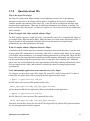
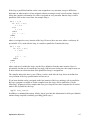
™
PVF
User’s Guide
Parallel Fortran for Scientists and Engineers
The Portland Group™
STMicroelectronics
Two Centerpointe Drive
Lake Oswego, OR 97035
While every precaution has been taken in the preparation of this document, The Portland Group™, a
wholly-owned subsidiary of STMicroelectronics, makes no warranty for the use of its products and
assumes no responsibility for any errors that may appear, or for damages resulting from the use of the
information contained herein. The Portland Group retains the right to make changes to this
information at any time, without notice. The software described in this document is distributed under
license from STMicroelectronics and may be used or copied only in accordance with the terms of the
license agreement. No part of this document may be reproduced or transmitted in any form or by any
means, for any purpose other than the purchaser's personal use without the express written
permission of The Portland Group.
Many of the designations used by manufacturers and sellers to distinguish their products are claimed
as trademarks. Where those designations appear in this manual, The Portland Group was aware of a
trademark claim. The designations have been printed in caps or initial caps. Thanks is given to the
Parallel Tools Consortium and, in particular, to the High Performance Debugging Forum for their
efforts.
PGF95, PGF90, PGC++, Cluster Development Kit, CDK, PGI Unified Binary, PGI Visual Fortran,
PVF and The Portland Group are trademarks and PGI, PGHPF, PGF77, PGCC, PGPROF, and
PGDBG are registered trademarks of STMicroelectronics, Inc. Other brands and names are the
property of their respective owners. The use of STLport, a C++ Library, is licensed separately and
license, distribution and copyright notice can be found in the online documentation for a given
release of the PGI compilers and tools.
PVF User's Guide
Copyright © 2006 STMicroelectronics, Inc.
All rights reserved.
Printed in the United States of America
First Printing: Release 6.2, Aug 2006
Technical support: [email protected]
Sales: [email protected]
Web: http://www.pgroup.com/
ii
Contents
Preface ...................................................................................................................ix
Audience Description ...................................................................................ix
Compatibility and Conformance to Standards..............................................ix
Organization ..................................................................................................x
Hardware and Software Constraints .............................................................x
Conventions .................................................................................................xi
Related Publications................................................................................... xiv
Chapter 1
Getting Started with PVF ................................................................1
1.1
1.2
1.3
1.4
1.5
1.6
1.7
1.8
1.8.1
1.9
1.10
1.11
1.12
1.13
1.14
1.15
1.16
1.17
1.17.1
1.17.2
1.17.3
1.17.4
1.17.5
1.17.5.1
1.17.5.2
Creating a PVF Project ............................................................................... 1
Migrating an Existing Application to PVF .................................................... 2
PVF Solution Explorer ................................................................................. 2
PVF Editor Features ................................................................................... 3
Setting Global User Options ....................................................................... 3
Setting Configuration Options in PVF ......................................................... 4
Setting File Properties in PVF ..................................................................... 4
Building a Project with PVF ......................................................................... 5
Order of PVF Build Operations ................................................................... 5
Custom Build Step and Build Events .......................................................... 6
PVF Build Macros ....................................................................................... 6
Debugging with PVF ................................................................................... 8
Profiling with PVF ........................................................................................ 9
VC++ Interoperability .................................................................................. 9
Using PVF Online Help ............................................................................. 10
The PVF Command Environment ............................................................. 10
PVF Sample Projects ................................................................................ 10
Compatibility ............................................................................................. 10
Win32 API Support ................................................................................... 11
Fortran Module/Library Interfaces ............................................................. 11
Portability Interfaces (Unix/Linux) ............................................................. 12
Data Types ................................................................................................ 12
Graphical User Interfaces ......................................................................... 13
Menus, Dialog Boxes, and Resources .................................................. 14
Building Windows Applications from the Command Line .................... 14
Chapter 2
Getting Started with the Command Line Compilers ..................15
2.1
2.2
2.2.1
2.2.2
2.2.3
2.3
Overview ................................................................................................... 15
Invoking the Command-level PGI Compilers ............................................ 15
Command-line Syntax ............................................................................... 16
Command-line Options ............................................................................. 17
Fortran Directives ...................................................................................... 17
Filename Conventions .............................................................................. 17
iii
2.3.1
2.3.2
2.4
2.4.1
2.5
2.5.1
Input Files ................................................................................................. 17
Output Files ............................................................................................... 18
Parallel Programming Using the PGI Compilers ....................................... 20
Running SMP Parallel Programs .............................................................. 20
Using the PGI Compilers on Windows ...................................................... 21
Command Prompt Window ....................................................................... 21
Chapter 3
Optimization & Parallelization .....................................................23
3.1
3.2
3.3
3.3.1
3.4
3.5
3.5.1
3.5.1.1
3.5.1.2
3.5.1.3
3.5.1.4
3.5.2
3.6
3.6.1
3.6.1.1
3.6.1.2
3.6.1.3
3.6.2
3.6.2.1
3.6.2.2
3.6.2.3
3.6.2.4
3.7
3.7.1
3.7.2
3.7.3
3.7.4
3.7.5
3.7.6
3.7.7
3.7.8
3.8
3.9
3.10
3.11
Overview of Optimization .......................................................................... 23
Getting Started with Optimizations ............................................................ 25
Local and Global Optimization using -O ................................................... 26
Scalar SSE Code Generation ................................................................... 28
Loop Unrolling using -Munroll ................................................................... 29
Vectorization using -Mvect ........................................................................ 30
Vectorization Sub-options ......................................................................... 31
Assoc Option ............................................................................................. 32
Cachesize Option ...................................................................................... 32
SSE Option ............................................................................................... 32
Prefetch Option ......................................................................................... 32
Vectorization Example Using SSE/SSE2 Instructions .............................. 33
Auto-Parallelization using -Mconcur ......................................................... 36
Auto-parallelization Sub-options ............................................................... 36
Altcode Option .......................................................................................... 36
Dist Option ................................................................................................ 37
Cncall Option ............................................................................................ 37
Loops That Fail to Parallelize .................................................................... 37
Innermost Loops ....................................................................................... 38
Timing Loops ............................................................................................ 38
Scalars ...................................................................................................... 38
Scalar Last Values .................................................................................... 39
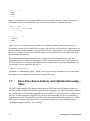
Inter-Procedural Analysis and Optimization using –Mipa .......................... 40
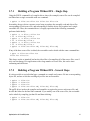
Building a Program Without IPA – Single Step ......................................... 41
Building a Program Without IPA - Several Steps ...................................... 41
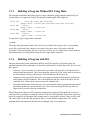
Building a Program Without IPA Using Make ........................................... 42
Building a Program with IPA ..................................................................... 42
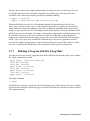
Building a Program with IPA - Single Step ................................................ 43
Building a Program with IPA - Several Steps ............................................ 43
Building a Program with IPA Using Make ................................................. 44
Questions about IPA ................................................................................. 45
Profile-Feedback Optimization using –Mpfi/–Mpfo .................................... 46
Default Optimization Levels ...................................................................... 46
Local Optimization Using Directives ......................................................... 47
Execution Timing and Instruction Counting .............................................. 48
Chapter 4
Command Line Options ...............................................................49
iv
Contents
4.1
Chapter 5
5.1
5.1.1
5.2
5.2.1
5.2.2
5.3
5.4
5.5
Chapter 6
6.1
6.2
6.3
6.4
6.5
6.6
6.7
6.8
6.9
6.10
6.11
6.12
6.13
6.14
6.15
6.16
6.17
6.18
6.19
Chapter 7
7.1
7.2
7.3
7.4
7.5
Chapter 8
8.1
8.2
8.3
8.4
Contents
Generic PGI Compiler Options ................................................................. 52
Function Inlining ...........................................................................97
Invoking Function Inlining ......................................................................... 97
Using an Inline Library .............................................................................. 98
Creating an Inline Library .......................................................................... 99
Working with Inline Libraries ..................................................................... 99
Updating Inline Libraries - Makefiles ......................................................... 99
Error Detection during Inlining ................................................................ 100
Examples ................................................................................................ 100
Restrictions on Inlining ............................................................................ 101
OpenMP Directives for Fortran ..................................................103
Parallelization Directives ......................................................................... 103
PARALLEL ... END PARALLEL .............................................................. 104
CRITICAL ... END CRITICAL .................................................................. 107
MASTER ... END MASTER .................................................................... 108
SINGLE ... END SINGLE ........................................................................ 109
DO ... END DO ........................................................................................ 109
WORKSHARE ... END WORKSHARE ................................................... 112
BARRIER ................................................................................................ 112
DOACROSS ........................................................................................... 112
PARALLEL DO ....................................................................................... 113
PARALLEL WORKSHARE ..................................................................... 114
SECTIONS … END SECTIONS ............................................................. 114
PARALLEL SECTIONS .......................................................................... 115
ORDERED .............................................................................................. 116
ATOMIC .................................................................................................. 116
FLUSH .................................................................................................... 117
THREADPRIVATE .................................................................................. 117
Run-time Library Routines ...................................................................... 118
Environment Variables ............................................................................ 120
Optimization Directives ..............................................................121
Adding Directives to Fortran ................................................................... 121
Fortran Directive Summary ..................................................................... 122
Scope of Directives and Command Line options .................................... 128
!DEC$ directive extensions ..................................................................... 130
Prefetch Directives .................................................................................. 131
Libraries and Environment Variables .......................................133
Creating and Using Dynamic-Link Libraries on Windows ....................... 133
Using LIB3F ............................................................................................ 137
LAPACK, the BLAS and FFTs ................................................................ 137
Environment Variables ............................................................................ 138
v
Chapter 9
9.1
9.1.1
9.1.2
9.1.3
Fortran Data Types .....................................................................141
Fortran Data Types ................................................................................. 141
Fortran Scalars ....................................................................................... 141
FORTRAN 77 Aggregate Data Type Extensions .................................... 144
Fortran 90 Aggregate Data Types (Derived Types) ................................ 146
Chapter 10 Inter-language Calling ................................................................147
Appendix A Run-time Environment ................................................................149
A.1
A.1.1
A.1.1.1
A.1.2
A.1.3
A.2
A.2.1
A.2.2
A.2.3
A.2.4
A.2.4.1
A.2.4.2
A.2.4.3
A.2.4.4
Win32 Programming Model .................................................................... 149
Function Calling Sequence ..................................................................... 149
Register Usage Conventions .................................................................. 149
Function Return Values .......................................................................... 152
Argument Passing ................................................................................... 154
Win64 Programming Model .................................................................... 158
Function Calling Sequence ..................................................................... 158
Function Return Values .......................................................................... 161
Argument Passing ................................................................................... 162
Win64 Fortran Supplement ..................................................................... 165
Fortran Fundamental Types .................................................................... 166
Fortran Naming Conventions .................................................................. 167
Fortran Argument Passing and Return Conventions .............................. 167
Interlanguage Calling .............................................................................. 167
Appendix B Messages .....................................................................................173
B.1
B.2
B.3
B.3.1
B.3.2
B.4
B.4.1
B.4.2
vi
Diagnostic Messages .............................................................................. 173
Phase Invocation Messages ................................................................... 174
Fortran Compiler Error Messages ........................................................... 174
Message Format ..................................................................................... 174
Message List ........................................................................................... 174
Fortran Runtime Error Messages ............................................................ 216
Message Format ..................................................................................... 216
Message List ........................................................................................... 216
Contents
Tables
Table P-1:
Table P-2:
Table 1-1:
Table 1-2:
Table 1-3:
Table 2-1:
Table 3-1:
Table 4-1:
Table 4-2:
Table 4-3:
Table 6-1:
Table 7-1:
Table 9-1:
Table 9-2:
Table 9-3:
Table A-1:
Table A-2:
Table A-3:
Table A-4:
Table A-5:
Table A-6:
Table A-7:
Table A-8:
Table A-9:
Table A-10:
Table A-11:
Table A-12:
PGI Compilers and Commands .................................................................... xii
Processor Options ....................................................................................... xiii
PVF Build Macros ...........................................................................................7
PVF Win32 API Module Mappings ...............................................................11
Fortran Data Type Mappings ........................................................................13
Stop after Options, Inputs and Outputs ........................................................19
Optimization and –O, –g and –M<opt> Options ...........................................47
Generic PGI Compiler Options .....................................................................50
–M Options Summary ..................................................................................61
Optimization and –O, –g, –Mvect, and –Mconcur Options ...........................87
Initialization of REDUCTION Variables.......................................................106
Fortran Optimization Directive Summary....................................................123
Representation of Fortran Data Types .......................................................142
Real Data Type Ranges .............................................................................144
Scalar Type Alignment................................................................................144
Register Allocation......................................................................................150
Standard Stack Frame................................................................................151
Stack Contents for Functions Returning struct/union .................................154
Integral and Pointer Arguments ..................................................................155
Floating-point Arguments............................................................................155
Structure and Union Arguments .................................................................156
Register Allocation......................................................................................159
Standard Stack Frame................................................................................160
Register Allocation for Example A-4 ...........................................................163
Win64 Fortran Fundamental Types ............................................................166
Fortran and C/C++ Data Type Compatibility...............................................169
Fortran and C/C++ Representation of the COMPLEX Type.......................169
vii
viii
Preface
This guide is part of a set of manuals that describe how to use The Portland Group (PGI) Fortran
compilers and program development tools integrated with Microsoft Visual Studio. These tools,
combined with Visual Studio and assorted libraries, are collectively known as PGI Visual FortranTM,
or PVFTM. PVF can be used to edit, compile, debug, optimize and profile serial and parallel
applications for x86 (Intel Pentium II/III/4/M, Intel Centrino, Intel Xeon, AMD Athlon XP/MP) or
x64 (AMD Athlon64/Opteron/Turion, Intel EM64T/Core 2) processor-based systems.
This PVF User's Guide provides operating instructions for both the Visual Studio integrated
development environment as well as command-level compilation and general information about
PGI’s implementation of the Fortran language. This guide does not teach the Fortran programming
language.
Audience Description
This guide is intended for scientists and engineers using PGI Visual Fortran. To fully understand this
guide, you should be aware of the role of high-level languages (e.g. Fortran) in the software
development process and should have some level of understanding of programming. PGI Visual
Fortran is available on a variety of x86 or x64 hardware platforms and variants of the Windows
operating system. You need to be familiar with the basic commands available on your system.
Finally, your system needs to be running a properly installed and configured version of PVF. For
information on installing PVF, refer to the Release and Installation Notes included with your
software.
Compatibility and Conformance to Standards
For further information, refer to the following:
•
American National Standard Programming Language FORTRAN, ANSI X3. -1978 (1978).
•
ISO/IEC 1539 : 1991, Information technology – Programming Languages – Fortran, Geneva, 1991
(Fortran 90).
•
ISO/IEC 1539 : 1997, Information technology – Programming Languages – Fortran, Geneva, 1997
(Fortran 95).
•
Fortran 95 Handbook Complete ISO/ANSI Reference, Adams et al, The MIT Press, Cambridge,
Mass, 1997.
•
OpenMP Application Program Interface, Version 2.5, May 2005, http://www.openmp.org.
•
Programming in VAX Fortran, Version 4.0, Digital Equipment Corporation (September, 1984).
•
IBM VS Fortran, IBM Corporation, Rev. GC26-4119.
ix
•
Military Standard, Fortran, DOD Supplement to American National Standard Programming
Language Fortran, ANSI x.3-1978, MIL-STD-1753 (November 9, 1978).
•
ISO/IEC 9899:1999, Information technology – Programming Languages – C, Geneva, 1999 (C99).
Organization
This manual is divided into the following chapters and appendices:
Chapter 1, “Getting Started with PVF” gives an overview of the Visual Studio environment and how
to use PGI Visual Fortran in that environment.
Chapter 2, “Getting Started with the Command Line Compilers” provides an introduction to the PGI
compilers and describes their use and overall features.
Chapter 3, “Optimization & Parallelization” describes standard optimization techniques that, with
little effort, allow users to significantly improve the performance of programs.
Chapter 4, “Command Line Options” provides a detailed description of each command-line option.
Chapter 5, “Function Inlining” describes how to use function inlining and shows how to create an
inline library.
Chapter 6, “OpenMP Directives for Fortran” provides a description of the OpenMP Fortran
parallelization directives and shows examples of their use.
Chapter 7, “Optimization Directives” provides a description of each Fortran optimization directive,
and shows examples of their use.
Chapter 8, “Libraries and Environment Variables” discusses PGI support libraries, shared object
files, and environment variables that affect the behavior of the PGI compilers.
Chapter 9, “Fortran Data Types” describes the data types that are supported by the PGI Fortran
compilers.
Chapter 10, “Inter-language Calling” provides examples showing how to place C Language calls in a
Fortran program and Fortran Language calls in a C program.
Appendix A, “Run-time Environment” describes the assembly language calling conventions and
examples of assembly language calls.
Appendix B, “Messages” provides a list of compiler error messages.
Hardware and Software Constraints
This guide describes versions of PGI Visual Fortran that are intended for use on x86 and x64
processor-based systems. Details concerning environment-specific values and defaults and systemspecific features or limitations are presented in the release notes delivered with PGI Visual Fortran.
x
Preface
Conventions
The PVF User's Guide uses the following conventions:
italic
is used for commands, filenames, directories, arguments, options and for
emphasis.
Constant Width
is used in examples and for language statements in the text, including
assembly language statements.
[ item1 ]
square brackets indicate optional items. In this case item1 is optional.
{ item2 | item 3}
braces indicate that a selection is required. In this case, you must select either
item2 or item3.
filename...
ellipsis indicate a repetition. Zero or more of the preceding item may occur. In
this example, multiple filenames are allowed.
FORTRAN
Fortran language statements are shown in the text of this guide using uppercase characters and a reduced point size.
The PGI compilers and tools are supported on both 32-bit and 64-bit variants of the Windows
operating system on a variety of x86-compatible processors. The PVF User’s Guide defines the
following terms with respect to these platforms:
x86
a processor designed to be binary compatible with i386/i486 and previous
generation processors from Intel* Corporation. Used to refer collectively to
such processors up to and including 32-bit variants.
IA32
an Intel Architecture 32-bit processor designed to be binary compatible with
x86 processors, but incorporating new features such as streaming SIMD
extensions (SSE) for improved performance.
AMD64
a 64-bit processor from AMD designed to be binary compatible with IA32
processors, and incorporating new features such as additional registers and
64-bit addressing support for improved performance and greatly increased
memory range.
EM64T
a 64-bit IA32 processor with Extended Memory 64-bit Technology extensions
that are binary compatible with AMD64 processors.
x64
collectively, all AMD64 and EM64T processors supported by the PGI
compilers.
Win32
any of the 32-bit Microsoft Windows Operating Systems (XP/2000/Server
2003) running on an x86 or x64 processor-based system. On these targets, the
PGI compiler products include additional tools and libraries needed to build
executables for 32-bit Windows systems.
Preface
xi
Win64
any of the 64-bit Microsoft Windows Operating Systems (XP Professional /
Windows Server 2003 x64 Editions) running on an x64 processor-based
system.
Windows
collectively, all Win32 and Win64 platforms supported by the PGI compilers.
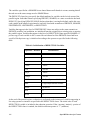
The following table lists the PGI compilers and tools and their corresponding commands:
Table P-1: PGI Compilers and Commands
Compiler or Tool
Language or Function
Command
PGF77
FORTRAN 77
pgf77
PGF95
Fortran 90/95
pgf95
PGDBG
Source code debugger
pgdbg
PGPROF
Performance profiler
pgprof
In general, the designation PGF95 is used to refer to The Portland Group’s Fortran 90/95 compiler,
and pgf95 is used to refer to the command that invokes the compiler. A similar convention is used for
each of the PGI compilers and tools.
For simplicity, examples of command-line invocation of the compilers generally reference the pgf95
command and most source code examples are written in Fortran. Usage of the PGF77 compiler,
whose features are a subset of PGF95, is similar.
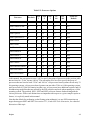
There are a wide variety of x86-compatible processors in use. All are supported by the PGI compilers
and tools. Most of these processors are forward-compatible, but not backward-compatible. That
means code compiled to target a given processor will not necessarily execute correctly on a previousgeneration processor. The most important processor types, along with a list of the features utilized by
the PGI compilers that distinguish them from a compatibility standpoint, are listed in the following
table:
xii
Preface
Table P-2: Processor Options
Processor
Prefetch
SSE
1
SSE
2
SSE
3
AMD Athlon
32bit
64bit
Scalar FP
Default
X
x87
X
x87
AMD Athlon XP/MP
X
X
AMD Athlon64
X
X
X
X
X
SSE
AMD Opteron
X
X
X
X
X
SSE
AMD Opteron Rev E
X
X
X
X
X
X
SSE
AMD Turion
X
X
X
X
X
X
SSE
Intel Celeron
X
x87
Intel Pentium II
X
x87
X
x87
Intel Pentium III
X
X
Intel Pentium 4
X
X
X
X
SSE
Intel Pentium M
X
X
X
X
SSE
Intel Centrino
X
X
X
X
SSE
Intel Pentium 4 EM64T
X
X
X
X
X
X
SSE
Intel Xeon EM64T
X
X
X
X
X
X
SSE
Intel Core 2 EM64T
X
X
X
X
X
X
SSE
In this manual, the convention is to use “x86” to specify the group of processors in the previous table
that are listed as “32-bit” but not “64-bit.” The convention is to use x64 to specify the group of
processors that are listed as both “32-bit” and “64-bit.” x86 processor-based systems can run only 32bit operating systems. x64 processor-based systems can run either 32-bit or 64-bit operating systems,
and can execute all 32-bit x86 binaries in either case. x64 processors have additional registers and 64bit addressing capabilities that are utilized by the PGI compilers and tools when running on a 64-bit
operating system. The prefetch, SSE1, SSE2 and SSE3 processor features further distinguish the
various processors. Where such distinctions are important with respect to a given compiler option or
feature, it is explicitly noted in this manual.
Note that the default for performing scalar floating-point arithmetic is to use SSE instructions on
targets that support SSE1 and SSE2. See section 2.3.1, Scalar SSE Code Generation, for a detailed
discussion of this topic.
Preface
xiii
Related Publications
The following documents contain additional information related to the x86 and x64 architectures, and
the compilers and tools available from The Portland Group.
•
PGI Fortran Reference manual describes the FORTRAN 77, Fortran 90/95, and HPF statements,
data types, input/output format specifiers, and additional reference material related to use of the PGI
Fortran compilers.
•
System V Application Binary Interface Processor Supplement by AT&T UNIX System Laboratories,
Inc. (Prentice Hall, Inc.).
•
System V Application Binary Interface X86-64 Architecture Processor Supplement, http://www.x8664.org/abi.pdf.
•
Fortran 95 Handbook Complete ISO/ANSI Reference, Adams et al, The MIT Press, Cambridge,
Mass, 1997.
•
Programming in VAX Fortran, Version 4.0, Digital Equipment Corporation (September, 1984).
•
IBM VS Fortran, IBM Corporation, Rev. GC26-4119.
•
OpenMP Application Program Interface , Version 2.5 May 2005 (OpenMP Architecture Review
Board, 1997-2005).
xiv
Preface
Chapter 1
Getting Started with PVF
This section provides an overview of how to use PGI Visual Fortran within the Microsoft Visual
Studio 2005 IDE. For information on generic use of the Visual Studio 2005 IDE, see the Visual
Studio online help or http://msdn.microsoft.com/library/default.asp?url=/library/en-us/dnanchor/
html/vs2005anchor.asp.
PVF runs within Visual Studio 2005, so to invoke PVF one must invoke Visual Studio. If other
languages such as Visual C++ or Visual Basic are installed, they will be available in the same
instance of Visual Studio as PVF.
To invoke PVF, go to the Windows Start menu and select Start:All Programs:PGI Visual Fortran:PGI
Visual Fortran. Visual Studio will start.
Alternatively, Visual Studio 2005 may be invoked using Start:All Programs:Microsoft Visual Studio
2005:Microsoft Visual Studio 2005. PVF projects and settings will be available as with any other
language.
The first time Visual Studio is started it may display a list of default settings from which to choose;
select General Development Settings. If Visual Studio was installed prior to the PVF install, it will
start as usual after PVF is installed, except PVF projects and settings will be available.
1.1
Creating a PVF Project
Once Visual Studio 2005 is running, it can be used to create a PGI Visual Fortran project. PVF
supports a variety of project types:
•
Console Application
•
Dynamic Library
An application that runs in a console window, using text input and output.
An executable file that provides routines that can be loaded on-demand when called by the program
that needs them.
•
Static Library
•
Windows Application
An archive file containing one or more object files that can be linked to create an executable.
An application that supports a graphical user interface that makes use of components like windows,
dialog boxes, menus, and so on. The name of the program entry point for such applications is
WinMain.
•
Empty Project
A skeletal project intended to allow migration of existing applications to PVF.
1
To create a new project, select File:New:Project from the File menu. The New Project dialog will
appear. In the left-hand pane of the dialog, select PGI Visual Fortran. The right-hand pane will
display icons corresponding to the project types listed above. Note that on x64 systems 32-bit and 64bit project types are clearly labeled, and they may be filtered using the 32-bit and 64-bit folders in the
left-hand navigation pane of the dialog. Name the project in the edit box labeled Name and select
where to create the project in the edit box labeled Location. Double-click the project type icon
corresponding to the project type you want to create, and the project will be created. Look in the
Solution Explorer (select View:Solution Explorer if not visible) to see the newly created project files
and folders.
1.2
Migrating an Existing Application to PVF
An existing non-PVF Fortran application or library project can be migrated to PVF. Create an Empty
Project, then right-click on the project node in the Solution Explorer to bring up the project context
menu. From this menu select Add:Existing Item… and use the Add Existing Item… dialog to
navigate to the location of the source files to be added to the project. Select the desired source files
and click OK to add them to the project.
PVF will attempt to determine which files are “include files” as opposed to source files; that is,
which files are only included in other files and should not be built. If PVF’s decision is incorrect, or if
the status of a file changes, the file’s type can be set manually as described in ‘Setting File Properties
in PVF’ below.
Include files are generally located in the Include Files folder in the Solution Explorer, and source
files in the Source Files folder. Icons are used to distinguish include files, fixed format source files,
and free format source files.
1.3
PVF Solution Explorer
PVF uses the standard Visual Studio Solution Explorer to organize files in PVF projects. Visual
Studio uses the term project to refer to a set of files, build rules, and so on that creates an output like
an executable, DLL, or static library. Projects are collected into a solution, which is composed of one
or more projects that are usually related in some way.
PVF projects are reference-based projects, which means that although there can be folders in the
representation of the project in the Solution Explorer, there are not necessarily any corresponding
folders in the file system. Similarly, files added to the project can be located anywhere in the file
system; adding them to the project does not copy them or move them to a project folder in the file
system. The PVF project system keeps an internal record of the location of all the files added to a
project.
2
Getting Started with PVF
1.4
PVF Editor Features
The PVF Editor provides several Fortran-aware features to ease the task of entering and examining
Fortran code.
Source Colorization – Fortran source is colorized, so that keywords, comments, and strings are
distinguished from other language elements. Using the Tools:Options:Environment:Fonts and Colors
property page, colors can be assigned for identifiers and numeric constants, and the existing colors
for strings, keywords and comments can be changed.
Method Tips – Fortran intrinsic functions are supported with method tips. When an opening
parenthesis is entered in the source editor following an intrinsic name, a method tip pop-up is
displayed that shows the data types of the arguments to the intrinsic function. If the intrinsic is a
generic function supporting more than one set of arguments, the method tip window supports
scrolling through the supported argument lists.
Keyword Completion – Fortran keywords are supported with keyword completion. When entering a
keyword into the source editor, typing <CTRL>+<SPACE> will open a pop-up list displaying the
possible completions for the portion of the keyword entered so far. Use the up or down arrow keys or
the mouse to select one of the displayed items; type <ENTER> or double-click to enter the remainder
of the highlighted keyword into the source. Type additional characters to narrow the keyword list or
use <BACKSPACE> to expand it.
1.5
Setting Global User Options
Global user options are settings that affect all Visual Studio sessions for a particular user, regardless
of which project they have open. These options are set by accessing the Tools:Options dialog.
PVF supports several global user settings which affect the directories that are searched for
executables, include files, and library files. These are accessed by selecting Tools:Options to access
the dialog, then clicking on Projects and Solutions followed by PVF Directories in the dialog’s
navigation pane. The PVF Directories page has two combo boxes at the top, labeled Platform (to
allow selection of the platform, for example, x64) and Show directories for (to allow selection of the
search path to edit. Search paths that can be edited include the Executable files path, the Include and
module files path, and the Library files path. In general it is good practice to ensure that all three
paths contain directories from the same release of the PGI compilers; mixing and matching different
releases of the compiler executables, include files, and libraries can have undefined results.
Getting Started with PVF
3
1.6
Setting Configuration Options in PVF
Visual Studio makes extensive use of property pages to specify configuration options. Property pages
are used to set options for compilation, optimization and linking, as well as how and where other
tools like the debugger operate in the Visual Studio environment. Some property pages apply to the
whole project, while others apply to a single file and can override the project-wide properties.
The configuration options specified by the property pages apply to a specific configuration. Visual
Studio projects are generally created with two default configurations: Debug and Release. Users may
create other configurations. Different configurations can (and usually do) have different settings for
configuration options.
Property pages can be invoked in several ways. Selecting Properties from the Project menu will
invoke the property pages for the currently selected item in the Solution Explorer. This item may be a
project, a file, a folder, or the solution itself. Right-clicking the project node in the Solution Explorer
and selecting Properties from the resulting context menu will invoke the project property pages.
Right-clicking a file node and selecting Properties from the context menu will invoke that file’s
property pages.
The property page dialog displays the current configuration and platform in combo (or drop-down)
boxes across the top of the dialog. The configuration can be changed to ‘All Configurations’ so the
property is changed for all configurations. A common error is to change a property like ‘Additional
Include Directories’ for the Debug configuration but not the Release configuration, thereby breaking
the build of the Release configuration.
In the PVF documentation, compiler options are described in terms of the corresponding commandline options. For compiler options that can be set using the PVF property pages, the description of the
option includes instructions on how to do so.
Each tool supported by PVF (compiler, linker, etc.) has a Command Line property page, where the
command line derived from the properties can be seen. Options that are not supported by the PVF
property pages can be added to the command line from this property page by entering them into the
Additional Options field.
1.7
Setting File Properties in PVF
Visual Studio also supports properties that are not configuration properties. For example, whether or
not a file is an include file is not configuration-specific; it is a property of the file whether in the
Debug or Release configuration. View and modify this type of property in the Properties Window.
The Properties Window can be accessed via the View:Properties Window menu selection. Once the
Properties Window is visible, selecting a file will show that file’s properties.
To include a source file in the build, make sure the IsIncludeFile property is set to False. To exclude a
source file from the build, set IsIncludeFile to True.
4
Getting Started with PVF
To change whether a source file is compiled as fixed format or free format source, set the
IsFixedFormat property appropriately. PVF uses file extensions to determine the format style: the .f
extension implies fixed format, and other extensions such as .f90 or .f95 imply free format. Note that
the ‘C’ and ‘*’ comment characters are only valid for fixed format compilation.
1.8
Building a Project with PVF
Once a PVF project has been created, populated with source files, and any necessary configuration
settings have been made, the project can be built. The easiest way to start a build is to use the
Build:Build Solution menu selection; all projects in the solution will be built.
If there are compile-time errors, the Error List window will be displayed, showing a summary of the
errors that were encountered. If the error message shows a line number, then double-clicking the
error record in the Error List window will navigate to the location of the error in the editor window.
When a project is built for the first time, PVF must determine the build dependencies. Build
dependencies are the result of USE or INCLUDE statements or #include preprocessor directives in
the source. In particular, if file A contains a USE statement referring to a Fortran module defined in
file B, file B must be compiled successfully before file A will compile.
To do this, PVF begins compiling files in alphabetical order. If a compile fails due to an unsatisfied
module dependency, the offending file is placed back on the build queue and a message is printed to
the Output Window (but not the Error List). In a correct Fortran program, all dependencies will
eventually be met, and the project will be built successfully. Otherwise, errors will be printed to the
Error List as usual.
Subsequent builds use the build dependency information generated during the course of the initial
build.
1.8.1
Order of PVF Build Operations
In the default PVF project build, the build operations are executed in the following order:
•
Pre-Build Event
•
Custom Build Steps for Files
•
Build Resources
•
Compile Fortran Files to Objects (using the PGI Fortran compiler)
•
Pre-Link Event
•
Build Output Files (using linker or librarian)
•
Custom Build Step for Project
•
Post-Link Event
Getting Started with PVF
5
1.9
Custom Build Step and Build Events
PVF provides default build rules for Fortran files and Resource files. Other files are ignored unless a
build action is specified using a Custom Build Step or a Build Event.
Build Events allow definition of a specific command to be executed at a predetermined point during
the project build. Build events can be specified as Pre-Build, Pre-Link, and Post-Build. See Section
1.8.1, “Order of PVF Build Operations” for specifics of where build events are run in the PVF build.
Build events are always run unless the project is up to date. There is no dependency checking for
build events. Define build events using the property pages for the project.
Custom Build Steps may apply to either individual files or the project. If applied to an individual file,
dependencies may be specified. Dependencies must be out of date for a Custom Build Step to run.
When defined for a project, the Custom Build Step does not check dependencies; in this case the
Custom Build Step is very similar to the Post-Build Event. Define Custom Build Steps using the
property pages for the file or project.
1.10
PVF Build Macros
PVF implements a subset of the build macros supported by Visual C++ along with a few PGI-specific
macros. The macro names are not case-sensitive, and they should be usable in any string field in a
property page. Unless otherwise noted, macros that evaluate to directory names end with a trailing
backslash ('\').
In general these Items can only be changed if there is an associated PVF project or file property. For
example, $(VCInstallDir) cannot be changed, while $(IntDir) can be changed by modifying the
General:Intermediate Directory property.
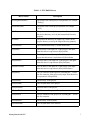
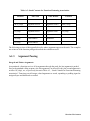
The table below lists the supported macros:
6
Getting Started with PVF
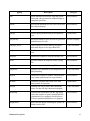
Table 1-1: PVF Build Macros
Macro Name
Description
$(ConfigurationName)
The name of the current project configuration (for example,
“Debug”).
$(PlatformName)
The name of the current project platform (for example,
“x64”).
$(IntDir)
The path to the directory for intermediate files, relative to
the project directory, as set by the Intermediate Directory
property.
$(OutDir)
The path to the directory for output files, relative to the
project directory, as set by the Output Directory property.
$(DevEnvDir)
The installation directory of Visual Studio 2005.
$(InputDir)
The directory of the input file. If the project is the input,
then this macro is equivalent to $(ProjectDir).
$(InputPath)
The full path name of the input file. If the project is the
input, then this macro is equivalent to $(ProjectPath).
$(InputName)
The base name of the input file. If the project is the input,
then this macro is equivalent to $(ProjectName).
$(InputFileName)
The file name of the input file. If the project is the input,
then this macro is equivalent to $(ProjectFileName).
$(InputExt)
The file extension of the input file, including the ‘.’ before
the file extension. If the project is the input, then this macro
is equivalent to $(ProjectExt).
$(ProjectDir)
The directory of the project.
$(ProjectPath)
The full path name of the project.
$(ProjectName)
The base name of the project.
$(ProjectFileName)
The file name of the project file.
$(ProjectExt)
The file extension of the project file, including the ‘.’ before
the file extension.
$(SolutionDir)
The directory of the solution.
$(SolutionPath)
The full path name of the solution.
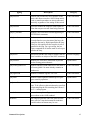
Getting Started with PVF
7
Macro Name
Description
$(SolutionName)
The base name of the solution.
$(SolutionFileName)
The file name of the solution file.
$(SolutionExt)
The file extension of the solution file, including the ‘.’
before the file extension.
$(TargetDir)
The directory of the primary output file of the build.
$(TargetPath)
The full path name of the primary output file of the build.
$(TargetFileName)
The file name of the primary output file of the build.
$(TargetExt)
The file extension of the primary output file of the build,
including the ‘.’ before the file extension.
$(VSInstallDir)
The Visual Studio 2005 installation directory.
$(VCInstallDir)
The Visual C++ 2005 installation directory. If Visual C++
2005 is not installed, this macro may evaluate to a directory
that does not exist.
$(OpenToolsDir) [PGI only]
The location of the Open Tools installation directory,
including files needed for building Microsoft Windows
applications for both 32-bit and 64-bit environments.
$(PGITools32Dir) [PGI only]
The location of the active PGI toolset for 32-bit targets. This
directory is the parent of bin, lib, and include directories
containing executables, libraries, and include files for the
PGI development environment.
$(PGIToolsDir) [PGI only]
The location of the active PGI toolset for 64-bit targets. This
directory is the parent of bin, lib, and include directories
containing executables, libraries, and include files for the
PGI development environment.
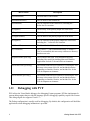
1.11
Debugging with PVF
PVF utilizes the Visual Studio debugger for debugging Fortran programs. PGI has implemented a
custom debug engine that provides the language-specific debugging capability required for Fortran.
This debug engine also supports Visual C++.
The Debug configuration is usually used for debugging. By default, this configuration will build the
application so that debugging information is provided.
8
Getting Started with PVF
The debugger can be started by clicking on the green arrow in the toolbar (looks like the ‘play’ button
on a CD or DVD player) or by selecting Debug:Start Debugging. Then use the Visual Studio
debugger controls as usual.
1.12
Profiling with PVF
Some PVF product configurations provide support for using the PGPROF performance profiler.
PVF profiling on Windows is a three-step process. First, the program is built using PGI profiling
options to insert calls to the PGI performance instrumentation library into the program. Second, the
program is run; when it exits, a file (pgprof.out) containing performance data is created. Finally, the
PGPROF profiler is run to view and analyze the data in the pgprof.out file. On Windows, PGI
provides performance instrumentation that measures time at the function level and the source line
level.
To instrument a program for performance profiling, select the desired Profiling property in both the
Fortran:General and the Linker:General property pages, then rebuild the program.
Run the program, either using the Debug:Start Without Debugging menu selection or manually from
the command line. Program execution will create a pgprof.out file in the working directory of the
program.
Next, select Start:All Programs:PGI Visual Fortran:PGI Visual Fortran Tools:PGPROF Performance
Profiler to launch PGPROF. Open the pgprof.out file located in the directory where the program was
run and examine the results.
Use the PGPROF online help, accessed via the PGPROF Help menu, for more details on using the
profiler.
1.13
VC++ Interoperability
If Visual C++ is installed along with PVF, Visual Studio solutions containing both PVF and VC++
projects can be created. Each project, though, must be purely PVF or VC++; Fortran and C/C++ code
cannot be mixed in a single project. This constraint is purely an organizational issue. Fortran
subprograms may call C functions and C functions may call Fortran subprograms as outlined in
Chapter 10, “Inter-language Calling”. Note that calling Visual C++ (as opposed to C) from Fortran is
very complicated and not recommended.
Getting Started with PVF
9
1.14
Using PVF Online Help
PVF online help is fully integrated with Visual Studio 2005 help. It can be invoked by selecting the
Help:Contents, Help:Index, or Help:Search menu options. It can also be invoked from the Start menu
via Start:All Programs:PGI Visual Fortran:PGI Documentation. Context-sensitive help (i.e., <F1>
help) is not currently supported in PVF.
1.15
The PVF Command Environment
PVF provides a Start menu selection to invoke a command shell with the environment configured for
the PGI compilers and tools. The command line compilers and graphical tools may be invoked from
this command shell without any further configuration.
For example, to invoke the PVF command shell with the environment set for the x64 compilers and
tools, go to the Start menu and select Start:All Programs:PGI Visual Fortran:PGI Visual Fortran
Tools:PVF Command Prompt (x64).
1.16
PVF Sample Projects
PVF includes several examples of Fortran projects. These are found under the PVF installation
directory. Typically this is something like:
$(VSInstallDir)\PGI Visual Fortran\Samples\
These samples provide simple demonstrations of specific PVF project and solution types, including:
•
pvf_calling_vc, which shows how to create a solution containing a Visual C++ static library and a
PVF main program that links to it and calls it
•
pvf_dll, which shows how to create a DLL that exports routines written in Fortran
•
menu_dialog, which uses a resource file and Win32 API calls to create and control a menu and a
dialog box
1.17
Compatibility
PGI Visual Fortran provides features that are compatible with those supported by older Windows
Fortran products, such as Compaq® Visual Fortran. These include:
•
Win32 API Support
•
Portability Support (Unix/Linux)
•
Graphical User Interface Support
This section describes how to use each of these features.
10
Getting Started with PVF
1.17.1
Win32 API Support
The Microsoft Windows operating system interface (the system call and library interface) is known
collectively as the Win32 API. This is true for both the 32-bit and 64-bit versions of Windows; there
is no “Win64 API” for 64-bit Windows. The only difference on 64-bit systems is that pointers are 64bits rather than the 32-bit pointers found on 32-bit Windows.
PGI Visual Fortran provides access to the Win32 API using Fortran modules. See the sections
entitled ‘Fortran Module/Library Interfaces’ and ‘Data Types’ for more information on the use of
these interfaces. Source code for the modules is located in:
C:\Program Files\PGI\win64\<release_number>\src\
For details on specific Win32 API routines, see the online Microsoft Platform SDK documentation,
or visit the Microsoft MSDN website: msdn.microsoft.com/library/default.asp?url=/code/list/
win32api.asp
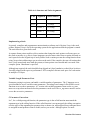
The modules and their corresponding Win32 libraries are shown in the following table:
Table 1-2: PVF Win32 API Module Mappings
C Win32 API Lib
1.17.2
C Header File
PVF Fortran Module
advapi32.lib
WinBase.h
advapi32
comdlg32.lib
ComDlg.h
comdlg32
gdi32.lib
WinGDI.h
gdi32
kernel32.lib
WinBase.h
kernel32
shell32.lib
ShellAPI.h
shell32
user32.lib
WinUser.h
user32
winver.lib
WinVer.h
winver
wsock32.lib
WinSock.h
wsock32
Fortran Module/Library Interfaces
PGI Visual Fortran provides access to a number of libraries that export C interfaces by using Fortran
modules. This is the mechanism used by PVF to support the Win32 API and Unix/Linux portability
libraries. To utilize any of the Win32 API interfaces, for example, user32.lib, simply add a Fortran
USE statement:
USE DFWIN
Getting Started with PVF
11
The DFWIN module includes all the modules needed to access the Win32 API. Modules supporting
specific portions of the Win32 API are also available; see the table in the section titled ‘Win32 API
Support’ for a mapping of module names to the corresponding Win32 API library and header files.
The function calls made through the module interfaces ultimately resolve to C Language interfaces,
so some accommodation for inter-language calling conventions must be made in the Fortran
application. These issues include:
•
On x64 platforms, pointers and pointer types such as HANDLE, HINSTANCE, WPARAM, and
HWND must be treated as 8-byte quantities (INTEGER(8)). On x86 (32-bit) platforms, these are 4byte quantities ((INTEGER(4)).
•
In general, C makes calls by value while Fortran makes calls by reference.
•
When doing Windows development one must sometimes provide callback functions for message
processing, dialog processing, etc. These routines are called by the Windows system when events
are processed. In order to provide the expected function signature for a callback function, the user
may need to use the STDCALL attribute directive (!DEC$ATTRIBUTE::STDCALL) in the
declaration. See the PVF examples for more detail on how to implement callbacks.
1.17.3
Portability Interfaces (Unix/Linux)
PVF also includes Fortran module interfaces to libraries supporting some standard C library and
Unix/Linux system call functionality. These functions are provided by the DFLIB and DFPORT
modules. To utilize these modules add the appropriate USE statement:
USE DFLIB
USE DFPORT
1.17.4
Data Types
Because the Win32 API and Portability interfaces resolve to C Language libraries, it is important to
understand how the data types compare within the two languages. Here is a table summarizing how C
types correspond with Fortran types for some of the more common data types:
12
Getting Started with PVF
Table 1-3: Fortran Data Type Mappings
C Win32 Data Type
1.17.5
Fortran Data Type
BOOL
LOGICAL(4)
BYTE
BYTE
CHAR
CHARACTER
SHORT, WORD
INTEGER(2)
DWORD, INT, LONG
INTEGER(4)
LONG LONG
INTEGER(8)
FLOAT
REAL(4)
DOUBLE
REAL(8)
x86 Pointers
INTEGER(4)
x64 Pointers
INTEGER(8)
Graphical User Interfaces
Programs that manage graphical user interface components using Fortran code are referred to as
Windows Applications within PVF. A PVF Windows Application can be created by selecting
Windows Application in the PVF New Project dialog, or by changing the Configuration Type
property to Windows Application in the PVF General property page.
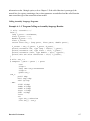
PVF Windows Applications are characterized by the lack of a PROGRAM statement. Instead,
Windows Applications must provide a WinMain function like the following:
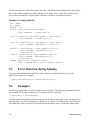
Example 1-1: PVF WinMain for x64
integer(4) function WinMain (hInstance, &
hPrevInstance, lpszCmdLine, nCmdShow)
integer(8) hInstance
integer(8) hPrevInstance
integer(8) lpszCmdLine
integer(4) nCmdShow
Note that since hInstance, hPrevInstance, and lpszCmdLine are all x64 pointers, they must be 8-byte
integers. If this were a 32-bit program, these would be 4-byte integers. nCmdShow is an integer
specifying how the window is to be shown (look up WinMain in the Microsoft Platform SDK
documentation for additional details).
Getting Started with PVF
13
The PVF Windows Application project type provides a template for WinMain. The PVF sample
program
samples\win32api\menu_dialog
is a small application using WinMain.
1.17.5.1 Menus, Dialog Boxes, and Resources
The use of resources in PVF is similar to their use in Visual C++. The resource files that control
menus and dialog boxes have the file extension .rc. These files are processed with the Microsoft
Resource Compiler to produce binary .res files. A .res file is then directly passed to the linker which
incorporates the resources into the output file. See the PVF sample project menu_dialog for details on
how resources are used within a windows application.
Note
The complete Visual C++ Resource Editor is not available in PVF. Although you
can edit files like icons (.ico) and bitmaps (.bmp) directly, the .rc file is not updated
automatically by the environment. You must either install Visual C++, in which
case the resource editor is fully functional, or you must edit .rc files using the
source code (text) editor.
1.17.5.2 Building Windows Applications from the Command Line
Windows applications can also be built using a command line version of pgf95. To enable this
feature, add the –winapp option to the compiler driver command line when linking the application.
This option causes the linker to include the correct libraries and object files needed to support a
Windows Application. However, it does not add any additional system libraries to the link line. Add
any required system libraries by adding the option -defaultlib:<library name> to the link command
line for each library. <library name> can be any of the following: advapi32, comdlg32, gdi32,
kernel32, shell32, user32, winver, or wsock32.
14
Getting Started with PVF
Chapter 2
Getting Started with the
Command Line Compilers
This chapter describes how to use the PGI compilers. The command used to invoke a compiler, for
example the pgf95 command, is called a compiler driver. The compiler driver controls the following
phases of compilation: preprocessing, compiling, assembling, and linking. Once a file is compiled
and an executable file is produced, you can execute, debug, or profile the program on your system.
Executables produced by the PGI compilers are unconstrained, meaning they can be executed on any
compatible x86 or x64 processor-based system regardless of whether the PGI compilers are installed
on that system.
2.1
Overview
In general, using a PGI compiler involves three steps:
1.
Produce a program in a file containing a .f extension or another appropriate extension (see Section
2.3.1, “Input Files”). This may be a program that you have written or a program that you are
modifying.
2.
Compile the program using the appropriate compiler command.
3.
Execute, debug, or profile the executable file on your system.
The PGI compilers allow many variations on these general program development steps. These
variations include the following:
•
Stop the compilation after preprocessing, compiling or assembling to save and examine intermediate
results.
•
Provide options to the driver that control compiler optimization or that specify various features or
limitations.
•
Include as input intermediate files such as preprocessor output, compiler output, or assembler
output.
2.2
Invoking the Command-level PGI Compilers
To translate and link a Fortran language program, the pgf77 and pgf95 commands do the following:
•
Preprocess the source text file
•
Check the syntax of the source text
•
Generate an assembly language file
•
Pass control to the subsequent assembly and linking steps
For example, if you enter the following simple Fortran program in the file hello.f:
15
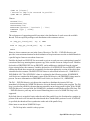
print *, "hello"
end
You can compile it from a shell prompt using the default pgf95 driver options.
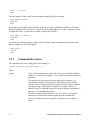
PGI$ pgf95 hello.f
Linking:
PGI$
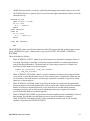
By default, the executable output is placed in the file a.out (or, on Windows platforms, a filename
based on the name of the first source or object file on the command line). Use the –o option to specify
an output file name. To place the executable output in the file hello:
PGI$ pgf95 -o hello.f
Linking:
PGI$
To execute the resulting program, simply type the filename at the command prompt and press the
Return or Enter key on your keyboard:
PGI$ hello
hello
PGI$
2.2.1
Command-line Syntax
The command-line syntax, using pgf95 as an example, is:
pgf95 [options] [path]filename [...]
Where:
options
is one or more command-line options, all of which are described in detail in
Chapter 4, “Command Line Options”. Case is significant for options and their
arguments.
The compiler drivers recognize characters preceded by a hyphen (-) as
command-line options. For example, the –Mlist option specifies that the
compiler creates a listing file (in the text of this manual we show commandline options using a dash instead of a hyphen, for example –Mlist). In
addition, the pgCC command recognizes a group of characters preceded by a
plus sign (+) as command-line options.
The order of options and the filename is not fixed. That is, you can place
options before and after the filename argument on the command line.
However, the placement of some options is significant, for example the –l
option.
16
Getting Started with the Command Line Compilers
Note
If two or more options contradict each other, the last one in the command line takes
precedence.
path
is the pathname to the directory containing the file named by filename. If you
do not specify path for a filename, the compiler uses the current directory.
You must specify path separately for each filename not in the current
directory.
filename
is the name of a source file, assembly-language file, object file, or library to
be processed by the compilation system. You can specify more than one
[path]filename.
2.2.2
Command-line Options
The command-line options control various aspects of the compilation process. For a complete
alphabetical listing and a description of all the command-line options, refer to Chapter 4, “Command
Line Options”.
2.2.3
Fortran Directives
Fortran directives inserted in program source code allow you to alter the effects of certain commandline options and control various aspects of the compilation process for a specific routine or a specific
program loop. For a complete alphabetical listing and a description of all the Fortran directives, refer
to Chapter 6, “OpenMP Directives for Fortran” and Chapter 7, “Optimization Directives” .
2.3
Filename Conventions
The PGI compilers use the filenames that you specify on the command line to find and to create input
and output files. This section describes the input and output filename conventions for the phases of
the compilation process.
2.3.1
Input Files
You can specify assembly-language files, preprocessed source files, Fortran/C/C++ source files,
object files, and libraries as inputs on the command line. The compiler driver determines the type of
each input file by examining the filename extensions. The drivers use the following conventions:
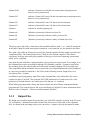
filename.f
indicates a Fortran source file.
filename.F
indicates a Fortran source file that can contain macros and preprocessor
directives (to be preprocessed).
Getting Started with the Command Line Compilers
17
filename.FOR
indicates a Fortran source file that can contain macros and preprocessor
directives (to be preprocessed).
filename.F95
indicates a Fortran 90/95 source file that can contain macros and preprocessor
directives (to be preprocessed).
filename.f90
indicates a Fortran 90/95 source file that is in freeform format.
filename.f95
indicates a Fortran 90/95 source file that is in freeform format.
filename.s
indicates an assembly-language file.
filename.obj
(Windows systems only) indicates an object file.
filename.lib
(Windows systems only) indicates a library of object files.
filename.dll
(Windows systems only) indicates a library of shared object files.
The driver passes files with .s extensions to the assembler and files with .o, .so, .a and .lib extensions
to the linker. Input files with unrecognized extensions, or no extension, are also passed to the linker.
Files with a .fpp suffix are first preprocessed by the Fortran compilers and the output is passed to the
compilation phase. The Fortran preprocessor is built in to the Fortran compilers. This ensures
consistency in the pre-processing step regardless of the type or revision of operating system under
which you’re compiling.
Any input files not needed for a particular phase of processing are not processed. For example, if on
the command line you use an assembly-language file (filename.s) and the –S option to stop before
the assembly phase, the compiler takes no action on the assembly-language file. Processing stops
after compilation and the assembler does not run (in this case compilation must have been completed
in a previous pass which created the .s file). Refer to the following section, Output Files, for a
description of the –S option.
In addition to specifying primary input files on the command line, code within other files can be
compiled as part of “include” files using the INCLUDE statement in a Fortran source file or the
preprocessor #include directive in Fortran source files that use a .F extension.
When linking a program with a library, the linker extracts only those library components that the
program needs. The compiler drivers link in several libraries by default. For more information about
libraries, refer to Chapter 8, “Libraries and Environment Variables”, .
2.3.2
Output Files
By default, an executable output file produced by one of the PGI compilers is placed in the file a.out
(or, on Windows, a filename based on the name of the first source or object file on the command
line). As shown in the preceding section, you can use the –o option to specify the output file name.
18
Getting Started with the Command Line Compilers
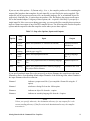
If you use one of the options: –F (Fortran only), –S or –c, the compiler produces a file containing the
output of the last phase that completes for each input file, as specified by the option supplied. The
output file will be a preprocessed source file, an assembly-language file, or an unlinked object file
respectively. Similarly, the –E option does not produce a file, but displays the preprocessed source
file on the standard output. Using any of these options, the –o option is valid only if you specify a
single input file. If no errors occur during processing, you can use the files created by these options as
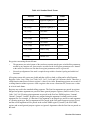
input to a future invocation of any of the PGI compiler drivers. The following table lists the stop after
options and the output files that the compilers create when you use these options.
Table 2-1: Stop after Options, Inputs and Outputs
Stop
after
Option
Input
Output
–E
preprocessing
Source files (must have .F extension for Fortran)
preprocessed file to
standard out
–F
preprocessing
Source files (must have .F extension, this option is not
valid for pgcc or pgCC)
preprocessed file – .f
–S
compilation
Source files or preprocessed files
assembly-language
file – .s
–c
assembly
Source files, preprocessed files or assembly-language
files
unlinked object file –
.o
none
linking
Source files, preprocessed files, assembly-language
files, object files or libraries
executable files a.out
If you specify multiple input files or do not specify an object filename, the compiler uses the input
filenames to derive corresponding default output filenames of the following form, where filename is
the input filename without its extension:
filename.f
indicates a preprocessed file (if you compiled a Fortran file using the –F
option).
filename.l
stindicates a listing file from the –Mlist option.
filename.o
indicates an object file from the –c option.
filename.s
indicates an assembly-language file from the –S option.
Note
Unless you specify otherwise, the destination directory for any output file is the
current working directory. If the file exists in the destination directory, the compiler
overwrites it.
Getting Started with the Command Line Compilers
19
The following example demonstrates the use of output filename extensions.
$ pgf95 -c proto.f proto1.F
This produces the output files proto.o and proto1.o, both of which are binary object files. Prior to
compilation, the file proto1.F is pre-processed because it has a .F filename extension.
2.4
Parallel Programming Using the PGI Compilers
The PGI Visual Fortran compilers support two styles of parallel programming:
•
Automatic shared-memory parallel programs compiled using the -Mconcur option to pgf77 or pgf95
— parallel programs of this variety can be run on shared-memory parallel (SMP) systems such as
dual-core or multi-processor workstations.
•
OpenMP shared-memory parallel programs compiled using the -mp option to pgf77, pgf95 —
parallel programs of this variety can be run on SMP systems. Carefully coded user-directed parallel
programs using OpenMP directives can often achieve significant speed-ups on dual-core
workstations or large numbers of processors on SMP server systems. Chapter 6, “OpenMP
Directives for Fortran” contains complete descriptions of user-directed parallel programming.
Some newer CPUs incorporate two or more complete processor cores (functional units, registers,
level 1 cache, level 2 cache, etc) on a single silicon die. These are referred to as multi-core
processors. For purposes of threads, or OpenMP parallelism, these cores function as 2 or more
distinct processors. However, the processing cores are on a single chip occupying a single socket on a
system motherboard. For purposes of PGI software licensing, a multi-core processor is treated as a
single CPU.
2.4.1
Running SMP Parallel Programs
When you execute an SMP parallel program, by default it will use only 1 processor. To run on more
than one processor, set the NCPUS environment variable to the desired number of processors
(subject to a maximum of 4 for PGI’s workstation-class products).
You can set this environment variable by issuing the following command:
% setenv NCPUS <number>
in a Windows command prompt window
Note
If you set NCPUS to a number larger than the number of physical processors, your
program may execute very slowly.
20
Getting Started with the Command Line Compilers
2.5
Using the PGI Compilers on Windows
2.5.1
Command Prompt Window
The PVF submenu in the Windows Start menu contains an item named PVF Command Prompt. This
is used to launch a Windows Command Prompt window that has an environment pre-initialized for
usage of the PGI compilers and tools. On x64 systems, there are two selections: one is tagged (x64) to
denote that its environment is pre-initialized for the 64-bit compilers and tools.
Getting Started with the Command Line Compilers
21
22
Getting Started with the Command Line Compilers
Chapter 3
Optimization &
Parallelization
Source code that is readable, maintainable, and produces correct results is not always organized for
efficient execution. Normally, the first step in the program development process involves producing
code that executes and produces the correct results. This first step usually involves compiling without
much worry about optimization. After code is compiled and debugged, code optimization and
parallelization become an issue. Invoking one of the PGI compiler commands with certain options
instructs the compiler to generate optimized code. Optimization is not always performed since it
increases compilation time and may make debugging difficult. However, optimization produces more
efficient code that usually runs significantly faster than code that is not optimized.
The compilers optimize code according to the specified optimization level. In PVF, the
Fortran:Optimization property page is used to specify optimization levels; on the command line, the
–O, –Mvect, –Mipa and –Mconcur options are commonly used. Several –M<pgflag> switches can be
used to control specific types of optimization and parallelization. Options not supported by the
Fortran:Optimization property page can be set using the Additional Options field of the
Fortran:Command Line property page.
This chapter describes the optimization options and describes how to choose optimization options to
use with the PGI compilers. Chapter 5, “Function Inlining”, describes how to use the function
inlining options.
3.1
Overview of Optimization
In general, optimization involves using transformations and replacements that generate more
efficient code. This is done by the compiler and involves replacements that are independent of the
particular target processor’s architecture as well as replacements that take advantage of the x86 or
x64 architecture, instruction set and registers. For the discussion in this and the following chapters,
optimization is divided into the following categories:
Local Optimization
This optimization is performed on a block-by-block basis within a program’s basic blocks. A basic
block is a sequence of statements, in which the flow of control enters at the beginning and leaves at
the end without the possibility of branching, except at the end. The PGI compilers perform many
types of local optimization including: algebraic identity removal, constant folding, common subexpression elimination, pipelining, redundant load and store elimination, scheduling, strength
reduction, and peephole optimizations.
23
Global Optimization
This optimization is performed on a program unit over all its basic blocks. The optimizer performs
control-flow and data-flow analysis for an entire program unit. All loops, including those formed by
IFs and GOTOs are detected and optimized. Global optimization includes: constant propagation,
copy propagation, dead store elimination, global register allocation, invariant code motion, and
induction variable elimination.
Loop Optimization: Unrolling, Vectorization,and Parallelization
The performance of certain classes of loops may be improved through vectorization or unrolling
options. Vectorization transforms loops to improve memory access performance and make use of
packed SSE instructions which perform the same operation on multiple data items concurrently.
Unrolling replicates the body of loops to reduce loop branching overhead and provide better
opportunities for local optimization, vectorization and scheduling of instructions. Performance for
loops on systems with multiple processors may also improve using the parallelization features of the
PGI compilers.
Inter-Procedural Analysis and Optimization (IPA)
Interprocedural analysis allows use of information across function call boundaries to perform
optimizations that would otherwise be unavailable. For example, if the actual argument to a function
is in fact a constant in the caller, it may be possible to propagate that constant into the callee and
perform optimizations that are not valid if the dummy argument is treated as a variable. A wide range
of optimizations are enabled or improved by using IPA, including but not limited to data alignment
optimizations, argument removal, constant propagation, pointer disambiguation, pure function
detection, F90/F95 array shape propagation, data placement, vestigial function removal, automatic
function inlining, inlining of functions from pre-compiled libraries, and interprocedural optimization
of functions from pre-compiled libraries.
Function Inlining
This optimization allows a call to a function to be replaced by a copy of the body of that function.
This optimization will sometimes speed up execution by eliminating the function call and return
overhead. Function inlining may also create opportunities for other types of optimization. Function
inlining is not always beneficial. When used improperly it may increase code size and generate less
efficient code.
Profile-Feedback Optimization (PFO)
Profile-feedback optimization makes use of information from a trace file produced by specially
instrumented executables which capture and save information on branch frequency, function and
subroutine call frequency, semi-invariant values, loop index ranges, and other input data dependent
24
Optimization & Parallelization
information that can only be collected dynamically during execution of a program. By definition, use
of profile-feedback optimization is a two-phase process: compilation and execution of a speciallyinstrumented executable, followed by a subsequent compilation which reads a trace file generated
during the first phase and uses the information in the trace file to guide compiler optimizations.
3.2
Getting Started with Optimizations
Your first concern should be getting your program to execute and produce correct results. To get your
program running, start by compiling and linking without optimization. Use the optimization level –
O0 or select –g to perform minimal optimization. At this level, you will be able to debug your
program easily and isolate any coding errors exposed during porting to x86 or x64 platforms.
If you want to get started quickly with optimization, a good set of options to use with any of the PGI
compilers is –fastsse –Mipa=fast. For example:
$ pgf95 -fastsse -Mipa=fast prog.f
In PVF, similar options may be accessed using the Optimization property in the
Fortran:Optimization property page.
For all of the PGI Fortran compilers, this option will generally produce code that is well-optimized
without the possibility of significant slowdowns due to pathological cases. The -fastsse option is an
aggregate option that includes a number of individual PGI compiler options; which PGI compiler
options are included depends on the target for which compilation is performed. The –Mipa=fast
option invokes interprocedural analysis including several IPA suboptions.
By experimenting with individual compiler options on a file-by-file basis, further significant
performance gains can sometimes be realized. However, individual optimizations can sometimes
cause slowdowns depending on coding style and must be used carefully to ensure performance
improvements result. In addition to –fastsse, the optimization flags most likely to further improve
performance are –O3, –Mpfi/–Mpfo, –Minline, and on targets with multiple processors –Mconcur.
In PVF, the –O3, –Minline and –Mconcur options may be accessed using the Global Optimizations,
Inlining, and Auto-Parallelization properties on the Fortran:Optimization property page,
respectively.
Three other options which are extremely useful are –help, –Minfo, and –dryrun. You can see a
specification of any command-line option by invoking any of the PGI compilers with –help in
combination with the option in question, without specifying any input files.
For example:
$ pgf95 -help -fastsse
Reading rcfile /usr/pgi_rel/linux86-64/6.0/bin/.pgf95rc
-fastsse == -fast -Mvect=sse -Mcache_align -Mflushz
-fast Common optimizations: -O2 -Munroll=c:1 -Mnoframe -Mlre
. . .
Optimization & Parallelization
25
Or to see the full functionality of –help itself, which can return information on either an individual
option or groups of options by type:
$ pgf95 -help -help
Reading rcfile /usr/pgi_rel/linux86-64/6.0/bin/.pgf95rc
-help[=groups|asm|debug|language|linker|opt|other|overall|
phase|prepro|suffix|switch|target|variable]
In PVF these options may be accessed via the Fortran:Command Line property page, or perhaps
more appropriately for the –help option via a Build Event or Custom Build Step.
The –Minfo option can be used to display compile-time optimization listings. When this option is
used, the PGI compilers will issue informational messages to stdout as compilation proceeds. From
these messages, you can determine which loops are optimized using unrolling, SSE instructions,
vectorization, parallelization, interprocedural optimizations and various miscellaneous optimizations.
You can also see where and whether functions are inlined. The –Mneginfo option can be used to
display informational messages listing why certain optimizations are inhibited.
The –dryrun option can be useful as a diagnostic tool if you need to see the steps used by the
compiler driver to pre-process, compile, assemble and link in the presence of a given set of command
line inputs. When you specify the –dryrun option, these steps will be printed to stdout but will not
actually be performed. For example, this allows inspection of the default and user-specified libraries
that are searched during the link phase, and the order in which they are searched by the linker.
The remainder of this chapter describes the –O options, the loop unroller option –Munroll, the
vectorizer option –Mvect, the auto-parallelization option –Mconcur, and the inter-procedural analysis
optimization –Mipa, and the profile-feedback instrumentation (–Mpfi) and optimization (–Mpfo)
options. Usually, you should be able to get very near optimal compiled performance using some
combination of these switches. The following overview will help if you are just getting started with
one of the PGI compilers, or wish to experiment with individual optimizations. Complete
specifications of each of these options are listed in Chapter 4, “Command Line Options” .
The chapters that follow provide more detailed information on other –M<pgflag> options that control
specific optimizations, including function inlining. Explicit parallelization through the use of
OpenMP directives or pragmas is invoked using the –mp option, described in detail in Chapter 6,
“OpenMP Directives for Fortran”.
3.3
Local and Global Optimization using -O
Using the PGI compiler commands with the –Olevel option, you can specify any of the following
optimization levels (the capital O is for Optimize):
–O0
level-zero specifies no optimization. A basic block is generated for each language statement.
–O1
level-one specifies local optimization. Scheduling of basic blocks is performed. Register
allocation is performed.
26
Optimization & Parallelization
–O2
level-two specifies global optimization. This level performs all level-one local optimization as
well as level-two global optimization.
–O3
level-three specifies aggressive global optimization. This level performs all level-one and leveltwo optimizations and enables more aggressive hoisting and scalar replacement optimizations
that may or may not be profitable.
Level-zero optimization specifies no optimization (–O0). At this level, the compiler generates a basic
block for each statement. This level is useful for the initial execution of a program. Performance will
almost always be slowest using this optimization level. Level-zero is useful for debugging since there
is a direct correlation between the program text and the code generated.
Level-one optimization specifies local optimization (–O1). The compiler performs scheduling of
basic blocks as well as register allocation. This optimization level is a good choice when the code is
very irregular; that is it contains many short statements containing IF statements and the program
does not contain loops (DO or DO WHILE statements). For certain types of code, this optimization
level may perform better than level-two (–O2) although this case rarely occurs.
The PGI compilers perform many different types of local optimizations, including but not limited to:
•
Algebraic identity removal
•
Constant folding
•
Common subexpression elimination
•
Local register optimization
•
Peephole optimizations
•
Redundant load and store elimination
•
Strength reductions
Level-two optimization (–O2 or –O) specifies global optimization. The –fast option generally will
specify global optimization; however, the –fast switch will vary from release to release depending on
a reasonable selection of switches for any one particular release. The –O or –O2 level performs all
level-one local optimizations as well as global optimizations. Control flow analysis is applied and
global registers are allocated for all functions and subroutines. Loop regions are given special
consideration. This optimization level is a good choice when the program contains loops, the loops
are short, and the structure of the code is regular.
The PGI compilers perform many different types of global optimizations, including but not limited
to:
•
Branch to branch elimination
•
Constant propagation
•
Copy propagation
•
Dead store elimination
•
Global register allocation
•
Invariant code motion
•
Induction variable elimination
Optimization & Parallelization
27
You select the optimization level on the command line. For example, level-two optimization results
in global optimization, as shown below:
$ pgf95 -O2 prog.f
Specifying –O on the command-line without a level designation is equivalent to –O2. The default
optimization level changes depending on which options you select on the command line. For
example, when you select the –g debugging option, the default optimization level is set to level-zero
(–O0). However, you can override this default by placing –Olevel option after –g on the commandline if you need to debug optimized code. Refer to Section 2.8, Default Optimization Levels, for a
description of the default levels.
As noted above, the –fast option includes –O2 on all x86 and x64 targets. If you wish to override this
with –O3 while maintaining all other elements of –fast, simply compile as follows:
$ pgf95 -fast -O3 prog.f
Note
Most modern x86 processors support SSE instructions, so using the –fastsse option
(instead of –fast) is recommended for those processors. Only use –fast for older
x86 processors, as described in the following section.
3.3.1
Scalar SSE Code Generation
For all processors prior to Intel Pentium 4 and AMD Opteron/Athlon64, for example Intel Pentium
III and AMD AthlonXP/MP processors, scalar floating-point arithmetic as generated by the PGI
Workstation compilers is performed using x87 floating-point stack instructions. With the advent of
SSE/SSE2 instructions on Intel Pentium 4/Xeon and AMD Opteron/Athlon64, it is possible to
perform all scalar floating-point arithmetic using SSE/SSE2 instructions. In most cases, this is
beneficial from a performance standpoint.
The default on 32-bit Intel Pentium II/III (–tp p6, –tp piii, etc) or AMD AthlonXP/MP (–tp k7) is to
use x87 instructions for scalar floating-point arithmetic. The default on Intel Pentium 4/Xeon or Intel
EM64T running a 32-bit operating system (–tp p7), AMD Opteron/Athlon64 running a 32-bit
operating system (–tp k8-32), or AMD Opteron/Athlon64 or Intel EM64T processors running a 64bit operating system (–tp k8-64 and –tp p7-64 respectively) is to use SSE/SSE2 instructions for scalar
floating-point arithmetic. The only way to override this default on AMD Opteron/Athlon64 or Intel
EM64T processors running a 64-bit operating system is to specify an older 32-bit target (for example
–tp k7 or –tp piii).
In PVF, the –tp option is accessed using the Processor-Specific Optimization property in the
Fortran:Optimization property page.
Note that there can be significant arithmetic differences between calculations performed using x87
instructions versus SSE/SSE2. By default, all floating-point data is promoted to IEEE 80-bit format
when stored on the x87 floating-point stack, and all x87 operations are performed register-to-register
28
Optimization & Parallelization
in this same format. Values are converted back to IEEE 32-bit or IEEE 64-bit when stored back to
memory (for REAL/float and DOUBLE PRECISION/double data respectively). The default
precision of the x87 floating-point stack can be reduced to IEEE 32-bit or IEEE 64-bit globally by
compiling the main program with the –pc {32 | 64} option to the PGI Workstation compilers, which
is described in detail in Chapter 4, “Command Line Options”. However, there is no way to ensure
that operations performed in mixed precision will match those produced on a traditional load-store
RISC/UNIX system which implements IEEE 64-bit and IEEE 32-bit registers and associated
floating-point arithmetic instructions.
In contrast, arithmetic results produced on Intel Pentium 4/Xeon, AMD Opteron/Athlon64 or Intel
EM64T processors will usually closely match or be identical to those produced on a traditional RISC/
UNIX system if all scalar arithmetic is performed using SSE/SSE2 instructions. You should keep this
in mind when porting applications to and from systems which support both x87 and full SSE/SSE2
floating-point arithmetic. Many subtle issues can arise which affect your numerical results,
sometimes to several digits of accuracy.
3.4
Loop Unrolling using -Munroll
This optimization unrolls loops, executing multiple instances of the loop during each iteration. This
reduces branch overhead, and can improve execution speed by creating better opportunities for
instruction scheduling. A loop with a constant count may be completely unrolled or partially
unrolled. A loop with a non-constant count may also be unrolled. A candidate loop must be an
innermost loop containing one to four blocks of code. The following shows the use of the –Munroll
option:
$ pgf95 -Munroll prog.f
The –Munroll option is included as part of –fast and –fastsse on all x86 and x64 targets. The loop
unroller expands the contents of a loop and reduces the number of times a loop is executed.
Branching overhead is reduced when a loop is unrolled two or more times, since each iteration of the
unrolled loop corresponds to two or more iterations of the original loop; the number of branch
instructions executed is proportionately reduced. When a loop is unrolled completely, the loop’s
branch overhead is eliminated altogether.
In PVF, this option is accessed using the Loop Unroll Count property in the Fortran:Optimization
property page.
Loop unrolling may be beneficial for the instruction scheduler. When a loop is completely unrolled or
unrolled two or more times, opportunities for improved scheduling may be presented. The code
generator can take advantage of more possibilities for instruction grouping or filling instruction
delays found within the loop. Examples 2-1 and 2-2 show the effect of code unrolling on a segment
that computes a dot product.
Optimization & Parallelization
29
Example 3-1: Dot Product Code
REAL*4 A(100), B(100), Z
INTEGER I
DO I=1, 100
Z = Z + A(i) * B(i)
END DO
END
Example 3-2: Unrolled Dot Product Code
REAL*4 A(100), B(100), Z
INTEGER I
DO I=1, 100, 2
Z = Z + A(i) * B(i)
Z = Z + A(i+1) * B(i+1)
END DO
END
Using the –Minfo option, the compiler informs you when a loop is being unrolled. For example, a
message indicating the line number, and the number of times the code is unrolled, similar to the
following will display when a loop is unrolled:
dot:
5, Loop unrolled 5 times
Using the c:<m> and n:<m> sub-options to –Munroll, or using –Mnounroll, you can control whether
and how loops are unrolled on a file-by-file basis. Using directives or pragmas as specified in
Chapter 7, “Optimization Directives”, you can precisely control whether and how a given loop is
unrolled. See Chapter 4, “Command Line Options”, for a detailed description of the –Munroll option.
3.5
Vectorization using -Mvect
The –Mvect option is included as part of –fastsse on all x86 and x64 targets. If your program contains
computationally intensive loops, the –Mvect option may be helpful. If in addition you specify –
Minfo, and your code contains loops that can be vectorized, the compiler reports relevant information
on the optimizations applied.
When a PGI compiler command is invoked with the –Mvect option, the vectorizer scans code
searching for loops that are candidates for high-level transformations such as loop distribution, loop
interchange, cache tiling, and idiom recognition (replacement of a recognizable code sequence, such
as a reduction loop, with optimized code sequences or function calls). When the vectorizer finds
vectorization opportunities, it internally rearranges or replaces sections of loops (the vectorizer
changes the code generated; your source code’s loops are not altered). In addition to performing these
30
Optimization & Parallelization
loop transformations, the vectorizer produces extensive data dependence information for use by other
phases of compilation and detects opportunities to use vector or packed Streaming SIMD Extensions
(SSE) instructions on processors where these are supported.
The –Mvect option can speed up code which contains well-behaved countable loops which operate
on large REAL, REAL*4, REAL*8, INTEGER*4, COMPLEX or COMPLEX DOUBLE arrays in
Fortran. However, it is possible that some codes will show a decrease in performance when compiled
with –Mvect due to the generation of conditionally executed code segments, inability to determine
data alignment, and other code generation factors. For this reason, it is recommended that you check
carefully whether particular program units or loops show improved performance when compiled with
this option enabled.
In PVF, this option the basic forms of this option are accessed using the Vectorization property in the
Fortran:Optimization property page. For more advanced use of this option, use the
Fortran:Command Line property page.
3.5.1
Vectorization Sub-options
The vectorizer performs high-level loop transformations on countable loops. A loop is countable if
the number of iterations is set only before loop execution and cannot be modified during loop
execution. Some of the vectorizer transformations can be controlled by arguments to the –Mvect
command line option. The following sections describe the arguments that affect the operation of the
vectorizer. In addition, some of these vectorizer operations can be controlled from within code using
directives and pragmas. For details on the use of directives and pragmas, refer to Chapter 7,
“Optimization Directives” .
The vectorizer performs the following operations:
•
Loop interchange
•
Loop splitting
•
Loop fusion
•
Memory-hierarchy (cache tiling) optimizations
•
Generation of SSE instructions on processors where these are supported
•
Generation of prefetch instructions on processors where these are supported
•
Loop iteration peeling to maximize vector alignment
•
Alternate code generation
By default, –Mvect without any sub-options is equivalent to:
-Mvect=assoc,cachesize:262144
This enables the options for nested loop transformation and various other vectorizer options. These
defaults may vary depending on the target system.
Optimization & Parallelization
31
3.5.1.1
Assoc Option
The option –Mvect=assoc instructs the vectorizer to perform associativity conversions that can
change the results of a computation due to roundoff error (–Mvect=noassoc disables this option). For
example, a typical optimization is to change one arithmetic operation to another arithmetic operation
that is mathematically correct, but can be computationally different and generate faster code. This
option is provided to enable or disable this transformation, since roundoff error for such associativity
conversions may produce unacceptable results.
3.5.1.2
Cachesize Option
The option –Mvect=cachesize:n instructs the vectorizer to tile nested loop operations assuming a data
cache size of n bytes. By default, the vectorizer attempts to tile nested loop operations, such as matrix
multiply, using multi-dimensional strip-mining techniques to maximize re-use of items in the data
cache.
3.5.1.3
SSE Option
The option –Mvect=sse instructs the vectorizer to automatically generate packed SSE, SSE2
(streaming SIMD extensions) and prefetch instructions when vectorizable loops are encountered.
SSE instructions, first introduced on Pentium III and AthlonXP processors, operate on singleprecision floating-point data, and hence apply only to vectorizable loops that operate on singleprecision floating-point data. SSE2 instructions, first introduced on Pentium 4, Xeon and Opteron
processors, operate on double-precision floating-point data. Prefetch instructions, first introduced on
Pentium III and AthlonXP processors, can be used to improve the performance of vectorizable loops
that operate on either 32-bit or 64-bit floating-point data. See table P-2 for a concise list of processors
that support SSE, SSE2 and prefetch instructions.
Note
Programs units compiled with –Mvect=sse will not execute on Pentium, Pentium
Pro, Pentium II or first generation AMD Athlon processors. They will only execute
correctly on Pentium III, Pentium 4, Xeon, EM64T, AthlonXP, Athlon64 and
Opteron systems running an SSE-enabled operating system.
3.5.1.4
Prefetch Option
The option –Mvect=prefetch instructs the vectorizer to automatically generate prefetch instructions
when vectorizable loops are encountered, even in cases where SSE or SSE2 instructions are not
generated. Usually, explicit prefetching is not necessary on Pentium 4, Xeon and Opteron because
these processors support hardware prefetching; nonetheless, it sometimes can be worthwhile to
experiment with explicit prefetching. Prefetching can be controlled on a loop-by-loop level using
prefetch directives, which are described in detail in Section 7.5, “Prefetch Directives”.
32
Optimization & Parallelization
Note
Program units compiled with –Mvect=prefetch will not execute correctly on
Pentium, Pentium Pro, or Pentium II processors. They will execute correctly only
on Pentium III, Pentium 4, Xeon, EM64T, AthlonXP, Athlon64 or Opteron systems.
In addition, the prefetchw instruction is only supported on AthlonXP, Athlon64 or
Opteron systems and can cause instruction faults on non-AMD processors. For this
reason, the PGI compilers do not generate prefetchw instructions by default on any
target.
In addition to these sub-options to –Mvect, several other sub-options are supported. See the
description of –Mvect in Chapter 4, “Command Line Options”, for a detailed description of all
available sub-options.
3.5.2
Vectorization Example Using SSE/SSE2 Instructions
One of the most important vectorization options is –Mvect=sse. This section contains an example of
the use and potential effects of –Mvect=sse.
When the compiler switch –Mvect=sse is used, the vectorizer in the PGI Workstation compilers
automatically uses SSE and SSE2 instructions where possible when targeting processors where these
are supported. This capability is supported by all of the PGI Fortran, C and C++ compilers. See table
P-2 for a complete specification of which x86 and x64 processors support SSE and SSE2
instructions. Using –Mvect=sse, performance improvements of up to two times over equivalent
scalar code sequences are possible.
In the program in Example 3-3, “Vector operation using SSE instructions”, the vectorizer recognizes
the vector operation in subroutine 'loop' when the compiler switch –Mvect=sse is used. This example
shows the compilation, informational messages, and runtime results using the SSE instructions on an
AMD Opteron processor-based system, along with issues that affect SSE performance.
First note that the arrays in Example 3-3 , “Vector operation using SSE instructions” are singleprecision and that the vector operation is done using a unit stride loop. Thus, this loop can potentially
be vectorized using SSE instructions on any processor that supports SSE or SSE2 instructions. SSE
operations can be used to operate on pairs of single-precision floating-point numbers, and do not
apply to double-precision floating-point numbers. SSE2 instructions can be used to operate on quads
of single-precision floating-point numbers or on pairs of double-precision floating-point numbers.
Loops vectorized using SSE or SSE2 instructions operate much more efficiently when processing
vectors that are aligned to a cache-line boundary. You can cause unconstrained data objects of size 16
bytes or greater to be cache-aligned by compiling with the –Mcache_align switch. An unconstrained
data object is a data object that is not a common block member and not a member of an aggregate
data structure.
Optimization & Parallelization
33
Note
In order for stack-based local variables to be properly aligned, the main program
or function must be compiled with –Mcache_align.
The –Mcache_align switch has no effect on the alignment of Fortran allocatable or automatic arrays.
If you have arrays that are constrained, for example vectors that are members of Fortran common
blocks, you must specifically pad your data structures to ensure proper cache alignment; –
Mcache_align causes only the beginning address of each common block to be cache-aligned.
The following examples show results of compiling the example code with and without –Mvect=sse.
Example 3-3: Vector operation using SSE instructions
program vector_op
parameter (N = 9999)
real*4 x(n),y(n),z(n),w(n)
do i = 1,n
y(i) = i
z(i) = 2*i
w(i) = 4*i
enddo
do j = 1, 200000
call loop(x,y,z,w,1.0e0,n)
enddo
print*,x(1),x(771),x(3618),x(6498),x(9999)
end
subroutine loop(a,b,c,d,s,n)
integer i,n
real*4 a(n),b(n),c(n),d(n),s
do i = 1,n
a(i) = b(i) + c(i) - s * d(i)
enddo
end
Assume the above program is compiled as follows:
% pgf95 -fast -Minfo vadd.f
vector_op:
4, Loop unrolled 4 times
loop:
18, Loop unrolled 4 times
Following is the result if the generated executable is run and timed on a standalone AMD Opteron
2.2 Ghz system:
% /bin/time a.out
-1.000000 -771.000 -3618.000 -6498.00 -9999.00
34
Optimization & Parallelization
5.15user 0.00system 0:05.16 elapsed 99%CPU
Now, recompile with SSE vectorization enabled:
% pgf95 -fast –Mvect=sse -Minfo
vadd.f
vector_op:
4, Unrolling inner loop 8 times
Loop unrolled 7 times (completely unrolled)
loop:
18, Generating vector sse code for inner loop
Generated 3 prefetch instructions for this loop
Note the informational message indicating that the loop has been vectorized and SSE instructions
have been generated. The second part of the informational message notes that prefetch instructions
have been generated for 3 loads to minimize latency of transfers of data from main memory.
Executing again, you should see results similar to the following:
% /bin/time a.out
-1.000000 -771.000 -3618.00 -6498.00 -9999.0
3.55user 0.00system 0:03.56elapsed 99%CPU
The result is a speed-up of 45% over the equivalent scalar (i.e. non-SSE) version of the program.
Speed-up realized by a given loop or program can vary widely based on a number of factors:
•
Performance improvement using vector SSE or SSE2 instructions is most effective when the vectors
of data are resident in the data cache.
•
If data is aligned properly, performance will be better in general than when using vector SSE
operations on unaligned data.
•
If the compiler can guarantee that data is aligned properly, even more efficient sequences of SSE
instructions can be generated.
•
SSE2 vector instructions can operate on 4 single-precision elements concurrently, but only 2 doubleprecision elements. As a result, the efficiency of loops that operate on single-precision data can be
higher.
Note
Compiling with –Mvect=sse can result in numerical differences from the generated
executable. Certain vectorizable operations, for example dot products, are
sensitive to order of operations and the associative transformations necessary to
enable vectorization (or parallelization).
Optimization & Parallelization
35
3.6
Auto-Parallelization using -Mconcur
With the -Mconcur option the compiler scans code searching for loops that are candidates for autoparallelization. –Mconcur must be used at both compile-time and link-time. When the parallelizer
finds opportunities for auto-parallelization, it parallelizes loops and you are informed of the line or
loop being parallelized if the -Minfo option is present on the compile line. See Chapter 4, “Command
Line Options”, for a complete specification of -Mconcur.
In PVF, the basic form of this option is accessed using the Auto-Parallelization property of the
Fortran:Optimization property page. For more advanced auto-parallelization, use the
Fortran:Command Line property page.
A loop is considered parallelizable if doesn't contain any cross-iteration data dependencies. Crossiteration dependencies from reductions and expandable scalars are excluded from consideration,
enabling more loops to be parallelizable. In general, loops with calls are not parallelized due to
unknown side effects. Also, loops with low trip counts are not parallelized since the overhead in
setting up and starting a parallel loop will likely outweigh the potential benefits. In addition, the
default is to not parallelize innermost loops, since these often by definition are vectorizable using
SSE instructions and it is seldom profitable to both vectorize and parallelize the same loop,
especially on multi-core processors. Compiler switches and directives are available to let you
override most of these restrictions on auto-parallelization.
3.6.1
Auto-parallelization Sub-options
The parallelizer performs various operations that can be controlled by arguments to the –Mconcur
command line option. The following sections describe these arguments that affect the operation of
the vectorizer. In addition, these vectorizer operations can be controlled from within code using
directives and pragmas. For details on the use of directives and pragmas, refer to Chapter 7,
“Optimization Directives”.
By default, –Mconcur without any sub-options is equivalent to:
-Mconcur=dist:block
This enables parallelization of loops with blocked iteration allocation across the available threads of
execution. These defaults may vary depending on the target system.
3.6.1.1
Altcode Option
The option –Mconcur=altcode instructs the parallelizer to generate alternate serial code for
parallelized loops. If altcode is specified without arguments, the parallelizer determines an
appropriate cutoff length and generates serial code to be executed whenever the loop count is less
than or equal to that length. If altcode:n is specified, the serial altcode is executed whenever the loop
count is less than or equal to n. If noaltcode is specified, no alternate serial code is generated.
36
Optimization & Parallelization
3.6.1.2
Dist Option
The option –Mconcur=dist:{block|cyclic} option specifies whether to assign loop iterations to the
available threads in blocks or in a cyclic (round-robin) fashion. Block distribution is the default. If
cyclic is specified, iterations are allocated to processors cyclically. That is, processor 0 performs
iterations 0, 3, 6, etc.; processor 1 performs iterations 1, 4, 7, etc.; and processor 2 performs iterations
2, 5, 8, etc.
3.6.1.3
Cncall Option
The option –Mconcur=cncall specifies that it is safe to parallelize loops that contain subroutine or
function calls. By default, such loops are excluded from consideration for auto-parallelization. Also,
no minimum loop count threshold must be satisfied before parallelization will occur, and last values
of scalars are assumed to be safe.
The environment variable NCPUS is checked at runtime for a parallel program. If NCPUS is set to 1,
a parallel program runs serially, but will use the parallel routines generated during compilation. If
NCPUS is set to a value greater than 1, the specified number of processors will be used to execute the
program. Setting NCPUS to a value exceeding the number of physical processors can produce
inefficient execution. Executing a program on multiple processors in an environment where some of
the processors are being time-shared with another executing job can also result in inefficient
execution.
As with the vectorizer, the -Mconcur option can speed up code if it contains well-behaved countable
loops and/or computationally intensive nested loops that operate on arrays. However, it is possible
that some codes will show a decrease in performance on multi-processor systems when compiled
with -Mconcur due to parallelization overheads, memory bandwidth limitations in the target system,
false-sharing of cache lines, or other architectural or code-generation factors. For this reason, it is
recommended that you check carefully whether particular program units or loops show improved
performance when compiled using this option.
If the compiler is not able to successfully auto-parallelize your application, you should refer to
Chapter 6, “OpenMP Directives for Fortran”, to see if insertion of explicit parallelization directives
or pragmas and use of the –mp compiler option enables the application to run in parallel.
3.6.2
Loops That Fail to Parallelize
In spite of the sophisticated analysis and transformations performed by the compiler, programmers
will often note loops that are seemingly parallel, but are not parallelized. In this subsection, we’ll
look at some examples of common situations where parallelization does not occur.
Optimization & Parallelization
37
3.6.2.1
Innermost Loops
As noted earlier in this chapter, the PGI compilers will not parallelize innermost loops by default,
because it is usually not profitable. You can override this default using the command-line option –
Mconcur=innermost.
3.6.2.2
Timing Loops
Often, loops will occur in programs that are similar to timing loops. The outer loop in the following
example is one such loop.
do 1 j = 1, 2
do 1 i = 1, n
a(i) = b(i) + c(i)
1continue
The outer loop above is not parallelized because the compiler detects a cross-iteration dependence in
the assignment to a(i). Suppose the outer loop were parallelized. Then both processors would
simultaneously attempt to make assignments into a(1:n). Now in general the values computed by
each processor for a(1:n) will differ, so that simultaneous assignment into a(1:n) will produce values
different from sequential execution of the loops.
In this example, values computed for a(1:n) don’t depend on j, so that simultaneous assignment by
both processors will not yield incorrect results. However, it is beyond the scope of the compilers’
dependence analysis to determine that values computed in one iteration of a loop don’t differ from
values computed in another iteration. So the worst case is assumed, and different iterations of the
outer loop are assumed to compute different values for a(1:n). Is this assumption too pessimistic? If j
doesn’t occur anywhere within a loop, the loop exists only to cause some delay, most probably to
improve timing resolution. And, it’s not usually valid to parallelize timing loops; to do so would
distort the timing information for the inner loops.
3.6.2.3
Scalars
Quite often, scalars will inhibit parallelization of non-innermost loops. There are two separate cases
that present problems. In the first case, scalars appear to be expandable, but appear in non-innermost
loops, as in the following example.
do 1 j = 1, n
x = b(j)
do 1 i = 1, n
a(i,j) = x + c(i,j)
1 continue
There are a number of technical problems to be resolved in order to recognize expandable scalars in
non-innermost loops. Until this generalization occurs, scalars like x above will inhibit parallelization
of loops in which they are assigned. In the following example, scalar k is not expandable, and it is not
an accumulator for a reduction.
38
Optimization & Parallelization
1
2
3
k = 1
do 3 i = 1, n
do 1 j = 1, n
a(j,i) = b(k) * x
k = i
if (i .gt. n/2) k = n - (i - n/2)
continue
If the outer loop is parallelized, conflicting values will be stored into k by the various processors. The
variable k cannot be made local to each processor because the value of k must remain coherent
among the processors. It is possible the loop could be parallelized if all assignments to k are placed in
critical sections. However, it is not clear where critical sections should be introduced because in
general the value for k could depend on another scalar (or on k itself), and code to obtain the value of
other scalars must reside in the same critical section.
In the example above, the assignment to k within a conditional at label 2 prevents k from being
recognized as an induction variable. If the conditional statement at label 2 is removed, k would be an
induction variable whose value varies linearly with j, and the loop could be parallelized.
3.6.2.4
Scalar Last Values
During parallelization, scalars within loops often need to be privatized; that is, each execution thread
will have its own independent copy of the scalar. Problems can arise if a privatized scalar is accessed
outside the loop. For example, consider the following loop:
do I = 1,N
if (x(I) > 5.0 ) then
t = I
endif
enddo
v = t
The value of t may not be computed on the last iteration of the loop. Normally, if a scalar is assigned
within a loop and used following the loop, the PGI compilers save the last value of the scalar.
However, if the loop is parallelized and the scalar is not assigned on every iteration, it may be
difficult (without resorting to costly critical sections) to determine on what iteration t is last assigned.
Analysis allows the compiler to determine that a scalar is assigned on each iteration and hence that
the loop is safe to parallelize if the scalar is used later.
For example:
do I = 1,N
if (x(I) > 0.0 ) then
t = 2.0
else
t = 3.0
Optimization & Parallelization
39
y(i) = ...t
endif
enddo
v = t
where t is assigned on every iteration of the loop. However, there are cases where a scalar may be
privatizable, but if it is used after the loop, it is unsafe to parallelize. Examine this loop:
do I = 1,N
if (x(I) > 0.0 ) then
t = x(I)
...
...
y(i) = ... t
endif
enddo
v = t
where each use of t within the loop is reached by a definition from the same iteration. Here t is
privatizable, but the use of t outside the loop may yield incorrect results since the compiler may not
be able to detect on which iteration of the parallelized loop t is last assigned. The compiler detects the
above cases. Where a scalar is used after the loop but is not defined on every iteration of the loop,
parallelization will not occur.
When the programmer knows that the scalar is assigned on the last iteration of the loop, the
programmer may use a directive or pragma to let the compiler know the loop is safe to parallelize.
The Fortran directive which tells the compiler that for a given loop the last value computed for all
scalars make it safe to parallelize the loop is:
cpgi$l safe_lastval
In addition, a command-line option, –Msafe_lastval, provides this information for all loops within
the routines being compiled (essentially providing global scope).
3.7
Inter-Procedural Analysis and Optimization using –
Mipa
The PGI Fortran compilers use interprocedural analysis (IPA) that results in minimal changes to
makefiles and the standard edit-build-run application development cycle. Other than adding –Mipa to
the command line or selecting the appropriate value for the PVF Fortran:Optimization:Optimization
property, no other changes are required. For reference and background, the process of building a
program without IPA is described below, followed by the minor modifications required to use IPA
with the PGI compilers. Note that the PVF’s internal build engine uses the method described as
“Building a Program with IPA - Several Steps”.
40
Optimization & Parallelization
3.7.1
Building a Program Without IPA – Single Step
Using the PGF95 command-level compiler driver, three (for example) source files can be compiled
and linked into a single executable with one command:
% pgf95 -o file1.exe file1.f95 file2.f95 file3.f95
In actuality, the pgcc driver executes several steps to produce the assembly code and object files
corresponding to each source file, and subsequently to link the object files together into a single
executable file. Thus, the command above is roughly equivalent to the following commands
performed individually:
%
%
%
%
%
%
%
pgf95
as -o
pgf95
as -o
pgf95
as -o
pgf95
-S -o file1.s file1.f95
file1.obj file1.s
-S -o file2.s file2.f95
file2.obj file2.s
-S -o file3.s file3.f95
file3.obj file3.s
-o file1.exe file1.obj file2.obj file3.obj
If any of the three source files is edited, the executable can be rebuilt with the same command line:
% pg95 -o file1.exe file1.f95
file2.f95 file3.f95
This always works as intended, but has the side-effect of recompiling all of the source files, even if
only one has changed. For applications with a large number of source files, this can be timeconsuming and inefficient.
3.7.2
Building a Program Without IPA - Several Steps
It is also possible to use individual pgcc commands to compile each source file into a corresponding
object file, and one to link the resulting object files into an executable:
%
%
%
%
pgf95
pgf95
pgf95
pgf95
-c
-c
-c
-o
file1.f95
file2.f95
file3.f95
file1.exe file1.obj file2.obj file3.obj
The pgf95 driver invokes the compiler and assembler as required to process each source file, and
invokes the linker for the final link command. If you modify one of the source files, the executable
can be rebuilt by compiling just that file and then relinking:
% pgf95 -c file1.f95
% pgf95 -o file1.exe file1.obj file2.obj file3.obj
Optimization & Parallelization
41
3.7.3
Building a Program Without IPA Using Make
The program compilation and linking process can be simplified greatly using the make utility on
systems where it is supported. Using a file makefile containing the following lines:
file1.exe:
file1.obj file2.obj file3.obj
pgf95 $(OPT) -o file1.exe file1.obj file2.obj file3.obj
file1.obj:
file1.c
pgf95 $(OPT) -c file1.f95
file2.obj:
file2.c
pgf95 $(OPT) -c file2.f95
file3.obj:
file3.c
pgf95 $(OPT) -c file3.f95
It is possible to type a single make command:
% nmake
The make utility determines which object files are out of date with respect to their corresponding
source files, and invokes the compiler to recompile only those source files and to relink the
executable. If you subsequently edit one or more source files, the executable can be rebuilt with the
minimum number of recompilations using the same single make command.
3.7.4
Building a Program with IPA
Interprocedural analysis and optimization (IPA) by the PGI compilers is designed to alter the
standard and make utility command-level interfaces outlined above as little as possible. IPA occurs in
three phases:
•
Collection: Create a summary of each function or procedure, collecting the useful information for
interprocedural optimizations. This is done during the compile step if the –Mipa switch is present on
the command line; summary information is collected and stored in the object file.
•
Propagation: Processing all the object files to propagate the interprocedural summary information
across function and file boundaries. This is done during the link step, when all the object files are
combined, if the –Mipa switch is present on the link command line.
•
Recompile/Optimization: Each of the object files is recompiled with the propagated interprocedural
information, producing a specialized object file. This is also done during the link step when the –
Mipa switch is present on the link command line.
When linking with –Mipa, the PGI compilers automatically regenerate IPA-optimized versions of
each object file, essentially recompiling each file. If there are IPA-optimized objects from a previous
build, the compilers will minimize the recompile time by reusing those objects if they are still valid.
They will still be valid if the IPA-optimized object is newer than the original object file, and the
propagated IPA information for that file has not changed since it was optimized.
42
Optimization & Parallelization
After each object file has been recompiled, the regular linker is invoked to build the application with
the IPA-optimized object files. The IPA-optimized object files are saved in the same directory as the
original object files, for use in subsequent program builds.
3.7.5
Building a Program with IPA - Single Step
By adding the –Mipa command line switch, several source files can be compiled and linked with
interprocedural optimizations with one command:
% pgf95 -Mipa=fast -o file1.exe file1.f95 file2.f95 file3.f95
Just like compiling without –Mipa, the driver executes several steps to produce the assembly and
object files, to create the executable:
%
%
%
%
%
%
%
pgf95
as -o
pgf95
as -o
pgf95
as -o
pgf95
-Mipa=fast -S -o file1.s file1.f95
file1.obj file1.s
-Mipa=fast -S -o file2.s file2.f95
file2.obj file2.s
-Mipa=fast -S -o file3.s file3.f95
file3.obj file3.s
-Mipa=fast -o file1.exe file1.obj file2.obj file3.obj
In the last step, an IPA linker is invoked to read all the IPA summary information and perform the
interprocedural propagation. The IPA linker reinvokes the compiler on each of the object files to
recompile them with interprocedural information. This creates three new objects with mangled
names:
file1_ipa5_file1.exe.obj, file2_ipa5_file1.exe.obj,
file2_ipa5_file1.exe.obj
The system linker is then invoked to link these IPA-optimized objects into the final executable. Later,
if one of the three source files is edited, the executable can be rebuilt with the same command line:
% pgf95 -Mipa=fast -o file1.exe file1.f95 file2.f95 file3.f95
This will work, but again has the side-effect of compiling each source file, and recompiling each
object file at link time.
3.7.6
Building a Program with IPA - Several Steps
Just by adding the –Mipa command-line switch, it is possible to use individual pgcc commands to
compile each source file, followed by a command to link the resulting object files into an executable:
%
%
%
%
pgf95
pgf95
pgf95
pgf95
-Mipa=fast
-Mipa=fast
-Mipa=fast
-Mipa=fast
-c
-c
-c
-o
Optimization & Parallelization
file1.f95
file2.f95
file3.f95
file1.exe file1.obj file2.obj file3.obj
43
The pgcc driver invokes the compiler and assembler as required to process each source file, and
invokes the IPA linker for the final link command. If you modify one of the source files, the
executable can be rebuilt by compiling just that file and then relinking:
% pgf95 -c file1.f95
% pgf95 -o file1.exe file1.obj file2.obj file3.obj
When the IPA linker is invoked, it will determine that the IPA-optimized object for file1.obj
(file1_ipa5_a.out.obj) is stale, since it is older than the object file1.obj, and hence will need to be
rebuilt, and will reinvoke the compiler to generate it. In addition, depending on the nature of the
changes to the source file file1.f95, the interprocedural optimizations previously performed for file2
and file3 may now be inaccurate. For instance, IPA may have propagated a constant argument value
in a call from a function in file1.f95 to a function in file2.f95; if the value of the argument has
changed, any optimizations based on that constant value are invalid. The IPA linker will determine
which, if any, of any previously created IPA-optimized objects need to be regenerated, and will
reinvoke the compiler as appropriate to regenerate them. Only those objects that are stale or which
have new or different IPA information will be regenerated, which saves on compile time.
3.7.7
Building a Program with IPA Using Make
As in the previous two sections, programs can be built with IPA using the make utility, just by adding
the –Mipa command-line switch:
pgf95 $(OPT) -o file1.exe file1.obj
file2.obj file3.obj
file1.obj: file1.f95
pgf95 $(OPT) -c file1.f95
file2.obj: file2.f95
pgf95 $(OPT) -c file2.f95
file3.obj: file3.f95
pgf95 $(OPT) -c file3.f95
The single command:
% nmake
will invoke the compiler to generate any object files that are out-of-date, then invoke pgcc to link the
objects into the executable; at link time, pgcc will call the IPA linker to regenerate any stale or invalid
IPA-optimized objects.
44
Optimization & Parallelization
3.7.8
Questions about IPA
Why is the object file so large?
An object file created with –Mipa contains several additional sections. One is the summary
information used to drive the interprocedural analysis. In addition, the object file contains the
compiler internal representation of the source file, so the file can be recompiled at link time with
interprocedural optimizations. There may be additional information when inlining is enabled. The
total size of the object file may be 5-10 times its original size. The extra sections are not added to the
final executable.
What if I compile with –Mipa and link without –Mipa?
The PGI compilers generate a legal object file, even when the source file is compiled with –Mipa. If
you compile with –Mipa and link without –Mipa, the linker is invoked on the original object files. A
legal executable will be generated; while this will not have the benefit of interprocedural
optimizations, any other optimizations will apply.
What if I compile without –Mipa and link with –Mipa?
At link time, the IPA linker must have summary information about all the functions or routines used
in the program. This information is created only when a file is compiled with –Mipa. If you compile
a file without –Mipa and then try to get interprocedural optimizations by linking with –Mipa, the IPA
linker will issue a message that some routines have no IPA summary information, and will proceed to
run the system linker using the original object files. If some files were compiled with –Mipa and
others were not, it will determine the safest approximation of the IPA summary information for those
files not compiled with –Mipa, and use that to recompile the other files using interprocedural
optimizations.
Can I build multiple applications in the same directory with –Mipa?
Yes. Suppose you have three source files: main1.f95, main2.f95, sub.f95, where sub.f95 is shared
between the two applications. When you build the first application with –Mipa:
% pgf95 -o app1 main1.f95 sub.f95
the IPA linker will create two IPA-optimized object files:
main1_ipa4_app1.exe.oobj sub_ipa4_app1.exe.oobj
and use them to build the first application. When you build the second application:
% pgf95 -o app2 main2.f95 sub.f95
the IPA linker will create two more IPA-optimized object files:
main2_ipa4_app2.exe.oobj sub_ipa4_app2.exe.oobj
Note there are now three object files for sub.f95: the original sub.obj, and two IPA-optimized objects,
one for each application in which it appears.
Optimization & Parallelization
45
How is the mangled name for the IPA-optimized object files generated?
The mangled name has '_ipa' appended, followed by the decimal number of the length of the
executable file name, followed by an underscore and the executable file name itself. The suffix is
changed to .oobj so linking *.obj does not pull in the IPA-optimized objects. If the IPA linker
determines that the file would not benefit from any interprocedural optimizations, it does not have to
recompile the file at link time, and will use the original object.
3.8
Profile-Feedback Optimization using –Mpfi/–Mpfo
The PGI compilers support many common profile-feedback optimizations, including semi-invariant
value optimizations and block placement. These are performed under control of the –Mpfi/–Mpfo
command-line options.
When invoked with the –Mpfi option, the PGI compilers instrument the generated executable for
collection of profile and data feedback information. This information can be used in subsequent
compilations that include the –Mpfo optimization option. –Mpfi must be used at both compile-time
and link-time. Programs compiled with –Mpfi include extra code to collect run-time statistics and
write them out to a trace file. When the resulting program is executed, a profile feedback trace file
pgfi.out is generated in the current working directory.
Note
Programs compiled and linked with –Mpfi will execute more slowly due to the
instrumentation and data collection overhead. You should use executables
compiled with –Mpfi only for execution of training runs.
When invoked with the –Mpfo option, the PGI compilers use data from a pgfi.out profile feedback
tracefile to enable or enhance certain performance optimizations. Use of this option requires the
presence of a pgfi.out trace file in the current working directory.
3.9
Default Optimization Levels
The following table shows the interaction between the –O, –g and –M<opt> options. In the table,
level can be 0, 1, 2 or 3, and <opt> can be vect, unroll or ipa. The default optimization level is
dependent upon these command-line options.
46
Optimization & Parallelization
Table 3-1: Optimization and –O, –g and –M<opt> Options
Optimize
Option
Debug
Option
–M<opt>
Option
Optimization
Level
none
none
none
1
none
none
–M<opt>
2
none
–g
none
0
–O
none or –g
none
2
–Olevel
none or –g
none
level
–Olevel <= 2
none or –g
–M<opt>
2
–O3
none or –g
none
3
Unoptimized code compiled using the option –O0 can be significantly slower than code generated at
other optimization levels. The –M<opt> option, where <opt> is vect, concur, unroll or ipa, sets the
optimization level to level-2 if no –O options are supplied. The –fast and –fastsse options set the
optimization level to a target-dependent optimization level if no –O options are supplied.
3.10
Local Optimization Using Directives
Command-line options let you specify optimizations for an entire source file. Directives supplied
within a Fortran source file provide information to the compiler and alter the effects of certain
command-line options or default behavior of the compiler (many directives have a corresponding
command-line option).
While a command line option affects the entire source file that is being compiled, directives let you
do the following:
•
Apply, or disable, the effects of a particular command-line option to selected subprograms or to
selected loops in the source file (for example, an optimization).
•
Globally override command-line options.
•
Tune selected routines or loops based on your knowledge or on information obtained through
profiling.
Chapter 7, “Optimization Directives” provides details on how to add directives and pragmas to your
source files.
Optimization & Parallelization
47
3.11
Execution Timing and Instruction Counting
As this chapter shows, once you have a program that compiles, executes and gives correct results,
you may optimize your code for execution efficiency. Selecting the correct optimization level
requires some thought and may require that you compare several optimization levels before arriving
at the best solution. To compare optimization levels, you need to measure the execution time for your
program. There are several approaches you can take for timing execution. You can use shell
commands that provide execution time statistics, you can include function calls in your code that
provides timing information, or you can profile sections of code. Timing functions available with the
PGI compilers include 3F timing routines, the SECNDS pre-declared function in PGF77 or PGF95,
or the SYSTEM_CLOCK or CPU_CLOCK intrinsics in PGF95 or PGHPF. In general, when timing
a program one should try to eliminate or reduce the amount of system level activities such as program
loading, I/O and task switching.
The following example shows a fragment that indicates how to use SYSTEM_CLOCK effectively
within either an HPF or F90/F95 program unit.
Example 3-4: Using SYSTEM_CLOCK
. . .
integer :: nprocs, hz, clock0, clock1
real :: time
integer, allocatable :: t(:)
#elif defined (_OPENMP)
allocate (t(OMP_GET_NUM_THREADS()))
#else
allocate (t(1))
#endif
call system_clock (count_rate=hz)
!
call system_clock(count=clock0)
< do work>
call system_clock(count=clock1)
!
t = (clock1 - clock0)
time = real (sum(t)) / (real(hz) * size(t))
. . .
48
Optimization & Parallelization
Chapter 4
Command Line Options
This chapter describes the syntax and operation of each compiler option. The options are arranged in
alphabetical order. On a command-line, options need to be preceded by a hyphen (-). If the compiler
does not recognize an option, it passes the option to the linker.
This chapter uses the following notation:
[item]
Square brackets indicate that the enclosed item is optional.
{item | item}
Braces indicate that you must select one and only one of the enclosed items. A
vertical bar (|) separates the choices.
...
Horizontal ellipses indicate that zero or more instances of the preceding item
are valid.
NOTE
Some options do not allow a space between the option and its argument or within
an argument. This fact is noted in the syntax section of the respective option.
49
Table 4-1: Generic PGI Compiler Options
Option
Description
-#
Display invocation information.
-###
Show but do not execute the driver commands (same as –dryrun).
–-byteswapio
(Fortran only) Swap bytes from big-endian to little-endian or vice
versa on input/output of unformatted data
-C
Instrument the generated executable to perform array bounds checking at runtime.
-c
Stops after the assembly phase and saves the object code in filename.o.
-D<args>
Defines a preprocessor macro.
-dryrun
Show but do not execute driver commands.
-E
Stops after the preprocessing phase and displays the preprocessed file
on the standard output.
-F
Stops after the preprocessing phase and saves the preprocessed file in
filename.f (this option is only valid for the PGI Fortran compilers).
-fast
Generally optimal set of flags for the target.
-fastsse
Generally optimal set of flags for targets that include SSE/SSE2 capability.
-flags
Display valid driver options.
-g
Includes debugging information in the object module.
-g77libs
(Linux only) Allow object files generated by g77 to be linked into PGI
main programs.
-gopt
Includes debugging information in the object module, but forces
assembly code generation identical to that obtained when is not
present on the command line.
-I<dirname>
Adds a directory to the search path for #include files.
-i2, -i4 and -i8
Treat INTEGER variables as 2 bytes.
-i2, -i4 and -i8
Treat INTEGER variables as 4 bytes.
-i2, -i4 and -i8
Treat INTEGER and LOGICAL variables as 8 bytes and use 64-bits
for INTEGER*8 operations.
50
Command Line Options
Option
Description
-K<flag>
Requests special compilation semantics with regard to conformance to
IEEE 754.
-L<dirname>
Specifies a library directory.
-I<libname>
Loads a library.
-M<pgflag>
Selects variations for code generation and optimization.
–m
Displays a link map on the standard output.
-module <moduledir>
Save/search for module files in directory <moduledir>.
-mp[=align,[no]numa]
Interpret and process user-inserted shared-memory parallel programming directives (see Chapters 5 and 6).
-O<level>
Specifies code optimization level where <level> is 0, 1, 2 or 3.
-o
Names the object file.
-pc <val>
(–tp px/p5/p6/piii targets only) Set precision globablly for x87 floating-point calculations; must be used when compiling the main program. <val> may be one of 32, 64 or 80.
-pgf77libs
Append PGF77 runtime libraries to the link line.
–pgf90libs
Append PGF90/PGF95 runtime libraries to the link line.
-Q
Selects variations for compiler steps.
–r
Creates a relocatable object file.
-r4 and -r8
Interpret DOUBLE PRECISION variables as REAL.
-r4 and -r8
Interpret REAL variables as DOUBLE PRECISION.
-rc file
Specifies the name of the driver's startup file.
-S
Stops after the compiling phase and saves the assembly–language
code in filename.s.
–s
Strips the symbol-table information from the object file.
-show
Display driver's configuration parameters after startup.
-silent
Do not print warning messages.
-time
Print execution times for the various compilation steps.
-U<symbol>
Undefine a preprocessor macro.
Command Line Options
51
Option
Description
–u<symbol>
Initializes the symbol table with <symbol>, which is undefined for the
linker. An undefined symbol triggers loading of the first member of an
archive library.
-V[release_number]
Displays the version messages and other information, or allows invocation of a version of the compiler other than the default.
-v
Displays the compiler, assembler, and linker phase invocations.
-W
Passes arguments to a specific phase.
-w
Do not print warning messages.
4.1
Generic PGI Compiler Options
-#
Use the –# option to display the invocations of the compiler, assembler and linker. These invocations
are command-lines created by the driver from your command-line input and the default values.
Default: The compiler does not display individual phase invocations.
Usage: The following command-line requests verbose invocation information.
$ pgf95 -# prog.f
Cross-reference: –Minfo, –V, –v.
-###
Use the –### option to display the invocations of the compiler, assembler and linker but do not
execute them. These invocations are command lines created by the compiler driver from the PGIRC
files and the command-line options.
Default: The compiler does not display individual phase invocations.
Usage: The following command-line requests verbose invocation information.
$ pgf95 -### myprog.f
Cross-reference: –Minfo, –V, –dryrun.
52
Command Line Options
-byteswapio
Use the –byteswapio option to swap the byte-order of data in unformatted Fortran data files on input/
output. When this option is used, the order of bytes is swapped in both the data and record control
words (the latter occurs in unformatted sequential files). Specifically, this option can be used to
convert big-endian format data files produced by most RISC workstations and high-end servers to the
little-endian format used on x86 or x64 systems on the fly during file reads/writes. This option
assumes that the record layouts of unformatted sequential access and direct access files are the same
on the systems. Also, the assumption is that the IEEE representation is used for floating-point
numbers. In particular, the format of unformatted data files produced by PGI Fortran compilers is
identical to the format used on Sun and SGI workstations, that allows you to read and write
unformatted Fortran data files produced on those platforms from a program compiled for an x86 or
x64 platform using the –byteswapio option.
Default: The compiler does not byte-swap data on input/output.
Usage: The following command-line requests byte-swapping are performed on input/output.
$ pgf95 -byteswapio myprog.f
-C
Enables array bounds checking. If an array is an assumed size array, the bounds checking only
applies to the lower bound. If an array bounds violation occurs during execution, an error message
describing the error is printed and the program terminates. The text of the error message includes the
name of the array, the location where the error occurred (the source file and the line number in the
source), and information about the out of bounds subscript (its value, its lower and upper bounds, and
its dimension).
Default: The compiler does not enable array bounds checking.
Usage: In this example, the compiler instruments the executable produced from myprog.f to perform
array bounds checking at runtime:
$ pgf95 -C myprog.f
Cross-reference: –Mbounds.
-c
Stops after the assembling phase. Use the –c option to halt the compilation process after the
assembling phase and write the object code to the file filename.o, where the input file is filename.f.
Default: The compiler produces an executable file (does not use the –c option).
Usage: In this example, the compiler produces the object file myprog.o in the current directory.
Command Line Options
53
$ pgf95 -c myprog.f
Cross-reference: –E, –Mkeepasm, –o, and –S.
-D
Defines a preprocessor macro. Use the –D option to create a macro with a given value. The value
must be either an integer or a character string. You can use the –D option more than once on a
compiler command line. The number of active macro definitions is limited only by available
memory.
You can use macros with conditional compilation to select source text during preprocessing. A macro
defined in the compiler invocation remains in effect for each module on the command line, unless
you remove the macro with an #undef preprocessor directive or with the –U option. The compiler
processes all of the –U options in a command line after processing the –D options.
Syntax:
-Dname[=value]
Where name is the symbolic name and value is either an integer value or a character string.
Default: If you define a macro name without specifying a value the preprocessor assigns the string 1
to the macro name.
Usage: In the following example, the macro PATHLENGTH has the value 256 until a subsequent
compilation. If the –D option is not used, PATHLENGTH’s value is set to 128.
$ pgf95 -DPATHLENGTH=256 myprog.F
Where the source text is:
#ifndef PATHLENGTH
#define PATHLENGTH 128
#endif
SUBROUTINE SUB
CHARACTER*PATHLENGTH path
...
END
To set this option in PVF, use the Fortran:Preprocessor:Preprocessor Definitions property.
Cross-reference: –U
54
Command Line Options
-dryrun
Use the –dryrun option to display the invocations of the compiler, assembler and linker but do not
execute them. These invocations are command lines created by the compiler driver from the PGIRC
file and the command-line supplied with –dryrun.
Default: The compiler does not display individual phase invocations.
Usage: The following command-line requests verbose invocation information.
$ pgf95 -dryrun myprog.f
Cross-reference: –Minfo, –V, –###
-E
Stops after the preprocessing phase. Use the –E option to halt the compilation process after the
preprocessing phase and display the preprocessed output on the standard output.
Default: The compiler produces an executable file.
Usage: In the following example the compiler displays the preprocessed myprog.f on the standard
output.
$ pgf95 -E myprog.f
Cross-reference: See the options –C, –c, –Mkeepasm, –o, –F, –S.
-F
Stops compilation after the preprocessing phase. Use the –F option to halt the compilation process
after preprocessing and write the preprocessed output to the file filename.f where the input file is
filename .F.
Default: The compiler produces an executable file.
Usage: In the following example the compiler produces the preprocessed file myprog.f in the current
directory.
$ pgf95 -F myprog.F
Cross-reference: –c,–E, –Mkeepasm, –o, –S
-fast
A generally optimal set of options is chosen depending on the target system.
Cross-reference: –O, –Munroll, –Mnoframe, –Mvect, –tp, –Mscalarsse
Command Line Options
55
-fastsse
A generally optimal set of options is chosen for targets that support SSE capability. In addition, the
appropriate –tp option is automatically included to enable generation of code optimized for the type
of system on which compilation is performed.
Note
Auto-selection of the appropriate –tp option means that programs built using the –
fastsse option on a given system are not necessarily backward-compatible with
older systems.
Cross-reference: –O, –Munroll, –Mnoframe, –Mscalarsse, –Mvect, –Mcache_align, –tp
-flags
Displays driver options on the standard output. Use this option with –v to list options that are
recognized and ignored, as well as the valid options.
Cross-reference: –#, –###, –v
-G
(Linux only) Passed to the linker. Instructs the linker to produce a shared object file.
Cross-reference:–shared, –R
-g
The –g option instructs the compiler to include symbolic debugging information in the object
module. Debuggers, such as PGDBG, require symbolic debugging information in the object module
to display and manipulate program variables and source code. Note that including symbolic
debugging information increases the size of the object module.
If you specify the –g option on the command-line, the compiler sets the optimization level to –O0
(zero), unless you specify the –O option. For more information on the interaction between the –g and
–O options, see the –O entry. Symbolic debugging may give confusing results if an optimization
level other than zero is selected.
Default: The compiler does not put debugging information into the object module.
Usage: In the following example, the object file a.out contains symbolic debugging information.
$ pgf95 -g myprog.f
56
Command Line Options
To set this option in PVF, use the Fortran:General:Debug Information Format property.
-gopt
Use of –g alters how optimized code is generated in ways that are intended to enable or improve
debugging of optimized code. The –gopt option instructs the compiler to include symbolic debugging
information in the object file, and to generate optimized code identical to that generated when –g is
not specified.
Default: The compiler does not put debugging information into the object module.
Usage: In the following example, the object file a.out contains symbolic debugging information.
$ pgf95 -gopt myprog.f
To set this option in PVF, use the Fortran:General:Debug Information Format property.
-I
Adds a directory to the search path for files that are included using the INCLUDE statement or the
preprocessor directive #include. Use the –I option to add a directory to the list of where to search for
the included files. The compiler searches the directory specified by the –I option before the default
directories.stdinc
Syntax:
-Idirectory
Where directory is the name of the directory added to the standard search path for include files.
Usage: The Fortran INCLUDE statement directs the compiler to begin reading from another file. The
compiler uses two rules to locate the file:
1.
If the file name specified in the INCLUDE statement includes a path name, the compiler begins
reading from the file it specifies.
2.
If no path name is provided in the INCLUDE statement, the compiler searches (in order):
•
any directories specified using the –I option (in the order specified.)
•
the directory containing the source file
•
the current directory
For example, the compiler applies rule (1) to the following statements:
INCLUDE '/bob/include/file1'
(absolute path name)
INCLUDE '../../file1' (relative path name)
and rule (2) to this statement:
INCLUDE 'file1'
Command Line Options
57
To set this option in PVF, use the Fortran:General:Additional Include Directories property or the
Fortran:Preprocessor:Additional Include Directories property.
Cross-reference: –Mnostdinc
-i2, -i4 and -i8
Treat INTEGER and LOGICAL variables as either two, four, or eight bytes. INTEGER*8 values not
only occupy 8 bytes of storage, but operations use 64 bits, instead of 32 bits.
-K<flag>
Requests that the compiler provide special compilation semantics.
Syntax:
–K<flag>
Where flag is one of the following:
ieee
Perform floating-point operations in strict conformance with the IEEE 754
standard. Some optimizations are disabled, and on some systems a more
accurate math library is linked if –Kieee is used during the link step.
To set this option in PVF, use the Fortran:Floating Point Options:IEEE
Arithmetic property.
noieee
Use the fastest available means to perform floating-point operations, link in
faster non-IEEE libraries if available, and disable underflow traps.
trap=option[,option]...
Controls the behavior of the processor when floating-point exceptions occur.
Possible options include:
•
fp
•
align (ignored)
•
inv
•
denorm
•
divz
•
ovf
•
unf
•
inexact
–Ktrap is only processed by the compilers when compiling main functions/
programs. The options inv, denorm, divz, ovf, unf, and inexact correspond to
the processor’s exception mask bits invalid operation, denormalized operand,
divide-by-zero, overflow, underflow, and precision, respectively. Normally,
the processor’s exception mask bits are on (floating-point exceptions are
58
Command Line Options
masked—the processor recovers from the exceptions and continues). If a
floating-point exception occurs and its corresponding mask bit is off (or
“unmasked”), execution terminates with an arithmetic exception (C's SIGFPE
signal). -Ktrap=fp is equivalent to -Ktrap=inv,divz,ovf.
To set this option in PVF, use the Fortran:Floating Point Options:Floating
Point Exception Handling property.
Default: The default is -Knoieee.
-L
Specifies a directory to search for libraries. Use –L to add directories to the search path for library
files. Multiple –L options are valid. However, the position of multiple –L options is important
relative to –l options supplied.
Syntax:
-Ldirectory
Where directory is the name of the library directory.
Default: Search the standard library directory.
Usage: In the following example, the library directory is /lib and the linker links in the standard
libraries required by PGF95 from /lib.
$ pgf95 -L/lib myprog.f
In the following example, the library directory /lib is searched for the library file libx.a and both the
directories /lib and /libz are searched for liby.a.
$ pgf95 -L/lib -lx -L/libz -ly
myprog.f
-l<library>
Loads a library. The linker searches <library> in addition to the standard libraries. Libraries specified
with –l are searched in order of appearance and before the standard libraries.
Syntax:
-llibrary
Where library is the name of the library to search. The compiler prepends the characters lib to the
library name and adds the .a extension following the library name.
Usage: In the following example, if the standard library directory is /lib the linker loads the library /
lib/libmylib.a, in addition to the standard libraries.
Command Line Options
59
$ pgf95 myprog.f -lmylib
-M<pgflag>
Selects options for code generation. The options are divided into the following categories:
Code generation
Environment
Inlining
Fortran Language Controls
C/C++ Language Controls
Optimization
Miscellaneous
The following table lists and briefly describes the options alphabetically and includes a field showing
the category.
60
Command Line Options
Table 4-2: –M Options Summary
pgflag
Description
Category
anno
annotate the assembly code with source code.
Miscellaneous
[no]autoinline
C/C++ when a function is declared with the inline
keyword, inline it at -O2 and above.
Inlining
[no]backslash
determines how the backslash character is treated
in quoted strings (pgf77, pgf95, and pghpf only).
Fortran Language
[no]bounds
specifies whether array bounds checking is
enabled or disabled.
Miscellaneous
byteswapio
Swap byte-order (big-endian to little-endian or
vice versa) during I/O of Fortran unformatted
data.
Miscellaneous
cache_align
where possible, align data objects of size greater
than or equal to 16 bytes on cache-line boundaries.
Optimization
chkfpstk
check for internal consistency of the x87 FP stack
in the prologue of a function and after returning
from a function or subroutine call (–tp px/p5/p6/
piii targets only).
Miscellaneous
chkptr
check for NULL pointers (pgf95 and pghpf only).
Miscellaneous
chkstk
check the stack for available space upon entry to
and before the start of a parallel region. Useful
when many private variables are declared.
Miscellaneous
concur
enable auto-concurrentization of loops. Multiple
processors or cores will be used to execute parallelizable loops.
Optimization
cpp
run the PGI cpp-like pre-processor without performing subsequent compilation steps.
Miscellaneous
cray
Force Cray Fortran (CF77) compatibility (pgf77,
pgf95, and pghpf only).
Optimization
[no]daz
Do/don’t treat denormalized numbers as zero.
Code Generation
[no]dclchk
determines whether all program variables must be
declared (pgf77, pgf95, and pghpf only).
Fortran Language
Command Line Options
61
pgflag
Description
Category
[no]defaultunit
determines how the asterisk character ("*") is
treated in relation to standard input and standard
output (regardless of the status of I/O units 5 and
6, pgf77, pgf95, and pghpf only).
Fortran Language
[no]depchk
checks for potential data dependencies.
Optimization
[no]dlines
determines whether the compiler treats lines containing the letter "D" in column one as executable
statements (pgf77, pgf95, and pghpf only).
Fortran Language
dollar
specifies the character to which the compiler
maps the dollar sign code.
Fortran Language
dwarf1
when used with –g, generate DWARF1 format
debug information.
Code Generation
dwarf2
when used with –g, generate DWARF2 format
debug information.
Code Generation
dwarf3
when used with –g, generate DWARF3 format
debug information.
Code Generation
extend
the compiler accepts 132-column source code;
otherwise it accepts 72-column code (pgf77,
pgf95, and pghpf only).
Fortran Language
extract
invokes the function extractor.
Inlining
fixed
the compiler assumes F77-style fixed format
source code (pgf95 and pghpf only).
Fortran Language
[no]flushz
do/don’t set SSE flush-to-zero mode
Code Generation
[no]fprelaxed[=option]
Perform certain floating point intrinsic functions
using relaxed precision.
Optimization
free
the compiler assumes F90-style free format
source code (pgf95 and pghpf only).
Fortran Language
func32
the compiler aligns all functions to 32-byte
boundaries.
Code Generation
gccbug[s]
match behavior of certain gcc bugs
Miscellaneous
noi4
determines how the compiler treats INTEGER
variables .
Optimization
62
Command Line Options
pgflag
Description
Category
info
prints informational messages regarding optimization and code generation to standard output as
compilation proceeds.
Miscellaneous
inform
specifies the minimum level of error severity that
the compiler displays.
Miscellaneous
inline
invokes the function inliner.
Inlining
[no]ipa
invokes inter-procedural analysis and optimization.
Optimization
[no]iomutex
determines whether critical sections are generated
around Fortran I/O calls.
Fortran Language
[no]large_arrays
enable support for 64-bit indexing and single
static data objects of size larger than 2GB.
Code Generation
[no]lre
Disable/enable loop-carried redundancy elimination.
Optimization
keepasm
instructs the compiler to keep the assembly file.
Miscellaneous
nolist
specifies whether the compiler creates a listing
file.
Miscellaneous
makedll
Generate a dynamic link library (DLL).
Miscellaneous
[no]movnt
(disable) force generation of non-temporal moves
and prefetching.
Code Generation
neginfo
instructs the compiler to produce information on
why certain optimizations are not performed.
Miscellaneous
noframe
eliminates operations that set up a true stack
frame pointer for functions.
Optimization
nomain
when the link step is called, don’t include the
object file that calls the Fortran main program .
Code Generation
noopenmp
when used in combination with the -mp option,
causes the compiler to ignore OpenMP parallelization directives or pragmas, but still process
SGI-style parallelization directives or pragmas.
Miscellaneous
nopgdllmain
do not link the module containing the default DllMain() into the DLL.
Miscellaneous
Command Line Options
63
pgflag
Description
Category
norpath
On Linux, do not add -rpath paths to the link line.
Miscellaneous
nosgimp
when used in combination with the -mp option,
causes the compiler to ignore SGI-style parallelization directives or pragmas, but still process
OpenMP directives or pragmas.
Miscellaneous
nostartup
do not link in the standard startup routine.
Environment
nostdinc
instructs the compiler to not search the standard
location for include files.
Environment
To set this option in PVF, use the Fortran:Preprocessor:Ignore Standard Include Path property.
nostdlib
instructs the linker to not link in the standard
libraries.
Environment
noonetrip
determines whether each DO loop executes at
least once.
Language
novintr
disable idiom recognition and generation of calls
to optimized vector functions.
Optimization
pfi
instrument the generated code and link in libraries
for dynamic collection of profile and data information at runtime.
Optimization
pfo
read a pgfi.out trace file and use the information
to enable or guide optimizations.
Optimization
[no]prefetch
(disable) enable generation of prefetch instructions.
Optimization
preprocess
perform cpp-like preprocessing on assembly language and Fortran input source files.
Miscellaneous
prof
set profile options; function-level and line-level
profiling are supported.
Code Generation
nor8
determines whether the compiler promotes REAL
variables and constants to DOUBLE PRECISION.
Optimization
nor8intrinsics
determines how the compiler treats the intrinsics
CMPLX and REAL.
Optimization
64
Command Line Options
pgflag
Description
Category
[no]recursive
allocate (do not allocate) local variables on the
stack, this allows recursion. SAVEd, data-initialized, or namelist members are always allocated
statically, regardless of the setting of this switch.
Code Generation
[no]reentrant
specifies whether the compiler avoids optimizations that can prevent code from being reentrant.
Code Generation
[no]ref_externals
do/don’t force references to names appearing in
EXTERNAL statements.
Code Generation
safe_lastval
In the case where a scalar is used after a loop, but
is not defined on every iteration of the loop, the
compiler does not by default parallelize the loop.
However, this option tells the compiler it safe to
parallelize the loop. For a given loop, the last
value computed for all scalars make it safe to parallelize the loop.
Code Generation
[no]nosave
determines whether the compiler assumes that all
local variables are subject to the SAVE statement.
Fortran Language
[no]scalarsse
do/don’t use SSE/SSE2 instructions to perform
scalar floating-point arithmetic.
Optimization
[no]second_underscore
do/don’t add the second underscore to the name of
a Fortran global if its name already contains an
underscore.
Code Generation
[no]signextend
do/don’t extend the sign bit, if it is set.
Code Generation
[no]smart
do/don’t enable optional AMD64-specific postpass assembly optimizer.
Optimization
[no]smartalloc
add a call to the routine mallopt in the main routine. To be effective, this switch must be specified
when compiling the file containing the Fortran, C,
or C++ main program.
Environment
standard
causes the compiler to flag source code that does
not conform to the ANSI standard .
Fortran Language
nostride0
the compiler generates (does not generate) alternate code for a loop that contains an induction
variable whose increment may be zero.
Code Generation
Command Line Options
65
pgflag
Description
Category
unix
uses UNIX calling and naming conventions for
Fortran subprograms.
CodeGeneration
[no]nounixlogical
determines whether logical .TRUE. and .FALSE.
are determined by non-zero (TRUE) and zero
(FALSE) values for unixlogical. With nounixlogical, the default, -1 values are TRUE and 0 values
are FALSE.
Fortran Language
[no]unroll
controls loop unrolling.
Optimization
noupcase
determines whether the compiler allows uppercase letters in identifiers.
Fortran Language
varargs
force Fortran program units to assume calls are to
C functions with a varargs type interface.
Code Generation
[no]vect
do/don’t invoke the code vectorizer.
Optimization
Following are detailed descriptions of several, but not all, of the –M<pgflag> options outlined in the
table above. These options are grouped according the category that appears in column 3 of the table
above, and are listed with exact syntax, defaults, and notes concerning similar or related options. For
the latest information and description of a given option, or to see all available options, use the –help
command-line option to any of the PGI compilers.
-M<pgflag>
Code Generation Controls
Syntax:
-Mdaz
Set IEEE denormalized input values to zero; there is a performance benefit
but misleading results can occur, such as when dividing a small normalized
number by a denormalized number. This option must be set for the main
program to take effect.
To set this option in PVF, use the Fortran:Floating Point Options:Treat
Denormalized Values as Zero property.
-Mnodaz
Do not treat denormalized numbers as zero. This option must be set for the
main program to take effect.
-Mdwarf1
Generate DWARF1 format debug information; must be used in combination
with –g.
-Mdwarf2
Generate DWARF2 format debug information; must be used in combination
with –g.
66
Command Line Options
-Mdwarf3
Generate DWARF3 format debug information; must be used in combination
with –g.
-Mflushz
Set SSE flush-to-zero mode; if a floating-point underflow occurs, the value is
set to zero. This option must be set for the main program to take effect.
To set this option in PVF, use the Fortran:Floating Point Options:Flush
Denormalized Results to Zero property.
-Mnoflushz
Do not set SSE flush-to-zero mode; generate underflows. This option must be
set for the main program to take effect.
-Mfunc32
Align functions on 32-byte boundaries.
-Mlarge_arrays
Enable support for 64-bit indexing and single static data objects larger than
2GB in size. This option is default in the presence of –mcmodel=medium.
Can be used separately together with the default small memory model for
certain 64-bit applications that manage their own memory space.
-Mnolarge_arrays
Disable support for 64-bit indexing and single static data objects larger than
2GB in size. When placed after –mcmodel=medium on the command line,
disables use of 64-bit indexing for applications that have no single data object
larger than 2GB.
-Mnomain
instructs the compiler not to include the object file that calls the Fortran main
program as part of the link step. This option is useful for linking programs in
which the main program is written in C/C++ and one or more subroutines are
written in Fortran (pgf77, pgf95, and pghpf only).
-M[no]movnt
instructs the compiler to generate nontemporal move and prefetch instructions
even in cases where the compiler cannot determine statically at compile-time
that these instructions will be beneficial.
-Mprof[=option[,option,...]] Set profile options. option can be any of the following:
func
perform PGI-style function-level profiling
lines
perform PGI-style line-level profiling.
To set this option in PVF, use the Fortran:General:Profiling property. To
enable profiling you must also set the Linker:General:Profiling property.
-Mrecursive
instructs the compiler to allow Fortran subprograms to be called recursively.
-Mnorecursive
Command Line Options
67
Fortran subprograms may not be called recursively.
-Mref_externals
force references to names appearing in EXTERNAL statements .
-Mnoref_externals
do not force references to names appearing in EXTERNAL statements
(pgf77, pgf95, and pghpf only).
-Mreentrant
instructs the compiler to avoid optimizations that can prevent code from being
reentrant.
-Mnoreentrant
instructs the compiler not to avoid optimizations that can prevent code from
being reentrant.
-Msecond_underscore instructs the compiler to add a second underscore to the name of a Fortran
global symbol if its name already contains an underscore. This option is
useful for maintaining compatibility with object code compiled using g77,
which uses this convention by default .
-Mnosecond_underscore
instructs the compiler not to add a second underscore to the name of a Fortran
global symbol if its name already contains an underscore.
-Msignextend
instructs the compiler to extend the sign bit that is set as a result of converting
an object of one data type to an object of a larger signed data type.
-Mnosignextend
instructs the compiler not to extend the sign bit that is set as the result of
converting an object of one data type to an object of a larger data type.
-Msafe_lastval
In the case where a scalar is used after a loop, but is not defined on every
iteration of the loop, the compiler does not by default parallelize the loop.
However, this option tells the compiler it’s safe to parallelize the loop. For a
given loop the last value computed for all scalars make it safe to parallelize
the loop.
-Mstride0
instructs the compiler to inhibit certain optimizations and to allow for stride 0
array references. This option may degrade performance and should only be
used if zero-stride induction variables are possible.
-Mnostride0
instructs the compiler to perform certain optimizations and to disallow for
stride 0 array references.
-Munix
use UNIX symbol and parameter passing conventions for Fortran
subprograms.
68
Command Line Options
-Mvarargs
force Fortran program units to assume procedure calls are to C functions with
a varargs-type interface.
Default: For arguments that you do not specify, the default code generation controls are as follows:
nodaz
noflushz
norecursive
nostride0
noreentrant
noref_externals
nosignextend
nosecond_underscore
-M<pgflag>
Environment Controls
Syntax:
-Mnostartup
instructs the linker not to link in the standard startup routine that contains the
entry point (_start) for the program.
Note
If you use the –Mnostartup option and do not supply an entry point, the linker
issues the following error message: Warning: cannot find entry symbol _start
-Mnostdlib
instructs the linker not to link in the standard libraries libpgftnrtl.a, libm.a,
libc.a and libpgc.a in the library directory lib within the standard directory.
You can link in your own library with the –l option or specify a library
directory with the –L option.
Default: For arguments that you do not specify, the default environment option depends on your
configuration.
Cross-reference: –D, –I, –L, –l, –U
-M<pgflag>
Inlining Controls
This section describes the –M<pgflag> options that control function inlining.
Syntax:
-Mextract[=option[,option,...]]
Extracts functions from the file indicated on the command line and creates or
appends to the specified extract directory where option can be any of:
Command Line Options
69
name:func
instructs the extractor to extract function func
from the file.
size:number
instructs the extractor to extract functions with
number or fewer, statements from the file.
lib:filename.ext
Use directory filename.ext as the extract
directory (required in order to save and re-use
inline libraries).
If you specify both name and size, the compiler extracts functions that match
func, or that have number or fewer statements. For examples of extracting
functions, see Function Inlining.
-Minline[=option[,option,...]] This passes options to the function inliner where option can be any of:
70
except:func
instructs the inliner to inline all eligible functions
except func, a function in the source text.
Multiple functions can be listed, commaseparated.
[name:]func
instructs the inliner to inline the function func.
The func name should be a non-numeric string
that does not contain a period. You can also use a
name: prefix followed by the function name. If
name: is specified, what follows is always the
name of a function.
[lib:]filename.ext
instructs the inliner to inline the functions within
the library file filename.ext. The compiler
assumes that a filename.ext option containing a
period is a library file. Create the library file
using the –Mextract option. You can also use a
lib: prefix followed by the library name. If lib: is
specified, no period is necessary in the library
name. Functions from the specified library are
inlined. If no library is specified, functions are
extracted from a temporary library created during
an extract prepass.
[size:]number
instructs the inliner to inline functions with
number or fewer statements. You can also use a
size: prefix followed by a number. If size: is
specified, what follows is always taken as a
number.
levels:number
instructs the inliner to perform number levels of
inlining. The default number is 1.
Command Line Options
If you specify both func and number, the compiler inlines functions that
match the function name or have number or fewer statements. For examples
of inlining functions, see Function Inlining.
To set this option in PVF, use the Fortran:Optimization:Inlining property.
Usage: In the following example, the compiler extracts functions that have 500 or fewer statements
from the source file myprog.f and saves them in the file extract.il.
$ pgf95 -Mextract=500 -oextract.il
myprog.f
In the following example, the compiler inlines functions with fewer than approximately 100
statements in the source file myprog.f and writes the executable code in the default output file a.out.
$ pgf95 -Minline=size:100
myprog.f
Cross-reference: –o
-M<pgflag>
Fortran Language Controls
This section describes the –M<pgflag> options that affect Fortran language interpretations by the
PGI Fortran compilers. These options are only valid to the pgf77 and pgf95 compiler drivers.
Syntax:
-Mbackslash
the compiler treats the backslash as a normal character, and not as an escape
character in quoted strings.
-Mnobackslash
the compiler recognizes a backslash as an escape character in quoted strings
(in accordance with standard C usage).
-Mdclchk
the compiler requires that all program variables be declared.
-Mnodclchk
the compiler does not require that all program variables be declared.
-Mdefaultunit
the compiler treats "*" as a synonym for standard input for reading and
standard output for writing.
-Mnodefaultunit
the compiler treats "*" as a synonym for unit 5 on input and unit 6 on output.
-Mdlines
the compiler treats lines containing "D" in column 1 as executable statements
(ignoring the "D").
-Mnodlines
the compiler does not treat lines containing "D" in column 1 as executable
statements (does not ignore the "D").
-Mdollar,char
Command Line Options
71
char specifies the character to which the compiler maps the dollar sign. The
compiler allows the dollar sign in names.
-Mextend
with –Mextend, the compiler accepts 132-column source code; otherwise it
accepts 72-column code.
-Mfixed
with –Mfixed, the compiler assumes input source files are in FORTRAN 77style fixed form format.
-Mfree
with –Mfree, the compiler assumes the input source files are in Fortran 90/95
freeform format.
-Miomutex
the compiler generates critical section calls around Fortran I/O statements.
-Mnoiomutex
the compiler does not generate critical section calls around Fortran I/O
statements.
-Monetrip
the compiler forces each DO loop to execute at least once.
-Mnoonetrip
the compiler does not force each DO loop to execute at least once. This option
is useful for programs written for earlier versions of Fortran.
-Msave
the compiler assumes that all local variables are subject to the SAVE
statement. Note that this may allow older Fortran programs to run, but it can
greatly reduce performance.
-Mnosave
the compiler does not assume that all local variables are subject to the SAVE
statement.
-Mstandard
the compiler flags non-ANSI–conforming source code.
-Munixlogical
directs the compiler to treat logical values as true if the value is non-zero and
false if the value is zero (UNIX F77 convention.) When –Munixlogical is
enabled, a logical value or test that is non-zero is .TRUE., and a value or test
that is zero is .FALSE.. In addition, the value of a logical expression is
guaranteed to be one (1) when the result is .TRUE..
-Mnounixlogical
ldirects the compiler to use the VMS convention for logical values for true
and false. Even values are true and odd values are false.
-Mupcase
the compiler allows uppercase letters in identifiers. With –Mupcase, the
identifiers "X" and "x" are different, and keywords must be in lower case.
This selection affects the linking process: if you compile and link the same
source code using –Mupcase on one occasion and –Mnoupcase on another,
you may get two different executables (depending on whether the source
contains uppercase letters). The standard libraries are compiled using the
default –Mnoupcase.
72
Command Line Options
-Mnoupcase
the compiler converts all identifiers to lower case. This selection affects the
linking process: If you compile and link the same source code using –
Mupcase on one occasion and –Mnoupcase on another, you may get two
different executables (depending on whether the source contains uppercase
letters). The standard libraries are compiled using –Mnoupcase.
Default: For arguments that you do not specify, the defaults are as follows:
nobackslash
noiomutex
nodclchk
noonetrip
nodefaultunit
nosave
nodlines
nounixlogical
dollar,_
noupcase
-M<pgflag>
Optimization Controls
Syntax:
-Mcache_align
Align unconstrained objects of length greater than or equal to 16 bytes on
cache-line boundaries. An unconstrained object is a data object that is not a
member of an aggregate structure or common block. This option does not
affect the alignment of allocatable or automatic arrays. cache_align
Note: To effect cache-line alignment of stack-based local variables, the main
program or function must be compiled with –Mcache_align.
-Mconcur[=option [,option,...]] Instructs the compiler to enable auto-concurrentization of loops. If Mconcur is specified, multiple processors will be used to execute loops that
the compiler determines to be parallelizable. Where option is one of the
following:
[no]altcode:n
Command Line Options
Instructs the parallelizer to generate alternate
serial code for parallelized loops. If altcode is
specified without arguments, the parallelizer
determines an appropriate cutoff length and
generates serial code to be executed whenever
the loop count is less than or equal to that length.
If altcode:n is specified, the serial altcode is
executed whenever the loop count is less than or
equal to n. If noaltcode is specified, the
parallelized version of the loop is always
executed regardless of the loop count.
73
cncall
Calls in parallel loops are safe to parallelize.
Loops containing calls are candidates for
parallelization. Also, no minimum loop count
threshold must be satisfied before parallelization
will occur, and last values of scalars are assumed
to be safe.
dist:block
Parallelize with block distribution (this is the
default). Contiguous blocks of iterations of a
parallelizable loop are assigned to the available
processors.
dist:cyclic
Parallelize with cyclic distribution. The
outermost parallelizable loop in any loop nest is
parallelized. If a parallelized loop is innermost,
its iterations are allocated to processors
cyclically. For example, if there are 3 processors
executing a loop, processor 0 performs iterations
0, 3, 6, etc.; processor 1 performs iterations 1, 4,
7, etc.; and processor 2 performs iterations 2, 5,
8, etc.
[no]innermost
Enable parallelization of innermost loops. The
default is to not parallelize innermost loops, since
it is usually not profitable on dual-core
processors.
noassoc
Disables parallelization of loops with reductions.
When linking, the -Mconcur switch must be specified or unresolved
references will result. The NCPUS environment variable controls how many
processors or cores are used to execute parallelized loops.
To set this option in PVF, use the Fortran:Optimization:Auto-Parallelization
property.
Note
This option applies only on shared-memory multi-processor (SMP) or dual-core
processor-based systems.
-Mcray[=option[,option,...]] Force Cray Fortran (CF77) compatibility with respect to the listed options.
Possible values of option include:
pointer
-Mdepchk
74
for purposes of optimization, it is assumed that
pointer-based variables do not overlay the
storage of any other variable.
instructs the compiler to assume unresolved data dependencies actually
conflict.
Command Line Options
-Mnodepchk
instructs the compiler to assume potential data dependencies do not conflict.
However, if data dependencies exist, this option can produce incorrect code.
-Mfprelaxed[=option]
instructs the compiler to use relaxed precision in the calculation of some
intrinsic functions. Can result in improved performance at the expense of
numerical accuracy.
To set this option in PVF, use the Fortran:Floating Point Options:Floating
Point Consistency property.
The possible values for option are:
div
Perform divide using relaxed precision.
sqrt
Perform square root with relaxed precision.
rsqrt
Perform reciprocal square root (1/sqrt) using relaxed precision.
With no options, -Mfprelaxed will choose generate relaxed precision code for
those operations that generate a significant performance improvement,
depending on the target processor.
-Mnofprelaxed
(default) instructs the compiler not to use relaxed precision in the calculation
of intrinsic functions.
-Mi4
the compiler treats INTEGER variables as INTEGER*4.
-Mipa=<option>[,<option>[,…]] Pass options to the interprocedural analyzer. Note: –Mipa implies –O2,
and the minimum optimization level that can be specified in combination with
–Mipa is –O2. For example, if you specify –Mipa –O1 on the command line,
the optimization level will automatically be elevated to –O2 by the compiler
driver. It is typical and recommended to use –Mipa=fast. Many of the
following sub-options can be prefaced with no, which reverses or disables the
effect of the sub-option if it’s included in an aggregate sub-option like –
Mipa=fast. The choices of option are:
Command Line Options
[no]align
recognize when targets of a pointer dummy are
aligned; default is noalign.
[no]arg
remove arguments replaced by const, ptr; default
is noarg.
[no]cg
generate call graph information for viewing
using the pgicg command-line utility; default is
nocg.
[no]const
perform interprocedural constant propagation;
default is const.
75
76
except:<func>
used with inline to specify functions which
should not be inlined; default is to inline all
eligible functions according to internally defined
heuristics.
[[no]f90ptr
F90/F95 pointer disambiguation across calls;
default is nof90ptr
fast
choose IPA options generally optimal for the
target. Use –help to see the settings for –
Mipa=fast on a given target.
force
force all objects to re-compile regardless of
whether IPA information has changed.
[no]globals
optimize references to global variables; default is
noglobals.
inline[:n]
perform automatic function inlining. If the
optional :n is provided, limit inlining to at most n
levels. IPA-based function inlining is performed
from leaf routines upward.
ipofile
save IPA information in a .ipo file rather than
incorporating it into the object file.
[no]keepobj
keep the optimized object files, using file name
mangling, to reduce re-compile time in
subsequent builds default is keepobj.
[no]libc
optimize calls to certain standard C library
routines.; default is nolibc.
[no]libinline
allow inlining of routines from libraries; implies
–Mipa=inline; default is nolibinline.
[no]libopt
allow recompiling and optimization of routines
from libraries using IPA information; default is
nolibopt.
[no]localarg
equivalent to arg plus externalization of local
pointer targets; default is nolocalarg.
main:<func>
specify a function to appear as a global entry
point; may appear multiple times; disables
linking.
[no]ptr
enable pointer disambiguation across procedure
calls; default is noptr.
[no]pure
pure function detection; default is nopure.
Command Line Options
required
return an error condition if IPA is inhibited for
any reason, rather than the default behavior of
linking without IPA optimization.
safe:[<function>|<library>] declares that the named function, or all functions
in the named library, are safe; a safe procedure
does not call back into the known procedures and
does not change any known global variables.
Without –Mipa=safe, any unknown procedures
will cause IPA to fail.
[no]safeall
declares that all unknown procedures are safe;
see –Mipa=safe; default is nosafeall.
[no]shape
perform Fortran 90 array shape propagation;
default is noshape.
summary
only collect IPA summary information when
compiling; this prevents IPA optimization of this
file, but allows optimization for other files linked
with this file.
[no]vestigial
remove uncalled (vestigial) functions; default is
novestigial.
-Mlre[=array | assoc | noassoc] Enables loop-carried redundancy elimination, an optimization that can
reduce the number of arithmetic operations and memory references in loops.
array
treat individual array element references as
candidates for possible loop-carried redundancy
elimination. The default is to eliminate only
redundant expressions involving two or more
operands.
assoc
allow expression re-association; specifying this
sub-option can increase opportunities for loopcarried redundancy elimination but may alter
numerical results.
noassoc
disallow expression re-association.
-Mnolre
Disables loop-carried redundancy elimination.
-Mnoframe
Eliminates operations that set up a true stack frame pointer for every function.
With this option enabled, you cannot perform a traceback on the generated
code and you cannot access local variables.
Command Line Options
77
To set this option in PVF, use the Fortran:Optimization:Use Frame Pointer
property.
-Mnoi4
the compiler treats INTEGER variables as INTEGER*2.
-Mpfi
generate profile-feedback instrumentation; this includes extra code to collect
run-time statistics and dump them to a trace file for use in a subsequent
compilation. –Mpfi must also appear when the program is linked. When the
resulting program is executed, a profile feedback trace file pgfi.out is
generated in the current working directory; see –Mpfo.
Note
compiling and linking with –Mpfi adds significant runtime overhead to almost any
executable; you should use executables compiled with –Mpfi only for execution of
training runs.
-Mpfo
enable profile-feedback optimizations; requires the presence of a pgfi.out
profile-feedback trace file in the current working directory. See –Mpfi.
-Mprefetch[=option [,option...]] enables generation of prefetch instructions on processors where they
are supported. Possible values for option include:
d:m
set the fetch-ahead distance for prefetch
instructions to m cache lines.
n:p
set the maximum number of prefetch instructions
to generate for a given loop to p.
nta
use the prefetchnta instruction.
plain
use the prefetch instruction (default).
t0
use the prefetcht0 instruction.
w
use the AMD-specific prefetchw instruction.
-Mnoprefetch
Disables generation of prefetch instructions.
-Mr8
the compiler promotes REAL variables and constants to DOUBLE
PRECISION variables and constants, respectively. DOUBLE PRECISION
elements are 8 bytes in length.
-Mnor8
the compiler does not promote REAL variables and constants to DOUBLE
PRECISION. REAL variables will be single precision (4 bytes in length).
-Mr8intrinsics
the compiler treats the intrinsics CMPLX and REAL as DCMPLX and
DBLE, respectively.
78
Command Line Options
-Mnor8intrinsics
the compiler does not promote the intrinsics CMPLX and REAL to DCMPLX
and DBLE, respectively.
-Mscalarsse
Use SSE/SSE2 instructions to perform scalar floating-point arithmetic (this
option is valid only on –tp {p7 | k8-32 | k8-64} targets).
-Mnoscalarsse
Do not use SSE/SSE2 instructions to perform scalar floating-point arithmetic;
use x87 instructions instead (this option is not valid in combination with the –
tp k8-64 option).
-Msmart
instructs the compiler driver to invoke an AMD64-specific post-pass
assembly optimization utility.
-Mnosmart
instructs the compiler not to invoke an AMD64-specific post-pass assembly
optimization utility.
-Munroll[=option [,option...]] invokes the loop unroller. This also sets the optimization level to 2 if the
level is set to less than 2. The option is one of the following:
c:m
instructs the compiler to completely unroll loops with a constant
loop count less than or equal to m, a supplied constant. If this value
is not supplied, the m count is set to 4.
n:u
instructs the compiler to unroll u times, a loop that is not completely
unrolled, or has a non-constant loop count. If u is not supplied, the
unroller computes the number of times a candidate loop is unrolled.
To set this option in PVF, use the Fortran:Optimization:Loop Unroll Count
property.
-Mnounroll
instructs the compiler not to unroll loops.
-M[no]vect[=option [,option,...]] (disable) enable the code vectorizer, where option is one of the
following:
altcode
Command Line Options
Instructs the vectorizer to generate alternate code
(altcode) for vectorized loops when appropriate.
For each vectorized loop the compiler decides
whether to generate altcode and what type or
types to generate, which may be any or all of:
altcode without iteration peeling, altcode with
non-temporal stores and other data cache
optimizations, and altcode based on array
alignments calculated dynamically at runtime.
The compiler also determines suitable loop count
and array alignment conditions for executing the
alcode. This option is enabled by default.
79
noaltcode
This disables alternate code generation for
vectorized loops.
assoc
Instructs the vectorizer to enable certain
associativity conversions that can change the
results of a computation due to roundoff error. A
typical optimization is to change an arithmetic
operation to an arithmetic operation that is
mathematically correct, but can be
computationally different, due to round-off error
noassoc
Instructs the vectorizer to disable associativity
conversions.
cachesize:n
Instructs the vectorizer, when performing cache
tiling optimizations, to assume a cache size of n.
The default is set using per-processor type, either
using the -tp switch or auto-detected from the
host computer.
[no]sizelimit
Generate vector code for all loops where possible
regardless of the number of statements in the
loop. This overrides a heuristic in the vectorizer
that ordinarily prevents vectorization of loops
with a number of statements that exceeds a
certain threshold. The default is nosizelimit.
smallvect[:n]
Instructs the vectorizer to assume that the
maximum vector length is less than or equal to n.
The vectorizer uses this information to eliminate
generation of the stripmine loop for vectorized
loops wherever possible. If the size n is omitted,
the default is 100.
Note: No space is allowed on either side of the
colon (:).
sse
Instructs the vectorizer to search for vectorizable
loops and, where possible, make use of SSE,
SSE2 and prefetch instructions.
To set this option in PVF, use the Fortran:Optimization:Vectorization
property.
-Mnovect
instructs the compiler not to perform vectorization; can be used to override a
previous instance of –Mvect on the command-line, in particular for cases
where –Mvect is included in an aggregate option such as –fastsse.
-Mnovintr
80
Command Line Options
instructs the compiler not to perform idiom recognition or introduce calls to
hand-optimized vector functions.
Default: For arguments that you do not specify, the default optimization control options are as
follows:
depchk
noprefetch
i4
nounroll
nofprelaxed
novect
noipa
nor8
nolre
nor8intrinsics
If you do not supply an option to –Mvect, the compiler uses defaults that are dependent upon the
target system.
Usage: In this example, the compiler invokes the vectorizer with use of packed SSE instructions
enabled.
$ pgf95 -Mvect=sse -Mcache_align
myprog.f
Cross-reference: –g, –O
-M<pgflag>
Miscellaneous Controls
Syntax:
-Manno
annotate the generated assembly code with source code when either the –S or
–Mkeepasm options are used.
To set this option in PVF, use the Fortran:Output:Annotated ASM Listing
property.
-Mbounds
Command Line Options
enables array bounds checking. If an array is an assumed size array, the
bounds checking only applies to the lower bound. If an array bounds violation
occurs during execution, an error message describing the error is printed and
the program terminates. The text of the error message includes the name of
the array, the location where the error occurred (the source file and the line
number in the source), and information about the out of bounds subscript (its
value, its lower and upper bounds, and its dimension). For example: PGFTNF-Subscript out of range for array a (a.f: 2) subscript=3, lower bound=1,
upper bound=2, dimension=2
81
-Mnobounds
disables array bounds checking.
-Mbyteswapio
swap byte-order from big-endian to little-endian or vice versa upon input/
output of Fortran unformatted data files.
-Mchkfpstk
instructs the compiler to check for internal consistency of the x87 floatingpoint stack in the prologue of a function and after returning from a function or
subroutine call. Floating-point stack corruption may occur in many ways, one
of which is Fortran code calling floating-point functions as subroutines (i.e.,
with the CALL statement). If the PGI_CONTINUE environment variable is
set upon execution of a program compiled with –Mchkfpstk, the stack will be
automatically cleaned up and execution will continue. There is a performance
penalty associated with the stack cleanup. If PGI_CONTINUE is set to
verbose, the stack will be automatically cleaned up and execution will
continue after printing of a warning message.
-Mchkptr
instructs the compiler to check for pointers that are de-referenced while
initialized to NULL.
-Mchkstk
instructs the compiler to check the stack for available space in the prologue of
a function and before the start of a parallel region. Prints a warning message
and aborts the program gracefully if stack space is insufficient. Useful when
many local and private variables are declared in an OpenMP program.
–Mcpp[=option [,option,...]]
run the PGI cpp-like pre-processor without execution of any subsequent
compilation steps. This option is useful for generating dependence
information to be included in makefiles. option is one or more of the
following (Note: only one of the m, md, mm or mmd options can be present;
if multiple of these options are listed, the last one listed is accepted and the
others are ignored):
82
m
print makefile dependencies to stdout.
md
print makefile dependencies to filename.d, where
filename is the root name of the input file being
processed.
mm
print makefile dependencies to stdout, ignoring
system include files.
mmd
print makefile dependencies to filename.d, where
filename is the root name of the input file being
processed, ignoring system include files.
Command Line Options
[no]comment
(don’t) retain comments in ed output.
[suffix:]<suff>
use <suff> as the suffix of the output file
containing makefile dependencies.
-Mdll
(Windows only) link with the DLL versions of the runtime libraries. This flag
is required when linking with any DLL built by any of The Portland Group
compilers.
-Mgccbug[s]
match the behavior of certain gcc bugs.
-Minfo[=option [,option,...]]
instructs the compiler to produce information on standard error, where option
is one of the following:
all
instructs the compiler to produce all available Minfo information.
inline
instructs the compiler to display information
about extracted or inlined functions. This option
is not useful without either the –Mextract or –
Minline option.
ipa
instructs the compiler to display information
about interprocedural optimizations.
loop
instructs the compiler to display information
about loops, such as information on
vectorization.
opt
instructs the compiler to display information
about optimization.
mp
instructs the compiler to display information
about parallelization.
time
instructs the compiler to display compilation
statistics.
unroll
instructs the compiler to display information
about loop unrolling.
-Mneginfo[=option [,option,...]] neginfo instructs the compiler to produce information on standard
error, where option is one of the following:
all
Command Line Options
instructs the compiler to produce all available
information on why various optimizations are not
performed.
83
-Minform,level
concur
instructs the compiler to produce all available
information on why loops are not automatically
parallelized. In particular, if a loop is not
parallelized due to potential data dependence, the
variable(s) that cause the potential dependence
will be listed in the -Mneginfo messages.
loop
instructs the compiler to produce information on
why memory hierarchy optimizations on loops
are not performed.
instructs the compiler to display error messages at the specified and higher
levels, where level is one of the following:inform
fatal
instructs the compiler to display fatal error
messages.
severe
instructs the compiler to display severe and fatal
error messages.
warn
instructs the compiler to display warning, severe
and fatal error messages.
inform
informinstructs the compiler to display all error
messages (inform, warn, severe and fatal).
To set this option in PVF, use the Fortran:General:Warning Level property.
-Mkeepasm
instructs the compiler to keep the assembly file as compilation continues.
Normally, the assembler deletes this file when it is finished. The assembly file
has the same filename as the source file, but with a .s extension.
To set this option in PVF, use the Fortran:Output:Assembler Output property.
-Mlist
instructs the compiler to create a listing file. The listing file is filename.lst,
where the name of the source file is filename.f.
-Mnolist
the compiler does not create a listing file. This is the default.
-Mmakedll
generate a dynamic link library (DLL).
-Mnoopenmp
when used in combination with the -mp option, causes the compiler to ignore
OpenMP parallelization directives or pragmas, but still process SGI-style
parallelization directives or pragmas.
-Mnosgimp
when used in combination with the -mp option, causes the compiler to ignore
SGI-style parallelization directives or pragmas, but still process OpenMP
parallelization directives or pragmas.
84
Command Line Options
-Mnopgdllmain
Do not link the module containing the default DllMain() into the DLL. If you
want to replace the default DllMain() routine with a custom DllMain(), use
this flag and add the object containing the custom DllMain() to the link line.
The latest version of the default DllMain() used by PGF95 is included in the
Release Notes for each release; the PGF95-specific code in this routine must
be incorporated into the custom version of DllMain() to ensure the
appropriate function of your DLL.
-Mpreprocess
perform cpp-like pre-processing on assembly and Fortran input source files.
To set this option in PVF, use the Fortran:Preprocessor:Preprocess Source File
property.
Default: For arguments that you do not specify, the default miscellaneous options are as follows:
inform
warn
nolist
nobounds
Usage: In the following example, the compiler includes Fortran source code with the assembly code.
$ pgf95 -Manno -S myprog.f
In the following example, the compiler displays information about inlined functions with fewer than
approximately 20 source lines in the source file myprog.f.
$ pgf95 -Minfo=inline -Minline=20
myprog.f
In the following example, the assembler does not delete the assembly file myprog.s after the
assembly pass.
$ pgf95 -Mkeepasm myprog.f
In the following example, the compiler creates the listing file myprog.lst.
$ pgf95 -Mlist myprog.f
In the following example, array bounds checking is enabled.
$ pgf95 -Mbounds myprog.f
Cross-reference: –m, –S, –V, –v
Command Line Options
85
-module <moduledir>
Use the -module option to specify a particular directory in which generated intermediate .mod files
should be placed. If the -module <moduledir> option is present, and USE statements are present in a
compiled program unit, <moduledir> will search for .mod intermediate files prior to the search in the
default (local) directory.
Default: The compiler places .mod files in the current working directory, and searches only in the
current working directory for pre-compiled intermediate .mod files.
Usage: The following command line requests that any intermediate module file produced during
compilation of myprog.f be placed in the directory mymods (in particular, the file ./mymods/
myprog.mod will be used):
$ pgf95 -module mymods myprog.f
To set this option in PVF, use the Fortran:Output:Module Path property.
-mp[=align,[no]numa]
Use the -mp option to instruct the compiler to interpret user-inserted OpenMP shared-memory
parallel programming directives and generate an executable file which will utilize multiple
processors in a shared-memory parallel system. See OpenMP Directives for Fortran, for a detailed
description of this programming model and the associated directives and pragmas. The align suboption forces loop iterations to be allocated to OpenMP processes using an algorithm that maximizes
alignment of vector sub-sections in loops that are both parallelized and vectorized for SSE. This can
improve performance in program units that include many such loops. It can result in load-balancing
problems that significantly decrease performance in program units with relatively short loops that
contain a large amount of work in each iteration. The numa suboption uses libnuma on systems
where it is available.
Default: The compiler ignores user-inserted shared-memory parallel programming directives and
pragmas.
Usage: The following command line requests processing of any shared-memory directives present in
myprog.f:
$ pgf95 -mp myprog.f
To set this option in PVF, use the Fortran:Language:Process OpenMP Directives property.
Cross-reference: –Mconcur and –Mvect
-O<level>
Invokes code optimization at the specified level.
86
Command Line Options
Syntax:
–O [level]
Where level is one of the following:
0
creates a basic block for each statement. Neither scheduling nor global
optimization is done. To specify this level, supply a 0 (zero) argument to the –
O option.
1
schedules within basic blocks and performs some register allocations, but
does no global optimization.
2
performs all level-1 optimizations, and also performs global scalar
optimizations such as induction variable elimination and loop invariant
movement.
3
level-three specifies aggressive global optimization. This level performs all
level-one and level-two optimizations and enables more aggressive hoisting
and scalar replacement optimizations that may or may not be profitable.
To set this option (-O2 or -O3) in PVF, use the Fortran:Optimization:Global Optimizations property.
Default: This table shows the interaction between the –O option, –g option, and –Mvect options.
Table 4-3: Optimization and –O, –g, –Mvect, and –Mconcur Options
Optimize
Option
Debug
Option
–M
Option
Optimization
Level
none
none
none
1
none
none
–Mvect
2
none
none
–Mconcur
2
none
–g
none
0
–O
none or –g
none
2
–Olevel
none or –g
none
level
–Olevel < 2
none or –g
–Mvect
2
–Olevel < 2
none or –g
–Mconcur
2
Unoptimized code compiled using the option –O0 can be significantly slower than code generated at
other optimization levels. Like the –Mvect option, the –Munroll option sets the optimization level to
level-2 if no –O or –g options are supplied. For more information on optimization, see Optimization
& Parallelization.
Command Line Options
87
Usage: In the following example, since no optimization level is specified and a –O option is
specified, the compiler sets the optimization to level-2.
$ pgf95 -O myprog.f
Cross-reference: –g, –M<pgflag>
-o
Names the executable file. Use the –o option to specify the filename of the compiler object file. The
final output is the result of linking.
Syntax:
–o filename
Where filename is the name of the file for the compilation output. The filename must not have a .f
extension.
Default: The compiler creates executable filenames as needed. If you do not specify the –o option,
the default filename is the linker output file a.out.
Usage: In the following example, the executable file is myprog instead of the default a.out.
$ pgf95 myprog.f -o myprog
To set this option in PVF, use the Fortran:Output:Object File Name property.
Cross-reference: –c ,–E, –F, –S
-pc
(–tp px/p5/p6/piii targets only) The –pc option can be used to control the precision of operations
performed using the x87 floating point unit, and their representation on the x87 floating point stack.
Syntax:
–pc { 32 | 64 | 80 }
The x87 architecture implements a floating-point stack using 8 80-bit registers. Each register uses
bits 0-63 as the significand, bits 64-78 for the exponent, and bit 79 is the sign bit. This 80-bit real
format is the default format (called the extended format). When values are loaded into the floating
point stack they are automatically converted into extended real format. The precision of the floating
point stack can be controlled, however, by setting the precision control bits (bits 8 and 9) of the
floating control word appropriately. In this way, you can explicitly set the precision to standard IEEE
double-precision using 64 bits, or to single precision using 32 bits.1 The default precision is system
88
Command Line Options
dependent. To alter the precision in a given program unit, the main program must be compiled with
the same -pc option. The command line option –pc val lets the programmer set the compiler’s
precision preference. Valid values for val are:
•
32 single precision
•
64 double precision
•
80 extended precision
Extended Precision Option – Operations performed exclusively on the floating-point stack using
extended precision, without storing into or loading from memory, can cause problems with
accumulated values within the extra 16 bits of extended precision values. This can lead to answers,
when rounded, that do not match expected results.
For example, if the argument to sin is the result of previous calculations performed on the floatingpoint stack, then an 80-bit value used instead of a 64-bit value can result in slight discrepancies.
Results can even change sign due to the sin curve being too close to an x-intercept value when
evaluated. To maintain consistency in this case, you can assure that the compiler generates code that
calls a function. According to the x86 ABI, a function call must push its arguments on the stack (in
this way memory is guaranteed to be accessed, even if the argument is an actual constant.) Thus, even
if the called function simply performs the inline expansion, using the function call as a wrapper to sin
has the effect of trimming the argument precision down to the expected size. Using the -Mnobuiltin
option on the command line for C accomplishes this task by resolving all math routines in the library
libm, performing a function call of necessity. The other method of generating a function call for math
routines, but one that may still produce the inline instructions, is by using the -Kieee switch.
A second example illustrates the precision control problem using a section of code to determine
machine precision:
program find_precision
w = 1.0
w=w+w
y=w+1
z=y-w
if (z .gt. 0) goto 100
C now w is just big enough that |((w+1)-w)-1| >= 1 ...
print*,w
end
100
In this case, where the variables are implicitly real*4, operations are performed on the floating-point
stack where optimization removed unnecessary loads and stores from memory. The general case of
copy propagation being performed follows this pattern:
1. According to Intel documentation, this only affects the x87 operations of add, subtract,
multiply, divide, and square root. In particular, it does not appear to affect the x87 transcendental instructions.
Command Line Options
89
a = x
y = 2.0 + a
Instead of storing x into a, then loading a to perform the addition, the value of x can be left on the
floating-point stack and added to 2.0. Thus, memory accesses in some cases can be avoided, leaving
answers in the extended real format. If copy propagation is disabled, stores of all left-hand sides will
be performed automatically and reloaded when needed. This will have the effect of rounding any
results to their declared sizes.
For the above program, w has a value of 1.8446744E+19 when executed using default (extended)
precision. If, however, -Kieee is set, the value becomes 1.6777216E+07 (single precision.) This
difference is due to the fact that -Kieee disables copy propagation, so all intermediate results are
stored into memory, then reloaded when needed. Copy propagation is only disabled for floating-point
operations, not integer. With this particular example, setting the -pc switch will also adjust the result.
The switch -Kieee also has the effect of making function calls to perform all transcendental
operations. Although the function still produces the x86 machine instruction for computation (unless
in C the -Mnobuiltin switch is set), arguments are passed on the stack, which results in a memory
store and load.
Finally, -Kieee also disables reciprocal division for constant divisors. That is, for a/b with unknown a
and constant b, the expression is usually converted at compile time to a*(1/b), thus turning an
expensive divide into a relatively fast scalar multiplication. However, numerical discrepancies can
occur when this optimization is used.
Understanding and correctly using the -pc, -Mnobuiltin, and -Kieee switches should enable you to
produce the desired and expected precision for calculations which utilize floating-point operations.
Usage:
$ pgf95 -pc 64 myprog.c
-Q
Selects variations for compilation. There are four uses for the –Q option.
Syntax:
-Qdirdirectory
The first variety, using the dir keyword, lets you supply a directory parameter that indicates the
directory where the compiler driver is located.
-Qoptionprog,opt
The second variety, using the option keyword, lets you supply the option opt to the program prog.
The prog parameter can be one of pgftn, as, or ld.
-Qpathpathname
90
Command Line Options
The third –Q variety, using the path keyword, lets you supply an additional pathname to the search
path for the compiler’s required .o files.
-Qproducesourcetype
The fourth –Q variety, using the produce keyword, lets you choose a stop-after location for the
compilation based on the supplied sourcetype parameter. Valid sourcetypes are: .i, .c, .s and .o. These
indicate respectively, stop-after preprocessing, compiling, assembling, or linking.
Usage: The following examples show the different –Q options.
$ pgf95
$ pgf95
$ pgf95
$ pgf95
hello.f
-Qproduce .s hello.f
-Qoption ld,-s hello.f
-Qpath /home/test hello.f
-Qdir /home/comp/new
Cross-reference: –p
-r4 and -r8
Interpret DOUBLE PRECISION variables as REAL (–r4) or REAL variables as DOUBLE
PRECISION (–r8).
Usage:
$ pgf95 -r4 myprog.f
Cross-reference: –i2, –i4, -i8, -nor8
-rc
Specifies the name of the driver startup configuration file. If the file or pathname supplied is not a
full pathname, the path for the configuration file loaded is relative to the $DRIVER path (the path of
the currently executing driver). If a full pathname is supplied, that file is used for the driver
configuration file.
Syntax:
–rc [path] filename
Where path is either a relative pathname, relative to the value of $DRIVER, or a full pathname
beginning with "/". Filename is the driver configuration file.
Default: The driver uses the configuration file .pgirc.
Usage: In the following example, the file .pgf95rctest, relative to /usr/pgi/linux86/bin, the value of
$DRIVER, is the driver configuration file.
Command Line Options
91
$ pgf95 -rc .pgf95rctest myprog.f
Cross-reference: –show
-S
Stops compilation after the compiling phase and writes the assembly-language output to the file
filename.s, where the input file is filename.f.
Default: The compiler produces an executable file.
Usage: In this example, pgf95 produces the file myprog.s in the current directory.
$ pgf95 -S myprog.f
Cross-reference: –c, –E, –F, –Mkeepasm, –o
-show
Produce driver help information describing the current driver configuration.
Usage: In the following example, the driver displays configuration information to the standard output
after processing the driver configuration file.
$ pgf95 -show myprog.f
Cross-reference: –V , –v, –###, –help, –rc
-silent
Do not print warning messages.
Usage: In the following example, the driver does not display warning messages.
$ pgf95 -silent myprog.f
Cross-reference: -v, -V, -w
-time
Print execution times for various compilation steps.
Usage: In the following example, pgf95 prints the execution times for the various compilation steps.
$ pgf95 -time myprog.f
Cross-reference: –#
92
Command Line Options
-tp
Set the target architecture. By default, the PGI compilers produce code specifically targeted to the
type of processor on which the compilation is performed. In particular, the default is to use all
supported instructions wherever possible when compiling on a given system. As a result, executables
created on a given system may not be useable on previous generation systems (for example,
executables created on a Pentium 4 may fail to execute on a Pentium III or Pentium II).
Processor-specific optimizations can be specified or limited explicitly by using the -tp option. In this
way, it is possible to create executables that are usable on previous generation systems. With the
exception of k8-64, k8-64e, p7-64, and x64, any of these sub-options are valid on any x86 or x64
processor-based system. The k8-64, k8-64e, p7-64 and x64 options are valid only on x64 processorbased systems.
The –tp x64 option is used to generate unified binary object and executable files. The –tp k8-64 and –
tp k8-64e options result in generation of code supported on and optimized for AMD x64 processors,
while the –tp p7-64 option results in generation of code that is supported on and optimized for Intel
x64 processors. Performance of k8-64 or k8-64e code executed on Intel x64 processors, or of p7-64
code executed on AMD x64 processors, can often be significantly less than that obtained with a
native binary. The –tp x64 option results in generation of unified binary object and executable files
which are supported on and include optimized code sequences for both AMD and Intel x64
processors.
To set this option in PVF, use the Fortran:Optimization:Processor-Specific Optimization property.
Following is a list of possible sub-options to –tp and the processors they are intended to target:
k8-32
generate 32-bit code for AMD Athlon64, AMD Opteron and compatible
processors.
k8-64
generate 64-bit code for AMD Athlon64, AMD Opteron and compatible
processors.
k8-64e
generate 64-bit code for AMD Opteron Revision E, AMD Turion, and
compatible processors.
p6
generate 32-bit code for Pentium Pro/II/III and AthlonXP compatible
processors.
p7
generate 32-bit code for Pentium 4 and compatible processors.
p7-64
generate 64-bit code for Intel P4/Xeon EM64T and compatible processors.
core2
generate 32-bit code for Intel Core 2 Duo and compatible processors.
core2-64
generate 64-bit code for Intel Core 2 Duo EM64T and compatible processors.
piii
generate 32-bit code for Pentium III and compatible processors, including
support for single-precision vector code using SSE instructions.
px
generate 32-bit code that is useable on any x86 processor-based system.
Command Line Options
93
x64
generate 64-bit unified binary code including full optimizations and support
for both AMD and Intel x64 processors.
See Table 2 , “Processor Options” for a concise list of the features of these processors that distinguish
them as separate targets when using the PGI compilers and tools.
Syntax for 64-bit targets:
-tp {k8-64 | k8-64e | p7-64 | core2-64 | x64}
Syntax for 32-bit targets:
-tp {k8-32 | p6 | p7 | core2 | piii | px}
Usage: In the following example, pgf95 sets the target architecture to EM64T:
$ pgf95 -tp p7-64 myprog.f
Default: The default style of code generation is auto-selected depending on the type of processor on
which compilation is performed. The –tp x64 style of unified binary code generation is only enabled
by an explicit –tp x64 option.
-U
Undefines a preprocessor macro. Use the –U option or the #undef preprocessor directive to undefine
macros.
Syntax:
-Usymbol
Where symbol is a symbolic name.
Usage: The following examples undefine the macro test.
$ pgf95 -Utest myprog.F
$ pgf95 -Dtest -Utest myprog.F
To set this option in PVF, use the Fortran:Preprocessor:Undefine Preprocessor Definitions property.
Cross-reference: –D,–Mnostdde.
94
Command Line Options
-V[release_number]
Displays additional information, including version messages. If a release_number is appended, the
compiler driver will attempt to compile using the specified release instead of the default release.
There can be no space between –V and release_number. The specified release must be co-installed
with the default release, and must have a release number greater than or equal to 4.1 (the first release
for which this functionality is supported).
Usage: The following command-line shows the output using the -V option.
% pgf95 -V myprog.f
The following command-line causes PGF95 to compile using the 5.2 release instead of the default:
% pgcc -V5.2 myprog.c
To set this option in PVF, use the Fortran:General:Display Startup Banner property.
Cross-reference: –Minfo, –v
-v
Use the –v option to display the invocations of the compiler, assembler, and linker. These invocations
are command lines created by the compiler driver from the files and the –W options you specify on
the compiler command-line.
Default: The compiler does not display individual phase invocations.
Cross-reference: –Minfo, –V
-W
Passes arguments to a specific phase. Use the –W option to specify options for the assembler,
compiler or linker. Note: A given PGI compiler command invokes the compiler driver, which parses
the command-line and generates the appropriate commands for the compiler, assembler and linker.
Syntax:
–W {0 | a | l },option[,option...]
Where:
0
(the number zero) specifies the compiler.
a
specifies the assembler.
l
(lowercase letter l) specifies the linker.
Command Line Options
95
option
is a string that is passed to and interpreted by the compiler, assembler or
linker. Options separated by commas are passed as separate command line
arguments.
Note
You cannot have a space between the –W and the single-letter pass identifier,
between the identifier and the comma, or between the comma and the option.
Usage: In the following example the linker loads the text segment at address 0xffc00000 and the data
segment at address 0xffe00000.
$ pgf95 -Wl,-k,-t,0xffc00000,-d,0xffe00000 myprog.f
-w
Do not print warning messages.
96
Command Line Options
Chapter 5
Function Inlining
Function inlining replaces a call to a function or a subroutine with the body of the function or
subroutine. This can speed up execution by eliminating parameter passing and function/subroutine
call and return overhead. It also allows the compiler to optimize the function with the rest of the code.
Note that using function inlining indiscriminately can result in much larger code size and no increase
in execution speed.
The PGI compilers provide two categories of inlining:
•
Automatic inlining - During the compilation process, a hidden pass precedes the compilation pass.
This hidden pass extracts functions that are candidates for inlining. The inlining of functions occurs
as the source files are compiled.
•
Inline libraries - You create inline libraries, for example using the pgf95 command and the –
Mextract and –o options. There is no hidden extract pass but you must ensure that any files that
depend on the inline library use the latest version of the inline library.
There are important restrictions on inlining. Inlining only applies to certain types of functions. Refer
to Section 5.5, “Restrictions on Inlining”, at the end of this chapter for more details on function
inlining limitations.
5.1
Invoking Function Inlining
To invoke the function inliner, use the –Minline option. If you do not specify an inline library, the
compiler performs a special prepass on all source files named on the compiler command line before it
compiles any of them. This pass extracts functions that meet the requirements for inlining and puts
them in a temporary inline library for use by the compilation pass.
In PVF, inlining can be turned on using the Inlining property in the Fortran:Optimization property
page. for more advanced configuration of inlining, use the Fortran:Command Line property page.
Several –Minline options let you determine the selection criteria for functions to be inlined. These
selection criteria include:
except:func
Inline all eligible functions except func, a function in the source text. Multiple
functions can be listed, comma-separated.
[name:]func
A function name, which is a string matching func, a function in the source
text.
[size:]n
A size, which instructs the compiler to select functions with a statement count
less than or equal to n, the specified size.
Note: the size n may not exactly equal the number of statements in a selected
function (the size parameter is used as a rough gauge).
97
levels:n
A level number, which represents the number of function calling levels to be
inlined. The default number is one (1). Using a level greater than one
indicates that function calls within inlined functions may be replaced with
inlined code. This allows the function inliner to automatically perform a
sequence of inline and extract processes.
[lib:]file.ext
A library file name. This instructs the inliner to inline the functions within the
library file file.ext. Create the library file using the –Mextract option. If no
inline library is specified, functions are extracted from a temporary library
created during an extract prepass.
If you specify both a function name and a size n, the compiler inlines functions that match the
function name or have n or fewer statements.
If a keyword name:, lib: or size: is omitted, then a name with a period is assumed to be an inline
library, a number is assumed to be a size, and a name without a period is assumed to be a function
name.
In the following example, the compiler inlines functions with fewer than approximately 100
statements in the source file myprog.f and writes the executable code in the default output file a.out.
$ pgf95 -Minline=size:100 myprog.f
Refer to Chapter 4, “Command Line Options” for more information on the –Minline options.
5.1.1
Using an Inline Library
If you specify one or more inline libraries on the command line with the –Minline option, the
compiler does not perform an initial extract pass. The compiler selects functions to inline from the
specified inline library. If you also specify a size or function name, all functions in the inline library
meeting the selection criteria are selected for inline expansion at points in the source text where they
are called.
If you do not specify a function name or a size limitation for the –Minline option, the compiler
inlines every function in the inline library that matches a function in the source text.
In the following example, the compiler inlines the function proc from the inline library lib.il and
writes the executable code in the default output file a.out.
$ pgf95 -Minline=name:proc,lib:lib.il myprog.f
The following command line is equivalent to the line above, the only difference in this example is
that the name: and lib: inline keywords are not used. The keywords are provided so you can avoid
name conflicts if you use an inline library name that does not contain a period. Otherwise, without
the keywords, a period lets the compiler know that the file on the command line is an inline library.
$ pgf95 -Minline=proc,lib.il myprog.f
98
Function Inlining
5.2
Creating an Inline Library
You can create or update an inline library using the –Mextract command-line option. If you do not
specify a selection criteria along with the –Mextract option, the compiler attempts to extract all
subprograms.
When you use the –Mextract option, only the extract phase is performed; the compile and link phases
are not performed. The output of an extract pass is a library of functions available for inlining. It is
placed in the inline library file specified on the command line with the –o filename specification. If
the library file exists, new information is appended to it. If the file does not exist, it is created.
You can use the –Minline option with the –Mextract option. In this case, the extracted library of
functions can have other functions inlined into the library. Using both options enables you to obtain
more than one level of inlining. In this situation, if you do not specify a library with the –Minline
option, the inline process consists of two extract passes. The first pass is a hidden pass implied by the
–Minline option, during which the compiler extracts functions and places them into a temporary
library. The second pass uses the results of the first pass but puts its results into the library that you
specify with the –o option.
5.2.1
Working with Inline Libraries
An inline library is implemented as a directory with each inline function in the library stored as a file
using an encoded form of the inlinable function.
A special file named TOC in the inline library directory serves as a table of contents for the inline
library. This is a printable, ASCII file which can be examined to find out information about the
library contents, such as names and sizes of functions, the source file from which they were
extracted, the version number of the extractor which created the entry, etc.
Libraries and their elements can be manipulated using ordinary system commands.
•
Inline libraries can be copied or renamed.
•
Elements of libraries can be deleted or copied from one library to another.
•
The ls command can be used to determine the last-change date of a library entry.
Dependencies in Makefiles–When a library is created or updated using one of the PGI compilers, the
last-change date of the library directory is updated. This allows a library to be listed as a dependence
in a makefile (and ensures that the necessary compilations will be performed when a library is
changed).
5.2.2
Updating Inline Libraries - Makefiles
If you use inline libraries you need to be certain that they remain up to date with the source files into
which they are inlined. One way to assure inline libraries are updated is to include them in a
makefile. The makefile fragment in the following example assumes the file utils.f contains a number
Function Inlining
99
of small functions used in the files parser.f and alloc.f. The makefile also maintains the inline library
utils.il. The makefile updates the library whenever you change utils.f or one of the include files it
uses. In turn, the makefile compiles parser.f and alloc.f whenever you update the library.
Example 5-1: Sample Makefile
SRC = mydir
FC = pgf95
FFLAGS = -O2
main.o: $(SRC)/main.f $(SRC)/global.h
$(FC) $(FFLAGS) -c $(SRC)/main.f
utils.o: $(SRC)/utils.f $(SRC)/global.h $(SRC)/utils.h
$(FC) $(FFLAGS) -c $(SRC)/utils.f
utils.il: $(SRC)/utils.f $(SRC)global.h $(SRC)/utils.h
$(FC) $(FFLAGS) -Mextract=15 -o utils.il
parser.o: $(SRC)/parser.f $(SRC)/global.h utils.il
$(FC) $(FFLAGS) -Minline=utils.il -c
$(SRC)/parser.f
alloc.o: $(SRC)/alloc.f $(SRC)/global.h utils.il
$(FC) $(FFLAGS) -Minline=utils.il -c
$(SRC)/alloc.f
myprog: main.o utils.o parser.o alloc.o
$(FC) -o myprog main.o utils.o parser.o alloc.o
5.3
Error Detection during Inlining
To request inlining information from the compiler when you invoke the inliner, specify the –
Minfo=inline option. For example:
$ pgf95 -Minline=mylib.il -Minfo=inline myext.f
5.4
Examples
Assume the program dhry consists of a single source file dhry.f. The following command line builds
an executable file for dhry in which proc7 is inlined wherever it is called:
$ pgf95 dhry.f -Minline=proc7
The following command lines build an executable file for dhry in which proc7 plus any functions of
approximately 10 or fewer statements are inlined (one level only). Note that the specified functions
are inlined only if they are previously placed in the inline library, temp.il, during the extract phase.
100
Function Inlining
$ pgf95 dhry.f -Mextract -o temp.il
$ pgf95 dhry.f -Minline=10,Proc7,temp.il
Assume the program fibo.f contains a single function fibo that calls itself recursively. The following
command line creates the file fibo.o in which fibo is inlined into itself:
$ pgf95 fibo.f -c -Mrecursive -Minline=fibo
Because this version of fibo recurses only half as deeply, it executes noticeably faster.
Using the same source file dhry.f, the following example builds an executable for dhry in which all
functions of roughly ten or fewer statements are inlined. Two levels of inlining are performed. This
means that if function A calls function B, and B calls C, and both B and C are inlinable, then the
version of B which is inlined into A will have had C inlined into it.
$ pgf95 dhry.f -Minline=size:10,levels:2
5.5
Restrictions on Inlining
The following Fortran subprograms cannot be extracted:
•
Main or BLOCK DATA programs.
•
Subprograms containing alternate return, assigned GO TO, DATA, SAVE, or EQUIVALENCE
statements.
•
Subprograms containing FORMAT statements.
•
Subprograms containing multiple entries.
A Fortran subprogram is not inlined if any of the following applies:
•
It is referenced in a statement function.
•
A common block mismatch exists; i.e., the caller must contain all common blocks specified in the
callee, and elements of the common blocks must agree in name, order, and type (except that the
caller's common block can have additional members appended to the end of the common block).
•
An argument mismatch exists; i.e., the number and type (size) of actual and formal parameters must
be equal.
•
A name clash exists; e.g., a call to subroutine xyz in the extracted subprogram and a variable named
xyz in the caller.
Function Inlining
101
102
Function Inlining
Chapter 6
OpenMP Directives for
Fortran
The PGF77 and PGF95 Fortran compilers support the OpenMP Fortran Application Program
Interface. The OpenMP shared-memory parallel programming model is defined by a collection of
compiler directives, library routines, and environment variables that can be used to specify sharedmemory parallelism in Fortran, C and C++ programs. The directives include a parallel region
construct for writing coarse grain SPMD programs, work-sharing constructs which specify that DO
loop iterations should be split among the available threads of execution, and synchronization
constructs. The data environment is controlled using clauses on the directives or with additional
directives. Run-time library routines are provided to query the parallel runtime environment, for
example to determine how many threads are participating in execution of a parallel region. Finally,
environment variables are provided to control the execution behavior of parallel programs. For more
information on OpenMP, see http://www.openmp.org.
For an introduction to how to execute programs that use multiple processors along with some
pointers to example code, see Section 2.4, “Parallel Programming Using the PGI Compilers”. The
file ftp://ftp.pgroup.com/pub/SMP/fftpde.tar.gz contains a more advanced self-guided tutorial on how
to parallelize the NAS FT fast Fourier transform benchmark using OpenMP directives. You can
retrieve it using a web browser, and unpack it using the following commands within a shell command
window:
% gunzip fftpde.tar.gz
% tar xvf fftpde.tar
Follow the instructions in the README file to work through the tutorial.
6.1
Parallelization Directives
Parallelization directives are comments in a program that are interpreted by the PGI Fortran
compilers when the option -mp is specified on the command line. The form of a parallelization
directive is:
sentinel directive_name[clauses]
With the exception of the SGI-compatible DOACROSS directive, the sentinel must be !$OMP,
C$OMP, or *$OMP, must start in column 1 (one), and must appear as a single word without
embedded white space. The sentinel marking a DOACROSS directive is C$. Standard Fortran syntax
restrictions (line length, case insensitivity, etc.) apply to the directive line. Initial directive lines must
have a space or zero in column six and continuation directive lines must have a character other than
space or zero in column six. Continuation lines for C$DOACROSS directives are specified using the
C$& sentinel.
103
The order in which clauses appear in the parallelization directives is not significant. Commas
separate clauses within the directives, but commas are not allowed between the directive name and
the first clause. Clauses on directives may be repeated as needed subject to the restrictions listed in
the description of each clause.
The compiler option -mp enables recognition of the parallelization directives. The use of this option
also implies:
-Mreentrant
local variables are placed on the stack and optimizations that may result in
non-reentrant code are disabled (e.g., -Mnoframe);
-Miomutex
critical sections are generated around Fortran I/O statements.
In PVF, the -mp option is set using the Process OpenMP Directives property in the
Fortran:Language property page.
Many of the directives are presented in pairs and must be used in pairs. In the examples given with
each section, the routines omp_get_num_threads() and omp_get_thread_num() are used, refer to
Section 6.18, “Run-time Library Routines” for more information. They return the number of threads
currently in the team executing the parallel region and the thread number within the team,
respectively.
6.2
PARALLEL ... END PARALLEL
The OpenMP PARALLEL END PARALLEL directive is supported using the following syntax.
Syntax:
!$OMP PARALLEL [Clauses]
< Fortran code executed in body of parallel region >
!$OMP END PARALLEL
Clauses:
PRIVATE(list)
SHARED(list)
DEFAULT(PRIVATE | SHARED | NONE)
FIRSTPRIVATE(list)
REDUCTION([{operator | intrinsic}:] list)
COPYIN(list)
IF(scalar_logical_expression)
NUM_THREADS(scalar_integer_expression)
This directive pair declares a region of parallel execution. It directs the compiler to create an
executable in which the statements between PARALLEL and END PARALLEL are executed by
multiple lightweight threads. The code that lies between PARALLEL and END PARALLEL is called
a parallel region.
104
OpenMP Directives for Fortran
The OpenMP parallelization directives support a fork/join execution model in which a single thread
executes all statements until a parallel region is encountered. At the entrance to the parallel region, a
system-dependent number of symmetric parallel threads begin executing all statements in the parallel
region redundantly. These threads share work by means of work-sharing constructs such as parallel
DO loops (see below). The number of threads in the team is controlled by the
OMP_NUM_THREADS environment variable. If OMP_NUM_THREADS is not defined, the
program will execute parallel regions using only one processor. Branching into or out of a parallel
region is not supported.
All other shared-memory parallelization directives must occur within the scope of a parallel region.
Nested PARALLEL ... END PARALLEL directive pairs are not supported and are ignored. The END
PARALLEL directive denotes the end of the parallel region, and is an implicit barrier. When all
threads have completed execution of the parallel region, a single thread resumes execution of the
statements that follow.
NOTE
By default, there is no work distribution in a parallel region. Each active thread
executes the entire region redundantly until it encounters a directive that specifies
work distribution. For work distribution, see the DO, PARALLEL DO, or
DOACROSS directives.
PROGRAM WHICH_PROCESSOR_AM_I
INTEGER A(0:1)
INTEGER omp_get_thread_num
A(0) = -1
A(1) = -1
!$OMP PARALLEL
A(omp_get_thread_num()) = omp_get_thread_num()
!$OMP END PARALLEL
PRINT *, "A(0)=",A(0), " A(1)=",A(1)
END
The variables specified in a PRIVATE list are private to each thread in a team. In effect, the compiler
creates a separate copy of each of these variables for each thread in the team. When an assignment to
a private variable occurs, each thread assigns to its local copy of the variable. When operations
involving a private variable occur, each thread performs the operations using its local copy of the
variable.
Important points about private variables are:
•
Variables declared private in a parallel region are undefined upon entry to the parallel region. If the
first use of a private variable within the parallel region is in a right-hand-side expression, the results
of the expression will be undefined (i.e., this is probably a coding error).
•
Likewise, variables declared private in a parallel region are undefined when serial execution
resumes at the end of the parallel region.
OpenMP Directives for Fortran
105
The variables specified in a SHARED list are shared between all threads in a team, meaning that all
threads access the same storage area for SHARED data.
The DEFAULT clause lets you specify the default attribute for variables in the lexical extent of the
parallel region. Individual clauses specifying PRIVATE, SHARED, etc. status override the declared
DEFAULT. Specifying DEFAULT(NONE) declares that there is no implicit default, and in this case,
each variable in the parallel region must be explicitly listed with an attribute of PRIVATE, SHARED,
FIRSTPRIVATE, LASTPRIVATE, or REDUCTION.
Variables that appear in the list of a FIRSTPRIVATE clause are subject to the same semantics as
PRIVATE variables, but in addition, are initialized from the original object existing prior to entering
the parallel region. Variables that appear in the list of a REDUCTION clause must be SHARED. A
private copy of each variable in list is created for each thread as if the PRIVATE clause had been
specified. Each private copy is initialized according to the operator as specified in the following
table:
Table 6-1: Initialization of REDUCTION Variables
Operator / Intrinsic
Initialization
+
0
*
1
-
0
.AND.
.TRUE.
.OR.
.FALSE.
.EQV.
.TRUE.
.NEQV.
.FALSE.
MAX
Smallest Representable Number
MIN
Largest Representable Number
IAND
All bits on
IOR
0
IEOR
0
At the end of the parallel region, a reduction is performed on the instances of variables appearing in
list using operator or intrinsic as specified in the REDUCTION clause. The initial value of each
REDUCTION variable is included in the reduction operation. If the {operator | intrinsic}: portion of
the REDUCTION clause is omitted, the default reduction operator is “+” (addition).
106
OpenMP Directives for Fortran
The COPYIN clause applies only to THREADPRIVATE common blocks. In the presence of the
COPYIN clause, data from the master thread’s copy of the common block is copied to the
threadprivate copies upon entry to the parallel region.
In the presence of an IF clause, the parallel region will be executed in parallel only if the
corresponding scalar_logical_expression evaluates to .TRUE.. Otherwise, the code within the region
will be executed by a single processor regardless of the value of the environment variable
OMP_NUM_THREADS.
If the NUM_THREADS clause is present, the corresponding scalar_integer_expression must
evaluate to a positive integer value. This value sets the maximum number of threads used during
execution of the parallel region. A NUM_THREADS clause overrides either a previous call to the
library routine omp_set_num_threads() or the setting of the OMP_NUM_THREADS environment
variable.
6.3
CRITICAL ... END CRITICAL
The OpenMP END CRITICAL directive uses the following syntax.
!$OMP CRITICAL [(name)]
< Fortran code executed in body of critical section >
!$OMP END CRITICAL [(name)]
Within a parallel region, you may have code that will not execute properly when multiple threads act
upon the same sub-region of code. This is often due to a shared variable that is written and then read
again.
The CRITICAL ... END CRITICAL directive pair defines a subsection of code within a parallel
region, referred to as a critical section, which will be executed one thread at a time. The optional
name argument identifies the critical section. The first thread to arrive at a critical section will be the
first to execute the code within the section. The second thread to arrive will not begin execution of
statements in the critical section until the first thread has exited the critical section. Likewise each of
the remaining threads will wait its turn to execute the statements in the critical section.
Critical sections cannot be nested, and any such specifications are ignored. Branching into or out of a
critical section is illegal. If a name argument appears on a CRITICAL directive, the same name must
appear on the END CRITICAL directive.
PROGRAM CRITICAL_USE
REAL A(100,100), MX, LMX
INTEGER I, J
MX = -1.0
LMX = -1.0
CALL RANDOM_SEED()
CALL RANDOM_NUMBER(A)
!$OMP PARALLEL PRIVATE(I), FIRSTPRIVATE(LMX)
!$OMP DO
OpenMP Directives for Fortran
107
DO J=1,100
DO I=1,100
LMX = MAX(A(I,J), LMX)
ENDDO
ENDDO
!$OMP CRITICAL
MX = MAX(MX, LMX)
!$OMP END CRITICAL
!$OMP END PARALLEL
PRINT *, "MAX VALUE OF A IS ", MX
END
Note that this program could also be implemented without the critical region by declaring MX as a
reduction variable and performing the MAX calculation in the loop using MX directly rather than
using LMX. See Section 6.2, “PARALLEL ... END PARALLEL” and Section 6.6, “DO ... END DO”
for more information on how to use the REDUCTION clause on a parallel DO loop.
6.4
MASTER ... END MASTER
The OpenMP END MASTER directive uses the following syntax.
!$OMP MASTER
< Fortran code in body of MASTER section >
!$OMP END MASTER
In a parallel region of code, there may be a sub-region of code that should execute only on the master
thread. Instead of ending the parallel region before this subregion and then starting it up again after
this subregion, the MASTER ... END MASTER directive pair let you conveniently designate code
that executes on the master thread and is skipped by the other threads. There is no implied barrier on
entry to or exit from a MASTER ... END MASTER section of code. Nested master sections are
ignored. Branching into or out of a master section is not supported.
PROGRAM MASTER_USE
INTEGER A(0:1)
INTEGER omp_get_thread_num
A=-1
!$OMP PARALLEL
A(omp_get_thread_num()) = omp_get_thread_num()
!$OMP MASTER
PRINT *, "YOU SHOULD ONLY SEE THIS ONCE"
!$OMP END MASTER
!$OMP END PARALLEL
PRINT *, "A(0)=", A(0), " A(1)=", A(1)
END
108
OpenMP Directives for Fortran
6.5
SINGLE ... END SINGLE
The OpenMP SINGLE END SINGLE directive uses the following syntax.
!$OMP SINGLE [Clauses]
< Fortran code in body of SINGLE processor section >
!$OMP END SINGLE [NOWAIT]
Clauses:
PRIVATE(list)
FIRSTPRIVATE(list)
COPYPRIVATE(list)
In a parallel region of code, there may be a sub-region of code that will only execute correctly on a
single thread. Instead of ending the parallel region before this subregion and then starting it up again
after this subregion, the SINGLE ... END SINGLE directive pair lets you conveniently designate
code that executes on a single thread and is skipped by the other threads. There is an implied barrier
on exit from a SINGLE ... END SINGLE section of code unless the optional NOWAIT clause is
specified.
Nested single process sections are ignored. Branching into or out of a single process section is not
supported.
PROGRAM SINGLE_USE
INTEGER A(0:1)
INTEGER omp_get_thread_num()
!$OMP PARALLEL
A(omp_get_thread_num()) = omp_get_thread_num()
!$OMP SINGLE
PRINT *, "YOU SHOULD ONLY SEE THIS ONCE"
!$OMP END SINGLE
!$OMP END PARALLEL
PRINT *, "A(0)=", A(0), " A(1)=", A(1)
END
The PRIVATE and FIRSTPRIVATE clauses are as described in Section 6.2, “PARALLEL ... END
PARALLEL”.
The COPYPRIVATE clause causes the variables in list to be copied from the private copies in the
single thread that executes the SINGLE region to the other copies in all other threads of the team at
the end of the SINGLE region. The COPYPRIVATE clause must not be used with NOWAIT.
6.6
DO ... END DO
The OpenMP DO END DO directive uses the following syntax.
Syntax:
OpenMP Directives for Fortran
109
!$OMP DO [Clauses ]
< Fortran DO loop to be executed in parallel >
!$OMP END DO [NOWAIT]
Clauses:
PRIVATE(list)
FIRSTPRIVATE(list)
LASTPRIVATE(list)
REDUCTION({operator | intrinsic } : list)
SCHEDULE (type [, chunk])
ORDERED
The real purpose of supporting parallel execution is the distribution of work across the available
threads. You can explicitly manage work distribution with constructs such as:
IF (omp_get_thread_num() .EQ. 0) THEN
...
ELSE IF (omp_get_thread_num() .EQ. 1) THEN
...
ENDIF
However, these constructs are not in the form of directives. The DO ... END DO directive pair
provides a convenient mechanism for the distribution of loop iterations across the available threads in
a parallel region. Items to note about clauses are:
Variables declared in a PRIVATE list are treated as private to each processor participating in parallel
execution of the loop, meaning that a separate copy of the variable exists on each processor. Variables
declared in a FIRSTPRIVATE list are PRIVATE, and in addition are initialized from the original
object existing before the construct. Variables declared in a LASTPRIVATE list are PRIVATE, and in
addition the thread that executes the sequentially last iteration updates the version of the object that
existed before the construct. The REDUCTION clause is as described in Section 6.2, “PARALLEL ...
END PARALLEL”.The SCHEDULE clause is explained in the following section. If ORDERED
code blocks are contained in the dynamic extent of the DO directive, the ORDERED clause must be
present. For more information on ORDERED code blocks, see Section 6.14, “ORDERED”
The DO ... END DO directive pair directs the compiler to distribute the iterative DO loop
immediately following the !$OMP DO directive across the threads available to the program. The DO
loop is executed in parallel by the team that was started by an enclosing parallel region. If the !$OMP
END DO directive is not specified, the !$OMP DO is assumed to end with the enclosed DO loop. DO
... END DO directive pairs may not be nested. Branching into or out of a !$OMP DO loop is not
supported.
By default, there is an implicit barrier after the end of the parallel loop; the first thread to complete its
portion of the work will wait until the other threads have finished their portion of work. If NOWAIT
is specified, the threads will not synchronize at the end of the parallel loop.
Other items to note about !$OMP DO loops:
•
110
The DO loop index variable is always private.
OpenMP Directives for Fortran
•
!$OMP DO loops must be executed by all threads participating in the parallel region or none at all.
•
The END DO directive is optional, but if it is present it must appear immediately after the end of the
enclosed DO loop.
PROGRAM DO_USE
REAL A(1000), B(1000)
DO I=1,1000
B(I) = FLOAT(I)
ENDDO
!$OMP PARALLEL
!$OMP DO
DO I=1,1000
A(I) = SQRT(B(I));
ENDDO
...
!$OMP END PARALLEL
...
END
The SCHEDULE clause specifies how iterations of the DO loop are divided up between processors.
Given a SCHEDULE (type [, chunk]) clause, type can be STATIC, DYNAMIC, GUIDED, or
RUNTIME.
These are defined as follows:
•
When SCHEDULE (STATIC, chunk) is specified, iterations are allocated in contiguous blocks of
size chunk. The blocks of iterations are statically assigned to threads in a round-robin fashion in
order of the thread ID numbers. The chunk must be a scalar integer expression. If chunk is not
specified, a default chunk size is chosen equal to:
(number_of_iterations + omp_num_threads()
- 1) / omp_num_threads()
•
When SCHEDULE (DYNAMIC, chunk) is specified, iterations are allocated in contiguous blocks
of size chunk. As each thread finishes a piece of the iteration space, it dynamically obtains the next
set of iterations. The chunk must be a scalar integer expression. If no chunk is specified, a default
chunk size is chosen equal to 1.
•
When SCHEDULE (GUIDED, chunk) is specified, the chunk size is reduced in an exponentially
decreasing manner with each dispatched piece of the iteration space. Chunk specifies the minimum
number of iterations to dispatch each time, except when there are less than chunk iterations
remaining to be processed, at which point all remaining iterations are assigned. If no chunk is
specified, a default chunk size is chosen equal to 1.
•
When SCHEDULE (RUNTIME) is specified, the decision regarding iteration scheduling is deferred
until runtime. The schedule type and chunk size can be chosen at runtime by setting the
OMP_SCHEDULE environment variable. If this environment variable is not set, the resulting
schedule is equivalent to SCHEDULE(STATIC).
OpenMP Directives for Fortran
111
6.7
WORKSHARE ... END WORKSHARE
The OpenMP WORKSHARE … END WORKSHARE directive pair uses the following syntax.
Syntax:
!$OMP WORKSHARE
< Fortran structured block to be executed in parallel >
!$OMP END WORKSHARE [NOWAIT]
The Fortran structured block enclosed by the WORKSHARE … END WORKSHARE directive pair
can consist only of the following types of statements and constructs:
•
Array assignments
•
Scalar assignments
•
FORALL statements or constructs
•
WHERE statements or constructs
•
OpenMP ATOMIC , CRITICAL or PARALLEL constructs
The work implied by the above statements and constructs is split up between the threads executing
the WORKSHARE construct in a way that is guaranteed to maintain standard Fortran semantics. The
goal of the WORKSHARE construct is to effect parallel execution of non-iterative but implicitly data
parallel array assignments, FORALL, and WHERE statements and constructs intrinsic to the Fortran
language beginning with Fortran 90. The Fortran structured block contained within a WORKSHARE
construct must not contain any user-defined function calls unless the function is ELEMENTAL.
6.8
BARRIER
The OpenMP BARRIER directive uses the following syntax.
!$OMP BARRIER
There may be occasions in a parallel region, when it is necessary that all threads complete work to
that point before any thread is allowed to continue. The BARRIER directive synchronizes all threads
at such a point in a program. Multiple barrier points are allowed within a parallel region. The
BARRIER directive must either be executed by all threads executing the parallel region or by none of
them.
6.9
DOACROSS
The C$DOACROSS directive is not part of the OpenMP standard, but is supported for compatibility
with programs parallelized using legacy SGI-style directives.
Syntax:
112
OpenMP Directives for Fortran
C$DOACROSS [ Clauses ]
< Fortran DO loop to be executed in parallel >
Clauses:
[
[
[
[
[
{PRIVATE | LOCAL} (list) ]
{SHARED | SHARE} (list) ]
MP_SCHEDTYPE={SIMPLE | INTERLEAVE} ]
CHUNK=<integer_expression> ]
IF (logical_expression) ]
The C$DOACROSS directive has the effect of a combined parallel region and parallel DO loop
applied to the loop immediately following the directive. It is very similar to the OpenMP
PARALLEL DO directive, but provides for backward compatibility with codes parallelized for SGI
systems prior to the OpenMP standardization effort. The C$DOACROSS directive must not appear
within a parallel region. It is a shorthand notation that tells the compiler to parallelize the loop to
which it applies, even though that loop is not contained within a parallel region. While this syntax is
more convenient, it should be noted that if multiple successive DO loops are to be parallelized it is
more efficient to define a single enclosing parallel region and parallelize each loop using the
OpenMP DO directive.
A variable declared PRIVATE or LOCAL to a C$DOACROSS loop is treated the same as a private
variable in a parallel region or DO (see above). A variable declared SHARED or SHARE to a
C$DOACROSS loop is shared among the threads, meaning that only 1 copy of the variable exists to
be used and/or modified by all of the threads. This is equivalent to the default status of a variable that
is not listed as PRIVATE in a parallel region or DO (this same default status is used in
C$DOACROSS loops as well).
6.10
PARALLEL DO
The OpenMP PARALLEL DO directive uses the following syntax.
Syntax:
!$OMP PARALLEL DO [CLAUSES]
< Fortran DO loop to be executed in parallel >
[!$OMP END PARALLEL DO]
Clauses:
PRIVATE(list)
SHARED(list)
DEFAULT(PRIVATE | SHARED | NONE)
FIRSTPRIVATE(list)
LASTPRIVATE(list)
REDUCTION({operator | intrinsic} : list)
COPYIN (list)
OpenMP Directives for Fortran
113
IF(scalar_logical_expression)
NUM_THREADS(scalar_integer_expression)
SCHEDULE (type [, chunk])
ORDERED
The semantics of the PARALLEL DO directive are identical to those of a parallel region containing
only a single parallel DO loop and directive. Note that the END PARALLEL DO directive is
optional. The available clauses are as defined in Section 6.2, “PARALLEL ... END PARALLEL” and
Section 6.6, “DO ... END DO”.
6.11
PARALLEL WORKSHARE
The OpenMP PARALLEL WORKSHARE directive uses the following syntax.
Syntax:
!$OMP PARALLEL WORKSHARE [CLAUSES]
< Fortran structured block to be executed in parallel >
[!$OMP END PARALLEL WORKSHARE]
Clauses:
PRIVATE(list)
SHARED(list)
DEFAULT(PRIVATE | SHARED | NONE)
FIRSTPRIVATE(list)
LASTPRIVATE(list)
REDUCTION({operator | intrinsic} : list)
COPYIN (list)
IF(scalar_logical_expression)
NUM_THREADS(scalar_integer_expression)
SCHEDULE (type [, chunk])
ORDERED
The semantics of the PARALLEL WORKSHARE directive are identical to those of a parallel region
containing a single WORKSHARE construct. Note that the END PARALLEL WORKSHARE
directive is optional, and that NOWAIT may not be specified on an END PARALLEL
WORKSHARE directive. The available clauses are as defined in Section 6.2, “PARALLEL ... END
PARALLEL”.
6.12
SECTIONS … END SECTIONS
The OpenMP SECTIONS / END SECTIONS directive pair uses the following syntax:
Syntax:
114
OpenMP Directives for Fortran
!$OMP SECTIONS [ Clauses ]
[!$OMP SECTION]
< Fortran code block executed by processor i >
[!$OMP SECTION]
< Fortran code block executed by processor j >
...
!$OMP END SECTIONS [NOWAIT]
Clauses:
PRIVATE (list)
FIRSTPRIVATE (list)
LASTPRIVATE (list)
REDUCTION({operator | intrinsic} : list)
The SECTIONS / END SECTIONS directives define a non-iterative work-sharing construct within a
parallel region. Each section is executed by a single processor. If there are more processors than
sections, some processors will have no work and will jump to the implied barrier at the end of the
construct. If there are more sections than processors, one or more processors will execute more than
one section.
A SECTION directive may only appear within the lexical extent of the enclosing SECTIONS / END
SECTIONS directives. In addition, the code within the SECTIONS / END SECTIONS directives
must be a structured block, and the code in each SECTION must be a structured block.
The available clauses are as defined in Section 6.2, “PARALLEL ... END PARALLEL” and Section
6.6, “DO ... END DO”.
6.13
PARALLEL SECTIONS
The OpenMP PARALLEL SECTIONS / END SECTIONS directive pair uses the following syntax:
Syntax:
!$OMP PARALLEL SECTIONS [CLAUSES]
[!$OMP SECTION]
< Fortran code block executed by processor i >
[!$OMP SECTION]
< Fortran code block executed by processor j >
...
!$OMP END SECTIONS [NOWAIT]
Clauses:
PRIVATE(list)
SHARED(list)
DEFAULT(PRIVATE | SHARED | NONE)
FIRSTPRIVATE(list)
LASTPRIVATE(list)
OpenMP Directives for Fortran
115
REDUCTION({operator | intrinsic} : list)
COPYIN (list)
IF(scalar_logical_expression)
NUM_THREADS(scalar_integer_expression)
The PARALLEL SECTIONS / END SECTIONS directives define a non-iterative work-sharing
construct without the need to define an enclosing parallel region. Each section is executed by a single
processor. If there are more processors than sections, some processors will have no work and will
jump to the implied barrier at the end of the construct. If there are more sections than processors, one
or more processors will execute more than one section.
A SECTION directive may only appear within the lexical extent of the enclosing PARALLEL
SECTIONS / END SECTIONS directives. In addition, the code within the PARALLEL SECTIONS /
END SECTIONS directives must be a structured block, and the code in each SECTION must be a
structured block.
The available clauses are as defined in Section 6.2, “PARALLEL ... END PARALLEL” and Section
6.6, “DO ... END DO”.
6.14
ORDERED
The OpenMP ORDERED directive is supported using the following syntax:
!$OMP ORDERED
< Fortran code block executed by processor >
!$OMP END ORDERED
The ORDERED directive can appear only in the dynamic extent of a DO or PARALLEL DO
directive that includes the ORDERED clause. The code block between the ORDERED / END
ORDERED directives is executed by only one thread at a time, and in the order of the loop iterations.
This sequentializes the ordered code block while allowing parallel execution of statements outside
the code block. The following additional restrictions apply to the ORDERED directive:
•
The ORDERED code block must be a structured block. It is illegal to branch into or out of the block.
•
A given iteration of a loop with a DO directive cannot execute the same ORDERED directive more
than once, and cannot execute more than one ORDERED directive.
6.15
ATOMIC
The OpenMP ATOMIC directive uses following syntax:
!$OMP ATOMIC
The ATOMIC directive is semantically equivalent to enclosing the following single statement in a
CRITICAL / END CRITICAL directive pair. The statement must be of one of the following forms:
x = x operator expr
116
OpenMP Directives for Fortran
x = expr operator x
x = intrinsic (x, expr)
x = intrinsic (expr, x)
where x is a scalar variable of intrinsic type, expr is a scalar expression that does not reference x,
intrinsic is one of MAX, MIN, IAND, IOR, or IEOR, and operator is one of +, *, -, /, .AND., .OR.,
.EQV., or .NEQV..
6.16
FLUSH
The OpenMP FLUSH directive uses the following syntax:
!$OMP FLUSH [(list)]
The FLUSH directive ensures that all processor-visible data items, or only those specified in list
when it’s present, are written back to memory at the point at which the directive appears.
6.17
THREADPRIVATE
The OpenMP THREADPRIVATE directive uses the following syntax:
!$OMP THREADPRIVATE (list)
Where list is a comma-separated list of named variables to be made private to each thread or named
common blocks to be made private to each thread but global within the thread . Common block
names must appear between slashes (i.e. /common_blockn/). This directive must appear in the
declarations section of a program unit after the declaration of any common blocks or variables listed.
On entry to a parallel region, data in a THREADPRIVATE common block or variable is undefined
unless COPYIN is specified on the PARALLEL directive. When a common block or variable that is
initialized using DATA statements appears in a THREADPRIVATE directive, each thread’s copy is
initialized once prior to its first use.
The following restrictions apply to the THREADPRIVATE directive:
•
The THREADPRIVATE directive must appear after every declaration of a thread private common
block.
•
Only named common blocks can be made thread private
•
It is illegal for a THREADPRIVATE common block or its constituent variables to appear in any
clause other than a COPYIN clause.
•
A variable can appear in a THREADRIVATE directive only in the scope in which it is declared. It
must not be an element of a common block or be declared in an EQUIVALENCE statement.
•
A variable that appears in a THREADPRIVATE directive and is not declared in the scope of a
module must have the SAVE attribute.
OpenMP Directives for Fortran
117
6.18
Run-time Library Routines
User-callable functions are available to the Fortran programmer to query and alter the parallel
execution environment.
integer omp_get_num_threads()
returns the number of threads in the team executing the parallel region from which it is called. When
called from a serial region, this function returns 1. A nested parallel region is the same as a single
parallel region. By default, the value returned by this function is equal to the value of the
environment variable OMP_NUM_THREADS or to the value set by the last previous call to the
omp_set_num_threads() subroutine defined below.
subroutine omp_set_num_threads(scalar_integer_exp)
sets the number of threads to use for the next parallel region. This subroutine can only be called from
a serial region of code. If it is called from within a parallel region, or within a subroutine or function
that is called from within a parallel region, the results are undefined. This subroutine has precedence
over the OMP_NUM_THREADS environment variable.
integer omp_get_thread_num()
returns the thread number within the team. The thread number lies between 0 and
omp_get_num_threads()-1. When called from a serial region, this function returns 0. A nested
parallel region is the same as a single parallel region.
integer function omp_get_max_threads()
returns the maximum value that can be returned by calls to omp_get_num_threads(). If
omp_set_num_threads() is used to change the number of processors, subsequent calls to
omp_get_max_threads() will return the new value. This function returns the maximum value whether
executing from a parallel or serial region of code.
integer function omp_get_num_procs()
returns the number of processors that are available to the program.
logical function omp_in_parallel()
returns .TRUE. if called from within a parallel region and .FALSE. if called outside of a parallel
region. When called from within a parallel region that is serialized, for example in the presence of an
IF clause evaluating .FALSE., the function will return .FALSE..
subroutine omp_set_dynamic(scalar_logical_exp)
is designed to allow automatic dynamic adjustment of the number of threads used for execution of
parallel regions. This function is recognized, but currently has no effect.
logical function omp_get_dynamic()
118
OpenMP Directives for Fortran
is designed to allow the user to query whether automatic dynamic adjustment of the number of
threads used for execution of parallel regions is enabled. This function is recognized, but currently
always returns .FALSE..
subroutine omp_set_nested(scalar_logical_exp)
is designed to allow enabling/disabling of nested parallel regions. This function is recognized, but
currently has no effect.
logical function omp_get_nested()
is designed to allow the user to query whether dynamic adjustment of the number of threads available
for execution of parallel regions is enabled. This function is recognized, but currently always returns
.FALSE.
double precision function omp_get_wtime()
returns the elapsed wall clock time in seconds as a DOUBLE PRECISION value. Times returned are
per-thread times, and are not necessarily globally consistent across all threads.
double precision function omp_get_wtick()
returns the resolution of omp_get_wtime(), in seconds, as a DOUBLE PRECISION value.
subroutine omp_init_lock(integer_var)
initializes a lock associated with the variable integer_var for use in subsequent calls to lock routines.
This initial state of integer_var is unlocked. It is illegal to make a call to this routine if integer_var is
already associated with a lock.
subroutine omp_destroy_lock(integer_var)
disassociates a lock associated with the variable integer_var.
subroutine omp_set_lock(integer_var)
causes the calling thread to wait until the specified lock is available. The thread gains ownership of
the lock when it is available. It is illegal to make a call to this routine if integer_var has not been
associated with a lock.
subroutine omp_unset_lock(integer_var)
causes the calling thread to release ownership of the lock associated with integer_var. It is illegal to
make a call to this routine if integer_var has not been associated with a lock.
logical function omp_test_lock(integer_var)
causes the calling thread to try to gain ownership of the lock associated with integer_var. The
function returns .TRUE. if the thread gains ownership of the lock, and .FALSE. otherwise. It is illegal
to make a call to this routine if integer_var has not been associated with a lock.
OpenMP Directives for Fortran
119
6.19
Environment Variables
OMP_NUM_THREADS - specifies the number of threads to use during execution of parallel
regions. The default value for this variable is 1. For historical reasons, the environment variable
NCPUS is supported with the same functionality. In the event that both OMP_NUM_THREADS and
NCPUS are defined, the value of OMP_NUM_THREADS takes precedence.
NOTE
OMP_NUM_THREADS threads will be used to execute the program regardless of
the number of physical processors available in the system. As a result, you can run
programs using more threads than physical processors and they will execute
correctly. However, performance of programs executed in this manner can be
unpredictable, and oftentimes will be inefficient
OMP_SCHEDULE - specifies the type of iteration scheduling to use for DO and PARALLEL DO
loops which include the SCHEDULE(RUNTIME) clause. The default value for this variable is
“STATIC”. If the optional chunk size is not set, a chunk size of 1 is assumed except in the case of a
STATIC schedule. For a STATIC schedule, the default is as defined in Section 6.6, “DO ... END
DO”. Examples of the use of OMP_SCHEDULE are as follows:
$ setenv OMP_SCHEDULE "STATIC, 5"
$ setenv OMP_SCHEDULE "GUIDED, 8"
$ setenv OMP_SCHEDULE "DYNAMIC"
OMP_DYNAMIC - currently has no effect.
OMP_NESTED - currently has no effect.
MPSTKZ - increase the size of the stacks used by threads executing in parallel regions. It is for use
with programs that utilize large amounts of thread-local storage in the form of private variables or
local variables in functions or subroutines called within parallel regions. The value should be an
integer <n> concatenated with M or m to specify stack sizes of n megabytes. For example:
$ setenv MPSTKZ 8M
To set the environment for programs run from within PVF, whether they are run in the debugger are
not, use the environment properties in the Debugging property page.
120
OpenMP Directives for Fortran
Chapter 7
Optimization Directives
Directives are Fortran comments that the user may supply in a Fortran source file to provide
information to the compiler. Directives alter the effects of certain command line options or default
behavior of the compiler. While a command line option affects the entire source file that is being
compiled, directives apply, or disable, the effects of a command line option to selected subprograms
or to selected loops in the source file (for example, an optimization). Use directives to tune selected
routines or loops.
7.1
Adding Directives to Fortran
Directives may have any of the following forms:
cpgi$g directive
cpgi$r directive
cpgi$l directive
cpgi$ directive
The C must be in column 1. Either * or ! is allowed in place of C. The scope indicator occurs after the
$; this indicator controls the scope of the directive. Some directives ignore the scope indicator. The
valid scopes, as shown above, are:
g
(global) indicates the directive applies to the end of the source file.
r
(routine) indicates the directive applies to the next subprogram.
l
(loop) indicates the directive applies to the next loop (but not to any loop contained within the
loop body). Loop-scoped directives are only applied to DO loops.
blank
indicates that the default scope for the directive is applied.
The body of the directive may immediately follow the scope indicator. Alternatively, any number of
blanks may precede the name of the directive. Any names in the body of the directive, including the
directive name, may not contain embedded blanks. Blanks may surround any special characters, such
as a comma or an equal sign.
The directive name, including the directive prefix, may contain upper or lower case letters (case is
not significant). Case is significant for any variable names that appear in the body of the directive if
the command line option –Mupcase is selected. For compatibility with other vendors’ directives, the
prefix cpgi$ may be substituted with cdir$ or cvd$.
121
7.2
Fortran Directive Summary
The next table summarizes the supported Fortran directives. The scope entry indicates the allowed
scope indicators for each directive; the default scope is surrounded by parentheses. The system field
indicates the target system type for which the pragma applies. Many of the directives can be preceded
by NO. The default entry in the table indicates the default of the directive; n/a appears if a default
does not apply. The name of a directive may also be prefixed with –M; for example, the directive –
Mbounds is equivalent to bounds and –Mopt is equivalent to opt.
122
Optimization Directives
Table 7-1: Fortran Optimization Directive Summary
Directive
Function
Default
Scope
altcode noaltcode
Do/don’t generate alternate code for vectorized and parallelized loops
altcode
(l)rg
assoc noassoc
Do/don’t perform associative transformations
assoc
(l)rg
bounds nobounds
Do/don’t perform array bounds checking
nobounds
(r)g*
cncall nocncall
Loops are considered for parallelization,
even if they contain calls to user-defined
subroutines or functions, or if their loop
counts do not exceed usual thresholds.
nocncall
(l)rg
concur noconcur
Do/don’t enable auto-concurrentization of
loops
concur
(l)rg
depchk nodepchk
Do/don’t ignore potential data dependencies
depchk
(l)rg
eqvchk noeqvchk
Do/don’t check EQUIVALENCE s for data
dependencies.
eqvchk
(l)rg
invarif noinvarif
Do/don’t remove invariant if constructs
from loops.
invarif
(l)rg
ivdep
Ignore potential data dependencies
depchk
(l)rg
lstval nolstval
Do/don’t compute last values.
lstval
(l)rg
opt
Select optimization level.
N/A
(r)g
safe_lastval
Parallelize when loop contains a scalar
used outside of loop.
not enabled
(l)
unroll nounroll
Do/don’t unroll loops.
nounroll
(l)rg
vector novector
Do/don't perform vectorizations.
vector
(l)rg
vintr novintr
Do/don’t recognize vector intrinsics.
vintr
(l)rg
In the case of the vector/novector directive, the scope is the code following the directive until the end
of the routine for r-scoped directives (as opposed to the entire routine), or until the end of the file for
g-scoped directives (as opposed to the entire file).
altcode (noaltcode)
Optimization Directives
123
Instructs the compiler to generate alternate code for vectorized or parallelized loops. The noaltcode
directive disables generation of alternate code.
This directive affects the compiler only when –Mvect or –Mconcur is enabled on the command line.
cpgi$ altcode
Enables alternate code (altcode) generation for vectorized loops. For
each loop the compiler decides whether to generate altcode and what
type(s) to generate, which may be any or all of: altcode without
iteration peeling, altcode with non-temporal stores and other data
cache optimizations, and altcode based on array alignments
calculated dynamically at runtime. The compiler also determines
suitable loop count and array alignment conditions for executing the
alternate code.
cpgi$ altcode alignment
For a vectorized loop, if possible generate an alternate vectorized
loop containing additional aligned moves which is executed if a
runtime array alignment test is passed.
cpgi$ altcode [(n)] concur
For each auto-parallelized loop, generate an alternate serial loop to
be executed if the loop count is less than or equal to n. If n is omitted
or n is 0, the compiler determines a suitable value of n for each loop.
cpgi$ altcode [(n)] concurreduction
This directive sets the loop count threshold for parallelization of
reduction loops to n. For each auto-parallelized reduction loop,
generate an alternate serial loop to be executed if the loop count is
less than or equal to n. If n is omitted or n is 0, the compiler
determines a suitable value of n for each loop.
cpgi$ altcode [(n)] nontemporal
For a vectorized loop, if possible generate an alternate vectorized
loop containing non-temporal stores and other cache optimizations
to be executed if the loop count is greater than n. If n is omitted or n
is 1, the compiler determines a suitable value of n for each loop. The
alternate code is optimized for the case when the data referenced in
the loop does not all fit in level 2 cache.
cpgi$ altcode [(n)] nopeel
For a vectorized loop where iteration peeling is performed by
default, if possible generate an alternate vectorized loop without
iteration peeling to be executed if the loop count is less than or equal
to n. If n is omitted or n is 1, the compiler determines a suitable
value of n for each loop, and in some cases it may decide not to
generate an alternate unpeeled loop.
For each vectorized loop, generate an alternate scalar loop to be
executed if the loop count is less than or equal to n. If n is omitted or
n is 1, the compiler determines a suitable value of n for each loop.
cpgi$ altcode [(n)] vector
124
cpgi$ noaltcodeThis directive sets the loop count thresholds for
parallelization of all innermost loops to 0, and disables alternate
code generation for vectorized loops.
Optimization Directives
assoc (noassoc)
This directive toggles the effects of the –Mvect=noassoc command-line option (an Optimization –M
control).
By default, when scalar reductions are present the vectorizer may change the order of operations so
that it can generate better code (e.g., dot product). Such transformations change the result of the
computation due to roundoff error. The noassoc directive disables these transformations. This
directive affects the compiler only when –Mvect is enabled on the command line.
bounds (nobounds)
This directive alters the effects of the –Mbounds command line option. This directive enables the
checking of array bounds when subscripted array references are performed. By default, array bounds
checking is not performed.
cncall (nocncall)
Loops within the specified scope are considered for parallelization, even if they contain calls to userdefined subroutines or functions, or if their loop counts do not exceed the usual thresholds. A
nocncall directive cancels the effect of a previous cncall.
concur (noconcur)
This directive alters the effects of the –Mconcur command-line option. The directive instructs the
auto-parallelizer to enable auto-concurrentization of loops. If concur is specified, multiple processors
will be used to execute loops which the auto-parallelizer determines to be parallelizable. The
noconcur directive disables these transformations. This directive affects the compiler only when –
Mconcur is enabled on the command line.
depchk (nodepchk)
This directive alters the effects of the –Mdepchk command line option. When potential data
dependencies exist, the compiler, by default, assumes that there is a data dependence that in turn may
inhibit certain optimizations or vectorizations. nodepchk directs the compiler to ignore unknown data
dependencies.
eqvchk (noeqvchk)
When examining data dependencies, noeqvchk directs the compiler to ignore any dependencies
between variables appearing in EQUIVALENCE statements.
Optimization Directives
125
invarif (noinvarif)
There is no command-line option corresponding to this directive. Normally, the compiler removes
certain invariant if constructs from within a loop and places them outside of the loop. The directive
noinvarif directs the compiler to not move such constructs. The directive invarif toggles a previous
noinvarif.
ivdep
The ivdep directive is equivalent to the directive nodepchk.
opt
The syntax of this directive is:
cpgi$<scope> opt=<level>
where, the optional <scope> is r or g and <level> is an integer constant representing the optimization
level to be used when compiling a subprogram (routine scope) or all subprograms in a file (global
scope). The opt directive overrides the value specified by the command line option –On.
lstval (nolstval)
There is no command line option corresponding to this directive. The compiler determines whether
the last values for loop iteration control variables and promoted scalars need to be computed. In
certain cases, the compiler must assume that the last values of these variables are needed and
therefore computes their last values. The directive nolstval directs the compiler not to compute the
last values for those cases.
safe_lastval
During parallelization scalars within loops need to be privatized. Problems are possible if a scalar is
accessed outside the loop. For example:
do i = 1, N
if( f(x(i)) > 5.0 )
t = x(i)
enddo
v = t
creates a problem since the value of t may not be computed on the last iteration of the loop. If a scalar
assigned within a loop is used outside the loop, we normally save the last value of the scalar.
Essentially the value of the scalar on the "last iteration" is saved, in this case when i = N.
126
Optimization Directives
If the loop is parallelized and the scalar is not assigned on every iteration, it may be difficult to
determine on what iteration t is last assigned, without resorting to costly critical sections. Analysis
allows the compiler to determine if a scalar is assigned on every iteration, thus the loop is safe to
parallelize if the scalar is used later. An example loop is:
do i = 1, N
if( x(i) > 0.0 )
t = 2.0
else
t = 3.0
endif
y(i) = ...t...
enddo
v = t
where t is assigned on every iteration of the loop. However, there are cases where a scalar may be
privatizable. If it is used after the loop, it is unsafe to parallelize. Examine this loop:
do i = 1,N
if( x(i) > 0.0 )
t = x(i)
...
...
y(i) = ...t..
endif
enddo
v = t
where each use of t within the loop is reached by a definition from the same iteration. Here t is
privatizable, but the use of t outside the loop may yield incorrect results since the compiler may not
be able to detect on which iteration of the parallelized loop t is assigned last.
The compiler detects the above cases. Where a scalar is used after the loop, but is not defined on
every iteration of the loop, parallelization will not occur.
If you know that the scalar is assigned on the last iteration of the loop, making it safe to parallelize
the loop, a pragma is available to let the compiler know the loop is safe to parallelize. Use the
following C pragma to tell the compiler that for a given loop the last value computed for all scalars
make it safe to parallelize the loop:
cpgi$l safe_lastval
In addition, a command-line option, -Msafe_lastval, provides this information for all loops within the
routines being compiled (essentially providing global scope.)
Optimization Directives
127
unroll (nounroll)
The directive nounroll is used to disable loop unrolling and unroll to enable unrolling. The directive
takes arguments c and n. A c specifies that c (complete unrolling should be turned on or off) An n
specifies that n (count) unrolling should be turned on or off. In addition, the following arguments
may be added to the unroll directive:
cpgi$ unroll = c:v
This sets the threshold to which c unrolling applies; v is a constant; a loop whose constant loop count
is <= v is completely unrolled.
cpgi$ unroll = n:v
This adjusts threshold to which n unrolling applies; v is a constant; a loop to which n unrolling
applies is unrolled v times.
The directives unroll and nounroll only apply if –Munroll is selected on the command line.
vector (novector)
The directive novector is used to disable vectorization. The directive vector is used to re-enable
vectorization after a previous novector directive. The directives vector and novector only apply if –
Mvect has been selected on the command line.
vintr (novintr)
The directive novintr directs the vectorizer to disable recognition of vector intrinsics. The directive
vintr is used to re-enable recognition of vector intrinsics after a previous novintr directive. The
directives vintr and novintr only apply if –Mvect has been selected on the command line.
7.3
Scope of Directives and Command Line options
This section presents several examples showing the effect of directives and the scope of directives.
Remember that during compilation, the effect of a directive may be to either turn an option on, or
turn an option off. Directives apply to the section of code following the directive, corresponding to
the specified scope (that is, the following loop, the following routine, or the rest of the program).
Consider the following code:
integer maxtime, time
parameter (n = 1000, maxtime = 10)
double precision a(n,n), b(n,n), c(n,n)
do time = 1, maxtime
do i = 1, n
do j = 1, n
128
Optimization Directives
c(i,j) = a(i,j) + b(i,j)
enddo
enddo
enddo
end
When compiled with –Mvect, both interior loops are interchanged with the outer loop.
$ pgf95 -Mvect dirvect1.f
Directives alter this behavior either globally or on a routine or loop by loop basis. To assure that
vectorization is not applied, use the novector directive with global scope.
cpgi$g novector
integer maxtime, time
parameter (n = 1000, maxtime = 10)
double precision a(n,n), b(n,n), c(n,n)
do time = 1, maxtime
do i = 1, n
do j = 1, n
c(i,j) = a(i,j) + b(i,j)
enddo
enddo
enddo
end
In this version, the compiler disables vectorization for the entire source file. Another use of the
directive scoping mechanism turns an option on or off locally, either for a specific procedure or for a
specific loop:
integer maxtime, time
parameter (n = 1000, maxtime = 10)
double precision a(n,n), b(n,n), c(n,n)
cpgi$l novector
do time = 1, maxtime
do i = 1, n
do j = 1, n
c(i,j) = a(i,j) + b(i,j)
enddo
enddo
enddo
end
Loop level scoping does not apply to nested loops. That is, the directive only applies to the following
loop. In this example, the directive turns off vector transformations for the top-level loop. If the outer
loop were a timing loop, this would be a practical use for a loop-scoped directive.
Optimization Directives
129
7.4
!DEC$ directive extensions
These extensions are only enabled on Windows platforms.
Syntax:
ATTRIBUTES Clause
!DEC$ ATTRIBUTES <attr option>
where <attr option> is one of:
ALIAS : 'alias_name' :: routine_name Specifies an alternative name with which to resolve routine_name.
C
Same as STDCALL on Win64
DLLEXPORT :: name
Specifies that 'name' is being exported to other applications or
DLL's
DLLIMPORT :: name
Specifies that 'name' is being imported from other applications or
DLL's
REFERENCE :: name
Specifies that the argument 'name' is being passed by reference.
Often this attribute is used in conjuction with STDCALL, where
STDCALL refers to an entire routine,then individual arguments are
modified with REFERENCE.
STDCALL :: routine_name
Specifies that routine 'routine_name' will have its arguments passed
by value. When a routine marked STDCALL is called, arguments
(except arrays and characters) will be sent by value. The standard
F90/F95 calling convention is by reference.
VALUE :: name
Specifies that the argument 'name' is being passed by value. Often
used to specify that a particular argument is being passed by value.
Loop Distribution Directive
!DEC$ DISTRIBUTE POINT
This directive is front-end based, and tells the compiler at what point within a loop to split into two
loops.
subroutine dist(a,b,n)
integer i
integer n
integer a(*)
integer b(*)
do i = 1,n
130
Optimization Directives
a(i) = a(i)+2
!DEC$ DISTRIBUTE POINT
b(i) = b(i)*4
enddo
end subroutine
!DEC$ DISTRIBUTEPOINT
is same as !DEC$ DISTRIBUTE POINT
ALIAS Attribute
!DEC$ ALIAS
same as !DEC$ ATTRIBUTES ALIAS
7.5
Prefetch Directives
When vectorization is enabled using the –Mvect or –Mprefetch compiler options, or an aggregate
option such as –fastsse that incorporates –Mvect, the PGI compilers selectively emit instructions to
explicitly prefetch data into the data cache prior to first use. It is possible to control how these
prefetch instructions are emitted using prefetch directives. These directives only have an effect when
vectorization or prefetching are enabled on the command-line or by PVF properties. See Table 2 ,
“Processor Options” in the Preface for a list of processors that support prefetch instructions.
The syntax of a prefetch directive is as follows:
c$mem prefetch <var1>[,<var2>[,...]]
where <varn> is any valid variable or array element reference.
NOTE
The sentinel for prefetch directives is c$mem, which is distinct from the cpgi$
sentinel used for optimization directives. Any prefetch directives that use the cpgi$
sentinel will be ignored by the PGI compilers.
The "c" must be in column 1. Either * or ! is allowed in place of c. The scope indicators g, r and l
used with the cpgi$ sentinel are not supported. The directive name, including the directive prefix,
may contain upper or lower case letters (case is not significant). Case is significant for any variable
names that appear in the body of the directive if the command line option –Mupcase is selected.
An example using prefetch directives to prefetch data in a matrix multiplication inner loop where a
row of one source matrix has been gathered into a contiguous vector might look as follows:
Optimization Directives
131
real*8 a(m,n), b(n,p), c(m,p), arow(n)
...
do j = 1, p
c$mem prefetch arow(1),b(1,j)
c$mem prefetch arow(5),b(5,j)
c$mem prefetch arow(9),b(9,j)
do k = 1, n, 4
c$mem prefetch arow(k+12),b(k+12,j)
c(i,j) = c(i,j) + arow(k) *
c(i,j) = c(i,j) + arow(k+1)
c(i,j) = c(i,j) + arow(k+2)
c(i,j) = c(i,j) + arow(k+3)
enddo
enddo
b(k,j)
* b(k+1,j)
* b(k+2,j)
* b(k+3,j)
This pattern of prefetch directives will cause the compiler to emit prefetch instructions whereby
elements of arow and b are fetched into the data cache starting 4 iterations prior to first use. By
varying the prefetch distance in this way, it is possible in some cases to reduce the effects of main
memory latency and improve performance.
132
Optimization Directives
Chapter 8
Libraries and Environment
Variables
This chapter discusses issues related to PGI-supplied compiler libraries. It also addresses the creation
of dynamically linked libraries and math libraries.
8.1
Creating and Using Dynamic-Link Libraries on
Windows
Some of the PGI compiler runtime libraries are available in both static library and dynamic-link
library (DLL) form for Windows. The static libraries are always used by default. To use the Fortran
compilers to create an executable that links to the runtime DLLs, use the compiler flag –Mdll at the
link step.
There are several differences between static and dynamic-link libraries. Both libraries are used when
resolving external references when linking an executable, but the process differs for each type of
library. When linking with a static library, the code needed from the library is incorporated into the
executable. When linking with a DLL, external references are resolved using the DLL's import
library, not the DLL itself. The code in the DLL associated with the external references does not
become a part of the executable. The DLL is loaded when the executable that needs it is run. For the
DLL to be loaded in this manner, the DLL must be in your path.
Static libraries and DLLs also handle global data differently. Global data in static libraries is
automatically accessible to other objects linked into an executable. Global data in a DLL can only be
accessed from outside the DLL if the DLL exports the data and the image that uses the data imports
it.
The Fortran compilers support the DEC ATTRIBUTES extensions DLLIMPORT and DLLEXPORT:
cDEC$ ATTRIBUTES DLLEXPORT :: object [,object] ...
cDEC$ ATTRIBUTES DLLIMPORT :: object [,object] ...
c is one of C, c, !, or *. object is the name of the subprogram or common block that is exported or
imported. Note that common block names are enclosed within slashes (/). In example:
cDEC$ ATTRIBUTES DLLIMPORT :: intfunc
!DEC$ ATTRIBUTES DLLEXPORT :: /fdata/
The Examples in this section further illustrate the use of these extensions.
To create a DLL in PVF, select File:New:Project..., select PGI Visual Fortran, and create a new
Dynamic Library project.
To create a DLL from the command line, use the –Mmakedll option.
133
The following switches apply to making and using DLLs with the PGI compilers:
–Mdll
Link with the DLL version of the runtime libraries. This flag is required when
linking with any DLL built by the PGI compilers.
–Mmakedll
Generate a dynamic-link library or DLL.
–Mmakeimplib
Generate an import library without generating a DLL. Use this flag when you
want to generate an import library for a DLL but are not yet ready to build the
DLL itself. This situation might arise, for example, when building DLLs with
mutual imports (see Example 4 below).
–o <file>
Passed to the linker. Name the DLL or import library <file>.
–def <file>
When used with –Mmakedll, this flag is passed to the linker and a .def file
named <file> is generated for the DLL. The .def file contains the symbols
exported by the DLL. Generating a .def file is not required when building a
DLL but can be a useful debugging tool if the DLL does not contain the
symbols that you expect it to contain.
When used with –Mmakeimplib, this flag is passed to lib which requires a
.def file to create an import library. The .def file can be empty if the list of
symbols to export are passed to lib on the command line or explicitly marked
as dllexport in the source code.
–implib <file>
Passed to linker. Generate an import library named <file> for the DLL. A
DLL’s import library is the interface used when linking an executable that
depends on routines in a DLL.
To use the PGI compilers to create an executable that links to the DLL form of the runtime, use the
compiler flag –Mdll. The executable built will be smaller than one built without –Mdll; the PGI
runtime DLLs, however, must be available on the system where the executable is run. The –Mdll flag
must be used when an executable is linked against a DLL built by the PGI compilers.
The following examples outline how to use –Mmakedll and –Mmakeimplib to build and use DLLs
with the PGI compilers.
Example 1: Build a DLL out of a single source file, object1.f, which exports data and a subroutine
using DLLEXPORT. Build the main source file, prog1.f, which uses DLLIMPORT to import the data
and subroutine from the DLL.
object1.f:
subroutine sub1(i)
!DEC$ ATTRIBUTES DLLEXPORT :: sub1
integer i
common /acommon/ adata
integer adata
!DEC$ ATTRIBUTES DLLEXPORT :: /acommon/
print *, "sub1 adata", adata
print *, "sub1 i ", i
134
Libraries and Environment Variables
adata = i
end
prog1.f:
program prog1
common /acommon/ adata
integer adata
external sub1
!DEC$ ATTRIBUTES DLLIMPORT:: sub1, /acommon/
adata = 11
call sub1(12)
print *, "main adata", adata
end
Step 1: Create the DLL obj1.dll and its import library obj1.lib using the following series of
commands:
% pgf95 -c object1.f
% pgf95 –Mmakedll object1.obj -o obj1.dll
Step 2: Compile the main program:
% pgf95 -Mdll -o prog1 prog1.f -defaultlib:obj1
The –Mdll switch causes the compiler to link against the PGI runtime DLLs instead of the PGI
runtime static libraries. The –Mdll switch is required when linking against any PGI-compiled DLL
such as obj1.dll. The -defaultlib: switch is used to specify that obj1.lib, the DLL’s import library,
should be used to resolve imports.
Step 3: Ensure that obj1.dll is in your path, then run the executable prog1 to determine if the DLL
was successfully created and linked:
% prog1
sub1 adata 11
sub1 i 12
main adata 12
Should you wish to change obj1.dll without changing the subroutine or function interfaces, no
rebuilding of prog1 is necessary. Just recreate obj1.dll and the new obj1.dll will be loaded at runtime.
Example 4: Build two DLLs when each DLL is dependent on the other, and use them to build the
main program. In the following source files, object2.f95 makes calls to routines defined in
object3.f95, and vice versa. This situation of mutual imports requires two steps to build each DLL.
object2.f95:
subroutine func_2a
external func_3b
!DEC$ ATTRIBUTES DLLEXPORT :: func_2a
!DEC$ ATTRIBUTES DLLIMPORT :: func_3b
Libraries and Environment Variables
135
print*,"func_2a, calling a routine in obj3.dll"
call func_3b()
end subroutine
subroutine func_2b
!DEC$ ATTRIBUTES DLLEXPORT :: func_2b
print*,"func_2b"
end subroutine
object3.f95
subroutine func_3a
external func_2b
!DEC$ ATTRIBUTES DLLEXPORT :: func_3a
!DEC$ ATTRIBUTES DLLIMPORT :: func_2b
print*,"func_3a, calling a routine in obj2.dll"
call func_2b()
end subroutine
subroutine func_3b
!DEC$ ATTRIBUTES DLLEXPORT :: func_3b
print*,"func_3b"
end subroutine
prog2.f95:
program prog2
external func_2a
external func_3a
!DEC$ ATTRIBUTES DLLIMPORT :: func_2a
!DEC$ ATTRIBUTES DLLIMPORT :: func_3a
call func_2a()
call func_3a()
end program
Step 1: To make obj2.dll and obj3.dll, first compile the source and create an import library for each
DLL that will be built. The PGI drivers call the Microsoft lib tool to create import libraries. The lib
tool will only create an import library if a module-definition (.def) file is provided. A .def file
contains symbols to export. In this example, the symbols to be exported are already marked as such
by the DLLIMPORT statements, so the .def file should be empty.
% touch obj2.def
% pgf95 -c object2.f95
% pgf95 -Mmakeimplib -o obj2.lib object2.obj -def obj2.def
136
Libraries and Environment Variables
% touch obj3.def
% pgf95 -c object3.f95
% pgf95 -Mmakeimplib -o obj3.lib object3.obj -def obj3.def
Step 2: Create the DLLs using the import libraries obj3.lib and obj4.lib.
% pgf95 -Mmakedll -o obj2.dll
object2.obj -defaultlib:obj3
% pgf95 -Mmakedll -o obj3.dll object3.obj -defaultlib:obj2
Step 3: Compile the main program and link against the import libraries for obj3.dll and obj4.dll.
% pgf95 -Mdll prog2.f95
-o prog2 -defaultlib:obj2 -defaultlib:obj3
Step 4: Execute prog2 to ensure that the DLLs were created properly:
% prog2
func_2a, calling a routine in obj3.dll
func_3b
func_3a, calling a routine in obj2.dll
func_2b
8.2
Using LIB3F
The PGI Fortran compilers include complete support for the de facto standard LIB3F library routines
on both Linux and Windows operating systems. See the PGI Fortran Reference manual for a
complete list of available routines in the PGI implementation of LIB3F.
8.3
LAPACK, the BLAS and FFTs
Pre-compiled versions of the public domain LAPACK and BLAS libraries are included with the PGI
compilers on Windows systems in the files $PGI/<target>/lib/lapack.a and $PGI/<target>/lib/blas.a
respectively, where <target> is replaced with the appropriate target name (win64).
To use these libraries, simply link them in using the -l option when linking your main program:
% pgf95 myprog.f -lblas -llapack
Highly optimized assembly-coded versions of the BLAS and certain FFT routines may be available
for your platform. In some cases, these are shipped with the PGI compilers. See the current release
notes for the PGI compilers you are using to determine if these optimized libraries exist, where they
can be downloaded (if necessary), and how to incorporate them into your installation as the default.
Libraries and Environment Variables
137
8.4
Environment Variables
Several environment variables can be used to alter the default behavior of the PGI compilers and the
executables which they generate. Many of these environment variables are documented in context in
other sections of the PGI User’s Guide. They are gathered here for easy reference. Specifically
excluded are environment variables specific to OpenMP which are used to control the behavior of
OpenMP programs. See section 5.17, Environment Variables, for a list and description of
environment variables that affect the execution of Fortran OpenMP programs. Also excluded are
environment variables that control the behavior of the PGDBG debugger or PGPROF profiler. See
the PGI Tools Guide for a description of environment variables that affect these tools.
FORTRAN_OPT - If this variable exists and contains the value vaxio, the record length in the open
statement is in units of 4-byte words, and the $ edit descriptor only has an effect for lines beginning
with a space or +. If this variable exists and contains the value format_relaxed, an I/O item
corresponding to a numerical edit descriptor (F, E, I, etc.) is not required to be a type implied by the
descriptor. For example:
$ setenv FORTRAN_OPT vaxio
will cause the PGI Fortran compilers to use VAX I/O conventions as defined above.
MPSTKZ - increase the size of the stacks used by threads executing in parallel regions. It is for use
with programs that utilize large amounts of thread-local storage in the form of private variables or
local variables in functions or subroutines called within parallel regions. The value should be an
integer <n> concatenated with M or m to specify stack sizes of n megabytes. For example:
$ setenv MPSTKZ 8M
MP_BIND - the MP_BIND environment variable can be set to yes or y to bind processes or threads
executing in a parallel region to physical processors, or to no or n to disable such binding. The default
is to not bind processes to processors. This is an execution time environment variable interpreted by
the PGI runtime support libraries. It does not affect the behavior of the PGI compilers in any way.
Note: the MP_BIND environment variable is not supported on all platforms.
MP_BLIST - In addition to the MP_BIND variable, it is possible to define the thread-CPU
relationship. For example, setting MP_BLIST=3,2,1,0 maps CPUs 3, 2, 1 and 0 to threads 0, 1, 2 and
3 respectively.
MP_SPIN - When a thread executing in a parallel region enters a barrier, it spins on a semaphore.
MP_SPIN can be used to specify the number of times it checks the semaphore before calling
sched_yield() (on linux) or _sleep() (on Windows). These calls cause the thread to be re-scheduled,
allowing other processes to run. The default values are 100 (Linux) and 10000 (Windows).
MP_WARN - By default, a warning will be printed to stderr if you execute an OpenMP or autoparallelized program with NCPUS or OMP_NUM_THREADS set to a value larger than the number
of physical processors in the system. For example, if you produce a parallelized executable a.out and
execute as follows on a system with only one processor:
138
Libraries and Environment Variables
% setenv NCPUS 2
% a.out
Warning: OMP_NUM_THREADS or NCPUS (2) greater
than available cpus (1)
FORTRAN STOP
Setting MP_WARN to no will eliminate these warning messages.
NCPUS - The NCPUS environment variable can be used to set the number of processes or threads
used in parallel regions. The default is to use only one process or thread (serial mode). If both
OMP_NUM_THREADS and NCPUS are set, the value of OMP_NUM_THREADS takes
precedence. Warning: setting NCPUS to a value larger than the number of physical processors or
cores in your system can cause parallel programs to run very slowly.
NCPUS_MAX - The NCPUS_MAX environment variable can be used to limit the maximum
number of processes or threads used in a parallel program. Attempts to dynamically set the number
of processes or threads to a higher value, for example using set_omp_num_threads(), will cause the
number of processes or threads to be set at the value of NCPUS_MAX rather than the value specified
in the function call.
NO_STOP_MESSAGE - If this variable exists, the execution of a plain STOP statement does not
produce the message FORTRAN STOP. The default behavior of the PGI Fortran compilers is to issue
this message.
PGI - The PGI environment variable specifies the root directory where the PGI compilers and tools
are installed. The default value of this variable is /usr/pgi. In most cases, the name of this root
directory is derived dynamically by the PGI compilers and tools through determination of the path to
the instance of the compiler or tool that has been invoked.
PGI_CONTINUE - If the PGI_CONTINUE environment variable is set upon execution of a
program compiled with –Mchkfpstk, the stack will be automatically cleaned up and execution will
continue. There is a performance penalty associated with the stack cleanup. If PGI_CONTINUE is
set to verbose, the stack will be automatically cleaned up and execution will continue after printing of
a warning message.
STATIC_RANDOM_SEED - The first call to the Fortran 90/95 RANDOM_SEED intrinsic
without arguments will reset the random seed to a default value, then advance the seed by a variable
amount based on time. Subsequent calls to RANDOM_SEED without arguments will reset the
random seed to the same initial value as the first call. Unless the time is exactly the same, each time a
program is run a different random number sequence will be generated. You can force the seed
returned by RANDOM_SEED to be constant, thereby generating the same sequence of random
numbers at each execution of the program, by setting the environment variable
STATIC_RANDOM_SEED to yes.
PGI_TERM - The stack traceback and just-in-time debugging functionality is controlled by the
PGI_TERM environment variable. The run-time libraries use the value of PGI_TERM to determine
what action to take when a progam abnormally terminates.
Libraries and Environment Variables
139
PGI_TERM_DEBUG - The PGI_TERM_DEBUG variable may be set to override the default
behavior when PGI_TERM is set to debug.
TMPDIR - Can be used to specify the directory that should be used for placement of any temporary
files created during execution of the PGI compilers and tools.
140
Libraries and Environment Variables
Chapter 9
Fortran Data Types
This chapter describes the scalar and aggregate data types recognized by the PGI Fortran compilers,
the format and alignment of each type in memory, and the range of values each type can take on x86
or x64 processor-based systems running a 32-bit operating system. This chapter specifically does not
address x64 processor-based systems running a 64-bit operating system, because the application
binary interface (ABI) for those systems is still evolving. See http://www.x86-64.org/abi.pdf for the
latest version of this ABI.
9.1
Fortran Data Types
9.1.1
Fortran Scalars
A scalar data type holds a single value, such as the integer value 42 or the real value 112.6. The next
table lists scalar data types, their size, format and range. Table 9-2 , “Real Data Type Ranges” shows
the range and approximate precision for Fortran real data types. Table 9-3 , “Scalar Type Alignment”
shows the alignment for different scalar data types. The alignments apply to all scalars, whether they
are independent or contained in an array, a structure or a union.
141
Table 9-1: Representation of Fortran Data Types
Fortran Data Type
Format
Range
INTEGER
2's complement integer
-231 to 231-1
INTEGER*2
2's complement integer
-32768 to 32767
INTEGER*4
same as INTEGER
INTEGER*8
same as INTEGER
-263 to 263-1
LOGICAL
same as INTEGER
true or false
LOGICAL*1
8 bit value
true or false
LOGICAL*2
16 bit value
true or false
LOGICAL*4
same as INTEGER
true or false
LOGICAL*8
same as INTEGER
true or false
BYTE
2's complement
-128 to 127
REAL
Single-precision floating point
10-37 to 1038 (1)
REAL*4
Single-precision floating point
10-37 to 1038 (1)
REAL*8
Double-precision floating point
10-307 to 10308 (1)
DOUBLE PRECISION
Double-precision floating point
10-307 to 10308 (1)
COMPLEX
See REAL
See REAL
DOUBLE COMPLEX
See DOUBLE PRECISION
See DOUBLE PRECISION
COMPLEX*16
Same as above
Same as above
CHARACTER*n
Sequence of n bytes
(1) Approximate value
142
Fortran Data Types
The logical constants .TRUE. and .FALSE. are all ones and all zeroes, respectively. Internally, the
value of a logical variable is true if the least significant bit is one and false otherwise. When the
option –Munixlogical is set, a logical variable with a non-zero value is true and with a zero value is
false.
Fortran Data Types
143
Table 9-2: Real Data Type Ranges
Data Type
Binary Range
Decimal Range
Digits of Precision
REAL
2-126 to 2128
10-37 to 1038
7-8
REAL*8
2-1022 to 21024
10-307 to 10308
15-16
Table 9-3: Scalar Type Alignment
Type
9.1.2
Is Aligned on a
LOGICAL*1
1-byte boundary
LOGICAL*2
2-byte boundary
LOGICAL*4
4-byte boundary
LOGICAL*8
8-byte boundary
BYTE
1-byte boundary
INTEGER*2
2-byte boundary
INTEGER*4
4-byte boundary
INTEGER*8
8-byte boundary
REAL*4
4-byte boundary
REAL*8
8-byte boundary
COMPLEX*8
4-byte boundary
COMPLEX*16
8-byte boundary
FORTRAN 77 Aggregate Data Type Extensions
The PGF77 compiler supports de facto standard extensions to FORTRAN 77 that allow for aggregate
data types. An aggregate data type consists of one or more scalar data type objects. You can declare
144
Fortran Data Types
the following aggregate data types:
array
consists of one or more elements of a single data type placed in contiguous
locations from first to last.
structure
is a structure that can contain different data types. The members are allocated
in the order they appear in the definition but may not occupy contiguous
locations.
union
is a single location that can contain any of a specified set of scalar or
aggregate data types. A union can have only one value at a time. The data type
of the union member to which data is assigned determines the data type of the
union after that assignment.
The alignment of an array, a structure or union (an aggregate) affects how much space the object
occupies and how efficiently the processor can address members. Arrays use the alignment of their
members.
Array types
align according to the alignment of the array elements. For example, an array
of INTEGER*2 data aligns on a 2 byte boundary.
Structures and Unions
align according to the alignment of the most restricted data type of the
structure or union. In the next example, the union aligns on a 4-byte boundary
since the alignment of c, the most restrictive element, is four.
STRUCTURE /astr/
UNION
MAP
INTEGER*2 a ! 2 bytes
END MAP
MAP
BYTE b ! 1 byte
END MAP
MAP
INTEGER*4 c ! 4 bytes
END MAP
END UNION
END STRUCTURE
Structure alignment can result in unused space called padding. Padding between members of the
structure is called internal padding. Padding between the last member and the end of the space is
called tail padding.
The offset of a structure member from the beginning of the structure is a multiple of the member’s
alignment. For example, since an INTEGER*2 aligns on a 2-byte boundary, the offset of an
INTEGER*2 member from the beginning of a structure is a multiple of two bytes.
Fortran Data Types
145
9.1.3
Fortran 90 Aggregate Data Types (Derived Types)
The Fortran 90 standard added formal support for aggregate data types. The TYPE statement begins
a derived type data specification or declares variables of a specified user-defined type. For example,
the following would define a derived type ATTENDEE:
TYPE ATTENDEE
CHARACTER(LEN=30) NAME
CHARACTER(LEN=30) ORGANIZATION
CHARACTER (LEN=30) EMAIL
END TYPE ATTENDEE
In order to declare a variable of type ATTENDEE and access the contents of such a variable, code
such as the following would be used:
TYPE (ATTENDEE) ATTLIST(100)
. . .
ATTLIST(1)%NAME = ‘JOHN DOE’
146
Fortran Data Types
Chapter 10 Inter-language Calling
STDCALL - The symbol name for the subroutine is constructed by pre-pending an underscore,
converting to all lower case, and appending an @ sign followed by an integer indicating the total
number of bytes occupied by the argument list. Character strings are truncated to the first character in
the string, which is passed by value as the first byte in a 4-byte word. The following is an example of
the pseudo-code for the above call using STDCALL conventions:
call _work@20 (%val(‘E’), %val(a), %addr(b), %val(n))
Note that in this case there are still 20 bytes in the argument list. However, rather than 5 4-byte
quantities as in the Default convention, there are 3 4-byte quantities and 1 8-byte quantity (the double
precision value of a).
147
148
Inter-language Calling
Appendix A
Run-time Environment
This appendix describes the programming model supported for compiler code generation, including
register conventions and calling conventions for x86 and x64 processor-based systems running
Windows operating systems.
A.1
Win32 Programming Model
This section defines compiler and assembly language conventions for the use of certain aspects of an
x86 processor running a Win32 operating system. These standards must be followed to guarantee that
compilers, application programs, and operating systems written by different people and organizations
will work together. The conventions supported by the PGCC ANSI C compiler implement the
application binary interface (ABI) as defined in the System V Application Binary Interface: Intel
Processor Supplement and the System V Application Binary Interface, listed in the “Related
Publications” section in the Preface.
A.1.1
Function Calling Sequence
This section describes the standard function calling sequence, including the stack frame, register
usage, and parameter passing.
A.1.1.1
Register Usage Conventions
The following table defines the standard for register allocation. The 32-bit x86 Architecture provides
a number of registers. All the integer registers and all the floating-point registers are global to all
procedures in a running program.
149
Table A-1: Register Allocation
Type
General
Floating-point
Name
Purpose
%eax
integer return value
%edx
dividend register (for divide operations)
%ecx
count register (shift and string operations)
%ebx
local register variable
%ebp
optional stack frame pointer
%esi
local register variable
%edi
local register variable
%esp
stack pointer
%st(0)
floating-point stack top, return value
%st(1)
floating-point next to stack top
%st(...)
%st(7)
floating-point stack bottom
In addition to the registers, each function has a frame on the run-time stack. This stack grows
downward from high addresses. The next table shows the stack frame organization.
150
Run-time Environment
Table A-2: Standard Stack Frame
Position
Contents
4n+8 (%ebp)
argument word n
8 (%ebp)
argument word 0
4 (%ebp)
return address
0 (%ebp)
caller's %ebp
-4 (%ebp)
n bytes of local
-n (%ebp)
variables and temps
Frame
previous
current
Several key points concerning the stack frame:
•
The stack is kept double word aligned
•
Argument words are pushed onto the stack in reverse order (i.e., the rightmost argument in C call
syntax has the highest address) A dummy word may be pushed ahead of the rightmost argument in
order to preserve doubleword alignment. All incoming arguments appear on the stack, residing in
the stack frame of the caller.
•
An argument’s size is increased, if necessary, to make it a multiple of words. This may require tail
padding, depending on the size of the argument.
All registers on an x86 system are global and thus visible to both a calling and a called function.
Registers %ebp, %ebx, %edi, %esi, and %esp are non-volatile across function calls. Therefore, a
function must preserve these registers’ values for its caller. Remaining registers are volatile (scratch).
If a calling function wants to preserve such a register value across a function call, it must save its
value explicitly.
Some registers have assigned roles in the standard calling sequence:
%esp
The stack pointer holds the limit of the current stack frame, which is the
address of the stack’s bottom-most, valid word. At all times, the stack pointer
should point to a word-aligned area.
%ebp
The frame pointer holds a base address for the current stack frame.
Consequently, a function has registers pointing to both ends of its frame.
Incoming arguments reside in the previous frame, referenced as positive
offsets from %ebp, while local variables reside in the current frame,
referenced as negative offsets from %ebp. A function must preserve this
register value for its caller.
Run-time Environment
151
%eax
Integral and pointer return values appear in %eax. A function that returns a
structure or union value places the address of the result in %eax. Otherwise,
this is a scratch register.
%esi, %edi
These local registers have no specified role in the standard calling sequence.
Functions must preserve their values for the caller.
%ecx, %edx
Scratch registers have no specified role in the standard calling sequence.
Functions do not have to preserve their values for the caller.
%st(0)
Floating-point return values appear on the top of the floating point register
stack; there is no difference in the representation of single or double-precision
values in floating point registers. If the function does not return a floating
point value, then the stack must be empty.
%st(1) - %st(7)
Floating point scratch registers have no specified role in the standard calling
sequence. These registers must be empty before entry and upon exit from a
function.
EFLAGS
The flags register contains the system flags, such as the direction flag and the
carry flag. The direction flag must be set to the “forward” (i.e., zero) direction
before entry and upon exit from a function. Other user flags have no specified
role in the standard calling sequence and are not reserved.
Floating Point Control Word The control word contains the floating-point flags, such as the rounding
mode and exception masking. This register is initialized at process
initialization time and its value must be preserved.
Signals can interrupt processes. Functions called during signal handling have no unusual restriction
on their use of registers. Moreover, if a signal handling function returns, the process resumes its
original execution path with registers restored to their original values. Thus, programs and compilers
may freely use all registers without danger of signal handlers changing their values.
A.1.2
Function Return Values
Functions Returning Scalars or No Value
•
A function that returns an integral or pointer value places its result in register %eax.
•
A function that returns a long long integer value places its result in the registers %edx and %eax.
The most significant word is placed in %edx and the least significant word is placed in %eax.
•
A floating-point return value appears on the top of the floating point stack. The caller must then
remove the value from the floating point stack, even if it does not use the value. Failure of either
side to meet its obligations leads to undefined program behavior. The standard calling sequence does
not include any method to detect such failures nor to detect return value type mismatches.
Therefore, the user must declare all functions properly. There is no difference in the representation
of single-, double- or extended-precision values in floating-point registers.
152
Run-time Environment
•
Functions that return no value (also called procedures or void functions) put no particular value in
any register.
•
A call instruction pushes the address of the next instruction (the return address) onto the stack. The
return instruction pops the address off the stack and effectively continues execution at the next
instruction after the call instruction. A function that returns a scalar or no value must preserve the
caller's registers as described above. Additionally, the called function must remove the return
address from the stack, leaving the stack pointer (%esp) with the value it had before the call
instruction was executed.
Functions Returning Structures or Unions
If a function returns a structure or union, then the caller provides space for the return value and places
its address on the stack as argument word zero. In effect, this address becomes a hidden first
argument.
A function that returns a structure or union also sets %eax to the value of the original address of the
caller's area before it returns. Thus, when the caller receives control again, the address of the returned
object resides in register %eax and can be used to access the object. Both the calling and the called
functions must cooperate to pass the return value successfully:
•
The calling function must supply space for the return value and pass its address in the stack frame;
•
The called function must use the address from the frame and copy the return value to the object so
supplied;
•
The called function must remove this address from the stack before returning.
Failure of either side to meet its obligation leads to undefined program behavior. The standard
function calling sequence does not include any method to detect such failures nor to detect structure
and union type mismatches. Therefore, you must declare the function properly.
The following table illustrates the stack contents when the function receives control, after the call
instruction, and when the calling function again receives control, after the ret instruction.
Run-time Environment
153
Table A-3: Stack Contents for Functions Returning struct/union
Position
After Call
After Return
Position
4n+8 (%esp)
argument word n
argument word n
4n-4 (%esp)
8 (%esp)
argument word 1
argument word 1
0 (%esp)
4 (%esp)
value address
undefined
0 (%esp)
return address
The following sections of this appendix describe where arguments appear on the stack. The examples
are written as if the function prologue described above had been used.
A.1.3
Argument Passing
Integral and Pointer Arguments
As mentioned, a function receives all its arguments through the stack; the last argument is pushed
first. In the standard calling sequence, the first argument is at offset 8(%ebp), the second argument is
at offset 12(%ebp), etc., as previously shown in Table A-3 , “Stack Contents for Functions Returning
struct/union”. Functions pass all integer-valued arguments as words, expanding or padding signed or
unsigned bytes and halfwords as needed.
154
Run-time Environment
Table A-4: Integral and Pointer Arguments
Call
g(1, 2, 3, (void *)0);
Argument
Stack Address
1
8 (%ebp)
2
12 (%ebp)
3
16 (%ebp)
(void *) 0
20 (%ebp)
Floating-Point Arguments
The stack also holds floating-point arguments: single-precision values use one word and doubleprecision use two. The example below uses only double-precision arguments.
Table A-5: Floating-point Arguments
Call
h(1.414, 1, 2.998e10);
Argument
Stack Address
word 0, 1.414
8 (%ebp)
word 1, 1.414
12 (%ebp)
1
16 (%ebp)
word 0 2.998e10
20 (%ebp)
word 1, 2.998e10
24 (%ebp)
Structure and Union Arguments
Structures and unions can have byte, halfword, or word alignment, depending on the constituents. An
argument’s size is increased, if necessary, to make it a multiple of words. This may require tail
padding, depending on the size of the argument. Structure and union arguments are pushed onto the
stack in the same manner as integral arguments, described above. This provides call-by-value
semantics, letting the called function modify its arguments without affecting the calling function’s
object. In the example below, the argument, s, is a structure consisting of more than 2 words.
Run-time Environment
155
Table A-6: Structure and Union Arguments
Call
Argument
Stack Address
i(1,s);
1
8 (%ebp)
word 0, s
12 (%ebp)
word 1, s
16 (%ebp)
...
...
Implementing a Stack
In general, compilers and programmers must maintain a software stack. Register %esp is the stack
pointer. Register %esp is set by the operating system for the application when the program is started.
The stack must be a grow-down stack.
A separate frame pointer enables calls to routines that change the stack pointer to allocate space on
the stack at run-time (e.g. alloca). Some languages can also return values from a routine allocated on
stack space below the original top-of-stack pointer. Such a routine prevents the calling function from
using %esp-relative addressing to get at values on the stack. If the compiler does not call routines that
leave %esp in an altered state when they return, a frame pointer is not needed and is not used if the
compiler option –Mnoframe is specified.
Although not required, the stack should be kept aligned on 8-byte boundaries so that 8-byte locals are
favorably aligned with respect to performance. PGI's compilers allocate stack space for each routine
in multiples of 8 bytes.
Variable Length Parameter Lists.
Parameter passing in registers can handle a variable number of parameters. The C language uses a
special method to access variable-count parameters. The stdarg.h and varargs.h files define several
functions to access these parameters. A C routine with variable parameters must use the va_start
macro to set up a data structure before the parameters can be used. The va_arg macro must be used to
access the successive parameters.
C Parameter Conversion.
In C, for a called prototyped function, the parameter type in the called function must match the
argument type in the calling function. If the called function is not prototyped, the calling convention
uses the types of the arguments but promotes char or short to int, and unsigned char or unsigned short
to unsigned int and promotes float to double, unless you use the --Msingle option. For more
156
Run-time Environment
information on the –Msingle option, refer to Chapter 3. If the called function is prototyped, the
unused bits of a register containing a char or short parameter are undefined and the called function
must extend the sign of the unused bits when needed.
Calling Assembly Language Programs
Example A-1: C Program Calling an Assembly-language Routine
/* File: testmain.c */
main(){
long l_para1 = 0x3f800000;
float f_para2 = 1.0;
double d_para3 = 0.5;
float f_return;
extern float sum_3 (long para1, float para2, double para3);
f_return = sum_3(l_para1, f_para2, d_para3);
printf("Parameter one, type long = %08x\n", l_para1);
printf("Parameter two, type float = %f\n", f_para2);
printf("Parameter three, type double = %g\n", d_para3);
printf("The sum after conversion = %f\n", f_return);
}
# File: sum_3.s
# Computes ( para1 + para2 ) + para3
.text
.align 4
.long .EN1-sum_3+0xc8000000
.align 16
.globl sum_3
sum_3:
pushl %ebp
movl %esp,%ebp
subl $8,%esp
..EN1:
fildl 8(%ebp)
fadds 12(%ebp)
faddl 16(%ebp)
fstps -4(%ebp)
flds -4(%ebp)
leave
ret
.type sum_3,@function
.size sum_3,.-sum_3
Run-time Environment
157
A.2
Win64 Programming Model
This section defines compiler and assembly language conventions for the use of certain aspects of an
x64 processor running a Win64 operating system. These standards must be followed to guarantee that
compilers, application programs, and operating systems written by different people and organizations
will work together. The conventions supported by the PGCC ANSI C compiler implement the
application binary interface (ABI) as defined in the AMD64 Software Conventions document.
A.2.1
Function Calling Sequence
This section describes the standard function calling sequence, including the stack frame, register
usage, and parameter passing.
Register Usage Conventions.
The following table defines the standard for register allocation. The 64-bit AMD64 Architecture
(AMD64) provides a number of registers. All the general purpose registers, XMM registers, and x87
registers are global to all procedures in a running program.
158
Run-time Environment
Table A-7: Register Allocation
Type
General
XMM
Name
Purpose
%rax
return value register
%rbx
callee-saved
%rcx
pass 1st argument to functions
%rdx
pass 2nd argument to functions
%rsp
stack pointer
%rbp
callee-saved; optional stack frame pointer
%rsi
callee-saved
%rdi
callee-saved
%r8
pass 3rd argument to functions
%r9
pass 4th argument to functions
%r10-%r11
temporary registers; used in syscall/sysret instructions
%r12-r15
callee-saved registers
%xmm0
pass 1st floating point argument; return value register
%xmm1
pass 2nd floating point argument
%xmm2
pass 3rd floating point argument
%xmm3
pass 4th floating point argument
%xmm4-%xmm5
temporary registers
%xmm6-%xmm15
callee-saved registers
In addition to the registers, each function has a frame on the run-time stack. This stack grows
downward from high addresses. The next table shows the stack frame organization.
Run-time Environment
159
Table A-8: Standard Stack Frame
Position
8n-120 (%rbp)
Contents
argument eightbyte n
Frame
previous
...
-80 (%rbp)
argument eightbyte 5
-88 (%rbp)
%r9 home
-96 (%rbp)
%r8 home
-104 (%rbp)
%rdx home
-112 (%rbp)
%rcx home
-120 (%rbp)
return address
-128 (%rbp)
caller's %rbp
current
...
0 (%rsp)
variable size
Key points concerning the stack frame:
•
The parameter area at the bottom of the stack must contain enough space to hold all the parameters
needed by any function call. Space must be set aside for the four register parameters to be “homed”
to the stack even if there are less than four register parameters used in a given call.
•
Sixteen-byte alignment of the stack is required except within a function’s prolog and within leaf
functions.
All registers on an x64 system are global and thus visible to both a calling and a called function.
Registers %rbx, %rsp, %rbp, %rsi, %rdi, %r12, %r13, %r14, and %r15 are non-volatile. Therefore, a
called function must preserve these registers’ values for its caller. Remaining registers are scratch. If
a calling function wants to preserve such a register value across a function call, it must save a value
in its local stack frame.
Registers are used in the standard calling sequence. The first four arguments are passed in registers.
Integral and pointer arguments are passed in these general purpose registers (listed in order): %rcx,
%rdx, %r8, %r9. Floating point arguments are passed in the first four XMM registers: %xmm0,
%xmm1, %xmm2, %xmm3. Registers are assigned using the argument’s ordinal position in the
argument list. For example, if a function’s first argument is an integral type and its second argument
is a floating-point type, the first argument will be passed in the first general purpose register (%rcx)
and the second argument will be passed in the second XMM register (%xmm1); the first XMM
register and second general purpose register are ignored. Arguments after the first four are passed on
the stack.
160
Run-time Environment
Integral and pointer type return values are returned in %rax. Floating point return values are returned
in %xmm0.
Additional registers with assigned roles in the standard calling sequence:
%rsp
The stack pointer holds the limit of the current stack frame, which is the
address of the stack’s bottom-most, valid word. The stack pointer should point
to a 16-byte aligned area unless in the prolog or a leaf function.
%rbp
The frame pointer, if used, can provide a way to reference the previous frame
on the stack. Details are implementation dependent. A function must preserve
this register value for its caller.
MXCSR
The flags register MXCSR contains the system flags, such as the direction
flag and the carry flag. The six status flags (MXCSR[0:5]) are volatile; the
remainder of the register is nonvolatile.
x87
Floating Point Control Word (FPCSR)The control word contains the floatingpoint flags, such as the rounding mode and exception masking. This register is
initialized at process initialization time and its value must be preserved.
Signals can interrupt processes. Functions called during signal handling have no unusual restriction
on their use of registers. Moreover, if a signal handling function returns, the process resumes its
original execution path with registers restored to their original values. Thus, programs and compilers
may freely use all registers without danger of signal handlers changing their values.
A.2.2
Function Return Values
Functions Returning Scalars or No Value
•
A function that returns an integral or pointer value that fits in 64 bits places its result in %rax.
•
A function that returns a floating point value that fits in the XMM registers returns this value in
%xmm0.
•
A function that returns a value in memory via the stack places the address of this memory (passed to
the function as a “hidden” first argument in %rcx) in %rax.
•
Functions that return no value (also called procedures or void functions) put no particular value in
any register.
•
A call instruction pushes the address of the next instruction (the return address) onto the stack. The
return instruction pops the address off the stack and effectively continues execution at the next
instruction after the call instruction. A function that returns a scalar or no value must preserve the
caller's registers as described above. Additionally, the called function must remove the return
address from the stack, leaving the stack pointer (%rsp) with the value it had before the call
instruction was executed.
Run-time Environment
161
Functions Returning Structures or Unions
A function can use either registers or the stack to return a structure or union. The size and type of the
structure or union determine how it is returned. A structure or union is returned in memory if it is
larger than 8 bytes or if its size is 3, 5, 6, or 7 bytes. A structure or union is returned in %rax if its size
is 1, 2, 4, or 8 bytes.
If a structure or union is to be returned in memory, the caller provides space for the return value and
passes its address to the function as a “hidden” first argument in %rcx. This address will also be
returned in %rax.
A.2.3
Argument Passing
Integral and Pointer Arguments
Integral and pointer arguments are passed to a function using the next available register of the
sequence %rcx, %rdx, %r8, %r9. After this list of registers has been exhausted, all remaining integral
and pointer arguments are passed to the function via the stack.
Floating-Point Arguments
Float and double arguments are passed to a function using the next available XMM register of the
sequence %xmm0, %xmm1, %xmm2, %xmm3. After this list of registers has been exhausted, all
remaining XMM floating-point arguments are passed to the function via the stack.
Array, Structure, and Union Arguments
Arrays and strings are passed to functions using a pointer to caller-allocated memory.
Structure and union arguments of size 1, 2, 4, or 8 bytes will be passed as if they were integers of the
same size. Structures and unions of other sizes will be passed as a pointer to a temporary, allocated by
the caller, and whose value contains the value of the argument. The caller-allocated temporary
memory used for arguments of aggregate type must be 16-byte aligned.
Passing Arguments on the Stack
Registers are assigned using the argument’s ordinal position in the argument list. For example, if a
function’s first argument is an integral type and its second argument is a floating-point type, the first
argument will be passed in the first general purpose register (%rcx) and the second argument will be
passed in the second XMM register (%xmm1); the first XMM register and second general purpose
register are ignored. Arguments after the first four are passed on the stack; they are pushed on the
stack in reverse order, with the last argument pushed first.
162
Run-time Environment
Table A-9 , “Register Allocation for Example A-4” shows the register allocation and stack frame
offsets for the function declaration and call shown in the following example.
Example A-2: Parameter Passing
typedef struct {
int i;
float f;
} struct1;
int i;
float f;
double d;
long l;
long long ll;
struct1 s1;
extern void func (int i, float f, struct1 s1, double d,
long long ll, long l);
func (i, f, s1, d, ll, l);
Table A-9: Register Allocation for Example A-4
General Purpose
Registers
Floating Point Registers
Stack Frame
Offset
%rcx: i
%xmm0: <ignored>
32: ll
%rdx: <ignored>
%xmm1: f
40: l
%r8: s1.i, s1.f
%xmm2: <ignored>
%r9: <ignored>
%xmm3: d
Implementing a Stack
In general, compilers and programmers must maintain a software stack. The stack pointer, register
%rsp, is set by the operating system for the application when the program is started. The stack must
grow downwards from high addresses.
A separate frame pointer enables calls to routines that change the stack pointer to allocate space on
the stack at run-time (e.g. alloca). Some languages can also return values from a routine allocated on
stack space below the original top-of-stack pointer. Such a routine prevents the calling function from
using %rsp-relative addressing to get at values on the stack. If the compiler does not call routines that
leave %rsp in an altered state when they return, a frame pointer is not needed and is not used if the
compiler option –Mnoframe is specified.
Run-time Environment
163
The stack must always be 16-byte aligned except within the prolog and within leaf functions.
Variable Length Parameter Lists.
Parameter passing in registers can handle a variable number of parameters. The C language uses a
special method to access variable-count parameters. The stdarg.h and varargs.h files define several
functions to access these parameters. A C routine with variable parameters must use the va_start
macro to set up a data structure before the parameters can be used. The va_arg macro must be used to
access the successive parameters.
For unprototyped functions or functions that use varargs, floating-point arguments passed in registers
must be passed in both an XMM register and its corresponding general purpose register.
C Parameter Conversion.
In C, for a called prototyped function, the parameter type in the called function must match the
argument type in the calling function. If the called function is not prototyped, the calling convention
uses the types of the arguments but promotes char or short to int, and unsigned char or unsigned short
to unsigned int and promotes float to double, unless you use the –Msingle option. For more
information on the –Msingle option, refer to Chapter 3. If the called function is prototyped, the
unused bits of a register containing a char or short parameter are undefined and the called function
must extend the sign of the unused bits when needed.
Calling Assembly Language Programs
Example A-3: C Program Calling an Assembly-language Routine
/* File: testmain.c */
main() {
long l_para1 = 0x3f800000;
float f_para2 = 1.0;
double d_para3 = 0.5;
float f_return;
extern float sum_3 (long para1, float para2, double para3);
f_return = sum_3(l_para1, f_para2, d_para3);
printf("Parameter one, type long = %08x\n", l_para1);
printf("Parameter two, type float = %f\n", f_para2);
printf("Parameter three, type double = %g\n", d_para3);
printf("The sum after conversion = %f\n", f_return);
}
# File: sum_3.s
# Computes ( para1 + para2 ) + para3
.text
164
Run-time Environment
.align 16
.globl sum_3
sum_3:
pushq
%rbp
leaq
128(%rsp), %rbp
cvtsi2ss %ecx, %xmm0
addss
%xmm1, %xmm0
cvtss2sd %xmm0, %xmm0
addsd
%xmm2, %xmm0
cvtsd2ss %xmm0, %xmm0
popq
%rbp
ret
.type sum_3,@function
.size sum_3,.-sum_3
A.2.4
Win64 Fortran Supplement
Sections A3.4.1 through A3.4.4 define the Fortran supplement to the AMD64 Software Conventions
for Win64. The register usage conventions set forth in that document remain the same for Fortran.
Run-time Environment
165
A.2.4.1
Fortran Fundamental Types
Table A-10: Win64 Fortran Fundamental Types
Fortran Type
Size
(bytes)
Alignment
(bytes)
INTEGER
4
4
INTEGER*1
1
1
INTEGER*2
2
2
INTEGER*4
4
4
INTEGER*8
8
8
LOGICAL
4
4
LOGICAL*1
1
1
LOGICAL*2
2
2
LOGICAL*4
4
4
LOGICAL*8
8
8
BYTE
1
1
CHARACTER*n
n
1
REAL
4
4
REAL*4
4
4
REAL*8
8
8
DOUBLE PRECISION
8
8
COMPLEX
8
4
COMPLEX*8
8
4
COMPLEX*16
16
8
DOUBLE COMPLEX
16
8
A logical constant is one of:
•
.TRUE.
•
.FALSE.
166
Run-time Environment
The logical constants .TRUE. and .FALSE. are defined to be the four-byte values -1 and 0
respectively. A logical expression is defined to be .TRUE. if its least significant bit is 1 and .FALSE.
otherwise.
Note that the value of a character is not automatically NULL-terminated.
A.2.4.2
Fortran Naming Conventions
By default, all globally visible Fortran symbol names (subroutines, functions, common blocks) are
converted to lower-case. In addition, an underscore is appended to Fortran global names to
distinguish the Fortran name space from the C/C++ name space.
A.2.4.3
Fortran Argument Passing and Return Conventions
Arguments are passed by reference (i.e. the address of the argument is passed, rather than the
argument itself). In contrast, C/C++ arguments are passed by value.
When passing an argument declared as Fortran type CHARACTER, an argument representing the
length of the CHARACTER argument is also passed to the function. This length argument is a fourbyte integer passed by value, and is passed at the end of the parameter list following the other formal
arguments. A length argument is passed for each CHARACTER argument; the length arguments are
passed in the same order as their respective CHARACTER arguments.
A Fortran function, returning a value of type CHARACTER, adds two arguments to the beginning of
its argument list. The first additional argument is the address of the area created by the caller for the
return value; the second additional argument is the length of the return value. If a Fortran function is
declared to return a character value of constant length, for example CHARACTER*4 FUNCTION
CHF(), the second extra parameter representing the length of the return value must still be supplied.
A Fortran complex function returns its value in memory. The caller provides space for the return
value and passes the address of this storage as if it were the first argument to the function.
Alternate return specifiers of a Fortran function are not passed as arguments by the caller. The
alternate return function passes the appropriate return value back to the caller in %rax.
The handling of the following Fortran 90 features is implementation-defined: internal procedures,
pointer arguments, assumed-shape arguments, functions returning arrays, and functions returning
derived types.
A.2.4.4
Interlanguage Calling
Inter-language calling between Fortran and C/C++ is possible if function/subroutine parameters and
return values match types. If a C/C++ function returns a value, call it from Fortran as a function,
otherwise, call it as a subroutine. If a Fortran function has type CHARACTER or COMPLEX, call it
from C/C++ as a void function. If a Fortran subroutine has alternate returns, call it from C/C++ as a
Run-time Environment
167
function returning int; the value of such a subroutine is the value of the integer expression specified
in the alternate RETURN statement. If a Fortran subroutine does not contain alternate returns, call it
from C/C++ as a void function.
The following table provides the C/C++ data type corresponding to each Fortran data type.
168
Run-time Environment
Table A-11: Fortran and C/C++ Data Type Compatibility
Fortran Type
C/C++ Type
Size (bytes)
CHARACTER*n x
char x[n]
n
REAL x
float x
4
REAL*4 x
float x
4
REAL*8 x
double x
8
DOUBLE PRECISION x
double x
8
INTEGER x
int x
4
INTEGER*1 x
signed char x
1
INTEGER*2 x
short x
2
INTEGER*4 x
int x
4
INTEGER*8 x
long long x
8
LOGICAL x
int x
4
LOGICAL*1 x
char x
1
LOGICAL*2 x
short x
2
LOGICAL*4 x
int x
4
LOGICAL*8 x
long long x
8
Table A-12: Fortran and C/C++ Representation of the COMPLEX Type
Fortran Type
C/C++ Type
Size (bytes)
COMPLEX x
struct {float r, I;} x;
8
COMPLEX*8 x
struct {float r, I;} x;
8
COMPLEX*16 x
struct {double dr,di;} x;
16
DOUBLE COMPLEX x
struct {double dr,di;} x;
16
Arrays
C/C++ arrays and Fortran arrays use different default initial array index values. By default, C/C++
Run-time Environment
169
arrays start at 0 and Fortran arrays start at 1. A Fortran array can be declared to start at zero.
Another difference between Fortran and C/C++ arrays is the storage method used. Fortran uses
column-major order and C/C++ use row-major order. For one-dimensional arrays, this poses no
problems. For two-dimensional arrays, where there are an equal number of rows and columns, row
and column indexes can simply be reversed. Inter-language function mixing is not recommended for
arrays other than single dimensional arrays and square two-dimensional arrays.
Structures, Unions, Maps, and Derived Types.
Fields within Fortran structures and derived types, and multiple map declarations within a Fortran
union, conform to the same alignment requirements used by C structures.
Common Blocks.
A named Fortran common block can be represented in C/C++ by a structure whose members
correspond to the members of the common block. The name of the structure in C/C++ must have the
added underscore. For example, the Fortran common block:
INTEGER I, J
COMPLEX C
DOUBLE COMPLEX CD
DOUBLE PRECISION D
COMMON /COM/ i, j, c, cd, d
is represented in C with the following equivalent:
extern struct {
int i;
int j;
struct {float real, imag;} c;
struct {double real, imag;} cd;
double d;
} com_;
and in C++ with the following equivalent:
extern "C" struct {
int i;
int j;
struct {float real, imag;} c;
struct {double real, imag;} cd;
double d;
} com_;
Note that the compiler-provided name of the BLANK COMMON block is implementation specific.
170
Run-time Environment
Calling Fortran COMPLEX and CHARACTER functions from C/C++ is not as straightforward as
calling other types of Fortran functions. Additional arguments must be passed to the Fortran function
by the C/C++ caller. A Fortran COMPLEX function returns its value in memory; the first argument
passed to the function must contain the address of the storage for this value. A Fortran
CHARACTER function adds two arguments to the beginning of its argument list. The following
example of calling a Fortran CHARACTER function from C/C++ illustrates these caller-provided
extra parameters:
CHARACTER*(*) FUNCTION CHF(C1, I)
CHARACTER*(*) C1
INTEGER I
END
extern void chf_();
char tmp[10];
char c1[9];
int i;
chf_(tmp, 10, c1, &i, 9);
The extra parameters tmp and 10 are supplied for the return value, while 9 is supplied as the length of
c1. Refer to Section 11.6, “Argument Passing and Return Values”, for additional information.
Run-time Environment
171
172
Run-time Environment
Appendix B
Messages
This appendix describes the various messages that the compiler produces. These messages include
the sign-on message and diagnostic messages for remarks, warnings, and errors. The compiler always
displays any error messages, along with the erroneous source line, on the screen. If you specify the –
Mlist option, the compiler places any error messages in the listing file. You can also use the –v option
to display more information about the compiler, assembler, and linker invocations and about the host
system. For more information on the –Mlist and –v options, refer to Chapter 4, “Command Line
Options”.
B.1
Diagnostic Messages
Diagnostic messages provide syntactic and semantic information about your source text. Syntactic
information includes information such as syntax errors. Semantic includes information includes such
as unreachable code.
You can specify that the compiler displays error messages at a certain level with the -Minform option.
The compiler messages refer to a severity level, a message number, and the line number where the
error occurs.
The compiler can also display internal error messages on standard errors. If your compilation
produces any internal errors, contact you’re The Portland Group’s technical reporting service by
sending e-mail to [email protected].
If you use the listing file option –Mlist, the compiler places diagnostic messages after the source lines
in the listing file, in the following format:
PGFTN-etype-enum-message (filename: line)
Where:
etype
is a character signifying the severity level
enum
is the error number
message
is the error message
filename
is the source filename
line
is the line number where the compiler detected an error.
173
B.2
Phase Invocation Messages
You can display compiler, assembler, and linker phase invocations by using the –v command line
option. For further information about this option, see Chapter 4, “Command Line Options”.
B.3
Fortran Compiler Error Messages
This section presents the error messages generated by the PGF77 and PGF95 compilers. The
compilers display error messages in the program listing and on standard output; and can also display
internal error messages on standard error.
B.3.1
Message Format
Each message is numbered. Each message also lists the line and column number where the error
occurs. A dollar sign ($) in a message represents information that is specific to each occurrence of the
message.
B.3.2
Message List
Error message severities:
I
informative
W
warning
S
severe error
F
fatal error
V
variable
V000 Internal compiler error. $ $
This message indicates an error in the compiler, rather than a user error – although it may be possible for a user error to cause an internal error. The severity may vary; if it is informative or warning,
correct object code was probably generated, but it is not safe to rely on this. Regardless of the
severity or cause, internal errors should be reported to [email protected].
F001 Source input file name not specified
On the command line, source file name should be specified either before all the switches, or after
them.
F002 Unable to open source input file: $
174
Messages
Source file name misspelled, file not in current working directory, or file is read protected.
F003 Unable to open listing file
Probably, user does not have write permission for the current working directory.
F004 $ $
Generic message for file errors.
F005 Unable to open temporary file
Compiler uses directory "/usr/tmp" or "/tmp" in which to create temporary files. If neither of these
directories is available on the node on which the compiler is being used, this error will occur.
S006 Input file empty
Source input file does not contain any Fortran statements other than comments or compiler
directives.
F007 Subprogram too large to compile at this optimization level $
Internal compiler data structure overflow, working storage exhausted, or some other non-recoverable
problem related to the size of the subprogram. If this error occurs at opt 2, reducing the opt level to 1
may work around the problem. Moving the subprogram being compiled to its own source file may
eliminate the problem. If this error occurs while compiling a subprogram of fewer than 2000
statements it should be reported to the compiler maintenance group as a possible compiler problem.
F008 Error limit exceeded
The compiler gives up because too many severe errors were issued; the error limit can be reset on the
command line.
F009 Unable to open assembly file
Probably, user does not have write permission for the current working directory.
F010 File write error occurred $
Probably, file system is full.
S011 Unrecognized command line switch: $
Refer to PDS reference document for list of allowed compiler switches.
S012 Value required for command line switch: $
Certain switches require an immediately following value, such as "-opt 2".
Messages
175
V000 Internal compiler error. $ $
This message indicates an error in the compiler, rather than a user error – although it may be possible for a user error to cause an internal error. The severity may vary; if it is informative or warning,
correct object code was probably generated, but it is not safe to rely on this. Regardless of the
severity or cause, internal errors should be reported to [email protected].
F001 Source input file name not specified
On the command line, source file name should be specified either before all the switches, or after
them.
F002 Unable to open source input file: $
Source file name misspelled, file not in current working directory, or file is read protected.
F003 Unable to open listing file
Probably, user does not have write permission for the current working directory.
F004 $ $
Generic message for file errors.
F005 Unable to open temporary file
Compiler uses directory "/usr/tmp" or "/tmp" in which to create temporary files. If neither of these
directories is available on the node on which the compiler is being used, this error will occur.
S006 Input file empty
Source input file does not contain any Fortran statements other than comments or compiler
directives.
F007 Subprogram too large to compile at this optimization level $
Internal compiler data structure overflow, working storage exhausted, or some other non-recoverable
problem related to the size of the subprogram. If this error occurs at opt 2, reducing the opt level to 1
may work around the problem. Moving the subprogram being compiled to its own source file may
eliminate the problem. If this error occurs while compiling a subprogram of fewer than 2000
statements it should be reported to the compiler maintenance group as a possible compiler problem.
F008 Error limit exceeded
The compiler gives up because too many severe errors were issued; the error limit can be reset on the
command line.
F009 Unable to open assembly file
176
Messages
Probably, user does not have write permission for the current working directory.
F010 File write error occurred $
Probably, file system is full.
S011 Unrecognized command line switch: $
Refer to PDS reference document for list of allowed compiler switches.
S012 Value required for command line switch: $
Certain switches require an immediately following value, such as "-opt 2".
S013 Unrecognized value specified for command line switch: $
S014 Ambiguous command line switch: $
Too short an abbreviation was used for one of the switches.
W015 Hexadecimal or octal constant truncated to fit data type
I016 Identifier, $, truncated to 31 chars
An identifier may be at most 31 characters in length; characters after the 31st are ignored.
S017 Unable to open include file: $
File is missing, read protected, or maximum include depth (10) exceeded. Remember that the file
name should be enclosed in quotes.
S018 Illegal label $ $
Used for label ’field’ errors or illegal values. E.g., in fixed source form, the label field (first five
characters) of the indicated line contains a non-numeric character.
S019 Illegally placed continuation line
A continuation line does not follow an initial line, or more than 99 continuation lines were specified.
S020 Unrecognized compiler directive
Refer to user’s manual for list of allowed compiler directives.
S021 Label field of continuation line is not blank
Messages
177
The first five characters of a continuation line must be blank.
S022 Unexpected end of file - missing END statement
S023 Syntax error - unbalanced $
Unbalanced parentheses or brackets.
W024 CHARACTER or Hollerith constant truncated to fit data type
A character or hollerith constant was converted to a data type that was not large enough to contain all
of the characters in the constant. This type conversion occurs when the constant is used in an
arithmetic expression or is assigned to a non-character variable. The character or hollerith constant is
truncated on the right, that is, if 4 characters are needed then the first 4 are used and the remaining
characters are discarded.
W025 Illegal character ($) - ignored
The current line contains a character, possibly non-printing, which is not a legal Fortran character
(characters inside of character or Hollerith constants cannot cause this error). As a general rule, all
non-printing characters are treated as white space characters (blanks and tabs); no error message is
generated when this occurs. If for some reason, a non-printing character is not treated as a white
space character, its hex representation is printed in the form dd where each d is a hex digit.
S026 Unmatched quote
S027 Illegal integer constant: $
Integer constant is too large for 32 bit word.
S028 Illegal real or double precision constant: $
S029 Illegal $ constant: $
Illegal hexadecimal, octal, or binary constant. A hexadecimal constant consists of digits 0..9 and
letters A..F or a..f; any other character in a hexadecimal constant is illegal. An octal constant consists
of digits 0..7; any other digit or character in an octal constant is illegal. A binary constant consists of
digits 0 or 7; any other digit or character in a binary constant is illegal.
S030 Explicit shape must be specified for $
178
Messages
S031 Illegal data type length specifier for $
The data type length specifier (e.g. 4 in INTEGER*4) is not a constant expression that is a member of
the set of allowed values for this particular data type.
W032 Data type length specifier not allowed for $
The data type length specifier (e.g. 4 in INTEGER*4) is not allowed in the given syntax (e.g.
DIMENSION A(10)*4).
S033 Illegal use of constant $
A constant was used in an illegal context, such as on the left side of an assignment statement or as the
target of a data initialization statement.
S034 Syntax error at or near $
I035 Predefined intrinsic $ loses intrinsic property
An intrinsic name was used in a manner inconsistent with the language definition for that intrinsic.
The compiler, based on the context, will treat the name as a variable or an external function.
S036 Illegal implicit character range
First character must alphabetically precede second.
S037 Contradictory data type specified for $
The indicated identifier appears in more than one type specification statement and different data
types are specified for it.
S038 Symbol, $, has not been explicitly declared
The indicated identifier must be declared in a type statement; this is required when the IMPLICIT
NONE statement occurs in the subprogram.
W039 Symbol, $, appears illegally in a SAVE statement $
An identifier appearing in a SAVE statement must be a local variable or array.
S040 Illegal common variable $
Indicated identifier is a dummy variable, is already in a common block, or has previously been
defined to be something other than a variable or array.
W041 Illegal use of dummy argument $
Messages
179
This error can occur in several situations. It can occur if dummy arguments were specified on a
PROGRAM statement. It can also occur if a dummy argument name occurs in a DATA, COMMON,
SAVE, or EQUIVALENCE statement. A program statement must have an empty argument list.
S042 $ is a duplicate dummy argument
S043 Illegal attempt to redefine $ $
An attempt was made to define a symbol in a manner inconsistent with an earlier definition of the
same symbol. This can happen for a number of reasons. The message attempts to indicate the
situation that occurred.
intrinsic - An attempt was made to redefine an intrinsic function. A symbol that represents an
intrinsic function may be redefined if that symbol has not been previously verified to be an intrinsic
function. For example, the intrinsic sin can be defined to be an integer array. If a symbol is verified to
be an intrinsic function via the INTRINSIC statement or via an intrinsic function reference then it
must be referred to as an intrinsic function for the remainder of the program unit.
symbol - An attempt was made to redefine a symbol that was previously defined. An example of this
is to declare a symbol to be a PARAMETER which was previously declared to be a subprogram
argument.
S044 Multiple declaration for symbol $
A redundant declaration of a symbol has occurred. For example, an attempt was made to declare a
symbol as an ENTRY when that symbol was previously declared as an ENTRY.
S045 Data type of entry point $ disagrees with function $
The current function has entry points with data types inconsistent with the data type of the current
function. For example, the function returns type character and an entry point returns type complex.
S046 Data type length specifier in wrong position
The CHARACTER data type specifier has a different position for the length specifier from the other
data types. Suppose, we want to declare arrays ARRAYA and ARRAYB to have 8 elements each
having an element length of 4 bytes. The difference is that ARRAYA is character and ARRAYB is
integer. The declarations would be CHARACTER ARRAYA(8)*4 and INTEGER ARRAYB*4(8).
S047 More than seven dimensions specified for array
S048 Illegal use of ’*’ in declaration of array $
An asterisk may be used only as the upper bound of the last dimension.
180
Messages
S049 Illegal use of ’*’ in non-subroutine subprogram
The alternate return specifier ’*’ is legal only in the subroutine statement. Programs, functions, and
block data are not allowed to have alternate return specifiers.
S050 Assumed size array, $, is not a dummy argument
S051 Unrecognized built-in % function
The allowable built-in functions are %VAL, %REF, %LOC, and %FILL. One was encountered that
did not match one of these allowed forms.
S052 Illegal argument to %VAL or %LOC
S053 %REF or %VAL not legal in this context
The built-in functions %REF and %VAL can only be used as actual parameters in procedure calls.
W054 Implicit character $ used in a previous implicit statement
An implicit character has been given an implied data type more than once. The implied data type for
the implicit character is changed anyway.
W055 Multiple implicit none statements
The IMPLICIT NONE statement can occur only once in a subprogram.
W056 Implicit type declaration
The -dclchk switch and an implicit declaration following an IMPLICIT NONE statement will
produce a warning message for IMPLICIT statements.
S057 Illegal equivalence of dummy variable, $
Dummy arguments may not appear in EQUIVALENCE statements.
S058 Equivalenced variables $ and $ not in same common block
A common block variable must not be equivalenced with a variable in another common block.
S059 Conflicting equivalence between $ and $
The indicated equivalence implies a storage layout inconsistent with other equivalences.
S060 Illegal equivalence of structure variable, $
Messages
181
STRUCTURE and UNION variables may not appear in EQUIVALENCE statements.
S061 Equivalence of $ and $ extends common block backwards
W062 Equivalence forces $ to be unaligned
EQUIVALENCE statements have defined an address for the variable which has an alignment not
optimal for variables of its data type. This can occur when INTEGER and CHARACTER data are
equivalenced, for instance.
I063 Gap in common block $ before $
S064 Illegal use of $ in DATA statement implied DO loop
The indicated variable is referenced where it is not an active implied DO index variable.
S065 Repeat factor less than zero
S066 Too few data constants in initialization statement
S067 Too many data constants in initialization statement
S068 Numeric initializer for CHARACTER $ out of range 0 through 255
A CHARACTER*1 variable or character array element can be initialized to an integer, octal, or
hexadecimal constant if that constant is in the range 0 through 255.
S069 Illegal implied DO expression
The only operations allowed within an implied DO expression are integer +, -, *, and /.
S070 Incorrect sequence of statements $
The statement order is incorrect. For instance, an IMPLICIT NONE statement must precede a
specification statement which in turn must precede an executable statement.
S071 Executable statements not allowed in block data
182
Messages
S072 Assignment operation illegal to $ $
The destination of an assignment operation must be a variable, array reference, or vector reference.
The assignment operation may be by way of an assignment statement, a data statement, or the index
variable of an implied DO-loop. The compiler has determined that the identifier used as the
destination, is not a storage location. The error message attempts to indicate the type of entity used.
entry point - An assignment to an entry point that was not a function procedure was attempted.
external procedure - An assignment to an external procedure or a Fortran intrinsic name was
attempted. if the identifier is the name of an entry point that is not a function, an external procedure...
S073 Intrinsic or predeclared, $, cannot be passed as an argument
S074 Illegal number or type of arguments to $ $
The indicated symbol is an intrinsic or generic function, or a predeclared subroutine or function,
requiring a certain number of arguments of a fixed data type.
S075 Subscript, substring, or argument illegal in this context for $
This can happen if you try to doubly index an array such as ra(2)(3). This also applies to substring
and function references.
S076 Subscripts specified for non-array variable $
S077 Subscripts omitted from array $
S078 Wrong number of subscripts specified for $
S079 Keyword form of argument illegal in this context for $$
S080 Subscript for array $ is out of bounds
S081 Illegal selector $ $
Messages
183
S082 Illegal substring expression for variable $
Substring expressions must be of type integer and if constant must be greater than zero.
S083 Vector expression used where scalar expression required
A vector expression was used in an illegal context. For example, iscalar = iarray, where a scalar is
assigned the value of an array. Also, character and record references are not vectorizable.
S084 Illegal use of symbol $ $
This message is used for many different errors.
S085 Incorrect number of arguments to statement function $
S086 Dummy argument to statement function must be a variable
S087 Non-constant expression where constant expression required
S088 Recursive subroutine or function call of $
A function may not call itself.
S089 Illegal use of symbol, $, with character length = *
Symbols of type CHARACTER*(*) must be dummy variables and must not be used as statement
function dummy parameters and statement function names. Also, a dummy variable of type
CHARACTER*(*) cannot be used as a function.
S090 Hollerith constant more than 4 characters
In certain contexts, Hollerith constants may not be more than 4 characters long.
S091 Constant expression of wrong data type
S092 Illegal use of variable length character expression
A character expression used as an actual argument, or in certain contexts within I/O statements, must
not consist of a concatenation involving a passed length character variable.
W093 Type conversion of expression performed
184
Messages
An expression of some data type appears in a context which requires an expression of some other
data type. The compiler generates code to convert the expression into the required type.
S094 Variable $ is of wrong data type $
The indicated variable is used in a context which requires a variable of some other data type.
S095 Expression has wrong data type
An expression of some data type appears in a context which requires an expression of some other
data type.
S096 Illegal complex comparison
The relations .LT., .GT., .GE., and .LE. are not allowed for complex values.
S097 Statement label $ has been defined more than once
More than one statement with the indicated statement number occurs in the subprogram.
S098 Divide by zero
S099 Illegal use of $
Aggregate record references may only appear in aggregate assignment statements, unformatted I/O
statements, and as parameters to subprograms. They may not appear, for example, in expressions.
Also, records with differing structure types may not be assigned to one another.
S100 Expression cannot be promoted to a vector
An expression was used that required a scalar quantity to be promoted to a vector illegally. For
example, the assignment of a character constant string to a character array. Records, too, cannot be
promoted to vectors.
S101 Vector operation not allowed on $
Record and character typed entities may only be referenced as scalar quantities.
S102 Arithmetic IF expression has wrong data type
The parenthetical expression of an arithmetic if statement must be an integer, real, or double
precision scalar expression.
S103 Type conversion of subscript expression for $
The data type of a subscript expression must be integer. If it is not, it is converted.
Messages
185
S104 Illegal control structure $
This message is issued for a number of errors involving IF-THEN statements and DO loops. If the
line number specified is the last line (END statement) of the subprogram, the error is probably an
unterminated DO loop or IF-THEN statement.
S105 Unmatched ELSEIF, ELSE or ENDIF statement
An ELSEIF, ELSE, or ENDIF statement cannot be matched with a preceding IF-THEN statement.
S106 DO index variable must be a scalar variable
The DO index variable cannot be an array name, a subscripted variable, a PARAMETER name, a
function name, a structure name, etc.
S107 Illegal assigned goto variable $
S108 Illegal variable, $, in NAMELIST group $
A NAMELIST group can only consist of arrays and scalars which are not dummy arguments and
pointer-based variables.
I109 Overflow in $ constant $, constant truncated at left
A non-decimal (hexadecimal, octal, or binary) constant requiring more than 64-bits produces an
overflow. The constant is truncated at left (e.g. ’1234567890abcdef1’x will be
’234567890abcdef1’x).
I110 <reserved message number>
I111 Underflow of real or double precision constant
I112 Overflow of real or double precision constant
S113 Label $ is referenced but never defined
S114 Cannot initialize $
186
Messages
W115 Assignment to DO variable $ in loop
S116 Illegal use of pointer-based variable $ $
S117 Statement not allowed within a $ definition
The statement may not appear in a STRUCTURE or derived type definition.
S118 Statement not allowed in DO, IF, or WHERE block
I119 Redundant specification for $
Data type of indicated symbol specified more than once.
I120 Label $ is defined but never referenced
I121 Operation requires logical or integer data types
An operation in an expression was attempted on data having a data type incompatible with the
operation. For example, a logical expression can consist of only logical elements of type integer or
logical. Real data would be invalid.
I122 Character string truncated
Character string or Hollerith constant appearing in a DATA statement or PARAMETER statement
has been truncated to fit the declared size of the corresponding identifier.
W123 Hollerith length specification too big, reduced
The length specifier field of a hollerith constant specified more characters than were present in the
character field of the hollerith constant. The length specifier was reduced to agree with the number of
characters present.
S124 Relational expression mixes character with numeric data
A relational expression is used to compare two arithmetic expressions or two character expressions.
A character expression cannot be compared to an arithmetic expression.
I125 Dummy procedure $ not declared EXTERNAL
Messages
187
A dummy argument which is not declared in an EXTERNAL statement is used as the subprogram
name in a CALL statement, or is called as a function, and is therefore assumed to be a dummy
procedure. This message can result from a failure to declare a dummy array.
I126 Name $ is not an intrinsic function
I127 Optimization level for $ changed to opt 1 $
W128 Integer constant truncated to fit data type: $
An integer constant will be truncated when assigned to data types smaller than 32-bits, such as a
BYTE.
I129 Floating point overflow. Check constants and constant
expressions
I130 Floating point underflow. Check constants and constant
expressions
I131 Integer overflow. Check floating point expressions cast to
integer
I132 Floating pt. invalid oprnd. Check constants and constant
expressions
I133 Divide by 0.0. Check constants and constant expressions
S134 Illegal attribute $ $
W135 Missing STRUCTURE name field
A STRUCTURE name field is required on the outermost structure.
188
Messages
W136 Field-namelist not allowed
The field-namelist field of the STRUCTURE statement is disallowed on the outermost structure.
W137 Field-namelist is required in nested structures
W138 Multiply defined STRUCTURE member name $
A member name was used more than once within a structure.
W139 Structure $ in RECORD statement not defined
A RECORD statement contains a reference to a STRUCTURE that has not yet been defined.
S140 Variable $ is not a RECORD
S141 RECORD required on left of $
S142 $ is not a member of this RECORD
S143 $ requires initializer
W144 NEED ERROR MESSAGE $ $
This is used as a temporary message for compiler development.
W145 %FILL only valid within STRUCTURE block
The %FILL special name was used outside of a STRUCTURE multiline statement. It is only valid
when used within a STRUCTURE multiline statement even though it is ignored.
S146 Expression must be character type
S147 Character expression not allowed in this context
S148 Reference to $ required
Messages
189
An aggregate reference to a record was expected during statement compilation but another data type
was found instead.
S149 Record where arithmetic value required
An aggregate record reference was encountered when an arithmetic expression was expected.
S150 Structure, Record, derived type, or member $ not allowed in
this context
A structure, record, or member reference was found in a context which is not supported. For
example, the use of structures, records, or members within a data statement is disallowed.
S151 Empty TYPE, STRUCTURE, UNION, or MAP
TYPE - ENDTYPE, STRUCTURE - ENDSTRUCTURE, UNION - ENDUNION MAP - ENDMAP
declaration contains no members.
S152 All dimension specifiers must be ’:’
S153 Array objects are not conformable $
S154 DISTRIBUTE target, $, must be a processor
S155 $ $
S156 Number of colons and triplets must be equal in ALIGN $ with $
S157 Illegal subscript use of ALIGN dummy $ - $
S158 Alternate return not specified in SUBROUTINE or ENTRY
An alternate return can only be used if alternate return specifiers appeared in the SUBROUTINE or
ENTRY statements.
S159 Alternate return illegal in FUNCTION subprogram
An alternate return cannot be used in a FUNCTION.
190
Messages
S160 ENDSTRUCTURE, ENDUNION, or ENDMAP does not match top
S161 Vector subscript must be rank-one array
W162 Not equal test of loop control variable $ replaced with < or >
test.
S163 <reserved message number>
S164 Overlapping data initializations of $
An attempt was made to data initialize a variable or array element already initialized.
S165 $ appeared more than once as a subprogram
A subprogram name appeared more than once in the source file. The message is applicable only
when an assembly file is the output of the compiler.
S166 $ cannot be a common block and a subprogram
A name appeared as a common block name and a subprogram name. The message is applicable only
when an assembly file is the output of the compiler.
I167 Inconsistent size of common block $
A common block occurs in more than one subprogram of a source file and its size is not identical.
The maximum size is chosen. The message is applicable only when an assembly file is the output of
the compiler.
S168 Incompatible size of common block $
A common block occurs in more than one subprogram of a source file and is initialized in one
subprogram. Its initialized size was found to be less than its size in the other subprogram(s). The
message is applicable only when an assembly file is the output of the compiler.
W169 Multiple data initializations of common block $
A common block is initialized in more than one subprogram of a source file. Only the first set of
initializations apply. The message is applicable only when an assembly file is the output of the
compiler.
Messages
191
W170 F90 extension: $ $
Use of a nonstandard feature. A description of the feature is provided.
W171 F90 extension: nonstandard statement type $
W172 F90 extension: numeric initialization of CHARACTER $
A CHARACTER*1 variable or array element was initialized with a numeric value.
W173 F90 extension: nonstandard use of data type length specifier
W174 F90 extension: type declaration contains data initialization
W175 F90 extension: IMPLICIT range contains nonalpha characters
W176 F90 extension: nonstandard operator $
W177 F90 extension: nonstandard use of keyword argument $
W178 <reserved message number>
W179 F90 extension: use of structure field reference $
W180 F90 extension: nonstandard form of constant
W181 F90 extension: & alternate return
W182 F90 extension: mixed non-character and character elements in
COMMON $
192
Messages
W183 F90 extension: mixed non-character and character EQUIVALENCE
($,$)
W184 Mixed type elements (numeric and/or character types) in COMMON
$
W185 Mixed numeric and/or character type EQUIVALENCE ($,$)
S186 Argument missing for formal argument $
S187 Too many arguments specified for $
S188 Argument number $ to $: type mismatch
S189 Argument number $ to $: association of scalar actual argument
to array dummy argument
S190 Argument number $ to $: non-conformable arrays
S191 Argument number $ to $ cannot be an assumed-size array
S192 Argument number $ to $ must be a label
W193 Argument number $ to $ does not match INTENT (OUT)
Messages
193
W194 INTENT(IN) argument cannot be defined - $
S195 Statement may not appear in an INTERFACE block $
S196 Deferred-shape specifiers are required for $
S197 Invalid qualifier or qualifier value (/$) in OPTIONS statement
An illegal qualifier was found or a value was specified for a qualifier which does not expect a value.
In either case, the qualifier for which the error occurred is indicated in the error message.
S198 $ $ in ALLOCATE/DEALLOCATE
W199 Unaligned memory reference
A memory reference occurred whose address does not meet its data alignment requirement.
S200 Missing UNIT/FILE specifier
S201 Illegal I/O specifier - $
S202 Repeated I/O specifier - $
S203 FORMAT statement has no label
S204 $ $
Miscellaneous I/O error.
S205 Illegal specification of scale factor
The integer following + or - has been omitted, or P does not follow the integer value.
S206 Repeat count is zero
194
Messages
S207 Integer constant expected in edit descriptor
S208 Period expected in edit descriptor
S209 Illegal edit descriptor
S210 Exponent width not used in the Ew.dEe or Gw.dEe edit
descriptors
S211 Internal I/O not allowed in this I/O statement
S212 Illegal NAMELIST I/O
Namelist I/O cannot be performed with internal, unformatted, formatted, and list-directed I/O. Also,
I/O lists must not be present.
S213 $ is not a NAMELIST group name
S214 Input item is not a variable reference
S215 Assumed sized array name cannot be used as an I/O item or
specifier
An assumed sized array was used as an item to be read or written or as an I/O specifier (i.e., FMT =
array-name). In these contexts the size of the array must be known.
S216 STRUCTURE/UNION cannot be used as an I/O item
S217 ENCODE/DECODE buffer must be a variable, array, or array
element
Messages
195
S218 Statement labeled $ $
S219 <reserved message number>
S220 Redefining predefined macro $
S221 #elif after #else
A preprocessor #elif directive was found after a #else directive; only #endif is allowed in this context.
S222 #else after #else
A preprocessor #else directive was found after a #else directive; only #endif is allowed in this
context.
S223 #if-directives too deeply nested
Preprocessor #if directive nesting exceeded the maximum allowed (currently 10).
S224 Actual parameters too long for $
The total length of the parameters in a macro call to the indicated macro exceeded the maximum
allowed (currently 2048).
W225 Argument mismatch for $
The number of arguments supplied in the call to the indicated macro did not agree with the number of
parameters in the macro’s definition.
F226 Can’t find include file $
The indicated include file could not be opened.
S227 Definition too long for $
The length of the macro definition of the indicated macro exceeded the maximum allowed (currently
2048).
S228 EOF in comment
The end of a file was encountered while processing a comment.
S229 EOF in macro call to $
196
Messages
The end of a file was encountered while processing a call to the indicated macro.
S230 EOF in string
The end of a file was encountered while processing a quoted string.
S231 Formal parameters too long for $
The total length of the parameters in the definition of the indicated macro exceeded the maximum
allowed (currently 2048).
S232 Identifier too long
The length of an identifier exceeded the maximum allowed (currently 2048).
S233 <reserved message number>
W234 Illegal directive name
The sequence of characters following a # sign was not an identifier.
W235 Illegal macro name
A macro name was not an identifier.
S236 Illegal number $
The indicated number contained a syntax error.
F237 Line too long
The input source line length exceeded the maximum allowed (currently 2048).
W238 Missing #endif
End of file was encountered before a required #endif directive was found.
W239 Missing argument list for $
A call of the indicated macro had no argument list.
S240 Number too long
The length of a number exceeded the maximum allowed (currently 2048).
W241 Redefinition of symbol $
The indicated macro name was redefined.
Messages
197
I242 Redundant definition for symbol $
A definition for the indicated macro name was found that was the same as a previous definition.
F243 String too long
The length of a quoted string exceeded the maximum allowed (currently 2048).
S244 Syntax error in #define, formal $ not identifier
A formal parameter that was not an identifier was used in a macro definition.
W245 Syntax error in #define, missing blank after name or arglist
There was no space or tab between a macro name or argument list and the macro’s definition.
S246 Syntax error in #if
A syntax error was found while parsing the expression following a #if or #elif directive.
S247 Syntax error in #include
The #include directive was not correctly formed.
W248 Syntax error in #line
A #line directive was not correctly formed.
W249 Syntax error in #module
A #module directive was not correctly formed.
W250 Syntax error in #undef
A #undef directive was not correctly formed.
W251 Token after #ifdef must be identifier
The #ifdef directive was not followed by an identifier.
W252 Token after #ifndef must be identifier
The #ifndef directive was not followed by an identifier.
S253 Too many actual parameters to $
The number of actual arguments to the indicated macro exceeded the maximum allowed (currently
31).
S254 Too many formal parameters to $
198
Messages
The number of formal arguments to the indicated macro exceeded the maximum allowed (currently
31).
F255 Too much pushback
The preprocessor ran out of space while processing a macro expansion. The macro may be recursive.
W256 Undefined directive $
The identifier following a # was not a directive name.
S257 EOF in #include directive
End of file was encountered while processing a #include directive.
S258 Unmatched #elif
A #elif directive was encountered with no preceding #if or #elif directive.
S259 Unmatched #else
A #else directive was encountered with no preceding #if or #elif directive.
S260 Unmatched #endif
A #endif directive was encountered with no preceding #if, #ifdef, or #ifndef directive.
S261 Include files nested too deeply
The nesting depth of #include directives exceeded the maximum (currently 20).
S262 Unterminated macro definition for $
A newline was encountered in the formal parameter list for the indicated macro.
S263 Unterminated string or character constant
A newline with no preceding backslash was found in a quoted string.
I264 Possible nested comment
The characters /* were found within a comment.
S265 <reserved message number>
S266 <reserved message number>
Messages
199
S267 <reserved message number>
W268 Cannot inline subprogram; common block mismatch
W269 Cannot inline subprogram; argument type mismatch
This message may be Severe if have gone too far to undo inlining process.
F270 Missing -exlib option
W271 Can’t inline $ - wrong number of arguments
I272 Argument of inlined function not used
S273 Inline library not specified on command line (-inlib switch)
F274 Unable to access file $/TOC
S275 Unable to open file $ while extracting or inlining
F276 Assignment to constant actual parameter in inlined subprogram
I277 Inlining of function $ may result in recursion
S278 <reserved message number>
W279 Possible use of $ before definition in $
200
Messages
The optimizer has detected the possibility that a variable is used before it has been assigned a value.
The names of the variable and the function in which the use occurred are listed. The line number, if
specified, is the line number of the basic block containing the use of the variable.
W280 Syntax error in directive $
messages 280-300 rsvd for directive handling
W281 Directive ignored - $ $
S300 Too few data constants in initialization of derived type $
S301 $ must be TEMPLATE or PROCESSOR
S302 Unmatched END$ statement
S303 END statement for $ required in an interface block
S304 EXIT/CYCLE statement must appear in a DO/DOWHILE loop$$
S305 $ cannot be named, $
S306 $ names more than one construct
S307 $ must have the construct name $
S308 DO may not terminate at an EXIT, CYCLE, RETURN, STOP, GOTO, or
arithmetic IF
Messages
201
S309 Incorrect name, $, specified in END statement
S310 $ $
Generic message for MODULE errors.
W311 Non-replicated mapping for $ array, $, ignored
W312 Array $ should be declared SEQUENCE
W313 Subprogram $ called within INDEPENDENT loop not PURE
E314 IPA: actual argument $ is a label, but dummy argument $ is not
an asterisk
The call passes a label to the subprogram; the corresponding dummy argument in the subprogram
should be an asterisk to declare this as the alternate return.
I315 IPA: routine $, $ constant dummy arguments
This many dummy arguments are being replaced by constants due to interprocedural analysis.
I316 IPA: routine $, $ INTENT(IN) dummy arguments
This many dummy arguments are being marked as INTENT(IN) due to interprocedural analysis.
I317 IPA: routine $, $ array alignments propagated
This many array alignments were propagated by interprocedural analysis.
I318 IPA: routine $, $ distribution formats propagated
This many array distribution formats were propagated by interprocedural analysis.
I319 IPA: routine $, $ distribution targets propagated
This many array distribution targets were propagated by interprocedural analysis.
I320 IPA: routine $, $ common blocks optimized
This many mapped common blocks were optimized by interprocedural analysis.
202
Messages
I321 IPA: routine $, $ common blocks not optimized
This many mapped common blocks were not optimized by interprocedural analysis, either because
they were declared differently in different routines, or they did not appear in the main program.
I322 IPA: analyzing main program $
Interprocedural analysis is building the call graph and propagating information with the named main
program.
I323 IPA: collecting information for $
Interprocedural analysis is saving information for the current subprogram for subsequent analysis
and propagation.
W324 IPA file $ appears to be out of date
W325 IPA file $ is for wrong subprogram: $
W326 Unable to open file $ to propagate IPA information to $
I327 IPA: $ subprograms analyzed
I328 IPA: $ dummy arguments replaced by constants
I329 IPA: $ INTENT(IN) dummy arguments should be INTENT(INOUT)
I330 IPA: $ dummy arguments changed to INTENT(IN)
I331 IPA: $ inherited array alignments replaced
I332 IPA: $ transcriptive distribution formats replaced
Messages
203
I333 IPA: $ transcriptive distribution targets replaced
I334 IPA: $ descriptive/prescriptive array alignments verified
I335 IPA: $ descriptive/prescriptive distribution formats verified
I336 IPA: $ descriptive/prescriptive distribution targets verified
I337 IPA: $ common blocks optimized
I338 IPA: $ common blocks not optimized
S339 Bad IPA contents file: $
S340 Bad IPA file format: $
S341 Unable to create file $ while analyzing IPA information
S342 Unable to open file $ while analyzing IPA information
S343 Unable to open IPA contents file $
S344 Unable to create file $ while collecting IPA information
F345 Internal error in $: table overflow
Analysis failed due to a table overflowing its maximum size.
204
Messages
W346 Subprogram $ appears twice
The subprogram appears twice in the same source file; IPA will ignore the first appearance.
F347 Missing -ipalib option
Interprocedural analysis, enabled with the -ipacollect, -ipaanalyze, or -ipapropagate options, requires
the -ipalib option to specify the library directory.
W348 Common /$/ $ has different distribution target
The array was declared in a common block with a different distribution target in another subprogram.
W349 Common /$/ $ has different distribution format
The array was declared in a common block with a different distribution format in another
subprogram.
W350 Common /$/ $ has different alignment
The array was declared in a common block with a different alignment in another subprogram.
W351 Wrong number of arguments passed to $
The subroutine or function statement for the given subprogram has a different number of dummy
arguments than appear in the call.
W352 Wrong number of arguments passed to $ when bound to $
The subroutine or function statement for the given subprogram has a different number of dummy
arguments than appear in the call to the EXTERNAL name given.
W353 Subprogram $ is missing
A call to a subroutine or function with this name appears, but it could not be found or analyzed.
I354 Subprogram $ is not called
No calls to the given subroutine or function appear anywhere in the program.
W355 Missing argument in call to $
A nonoptional argument is missing in a call to the given subprogram.
I356 Array section analysis incomplete
Interprocedural analysis for array section arguments is incomplete; some information may not be
available for optimization.
I357 Expression analysis incomplete
Messages
205
Interprocedural analysis for expression arguments is incomplete; some information may not be
available for optimization.
W358 Dummy argument $ is EXTERNAL, but actual is not subprogram
The call statement passes a scalar or array to a dummy argument that is declared EXTERNAL.
W359 SUBROUTINE $ passed to FUNCTION dummy argument $
The call statement passes a subroutine name to a dummy argument that is used as a function.
W360 FUNCTION $ passed to FUNCTION dummy argument $ with different
result type
The call statement passes a function argument to a function dummy argument, but the dummy has a
different result type.
W361 FUNCTION $ passed to SUBROUTINE dummy argument $
The call statement passes a function name to a dummy argument that is used as a subroutine.
W362 Argument $ has a different type than dummy argument $
The type of the actual argument is different than the type of the corresponding dummy argument.
W363 Dummy argument $ is a POINTER but actual argument $ is not
The dummy argument is a pointer, so the actual argument must be also.
W364 Array or array expression passed to scalar dummy argument $
The actual argument is an array, but the dummy argument is a scalar variable.
W365 Scalar or scalar expression passed to array dummy argument $
The actual argument is a scalar variable, but the dummy argument is an array.
F366 Internal error: interprocedural analysis fails
An internal error occurred during interprocedural analysis; please report this to the compiler
maintenance group. If user errors were reported when collecting IPA information or during IPA
analysis, correcting them may avoid this error.
I367 Array $ bounds cannot be matched to formal argument
Passing a nonsequential array to a sequential dummy argument may require copying the array to
sequential storage. The most common cause is passing an ALLOCATABLE array or array expression
to a dummy argument that is declared with explicit bounds. Declaring the dummy argument as
assumed shape, with bounds (:,:,:), will remove this warning.
206
Messages
W368 Array-valued expression passed to scalar dummy argument $
The actual argument is an array-valued expression, but the dummy argument is a scalar variable.
W369 Dummy argument $ has different rank than actual argument
The actual argument is an array or array-valued expression with a different rank than the dummy
argument.
W370 Dummy argument $ has different shape than actual argument
The actual argument is an array or array-valued expression with a different shape than the dummy
argument; this may require copying the actual argument into sequential storage.
W371 Dummy argument $ is INTENT(IN) but may be modified
The dummy argument was declared as INTENT(IN), but analysis has found that the argument may
be modified; the INTENT(IN) declaration should be changed.
W372 Cannot propagate alignment from $ to $
The most common cause is when passing an array with an inherited alignment to a dummy argument
with non- inherited alignment.
I373 Cannot propagate distribution format from $ to $
The most common cause is when passing an array with a transcriptive distribution format to a
dummy argument with prescriptive or descriptive distribution format.
I374 Cannot propagate distribution target from $ to $
The most common cause is when passing an array with a transcriptive distribution target to a dummy
argument with prescriptive or descriptive distribution target.
I375 Distribution format mismatch between $ and $
Usually this arises when the actual and dummy arguments are distributed in different dimensions.
I376 Alignment stride mismatch between $ and $
This may arise when the actual argument has a different stride in its alignment to its template than
does the dummy argument.
I377 Alignment offset mismatch between $ and $
This may arise when the actual argument has a different offset in its alignment to its template than
does the dummy argument.
I378 Distribution target mismatch between $ and $
Messages
207
This may arise when the actual and dummy arguments have different distribution target sizes.
I379 Alignment of $ is too complex
The alignment specification of the array is too complex for interprocedural analysis to verify or
propagate; the program will work correctly, but without the benefit of IPA.
I380 Distribution format of $ is too complex
The distribution format specification of the array is too complex for interprocedural analysis to verify
or propagate; the program will work correctly, but without the benefit of IPA.
I381 Distribution target of $ is too complex
The distribution target specification of the array is too complex for interprocedural analysis to verify
or propagate; the program will work correctly, but without the benefit of IPA.
I382 IPA: $ subprograms analyzed
Interprocedural analysis succeeded in finding and analyzing this many subprograms in the whole
program.
I383 IPA: $ dummy arguments replaced by constants
Interprocedural analysis has found this many dummy arguments in the whole program that can be
replaced by constants.
I384 IPA: $ dummy arguments changed to INTENT(IN)
Interprocedural analysis has found this many dummy arguments in the whole program that are not
modified and can be declared as INTENT(IN).
W385 IPA: $ INTENT(IN) dummy arguments should be INTENT(INOUT)
Interprocedural analysis has found this many dummy arguments in the whole program that were
declared as INTENT(IN) but should be INTENT(INOUT).
I386 IPA: $ array alignments propagated
Interprocedural analysis has found this many array dummy arguments that could have the inherited
array alignment replaced by a descriptive alignment.
I387 IPA: $ array alignments verified
Interprocedural analysis has verified that the prescriptive or descriptive alignments of this many
array dummy arguments match the alignments of the actual argument.
I388 IPA: $ array distribution formats propagated
208
Messages
Interprocedural analysis has found this many array dummy arguments that could have the
transcriptive distribution format replaced by a descriptive format.
I389 IPA: $ array distribution formats verified
Interprocedural analysis has verified that the prescriptive or descriptive distribution formats of this
many array dummy arguments match the formats of the actual argument.
I390 IPA: $ array distribution targets propagated
Interprocedural analysis has found this many array dummy arguments that could have the
transcriptive distribution target replaced by a descriptive target.
I391 IPA: $ array distribution targets verified
Interprocedural analysis has verified that the prescriptive or descriptive distribution targets of this
many array dummy arguments match the targets of the actual argument.
I392 IPA: $ common blocks optimized
Interprocedural analysis has found this many common blocks that could be optimized.
I393 IPA: $ common blocks not optimized
Interprocedural analysis has found this many common blocks that could not be optimized, either
because the common block was not declared in the main program, or because it was declared
differently in different subprograms.
I394 IPA: $ replaced by constant value
The dummy argument was replaced by a constant as per interprocedural analysis.
I395 IPA: $ changed to INTENT(IN)
The dummy argument was changed to INTENT(IN) as per interprocedural analysis.
I396 IPA: array alignment propagated to $
The template alignment for the dummy argument was changed as per interprocedural analysis.
I397 IPA: distribution format propagated to $
The distribution format for the dummy argument was changed as per interprocedural analysis.
I398 IPA: distribution target propagated to $
The distribution target for the dummy argument was changed as per interprocedural analysis.
I399 IPA: common block $ not optimized
Messages
209
The given common block was not optimized by interprocedural analysis either because it was not
declared in the main program, or because it was declared differently in different subprograms.
E400 IPA: dummy argument $ is an asterisk, but actual argument is
not a label
The subprogram expects an alternate return label for this argument.
E401 Actual argument $ is a subprogram, but Dummy argument $ is not
declared EXTERNAL
The call statement passes a function or subroutine name to a dummy argument that is a scalar
variable or array.
E402 Actual argument $ is illegal
E403 Actual argument $ and formal argument $ have different ranks
The actual and formal array arguments differ in rank, which is allowed only if both arrays are
declared with the HPF SEQUENCE attribute.
E404 Sequential array section of $ in argument $ is not contiguous
When passing an array section to a formal argument that has the HPF SEQUENCE attribute, the
actual argument must be a whole array with the HPF SEQUENCE attribute, or an array section of
such an array where the section is a contiguous sequence of elements.
E405 Array expression argument $ may not be passed to sequential
dummy argument $
When the dummy argument has the HPF SEQUENCE attribute, the actual argument must be a whole
array with the HPF SEQUENCE attribute or a contiguous array section of such an array, unless an
INTERFACE block is used.
E406 Actual argument $ and formal argument $ have different
character lengths
The actual and formal array character arguments have different character lengths, which is allowed
only if both character arrays are declared with the HPF SEQUENCE attribute, unless an
INTERFACE block is used.
W407 Argument $ has a different character length than dummy argument
$
The character length of the actual argument is different than the length specified for the
corresponding dummy argument.
210
Messages
W408 Specified main program $ is not a PROGRAM
The main program specified on the command line is a subroutine, function, or block data
subprogram.
W409 More than one main program in IPA directory: $ and $
There is more than one main program analyzed in the IPA directory shown. The first one found is
used.
W410 No main program found; IPA analysis fails.
The main program must appear in the IPA directory for analysis to proceed.
W411 Formal argument $ is DYNAMIC but actual argument is an
expression
W412 Formal argument $ is DYNAMIC but actual argument $ is not
I413 Formal argument $ has two reaching distributions and may be a
candidate for cloning
I414 $ and $ may be aliased and one of them is assigned
Interprocedural analysis has determined that two formal arguments because the same variable is
passed in both argument positions, or one formal argument and a global or COMMON variable may
be aliased, because the global or COMMON variable is passed as an actual argument. If either alias is
assigned in the subroutine, unexpected results may occur; this message alerts the user that this
situation is disallowed by the Fortran standard.
F415 IPA fails: incorrect IPA file
Interprocedural analysis saves its information in special IPA files in the specified IPA directory. One
of these files has been renamed or corrupted. This can arise when there are two files with the same
prefix, such as ’a.hpf’ and ’a.f90’.
E416 Argument $ has the SEQUENCE attribute, but the dummy parameter
$ does not
When an actual argument is an array with the SEQUENCE attribute, the dummy parameter must
have the SEQUENCE attribute or an INTERFACE block must be used.
E417 Interface block for $ is a SUBROUTINE but should be a FUNCTION
Messages
211
E418 Interface block for $ is a FUNCTION but should be a SUBROUTINE
E419 Interface block for $ is a FUNCTION has wrong result type
W420 Earlier $ directive overrides $ directive
W421 $ directive can only appear in a function or subroutine
E422 Nonconstant DIM= argument is not supported
E423 Constant DIM= argument is out of range
E424 Equivalence using substring or vector triplets is not allowed
E425 A record is not allowed in this context
E426 WORD type cannot be converted
E427 Interface block for $ has wrong number of arguments
E428 Interface block for $ should have $
E429 Interface block for $ should not have $
212
Messages
E430 Interface block for $ has wrong $
W431 Program is too large for Interprocedural Analysis to complete
W432 Illegal type conversion $
E433 Subprogram $ called within INDEPENDENT loop not LOCAL
W434 Incorrect home array specification ignored
S435 Array declared with zero size
An array was declared with a zero or negative dimension bound, as ’real a(-1)’, or an upper bound
less than the lower bound, as ’real a(4:2)’.
W436 Independent loop not parallelized$
W437 Type $ will be mapped to $
Where DOUBLE PRECISION is not supported, it is mapped to REAL, and similarly for
COMPLEX(16) or COMPLEX*32.
E438 $ $ not supported on this platform
This construct is not supported by the compiler for this target.
S439 An internal subprogram cannot be passed as argument - $
S440 Defined assignment statements may not appear in WHERE statement
or WHERE block
S441 $ may not appear in a FORALL block
Messages
213
E442 Adjustable-length character type not supported on this host - $
$
S443 EQUIVALENCE of derived types not supported on this host - $
S444 Derived type in EQUIVALENCE statement must have SEQUENCE
attribute - $
A variable or array with derived type appears in an EQUIVALENCE statement. The derived type
must have the SEQUENCE attribute, but does not.
E445 Array bounds must be integer $ $
The expressions in the array bounds must be integer.
S446 Argument number $ to $: rank mismatch
The number of dimensions in the array or array expression does not match the number of dimensions
in the dummy argument.
S447 Argument number $ to $ must be a subroutine or function name
S448 Argument number $ to $ must be a subroutine name
S449 Argument number $ to $ must be a function name
S450 Argument number $ to $: kind mismatch
S451 Arrays of derived type with a distributed member are not
supported
S452 Assumed length character, $, is not a dummy argument
214
Messages
S453 Derived type variable with pointer member not allowed in IO - $
$
S454 Subprogram $ is not a module procedure
Only names of module procedures declared in this module or accessed through USE association can
appear in a MODULE PROCEDURE statement.
S455 A derived type array section cannot appear with a member array
section - $
A reference like A(:)%B(:), where ’A’ is a derived type array and ’B’ is a member array, is not
allowed; a section subscript may appear after ’A’ or after ’B’, but not both.
S456 Unimplemented for data type for MATMUL
S457 Illegal expression in initialization
S458 Argument to NULL() must be a pointer
S459 Target of NULL() assignment must be a pointer
S460 ELEMENTAL procedures cannot be RECURSIVE
S461 Dummy arguements of ELEMENATAL procedures must be scalar
S462 Arguments and return values of ELEMENATAL procedures cannot
have the POINTER attribute
S463 Arguments of ELEMENATAL procedures cannot be procedures
S464 An ELEMENTAL procedure cannot be passed as argument - $
Messages
215
B.4
Fortran Runtime Error Messages
This section presents the error messages generated by the runtime system. The runtime system
displays error messages on standard output.
B.4.1
Message Format
The messages are numbered but have no severity indicators because they all terminate program
execution.
B.4.2
Message List
Here are the runtime error messages:
201 illegal value for specifier
An improper specifier value has been passed to an I/O runtime routine. Example: within an OPEN
statement, form='unknown'.
202 conflicting specifiers
Conflicting specifiers have been passed to an I/O runtime routine. Example: within an OPEN
statement, form='unformatted', blank='null'.
203 record length must be specified
A recl specifier required for an I/O runtime routine has not been passed. Example: within an OPEN
statement, access='direct' has been passed, but the record length has not been specified
(recl=specifier).
204 illegal use of a readonly file
Self explanatory. Check file and directory modes for readonly status.
205 'SCRATCH' and 'SAVE'/'KEEP' both specified
In an OPEN statement, a file disposition conflict has occurred. Example: within an OPEN statement,
status='scratch' and dispose='keep' have been passed.
216
Messages
206 attempt to open a named file as 'SCRATCH'
207 file is already connected to another unit
208 'NEW' specified for file that already exists
209 'OLD' specified for file that does not exist
210 dynamic memory allocation failed
Memory allocation operations occur only in conjunction with namelist I/O. The most probable cause
of fixed buffer overflow is exceeding the maximum number of simultaneously open file units.
211 invalid file name
212 invalid unit number
A file unit number less than or equal to zero has been specified.
215 formatted/unformatted file conflict
Formatted/unformatted file operation conflict.
217 attempt to read past end of file
219 attempt to read/write past end of record
For direct access, the record to be read/written exceeds the specified record length.
220 write after last internal record
221 syntax error in format string
A runtime encoded format contains a lexical or syntax error.
222 unbalanced parentheses in format string
Messages
217
223 illegal P or T edit descriptor - value missing
224 illegal Hollerith or character string in format
An unknown token type has been found in a format encoded at run-time.
225 lexical error -- unknown token type
226 unrecognized edit descriptor letter in format
An unexpected Fortran edit descriptor (FED) was found in a runtime format item.
228 end of file reached without finding group
229 end of file reached while processing group
230 scale factor out of range -128 to 127
Fortran P edit descriptor scale factor not within range of -128 to 127.
231 error on data conversion
233 too many constants to initialize group item
234 invalid edit descriptor
An invalid edit descriptor has been found in a format statement.
235 edit descriptor does not match item type
Data types specified by I/O list item and corresponding edit descriptor conflict.
236 formatted record longer than 2000 characters
218
Messages
237 quad precision type unsupported
238 tab value out of range
A tab value of less than one has been specified.
239 entity name is not member of group
242 illegal operation on direct access file
243 format parentheses nesting depth too great
244 syntax error - entity name expected
245 syntax error within group definition
246 infinite format scan for edit descriptor
248 illegal subscript or substring specification
249 error in format - illegal E, F, G or D descriptor
250 error in format - number missing after '.', '-', or '+'
251 illegal character in format string
252 operation attempted after end of file
Messages
219
253 attempt to read non-existent record (direct access)
254 illegal repeat count in format
220
Messages
Index
A
Auto-parallelization..........................................36
B
Basic block ......................................................23
Bounds checking .............................................81
C
Cache tiling
failed cache tiling ........................................ 83
with -Mvect.................................................. 79
Command-line Options........................17, 49, 60
-#................................................................. 52
-###............................................................. 52
-byteswapio................................................. 53
-C ................................................................ 53
-c................................................................. 53
-D ................................................................ 54
-dryrun ........................................................ 55
-E ................................................................ 55
-F ................................................................ 55
-fast....................................................... 55, 56
-flags ........................................................... 56
-G................................................................ 56
-g................................................................. 56
-gopt............................................................ 57
-I.................................................................. 57
-i2, -i4 and -i8.............................................. 58
-Kflag .......................................................... 58
-L................................................................. 59
-l.................................................................. 59
-Manno........................................................ 81
-Mbackslash................................................ 71
-Mbounds.................................................... 81
-Mbyteswapio.............................................. 82
-Mcache_align ............................................ 73
-Mchkfpstk .................................................. 82
-Mchkptr...................................................... 82
-Mchkstk ..................................................... 82
-Mconcur..................................................... 73
-Mcray......................................................... 74
-Mdaz.......................................................... 66
-Mdclchk ..................................................... 71
-Mdefaultunit ............................................... 71
-Mdepchk .................................................... 74
-Mdlines ...................................................... 71
-Mdll ............................................................ 83
-Mdollar....................................................... 72
-Mdwarf1..................................................... 66
-Mdwarf2..................................................... 66
-Mdwarf3..................................................... 67
-Mextend..................................................... 72
-Mextract..................................................... 69
-Mfixed.........................................................72
-Mflushz.......................................................67
-Mfprelaxed .................................................75
-Mfree ..........................................................72
-Mfunc32 .....................................................67
-Mgccbugs...................................................83
-Mi4 .............................................................75
-Minform ......................................................84
-Minline........................................................70
-Miomutex....................................................72
-Mipa ...........................................................75
-Mkeepasm..................................................84
-Mlarge_arrays ............................................67
-Mlist............................................................84
-Mlre ............................................................77
-Mmakedll....................................................84
-Mneginfo ....................................................83
-Mnobackslash ............................................71
-Mnobounds ................................................82
-Mnodaz ......................................................66
-Mnodclchk ..................................................71
-Mnodefaultunit............................................71
-Mnodepchk.................................................75
-Mnodlines...................................................71
-Mnoflushz...................................................67
-Mnofprelaxed .............................................75
-Mnoframe ...................................................77
-Mnoi4 .........................................................78
-Mnoiomutex................................................72
-Mnolarge_arrays ........................................67
-Mnolist........................................................84
-Mnolre ........................................................77
-Mnomain ....................................................67
-Mnontemporal ............................................67
-Mnoonetrip .................................................72
-Mnoopenmp ...............................................84
-Mnopgdllmain.............................................85
-Mnoprefetch ...............................................78
-Mnor8 .........................................................78
-Mnor8intrinsics ...........................................79
-Mnorecursive..............................................68
-Mnoreentrant..............................................68
-Mnoref_externals .......................................68
-Mnosave.....................................................72
-Mnoscalarsse .............................................79
-Mnosecond_underscore.............................68
-Mnosgimp...................................................84
-Mnosignextend...........................................68
-Mnosmart ...................................................79
-Mnostartup .................................................69
-Mnostdlib ....................................................69
-Mnostride0 .................................................68
-Mnounixlogical ...........................................72
-Mnounroll ...................................................79
-Mnoupcase.................................................73
-Mnovect......................................................80
-Mnovintr .....................................................81
-module .......................................................86
-Monetrip .....................................................72
221
-mp.............................................................. 86
-Mpfi............................................................ 78
-Mpfo........................................................... 78
-Mprefetch................................................... 78
-Mpreprocess.............................................. 85
-Mprof ......................................................... 67
-Mr8 ............................................................ 78
-Mr8intrinsics .............................................. 78
-Mrecursive ................................................. 67
-Mreentrant ................................................. 68
-Mref_externals........................................... 68
-Msafe_lastval............................................. 68
-Msave ........................................................ 72
-Mscalarsse ................................................ 79
-Msecond_underscore ................................ 68
-Msignextend .............................................. 68
-Msmart....................................................... 79
-Mstandard.................................................. 72
-Mstride0..................................................... 68
-Munix ......................................................... 68
-Munixlogical............................................... 72
-Mupcase .................................................... 72
-Mvarargs.................................................... 69
-Mvect ......................................................... 79
-O................................................................ 86
-o................................................................. 88
-pc............................................................... 88
-Q................................................................ 90
-r4 and -r8 ................................................... 91
-rc................................................................ 91
-S ................................................................ 92
-show .......................................................... 92
-silent .......................................................... 92
-time............................................................ 92
-tp................................................................ 93
-U ................................................................ 94
-V ................................................................ 95
-v................................................................. 95
-W ............................................................... 95
-w ................................................................ 96
Commandline Options
syntax ......................................................... 16
Compilation driver ...........................................15
Compilers
Invoke at command level ............................ 15
PGF77 .........................................................xii
PGF95 .........................................................xii
D
Data Types ....................................................141
DEC structures ......................................... 144
DEC Unions .............................................. 144
F90 derived types ..................................... 146
Fortran ...................................................... 141
Directives
Fortran ........................................................ 17
optimization............................................... 121
Parallelization ........................................... 103
222
prefetch .....................................................131
scope.........................................................128
E
Environment variables ..................................138
MP_BIND ..................................................138
MP_BLIST .................................................138
MP_SPIN...................................................138
MP_WARN ................................................138
NCPUS......................................................139
NCPUS_MAX ............................................139
NO_STOP_MESSAGE..............................139
PGI ............................................................139
PGI_CONTINUE ...............................139, 140
STATIC_RANDOM_SEED ........................139
TMPDIR.....................................................140
F
Filename Conventions ....................................17
extensions ...................................................17
Input Files....................................................17
Output Files .................................................18
Floating-point stack .........................................88
Fortran
directive summary .....................................122
Fortran Parallelization Directives
ATOMIC.....................................................116
DOACROSS..............................................112
Function Inlining
inlining and makefiles ..................................99
inlining examples.......................................100
inlining restrictions .....................................101
L
Libraries
BLAS .........................................................137
FFTs ..........................................................137
LAPACK.....................................................137
LIB3F.........................................................137
Listing Files ...............................................81, 84
Loop unrolling .................................................29
Loops
failed auto-parallelization.............................37
innermost.....................................................38
scalars .........................................................38
timing...........................................................38
O
OpenMP environment variables
MPSTKZ............................................120, 138
OMP_DYNAMIC........................................120
OMP_NESTED..........................................120
OMP_NUM_THREADS.............................120
OMP_SCHEDULE.....................................120
OpenMP Fortran Directives ..........................103
ATOMIC.....................................................116
BARRIER ..................................................112
Index
CRITICAL ................................................. 107
DO ............................................................ 109
FLUSH ...................................................... 117
MASTER................................................... 108
ORDERED................................................ 116
PARALLEL................................................ 104
PARALLEL DO ......................................... 113
PARALLEL SECTIONS ............................ 115
PARALLEL WORKSHARE ....................... 114
SECTIONS ............................................... 114
SINGLE..................................................... 109
THREADPRIVATE .................................... 117
WORKSHARE .......................................... 112
OpenMP Fortran Support Routines
omp_destroy_lock() .................................. 119
omp_get_dynamic() .................................. 119
omp_get_max_threads()........................... 118
omp_get_nested()..................................... 119
omp_get_num_procs().............................. 118
omp_get_num_threads() .......................... 118
omp_get_thread_num() ............................ 118
omp_get_wtick() ....................................... 119
omp_get_wtime() ...................................... 119
omp_in_parallel() ...................................... 118
omp_init_lock() ......................................... 119
omp_set_dynamic() .................................. 118
omp_set_lock() ......................................... 119
omp_set_nested()..................................... 119
omp_set_num_threads()........................... 118
omp_test_lock() ........................................ 119
omp_unset_lock() ..................................... 119
Optimization ..................................................121
C/C++ pragmas .......................................... 47
cache tiling.................................................. 79
Fortran directives ................................ 47, 121
Fortran directives scope ........................... 128
function inlining ..................................... 24, 97
global optimization ................................ 24, 27
inline libraries.............................................. 98
Inter-Procedural Analysis............................ 24
IPA .............................................................. 24
local optimization ........................................ 23
loop optimization......................................... 24
loop unrolling ........................................ 24, 29
loops ........................................................... 77
-O................................................................ 86
-O0.............................................................. 26
-O1.............................................................. 26
-O2.............................................................. 27
-O3.............................................................. 27
-Olevel ........................................................ 26
parallelization........................................ 24, 36
PFO ............................................................ 24
prefetching .................................................. 78
profile-feedback (PFO) ............................... 46
Profile-Feedback Optimization.................... 24
vectorization.......................................... 24, 30
Index
P
Parallelization..................................................36
auto-parallelization ......................................36
failed auto-parallelization.......................37, 83
-Mconcur auto-parallelization ......................73
NCPUS environment variable .....................37
safe_lastval .................................................39
user-directed ...............................................86
Parallelization Directives ...............................103
Prefetch directives ........................................131
Preprocessor
cpp...............................................................18
Fortran.........................................................18
R
Run-time Environment ..................................149
T
Timing
CPU_CLOCK ..............................................48
execution .....................................................48
SYSTEM_CLOCK .......................................48
Tools
PGDBG ....................................................... xii
PGPROF ..................................................... xii
V
Vectorization .............................................30, 79
SSE instructions ..........................................80
W
Win32 Calling Conventions
STDCALL ..................................................147
224
Index