1
5 Set up with the display and adjustment module
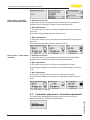
Main menu
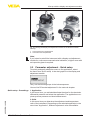
The main menu is divided into five sections with the following functions:
Setup: Settings, e.g., for measurement loop name, application, units,
position correction, adjustment, signal output
Display: Settings, e.g., for language, measured value display, lighting
Diagnosis: Information, e.g. on instrument status, pointer, measurement reliability, simulation
Additional adjustments: PIN, date/time, reset, copy function
Info: Instrument name, hardware and software version, date of manufacture, device ID, sensor features
Note:
For optimum adjustment of the measuring point, the individual submenu items in the main menu item "Setup" should be selected one
after the other and provided with the correct parameters. If possible,
go through the items in the given sequence.
The procedure is described below.
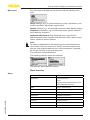
The following submenu points are available:
The submenu points described below.
Setup
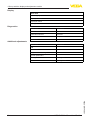
Menu overview
Menu item
Parameter
Application
Process pressure
Level
Activation/Deactivation Slave for electronic differential pressure
Units
Unit of measurement
Temperature unit
Position correction
Adjustment
Zero/Min. adjustment
46323-EN-140801
Span/Max. adjustment
Damping
Integration time
Linearization
Linearization type
Lock adjustment
VEGABAR 86 • Foundation Fieldbus
15