1
Contents
Contents
1 About this document
1.1Function............................................................................................................................ 4
1.2 Target group...................................................................................................................... 4
1.3 Symbols used................................................................................................................... 4
2 For your safety
2.1 Authorised personnel........................................................................................................ 5
2.2 Appropriate use................................................................................................................. 5
2.3 Warning about incorrect use.............................................................................................. 5
2.4 General safety instructions................................................................................................ 5
2.5 Safety label on the instrument........................................................................................... 6
2.6 CE conformity.................................................................................................................... 6
2.7 Fulfillment of NAMUR recommendations.......................................................................... 6
2.8 Safety instructions for Ex areas......................................................................................... 6
2.9 Environmental instructions................................................................................................ 6
3 Product description
3.1 Configuration..................................................................................................................... 7
3.2 Principle of operation........................................................................................................ 7
3.3Operation.......................................................................................................................... 8
3.4 Packaging, transport and storage...................................................................................... 8
4Mounting
4.1 General instructions........................................................................................................ 10
4.2 Mounting instructions...................................................................................................... 11
5 Connecting to power supply
5.1 Preparing the connection................................................................................................ 18
5.2 Connection procedure..................................................................................................... 19
5.3 Wiring plan, single chamber housing.............................................................................. 20
5.4 Wiring plan, double chamber housing............................................................................. 21
5.5 Wiring plan - version IP 66/IP 68, 1 bar............................................................................ 23
5.6 Switch-on phase............................................................................................................. 24
6 Set up with the display and adjustment module PLICSCOM
6.1 Short description............................................................................................................. 25
6.2 Insert display and adjustment module............................................................................. 25
6.3 Adjustment system.......................................................................................................... 26
6.4 Setup steps..................................................................................................................... 27
6.5 Menu schematic.............................................................................................................. 32
6.10 Saving the parameter adjustment data............................................................................ 33
8 Maintenance and fault rectification
8.1 Maintenance................................................................................................................... 37
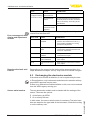
8.2 Rectify faults.................................................................................................................... 37
8.3 Exchanging the electronics module................................................................................. 38
2
VEGASON 62 • Foundation Fieldbus
28791-EN-141015
7 Set up with PACTware and other adjustment programs
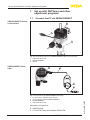
7.1 Connect the PC via VEGACONNECT............................................................................. 34
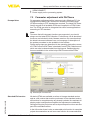
7.2 Parameter adjustment with PACTware............................................................................. 35
7.3 Parameter adjustment with AMS™................................................................................. 36
7.4 Saving the parameter adjustment data............................................................................ 36