1
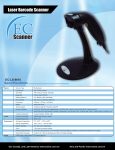
2.4G Wireless Barcode Scanner
User Manual
Technical parameters
Input voltage
Power
DC5V ±0.25V
425mW(work);500mW(instantaneous)
Battery Charge Time
2.5 Hours
Battery Scan Time
30 Hours
Current
Light
Laser Level
Decoding speed
25mA(work);95mA(instantaneous)
Visible light laser diode, wavelength 650 nm
Laser Level II laser safety standards
100 times / sec
Scan angle
±60°,±65°,±42°(about turn)
Resolution
0.10mm
(4mil)
Ability decode
UPC-A,UPC-E,EAN-13,EAN-8,ISBN/ISSN,Code 39 ,
int25,ind25,Coda bar,Code 128,Code 93,Code 11,
MSI/Plessey,UCC/EAN128……
Prompt manner
Buzzer,
indicator
Communication mode
Trigger manual
Interface Type
External dimension
Temperature
Humidity
LED
Communication
distance
30m (void)
2.4G wireless
Data memory
8K Byte
manual scanning
weight
153g
Shell material
ABS+PC
USB
164*67*95 mm(scanner)
71*24*9.3mm (acceptor)
0℃ to 45℃(work);-40℃ to 60℃(save)
5% to 90%
Seismic capacity
multiple 1.5 m drops to concrete floor impact
Program update
computer online updates
Aiming:Note:
The scanner performs best when it is not exactly
perpendicular to the barcode
1
Simple manual
Wireless setting and Default
Return to default
Wireless barcode scanner pair with the receiver
The scanner must be pair with a receiver then you can transfer the data
to your PC or other host.
Channel setting
We have paired the scanner with receiver and have a default channel
before we product it .And if you want make change the channel for the
scanner, please check the follow method .You can also accord to your own
needs to set channel, channel range is“ 01-20”
Method :please insert the receiver on your PC ,then in 20seconds you
use the scanner decode the “channel setting 01—20” code ,then scanner
two numbers between 0-9 (page 4 ) the number code .then you can use the
new channel .
Example : you need 06 as the new channel : pair at first then scan the
“Channel setting 01-20” then scan “0” then scan “6”that all .
Channel setting
2
01-20
Scanner ID setting
You can set the ID from 01-99 any number as the ID . For example ,if you
want set the ID as 23 ,please scan the code “Setting ID 01-99” at first then
scan the number code “2” and “3”.then you finish the ID setting step.
Setting ID
01-99
Add the ID as Prefix
Please scan the code “Open Identification as Prefix” If you want use
the ID as the Prefix, then you will find the ID in the front of the every barcode .
Open Identification as Prefix
Close Identification as Prefix *
3
Number code
0
1
2
3
4
5
6
7
8
9
4
power sleep time setting
Enter setting sleep time
Please choose the follow power sleep time
20sec *
30sec
60sec
2min
5min
10min
20min
No sleep
5
Working mode
Normal mode :Scan barcodes directly then the decoded data transfer to
the receiver and displayed on the PC or your host ,But if the transmission
fails (for example, over the transmission distance or the receiver is not open),
then issue a "de de de " sound prompts the user to transmission failure.
Normal mode *
Inventory mode:
When the scanner is not in the receiver’s operating range, please use
the Inventory mode 。First you can set the mode “Inventory mode” then
you scan the barcode ,the data will be stored in the scanner, In the end of your
work, you can scan the “Transfer data “,then the data will be transferred to
your PC or other host . You also can check how many data you had
decode .please scan the “Total number of data”.
After you transfer the data in the Inventory mode ,please scan the
“Clear data” then you can do the next work .
Inventory mode
Transfer data
Total number of data
Clear data
6
Multiscan Functions
Defaults
Buzzer Mode
Good Read Beep Tone-None
Good Read Beep Tone-Reset
Good Read Beep Duration
Save Mode-Enable
Reading Mode
Single Scan
Single Scan No Trigger
Multi Scan
Multi Scan No Trigger
Continuous Scan
Pulse Scan
7
Language
USA
German
France
Universal
Baud Rate
1200
2400
4800
9600*
19200
38400
8
Data Bit
8
7
Stop Bit
1
2
Parity Bit
NONE
ODD
EVEN
9
Code Symbol On/Off
CODE 11
Enable*
Disable
CODE 128
Enable*
Disable
CODE 39
Enable*
Disable
FULL ASCII Enable*
FULL ASCII Disable
CODE 93
Enable*
Disable
CODABAR
Enable*
Disable
10
Interleaved 2 Of 5
Enable*
Disable
Industrial 2 Of 5
Enable *
Disable
MSI/PLESSEY
Enable*
Disable
UPC-A
Enable*
Disable
UPC-E
Enable*
Disable
EAN-13
Enable*
Disable
EAN-8
Enable*
Disable
11
OTHER I
Expand UPC-E to UPC-A enable
Expand UPC-E to UPC-A Disable
Expand UPC-A to EAN-13 Enable
Expand UPC-A to EAN-13 Disable
Convert EAN-13 to ISBN Enable
Convert EAN-13 to ISBN Disable
Supplement Digits
UPC/EAN Supplements Disable*
UPC/EAN Supplements-2 only
UPC/EAN Supplements-5 only
UPC/EAN Supplements-2&5 only
CODABAR Send Chars Enable
CODABAR Send Chars Disable
CODE39 Send Chars Enable
CODE39 Send Chars Disable
12
OTHER II
Suffix setting
Termination Char-CR *
Termination Char-LF
Termination Char-CR+LF
None
Codes Preamble ‘STX’
Codes Preamble ‘ETX’
Convert To Uppercase
a→A
Convert To Lowercase
13
A→a