1
F1000 User's Manual
2.3 Communication
You can see the communication port on the back of the shell, can be used to connect such
as PLC or external devices.
2.3.1 Connected with external device
Cable requirements
With different external devices should be connected different communication cables.
[WARNING] Never plug communication cable when the device power on.
Attention
To avoid the problem of communication, please pay attention to that: the length of
communication cable with the connection of RS485 is no more than 150meters; the length of
communication cable with the connection of RS232 is no more than 15meters.
When the communication cable is too long or the communication cable needs to through the
electrical noise environment, you must make the communication cable by the shielding cable.
Do not wire the communication cable and AC power cable together or wire the
communication cable near the position of electrical noise source.
Please ensure that both ends of the connector communication cable and communication
port is connected closely and fixation.
Pin configuration
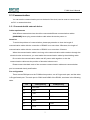
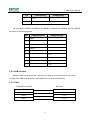
There are two DB9 ports on the F1000 series product, one is D-type male port, and the other
is D-type female port. The male port is COM1 and COM3 of the RS232, as shown in the following
table.
Pin
COM1[RS232]
1
Not used
2
RxD
3
TxD
4
5
TxD
GND
6
7
COM3[RS232]
RxD
RTS
7