1
EN
Using the remote
microphone
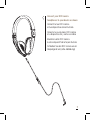
These RCF Iconica headphones
are equipped with a cable and
integrated microphone for use with
smartphones and music playback
devices.
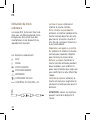
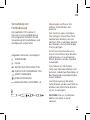
The functions available are:
PLAY
PAUSE SKIP TO NEXT TRACK SKIP TO PREVIOUS TRACK
ANSWER VOICE CONTROL VOLUME CONTROL + AND -
Playback and Pause: Press and
release the centre button.
Skip to the next or previous track:
Quickly press and release the centre
button twice to go to the next track,
three times to go to the previous
track.
Answer or end a call: Press and
release the centre button to answer.
Repeat to end the conversation.
Rejecting a call: Press and hold
the centre button for two seconds,
release it after hearing two “beeps”
which will confirm that the call has
been refused.
Volume Control: Press the top
button to increase the volume and
the lower one to decrease it.
CAUTION: These functions can vary
from device to device.
11