1
Basic Programming
Step 5: Function Mapping
Function Mapping Explained
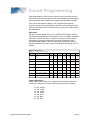
Function mapping allows the DSD to be reconfigured so that sound effects
and function outputs can respond to a different function key input. This is
especially useful for users who have throttles with less than thirteen function
keys as now they can pick and choose what effects they can control instead
of being restricted to an arbitrary assignment.
There are 14 function mapping CVs - twelve CVs, 35-46 are used to assign
output control to function keys 1 through 12 respectively.
The other two CVs, 33 and 34 are both for the F0 function. CV 33 controls
which outputs are on when F0 is on and the locomotive is moving forward.
CV 34 controls which outputs are on when F0 is on and the locomotive is
moving in reverse. If the same output is selected in both CV 33 and CV 34,
that function will turn on when the F0 function is on regardless of locomotive
direction.
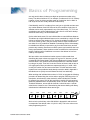
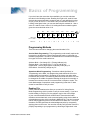
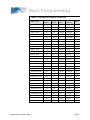
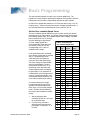
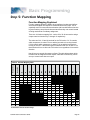
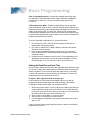
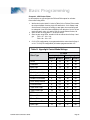
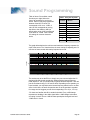
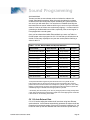
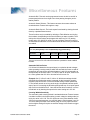
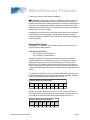
Not all keys can control all outputs or effects. The table below shows which
functions can be mapped to which outputs. Note that a function key can be
set up to control more than one output.
STM
WS
DIM
INJ
BRK
8
16
32
64
128
1
2
4
8
16
32
64
128
1
2
4
8
16
32
64
128
X
1
2
4
8
16
32
64
128
X
2
4
8
16
32
64
128
X
1
2
4
8
16
32
64
128
1
2
4
8
16
32
64
128
1
2
4
8
16
32
64
128
44
1
2
4
8
16
32
64
45
1
2
4
8
16
32
64
128
46
1
2
4
8
16
32
64
128
1
2
4
8
16
F0 (r)
34
1
2
4
8
16
F1
35
1
2
4
8
F2
36
1
2
4
F3
37
F4
38
F5
39
F6
40
F7
41
F8
42
F9
43
F10
F11
F12
1
X
FX5
33
X
X
CPL
SHW
128
F0 (f)
MUT
DYN
32
BEL
16
64
WH
128
32
64
64
BL
32
HL
FX6
Control CV
Function Key
Table F. Function Mapping Table
128
128
Bold Numbers indicate default settings.
Tsunami Steam Sound User’s Guide
Page 24