1
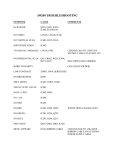
D9200 TROUBLESHOOTING
SYMPTOM
CAUSE
No RASTER
Q401, Q425, IC401,
IC403, FLYBACK
NO VIDEO
LW105, LW108, IC201
NO VERTICAL SCAN
IC403, R312, R314
DISTORTED VIDEO
IC403
"NO SIGNAL" MESSAGE LW105, P502
COMMENTS
CHANGE C810 TO 270UF/35V
105 DEG C (DELAYS START UP)
NO HORIZONTAL SCAN Q413, R462, R424, IC404,
R415, Q418
R462 (OPEN), R424 (SHORT)
HORIZ LINEARITY
C438 (COLD SOLDER)
LOW CONTRAST
ZD901, D414, SERIES RES
NO BRIGHTNESS
Q408
SHUT DOWN
IC401, IC805, IC806
220VAC W/NO 110VAC
IC801
NO B+ (170V)
IC802, D802
NO +12V
IC803
NO OSD
IC201
NO RED
IC201, R228, Q202
NO GREEN
IC201, R236, Q207
NO BLUE
IC201, R244, Q213
PINCUSION
Q401, Q402, Q403, IC403
MENU APPEARS
R106, RIBBON CABLE
W/R228 OPEN CHANGE IC201
CHANGE R106 TO 15K, KEEP
RIBBON CABLE AWAY FROM
POWER SUPPLY AREA
D9200 TROUBLESHOOTING
NOTE: Make sure there is No AC Power to the monitor when checking cable
connections.
SYMPTOM
REMEDY
“No Signal” message
Check all cable connections on
monitor interface board.
No power
Check AC power connection. Unplug
the signal cable to see if the “No
Signal” message appears on the
screen.
No video
Check RGB cable connection at top
of interface board. Adjust VR401 sub
brightness on the main board.
Color missing or low
Check the RGB cable on the
interface board. Adjust that color with
the on-screen menu. Select “Recall”
in menu.
Picture tilt
Adjust the rotation control on the
main board at VR101.
Screen discoloration
Press the “SEL” button on the control
board to degauss.
No degauss action
Check degauss coil plug at W801
next to the power plug.
Dim video
Adjust Brightness and Contrast with
the on-screen menu.
Video noise
Reroute ribbon cables and low
voltage wires away from the power
supply section and the high voltage
section of the main board.
No on-screen menu
Check ribbon cable from control
board to the main board.
Poor focus
Adjust middle control on flyback.