1
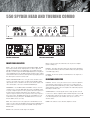
COMPRESSION – Adding a small amount of compression gives a fat bottom
end to the sound and allows a greater volume of amplification to be used
without the playing peaks distorting the amplifiers output stage.
You will also find that this will add definition to your playing bringing out
notes within a run more clearly as it evens out the dynamics of your playing.
A large amount of compression can be used as an effect but it will tend to
reduce the dynamics in your playing to such an extent that the volume of the
note will be the same no matter how hard or soft you hit the string.
Compression also adds sustain to notes making them longer before they die
away.
The Compression Level control adjusts the degree of compression applied to
the bass signal. For this to function correctly the Input Level must be
correctly set as described in the INPUT CONTROL section (left).
When the Input Level is correctly set there will be hardly any difference in
volume between Compression IN and Compression OUT. This is because the
amplifier automatically compensates for the reduction in level that would be
apparent when Compression is added by increasing the overall gain to
restore the volume to its pre compression level, because of this you may
notice an increase in background noise with high compression settings.
COMPRESSION IN/OUT – This push button switches the Compression IN or
OUT. This function may also be controlled from the Ashdown 4 way
footswitch. For the footswitch to operate this button must be in its OUT
position.
SUB HARMONICS - This section produces Sub Harmonics an octave below
the notes being played. The level of these Sub Harmonics relative to the
straight bass sound can be adjusted using the LEVEL control.
This is very effective in thickening the sound and you will find in use that only
a small degree of this lower octave is required to really fill out the sound and
provide a character that is not possible by any other means.
i.e. pressing this button mutes all sound from the amplifier and allows a tuner
connected to the TUNER socket to operate for silent tuning. Release the
button and you are back in action again.
TUNER OUT - This output socket provides a line level signal that can be used
for a permanent connection to a tuner.
The signal from this socket remains when all other outputs from the amplifier
are Muted allowing all sound from the amplifier to be silenced while tuning is
in progress.
LINE OUT -This output socket provides a line level/post Output Level control
signal for connection to an external power amplifier driving additional speaker
cabinets.
OUTPUT LEVEL - The OUTPUT control adjusts the overall level of the
amplifier. Adjust this for your preferred overall stage playing volume.can be
produced by this type of amplifier. Do not operate for prolonged periods of
time at high volume without suitable ear protection, or at a level that causes
you discomfort in any way.
REAR PANEL FACILITIES
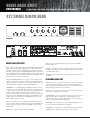
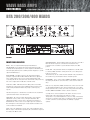
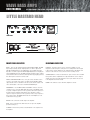
LINE INPUT - The rear panel has a Line Input socket for connection of other
signal sources into the system. This can be used for plugging a CD, Tape or
MP3 player into the amplifier for practising, rehearsing or for connection of a
second pre-amp into the system.
EFFECTS SEND / RETURN - A serial effects loop is provided at a level of 0dB.
The EFFECTS SEND socket can also be used as a Line Out socket if required
as the signal path through the preamp is only broken when a jack plug is
inserted into the EFFECTS RETURN socket.
The EFFECTS SEND is situated after the EQ, the Valve section the
Compression and the Sub Bass Processor.
The degree of Sub Harmonics is also dependant on the setting of the BASS
control.
DIRECT INJECT (D.I.) - A balanced D.I. is provided on a latching XLR socket.
This has a push button placed below it that allows the user to choose either
a Pre E.Q. signal (button pushed IN) or a Post E.Q. Post Sub and effects
signal (button OUT).
4-WAY FOOTSWITCH SOCKET - For the 4 way footswitch to operate it is
essential that the corresponding front panel push buttons be in the OUT
position. This is a mono jack socket for connection of the supplied Ashdown
4 way footswitch only.
The output signal from this XLR socket is set to a level and impedance
suitable for connecting directly into the Microphone input of a mixing desk for
either Direct Injection into the PA system or for recording. This must ONLY be
used into a Balanced Microphone input, it is not intended for any other type
of connection.
Always connect this prior to turning on the power to the amplifier as the
footswitch derives its power from the amplifier and sends a serial data
stream to the amplifier in order to operate the various functions.
Each of the 4 facilities available for selection is indicated by an LED that will
light when that facility is selected from the footswitch.
This has a floating ground that is referenced to the mixing console it is
plugged into and should not need ground lifting. It is also unaffected by
Phantom Powering on the Microphone input.
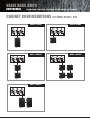
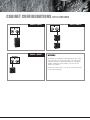
SPEAKER OUTPUTS - There are dedicated Speakon connectors for 2, 4 and
8Ω load speaker cabinet configurations. It is important that the correct
output or outputs are used to match the impedance load of your cabinets.
Please refer to the diagrams later in this manual.
Make sure your XLR plug does not have the shell of the plug internally
connected to signal ground or this will connect the system to chassis ground
of the ABM and may cause problems with hum.
PUSH TO MUTE - When pushed IN this button mutes the output from the
preamp to the power amp, mutes the output from the D.I. socket and mutes
the output from the LINE Out socket as well. This leaves the output from the
TUNER socket still available to allow muted tuning. An LED is provided next to
this switch to indicate when the amplifier is muted. This function operates
only from the front panel MUTE push switch.
OFF/PREHEAT - Use this switch to pre-heat the valves, bringing them up to
the correct operating temperature before performing.
STANDBY/FULL - No signal is sent to the speakers when this switch is in the
STANDBY position. Switch to FULL when you are ready to perform.