1
3. To view the scheduled cleaning time
Press “SET” button twice to enter “Schedule Cleaning Mode” and view
the scheduled cleaning tasks.
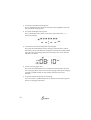
4. To cancel scheduled cleaning time
Press “SET” button twice, then set the hour and minute until “-” is
shown (see below).
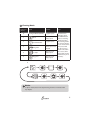
5. To set Eclean to start cleaning after fully charged
Press and hold “GO” button on the recharging dock about 1 second,
the battery, brush and GO icons will display as below.Press “GO” button
again to cancel this setting.Note: Eclean will only clean once after this
function is enabled.
6. To start cleaning right away
Press and hold “GO” button over 5 seconds to instruct Eclean to leave
the recharging dock, and it will start cleaning regardless of its charging
status.The “START” button on the remote control has the same
function.
7. To use the remote control to start cleaning
You can also press “START” button to set Eclean to start cleaning tasks
while it is charging at the dock.
14