1
Using PQF Files Manager
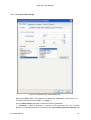
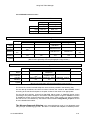
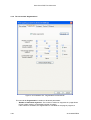
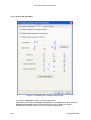
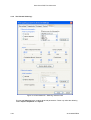
List of NIPSON screens to use :
480 DPI MACHINES
Standard
Light
VaryPress
75 Lpi
N7000
85 Lpi
V75std.scn
N85.scn
V75lit.scn
N85L.scn
Very Light
N85XL.scn
600 DPI MACHINES with type "C" heads
96 Lpi
85 Lpi
Dark
Medium Dark
Bayer
Standard
Light
S96cB.scn
Bayer
Modified
Random
106 Lpi
S96cBmod_Dark
.scn
S96cBmod.scn
S85cRFT
.scn
Pseudo
Random
S96cRFT.scn
S106cRFT
.scn
S96cRP.scn
S96cPSR_Dark8 S96cPSR_MDark12 S96cPSR_Std16 S96cPSR_Light20
.scn
.scn
.scn
.scn
With this mode you can use all screens
( But we use it generally with the photographic image screen )
Hybrid
600 DPI MACHINES with type "P" heads
85 Lpi
Dark
Bayer
Bayer Modified
Pseudo
Random
Hybrid
96 Lpi
Standard
106 Lpi
Light
S96pB.scn
S96pBmod_Dark
S96pBmod.scn
.scn
S96pPSR_Dark8 S96pPSR_Std12 S96pPSR_Light16
.scn
.scn
.scn
With this mode you can use all screens
( But we use it generally with the photographic image screen )
The choice of a screen is a little subjective. One can then proceed in the following way:
For the 480 dpi machines, the choice is limited. Choose the V75std or N85 standard screen
according to the machine and pass to the paler versions if the result is not appropriate.
For the 600 dpi machines, choose first S96cPSR_Std16 screen or S96pPSR_Std16 screen
(according to the printer heads) for documents with photographic images or S96cBmod screen
or S96pBmod screen for documents with grayed zones. Other screens can then be tested if
this first choice is not satisfactory. See also the documentation ImageGuide_Us.pdf in the CD
for more detailed information.
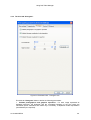
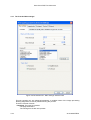
The Nipson dispersed dithering is the second dithering mode. It is a dispersed mode
using a Floyd & Steinberg type filter. This filter is modified and adapted to NIPSON printers.
22 A2 55NS REV2
3-15