1
User’s guide
P2/4
recommendations
P3/4
Other fixing possibilities
1 - Temperature conditioning:
Beware: if you don’t want to use the brackets supplied with the product on a flat surface, here are our recommendations.
before the set-up, please store the bar during 24 hours in its package, at the operating temperature (the packaging will slow down the crossing time from 20°C to 5°C – and the air vent will balance both the pressures and
the humidity).
1 - You can use clamps. Please place them on the o-ring of the tube. Do not press it, to avoid any pressure or fissure.
2 - Setting up:
as soon as the product is brought out of its packaging, please set up, immediately connect the fans and turn them on.
3 - Use:
• never turn off the fans,
• u nless it is used in continuous mode, do not put the bar in a place where the temperature may vary rapidly (close
to the door of a refrigerator at -20°C),
• do not wash the product with warm water (max 80°C) more than 1 minute, to avoid any condensation phenomenon,
• if the product is working in continuous mode, do not turn it off during the cleaning,
• if the product is working in strobe mode, please respect the following steps during the cleaning with warm water:
-
2-Y
ou can also mount the tube with your own brackets. Then, you have to insert rubber blocks, to avoid any pressure
on the tube.
switch the bar on in continuous mode (at least one color for RGB bars) during 30 minutes,
clean the product while it is turned on,
turn it off, but keep the fans on during 1 hour,
you can now use the bar in strobe mode again.
fixing
In all cases, if the mounting recommendations are not followed, TPL Vision can decide to cancel the warranty in case
of damage.
Connection
To connect the lighting, please refer to the associated user’s guide. To prevent any steam appearance inside the product,
you need to power the ventilation system. The fan has to work 24 hours a day.
Ventilation connection
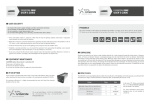
Brown wire : + 24 V
Blue wire : GND