Transcript
USER GUIDE
HLS 21
V2.0 (28.06.2012)
1 (1)
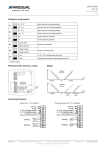
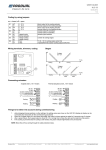
Wiring terminals, trimmers, coding
Stages
Wiring
Coding by using jumpers
S1
Valve jam prevention
Valve jam prevention on
Valve jam prevention off
S2
Proportional band (Xp)
2 °C
1 °C
S3
Centre of user set point area
The user set point area centre (factory setting
21 °C) can be changed by turning the
potentiometer to the desired position and then
removing and replacing the jumper.
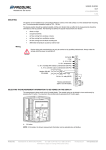
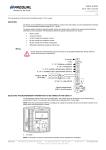
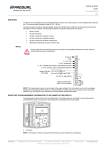
Things to be taken into account during commissioning
1.
2.
while changing trimmer positions or other settings, the setting values are shown on the HLS 21-N display (a display can be
connected also temporarily for the commissioning procedure)
if the cooling is prevented but the cooling is still needed, the green indicator light flashes every 30 seconds
NOTE: Block the air flow coming through the cable protection tubes.
Produal Oy
Keltakalliontie 18, 48770 Kotka FINLAND
Tel: +358-5-230 9200 / Fax: +358-5-230 9210
Information is subject to change without prior notice.
[email protected]
www.produal.com