1
SQL*Plus®
User’s Guide and Reference
Release 10.2
B14357-01
June 2005
SQL*Plus User’s Guide and Reference, Release 10.2
B14357-01
Copyright © 1996, 2005 Oracle. All rights reserved.
Primary Author:
Simon Watt
Contributor: Alison Goggin, Alison Holloway, Anil Samuel, Christopher Jones, Luan Nim, Richard
Rendell, Andrei Souleimanian.
The Programs (which include both the software and documentation) contain proprietary information; they
are provided under a license agreement containing restrictions on use and disclosure and are also protected
by copyright, patent, and other intellectual and industrial property laws. Reverse engineering, disassembly,
or decompilation of the Programs, except to the extent required to obtain interoperability with other
independently created software or as specified by law, is prohibited.
The information contained in this document is subject to change without notice. If you find any problems in
the documentation, please report them to us in writing. This document is not warranted to be error-free.
Except as may be expressly permitted in your license agreement for these Programs, no part of these
Programs may be reproduced or transmitted in any form or by any means, electronic or mechanical, for any
purpose.
If the Programs are delivered to the United States Government or anyone licensing or using the Programs on
behalf of the United States Government, the following notice is applicable:
U.S. GOVERNMENT RIGHTS Programs, software, databases, and related documentation and technical data
delivered to U.S. Government customers are "commercial computer software" or "commercial technical data"
pursuant to the applicable Federal Acquisition Regulation and agency-specific supplemental regulations. As
such, use, duplication, disclosure, modification, and adaptation of the Programs, including documentation
and technical data, shall be subject to the licensing restrictions set forth in the applicable Oracle license
agreement, and, to the extent applicable, the additional rights set forth in FAR 52.227-19, Commercial
Computer Software—Restricted Rights (June 1987). Oracle Corporation, 500 Oracle Parkway, Redwood City,
CA 94065
The Programs are not intended for use in any nuclear, aviation, mass transit, medical, or other inherently
dangerous applications. It shall be the licensee's responsibility to take all appropriate fail-safe, backup,
redundancy and other measures to ensure the safe use of such applications if the Programs are used for such
purposes, and we disclaim liability for any damages caused by such use of the Programs.
Oracle, JD Edwards, PeopleSoft, and Retek are registered trademarks of Oracle Corporation and/or its
affiliates. Other names may be trademarks of their respective owners.
The Programs may provide links to Web sites and access to content, products, and services from third
parties. Oracle is not responsible for the availability of, or any content provided on, third-party Web sites.
You bear all risks associated with the use of such content. If you choose to purchase any products or services
from a third party, the relationship is directly between you and the third party. Oracle is not responsible for:
(a) the quality of third-party products or services; or (b) fulfilling any of the terms of the agreement with the
third party, including delivery of products or services and warranty obligations related to purchased
products or services. Oracle is not responsible for any loss or damage of any sort that you may incur from
dealing with any third party.
Contents
Preface ............................................................................................................................................................... xiii
Audience..................................................................................................................................................... xiii
Documentation Accessibility ................................................................................................................... xiii
Related Documents ................................................................................................................................... xiv
Conventions ............................................................................................................................................... xv
What’s New in SQL*Plus? ..................................................................................................................... xvii
New Features in SQL*Plus Release 10.2................................................................................................
xvii
SQL*Plus Quick Start .............................................................................................................................. xix
SQL*Plus Resources .................................................................................................................................. xix
SQL*Plus Overview .................................................................................................................................. xix
SQL*Plus Prerequisites ............................................................................................................................ xxii
Starting SQL*Plus Command-line ......................................................................................................... xxii
Starting SQL*Plus Windows GUI ......................................................................................................... xxiv
Starting iSQL*Plus................................................................................................................................... xxiv
Starting SQL*Plus Instant Client ........................................................................................................... xxv
Connecting to a Different Database...................................................................................................... xxv
Sample Schemas and SQL*Plus............................................................................................................. xxv
Running your first Query....................................................................................................................... xxvi
Exiting SQL*Plus .................................................................................................................................... xxvii
Part I
1
SQL*Plus Getting Started
SQL*Plus User Interface
SQL*Plus Command-line User Interface.............................................................................................
The Command-line Screen................................................................................................................
Changing the Command-line Font and Font Size .........................................................................
Windows Graphical User Interface.......................................................................................................
Using the Mouse to Copy Text to the Command Prompt ...........................................................
Using Command Keys.......................................................................................................................
Using the Windows GUI Menus......................................................................................................
Changing the Windows GUI Font and Font Size ..........................................................................
iSQL*Plus User Interface ........................................................................................................................
1-1
1-1
1-1
1-2
1-3
1-3
1-3
1-6
1-7
iii
iSQL*Plus Navigation........................................................................................................................ 1-7
iSQL*Plus Login Screen..................................................................................................................... 1-8
iSQL*Plus DBA Login Screen ........................................................................................................... 1-9
iSQL*Plus Workspace..................................................................................................................... 1-11
iSQL*Plus DBA Workspace ........................................................................................................... 1-13
iSQL*Plus History Screen............................................................................................................... 1-13
iSQL*Plus Input Required Screen................................................................................................. 1-14
iSQL*Plus Preferences Screen........................................................................................................ 1-15
Preferences and Equivalent SET Commands .................................................................................. 1-18
2
Configuring SQL*Plus
SQL*Plus and iSQL*Plus Environment Variables............................................................................. 2-1
SQL*Plus and iSQL*Plus Configuration............................................................................................. 2-4
Site Profile ........................................................................................................................................... 2-5
User Profile.......................................................................................................................................... 2-5
Storing and Restoring SQL*Plus System Variables....................................................................... 2-6
Installing Command-line Help ........................................................................................................ 2-7
Configuring Oracle Net Services ..................................................................................................... 2-9
iSQL*Plus Application Server Configuration .................................................................................... 2-9
Changing the iSQL*Plus Application Server Port in Use............................................................. 2-9
Testing if the iSQL*Plus Application Server is Running ........................................................... 2-10
Setting the Level of iSQL*Plus Logging....................................................................................... 2-11
Setting the Session Time Out......................................................................................................... 2-11
Enabling Restricted Database Access ........................................................................................... 2-12
Enabling iSQL*Plus DBA Access .................................................................................................. 2-13
Enabling SSL with iSQL*Plus ........................................................................................................ 2-15
Enabling iSQL*Plus or iSQL*Plus Help ....................................................................................... 2-18
Enabling Unauthorised Access Banner........................................................................................ 2-18
Enabling URL Access...................................................................................................................... 2-19
Enabling User Defined HTML Markup ....................................................................................... 2-19
iSQL*Plus Web Browser Configuration ........................................................................................... 2-20
Session Integrity .............................................................................................................................. 2-20
Retained Session Settings............................................................................................................... 2-20
Windows Graphical User Interface Configuration......................................................................... 2-20
Setting Options and Values Using the Environment Dialog .................................................... 2-21
Customizing Registry Entries that affect SQL*Plus on Windows ........................................... 2-22
3
Starting SQL*Plus
Login Username and Password .............................................................................................................
Secure External Password Store.......................................................................................................
Expired Password ..............................................................................................................................
Expired Password Screen in iSQL*Plus ..........................................................................................
Changing your Password .................................................................................................................
Changing Your Password in iSQL*Plus..........................................................................................
Connecting to a Database .......................................................................................................................
Net Service Name...............................................................................................................................
Full Connection Identifier .................................................................................................................
iv
3-1
3-2
3-2
3-2
3-3
3-3
3-4
3-4
3-5
Easy Connection Identifier ............................................................................................................... 3-5
Connectionless Session with /NOLOG .......................................................................................... 3-6
Starting SQL*Plus .................................................................................................................................... 3-6
Starting Command-line SQL*Plus ................................................................................................... 3-6
Getting Command-line Help ............................................................................................................ 3-7
Starting the Windows Graphical User Interface............................................................................ 3-7
Starting the iSQL*Plus Application Server..................................................................................... 3-8
To Check the HTTP Port used by the iSQL*Plus Application Server ........................................ 3-9
Stopping the iSQL*Plus Application Server................................................................................ 3-10
Starting iSQL*Plus........................................................................................................................... 3-10
Starting iSQL*Plus as a DBA ......................................................................................................... 3-10
Starting iSQL*Plus from a URL..................................................................................................... 3-11
Getting Help in iSQL*Plus ............................................................................................................. 3-12
Exiting SQL*Plus................................................................................................................................... 3-12
Exiting the Command-line User Interface ................................................................................... 3-13
Exiting the Windows Graphical User Interface .......................................................................... 3-13
Exiting the iSQL*Plus User Interface............................................................................................ 3-13
SQLPLUS Program Syntax .................................................................................................................. 3-13
Options ............................................................................................................................................. 3-14
Logon ................................................................................................................................................ 3-18
Start ................................................................................................................................................... 3-19
Part II
4
Using SQL*Plus
SQL*Plus Basics
Entering and Executing Commands ..................................................................................................... 4-1
The SQL Buffer ................................................................................................................................... 4-2
Executing Commands ....................................................................................................................... 4-2
Listing a Table Definition....................................................................................................................... 4-3
Listing PL/SQL Definitions.................................................................................................................... 4-3
Running SQL Commands....................................................................................................................... 4-4
Understanding SQL Command Syntax .......................................................................................... 4-5
Running PL/SQL Blocks ......................................................................................................................... 4-6
Creating Stored Procedures .............................................................................................................. 4-6
Running SQL*Plus Commands............................................................................................................. 4-7
Understanding SQL*Plus Command Syntax ................................................................................. 4-8
System Variables that Affect How Commands Run.......................................................................... 4-8
Stopping a Command while it is Running ......................................................................................... 4-9
Running Operating System Commands.............................................................................................. 4-9
Pausing the Display .............................................................................................................................. 4-10
Saving Changes to the Database Automatically ............................................................................. 4-10
Interpreting Error Messages................................................................................................................ 4-11
5
Using Scripts in SQL*Plus
Editing Scripts........................................................................................................................................... 5-1
Writing Scripts with a System Editor.............................................................................................. 5-1
v
Editing Scripts in SQL*Plus Command-Line ..................................................................................... 5-2
Listing the Buffer Contents ............................................................................................................... 5-3
Editing the Current Line ................................................................................................................... 5-4
Appending Text to a Line ................................................................................................................ 5-5
Adding a New Line............................................................................................................................ 5-6
Deleting Lines .................................................................................................................................... 5-7
Placing Comments in Scripts ................................................................................................................. 5-7
Using the REMARK Command ....................................................................................................... 5-7
Using /*...*/ ........................................................................................................................................ 5-7
Using -- ................................................................................................................................................ 5-8
Notes on Placing Comments ............................................................................................................ 5-8
Running Scripts ..................................................................................................................................... 5-10
Running a Script as You Start SQL*Plus...................................................................................... 5-10
Nesting Scripts....................................................................................................................................... 5-11
Exiting from a Script with a Return Code ........................................................................................ 5-11
Defining Substitution Variables ........................................................................................................ 5-11
Using Predefined Variables................................................................................................................. 5-12
Using Substitution Variables .............................................................................................................. 5-12
Where and How to Use Substitution Variables .......................................................................... 5-12
Avoiding Unnecessary Prompts for Values ................................................................................ 5-14
Restrictions ...................................................................................................................................... 5-17
System Variables and iSQL*Plus Preferences ............................................................................. 5-17
Substitution Variables in iSQL*Plus................................................................................................. 5-17
iSQL*Plus Input Required Screen................................................................................................. 5-18
Passing Parameters through the START Command ....................................................................... 5-19
Communicating with the User............................................................................................................ 5-20
Receiving a Substitution Variable Value ................................................................................... 5-20
Customizing Prompts for Substitution Variable ....................................................................... 5-21
Sending a Message and Accepting Return as Input .................................................................. 5-22
Clearing the Screen ......................................................................................................................... 5-22
Using Bind Variables ............................................................................................................................ 5-23
Creating Bind Variables ................................................................................................................. 5-23
Referencing Bind Variables............................................................................................................ 5-23
Displaying Bind Variables ............................................................................................................. 5-23
Using REFCURSOR Bind Variables .................................................................................................. 5-24
6
Formatting SQL*Plus Reports
Formatting Columns ................................................................................................................................
Changing Column Headings............................................................................................................
Formatting NUMBER Columns .......................................................................................................
Formatting Datatypes ........................................................................................................................
Copying Column Display Attributes ..............................................................................................
Listing and Resetting Column Display Attributes ........................................................................
Suppressing and Restoring Column Display Attributes..............................................................
Printing a Line of Characters after Wrapped Column Values ....................................................
Clarifying Your Report with Spacing and Summary Lines .............................................................
Suppressing Duplicate Values in Break Columns.........................................................................
vi
6-1
6-1
6-3
6-4
6-6
6-7
6-7
6-8
6-9
6-9
Inserting Space when a Break Column's Value Changes..........................................................
Inserting Space after Every Row...................................................................................................
Using Multiple Spacing Techniques.............................................................................................
Listing and Removing Break Definitions ....................................................................................
Computing Summary Lines when a Break Column's Value Changes....................................
Computing Summary Lines at the End of the Report ...............................................................
Computing Multiple Summary Values and Lines .....................................................................
Listing and Removing COMPUTE Definitions ..........................................................................
Defining Page and Report Titles and Dimensions .........................................................................
Setting the Top and Bottom Titles and Headers and Footers...................................................
Displaying System-Maintained Values in Titles ........................................................................
Listing, Suppressing, and Restoring Page Title Definitions .....................................................
Displaying Column Values in Titles ............................................................................................
Displaying the Current Date in Titles ..........................................................................................
Setting Page Dimensions................................................................................................................
Storing and Printing Query Results ..................................................................................................
Creating a Flat File ..........................................................................................................................
Sending Results to a File ................................................................................................................
Sending Results to a Printer...........................................................................................................
7
Generating HTML Reports from SQL*Plus
Creating Reports using Command-line SQL*Plus ............................................................................
Creating Reports.................................................................................................................................
Suppressing the Display of SQL*Plus Commands in Reports ....................................................
HTML Entities ....................................................................................................................................
Creating Reports using iSQL*Plus .......................................................................................................
8
6-10
6-11
6-11
6-12
6-12
6-15
6-16
6-17
6-17
6-18
6-21
6-22
6-23
6-24
6-24
6-26
6-26
6-27
6-27
7-1
7-1
7-5
7-5
7-5
Tuning SQL*Plus
Tracing Statements ...................................................................................................................................
Controlling the Autotrace Report ....................................................................................................
Execution Plan ....................................................................................................................................
Statistics ...............................................................................................................................................
Collecting Timing Statistics ...................................................................................................................
Tracing Parallel and Distributed Queries............................................................................................
Execution Plan Output in Earlier Databases.......................................................................................
SQL*Plus Script Tuning ..........................................................................................................................
COLUMN NOPRINT ........................................................................................................................
SET APPINFO OFF ............................................................................................................................
SET ARRAYSIZE ................................................................................................................................
SET DEFINE OFF ...............................................................................................................................
SET FLUSH OFF .................................................................................................................................
SET LINESIZE.....................................................................................................................................
SET LONGCHUNKSIZE...................................................................................................................
SET PAGESIZE ...................................................................................................................................
SET SERVEROUTPUT.......................................................................................................................
SET SQLPROMPT ..............................................................................................................................
8-1
8-1
8-2
8-3
8-5
8-6
8-7
8-8
8-8
8-8
8-8
8-9
8-9
8-9
8-9
8-9
8-9
8-9
vii
SET TAB............................................................................................................................................ 8-10
SET TERMOUT................................................................................................................................ 8-10
SET TRIMOUT ON
SET TRIMSPOOL ON 8-10
UNDEFINE ...................................................................................................................................... 8-10
9
SQL*Plus Security
PRODUCT_USER_PROFILE Table ......................................................................................................
Creating the PUP Table .....................................................................................................................
PUP Table Structure...........................................................................................................................
Description and Use of PUP Columns ............................................................................................
PUP Table Administration................................................................................................................
Disabling SQL*Plus, SQL, and PL/SQL Commands ........................................................................
Creating and Controlling Roles.............................................................................................................
Disabling SET ROLE ..........................................................................................................................
Disabling User Roles..........................................................................................................................
Disabling Commands with SQLPLUS -RESTRICT ..........................................................................
Program Argument Security...................................................................................................................
iSQL*Plus Security ..................................................................................................................................
Enabling SSL with iSQL*Plus ...........................................................................................................
Administration Privileges .................................................................................................................
Enabling DBA Access ........................................................................................................................
Enabling or Disabling Restricted Database Access .......................................................................
Security Usage Notes.........................................................................................................................
10
Database Administration with SQL*Plus
Overview .................................................................................................................................................
Introduction to Database Startup and Shutdown...........................................................................
Database Startup .............................................................................................................................
Database Shutdown ........................................................................................................................
Redo Log Files........................................................................................................................................
ARCHIVELOG Mode .....................................................................................................................
Database Recovery ................................................................................................................................
11
10-1
10-1
10-1
10-2
10-3
10-3
10-3
SQL*Plus Globalization Support
Configuring Globalization Support in Command-line SQL*Plus..............................................
SQL*Plus Client ...............................................................................................................................
Oracle Database ...............................................................................................................................
Configuring Multiple Language Support in iSQL*Plus ...............................................................
Web Browser....................................................................................................................................
Application Server ..........................................................................................................................
NLS_LANG Environment Variable ...................................................................................................
Viewing NLS_LANG Settings .......................................................................................................
Setting NLS_LANG ..............................................................................................................................
Part III
viii
9-1
9-1
9-2
9-2
9-3
9-3
9-5
9-5
9-5
9-6
9-7
9-7
9-8
9-8
9-8
9-8
9-8
SQL*Plus Reference
11-1
11-1
11-1
11-1
11-2
11-2
11-3
11-3
11-4
12
SQL*Plus Command Reference
SQL*Plus Command Summary ..........................................................................................................
@ ("at" sign) .............................................................................................................................................
@@ (double "at" sign) ............................................................................................................................
/ (slash).....................................................................................................................................................
ACCEPT.................................................................................................................................................
APPEND................................................................................................................................................
ARCHIVE LOG ...................................................................................................................................
ATTRIBUTE .........................................................................................................................................
BREAK...................................................................................................................................................
BTITLE ..................................................................................................................................................
CHANGE ..............................................................................................................................................
CLEAR ...................................................................................................................................................
COLUMN..............................................................................................................................................
COMPUTE ............................................................................................................................................
CONNECT ............................................................................................................................................
COPY......................................................................................................................................................
DEFINE..................................................................................................................................................
Predefined Variables.....................................................................................................................
DEL.........................................................................................................................................................
DESCRIBE ............................................................................................................................................
DISCONNECT.....................................................................................................................................
EDIT .......................................................................................................................................................
EXECUTE ..............................................................................................................................................
EXIT........................................................................................................................................................
GET ........................................................................................................................................................
HELP ......................................................................................................................................................
HOST .....................................................................................................................................................
INPUT....................................................................................................................................................
LIST........................................................................................................................................................
PASSWORD .........................................................................................................................................
PAUSE....................................................................................................................................................
PRINT ....................................................................................................................................................
PROMPT ...............................................................................................................................................
RECOVER ............................................................................................................................................
REMARK ..............................................................................................................................................
REPFOOTER ........................................................................................................................................
REPHEADER........................................................................................................................................
RUN........................................................................................................................................................
SAVE ......................................................................................................................................................
SET .........................................................................................................................................................
SET System Variable Summary ........................................................................................................
SET APPI[NFO]{ON | OFF | text} .............................................................................................
SET ARRAY[SIZE] {15 | n} ..........................................................................................................
SET AUTO[COMMIT]{ON | OFF | IMM[EDIATE] | n} .......................................................
SET AUTOP[RINT] {ON | OFF}.................................................................................................
SET AUTORECOVERY [ON | OFF] ..........................................................................................
12-2
12-5
12-7
12-9
12-10
12-12
12-13
12-16
12-18
12-22
12-24
12-26
12-28
12-36
12-41
12-43
12-44
12-46
12-49
12-51
12-57
12-58
12-60
12-61
12-63
12-64
12-65
12-66
12-68
12-70
12-71
12-72
12-73
12-74
12-81
12-82
12-84
12-87
12-88
12-89
12-90
12-93
12-94
12-95
12-96
12-97
ix
SET AUTOT[RACE] {ON | OFF | TRACE[ONLY]} [EXP[LAIN]] [STAT[ISTICS]]........... 12-98
SET BLO[CKTERMINATOR] {. | c | ON | OFF} .................................................................... 12-99
SET CMDS[EP] {; | c | ON | OFF}........................................................................................... 12-100
SET COLSEP { | text} ................................................................................................................. 12-101
SET CON[CAT] {. | c | ON | OFF}.......................................................................................... 12-102
SET COPYC[OMMIT] {0 | n} .................................................................................................... 12-103
SET COPYTYPECHECK {ON | OFF} ...................................................................................... 12-104
SET DEF[INE] {& | c | ON | OFF} .......................................................................................... 12-105
SET DESCRIBE [DEPTH {1 | n | ALL}] [LINENUM {ON | OFF}] [INDENT {ON | OFF}]..........
12-106
SET ECHO {ON | OFF}.............................................................................................................. 12-107
SET EDITF[ILE] file_name[.ext] .................................................................................................. 12-108
SET EMB[EDDED] {ON | OFF} ................................................................................................ 12-109
SET ESC[APE] {\ | c | ON | OFF}........................................................................................... 12-110
SET FEED[BACK] {6 | n | ON | OFF} .................................................................................... 12-111
SET FLAGGER {OFF | ENTRY | INTERMED[IATE] | FULL}.......................................... 12-112
SET FLU[SH] {ON | OFF}.......................................................................................................... 12-113
SET HEA[DING] {ON | OFF} ................................................................................................... 12-114
SET HEADS[EP] { | | c | ON | OFF} ..................................................................................... 12-115
SET INSTANCE [instance_path | LOCAL] .............................................................................. 12-116
SET LIN[ESIZE] {80 | n}
SET LIN[ESIZE] {150 | n} in iSQL*Plus 12-117
SET LOBOF[FSET] {1 | n} .......................................................................................................... 12-118
SET LOGSOURCE [pathname] ................................................................................................... 12-119
SET LONG {80 | n} ..................................................................................................................... 12-120
SET LONGC[HUNKSIZE] {80 | n}........................................................................................... 12-121
SET MARK[UP] HTML [ON | OFF] [HEAD text] [BODY text] [TABLE text] [ENTMAP {ON |
OFF}] [SPOOL {ON | OFF}] [PRE[FORMAT] {ON | OFF}] 12-122
SET NEWP[AGE] {1 | n | NONE} ........................................................................................... 12-124
SET NULL text ............................................................................................................................. 12-125
SET NUMF[ORMAT] format...................................................................................................... 12-126
SET NUM[WIDTH] {10 | n} ...................................................................................................... 12-127
SET PAGES[IZE] {14 | n} ........................................................................................................... 12-128
SET PAU[SE] {ON | OFF | text} ............................................................................................... 12-129
SET RECSEP {WR[APPED] | EA[CH] | OFF} ....................................................................... 12-130
SET RECSEPCHAR { | c} .......................................................................................................... 12-131
SET SERVEROUT[PUT] {ON | OFF} [SIZE {n | UNL[IMITED]}] [FOR[MAT] {WRA[PPED]
| WOR[D_WRAPPED] | TRU[NCATED]}] 12-132
SET SHIFT[INOUT] {VIS[IBLE] | INV[ISIBLE]} .................................................................... 12-134
SET SHOW[MODE] {ON | OFF} .............................................................................................. 12-135
SET SQLBL[ANKLINES] {ON | OFF} ..................................................................................... 12-136
SET SQLC[ASE] {MIX[ED] | LO[WER] | UP[PER]} ............................................................. 12-137
SET SQLCO[NTINUE] {> | text}.............................................................................................. 12-138
SET SQLN[UMBER] {ON | OFF} ............................................................................................. 12-139
SET SQLPLUSCOMPAT[IBILITY] {x.y[.z]} ............................................................................. 12-140
SET SQLPRE[FIX] {# | c} ............................................................................................................ 12-142
SET SQLP[ROMPT] {SQL> | text} ............................................................................................ 12-143
SET SQLT[ERMINATOR] {; | c | ON | OFF} ........................................................................ 12-144
x
SET SUF[FIX] {SQL | text} .........................................................................................................
SET TAB {ON | OFF}..................................................................................................................
SET TERM[OUT] {ON | OFF} ...................................................................................................
SET TI[ME] {ON | OFF}.............................................................................................................
SET TIMI[NG] {ON | OFF}........................................................................................................
SET TRIM[OUT] {ON | OFF} ....................................................................................................
SET TRIMS[POOL] {ON | OFF} ...............................................................................................
SET UND[ERLINE] {- | c | ON | OFF}...................................................................................
SET VER[IFY] {ON | OFF}.........................................................................................................
SET WRA[P] {ON | OFF}...........................................................................................................
SET XQUERY BASEURI {text} ...................................................................................................
SET XQUERY ORDERING {UNORDERED | ORDERED | DEFAULT} ...........................
SET XQUERY NODE {BYVALUE | BYREFERENCE | DEFAULT} ...................................
SET XQUERY CONTEXT {text}.................................................................................................
SHOW..................................................................................................................................................
SHUTDOWN ....................................................................................................................................
SPOOL .................................................................................................................................................
START..................................................................................................................................................
STARTUP ...........................................................................................................................................
STORE .................................................................................................................................................
TIMING ..............................................................................................................................................
TTITLE ................................................................................................................................................
UNDEFINE .........................................................................................................................................
VARIABLE ..........................................................................................................................................
WHENEVER OSERROR..................................................................................................................
WHENEVER SQLERROR ...............................................................................................................
XQUERY ..............................................................................................................................................
13
12-145
12-146
12-147
12-148
12-149
12-150
12-151
12-152
12-153
12-154
12-155
12-156
12-157
12-158
12-159
12-163
12-165
12-167
12-169
12-172
12-173
12-174
12-177
12-178
12-185
12-187
12-189
SQL*Plus Error Messages
SQL*Plus Error Messages .................................................................................................................... 13-1
iSQL*Plus Error Messages................................................................................................................. 13-32
COPY Command Messages............................................................................................................... 13-39
Part IV SQL*Plus Appendixes
A
SQL*Plus Limits
B
SQL*Plus COPY Command
COPY Command Syntax ........................................................................................................................
Terms ..................................................................................................................................................
Usage...................................................................................................................................................
Examples ............................................................................................................................................
Copying Data from One Database to Another ..................................................................................
Understanding COPY Command Syntax......................................................................................
Controlling Treatment of the Destination Table...........................................................................
Interpreting the Messages that COPY Displays ...........................................................................
B-1
B-1
B-3
B-3
B-3
B-4
B-5
B-6
xi
Specifying Another User's Table..................................................................................................... B-6
Copying Data between Tables on One Database.............................................................................. B-7
C
Obsolete SQL*Plus Commands
SQL*Plus Obsolete Command Alternatives......................................................................................
BTI[TLE] text (obsolete old form) ........................................................................................................
COL[UMN] {column|expr} DEF[AULT] (obsolete) ...........................................................................
DOC[UMENT] (obsolete) ......................................................................................................................
NEWPAGE [1|n] (obsolete)...................................................................................................................
SET BUF[FER] {buffer|SQL} (obsolete)...............................................................................................
SET COM[PATIBILITY]{V7 | V8 | NATIVE} (obsolete) ................................................................
SET CLOSECUR[SOR] {ON|OFF} (obsolete) ...................................................................................
SET DOC[UMENT] {ON|OFF} (obsolete) .........................................................................................
SET MAXD[ATA] n (obsolete) ..............................................................................................................
SET SCAN {ON|OFF} (obsolete) .........................................................................................................
SET SPACE {1|n} (obsolete) ..................................................................................................................
SET TRU[NCATE] {ON|OFF} (obsolete)............................................................................................
TTI[TLE] text (obsolete old form) ........................................................................................................
D
Commands Not Supported in iSQL*Plus
E
SQL*Plus Instant Client
Choosing the SQL*Plus Instant Client to Install ..............................................................................
Basic Instant Client............................................................................................................................
Lightweight Instant Client ...............................................................................................................
Installing SQL*Plus Instant Client by Downloading from OTN..................................................
Installing SQL*Plus Instant Client from Linux RPM Packages .................................................
Installing SQL*Plus Instant Client from the UNIX or Windows Zip Files ..............................
List of Files Required for SQL*Plus Instant Client .......................................................................
Installing SQL*Plus Instant Client from the 10g Client Release Media ......................................
Installing SQL*Plus Instant Client on UNIX or Linux.................................................................
Installing SQL*Plus Instant Client on Windows ..........................................................................
Configuring SQL*Plus Instant Client .................................................................................................
Configuring SQL*Plus Instant Client on Linux (from RPMs) ....................................................
Configuring SQL*Plus Instant Client on Linux (from Client Media or Zip File) and UNIX .
Configuring SQL*Plus Instant Client on Windows .....................................................................
Connecting to a Database with SQL*Plus Instant Client................................................................
AS SYSDBA or AS SYSOPER Connections with SQL*Plus Instant Client ................................
Uninstalling Instant Client....................................................................................................................
Uninstalling SQL*Plus Instant Client.............................................................................................
Uninstalling the Complete Instant Client .....................................................................................
Index
xii
C-1
C-2
C-2
C-2
C-2
C-2
C-3
C-3
C-3
C-3
C-4
C-4
C-4
C-4
E-1
E-1
E-1
E-2
E-2
E-2
E-3
E-3
E-3
E-4
E-4
E-4
E-5
E-6
E-6
E-7
E-7
E-7
E-8
Preface
The SQL*Plus (pronounced "sequel plus") User's Guide and Reference introduces
SQL*Plus and its uses, and provides a description of each SQL*Plus command.
Unless explicitly stated otherwise, SQL*Plus refers to SQL*Plus behavior available
through all its user interfaces: command-line, Windows Graphical User Interface and
the iSQL*Plus web-based user interface.
This preface contains these topics:
Q
Audience
Q
Documentation Accessibility
Q
Related Documents
Q
Conventions
Audience
The SQL*Plus User’s Guide and Reference is intended for business and technical users
and system administrators who perform the following tasks:
Q
Develop and run batch scripts
Q
Format, calculate on, store, print and create web output from query results
Q
Examine table and object definitions
Q
Perform database administration
This document assumes a basic understanding of the SQL language. If you do not
have familiarity with SQL, see the Oracle Database SQL Reference. If you plan to use
PL/SQL in conjunction with SQL*Plus, see the Oracle Database PL/SQL User's Guide and
Reference.
Documentation Accessibility
Our goal is to make Oracle products, services, and supporting documentation
accessible, with good usability, to the disabled community. To that end, our
documentation includes features that make information available to users of assistive
technology. This documentation is available in HTML format, and contains markup to
facilitate access by the disabled community. Accessibility standards will continue to
evolve over time, and Oracle is actively engaged with other market-leading
technology vendors to address technical obstacles so that our documentation can be
accessible to all of our customers. For more information, visit the Oracle Accessibility
Program Web site at
xiii
http://www.oracle.com/accessibility/
Accessibility of Code Examples in Documentation
Screen readers may not always correctly read the code examples in this document. The
conventions for writing code require that closing braces should appear on an
otherwise empty line; however, some screen readers may not always read a line of text
that consists solely of a bracket or brace.
Accessibility of Links to External Web Sites in Documentation
This documentation may contain links to Web sites of other companies or
organizations that Oracle does not own or control. Oracle neither evaluates nor makes
any representations regarding the accessibility of these Web sites.
TTY Access to Oracle Support Services
Oracle provides dedicated Text Telephone (TTY) access to Oracle Support Services
within the United States of America 24 hours a day, seven days a week. For TTY
support, call 800.446.2398.
Related Documents
For more information, see these Oracle resources:
Q
SQL*Plus Quick Reference
Q
Oracle Database PL/SQL User's Guide and Reference
Q
Oracle Database SQL Reference
Q
Oracle Call Interface Programmer's Guide
Q
Oracle Database Concepts
Q
Oracle Database Administrator's Guide
Q
Oracle Database Backup and Recovery Basics
Q
Oracle Database Application Developer's Guide - Fundamentals
Q
Oracle XML DB Developer's Guide
Q
Oracle Database Globalization Support Guide
Q
Oracle Database Heterogeneous Connectivity Administrator's Guide
Q
Oracle Database Error Messages
Q
Oracle Database Upgrade Guide
Q
Oracle Database Reference
Q
Oracle Database Performance Tuning Guide
Q
Oracle Database Net Services Administrator's Guide
Q
Pro*COBOL Programmer's Guide
Q
Pro*C/C++ Programmer's Guide
Q
Oracle Database installation and user's manuals for your operating system
Many of the examples in this book use the sample schemas, which are installed by
default when you select the Basic Installation option with an Oracle Database
installation. See Oracle Database Sample Schemas for information on how these schemas
were created and how you can use them yourself.
xiv
SQL*Plus error message documentation is available in Chapter 13, "SQL*Plus Error
Messages". Oracle Database error message documentation is only available in HTML.
If you only have access to the Oracle Database Documentation media, you can browse
the Oracle Database error messages by range. Once you find the specific range, use
your browser's "find in page" feature to locate the specific message. When connected to
the Internet, you can search for a specific error message using the error message search
feature of the Oracle Database online documentation.
Conventions
The following text conventions are used in this document:
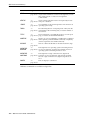
Convention
Meaning
boldface
Boldface type indicates graphical user interface elements associated
with an action, or terms defined in text or the glossary.
italic
Italic type indicates book titles, emphasis, or placeholder variables for
which you supply particular values.
monospace
Monospace type indicates commands within a paragraph, URLs, code
in examples, text that appears on the screen, or text that you enter.
xv
xvi
What’s New in SQL*Plus?
This section describes new features of the SQL*Plus Release 10.2 and provides pointers
to additional information.
New Features in SQL*Plus Release 10.2
SQL*Plus Release 10.2 is a superset of SQL*Plus 10.1. This section describes new
features introduced in SQL*Plus Release 10.2.
Q
SQL*Plus Supports Lightweight Instant Client
The SQL*Plus Instant Client now supports Lightweight Instant client and
documentation is included in the SQL*Plus User's Guide and Reference.
See Also:
Starting SQL*Plus Instant Client on page xxv
Appendix E, "SQL*Plus Instant Client" on page E-1
Q
AUTOTRACE PLAN Output
Autotrace Plan output now includes additional information and uses the DBMS_
XPLAN package format.
See Also:
Q
Execution Plan on page 8-2
SET SERVEROUTPUT Changes
SET SERVEROUTPUT supports an UNLIMITED size which is the new default.
DBMS_OUTPUT line length limit is increased to 32767 bytes from 255.
You can SET ARRAYSIZE to tune the performance of SET SERVEROUTPUT.
See Also: SET SERVEROUT[PUT] {ON | OFF} [SIZE {n |
UNL[IMITED]}] [FOR[MAT] {WRA[PPED] | WOR[D_WRAPPED]
| TRU[NCATED]}] on page 12-132
Oracle Database PL/SQL Packages and Types Reference
Q
XQUERY Command
XQUERY is a new SQL*Plus command that enables you to run XQueries against
your database in SQL*Plus or iSQL*Plus. There are four new SETXQUERY options
associated with this command, SET XQUERY BASEURI, ORDERING, NODE, and
CONTEXT.
xvii
See Also:
XQUERY on page 12-189
SET XQUERY BASEURI {text} on page 12-155
SET XQUERY ORDERING {UNORDERED | ORDERED |
DEFAULT} on page 12-156
SET XQUERY NODE {BYVALUE | BYREFERENCE | DEFAULT}
on page 12-157
SET XQUERY CONTEXT {text} on page 12-158
xviii
SQL*Plus Quick Start
These instructions are to enable you to login and connect to a database after you have
installed SQL*Plus. You can connect to the default database you created during
installation, or to another existing Oracle database.
Q
SQL*Plus Resources
Q
SQL*Plus Overview
Q
SQL*Plus Prerequisites
Q
Starting SQL*Plus Command-line
Q
Starting SQL*Plus Windows GUI
Q
Starting iSQL*Plus
Q
Starting SQL*Plus Instant Client
Q
Connecting to a Different Database
Q
Sample Schemas and SQL*Plus
Q
Running your first Query
Q
Exiting SQL*Plus
SQL*Plus Resources
Q
Q
Q
Q
SQL*Plus on the Oracle Technology Network at
http://www.oracle.com/technology/tech/sql_plus/.
SQL*Plus Discussion Forum at http://www.oracle.com/forums/.
Oracle Documentation Library at
http://www.oracle.com/technology/documentation.
SQL*Plus Product and Documentation feedback by emailing [email protected].
SQL*Plus Overview
SQL*Plus is an interactive and batch query tool that is installed with every Oracle
Database installation. It has a command-line user interface, a Windows Graphical User
Interface (GUI) and the iSQL*Plus web-based user interface.
There is also the SQL*Plus Instant Client which is a stand-alone command-line
interface available on platforms that support the OCI Instant Client. SQL*Plus Instant
Client connects to any available Oracle database, but does not require its own Oracle
xix
database installation. See the Oracle Call Interface Programmer's Guide for more
information on the OCI Instant Client.
SQL*Plus has its own commands and environment, and it provides access to the
Oracle Database. It enables you to enter and execute SQL, PL/SQL, SQL*Plus and
operating system commands to perform the following:
Q
Format, perform calculations on, store, and print from query results
Q
Examine table and object definitions
Q
Develop and run batch scripts
Q
Perform database administration
You can use SQL*Plus to generate reports interactively, to generate reports as batch
processes, and to output the results to text file, to screen, or to HTML file for browsing
on the Internet. You can generate reports dynamically using the HTML output facility
of SQL*Plus, or using the dynamic reporting capability of iSQL*Plus to run a script
from a web page.
Connections to an Oracle7 database from SQL*Plus 10.2 are not supported.
Who Can Use SQL*Plus
The SQL*Plus, SQL, and PL/SQL command languages are powerful enough to serve
the needs of users with some database experience, yet straightforward enough for new
users who are just learning to work with the Oracle Database.
The SQL*Plus language is easy to use. For example, to rename a column labelled
LAST_NAME with the heading "Family Name", enter the command:
COLUMN LAST_NAME HEADING 'Family Name'
Similarly, to list column definitions for the EMPLOYEES table, enter the command:
DESCRIBE EMPLOYEES
How Can I Learn SQL*Plus
There are several sources available to assist you to learn SQL*Plus:
Q
Part II of this Guide, Using SQL*Plus
Q
Help for SQL*Plus, Command-line and iSQL*Plus online help
Q
Oracle Database 10g: SQL Fundamentals
An instructor-led course run by Oracle. This is a comprehensive hands-on course
taking the student through all aspects of using SQL*Plus and iSQL*Plus to access
Oracle Database.
Q
More Oracle Database 10g Training
To find more useful Oracle courses, go to
http://www.oracle.com/education.
How to Use the SQL*Plus Guide
This guide provides information about SQL*Plus that applies to all operating systems.
It also includes some Windows and UNIX specific information, for example, the
Windows Graphical User Interface. Some aspects of SQL*Plus differ on each operating
system. Such operating system specific details are covered in the Oracle Database
Installation Guide provided for your system. Use these operating system specific
guides in conjunction with this SQL*Plus User's Guide and Reference.
xx
Throughout this guide, examples showing how to enter commands use a common
command syntax and a common set of sample tables. The tables are described in
"Sample Schemas and SQL*Plus" on page xxv.
SQL*Plus Command-line and Windows GUI Architecture
SQL*Plus command-line and the Windows GUI use a two-tier model comprising:
Q
Client (command-line user interface).
Q
Database (Oracle Database).
The two tiers may be on the same machine.
SQL*Plus Client
The command-line user interface is the character based terminal implementation. The
Windows GUI is an alternate user interface available in Windows installations.
Oracle Database
Oracle Database Net components provide communication between the SQL*Plus
Client and Oracle Database.
iSQL*Plus Architecture
iSQL*Plus is a browser-based interface which uses the SQL*Plus processing engine in a
three-tier model comprising:
Q
Client (Web browser).
Q
Middle tier (Application Server).
Q
Database (Oracle Database).
The iSQL*Plus Server is installed on the same machine as the Application Server. The
client may or may not also be on this machine. The middle tier coordinates interactions
and resources between the client tier and the database tier. The database is Oracle8i,
Oracle9i or Oracle Database 10g accessed through Oracle Net.
Web Browser
The iSQL*Plus user interface comprises web pages served to your web browser
through the Internet or your intranet. There is no installation or configuration required
for the iSQL*Plus user interface. You only need to know the URL of the Application
Server to access an available Oracle database.
Application Server
The Application Server is installed when Oracle Database is installed.
xxi
The middle tier contains a Java2 Enterprise Edition (J2EE) compliant application
server. It uses Oracle Containers for Java (OC4J) as the server engine. The Application
Server enables communication and authentication between the iSQL*Plus user
interface and Oracle Database.
Oracle Database
Oracle Net components provide communication between the iSQL*Plus Application
Server and Oracle Database in the same way as for a client server installation of Oracle
Database.
SQL*Plus Prerequisites
SQL*Plus is a component of Oracle Database. SQL*Plus, and its command-line user
interface, Windows GUI, and iSQL*Plus web-based user interface are installed by
default when you install the Oracle Database.
Some aspects of Oracle Database and SQL*Plus differ from one computer and
operating system to another. These topics are discussed in the Oracle Database
Installation Guide for each operating system that SQL*Plus supports.
What is necessary before you can run SQL*Plus or iSQL*Plus?
Q
Q
Q
Q
Q
Q
Install Oracle Database (or Oracle Client for the command-line SQL*Plus or
Windows GUI interfaces only). See the Oracle Database Installation Guide for your
operating system available at
http://www.oracle.com/technology/documentation/.
Obtain an Oracle Database login username and password during installation or
from your Database Administrator. See Login Username and Password.
Ensure a sample database is installed and that you have a login username and
password for it during Oracle Database installation. See Sample Schemas and
SQL*Plus.
Create a default database during installation or obtain the connection identifier for
the Oracle Database you want to connect to from your Database Administrator.
See Connecting to a Database.
Ensure the database you want to connect to is started. See the STARTUP
command.
If using iSQL*Plus, ensure that you have the URL for the Application Server you
want to connect to, and that the Application Server is available and running. See
Starting the iSQL*Plus Application Server, and Testing if the iSQL*Plus
Application Server is Running.
SQL*Plus Date Format
The default date format in SQL*Plus is determined by the database
NLS_DATE_FORMAT parameter and may use a date format displaying two digit
years. You can use the SQL TO_CHAR function, or the SQL*Plus COLUMN FORMAT
command in your SELECT statements to control the way dates are displayed in your
report.
Starting SQL*Plus Command-line
The SQL*Plus executable is usually installed in $ORACLE_HOME/bin, which is
usually included in your operating system PATH environment variable. You may need
to change directory to the $ORACLE_HOME/bin directory to start SQL*Plus.
xxii
In the following examples, you are prompted to enter the database account password.
An example using an Easy Connection identifier to connect to the HR schema in the
MYDB database running on mymachine is:
sqlplus hr@//mymachine.mydomain:port/MYDB
An example using a Net Service Name is:
sqlplus hr@MYDB
Net Service Names can be stored in a number of places, including Oracle Names. See
the Net Services Reference Guide for more information.
If you want to use Net Service Names configured in a local Oracle Net tnsnames.ora
file, then set the environment variable TNS_ADMIN to the directory containing the
tnsnames.ora file. For example, on UNIX, if your tnsnames.ora file is in /home/user1
and it defines the Net Service Name MYDB2:
TNS_ADMIN=/home/user1
export TNS_ADMIN
sqlplus hr@MYDB2
This example assumes the ORACLE_HOME environment variable is set, and the
$ORACLE_HOME/network/admin/tnsnames.ora or
%ORACLE_HOME%\network\admin\tnsnames.ora file defines the Net Service
Name MYDB3:
sqlplus hr@MYDB3
The TWO_TASK (on UNIX) or LOCAL (on Windows) environment variable can be set
to a connection identifier. This removes the need to explicitly enter the connection
identifier whenever a connection is made in SQL*Plus or SQL*Plus Instant Client. This
UNIX example connects to the database known as MYDB4:
TNS_ADMIN=/home/user1
export TNS_ADMIN
TWO_TASK=MYDB4
export TWO_TASK
sqlplus hr
To start SQL*Plus and connect to the default database
1. Open a UNIX or a Windows terminal and enter the SQL*Plus command:
sqlplus
2.
When prompted, enter your Oracle Database username and password. If you do
not know your Oracle Database username and password, ask your Database
Administrator.
3.
Alternatively, enter the SQL*Plus command in the form:
sqlplus username
You are prompted to enter your password.
4.
SQL*Plus starts and connects to the default database.
Now you can start entering and executing SQL, PL/SQL and SQL*Plus statements
and commands at the SQL> prompt.
xxiii
To start SQL*Plus and connect to a database other than the default
Open a UNIX or a Windows terminal and enter the SQL*Plus command:
sqlplus username@connect_identifier
You are prompted to enter your password.
Starting SQL*Plus Windows GUI
To start the SQL*Plus Windows GUI and connect to a database
1. Click Start > Programs > Oracle-OraHomeName > Application Development >
SQL Plus.
2.
Alternatively, open a Windows terminal and enter the SQL*Plus command:
sqlplusw
3.
The SQL*Plus Windows GUI opens and the Log On dialog is displayed.
Enter your Oracle Database username and password in the Log On dialog. If you
do not know your Oracle Database username and password, ask your Database
Administrator.
Leave the Host String field blank to connect to the default database. Enter a
connection identifier for the database you want to connect to in the Host String
field. You can connect to Oracle8i, Oracle9i and Oracle Database 10g databases.
4.
Click OK. SQL*Plus starts and connects to the database.
Now you can start entering and executing SQL, PL/SQL and SQL*Plus statements
and commands at the SQL> prompt.
Starting iSQL*Plus
To start an iSQL*Plus session
1. Enter the iSQL*Plus URL in your web browser's Location or Address field. The
iSQL*Plus URL looks like:
http://machine_name.domain:port/isqlplus
If you do not know the iSQL*Plus URL, ask your System Administrator, or try one
of the following on the machine running the iSQL*Plus Application Server.
http://127.0.0.1:5560/isqlplus/
http://localhost:5560/isqlplus/
iSQL*Plus uses HTTP port 5560 by default. If iSQL*Plus is not available on port
5560, read the $ORACLE_HOME/install/portlist.ini file on the computer running
the iSQL*Plus Application Server to find the port on which iSQL*Plus is running.
xxiv
2.
Press Enter to go to the URL. The iSQL*Plus Login screen is displayed in your web
browser.
3.
Enter your Oracle Database username and password in the Username and
Password fields. If you do not know your Oracle Database username and
password, ask your Database Administrator.
4.
Leave the Connection Identifier field blank to connect to the default database.
Enter an Oracle Database connection identifier in the Connection Identifier field to
connect to a database other than the default. You can connect to Oracle8i, Oracle9i
and Oracle Database 10g databases.
If restricted database access has been configured, the Connection Identifier field is
a dropdown list of available databases to select.
5.
Click Login to connect to the database. The iSQL*Plus Workspace is displayed in
your web browser.
Now you can start entering and executing SQL, PL/SQL and SQL*Plus statements
and commands in the Workspace.
Starting and Stopping the iSQL*Plus Application Server
The iSQL*Plus Application Server is started during Oracle Database installation. It
must be running to enable web-based iSQL*Plus sessions. See Starting the iSQL*Plus
Application Server on page 3-8.
Starting SQL*Plus Instant Client
SQL*Plus Instant Client is the SQL*Plus command-line without the need to install
Oracle Database. For information about using it, see Starting SQL*Plus Command-line
on page xxii.
Because SQL*Plus Instant Client does not include a database, it is always 'remote' from
any database server. To connect to a database you must specify the database using an
Oracle Net connection identifier.
If TNS_ADMIN is not set, then an operating system dependent set of directories is
examined to find tnsnames.ora. This search path includes looking in the directory
specified by the ORACLE_HOME environment variable for
network/admin/tnsnames.ora. This is the only reason to set the ORACLE_HOME
environment variable for SQL*Plus Instant Client. If ORACLE_HOME is set when
running Instant Client applications, it must be set to a directory that exists.
Connecting to a Different Database
To connect to a different database from a current command-line session
From an existing Windows GUI or command-line session, enter a CONNECT
command in the form:
SQL> connect username@connect_identifier
You are prompted to enter your password.
To connect to a different database from a current iSQL*Plus session
From an existing iSQL*Plus session, enter a CONNECT command in the form:
SQL> connect username@connect_identifier
You are prompted to enter your password.
Sample Schemas and SQL*Plus
Sample schemas are included with the Oracle Database. Examples in this guide use the
EMP_DETAILS_VIEW view of the Human Resources (HR) sample schema. This
xxv
schema contains personnel records for a fictitious company. To view column details for
the view, EMP_DETAILS_VIEW, enter
DESCRIBE EMP_DETAILS_VIEW
For more information about the sample schemas, see the Oracle Database Sample
Schemas guide.
Unlocking the Sample Tables
The Human Resources (HR) Sample Schema is installed as part of the default Oracle
Database installation. The HR account is locked by default.
You need to unlock the HR account before you can use the HR sample schema. To
unlock the HR account, log in as the SYSTEM user and enter the following command,
where your_password is the password you want to define for the user HR:
ALTER USER HR IDENTIFIED BY your_password ACCOUNT UNLOCK;
For further information about unlocking the HR account, see the Oracle Database
Sample Schemas guide. The HR user is primarily to enable you to access the HR sample
schema and is necessary to enable you to run the examples in this guide.
Each table in the database is "owned" by a particular user. You may wish to have your
own copies of the sample tables to use as you try the examples in this guide. To get
your own copies of the HR tables, see your DBA or see the Oracle Database Sample
Schemas guide, or you can create the HR tables with the script HR_MAIN.SQL which is
located in the following directory on UNIX:
$ORACLE_HOME/demo/schema/human_resources/hr_main.sql
And on the following directory on Windows:
%ORACLE_HOME%\DEMO\SCHEMA\HUMAN_RESOURCES\HR_MAIN.SQL
To create the HR tables from command-line SQL*Plus, do the following:
1.
Ask your DBA for your Oracle Database account username and password.
2.
Login to SQL*Plus.
3.
On UNIX, enter the following command at the SQL*Plus prompt:
SQL> @?/DEMO/SCHEMA/HUMAN_RESOURCES/HR_MAIN.SQL
On Windows, enter the following command at the SQL*Plus prompt:
SQL> @?\DEMO\SCHEMA\HUMAN_RESOURCES\HR_MAIN.SQL
To remove the sample tables, perform the same steps but substitute HR_DROP.SQL for
HR_MAIN.SQL.
Running your first Query
To describe a database object using iSQL*Plus, for example, column details for
EMP_DETAILS_VIEW, enter a DESCRIBE command like:
DESCRIBE EMP_DETAILS_VIEW
which produces the following output:
xxvi
To rename the column headings, and to select data from the HR sample schema view,
EMP_DETAILS_VIEW, enter
COLUMN FIRST_NAME HEADING "First Name"
COLUMN LAST_NAME HEADING "Family Name"
SELECT FIRST_NAME, LAST_NAME
FROM EMP_DETAILS_VIEW
WHERE LAST_NAME LIKE 'K%';
which produces the following output:
Exiting SQL*Plus
It is recommended that you always use the Logout icon to exit iSQL*Plus to free up
system and server resources.
To exit SQL*Plus command-line, enter EXIT.
To exit the Windows GUI, enter EXIT or select Exit from the File menu.
In iSQL*Plus, the EXIT or QUIT command halts the script currently running, it does
not terminate your session.
xxvii
xxviii
Part I
SQL*Plus Getting Started
Part 1 provides the information you need to get started with SQL*Plus. It describes the
command-line and iSQL*Plus user interfaces, provides configuration information and
information you need to log in and run SQL*Plus.
Part 1 contains the following chapters:
Q
SQL*Plus User Interface
Q
Configuring SQL*Plus
Q
Starting SQL*Plus
1
SQL*Plus User Interface
This chapter describes the SQL*Plus command-line user interface, the Windows
Graphical User Interface (GUI), and the iSQL*Plus web-based user interface. It
contains the following topics:
Q
SQL*Plus Command-line User Interface
Q
Windows Graphical User Interface
Q
iSQL*Plus User Interface
Q
Preferences and Equivalent SET Commands
SQL*Plus Command-line User Interface
The SQL*Plus command-line interface is standard on all operating systems.
The Command-line Screen
The following image shows the SQL*Plus command-line interface running in an X
terminal.
When SQL*Plus starts, it displays the date and time, the SQL*Plus version and
copyright information before the SQL*Plus prompt appears. The default prompt for
SQL*Plus command-line is:
SQL>
Changing the Command-line Font and Font Size
In Windows, from a Command Prompt, open the Command Prompt Properties dialog
to set the font and font size used in the SQL*Plus command-line interface.
SQL*Plus User Interface
1-1
Windows Graphical User Interface
To Change the Command-line Interface Font and Font Size
1.
Right click in the command-line interface title bar.
2.
Click Properties. The Window Preview box displays the current window's relative
size on your monitor based on your font and font size selections. The Selected
Font: box displays a sample of the current font.
3.
Click the Font tab.
4.
Select the font size to use from the Size box. Raster font sizes are shown as width
by height in pixels. TrueType font sizes are shown as height in pixels.
5.
Select the font to use from the Font box.
6.
Select the Bold Fonts check box if you want to use a bold version of the font.
For more information about changing Command Prompt properties, see Windows
Help or click Help in the Command Prompt Properties dialog.
Using a Special Character in Windows
To check if a font contains a particular character, for example, the Euro sign, enter the
character's decimal number equivalent in the SQL*Plus command-line interface. For
example, the decimal number equivalent for the Euro sign is 128, so you would enter
Alt+0128 (hold Alt while pressing 0, 1, 2 and 8 in the numeric keypad) to display it. If
it appears correctly, the font contains the Euro sign, otherwise you need to try another
font.
You can use the Windows Character Map utility to view the characters available in a
font. Character Map also shows the decimal number equivalent for extended ASCII
characters. You access the Character Map utility by selecting Start, Programs,
Accessories and then clicking Character Map.
Windows Graphical User Interface
The graphical user interface is a feature of SQL*Plus only available in Windows. The
Windows Graphical User Interface will be obsoleted in favor of the iSQL*Plus
browser-based user interface in a future release of SQL*Plus.
The graphical user interface does not support non-blocking database calls to the
Oracle Database server. Therefore there is no cancel dialog while statements are
executing.
The following image shows the SQL*Plus Windows Graphical User Interface (GUI)
running in Windows.
When the Windows GUI starts, it displays the same information as the command-line
user interface, and has the same default prompt:
SQL>
1-2
SQL*Plus User’s Guide and Reference
Windows Graphical User Interface
Using the Mouse to Copy Text to the Command Prompt
You can use the mouse to copy text from anywhere in the Windows GUI to the
SQL*Plus prompt.
Left click and drag to select the text you want to copy. While still holding down the left
button, right click to copy the selected text to the SQL*Plus prompt.
You can also use Ctrl-C and Ctrl-V to cut and copy text.
Using Command Keys
The following command keys have special functions in the Windows GUI:
Key
Function
Home
Top of screen buffer
End
Bottom of screen buffer
Page Up
Previous screen page
Page Down
Next screen page
Ctrl+Page Up
Show page on left of current screen page
Ctrl+Page Down
Show page on right of current screen page
Alt+F3
Find
F3
Find next
Ctrl+C
Cancels the data fetch operation following command execution.
Ctrl+C
Copies text - when no operations are running.
Ctrl+V
Paste text
Shift+Del
Clear the screen and the screen buffer
Using the Windows GUI Menus
There are menus in the SQL*Plus Windows GUI menu bar. In the Option column,
entries in parentheses show keyboard shortcuts. The Command-line column shows
equivalent command-line commands.
File Menu
The File menu has the following options:
Option
Open
Description of File Menu Option
Command-line
The Open option retrieves a previously stored script
GET filename
If you supply no file extension, SQL*Plus looks for scripts with the SQL
extension The script should contain a single SQL or PL/SQL statement such
as SELECT It should not contain multiple statements, and it should not
contain SQL*Plus commands such as SET.
Save
The Save option has three alternatives: Save Create, Save Replace, and Save
Append
Q
Q
Q
SAVE
SAVE filename
Save Create saves the contents of the SQL*Plus buffer in a script By
default, SQL*Plus assigns the SQL extension to scripts You can specify a CREATE
different extension in the File name text box.
Save Replace replaces the contents of an existing file with the contents
of the SQL*Plus buffer SQL*Plus creates the file if it does not exist.
SAVE filename
REPLACE
Save Append adds the contents of the SQL*Plus buffer to the end of the SAVE filename
APPEND
file you specify.
SQL*Plus User Interface
1-3
Windows Graphical User Interface
Option
Description of File Menu Option
Command-line
After you save a script, you can:
Q
Retrieve the file using the Open option on the File menu.
Q
Edit the file using the Editor option on the Edit menu.
Q
Save As
Run the file using the START or RUN commands from the SQL*Plus
command prompt.
The Save As option saves the contents of the SQL*Plus buffer in a script.
By default, SQL*Plus assigns the SQL extension to scripts.You can specify a
different extension in the File name text box.
Spool
SAVE filename
REPLACE
The Spool option has two alternatives:Spool File and Spool Off The Spool
File option is the same as the SPOOL command with the REPLACE option
SQL*Plus for Windows does not support the SPOOL OUT option.
Q
Q
Spool File stores query results in a file By default, SQL*Plus assigns the
LST extension to spool files You can specify a different extension in the
File name text box You can edit the results with the Editor option on the
Edit menu, and print the file from a Windows text editor.
SPOOL
filename
REP:ACE
Spool Off turns off spooling.
SPOOL OFF
Run
The Run option lists and executes the SQL command or PL/SQL block
currently stored in the SQL buffer. Typically this will be the last statement
that was executed.
RUN
Cancel
(Ctrl+C))
The Cancel option cancels an in-progress operation.
Ctrl+C
Exit
The Cancel keyboard shortcut is only available when a SQL operation is
running in the SQL*Plus session. When no SQL*Plus operation is running,
Ctrl+C copies selected text.
The Exit option commits all pending database changes and closes the
SQL*Plus application window.
EXIT
Edit Menu
The Edit menu has the following options:
Option
Description of Edit Menu Option
Command-line
Copy
(Ctrl+C)
The Copy option copies selected text to the Clipboard
not applicable
After you copy text to the Clipboard, you can paste the text into other Windows
applications, such as Microsoft Excel and Microsoft Word.
The Copy keyboard shortcut is only available when no SQL operations are running in
the SQL*Plus session When a SQL operation is running, Ctrl+C cancels the running
operation.
Paste
(Ctrl+V)
The Paste option pastes the contents of the Clipboard to the SQL*Plus command-line.
not applicable
Note: A maximum of 3625 characters can be pasted from the Clipboard to the
SQL*Plus command-line during a single paste operation.
Clear
(Shift+Del)
The Clear option clears the screen buffer and the screen of the SQL*Plus application
window.
Editor
The Editor option has two alternatives: Invoke Editor and DefineEditor.
Q
Q
CLEAR SCREEN
InvokeEditor loads the contents of the SQL*Plus buffer into an editor. By default, EDIT
SQL*Plus saves the file to AFIEDT.BUF
Define Editor defines the editor that is invoked
DEFINE _EDITOR
=editor_name
1-4
SQL*Plus User’s Guide and Reference
Windows Graphical User Interface
Search Menu
The Search menu has the following options:
Option
Description of Search Menu Option
Command-line
Find
(Alt+F3)
The Find option searches for a character, a word, or a group of characters or not applicable
words in the SQL*Plus application window. Find begins the search at the top
of the displayed screen.
Note: When Find reaches the end of the displayed screen, it does not wrap
and continue searching from the top of the screen buffer.
Find Next
(F3)
The Find Next option finds the next occurrence of the search text.
not applicable
Options Menu
The Options menu has the following options:
Option
Description of Options Menu Option
Command-line
Environment The Environment option enables you to set system variables to alter the
SQL*Plus environment for your current session. This dialog has three areas:
Set Options, Value, and Screen Buffer.
Note: See Setting Options and Values Using the Environment Dialog on
page 2-21 for examples of how these controls interact.
Set Options
SET variable value
This area has a list of variables you can select to establish aspects of the
SQL*Plus environment for your current session, such as:
Q
Setting the display width for NUMBER data.
Q
Setting the display width for LONG data.
Q
Enabling or disabling the printing of column headings.
Q
Setting the number of lines in each page.
See the SET command on page 12-89 for descriptions of each system
variable.
SET variable value
Value
The Value area has four options: Default, Custom, On, and Off.
Note: When Custom is selected, the On and Off buttons and the text field
may or may not be enabled for user selection. The availability of these fields
depends on the item selected in the Set Option.
not applicable
Screen Buffer
This area has two text boxes: Buffer Width and Buffer Length.
Q
Q
Use the Buffer Width text box to set the number of characters available
to display on one line. The Buffer Width value must be at least as big as
the LINESIZE value. Buffer Width has a default value of 100, a
minimum value of 80, and a maximum value of 32,767 characters.
In the Buffer Length text box, you set the number of lines that SQL*Plus
displays on the screen. The default value of the Buffer Length parameter
is 1000 lines. You can specify from 100 to 2000 lines on one screen.
Notes: When you change the Screen Buffer option, SQL*Plus displays a
dialog to alert you that if you shorten the size of your screen buffer, some
data may not be displayed on your screen Click OK to proceed.
If you use SET MARKUP to send output to an HTML table, the number of
lines specified in the Buffer Length variable specifies the number of HTML
table rows Each HTML table row may contain more than one text line.
SQL*Plus User Interface
1-5
Windows Graphical User Interface
Help Menu
The Help menu has the following option:
Option
Description of Help Menu Option
Command-line
About
SQL*Plus
Displays the SQL*Plus version number and copyright information.
not applicable
You access SQL*Plus help from the SQL*Plus prompt. See Getting
Command-line Help on page 3-7.
Changing the Windows GUI Font and Font Size
There are two registry entries that set the font and font size used in the SQL*Plus
Windows GUI. SQLPLUS_FONT sets the font face, and SQLPLUS_FONT_SIZE sets
the font size in pixels.
You use the Windows Registry Editor to create these two registry entries and define
values for them. Ensure that you create the correct entries in uppercase, and that the
values (font names, sizes) you enter are correct.
Warning: Microsoft does not recommend modifying the registry.
Editing the registry may affect your operating system and software
installation. Only advanced users should edit the registry. Oracle takes
no responsibility for problems arising from editing the Windows
registry.
You can choose any fixed-pitch TrueType font available in your Windows system such
as Courier New or Lucida Console. If you choose a proportional pitch font such as
Arial or Times New Roman, or if you enter an unavailable font, the registry entry is
ignored and the default font and size, Fixedsys 16, are used. If you choose an
unavailable font size, the default font size, 16, is used.
If you do not create the SQLPLUS_FONT registry entry, or if you do not specify a
value for SQLPLUS_FONT, the default font and size, Fixedsys 16, are used.
If you want to use particular characters, such as the Euro sign, you should make sure
that the fixed pitch font you choose contains those characters.
To Change the Windows GUI Font and Font Size
1.
Select Run from the Start menu and then enter regedit in the Open field.
2.
Click OK to start the Registry Editor. The Registry Editor is displayed.
3.
Navigate to HKEY_LOCAL_MACHINE\SOFTWARE\ORACLE\HOME0.
If you have more than one Oracle Database installation, you
must select the HOME entry associated with the Windows GUI you
want to change. HOME0 is the registry entry for an Oracle Database
installation. A subsequent Oracle Database installation will have the
registry entry HOME1 and the next HOME2 and so on.
Note:
Changes only affect a SQL*Plus Windows GUI started from the
associated Oracle Database installation, so you can use different
settings for each Oracle Database installation.
1-6
SQL*Plus User’s Guide and Reference
iSQL*Plus User Interface
4.
Click New String Value in the Edit menu. A new string value, with the default
name, NewValue #1 is created at the bottom of the right pane of the Registry
Editor. The default name of the new string value is selected ready for you to
replace with the name you want.
5.
Enter SQLPLUS_FONT as the name of the new font face string value. If you
misskey the name or inadvertently enter it in mixed or lower case, you can edit the
name by selecting Rename from the Edit menu.
or
Enter SQLPLUS_FONT_SIZE as the name of the new font size string value. If you
misskey the name or inadvertently enter it in mixed or lower case, you can edit the
name by selecting Rename from the Edit menu.
6.
Click Modify from the Edit menu or press Enter again to display the Edit String
dialog.
7.
Enter the font name you want to use, such as Courier New, in the Value Data:
field. SQL*Plus will use the new font the next time you start the SQL*Plus
Windows GUI. The font must be a True Type fixed pitch font such as Courier New
or Lucida Console.
or
Enter the font size you want to use in pixels, such as 14, in the Value Data: field.
SQL*Plus will use the new font size the next time you start the SQL*Plus Windows
GUI. The size must be a size that exists on the client machine for the specified font.
You should not change the font face, font size or font subset
while any SQL*Plus Windows GUI is active. You should exit all
SQL*Plus Windows GUI sessions, make font face, font size and font
subset changes in the registry, exit the Registry Editor and then restart
the SQL*Plus Windows GUI to see the changes.
Note:
Using a Special Character
To check if a font contains a particular character such as the Euro sign, enter the
character's decimal number equivalent in the SQL*Plus Windows GUI. For example,
the decimal number equivalent for the Euro sign is 128, so you would enter Alt+0128
(hold Alt while pressing 0, 1, 2 and 8 on the numeric keypad) to display it. If it appears
correctly, the font contains the Euro sign, otherwise you need to try another font.
You can also use the Windows Character Map accessory to view the characters
available in a font. Character Map also shows the decimal number equivalent for
extended ASCII characters. You access the Character Map accessory by selecting
Start->Programs->Accessories->System Tools->Character Map.
iSQL*Plus User Interface
iSQL*Plus is a web-based user interface to an Oracle Database.
iSQL*Plus Navigation
There are a number of ways to navigate in iSQL*Plus:
Icons
Global navigation icons are displayed on each screen. Icons have two states:
SQL*Plus User Interface
1-7
iSQL*Plus User Interface
Q
A white background when that functionality is available
Q
A blue background when active (when you have navigated to that screen)
Three navigation icons are always available after you have logged into iSQL*Plus:
Logout
Deletes your history list, ends your iSQL*Plus session, and displays the Login screen
with a message confirming that you have logged out.
Preferences
Opens the Preferences screen where you can configure interface settings, system
settings or change your password.
Help
Opens iSQL*Plus Help in a separate web browser window. Help is also available from
the Login screen.
Tabs
Tabs appear on the top right of the current screen. Click a tab to go to that screen.
Menus
There are side menus to provide navigation to sections in screens such as Preferences.
Click the link to go to that screen.
Footer Links
Footer links are navigation links to available screens shown at the bottom of each page.
Click a link to go to that screen.
iSQL*Plus Login Screen
You connect to the Login screen from your web browser with a URL like:
http://machine_name.domain:port/isqlplus
The Login screen is displayed:
1-8
SQL*Plus User’s Guide and Reference
iSQL*Plus User Interface
Username:
Enter a valid username to connect to the Oracle Database (mandatory).
Password:
Enter a valid password for the username (mandatory).
Connection Identifier:
Leave this field blank to use the default Oracle database, otherwise enter a connection
identifier for the database you want to connect to.
[//]host[:port][/service_name]
The SERVICE_NAME is the global database name entered during database creation. It
combines a database name with a domain name. For example, the SERVICE_NAME
sales.us.acme.com has a database name of sales and a domain of
us.acme.com.
An INSTANCE_NAME is the name you give to the database instance during creation. It
defaults to the SID you entered during database creation.
An Oracle System Identifier (SID) identifies a specific Oracle release 8.0 or earlier
database instance.
You can optionally use an INSTANCE_NAME in place of the SERVICE_NAME.
Use a SID in place of SERVICE_NAME when connecting to an Oracle release 8.0
database.
Alternatively you can use an Oracle Net alias. If you use an Oracle Net alias, it must be
specified on the machine running the iSQL*Plus Server, which may not be the same
machine from which you run your web browser.
iSQL*Plus can be configured to restrict connections to specific databases. If restricted
database access has been enabled, a dropdown list of available databases is displayed
in place of the Connection Identifier text field. This enables greater security for
iSQL*Plus Servers in hosted environments. This is configured using the
iSQLPlusConnectIdList parameter in the configuration file. See Enabling Restricted
Database Access on page 2-12 for more information.
See the Oracle Database Net Services Administrator's Guide for more information about
defining connection identifiers.
Login
Click the Login button to log in to iSQL*Plus. If you enter an invalid username or
password, the Login screen is re-displayed with an error message.
iSQL*Plus DBA Login Screen
You can log in to iSQL*Plus with SYSDBA or SYSOPER privileges to perform database
administration and run DBA commands through iSQL*Plus. You must authenticate
with the Application Server, and have Oracle SYSDBA or SYSOPER privileges.
To connect with either SYSDBA or SYSOPER privileges, users must be created through
the OC4J user manager. To add users for DBA Login, see Enabling iSQL*Plus DBA
Access on page 2-13.
Because of possible HTTP network timeouts, it is recommended that you use
command-line SQL*Plus for long running DBA operations.
SQL*Plus User Interface
1-9
iSQL*Plus User Interface
To log in with SYSDBA or SYSOPER privileges, you must enter the iSQL*Plus DBA
URL in the Location/Address field of your web browser. The iSQL*Plus DBA URL is
in the form:
http://machine_name.domain:port/isqlplus/dba
The Enter Network Dialog dialog is displayed. The name of the dialog may differ on
different operating systems.
User Name
Enter a valid Application Server authentication username. This may not be the same as
your Oracle Database username.
Password
Enter a valid Application Server authentication password for the username. This may
not be the same as your Oracle Database password.
After you have successfully authenticated, the iSQL*Plus DBA Login screen is
displayed:
Username:
Enter a valid username or / to connect to Oracle Database (mandatory).
Password:
Enter a valid password for the username.
1-10
SQL*Plus User’s Guide and Reference
iSQL*Plus User Interface
Connection Identifier:
Leave this field blank to use the default Oracle database, otherwise enter a connection
identifier for the database you want to connect to.
[//]host[:port][/service_name]
You can optionally use INSTANCE_NAME in place of SERVICE_NAME. When
connecting to an Oracle release 8.0 or earlier database, you use a SID. Alternatively
you can use an Oracle Net alias. If you use an Oracle Net alias, it must be specified on
the machine running the iSQL*Plus Server, which may not be the same machine from
which you run your web browser.
iSQL*Plus can be configured to restrict connections to specific databases. If restricted
database access has been enabled, a dropdown list of available databases is displayed
in place of the Connection Identifier text field. This enables greater security for
iSQL*Plus Servers in hosted environments. This is configured using the
iSQLPlusConnectIdList parameter in the configuration file. See Enabling Restricted
Database Access on page 2-12 for more information.
Privilege:
The Privilege dropdown list has two options:
Q
SYSDBA—connects to the specified database with SYSDBA privileges.
Q
SYSOPER—connects to the specified database with SYSOPER privileges.
Login
Click the Login button to log in to iSQL*Plus with the supplied username, password,
connection identifier and DBA privilege. If you enter an invalid username or
password, you are returned to the Login screen and a message is displayed.
iSQL*Plus Workspace
The Workspace consists of the Workspace, History and Load Script screens. After
successfully logging in, the Workspace is displayed. From the Workspace you can:
Q
Enter, Execute and Cancel scripts
Q
Load and Save scripts
Q
View, Save and Print output
Q
Access Preferences screens
Q
Get help and Log out
SQL*Plus User Interface
1-11
iSQL*Plus User Interface
The Workspace and History screens display the user's connection information in the
top right. The connection information is displayed in the form:
Connected as [username]@[connection_identifier] [AS SYSDBA| AS SYSOPER]
or
Not connected
Clear
Clears all statements in the Input area, and all displayed output. Cancels any script
that may be running.
It does not clear the SQL buffer, nor does it clear any variable values altered by
changing preferences or changing options of the SET command.
Execute
Executes the contents of the Input area. Depending on your preference settings, the
results are displayed in the Output area, in a new web browser window, or saved to a
file.
Load Script
Displays the Load Script screen where you enter a path and file name, or a URL for the
script you want to load into the Input area for editing or execution.
Save Script
Displays the File > Save As dialog where you enter a file name for the script you want
to save from the Input area as a plain text file. It may be useful to identify scripts with
an extension of .SQL.
1-12
SQL*Plus User’s Guide and Reference
iSQL*Plus User Interface
Cancel
Cancels any script that is currently running, but does not clear the Input or Output
areas. A message saying that the script was cancelled is displayed.
Next Page
Displays the next page of report output. The Next Page button is displayed when there
are more results to display than can fit on the current output page or the script
contains a PAUSE command.
You can configure whether pages are displayed on a single page or multiple pages
using Preferences > Interface Configuration > Output Page Setup, or by executing the
SET PAUSE ON or SET PAUSE OFF command.
You can use the standard Back button of your web browser to view previous pages of
iSQL*Plus output. Some web browsers do not support this use of the Back button.
iSQL*Plus DBA Workspace
If you log in with SYSDBA or SYSOPER privileges, the iSQL*Plus DBA Workspace is
displayed to remind you of the privileged connection. It is otherwise identical to the
iSQL*Plus Workspace described earlier.
Fill out the fields on the DBA Workspace as you would for the iSQL*Plus Workspace.
iSQL*Plus History Screen
Click the History tab to display the History screen. The History screen enables you to
reload scripts that you have previously executed in the same session.
A history entry is created each time you execute a script in the Workspace if it is not
the same as the most recently executed script. The History screen shows the first 80
characters of the script.
When the history limit is reached, the oldest scripts are removed. When you exit a
session the history is discarded, and history is not shared between sessions.
You can change the default number of entries stored in the history list in the Interface
Options screen which you access from the Preferences screen.
SQL*Plus User Interface
1-13
iSQL*Plus User Interface
Script
Shows the current list of scripts in the history. They are in most recently executed
order, with the most recent at the top. Click the checkbox of one or more scripts that
you want to load into the Input area.
Scripts are displayed verbatim, so be careful if you have included items like
CONNECT commands which include passwords.
Load
Loads the selected scripts into the Input area of the Workspace.
Delete
Deletes the selected scripts from the history.
Click the Workspace tab to return to the Input area without loading or deleting any
scripts from the history.
iSQL*Plus Input Required Screen
When iSQL*Plus executes a script containing substitution variables, the Input
Required screen is displayed for each substitution variable. For example, enter:
BREAK ON &&SORTCOL
SELECT &SORTCOL, SALARY
FROM &MYTABLE
WHERE SALARY > 12000
ORDER BY &SORTCOL;
The Input Required screen is displayed.
Enter Value for sortcol
Enter a value for the sortcol variable. For example, enter LAST_NAME. Remember
that if a substitution variable is currently undefined, then when it is referenced with a
single ampersand, you are prompted for its value at every occurrence of the reference.
If you reference the variable with a double ampersand, the value is retained for the
session and you will only be prompted for it once.
When prompted, enter a value for the mytable variable. For example, enter EMP_
DETAILS_VIEW.
1-14
SQL*Plus User’s Guide and Reference
iSQL*Plus User Interface
Continue
Click the Continue button to execute the script in the Input area with the input values
you entered.
Cancel
Click the Cancel button to cancel execution of the script and return to the Workspace.
iSQL*Plus Preferences Screen
The Preferences screen enables you to change interface settings, system settings, and
your password. The Cancel and Apply buttons appear on each of the Preferences
screens and have the same function on all Preferences screens. Click the Workspace or
History tab to return to the Workspace or History screen.
Connection information is not displayed in the Preferences screen.
Cancel
Click the Cancel button to cancel changes you have made on this Preferences screen.
Apply
Click the Apply button to apply the changes you have made on this Preferences
screen.
Interface Configuration
Click Interface Configuration in the side menu to open the Interface Configuration
screen.
SQL*Plus User Interface
1-15
iSQL*Plus User Interface
System Configuration
You can click one of the three entries under System Configuration in the side menu to
open these further three screens:
Q
Script Formatting
Q
Script Execution
Q
Database Administration
Script Formatting
Click Script Formatting in the side menu to open the Script Formatting screen. You use
the Script Formatting screen to set options that affect the way script output is
displayed.
Each of these options contains either a field, set of radio buttons, or text area to change
the setting, with explanatory text.
Script Execution
Click Script Execution in the side menu to open the Script Execution screen. You use
the Script Execution screen to set options which affect the way scripts are executed.
Each of these options contains either a field, set of radio buttons, or text area to change
the setting, with explanatory text.
1-16
SQL*Plus User’s Guide and Reference
iSQL*Plus User Interface
Database Administration
Click Database Administration in the side menu to open the Database Administration
screen. You use the Database Administration screen to set options that affect database
administration.
Each of these options contains either a field, set of radio buttons, or text area to change
the setting, with explanatory text.
SQL*Plus User Interface
1-17
Preferences and Equivalent SET Commands
Change Password
Click Change Password in the side menu to access the Change Password screen. See
Changing Your Password in iSQL*Plus on page 3-3.
Preferences and Equivalent SET Commands
The tables below show the preferences available on each of the four Preferences
screens, and the equivalent system variables that can be set using the SET command.
Table 1–1
iSQL*Plus Preference
Equivalent SET Command
History Size
Not applicable
Input Area Size
Not applicable
Output Location
Not applicable
Output Page Setup
SET PAGESIZE, SET PAUSE
Table 1–2
1-18
Interface Configuration
Script Formatting
iSQL*Plus Preference
Equivalent SET Command
Describe Objects
SET DESCRIBE
Display Bind Variables
SET AUTOPRINT
Display Commands
SET ECHO
Display Headings
SET HEADING
Display Record Count
SET FEEDBACK
Display Server Output
SET SERVEROUTPUT
Display Substitution Variables
SET VERIFY
*HTML HEAD Tag
SET MARKUP HTML HEAD
*HTML BODY Tag
SET MARKUP HTML BODY
*HTML TABLE Tag
SET MARKUP HTML TABLE
Line Size
SET LINESIZE
SQL*Plus User’s Guide and Reference
Preferences and Equivalent SET Commands
Table 1–2
(Cont.) Script Formatting
iSQL*Plus Preference
Equivalent SET Command
*Map Special Characters to HTML Entities
SET MARKUP HTML ENTMAP
Null Text
SET NULL
Number Format
SET NUMFORMAT
Number Width
SET NUMWIDTH
Preformatted Output
SET MARKUP HTML PREFORMAT
Column Separator
SET COLSEP
Display Record Separator
SET RECSEP, SET RECSEPCHAR
Headings on Multiple Lines
SET HEADSEP
Underline Headings
SET UNDERLINE
Start Output
SET EMBEDDED
Timing Statistics
SET TIMIMG
Wrap Lines
SET WRAP
* Items prefixed with an asterisk are only available when the
iSQLPlusAllowUserMarkup configuration option is set to ALL. Its default value is
NONE. For more information, see Enabling User Defined HTML Markup on
page 2-19.
Table 1–3
Script Execution
iSQL*Plus Preference
Equivalent SET Command
Array Size
SET ARRAYSIZE
Check SQL Syntax
SET FLAGGER
Commit Changes
SET AUTOCOMMIT
Commit when Copying
SET COPYCOMMIT
Compare Datatypes when Copying
SET COPYTYPECHECK
Escape Character
SET ESCAPE
LOB Offset
SET LOBOFFSET
LOB, LONG and XML Type Size
SET LONG
Multiple SQL*Plus Commands on Single
Line
SET CMDSEP
Register Scripts
SET APPINFO
SQL and PL/SQL Terminator
SET BLOCKTERMINATOR
SQL Case
SET SQLCASE
SQL Compatibility
SET COMPATIBILITY
SQL Terminator
SET SQLTERMINATOR
SQL*Plus Compatibility
SET SQLPLUSCOMPATIBILITY
Substitution Variable Prefix
SET DEFINE
Substitution Variable Reference Terminator
SET CONCAT
Trace Statements
SET AUTOTRACE
SQL*Plus User Interface
1-19
Preferences and Equivalent SET Commands
Table 1–3
iSQL*Plus Preference
Equivalent SET Command
XQuery Base URI
SET XQUERY BASEURI
XQuery Ordering
SET XQUERY ORDERING
XQUERY Node Identity
SET XQUERY NODE
XQUERY Context
SET XQUERY CONTEXT
Table 1–4
1-20
(Cont.) Script Execution
Database Administration
iSQL*Plus Preference
Equivalent SET Command
Archive Log Source
SET LOGSOURCE
Automatic Recovery
SET AUTORECOVERY
SQL*Plus User’s Guide and Reference
2
Configuring SQL*Plus
This chapter explains how to configure your SQL*Plus command-line, Windows GUI,
and iSQL*Plus environments. It has the following topics:
Q
SQL*Plus and iSQL*Plus Environment Variables
Q
SQL*Plus and iSQL*Plus Configuration
Q
iSQL*Plus Application Server Configuration
Q
iSQL*Plus Web Browser Configuration
Q
Windows Graphical User Interface Configuration
SQL*Plus and iSQL*Plus Environment Variables
These environment variables specify the location or path of files used by SQL*Plus and
the iSQL*Plus Application Server. For other environment variables that influence the
behavior of SQL*Plus, see the Oracle Database Administrator's Reference.
Table 2–1
Parameters or Environment Variables influencing SQL*Plus and iSQL*Plus
Parameter or Variable
Description
JAVA_HOME
Environment variable to specify the path used to search for
the location of the Java home (JDK 1.4 or above). This should
usually be set to the Oracle Java home.
Example
$ORACLE_HOME/jdk
JRE_HOME
Environment variable to specify the path used to search for
the location of the Java Runtime home. This should usually be
set to the Oracle Java Runtime home.
Example
$JAVA_HOME/jre/bin
LD_LIBRARY_PATH
Environment variable to specify the path used to search for
libraries on UNIX and Linux. The environment variable may
have a different name on some operating systems, such as
DYLD_LIBRARY_PATH on Apple Mac OS, LIBPATH on
IBM/AIX-5L, and SHLIB_PATH on HP-UX. Not applicable to
Windows operating systems.
Example
$ORACLE_HOME/lib
LOCAL
Windows environment variable to specify a connection string.
Performs the same function as TWO_TASK on UNIX.
Configuring SQL*Plus 2-1
SQL*Plus and iSQL*Plus Environment Variables
Table 2–1
(Cont.) Parameters or Environment Variables influencing SQL*Plus and
Parameter or Variable
Description
NLS_LANG
Environment variable to specify globalization behavior. In
iSQL*Plus, the charset parameter is ignored and is always
UTF8.
Example
american_america.utf8
ORACLE_HOME
Environment variable to specify where SQL*Plus is installed.
It is also used by SQL*Plus to specify where message files are
located.
Examples:
d:\oracle\10g
/u01/app/oracle/product/v10g
ORA_NLS10
Environment variable to specify the locations of the NLS data
and the user boot file in SQL*Plus 10.2. The default location is
$ORACLE_HOME/nls/data. In a system with both Oracle9i
and 10g, or a system under version upgrade, you should set
ORA_NLS10 for Oracle 10g and set ORA_NLS33 for 9i. The
default NLS location in 9i was $ORACLE_
HOME/common/nls/admin/data.
ORACLE_PATH
Environment variable to specify the location of SQL scripts. If
SQL*Plus cannot find the file in ORACLE_PATH, or if
ORACLE_PATH is not set, it searches for the file in the
current working directory.
Not applicable to Windows
ORACLE_SID
Environment variable to specify the database instance,
optional
PATH
Environment variable to specify the path to search for
executables, and DLLs in Windows. Typically includes
ORACLE_HOME/bin
SQLPATH
Environment variable or Windows registry entry to specify
the location of SQL scripts. SQL*Plus searches for SQL scripts,
including login.sql, in the current directory and then in the
directories specified by SQLPATH, and in the subdirectories
of SQLPATH directories. SQLPATH is a colon separated list of
directories. There is no default value set in UNIX installations.
In Windows, SQLPATH is defined in a registry entry during
installation. For more information about the SQLPATH
registry entry, see SQLPATH Registry Entry on page 2-23.
SQLPLUS
Environment variable to specify the location of SQL*Plus
message files in Windows. This environment variable is set
during installation. It has a default value of:
%ORACLE_HOME%\SQLPLUS\MESG
Not applicable to UNIX.
2-2
SQLPLUS_FONT
Windows registry entry to specify the font face used in the
SQL*Plus Windows GUI. If the SQLPLUS_FONT entry is not
created, or if it has an invalid name or value, the default face,
Fixedsys, is used.
SQLPLUS_FONT_SIZE
Windows registry entry to specify the font size used in the
SQL*Plus Windows GUI. If the SQLPLUS_FONT_SIZE entry
is not created, or if it has an invalid name or value, the default
size, 16, is used.
SQL*Plus User’s Guide and Reference
SQL*Plus and iSQL*Plus Environment Variables
Table 2–1
(Cont.) Parameters or Environment Variables influencing SQL*Plus and
Parameter or Variable
Description
TNS_ADMIN
Environment variable to specify the location of the
tnsnames.ora file. If not specified, $ORACLE_
HOME/network/admin is used
Example
h:\network
/var/opt/oracle
TWO_TASK
UNIX environment variable to specify a connection string.
Connections that do not specify a database will connect to the
database specified in TWO_TASK.
Example
TWO_TASK=MYDB
export TWO_TASK
sqlplus hr
is the same as:
sqlplus hr@MYDB
iSQLPlusAllowUserMarkup iSQL*Plus configuration file parameter to specify whether
HTML entity mapping replaces characters of special
significance with printable representations of those
characters. Entity mapping is enabled by default, preventing
the use of user defined HTML in iSQL*Plus output. The
iSQLPlusAllowUserMarkup parameter controls whether an
iSQL*Plus Application Server enables users to change the
entity mapping setting, or use the custom HTML header,
body, and table tags.
For more information about user defined HTML, see Enabling
User Defined HTML Markup on page 2-19.
iSQLPlusAllowScriptsURL
iSQL*Plus configuration file parameter to control whether an
iSQL*Plus Application Server enables users to load scripts
from a URL, run @, @@ and START commands from a script,
or use a script loaded from a URL with a Dynamic Report.
See Enabling URL Access on page 2-19 for more information.
iSQLPlusBannerMessage
iSQL*Plus configuration file parameter to either remove the
default security message from the iSQL*Plus Login screen, or
to replace it with your own system-wide message.
See Enabling Unauthorised Access Banner on page 2-18 for
more information.
iSQLPlusConnectIdList
iSQL*Plus configuration file option to specify the databases
that users can access in iSQL*Plus. When enabled, a
dropdown list of available databases is displayed in place of
the Connection Identifier text field on the Login screen. This
enables greater security for iSQL*Plus Servers in hosted
environments.
For more information about restricted database access, see
Enabling Restricted Database Access on page 2-12.
log4j.rootLogger
iSQL*Plus configuration file option to specify the level to
which messages are logged in the iSQL*Plus Application
Server error logs.
For more information about iSQL*Plus logging, see Setting
the Level of iSQL*Plus Logging on page 2-11.
Configuring SQL*Plus 2-3
SQL*Plus and iSQL*Plus Configuration
SQL*Plus and iSQL*Plus Configuration
You can set up your SQL*Plus or iSQL*Plus Application Server environment to use the
same settings with each session.
There are two operating system files to do this:
Q
Q
The Site Profile file, glogin.sql, for site wide settings, and settings for the iSQL*Plus
sessions from an iSQL*Plus Application Server.
Additionally, in the command-line user interface and the Windows GUI, the User
Profile, login.sql, sets user specific settings.
The exact names of these files is system dependent.
Some privileged connections may generate errors if SET SERVEROUTPUT or SET
APPINFO commands are put in the Site Profile or User Profile.
The following tables show the profile scripts, and some commands and settings that
affect the Command-line, Windows and iSQL*Plus user interfaces.
Table 2–2
Profile Scripts affecting SQL*Plus User Interface Settings
This script ...
is run in the
Command-line and
Windows GUI...
is run in the iSQL*Plus
Server ...
Site Profile (glogin.sql)
After successful Oracle
Database connection from a
SQLPLUS or CONNECT
command.
On successful Oracle
Database connection from
an iSQL*Plus session or a
CONNECT command from
an iSQL*Plus session.
Can contain any content that
can be included in a SQL*Plus
script, such as system variable
settings or other global settings
the DBA wants to implement.
User Profile (login.sql)
Can contain any content that
can be included in a SQL*Plus
script, but the settings are only
applicable to the user's sessions.
Table 2–3
Where /NOLOG is
specified.
Immediately after the Site
Profile.
Commands in Profile scripts affecting SQL*Plus User Interface Settings
In a profile script, this
command ...
affects the Command-line affects the iSQL*Plus
and Windows GUI by ...
Server by ...
SET
SQLPLUSCOMPAT[IBILITY]
{x.y[.z]}
Setting the SQL*Plus
compatibility mode to
obtain the behavior the
DBA wants for this site.
Also see the SQL*Plus
Compatibility Matrix on
page 12-140.
SQLPLUS command
COMPATIBILITY Option
SQL*Plus User’s Guide and Reference
Setting the SQL*Plus
compatibility mode to
obtain the behavior the DBA
wants for this site.
Not Applicable
As for SET
SQLPLUSCOMPATIBILITY
but set with the SQLPLUS
command COMPATIBILITY
option.
SQLPLUS command RESTRICT Starting SQL*Plus with the
Option
RESTRICT option set to 3
prevents the User Profile
script from being read.
2-4
Not Applicable
Not Applicable
SQL*Plus and iSQL*Plus Configuration
Site Profile
A Site Profile script is created during installation. It is used by the database
administrator to configure session wide behavior for SQL*Plus Command-line,
Windows GUI and iSQL*Plus connections.
The Site Profile script is generally named glogin.sql. SQL*Plus or the iSQL*Plus Server
executes this script whenever a user starts a SQL*Plus or iSQL*Plus session and
successfully establishes the Oracle Database connection.
The Site Profile enables the DBA to set up SQL*Plus environment defaults for all users
of a particular SQL*Plus or iSQL*Plus Application Server installation
Users cannot directly access the Site Profile.
Default Site Profile Script
The Site Profile script is $ORACLE_HOME/sqlplus/admin/glogin.sql in UNIX, and
%ORACLE_HOME%\sqlplus\admin\glogin.sql in Windows. If a Site Profile already
exists at this location, it is overwritten when you install SQL*Plus. If SQL*Plus is
removed, the Site Profile script is deleted.
User Profile
For SQL*Plus command-line and Windows GUI connections, SQL*Plus also supports a
User Profile script. The User Profile is executed after the Site Profile and is intended to
allow users to specifically customize their session. The User Profile script is generally
named login.sql. SQL*Plus searches for the User Profile in your current directory, and
then the directories you specify with the SQLPATH environment variable. SQL*Plus
searches this colon-separated list of directories and their subdirectories in the order
they are listed.
You can add any SQL commands, PL/SQL blocks, or SQL*Plus commands to your
user profile. When you start SQL*Plus, it automatically searches for your user profile
and runs the commands it contains.
A user profile is not used in iSQL*Plus.
Modifying Your LOGIN File
You can modify your LOGIN file just as you would any other script. The following
sample User Profile script shows some modifications that you could include:
-login.sql
-SQL*Plus user login startup file.
--This script is automatically run after glogin.sql
--- To change the SQL*Plus prompt to display the current user,
-- connection identifier and current time.
-- First set the database date format to show the time.
ALTER SESSION SET nls_date_format = 'HH:MI:SS';
-- SET the SQLPROMPT to include the _USER, _CONNECT_IDENTIFIER
-- and _DATE variables.
SET SQLPROMPT "_USER'@'_CONNECT_IDENTIFIER _DATE> "
-- To set the number of lines to display in a report page to 24.
SET PAGESIZE 24
-- To set the number of characters to display on each report line to 78.
Configuring SQL*Plus 2-5
SQL*Plus and iSQL*Plus Configuration
SET LINESIZE 78
-- To set the number format used in a report to $99,999.
SET NUMFORMAT $99,999
See Also:
Q
Q
SET command on page 12-89 for more information on these and
other SET command variables you may wish to set in your
SQL*Plus LOGIN file.
Using Predefined Variables on page 5-12 for more information
about predefined variables.
Storing and Restoring SQL*Plus System Variables
From the Command-line and Windows GUI you can store the current SQL*Plus
system variables in a script with the STORE command. If you alter any variables, this
script can be run to restore the original values. This is useful if you want to reset
system variables after running a report that alters them. You could also include the
script in your User Profile script so that these system variables are set each time you
start SQL*Plus.
To store the current setting of all system variables, enter
STORE SET file_name
Enter a file name and file extension, or enter only the file name to use the default
extension .SQL. You can use the SET SUF[FIX] {SQL | text} command on page 12-145
to change the default file extension.
Restoring the System Variables
To restore the stored system variables, enter
START file_name
If the file has the default extension (as specified by the SET SUF[FIX] {SQL | text} on
page 12-145 command), you do not need to add the period and extension to the file
name.
You can also use the @ ("at" sign) or the @@ (double "at" sign) commands to run the
script.
Example 2–1 Storing and Restoring SQL*Plus System Variables
To store the current values of the SQL*Plus system variables in a new script
"plusenv.sql":
STORE SET plusenv
Created file plusenv
Now the value of any system variable can be changed:
SHOW PAGESIZE
PAGESIZE 24
SET PAGESIZE 60
2-6
SQL*Plus User’s Guide and Reference
SQL*Plus and iSQL*Plus Configuration
SHOW PAGESIZE
PAGESIZE 60
The original values of system variables can then be restored from the script:
START plusenv
SHOW PAGESIZE
PAGESIZE 24
Installing Command-line Help
Command-line help is usually installed during Oracle Database installation. If not, the
database administrator can create the SQL*Plus command-line help tables and
populate them with SQL*Plus help data in two ways:
Q
Running a supplied shell script or batch file from the operating system.
Q
Running a supplied SQL script from SQL*Plus.
The database administrator can also remove the SQL*Plus command-line help tables
by running a SQL script from SQL*Plus.
Before you can install or remove SQL*Plus help, ensure that:
Q
SQL*Plus is installed.
Q
The ORACLE_HOME environment variable is set.
Q
The SQL*Plus help script files exist:
–
HLPBLD.SQL - to drop and create new help tables.
–
HELPDROP.SQL - to drop existing help tables.
–
HELPUS.SQL - to populate the help tables with the help data.
Running the helpins Shell Script or Batch File to Install Command-line Help
Run the provided shell script or batch file to install command-line help.
In UNIX, use the shell script, HELPINS, available in
$ORACLE_HOME/BIN
In Windows, use the batch file, HELPINS.BAT, available in
%ORACLE_HOME%\BIN
1.
In UNIX, set an environment variable, SYSTEM_PASS, to hold the SYSTEM user
login with:
SYSTEM_PASS=SYSTEM/password
EXPORT SYSTEM_PASS
In Windows, set SYSTEM_PASS with:
SET SYSTEM_PASS=SYSTEM/password
where password is the password you have defined for the SYSTEM user.
Configuring SQL*Plus 2-7
SQL*Plus and iSQL*Plus Configuration
Warning: Defining a variable containing your password in plain
text is a potential security risk. You can avoid this risk by omitting
the password, and responding to system prompts for the password.
If you choose to include your password in the SYSTEM_PASS
variable, undefine the variable immediately after you have run the
helpins script or batch file.
2.
In UNIX, run the shell script, HELPINS, from a terminal with:
$ORACLE_HOME/BIN/HELPINS
In Windows, run the batch file, HELPINS.BAT, from the command-line with:
%ORACLE_HOME%\BIN\HELPINS
In either case, the HELPINS utility reads the login from SYSTEM_PASS to connect
to Oracle Database using SQL*Plus, creates and loads the help tables, and then
disconnects. You can use command-line help the next time you start SQL*Plus.
Running the hlpbld.sql Script to Install Command-line Help
Run the provided SQL script, HLPBLD.SQL, to load command-line help.
1.
Log in to SQL*Plus as the SYSTEM user with:
SQLPLUS SYSTEM
You are prompted to enter the password you have defined for the SYSTEM user.
2.
In UNIX run the SQL script, HLPBLD.SQL, from SQL*Plus with:
@$ORACLE_HOME/SQLPLUS/ADMIN/HELP/HLPBLD.SQL HELPUS.SQL
In Windows run the SQL script, HLPBLD.SQL, from SQL*Plus with:
@%ORACLE_HOME%\SQLPLUS\ADMIN\HELP\HLPBLD.SQL HELPUS.SQL
The HLPBLD.SQL script creates and loads the help tables.
Running the helpdrop.sql Script to Remove Command-line Help
Run the provided SQL script, HELPDROP.SQL, to remove the command-line help.
1.
Log in to SQL*Plus as the SYSTEM user with:
SQLPLUS SYSTEM
You are prompted to enter the password you have defined for the SYSTEM user.
2.
In UNIX run the SQL script, HELPDROP.SQL, from SQL*Plus with:
@$ORACLE_HOME/SQLPLUS/ADMIN/HELP/HELPDROP.SQL
In Windows run the SQL script, HELPDROP.SQL, from SQL*Plus with:
@%ORACLE_HOME%\SQLPLUS\ADMIN\HELP\HELPDROP.SQL
The HELPDROP.SQL script drops the help tables, and then disconnects.
2-8
SQL*Plus User’s Guide and Reference
iSQL*Plus Application Server Configuration
Configuring Oracle Net Services
If you plan to connect to a database other than the default, whether on the same
computer or another computer, you need to ensure that Oracle Net is installed, and the
database listener is configured and running. Oracle Net services are used by SQL*Plus
and the iSQL*Plus Application Server.
Oracle Net services and the database listener are installed by default during Oracle
Database installation. For further information about installing and configuring Oracle
Net, see the Oracle Database documentation at
http://www.oracle.com/technology/documentation.
iSQL*Plus Application Server Configuration
You can set the following behavior and security settings on the iSQL*Plus Application
Server:
Q
Changing the iSQL*Plus Application Server Port in Use
Q
Testing if the iSQL*Plus Application Server is Running
Q
Setting the Level of iSQL*Plus Logging
Q
Setting the Session Time Out
Q
Enabling Restricted Database Access
Q
Enabling iSQL*Plus DBA Access
Q
Enabling SSL with iSQL*Plus
Q
Enabling iSQL*Plus or iSQL*Plus Help
Q
Enabling User Defined HTML Markup
Changing the iSQL*Plus Application Server Port in Use
After Oracle Database installation, if you are unable to connect to your iSQL*Plus
Server, check that your Application Server is running (see Testing if the iSQL*Plus
Application Server is Running), and that you are using the correct URL to connect to it.
If you are still unable to connect, it may be because the port that the Application
Server is attempting to use is already in use. A message, if any, depends on the
application using the port.
To determine the port number used by the iSQL*Plus Application Server
1. Open the configuration file, http-web-site.xml, located in
$ORACLE_HOME/oc4j/j2ee/isqlplus/config
2.
Search for the web-site element. It has the form
<website port="5560" display-name="Oracle9iAS Containers for J2EE HTTP Web
Site">
3.
The value specified by the attribute, port, is the port number that the Application
Server is attempting to use.
To view currently used ports and determine if the Application Server is trying to use a
port that is already in use, run the following command:
netstat -an
Configuring SQL*Plus 2-9
iSQL*Plus Application Server Configuration
If there is another application using the same port, you need to change the port used
by the Application Server to a number that is not in use. By convention, it is
recommended that you use a port number above 2000, and that you do not use 80 or
8080 as they are usually used by web services. A port number can be any unique
integer number.
To change the port number used by the iSQL*Plus Application Server
1. Stop the Application Server.
2.
Open the configuration file, http-web-site.xml, located in
$ORACLE_HOME/oc4j/j2ee/isqlplus/config
3.
Search for the web-site element. It has the form
<website port="5560" display-name="Oracle9iAS Containers for J2EE HTTP Web
Site">
The number specified by the attribute, port, is the port number that the
Application Server is attempting to use.
4.
Change the port number to a unique port number that you want the iSQL*Plus
Application Server to use.
5.
Save http-web-site.xml.
6.
Restart the iSQL*Plus Application Server.
Testing if the iSQL*Plus Application Server is Running
You can use operating system utilities to determine if the iSQL*Plus Application
Server is running. On Windows, the iSQL*Plus Application Server can be run as a
Windows Service, or can be started from a Windows command prompt.
UNIX: To determine if the iSQL*Plus Application Server is running
Open a terminal.
1.
2.
Enter the following command to find the iSQL*Plus Application Server process:
$ ps -eaf|grep Djava
One of the lines returned should be something like:
oracle 6082 1 0 Nov 05 pts/8 28:42 $ORACLE_HOME/jdk/bin/java
-Djava.awt.headless=true -Djava.security.properties=/
This running process is the iSQL*Plus Application Server.
Windows Service: To determine if the iSQL*Plus Application Server is running
1. Select Services from the Start > Programs > Administrative Tools menu.
2.
Find the iSQL*Plus Windows service, called OracleOracleHomeNameiSQL*Plus.
3.
Check the status of the Windows service to see whether it is started.
Windows Command Prompt: To determine if the iSQL*Plus Application Server is
running
iSQL*Plus can also be started from a Windows command prompt. To determine
whether the iSQL*Plus Application Server was started and is running from the
2-10
SQL*Plus User’s Guide and Reference
iSQL*Plus Application Server Configuration
command line, check whether there is an open Windows command prompt containing
messages similar to:
%ORACLE_HOME%\bin\isqlplusctl start
iSQL*Plus 10.2.0.1.0
Copyright (c) 2005 Oracle. All rights reserved.
Starting iSQL*Plus ...
iSQL*Plus started.
Setting the Level of iSQL*Plus Logging
The log4j.rootLogger parameter determines whether logging of iSQL*Plus Application
Server messages is enabled. It also sets the level to which messages are logged in the
iSQL*Plus Application Server error logs. There should be no need to change its value
unless instructed to do so by Oracle Support. Logging is useful to help resolve user
problems.
You need to stop the iSQL*Plus Application Server to make changes to the
log4j.rootLogger parameter. The log4j.rootLogger parameter is in the log4j.properties file,
located in the directory:
$ORACLE_HOME/oc4j/j2ee/oc4j_
applications/applications/isqlplus/isqlplus/WEB-INF/classes
Logging can be set to ALL errors and messages, DEBUG messages, INFO messages,
WARNing messages, ERROR messages, FATAL errors, or to OFF. The settings are
changed by commenting or uncommenting the required lines in the
log4j.properties file. The following example shows the default setting, which is
to log FATAL errors:
# Set root logger level and its only appender to A1.
#log4j.rootLogger=ALL, A1
#log4j.rootLogger=DEBUG, A1
#log4j.rootLogger=INFO, A1
#log4j.rootLogger=WARN, A1
#log4j.rootLogger=ERROR, A1
log4j.rootLogger=FATAL, A1
#log4j.rootLogger=OFF, A1
The iSQL*Plus log file is written to:
$ORACLE_HOME/oc4j/j2ee/isqlplus/application-deployments/isqlplus/application.log
The iSQL*Plus Help log file is written to:
$ORACLE_
HOME/oc4j/j2ee/isqlplus/application-deployments/isqlplushelp/application.log
Setting the Session Time Out
Timing out iSQL*Plus sessions helps to reduce machine load and to maximize
resources. The time out interval is set by the session-timeout element. It defines the
time a session can be idle before it is expired.
You need to stop the iSQL*Plus Application Server to make changes to the
session-timeout element. You can edit the web.xml configuration file to change the
timeout interval. The web.xml file is located in the directory:
$ORACLE_HOME/oc4j/j2ee/oc4j_applications/applications/isqlplus/isqlplus/WEB-INF
Configuring SQL*Plus
2-11
iSQL*Plus Application Server Configuration
In the web.xml file, search for the <session-timeout> element inside <session-config>.
The syntax of the line to change in the configuration file is:
<session-config>
<session-timeout>15</session-timeout>
</session-config>
Where the value is the number of whole minutes of idle time before the session times
out. It has a default value of 15 minutes. It can be set to any value from 1 to 1440
minutes. It can also be set to never expire by entering a negative value such as -1. It
should not be set so small that users do not get a chance to enter their scripts.
When a user tries to use a timed out iSQL*Plus session, the Login screen is displayed
and the user is prompted to log in again. The following error is displayed:
SP2-0864: Session has expired. Please log in again.
Enabling Restricted Database Access
You may want to limit the databases that users can access in iSQL*Plus to a restricted
list. When restricted database access has been enabled, a dropdown list of available
databases is displayed in place of the Connection Identifier text field on the Login
screen. This enables greater security for iSQL*Plus Servers in hosted environments.
Connection identifiers are listed in the order defined in iSQLPlusConnectIdList.
You need to stop the iSQL*Plus Application Server to make changes to the
iSQLPlusConnectIdList parameter.
Edit the $ORACLE_
HOME/oc4j/j2ee/oc4j-applications/applications/isqlplus/isqlplus/WEB-INF/web.x
ml file to restrict database access to iSQL*Plus users. Change the following entry to
include a new param-value element which contains the restrictedlist of databases, for
example
<init-param>
<param-name>iSQLPlusConnectIdList</param-name>
<description>The database(s) to which iSQL*Plus users are restricted. The list
should contain the Oracle SIDs or SERVICE_NAMEs, separated by a semicolon (;). If
there are no entries, database access is not restricted through
iSQL*Plus.</description>
<param-value>ora10g;ora9i</param-value>
</init-param>
Entries in the param-value element should be identical to the alias for SERVICE_
NAMEs or SIDs set in your $ORACLE_HOME/network/admin/tnsnames.ora file.
Connection identifiers are case insensitive, and each connection identifier listed in the
argument should be identical to an alias in the tnsnames.ora file.
Once set, all connections made through the Login screen, all dynamic reports and any
connections attempted with the CONNECT command are refused unless the
connection is to one of the databases in the restricted list. Similarly, if SET INSTANCE
is used, the connection identifier defined must match an entry in
iSQLPlusConnectIdList or the connection is refused.
Enabling the restricted database access does not
prevent users from connecting to available remote databases.
WARNING:
2-12
SQL*Plus User’s Guide and Reference
iSQL*Plus Application Server Configuration
If no connection identifier is given, or if the one given does not match an entry in
iSQLPlusConnectIdList, the database connection is refused and the following error
occurs:
SP2-0884: Connection to database database_name is not allowed
Enabling iSQL*Plus DBA Access
To access the iSQL*Plus DBA URL, you must set up the OC4J user manager. You can
set up OC4J to use:
Q
The XML-based provider type, jazn-data.xml
Q
The LDAP-based provider type, Oracle Internet Directory
You need to stop the iSQL*Plus Application Server to enable iSQL*Plus DBA access.
This document discusses how to set up the iSQL*Plus DBA URL to use the XML-based
provider. For more information, refer to the Oracle Application Server documentation,
which you can find at http://www.oracle.com/technology/documentation/.
To set up the iSQL*Plus DBA URL
1. Create users for the iSQL*Plus DBA URL.
2.
Grant the webDba role to users.
3.
Restart the iSQL*Plus server after making any changes to the JAZN authentication
file, jazn-data.xml. The JAZN authentication file is changed when you use the
JAZN admin tool to set up users for the iSQL*Plus DBA URL.
4.
Test iSQL*Plus DBA Access.
The Oracle JAAS Provider, otherwise known as JAZN (Java AuthoriZatioN), is
Oracle's implementation of the Java Authentication and Authorization Service (JAAS).
Oracle's JAAS Provider is referred to as JAZN in the remainder of this document. See
the Oracle Application Server Containers for J2EE documentation at
http://www.oracle.com/technology/tech/java/oc4j/index.html for
more information about JAZN, the Oracle JAAS Provider.
Create and Manage Users for the iSQL*Plus DBA URL
The actions available to manage users for the iSQL*Plus DBA URL are:
1.
Create users
2.
List users
3.
Grant the webDba role
4.
Remove users
5.
Revoke the webDba role
6.
Change user passwords
You perform these actions from the $ORACLE_
HOME/oc4j/j2ee/isqlplus/application-deployments/isql
plus directory.
Note:
$JAVA_HOME is the location of your JDK (1.4 or above). It should be set to $ORACLE_
HOME/jdk.
Configuring SQL*Plus
2-13
iSQL*Plus Application Server Configuration
admin_password is the password for the iSQL*Plus DBA realm administrator user,
admin. The password for the admin user is set to 'welcome' by default. You should
change this password as soon as possible. See Change User Passwords on page 2-15
for more information.
A JAZN shell option, and a command-line option are given for all steps.
To start the JAZN shell, enter:
$JAVA_HOME/bin/java -Djava.security.properties=$ORACLE_
HOME/oc4j/j2ee/home/config/jazn.security.props -jar $ORACLE_
HOME/oc4j/j2ee/home/jazn.jar -user "iSQL*Plus DBA/admin" -password admin_password
-shell
To exit the JAZN shell, enter:
EXIT
Create Users
You can create multiple users who have access to the iSQL*Plus DBA URL. To create a
user from the JAZN shell, enter:
JAZN> adduser "iSQL*Plus DBA" username password
To create a user from the command line, enter:
$JAVA_HOME/bin/java -Djava.security.properties=$ORACLE_
HOME/oc4j/j2ee/home/config/jazn.security.props -jar $ORACLE_
HOME/oc4j/j2ee/home/jazn.jar -user "iSQL*Plus DBA/admin" -password admin_password
-adduser "iSQL*Plus DBA" username password
username and password are the username and password used to log into the iSQL*Plus
DBA URL.
To create multiple users, repeat the above command for each user.
List Users
You can confirm that users have been created and added to the iSQL*Plus DBA realm.
To confirm the creation of a user using the JAZN shell, enter:
JAZN> listusers "iSQL*Plus DBA"
To confirm the creation of a user using the command line, enter:
$JAVA_HOME/bin/java -Djava.security.properties=$ORACLE_
HOME/oc4j/j2ee/home/config/jazn.security.props -jar $ORACLE_
HOME/oc4j/j2ee/home/jazn.jar -user "iSQL*Plus DBA/admin" -password admin_password
-listusers "iSQL*Plus DBA"
The usernames you created are displayed.
Grant Users the webDba Role
Each user you created above must be granted access to the webDba role. To grant a
user access to the webDba role from the JAZN shell, enter:
JAZN> grantrole webDba "iSQL*Plus DBA" username
To grant a user access to the webDba role from the command line, enter:
$JAVA_HOME/bin/java -Djava.security.properties=$ORACLE_
HOME/oc4j/j2ee/home/config/jazn.security.props -jar $ORACLE_
2-14
SQL*Plus User’s Guide and Reference
iSQL*Plus Application Server Configuration
HOME/oc4j/j2ee/home/jazn.jar -user "iSQL*Plus DBA/admin" -password admin_password
-grantrole webDba "iSQL*Plus DBA" username
Remove Users
To remove a user using the JAZN shell, enter:
JAZN> remuser "iSQL*Plus DBA" username
To remove a user using the command line, enter:
$JAVA_HOME/bin/java -Djava.security.properties=$ORACLE_
HOME/oc4j/j2ee/home/config/jazn.security.props -jar $ORACLE_
HOME/oc4j/j2ee/home/jazn.jar -user "iSQL*Plus DBA/admin" -password admin_password
-remuser "iSQL*Plus DBA" username
Revoke the webDba Role
To revoke a user's webDba role from the JAZN shell, enter:
JAZN> revokerole webDba "iSQL*Plus DBA" username
To revoke a user's webDba role from the command line, enter:
$JAVA_HOME/bin/java -Djava.security.properties=$ORACLE_
HOME/oc4j/j2ee/home/config/jazn.security.props -jar $ORACLE_
HOME/oc4j/j2ee/home/jazn.jar -user "iSQL*Plus DBA/admin" -password admin_password
-revokerole "iSQL*Plus DBA" username
Change User Passwords
To change a user's password from the JAZN shell, enter:
JAZN> setpasswd "iSQL*Plus DBA" username old_password new_password
To change a user's password from the command line, enter:
$JAVA_HOME/bin/java -Djava.security.properties=$ORACLE_
HOME/oc4j/j2ee/home/config/jazn.security.props -jar $ORACLE_
HOME/oc4j/j2ee/home/jazn.jar -user "iSQL*Plus DBA/admin" -password admin_password
-setpasswd "iSQL*Plus DBA" username old_password new_password
Test iSQL*Plus DBA Access
Test iSQL*Plus DBA access by entering the iSQL*Plus DBA URL in your web browser:
http://machine_name.domain:5560/isqlplus/dba
A dialog is displayed requesting authentication for the iSQL*Plus DBA URL. Log in as
the user you created above. You may need to restart iSQL*Plus for the changes to take
effect.
Enabling SSL with iSQL*Plus
This is an example of setting up iSQL*Plus to use SSL. This procedure assumes that
you have an existing certificate. If not, you can request a certificate from a certification
authority (CA). Many CAs provide test certificates for use during testing.
For this procedure, set JAVA_HOME to ORACLE_HOME/jdk, and perform the
following steps from the $ORACLE_HOME/oc4j/j2ee directory.
You need to stop the iSQL*Plus Application Server to enable SSL with iSQL*Plus.
Configuring SQL*Plus
2-15
iSQL*Plus Application Server Configuration
1. Generate Keys and Storage File
Use the keytool utility to generate the keypair (public and private keys), and a
keystore (database) to store the keypair:
$JAVA_HOME/bin/keytool -genkey -keyalg "RSA" -keystore keystore -storepass 123456
-validity 100
This example uses RSA as the key algorithm, keystore as the storage file name to store
the keys, sets the password to access the storage file as 123456, and is valid for 100
days. The keytool utility then prompts you for further information:
What is your first and last name?
[Unknown]: Test User
What is the name of your organizational unit?
[Unknown]: IT Department
What is the name of your organization?
[Unknown]: Oracle Corporation
What is the name of your City or Locality?
[Unknown]: San Francisco
What is the name of your State or Province?
[Unknown]: California
What is the two-letter country code for this unit?
[Unknown]: US
Is CN=Test User, OU=IT Department, O=Oracle Corporation, L=San Francisco,
ST=California, C=US correct?
[no]: yes
Enter key password for <mykey>
(RETURN if same as keystore password):
A storage file named keystore is generated in the current directory.
2. Load Root Certificate into Storage File
Load your server's root certificate into the storage file you created in step 1.
$JAVA_HOME/bin/keytool -keystore keystore -import -alias servertest -file
servertest.cer
Enter keystore password: 123456
Owner: CN=Thawte Test CA Root, OU=TEST TEST TEST, O=Thawte Certification, ST=FO
TESTING PURPOSES ONLY, C=ZA
Issuer: CN=Thawte Test CA Root, OU=TEST TEST TEST, O=Thawte Certification, ST=F
R TESTING PURPOSES ONLY, C=ZA
Serial number: 0
Valid from: Thu Aug 01 10:00:00 EST 1996 until: Fri Jan 01 08:59:59 EST 2021
Certificate fingerprints:
MD5: 5E:E0:0E:1D:17:B7:CA:A5:7D:36:D6:02:DF:4D:26:A4
SHA1: 39:C6:9D:27:AF:DC:EB:47:D6:33:36:6A:B2:05:F1:47:A9:B4:DA:EA
Trust this certificate? [no]: yes
Certificate was added to keystore
In this example, an alias, servertest, is created for the root certificate, servertest.cer.
3. Request Certificate from CA
Create a certificate request to request a certificate from your CA.
2-16
SQL*Plus User’s Guide and Reference
iSQL*Plus Application Server Configuration
$JAVA_HOME/bin/keytool -certreq -keystore keystore -file mycsr.csr
Enter keystore password: 123456
In this example, the certificate request file is named mycsr.csr. Use the contents of
mycsr.csr to request a new certificate from your CA. Create a new file called mycert.cer
and paste in the contents of your new certificate.
4. Import Certificate into Storage File
Import the new certificate obtained in the previous step into the storage file.
$JAVA_HOME/bin/keytool -import -trustcacerts -file mycert.cer
Enter keystore password: 123456
Owner: CN=Test User, OU=IT Department, O=Oracle Corporation, L=San Francisco,
ST=California, C=US
Issuer: CN=Thawte Test CA Root, OU=TEST TEST TEST, O=Thawte Certification, ST=FOR
TESTING PURPOSES ONLY, C=ZA
Serial number: 7988
Valid from: Thu Sep 04 14:12:45 EST 2003 until: Thu Sep 25 14:12:45 EST 2003
Certificate fingerprints:
MD5: F3:E2:1F:6B:5E:E0:8A:7C:7D:94:60:96:28:55:CF:75
SHA1: D2:54:0E:97:86:53:D7:F5:E9:68:BC:C6:BF:42:62:88:38:15:BE:F4
Trust this certificate? [no]: yes
Certificate was added to keystore
5. Configure iSQL*Plus to run in SSL mode
Configure iSQL*Plus to run in SSL mode.
1.
Copy http-web-site.xml to secure-web-site.xml
cd $ORACLE_HOME/oc4j/j2ee/isqlplus/config
cp http-web-site.xml secure-web-site.xml
2.
Edit secure-web-site.xml and set the port number, and add the attribute
secure="true":
<web-site port="4443" secure="true" display-name="Oracle9iAS Containers for
J2EE HTTP Web Site">
The port you use for iSQL*Plus in SSL mode can be any free port on your machine.
In this example, it is set to port 4443. The default SSL port is 443.
3.
Add a new element to the web-site element in the secure-web-site.xml file.
<ssl-config keystore="/oracle/ora10g/oc4j/j2ee/keystore"
keystore-password="123456" />
You can hide the password through password indirection. See
Oracle Application Server Containers for J2EE Security Guide for a
description of password indirection.
Note:
4.
Edit server.xml to refer to the secure-web-site.xml file:
<web-site default="true" path="./secure-web-site.xml" />
For detailed information about implementing SSL, see the Oracle Application Server
Containers for J2EE Security Guide.
Configuring SQL*Plus
2-17
iSQL*Plus Application Server Configuration
Enabling iSQL*Plus or iSQL*Plus Help
You can edit the Application Server configuration file to enable or disable iSQL*Plus or
iSQL*Plus Help.
To disable iSQL*Plus or iSQL*Plus Help
1.
Stop the Application Server.
2.
Open server.xml located in $ORACLE_HOME/oc4j/j2ee/isqplus/config.
3.
Find the application tag for iSQL*Plus. It has the form <application
name="isqlplus" ...>. To disable iSQL*Plus, wrap with the comment tags, <!-- and
-->. To enable iSQL*Plus, remove the comment tags. The syntax of the line to
change in the configuration file to disable or enable iSQL*Plus is:
<application name="isqlplus" path="../applications/isqlplus.ear"
auto-start="true" />
or find the application tag for iSQL*Plus Help. It has the form, <application
name="isqlplushelp" ...>. To disable iSQL*Plus Help, wrap with the comment tags,
<!-- and -->. To enable iSQL*Plus Help, remove the comment tags. The syntax of
the line to change in the configuration file to disable or enable iSQL*Plus Help is:
<application name="isqlplushelp" path="../applications/isqlplushelp.ear"
auto-start="true" />
4.
Start the Application Server.
Enabling Unauthorised Access Banner
The iSQLPlusBannerMessage configuration parameter enables you to either remove
the default security message displayed on the iSQL*Plus Login screen, or to create
your own message. You can use it to display a system-wide broadcast message such as
a disclaimer or a scheduled downtime message. The default message displayed is:
Unauthorized use of this site is prohibited and may be subject to civil and
criminal prosecution.
You need to stop the iSQL*Plus Application Server to change the message.
You can edit the configuration file, web.xml, to set iSQLPlusBannerMessage to a new
value. The web.xml file is located in the directory:
$ORACLE_HOME/oc4j/j2ee/oc4j_applications/applications/isqlplus/isqlplus/WEB-INF
In the web.xml file, search for the <param-name> iSQLPlusBannerMessage. The syntax
of the line to change in the configuration file is:
<init-param>
<param-name>iSQLPlusBannerMessage</param-name>
<param-value/>
<description>A text message displayed on the iSQL*Plus login screen.</description>
</init-param>
To change the default message, replace
<param-value/>
with
<param-value>new_message</param-value>
2-18
SQL*Plus User’s Guide and Reference
iSQL*Plus Application Server Configuration
where new_message is the text of the new message you want to display in place of the
default message. Use the HTML whitespace entity to display no banner
message.
Enabling URL Access
The iSQLPlusAllowScriptsURL configuration parameter controls whether an
iSQL*Plus Application Server enables users to load scripts from a URL, run @, @@ and
START commands from a script, or use a script loaded from a URL with a Dynamic
Report.
You need to stop the iSQL*Plus Application Server to change this configuration
parameter.
You can edit the configuration file, web.xml, to set iSQLPlusAllowScriptsURL to YES or
NO. The web.xml file is located in the directory:
$ORACLE_HOME/oc4j/j2ee/oc4j_applications/applications/isqlplus/isqlplus/WEB-INF
In the web.xml file, search for the <param-name> iSQLPlusAllowScriptsURL. The
syntax of the line to change in the configuration file is:
<init-param>
<param-name>iSQLPlusAllowScriptsURL</param-name>
<param-value>no</param-value>
<description>Enables and disables the Dynamic Report URL and Upload
from URL functionality, and prevents @, @@ and START from
accessing URLs. Valid values are: yes | no</description>
</init-param>
If the parameter is set to NO, or if it does not exist or has an invalid value, users
cannot load scripts from a URL. The default value for iSQLPlusAllowScriptsURL is
NO. When URL access is disabled, the URL field does not appear on the Load Script
screen. Any attempt to run @, @@ or START commands gives the message:
SP2-0936 URL access is disabled in iSQL*Plus
If the parameter is set to YES, users can load scripts from a URL, run @, @@ and
START commands from a script, or use a script loaded from a URL with a Dynamic
Report.
Enabling User Defined HTML Markup
The iSQLPlusAllowUserMarkup configuration option controls whether an iSQL*Plus
Application Server enables users to use custom HTML in scripts.
You need to stop the iSQL*Plus Application Server to enable user defined HTML
markup.
You can edit the configuration file, web.xml, to set iSQLPlusAllowUserMarkup to ALL
or NONE. The web.xml file is located in the directory:
$ORACLE_HOME/oc4j/j2ee/oc4j_applications/applications/isqlplus/isqlplus/WEB-INF
In the web.xml file, search for the <param-name> iSQLPlusAllowUserMarkup. The
syntax of the line to change in the configuration file is:
<init-param>
<param-name>iSQLPlusAllowUserMarkup</param-name>
<param-value>none</param-value>
<description>Valid values are: none | all</description>
Configuring SQL*Plus
2-19
iSQL*Plus Web Browser Configuration
</init-param>
If the parameter is set to NONE, or if it does not exist or has an invalid value, users
cannot use SET MARKUP HTML HEAD text BODY text TABLE text ENTMAP or
COLUMN ENTMAP to create user defined HTML. If Map Special Characters to
HTML Entities is set OFF in the Script Formatting Preferences screen, the value is
ignored and reverts to ON. The default value for iSQLPlusAllowUserMarkup is
NONE. Leaving it set to NONE provides greater security.
Where the parameter is set to ALL, users can execute SET MARKUP HTML HEAD text
BODY text TABLE text ENTMAP and COLUMN ENTMAP commands to change the
status of entity mapping for the iSQL*Plus session or report column. This enables
custom HTML to be included in iSQL*Plus report output.
iSQL*Plus Web Browser Configuration
Your web browser needs to be configured to enable cookies and JavaScript.
Your iSQL*Plus interface and online help default to the language of the operating
system. However, data you retrieve and enter is determined by the language and
territory parameters set by the NLS_LANG environment variable. The charset
parameter is ignored and is always UTF8. See Chapter 11, "SQL*Plus Globalization
Support" for more information.
Session Integrity
Each iSQL*Plus login is uniquely identified, so you can:
Q
Connect multiple times from the same machine
Q
Connect multiple times from different machines
iSQL*Plus supports this stateful behavior by storing session context information in the
Application Server. You must ensure that your Application Server always routes HTTP
requests to the same server, otherwise the session context will not be found. However,
you may find it useful to start more than one Application Server to distribute user load
across multiple servers.
Retained Session Settings
Certain settings from a session are either retained or automatically entered the next
time you log in to iSQL*Plus from the same workstation:
Q
Script Input area size
Q
Number of History entries
Your username, password and Output preferences are not saved by iSQL*Plus. Your
login details may be retained by your web browser.
Windows Graphical User Interface Configuration
Configuring the Windows Graphical User Interface is discussed in the following
topics:
2-20
Q
Setting Options and Values Using the Environment Dialog
Q
Customizing Registry Entries that affect SQL*Plus on Windows
SQL*Plus User’s Guide and Reference
Windows Graphical User Interface Configuration
Setting Options and Values Using the Environment Dialog
Choose Environment from the Options menu to display the Environment dialog which
you can use to create a SQL environment statement for the current session.
Choose an item from the Set Options list to begin. You can use the default settings, or
you can customize the settings by using the other dialog controls. The available
controls vary with the options you choose. You can make multiple changes to options
and values. When the text box is available, you can enter appropriate text or
appropriate numeric values. Click OK to commit your settings.
Options introduced in SQL*Plus Release 8.1 can only be
accessed through the command-line and are not available in the
SQL*Plus for Windows Environment dialog. These options are:
Note:
SET APPINFO
SET LOBOFFSET
SET MARKUP
SET SHIFTINOUT
SET SQLBLANKLINES
SET SQLPLUSCOMPATIBILITY {ON|OFF}
See "Command Reference" in the SQL*Plus User's Guide and Reference
for descriptions of these SET commands.
Example 2–2 A default setting in the Environment Dialog
The ARRAYSIZE is set to 15, the default value.
Example 2–3 Setting ARRAYSIZE in the Environment Dialog
To change the ARRAYSIZE, click Custom and enter the number in the text box.
Configuring SQL*Plus
2-21
Windows Graphical User Interface Configuration
Example 2–4 Setting ECHO in the Environment Dialog
The default for ECHO is off. To change the setting, click Custom and then click On.
Customizing Registry Entries that affect SQL*Plus on Windows
This section describes how to customize your Windows GUI and command-line
interface configuration by setting Windows registry entries.
Microsoft does not recommend modifying the registry.
Editing the registry may affect your operating system and software
installation. Only advanced users should edit the registry. Oracle
takes no responsibility for problems arising from editing the
Windows registry.
WARNING:
Using the Registry
When you install Oracle products for Windows, Oracle Universal Installer adds
relevant parameters to the Windows registry.
The following table indicates which registry version(s), REGEDT32.EXE or
REGEDIT.EXE, you can use for your particular Windows platform:
2-22
Windows Platform
REGEDT32.EXE
REGEDIT.EXE
Windows XP Pro
YES
YES
Windows 2000
YES
YES
SQL*Plus User’s Guide and Reference
Windows Graphical User Interface Configuration
The HKEY_LOCAL_MACHINE\SOFTWARE\ORACLE subkey contains the Oracle
Database parameters.
See the Registry Editor's help system for instructions on how to edit the registry
entries defining Oracle Database parameters.
If you change the value of an Oracle Database related registry entry or add a registry
entry, you should restart SQL*Plus to ensure the changes take effect.
SQLPATH Registry Entry
The SQLPATH registry entry specifies the location of SQL scripts. SQL*Plus searches
for SQL scripts in the current directory and then in the directories specified by the
SQLPATH registry entry, and in the subdirectories of SQLPATH directories.
The HKEY_LOCAL_MACHINE\SOFTWARE\ORACLE\HOME0 registry subkey (or
the HOMEn directory for the associated ORACLE_HOME) contains the SQLPATH
registry entry. SQLPATH is created with a default value of %ORACLE_HOME%\DBS.
You can specify any directories on any drive as valid values for SQLPATH.
When setting the SQLPATH registry entry, you can concatenate directories with a
semicolon (;). For example:
C:\ORACLE\ORA10\DATABASE;C:\ORACLE\ORA10\DBS
See the Registry Editor's help system for instructions on how to edit the SQLPATH
registry entry.
SQLPLUS_FONT Registry Entry
The SQLPLUS_FONT registry entry defines the font face used in the SQL*Plus
Windows GUI. It is located in the registry subkey, HKEY_LOCAL_
MACHINE\SOFTWARE\ORACLE\HOME0. If the SQLPLUS_FONT entry is not
created, or if it has an invalid name or value, the default face, Fixedsys, is used.
See To Change the Windows GUI Font and Font Size on page 1-6 for details on how to
create the SQLPLUS_FONT registry entry and set the font face. See the Registry
Editor's help system for instructions on how to edit the SQLPLUS_FONT registry
entry.
SQLPLUS_FONT_SIZE Registry Entry
The SQLPLUS_FONT_SIZE registry entry defines the font size used in the SQL*Plus
Windows GUI. It is located in the registry subkey, HKEY_LOCAL_
MACHINE\SOFTWARE\ORACLE\HOME0. If the SQLPLUS_FONT_SIZE entry is
not created, or if it has an invalid name or value, the default size, 16, is used.
See Changing the Windows GUI Font and Font Size on page 1-6 for details on how to
create the SQLPLUS_FONT_SIZE registry entry and set the font size. See the Registry
Editor's help system for instructions on how to edit the SQLPLUS_FONT_SIZE
registry entry.
Configuring SQL*Plus
2-23
Windows Graphical User Interface Configuration
2-24
SQL*Plus User’s Guide and Reference
3
Starting SQL*Plus
This chapter describes how to start, login, and connect to a database, how to get help,
and how to exit SQL*Plus.
Specific topics discussed are:
Q
Login Username and Password
Q
Connecting to a Database
Q
Starting SQL*Plus
Q
Exiting SQL*Plus
Q
SQLPLUS Program Syntax
Login Username and Password
When you start SQL*Plus, you need a username and password to login to an Oracle
Database schema. Your username and password identify you as an authorized user of
the Oracle Database schema.
The database administrator (DBA) is responsible for creating your database account
with the necessary privileges and giving you the username and password that enables
you to access your account.
Default logins are created and you are prompted for associated passwords during
Oracle Database installation. Some of the default login usernames created are:
Q
SYS
Q
SYSTEM
Q
HR
Logins are created and displayed in messages during Oracle Database installation.
For further information about the default logins, see the Oracle Database Administrator's
Guide.
Once you have logged in, you can connect under a different username using the
CONNECT command. The username and password must be valid for the database.
For example, to connect the username TODD to the default database using the
password FOX, you could enter
CONNECT TODD
You are prompted to enter the password, FOX.
Starting SQL*Plus
3-1
Login Username and Password
In the command-line interface, if you omit the username and password, SQL*Plus
prompts you for them. Because CONNECT first disconnects you from your current
database, you will be left unconnected to any database if you use an invalid username
and password in your CONNECT command.
If you log on or connect as a user whose account has expired, you are prompted to
change your password before you can connect.
If an account is locked, a message is displayed and connection as this user is not
permitted until the account is unlocked by your DBA.
You can use the DISCONNECT command to disconnect from a database without
leaving SQL*Plus.
Secure External Password Store
As a command-line alternative for large-scale deployments where applications use
password credentials to connect to databases, it is possible to store such credentials in
a client-side Oracle wallet. An Oracle wallet is a secure software container that is used
to store authentication and signing credentials.
Storing database password credentials in a client-side Oracle wallet eliminates the
need to embed usernames and passwords in application code, batch jobs, or scripts.
This reduces the risk of exposing passwords in the clear in scripts and application
code, and simplifies maintenance because you need not change your code each time
usernames and passwords change. In addition, not having to change application code
also makes it easier to enforce password management policies for these user accounts.
When you configure a client to use the external password store, applications can use
the following syntax to connect to databases that use password authentication:
CONNECT /@database_alias
Note that you need not specify database login credentials in this CONNECT statement.
Instead your system looks for database login credentials in the client wallet.
See Also: Oracle Database Security Guide for information about
configuring your client to use secure external password store and for
information about managing credentials in it.
Expired Password
In the command-line interface, if your password has expired, SQL*Plus prompts you
to change it when you attempt to log in. You are logged in once you successfully
change your password.
Expired Password Screen in iSQL*Plus
If your password has expired, the Expired Password screen is automatically displayed
when you attempt to log in. Fill out the fields on the Expired Password screen as you
would for the Change Password screen.
You are logged in once you successfully change your password. If you click the Cancel
button, you are returned to the Login screen.
3-2
SQL*Plus User’s Guide and Reference
Login Username and Password
Changing your Password
In the command-line interface, you can change your password with the PASSWORD
command. See PASSWORD on page 12-70.
Changing Your Password in iSQL*Plus
You can change your Oracle Database account password in the Change Password
screen. If you have logged in with DBA privileges, you can change the password of
other users. You access the Change Password screen from the Preferences screen.
Username:
Enter your Oracle Database account username.
Old password:
Enter your current Oracle Database account password.
New password:
Enter your new password.
Starting SQL*Plus
3-3
Connecting to a Database
Retype new password:
Enter your new password again to make sure you have entered it correctly.
Apply
Click the Apply button to change the password for your Oracle Database account.
Cancel
Click the Cancel button to clear the screen without changing your password.
Connecting to a Database
You must connect to an Oracle Database (instance) before you can query or modify
data in that database. You can connect to the default database and to other databases
accessible through your network. To connect to another database over a network, both
databases must have Oracle Net configured, and have compatible network drivers.
You must enter either a connection identifier or a net service name to connect to a
database other than the default.
The connection identifier or net service name is entered:
Q
Q
Q
Q
as an argument to the SQLPLUS Program Syntax when starting a command-line
session.
in the Connection Identifier field in the iSQL*Plus Login Screen when starting
iSQL*Plus.
in the Host String field in the Log On dialog when Starting the Windows
Graphical User Interface.
as an argument to the CONNECT command from a current session.
Net Service Name
Your DBA is responsible for creating the databases you use and defining net service
names for them in the tnsnames.ora file. In iSQL*Plus, your DBA can also restrict the
databases available to those shown in a dropdown list of net service names.
A net service name definition in the tnsnames.ora file has the syntax:
net_service_name=
(DESCRIPTION=
(ADDRESS=(PROTOCOL=tcp)(HOST=host)(PORT=port) )
(CONNECT_DATA=
(SERVICE_NAME=service_name) ) )
To use a net service name (alias), it must have an entry in the tnsnames.ora file on the
machine running SQL*Plus, or for iSQL*Plus, the machine running the iSQL*Plus
Application Server. An entry in tnsnames.ora is not required if you use a connection
identifier.
Example 3–1 The tnsnames.ora entry for the sales database
SALES1 =
(DESCRIPTION =
(ADDRESS=(PROTOCOL=tcp)(HOST=sales-server)(PORT=1521) )
(CONNECT_DATA=
(SERVICE_NAME=sales.us.acme.com) ) )
3-4
SQL*Plus User’s Guide and Reference
Connecting to a Database
Example 3–2 Start a command-line session to the sales database using the net service
name
SQLPLUS hr@SALES1
See the Oracle Database Net Services Reference and the Oracle Database Net Services
Administrator's Guide for more information about database connections and net service
name definitions.
Full Connection Identifier
Depending on your configuration, use the full connection identifier syntax like:
(DESCRIPTION=
(ADDRESS=(PROTOCOL=tcp)(HOST=host)(PORT=port) )
(CONNECT_DATA=
(SERVICE_NAME=service_name) ) )
The SERVICE_NAME is the global database name entered during database creation. It
combines a database name with a domain name. For example, the SERVICE_NAME
sales.us.acme.com has a database name of sales and a domain of
us.acme.com.
An INSTANCE_NAME is the name you give to the database instance during creation. It
defaults to the SID you entered during database creation.
An Oracle System Identifier (SID) identifies a specific Oracle release 8.0 database
instance.
You can optionally use an INSTANCE_NAME in place of the SERVICE_NAME phrase.
Use a SID in place of the SERVICE_NAME when connecting to an Oracle release 8.0 or
earlier database.
Example 3–3 Full connection identifier for SALES1
SQLPLUS hr@(DESCRIPTION=
(ADDRESS=(PROTOCOL=tcp)(HOST=sales-server)(PORT=1521) )
(CONNECT_DATA=
(SERVICE_NAME=sales.us.acme.com) ) )
Easy Connection Identifier
The easy or abbreviated connection identifier has the syntax:
[//]host[:port][/service_name]
Example 3–4 Start a command-line session to the sales database using the easy
connection identifier
sqlplus hr@sales-server:1521/sales.us.acme.com
Example 3–5 CONNECT to the sales database using the easy connection identifier
connect hr@sales-server:1521/sales.us.acme.com
The easy connection identifier can be used wherever you can use a full connection
identifier, or a net service name. The easy syntax is less complex, and no tnsnames.ora
entry is required.
Starting SQL*Plus
3-5
Starting SQL*Plus
Connectionless Session with /NOLOG
In the command-line interface, it is possible to start SQL*Plus without connecting to a
database. This is useful for performing some database administration tasks, writing
transportable scripts, or to use SQL*Plus editing commands to write or edit scripts.
You use the /NOLOG argument to the SQLPLUS command to start a connectionless
command-line session. After SQL*Plus has started you can connect to a database with
the CONNECT command.
Example 3–6 Start a connectionless SQL*Plus session with /NOLOG
SQLPLUS /NOLOG
Starting SQL*Plus
If you are connecting to a remote Oracle database, make sure your Oracle Net software
is installed and working properly. For more information, see the Oracle Database Net
Services Administrator's Guide.
When you start a SQL*Plus command-line or Windows GUI session, and after a
CONNECT command in that session, the site profile, glogin.sql, and the user profile
file, login.sql, are processed:
Q
Q
Q
After SQL*Plus starts and connects, and prior to displaying the first prompt.
After SQL*Plus starts and connects, and prior to running a script specified on the
command line.
Prior to the first prompt when /NOLOG is specified on the command line and no
connection is made.
The site profile file, glogin.sql is processed first, then the user profile file, login.sql.
When you start an iSQL*Plus session, and after a CONNECT command in that session,
the site profile, glogin.sql, is processed:
Q
Q
After iSQL*Plus starts and connects.
After iSQL*Plus starts and connects, and prior to running a script specified in a
dynamic URL.
Behavior in SQL*Plus 10.1 may be unexpected depending on the setting of SET
SQLPLUSCOMPATIBILITY. For example, processing glogin.sql and login.sql after a
CONNECT command only occurs with the default SQLPLUSCOMPATIBILITY setting
of 10.1. For more information, see SET SQLPLUSCOMPAT[IBILITY] {x.y[.z]} on
page 12-140.
Starting Command-line SQL*Plus
To begin using SQL*Plus, you must first understand how to start and stop SQL*Plus.
Example 3–7 Starting SQL*Plus
This example shows you how to start SQL*Plus:
3-6
1.
Make sure that SQL*Plus has been installed on your computer.
2.
Log on to the operating system (if required).
3.
Enter the command, SQLPLUS, and press Return.
SQL*Plus User’s Guide and Reference
Starting SQL*Plus
Some operating systems expect you to enter commands in
lowercase letters. If your system expects lowercase, enter the
SQLPLUS command in lowercase.
Note:
SQLPLUS
SQL*Plus displays its version number, the current date, and copyright
information, and prompts you for your username (the text displayed on your
system may differ slightly):
SQL*Plus: Release 10.2.0.1.0 - Production on Thu Jun 2 16:29:01 2005
(c) Copyright 1982, 2005 Oracle Corporation. All rights reserved.
Enter user-name:
4.
Enter your username and press Return. SQL*Plus displays the prompt "Enter
password:".
5.
Enter your password and press Return again. For your protection, your password
does not appear on the screen.
The process of entering your username and password is called logging in.
SQL*Plus displays the version of Oracle Database to which you connected and the
versions of available tools such as PL/SQL.
Next, SQL*Plus displays the SQL*Plus command prompt:
SQL>
The SQL*Plus command prompt indicates that SQL*Plus is ready to accept your
commands.
If SQL*Plus does not start, you should see a message to help you correct the problem.
Getting Command-line Help
To access command-line help for SQL*Plus commands, type HELP or ? followed by
the command name at the SQL command prompt or in the iSQL*Plus Workspace
Input area. See the HELP command on page 12-64 for more information. For example:
HELP ACCEPT
To display a list of SQL*Plus commands, type HELP followed by either TOPICS or
INDEX. HELP TOPICS displays a single column list of SQL*Plus commands. HELP
INDEX displays a four column list of SQL*Plus commands which fits in a standard
screen. For example:
HELP INDEX
Starting the Windows Graphical User Interface
The graphical user interface can be started from the Windows menu, or from a
Windows command prompt.
Starting the GUI from the Windows Menu
1.
Select Programs in the Start menu. Then select Oracle - ORACLE_HOME, then
Application Development, and click SQL Plus.
Starting SQL*Plus
3-7
Starting SQL*Plus
The SQL*Plus window appears displaying the Log On dialog.
Enter a valid user name and password. If you are connecting to a remote Oracle
database, enter the Oracle Net connect identifier in the Host String field. To
connect to the default database, leave the Host String field blank. See Easy
Connection Identifier earlier for more information about configuring and using
Oracle Net connect identifiers.
2.
Click OK.
Starting the GUI from the Windows Command Prompt
1.
Select Command Prompt from Programs->Accessories in the Start menu. A
Command Prompt window appears.
2.
Enter
C:\> SQLPLUSW
The SQL*Plus graphical user interface starts. You can optionally include your
login username and password separated by a slash (/), and a database to connect
to. However, for security reasons, it is recommended that you never include your
password in plain text. You are always prompted to enter your password if you
start the SQL*Plus GUI with:
C:\> SQLPLUSW username@connect_identifier
Otherwise enter the required information in the login dialog as described in
Starting SQL*Plus earlier. The Oracle SQL*Plus application window appears.
Starting the iSQL*Plus Application Server
The iSQL*Plus Application Server must be running on the middle tier before you can
start an iSQL*Plus session. A command-line utility and a Windows Service are
supplied to start and stop iSQL*Plus on Windows.
The iSQL*Plus Application Server is started by default during Oracle Database
installation.
3-8
SQL*Plus User’s Guide and Reference
Starting SQL*Plus
To Start the iSQL*Plus Application Server on Unix
1. Start a terminal session.
2.
Enter
$ORACLE_HOME/bin/isqlplusctl start
The iSQL*Plus Application Server is started.
To Start the iSQL*Plus Application Server on Windows
1. Select Services from the Start > Programs > Administrative Tools menu.
2.
Locate the iSQL*Plus Windows Service, OracleOracleHomeNameiSQL*Plus.
3.
Start the Windows Service.
Alternatively, you can start iSQL*Plus from a command prompt.
To Start iSQL*Plus Application Server from a Command Prompt
1. Start a command prompt session.
2.
Enter
%ORACLE_HOME%\bin\isqlplusctl start
The iSQL*Plus Application Server is started.
To Test If the iSQL*Plus Application Server Has Started Correctly
1. Enter the iSQL*Plus URL in your web browser. The iSQL*Plus URL is in the form:
http://machine_name:5560/isqlplus/
iSQL*Plus uses HTTP port 5560 by default. If iSQL*Plus is not available on port
5560, read the $ORACLE_HOME/install/portlist.ini file to find the port on which
iSQL*Plus is running.
2.
Enter one of the following URLs from a web browser on the machine running the
iSQL*Plus Application Server if you do not know the iSQL*Plus URL:
http://127.0.0.1:5560/isqlplus/
http://localhost:5560/isqlplus/
The iSQL*Plus Login screen should be displayed.
3.
Enter the same URL you used in step 2, without "isqlplus/" if the iSQL*Plus Login
screen was not displayed in step 2. This is to establish whether the OC4J instance
has started correctly:
http://127.0.0.1:5560/
http://localhost:5560/
The OC4J default page should be displayed.
If the OC4J default page is not displayed, the iSQL*Plus Application Server is not
running. Also see Testing if the iSQL*Plus Application Server is Running on
page 2-10.
To Check the HTTP Port used by the iSQL*Plus Application Server
To discover the HTTP port number used by the iSQL*Plus Application Server, search
the $ORACLE_HOME/install/portlist.ini file on the Application Server. Also see
Changing the iSQL*Plus Application Server Port in Use on page 2-9.
Starting SQL*Plus
3-9
Starting SQL*Plus
Stopping the iSQL*Plus Application Server
To Stop the iSQL*Plus Application Server on Unix
1. Start a command-line session.
2.
Enter
$ORACLE_HOME/bin/isqlplusctl stop
The iSQL*Plus Application Server is stopped.
To Stop the iSQL*Plus Application Server on Windows
1. Select Services from the Start > Programs > Administration Tools menu.
2.
Locate the iSQL*Plus Windows Service, OracleOracleHomeNameiSQL*Plus.
3.
Stop the Windows Service.
To Stop the iSQL*Plus Application Server from the Command Prompt
1. Start a command-line session.
2.
Enter
%ORACLE_HOME%\bin\isqlplusctl stop
The iSQL*Plus Application Server is stopped.
Once stopped, no iSQL*Plus sessions are possible through this server until the
iSQL*Plus Application Server is restarted.
Starting iSQL*Plus
To start an iSQL*Plus session
1.
Enter the Uniform Resource Locator (URL) of iSQL*Plus in the Location field of
your web browser, for example:
http://machine_name.domain:port/isqlplus
where machine_name.domain is the URL, and port is the port number for the
Application Server you want to use. The iSQL*Plus Login screen is displayed.
Each successful login is uniquely identified, so you can have multiple iSQL*Plus
sessions running from the same machine, or from multiple client machines.
2.
Enter your Username, Password and Connection Identifier. See Login Username
and Password and Connecting to a Database for more information.
3.
Click the Login button. The iSQL*Plus Workspace is displayed.
Starting iSQL*Plus as a DBA
To start an iSQL*Plus session with SYSDBA or SYSOPER privileges, you use the
iSQL*Plus DBA URL which has the form:
http://machine_name:port/isqlplus/dba/
To access the iSQL*Plus DBA URL, you must set up login credentials using the Oracle
JAAS Provider, known as JAZN (Java AuthoriZatioN). See Enabling iSQL*Plus DBA
Access on page 2-13 for information on accessing the iSQL*Plus DBA URL.
3-10
SQL*Plus User’s Guide and Reference
Starting SQL*Plus
When you are connected through the iSQL*Plus DBA URL, the Application Server
authentication enables AS SYSDBA or AS SYSOPER connections through the DBA
Login screen, or through a CONNECT command, but the Oracle Database username
and password authentication may still prevent access.
Starting iSQL*Plus from a URL
You can start iSQL*Plus and pass URL variables, SQL scripts and substitution
variables by sending a request from a URL.
SQL scripts must be available through HTTP or FTP, or passed to iSQL*Plus as a URL
variable. iSQL*Plus executes the script and returns the results in a web browser
window, or loads the script into the Workspace.
You can start iSQL*Plus as a normal user, or with SYSDBA or SYSOPER privileges.
The syntax to enter in your web browser's Location/Address field to start iSQL*Plus
as a normal user is:
http://machine_name.domain:port/isqlplus[/dynamic?UserOpts]
or to start iSQL*Plus with SYSDBA or SYSOPER privileges, use:
http://machine_name.domain:port/isqlplus/dba[/dynamic?DBAOpts]
where
machine_name.domain is the URL of the Application Server
port is the number of the port used by the Application Server
UserOpts is UserLogin|Script|UserLogin&Script
DBAOpts is DBALogin|Script|DBALogin&Script
and
UserLogin is userid=username[/password][@connect_identifier]
DBALogin is userid={username[/password][@connect_identifier]
| / } AS {SYSDBA | SYSOPER}
Script is script=text[&type={url|text}][&action={execute|load}][&variable=value ...]
If there is no userid URL parameter or if it has incomplete information, iSQL*Plus
displays the login screen. If the URL parameter is complete and the login information
is valid, iSQL*Plus connects and continues with the request.
SQL script parameters can be given in any order. If any user variable script parameter
begins with a reserved keyword, such as script or userid, iSQL*Plus may interpret it as
a command rather than as a literal parameter.
If the URL parameter type is url, or if it is not specified, the script parameter is
assumed to be the URL of a SQL script.
If the URL parameter type is text, the text in the script parameter is assumed to be the
contents of the SQL script itself. There may be HTML character set restrictions on
scripts passed using this method.
If the URL parameter action is execute, or if it is not specified, the SQL script is
executed in iSQL*Plus.
If the URL parameter action is load, the script is loaded into the Workspace, but it is
not executed. A web browser may not be able to display large scripts in the
Workspace, and as a result, scripts may be truncated.
Starting SQL*Plus
3-11
Exiting SQL*Plus
Warning: Entering your password in a URL in plain text is a
potential security risk. You can avoid this risk by omitting the
password, and responding to system prompts for it.
Examples
To log into iSQL*Plus with the username HR and be prompted for your password,
enter
http://machine_name.domain:5560/isqlplus/dynamic?userid=HR
To execute a script that is located at the URL http://machine_
name2.domain/myscript.sql in iSQL*Plus, and be prompted for username and
password, enter
http://machine_name.domain:5560/isqlplus/dynamic?script=http://machine_
name2.domain/myscript.sql
To execute a script that is located at a URL, pass the username, be prompted for the
password, login to a database, and pass parameters to the script to provide values for
substitution variables, enter
http://machine_
name.domain:5560/isqlplus/dba/dynamic?userid=hr@oracle10g%20as%20sysdba&script=ftp
://machine_name2.domain/script.sql&name=*&salary=12000
As the iSQL*Plus DBA URL is used, Application Server authentication is also required.
As spaces are not supported, they have been encoded as %20 in this example.
To load a script into iSQL*Plus without passing the username and password, enter
http://machine_name.domain:5560/isqlplus/dynamic?script=select%20*%20from%20emp_
details_view;&type=text&action=load
Getting Help in iSQL*Plus
To access iSQL*Plus Online Help, click the Help icon. Help specific to iSQL*Plus is
displayed in a new browser window. It is available in eight languages:
Brazilian Portuguese
French
German
Italian
Japanese
Korean
Simplified Chinese
Spanish
English is installed by default, and when the requested language is unavailable.
For more information about language support in SQL*Plus, see Chapter 11, "SQL*Plus
Globalization Support".
Exiting SQL*Plus
The way you exit SQL*Plus from each of the three user interfaces is described in the
following sections.
3-12
SQL*Plus User’s Guide and Reference
SQLPLUS Program Syntax
If you cannot log in to SQL*Plus because your username or password is invalid or for
some other reason, SQL*Plus returns an error status equivalent to an EXIT FAILURE
command. See the EXIT command on page 12-61 for further information.
Exiting the Command-line User Interface
When you are done working with SQL*Plus and wish to return to the operating
system, enter EXIT or QUIT at the SQL*Plus prompt, or enter the end of file character,
Ctrl+D on UNIX or Ctrl+Z on Windows.
SQL*Plus displays the version of Oracle Database from which you disconnected and
the versions of tools available through SQL*Plus before you return to the operating
system prompt.
Exiting the Windows Graphical User Interface
You can exit the Windows GUI in the same way as you exit the command-line user
interface, enter EXIT or QUIT at the SQL*Plus prompt.
You can also click Exit in the File menu to exit the Windows GUI.
Exiting the iSQL*Plus User Interface
To exit iSQL*Plus, click the Logout icon.
To free up system and server resources, it is recommended that you always use the
Logout icon to exit iSQL*Plus.
In iSQL*Plus, the EXIT or QUIT command halts the script currently running, it does
not terminate your iSQL*Plus session.
SQLPLUS Program Syntax
You use the SQLPLUS command at the operating system prompt to start
command-line SQL*Plus:
SQLPLUS [ [Options] [Logon] [Start] ]
where: Options has the following syntax:
-H[ELP]|-V[ERSION]
|[[-C[OMPATIBILITY] {x.y[.z]] [-L[OGON]] [-M[ARKUP] markup_option]
[-R[ESTRICT] {1|2|3}] [-S[ILENT]] ]
and markup_option has the following syntax:
HTML [ON|OFF] [HEAD text] [BODY text] [TABLE text] [ENTMAP {ON|OFF}]
[SPOOL {ON|OFF}] [PRE[FORMAT] {ON|OFF}]
where Logon has the following syntax:
{username[/password][@connect_identifier] | / } [AS {SYSOPER|SYSDBA}]
|/NOLOG
where Start has the following syntax:
@{url|file_name[.ext]} [arg ...]
Starting SQL*Plus
3-13
SQLPLUS Program Syntax
Warning: Including your password in plain text is a security risk.
You can avoid this risk by omitting the password, and entering it
only when the system prompts for it.
You have the option of entering logon. If you do not specify logon but do specify start,
SQL*Plus assumes that the first line of the script contains a valid logon. If neither start
nor logon are specified, SQL*Plus prompts for logon information.
Options
The following sections contain descriptions of SQLPLUS command options:
COMPATIBILITY Option
-C[OMPATIBILITY] {x.y[.z]
Sets the value of the SQLPLUSCOMPATIBILITY system variable to the SQL*Plus
release specified by x.y[.z]. Where x is the version number, y is the release number, and
z is the update number. For example, 9.0.1 or 10.2. For more information, see the SET
SQLPLUSCOMPAT[IBILITY] {x.y[.z]} on page 12-140system variable.
HELP Option
-H[ELP]
Displays the usage and syntax for the SQLPLUS command, and then returns control to
the operating system.
VERSION Option
-V[ERSION]
Displays the current version and level number for SQL*Plus, and then returns control
to the operating system.
LOGON Option
-L[OGON]
Specifies not to reprompt for username or password if the initial connection does not
succeed. This can be useful in operating system scripts that must either succeed or fail
and you don't want to be reprompted for connection details if the database server is
not running. The -LOGON option is not supported in the Windows GUI.
MARKUP Options
-M[ARKUP]
You can use the MARKUP option to generate a complete stand alone web page from
your query or script. MARKUP currently supports HTML 4.0 transitional.
Depending on your operating system, the complete markup_
option clause for the SQLPLUS command may need to be contained in
quotes.
Note:
Use SQLPLUS -MARKUP HTML ON or SQLPLUS -MARKUP HTML ON SPOOL ON
to produce standalone web pages. SQL*Plus will generate complete HTML pages
3-14
SQL*Plus User’s Guide and Reference
SQLPLUS Program Syntax
automatically encapsulated with <HTML> and <BODY> tags. The HTML tags in a
spool file are closed when SPOOL OFF is executed or SQL*Plus exits.
The -SILENT and -RESTRICT command-line options may be useful when used in
conjunction with -MARKUP.
You can use MARKUP HTML ON to produce HTML output in either the <PRE> tag or
in an HTML table. Output to a table uses standard HTML <TABLE>, <TR> and <TD>
tags to automatically encode the rows and columns resulting from a query. Output to
an HTML table is the default behavior when the HTML option is set ON. You can
generate output using HTML <PRE> tags by setting PREFORMAT ON.
In SQL*Plus, use the SHOW MARKUP command to view the status of MARKUP
options.
The SQLPLUS -MARKUP command has the same options and functionality as the SET
MARKUP command. These options are described in this section. For other
information on the SET MARKUP command, see the SET command on page 12-89.
HTML [ON|OFF]
HTML is a mandatory MARKUP argument which specifies that the type of output to
be generated is HTML. The optional HTML arguments, ON and OFF, specify whether
or not to generate HTML output. The default is OFF.
MARKUP HTML ON generates HTML output using the specified MARKUP options.
You can turn HTML output ON and OFF as required during a session. The default is
OFF.
HEAD text
The HEAD text option enables you to specify content for the <HEAD> tag. By default,
text includes a default in-line cascading style sheet and title.
If text includes spaces, it must be enclosed in quotes. SQL*Plus does not test this free
text entry for HTML validity. You must ensure that the text you enter is valid for the
HTML <HEAD> tag. This gives you the flexibility to customize output for your
browser or special needs.
BODY text
The BODY text option enables you to specify attributes for the <BODY> tag. By
default, there are no attributes. If text includes spaces, it must be enclosed in quotes.
SQL*Plus does not test this free text entry for HTML validity. You must ensure that the
text you enter is valid for the HTML <BODY> tag. This gives you the flexibility to
customize output for your browser or special needs.
TABLE text
The TABLE text option enables you to enter attributes for the <TABLE> tag. You can
use TABLE text to set HTML <TABLE> tag attributes such as BORDER,
CELLPADDING, CELLSPACING and WIDTH. By default, the <TABLE> WIDTH
attribute is set to 90% and the BORDER attribute is set to 1.
If text includes spaces, it must be enclosed in quotes. SQL*Plus does not test this free
text entry for HTML validity. You must ensure that the text you enter is valid for the
HTML <TABLE> tag. This gives you the flexibility to customize output for your
browser or special needs.
ENTMAP {ON|OFF}
Starting SQL*Plus
3-15
SQLPLUS Program Syntax
ENTMAP ON or OFF specifies whether or not SQL*Plus replaces special characters <,
>, " and & with the HTML entities <, >, " and & respectively.
ENTMAP is set ON by default.
You can turn ENTMAP ON and OFF as required during a session. For example, with
ENTMAP OFF, SQL*Plus screen output is:
SQL>PROMPT A > B
A > B
With ENTMAP ON, SQL*Plus screen output is:
SQL> PROMPT A > B
A > B
As entities in the <HEAD> and <BODY> tags are not mapped, you must ensure that
valid entities are used in the MARKUP HEAD and BODY options.
If entities are not mapped, web browsers may treat data as invalid HTML and all
subsequent output may display incorrectly. ENTMAP OFF enables users to write their
own HTML tags to customize output.
ENTMAP only takes effect when the HTML option is set ON.
For more information about using entities in your output, see the
COLUMN command on page 12-28.
Note:
SPOOL {ON|OFF}
SPOOL ON or OFF specifies whether or not SQL*Plus writes the HTML opening tags,
<HTML> and <BODY>, and the closing tags, </BODY> and </HTML>, to the start
and end of each file created by the SQL*Plus SPOOL filename command. The default
is OFF.
You can turn SPOOL ON and OFF as required during a session.
It is important to distinguish between the SET MARKUP
HTML SPOOL option, and the SQLPLUS SPOOL filename command.
Note:
The SET MARKUP HTML SPOOL ON option enables the writing of
the <HTML> tag to the spool file. The spool file is not created, and the
header and footer tags enabled by the SET MARKUP HTML SPOOL
ON option are not written to the spool file until you issue the
SQLPLUS SPOOL filename command. See the SPOOL command on
page 12-165 for more information.
SQL*Plus writes several HTML tags to the spool file when you issue the SPOOL
filename command.
When you issue any of the SQL*Plus commands: EXIT, SPOOL OFF or SPOOL
filename, SQL*Plus appends the following end tags and closes the file:
</BODY>
</HTML>
You can specify <HEAD> tag contents and <BODY> attributes using the HEAD and
BODY options
PRE[FORMAT] {ON|OFF}
3-16
SQL*Plus User’s Guide and Reference
SQLPLUS Program Syntax
PREFORMAT ON or OFF specifies whether or not SQL*Plus writes output to the
<PRE> tag or to an HTML table. The default is OFF, so output is written to a HTML
table by default. You can turn PREFORMAT ON and OFF as required during a session.
To produce report output using the HTML <PRE> tag, you
must set PREFORMAT ON. For example:
Note:
SQLPLUS -M "HTML ON PREFORMAT ON"
or
SET MARKUP HTML ON PREFORMAT ON
MARKUP Usage Notes
When MARKUP HTML ON PREFORMAT OFF is used, commands originally
intended to format paper reports have different meaning for reports intended for web
tables:
Q
Q
Q
Q
Q
PAGESIZE is the number of rows in an HTML table, not the number of lines. Each
row may contain multiple lines. The TTITLE, BTITLE and column headings are
repeated every PAGESIZE rows.
LINESIZE may have an effect on data if wrapping is on, or for very long data.
Depending on data size, output may be generated on separate lines, which a
browser may interpret as a space character.
TTITLE and BTITLE content is output to three line positions: left, center and right,
and the maximum line width is preset to 90% of the browser window. These
elements may not align with the main output as expected due to the way they are
handled for web output. Entity mapping in TTITLE and BTITLE is the same as the
general ENTMAP setting specified in the MARKUP command.
If you use a title in your output, then SQL*Plus starts a new HTML table for
output rows that appear after the title. Your browser may format column widths of
each table differently, depending on the width of data in each column.
SET COLSEP, RECSEP and UNDERLINE only produce output in HTML reports
when PREFORMAT is ON.
RESTRICT Option
-R[ESTRICT] {1|2|3}
Enables you to disable certain commands that interact with the operating system. This
is similar to disabling the same commands in the Product User Profile (PUP) table.
However, commands disabled with the -RESTRICT option are disabled even if there is
no connection to a server, and remain disabled until SQL*Plus terminates.
If no -RESTRICT option is active, than all commands can be used, unless disabled in
the PUP table.
If -RESTRICT 3 is used, then LOGIN.SQL is not read. GLOGIN.SQL is read but
restricted commands used will fail.
Table 3–1
Commands Disabled by Restriction Level
Command
Level 1
Level 2
Level 3
EDIT
disabled
disabled
disabled
GET
disabled
Starting SQL*Plus
3-17
SQLPLUS Program Syntax
Table 3–1
(Cont.) Commands Disabled by Restriction Level
Command
Level 1
Level 2
Level 3
HOST
disabled
disabled
disabled
SAVE
disabled
disabled
SPOOL
disabled
disabled
START, @, @@
STORE
disabled
disabled
disabled
SILENT Option
-S[ILENT]
Suppresses all SQL*Plus information and prompt messages, including the command
prompt, the echoing of commands, and the banner normally displayed when you start
SQL*Plus. If you omit username or password, SQL*Plus prompts for them, but the
prompts are not visible! Use SILENT to invoke SQL*Plus within another program so
that the use of SQL*Plus is invisible to the user.
SILENT is a useful mode for creating reports for the web using the SQLPLUS
-MARKUP command inside a CGI script or operating system script. The SQL*Plus
banner and prompts are suppressed and do not appear in reports created using the
SILENT option.
Logon
username[/password]
Represent the username and password with which you wish to start SQL*Plus and
connect to Oracle Database.
Warning: Including your password in plain text is a security risk.
You can avoid this risk by omitting the password, and entering it
only when the system prompts for it.
If you omit username and password, SQL*Plus prompts you for them. If you omit only
password, SQL*Plus prompts for it. In silent mode, username and password prompts
are not visible! Your username appears when you type it, but not your password.
@connect_identifier
Consists of an Oracle Net connect identifier. The exact syntax depends upon the Oracle
Net configuration. For more information, refer to the Oracle Net manual or contact
your DBA.
/
Represents a default logon using operating system authentication. You cannot enter a
connect identifier if you use a default logon. In a default logon, SQL*Plus typically
attempts to log you in using the username OPS$name, where name is your operating
system username. Note that the prefix "OPS$" can be set to any other string of text. For
example, you may wish to change the settings in your INIT.ORA parameters file to
LOGONname or USERIDname. See the Oracle Database Administrator's Guide for
information about operating system authentication.
AS {SYSOPER|SYSDBA}
3-18
SQL*Plus User’s Guide and Reference
SQLPLUS Program Syntax
The AS clause enables privileged connections by users who have been granted
SYSOPER or SYSDBA system privileges.
/NOLOG
Establishes no initial connection to Oracle Database. Before issuing any SQL
commands, you must issue a CONNECT command to establish a valid logon. Use
/NOLOG when you want to have a SQL*Plus script prompt for the username,
password, or database specification. The first line of this script is not assumed to
contain a logon.
Start
@{url|file_name [.ext]} [arg ...]
Specifies the name of a script and arguments to run. The script can be called from the
local file system or from a web server.
SQL*Plus passes the arguments to the script as if executing the file using the SQL*Plus
START command. If no file suffix (file extension) is specified, the suffix defined by the
SET SUFFIX command is used. The default suffix is .sql.
See the START command on page 12-167 for more information.
Starting SQL*Plus
3-19
SQLPLUS Program Syntax
3-20
SQL*Plus User’s Guide and Reference
Part II
Using SQL*Plus
Part II helps you learn how to use SQL*Plus, how to tune SQL*Plus for better
performance, how to restrict access to tables and commands and provides overviews
of database administration tools and globalization support.
Part II contains the following chapters:
Q
SQL*Plus Basics
Q
Using Scripts in SQL*Plus
Q
Formatting SQL*Plus Reports
Q
Generating HTML Reports from SQL*Plus
Q
Tuning SQL*Plus
Q
SQL*Plus Security
Q
Database Administration with SQL*Plus
Q
SQL*Plus Globalization Support
4
SQL*Plus Basics
This chapter helps you learn the basics of using SQL*Plus. It has the following topics:
Q
Entering and Executing Commands
Q
Listing a Table Definition
Q
Listing PL/SQL Definitions
Q
Running SQL Commands
Q
Running PL/SQL Blocks
Q
Running SQL*Plus Commands
Q
System Variables that Affect How Commands Run
Q
Stopping a Command while it is Running
Q
Running Operating System Commands
Q
Pausing the Display
Q
Saving Changes to the Database Automatically
Q
Interpreting Error Messages
Entering and Executing Commands
Unless stated otherwise, descriptions of commands are applicable to all user
interfaces.
In the command-line and Windows GUI, type commands at the SQL*Plus prompt and
press Return to execute them.
In iSQL*Plus, type commands in the Workspace Input area and click Execute to
execute them.
Usually, you separate the words in a command with a space or a tab. You can use
additional spaces or tabs between words to make your commands more readable.
Case sensitivity is operating system specific. For the sake of clarity, all table names,
column names, and commands in this guide appear in capital letters.
You can enter three kinds of commands:
Q
SQL commands, for working with information in the database
Q
PL/SQL blocks, also for working with information in the database
Q
SQL*Plus commands, for formatting query results, setting options, and editing
and storing SQL commands and PL/SQL blocks
SQL*Plus Basics
4-1
Entering and Executing Commands
The manner in which you continue a command on additional lines, end a command,
or execute a command differs depending on the type of command you wish to enter
and run. Examples of how to run and execute these types of commands are found on
the following pages.
In iSQL*Plus, the Input area of the Workspace is where you write, load, save and
execute scripts. You can cut and paste statements in the Input area using your web
browser's edit keys. You can also cut or copy scripts or statements from other
applications, and paste them directly into the Input area. You can use the Save Script
and Load Script buttons to save scripts from, and load scripts to the Input area. This
may be useful when editing and testing.
In iSQL*Plus, you can enter multiple commands in the Input area, then click the
Execute button to run them all sequentially.
iSQL*Plus script output can be:
Q
Displayed in the Workspace, below the Input area
Q
Displayed in a separate web browser window
Q
Saved to a file on your client machine
The SQL Buffer
The SQL buffer stores the most recently entered SQL command or PL/SQL block (but
not SQL*Plus commands). The command or block remains in the buffer until replaced
by the next SQL command or PL/SQL block. You can view the buffer contents with
the LIST command.
You can execute the command or block in the SQL buffer using the RUN or /(slash)
commands. RUN displays the command or block in the buffer before executing it.
/(slash) executes the command or block in the buffer without displaying it first. For
information about editing a command or block stored in the buffer see Editing Scripts
in SQL*Plus Command-Line on page 5-2.
SQL*Plus does not store SQL*Plus commands, or the semicolon or slash characters
you type to execute a command in the SQL buffer.
Executing Commands
In command-line SQL*Plus, you type a command and direct SQL*Plus to execute it by
pressing the Return key. SQL*Plus processes the command and re-displays the
command prompt when ready for another command.
In iSQL*Plus, you type a command or a script into the Input area and click the Execute
button to execute the contents of the Input area. The results of your script are
displayed below the Input area by default. Use the History screen to access and rerun
commands previously executed in the current session.
iSQL*Plus executes the last SQL or PL/SQL statement even if it is incomplete or does
not have a final ";" or "/". If you intend to run iSQL*Plus scripts in the command-line
or Windows GUI, you should make sure you use a ";" or "/" to terminate your final
statement.
iSQL*Plus retains the state of your current system variables and other options
throughout your session. If you use the History screen to re-execute a script, you may
get different results from those previously obtained, depending on the current system
variable values.
4-2
SQL*Plus User’s Guide and Reference
Listing PL/SQL Definitions
Some SQL*Plus commands have no logical sense or are not applicable in iSQL*Plus.
See Appendix D, "Commands Not Supported in iSQL*Plus"
Listing a Table Definition
To see the definitions of each column in a given table or view, use the SQL*Plus
DESCRIBE command.
Example 4–1 Using the DESCRIBE Command
To list the column definitions of the columns in the sample view EMP_DETAILS_
VIEW, enter
DESCRIBE EMP_DETAILS_VIEW
Name
----------------------------------------EMPLOYEE_ID
JOB_ID
MANAGER_ID
DEPARTMENT_ID
LOCATION_ID
COUNTRY_ID
FIRST_NAME
LAST_NAME
SALARY
COMMISSION_PCT
DEPARTMENT_NAME
JOB_TITLE
CITY
STATE_PROVINCE
COUNTRY_NAME
REGION_NAME
Null?
-------NOT NULL
NOT NULL
NOT NULL
NOT NULL
NOT NULL
NOT NULL
Type
---------------NUMBER(6)
VARCHAR2(10)
NUMBER(6)
NUMBER(4)
NUMBER(4)
CHAR(2)
VARCHAR2(20)
VARCHAR2(25)
NUMBER(8,2)
NUMBER(2,2)
VARCHAR2(30)
VARCHAR2(35)
VARCHAR2(30)
VARCHAR2(25)
VARCHAR2(40)
VARCHAR2(25)
DESCRIBE accesses information in the Oracle Database data
dictionary. You can also use SQL SELECT commands to access this
and other information in the database. See your Oracle Database SQL
Reference for details.
Note:
Listing PL/SQL Definitions
To see the definition of a function or procedure, use the SQL*Plus DESCRIBE
command.
Example 4–2 Using the DESCRIBE Command
To create and list the definition of a function called AFUNC, enter
create or replace function afunc (f1 varchar2, f2 number) return number as
begin
if (length(f1) > f2) then
return 1;
else
return 0;
end if;
end;
/
SQL*Plus Basics
4-3
Running SQL Commands
FUNCTION created.
DESCRIBE afunc
FUNCTION afunc RETURNS NUMBER
Argument Name
Type
In/Out
Default?
--------------- -------- -------- --------F1
VARCHAR2 IN
F2
NUMBER
IN
Running SQL Commands
The SQL command language enables you to manipulate data in the database. See your
Oracle Database SQL Reference for information on individual SQL commands.
Example 4–3 Entering a SQL Command
In this example, you will enter and execute a SQL command to display the employee
number, name, job, and salary of each employee in the EMP_DETAILS_VIEW view.
1.
At the command prompt, enter the first line of the command:
SELECT EMPLOYEE_ID, LAST_NAME, JOB_ID, SALARY
If you make a mistake, use Backspace to erase it and re-enter. When you are done,
press Return to move to the next line.
2.
SQL*Plus displays a "2", the prompt for the second line (not in iSQL*Plus). Enter
the second line of the command:
FROM EMP_DETAILS_VIEW WHERE SALARY > 12000;
The semicolon (;) means that this is the end of the command. Press Return or click
Execute. SQL*Plus processes the command and displays the results:
EMPLOYEE_ID
----------100
101
102
145
146
201
LAST_NAME
------------------------King
Kochhar
De Haan
Russell
Partners
Hartstein
JOB_ID
SALARY
---------- -------------AD_PRES
$24,000
AD_VP
$17,000
AD_VP
$17,000
SA_MAN
$14,000
SA_MAN
$13,500
MK_MAN
$13,000
6 rows selected.
After displaying the results and the number of rows retrieved, SQL*Plus
command-line and Windows GUI display the command prompt again. If you
made a mistake and therefore did not get the results shown, re-enter the command
(or edit the command in the Input area in iSQL*Plus).
The headings may be repeated in your output, depending on the setting of a
system variable called PAGESIZE. Sometimes, the result from a query will not fit
the available page width. You can use the system variable, LINESIZE, to set the
width of the output in characters. See Setting Page Dimensions on page 6-24.
Typically, LINESIZE is set to 80 in command-line and Windows GUI, and 150 in
iSQL*Plus. Whether you see the message stating the number of records retrieved
4-4
SQL*Plus User’s Guide and Reference
Running SQL Commands
depends on the setting of the system variable, FEEDBACK. See System Variables
that Affect How Commands Run on page 4-8 for more information.
Understanding SQL Command Syntax
Just as spoken language has syntax rules that govern the way we assemble words into
sentences, SQL*Plus has syntax rules that govern how you assemble words into
commands. You must follow these rules if you want SQL*Plus to accept and execute
your commands.
Dividing a SQL Command into Separate Lines
You can divide your SQL command into separate lines at any points you wish, as long
as individual words are not split. Thus, you can enter the query you entered in
Example 4–3, "Entering a SQL Command" on three lines:
SELECT EMPLOYEE_ID, LAST_NAME, JOB_ID
FROM EMP_DETAILS_VIEW
WHERE SALARY>12000;
In this guide, you will find most SQL commands divided into clauses, one clause on
each line. In Example 4–3, "Entering a SQL Command", for instance, the SELECT and
FROM clauses were placed on separate lines. Many people find this clearly visible
structure helpful, but you may choose whatever line division makes commands most
readable to you.
Ending a SQL Command
You can end a SQL command in one of three ways:
Q
with a semicolon (;)
Q
with a slash (/) on a line by itself
Q
with a blank line
A semicolon (;) tells SQL*Plus that you want to run the command. Type the semicolon
at the end of the last line of the command, as shown in Example 4–3, "Entering a SQL
Command", and press Return or click Execute. SQL*Plus processes the command and
also stores the command in the SQL buffer. See The SQL Buffer on page 4-2 for details.
If you mistakenly press Return before typing the semicolon, SQL*Plus prompts you
with a line number for the next line of your command (not in iSQL*Plus). Type the
semicolon and press Return again or click Execute to run the command.
A slash (/) on a line by itself also tells SQL*Plus that you wish to run the command.
Press Return at the end of the last line of the command. SQL*Plus prompts you with
another line number (not in iSQL*Plus). Type a slash and press Return again or click
Execute. SQL*Plus executes the command and stores it in the buffer.
A blank line in a SQL statement or script tells SQL*Plus that you have finished
entering the command, but do not want to run it yet. Press Return at the end of the last
line of the command. SQL*Plus prompts you with another line number (not in
iSQL*Plus).
You can change the way blank lines appear and behave in SQL
statements using the SET SQLBLANKLINES command (not in
iSQL*Plus). For more information about changing blank line behavior,
see the SET command on page 12-89.
Note:
SQL*Plus Basics
4-5
Running PL/SQL Blocks
To execute commands this way, press Return again; SQL*Plus now prompts you with
the SQL*Plus command prompt (not in iSQL*Plus). SQL*Plus does not execute the
command, but stores it in the SQL buffer. See The SQL Buffer on page 4-2 for details. If
you subsequently enter another SQL command, SQL*Plus overwrites the previous
command in the buffer.
Running PL/SQL Blocks
You can also use PL/SQL subprograms (called blocks) to manipulate data in the
database. See your Oracle Database PL/SQL User's Guide and Reference for information
on individual PL/SQL statements.
SQL*Plus treats PL/SQL subprograms in the same manner as SQL commands, except
that a semicolon (;) or a blank line does not terminate and execute a block. Terminate
PL/SQL subprograms by entering a period (.) by itself on a new line. You can also
terminate and execute a PL/SQL subprogram by entering a slash (/) by itself on a new
line.
You enter the mode for entering PL/SQL statements when:
Q
Q
You type DECLARE or BEGIN. After you enter PL/SQL mode in this way, type
the remainder of your PL/SQL subprogram.
You type a SQL command (such as CREATE PROCEDURE) that creates a stored
procedure. After you enter PL/SQL mode in this way, type the stored procedure
you want to create.
SQL*Plus stores the subprograms you enter in the SQL buffer. Execute the current
subprogram with a RUN or slash (/) command. A semicolon (;) is treated as part of the
PL/SQL subprogram and will not execute the command.
SQL*Plus sends the complete PL/SQL subprogram to Oracle Database for processing
(as it does SQL commands). See your Oracle Database PL/SQL User's Guide and Reference
for more information.
You might enter and execute a PL/SQL subprogram as follows:
DECLARE
x
NUMBER := 100;
BEGIN
FOR i IN 1..10 LOOP
IF MOD (i, 2) = 0 THEN
--i is even
INSERT INTO temp VALUES (i, x, 'i is even');
ELSE
INSERT INTO temp VALUES (i, x, 'i is odd');
END IF;
x := x + 100;
END LOOP;
END;
.
/
Creating Stored Procedures
Stored procedures are PL/SQL functions, packages, or procedures. To create stored
procedures, you use the following SQL CREATE commands:
4-6
Q
CREATE FUNCTION
Q
CREATE LIBRARY
Q
CREATE PACKAGE
SQL*Plus User’s Guide and Reference
Running SQL*Plus Commands
Q
CREATE PACKAGE BODY
Q
CREATE PROCEDURE
Q
CREATE TRIGGER
Q
CREATE TYPE
Entering any of these commands places you in PL/SQL mode, where you can enter
your PL/SQL subprogram. For more information, see Running PL/SQL Blocks on
page 4-6. When you are done typing your PL/SQL subprogram, enter a period (.) on a
line by itself to terminate PL/SQL mode. To run the SQL command and create the
stored procedure, you must enter RUN or slash (/). A semicolon (;) will not execute
these CREATE commands.
When you use CREATE to create a stored procedure, a message appears if there are
compilation errors. To view these errors, you use SHOW ERRORS. For example:
SHOW ERRORS PROCEDURE ASSIGNVL
See SHOW on page 12-159 for more information.
To execute a PL/SQL statement that references a stored procedure, you can use the
SQL*Plus EXECUTE command. EXECUTE runs the PL/SQL statement that you enter
immediately after the command. For example:
EXECUTE EMPLOYEE_MANAGEMENT.NEW_EMP('BLAKE')
See EXECUTE on page 12-60 for more information.
Running SQL*Plus Commands
You can use SQL*Plus commands to manipulate SQL commands and PL/SQL blocks
and to format and print query results. SQL*Plus treats SQL*Plus commands differently
than SQL commands or PL/SQL blocks.
To speed up command entry, you can abbreviate many SQL*Plus commands. For
information on and abbreviations of all SQL*Plus commands, see Chapter 12,
"SQL*Plus Command Reference".
Example 4–4 Entering a SQL*Plus Command (not in iSQL*Plus)
This example shows how you might enter a SQL*Plus command to change the format
used to display the column SALARY of the sample view, EMP_DETAILS_VIEW.
1.
Enter this SQL*Plus command:
COLUMN SALARY FORMAT $99,999 HEADING 'MONTHLY SALARY'
If you make a mistake, use Backspace to erase it and re-enter. When you have
entered the line, press Return. SQL*Plus notes the new format and displays the
SQL*Plus command prompt again, ready for a new command.
2.
Enter the following query and press Return, or click Execute in iSQL*Plus to run it:
SELECT EMPLOYEE_ID, LAST_NAME, JOB_ID, SALARY
FROM EMP_DETAILS_VIEW WHERE SALARY > 12000;
SQL*Plus Basics
4-7
System Variables that Affect How Commands Run
EMPLOYEE_ID
----------100
101
102
145
146
201
LAST_NAME
------------------------King
Kochhar
De Haan
Russell
Partners
Hartstein
JOB_ID
MONTHLY SALARY
---------- -------------AD_PRES
$24,000
AD_VP
$17,000
AD_VP
$17,000
SA_MAN
$14,000
SA_MAN
$13,500
MK_MAN
$13,000
6 rows selected.
The COLUMN command formatted the column SALARY with a dollar sign ($) and a
comma (,) and gave it a new heading.
Understanding SQL*Plus Command Syntax
SQL*Plus commands have a different syntax from SQL commands or PL/SQL blocks.
You do not need to end a SQL*Plus command with a semicolon. When you finish
entering the command, you can just press Return or click Execute. There is no need to
end a SQL*Plus command with a semicolon.
Continuing a Long SQL*Plus Command on Additional Lines
You can continue a long SQL*Plus command by typing a hyphen at the end of the line
and pressing Return. If you wish, you can type a space before typing the hyphen.
SQL*Plus displays a right angle-bracket (>) as a prompt for each additional line (not in
iSQL*Plus).
For example:
COLUMN SALARY FORMAT $99,999 HEADING 'MONTHLY SALARY'
Since SQL*Plus identifies the hyphen as a continuation character, entering a hyphen
within a SQL statement is ignored by SQL*Plus. SQL*Plus does not identify the
statement as a SQL statement until after the input processing has joined the lines
together and removed the hyphen. For example, entering the following:
SELECT 200 100 FROM DUAL;
returns the error:
SELECT 200 100 FROM DUAL
*
ERROR at line 1:
ORA-00923: FROM keyword not found where expected
To ensure that the statement is interpreted correctly, reposition the hyphen from the
end of the first line to the beginning of the second line.
System Variables that Affect How Commands Run
The SQL*Plus SET command controls many variables—called SET variables or system
variables—which affect the way SQL*Plus runs your commands. System variables
control a variety of conditions within SQL*Plus, including default column widths for
4-8
SQL*Plus User’s Guide and Reference
Running Operating System Commands
your output, whether SQL*Plus displays the number of records selected by a
command, and your page size.
The examples in this guide are based on running SQL*Plus with the system variables
at their default settings. Depending on the settings of your system variables, your
output may appear slightly different than the output shown in the examples. (Your
settings might differ from the default settings if you have a SQL*Plus LOGIN file on
your computer.)
See the SET command on page 12-89 for more information on system variables and
their default settings. See SQL*Plus and iSQL*Plus Configuration on page 2-4 and
SQLPLUS Program Syntax on page 3-13 for details on the SQL*Plus LOGIN file.
To list the current setting of a system variable, enter SHOW followed by the variable
name. See the SHOW command on page 12-159 for information on other items you can
list with SHOW.
Stopping a Command while it is Running
Suppose you have displayed the first page of a 50 page report and decide you do not
need to see the rest of it. Press Cancel, the system's interrupt character, which is
usually CTRL+C. SQL*Plus stops the display. In iSQL*Plus, click the Cancel button.
Pressing Cancel does not stop the printing of a file that you
have sent to a printer with the OUT clause of the SQL*Plus SPOOL
command. (You will learn about printing query results in Chapter 6,
"Formatting SQL*Plus Reports".) You can stop the printing of a file
through your operating system. For more information, see your
operating system's installation and user's guide.
Note:
Running Operating System Commands
You can execute an operating system command from the SQL*Plus command prompt.
This is useful when you want to perform a task such as listing existing operating
system files.
To run an operating system command, enter the SQL*Plus command HOST followed
by the operating system command. For example, this SQL*Plus command runs the
command, DIRECTORY *.SQL:
HOST DIRECTORY *.SQL
When the command finishes running, the SQL*Plus command prompt appears again.
Operating system commands entered from a SQL*Plus session
using the HOST command do not affect the current SQL*Plus session.
For example, setting an operating system environment variable does
not affect the current SQL*Plus session, but may affect SQL*Plus
sessions started subsequently.
Note:
You can suppress access to the HOST command. For more information
about suppressing the HOST command see Chapter 9, "SQL*Plus
Security".
SQL*Plus Basics
4-9
Pausing the Display
Pausing the Display
You can use the PAUSE system variable to stop and examine the contents of the screen
after each page during the display of a long report, or during the display of a table
definition with many columns. After examining the display, you can press Return, or
click Next in iSQL*Plus, to continue.
You can use SET PAUSE to pause output after displaying each screen of a query or
report. See SET PAU[SE] {ON | OFF | text} on page 12-129 for more information.
Saving Changes to the Database Automatically
You can specify changes you wish to make to the information stored in the database
using the SQL Database Manipulation Language (DML) commands UPDATE,
INSERT, and DELETE—which can be used independently or within a PL/SQL block.
These changes are not made permanent until you enter a SQL COMMIT command or
a SQL Database Control Language (DCL) or Database Definition Language (DDL)
command (such as CREATE TABLE), or use the autocommit feature. The SQL*Plus
autocommit feature causes pending changes to be committed after a specified number
of successful SQL DML transactions. (A SQL DML transaction is either an UPDATE,
INSERT, or DELETE command, or a PL/SQL block.)
You control the autocommit feature with the SQL*Plus AUTOCOMMIT system
variable. Regardless of the AUTOCOMMIT setting, changes are committed when you
exit SQL*Plus successfully.
Example 4–5 Turning Autocommit On
To turn the autocommit feature on, enter
SET AUTOCOMMIT ON
Alternatively, you can enter the following to turn the autocommit feature on:
SET AUTOCOMMIT IMMEDIATE
Until you change the setting of AUTOCOMMIT, SQL*Plus automatically commits
changes from each SQL DML command that specifies changes to the database. After
each autocommit, SQL*Plus displays the following message:
COMMIT COMPLETE
When the autocommit feature is turned on, you cannot roll back changes to the
database.
To commit changes to the database after a number of SQL DML commands, for
example, 10, enter
SET AUTOCOMMIT 10
SQL*Plus counts SQL DML commands as they are executed and commits the changes
after each 10th SQL DML command.
For this feature, a PL/SQL block is regarded as one
transaction, regardless of the actual number of SQL commands
contained within it.
Note:
4-10
SQL*Plus User’s Guide and Reference
Interpreting Error Messages
To turn the autocommit feature off again, enter the following command:
SET AUTOCOMMIT OFF
To confirm that AUTOCOMMIT is now set to OFF, enter the following SHOW
command:
SHOW AUTOCOMMIT
AUTOCOMMIT OFF
See SET AUTO[COMMIT]{ON | OFF | IMM[EDIATE] | n} on page 12-95 for more
information.
Interpreting Error Messages
If SQL*Plus detects an error in a command, it displays an error message. See
Chapter 13, "SQL*Plus Error Messages" for a list of SQL*Plus error messages.
Example 4–6 Interpreting an Error Message
If you attempt to execute a file that does not exist or is unavailable by entering:
START EMPLYYES.SQL
An error message indicates that the table does not exist:
SP2-0310: unable to open file "emplyyes.sql"
You will often be able to figure out how to correct the problem from the message alone.
If you need further explanation, take one of the following steps to determine the cause
of the problem and how to correct it:
Q
Q
Q
Q
If the error is a numbered error beginning with the letters "SP2", look up the
SQL*Plus message in SQL*Plus Error Messages on page 13-1.
If the error is a numbered error beginning with the letters "CPY" look up the
SQL*Plus COPY command message in COPY Command Messages on page 13-39.
If the error is a numbered error beginning with the letters "ORA", look up the
Oracle Database message in the Oracle Database Error Messages guide or in the
platform-specific Oracle documentation provided for your operating system.
If the error is a numbered error beginning with the letters "PLS", look up the
Oracle Database message in the Oracle Database PL/SQL User's Guide and Reference.
If the error is unnumbered, look up correct syntax for the command that generated the
error in Chapter 12, "SQL*Plus Command Reference" for a SQL*Plus command, in the
Oracle Database SQL Reference for a SQL command, or in the Oracle Database PL/SQL
User's Guide and Reference for a PL/SQL block. Otherwise, contact your DBA.
SQL*Plus Basics 4-11
Interpreting Error Messages
4-12
SQL*Plus User’s Guide and Reference
5
Using Scripts in SQL*Plus
This chapter helps you learn to write and edit scripts containing SQL*Plus commands,
SQL commands, and PL/SQL blocks. It covers the following topics:
Q
Editing Scripts
Q
Editing Scripts in SQL*Plus Command-Line
Q
Placing Comments in Scripts
Q
Running Scripts
Q
Nesting Scripts
Q
Exiting from a Script with a Return Code
Q
Defining Substitution Variables
Q
Using Predefined Variables
Q
Using Substitution Variables
Q
Substitution Variables in iSQL*Plus
Q
Passing Parameters through the START Command
Q
Communicating with the User
Q
Using Bind Variables
Q
Using REFCURSOR Bind Variables
Read this chapter while sitting at your computer and try out the examples shown.
Before beginning, make sure you have access to the sample schema described in
SQL*Plus Overview on page xix.
Editing Scripts
In the command-line and Windows GUI, the use of an external editor in combination
with the @, @@ or START commands is an effective method of creating and executing
generic scripts. You can write scripts which contain SQL*Plus, SQL and PL/SQL
commands, which you can retrieve and edit. This is especially useful for storing
complex commands or frequently used reports.
Writing Scripts with a System Editor
Your operating system may have one or more text editors that you can use to write
scripts. You can run your operating system's default text editor without leaving
SQL*Plus command-line or Windows GUI by entering the EDIT command.
Using Scripts in SQL*Plus
5-1
Editing Scripts in SQL*Plus Command-Line
You can use the SQL*Plus DEFINE command to define the variable, _EDITOR, to hold
the name of your preferred text editor. For example, to define the editor used by EDIT
to be vi, enter the following command:
DEFINE _EDITOR = vi
You can include an editor definition in your user or site profile so that it is always
enabled when you start SQL*Plus. See SQL*Plus and iSQL*Plus Configuration on
page 2-4, the DEFINE command on page 12-44, and the EDIT command on page 12-58
for more information.
To create a script with a text editor, enter EDIT followed by the name of the file to edit
or create, for example:
EDIT SALES
EDIT adds the filename extension .SQL to the name unless you specify the file
extension. When you save the script with the text editor, it is saved back into the same
file. EDIT lets you create or modify scripts.
You must include a semicolon at the end of each SQL command and a slash (/) on a
line by itself after each PL/SQL block in the file. You can include multiple SQL
commands and PL/SQL blocks in a script.
Example 5–1 Using a System Editor to Write a SQL Script
Suppose you have composed a query to display a list of salespeople and their
commissions. You plan to run it once a month to keep track of how well each
employee is doing.
To compose and save the query using your system editor, invoke your editor and
create a file to hold your script:
EDIT SALES
Enter each of the following lines in your editor. Do not forget to include the semicolon
at the end of the SQL statement:
COLUMN LAST_NAME HEADING 'LAST NAME'
COLUMN SALARY HEADING 'MONTHLY SALARY' FORMAT $99,999
COLUMN COMMISSION_PCT HEADING 'COMMISSION %' FORMAT 90.90
SELECT LAST_NAME, SALARY, COMMISSION_PCT
FROM EMP_DETAILS_VIEW
WHERE JOB_ID='SA_MAN';
The format model for the column COMMISSION_PCT tells SQL*Plus to display an
initial zero for decimal values, and a zero instead of a blank when the value of
COMMISSION_PCT is zero for a given row. Format models and the COLUMN
command are described in more detail in the COLUMN command on page 12-28 and
in the Oracle Database SQL Reference.
Now use your editor's save command to store your query in a file called SALES.SQL.
Editing Scripts in SQL*Plus Command-Line
You can use a number of SQL*Plus commands to edit the SQL command or PL/SQL
block currently stored in the buffer.
Table 5–1, " SQL*Plus Editing Commands" lists the SQL*Plus commands that allow
you to examine or change the command in the buffer without re-entering the
command.
5-2
SQL*Plus User’s Guide and Reference
Editing Scripts in SQL*Plus Command-Line
Table 5–1
SQL*Plus Editing Commands
Command
Abbreviation Purpose
APPEND text
A text
adds text at the end of the current line
CHANGE/old/new
C/old/new
changes old to new in the current line
CHANGE/text
C/text
deletes text from the current line
CLEAR BUFFER
CL BUFF
deletes all lines
DEL
(none)
deletes the current line
DEL n
(none)
deletes line n
DEL *
(none)
deletes the current line
DEL n *
(none)
deletes line n through the current line
DEL LAST
(none)
deletes the last line
DEL m n
(none)
deletes a range of lines (m to n)
DEL * n
(none)
deletes the current line through line n
INPUT
I
adds one or more lines
INPUT text
I text
adds a line consisting of text
LIST
; or L
lists all lines in the SQL buffer
LIST n
L n or n
lists line n
LIST *
L *
lists the current line
LIST n *
L n *
lists line n through the current line
LIST LAST
L LAST
lists the last line
LIST m n
L m n
lists a range of lines (m to n)
LIST * n
L * n
lists the current line through line n
These are useful if you want to correct or modify a command you have entered.
Listing the Buffer Contents
The SQL buffer contains the last SQL or PL/SQL command. Any editing command
other than LIST and DEL affects only a single line in the buffer. This line is called the
current line. It is marked with an asterisk when you list the current command or block.
Example 5–2 Listing the Buffer Contents
Suppose you want to list the current command. Use the LIST command as shown. (If
you have exited SQL*Plus or entered another SQL command or PL/SQL block since
following the steps in Example 4–3, "Entering a SQL Command", perform the steps in
that example again before continuing.)
LIST
SELECT EMPLOYEE_ID, LAST_NAME, JOB_ID, SALARY
2 FROM EMP_DETAILS_VIEW
3* WHERE SALARY>12000
Notice that the semicolon you entered at the end of the SELECT command is not
listed. This semicolon is necessary to indicate the end of the command when you enter
Using Scripts in SQL*Plus
5-3
Editing Scripts in SQL*Plus Command-Line
it, but it is not part of the SQL command and SQL*Plus does not store it in the SQL
buffer.
Editing the Current Line
The SQL*Plus CHANGE command enables you to edit the current line. Various
actions determine which line is the current line:
Q
Q
Q
LIST a given line to make it the current line.
When you LIST or RUN the command in the buffer, the last line of the command
becomes the current line. (Note, that using the slash (/) command to run the
command in the buffer does not affect the current line.)
If you get an error, the error line automatically becomes the current line.
Example 5–3 Making an Error in Command Entry
Suppose you try to select the JOB_ID column but mistakenly enter it as JO_ID. Enter
the following command, purposely misspelling JOB_ID in the first line:
SELECT EMPLOYEE_ID, LAST_NAME, JO_ID, SALARY
FROM EMP_DETAILS_VIEW
WHERE JOB_ID='SA_MAN';
You see this message on your screen:
SELECT EMPLOYEE_ID, LAST_NAME, JO_ID, SALARY
*
ERROR at line 1:
ORA-00904: invalid column name
Examine the error message; it indicates an invalid column name in line 1 of the query.
The asterisk shows the point of error—the mis-typed column JOB_ID.
Instead of re-entering the entire command, you can correct the mistake by editing the
command in the buffer. The line containing the error is now the current line. Use the
CHANGE command to correct the mistake. This command has three parts, separated
by slashes or any other non-alphanumeric character:
Q
the word CHANGE or the letter C
Q
the sequence of characters you want to change
Q
the replacement sequence of characters
The CHANGE command finds the first occurrence in the current line of the character
sequence to be changed and changes it to the new sequence. You do not need to use
the CHANGE command to re-enter an entire line.
Example 5–4 Correcting the Error
To change JO_ID to JOB_ID, change the line with the CHANGE command:
CHANGE /JO_ID/JOB_ID
The corrected line appears on your screen:
1* SELECT EMPLOYEE_ID, FIRST_NAME, JOB_ID, SALARY
5-4
SQL*Plus User’s Guide and Reference
Editing Scripts in SQL*Plus Command-Line
Now that you have corrected the error, you can use the RUN command to run the
command again:
RUN
SQL*Plus correctly displays the query and its result:
1 SELECT EMPLOYEE_ID, LAST_NAME, JOB_ID, SALARY
2 FROM EMP_DETAILS_VIEW
3* WHERE JOB_ID='SA_MAN'
EMPLOYEE_ID
----------145
146
147
148
149
LAST_NAME
------------------------Russell
Partners
Errazuriz
Cambrault
Zlotkey
JOB_ID
MONTHLY SALARY
---------- -------------SA_MAN
$14,000
SA_MAN
$13,500
SA_MAN
$12,000
SA_MAN
$11,000
SA_MAN
$10,500
Note that the column SALARY retains the format you gave it in Example 4–4,
"Entering a SQL*Plus Command (not in iSQL*Plus)". (If you have left SQL*Plus and
started again since performing Example 4–4, "Entering a SQL*Plus Command (not in
iSQL*Plus)" the column has reverted to its original format.)
See CHANGE on page 12-24 for information about the significance of case in a
CHANGE command and on using wildcards to specify blocks of text in a CHANGE
command.
Appending Text to a Line
To add text to the end of a line in the buffer, use the APPEND command.
1.
Use the LIST command (or the line number) to list the line you want to change.
2.
Enter APPEND followed by the text you want to add. If the text you want to add
begins with a blank, separate the word APPEND from the first character of the text
by two blanks: one to separate APPEND from the text, and one to go into the
buffer with the text.
Example 5–5 Appending Text to a Line
To append a space and the clause DESC to line 4 of the current query, first list line 4:
LIST 4
4* ORDER BY SALARY
Next, enter the following command (be sure to type two spaces between APPEND and
DESC):
APPEND
DESC
4* ORDER BY SALARY DESC
Type RUN to verify the query:
Using Scripts in SQL*Plus
5-5
Editing Scripts in SQL*Plus Command-Line
1
2
3
4*
SELECT EMPLOYEE_ID, LAST_NAME, JOB_ID, SALARY
FROM EMP_DETAILS_VIEW
WHERE JOB_ID='SA_MAN'
ORDER BY SALARY DESC
EMPLOYEE_ID
----------145
146
147
148
149
LAST_NAME
------------------------Russell
Partners
Errazuriz
Cambrault
Zlotkey
JOB_ID
MONTHLY SALARY
---------- -------------SA_MAN
$14,000
SA_MAN
$13,500
SA_MAN
$12,000
SA_MAN
$11,000
SA_MAN
$10,500
Adding a New Line
To insert a new line after the current line, use the INPUT command.
To insert a line before line 1, enter a zero ("0") and follow the zero with text. SQL*Plus
inserts the line at the beginning of the buffer and all lines are renumbered starting at 1.
0 SELECT EMPLOYEE_ID
Example 5–6 Adding a Line
Suppose you want to add a fourth line to the SQL command you modified in
Example 5–4, "Correcting the Error". Since line 3 is already the current line, enter
INPUT and press Return.
INPUT
SQL*Plus prompts you for the new line:
4
Enter the new line. Then press Return.
4 ORDER BY SALARY
SQL*Plus prompts you again for a new line:
5
Press Return again to indicate that you will not enter any more lines, and then use
RUN to verify and re-run the query.
1
2
3
4*
SELECT EMPLOYEE_ID, LAST_NAME, JOB_ID, SALARY
FROM EMP_DETAILS_VIEW
WHERE JOB_ID='SA_MAN'
ORDER BY SALARY
EMPLOYEE_ID
----------149
148
147
146
145
5-6
LAST_NAME
------------------------Zlotkey
Cambrault
Errazuriz
Partners
Russell
SQL*Plus User’s Guide and Reference
JOB_ID
MONTHLY SALARY
---------- -------------SA_MAN
$10,500
SA_MAN
$11,000
SA_MAN
$12,000
SA_MAN
$13,500
SA_MAN
$14,000
Placing Comments in Scripts
Deleting Lines
Use the DEL command to delete lines in the buffer. Enter DEL specifying the line
numbers you want to delete.
Suppose you want to delete the current line to the last line inclusive. Use the DEL
command as shown.
DEL * LAST
DEL makes the following line of the buffer (if any) the current line.
See DEL on page 12-49 for more information.
Placing Comments in Scripts
You can enter comments in a script in three ways:
Q
using the SQL*Plus REMARK command for single line comments.
Q
using the SQL comment delimiters /*... */ for single or multi line comments.
Q
using ANSI/ISO (American National Standards Institute/International Standards
Organization) comments -- for single line comments.
Comments entered at the command-line are not stored in the SQL buffer.
Using the REMARK Command
Use the REMARK command on a line by itself in a script, followed by comments on
the same line. To continue the comments on additional lines, enter additional
REMARK commands. Do not place a REMARK command between different lines of a
single SQL command.
REMARK Commission Report;
REMARK to be run monthly.;
COLUMN LAST_NAME HEADING 'LAST_NAME';
COLUMN SALARY HEADING 'MONTHLY SALARY' FORMAT $99,999;
COLUMN COMMISSION_PCT HEADING 'COMMISSION %' FORMAT 90.90;
REMARK Includes only salesmen;
SELECT LAST_NAME, SALARY, COMMISSION_PCT
FROM EMP_DETAILS_VIEW
WHERE JOB_ID='SA_MAN';
Using /*...*/
Enter the SQL comment delimiters, /*...*/, on separate lines in your script, on the
same line as a SQL command, or on a line in a PL/SQL block.
You must enter a space after the slash-asterisk(/*) beginning a comment.
The comments can span multiple lines, but cannot be nested within one another:
/* Commission Report
to be run monthly. */
COLUMN LAST_NAME HEADING 'LAST_NAME';
COLUMN SALARY HEADING 'MONTHLY SALARY' FORMAT $99,999;
COLUMN COMMISSION_PCT HEADING 'COMMISSION %' FORMAT 90.90;
REMARK Includes only salesmen;
SELECT LAST_NAME, SALARY, COMMISSION_PCT
FROM EMP_DETAILS_VIEW
/* Include only salesmen.*/
WHERE JOB_ID='SA_MAN';
Using Scripts in SQL*Plus
5-7
Placing Comments in Scripts
Using -You can use ANSI/ISO "- -" style comments within SQL statements, PL/SQL blocks, or
SQL*Plus commands. Since there is no ending delimiter, the comment cannot span
multiple lines.
For PL/SQL and SQL, enter the comment after a command on a line, or on a line by
itself:
-- Commissions report to be run monthly
DECLARE --block for reporting monthly sales
For SQL*Plus commands, you can only include "- -" style comments if they are on a
line by themselves. For example, these comments are legal:
-- set maximum width for LONG to 777
SET LONG 777
This comment is illegal:
SET LONG 777 -- set maximum width for LONG to 777
If you enter the following SQL*Plus command, SQL*Plus interprets it as a comment
and does not execute the command:
-- SET LONG 777
Notes on Placing Comments
SQL*Plus does not have a SQL or PL/SQL command parser. It scans the first few
keywords of each new statement to determine the command type, SQL, PL/SQL or
SQL*Plus. Comments in some locations can prevent SQL*Plus from correctly
identifying the command type, giving unexpected results. The following usage notes
may help you to use SQL*Plus comments more effectively:
1.
Do not put comments within the first few keywords of a statement. For example:
CREATE OR REPLACE
2 /* HELLO */
3 PROCEDURE HELLO AS
4 BEGIN
5 DBMS_OUTPUT.PUT_LINE('HELLO');
6 END;
7 /
Warning: Procedure created with compilation errors.
The location of the comment prevents SQL*Plus from recognizing the command as
a command. SQL*Plus submits the PL/SQL block to the server when it sees the
slash "/" at the beginning of the comment, which it interprets as the "/" statement
terminator. Move the comment to avoid this error. For example:
CREATE OR REPLACE PROCEDURE
2 /* HELLO */
3 HELLO AS
4 BEGIN
5 DBMS_OUTPUT.PUT_LINE('HELLO');
6 END;
7 /
Procedure created.
5-8
SQL*Plus User’s Guide and Reference
Placing Comments in Scripts
2.
Do not put comments after statement terminators (period, semicolon or slash). For
example, if you enter:
SELECT 'Y' FROM DUAL; -- TESTING
You get the following error:
SELECT 'Y' FROM DUAL; -- TESTING
*
ERROR at line 1:
ORA-00911: invalid character
SQL*Plus expects no text after a statement terminator and is unable to process the
command.
3.
Do not put statement termination characters at the end of a comment line or after
comments in a SQL statement or a PL/SQL block. For example, if you enter:
SELECT *
-- COMMENT;
You get the following error:
-- COMMENT
*
ERROR at line 2:
ORA-00923: FROM keyword not found where expected
The semicolon is interpreted as a statement terminator and SQL*Plus submits the
partially formed SQL command to the server for processing, resulting in an error.
4.
Do not use ampersand characters '&' in comments in a SQL statement or PL/SQL
block. For example, if you enter a script such as:
SELECT REGION_NAME, CITY
/* THIS & THAT */
FROM EMP_DETAILS_VIEW
WHERE SALARY>12000;
SQL*Plus interprets text after the ampersand character "&" as a substitution
variable and prompts for the value of the variable, &that:
Enter value for that:
old
2: /* THIS & THAT */
new
2: /* THIS */
REGION_NAME
------------------------Americas
Americas
Americas
Europe
Europe
Americas
6 rows selected.
CITY
-----------------------------Seattle
Seattle
Seattle
Oxford
Oxford
Toronto
You can SET DEFINE OFF to prevent scanning for the substitution character.
Using Scripts in SQL*Plus
5-9
Running Scripts
For more information on substitution and termination characters, see DEFINE,
SQLTERMINATOR and SQLBLANKLINES in the SET command on page 12-89.
Running Scripts
The START command retrieves a script and runs the commands it contains. Use
START to run a script containing SQL commands, PL/SQL blocks, and SQL*Plus
commands. You can have many commands in the file. Follow the START command
with the name of the file:
START file_name
SQL*Plus assumes the file has a .SQL extension by default.
Example 5–7 Running a Script
To retrieve and run the command stored in SALES.SQL, enter
START SALES
SQL*Plus runs the commands in the file SALES and displays the results of the
commands on your screen, formatting the query results according to the SQL*Plus
commands in the file:
LAST NAME
MONTHLY SALARY COMMISSION %
------------------------- -------------- -----------Russell
$14,000
0.40
Partners
$13,500
0.30
Errazuriz
$12,000
0.30
Cambrault
$11,000
0.30
Zlotkey
$10,500
0.20
You can also use the @ ("at" sign) command to run a script:
@SALES
The @ and @@ commands list and run the commands in the specified script in the
same manner as START. SET ECHO affects the @ and @@ commands in the same way
as it affects the START command.
To see the commands as SQL*Plus "enters" them, you can SET ECHO ON. The ECHO
system variable controls the listing of the commands in scripts run with the START, @
and @@ commands. Setting the ECHO variable OFF suppresses the listing.
START, @ and @@ leave the last SQL command or PL/SQL block of the script in the
buffer.
Running a Script as You Start SQL*Plus
To run a script as you start SQL*Plus, use one of the following options:
Q
Follow the SQLPLUS command with your username, a slash, a space, @, and the
name of the file:
SQLPLUS HR @SALES
SQL*Plus starts, prompts for your password and runs the script.
5-10
SQL*Plus User’s Guide and Reference
Defining Substitution Variables
Q
Include your username as the first line of the file. Follow the SQLPLUS command
with @ and the filename. SQL*Plus starts, prompts for your password and runs the
file.
Nesting Scripts
To run a series of scripts in sequence, first create a script containing several START
commands, each followed by the name of a script in the sequence. Then run the script
containing the START commands. For example, you could include the following
START commands in a script named SALESRPT:
START
START
START
START
START
Q1SALES
Q2SALES
Q3SALES
Q4SALES
YRENDSLS
The @@ command may be useful in this example. See the @@
(double "at" sign) command on page 12-7 for more information.
Note:
Exiting from a Script with a Return Code
You can include an EXIT command in a script to return a value when the script
finishes. See the EXIT command on page 12-61 for more information.
You can include a WHENEVER SQLERROR command in a script to automatically exit
SQL*Plus with a return code should your script generate a SQL error. Similarly, you
can include a WHENEVER OSERROR command to automatically exit should an
operating system error occur. In iSQL*Plus, the script is stopped and focus is returned
to the Workspace. See the WHENEVER SQLERROR command on page 12-187, and the
WHENEVER OSERROR command on page 12-185 for more information.
Defining Substitution Variables
You can define variables, called substitution variables, for repeated use in a single
script by using the SQL*Plus DEFINE command. Note that you can also define
substitution variables to use in titles and to save your keystrokes (by defining a long
string as the value for a variable with a short name).
Example 5–8 Defining a Substitution Variable
To define a substitution variable L_NAME and give it the value "SMITH", enter the
following command:
DEFINE L_NAME = SMITH
To confirm the variable definition, enter DEFINE followed by the variable name:
DEFINE L_NAME
DEFINE L_NAME = "SMITH" (CHAR)
To list all substitution variable definitions, enter DEFINE by itself. Note that any
substitution variable you define explicitly through DEFINE takes only CHAR values
(that is, the value you assign to the variable is always treated as a CHAR datatype).
Using Scripts in SQL*Plus
5-11
Using Predefined Variables
You can define a substitution variable of datatype NUMBER implicitly through the
ACCEPT command. You will learn more about the ACCEPT command.
To delete a substitution variable, use the SQL*Plus command UNDEFINE followed by
the variable name.
Using Predefined Variables
There are eight variables containing SQL*Plus information that are defined during
SQL*Plus installation. These variables can be redefined, referenced or removed the
same as any other variable. They are always available from session to session unless
you explicitly remove or redefine them.
See Also:
Predefined Variables on page 12-46 for a list of the predefined
variables and examples of their use.
Using Substitution Variables
Suppose you want to write a query like the one in SALES (see Example 5–1, "Using a
System Editor to Write a SQL Script") to list the employees with various jobs, not just
those whose job is SA_MAN. You could do that by editing a different value into the
WHERE clause each time you run the command, but there is an easier way.
By using a substitution variable in place of the text, SA_MAN, in the WHERE clause,
you can get the same results you would get if you had written the values into the
command itself.
A substitution variable is preceded by one or two ampersands (&). When SQL*Plus
encounters a substitution variable in a command, SQL*Plus executes the command as
though it contained the value of the substitution variable, rather than the variable
itself.
For example, if the variable SORTCOL has the value JOB_ID and the variable
MYTABLE has the value EMP_DETAILS_VIEW, SQL*Plus executes the commands
SELECT &SORTCOL, SALARY
FROM &MYTABLE
WHERE SALARY>12000;
as if they were
SELECT JOB_ID, SALARY
FROM EMP_DETAILS_VIEW
WHERE SALARY>12000;
Where and How to Use Substitution Variables
You can use substitution variables anywhere in SQL and SQL*Plus commands, except
as the first word entered. When SQL*Plus encounters an undefined substitution
variable in a command, SQL*Plus prompts you for the value.
You can enter any string at the prompt, even one containing blanks and punctuation. If
the SQL command containing the reference should have quote marks around the
variable and you do not include them there, the user must include the quotes when
prompted.
5-12
SQL*Plus User’s Guide and Reference
Using Substitution Variables
SQL*Plus reads your response from the keyboard, even if you have redirected terminal
input or output to a file. If a terminal is not available (if, for example, you run the
script in batch mode), SQL*Plus uses the redirected file.
After you enter a value at the prompt, SQL*Plus lists the line containing the
substitution variable twice: once before substituting the value you enter and once after
substitution. You can suppress this listing by setting the SET command variable
VERIFY to OFF.
Example 5–9 Using Substitution Variables
Create a script named STATS, to be used to calculate a subgroup statistic (the
maximum value) on a numeric column:
SELECT &GROUP_COL, MAX(&NUMBER_COL) MAXIMUM
FROM &TABLE
GROUP BY &GROUP_COL
.
SAVE STATS
Created file STATS
Now run the script STATS:
@STATS
And respond to the prompts for values as shown:
Enter
old
new
Enter
old
new
Enter
old
new
Enter
old
new
value for group_col: JOB_ID
1: SELECT
&GROUP_COL,
1: SELECT
JOB_ID,
value for number_col: SALARY
2:
MAX(&NUMBER_COL) MAXIMUM
2:
MAX(SALARY) MAXIMUM
value for table: EMP_DETAILS_VIEW
3: FROM
&TABLE
3: FROM
EMP_DETAILS_VIEW
value for group_col: JOB_ID
4: GROUP BY &GROUP_COL
4: GROUP BY JOB_ID
SQL*Plus displays the following output:
Using Scripts in SQL*Plus
5-13
Using Substitution Variables
JOB_ID
MAXIMUM
---------- ---------AC_ACCOUNT
8300
AC_MGR
12000
AD_ASST
4400
AD_PRES
24000
AD_VP
17000
FI_ACCOUNT
9000
FI_MGR
12000
HR_REP
6500
IT_PROG
9000
MK_MAN
13000
MK_REP
6000
JOB_ID
MAXIMUM
---------- ---------PR_REP
10000
PU_CLERK
3100
PU_MAN
11000
SA_MAN
14000
SA_REP
11500
SH_CLERK
4200
ST_CLERK
3600
ST_MAN
8200
19 rows selected.
If you wish to append characters immediately after a substitution variable, use a
period to separate the variable from the character. For example:
SELECT SALARY FROM EMP_DETAILS_VIEW WHERE EMPLOYEE_ID='&X.5';
Enter value for X: 20
is interpreted as
SELECT SALARY FROM EMP_DETAILS_VIEW WHERE EMPLOYEE_ID='205';
Avoiding Unnecessary Prompts for Values
Suppose you wanted to expand the file STATS to include the minimum, sum, and
average of the "number" column. You may have noticed that SQL*Plus prompted you
twice for the value of GROUP_COL and once for the value of NUMBER_COL in
Example 5–9, "Using Substitution Variables", and that each GROUP_COL or
NUMBER_COL had a single ampersand in front of it. If you were to add three more
functions—using a single ampersand before each—to the script, SQL*Plus would
prompt you a total of four times for the value of the number column.
You can avoid being re-prompted for the group and number columns by adding a
second ampersand in front of each GROUP_COL and NUMBER_COL in STATS.
SQL*Plus automatically DEFINEs any substitution variable preceded by two
ampersands, but does not DEFINE those preceded by only one ampersand. When you
have defined a variable, SQL*Plus will not prompt for its value in the current session.
Example 5–10 Using Double Ampersands
To expand the script STATS using double ampersands and then run the file, first
suppress the display of each line before and after substitution:
SET VERIFY OFF
5-14
SQL*Plus User’s Guide and Reference
Using Substitution Variables
Now retrieve and edit STATS by entering the following commands:
GET STATS
SELECT
&GROUP_COL,
MAX(&NUMBER_COL) MAXIMUM
FROM
&TABLE
GROUP BY &GROUP_COL
2
2* MAX(&NUMBER_COL) MAXIMUM
APPEND ,
2* MAX(&NUMBER_COL) MAXIMUM,
CHANGE/&/&&
2* MAX(&&NUMBER_COL) MAXIMUM,
I
3i
MIN (&&NUMBER_COL) MINIMUM,
4i
SUM(&&NUMBER_COL)
TOTAL,
5i
AVG(&&NUMBER_COL)
AVERAGE
6i
1
1* SELECT
&GROUP_COL,
CHANGE/&/&&
1* SELECT
&&GROUP_COL,
7
7* GROUP BY &GROUP_COL
Using Scripts in SQL*Plus
5-15
Using Substitution Variables
CHANGE/&/&&/
7* GROUP BY &&GROUP_COL
SAVE STATS2
Created file STATS2
Finally, run the script STATS2 and respond to the prompts as follows:
START
Enter
Enter
Enter
STATS2
value for group_col: JOB_ID
value for number_col: SALARY
value for table: EMP_DETAILS_VIEW
SQL*Plus displays the following output:
JOB_ID
MAXIMUM
MINIMUM
TOTAL
AVERAGE
---------- ---------- ---------- ---------- ---------AC_ACCOUNT
8300
8300
8300
8300
AC_MGR
12000
12000
12000
12000
AD_ASST
4400
4400
4400
4400
AD_PRES
24000
24000
24000
24000
AD_VP
17000
17000
34000
17000
FI_ACCOUNT
9000
6900
39600
7920
FI_MGR
12000
12000
12000
12000
HR_REP
6500
6500
6500
6500
IT_PROG
9000
4200
28800
5760
MK_MAN
13000
13000
13000
13000
MK_REP
6000
6000
6000
6000
JOB_ID
MAXIMUM
MINIMUM
TOTAL
AVERAGE
---------- ---------- ---------- ---------- ---------PR_REP
10000
10000
10000
10000
PU_CLERK
3100
2500
13900
2780
PU_MAN
11000
11000
11000
11000
SA_MAN
14000
10500
61000
12200
SA_REP
11500
6100
250500
8350
SH_CLERK
4200
2500
64300
3215
ST_CLERK
3600
2100
55700
2785
ST_MAN
8200
5800
36400
7280
19 rows selected.
Note that you were prompted for the values of NUMBER_COL and GROUP_COL
only once. If you were to run STATS2 again during the current session, you would be
prompted for TABLE (because its name has a single ampersand and the variable is
therefore not DEFINEd) but not for GROUP_COL or NUMBER_COL (because their
names have double ampersands and the variables are therefore DEFINEd).
Before continuing, set the system variable VERIFY back to ON:
SET VERIFY ON
5-16
SQL*Plus User’s Guide and Reference
Substitution Variables in iSQL*Plus
Restrictions
You cannot use substitution variables in the buffer editing commands, APPEND,
CHANGE, DEL, and INPUT, nor in other commands where substitution would be
meaningless. The buffer editing commands, APPEND, CHANGE, and INPUT, treat
text beginning with "&" or "&&" literally, like any other text string.
System Variables and iSQL*Plus Preferences
The following system variables, specified with the SQL*Plus SET command or in
iSQL*Plus preferences, affect substitution variables:
System Variable
Affect on Substitution Variables
SET CONCAT
Defines the character that separates the name of a substitution
variable or parameter from characters that immediately follow
the variable or parameter—by default the period (.).
SET DEFINE
Defines the substitution character (by default the ampersand
"&") and turns substitution on and off.
SET ESCAPE
Defines an escape character you can use before the substitution
character. The escape character instructs SQL*Plus to treat the
substitution character as an ordinary character rather than as a
request for variable substitution. The default escape character is
a backslash (\).
SET NUMFORMAT
Sets the default format for displaying numbers, including
numeric substitution variables.
SET NUMWIDTH
Sets the default width for displaying numbers, including
numeric substitution variables.
SET VERIFY ON
Lists each line of the script before and after substitution.
See SET on page 12-89 for more information about system variables.
Substitution Variables in iSQL*Plus
System variables specified in the Preferences screens can affect iSQL*Plus behavior.
The Substitution Variable Prefix, Display Substitution Variable, Substitution Variable
Reference Terminator and Escape Character preferences affect variable substitution
behavior.
iSQL*Plus will only prompt for input when scripts are invoked from the Workspace
and output is being displayed in the browser (Below Input Area option). iSQL*Plus
will not prompt for values when output is set to any of the other three options, or
when invoked using the iSQL*Plus dynamic URL syntax.
iSQL*Plus prompts for each substitution variable as it encounters it by displaying a
separate Input Required screen.
To synchronize variable substitution, set the Substitution Variable Prefix preference
ON to set iSQL*Plus to always prompt for substitution variables before running any
further scripts. Click the Execute button to execute the command.
Enter your script using '&' and '&&' as the prefix for variables. Click the Execute
button to execute the script. iSQL*Plus prompts you for values for the substitution
variables in your script. At the end of script execution, any double ampersand
substitution variables in the script remain defined. This means that you are not
prompted to enter values for these variables again, until they have been undefined, or
you log out of iSQL*Plus. If this is not the behavior you want, then use single
Using Scripts in SQL*Plus
5-17
Substitution Variables in iSQL*Plus
ampersand substitution variables in your script. You are prompted to substitute a
value for each occurrence of a substitution variable created with a single ampersand. If
you use DEFINE to define variable values in your script in this mode, the defined
values override values entered in the Input Required screen.
Substitution variables can also be given values passed as parameters using the
iSQL*Plus dynamic report URL syntax. These values can be sent to iSQL*Plus in a
POST action from an HTML form you write. This enables you to write applications
that gather all input in one form, and also to do field level validation in JavaScript.
iSQL*Plus Input Required Screen
When iSQL*Plus executes a script containing substitution variables, the Input
Required screen is displayed for each substitution variable. For example, when you
enter:
BREAK ON &&SORTCOL
SELECT &SORTCOL, SALARY
FROM &MYTABLE
WHERE SALARY > 12000
ORDER BY &SORTCOL;
iSQL*Plus displays:
Enter Value for sortcol
Enter a value for the sortcol variable. For example, enter LAST_NAME. Remember that
when a substitution variable is defined with a single ampersand, you are prompted for
its value at every occurrence. If you define the variable with a double ampersand, the
value is defined for the session and you will only be prompted for it once.
When prompted, enter a value for the mytable variable. For example, enter EMP_
DETAILS_VIEW.
Continue
Click the Continue button to execute the script in the Input area with the input values
you entered.
Cancel
Click the Cancel button to cancel execution of the script and return to the Workspace.
5-18
SQL*Plus User’s Guide and Reference
Passing Parameters through the START Command
Passing Parameters through the START Command
You can bypass the prompts for values associated with substitution variables by
passing values to parameters in a script through the START command.
You do this by placing an ampersand (&) followed by a numeral in the script in place
of a substitution variable. Each time you run this script, START replaces each &1 in the
file with the first value (called an argument) after START filename, then replaces each
&2 with the second value, and so forth.
For example, you could include the following commands in a script called MYFILE:
SELECT * FROM EMP_DETAILS_VIEW
WHERE JOB_ID='&1'
AND SALARY='&2';
In the following START command, SQL*Plus would substitute PU_CLERK for &1 and
3100 for &2 in the script MYFILE:
START MYFILE PU_CLERK 3100
When you use arguments with the START command, SQL*Plus DEFINEs each
parameter in the script with the value of the appropriate argument.
Example 5–11 Passing Parameters through START
To create a new script based on SALES that takes a parameter specifying the job to be
displayed, enter
GET SALES
1
2
3
4
5
6*
COLUMN LAST_NAME HEADING 'LAST NAME'
COLUMN SALARY HEADING 'MONTHLY SALARY' FORMAT $99,999
COLUMN COMMISSION_PCT HEADING 'COMMISSION %' FORMAT 90.90
SELECT LAST_NAME, SALARY, COMMISSION_PCT
FROM EMP_DETAILS_VIEW
WHERE JOB_ID='SA_MAN'
6
6* WHERE JOB_ID='SA_MAN'
CHANGE /SA_MAN/&1
6* WHERE JOB_ID='&1'
SAVE ONEJOB
Created file ONEJOB
Now run the command with the parameter SA_MAN:
START ONEJOB SA_MAN
SQL*Plus lists the line of the SQL command that contains the parameter, before and
after replacing the parameter with its value, and then displays the output:
Using Scripts in SQL*Plus
5-19
Communicating with the User
old
new
3: WHERE JOB_ID='&1'
3: WHERE JOB_ID='SA_MAN'
LAST NAME
MONTHLY SALARY COMMISSION %
------------------------- -------------- -----------Russell
$14,000
0.40
Partners
$13,500
0.30
Errazuriz
$12,000
0.30
Cambrault
$11,000
0.30
Zlotkey
$10,500
0.20
You can use many parameters in a script. Within a script, you can refer to each
parameter many times, and you can include the parameters in any order.
While you cannot use parameters when you run a command with RUN or slash (/),
you could use substitution variables instead.
Before continuing, return the columns to their original heading by entering the
following command:
CLEAR COLUMN
Communicating with the User
Three SQL*Plus commands—PROMPT, ACCEPT, and PAUSE—help you
communicate with the end user. These commands enable you to send messages to the
screen and receive input from the user, including a simple Return. You can also use
PROMPT and ACCEPT to customize the prompts for values SQL*Plus automatically
generates for substitution variables.
Receiving a Substitution Variable Value
Through PROMPT and ACCEPT, you can send messages to the end user and receive
values from end-user input. PROMPT displays a message you specify on-screen to
give directions or information to the user. ACCEPT prompts the user for a value and
stores it in the substitution variable you specify. Use PROMPT in conjunction with
ACCEPT when a prompt spans more than one line.
Example 5–12 Prompting for and Accepting Input
To direct the user to supply a report title and to store the input in the variable
MYTITLE for use in a subsequent query, first clear the buffer:
CLEAR BUFFER
Next, set up a script as shown and save this file as PROMPT1:
PROMPT Enter a title of up to 30 characters
ACCEPT MYTITLE PROMPT 'Title: '
TTITLE LEFT MYTITLE SKIP 2
SELECT EMPLOYEE_ID, FIRST_NAME, LAST_NAME, SALARY
FROM EMP_DETAILS_VIEW
WHERE JOB_ID='SA_MAN'
SAVE PROMPT1
Created file PROMPT1.sql
5-20
SQL*Plus User’s Guide and Reference
Communicating with the User
The TTITLE command sets the top title for your report. See Defining Page and Report
Titles and Dimensions on page 6-17 for more information about the TTITILE
command.
Finally, run the script, responding to the prompt for the title as shown:
START PROMPT1
Enter a title of up to 30 characters
Title: Department Report
Department Report
EMPLOYEE_ID
----------145
146
147
148
149
FIRST_NAME
-------------------John
Karen
Alberto
Gerald
Eleni
LAST_NAME
SALARY
------------------------- ---------Russell
14000
Partners
13500
Errazuriz
12000
Cambrault
11000
Zlotkey
10500
Before continuing, turn the TTITLE command off:
TTITLE OFF
Customizing Prompts for Substitution Variable
If you want to customize the prompt for a substitution variable value, use PROMPT
and ACCEPT in conjunction with the substitution variable, as shown in the following
example.
Example 5–13 Using PROMPT and ACCEPT in Conjunction with Substitution Variables
As you have seen in Example 5–12, "Prompting for and Accepting Input", SQL*Plus
automatically generates a prompt for a value when you use a substitution variable.
You can replace this prompt by including PROMPT and ACCEPT in the script with the
query that references the substitution variable. First clear the buffer with:
CLEAR BUFFER
To create such a file, enter the following:
INPUT
PROMPT Enter a valid employee ID
PROMPT For Example 145, 206
ACCEPT ENUMBER NUMBER PROMPT 'Employee ID. :'
SELECT FIRST_NAME, LAST_NAME, SALARY
FROM EMP_DETAILS_VIEW
WHERE EMPLOYEE_ID=&ENUMBER;
Save this file as PROMPT2. Next, run this script. SQL*Plus prompts for the value of
ENUMBER using the text you specified with PROMPT and ACCEPT:
START PROMPT2
SQL*Plus prompts you to enter an Employee ID:
Enter a valid employee ID
For Example 145, 206
Employee ID. :
Using Scripts in SQL*Plus
5-21
Communicating with the User
205
old
new
3: WHERE EMPLOYEE_ID=&ENUMBER
3: WHERE EMPLOYEE_ID=
205
Department Report
FIRST_NAME
LAST_NAME
SALARY
-------------------- ------------------------- ---------Shelley
Higgins
12000
What would happen if you typed characters instead of numbers? Since you specified
NUMBER after the variable name in the ACCEPT command, SQL*Plus will not accept
a non-numeric value:
Try entering characters instead of numbers to the prompt for "Employee ID.",
SQL*Plus will respond with an error message and prompt you again to re-enter the
correct number:
START PROMPT2
When SQL*Plus prompts you to enter an Employee ID, enter the word "one" instead of
a number:
Enter a valid employee ID
For Example 145, 206
Employee ID. :
one
SP2-0425: "one" is not a valid number
Sending a Message and Accepting Return as Input
If you want to display a message on the user's screen and then have the user press
Return after reading the message, use the SQL*Plus command PAUSE. For example,
you might include the following lines in a script:
PROMPT Before continuing, make sure you have your account card.
PAUSE Press RETURN to continue.
In iSQL*Plus, PAUSE displays a Next Page button. Users must click Next Page to
continue.
Clearing the Screen
If you want to clear the screen before displaying a report (or at any other time), include
the SQL*Plus CLEAR command with its SCREEN clause at the appropriate point in
your script, using the following format:
CLEAR SCREEN
In iSQL*Plus, click the Clear button.
Before continuing to the next section, reset all columns to their original formats and
headings by entering the following command:
5-22
SQL*Plus User’s Guide and Reference
Using Bind Variables
CLEAR COLUMNS
Using Bind Variables
Bind variables are variables you create in SQL*Plus and then reference in PL/SQL or
SQL. If you create a bind variable in SQL*Plus, you can use the variable as you would
a declared variable in your PL/SQL subprogram and then access the variable from
SQL*Plus. You can use bind variables for such things as storing return codes or
debugging your PL/SQL subprograms.
Because bind variables are recognized by SQL*Plus, you can display their values in
SQL*Plus or reference them in PL/SQL subprograms that you run in SQL*Plus.
Creating Bind Variables
You create bind variables in SQL*Plus with the VARIABLE command. For example
VARIABLE ret_val NUMBER
This command creates a bind variable named ret_val with a datatype of NUMBER. See
the VARIABLE command on page 12-178 for more information. (To list all bind
variables created in a session, type VARIABLE without any arguments.)
Referencing Bind Variables
You reference bind variables in PL/SQL by typing a colon (:) followed immediately by
the name of the variable. For example
:ret_val := 1;
To change this bind variable in SQL*Plus, you must enter a PL/SQL block. For
example:
BEGIN
:ret_val:=4;
END;
/
PL/SQL procedure successfully completed.
This command assigns a value to the bind variable named ret_val.
Displaying Bind Variables
To display the value of a bind variable in SQL*Plus, you use the SQL*Plus PRINT
command. For example:
PRINT RET_VAL
RET_VAL
---------4
This command displays a bind variable named ret_val. See PRINT on page 12-72 for
more information about displaying bind variables.
Using Scripts in SQL*Plus
5-23
Using REFCURSOR Bind Variables
Using REFCURSOR Bind Variables
SQL*Plus REFCURSOR bind variables allow SQL*Plus to fetch and format the results
of a SELECT statement contained in a PL/SQL block.
REFCURSOR bind variables can also be used to reference PL/SQL cursor variables in
stored procedures. This enables you to store SELECT statements in the database and
reference them from SQL*Plus.
A REFCURSOR bind variable can also be returned from a stored function.
Example 5–14 Creating, Referencing, and Displaying REFCURSOR Bind Variables
To create, reference and display a REFCURSOR bind variable, first declare a local bind
variable of the REFCURSOR datatype
VARIABLE employee_info REFCURSOR
Next, enter a PL/SQL block that uses the bind variable in an OPEN... FOR SELECT
statement. This statement opens a cursor variable and executes a query. See the Oracle
Database PL/SQL User's Guide and Reference for information on the OPEN command
and cursor variables.
In this example we are binding the SQL*Plus employee_info bind variable to the cursor
variable.
BEGIN
OPEN :employee_info FOR SELECT EMPLOYEE_ID, SALARY
FROM EMP_DETAILS_VIEW WHERE JOB_ID='SA_MAN' ;
END;
/
PL/SQL procedure successfully completed.
The results from the SELECT statement can now be displayed in SQL*Plus with the
PRINT command.
PRINT employee_info
EMPLOYEE_ID
SALARY
----------- ---------145
14000
146
13500
147
12000
148
11000
149
10500
The PRINT statement also closes the cursor. To reprint the results, the PL/SQL block
must be executed again before using PRINT.
Example 5–15 Using REFCURSOR Variables in Stored Procedures
A REFCURSOR bind variable is passed as a parameter to a procedure. The parameter
has a REF CURSOR type. First, define the type.
CREATE OR REPLACE PACKAGE EmpPack AS
TYPE EmpInfoTyp IS REF CURSOR;
PROCEDURE EmpInfoRpt (emp_cv IN OUT EmpInfoTyp);
END EmpPack;
/
5-24
SQL*Plus User’s Guide and Reference
Using REFCURSOR Bind Variables
Package created.
Next, create the stored procedure containing an OPEN... FOR SELECT statement.
CREATE OR REPLACE PACKAGE BODY EmpPack AS
PROCEDURE EmpInfoRpt (emp_cv IN OUT EmpInfoTyp) AS
BEGIN
OPEN emp_cv FOR SELECT EMPLOYEE_ID, SALARY
FROM EMP_DETAILS_VIEW
WHERE JOB_ID='SA_MAN' ;
END;
END;
/
Procedure created.
Execute the procedure with a SQL*Plus bind variable as the parameter.
VARIABLE cv REFCURSOR
EXECUTE EmpPack.EmpInfoRpt(:cv)
PL/SQL procedure successfully completed.
Now print the bind variable.
PRINT cv
EMPLOYEE_ID
SALARY
----------- ---------145
14000
146
13500
147
12000
148
11000
149
10500
The procedure can be executed multiple times using the same or a different
REFCURSOR bind variable.
VARIABLE pcv REFCURSOR
EXECUTE EmpInfo_rpt(:pcv)
PL/SQL procedure successfully completed.
PRINT pcv
EMPLOYEE_ID
SALARY
----------- ---------145
14000
146
13500
147
12000
148
11000
149
10500
Using Scripts in SQL*Plus
5-25
Using REFCURSOR Bind Variables
Example 5–16 Using REFCURSOR Variables in Stored Functions
Create a stored function containing an OPEN... FOR SELECT statement:
CREATE OR REPLACE FUNCTION EmpInfo_fn RETURN cv_types.EmpInfo IS
resultset cv_types.EmpInfoTyp;
BEGIN
OPEN resultset FOR SELECT EMPLOYEE_ID, SALARY
FROM EMP_DETAILS_VIEW
WHERE JOB_ID='SA_MAN';
RETURN(resultset);
END;
/
Function created.
Execute the function.
VARIABLE rc REFCURSOR
EXECUTE :rc := EmpInfo_fn
PL/SQL procedure successfully completed.
Now print the bind variable.
PRINT rc
EMPLOYEE_ID
SALARY
----------- ---------145
14000
146
13500
147
12000
148
11000
149
10500
The function can be executed multiple times using the same or a different
REFCURSOR bind variable.
EXECUTE :rc := EmpInfo_fn
PL/SQL procedure successfully completed.
5-26
SQL*Plus User’s Guide and Reference
6
Formatting SQL*Plus Reports
This chapter explains how to format your query results to produce a finished report.
This chapter does not discuss HTML output, but covers the following topics:
Q
Formatting Columns
Q
Clarifying Your Report with Spacing and Summary Lines
Q
Defining Page and Report Titles and Dimensions
Q
Storing and Printing Query Results
Read this chapter while sitting at your computer and try out the examples shown.
Before beginning, make sure you have access to the HR sample schema described in
SQL*Plus Quick Start on page xix.
Formatting Columns
Through the SQL*Plus COLUMN command, you can change the column headings and
reformat the column data in your query results.
Changing Column Headings
When displaying column headings, you can either use the default heading or you can
change it using the COLUMN command. The following sections describe how default
headings are derived and how to alter them using the COLUMN command. See the
COLUMN command on page 12-28 for more details.
Default Headings
SQL*Plus uses column or expression names as default column headings when
displaying query results. Column names are often short and cryptic, however, and
expressions can be hard to understand.
Changing Default Headings
You can define a more useful column heading with the HEADING clause of the
COLUMN command, in the following format:
COLUMN column_name HEADING column_heading
Example 6–1 Changing a Column Heading
To produce a report from EMP_DETAILS_VIEW with new headings specified for
LAST_NAME, SALARY, and COMMISSION_PCT, enter the following commands:
COLUMN LAST_NAME
HEADING 'LAST NAME'
Formatting SQL*Plus Reports
6-1
Formatting Columns
COLUMN SALARY
HEADING 'MONTHLY SALARY'
COLUMN COMMISSION_PCT
HEADING COMMISSION
SELECT LAST_NAME, SALARY, COMMISSION_PCT
FROM EMP_DETAILS_VIEW
WHERE JOB_ID='SA_MAN';
LAST NAME
MONTHLY SALARY COMMISSION
------------------------- -------------- ---------Russell
14000
.4
Partners
13500
.3
Errazuriz
12000
.3
Cambrault
11000
.3
Zlotkey
10500
.2
The new headings will remain in effect until you enter
different headings, reset each column's format, or exit from SQL*Plus.
Note:
To change a column heading to two or more words, enclose the new heading in single
or double quotation marks when you enter the COLUMN command. To display a
column heading on more than one line, use a vertical bar (|) where you want to begin
a new line. (You can use a character other than a vertical bar by changing the setting of
the HEADSEP variable of the SET command. See the SET command on page 12-89 for
more information.)
Example 6–2 Splitting a Column Heading
To give the columns SALARY and LAST_NAME the headings MONTHLY SALARY
and LAST NAME respectively, and to split the new headings onto two lines, enter
COLUMN SALARY HEADING 'MONTHLY|SALARY'
COLUMN LAST_NAME HEADING 'LAST|NAME'
Now rerun the query with the slash (/) command:
/
LAST
MONTHLY
NAME
SALARY COMMISSION
------------------------- ---------- ---------Russell
14000
.4
Partners
13500
.3
Errazuriz
12000
.3
Cambrault
11000
.3
Zlotkey
10500
.2
Example 6–3 Setting the Underline Character
To change the character used to underline headings to an equal sign and rerun the
query, enter the following commands:
SET UNDERLINE =
/
6-2
SQL*Plus User’s Guide and Reference
Formatting Columns
LAST
MONTHLY
NAME
SALARY COMMISSION
========================= ========== ==========
Russell
14000
.4
Partners
13500
.3
Errazuriz
12000
.3
Cambrault
11000
.3
Zlotkey
10500
.2
Now change the underline character back to a dash:
SET UNDERLINE '-'
You must enclose the dash in quotation marks; otherwise,
SQL*Plus interprets the dash as a hyphen indicating that you wish to
continue the command on another line.
Note:
Formatting NUMBER Columns
When displaying NUMBER columns, you can either accept the SQL*Plus default
display width or you can change it using the COLUMN command. Later sections
describe the default display and how you can alter it with the COLUMN command.
The format model will stay in effect until you enter a new one, reset the column's
format with
COLUMN column_name CLEAR
or exit from SQL*Plus.
Default Display
A NUMBER column's width equals the width of the heading or the width of the
FORMAT plus one space for the sign, whichever is greater. If you do not explicitly use
FORMAT, then the column's width will always be at least the value of SET
NUMWIDTH.
SQL*Plus normally displays numbers with as many digits as are required for accuracy,
up to a standard display width determined by the value of the NUMWIDTH variable
of the SET command (normally 10). If a number is larger than the value of SET
NUMWIDTH, SQL*Plus rounds the number up or down to the maximum number of
characters allowed if possible, or displays hashes if the number is too large.
You can choose a different format for any NUMBER column by using a format model
in a COLUMN command. A format model is a representation of the way you want the
numbers in the column to appear, using 9s to represent digits.
Changing the Default Display
The COLUMN command identifies the column you want to format and the model you
want to use, as shown:
COLUMN column_name FORMAT model
Use format models to add commas, dollar signs, angle brackets (around negative
values), and leading zeros to numbers in a given column. You can also round the
values to a given number of decimal places, display minus signs to the right of
negative values (instead of to the left), and display values in exponential notation.
Formatting SQL*Plus Reports
6-3
Formatting Columns
To use more than one format model for a single column, combine the desired models
in one COLUMN command (see Example 6–4). See COLUMN on page 12-28 for a
complete list of format models and further details.
Example 6–4 Formatting a NUMBER Column
To display SALARY with a dollar sign, a comma, and the numeral zero instead of a
blank for any zero values, enter the following command:
COLUMN SALARY FORMAT $99,990
Now rerun the current query:
/
LAST
MONTHLY
NAME
SALARY COMMISSION
------------------------- -------- ---------Russell
$14,000
.4
Partners
$13,500
.3
Errazuriz
$12,000
.3
Cambrault
$11,000
.3
Zlotkey
$10,500
.2
Use a zero in your format model, as shown, when you use other formats such as a
dollar sign and wish to display a zero in place of a blank for zero values.
Formatting Datatypes
When displaying datatypes, you can either accept the SQL*Plus default display width
or you can change it using the COLUMN command. The format model will stay in
effect until you enter a new one, reset the column's format with
COLUMN column_name CLEAR
or exit from SQL*Plus. Datatypes, in this manual, include the following types:
Q
CHAR
Q
NCHAR
Q
VARCHAR2 (VARCHAR)
Q
NVARCHAR2 (NCHAR VARYING)
Q
DATE
Q
LONG
Q
CLOB
Q
NCLOB
Q
XMLType
Default Display
The default width of datatype columns is the width of the column in the database. The
column width of a LONG, CLOB, NCLOB or XMLType defaults to the value of SET
LONGCHUNKSIZE or SET LONG, whichever is the smaller.
The default width and format of unformatted DATE columns in SQL*Plus is
determined by the database NLS_DATE_FORMAT parameter. Otherwise, the default
6-4
SQL*Plus User’s Guide and Reference
Formatting Columns
format width is A9. See the FORMAT clause of the COLUMN command on page 12-28
for more information on formatting DATE columns.
Left justification is the default for datatypes.
Changing the Default Display
You can change the displayed width of a datatype or DATE, by using the COLUMN
command with a format model consisting of the letter A (for alphanumeric) followed
by a number representing the width of the column in characters.
Within the COLUMN command, identify the column you want to format and the
model you want to use:
COLUMN column_name FORMAT model
If you specify a width shorter than the column heading, SQL*Plus truncates the
heading. See the COLUMN command on page 12-28 for more details.
Example 6–5 Formatting a Character Column
To set the width of the column LAST_NAME to four characters and rerun the current
query, enter
COLUMN LAST_NAME FORMAT A4
/
LAST MONTHLY
NAME
SALARY COMMISSION
---- -------- ---------Russ $14,000
.4
ell
Part
ners
$13,500
.3
Erra
zuri
z
$12,000
.3
LAST MONTHLY
NAME
SALARY COMMISSION
---- -------- ---------Camb $11,000
.3
raul
t
Zlot
key
$10,500
.2
If the WRAP variable of the SET command is set to ON (its default value), the
employee names wrap to the next line after the fourth character, as shown in
Example 6–5, "Formatting a Character Column". If WRAP is set to OFF, the names are
truncated (cut off) after the fourth character.
The system variable WRAP controls all columns; you can override the setting of
WRAP for a given column through the WRAPPED, WORD_WRAPPED, and
TRUNCATED clauses of the COLUMN command. See the COLUMN command on
Formatting SQL*Plus Reports
6-5
Formatting Columns
page 12-28 for more information on these clauses. You will use the WORD_WRAPPED
clause of COLUMN later in this chapter.
NCLOB or multibyte CLOB columns cannot be formatted with the WORD_WRAPPED
option. If you format an NCLOB or multibyte CLOB column with COLUMN WORD_
WRAPPED, the column data behaves as though COLUMN WRAPPED was applied
instead.
The column heading is truncated regardless of the setting of
WRAP or any COLUMN command clauses.
Note:
Now return the column to its previous format:
COLUMN LAST_NAME FORMAT A10
Example 6–6 Formatting an XMLType Column
Before illustrating how to format an XMLType column, you must create a table with an
XMLType column definition, and insert some data into the table. You can create an
XMLType column like any other user-defined column. To create a table containing an
XMLType column, enter
CREATE TABLE warehouses (
warehouse_id NUMBER(3),
warehouse_spec SYS.XMLTYPE,
warehouse_name VARCHAR2 (35),
location_id NUMBER(4));
To insert a new record containing warehouse_id and warehouse_spec values into the
new warehouses table, enter
INSERT into warehouses (warehouse_id, warehouse_spec)
VALUES (100, sys.XMLTYPE.createXML(
'<Warehouse whNo="100">
<Building>Owned</Building>
</Warehouse>'));
To set the XMLType column width to 20 characters and then select the XMLType
column, enter
COLUMN Building FORMAT A20
SELECT
w.warehouse_spec.extract('/Warehouse/Building/text()').getStringVal()
"Building"
FROM warehouses w;
Building
-------------------Owned
For more information about the createXML, extract, text and getStringVal functions,
and about creating and manipulating XMLType data, see Oracle Database PL/SQL
Packages and Types Reference.
Copying Column Display Attributes
When you want to give more than one column the same display attributes, you can
reduce the length of the commands you must enter by using the LIKE clause of the
6-6
SQL*Plus User’s Guide and Reference
Formatting Columns
COLUMN command. The LIKE clause tells SQL*Plus to copy the display attributes of
a previously defined column to the new column, except for changes made by other
clauses in the same command.
Example 6–7 Copying a Column's Display Attributes
To give the column COMMISSION_PCT the same display attributes you gave to
SALARY, but to specify a different heading, enter the following command:
COLUMN COMMISSION_PCT LIKE SALARY HEADING BONUS
Rerun the query:
/
LAST
MONTHLY
NAME
SALARY
BONUS
---------- -------- -------Russell
$14,000
$0
Partners
$13,500
$0
Errazuriz
$12,000
$0
Cambrault
$11,000
$0
Zlotkey
$10,500
$0
Listing and Resetting Column Display Attributes
To list the current display attributes for a given column, use the COLUMN command
followed by the column name only, as shown:
COLUMN column_name
To list the current display attributes for all columns, enter the COLUMN command
with no column names or clauses after it:
COLUMN
To reset the display attributes for a column to their default values, use the CLEAR
clause of the COLUMN command as shown:
COLUMN column_name CLEAR
Example 6–8 Resetting Column Display Attributes to their Defaults
To reset all column display attributes to their default values, enter:
CLEAR COLUMNS
columns cleared
Suppressing and Restoring Column Display Attributes
You can suppress and restore the display attributes you have given a specific column.
To suppress a column's display attributes, enter a COLUMN command in the
following form:
COLUMN column_name OFF
OFF tells SQL*Plus to use the default display attributes for the column, but does not
remove the attributes you have defined through the COLUMN command. To restore
the attributes you defined through COLUMN, use the ON clause:
Formatting SQL*Plus Reports
6-7
Formatting Columns
COLUMN column_name ON
Printing a Line of Characters after Wrapped Column Values
As you have seen, by default SQL*Plus wraps column values to additional lines when
the value does not fit the column width. If you want to insert a record separator (a line
of characters or a blank line) after each wrapped line of output (or after every row),
use the RECSEP and RECSEPCHAR variables of the SET command.
RECSEP determines when the line of characters is printed; you set RECSEP to EACH
to print after every line, to WRAPPED to print after wrapped lines, and to OFF to
suppress printing. The default setting of RECSEP is WRAPPED.
RECSEPCHAR sets the character printed in each line. You can set RECSEPCHAR to
any character.
You may wish to wrap whole words to additional lines when a column value wraps to
additional lines. To do so, use the WORD_WRAPPED clause of the COLUMN
command as shown:
COLUMN column_name WORD_WRAPPED
Example 6–9 Printing a Line of Characters after Wrapped Column Values
To print a line of dashes after each wrapped column value, enter the commands:
SET RECSEP WRAPPED
SET RECSEPCHAR "-"
Finally, enter the following query:
SELECT LAST_NAME, JOB_TITLE, CITY
FROM EMP_DETAILS_VIEW
WHERE SALARY>12000;
Now restrict the width of the column JOB_TITLE and tell SQL*Plus to wrap whole
words to additional lines when necessary:
COLUMN JOB_TITLE FORMAT A20 WORD_WRAPPED
Run the query:
/
LAST_NAME
------------------------King
Kochhar
JOB_TITLE
CITY
-------------------- -------President
Seattle
Administration Vice Seattle
President
------------------------------------------------------De Haan
Administration Vice Seattle
President
------------------------------------------------------Russell
Sales Manager
Oxford
Partners
Sales Manager
Oxford
Hartstein
Marketing Manager
Toronto
6 rows selected.
If you set RECSEP to EACH, SQL*Plus prints a line of characters after every row (after
every department, for the above example).
6-8
SQL*Plus User’s Guide and Reference
Clarifying Your Report with Spacing and Summary Lines
Before continuing, set RECSEP to OFF to suppress the printing of record separators:
SET RECSEP OFF
Clarifying Your Report with Spacing and Summary Lines
When you use an ORDER BY clause in your SQL SELECT command, rows with the
same value in the ordered column (or expression) are displayed together in your
output. You can make this output more useful to the user by using the SQL*Plus
BREAK and COMPUTE commands to create subsets of records and add space or
summary lines after each subset.
The column you specify in a BREAK command is called a break column. By including
the break column in your ORDER BY clause, you create meaningful subsets of records
in your output. You can then add formatting to the subsets within the same BREAK
command, and add a summary line (containing totals, averages, and so on) by
specifying the break column in a COMPUTE command.
SELECT DEPARTMENT_ID, LAST_NAME, SALARY
FROM EMP_DETAILS_VIEW
WHERE SALARY > 12000
ORDER BY DEPARTMENT_ID;
DEPARTMENT_ID
------------20
80
80
90
90
90
LAST_NAME
SALARY
------------------------- ---------Hartstein
13000
Russell
14000
Partners
13500
King
24000
Kochhar
17000
De Haan
17000
6 rows selected.
To make this report more useful, you would use BREAK to establish DEPARTMENT_
ID as the break column. Through BREAK you could suppress duplicate values in
DEPARTMENT_ID and place blank lines or begin a new page between departments.
You could use BREAK in conjunction with COMPUTE to calculate and print summary
lines containing the total salary for each department and for all departments. You
could also print summary lines containing the average, maximum, minimum,
standard deviation, variance, or row count.
Suppressing Duplicate Values in Break Columns
The BREAK command suppresses duplicate values by default in the column or
expression you name. Thus, to suppress the duplicate values in a column specified in
an ORDER BY clause, use the BREAK command in its simplest form:
BREAK ON break_column
Whenever you specify a column or expression in a BREAK
command, use an ORDER BY clause specifying the same column or
expression. If you do not do this, breaks occur every time the column
value changes.
Note:
Formatting SQL*Plus Reports
6-9
Clarifying Your Report with Spacing and Summary Lines
Example 6–10 Suppressing Duplicate Values in a Break Column
To suppress the display of duplicate department numbers in the query results shown,
enter the following commands:
BREAK ON DEPARTMENT_ID;
For the following query (which is the current query stored in the buffer):
SELECT DEPARTMENT_ID, LAST_NAME, SALARY
FROM EMP_DETAILS_VIEW
WHERE SALARY > 12000
ORDER BY DEPARTMENT_ID;
DEPARTMENT_ID
------------20
80
LAST_NAME
SALARY
------------------------- ---------Hartstein
13000
Russell
14000
Partners
13500
90 King
24000
Kochhar
17000
De Haan
17000
6 rows selected.
Inserting Space when a Break Column's Value Changes
You can insert blank lines or begin a new page each time the value changes in the
break column. To insert n blank lines, use the BREAK command in the following form:
BREAK ON break_column SKIP n
To skip a page, use the command in this form:
BREAK ON break_column SKIP PAGE
Example 6–11 Inserting Space when a Break Column's Value Changes
To place one blank line between departments, enter the following command:
BREAK ON DEPARTMENT_ID SKIP 1
Now rerun the query:
/
DEPARTMENT_ID LAST_NAME
SALARY
------------- ------------------------- ---------20 Hartstein
13000
80 Russell
Partners
14000
13500
90 King
Kochhar
De Haan
24000
17000
17000
6 rows selected.
6-10
SQL*Plus User’s Guide and Reference
Clarifying Your Report with Spacing and Summary Lines
Inserting Space after Every Row
You may wish to insert blank lines or a blank page after every row. To skip n lines after
every row, use BREAK in the following form:
BREAK ON ROW SKIP n
To skip a page after every row, use
BREAK ON ROW SKIP PAGE
SKIP PAGE does not cause a physical page break character to
be generated unless you have also specified NEWPAGE 0.
Note:
Using Multiple Spacing Techniques
Suppose you have more than one column in your ORDER BY clause and wish to insert
space when each column's value changes. Each BREAK command you enter replaces
the previous one. Thus, if you want to use different spacing techniques in one report or
insert space after the value changes in more than one ordered column, you must
specify multiple columns and actions in a single BREAK command.
Example 6–12 Combining Spacing Techniques
Type the following:
SELECT DEPARTMENT_ID, JOB_ID, LAST_NAME, SALARY
FROM EMP_DETAILS_VIEW
WHERE SALARY>12000
ORDER BY DEPARTMENT_ID, JOB_ID;
Now, to skip a page when the value of DEPARTMENT_ID changes and one line when
the value of JOB_ID changes, enter the following command:
BREAK ON DEPARTMENT_ID SKIP PAGE ON JOB_ID SKIP 1
To show that SKIP PAGE has taken effect, create a TTITLE with a page number:
TTITLE COL 35 FORMAT 9 'Page:' SQL.PNO
Run the new query to see the results:
Formatting SQL*Plus Reports
6-11
Clarifying Your Report with Spacing and Summary Lines
Page: 1
DEPARTMENT_ID JOB_ID
LAST_NAME
SALARY
------------- ---------- ------------------------- ---------20 MK_MAN
Hartstein
13000
Page: 2
DEPARTMENT_ID JOB_ID
LAST_NAME
SALARY
------------- ---------- ------------------------- ---------80 SA_MAN
Russell
14000
Partners
13500
Page: 3
DEPARTMENT_ID JOB_ID
LAST_NAME
SALARY
------------- ---------- ------------------------- ---------90 AD_PRES
King
24000
AD_VP
Kochhar
De Haan
17000
17000
6 rows selected.
Listing and Removing Break Definitions
Before continuing, turn off the top title display without changing its definition:
TTITLE OFF
You can list your current break definition by entering the BREAK command with no
clauses:
BREAK
You can remove the current break definition by entering the CLEAR command with
the BREAKS clause:
CLEAR BREAKS
You may wish to place the command CLEAR BREAKS at the beginning of every script
to ensure that previously entered BREAK commands will not affect queries you run in
a given file.
Computing Summary Lines when a Break Column's Value Changes
If you organize the rows of a report into subsets with the BREAK command, you can
perform various computations on the rows in each subset. You do this with the
functions of the SQL*Plus COMPUTE command. Use the BREAK and COMPUTE
commands together in the following forms:
BREAK ON break_column
COMPUTE function LABEL label_name OF column column column
... ON break_column
You can include multiple break columns and actions, such as skipping lines in the
BREAK command, as long as the column you name after ON in the COMPUTE
command also appears after ON in the BREAK command. To include multiple break
columns and actions in BREAK when using it in conjunction with COMPUTE, use
these commands in the following forms:
BREAK ON break_column_1 SKIP PAGE ON break_column_2 SKIP 1
COMPUTE function LABEL label_name OF column column column
6-12
SQL*Plus User’s Guide and Reference
Clarifying Your Report with Spacing and Summary Lines
... ON break_column_2
The COMPUTE command has no effect without a corresponding BREAK command.
You can COMPUTE on NUMBER columns and, in certain cases, on all types of
columns. For more information see the COMPUTE command on page 12-36.
The following table lists compute functions and their effects
Table 6–1
Compute Functions
Function...
Computes the...
SUM
Sum of the values in the column.
MINIMUM
Minimum value in the column.
MAXIMUM
Maximum value in the column.
AVG
Average of the values in the column.
STD
Standard deviation of the values in the column.
VARIANCE
Variance of the values in the column.
COUNT
Number of non-null values in the column.
NUMBER
Number of rows in the column.
The function you specify in the COMPUTE command applies to all columns you enter
after OF and before ON. The computed values print on a separate line when the value
of the ordered column changes.
Labels for ON REPORT and ON ROW computations appear in the first column;
otherwise, they appear in the column specified in the ON clause.
You can change the compute label by using COMPUTE LABEL. If you do not define a
label for the computed value, SQL*Plus prints the unabbreviated function keyword.
The compute label can be suppressed by using the NOPRINT option of the COLUMN
command on the break column. See the COMPUTE command on page 12-36 for more
details. If you use the NOPRINT option for the column on which the COMPUTE is
being performed, the COMPUTE result is also suppressed.
Example 6–13 Computing and Printing Subtotals
To compute the total of SALARY by department, first list the current BREAK
definition:
BREAK
which displays current BREAK definitions:
break on DEPARTMENT_ID page nodup
on JOB_ID skip 1 nodup
Now enter the following COMPUTE command and run the current query:
COMPUTE SUM OF SALARY ON DEPARTMENT_ID
/
Formatting SQL*Plus Reports
6-13
Clarifying Your Report with Spacing and Summary Lines
DEPARTMENT_ID
------------20
*************
sum
JOB_ID
LAST_NAME
SALARY
---------- ------------------------- ---------MK_MAN
Hartstein
13000
**********
---------13000
DEPARTMENT_ID JOB_ID
LAST_NAME
SALARY
------------- ---------- ------------------------- ---------80 SA_MAN
Russell
14000
Partners
13500
************* **********
sum
---------27500
DEPARTMENT_ID JOB_ID
LAST_NAME
SALARY
------------- ---------- ------------------------- ---------90 AD_PRES
King
24000
AD_VP
Kochhar
De Haan
17000
17000
************* **********
sum
---------58000
6 rows selected.
To compute the sum of salaries for departments 10 and 20 without printing the
compute label:
COLUMN DUMMY NOPRINT;
COMPUTE SUM OF SALARY ON DUMMY;
BREAK ON DUMMY SKIP 1;
SELECT DEPARTMENT_ID DUMMY,DEPARTMENT_ID, LAST_NAME, SALARY
FROM EMP_DETAILS_VIEW
WHERE SALARY>12000
ORDER BY DEPARTMENT_ID;
DEPARTMENT_ID LAST_NAME
SALARY
------------- ------------------------- ---------20 Hartstein
13000
---------13000
80 Russell
80 Partners
14000
13500
---------27500
90 King
90 Kochhar
90 De Haan
24000
17000
17000
---------58000
6 rows selected.
To compute the salaries just at the end of the report:
6-14
SQL*Plus User’s Guide and Reference
Clarifying Your Report with Spacing and Summary Lines
COLUMN DUMMY NOPRINT;
COMPUTE SUM OF SALARY ON DUMMY;
BREAK ON DUMMY;
SELECT NULL DUMMY,DEPARTMENT_ID, LAST_NAME, SALARY
FROM EMP_DETAILS_VIEW
WHERE SALARY>12000
ORDER BY DEPARTMENT_ID;
DEPARTMENT_ID
------------20
80
80
90
90
90
LAST_NAME
SALARY
------------------------- ---------Hartstein
13000
Russell
14000
Partners
13500
King
24000
Kochhar
17000
De Haan
17000
---------98500
6 rows selected.
When you establish the format of a NUMBER column, you must allow for the size of
the sums included in the report.
Computing Summary Lines at the End of the Report
You can calculate and print summary lines based on all values in a column by using
BREAK and COMPUTE in the following forms:
BREAK ON REPORT
COMPUTE function LABEL label_name OF column column column
... ON REPORT
Example 6–14 Computing and Printing a Grand Total
To calculate and print the grand total of salaries for all sales people and change the
compute label, first enter the following BREAK and COMPUTE commands:
BREAK ON REPORT
COMPUTE SUM LABEL TOTAL OF SALARY ON REPORT
Next, enter and run a new query:
SELECT LAST_NAME, SALARY
FROM EMP_DETAILS_VIEW
WHERE JOB_ID='SA_MAN';
LAST_NAME
SALARY
------------------------- ---------Russell
14000
Partners
13500
Errazuriz
12000
Cambrault
11000
Zlotkey
10500
---------TOTAL
61000
To print a grand total (or grand average, grand maximum, and so on) in addition to
subtotals (or sub-averages, and so on), include a break column and an ON REPORT
Formatting SQL*Plus Reports
6-15
Clarifying Your Report with Spacing and Summary Lines
clause in your BREAK command. Then, enter one COMPUTE command for the break
column and another to compute ON REPORT:
BREAK ON break_column ON REPORT
COMPUTE function LABEL label_name OF column ON break_column
COMPUTE function LABEL label_name OF column ON REPORT
Computing Multiple Summary Values and Lines
You can compute and print the same type of summary value on different columns. To
do so, enter a separate COMPUTE command for each column.
Example 6–15 Computing the Same Type of Summary Value on Different Columns
To print the total of salaries and commissions for all sales people, first enter the
following COMPUTE command:
COMPUTE SUM OF SALARY COMMISSION_PCT ON REPORT
You do not have to enter a BREAK command; the BREAK you entered in
Example 6–14, "Computing and Printing a Grand Total" is still in effect. Now, change
the first line of the select query to include COMMISSION_PCT:
1
1* SELECT LAST_NAME, SALARY
APPEND , COMMISSION_PCT;
Finally, run the revised query to see the results:
/
LAST_NAME
SALARY COMMISSION_PCT
------------------------- ---------- -------------Russell
14000
.4
Partners
13500
.3
Errazuriz
12000
.3
Cambrault
11000
.3
Zlotkey
10500
.2
---------- -------------sum
61000
1.5
You can also print multiple summary lines on the same break column. To do so,
include the function for each summary line in the COMPUTE command as follows:
COMPUTE function LABEL label_name function
LABEL label_name function LABEL label_name ...
OF column ON break_column
If you include multiple columns after OF and before ON, COMPUTE calculates and
prints values for each column you specify.
Example 6–16 Computing Multiple Summary Lines on the Same Break Column
To compute the average and sum of salaries for the sales department, first enter the
following BREAK and COMPUTE commands:
BREAK ON DEPARTMENT_ID
6-16
SQL*Plus User’s Guide and Reference
Defining Page and Report Titles and Dimensions
COMPUTE AVG SUM OF SALARY ON DEPARTMENT_ID
Now, enter and run the following query:
SELECT DEPARTMENT_ID, LAST_NAME, SALARY
FROM EMP_DETAILS_VIEW
WHERE DEPARTMENT_ID = 30
ORDER BY DEPARTMENT_ID, SALARY;
DEPARTMENT_ID LAST_NAME
SALARY
------------- ------------------------- ---------30 Colmenares
2500
Himuro
2600
Tobias
2800
Baida
2900
Khoo
3100
Raphaely
11000
*************
---------avg
4150
sum
24900
6 rows selected.
Listing and Removing COMPUTE Definitions
You can list your current COMPUTE definitions by entering the COMPUTE command
with no clauses:
COMPUTE
Example 6–17 Removing COMPUTE Definitions
To remove all COMPUTE definitions and the accompanying BREAK definition, enter
the following commands:
CLEAR BREAKS
breaks cleared
CLEAR COMPUTES
computes cleared
You may wish to place the commands CLEAR BREAKS and CLEAR COMPUTES at
the beginning of every script to ensure that previously entered BREAK and
COMPUTE commands will not affect queries you run in a given file.
Defining Page and Report Titles and Dimensions
The word page refers to a screen full of information on your display or a page of a
spooled (printed) report. You can place top and bottom titles on each page, set the
number of lines per page, and determine the width of each line.
The word report refers to the complete results of a query. You can also place headers
and footers on each report and format them in the same way as top and bottom titles
on pages.
Formatting SQL*Plus Reports
6-17
Defining Page and Report Titles and Dimensions
Setting the Top and Bottom Titles and Headers and Footers
As you have already seen, you can set a title to display at the top of each page of a
report. You can also set a title to display at the bottom of each page. The TTITLE
command defines the top title; the BTITLE command defines the bottom title.
You can also set a header and footer for each report. The REPHEADER command
defines the report header; the REPFOOTER command defines the report footer.
A TTITLE, BTITLE, REPHEADER or REPFOOTER command consists of the command
name followed by one or more clauses specifying a position or format and a CHAR
value you wish to place in that position or give that format. You can include multiple
sets of clauses and CHAR values:
TTITLE position_clause(s) char_value position_clause(s) char_value ...
BTITLE position_clause(s) char_value position_clause(s) char_value ...
REPHEADER position_clause(s) char_value position_clause(s) char_value ...
REPFOOTER position_clause(s) char_value position_clause(s) char_value ...
For descriptions of all TTITLE, BTITLE, REPHEADER and REPFOOTER clauses, see
the TTITLE command on page 12-174 and the REPHEADER command on page 12-84.
Example 6–18 Placing a Top and Bottom Title on a Page
To put titles at the top and bottom of each page of a report, enter
TTITLE CENTER "ACME SALES DEPARTMENT PERSONNEL REPORT"
BTITLE CENTER "COMPANY CONFIDENTIAL"
Now run the current query:
/
DEPARTMENT_ID
------------30
30
30
30
30
30
ACME SALES DEPARTMENT PERSONNEL REPORT
LAST_NAME
SALARY
------------------------- ---------Colmenares
2500
Himuro
2600
Tobias
2800
Baida
2900
Khoo
3100
Raphaely
11000
COMPANY CONFIDENTIAL
6 rows selected.
Example 6–19 Placing a Header on a Report
To put a report header on a separate page, and to center it, enter
REPHEADER PAGE CENTER 'PERFECT WIDGETS'
Now run the current query:
/
which displays the following two pages of output, with the new REPHEADER
displayed on the first page:
6-18
SQL*Plus User’s Guide and Reference
Defining Page and Report Titles and Dimensions
ACME SALES DEPARTMENT PERSONNEL REPORT
PERFECT WIDGETS
COMPANY CONFIDENTIAL
DEPARTMENT_ID
------------30
30
30
30
30
30
ACME SALES DEPARTMENT PERSONNEL REPORT
LAST_NAME
SALARY
------------------------- ---------Colmenares
2500
Himuro
2600
Tobias
2800
Baida
2900
Khoo
3100
Raphaely
11000
COMPANY CONFIDENTIAL
6 rows selected.
To suppress the report header without changing its definition, enter
REPHEADER OFF
Positioning Title Elements
The report in the preceding exercises might look more attractive if you give the
company name more emphasis and place the type of report and the department name
on either end of a separate line. It may also help to reduce the line size and thus center
the titles more closely around the data.
You can accomplish these changes by adding some clauses to the TTITLE command
and by resetting the system variable LINESIZE, as the following example shows.
You can format report headers and footers in the same way as BTITLE and TTITLE
using the REPHEADER and REPFOOTER commands.
Example 6–20 Positioning Title Elements
To redisplay the personnel report with a repositioned top title, enter the following
commands:
TTITLE CENTER 'A C M E W I D G E T' SKIP 1 CENTER ==================== SKIP 1 LEFT 'PERSONNEL REPORT' RIGHT 'SALES DEPARTMENT' SKIP 2
SET LINESIZE 60
/
Formatting SQL*Plus Reports
6-19
Defining Page and Report Titles and Dimensions
PERSONNEL REPORT
DEPARTMENT_ID
------------30
30
30
30
30
30
A C M E W I D G E T
====================
SALES DEPARTMENT
LAST_NAME
SALARY
------------------------- ---------Colmenares
2500
Himuro
2600
Tobias
2800
Baida
2900
Khoo
3100
Raphaely
11000
COMPANY CONFIDENTIAL
6 rows selected.
The LEFT, RIGHT, and CENTER clauses place the following values at the beginning,
end, and center of the line. The SKIP clause tells SQL*Plus to move down one or more
lines.
Note that there is no longer any space between the last row of the results and the
bottom title. The last line of the bottom title prints on the last line of the page. The
amount of space between the last row of the report and the bottom title depends on
the overall page size, the number of lines occupied by the top title, and the number of
rows in a given page. In the above example, the top title occupies three more lines than
the top title in the previous example. You will learn to set the number of lines per page
later in this chapter.
To always print n blank lines before the bottom title, use the SKIP n clause at the
beginning of the BTITLE command. For example, to skip one line before the bottom
title in the example above, you could enter the following command:
BTITLE SKIP 1 CENTER 'COMPANY CONFIDENTIAL'
Indenting a Title Element
You can use the COL clause in TTITLE or BTITLE to indent the title element a specific
number of spaces. For example, COL 1 places the following values in the first
character position, and so is equivalent to LEFT, or an indent of zero. COL 15 places
the title element in the 15th character position, indenting it 14 spaces.
Example 6–21 Indenting a Title Element
To print the company name left-aligned with the report name indented five spaces on
the next line, enter
TTITLE LEFT 'ACME WIDGET' SKIP 1 COL 6 'SALES DEPARTMENT PERSONNEL REPORT' SKIP 2
Now rerun the current query to see the results:
/
6-20
SQL*Plus User’s Guide and Reference
Defining Page and Report Titles and Dimensions
ACME WIDGET
SALES DEPARTMENT PERSONNEL REPORT
DEPARTMENT_ID
------------30
30
30
30
30
30
LAST_NAME
SALARY
------------------------- ---------Colmenares
2500
Himuro
2600
Tobias
2800
Baida
2900
Khoo
3100
Raphaely
11000
COMPANY CONFIDENTIAL
6 rows selected.
Entering Long Titles
If you need to enter a title greater than 500 characters in length, you can use the
SQL*Plus command DEFINE to place the text of each line of the title in a separate
substitution variable:
DEFINE LINE1 = 'This is the first line...'
DEFINE LINE2 = 'This is the second line...'
DEFINE LINE3 = 'This is the third line...'
Then, reference the variables in your TTITLE or BTITLE command as follows:
TTITLE CENTER LINE1 SKIP 1 CENTER LINE2 SKIP 1 CENTER LINE3
Displaying System-Maintained Values in Titles
You can display the current page number and other system-maintained values in your
title by entering a system value name as a title element, for example:
TTITLE LEFT system-maintained_value_name
There are five system-maintained values you can display in titles, the most commonly
used of which is SQL.PNO (the current page number). See TTITLE on page 12-174 for
a list of system-maintained values you can display in titles.
Example 6–22 Displaying the Current Page Number in a Title
To display the current page number at the top of each page, along with the company
name, enter the following command:
TTITLE LEFT 'ACME WIDGET' RIGHT 'PAGE:' SQL.PNO SKIP 2
Now rerun the current query:
/
Formatting SQL*Plus Reports
6-21
Defining Page and Report Titles and Dimensions
ACMEWIDGET
DEPARTMENT_ID
------------30
30
30
30
30
30
PAGE:
1
LAST_NAME
SALARY
------------------------- ---------Colmenares
2500
Himuro
2600
Tobias
2800
Baida
2900
Khoo
3100
Raphaely
11000
COMPANY CONFIDENTIAL
6 rows selected.
Note that SQL.PNO has a format ten spaces wide. You can change this format with the
FORMAT clause of TTITLE (or BTITLE).
Example 6–23 Formatting a System-Maintained Value in a Title
To close up the space between the word PAGE: and the page number, reenter the
TTITLE command as shown:
TTITLE LEFT 'ACME WIDGET' RIGHT 'PAGE:' FORMAT 999 SQL.PNO SKIP 2
Now rerun the query:
/
ACME WIDGET
DEPARTMENT_ID
------------30
30
30
30
30
30
'PAGE:'
1
LAST_NAME
SALARY
------------------------- ---------Colmenares
2500
Himuro
2600
Tobias
2800
Baida
2900
Khoo
3100
Raphaely
11000
COMPANY CONFIDENTIAL
6 rows selected.
Listing, Suppressing, and Restoring Page Title Definitions
To list a page title definition, enter the appropriate title command with no clauses:
TTITLE
BTITLE
To suppress a title definition, enter:
TTITLE OFF
BTITLE OFF
6-22
SQL*Plus User’s Guide and Reference
Defining Page and Report Titles and Dimensions
These commands cause SQL*Plus to cease displaying titles on reports, but do not clear
the current definitions of the titles. You may restore the current definitions by entering:
TTITLE ON
BTITLE ON
Displaying Column Values in Titles
You may wish to create a master/detail report that displays a changing master column
value at the top of each page with the detail query results for that value underneath.
You can reference a column value in a top title by storing the desired value in a
variable and referencing the variable in a TTITLE command. Use the following form of
the COLUMN command to define the variable:
COLUMN column_name NEW_VALUE variable_name
You must include the master column in an ORDER BY clause and in a BREAK
command using the SKIP PAGE clause.
Example 6–24 Creating a Master/Detail Report
Suppose you want to create a report that displays two different managers' employee
numbers, each at the top of a separate page, and the people reporting to the manager
on the same page as the manager's employee number. First create a variable,
MGRVAR, to hold the value of the current manager's employee number:
COLUMN MANAGER_ID NEW_VALUE MGRVAR NOPRINT
Because you will only display the managers' employee numbers in the title, you do not
want them to print as part of the detail. The NOPRINT clause you entered above tells
SQL*Plus not to print the column MANAGER_ID.
Next, include a label and the value in your page title, enter the proper BREAK
command, and suppress the bottom title from the last example:
TTITLE LEFT 'Manager: ' MGRVAR SKIP 2
BREAK ON MANAGER_ID SKIP PAGE
BTITLE OFF
Finally, enter and run the following query:
SELECT MANAGER_ID, DEPARTMENT_ID, LAST_NAME, SALARY
FROM EMP_DETAILS_VIEW
WHERE MANAGER_ID IN (101, 201)
ORDER BY MANAGER_ID, DEPARTMENT_ID;
Formatting SQL*Plus Reports
6-23
Defining Page and Report Titles and Dimensions
Manager:
DEPARTMENT_ID
------------10
40
70
100
110
Manager:
101
LAST_NAME
SALARY
------------------------- ---------Whalen
4400
Mavris
6500
Baer
10000
Greenberg
12000
Higgins
12000
201
DEPARTMENT_ID LAST_NAME
SALARY
------------- ------------------------- ---------20 Fay
6000
6 rows selected.
If you want to print the value of a column at the bottom of the page, you can use the
COLUMN command in the following form:
COLUMN column_name OLD_VALUE variable_name
SQL*Plus prints the bottom title as part of the process of breaking to a new page—after
finding the new value for the master column. Therefore, if you simply referenced the
NEW_VALUE of the master column, you would get the value for the next set of
details. OLD_VALUE remembers the value of the master column that was in effect
before the page break began.
Displaying the Current Date in Titles
You can, of course, date your reports by simply typing a value in the title. This is
satisfactory for ad hoc reports, but if you want to run the same report repeatedly, you
would probably prefer to have the date automatically appear when the report is run.
You can do this by creating a variable to hold the current date.
You can reference the predefined substitution variable _DATE to display the current
date in a title as you would any other variable.
The date format model you include in your LOGIN file or in your SELECT statement
determines the format in which SQL*Plus displays the date. See your Oracle Database
SQL Reference for more information on date format models. See Modifying Your
LOGIN File on page 2-5 for more information about the LOGIN file.
You can also enter these commands interactively. See COLUMN on page 12-28 for
more information.
Setting Page Dimensions
Typically, a page of a report contains the number of blank line(s) set in the NEWPAGE
variable of the SET command, a top title, column headings, your query results, and a
bottom title. SQL*Plus displays a report that is too long to fit on one page on several
consecutive pages, each with its own titles and column headings. The amount of data
SQL*Plus displays on each page depends on the current page dimensions.
The default page dimensions used by SQL*Plus are shown underneath:
Q
6-24
number of lines before the top title: 1
SQL*Plus User’s Guide and Reference
Defining Page and Report Titles and Dimensions
Q
number of lines per page, from the top title to the bottom of the page: 14
Q
number of characters per line: 80
You can change these settings to match the size of your computer screen or, for
printing, the size of a sheet of paper.
You can change the page length with the system variable PAGESIZE. For example, you
may wish to do so when you print a report.
To set the number of lines between the beginning of each page and the top title, use the
NEWPAGE variable of the SET command:
SET NEWPAGE number_of_lines
If you set NEWPAGE to zero, SQL*Plus skips zero lines and displays and prints a
formfeed character to begin a new page. On most types of computer screens, the
formfeed character clears the screen and moves the cursor to the beginning of the first
line. When you print a report, the formfeed character makes the printer move to the
top of a new sheet of paper, even if the overall page length is less than that of the
paper. If you set NEWPAGE to NONE, SQL*Plus does not print a blank line or
formfeed between report pages.
To set the number of lines on a page, use the PAGESIZE variable of the SET command:
SET PAGESIZE number_of_lines
You may wish to reduce the line size to center a title properly over your output, or you
may want to increase line size for printing on wide paper. You can change the line
width using the LINESIZE variable of the SET command:
SET LINESIZE number_of_characters
Example 6–25 Setting Page Dimensions
To set the page size to 66 lines, clear the screen (or advance the printer to a new sheet
of paper) at the start of each page, and set the line size to 70, enter the following
commands:
SET PAGESIZE 66
SET NEWPAGE 0
SET LINESIZE 70
Now enter and run the following commands to see the results:
TTITLE CENTER 'ACME WIDGET PERSONNEL REPORT' SKIP 1 CENTER '01-JAN-2001' SKIP 2
Now run the following query:
COLUMN FIRST_NAME HEADING 'FIRST|NAME';
COLUMN LAST_NAME HEADING 'LAST|NAME';
COLUMN SALARY HEADING 'MONTHLY|SALARY' FORMAT $99,999;
SELECT DEPARTMENT_ID, FIRST_NAME, LAST_NAME, SALARY
FROM EMP_DETAILS_VIEW
WHERE SALARY>12000;
Formatting SQL*Plus Reports
6-25
Storing and Printing Query Results
ACME WIDGET PERSONNEL REPORT
01-JAN-2001
DEPARTMENT_ID
------------90
90
90
80
80
20
FIRST
NAME
-------------------Steven
Neena
Lex
John
Karen
Michael
LAST
MONTHLY
NAME
SALARY
------------------------- -------King
$24,000
Kochhar
$17,000
De Haan
$17,000
Russell
$14,000
Partners
$13,500
Hartstein
$13,000
6 rows selected.
Now reset PAGESIZE, NEWPAGE, and LINESIZE to their default values:
SET PAGESIZE 14
SET NEWPAGE 1
SET LINESIZE 80
To list the current values of these variables, use the SHOW command:
SHOW PAGESIZE
SHOW NEWPAGE
SHOW LINESIZE
Through the SQL*Plus command SPOOL, you can store your query results in a file or
print them on your computer's default printer.
Storing and Printing Query Results
Send your query results to a file when you want to edit them with a word processor
before printing or include them in a letter, email, or other document.
To store the results of a query in a file—and still display them on the screen—enter the
SPOOL command in the following form:
SPOOL file_name
If you do not follow the filename with a period and an extension, SPOOL adds a
default file extension to the filename to identify it as an output file. The default varies
with the operating system; on most hosts it is LST or LIS. The extension is not
appended when you spool to system generated files such as /dev/null and
/dev/stderr. See the platform-specific Oracle documentation provided for your
operating system for more information.
SQL*Plus continues to spool information to the file until you turn spooling off, using
the following form of SPOOL:
SPOOL OFF
Creating a Flat File
When moving data between different software products, it is sometimes necessary to
use a "flat" file (an operating system file with no escape characters, headings, or extra
characters embedded). For example, if you do not have Oracle Net, you need to create
a flat file for use with SQL*Loader when moving data from Oracle9i to Oracle
Database 10g.
6-26
SQL*Plus User’s Guide and Reference
Storing and Printing Query Results
To create a flat file with SQL*Plus, you first must enter the following SET commands:
SET
SET
SET
SET
SET
SET
SET
SET
SET
NEWPAGE 0
SPACE 0
LINESIZE 80
PAGESIZE 0
ECHO OFF
FEEDBACK OFF
VERIFY OFF
HEADING OFF
MARKUP HTML OFF SPOOL OFF
After entering these commands, you use the SPOOL command as shown in the
previous section to create the flat file.
The SET COLSEP command may be useful to delineate the columns. For more
information, see the SET command on page 12-89.
Sending Results to a File
To store the results of a query in a file—and still display them on the screen—enter the
SPOOL command in the following form:
SPOOL file_name
SQL*Plus stores all information displayed on the screen after you enter the SPOOL
command in the file you specify.
Sending Results to a Printer
To print query results, spool them to a file as described in the previous section. Then,
instead of using SPOOL OFF, enter the command in the following form:
SPOOL OUT
SQL*Plus stops spooling and copies the contents of the spooled file to your computer's
standard (default) printer. SPOOL OUT does not delete the spool file after printing.
Example 6–26 Sending Query Results to a Printer
To generate a final report and spool and print the results, create a script named
EMPRPT containing the following commands.
First, use EDIT to create the script with your operating system text editor.
EDIT EMPRPT
Next, enter the following commands into the file, using your text editor:
SPOOL
CLEAR
CLEAR
CLEAR
TEMP
COLUMNS
BREAKS
COMPUTES
COLUMN DEPARTMENT_ID HEADING DEPARTMENT
COLUMN LAST_NAME HEADING 'LAST NAME'
COLUMN SALARY HEADING 'MONTHLY SALARY' FORMAT $99,999
BREAK ON DEPARTMENT_ID SKIP 1 ON REPORT
COMPUTE SUM OF SALARY ON DEPARTMENT_ID
COMPUTE SUM OF SALARY ON REPORT
Formatting SQL*Plus Reports
6-27
Storing and Printing Query Results
SET PAGESIZE 24
SET NEWPAGE 0
SET LINESIZE 70
TTITLE CENTER 'A C M E W I D G E T' SKIP 2 LEFT 'EMPLOYEE REPORT' RIGHT 'PAGE:' FORMAT 999 SQL.PNO SKIP 2
BTITLE CENTER 'COMPANY CONFIDENTIAL'
SELECT DEPARTMENT_ID, LAST_NAME, SALARY
FROM EMP_DETAILS_VIEW
WHERE SALARY>12000
ORDER BY DEPARTMENT_ID;
SPOOL OFF
If you do not want to see the output on your screen, you can also add SET TERMOUT
OFF to the beginning of the file and SET TERMOUT ON to the end of the file. Save
and close the file in your text editor (you will automatically return to SQL*Plus). Now,
run the script EMPRPT:
@EMPRPT
SQL*Plus displays the output on your screen (unless you set TERMOUT to OFF), and
spools it to the file TEMP:
A C M E
W I D G E T
EMPLOYEE REPORT
PAGE: 1
DEPARTMENT LAST NAME
MONTHLY SALARY
---------- ------------------------- -------------20 Hartstein
$13,000
**********
-------------sum
$13,000
80 Russell
Partners
**********
sum
$14,000
$13,500
-------------$27,500
90 King
Kochhar
De Haan
**********
sum
$24,000
$17,000
$17,000
-------------$58,000
sum
6 rows selected.
6-28
SQL*Plus User’s Guide and Reference
-------------$98,500
COMPANY CONFIDENTIAL
7
Generating HTML Reports from SQL*Plus
This chapter explains how to generate a HTML report containing your query results.
This chapter covers the following topics:
Q
Creating Reports using Command-line SQL*Plus
Q
Creating Reports using iSQL*Plus
Creating Reports using Command-line SQL*Plus
In addition to plain text output, the SQL*Plus command-line interface enables you to
generate either a complete web page, or HTML output which can be embedded in a
web page. You can use SQLPLUS -MARKUP "HTML ON" or SET MARKUP HTML
ON SPOOL ON to produce complete HTML pages automatically encapsulated with
<HTML> and <BODY> tags.
By default, data retrieved with MARKUP HTML ON is output in HTML, though you
can optionally direct output to the HTML <PRE> tag so that it displays in a web
browser exactly as it appears in SQL*Plus. See the SQLPLUS MARKUP Options on
page 3-14 and the SET MARKUP command on page 12-89 for more information about
these commands.
SQLPLUS -MARKUP "HTML ON" is useful when embedding SQL*Plus in
program scripts. On starting, it outputs the HTML and BODY tags before executing
any commands. All subsequent output is in HTML until SQL*Plus terminates.
The -SILENT and -RESTRICT command-line options may be effectively used with
-MARKUP to suppress the display of SQL*Plus prompt and banner information, and
to restrict the use of some commands.
SET MARKUP HTML ON SPOOL ON generates an HTML page for each subsequently
spooled file. The HTML tags in a spool file are closed when SPOOL OFF is executed or
SQL*Plus exits.
You can use SET MARKUP HTML ON SPOOL OFF to generate HTML output suitable
for embedding in an existing web page. HTML output generated this way has no
<HTML> or <BODY> tags.
Creating Reports
During a SQL*Plus session, use the SET MARKUP command interactively to write
HTML to a spool file. You can view the output in a web browser.
SET MARKUP HTML ON SPOOL ON only specifies that SQL*Plus output will be
HTML encoded, it does not create or begin writing to an output file. You must use the
Generating HTML Reports from SQL*Plus
7-1
Creating Reports using Command-line SQL*Plus
SQL*Plus SPOOL command to start generation of a spool file. This file then has HTML
tags including <HTML> and </HTML>.
When creating a HTML file, it is important and convenient to specify a .html or .htm
file extension which are standard file extensions for HTML files. This enables you to
easily identify the type of your output files, and also enables web browsers to identify
and correctly display your HTML files. If no extension is specified, the default
SQL*Plus file extension is used.
You use SPOOL OFF or EXIT to append final HTML tags to the spool file and then
close it. If you enter another SPOOL filename command, the current spool file is closed
as for SPOOL OFF or EXIT, and a new HTML spool file with the specified name is
created.
You can use the SET MARKUP command to enable or disable HTML output as
required.
Example 7–1 Creating a Report Interactively
You can create HTML output in an interactive SQL*Plus session using the SET
MARKUP command. You can include an embedded style sheet, or any other valid text
in the HTML <HEAD> tag. Open a SQL*Plus session and enter the following:
SET MARKUP HTML ON SPOOL ON PREFORMAT OFF ENTMAP ON HEAD "<TITLE>Department Report</TITLE> <STYLE type='text/css'> <!-- BODY {background: #FFFFC6} --> </STYLE>" BODY "TEXT='#FF00Ff'" TABLE "WIDTH='90%' BORDER='5'"
You use the COLUMN command to control column output. The following COLUMN
commands create new heading names for the SQL query output. The first command
also turns off entity mapping for the DEPARTMENT_NAME column to allow HTML
hyperlinks to be correctly created in this column of the output data:
COLUMN DEPARTMENT_NAME HEADING 'DEPARTMENT' ENTMAP OFF
COLUMN CITY HEADING 'CITY'
SET MARKUP HTML ON SPOOL ON enables SQL*Plus to write HTML to a spool
file. The following SPOOL command triggers the writing of the <HTML> and
<BODY> tags to the named file:
SPOOL report.html
After the SPOOL command, anything entered or displayed on standard output is
written to the spool file, report.html.
Enter a SQL query:
SELECT '<A HREF="http://oracle.com/'||DEPARTMENT_NAME||'.html">'||DEPARTMENT_
NAME||'</A>' DEPARTMENT_NAME, CITY
FROM EMP_DETAILS_VIEW
WHERE SALARY>12000;
Enter the SPOOL OFF command:
SPOOL OFF
The </BODY> and </HTML> tags are appended to the spool file, report.html, before
it is closed.
7-2
SQL*Plus User’s Guide and Reference
Creating Reports using Command-line SQL*Plus
The output from report.sql is a file, report.html, that can be loaded into a web browser.
Open report.html in your web browser. It should appear something like the following:
In this example, the prompts and query text have not been suppressed. Depending on
how you invoke a script, you can use SET ECHO OFF or command-line -SILENT
options to do this.
The SQL*Plus commands in this example contain several items of usage worth noting:
Q
The hyphen used to continue lines in long SQL*Plus commands.
Q
The TABLE option to set table WIDTH and BORDER attributes.
Q
Q
The COLUMN command to set ENTMAP OFF for the DEPARTMENT_NAME
column to enable the correct formation of HTML hyperlinks. This makes sure that
any HTML special characters such as quotes and angle brackets are not replaced
by their equivalent entities, ", &, < and >.
The use of quotes and concatenation characters in the SELECT statement to create
hyperlinks by concatenating string and variable elements.
View the report.html source in your web browser, or in a text editor to see that the
table cells for the Department column contain fully formed hyperlinks as shown:
<html>
<head>
<TITLE>Department Report</TITLE> <STYLE type="text/css">
<!-- BODY {background: #FFFFC6} --> </STYLE>
<meta name="generator" content="SQL*Plus 10.2.0.1">
</head>
<body TEXT="#FF00Ff">
SQL> SELECT '<A HREF="http://oracle.com/'
||DEPARTMENT_NAME||'.html">'||DEPARTMENT_NAME
||'</A>' DEPARTMENT_NAME, CITY
<br>
2 FROM EMP_DETAILS_VIEW
<br>
3* WHERE SALARY>12000
<br>
<p>
<table WIDTH="90%" BORDER="5">
<tr><th>DEPARTMENT</th><th>CITY</th></tr>
<tr><td><A HREF="http://oracle.com/Executive.html">Executive</A></td>
<td>Seattle</td></tr>
<tr><td><A HREF="http://oracle.com/Executive.html">Executive</A></td>
<td>Seattle</td></tr>
<tr><td><A HREF="http://oracle.com/Executive.html">Executive</A></td>
<td>Seattle</td></tr>
Generating HTML Reports from SQL*Plus
7-3
Creating Reports using Command-line SQL*Plus
<tr><td><A HREF="http://oracle.com/Sales.html">Sales</A></td>
<td>Oxford</td></tr>
<tr><td><A HREF="http://oracle.com/Sales.html">Sales</A></td>
<td>Oxford</td></tr>
<tr><td><A HREF="http://oracle.com/Marketing.html">Marketing</A></td>
<td>Toronto</td></tr>
</table>
<p>
6 rows selected.<br>
SQL> spool off
<br>
</body>
</html>
Example 7–2 Creating a Report using the SQLPLUS Command
Enter the following command at the operating system prompt:
SQLPLUS -S -M "HTML ON TABLE 'BORDER="2"'" HR@Ora10g @depart.sql>depart.html
where depart.sql contains:
SELECT DEPARTMENT_NAME, CITY
FROM EMP_DETAILS_VIEW
WHERE SALARY>12000;
EXIT
This example starts SQL*Plus with user "HR", prompts for the HR password, sets
HTML ON, sets a BORDER attribute for TABLE, and runs the script depart.sql. The
output from depart.sql is a web page which, in this case, has been redirected to the file
depart.html using the ">" operating system redirect command (it may be different on
your operating system). It could be sent to a web browser if SQL*Plus was called in a
web server CGI script. See Suppressing the Display of SQL*Plus Commands in
Reports on page 7-5 for information about calling SQL*Plus from a CGI script.
Start your web browser and enter the appropriate URL to open depart.html:
The SQLPLUS command in this example contains three layers of nested quotes. From
the inside out, these are:
Q
"2" is a quoted HTML attribute value for BORDER.
Q
'BORDER="2"' is the quoted text argument for the TABLE option.
Q
"HTML ON TABLE 'BORDER="2"'" is the quoted argument for the -MARKUP
option.
The nesting of quotes may be different in some operating systems or program
scripting languages.
7-4
SQL*Plus User’s Guide and Reference
Creating Reports using iSQL*Plus
Suppressing the Display of SQL*Plus Commands in Reports
The SQLPLUS -SILENT option is particularly useful when used in combination with
-MARKUP to generate embedded SQL*Plus reports using CGI scripts or operating
system scripts. It suppresses the display of SQL*Plus commands and the SQL*Plus
banner. The HTML output shows only the data resulting from your SQL query.
You can also use SET ECHO OFF to suppress the display of each command in a script
that is executed with the START command.
HTML Entities
Certain characters, <, >, " and & have a predefined meaning in HTML. In the previous
example, you may have noticed that the > character was replaced by > as soon as
you entered the SET MARKUP HTML ON command. To enable these characters to be
displayed in your web browser, HTML provides character entities to use instead.
Table 7–1
Equivalent HTML Entities
Character
HTML Entity
Meaning
<
<
Start HTML tag label
>
>
End HTML tag label
"
"
Double quote
&
&
Ampersand
The web browser displays the > character, but the actual text in the HTML encoded file
is the HTML entity, >. The SET MARKUP option, ENTMAP, controls the
substitution of HTML entities. ENTMAP is set ON by default. It ensures that the
characters <, >, " and & are always replaced by the HTML entities representing these
characters. This prevents web browsers from misinterpreting these characters when
they occur in your SQL*Plus commands, or in data resulting from your query.
You can set ENTMAP at a global level with SET MARKUP HTML ENTMAP ON, or at
a column level with COLUMN column_name ENTMAP ON.
Creating Reports using iSQL*Plus
You can create dynamic reports, and pass variables to scripts by sending iSQL*Plus a
request to run a script from a URL. The script is uploaded using the HTTP POST
protocol and must be available through HTTP or FTP. iSQL*Plus executes the script,
using any HTML form field values as parameters, and returns the results in a new web
browser window.
iSQL*Plus prompts for undefined values for:
Q
Username and password
Q
Substitution variables
Q
ACCEPT commands
Q
RECOVER commands
Q
CONNECT commands
iSQL*Plus pauses script execution and displays a Next Page button when a PAUSE
command is executed. Select the Next Page button to continue script execution.
Generating HTML Reports from SQL*Plus
7-5
Creating Reports using iSQL*Plus
Dynamic report output can be displayed over multiple pages, or as a single page. The
default is multiple page output with pages of 24 lines. Use the SET PAGESIZE and SET
PAUSE commands in your scripts to set single or multiple page output for dynamic
reports. For example:
To set dynamic report output to a single page, use:
SET PAUSE OFF
To set dynamic report output to multiple pages of 40 lines, use:
SET PAUSE ON
SET PAGESIZE 40
You can include username and password information in the request. However, for
security reasons, it is recommended that you never include your password in plain
text. You will always be prompted to enter your password when you run the script.
If you want to use the SET MARKUP command to change the HEAD or BODY options
for a report, put the SET MARKUP command before the first command that generates
output.
The following examples use the EMP_DETAILS_VIEW view of the Human Resources
(HR) sample schema. This schema contains personnel records for a fictitious company.
It may be installed as part of the default Oracle Database installation using the Oracle
Database Configuration Assistant.
For further information about the sample schemas included with Oracle Database, see
the Oracle Database Sample Schemas guide.
Example 7–3 Creating a Dynamic Report
Create and save the following script to a file called script.sql on your Application
Server.
SET PAGESIZE 200
SELECT *
FROM EMP_DETAILS_VIEW
ORDER BY LAST_NAME, EMPLOYEE_ID
/
Create an HTML file which contains:
<HTML>
<HEAD>
<TITLE>iSQL*Plus Dynamic Report</TITLE>
</HEAD>
<BODY>
<H1><em>i</em>SQL*Plus Report</H1>
<A HREF="http://machine_name.domain:port/isqlplus/dynamic?script=http://machine_
name.domain:port/script.sql">
Run Employee Report</A>
</BODY>
</HTML>
Replace machine_name.domain with the host and domain names, and replace port with
the port number of your Application Server. Save the HTML file on your Application
Server.
Load the HTML file in your web browser and click "Run Employee Report". iSQL*Plus
requests your username and password. Log in to iSQL*Plus. iSQL*Plus executes the
script and displays the results in your web browser.
7-6
SQL*Plus User’s Guide and Reference
Creating Reports using iSQL*Plus
Example 7–4 Creating a Dynamic Report with Parameters
Create and save the following script to a file called employee_name.sql on your
Application Server.
SET VERIFY OFF
SET PAGESIZE 200
SET FEEDBACK OFF
SET MARKUP HTML ENTMAP OFF
PROMPT <H1>Employee Details for Employee(s) with Last Name like &last_name%</H1>
SET MARKUP HTML ENTMAP ON
SELECT *
FROM EMPLOYEES
WHERE UPPER(last_name) LIKE UPPER('&last_name%')
/
Create an HTML file which contains:
<HTML>
<HEAD>
<TITLE>iSQL*Plus Dynamic Report</TITLE>
</HEAD>
<BODY>
<H1><em>i</em>SQL*Plus Report</H1>
<H2>Query by Last Name</H2>
<FORM METHOD=get ACTION="http://machine_name.domain:port/isqlplus/dynamic">
<INPUT TYPE="hidden" NAME="script" VALUE="http://machine_
name.domain:port/employee_name.sql">
Enter last name of employee: <INPUT TYPE="text" NAME="last_name" SIZE="20">
<INPUT TYPE="submit" VALUE="Run Report">
</FORM>
</BODY>
</HTML>
The name of the INPUT TYPE should be the same as either a column or substitution
variable in your script, for example
<INPUT TYPE="text" NAME="last_name" SIZE="20">
maps to the substitution variable &last_name in the employee_name.sql script.
Replace machine_name.domain with the host and domain names, and port with the
iSQL*Plus port number of your Application Server. Save the HTML file on your
Application Server.
Load the HTML file in your web browser. Enter a name or partial name in the text
field, for example, "Fay". Click the Run Report button. iSQL*Plus executes the script
and displays the results in your web browser.
Example 7–5 Creating a Dynamic Script with Parameters and Login Details
Create and save the following script to a file called employee_id.sql on your
Application Server.
SET VERIFY OFF
SET PAGESIZE 200
SET MARKUP HTML ENTMAP OFF
PROMPT <H1>Employee Details for Employee Number &eid</H1>
SET MARKUP HTML ENTMAP ON
SELECT *
FROM EMPLOYEES
WHERE EMPLOYEE_ID = &eid
/
Generating HTML Reports from SQL*Plus
7-7
Creating Reports using iSQL*Plus
Create an HTML file which contains:
<HTML>
<HEAD>
<TITLE>iSQL*Plus Dynamic Report</TITLE>
</HEAD>
<BODY>
<H1><em>i</em>SQL*Plus Report</H1>
<H2>Query by Employee ID</H2>
<FORM METHOD=get ACTION="http://machine_name.domain:port/isqlplus/dynamic">
<INPUT TYPE="hidden" NAME="userid" VALUE="hr">
<INPUT TYPE="hidden" NAME="script" VALUE="http://machine_
name.domain:port/employee_id.sql">
Enter employee identification number: <INPUT TYPE="text" NAME="eid" SIZE="10">
<INPUT TYPE="submit" VALUE="Run Report">
</FORM>
</BODY>
</HTML>
Replace machine_name.domain with the host and domain names, port with the
iSQL*Plus port number of your Application Server, and hr with a valid userid. Save
the HTML file on your Application Server.
Load the HTML file in your web browser. Enter an employee identification number in
the text field, for example, "105". Click the Run Report button. iSQL*Plus executes the
script, prompts for the password and displays the results in your web browser.
Example 7–6 Passing a Connect Identifier to a Dynamic Report
Create an HTML file which contains:
<HTML><HEAD><TITLE>iSQL*Plus Report</TITLE>
</HEAD><BODY>
<H1><i>i</i>SQL*Plus Report</H1>
<H2>Search for an Employee</H2>
<FORM METHOD=get ACTION="http://machine_name.domain:port/isqlplus">
<p>
<INPUT TYPE="hidden" NAME="userid" VALUE="hr@ora901">
<INPUT TYPE="hidden" NAME="script"
VALUE="http://machine_name.domain:port/employee_id.sql">
Enter the employee's identification number:
<INPUT TYPE="text" NAME="eid" SIZE="10" value="105">
<INPUT TYPE="submit" VALUE="Search">
</p>
</FORM></BODY></HTML>
Replace machine_name.domain with the host and domain names, and replace port with
the port number of your Application Server. Save the HTML file on your Application
Server.
The connect identifier, ora91 in the example, needs to be included in the userid INPUT
field. The connect identifier must be defined in the tnsnames.ora file of the iSQL*Plus
Server you are using.
7-8
SQL*Plus User’s Guide and Reference
8
Tuning SQL*Plus
This chapter provides information about how to tune SQL*Plus for better
performance. It discusses the following topics:
Q
Tracing Statements
Q
Collecting Timing Statistics
Q
Tracing Parallel and Distributed Queries
Q
Execution Plan Output in Earlier Databases
Q
SQL*Plus Script Tuning
For information about tuning Oracle Database, see the Oracle Database Performance
Tuning Guide.
Tracing Statements
You can automatically get a report on the execution path used by the SQL optimizer
and the statement execution statistics. The report is generated after successful SQL
DML (that is, SELECT, DELETE, UPDATE and INSERT) statements. It is useful for
monitoring and tuning the performance of these statements.
Controlling the Autotrace Report
You can control the report by setting the AUTOTRACE system variable.
Autotrace Setting
Result
SET AUTOTRACE OFF
No AUTOTRACE report is generated. This is the
default.
SET AUTOTRACE ON EXPLAIN
The AUTOTRACE report shows only the optimizer
execution path.
SET AUTOTRACE ON
STATISTICS
The AUTOTRACE report shows only the SQL
statement execution statistics.
SET AUTOTRACE ON
The AUTOTRACE report includes both the optimizer
execution path and the SQL statement execution
statistics.
SET AUTOTRACE TRACEONLY
Like SET AUTOTRACE ON, but suppresses the
printing of the user's query output, if any. If
STATISTICS is enabled, query data is still fetched, but
not printed.
Tuning SQL*Plus
8-1
Tracing Statements
To use this feature, you must create a PLAN_TABLE table in your schema and then
have the PLUSTRACE role granted to you. DBA privileges are required to grant the
PLUSTRACE role. For information on how to grant a role and how to create the
PLAN_TABLE table, see the Oracle Database SQL Reference.
For more information about the roles and the PLAN_TABLE, see the Oracle Database
SQL Reference and the AUTOTRACE variable of the SET command on page 12-89.
Example 8–1 Creating a PLAN_TABLE
Run the following commands from your SQL*Plus session to create the PLAN_TABLE
in the HR schema:
CONNECT HR
@$ORACLE_HOME/rdbms/admin/utlxplan.sql
Table created.
Example 8–2 Creating the PLUSTRACE Role
Run the following commands from your SQL*Plus session to create the PLUSTRACE
role and grant it to the DBA:
CONNECT / AS SYSDBA
@$ORACLE_HOME/sqlplus/admin/plustrce.sql
drop role plustrace;
Role dropped.
create role plustrace;
Role created.
grant plustrace to dba with admin option;
Grant succeeded.
Example 8–3 Granting the PLUSTRACE Role
Run the following commands from your SQL*Plus session to grant the PLUSTRACE
role to the HR user:
CONNECT / AS SYSDBA
GRANT PLUSTRACE TO HR;
Grant succeeded.
Execution Plan
The Execution Plan shows the SQL optimizer's query execution path. Execution Plan
output is generated using EXPLAIN PLAN and DBMS_XPLAN.
For information about interpreting the output of DBMS_XPLAN, see the Oracle
Database Performance Tuning Guide.
8-2
SQL*Plus User’s Guide and Reference
Tracing Statements
Statistics
The statistics are recorded by the server when your statement executes and indicate
the system resources required to execute your statement. The results include the
following statistics.
Database Statistic Name Description
recursive calls
Number of recursive calls generated at both the user and
system level. Oracle Database maintains tables used for
internal processing. When Oracle Database needs to make a
change to these tables, it internally generates an internal SQL
statement, which in turn generates a recursive call.
db block gets
Number of times a CURRENT block was requested.
consistent gets
Number of times a consistent read was requested for a block
physical reads
Total number of data blocks read from disk. This number
equals the value of "physical reads direct" plus all reads into
buffer cache.
redo size
Total amount of redo generated in bytes
bytes sent through
SQL*Net to client
Total number of bytes sent to the client from the foreground
processes.
bytes received through
SQL*Net from client
Total number of bytes received from the client over Oracle Net.
SQL*Net round-trips
to/from client
Total number of Oracle Net messages sent to and received from
the client
sorts (memory)
Number of sort operations that were performed completely in
memory and did not require any disk writes
sorts (disk)
Number of sort operations that required at least one disk write
rows processed
Number of rows processed during the operation
The client referred to in the statistics is SQL*Plus. Oracle Net refers to the generic
process communication between SQL*Plus and the server, regardless of whether
Oracle Net is installed. You cannot change the default format of the statistics report.
For a more complete list of database statistics, see the Oracle Database Reference. For
more information about the statistics and how to interpret them, see Chapter 3,
"Gathering Optimizer Statistics" in the Oracle Database Performance Tuning Guide.
Example 8–4 Tracing Statements for Performance Statistics and Query Execution Path
If the SQL buffer contains the following statement:
SELECT E.LAST_NAME, E.SALARY, J.JOB_TITLE
FROM EMPLOYEES E, JOBS J
WHERE E.JOB_ID=J.JOB_ID AND E.SALARY>12000;
The statement can be automatically traced when it is run:
SET AUTOTRACE ON
/
Tuning SQL*Plus
8-3
Tracing Statements
LAST_NAME
SALARY JOB_TITLE
------------------------- ---------- ----------------------------------King
24000 President
De Haan
17000 Administration Vice President
Kochhar
17000 Administration Vice President
Partners
13500 Sales Manager
Russell
14000 Sales Manager
Hartstein
13000 Marketing Manager
6 rows selected.
Execution Plan
---------------------------------------------------------Plan hash value: 2988506077
-----------------------------------------------------------------------------| Id | Operation
| Name
| Rows | Bytes | Cost (%CPU)| Time
|
-----------------------------------------------------------------------------|
0 | SELECT STATEMENT
|
|
6 |
360 |
6 (17)| 00:00:01 |
|* 1 | HASH JOIN
|
|
6 |
360 |
6 (17)| 00:00:01 |
|* 2 |
TABLE ACCESS FULL| EMPLOYEES|
6 |
204 |
3
(0)| 00:00:01 |
|
3 |
TABLE ACCESS FULL| JOBS
|
19 |
494 |
2
(0)| 00:00:01 |
-----------------------------------------------------------------------------Predicate Information (identified by operation id):
--------------------------------------------------1 - access("E"."JOB_ID"="J"."JOB_ID")
2 - filter("E"."SALARY">12000)
Note
----- dynamic sampling used for this statement
Statistics
---------------------------------------------------------0 recursive calls
0 db block gets
10 consistent gets
0 physical reads
0 redo size
706 bytes sent via SQL*Net to client
496 bytes received via SQL*Net from client
2 SQL*Net roundtrips to/from client
0 sorts (memory)
0 sorts (disk)
6 rows processed
Example 8–5 Tracing Statements Without Displaying Query Data
To trace the same statement without displaying the query data, enter:
SET AUTOTRACE TRACEONLY
/
8-4
SQL*Plus User’s Guide and Reference
Collecting Timing Statistics
6 rows selected.
Execution Plan
---------------------------------------------------------Plan hash value: 2988506077
-----------------------------------------------------------------------------| Id | Operation
| Name
| Rows | Bytes | Cost (%CPU)| Time
|
-----------------------------------------------------------------------------|
0 | SELECT STATEMENT
|
|
6 |
360 |
6 (17)| 00:00:01 |
|* 1 | HASH JOIN
|
|
6 |
360 |
6 (17)| 00:00:01 |
|* 2 |
TABLE ACCESS FULL| EMPLOYEES|
6 |
204 |
3
(0)| 00:00:01 |
|
3 |
TABLE ACCESS FULL| JOBS
|
19 |
494 |
2
(0)| 00:00:01 |
-----------------------------------------------------------------------------Predicate Information (identified by operation id):
--------------------------------------------------1 - access("E"."JOB_ID"="J"."JOB_ID")
2 - filter("E"."SALARY">12000)
Note
----- dynamic sampling used for this statement
Statistics
---------------------------------------------------------0 recursive calls
0 db block gets
10 consistent gets
0 physical reads
0 redo size
706 bytes sent via SQL*Net to client
496 bytes received via SQL*Net from client
2 SQL*Net roundtrips to/from client
0 sorts (memory)
0 sorts (disk)
6 rows processed
This option is useful when you are tuning a large query, but do not want to see the
query report.
Your output may vary depending on the server version and
configuration.
Note:
Collecting Timing Statistics
Use the SQL*Plus TIMING command to collect and display data on the amount of
computer resources used to run one or more commands or blocks. TIMING collects
data for an elapsed period of time, saving the data on commands run during the
period in a timer.
See the TIMING command on page 12-173, and Tracing Statements on page 8-1 for
information about using AUTOTRACE to collect statistics.
To delete all timers, enter CLEAR TIMING.
Tuning SQL*Plus
8-5
Tracing Parallel and Distributed Queries
Tracing Parallel and Distributed Queries
When you trace a statement in a parallel or distributed query, the Execution Plan
output depends on the statement you use.
Example 8–6 Tracing Statements With Parallel Query Option
To trace a parallel query running the parallel query option:
create table D2_t1 (unique1 number) parallel (degree 6);
Table created.
create table D2_t2 (unique1 number) parallel (degree 6);
Table created.
create unique index d2_i_unique1 on d2_t1(unique1);
Index created.
set long 500 longchunksize 500
SET AUTOTRACE ON EXPLAIN
SELECT /*+ INDEX(B,D2_I_UNIQUE1) USE_NL(B) ORDERED */ COUNT (A.UNIQUE1)
FROM D2_T2 A, D2_T1 B
WHERE A.UNIQUE1 = B.UNIQUE1;
Execution Plan
---------------------------------------------------------Plan hash value: 107954098
-------------------------------------------------------------------------------------------------------------| Id | Operation
| Name
| Rows |Bytes| Cost(%CPU)| Time
|
TQ |IN-OUT| PQ Distrib |
-------------------------------------------------------------------------------------------------------------|
0 | SELECT STATEMENT
|
|
1 | 26 |
1
(0)| 00:00:01 |
|
|
|
|
1 | SORT AGGREGATE
|
|
1 | 26 |
|
|
|
|
|
|
2 |
PX COORDINATOR
|
|
|
|
|
|
|
|
|
|
3 |
PX SEND QC (RANDOM)
| :TQ10001|
1 | 26 |
|
| Q1,01 | P->S | QC (RAND) |
|
4 |
SORT AGGREGATE
|
|
1 | 26 |
|
| Q1,01 | PCWP |
|
|
5 |
NESTED LOOPS
|
|
1 | 26 |
1
(0)| 00:00:01 | Q1,01 | PCWP |
|
|
6 |
PX RECEIVE
|
|
|
|
|
| Q1,01 | PCWP |
|
|
7 |
PX SEND BROADCAST | :TQ10000|
|
|
|
| Q1,00 | P->P | BROADCAST |
|
8 |
PX BLOCK ITERATOR |
|
1 | 13 |
0
(0)| 00:00:01 | Q1,00 | PCWC |
|
|
9 |
TABLE ACCESS FULL| D2_T2
|
1 | 13 |
0
(0)| 00:00:01 | Q1,00 | PCWP |
|
| 10 |
PX BLOCK ITERATOR
|
|
1 | 13 |
2
(0)| 00:00:01 | Q1,01 | PCWC |
|
|* 11 |
TABLE ACCESS FULL | D2_T1
|
1 | 13 |
2
(0)| 00:00:01 | Q1,01 | PCWP |
|
-------------------------------------------------------------------------------------------------------------Predicate Information (identified by operation id):
--------------------------------------------------11 - filter("A"."UNIQUE1"="B"."UNIQUE1")
Note
----- dynamic sampling used for this statement
8-6
SQL*Plus User’s Guide and Reference
Execution Plan Output in Earlier Databases
Example 8–7 To monitor disk reads and buffer gets.
SET AUTOTRACE TRACEONLY STATISTICS
The following shows typical results:
Statistics
---------------------------------------------------------467 recursive calls
27 db block gets
147 consistent gets
20 physical reads
4548 redo size
502 bytes sent via SQL*Net to client
496 bytes received via SQL*Net from client
2 SQL*Net roundtrips to/from client
14 sorts (memory)
0 sorts (disk)
1 rows processed
If consistent gets or physical reads are high relative to the amount of data returned, it
indicates that the query is expensive and needs to be reviewed for optimization. For
example, if you are expecting less than 1,000 rows back and consistent gets is 1,000,000
and physical reads is 10,000, further optimization is needed.
You can also monitor disk reads and buffer gets using V$SQL
or TKPROF.
Note:
Execution Plan Output in Earlier Databases
Execution Plan output from Oracle Database 9i Release 2 (9.2) or earlier is different.
Each line of the Execution Plan has a sequential line number. SQL*Plus also displays
the line number of the parent operation.
The Execution Plan consists of four columns displayed in the following order:
Column Name
Description
ID_PLUS_EXP
Shows the line number of each execution step.
PARENT_ID_PLUS_EXP
Shows the relationship between each step and its parent.
This column is useful for large reports.
PLAN_PLUS_EXP
Shows each step of the report.
OBJECT_NODE_PLUS_EXP
Shows database links or parallel query servers used.
The format of the columns may be altered with the COLUMN command. For example,
to stop the PARENT_ID_PLUS_EXP column being displayed, enter
COLUMN PARENT_ID_PLUS_EXP NOPRINT
The default formats can be found in the site profile (for example, glogin.sql).
The Execution Plan output is generated using the EXPLAIN PLAN command.
When you trace a statement in a parallel or distributed query, the Execution Plan
shows the cost based optimizer estimates of the number of rows (the cardinality). In
general, the cost, cardinality and bytes at each node represent cumulative results. For
Tuning SQL*Plus
8-7
SQL*Plus Script Tuning
example, the cost of a join node accounts for not only the cost of completing the join
operations, but also the entire costs of accessing the relations in that join.
Lines marked with an asterisk (*) denote a parallel or remote operation. Each
operation is explained in the second part of the report. See the Oracle Database
Performance Tuning Guide for more information on parallel and distributed
operations.
The second section of this report consists of three columns displayed in the following
order
Column Name
Description
ID_PLUS_EXP
Shows the line number of each execution step.
OTHER_TAG_PLUS_
EXP
Describes the function of the SQL statement in the OTHER_PLUS_
EXP column.
OTHER_PLUS_EXP
Shows the text of the query for the parallel server or remote
database.
The format of the columns may be altered with the COLUMN command. The default
formats can be found in the site profile (for example, glogin.sql).
SQL*Plus Script Tuning
Most performance benefit comes from tuning SQL queries executed in a script. This is
done with tools like SQL*Plus's AUTOTRACE command. It involves restructuring
queries to make best use of the Oracle Database SQL optimizer. For information about
Tuning SQL statements, see the Oracle Database Performance Tuning Guide.
The performance gains made by tuning SQL*Plus-specific commands are smaller, but
could be important for some applications. The following system variables and
commands can influence SQL*Plus performance.
COLUMN NOPRINT
COLUMN NOPRINT turns off screen output and printing of the column heading and
all values selected for the column.
It is better to remove an unneeded column from a SELECT then it is to use COLUMN
NOPRINT to stop it displaying. Removing the column from the query means the SQL
engine does not need to process it, or need to transfer the column data back to
SQL*Plus.
SET APPINFO OFF
Sets automatic registering of scripts through the DBMS_APPLICATION_INFO
package. Setting APPINFO OFF prevents administrators monitoring the performance
and resource usage of scripts.
If many SQL scripts are being called, then turning APPINFO OFF stops internal
SQL*Plus calls to the database DBMS_APPLICATION_INFO package.
SET ARRAYSIZE
Sets the number of rows that SQL*Plus will fetch from the database at one time. Valid
values are 1 to 5000.
8-8
SQL*Plus User’s Guide and Reference
SQL*Plus Script Tuning
The effectiveness of setting ARRAYSIZE depends on how well Oracle Database fills
network packets and your network latency and throughput. In recent versions of
SQL*Plus and Oracle Database, ARRAYSIZE may have little effect. Overlarge sizes can
easily take more SQL*Plus memory which may decrease overall performance.
SET DEFINE OFF
SET DEFINE OFF disables the parsing of commands to replace substitution variables
with their values.
SET FLUSH OFF
SET FLUSH OFF enables the operating system to buffer output. ON disables buffering
and flushes output to the screen. Any benefit from setting FLUSH either ON or OFF
depends on your operating system and data. The gain may be marginal.
Use OFF only when you run a script that does not require user interaction and whose
output you do not need to see until the script finishes running.
SET FLUSH is not supported in iSQL*Plus
SET LINESIZE
SET LINESIZE sets the total number of characters that SQL*Plus displays on one line
before beginning a new line.
Keep LINESIZE as small as possible to avoid extra memory allocations and memory
copying.
However, if LINESIZE is too small, columns that cannot fit next to each other are put
on separate lines. This may reduce performance significantly.
SET LONGCHUNKSIZE
SET LONGCHUNKSIZE sets the size of the increments SQL*Plus uses to retrieve a
CLOB, LONG, NCLOB or XMLType value.
Experiment with different sizes if LONGS or LOBs are being fetched.
SET PAGESIZE
Sets the number of rows on each page of output in iSQL*Plus, and the number of lines
on each page of output in command-line and Windows GUI.
Increase PAGESIZE to avoid printing headings frequently, or set it to 0 to prevent
headings being displayed.
SET SERVEROUTPUT
SET SERVEROUTPUT OFF suppresses the display output (DBMS_OUTPUT.PUT_
LINE) of stored procedures or PL/SQL blocks in SQL*Plus.
Setting SERVEROUTPUT OFF stops internal SQL*Plus calls to the DBMS_OUTPUT
package done after user SQL statements.
SET SQLPROMPT
Sets the SQL*Plus command prompt.
Tuning SQL*Plus
8-9
SQL*Plus Script Tuning
Use the default prompt, "SQL> " to stop variable substitution occurring each time the
prompt is displayed.
SET SQLPROMPT is not supported in iSQL*Plus
SET TAB
Determines how SQL*Plus formats white space in terminal output.
Setting TAB ON causes multiple spaces to be compressed in terminal output. Unless
this significantly reduces the written data, the processing required may marginally
outweigh any benefit.
SET TAB is not supported in iSQL*Plus
SET TERMOUT
SET TERMOUT OFF suppresses the display so that you can spool output from a script
without seeing it on the screen.
If both spooling to file and writing to terminal are not required, use SET TERMOUT
OFF in SQL scripts to disable terminal output.
SET TERMOUT is not supported in iSQL*Plus
SET TRIMOUT ON
SET TRIMSPOOL ON
SET TRIMOUT ON or SET TRIMSPOOL ON removes trailing blanks at the end of
each displayed or spooled line.
Setting these variables ON can reduce the amount of data written. However, if
LINESIZE is optimal, it may be faster to set the variables OFF. The SQL*Plus output
line is blank filled throughout the query processing routines so removing the spaces
could take extra effort.
SET TRIMOUT and SET TRIMSPOOL are not supported in iSQL*Plus.
UNDEFINE
Deletes substitution variables that you defined either explicitly (with the DEFINE
command) or implicitly (with an argument to the START command or COLUMN
NEW_VAL|OLD_VAL).
Use the UNDEFINE command to remove unnecessary substitution variables. This can
reduce the time taken for any operation that uses '&', new_value or old_value
variables.
8-10
SQL*Plus User’s Guide and Reference
9
SQL*Plus Security
This chapter describes the available methods for controlling access to database tables,
SQL*Plus and iSQL*Plus commands, and iSQL*Plus access. It covers the following
topics:
Q
PRODUCT_USER_PROFILE Table
Q
Disabling SQL*Plus, SQL, and PL/SQL Commands
Q
Creating and Controlling Roles
Q
Disabling Commands with SQLPLUS -RESTRICT
Q
Program Argument Security
Q
iSQL*Plus Security
PRODUCT_USER_PROFILE Table
SQL*Plus uses the PRODUCT_USER_PROFILE (PUP) table, a table in the SYSTEM
account, to provide product-level security that supplements the user-level security
provided by the SQL GRANT and REVOKE commands and user roles.
DBAs can use the PUP table to disable certain SQL and SQL*Plus commands in the
SQL*Plus environment on a per-user basis. SQL*Plus—not Oracle Database—enforces
this security. DBAs can even restrict access to the GRANT, REVOKE, and SET ROLE
commands to control users' ability to change their database privileges.
SQL*Plus reads restrictions from the PUP table when a user logs in to SQL*Plus and
maintains those restrictions for the duration of the session. Changes to the PUP table
will only take effect the next time the affected users log in to SQL*Plus.
When SYSTEM, SYS, or a user authenticating with SYSDBA or SYSOPER privileges
connects or logs in, SQL*Plus does not read the PUP table. Therefore, no restrictions
apply to these users.
The PUP table applies only to the local database. If accessing objects on a remote
database through a database link, the PUP table for the remote database does not
apply. The remote database cannot extract the username and password from the
database link in order to determine that user's profile and privileges.
Creating the PUP Table
You can create the PUP table by running the script named PUPBLD with the extension
SQL as SYSTEM. The exact format of the file extension and the location of the file are
system dependent. See your DBA for more information.
SQL*Plus Security
9-1
PRODUCT_USER_PROFILE Table
If the table is created incorrectly, all users other than privileged
users will see a warning when connecting to Oracle Database that the
PUP table information is not loaded.
Note:
PUP Table Structure
The PUP table has the following columns:
PRODUCT
USERID
ATTRIBUTE
SCOPE
NUMERIC_VALUE
CHAR_VALUE
DATE_VALUE
LONG_VALUE
NOT NULL VARCHAR2 (30)
VARCHAR2(30)
VARCHAR2(240)
VARCHAR2(240)
NUMBER(15,2)
VARCHAR2(240)
DATE
LONG
Description and Use of PUP Columns
The following list describes each column in the PUP table:
PUP Column
Description
PRODUCT
Must contain the product name (in this case "SQL*Plus"). You cannot enter
wildcards or NULL in this column.
USERID
Must contain the username (uppercase) of the user for whom you wish to
disable the command. To disable the command for more than one user, use
SQL wild cards (%) or make multiple entries. Thus, all of the following
entries are valid:
Q
HR
Q
CLASS1
Q
CLASS% (all users whose names start with CLASS)
Q
% (all users)
ATTRIBUTE
Must contain the name (in uppercase) of the SQL, SQL*Plus, or PL/SQL
command to disable (for example, RUN). If you are disabling a role, it
must contain the character string "ROLES". You cannot enter a wildcard.
See PUP Table Administration on page 9-3 for a list of SQL and SQL*Plus
commands you can disable. See Creating and Controlling Roles on
page 9-5 for information on how to disable a role.
SCOPE
Not used, it is recommended that you enter NULL. Other products may
store specific file restrictions or other data in this column.
NUMERIC_
VALUE
Not used, it is recommended that you enter NULL. Other products may
store numeric values in this column.
CHAR_VALUE Must contain the character string "DISABLED" to disable a SQL, SQL*Plus,
or PL/SQL command. If you are disabling a role, it must contain the name
of the role you wish to disable. You cannot use a wildcard. See Disabling
Commands with SQLPLUS -RESTRICT on page 9-6 for information on
disabling a role.
DATE_VALUE
Not used, it is recommended that you enter NULL. Other products may
store DATE values in this column.
LONG_VALUE Not used, it is recommended that you enter NULL. Other products may
store LONG values in this column.
9-2
SQL*Plus User’s Guide and Reference
Disabling SQL*Plus, SQL, and PL/SQL Commands
PUP Table Administration
The DBA username SYSTEM owns and has all privileges on the PUP table. Other
Oracle Database usernames should have only SELECT access to this table, which
enables a view of restrictions for that username and those restrictions assigned to
PUBLIC. The script PUPBLD.SQL, when run, grants SELECT access on the PUP table
to PUBLIC.
Disabling SQL*Plus, SQL, and PL/SQL Commands
To disable a SQL or SQL*Plus command for a given user, insert a row containing the
user's username in the Userid column, the command name in the Attribute column,
and DISABLED in the Char_Value column. The Scope, Numeric_Value, and Date_
Value columns should contain NULL. For example:
PRODUCT
USERID
ATTRIBUTE
SCOPE
------SQL*Plus
SQL*Plus
SQL*Plus
SQL*Plus
-----HR
%
%
%
--------HOST
INSERT
UPDATE
DELETE
-----
NUMBERIC
VALUE
--------
CHAR
VALUE
-----DISABLED
DISABLED
DISABLED
DISABLED
DATE
VALUE
-----
LONG
VALUE
-----
To re-enable commands, delete the row containing the restriction.
SQL*Plus Commands That Can Be Disabled
ACCEPT
DEFINE
PASSWORD
SHUTDOWN
APPEND
DEL
PAUSE
SPOOL
ARCHIVE LOG
DESCRIBE
PRINT
START (@, @@)
ATTRIBUTE
DISCONNECT
PROMPT
STARTUP
BREAK
EDIT
RECOVER
STORE
BTITLE
EXECUTE
REMARK
TIMING
CHANGE
EXIT/QUIT
REPFOOTER
TTITLE
CLEAR
GET
REPHEADER
UNDEFINE
COLUMN
HELP (?)
RUN
VARIABLE
COMPUTE
HOST
SAVE
WHENEVER
OSERROR
CONNECT
INPUT
SET
WHENEVER
SQLERROR
COPY
LIST (;)
SHOW
XQUERY
SQL Commands That Can Be Disabled
ALTER
DELETE
MERGE
SET CONSTRAINTS
ANALYZE
DISASSOCIATE
NOAUDIT
SET ROLE
ASSOCIATE
DROP
PURGE
SET TRANSACTION
AUDIT
EXPLAIN
RENAME
TRUNCATE
CALL
FLASHBACK
REVOKE
UPDATE
COMMENT
GRANT
ROLLBACK
VALIDATE
SQL*Plus Security
9-3
Disabling SQL*Plus, SQL, and PL/SQL Commands
SQL Commands That Can Be Disabled
COMMIT
INSERT
SAVEPOINT
na
CREATE
LOCK
SELECT
na
You can disable the following PL/SQL commands:
PL/SQL Commands That Can Be Disabled
BEGIN
DECLARE
na
na
Note:
Q
Q
Q
Q
Q
Q
Q
Disabling HOST disables the operating system alias for HOST,
such as $ on Windows, and ! on UNIX.
Disabling LIST disables ; and numbers (numbers entered to go to
that line in a script).
You must disable HELP and ? separately to disable access to
command-line help.
Disabling the SQL*Plus SET command also disables SQL SET
CONSTRAINTS, SET ROLE and SET TRANSACTION.
Disabling SQL*Plus START also disables @ and @@.
Disabling BEGIN and DECLARE does not prevent the use of
SQL*Plus EXECUTE to run PL/SQL. EXECUTE must be disabled
separately.
Disabling EXIT/QUIT is not recommended. If disabled, terminate
a command-line session by sending an EOF character such as
Ctrl+D in UNIX or Ctrl+Z in Windows. Terminate a Windows
GUI session with File > Exit. Otherwise, terminate a session by
terminating the SQL*Plus process. If disabled, using EXIT/QUIT
to terminate the currently running script in iSQL*Plus is also
disabled. If disabled, the EXIT operation in WHENEVER
OSERROR and WHENEVER SQLERROR is also disabled.
Example 9–1 Setting Restrictions in the PUP Table
This is an example of how to insert a row into the PUP table to restrict the user HR
from using the SELECT statement:
1.
Log in as SYSTEM with the command
SQLPLUS SYSTEM
2.
Insert a row into the PUP table with the command:
INSERT INTO PRODUCT_USER_PROFILE
VALUES ('SQL*Plus', 'HR', 'SELECT', NULL, NULL, 'DISABLED', NULL, NULL);
3.
Connect as HR and try to SELECT something:
CONNECT HR
SELECT * FROM EMP_DETAILS_VIEW;
This command causes the following error message:
9-4
SQL*Plus User’s Guide and Reference
Creating and Controlling Roles
SP2-0544: Command SELECT disabled in Product User Profile
4.
To delete this row and remove the restriction from the user HR, CONNECT again
as SYSTEM and enter:
DELETE FROM PRODUCT_USER_PROFILE WHERE USERID = 'HR';
Creating and Controlling Roles
You can use SQL commands to create and control access to roles to provide security for
your database tables. By creating a role and then controlling who has access to it, you
can ensure that only certain users have access to particular database privileges.
Roles are created and used with the SQL CREATE, GRANT, and SET commands:
Q
Q
Q
To create a role, you use the CREATE command. You can create roles with or
without passwords.
To grant access to roles, you use the GRANT command. In this way, you can
control who has access to the privileges associated with the role.
To access roles, you use the SET ROLE command. If you created the role with a
password, the user must know the password in order to access the role.
For more information about roles, see your Oracle Database SQL Reference, your Oracle
Database Administrator's Guide, and your Oracle Database Concepts manual.
Disabling SET ROLE
From SQL*Plus, users can submit any SQL command. In certain situations, this can
cause security problems. Unless you take proper precautions, a user could use SET
ROLE to access privileges obtained through an application role. With these privileges,
they might issue SQL statements from SQL*Plus that could wrongly change database
tables.
To prevent application users from accessing application roles in SQL*Plus, you can use
the PUP table to disable the SET ROLE command. You also need to disable the BEGIN
and SQL*Plus EXECUTE commands to prevent application users setting application
roles through a PL/SQL block. This gives a SQL*Plus user only those privileges
associated with the roles enabled when they started SQL*Plus. For more information
about the creation and usage of user roles, see your Oracle Database SQL Reference and
Oracle Database Administrator's Guide.
Disabling User Roles
To disable a role for a given user, insert a row in the PUP table containing the user's
username in the Userid column, "ROLES" in the Attribute column, and the role name
in the Char_Value column.
When you enter "PUBLIC" or "%" for the Userid column, you
disable the role for all users. You should only use "%" or "PUBLIC" for
roles which are granted to "PUBLIC". If you try to disable a role that
has not been granted to a user, none of the roles for that user are
disabled.
Note:
SQL*Plus Security
9-5
Disabling Commands with SQLPLUS -RESTRICT
The Scope, Numeric_Value, and Date_Value columns should contain NULL. For
example:
PRODUCT
USERID
ATTRIBUTE
SCOPE
------SQL*Plus
SQL*Plus
-----HR
PUBLIC
--------ROLES
ROLES
-----
NUMERIC
VALUE
--------
CHAR
VALUE
-----ROLE1
ROLE2
DATE
VALUE
-----
LONG
VALUE
-----
During login, these table rows are translated into the command
SET ROLE ALL EXCEPT ROLE1, ROLE2
To ensure that the user does not use the SET ROLE command to change their roles
after login, you can disable the SET ROLE command.
To re-enable roles, delete the row containing the restriction.
See Disabling SET ROLE on page 9-5 for more information.
Disabling Commands with SQLPLUS -RESTRICT
Like the Product User Profile table, the RESTRICT option enables you to disable
certain commands that interact with the operating system. However, commands
disabled with the -RESTRICT option are disabled even when no connection to a server
exists, and remain disabled until SQL*Plus terminates.
The following table shows which commands are disabled in each restriction level.
Command
Level 1
Level 2
Level 3
EDIT
disabled
disabled
disabled
GET
disabled
HOST
disabled
disabled
disabled
SAVE
disabled
disabled
SPOOL
disabled
disabled
START
disabled
STORE
disabled
disabled
Note:
Q
Q
Disabling HOST also disables your operating system's alias for
HOST, such as $ on Windows, and ! on UNIX.
Disabling the SQL*Plus START command will also disable the
SQL*Plus @ and @@ commands.
For more information about the RESTRICT option, see the SQLPLUS RESTRICT
Option on page 3-17.
9-6
SQL*Plus User’s Guide and Reference
iSQL*Plus Security
Program Argument Security
Some operating systems allow any user to see what programs are being run. If the
display also shows command-line arguments, it may be possible to view the
usernames and passwords of other SQL*Plus users.
For example, on many UNIX or Linux systems the ps command shows program
arguments. To stop passwords being displayed depends on how you use SQL*Plus.
Q
Q
To run SQL*Plus interactively, always wait for SQL*Plus to prompt for connection
information, particularly your password.
To run a batch SQL script from a UNIX shell script, set environment variables
MYUSERNAME and MYPASSWORD to the appropriate values. Run a shell script
containing:
sqlplus /nolog <<EOF
connect $MYUSERNAME/$MYPASSWORD
select ...
EOF
Q
To run a batch SQL script, hard code the username and password as the first line
of the SQL script. Then call the script with:
sqlplus @myscript.sql
When SQL*Plus is started like this, it uses the first line of the script as the
username/password@connection_identifier string.
Avoid storing your username and password in files or scripts. If you do store your
username and password in a file or script, ensure that the file or script is secured from
non-authorized access.
iSQL*Plus Security
There are two main areas to consider for security and user authentication when using
iSQL*Plus:
Q
Q
The HTTP protocol connection between the web browser and the Application
Server.
The Oracle Net connection between the Application Server and Oracle Database.
It is useful to note that in iSQL*Plus you cannot access the middle tier operating
system to run commands such as HOST, EDIT and SPOOL which depend on operating
system access.
In iSQL*Plus, security for the connection between the web browser and the
Application Server is provided by standard HTTPS. It enables secure listener
connections with an Oracle Database-provided encryption mechanism through the
Secure Sockets Layer (SSL).
The Oracle Net connection between the iSQL*Plus Server and Oracle Database
provides the same security as in previous client server architectures. It is
recommended that you enable an Oracle Net listener password if possible. For more
information about Oracle Net connection security, see the Oracle Database Net
Services Administrator's Guide and the Oracle Advanced Security Administrator’s
Guide.
SQL*Plus Security
9-7
iSQL*Plus Security
Enabling SSL with iSQL*Plus
You can enable security for the connection between the web browser and the
iSQL*Plus Application Server using SSL.
To enable SSL for the iSQL*Plus Application Server, see Enabling SSL with iSQL*Plus
on page 2-15.
For detailed information about SSL, see the Oracle Application Server Containers for J2EE
Security Guide.
Administration Privileges
There are two modes of access to iSQL*Plus:
Q
Connect as a normal user.
Requires an Oracle Database account username and password entered in the
iSQL*Plus Login screen.
Q
Connect as a SYSDBA or SYSOPER privileged user.
Requires an Oracle Database account username and password entered in the
iSQL*Plus DBA Login screen, and an Application Server authentication username
and password entered in a separate dialog.
Enabling DBA Access
To connect with SYSDBA or SYSOPER privileges, your username and password must
be added to the iSQL*Plus authentication file for the iSQL*Plus Application Server. To
enable DBA access, see Enabling iSQL*Plus DBA Access on page 2-13.
Enabling or Disabling Restricted Database Access
The restricted database parameter limits the databases that users can access in
iSQL*Plus. When enabled, a dropdown list of available databases is displayed in place
of the Connection Identifier text field on the Login screen. This enables greater security
for iSQL*Plus Servers in hosted environments.
Connection identifiers are listed in the order defined by the iSQLPlusConnectIdList in
the configuration file, web.xml.
For more information about restricted database access, see Enabling Restricted
Database Access on page 2-12.
Security Usage Notes
The following notes may assist you in understanding and configuring iSQL*Plus:
Q
Q
Once you have successfully logged in with SYSDBA or SYSOPER privileges and
authenticated with your Application Server authentication username and
password, you may not be required to re-authenticate to the Application Server
until you restart your browser. However, you are still required to log in with your
Oracle Database username and password.
The Product User Profile (PUP) tables apply to each user in each database as for
SQL*Plus client server installations.
See PRODUCT_USER_PROFILE Table on page 9-1 for more information about
PUP tables.
9-8
SQL*Plus User’s Guide and Reference
iSQL*Plus Security
Q
The global configuration file glogin.sql is read from the middle tier machine as for
a client server installation. login.sql files are not read.
SQL*Plus Security
9-9
iSQL*Plus Security
9-10
SQL*Plus User’s Guide and Reference
10
Database Administration with SQL*Plus
This chapter provides a brief overview of the database administration tools available
in SQL*Plus, and discusses the following topics:
Q
Overview
Q
Introduction to Database Startup and Shutdown
Q
Redo Log Files
Q
Database Recovery
This chapter is intended for use by database administrators. You must have database
administrator privileges to use this functionality.
For more information on database administration, see the Oracle Database Concepts
manual.
Overview
Special operations such as starting up or shutting down a database are performed by a
database administrator (DBA). The DBA has certain privileges that are not assigned to
normal users. The commands outlined in this chapter would normally be used by a
DBA.
For more information about security and roles in SQL*Plus, see Chapter 9, "SQL*Plus
Security".
Introduction to Database Startup and Shutdown
An Oracle database may not always be available to all users. To open or close a
database, or to start up or shut down an instance, you must have DBA privileges or be
connected as SYSOPER or SYSDBA. Other users cannot change the current status of an
Oracle database.
Database Startup
Starting a database involves three steps:
1.
Starting an instance
An instance controls the background processes and the allocation of memory area
to access an Oracle database.
2.
Mounting the database
Mounting the database associates it with a previously started instance.
Database Administration with SQL*Plus
10-1
Introduction to Database Startup and Shutdown
3.
Opening the database
Opening the database makes it available for normal database operations.
For more information about database startup, see the Oracle Database Concepts guide.
For more information about starting a database, see the STARTUP command on
page 12-169.
Example 10–1 Starting an Instance
To start an Oracle Database instance, without mounting the database, enter
STARTUP NOMOUNT
Example 10–2 Mounting the Database
To start an instance, mount the database, but leave the database closed, enter
STARTUP MOUNT
Example 10–3 Opening the Database
To start an instance using the Oracle Database Server parameter file INITSALES.ORA,
mount and open the database named SALES, and restrict access to database
administrators, enter
STARTUP OPEN sales PFILE=INITSALES.ORA RESTRICT
where SALES is the database name specified in the DB_NAME parameter in the
INITSALES.ORA parameter file.
Example 10–4 Opening the Database
To start an instance using the Oracle Database Server parameter file INITSALES.ORA,
mount and open the database named SALES in exclusive mode, and restrict access to
administrative personnel, enter
STARTUP OPEN sales PFILE=INITSALES.ORA EXCLUSIVE RESTRICT
where SALES is the database name specified in the DB_NAME parameter in the
INITSALES.ORA parameter file.
Database Shutdown
Shutting down a database involves three steps:
1.
Closing the database
When a database is closed, all database and recovery data in the SGA are written
to the datafiles and redo log files, and all online datafiles are closed.
2.
Dismounting the database
Dismounting the database disassociates the database from an instance and closes
the control files of the database.
3.
Shutting down the instance
Shutting down an instance reclaims the SGA from memory and terminates the
background Oracle Database processes that constitute an Oracle Database
instance.
10-2
SQL*Plus User’s Guide and Reference
Database Recovery
For more information about database shutdown, see the Oracle Database Concepts
guide. For information about stopping a database, see the SHUTDOWN command on
page 12-163.
Example 10–5 Shutting Down the Database
To shut down the database normally after it has been opened and mounted, enter
SHUTDOWN
Database closed.
Database dismounted.
ORACLE instance shut down.
Redo Log Files
Every Oracle database has a set of two or more redo log files. The set of redo log files
for a database is collectively referred to as the database's redo log.
The redo log is used to record changes made to data. If, for example, there is a
database failure, the redo log is used to recover the database. To protect against a
failure involving the redo log itself, Oracle Database has a mirrored redo log so that
two or more copies of the redo log can be maintained on different disks.
ARCHIVELOG Mode
Operating a database in ARCHIVELOG mode enables the archiving of the online redo
log.
The ARCHIVE LOG command enables a complete recovery from disk failure as well
as instance failure, because all changes made to the database are permanently saved in
an archived redo log.
For more information about redo log files and database archiving modes, see the
Oracle Database Concepts manual, and the ARCHIVE LOG command on page 12-13.
To automatically begin archiving, enter
ARCHIVE LOG START
To list the details of the current log file being archived, enter
ARCHIVE LOG LIST
Database log mode
Automatic archival
Archive destination
Oldest online log sequence
Next log sequence to archive
Current log sequence
Archive Mode
Enabled
/vobs/oracle/dbs/arch
221
222
222
Database Recovery
If a damaged database is in ARCHIVELOG mode, it is a candidate for either complete
media recovery or incomplete media recovery operations. To begin media recovery
operations use the RECOVER command. For more information about recovering data,
see the RECOVER command on page 12-74.
Database Administration with SQL*Plus
10-3
Database Recovery
Because of possible network timeouts, it is recommended that you use SQL*Plus
command-line, not iSQL*Plus, for long running DBA operations such as RECOVER.
In order to begin recovery operations, you must have DBA privileges.
To recover the database up to a specified time using a control backup file, enter
RECOVER DATABASE UNTIL TIME '1998-11-23:12:47:30'USING BACKUP CONTROLFILE
To recover two offline tablespaces, enter
RECOVER TABLESPACE ts1, ts2
Make sure that the tablespaces you are interested in recovering have been taken
offline, before proceeding with recovery for those tablespaces.
10-4
SQL*Plus User’s Guide and Reference
11
SQL*Plus Globalization Support
Globalization support enables the storing, processing and retrieval of data in native
languages. The languages that can be stored in an Oracle database are encoded by
Oracle Database-supported character sets. Globalization support ensures that database
utilities, error messages, sort order, and date, time, monetary, numeric, and calendar
conventions adjust to the native language and locale.
Topics:
Q
Configuring Globalization Support in Command-line SQL*Plus
Q
Configuring Multiple Language Support in iSQL*Plus
Q
NLS_LANG Environment Variable
For more information on globalization support, see the Oracle Technology Network
globalization notes at http://otn.oracle.com/tech/globalization/, and see
the Oracle Database Globalization Support Guide
Configuring Globalization Support in Command-line SQL*Plus
SQL*Plus supports multiple languages through the NLS_LANG environment variable.
To display another language in SQL*Plus, before starting SQL*Plus you must
configure:
Q
NLS_LANG in the SQL*Plus client environment.
Q
The Oracle Database during installation.
SQL*Plus Client
The SQL*Plus client environment is configured by setting the NLS_LANG
environment variable which is read by SQL*Plus at startup.
Oracle Database
The Oracle Database environment is configured by creating the database with the
required character set.
Configuring Multiple Language Support in iSQL*Plus
iSQL*Plus supports multiple languages through the Unicode UTF-8 character
encoding in the web browser you use for the iSQL*Plus session, and through the
AL32UTF8 encoding (Oracle's implementation of Unicode) in the iSQL*Plus
Application Server serving the session.
SQL*Plus Globalization Support
11-1
Configuring Multiple Language Support in iSQL*Plus
If your Oracle Database also uses AL32UTF8, then there is a one-for-one
correspondence between the character sets in the database and in iSQL*Plus.
Otherwise some character mapping may occur.
Web Browser
The iSQL*Plus user interface can be displayed in a number of languages:
Q
Chinese (China) [zh-cn]
Q
Chinese (Taiwan) [zh-tw]
Q
French (France) [fr]
Q
German (Germany) [de]
Q
Italian (Italy) [it]
Q
Japanese [ja]
Q
Korean [ko]
Q
Portuguese (Brazil) [pt-br]
Q
Spanish (International/Traditional Sort) [es]
The iSQL*Plus user interface is automatically displayed in the language specified as
your preferred language in your web browser.
To display the iSQL*Plus user interface in a language other than your existing web
browser's preferred language, add the language to your web browser, then select the
language to use. For example, to display the iSQL*Plus user interface in Japanese in
Internet Explorer 6.0:
1.
Start Internet Explorer.
2.
Select Tools > Internet Options > Languages... > Add.
3.
Select Japanese [ja] and click OK.
4.
Select Japanese [ja] and click Move Up until it is at the top of the list.
5.
Click OK.
6.
Click OK.
7.
Enter the iSQL*Plus URL. The iSQL*Plus user interface is now displayed in
Japanese.
Your web browser must support UTF-8 character encoding. Most current web
browsers support UTF-8.
Application Server
The language used for the output from iSQL*Plus queries is dependent on the
language and territory values of the NLS_LANG environment variable in effect when
the iSQL*Plus Application Server starts. The charset parameter is ignored and is
always UTF8. The language and territory values are used for all iSQL*Plus sessions
run from that application server. However, you can use an ALTER SESSION command
to change the language and territory used for the duration of the current session. For
example, to use Chinese language and conventions in your current session, enter
ALTER SESSION SET NLS_LANGUAGE='SIMPLIFIED CHINESE';
ALTER SESSION SET NLS_TERRITORY='CHINA';
11-2
SQL*Plus User’s Guide and Reference
NLS_LANG Environment Variable
New pages served to your iSQL*Plus browser are now displayed with error messages
and text fields in Chinese. Information is now displayed according to Chinese
convention. This is a temporary change for the current login in the current iSQL*Plus
session. To check what settings are currently in effect, enter:
SELECT * FROM NLS_SESSION_PARAMETERS;
The NLS_TERRITORY and NLS_LANGUAGE values correspond to the language and
territory components of the NLS_LANG variable.
NLS_LANG Environment Variable
The NLS_LANG environment variable has three components, each controlling a
subset of the globalization features.
Your operating system and keyboard must be able to support the character set you
have chosen. You may need to install additional support software. For more
information about NLS_LANG, and software support, see the Oracle Database
Globalization Support Guide.
Setting up locale specific behavior on the SQL*Plus client is achieved with the use of
NLS parameters. These parameters may be specified in a number of ways, including as
an initialization parameter on the server. For settings that control the behavior of the
server, see the Oracle Database Globalization Support Guide.
NLS_LANG has the syntax:
NLS_LANG = language_territory.charset
where language specifies the conventions to use for Oracle Database messages, sorting
order, day and month names. For example, to receive messages in Japanese, set
language to JAPANESE. If language is not set, it defaults to AMERICAN.
where territory specifies the convention for default dates, and for monetary, and
numeric formats. For example to use the Japanese territory format, set territory to
JAPAN. If territory is not set, the default value is derived from the language value, and
so is set to AMERICA.
where, in SQL*Plus command-line, charset specifies the character set encoding used by
SQL*Plus for data processing, and is generally suited to that of the users terminal.
Illogical combinations can be set, but will not work. For example, Japanese cannot be
supported using a Western European character set such as:
NLS_LANG=JAPANESE_JAPAN.WE8DEC
However, Japanese could be supported with the Unicode character set. For example:
NLS_LANG=JAPANESE_JAPAN.UTF8
charset is not used by the iSQL*Plus Application Server. The iSQL*Plus Application
Server always uses AL32UTF8 character encoding, Oracle's implementation of
Unicode. It cannot be changed.
Viewing NLS_LANG Settings
You can view the NLS_LANG setting by entering the SELECT command:
SELECT * FROM NLS_SESSION_PARAMETERS;
The NLS_TERRITORY and NLS_LANGUAGE values correspond to the language and
territory components of the NLS_LANG variable.
SQL*Plus Globalization Support
11-3
Setting NLS_LANG
You can also obtain a list of valid values for the NLS_SORT, NLS_LANGUAGE, NLS_
TERRITORY and NLS_CHARACTERSET by querying the NLS dynamic performance
view table V$NLS_VALID_VALUES.
Setting NLS_LANG
You can set the NLS_LANG environment variable to control globalization features.
Example 11–1 Configuring Japanese Support in SQL*Plus on Windows
1.
Ensure you have exited your current SQL*Plus session.
2.
Open System from Start > Settings > Control Panel.
3.
Click the Advanced tab and select Environment Variables.
4.
Create a new environment variable, NLS_LANG, with a value of Japanese_
Japan.JA16SJIS.
5.
You may need to restart Windows for this setting to take effect.
Example 11–2 Configuring Japanese Support in SQL*Plus on UNIX
1.
Ensure you have exited your current SQL*Plus session.
2.
Set the NLS_LANG variable using either set or setenv depending on the UNIX
shell you are using. For example, in csh, you would enter:
setenv NLS_LANG Japanese_Japan.UTF8
or
setenv NLS_LANG Japanese_Japan.JA16SJIS
or
setenv NLS_LANG Japanese_Japan.JA16EUC
The locale setting of your UNIX terminal determines the exact value of the NLS_
LANG parameter. For more information on the NLS_LANG setting, see the
Oracle Database Globalization Support Guide.
Example 11–3 Configuring Japanese Support in Oracle Database
To store data in the Japanese character set using UTF-8 character encoding, ensure that
the Oracle database has been created with the AL32UTF8 character set. See your
Oracle Database Installation Guide for information about creating your database in a
character set other than US7ASCII.
11-4
SQL*Plus User’s Guide and Reference
Part III
SQL*Plus Reference
Part III contains the SQL*Plus command reference, and the list of SQL*Plus error
messages.
Part III contains the following chapters:
Q
SQL*Plus Command Reference
Q
SQL*Plus Error Messages
12
SQL*Plus Command Reference
This chapter contains descriptions of the SQL*Plus commands listed alphabetically.
Each description contains the following parts:
Section
Description
Syntax
Shows how to enter the command and provides a brief
description of the basic uses of the command.
Terms
Describes the function of each term or clause appearing in the
syntax.
Usage
Provides additional information on uses of the command and on
how the command works.
Examples
Gives one or more examples of the command.
You can continue a long SQL*Plus command by typing a hyphen at the end of the line
and pressing Return. If you wish, you can type a space before typing the hyphen.
SQL*Plus displays a right angle-bracket (>) as a prompt for each additional line.
You do not need to end a SQL*Plus command with a semicolon. When you finish
entering the command, you can press Return. If you wish, however, you can enter a
semicolon at the end of a SQL*Plus command.
SQL*Plus Command Reference
12-1
SQL*Plus Command Summary
SQL*Plus Command Summary
12-2
Command
Page
Description
@
on
page 12-5
Runs SQL*Plus statements in the specified script. The script
can be called from the local file system or from a web server.
@@
on
page 12-7
Runs a script. This command is similar to the @ ("at" sign)
command. It is useful for running nested scripts because it
has the additional functionality of looking for the specified
script in the same path as the calling script.
/(slash)
on
page 12-9
Executes the SQL command or PL/SQL block.
ACCEPT
on
page 12-10
Reads a line of input and stores it in a given substitution
variable.
*APPEND
on
page 12-12
Adds specified text to the end of the current line in the
buffer.
ARCHIVE LOG
on
page 12-13
Starts or stops the automatic archiving of online redo log
files, manually (explicitly) archives specified redo log files,
or displays information about redo log files.
ATTRIBUTE
on
page 12-16
Specifies display characteristics for a given attribute of an
Object Type column, and lists the current display
characteristics for a single attribute or all attributes.
BREAK
on
page 12-18
Specifies where and how formatting will change in a report,
or lists the current break definition.
BTITLE
on
page 12-22
Places and formats a specified title at the bottom of each
report page, or lists the current BTITLE definition.
*CHANGE
on
page 12-24
Changes text on the current line in the buffer.
CLEAR
on
page 12-26
Resets or erases the current clause or setting for the specified
option, such as BREAKS or COLUMNS.
COLUMN
on
page 12-28
Specifies display characteristics for a given column, or lists
the current display characteristics for a single column or for
all columns.
COMPUTE
on
page 12-36
Calculates and prints summary lines, using various standard
computations, on subsets of selected rows, or lists all
COMPUTE definitions.
CONNECT
on
page 12-41
Connects a given user to Oracle Database.
COPY
on
page 12-43
Copies results from a query to a table in the same or another
database.
DEFINE
on
page 12-44
Specifies a substitution variable and assigns it a CHAR
value, or lists the value and variable type of a single variable
or all variables.
*DEL
on
page 12-46
Deletes one or more lines of the buffer.
DESCRIBE
on
page 12-51
Lists the column definitions for the specified table, view, or
synonym or the specifications for the specified function or
procedure.
DISCONNECT
on
page 12-57
Commits pending changes to the database and logs the
current user off Oracle Database, but does not exit SQL*Plus.
SQL*Plus User’s Guide and Reference
SQL*Plus Command Summary
Command
Page
Description
*EDIT
on
page 12-58
Invokes an operating system text editor on the contents of
the specified file or on the contents of the buffer.
EXECUTE
on
page 12-60
Executes a single PL/SQL statement.
EXIT
on
page 12-61
Terminates SQL*Plus and returns control to the operating
system.
*GET
on
page 12-63
Loads a operating system file into the buffer.
HELP
on
page 12-64
Accesses the SQL*Plus command-line help system.
*HOST
on
page 12-65
Executes an operating system command without leaving
SQL*Plus.
*INPUT
on
page 12-66
Adds one or more new lines after the current line in the
buffer.
LIST
on
page 12-68
Lists one or more lines of the buffer.
PASSWORD
on
page 12-70
Enables a password to be changed without echoing the
password on an input device.
PAUSE
on
page 12-71
Displays the specified text, then waits for the user to press
Return.
PRINT
on
page 12-72
Displays the current value of a bind variable.
PROMPT
on
page 12-73
Sends the specified message to the user's screen.
QUIT
on
page 12-61
Terminates SQL*Plus and returns control to the operating
system. QUIT is identical to EXIT.
RECOVER
on
page 12-74
Performs media recovery on one or more tablespaces, one or
more datafiles, or the entire database.
REMARK
on
page 12-81
Begins a comment in a script.
REPFOOTER
on
page 12-82
Places and formats a specified report footer at the bottom of
each report, or lists the current REPFOOTER definition.
REPHEADER
on
page 12-84
Places and formats a specified report header at the top of
each report, or lists the current REPHEADER definition.
RUN
on
page 12-87
Lists and runs the SQL command or PL/SQL block currently
stored in the buffer.
*SAVE
on
page 12-88
Saves the contents of the buffer in an operating system file (a
script).
SET
on
page 12-89
Sets a system variable to alter the SQL*Plus environment for
your current session.
SHOW
on
Shows the value of a SQL*Plus system variable or the
page 12-159 current SQL*Plus environment.
SHUTDOWN
on
Shuts down a currently running Oracle Database instance.
page 12-163
*SPOOL
on
Stores query results in an operating system file and,
page 12-165 optionally, sends the file to a printer.
SQL*Plus Command Reference
12-3
SQL*Plus Command Summary
Command
Page
Description
START
on
Runs the SQL*Plus statements in the specified script. The
page 12-167 script can be called from a web server in iSQL*Plus, or from
the local file system or a web server in SQL*Plus
command-line.
STARTUP
on
Starts an Oracle Database instance and optionally mounts
page 12-169 and opens a database.
*STORE
on
Saves attributes of the current SQL*Plus environment in an
page 12-172 operating system script.
TIMING
on
Records timing data for an elapsed period of time, lists the
page 12-173 current timer's title and timing data, or lists the number of
active timers.
TTITLE
on
Places and formats a specified title at the top of each report
page 12-174 page, or lists the current TTITLE definition.
UNDEFINE
on
Deletes one or more substitution variables that you defined
page 12-177 either explicitly (with the DEFINE command) or implicitly
(with an argument to the START command).
VARIABLE
on
Declares a bind variable that can be referenced in PL/SQL.
page 12-178
WHENEVER
OSERROR
on
Exits SQL*Plus if an operating system command generates
page 12-185 an error. In iSQL*Plus, performs the specified action if an
operating system command generates an error.
WHENEVER
SQLERROR
on
Exits SQL*Plus if a SQL command or PL/SQL block
page 12-187 generates an error. In iSQL*Plus, performs the specified
action if a SQL command or PL/SQL block generates an
error.
XQUERY
on
Runs an XQuery 1.0 statement.
page 12-189
*Indicates commands not available in iSQL*Plus.
12-4
SQL*Plus User’s Guide and Reference
@ ("at" sign)
@ ("at" sign)
Syntax
@{url | file_name [.ext] } [arg ...]
Runs the SQL*Plus statements in the specified script. The script can be called from the
local file system or from a web server. Only the url form is supported in iSQL*Plus.
The @ command functions similarly to @@ and START.
Terms
url
Specifies the Uniform Resource Locator of a script to run on the specified web server.
SQL*Plus supports HTTP and FTP protocols, but not HTTPS. HTTP authentication in
the form http://username:password@machine_name.domain... is not supported in this
release.
file_name[.ext]
Represents the script you wish to run. If you omit ext, SQL*Plus assumes the default
command-file extension (normally SQL). For information on changing the default
extension, see SET SUF[FIX] {SQL | text} on page 12-145.
When you enter @file_name.ext, SQL*Plus searches for a file with that filename and
extension in the current default directory. If SQL*Plus does not find the file in the
current directory, it searches a system-dependent path to find it. Some operating
systems may not support the path search. See the platform-specific Oracle
documentation provided for your operating system for specific information related to
your operating system environment.
arg...
Represent data items you wish to pass to parameters in the script. If you enter one or
more arguments, SQL*Plus substitutes the values into the parameters (&1, &2, and so
forth) in the script. The first argument replaces each occurrence of &1, the second
replaces each occurrence of &2, and so forth.
The @ command defines the parameters with the values given by the arguments; if
you run the script again in this session, you can enter new arguments or omit the
arguments to use the current values. For more information on using parameters, see
Substitution Variables in iSQL*Plus on page 5-17.
Usage
All previous settings like COLUMN command settings stay in effect when the script
starts. If the script changes any setting, this new value stays in effect after the script
has finished.
You can include in a script any command you would normally enter interactively
(typically, SQL, SQL*Plus commands, or PL/SQL blocks).
If the START command is disabled (see Disabling SQL*Plus, SQL, and PL/SQL
Commands on page 9-3), this will also disable the @ command. See START on
page 12-167 for information on the START command.
SQL*Plus removes the SQLTERMINATOR (a semicolon by default) before the @
command is issued. If you require a semicolon in your command, add a second
SQL*Plus Command Reference
12-5
@ ("at" sign)
SQLTERMINATOR. See SET SQLT[ERMINATOR] {; | c | ON | OFF} on page 12-144
for more information.
Examples
To run a script named PRINTRPT with the extension SQL, enter
@PRINTRPT
To run a script named WKRPT with the extension QRY, enter
@WKRPT.QRY
You can run a script named YEAREND specified by a URL, and pass values to
variables referenced in YEAREND in the usual way:
@HTTP://machine_name.domain:port/YEAREND.SQL VAL1 VAL2
@FTP://machine_name.domain:port/YEAREND.SQL VAL1 VAL2
On a web server configured to serve SQL reports, you could request SQL*Plus to
execute a dynamic script with:
@HTTP://machine_name.domain:port/SCRIPTSERVER?ENDOFYEAR VAL1 VAL2
12-6
SQL*Plus User’s Guide and Reference
@@ (double "at" sign)
@@ (double "at" sign)
Syntax
@@{url | file_name[.ext] } [arg...]
Runs a script. This command is almost identical to the @ ("at" sign) command. When
running nested scripts it looks for nested scripts in the same path or url as the calling
script. Only the url form is supported in iSQL*Plus. The @@ command functions
similarly to @ and START.
Terms
url
Specifies the Uniform Resource Locator of a script to run on the specified web server.
SQL*Plus supports HTTP and FTP protocols, but not HTTPS. HTTP authentication in
the form http://username:password@machine_name.domain... is not supported in this
release.
file_name[.ext]
Represents the nested script you wish to run. If you omit ext, SQL*Plus assumes the
default command-file extension (normally SQL). For information on changing the
default extension, see SET SUF[FIX] {SQL | text} on page 12-145.
When you enter @@file_name.ext from within a script, SQL*Plus runs file_name.ext from
the same directory as the script.
When you enter @@file_name.ext interactively, SQL*Plus runs file_name.ext from the
current working directory or from the same url as the script from which it was called.
If SQL*Plus does not find the file, it searches a system-dependent path to find the file.
Some operating systems may not support the path search. See the platform-specific
Oracle documentation provided for your operating system for specific information
related to your operating system environment.
arg...
Represent data items you wish to pass to parameters in the script. If you enter one or
more arguments, SQL*Plus substitutes the values into the parameters (&1, &2, and so
forth) in the script. The first argument replaces each occurrence of &1, the second
replaces each occurrence of &2, and so forth.
The @@ command defines the parameters with the values given by the arguments. If
you run the script again in this session, you can enter new arguments or omit the
arguments to use the current values. For more information on using parameters, see
Substitution Variables in iSQL*Plus on page 5-17.
Usage
All previous settings like COLUMN command settings stay in effect when the script
starts. If the script changes any setting, the new value stays in effect after the script has
finished.
You can include in a script any command you would normally enter interactively
(typically, SQL or SQL*Plus commands).
If the START command is disabled (see Disabling SQL*Plus, SQL, and PL/SQL
Commands on page 9-3), this will also disable the @@ command. For more
information, see the SPOOL command on page 12-165.
SQL*Plus Command Reference
12-7
@@ (double "at" sign)
SQL*Plus removes the SQLTERMINATOR (a semicolon by default) before the @@
command is issued. A workaround for this is to add another SQLTERMINATOR. See
SET SQLT[ERMINATOR] {; | c | ON | OFF} on page 12-144 for more information.
Examples
Suppose that you have the following script named PRINTRPT:
SELECT DEPARTMENT_ID, CITY FROM EMP_DETAILS_VIEW WHERE SALARY>12000;
@EMPRPT.SQL
@@ WKRPT.SQL
When you START PRINTRPT and it reaches the @ command, it looks for the script
named EMPRPT in the current working directory and runs it. When PRINTRPT
reaches the @@ command, it looks for the script named WKRPT in the same path as
PRINTRPT and runs it.
Suppose that the same script PRINTRPT was located on a web server and you ran it
with START HTTP://machine_name.domain:port/PRINTRPT. When it reaches the @
command, it looks for the script named EMPRPT in the current working directory and
runs it. When PRINTRPT reaches the @@ command, it looks for the script named
WKRPT in the same url as PRINTRPT, HTTP://machine_
name.domain:port/WKRPT.SQL and runs it.
12-8
SQL*Plus User’s Guide and Reference
/ (slash)
/ (slash)
Syntax
/(slash)
Executes the most recently executed SQL command or PL/SQL block which is stored
in the SQL buffer.
The buffer has no command history and does not record SQL*Plus commands.
Usage
You can enter a slash (/) at the command prompt or at a line number prompt of a
multi-line command, or in the input area of the iSQL*Plus Workspace.
The slash command functions similarly to RUN, but does not list the command.
Executing a SQL command or PL/SQL block using the slash command will not cause
the current line number in the SQL buffer to change unless the command in the buffer
contains an error. In that case, SQL*Plus changes the current line number to the
number of the line containing the error.
Examples
Type the following SQL script:
SELECT CITY, COUNTRY_NAME
FROM EMP_DETAILS_VIEW
WHERE SALARY=12000;
Enter a slash (/) to re-execute the command in the buffer:
/
CITY
-----------------------------Seattle
Oxford
Seattle
COUNTRY_NAME
---------------------------------------United States of America
United Kingdom
United States of America
SQL*Plus Command Reference
12-9
ACCEPT
ACCEPT
Syntax
ACC[EPT] variable [NUM[BER] | CHAR | DATE | BINARY_FLOAT | BINARY_DOUBLE] [FOR[MAT]
format] [DEF[AULT] default] [PROMPT text|NOPR[OMPT]] [HIDE]
Reads a line of input and stores it in a given substitution variable.
In iSQL*Plus, displays the Input Required screen for you to enter a value for the
substitution variable.
Terms
variable
Represents the name of the variable in which you wish to store a value. If variable does
not exist, SQL*Plus creates it.
NUM[BER]
Makes the variable a NUMBER datatype. If the reply does not match the datatype,
ACCEPT gives an error message and prompts again.
CHAR
Makes the variable a CHAR datatype. The maximum CHAR length is 240 bytes. If a
multi-byte character set is used, one CHAR may be more than one byte in size.
DATE
Makes reply a valid DATE format. If the reply is not a valid DATE format, ACCEPT
gives an error message and prompts again. The datatype is CHAR.
BINARY_FLOAT
Makes the variable a BINARY_FLOAT datatype. BINARY_FLOAT is a floating-point
number that conforms substantially with the Institute for Electrical and Electronics
Engineers (IEEE) Standard for Binary Floating-Point Arithmetic, IEEE Standard
754-1985.
BINARY_DOUBLE
Makes the variable a BINARY_DOUBLE datatype. BINARY_DOUBLE is a
floating-point number that conforms substantially with the Institute for Electrical and
Electronics Engineers (IEEE) Standard for Binary Floating-Point Arithmetic, IEEE
Standard 754-1985.
FOR[MAT]
Specifies the input format for the reply. If the reply does not match the specified
format, ACCEPT gives an error message and prompts again. If an attempt is made to
enter more characters than are specified by the char format, an error message is given
and the value must be reentered. If an attempt is made to enter a greater number
precision than is specified by the number format, an error message is given and the
value must be reentered. The format element must be a text constant such as A10 or
9.999. See COLUMN FORMAT on page 12-28 for a complete list of format elements.
Oracle Database date formats such as "dd/mm/yy" are valid when the datatype is
DATE. DATE without a specified format defaults to the NLS_DATE_FORMAT of the
current session. See the Oracle Database Administrator's Guide and the Oracle Database
SQL Reference for information on Oracle Database date formats.
12-10
SQL*Plus User’s Guide and Reference
ACCEPT
DEF[AULT]
Sets the default value if a reply is not given. The reply must be in the specified format
if defined.
PROMPT text
Displays text on-screen before accepting the value of variable from the user.
NOPR[OMPT]
Skips a line and waits for input without displaying a prompt.
ACCEPT NOPR[OMPT] is not applicable in iSQL*Plus.
HIDE
Suppresses the display as you type the reply.
To display or reference variables, use the DEFINE command. See the DEFINE
command on page 12-44 for more information.
Examples
To display the prompt "Password: ", place the reply in a CHAR variable named PSWD,
and suppress the display, enter
ACCEPT pswd CHAR PROMPT 'Password:
' HIDE
To display the prompt "Enter weekly salary: " and place the reply in a NUMBER
variable named SALARY with a default of 000.0, enter
ACCEPT salary NUMBER FORMAT '999.99' DEFAULT '000.0' PROMPT 'Enter weekly salary: '
To display the prompt "Enter date hired: " and place the reply in a DATE variable,
HIRED, with the format "dd/mm/yyyy" and a default of "01/01/2003", enter
ACCEPT hired DATE FORMAT 'dd/mm/yyyy' DEFAULT '01/01/2003'PROMPT 'Enter date hired: '
To display the prompt "Enter employee lastname: " and place the reply in a CHAR
variable named LASTNAME, enter
ACCEPT lastname CHAR FORMAT 'A20' PROMPT 'Enter employee lastname: '
SQL*Plus Command Reference
12-11
APPEND
APPEND
APPEND is not available in iSQL*Plus.
Syntax
A[PPEND] text
where text represents the text to append.
Adds specified text to the end of the current line in the SQL buffer. The buffer has no
command history list and does not record SQL*Plus commands.
To separate text from the preceding characters with a space, enter two spaces between
APPEND and text.
To APPEND text that ends with a semicolon, end the command with two semicolons
(SQL*Plus interprets a single semicolon as an optional command terminator).
Examples
To append a comma delimiter, a space and the column name CITY to the first line of
the buffer, make that line the current line by listing the line as follows:
1
1* SELECT DEPARTMENT_ID
Now enter APPEND:
APPEND , CITY
1
1* SELECT DEPARTMENT_ID, CITY
To append a semicolon to the line, enter
APPEND ;;
SQL*Plus appends the first semicolon to the line and interprets the second as the
terminator for the APPEND command.
12-12
SQL*Plus User’s Guide and Reference
ARCHIVE LOG
ARCHIVE LOG
Syntax
ARCHIVE LOG {LIST | STOP} | {START | NEXT | ALL | integer } [TO destination]
Starts or stops automatic archiving of online redo log files, manually (explicitly)
archives specified redo log files, or displays information about redo log files.
Terms
LIST
Requests a display that shows the range of redo log files to be archived, the current log
file group's sequence number, and the current archive destination (specified by either
the optional command text or by the initialization parameter LOG_ARCHIVE_DEST).
If you are using both ARCHIVELOG mode and automatic archiving, the display might
appear like:
ARCHIVE LOG LIST
Database log mode
Automatic archival
Archive destination
Oldest online log sequence
Next log sequence to archive
Current log sequence
Archive Mode
Enabled
/vobs/oracle/dbs/arch
221
222
222
Since the log sequence number of the current log group and the next log group to
archive are the same, automatic archival has archived all log groups up to the current
one.
If you are using ARCHIVELOG but have disabled automatic archiving, the last three
lines might look like:
Oldest online log sequence
Next log sequence to archive
Current log sequence
222
222
225
If you are using NOARCHIVELOG mode, the "next log sequence to archive" line is
suppressed.
The log sequence increments every time the Log Writer begins to write to another redo
log file group; it does not indicate the number of logs being used. Every time an online
redo log file group is reused, the contents are assigned a new log sequence number.
STOP
Disables automatic archival. If the instance is still in ARCHIVELOG mode and all redo
log file groups fill, database operation is suspended until a redo log file is archived (for
example, until you enter the command ARCHIVE LOG NEXT or ARCHIVE LOG
ALL).
START
Enables automatic archiving. Starts the background process ARCH, which performs
automatic archiving as required. If ARCH is started and a filename is supplied, the
filename becomes the new default archive destination. ARCH automatically starts on
instance startup if the initialization parameter LOG_ARCHIVE_START is set to TRUE.
SQL*Plus Command Reference
12-13
ARCHIVE LOG
NEXT
Manually archives the next online redo log file group that has been filled, but not yet
archived.
ALL
Manually archives all filled, but not yet archived, online redo log file groups.
integer
Causes archival of the online redo log file group with log sequence number n. You can
specify any redo log file group that is still online. An error occurs if the log file cannot
be found online or the sequence number is not valid. This option can be used to
re-archive a log file group.
destination
Specifies the destination device or directory in an operating system. Specification of
archive destination devices is installation-specific; see your platform-specific Oracle
Database documentation for examples of specifying archive destinations. On many
operating systems, multiple log files can be spooled to the same tape.
If not specified in the command-line, the archive destination is derived from the
initialization parameter LOG_ARCHIVE_DEST. The command ARCHIVE LOG
START destination causes the specified device or directory to become the new default
archive destination for all future automatic or manual archives. A destination specified
with any other option is a temporary destination that is in effect only for the current
(manual) archive. It does not change the default archive destination for subsequent
automatic archives. For information about specifying archive destinations, see your
platform-specific Oracle Database documentation.
Usage
You must be connected to an open Oracle database as SYSOPER, or SYSDBA. For
information about connecting to the database, see the CONNECT command on
page 12-41.
For information about specifying archive destinations, see your platform-specific
Oracle Database documentation.
This command only applies to the current instance. To specify
archiving for a different instance or for all instances in a Real
Application Cluster, use the SQL command ALTER SYSTEM. For
more information about using SQL commands, see the Oracle Database
SQL Reference.
Note:
Examples
To start up the archiver process and begin automatic archiving, using the archive
destination specified in LOG_ARCHIVE_DEST, enter
ARCHIVE LOG START
To stop automatic archiving, enter
ARCHIVE LOG STOP
To archive the log file group with sequence number 1001 to the destination specified,
enter
12-14
SQL*Plus User’s Guide and Reference
ARCHIVE LOG
ARCHIVE LOG 1001 '/vobs/oracle/dbs/arch'
'arch' specifies the prefix of the filename on the destination device; the remainder of
the filename is dependent on the initialization parameter LOG_ARCHIVE_FORMAT,
which specifies the filename format for archived redo log files.
SQL*Plus Command Reference
12-15
ATTRIBUTE
ATTRIBUTE
Syntax
ATTR[IBUTE] [type_name.attribute_name [option ...]]
where option represents one of the following clauses:
ALI[AS] alias
CLE[AR]
FOR[MAT] format
LIKE {type_name.attribute_name | alias}
ON | OFF
Specifies display characteristics for a given attribute of an Object Type column, such as
the format of NUMBER data. Columns and attributes should not have the same names
as they share a common namespace.
Also lists the current display characteristics for a single attribute or all attributes.
Enter ATTRIBUTE followed by type_name.attribute_name and no other clauses to list
the current display characteristics for only the specified attribute. Enter ATTRIBUTE
with no clauses to list all current attribute display characteristics.
Terms
type_name.attribute_name
Identifies the data item (typically the name of an attribute) within the set of attributes
for a given object of Object Type, type_name.
If you select objects of the same Object Type, an ATTRIBUTE command for that type_
name.attribute_name applies to all such objects you reference in that session.
ALI[AS] alias
Assigns a specified alias to a type_name.attribute_name, which can be used to refer to
the type_name.attribute_name in other ATTRIBUTE commands.
CLE[AR]
Resets the display characteristics for the attribute_name. The format specification must
be a text constant such as A10 or $9,999—not a variable.
FOR[MAT] format
Specifies the display format of the column. The format specification must be a text
constant such as A10 or $9,999—not a variable.
LIKE {type_name.attribute_name | alias}
Copies the display characteristics of another attribute. LIKE copies only characteristics
not defined by another clause in the current ATTRIBUTE command.
ON | OFF
Controls the status of display characteristics for a column. OFF disables the
characteristics for an attribute without affecting the characteristics' definition. ON
reinstates the characteristics.
12-16
SQL*Plus User’s Guide and Reference
ATTRIBUTE
Usage
You can enter any number of ATTRIBUTE commands for one or more attributes. All
attribute characteristics set for each attribute remain in effect for the remainder of the
session, until you turn the attribute OFF, or until you use the CLEAR COLUMN
command. Thus, the ATTRIBUTE commands you enter can control an attribute's
display characteristics for multiple SQL SELECT commands.
When you enter multiple ATTRIBUTE commands for the same attribute, SQL*Plus
applies their clauses collectively. If several ATTRIBUTE commands apply the same
clause to the same attribute, the last one entered will control the output.
Examples
To make the LAST_NAME attribute of the Object Type EMPLOYEE_TYPE twenty
characters wide, enter
ATTRIBUTE EMPLOYEE_TYPE.LAST_NAME FORMAT A20
To format the SALARY attribute of the Object Type EMPLOYEE_TYPE so that it shows
millions of dollars, rounds to cents, uses commas to separate thousands, and displays
$0.00 when a value is zero, enter
ATTRIBUTE EMPLOYEE_TYPE.SALARY FORMAT $9,999,990.99
SQL*Plus Command Reference
12-17
BREAK
BREAK
Syntax
BRE[AK] [ON report_element [action [action]]] ...
where report_element has the syntax {column|expr|ROW|REPORT}
and action has the syntax [SKI[P] n|[SKI[P]] PAGE]
[NODUP[LICATES]|DUP[LICATES]]
Specifies where changes occur in a report and the formatting action to perform, such
as:
Q
Q
Q
suppressing display of duplicate values for a given column
skipping a line each time a given column value changes
(In iSQL*Plus, only when Preformatted Output is ON)
printing computed figures each time a given column value changes or at the end
of the report.
See the COMPUTE command on page 12-36.
Enter BREAK with no clauses to list the current BREAK definition.
Terms
ON column [action [action]]
When you include actions, specifies actions for SQL*Plus to take whenever a break
occurs in the specified column (called the break column). (column cannot have a table
or view appended to it. To achieve this, you can alias the column in the SQL
statement.) A break is one of three events, a change in the value of a column or
expression, the output of a row, or the end of a report
When you omit actions, BREAK ON column suppresses printing of duplicate values in
column and marks a place in the report where SQL*Plus will perform the computation
you specify in a corresponding COMPUTE command.
You can specify ON column one or more times. If you specify multiple ON clauses, as
in
BREAK ON DEPARTMENT_ID SKIP PAGE ON JOB_ID SKIP 1 ON SALARY SKIP 1
the first ON clause represents the outermost break (in this case, ON DEPARTMENT_
ID) and the last ON clause represents the innermost break (in this case, ON SALARY).
SQL*Plus searches each row of output for the specified breaks, starting with the
outermost break and proceeding—in the order you enter the clauses—to the
innermost. In the example, SQL*Plus searches for a change in the value of
DEPARTMENT_ID, then JOB_ID, then SALARY.
Next, SQL*Plus executes actions beginning with the action specified for the innermost
break and proceeding in reverse order toward the outermost break (in this case, from
SKIP 1 for ON SALARY toward SKIP PAGE for ON DEPARTMENT_ID). SQL*Plus
executes each action up to and including the action specified for the first break
encountered in the initial search.
If, for example, in a given row the value of JOB_ID changes—but the values of
DEPARTMENT_ID and SALARY remain the same—SQL*Plus skips two lines before
12-18
SQL*Plus User’s Guide and Reference
BREAK
printing the row (one as a result of SKIP 1 ON SALARY and one as a result of SKIP 1
ON JOB_ID).
Whenever you use ON column, you should also use an ORDER BY clause in the SQL
SELECT command. Typically, the columns used in the BREAK command should
appear in the same order in the ORDER BY clause (although all columns specified in
the ORDER BY clause need not appear in the BREAK command). This prevents breaks
from occurring at meaningless points in the report.
If the BREAK command specified earlier in this section is used, the following SELECT
command produces meaningful results:
SELECT DEPARTMENT_ID, JOB_ID, SALARY, LAST_NAME
FROM EMP_DETAILS_VIEW
WHERE SALARY > 12000
ORDER BY DEPARTMENT_ID, JOB_ID, SALARY, LAST_NAME;
All rows with the same DEPARTMENT_ID print together on one page, and within that
page all rows with the same JOB_ID print in groups. Within each group of jobs, those
jobs with the same SALARY print in groups. Breaks in LAST_NAME cause no action
because LAST_NAME does not appear in the BREAK command.
In BREAK commands, nulls are considered equal to each other, but not equal to
anything else. This is different to the treatment of nulls in WHERE clauses.
ON expr [action [action]]
When you include actions, specifies actions for SQL*Plus to take when the value of the
expression changes.
When you omit actions, BREAK ON expr suppresses printing of duplicate values of
expr and marks where SQL*Plus will perform the computation you specify in a
corresponding COMPUTE command.
You can use an expression involving one or more table columns or an alias assigned to
a report column in a SQL SELECT or SQL*Plus COLUMN command. If you use an
expression in a BREAK command, you must enter expr exactly as it appears in the
SELECT command. If the expression in the SELECT command is a+b, for example, you
cannot use b+a or (a+b) in a BREAK command to refer to the expression in the
SELECT command.
The information given for ON column also applies to ON expr.
ON ROW [action [action]]
When you include actions, specifies actions for SQL*Plus to take when a SQL SELECT
command returns a row. The ROW break becomes the innermost break regardless of
where you specify it in the BREAK command. You should always specify an action
when you BREAK on a row.
ON REPORT [action]
Marks a place in the report where SQL*Plus will perform the computation you specify
in a corresponding COMPUTE command. Use BREAK ON REPORT in conjunction
with COMPUTE to print grand totals or other "grand" computed values.
The REPORT break becomes the outermost break regardless of where you specify it in
the BREAK command.
Note that SQL*Plus will not skip a page at the end of a report, so you cannot use
BREAK ON REPORT SKIP PAGE.
SKI[P] n
SQL*Plus Command Reference
12-19
BREAK
Skips n lines before printing the row where the break occurred. BREAK SKIP n does
not work in SET MARKUP HTML ON mode or in iSQL*Plus unless PREFORMAT is
SET ON.
[SKI[P]] PAGE
Skips the number of lines that are defined to be a page before printing the row where
the break occurred. The number of lines per page can be set with the PAGESIZE clause
of the SET command. Note that PAGESIZE only changes the number of lines that
SQL*Plus considers to be a page. Therefore, SKIP PAGE may not always cause a
physical page break, unless you have also specified NEWPAGE 0. Note also that if
there is a break after the last row of data to be printed in a report, SQL*Plus will not
skip the page.
NODUP[LICATES]
Prints blanks rather than the value of a break column when the value is a duplicate of
the column's value in the preceding row.
DUP[LICATES]
Prints the value of a break column in every selected row.
Enter BREAK with no clauses to list the current break definition.
Usage
Each new BREAK command you enter replaces the preceding one.
To remove the BREAK command, use CLEAR BREAKS.
Examples
To produce a report that prints duplicate job values, prints the average of SALARY,
and additionally prints the sum of SALARY, you could enter the following commands.
(The example selects departments 50 and 80 and the jobs of clerk and salesman only.)
BREAK ON DEPARTMENT_ID ON JOB_ID DUPLICATES
COMPUTE SUM OF SALARY ON DEPARTMENT_ID
COMPUTE AVG OF SALARY ON JOB_ID
SELECT DEPARTMENT_ID, JOB_ID, LAST_NAME, SALARY
FROM EMP_DETAILS_VIEW
WHERE JOB_ID IN ('SH_CLERK', 'SA_MAN')
AND DEPARTMENT_ID IN (50, 80)
ORDER BY DEPARTMENT_ID, JOB_ID;
12-20
SQL*Plus User’s Guide and Reference
BREAK
DEPARTMENT_ID JOB_ID
------------- ---------50 SH_CLERK
SH_CLERK
.
.
.
SH_CLERK
LAST_NAME
SALARY
------------------------- ---------Taylor
3200
Fleaur
3100
DEPARTMENT_ID JOB_ID
------------- ---------50 SH_CLERK
SH_CLERK
.
.
.
SH_CLERK
**********
avg
LAST_NAME
SALARY
------------------------- ---------Perkins
2500
Bell
4000
Gates
Grant
2900
2600
---------3215
DEPARTMENT_ID JOB_ID
LAST_NAME
SALARY
------------- ---------- ------------------------- ---------*************
sum
80 SA_MAN
SA_MAN
SA_MAN
SA_MAN
SA_MAN
**********
avg
---------64300
Russell
Partners
Errazuriz
Cambrault
Zlotkey
14000
13500
12000
11000
10500
---------12200
DEPARTMENT_ID JOB_ID
LAST_NAME
SALARY
------------- ---------- ------------------------- ---------*************
sum
---------61000
25 rows selected.
SQL*Plus Command Reference
12-21
BTITLE
BTITLE
Syntax
BTI[TLE] [printspec [text | variable] ...] | [ON | OFF]
where printspec represents one or more of the following clauses used to place and
format the text:
BOLD
CE[NTER]
COL n
FORMAT text
LE[FT]
R[IGHT]
S[KIP] [n]
TAB n
Places and formats a specified title at the bottom of each report page, or lists the
current BTITLE definition.
Enter BTITLE with no clauses to list the current BTITLE definition. For a description of
the old form of BTITLE, see BTI[TLE] text (obsolete old form) on page C-2.
Terms
See the TTITLE command on page 12-174 for information on terms and clauses in the
BTITLE command syntax.
Usage
If you do not enter a printspec clause before the first occurrence of text, BTITLE left
justifies the text. SQL*Plus interprets BTITLE in the new form if a valid printspec clause
(LEFT, SKIP, COL, and so on) immediately follows the command name.
SQL*Plus substitution variables (& variables) are expanded before BTITLE is executed.
The resulting string is stored as the BTITLE text. During subsequent execution for each
page of results, the expanded value of a variable may itself be interpreted as a variable
with unexpected results.
You can avoid this double substitution in a BTITLE command by not using the &
prefix for variables that are to be substituted on each page of results. If you want to use
a substitution variable to insert unchanging text in a BTITLE, enclose it in quotes so
that it is only substituted once.
Examples
To set a bottom title with CORPORATE PLANNING DEPARTMENT on the left and a
date on the right, enter
BTITLE LEFT 'CORPORATE PLANNING DEPARTMENT' RIGHT '1 JAN 2001'
To set a bottom title with CONFIDENTIAL in column 50, followed by six spaces and a
date, enter
12-22
SQL*Plus User’s Guide and Reference
BTITLE
BTITLE COL 50 'CONFIDENTIAL'
TAB 6
'1 JAN 2001'
SQL*Plus Command Reference
12-23
CHANGE
CHANGE
CHANGE is not available in iSQL*Plus.
Syntax
C[HANGE] sepchar old [sepchar [new [sepchar]]]
Changes the first occurrence of the specified text on the current line in the buffer. The
buffer has no command history list and does not record SQL*Plus commands.
Terms
sepchar
Represents any non-alphanumeric character such as "/" or "!". Use a sepchar that does
not appear in old or new.
old
Represents the text you wish to change. CHANGE ignores case in searching for old.
For example,
CHANGE /aq/aw
finds the first occurrence of "aq", "AQ", "aQ", or "Aq" and changes it to "aw". SQL*Plus
inserts the new text exactly as you specify it.
If old is prefixed with "...", it matches everything up to and including the first
occurrence of old. If it is suffixed with "...", it matches the first occurrence of old and
everything that follows on that line. If it contains an embedded "...", it matches
everything from the preceding part of old through the following part of old.
new
Represents the text with which you wish to replace old. If you omit new and,
optionally, the second and third sepchars, CHANGE deletes old from the current line
of the buffer.
Usage
CHANGE changes the first occurrence of the existing specified text on the current line
of the buffer to the new specified text. The current line is marked with an asterisk (*) in
the LIST output.
You can also use CHANGE to modify a line in the buffer that has generated an Oracle
Database error. SQL*Plus sets the buffer's current line to the line containing the error
so that you can make modifications.
To reenter an entire line, you can type the line number followed by the new contents of
the line. If you specify a line number larger than the number of lines in the buffer and
follow the number with text, SQL*Plus adds the text in a new line at the end of the
buffer. If you specify zero ("0") for the line number and follow the zero with text,
SQL*Plus inserts the line at the beginning of the buffer (that line becomes line 1).
Examples
Enter 3 so the current line of the buffer contains the following text:
3
12-24
SQL*Plus User’s Guide and Reference
CHANGE
3* WHERE JOB_ID IS IN ('CLERK', 'SA_MAN')
Enter the following command:
CHANGE /CLERK/SH_CLERK/
The text in the buffer changes as follows:
3* WHERE JOB_ID IS IN ('SH_CLERK', 'SA_MAN')
Or enter the following command:
CHANGE /'CLERK',... /'SH_CLERK'/
The original line changes to
3* WHERE JOB_ID IS IN ('SH_CLERK')
Or enter the following command:
CHANGE /(...)/('SA_MAN')/
The original line changes to
3* WHERE JOB_ID IS IN ('SA_MAN')
You can replace the contents of an entire line using the line number. This entry
3
WHERE JOB_ID IS IN ('SH_CLERK')
causes the second line of the buffer to be replaced with
WHERE JOB_ID IS IN ('SH_CLERK')
Note that entering a line number followed by a string will replace the line regardless of
what text follows the line number. For example,
2
CHANGE/OLD/NEW/
will change the second line of the buffer to be
2* C/OLD/NEW/
SQL*Plus Command Reference
12-25
CLEAR
CLEAR
Syntax
CL[EAR] option ...
where option represents one of the following clauses:
BRE[AKS]
BUFF[ER]
COL[UMNS]
COMP[UTES]
SCR[EEN]
SQL
TIMI[NG]
Resets or erases the current value or setting for the specified option.
CLEAR SCREEN is not available in iSQL*Plus.
Terms
BRE[AKS]
Removes the break definition set by the BREAK command.
BUFF[ER]
Clears text from the buffer. CLEAR BUFFER has the same effect as CLEAR SQL, unless
you are using multiple buffers.
See SET BUF[FER] {buffer|SQL} (obsolete) on page C-2 for more information about the
obsolete form of this command.
COL[UMNS]
Resets column display attributes set by the COLUMN command to default settings for
all columns. To reset display attributes for a single column, use the CLEAR clause of
the COLUMN command. CLEAR COLUMNS also clears the ATTRIBUTEs for that
column.
COMP[UTES]
Removes all COMPUTE definitions set by the COMPUTE command.
SCR[EEN]
Clears your screen.
CLEAR SCREEN is not available in iSQL*Plus.
SQL
Clears the text from SQL buffer. CLEAR SQL has the same effect as CLEAR BUFFER,
unless you are using multiple buffers.
See SET BUF[FER] {buffer|SQL} (obsolete) on page C-2 for more information about the
obsolete form of this command.
TIMI[NG]
Deletes all timers created by the TIMING command.
12-26
SQL*Plus User’s Guide and Reference
CLEAR
Examples
To clear breaks, enter
CLEAR BREAKS
To clear column definitions, enter
CLEAR COLUMNS
SQL*Plus Command Reference
12-27
COLUMN
COLUMN
Syntax
COL[UMN] [{column | expr} [option ...]]
where option represents one of the following clauses:
ALI[AS] alias
CLE[AR]
ENTMAP {ON | OFF}
FOLD_A[FTER]
FOLD_B[EFORE]
FOR[MAT] format
HEA[DING] text
JUS[TIFY] {L[EFT] | C[ENTER] | R[IGHT]}
LIKE {expr | alias}
NEWL[INE]
NEW_V[ALUE] variable
NOPRI[NT] | PRI[NT]
NUL[L] text
OLD_V[ALUE] variable
ON | OFF
WRA[PPED] | WOR[D_WRAPPED] | TRU[NCATED]
Specifies display attributes for a given column, such as
Q
text for the column heading
Q
alignment of the column heading
Q
format for NUMBER data
Q
wrapping of column data
Also lists the current display attributes for a single column or all columns.
Enter COLUMN followed by column or expr and no other clauses to list the current
display attributes for only the specified column or expression. Enter COLUMN with
no clauses to list all current column display attributes.
Terms
{column | expr}
Identifies the data item (typically, the name of a column) in a SQL SELECT command
to which the column command refers. If you use an expression in a COLUMN
command, you must enter expr exactly as it appears in the SELECT command. If the
expression in the SELECT command is a+b, for example, you cannot use b+a or (a+b)
in a COLUMN command to refer to the expression in the SELECT command.
If you select columns with the same name from different tables, a COLUMN command
for that column name will apply to both columns. That is, a COLUMN command for
the column LAST_NAME applies to all columns named LAST_NAME that you
reference in this session. COLUMN ignores table name prefixes in SELECT commands.
Also, spaces are ignored unless the name is placed in double quotes.
To format the columns differently, assign a unique alias to each column within the
SELECT command itself (do not use the ALIAS clause of the COLUMN command)
and enter a COLUMN command for each column's alias.
12-28
SQL*Plus User’s Guide and Reference
COLUMN
ALI[AS] alias
Assigns a specified alias to a column, which can be used to refer to the column in
BREAK, COMPUTE, and other COLUMN commands.
CLE[AR]
Resets the display attributes for the column to default values.
To reset the attributes for all columns, use the CLEAR COLUMNS command. CLEAR
COLUMNS also clears the ATTRIBUTEs for that column.
ENTMAP {ON | OFF}
Enables entity mapping to be turned on or off for selected columns in HTML output.
This feature enables you to include, for example, HTML hyperlinks in a column of
data, while still mapping entities in other columns of the same report. By turning
entity mapping off for a column containing HTML hyperlinks, the HTML anchor tag
delimiters, <, >, " and &, are correctly interpreted in the report. Otherwise they would
be replaced with their respective entities, <, >, " and &, preventing
web browsers from correctly interpreting the HTML.
Entities in the column heading and any COMPUTE labels or output appearing in the
column are mapped or not mapped according to the value of ENTMAP for the
column.
The default setting for COLUMN ENTMAP is the current setting of the MARKUP
HTML ENTMAP option.
For more information about the MARKUP HTML ENTMAP option, see SET
MARKUP Options on page 3-14.
FOLD_A[FTER]
Inserts a carriage return after the column heading and after each row in the column.
SQL*Plus does not insert an extra carriage return after the last column in the SELECT
list. FOLD_A[FTER] does not work in SET MARKUP HTML ON mode or in iSQL*Plus
unless PREFORMAT is set ON.
FOLD_B[EFORE]
Inserts a carriage return before the column heading and before each row of the
column. SQL*Plus does not insert an extra carriage return before the first column in
the SELECT list. FOLD_A[FTER] does not work in SET MARKUP HTML ON mode or
in iSQL*Plus unless PREFORMAT is set ON.
FOR[MAT] format
Specifies the display format of the column. The format specification must be a text
constant such as A10 or $9,999.
Character Columns The default width of CHAR, NCHAR, VARCHAR2 (VARCHAR)
and NVARCHAR2 (NCHAR VARYING) columns is the width of the column in the
database. SQL*Plus formats these datatypes left-justified. If a value does not fit within
the column width, SQL*Plus wraps or truncates the character string depending on the
setting of SET WRAP.
A LONG, CLOB, NCLOB or XMLType column's width defaults to the value of SET
LONGCHUNKSIZE or SET LONG, whichever one is smaller.
SQL*Plus truncates or wraps XMLType columns after 2000 bytes. To avoid this you
need to set an explicit COLUMN format for the XMLType column. A COLUMN
format can be up to a maximum of 60000 per row.
SQL*Plus Command Reference
12-29
COLUMN
To change the width of a datatype to n, use FORMAT An. (A stands for alphabetic.) If
you specify a width shorter than the column heading, SQL*Plus truncates the heading.
DATE Columns The default width and format of unformatted DATE columns in
SQL*Plus is derived from the NLS_DATE_FORMAT parameter. The NLS_DATE_
FORMAT setting is determined by the NLS territory parameter. For example, the
default format for the NLS territory, America, is DD-Mon-RR, and the default width is
A9. The NLS parameters may be set in your database parameter file, in environment
variables or an equivalent platform-specific mechanism. They may also be specified
for each session with the ALTER SESSION command. For more information about
DATE formats, and about NLS parameters, see the Oracle Database SQL Reference.
You can change the format of any DATE column using the SQL function TO_CHAR in
your SQL SELECT statement. You may also wish to use an explicit COLUMN
FORMAT command to adjust the column width.
When you use SQL functions like TO_CHAR, Oracle Database automatically enables a
very wide column. The default column width may also depend on the character sets in
use in SQL*Plus and in the database. To maximize script portability if multiple
characters sets are used, Oracle Database recommends using COLUMN FORMAT for
each column selected.
To change the width of a DATE column to n, use the COLUMN command with
FORMAT An. If you specify a width shorter than the column heading, the heading is
truncated.
NUMBER Columns For numeric columns, COLUMN FORMAT settings take
precedence over SET NUMFORMAT settings, which take precedence over SET
NUMWIDTH settings.
See SET NUMF[ORMAT] format on page 12-126 and SET NUM[WIDTH] {10 | n} on
page 12-127.
To change a NUMBER column's width, use FORMAT followed by an element as
specified in Table 12–1, " Number Formats".
Table 12–1
Element
12-30
Number Formats
Examples
Description
, (comma) 9,999
Displays a comma in the specified position.
. (period)
99.99
Displays a period (decimal point) to separate the integral and
fractional parts of a number.
$
$9999
Displays a leading dollar sign.
0
0999
9990
Displays leading zeros
Displays trailing zeros.
9
9999
Displays a value with the number of digits specified by the
number of 9s. Value has a leading space if positive, a leading
minus sign if negative. Blanks are displayed for leading zeroes. A
zero (0) is displayed for a value of zero.
B
B9999
Displays blanks for the integer part of a fixed-point number when
the integer part is zero, regardless of zeros in the format model.
C
C999
Displays the ISO currency symbol in the specified position.
D
99D99
Displays the decimal character to separate the integral and
fractional parts of a number.
EEEE
9.999EEEE
Displays value in scientific notation (format must contain exactly
four "E"s).
SQL*Plus User’s Guide and Reference
COLUMN
Table 12–1 (Cont.) Number Formats
Element
Examples
Description
G
9G999
Displays the group separator in the specified positions in the
integral part of a number.
L
L999
Displays the local currency symbol in the specified position.
MI
9999MI
Displays a trailing minus sign after a negative value.
Display a trailing space after a positive value.
PR
9999PR
Displays a negative value in <angle brackets>.
Displays a positive value with a leading and trailing space.
RN
rn
RN
rn
Displays uppercase Roman numerals.
Displays lowercase Roman numerals.
Value can be an integer between 1 and 3999.
S
S9999
9999S
Displays a leading minus or plus sign.
Displays a trailing minus or plus sign.
TM
TM
Displays the smallest number of decimal characters possible. The
default is TM9. Fixed notation is used for output up to 64
characters, scientific notation for more than 64 characters. Cannot
precede TM with any other element. TM can only be followed by a
single 9 or E
U
U9999
Displays the dual currency symbol in the specified position.
V
999V99
Displays value multiplied by 10n, where n is the number of 9's
after the V.
X
XXXX
xxxx
Displays the hexadecimal value for the rounded value of the
specified number of digits.
The MI and PR format elements can only appear in the last position of a number
format model. The S format element can only appear in the first or last position.
If a number format model does not contain the MI, S or PR format elements, negative
return values automatically contain a leading negative sign and positive values
automatically contain a leading space.
A number format model can contain only a single decimal character (D) or period (.),
but it can contain multiple group separators (G) or commas (,). A group separator or
comma cannot appear to the right of a decimal character or period in a number format
model.
SQL*Plus formats NUMBER data right-justified. A NUMBER column's width equals
the width of the heading or the width of the FORMAT plus one space for the sign,
whichever is greater. If you do not explicitly use COLUMN FORMAT or SET
NUMFORMAT, then the column's width will always be at least the value of SET
NUMWIDTH.
SQL*Plus may round your NUMBER data to fit your format or field width.
If a value cannot fit in the column, SQL*Plus displays pound signs (#) instead of the
number.
If a positive value is extremely large and a numeric overflow occurs when rounding a
number, then the infinity sign (~) replaces the value. Likewise, if a negative value is
extremely small and a numeric overflow occurs when rounding a number, then the
negative infinity sign replaces the value (-~).
HEA[DING] text
SQL*Plus Command Reference
12-31
COLUMN
Defines a column heading. If you do not use a HEADING clause, the column's
heading defaults to column or expr. If text contains blanks or punctuation characters,
you must enclose it with single or double quotes. Each occurrence of the HEADSEP
character (by default, "|") begins a new line.
For example,
COLUMN LAST_NAME HEADING 'Employee |Name'
would produce a two-line column heading.
See SET HEADS[EP] { | | c | ON | OFF} on page 12-115 for information on changing
the HEADSEP character.
JUS[TIFY] {L[EFT] | C[ENTER] | R[IGHT]}
Aligns the heading. If you do not use a JUSTIFY clause, headings for NUMBER
columns default to RIGHT and headings for other column types default to LEFT.
LIKE {expr | alias}
Copies the display attributes of another column or expression (whose attributes you
have already defined with another COLUMN command). LIKE copies only attributes
not defined by another clause in the current COLUMN command.
NEWL[INE]
Starts a new line before displaying the column's value. NEWLINE has the same effect
as FOLD_BEFORE. NEWL[INE] does not work in SET MARKUP HTML ON mode or
in iSQL*Plus unless PREFORMAT is SET ON.
NEW_V[ALUE] variable
Specifies a variable to hold a column value. You can reference the variable in TTITLE
commands. Use NEW_VALUE to display column values or the date in the top title.
You must include the column in a BREAK command with the SKIP PAGE action. The
variable name cannot contain a pound sign (#).
NEW_VALUE is useful for master/detail reports in which there is a new master record
for each page. For master/detail reporting, you must also include the column in the
ORDER BY clause. See the example at the end of this command description.
Variables specified with NEW_V[ALUE] are expanded before TTITLE is executed. The
resulting string is stored as the TTITLE text. During subsequent execution for each
page of the report, the expanded value of a variable may itself be interpreted as a
variable with unexpected results.
You can avoid this double substitution in a TTITLE command by not using the &
prefix for NEW_V[ALUE] variables that are to be substituted on each page of the
report. If you want to use a substitution variable to insert unchanging text in a TTITLE,
enclose it in quotes so that it is only substituted once.
For information on displaying a column value in the bottom title, see OLD_V[ALUE]
variable below. For more information on referencing variables in titles, see the TTITLE
command on page 12-174. For information on formatting and valid format models, see
FOR[MAT] format above.
NOPRI[NT] | PRI[NT]
Controls the printing of the column (the column heading and all the selected values).
NOPRINT turns off the screen output and printing of the column. PRINT turns the
printing of the column ON.
NUL[L] text
12-32
SQL*Plus User’s Guide and Reference
COLUMN
Controls the text SQL*Plus displays for null values in the given column. The default is
a white space. SET NULL controls the text displayed for all null values for all columns,
unless overridden for a specific column by the NULL clause of the COLUMN
command. When a NULL value is selected, a variable's type always becomes CHAR so
the SET NULL text can be stored in it.
OLD_V[ALUE] variable
Specifies a variable to hold a column value. You can reference the variable in BTITLE
commands. Use OLD_VALUE to display column values in the bottom title. You must
include the column in a BREAK command with the SKIP PAGE action.
OLD_VALUE is useful for master/detail reports in which there is a new master record
for each page. For master/detail reporting, you must also include the column in the
ORDER BY clause.
Variables specified with OLD_V[ALUE] are expanded before BTITLE is executed. The
resulting string is stored as the BTITLE text. During subsequent execution for each
page of the report, the expanded value of a variable may itself be interpreted as a
variable with unexpected results.
You can avoid this double substitution in a BTITLE command by not using the &
prefix for OLD_V[ALUE] variables that are to be substituted on each page of the
report. If you want to use a substitution variable to insert unchanging text in a BTITLE,
enclose it in quotes so that it is only substituted once.
For information on displaying a column value in the top title, see NEW_V[ALUE]
variable. For more information on referencing variables in titles, see the TTITLE
command on page 12-174.
ON | OFF
Controls the status of display attributes for a column. OFF disables the attributes for a
column without affecting the attributes' definition. ON reinstates the attributes.
WRA[PPED] | WOR[D_WRAPPED] | TRU[NCATED]
Specifies how SQL*Plus will treat a datatype or DATE string that is too wide for a
column. WRAPPED wraps the string within the column bounds, beginning new lines
when required. When WORD_WRAP is enabled, SQL*Plus left justifies each new line,
skipping all leading whitespace (for example, returns, newline characters, tabs and
spaces), including embedded newline characters. Embedded whitespace not on a line
boundary is not skipped. TRUNCATED truncates the string at the end of the first line
of display.
NCLOB or multibyte CLOB columns cannot be formatted with the WORD_WRAPPED
option. If you format an NCLOB or multibyte CLOB column with COLUMN WORD_
WRAPPED, the column data behaves as though COLUMN WRAPPED was applied
instead.
Usage
The COLUMN commands you enter can control a column's display attributes for
multiple SQL SELECT commands.
You can enter any number of COLUMN commands for one or more columns. All
column attributes set for each column remain in effect for the remainder of the session,
until you turn the column OFF, or until you use the CLEAR COLUMN command.
When you enter multiple COLUMN commands for the same column, SQL*Plus
applies their clauses collectively. If several COLUMN commands apply the same
clause to the same column, the last one entered will control the output.
SQL*Plus Command Reference
12-33
COLUMN
Examples
To make the LAST_NAME column 20 characters wide and display EMPLOYEE
NAME on two lines as the column heading, enter
COLUMN LAST_NAME FORMAT A20 HEADING 'EMPLOYEE|NAME'
To format the SALARY column so that it shows millions of dollars, rounds to cents,
uses commas to separate thousands, and displays $0.00 when a value is zero, enter
COLUMN SALARY FORMAT $9,999,990.99
To assign the alias NET to a column containing a long expression, to display the result
in a dollar format, and to display <NULL> for null values, you might enter
COLUMN SALARY+COMMISSION_PCT+BONUS-EXPENSES-INS-TAX ALIAS NET
COLUMN NET FORMAT $9,999,999.99 NULL '<NULL>'
Note that the example divides this column specification into two commands. The first
defines the alias NET, and the second uses NET to define the format.
Also note that in the first command you must enter the expression exactly as you enter
it in the SELECT command. Otherwise, SQL*Plus cannot match the COLUMN
command to the appropriate column.
To wrap long values in a column named REMARKS, you can enter
COLUMN REMARKS FORMAT A20 WRAP
CUSTOMER
---------123
DATE
QUANTITY REMARKS
---------------- -------------------25-AUG-2001 144
This order must be s
hipped by air freigh
t to ORD
If you replace WRAP with WORD_WRAP, REMARKS looks like this:
CUSTOMER
---------123
DATE
QUANTITY
---------------25-AUG-2001 144
REMARKS
--------------------This order must be
shipped by air freight
to ORD
If you specify TRUNCATE, REMARKS looks like this:
CUSTOMER
---------123
DATE
QUANTITY
---------------25-AUG-2001 144
REMARKS
-------------------This order must be s
To print the current date and the name of each job in the top title, enter the following.
Use the EMPLOYEES table of the HR schema instead of EMP_DETAILS_VIEW.
For details on creating a date variable, see Displaying the Current Date in Titles on
page 6-24.
Your two page report would look similar to the following report, with "Job Report"
centered within your current linesize:
12-34
SQL*Plus User’s Guide and Reference
COLUMN
COLUMN JOB_ID NOPRINT NEW_VALUE JOBVAR
COLUMN TODAY NOPRINT NEW_VALUE DATEVAR
BREAK ON JOB_ID SKIP PAGE ON TODAY
TTITLE CENTER 'Job Report' RIGHT DATEVAR SKIP 2 LEFT 'Job:
' JOBVAR SKIP 2
SELECT TO_CHAR(SYSDATE, 'MM/DD/YYYY') TODAY,
LAST_NAME, JOB_ID, MANAGER_ID, HIRE_DATE, SALARY, DEPARTMENT_ID
FROM EMPLOYEES WHERE JOB_ID IN ('MK_MAN', 'SA_MAN')
ORDER BY JOB_ID, LAST_NAME;
To change the default format of DATE columns to 'YYYY-MM-DD', you can enter
ALTER SESSION SET NLS_DATE_FORMAT = 'YYYY-MM-DD';
Session altered.
To display the change, enter a SELECT statement, such as:
SELECT HIRE_DATE
FROM EMPLOYEES
WHERE EMPLOYEE_ID = 206;
Job Report
Job:
04/19/01
SA_MAN
HIRE_DATE
---------1994-06-07
See the Oracle Database SQL Reference for information on the ALTER SESSION
command.
SQL*Plus Command Reference
12-35
COMPUTE
COMPUTE
Syntax
COMP[UTE] [function [LAB[EL] text] ...
OF {expr | column | alias} ...
ON {expr | column | alias | REPORT | ROW} ...]
In combination with the BREAK command, calculates and prints summary lines, using
various standard computations on subsets of selected rows. It also lists all COMPUTE
definitions. For details on how to create summaries, see Clarifying Your Report with
Spacing and Summary Lines on page 6-9.
Terms
function ...
Represents one of the functions listed in Table 12–2, " COMPUTE Functions". If you
specify more than one function, use spaces to separate the functions.
COMPUTE command functions are always executed in the sequence AVG, COUNT,
MINIMUM, MAXIMUM, NUMBER, SUM, STD, VARIANCE, regardless of their order
in the COMPUTE command.
Table 12–2
COMPUTE Functions
Function
Computes
Applies to Datatypes
AVG
Average of non-null values
NUMBER
COU[NT]
Count of non-null values
all types
MIN[IMUM]
Minimum value
NUMBER, CHAR, NCHAR,
VARCHAR2 (VARCHAR),
NVARCHAR2 (NCHAR
VARYING)
MAX[IMUM]
Maximum value
NUMBER, CHAR, NCHAR,
VARCHAR2 (VARCHAR),
NVARCHAR2 (NCHAR
VARYING)
NUM[BER]
Count of rows
all types
SUM
Sum of non-null values
NUMBER
STD
Standard deviation of non-null values NUMBER
VAR[IANCE]
Variance of non-null values
NUMBER
LAB[EL] text
Defines the label to be printed for the computed value. If no LABEL clause is used, text
defaults to the unabbreviated function keyword. You must place single quotes around
text containing spaces or punctuation. The label prints left justified and truncates to
the column width or linesize, whichever is smaller. The maximum label length is 500
characters.
The label for the computed value appears in the break column specified. To suppress
the label, use the NOPRINT option of the COLUMN command on the break column.
If you repeat a function in a COMPUTE command, SQL*Plus issues a warning and
uses the first occurrence of the function.
12-36
SQL*Plus User’s Guide and Reference
COMPUTE
With ON REPORT and ON ROW computations, the label appears in the first column
listed in the SELECT statement. The label can be suppressed by using a NOPRINT
column first in the SELECT statement. When you compute a function of the first
column in the SELECT statement ON REPORT or ON ROW, then the computed value
appears in the first column and the label is not displayed. To see the label, select a
dummy column first in the SELECT list.
OF {expr | column | alias} ...
In the OF clause, you can refer to an expression or function reference in the SELECT
statement by placing the expression or function reference in double quotes. Column
names and aliases do not need quotes.
ON {expr | column | alias | REPORT | ROW} ...
If multiple COMPUTE commands reference the same column in the ON clause, only
the last COMPUTE command applies.
To reference a SQL SELECT expression or function reference in an ON clause, place the
expression or function reference in quotes. Column names and aliases do not need
quotes.
Enter COMPUTE without clauses to list all COMPUTE definitions.
Usage
In order for the computations to occur, the following conditions must all be true:
Q
Q
Q
One or more of the expressions, columns, or column aliases you reference in the
OF clause must also be in the SELECT command.
The expression, column, or column alias you reference in the ON clause must
occur in the SELECT command and in the most recent BREAK command.
If you reference either ROW or REPORT in the ON clause, also reference ROW or
REPORT in the most recent BREAK command.
To remove all COMPUTE definitions, use the CLEAR COMPUTES command.
Note that if you use the NOPRINT option for the column on which the COMPUTE is
being performed, the COMPUTE result is also suppressed.
Examples
To subtotal the salary for the "account manager", AC_MGR, and "salesman", SA_
MAN, job classifications with a compute label of "TOTAL", enter
BREAK ON JOB_ID SKIP 1;
COMPUTE SUM LABEL 'TOTAL' OF SALARY ON JOB_ID;
SELECT JOB_ID, LAST_NAME, SALARY
FROM EMP_DETAILS_VIEW
WHERE JOB_ID IN ('AC_MGR', 'SA_MAN')
ORDER BY JOB_ID, SALARY;
SQL*Plus Command Reference
12-37
COMPUTE
JOB_ID
---------AC_MGR
**********
TOTAL
SA_MAN
LAST_NAME
SALARY
------------------------- ---------Higgins
12000
---------12000
Zlotkey
10500
Cambrault
11000
Errazuriz
12000
Partners
13500
Russell
14000
**********
---------TOTAL
61000
6 rows selected.
To calculate the total of salaries greater than 12,000 on a report, enter
COMPUTE SUM OF SALARY ON REPORT
BREAK ON REPORT
COLUMN DUMMY HEADING ''
SELECT '
' DUMMY, SALARY, EMPLOYEE_ID
FROM EMP_DETAILS_VIEW
WHERE SALARY > 12000
ORDER BY SALARY;
SALARY EMPLOYEE_ID
--- ---------- ----------13000
201
13500
146
14000
145
17000
101
17000
102
24000
100
---------sum
98500
6 rows selected.
To calculate the average and maximum salary for the executive and accounting
departments, enter
BREAK ON DEPARTMENT_NAME SKIP 1
COMPUTE AVG LABEL 'Dept Average' MAX LABEL 'Dept Maximum' OF SALARY ON DEPARTMENT_NAME
SELECT DEPARTMENT_NAME, LAST_NAME, SALARY
FROM EMP_DETAILS_VIEW
WHERE DEPARTMENT_NAME IN ('Executive', 'Accounting')
ORDER BY DEPARTMENT_NAME;
12-38
SQL*Plus User’s Guide and Reference
COMPUTE
DEPARTMENT_NAME
LAST_NAME
SALARY
------------------------------ ------------------------- ---------Accounting
Higgins
12000
Gietz
8300
******************************
---------Dept Average
10150
Dept Maximum
12000
Executive
King
Kochhar
De Haan
24000
17000
17000
---------19333.3333
24000
******************************
Dept Average
Dept Maximum
To sum salaries for departments <= 20 without printing the compute label, enter
COLUMN DUMMY NOPRINT
COMPUTE SUM OF SALARY ON DUMMY
BREAK ON DUMMY SKIP 1
SELECT DEPARTMENT_ID DUMMY, DEPARTMENT_ID, LAST_NAME, SALARY
FROM EMP_DETAILS_VIEW
WHERE DEPARTMENT_ID <= 20
ORDER BY DEPARTMENT_ID;
DEPARTMENT_ID LAST_NAME
SALARY
------------- ------------------------- ---------10 Whalen
4400
---------4400
20 Hartstein
20 Fay
13000
6000
---------19000
To total the salary at the end of the report without printing the compute label, enter
COLUMN DUMMY NOPRINT
COMPUTE SUM OF SALARY ON DUMMY
BREAK ON DUMMY
SELECT NULL DUMMY, DEPARTMENT_ID, LAST_NAME, SALARY
FROM EMP_DETAILS_VIEW
WHERE DEPARTMENT_ID <= 30
ORDER BY DEPARTMENT_ID;
SQL*Plus Command Reference
12-39
COMPUTE
DEPARTMENT_ID
------------10
20
20
30
30
30
30
30
30
LAST_NAME
SALARY
------------------------- ---------Whalen
4400
Hartstein
13000
Fay
6000
Raphaely
11000
Khoo
3100
Baida
2900
Tobias
2800
Himuro
2600
Colmenares
2500
---------48300
9 rows selected.
12-40
SQL*Plus User’s Guide and Reference
CONNECT
CONNECT
Syntax
CONN[ECT] [{ logon | / } [AS {SYSOPER | SYSDBA}]]
CONN[ECT] [{logon | / | proxy} [AS {SYSOPER | SYSDBA}]]
where logon has the syntax:
username[/password] [@connect_identifier]
where proxy has the syntax:
proxy user[username] [/password] [@connect_identifier]
Note: The brackets around username in proxy are required syntax, not
an indication of an optional term. For example, to connect to scott
through proxy user hr with password welcome1.
CONNECT hr[scott]/welcome1
Connects a given username to the Oracle Database. When you run a CONNECT
command, the site profile, glogin.sql, and the user profile, login.sql, are executed.
CONNECT does not reprompt for username or password if the initial connection does
not succeed.
Warning: Including your password in plain text is a security risk.
You can avoid this risk by omitting the password, and entering it
only when the system prompts for it.
To connect to a database using an enterprise user proxy, you must first configure the
proxy. For information about configuring an enterprise user proxy, see the Oracle
Database Enterprise User Administrator's Guide.
Terms
username[/password]
The username and password you use to connect to Oracle Database. If you omit
username and password, SQL*Plus prompts you for them. If you enter a slash (/) or
enter Return or click Execute when prompted for username, SQL*Plus logs you in using
a default logon. See / (slash) on page 12-9 for more information.
If you omit only password, SQL*Plus prompts you for password. When prompting,
SQL*Plus does not display password on your terminal screen.
See the PASSWORD command on page 12-70 for information about changing your
password in SQL*Plus, and see Changing Your Password in iSQL*Plus on page 3-3
for information about changing passwords in iSQL*Plus.
connect_identifier
An Oracle Net connect identifier. The exact syntax depends on the Oracle Net
configuration. For more information, refer to the Oracle Net manual or contact your
DBA. SQL*Plus does not prompt for a service name, but uses your default database if
you do not include a connect identifier.
SQL*Plus Command Reference
12-41
CONNECT
/ (slash)
Represents a default logon using operating system authentication. You cannot enter a
connect_identifier if you use a default logon. In a default logon, SQL*Plus typically
attempts to log you in using the username OPS$name, where name is your operating
system username. See the Oracle Database Administrator's Guide for information about
operating system authentication.
In SQL*Plus command line, where applications use password credentials to connect to
databases, it is possible to store the credentials in a client-side Oracle wallet. When you
configure a client to use the Oracle wallet, applications can use the following syntax to
connect to databases that use password authentication:
CONNECT /@database_alias
For information about configuring your client to use secure external password store
and for information about managing credentials in it, see the Oracle Database Security
Guide.
AS {SYSOPER | SYSDBA}
The AS clause enables privileged connections by users who have been granted
SYSOPER or SYSDBA system privileges. You can use either of these privileged
connections with the default logon, /.
For information about system privileges, see the Oracle Database Administrator's Guide.
Usage
CONNECT commits the current transaction to the database, disconnects the current
username from Oracle Database, and reconnects with the specified username.
If you log on or connect as a user whose account has expired, SQL*Plus prompts you
to change your password before you can connect.
If an account is locked, a message is displayed and connection into that account (as
that user) is not permitted until the account is unlocked by your DBA.
For more information about user account management, refer to the CREATE USER,
ALTER USER and the CREATE PROFILE commands in the Oracle Database SQL
Reference.
Examples
To connect across Oracle Net with username HR, to the database known by the Oracle
Net alias as FLEETDB, enter
CONNECT HR@FLEETDB
For more information about setting up your password file, refer to the Oracle Database
Administrator's Guide.
To connect to an instance on the current node as a privileged user named HR, enter
CONNECT HR AS SYSDBA
To connect to an instance on the current node as a privileged default user, enter
CONNECT / AS SYSDBA
In the last two examples, your default schema becomes SYS.
12-42
SQL*Plus User’s Guide and Reference
COPY
COPY
The COPY command is not being enhanced to handle datatypes or features introduced
with, or after Oracle8i. The COPY command is likely to be made obsolete in a future
release.
For COPY command details and syntax, see Appendix B, "SQL*Plus COPY
Command".
SQL*Plus Command Reference
12-43
DEFINE
DEFINE
Syntax
DEF[INE] [variable] | [variable = text]
Specifies a user or predefined variable and assigns a CHAR value to it, or lists the
value and variable type of a single variable or all variables.
Terms
variable
Represents the user or predefined variable whose value you wish to assign or list.
text
Represents the CHAR value you wish to assign to variable. Enclose text in single quotes
if it contains punctuation or blanks.
variable = text
Defines (names) a substitution variable and assigns it a CHAR value.
Enter DEFINE followed by variable to list the value and type of variable. Enter DEFINE
with no clauses to list the values and types of all substitution variables.
Usage
Defined variables retain their values until you:
Q
enter a new DEFINE command referencing the variable
Q
enter an UNDEFINE command referencing the variable
Q
enter an ACCEPT command referencing the variable
Q
Q
reference the variable in the NEW_VALUE or OLD_VALUE clause of a COLUMN
command and then reference the column in a SELECT command
EXIT SQL*Plus
Whenever you run a stored query or script, SQL*Plus substitutes the value of variable
for each substitution variable referencing variable (in the form &variable or &&variable).
SQL*Plus will not prompt you for the value of variable in this session until you
UNDEFINE variable.
If the value of a defined variable extends over multiple lines (using the SQL*Plus
command continuation character), SQL*Plus replaces each continuation character and
carriage return with a space. For example, SQL*Plus interprets
DEFINE TEXT = 'ONETWOTHREE'
as
DEFINE TEXT = 'ONE TWO THREE'
You should avoid defining variables with names that may be identical to values that
you will pass to them, as unexpected results can occur. If a value supplied for a
defined variable matches a variable name, then the contents of the matching variable
are used instead of the supplied value.
12-44
SQL*Plus User’s Guide and Reference
DEFINE
Some variables are predefined when SQL*Plus starts. Enter DEFINE to see their
definitions.
Examples
To assign the value MANAGER to the variable POS, type:
DEFINE POS = MANAGER
If you execute a command containing a reference to &POS, SQL*Plus substitutes the
value MANAGER for &POS and will not prompt you for a POS value.
To assign the CHAR value 20 to the variable DEPARTMENT_ID, type:
DEFINE DEPARTMENT_ID = 20
Even though you enter the number 20, SQL*Plus assigns a CHAR value to
DEPARTMENT_ID consisting of two characters, 2 and 0.
To list the definition of DEPARTMENT_ID, enter
DEFINE DEPARTMENT_ID
DEFINE DEPARTMENT_ID = "20" (CHAR)
This result shows that the value of DEPARTMENT_ID is 20.
SQL*Plus Command Reference
12-45
Predefined Variables
Predefined Variables
There are eight variables defined during SQL*Plus installation. These variables only
differ from user defined variables by having predefined values.
Table 12–3
Variables Predefined at SQL*Plus Installation
Variable Name
Contains
_CONNECT_IDENTIFIER Connection identifier used to make connection, where
available.
_DATE
Current date, or a user defined fixed string.
_EDITOR
Specifies the editor used by the EDIT command.
_O_VERSION
Current version of the installed Oracle Database.
_O_RELEASE
Full release number of the installed Oracle Database.
_PRIVILEGE
Privilege level of the current connection.
_SQLPLUS_RELEASE
Full release number of installed SQL*Plus component.
_USER
User name used to make connection.
_CONNECT_IDENTIFIER
Contains the connection identifier as supplied by the user to make a connection where
it is available.
_DATE
Contains either the current date as a dynamic variable, or a fixed string. The current
date is the default and is formatted using the value of NLS_DATE_FORMAT.
Because _DATE can be used as a normal substitution variable, users may put it in
TTITLE. If _DATE is dynamic and is used in TTITLE it will have all the normal
variable semantics. If it is used with an ampersand than the value will be set to the
time when the TTITLE command is executed. If it is used without an ampersand
prefix, it will be re-evaluated for each page. For long reports with _DATE in the
TTITLE or with multiple references to &_DATE, different times may be displayed for
each occurrence of the variable.
Users using _DATE in TTITLEs will almost certainly want to use an ampersand: &_
DATE, so that each page of the report has exactly the same timestamp. This is
especially true when the current date format contains a "seconds" component.
A DEFINE (with no arguments) or dereference using &_DATE will give the current
date.
The _DATE value can be UNDEFINED, or set to a fixed string with an explicit DEFINE
_DATE.
You can re-enable the default dynamic date behavior with:
DEFINE _DATE = "" (an empty string)
_DATE enables time values to be included in your SQL*Plus prompt.
_EDITOR
Specifies the default editor used by the EDIT command.
12-46
SQL*Plus User’s Guide and Reference
DEFINE
During SQL*Plus installation on Windows operating systems, it is set to Notepad. On
UNIX operating systems, it is set to the value of the UNIX environment variable,
EDITOR, if it exists, otherwise it is set to Ed.
You can use the DEFINE command to redefine _EDITOR, to hold the name of your
preferred text editor. For example, to define the editor used by EDIT to be vi, enter the
following command:
DEFINE _EDITOR = vi
_O_VERSION
Contains the current version of the installed Oracle Database in the form:
Oracle Database 10g Release 10.2.0.1.0 - Production
_O_RELEASE
Contains the full release number of the installed Oracle Database in the form:
102010000
_PRIVILEGE
Contains a value indicating the privilege level of the current connection. It contains
one of the following values:
Q
AS SYSDBA
Q
AS SYSOPER
Q
An empty string for normal-user connections or when there is no connection.
AS SYSDBA and AS SYSOPER are database administrator level privileges.
Oracle Database SQL Reference for information on AS
SYSDBA and AS SYSOPER privileges.
See Also:
_SQLPLUS_RELEASE
Contains the full release number of the installed SQL*Plus component in the form:
101020000
_USER
Contains the user name connected to the current connection.
You can view the value of each of these variables with the DEFINE command.
These variables can be accessed and redefined like any other substitution variable.
They can be used in TTITLE, in '&' substitution variables, or in your SQL*Plus
command-line prompt.
You can use the DEFINE command to view the definitions of these eight predefined
variables in the same way as you view other DEFINE definitions. You can also use the
DEFINE command to redefine their values, or you can use the UNDEFINE command
to remove their definitions and make them unavailable.
To view a specific variable definition, enter
DEFINE variable
where variable is the name of the substitution variable whose definition you want to
view.
SQL*Plus Command Reference
12-47
Predefined Variables
To view all predefined and user defined variable definitions, enter
DEFINE
All predefined and all user defined variable definitions are displayed.
You can use UNDEFINE to remove a substitution variable definition and make it
unavailable.
Examples of Use of Predefined Variables
To change your SQL*Plus prompt to display your connection identifier, enter:
SET SQLPROMPT '_CONNECT_IDENTIFIER > '
To view the predefined value of the _SQLPLUS_RELEASE substitution variable, enter
DEFINE _SQLPLUS_RELEASE
DEFINE _SQLPLUS_RELEASE = "101000100" (CHAR)
12-48
SQL*Plus User’s Guide and Reference
DEL
DEL
DEL is not available in iSQL*Plus.
Syntax
DEL [n | n m | n * | n LAST | * | * n | * LAST | LAST]
Deletes one or more lines of the buffer.
SQL*Plus commands are not stored in the buffer. There is no history of commands
previously entered in the buffer.
Terms
Term
Description
n
Deletes line n.
nm
Deletes lines n through m.
n*
Deletes line n through the current line.
n LAST
Deletes line n through the last line.
*
Deletes the current line.
*n
Deletes the current line through line n.
* LAST
Deletes the current line through the last line.
LAST
Deletes the last line.
Enter DEL with no clauses to delete the current line of the buffer.
Usage
DEL makes the following line of the buffer (if any) the current line. You can enter DEL
several times to delete several consecutive lines.
DEL is a SQL*Plus command and DELETE is a SQL command.
For more information about the SQL DELETE command, see the
Oracle Database SQL Reference.
Note:
Examples
Assume the SQL buffer contains the following query:
SELECT LAST_NAME, DEPARTMENT_ID
FROM EMP_DETAILS_VIEW
WHERE JOB_ID = 'SA_MAN'
ORDER BY DEPARTMENT_ID;
To make the line containing the WHERE clause the current line, you could enter
LIST 3
3* WHERE JOB_ID = 'SA_MAN'
SQL*Plus Command Reference
12-49
DEL
followed by
DEL
The SQL buffer now contains the following lines:
SELECT LAST_NAME, DEPARTMENT_ID
FROM EMP_DETAILS_VIEW
ORDER BY DEPARTMENT_ID
To delete the third line of the buffer, enter
DEL 3
The SQL buffer now contains the following lines:
SELECT LAST_NAME, DEPARTMENT_ID
FROM EMP_DETAILS_VIEW
12-50
SQL*Plus User’s Guide and Reference
DESCRIBE
DESCRIBE
Syntax
DESC[RIBE] {[schema .]object[@db_link]}
Lists the column definitions for the specified table, view or synonym, or the
specifications for the specified function or procedure.
Terms
schema
Represents the schema where the object resides. If you omit schema, SQL*Plus assumes
you own object.
object
Represents the table, view, type, procedure, function, package or synonym you wish to
describe.
@db_link
Consists of the database link name corresponding to the database where object exists.
For more information on which privileges allow access to another table in a different
schema, refer to the Oracle Database SQL Reference.
Usage
The description for tables, views, types and synonyms contains the following
information:
Q
each column's name
Q
whether or not null values are allowed (NULL or NOT NULL) for each column
Q
Q
datatype of columns, for example, CHAR, DATE, LONG, LONGRAW, NUMBER,
RAW, ROWID, VARCHAR2 (VARCHAR), or XMLType
precision of columns (and scale, if any, for a numeric column)
When you do a DESCRIBE, VARCHAR columns are returned with a type of
VARCHAR2.
The DESCRIBE command enables you to describe objects recursively to the depth level
set in the SET DESCRIBE command. You can also display the line number and
indentation of the attribute or column name when an object contains multiple object
types. For more information, see the SET command.
To control the width of the data displayed, use the SET LINESIZE command.
Columns output for the DESCRIBE command are typically allocated a proportion of
the linesize currently specified. Decreasing or increasing the linesize with the SET
LINESIZE command usually makes each column proportionally smaller or larger. This
may give unexpected text wrapping in your display. For more information, see the SET
command.
The description for functions and procedures contains the following information:
Q
the type of PL/SQL object (function or procedure)
Q
the name of the function or procedure
Q
the type of value returned (for functions)
SQL*Plus Command Reference
12-51
DESCRIBE
Q
the argument names, types, whether input or output, and default values, if any
Q
the ENCRYPT keyword to indicate whether or not data in a column is encrypted
Examples
To describe the view EMP_DETAILS_VIEW, enter
DESCRIBE EMP_DETAILS_VIEW
Name
----------------------------------------EMPLOYEE_ID
JOB_ID
MANAGER_ID
DEPARTMENT_ID
LOCATION_ID
COUNTRY_ID
FIRST_NAME
LAST_NAME
SALARY
COMMISSION_PCT
DEPARTMENT_NAME
JOB_TITLE
CITY
STATE_PROVINCE
COUNTRY_NAME
REGION_NAME
Null?
-------NOT NULL
NOT NULL
NOT NULL
NOT NULL
NOT NULL
NOT NULL
Type
---------------NUMBER(6)
VARCHAR2(10)
NUMBER(6)
NUMBER(4)
NUMBER(4)
CHAR(2)
VARCHAR2(20)
VARCHAR2(25)
NUMBER(8,2)
NUMBER(2,2)
VARCHAR2(30)
VARCHAR2(35)
VARCHAR2(30)
VARCHAR2(25)
VARCHAR2(40)
VARCHAR2(25)
To describe a procedure called CUSTOMER_LOOKUP, enter
DESCRIBE customer_lookup
PROCEDURE customer_lookup
Argument Name
Type
---------------------- -------CUST_ID
NUMBER
CUST_NAME
VARCHAR2
In/Out
Default?
-------- --------IN
OUT
To create and describe the package APACK that contains the procedures aproc and
bproc, enter
CREATE PACKAGE apack AS
PROCEDURE aproc(P1 CHAR, P2 NUMBER);
PROCEDURE bproc(P1 CHAR, P2 NUMBER);
END apack;
/
Package created.
DESCRIBE apack
12-52
SQL*Plus User’s Guide and Reference
DESCRIBE
PROCEDURE APROC
Argument Name
-----------------------------P1
P2
PROCEDURE BPROC
Argument Name
-----------------------------P1
P2
Type
----------------------CHAR
NUMBER
In/Out Default?
------ -------IN
IN
Type
----------------------CHAR
NUMBER
In/Out Default?
------ -------IN
IN
To create and describe the object type ADDRESS that contains the attributes STREET
and CITY, enter
CREATE TYPE ADDRESS AS OBJECT
( STREET VARCHAR2(20),
CITY
VARCHAR2(20)
);
/
Type created.
DESCRIBE address
Name
Null?
----------------------------------------- -------STREET
CITY
Type
---------------------VARCHAR2(20)
VARCHAR2(20)
To create and describe the object type EMPLOYEE that contains the attributes LAST_
NAME, EMPADDR, JOB_ID and SALARY, enter
CREATE TYPE EMPLOYEE AS OBJECT
(LAST_NAME VARCHAR2(30),
EMPADDR ADDRESS,
JOB_ID VARCHAR2(20),
SALARY NUMBER(7,2)
);
/
Type created.
DESCRIBE employee
Name
Null?
----------------------------------------- -------LAST_NAME
EMPADDR
JOB_ID
SALARY
Type
---------------------VARCHAR2(30)
ADDRESS
VARCHAR2(20)
NUMBER(7,2)
To create and describe the object type addr_type as a table of the object type
ADDRESS, enter
CREATE TYPE addr_type IS TABLE OF ADDRESS;
SQL*Plus Command Reference
12-53
DESCRIBE
/
Type created.
DESCRIBE addr_type
addr_type TABLE OF ADDRESS
Name
Null?
----------------------------------------- -------STREET
CITY
Type
---------------------VARCHAR2(20)
VARCHAR2(20)
To create and describe the object type addr_varray as a varray of the object type
ADDRESS, enter
CREATE TYPE addr_varray AS VARRAY(10) OF ADDRESS;
/
Type created.
DESCRIBE addr_varray
addr_varray VARRAY(10) OF ADDRESS
Name
Null?
----------------------------------------- -------STREET
CITY
Type
---------------------VARCHAR2(20)
VARCHAR2(20)
To create and describe the table department that contains the columns
DEPARTMENT_ID, PERSON and LOC, enter
CREATE TABLE department
(DEPARTMENT_ID NUMBER,
PERSON EMPLOYEE,
LOC NUMBER
);
/
Table created.
DESCRIBE department
Name
Null?
----------------------------------------- -------DEPARTMENT_ID
PERSON
LOC
Type
---------------------NUMBER
EMPLOYEE
NUMBER
To create and describe the object type rational that contains the attributes
NUMERATOR and DENOMINATOR, and the METHOD rational_order, enter
CREATE OR REPLACE TYPE rational AS OBJECT
(NUMERATOR NUMBER,
DENOMINATOR NUMBER,
12-54
SQL*Plus User’s Guide and Reference
DESCRIBE
MAP MEMBER FUNCTION rational_order RETURN DOUBLE PRECISION,
PRAGMA RESTRICT_REFERENCES
(rational_order, RNDS, WNDS, RNPS, WNPS) );
/
CREATE OR REPLACE TYPE BODY rational AS OBJECT
MAP MEMBER FUNCTION rational_order RETURN DOUBLE PRECISION IS
BEGIN
RETURN NUMERATOR/DENOMINATOR;
END;
END;
/
DESCRIBE rational
Name
-----------------------------NUMERATOR
DENOMINATOR
Null?
--------
Type
-----------NUMBER
NUMBER
METHOD
-----MAP MEMBER FUNCTION RATIONAL_ORDER RETURNS NUMBER
To create a table which contains a column of XMLType, and describe it, enter
CREATE TABLE PROPERTY (Price NUMBER, Description SYS.XMLTYPE);
Table created
DESCRIBE PROPERTY;
Name
----------------------------------------PRICE
DESCRIPTION
Null?
--------
Type
---------------------NUMBER
SYS.XMLTYPE
To format the DESCRIBE output use the SET command as follows:
SET
SET
SET
SET
LINESIZE
DESCRIBE
DESCRIBE
DESCRIBE
80
DEPTH 2
INDENT ON
LINE OFF
To display the settings for the object, use the SHOW command as follows:
SHOW DESCRIBE
DESCRIBE DEPTH 2 LINENUM OFF INDENT ON
DESCRIBE employee
SQL*Plus Command Reference
12-55
DESCRIBE
Name
Null?
----------------------------------------- -------FIRST_NAME
EMPADDR
STREET
CITY
JOB_ID
SALARY
Type
---------------------VARCHAR2(30)
ADDRESS
VARCHAR2(20)
VARCHAR2(20)
VARCHAR2(20)
NUMBER(7,2)
To create and describe the table des2_table which contains an encrypted column col2,
enter
CREATE TABLE des2_table (
col1 VARCHAR2(10),
col2 VARCHAR2(15) ENCRYPT,
col3 CHAR(5),
col4 CHAR(20));
Table created
DESCRIBE des2_table;
Name
----------------------------------------COL1
COL2
COL3
COL4
Null?
--------
Type
---------------------VARCHAR2(10)
VARCHAR2(15) ENCRYPT
CHAR(5)
CHAR(20)
For more information on using the CREATE TYPE command, see your Oracle Database
SQL Reference.
For information about using the SET DESCRIBE and SHOW DESCRIBE commands,
see the SET command on page 12-89 and the SHOW command on page 12-159.
12-56
SQL*Plus User’s Guide and Reference
DISCONNECT
DISCONNECT
Syntax
DISC[ONNECT]
Commits pending changes to the database and logs the current username out of
Oracle Database, but does not exit SQL*Plus.
Usage
Use DISCONNECT within a script to prevent user access to the database when you
want to log the user out of Oracle Database but have the user remain in SQL*Plus. In
SQL*Plus command-line, use EXIT or QUIT to log out of Oracle Database and return
control to your computer's operating system. In iSQL*Plus, click the Logout button to
log out of Oracle Database.
Examples
Your script might begin with a CONNECT command and end with a DISCONNECT,
as shown later.
CONNECT HR
SELECT LAST_NAME, DEPARTMENT_NAME FROM EMP_DETAILS_VIEW;
DISCONNECT
SET INSTANCE FIN2
CONNECT HR2
SQL*Plus Command Reference
12-57
EDIT
EDIT
EDIT is not available in iSQL*Plus.
Syntax
ED[IT] [file_name[.ext]]
where file_name[.ext] represents the file you wish to edit (typically a script).
Invokes an operating system text editor on the contents of the specified file or on the
contents of the buffer. The buffer has no command history list and does not record
SQL*Plus commands.
Enter EDIT with no filename to edit the contents of the SQL buffer with the operating
system text editor.
Usage
If you omit the file extension, SQL*Plus assumes the default command-file extension
(normally SQL). For information on changing the default extension, see the SUFFIX
variable of the SET command.
If you specify a filename, SQL*Plus searches for the file in the directory set by
ORACLE_PATH. If SQL*Plus cannot find the file in ORACLE_PATH, or if ORACLE_
PATH is not set, it searches for the file in the current working directory. If SQL*Plus
cannot find the file in either directory, it creates a file with the specified name.
The substitution variable, _EDITOR, contains the name of the text editor invoked by
EDIT. You can change the text editor by changing the value of _EDITOR. For
information about changing the value of a substitution variable, see DEFINE on
page 12-44. EDIT attempts to run the default operating system editor if _EDITOR is
undefined.
EDIT places the contents of the SQL buffer in a file named AFIEDT.BUF by default (in
your current working directory) and runs the text editor on the contents of the file. If
the file AFIEDT.BUF already exists, it is overwritten with the contents of the buffer.
You can change the default filename by using the SET EDITFILE command. For more
information about setting a default filename for the EDIT command, see the EDITFILE
variable of the SET command.
The default file, AFIEDT.BUF, may have a different name on
some operating systems.
Note:
If you do not specify a filename and the buffer is empty, EDIT returns an error
message.
To leave the editing session and return to SQL*Plus, terminate the editing session in
the way customary for the text editor. When you leave the editor, SQL*Plus loads the
contents of the file into the buffer.
In Windows, if you use WordPad as your editor (_
EDITOR=write.exe), the buffer is not reloaded when you exit
WordPad. In this case, use GET to reload the buffer.
Note:
12-58
SQL*Plus User’s Guide and Reference
EDIT
Examples
To edit the file REPORT with the extension SQL using your operating system text
editor, enter
EDIT REPORT
SQL*Plus Command Reference
12-59
EXECUTE
EXECUTE
Syntax
EXEC[UTE] statement
where statement represents a PL/SQL statement.
Executes a single PL/SQL statement. The EXECUTE command is often useful when
you want to execute a PL/SQL statement that references a stored procedure. For more
information on PL/SQL, see your Oracle Database PL/SQL User's Guide and Reference.
Usage
If your EXECUTE command cannot fit on one line because of the PL/SQL statement,
use the SQL*Plus continuation character (a hyphen).
The length of the command and the PL/SQL statement cannot exceed the length
defined by SET LINESIZE.
You can suppress printing of the message "PL/SQL procedure successfully completed"
with SET FEEDBACK OFF.
Examples
If the variable :n has been defined with:
VARIABLE n NUMBER
The following EXECUTE command assigns a value to the bind variable n:
EXECUTE :n := 1
PL/SQL procedure successfully completed.
For information on how to create a bind variable, see the VARIABLE command on
page 12-178.
12-60
SQL*Plus User’s Guide and Reference
EXIT
EXIT
Syntax
{EXIT | QUIT} [SUCCESS | FAILURE | WARNING | n | variable | :BindVariable] [COMMIT | ROLLBACK]
Commits or rolls back all pending changes, logs out of Oracle Database, terminates
SQL*Plus and returns control to the operating system.
In iSQL*Plus, commits or rolls back all pending changes, stops processing the current
iSQL*Plus script and returns focus to the Input area. There is no way to access the
return code in iSQL*Plus. In iSQL*Plus click the Logout button to exit the Oracle
Database.
Commit on exit, or commit on termination of processing in iSQL*Plus, is performed
regardless of the status of SET AUTOCOMMIT.
Terms
{EXIT | QUIT}
Can be used interchangeably (QUIT is a synonym for EXIT).
SUCCESS
Exits normally.
FAILURE
Exits with a return code indicating failure.
WARNING
Exits with a return code indicating warning.
COMMIT
Saves pending changes to the database before exiting.
n
Represents an integer you specify as the return code.
variable
Represents a user-defined or system variable (but not a bind variable), such as
SQL.SQLCODE. EXIT variable exits with the value of variable as the return code.
:BindVariable
Represents a variable created in SQL*Plus with the VARIABLE command, and then
referenced in PL/SQL, or other subprograms. :BindVariable exits the subprogram and
returns you to SQL*Plus.
ROLLBACK
Executes a ROLLBACK statement and abandons pending changes to the database
before exiting.
EXIT with no clauses commits and exits with a value of SUCCESS.
SQL*Plus Command Reference
12-61
EXIT
Usage
EXIT enables you to specify an operating system return code. This enables you to run
SQL*Plus scripts in batch mode and to detect programmatically the occurrence of an
unexpected event. The manner of detection is operating-system specific.
The key words SUCCESS, WARNING, and FAILURE represent operating-system
dependent values. On some systems, WARNING and FAILURE may be
indistinguishable.
The range of operating system return codes is also restricted on some operating
systems. This limits the portability of EXIT n and EXIT variable between platforms. For
example, on UNIX there is only one byte of storage for return codes; therefore, the
range for return codes is limited to zero to 255.
If you make a syntax error in the EXIT options or use a non-numeric variable,
SQL*Plus performs an EXIT FAILURE COMMIT.
For information on exiting conditionally, see the WHENEVER SQLERROR command
on page 12-187 and the WHENEVER OSERROR command on page 12-185.
Examples
The following example commits all uncommitted transactions and returns the error
code of the last executed SQL command or PL/SQL block:
EXIT SQL.SQLCODE
12-62
SQL*Plus User’s Guide and Reference
GET
GET
GET is not available in iSQL*Plus. In iSQL*Plus use Load Script.
Syntax
GET [FILE] file_name[.ext] [LIST | NOLIST]
Loads an operating system file into the SQL buffer.
In iSQL*Plus click the Load Script button to load a script into the Input area.
The buffer has no command history list and does not record SQL*Plus commands.
Terms
FILE
Keyword to specify that the following argument is the name of the script you want to
load. This optional keyword is usually omitted.
If you want to load a script with the name file, because it is a command keyword, you
need to put the name file in single quotes.
file_name[.ext]
Represents the file you wish to load (typically a script).
LIST
Lists the contents of the file after it is loaded. This is the default.
NOLIST
Suppresses the listing.
Usage
If you do not specify a file extension, SQL*Plus assumes the default command-file
extension (normally SQL). For information on changing the default extension, see SET
SUF[FIX] {SQL | text} on page 12-145.
If the filename you specify contains the word list or the word file, the name must be in
double quotes. SQL*Plus searches for the file in the current working directory.
The operating system file should contain a single SQL statement or PL/SQL block. The
statement should not be terminated with a semicolon. If a SQL*Plus command or more
than one SQL statement or PL/SQL block is loaded into the SQL buffer from an
operating system file, an error occurs when the RUN or slash (/) command is used to
execute the buffer.
The GET command can be used to load files created with the SAVE command. See
SAVE on page 12-88 for more information.
Examples
To load a file called YEARENDRPT with the extension SQL into the buffer, enter
GET YEARENDRPT
SQL*Plus Command Reference
12-63
HELP
HELP
Syntax
HELP | ? [topic]
where topic represents a SQL*Plus help topic, for example, COLUMN.
Accesses the SQL*Plus command-line help system. Enter HELP INDEX or ? INDEX for
a list of topics. You can view SQL*Plus resources at
http://www.oracle.com/technology/tech/sql_plus/ and the Oracle
Database Library at http://www.oracle.com/technology/documentation/.
In iSQL*Plus, click the Help icon to access the iSQL*Plus Online Help.
Enter HELP or ? without topic to get help on the help system.
Usage
You can only enter one topic after HELP. You can abbreviate the topic (for example,
COL for COLUMN). However, if you enter only an abbreviated topic and the
abbreviation is ambiguous, SQL*Plus displays help for all topics that match the
abbreviation. For example, if you enter
HELP EX
SQL*Plus displays the syntax for the EXECUTE command followed by the syntax for
the EXIT command.
If you get a response indicating that help is not available, consult your database
administrator.
Examples
To see a list of SQL*Plus commands for which help is available, enter
HELP INDEX
or
? INDEX
To see a single column list of SQL*Plus commands for which help is available, enter
HELP TOPICS
12-64
SQL*Plus User’s Guide and Reference
HOST
HOST
HOST is not available in iSQL*Plus.
Syntax
HO[ST] [command]
where command represents an operating system command.
Executes an operating system command without leaving SQL*Plus.
Enter HOST without command to display an operating system prompt. You can then
enter multiple operating system commands. For information on returning to
SQL*Plus, refer to the platform-specific Oracle documentation provided for your
operating system.
Operating system commands entered from a SQL*Plus session
using the HOST command do not affect the current SQL*Plus session.
For example, setting an operating system environment variable only
affects SQL*Plus sessions started subsequently.
Note:
You can disable HOST. For more information about disabling HOST,
see SQL*Plus Security on page 9-1.
Usage
In some operating systems, you can use a character in place of HOST such as "$" in
Windows or "!" in UNIX, or you may not have access to the HOST command. See the
platform-specific Oracle documentation provided for your operating system or ask
your DBA for more information.
On some platforms, an _RC substitution variable may be created with a HOST return
value that is operation system dependent. It is recommended that you do not use the _
RC substitution variable in scripts as it is not portable.
SQL*Plus removes the SQLTERMINATOR (a semicolon by default) before the HOST
command is issued. A workaround for this is to add another SQLTERMINATOR. See
SET SQLT[ERMINATOR] {; | c | ON | OFF} on page 12-144 for more information.
Examples
To execute a UNIX operating system command, ls *.sql, enter
HOST ls *.sql
To execute a Windows operating system command, dir *.sql, enter
HOST dir *.sql
SQL*Plus Command Reference
12-65
INPUT
INPUT
INPUT is not available in iSQL*Plus.
Syntax
I[NPUT] [text]
where text represents the text you wish to add.
Adds one or more new lines of text after the current line in the buffer. The buffer has
no command history list and does not record SQL*Plus commands.
To add a single line, enter the text of the line after the command INPUT, separating the
text from the command with a space. To begin the line with one or more spaces, enter
two or more spaces between INPUT and the first non-blank character of text.
To add several lines, enter INPUT with no text. INPUT prompts you for each line. To
leave INPUT, enter a null (empty) line or a period.
Usage
If you enter a line number at the command prompt larger than the number of lines in
the buffer, and follow the number with text, SQL*Plus adds the text in a new line at the
end of the buffer. If you specify zero (0) for the line number and follow the zero with
text, then SQL*Plus inserts the line at the beginning of the buffer (that line becomes
line 1).
Examples
Assume the SQL buffer contains the following command:
SELECT LAST_NAME, DEPARTMENT_ID, SALARY, COMMISSION_PCT
FROM EMP_DETAILS_VIEW
To add an ORDER BY clause to the query, enter
LIST 2
2* FROM EMP_DETAILS_VIEW
INPUT ORDER BY LAST_NAME
LIST 2 ensures that line 2 is the current line. INPUT adds a new line containing the
ORDER BY clause after the current line. The SQL buffer now contains the following
lines:
1 SELECT LAST_NAME, DEPARTMENT_ID, SALARY, COMMISSION_PCT
2 FROM EMP_DETAILS_VIEW
3* ORDER BY LAST_NAME
To add a two-line WHERE clause, enter
LIST 2
2* FROM EMP_DETAILS_VIEW
12-66
SQL*Plus User’s Guide and Reference
INPUT
INPUT
3 WHERE JOB_ID = 'SA_MAN'
4 AND COMMISSION_PCT=.25
5
INPUT prompts you for new lines until you enter an empty line or a period. The SQL
buffer now contains the following lines:
SELECT LAST_NAME, DEPARTMENT_ID, SALARY, COMMISSION_PCT
FROM EMP_DETAILS_VIEW
WHERE JOB_ID = 'SA_MAN'
AND COMMISSION_PCT = .25
ORDER BY LAST_NAME
SQL*Plus Command Reference
12-67
LIST
LIST
Syntax
L[IST] [n | n m | n * | n LAST | * | * n | * LAST | LAST]
Lists one or more lines of the SQL buffer.
The buffer has no command history list and does not record SQL*Plus commands. In
SQL*Plus command-line you can also use ";" to list all the lines in the SQL buffer.
Terms
Term
Description
n
Lists line n.
nm
Lists lines n through m.
n*
Lists line n through the current line.
n LAST
Lists line n through the last line.
*
Lists the current line.
*n
Lists the current line through line n.
* LAST
Lists the current line through the last line.
LAST
Lists the last line.
Enter LIST with no clauses, or ";" to list all lines. The last line listed becomes the new
current line (marked by an asterisk).
Examples
To list the contents of the buffer, enter
LIST
or enter
;
1 SELECT LAST_NAME, DEPARTMENT_ID, JOB_ID
2 FROM EMP_DETAILS_VIEW
3 WHERE JOB_ID = 'SH_CLERK'
4* ORDER BY DEPARTMENT_ID
The asterisk indicates that line 4 is the current line.
To list the second line only, enter
LIST 2
The second line is displayed:
2* FROM EMP_DETAILS_VIEW
12-68
SQL*Plus User’s Guide and Reference
LIST
To list from the current line (now line 2) to the last line, enter
LIST * LAST
You will then see this:
2 FROM EMP_DETAILS_VIEW
3 WHERE JOB_ID = 'SH_CLERK'
4* ORDER BY DEPARTMENT_ID
SQL*Plus Command Reference
12-69
PASSWORD
PASSWORD
Syntax
PASSW[ORD] [username]
where username specifies the user. If omitted, username defaults to the current user.
Enables you to change a password without echoing it on an input device. In
iSQL*Plus, use the Password screen to change your password.
Usage
To change the password of another user, you must have been granted the appropriate
privilege. See CONNECT on page 12-41 for more information about changing your
password.
Examples
If you want to change your current password, enter
PASSWORD
Changing password for your_password
Old password: your_password
New password: new_password
Retype new password: new_password
Password changed
If you are logged on as a DBA, and want to change the password for user johnw
(currently identified by johnwpass) to johnwnewpass
PASSWORD johnw
Changing password for johnw
New password: johnwnewpass
Retype new password: johnwnewpass
Password changed
Passwords are not echoed to the screen, they are shown here for your convenience.
12-70
SQL*Plus User’s Guide and Reference
PAUSE
PAUSE
Syntax
PAU[SE] [text]
where text represents the text you wish to display.
Displays the specified text then waits for the user to press RETURN.
In iSQL*Plus, displays the Next Page button which the user must click to continue.
Enter PAUSE followed by no text to display two empty lines.
Usage
Because PAUSE always waits for the user's response, it is best to use a message that
tells the user explicitly to press [Return].
PAUSE reads input from the terminal (if a terminal is available) even when you have
designated the source of the command input as a file.
See SET PAU[SE] {ON | OFF | text} on page 12-129 for information on pausing
between pages of a report.
Examples
To print "Adjust paper and press RETURN to continue." and to have SQL*Plus wait for
the user to press [Return], you might include the following PAUSE command in a
script:
SET PAUSE OFF
PAUSE Adjust paper and press RETURN to continue.
SELECT ...
SQL*Plus Command Reference
12-71
PRINT
PRINT
Syntax
PRI[NT] [variable ...]
where variable ... represents names of bind variables whose values you want to display.
Displays the current values of bind variables. For more information on bind variables,
see your Oracle Database PL/SQL User's Guide and Reference.
Enter PRINT with no variables to print all bind variables.
Usage
Bind variables are created using the VARIABLE command. See VARIABLE on
page 12-178 for more information and examples.
You can control the formatting of the PRINT output just as you would query output.
For more information, see the formatting techniques described in Formatting
SQL*Plus Reports on page 6-1.
To automatically display bind variables referenced in a successful PL/SQL block or
used in an EXECUTE command, use the AUTOPRINT clause of the SET command.
See SET on page 12-89 for more information.
Examples
The following example illustrates a PRINT command:
VARIABLE n NUMBER
BEGIN
:n := 1;
END;
/
PL/SQL procedure successfully completed.
PRINT n
N
---------1
12-72
SQL*Plus User’s Guide and Reference
PROMPT
PROMPT
Syntax
PRO[MPT] [text]
where text represents the text of the message you want to display.
Sends the specified message or a blank line to the user's screen. If you omit text,
PROMPT displays a blank line on the user's screen.
Usage
You can use this command in scripts to give information to the user.
Examples
The following example shows the use of PROMPT in conjunction with ACCEPT in a
script called ASKFORDEPT.SQL. ASKFORDEPT.SQL contains the following SQL*Plus
and SQL commands:
PROMPT
PROMPT Please enter a valid department
PROMPT For example: 10
SELECT DEPARTMENT_NAME FROM EMP_DETAILS_VIEW
WHERE DEPARTMENT_ID = &NEWDEPT
Assume you run the file using START or @:
@ASKFORDEPT.SQL VAL1
@HTTP://machine_name.domain:port/ASKFORDEPT.SQL VAL1
Please enter a valid department
For example: 10
Department ID?>
You can enter a department number at the prompt Department ID?>. By default,
SQL*Plus lists the line containing &NEWDEPT before and after substitution, and then
displays the department name corresponding to the number entered at the
Department ID?> prompt. You can use SET VERIFY OFF to prevent this behavior.
SQL*Plus Command Reference
12-73
RECOVER
RECOVER
Syntax
RECOVER {general | managed | BEGIN BACKUP | END BACKUP}
where the general clause has the following syntax:
[AUTOMATIC] [FROM location]
{ {full_database_recovery | partial_database_recovery | LOGFILE filename}
[ {TEST | ALLOW integer CORRUPTION | parallel_clause } [TEST | ALLOW integer CORRUPTION |
parallel_clause ]...]
| CONTINUE [DEFAULT] | CANCEL}
where the full_database_recovery clause has the following syntax:
[STANDBY] DATABASE
[ {UNTIL {CANCEL | TIME date | CHANGE integer} | USING BACKUP CONTROLFILE}
[UNTIL {CANCEL | TIME date | CHANGE integer} | USING BACKUP CONTROLFILE]...]
where the partial_database_recovery clause has the following syntax:
{TABLESPACE tablespace [, tablespace]...
| DATAFILE {filename | filenumber} [, filename | filenumber]...
| STANDBY {TABLESPACE tablespace [, tablespace ]...
| DATAFILE {filename | filenumber} [, filename | filenumber]...}
UNTIL [CONSISTENT WITH] CONTROLFILE }
where the parallel clause has the following syntax:
{ NOPARALLEL | PARALLEL [ integer ] }
where the managed clause has the following syntax:
MANAGED STANDBY DATABASE recover_clause | cancel_clause | finish_clause
where the recover_clause has the following syntax:
{ { DISCONNECT [ FROM SESSION ] | { TIMEOUT integer | NOTIMEOUT } }
| { NODELAY | DEFAULT DELAY | DELAY integer } | NEXT integer
| { EXPIRE integer | NO EXPIRE } | parallel_clause
| USING CURRENT LOGFILE | UNTIL CHANGE integer
| THROUGH { [ THREAD integer ] SEQUENCE integer
| ALL ARCHIVELOG | { ALL | LAST | NEXT } SWITCHOVER} }
[ DISCONNECT [ FROM SESSION ] | { TIMEOUT integer | NOTIMEOUT }
| { NODELAY | DEFAULT DELAY | DELAY integer } | NEXT integer
| { EXPIRE integer | NO EXPIRE } | parallel_clause
| USING CURRENT LOGFILE | UNTIL CHANGE integer
| THROUGH { [ THREAD integer ] SEQUENCE integer
| ALL ARCHIVELOG | { ALL | LAST | NEXT } SWITCHOVER} ] ...
where the cancel_clause has the following syntax:
CANCEL [IMMEDIATE] [WAIT | NOWAIT]
where the finish_clause has the following syntax:
[ DISCONNECT [ FROM SESSION ] ] [ parallel_clause ]
FINISH [ SKIP [ STANDBY LOGFILE ] ] [ WAIT | NOWAIT ]
where the parallel_clause has the following syntax:
{ NOPARALLEL | PARALLEL [ integer ] }
12-74
SQL*Plus User’s Guide and Reference
RECOVER
Performs media recovery on one or more tablespaces, one or more datafiles, or the
entire database. For more information on the RECOVER command, see the Oracle
Database Administrator's Guide, the ALTER DATABASE RECOVER command in the
Oracle Database SQL Reference, and the Oracle Database Backup and Recovery Basics guide.
You must set AUTORECOVERY to ON to use the RECOVER command in iSQL*Plus.
Because of possible network timeouts, it is recommended that you use SQL*Plus
command-line, not iSQL*Plus, for long running DBA operations such as RECOVER.
Terms
AUTOMATIC
Automatically generates the name of the next archived redo log file needed to continue
the recovery operation. Oracle Database uses the LOG_ARCHIVE_DEST (or LOG_
ARCHIVE_DEST_ 1) and LOG_ARCHIVE_FORMAT parameters (or their defaults) to
generate the target redo log filename. If the file is found, the redo contained in that file
is applied. If the file is not found, SQL*Plus prompts you for a filename, displaying a
generated filename as a suggestion.
If you do not specify either AUTOMATIC or LOGFILE, SQL*Plus prompts you for a
filename, suggesting the generated filename. You can either accept the generated
filename or replace it with a fully qualified filename. You can save time by using the
LOGFILE clause to specify the filename if you know the archived filename differs from
the filename Oracle Database would generate.
FROM location
Specifies the location from which the archived redo log file group is read. The value of
location must be a fully specified file location. If you omit this parameter, SQL*Plus
assumes the archived redo log file group is in the location specified by the
initialization parameter LOG_ARCHIVE_DEST or LOG_ARCHIVE_DEST_1. Do not
specify FROM if you have set a file with SET LOGSOURCE.
full_database_recovery
Enables you to specify the recovery of a full database.
partial_database_recovery
Enables you to specify the recovery of individual tablespaces and datafiles.
LOGFILE
Continues media recovery by applying the specified redo log file. In interactive
recovery mode (AUTORECOVERY OFF), if a bad log name is entered, errors for the
bad log name are displayed and you are prompted to enter a new log name.
TEST
Specifies a trial recovery to detect possible problems. Redo is applied normally, but no
changes are written to disk, and changes are rolled back at the end of the trial recovery.
You can only use the TEST clause for a trial recovery if you have restored a backup. In
the event of logfile corruption, specifies the number of corrupt blocks that can be
tolerated while allowing recovery to proceed. During normal recovery, integer cannot
exceed 1.
ALLOW integer CORRUPTION
In the event of logfile corruption, specifies the number of corrupt blocks that can be
tolerated while allowing recovery to proceed. During normal recovery, integer cannot
exceed 1.
SQL*Plus Command Reference
12-75
RECOVER
parallel _clause
Enables you to specify the degree of parallel processing to use during the recovery
operation.
CONTINUE
Continues multi-instance recovery after it has been interrupted to disable a thread.
CONTINUE DEFAULT
Continues recovery using the redo log file generated automatically by Oracle Database
if no other logfile is specified. This is equivalent to specifying AUTOMATIC, except
that Oracle Database does not prompt for a filename.
CANCEL
Terminates cancel-based recovery.
STANDBY DATABASE
Recovers the standby database using the control file and archived redo log files copied
from the primary database. The standby database must be mounted but not open.
DATABASE
Recovers the entire database.
UNTIL CANCEL
Specifies an incomplete, cancel-based recovery. Recovery proceeds by prompting you
with suggested filenames of archived redo log files, and recovery completes when you
specify CANCEL instead of a filename.
UNTIL TIME
Specifies an incomplete, time-based recovery. Use single quotes, and the following
format:
'YYYY-MM-DD:HH24:MI:SS'
UNTIL CHANGE
Specifies an incomplete, change-based recovery. integer is the number of the System
Change Number (SCN) following the last change you wish to recover. For example, if
you want to restore your database up to the transaction with an SCN of 9, you would
specify UNTIL CHANGE 10.
USING BACKUP CONTROLFILE
Specifies that a backup of the control file be used instead of the current control file.
TABLESPACE
Recovers a particular tablespace. tablespace is the name of a tablespace in the current
database. You may recover up to 16 tablespaces in one statement.
DATAFILE
Recovers a particular datafile. You can specify any number of datafiles.
STANDBY TABLESPACE
Reconstructs a lost or damaged tablespace in the standby database using archived
redo log files copied from the primary database and a control file.
STANDBY DATAFILE
12-76
SQL*Plus User’s Guide and Reference
RECOVER
Reconstructs a lost or damaged datafile in the standby database using archived redo
log files copied from the primary database and a control file.
UNTIL CONSISTENT WITH CONTROLFILE
Specifies that the recovery of an old standby datafile or tablespace uses the current
standby database control file.
PARALLEL [integer]
SQL*Plus selects a degree of parallelism equal to the number of CPUs available on all
participating instances times the value of the PARALLEL_THREADS_PER_CPU
initialization parameter.
The PARALLEL keyword overrides the RECOVERY_PARALLELISM initialization
parameter. For more information about the PARALLEL keyword see the Oracle Real
Application Clusters Quick Start guide.
Use integer to specify the degree of parallelism, which is the number of parallel threads
used in the parallel operation. Each parallel thread may use one or two parallel
execution processes.
NOPARALLEL
Specifies serial recovery processing. This is the default.
MANAGED STANDBY DATABASE
Specifies sustained standby recovery mode. This mode assumes that the standby
database is an active component of an overall standby database architecture. A
primary database actively archives its redo log files to the standby site. As these
archived redo logs arrive at the standby site, they become available for use by a
managed standby recovery operation. Sustained standby recovery is restricted to
media recovery.
For more information on the parameters of this clause, see the Oracle Database Backup
and Recovery Advanced User's Guide.
DISCONNECT
Indicates that the managed redo process (MRP) should apply archived redo files as a
detached background process. Doing so leaves the current session available.
TIMEOUT
Specifies in minutes the wait period of the sustained recovery operation. The recovery
process waits for integer minutes for a requested archived log redo to be available for
writing to the standby database. If the redo log file does not become available within
that time, the recovery process terminates with an error message. You can then issue
the statement again to return to sustained standby recovery mode.
If you do not specify this clause, or if you specify NOTIMEOUT, the database remains
in sustained standby recovery mode until you reissue the statement with the
RECOVER CANCEL clause or until instance shutdown or failure.
NODELAY
Applies a delayed archivelog immediately to the standby database overriding any
DELAY setting in the LOG_ARCHIVE_DEST_n parameter on the primary database. If
you omit this clause, application of the archivelog is delayed according to the
parameter setting. If DELAY was not specified in the parameter, the archivelog is
applied immediately.
DEFAULT DELAY
SQL*Plus Command Reference
12-77
RECOVER
Waits the default number of minutes specified in the LOG_ARCHIVE_DEST_n
initialization parameter before applying the archived redo logs.
DELAY integer
Waits integer minutes before applying the archived redo logs.
NEXT integer
Applies the specified number of archived redo logs as soon as possible after they have
been archived. It temporarily overrides any DELAY setting in the LOG_ARCHIVE_
DEST_n parameter on the primary database, and any delay values set in an earlier
SQL*Plus RECOVER command or an ALTER DATABASE RECOVER command.
EXPIRE integer
Specifies the number of minutes from the current time after which managed recovery
terminates automatically.
NO EXPIRE
Disables a previously specified EXPIRE integer option.
USING CURRENT LOGFILE
Recovers redo from standby online logs as they are being filled, without requiring
them to be archived in the standby database first.
UNTIL CHANGE integer
Processes managed recovery up to but not including the specified system change
number (SCN).
THROUGH THREAD integer SEQUENCE integer
Terminates managed recovery based on archivelog thread number and sequence
number. Managed recovery terminates when the corresponding archivelog has been
applied. If omitted, THREAD defaults to 1.
THROUGH ALL ARCHIVELOG
Continues managed standby until all archivelogs have been recovered. You can use
this statement to override a THROUGH THREAD integer SEQUENCE integer clause
issued in an earlier statement. If the THROUGH clause is omitted, this is the default.
THROUGH ALL SWITCHOVER
Keeps managed standby recovery running through all switchover operations.
THROUGH LAST SWITCHOVER
Terminates managed standby recovery after the final end-of-redo archival indicator.
THROUGH NEXT SWITCHOVER
Terminates managed standby recovery after recovering the next end-of-redo archival
indicator.
CANCEL (managed clause)
Terminates managed standby recovery after applying the current archived redo file.
Session control returns when the recovery process terminates.
CANCEL IMMEDIATE
Terminates managed standby recovery after applying the current archived redo file, or
after the next redo log file read, whichever comes first. Session control returns when
the recovery process terminates.
12-78
SQL*Plus User’s Guide and Reference
RECOVER
CANCEL IMMEDIATE WAIT
Terminates managed standby recovery after applying the current archived redo file or
after the next redo log file read, whichever comes first. Session control returns when
the managed standby recovery terminates.
CANCEL IMMEDIATE cannot be issued from the same session that issued the
RECOVER MANAGED STANDBY DATABASE statement.
CANCEL IMMEDIATE NOWAIT
Terminates managed standby recovery after applying the current archived redo file, or
after the next redo log file read, whichever comes first. Session control returns
immediately.
CANCEL NOWAIT
Terminates managed standby recovery after the next redo log file read and returns
session control immediately.
FINISH
Recovers the current standby online logfiles of the standby database. This clause may
be useful if the primary database fails. It overrides any delays specified for
archivelogs, so that logs are applied immediately.
FINISH cannot be issued if you have also specified TIMEOUT, DELAY, EXPIRE or
NEXT clauses.
Usage
You must have the OSDBA role enabled. You cannot use the RECOVER command
when connected through the multi-threaded server.
To perform media recovery on an entire database (all tablespaces), the database must
be mounted and closed, and all tablespaces requiring recovery must be online.
To perform media recovery on a tablespace, the database must be mounted or open,
and the tablespace must be offline.
To perform media recovery on a datafile, the database can remain open and mounted
with the damaged datafiles offline (unless the file is part of the SYSTEM tablespace).
Before using the RECOVER command you must have restored copies of the damaged
datafiles from a previous backup. Be sure you can access all archived and online redo
log files dating back to when that backup was made.
When another log file is required during recovery, a prompt suggests the names of
files that are needed. The name is derived from the values specified in the initialization
parameters LOG_ARCHIVE_DEST and LOG_ARCHIVE_FORMAT. You should
restore copies of the archived redo log files needed for recovery to the destination
specified in LOG_ARCHIVE_DEST, if necessary. You can override the initialization
parameters by setting the LOGSOURCE variable with the SET LOGSOURCE
command.
During recovery you can accept the suggested log name by pressing return, cancel
recovery by entering CANCEL instead of a log name, or enter AUTO at the prompt for
automatic file selection without further prompting.
If you have enabled autorecovery (that is, SET AUTORECOVERY ON), recovery
proceeds without prompting you with filenames. Status messages are displayed when
each log file is applied. When normal media recovery is done, a completion status is
returned.
SQL*Plus Command Reference
12-79
RECOVER
Examples
To recover the entire database, enter
RECOVER DATABASE
To recover the database until a specified time, enter
RECOVER DATABASE UNTIL TIME 01-JAN-2001:04:32:00
To recover the two tablespaces ts_one and ts_two from the database, enter
RECOVER TABLESPACE ts_one, ts_two
To recover the datafile data1.db from the database, enter
RECOVER DATAFILE 'data1.db'
12-80
SQL*Plus User’s Guide and Reference
REMARK
REMARK
Syntax
REM[ARK]
Begins a comment in a script. SQL*Plus does not interpret the comment as a
command.
Usage
The REMARK command must appear at the beginning of a line, and the comment
ends at the end of the line. A line cannot contain both a comment and a command.
A "–" at the end of a REMARK line is treated as a line continuation character.
For details on entering comments in scripts using the SQL comment delimiters, /* ...
*/, or the ANSI/ISO comment delimiter, - -, see Placing Comments in Scripts on
page 5-7.
Examples
The following script contains some typical comments:
REM COMPUTE uses BREAK ON REPORT to break on end of table
BREAK ON REPORT
COMPUTE SUM OF "DEPARTMENT 10" "DEPARTMENT 20" "DEPARTMENT 30" "TOTAL BY JOB_ID" ON REPORT
REM Each column displays the sums of salaries by job for
REM one of the departments 10, 20, 30.
SELECT JOB_ID,
SUM(DECODE( DEPARTMENT_ID, 10, SALARY, 0)) "DEPARTMENT 10",
SUM(DECODE( DEPARTMENT_ID, 20, SALARY, 0)) "DEPARTMENT 20",
SUM(DECODE( DEPARTMENT_ID, 30, SALARY, 0)) "DEPARTMENT 30",
SUM(SALARY) "TOTAL BY JOB_ID"
FROM EMP_DETAILS_VIEW
GROUP BY JOB_ID;
SQL*Plus Command Reference
12-81
REPFOOTER
REPFOOTER
Syntax
REPF[OOTER] [PAGE] [printspec [text | variable ] ...] | [ON | OFF]
where printspec represents one or more of the following clauses used to place and
format the text:
COL n
S[KIP] [n]
TAB n
LE[FT]
CE[NTER]
R[IGHT]
BOLD
FORMAT text
Places and formats a specified report footer at the bottom of each report, or lists the
current REPFOOTER definition.
Enter REPFOOTER with no clauses to list the current REPFOOTER definition.
Terms
See the REPHEADER command on page 12-84 for additional information on terms
and clauses in the REPFOOTER command syntax.
Usage
If you do not enter a printspec clause before the text or variables, REPFOOTER left
justifies the text or variables.
You can use any number of constants and variables in a printspec. SQL*Plus displays
the constants and variables in the order you specify them, positioning and formatting
each constant or variable as specified by the printspec clauses that precede it.
Note:
If SET EMBEDDED is ON, the report footer is suppressed.
Examples
To define "END EMPLOYEE LISTING REPORT" as a report footer on a separate page
and to center it, enter:
REPFOOTER PAGE CENTER 'END EMPLOYEE LISTING REPORT'
TTITLE RIGHT 'Page: ' FORMAT 999 SQL.PNO
SELECT LAST_NAME, SALARY
FROM EMP_DETAILS_VIEW
WHERE SALARY > 12000;
12-82
SQL*Plus User’s Guide and Reference
REPFOOTER
LAST_NAME
SALARY
------------------------- ---------King
24000
Kochhar
17000
De Haan
17000
Russell
14000
Partners
13500
Hartstein
13000
---------sum
98500
Page:
2
END EMPLOYEE LISTING REPORT
6 rows selected.
To suppress the report footer without changing its definition, enter
REPFOOTER OFF
SQL*Plus Command Reference
12-83
REPHEADER
REPHEADER
Syntax
REPH[EADER] [PAGE] [printspec [text | variable] ...] | [ON | OFF]
where printspec represents one or more of the following clauses used to place and
format the text:
COL n
S[KIP] [n]
TAB n
LE[FT]
CE[NTER]
R[IGHT]
BOLD
FORMAT text
Places and formats a specified report header at the top of each report, or lists the
current REPHEADER definition.
Enter REPHEADER with no clauses to list the current REPHEADER definition.
Terms
These terms and clauses also apply to the REPFOOTER command.
PAGE
Begins a new page after printing the specified report header or before printing the
specified report footer.
text
The report header or footer text. Enter text in single quotes if you want to place more
than one word on a single line. The default is NULL.
variable
A substitution variable or any of the following system-maintained values. SQL.LNO is
the current line number, SQL.PNO is the current page number, SQL.CODE is the
current error code, SQL.RELEASE is the current Oracle Database release number, and
SQL.USER is the current username.
To print one of these values, reference the appropriate variable in the report header or
footer. You can use the FORMAT clause to format variable.
OFF
Turns the report header or footer off (suppresses its display) without affecting its
definition.
COL n
Indents to column n of the current line (backward if column n has been passed).
Column in this context means print position, not table column.
S[KIP] [n]
Skips to the start of a new line n times; if you omit n, one time; if you enter zero for n,
backward to the start of the current line.
TAB n
12-84
SQL*Plus User’s Guide and Reference
REPHEADER
Skips forward n columns (backward if you enter a negative value for n). Column in
this context means print position, not table column.
LE[FT] CE[NTER] R[IGHT]
Left-align, center, and right-align data on the current line respectively. SQL*Plus aligns
following data items as a group, up to the end of the printspec or the next LEFT,
CENTER, RIGHT, or COL command. CENTER and RIGHT use the SET LINESIZE
value to calculate the position of the data item that follows.
BOLD
Prints data in bold print. SQL*Plus represents bold print on your terminal by repeating
the data on three consecutive lines. On some operating systems, SQL*Plus may
instruct your printer to print bold text on three consecutive lines, instead of bold.
FORMAT text
Specifies a format model that determines the format of data items up to the next
FORMAT clause or the end of the command. The format model must be a text constant
such as A10 or $999. See COLUMN on page 12-28 for more information on formatting
and valid format models.
If the datatype of the format model does not match the datatype of a given data item,
the FORMAT clause has no effect on that item.
If no appropriate FORMAT model precedes a given data item, SQL*Plus prints
NUMBER values according to the format specified by SET NUMFORMAT or, if you
have not used SET NUMFORMAT, the default format. SQL*Plus prints DATE values
using the default format.
Usage
If you do not enter a printspec clause before the text or variables, REPHEADER left
justifies the text or variables.
You can use any number of constants and variables in a printspec. SQL*Plus displays
the constants and variables in the order you specify, positioning and formatting each
constant or variable as specified by the printspec clauses that precede it.
Examples
To define "EMPLOYEE LISTING REPORT" as a report header on a separate page, and
to center it, enter:
REPHEADER PAGE CENTER 'EMPLOYEE LISTING REPORT'
TTITLE RIGHT 'Page: ' FORMAT 999 SQL.PNO
SELECT LAST_NAME, SALARY
FROM EMP_DETAILS_VIEW
WHERE SALARY > 12000;
SQL*Plus Command Reference
12-85
REPHEADER
Page:
1
Page:
2
EMPLOYEE LISTING REPORT
LAST_NAME
SALARY
------------------------- ---------King
24000
Kochhar
17000
De Haan
17000
Russell
14000
Partners
13500
Hartstein
13000
---------sum
98500
6 rows selected.
To suppress the report header without changing its definition, enter:
REPHEADER OFF
12-86
SQL*Plus User’s Guide and Reference
RUN
RUN
Syntax
R[UN]
Lists and executes the SQL command or PL/SQL block currently stored in the SQL
buffer.
The buffer has no command history list and does not record SQL*Plus commands.
Usage
RUN causes the last line of the SQL buffer to become the current line.
The slash command (/) functions similarly to RUN, but does not list the command in
the SQL buffer on your screen. The SQL buffer always contains the last SQL statement
or PL/SQL block entered.
Examples
Assume the SQL buffer contains the following script:
SELECT DEPARTMENT_ID
FROM EMP_DETAILS_VIEW
WHERE SALARY>12000
To RUN the script, enter
RUN
1 SELECT DEPARTMENT_ID
2 FROM EMP_DETAILS_VIEW
3 WHERE SALARY>12000
DEPARTMENT_ID
------------90
90
90
80
80
20
6 rows selected.
SQL*Plus Command Reference
12-87
SAVE
SAVE
SAVE is not available in iSQL*Plus. In iSQL*Plus use Save Script.
Syntax
SAV[E] [FILE] file_name[.ext] [CRE[ATE] | REP[LACE] | APP[END]]
Saves the contents of the SQL buffer in an operating system script. In iSQL*Plus, click
the Save Script button to save the Input area contents to a script.
The buffer has no command history list and does not record SQL*Plus commands.
Terms
FILE
Keyword to specify that the following argument is the name you want to give to the
saved script. This optional keyword is usually omitted.
If you want to save the script with the name file, because it is a command keyword,
you need to put the name file in single quotes.
file_name[.ext]
Specifies the script in which you wish to save the buffer's contents.
CREATE
Creates a new file with the name specified. This is the default behavior.
REP[LACE]
Replaces the contents of an existing file. If the file does not exist, REPLACE creates the
file.
APP[END]
Adds the contents of the buffer to the end of the file you specify.
Usage
If you do not specify an extension, SQL*Plus assumes the default command-file
extension (normally SQL). See SET SUF[FIX] {SQL | text} on page 12-145 for
information on changing this default extension.
If you wish to SAVE a file under a name identical to a SAVE command clause
(CREATE, REPLACE, or APPEND), you must specify a file extension.
When you SAVE the contents of the SQL buffer, SAVE adds a line containing a slash
(/) to the end of the file.
Examples
To save the contents of the buffer in a file named DEPTSALRPT with the extension
SQL, enter
SAVE DEPTSALRPT
To save the contents of the buffer in a file named DEPTSALRPT with the extension
OLD, enter
SAVE DEPTSALRPT.OLD
12-88
SQL*Plus User’s Guide and Reference
SET
SET
Sets a system variable to alter the SQL*Plus environment settings for your current
session, for example, to:
Q
customize HTML formatting
Q
enable or disable the printing of column headings
Q
set the number of lines per page
Q
set the display width for data
You also use the Preferences screens in iSQL*Plus to set system variables.
Syntax
SET system_variable value
where system_variable and value represent one of the clauses shown in the SET System
Variable Summary on page 12-90 table following.
Usage
SQL*Plus maintains system variables (also called SET command variables) to enable
you to set up a particular environment for a SQL*Plus session. You can change these
system variables with the SET command and list them with the SHOW command.
SET ROLE and SET TRANSACTION are SQL commands (see the Oracle Database SQL
Reference for more information). When not followed by the keywords TRANSACTION
or ROLE, SET is assumed to be a SQL*Plus command.
SQL*Plus Command Reference
12-89
SET System Variable Summary
SET System Variable Summary
System Variable
Page
Description
SET APPINFO{ON | OFF | text}
on
page 12-93
Sets automatic registering of scripts through the DBMS_
APPLICATION_INFO package.
SET ARRAYSIZE {15 | n}
on
page 12-94
Sets the number of rows, called a batch, that SQL*Plus will
fetch from the database at one time.
SET AUTOCOMMIT{ON | OFF | IMMEDIATE | n}
on
page 12-95
Controls when Oracle Database commits pending changes
to the database.
SET AUTOPRINT {ON | OFF}
on
page 12-96
Sets the automatic printing of bind variables.
SET AUTORECOVERY [ON | OFF]
on
page 12-97
ON sets the RECOVER command to automatically apply
the default filenames of archived redo log files needed
during recovery.
SET AUTOTRACE {ON | OFF | TRACE[ONLY]}
[EXPLAIN] [STATISTICS]
on
page 12-98
Displays a report on the execution of successful SQL DML
statements (SELECT, INSERT, UPDATE or DELETE).
SET BLOCKTERMINATOR {. | c | ON | OFF}
on
page 12-99
Sets the non-alphanumeric character used to end PL/SQL
blocks to c.
SET CMDSEP {; | c | ON | OFF}
on
Sets the non-alphanumeric character used to separate
page 12-100 multiple SQL*Plus commands entered on one line to c.
SET COLSEP { | text}
on
In iSQL*Plus, SET COLSEP determines the column
page 12-101 separator character to be printed between column output
that is rendered inside <PRE> tags.
SET CONCAT [. | c | ON | OFF}
on
Sets the character you can use to terminate a substitution
page 12-102 variable reference if you wish to immediately follow the
variable with a character that SQL*Plus would otherwise
interpret as a part of the substitution variable name.
SET COPYCOMMIT {0 | n}
on
Controls the number of batches after which the COPY
page 12-103 command commits changes to the database.
SET COPYTYPECHECK {ON | OFF}
on
Sets the suppression of the comparison of datatypes while
page 12-104 inserting or appending to tables with the COPY command.
SET DEFINE {& | c | ON | OFF}
on
Sets the character used to prefix variables to c.
page 12-105
Sets the text to be printed between selected columns.
Sets the depth of the level to which you can recursively
SET DESCRIBE [DEPTH {1 | n | ALL}] [LINENUM on
page 12-106 describe an object.
{ON | OFF}] [INDENT {ON | OFF}]
SET ECHO {ON | OFF}
on
Controls whether the START command lists each
page 12-107 command in a script as the command is executed.
*SET EDITFILE file_name [ .ext]
on
Sets the default filename for the EDIT command.
page 12-108
SET EMBEDDED {ON | OFF}
on
Controls where on a page each report begins.
page 12-109
SET ESCAPE {\ | c | ON | OFF}
on
Defines the character you enter as the escape character.
page 12-110
SET FEEDBACK {6 | n | ON | OFF}
on
Displays the number of records returned by a query when
page 12-111 a query selects at least n records.
SET FLAGGER {OFF | ENTRY
| INTERMEDIATE | FULL}
on
Checks to make sure that SQL statements conform to the
page 12-112 ANSI/ISO SQL92 standard.
*SET FLUSH {ON | OFF}
on
Controls when output is sent to the user's display device.
page 12-113
SET HEADING {ON | OFF}
on
Controls printing of column headings in reports.
page 12-114
12-90
SQL*Plus User’s Guide and Reference
SET System Variable Summary
System Variable
Page
Description
SET HEADSEP { | | c | ON | OFF}
on
Defines the character you enter as the heading separator
page 12-115 character.
SET INSTANCE [instance_path | LOCAL]
on
Changes the default instance for your session to the
page 12-116 specified instance path.
SET LINESIZE {80 | n}
on
Sets the total number of characters that SQL*Plus displays
page 12-117 on one line before beginning a new line.
SET LINESIZE {150 | n} in iSQL*Plus
SET LOBOFFSET {n | 1}
on
Sets the starting position from which CLOB and NCLOB
page 12-118 data is retrieved and displayed.
SET LOGSOURCE [pathname]
on
Specifies the location from which archive logs are retrieved
page 12-119 during recovery.
SET LONG {80 | n}
on
Sets maximum width (in bytes) for displaying LONG,
page 12-120 CLOB, NCLOB and XMLType values; and for copying
LONG values.
SET LONGCHUNKSIZE {80 | n}
on
Sets the size (in bytes) of the increments in which SQL*Plus
page 12-121 retrieves a LONG, CLOB, NCLOB or XMLType value.
SET MARKUP HTML [ON | OFF] [HEAD text]
[BODY text] [TABLE text] [ENTMAP {ON | OFF}]
[SPOOL {ON | OFF}] [PREFORMAT {ON | OFF}]
on
Outputs HTML marked up text, which is the output used
page 12-122 by iSQL*Plus.
SET NEWPAGE {1 | n | NONE}
on
Sets the number of blank lines to be printed from the top of
page 12-124 each page to the top title.
SET NULL text
on
Sets the text that represents a null value in the result of a
page 12-125 SQL SELECT command.
SET NUMFORMAT format
on
Sets the default format for displaying numbers.
page 12-126
SET NUMWIDTH {10 | n}
on
Sets the default width for displaying numbers.
page 12-127
SET PAGESIZE {14 | n}
on
Sets the number of lines in each page.
page 12-128
SET PAUSE {ON | OFF | text}
on
Enables you to control scrolling of your terminal when
page 12-129 running reports.
SET RECSEP {WRAPPED | EACH | OFF}
on
RECSEP tells SQL*Plus where to make the record
page 12-130 separation.
SET RECSEPCHAR { | c}
on
Display or print record separators.
page 12-131
SET SERVEROUTPUT {ON | OFF} [SIZE {n |
UNL[IMITED]}] [FORMAT {WRAPPED | WORD_
WRAPPED | TRUNCATED}]
on
Controls whether to display the output (that is, DBMS_
page 12-132 OUTPUT PUT_LINE) of stored procedures or PL/SQL
blocks in SQL*Plus.
*SET SHIFTINOUT {VISIBLE | INVISIBLE}
on
Enables correct alignment for terminals that display shift
page 12-134 characters.
*SET SHOWMODE {ON | OFF}
on
Controls whether SQL*Plus lists the old and new settings
page 12-135 of a SQL*Plus system variable when you change the setting
with SET.
*SET SQLBLANKLINES {ON | OFF}
on
Controls whether SQL*Plus puts blank lines within a SQL
page 12-136 command or script.
SET SQLCASE {MIXED | LOWER | UPPER}
on
Converts the case of SQL commands and PL/SQL blocks
page 12-137 just prior to execution.
*SET SQLCONTINUE {> | text}
on
Sets the character sequence SQL*Plus displays as a prompt
page 12-138 after you continue a SQL*Plus command on an additional
line using a hyphen (–).
*SET SQLNUMBER {ON | OFF}
on
Sets the prompt for the second and subsequent lines of a
page 12-139 SQL command or PL/SQL block.
SET SQLPLUSCOMPATIBILITY {x.y[.z]}
on
Sets the behavior or output format of VARIABLE to that of
page 12-140 the release or version specified by x y [z].
SQL*Plus Command Reference
12-91
SET System Variable Summary
System Variable
Page
Description
*SET SQLPREFIX {# | c}
on
Sets the SQL*Plus prefix character.
page 12-142
*SET SQLPROMPT {SQL> | text}
on
Sets the SQL*Plus command prompt.
page 12-143
SET SQLTERMINATOR {; | c | ON | OFF}
on
Sets the character used to end and execute SQL commands
page 12-144 to c.
*SET SUFFIX {SQL | text}
on
Sets the default file that SQL*Plus uses in commands that
page 12-145 refer to scripts.
*SET TAB {ON | OFF}
on
Determines how SQL*Plus formats white space in terminal
page 12-146 output.
*SET TERMOUT {ON | OFF}
on
Controls the display of output generated by commands
page 12-147 executed from a script.
*SET TIME {ON | OFF}
on
Controls the display of the current time.
page 12-148
SET TIMING {ON | OFF}
on
Controls the display of timing statistics.
page 12-149
*SET TRIMOUT {ON | OFF}
on
Determines whether SQL*Plus puts trailing blanks at the
page 12-150 end of each displayed line.
*SET TRIMSPOOL {ON | OFF}
on
Determines whether SQL*Plus puts trailing blanks at the
page 12-151 end of each spooled line.
SET UNDERLINE {- | c | ON | OFF}
on
Sets the character used to underline column headings in
page 12-152 SQL*Plus reports to c.
SET VERIFY {ON | OFF}
on
Controls whether SQL*Plus lists the text of a SQL
page 12-153 statement or PL/SQL command before and after SQL*Plus
replaces substitution variables with values.
SET WRAP {ON | OFF}
on
Controls whether SQL*Plus truncates the display of a
page 12-154 SELECTed row if it is too long for the current line width.
SET XQUERY BASEURI {text}
on
Defines the base URI to use. This is useful to change the
page 12-155 prefix of the file to access when writing generic XQuery
expressions.
SET XQUERY ORDERING {ORDERED
|UNORDERED | DEFAULT}
on
Controls the ordering of results from an XQuery.
page 12-156
SET XQUERY NODE {BYVALUE |
BYREFERENCE | DEFAULT}
on
Sets the preservation mode for notes created or returned.
page 12-157
SET XQUERY CONTEXT {text}
on
Specifies an XQuery context item which can be either a
page 12-158 node or a value.
An asterisk (*) indicates the SET option is not available in iSQL*Plus.
12-92
SQL*Plus User’s Guide and Reference
SET System Variable Summary
SET APPI[NFO]{ON | OFF | text}
Sets automatic registering of scripts through the DBMS_APPLICATION_INFO
package.
This enables the performance and resource usage of each script to be monitored by
your DBA. The registered name appears in the MODULE column of the V$SESSION
and V$SQLAREA virtual tables. You can also read the registered name using the
DBMS_APPLICATION_INFO.READ_MODULE procedure.
ON registers scripts invoked by the @, @@ or START commands. OFF disables
registering of scripts. Instead, the current value of text is registered. text specifies the
text to register when no script is being run or when APPINFO is OFF, which is the
default. The default for text is "SQL*Plus". If you enter multiple words for text, you
must enclose them in quotes. The maximum length for text is limited by the DBMS_
APPLICATION_INFO package.
The registered name has the format nn@xfilename where: nn is the depth level of script;
x is '<' when the script name is truncated, otherwise, it is blank; and filename is the
script name, possibly truncated to the length allowed by the DBMS_APPLICATION_
INFO package interface.
For more information on the DBMS_APPLICATION_INFO package, see the Oracle
Database Performance Tuning Guide.
Example
To display the value of APPINFO, as it is SET OFF by default, enter
SET APPINFO ON
SHOW APPINFO
APPINFO is ON and set to "SQL*Plus"
To change the default text, enter
SET APPINFO 'This is SQL*Plus'
To make sure that registration has taken place, enter
VARIABLE MOD VARCHAR2(50)
VARIABLE ACT VARCHAR2(40)
EXECUTE DBMS_APPLICATION_INFO.READ_MODULE(:MOD, :ACT);
PL/SQL procedure successfully completed.
PRINT MOD
MOD
--------------------------------------------------This is SQL*Plus
To change APPINFO back to its default setting, enter
SET APPINFO OFF
SQL*Plus Command Reference
12-93
SET ARRAY[SIZE] {15 | n}
SET ARRAY[SIZE] {15 | n}
Sets the number of rows that SQL*Plus will fetch from the database at one time.
Valid values are 1 to 5000. A large value increases the efficiency of queries and
subqueries that fetch many rows, but requires more memory. Values over
approximately 100 provide little added performance. ARRAYSIZE has no effect on the
results of SQL*Plus operations other than increasing efficiency.
12-94
SQL*Plus User’s Guide and Reference
SET System Variable Summary
SET AUTO[COMMIT]{ON | OFF | IMM[EDIATE] | n}
Controls when Oracle Database commits pending changes to the database after SQL or
PL/SQL commands.
ON commits pending changes to the database after Oracle Database executes each
successful INSERT, UPDATE, or DELETE, or PL/SQL block. OFF suppresses
automatic committing so that you must commit changes manually (for example, with
the SQL command COMMIT). IMMEDIATE functions in the same manner as ON. n
commits pending changes to the database after Oracle Database executes n successful
SQL INSERT, UPDATE, or DELETE commands, or PL/SQL blocks. n cannot be less
than zero or greater than 2,000,000,000. The statement counter is reset to zero after
successful completion of n INSERT, UPDATE or DELETE commands or PL/SQL
blocks, a commit, a rollback, or a SET AUTOCOMMIT command.
SET AUTOCOMMIT does not alter the commit behavior when SQL*Plus exits. Any
uncommitted data is committed by default.
For this feature, a PL/SQL block is considered one transaction,
regardless of the actual number of SQL commands contained within
it.
Note:
SQL*Plus Command Reference
12-95
SET AUTOP[RINT] {ON | OFF}
SET AUTOP[RINT] {ON | OFF}
Sets the automatic printing of bind variables.
ON or OFF controls whether SQL*Plus automatically displays bind variables
(referenced in a successful PL/SQL block or used in an EXECUTE command).
See PRINT on page 12-72 for more information about displaying bind variables.
12-96
SQL*Plus User’s Guide and Reference
SET System Variable Summary
SET AUTORECOVERY [ON | OFF]
ON sets the RECOVER command to automatically apply the default filenames of
archived redo log files needed during recovery.
No interaction is needed, provided the necessary files are in the expected locations
with the expected names. The filenames used are derived from the values of the
initialization parameters LOG_ARCHIVE_DEST and LOG_ARCHIVE_FORMAT.
OFF, the default option, requires that you enter the filenames manually or accept the
suggested default filename given. See RECOVER on page 12-74 for more information
about database recovery.
You must set AUTORECOVERY to ON to use the RECOVER command in iSQL*Plus.
Example
To set the recovery mode to AUTOMATIC, enter
SET AUTORECOVERY ON
RECOVER DATABASE
SQL*Plus Command Reference
12-97
SET AUTOT[RACE] {ON | OFF | TRACE[ONLY]} [EXP[LAIN]] [STAT[ISTICS]]
SET AUTOT[RACE] {ON | OFF | TRACE[ONLY]} [EXP[LAIN]] [STAT[ISTICS]]
Displays a report on the execution of successful SQL DML statements (SELECT,
INSERT, UPDATE or DELETE).
The report can include execution statistics and the query execution path.
OFF does not display a trace report. ON displays a trace report. TRACEONLY displays
a trace report, but does not print query data, if any. EXPLAIN shows the query
execution path by performing an EXPLAIN PLAN. STATISTICS displays SQL
statement statistics. Information about EXPLAIN PLAN is documented in the Oracle
Database SQL Reference.
Using ON or TRACEONLY with no explicit options defaults to EXPLAIN STATISTICS.
The TRACEONLY option may be useful to suppress the query data of large queries. If
STATISTICS is specified, SQL*Plus still fetches the query data from the server,
however, the data is not displayed.
The AUTOTRACE report is printed after the statement has successfully completed.
Information about Execution Plans and the statistics is documented in the Oracle
Database Performance Tuning Guide.
When SQL*Plus produces a STATISTICS report, a second connection to the database is
automatically created. This connection is closed when the STATISTICS option is set to
OFF, or you log out of SQL*Plus.
The formatting of your AUTOTRACE report may vary depending on the version of
the server to which you are connected and the configuration of the server. The
additional information and tabular output of AUTOTRACE PLAN is supported when
connecting to Oracle Database 10g (Release 10.1) or later. When you connect to an
earlier database, the older form or AUTOTRACE reporting is used.
AUTOTRACE is not available when FIPS flagging is enabled.
AUTOTRACE PLAN does not use glogin.sql column definitions to display output.
See Tracing Statements on page 8-1 for more information on AUTOTRACE.
12-98
SQL*Plus User’s Guide and Reference
SET System Variable Summary
SET BLO[CKTERMINATOR] {. | c | ON | OFF}
Sets the character used to end PL/SQL blocks to c.
It cannot be an alphanumeric character or a whitespace. To execute the block, you
must issue a RUN or / (slash) command.
OFF means that SQL*Plus recognizes no PL/SQL block terminator. ON changes the
value of c back to the default period (.), not the most recently used character.
SQL*Plus Command Reference
12-99
SET CMDS[EP] {; | c | ON | OFF}
SET CMDS[EP] {; | c | ON | OFF}
Sets the non-alphanumeric character used to separate multiple SQL*Plus commands
entered on one line to c.
ON or OFF controls whether you can enter multiple commands on a line. ON
automatically sets the command separator character to a semicolon (;).
Example
To specify a title with TTITLE and format a column with COLUMN, both on the same
line, enter
SET CMDSEP +
TTITLE LEFT 'SALARIES' + COLUMN SALARY FORMAT $99,999
SELECT LAST_NAME, SALARY FROM EMP_DETAILS_VIEW
WHERE JOB_ID = 'SH_CLERK';
SALARIES
LAST_NAME
SALARY
------------------------- -------Taylor
$3,200
Fleaur
$3,100
Sullivan
$2,500
Geoni
$2,800
Sarchand
$4,200
Bull
$4,100
Dellinger
$3,400
Cabrio
$3,000
Chung
$3,800
Dilly
$3,600
Gates
$2,900
Perkins
$2,500
Bell
$4,000
Everett
$3,900
McCain
$3,200
Jones
$2,800
SALARIES
LAST_NAME
SALARY
------------------------- -------Walsh
$3,100
Feeney
$3,000
OConnell
$2,600
Grant
$2,600
20 rows selected.
12-100
SQL*Plus User’s Guide and Reference
SET System Variable Summary
SET COLSEP { | text}
Sets the column separator character printed between columns in output.
If the COLSEP variable contains blanks or punctuation characters, you must enclose it
with single quotes. The default value for text is a single space.
In multi-line rows, the column separator does not print between columns that begin on
different lines. The column separator does not appear on blank lines produced by
BREAK ... SKIP n and does not overwrite the record separator. See SET RECSEP
{WR[APPED] | EA[CH] | OFF} on page 12-130 for more information.
The Column Separator (SET COLSEP) is only used in iSQL*Plus when Preformatted
Output is ON (SET MARKUP HTML PREFORMAT).
Example
To set the column separator to "|" enter
SET MARKUP HTML PREFORMAT ON
SET COLSEP '|'
SELECT LAST_NAME, JOB_ID, DEPARTMENT_ID
FROM EMP_DETAILS_VIEW
WHERE DEPARTMENT_ID = 20;
LAST_NAME
|JOB_ID
|DEPARTMENT_ID
-------------------------|----------|------------Hartstein
|MK_MAN
|
20
Fay
|MK_REP
|
20
SQL*Plus Command Reference 12-101
SET CON[CAT] {. | c | ON | OFF}
SET CON[CAT] {. | c | ON | OFF}
Sets the character used to terminate a substitution variable reference when SQL*Plus
would otherwise interpret the next character as a part of the variable name.
SQL*Plus resets the value of CONCAT to a period when you switch CONCAT on.
12-102
SQL*Plus User’s Guide and Reference
SET System Variable Summary
SET COPYC[OMMIT] {0 | n}
Controls the number of rows after which the COPY command commits changes to the
database.
COPY commits rows to the destination database each time it copies n row batches.
Valid values are zero to 5000. You can set the size of a batch with the ARRAYSIZE
variable. If you set COPYCOMMIT to zero, COPY performs a commit only at the end
of a copy operation.
SQL*Plus Command Reference 12-103
SET COPYTYPECHECK {ON | OFF}
SET COPYTYPECHECK {ON | OFF}
Sets the suppression of the comparison of datatypes while inserting or appending to
tables with the COPY command.
This is to facilitate copying to DB2, which requires that a CHAR be copied to a DB2
DATE.
12-104
SQL*Plus User’s Guide and Reference
SET System Variable Summary
SET DEF[INE] {& | c | ON | OFF}
Sets the character used to prefix substitution variables to c.
ON or OFF controls whether SQL*Plus will scan commands for substitution variables
and replace them with their values. ON changes the value of c back to the default '&',
not the most recently used character. The setting of DEFINE to OFF overrides the
setting of the SCAN variable.
See SET SCAN {ON|OFF} (obsolete) on page C-4 for more information on the SCAN
variable.
SQL*Plus Command Reference 12-105
SET DESCRIBE [DEPTH {1 | n | ALL}] [LINENUM {ON | OFF}] [INDENT {ON | OFF}]
SET DESCRIBE [DEPTH {1 | n | ALL}] [LINENUM {ON | OFF}] [INDENT {ON | OFF}]
Sets the depth of the level to which you can recursively describe an object.
The valid range of the DEPTH clause is from 1 to 50. If you SET DESCRIBE DEPTH
ALL, then the depth will be set to 50, which is the maximum level allowed. You can
also display the line number and indentation of the attribute or column name when an
object contains multiple object types. Use the SET LINESIZE command to control the
width of the data displayed.
See DESCRIBE on page 12-51 for more information about describing objects.
Example
To create an object type ADDRESS, enter
CREATE TYPE ADDRESS AS OBJECT
( STREET VARCHAR2(20),
CITY
VARCHAR2(20)
);
/
Type created
To create the table EMPLOYEE that contains a nested object, EMPADDR, of type
ADDRESS, enter
CREATE TABLE EMPLOYEE
(LAST_NAME VARCHAR2(30),
EMPADDR ADDRESS,
JOB_ID VARCHAR2(20),
SALARY NUMBER(7,2)
);
/
Table created
To describe the table EMPLOYEE to a depth of two levels, and to indent the output
and display line numbers, enter:
SET DESCRIBE DEPTH 2 LINENUM ON INDENT ON
DESCRIBE employee
1
2
3
4
5
6
12-106
Name
Null?
------------------------------- -------LAST_NAME
EMPADDR
2
STREET
2
CITY
JOB_ID
SALARY
SQL*Plus User’s Guide and Reference
Type
-------------------------VARCHAR2(30)
ADDRESS
VARCHAR2(20)
VARCHAR2(20)
VARCHAR2(20)
NUMBER(7,2)
SET System Variable Summary
SET ECHO {ON | OFF}
Controls whether or not to echo commands in a script that is executed with @, @@ or
START. ON displays the commands on screen. OFF suppresses the display. ECHO
does not affect the display of commands you enter interactively or redirect to
SQL*Plus from the operating system.
SQL*Plus Command Reference 12-107
SET EDITF[ILE] file_name[.ext]
SET EDITF[ILE] file_name[.ext]
SET EDITFILE is not supported in iSQL*Plus
Sets the default filename for the EDIT command. See EDIT on page 12-58 for more
information about the EDIT command. The default filename for the EDIT command is
afiedt.buf which is the SQL buffer. The buffer has no command history list and does
not record SQL*Plus commands.
You can include a path and/or file extension. See SET SUF[FIX] {SQL | text} on
page 12-145 for information on changing the default extension. The default filename
and maximum filename length are operating system specific.
12-108
SQL*Plus User’s Guide and Reference
SET System Variable Summary
SET EMB[EDDED] {ON | OFF}
Controls where on a page each report begins.
OFF forces each report to start at the top of a new page. ON enables a report to begin
anywhere on a page. Set EMBEDDED to ON when you want a report to begin printing
immediately following the end of the previously run report.
SQL*Plus Command Reference 12-109
SET ESC[APE] {\ | c | ON | OFF}
SET ESC[APE] {\ | c | ON | OFF}
Defines the character used as the escape character.
OFF undefines the escape character. ON enables the escape character. ON changes the
value of c back to the default "\".
You can use the escape character before the substitution character (set through SET
DEFINE) to indicate that SQL*Plus should treat the substitution character as an
ordinary character rather than as a request for variable substitution.
Example
If you define the escape character as an exclamation point (!), then
SET ESCAPE !
ACCEPT v1 PROMPT 'Enter !&1:'
displays this prompt:
Enter &1:
To set the escape character back to the default value of \ (backslash), enter
SET ESCAPE ON
12-110
SQL*Plus User’s Guide and Reference
SET System Variable Summary
SET FEED[BACK] {6 | n | ON | OFF}
Displays the number of records returned by a script when a script selects at least n
records.
ON or OFF turns this display on or off. Turning feedback ON sets n to 1. Setting
feedback to zero is equivalent to turning it OFF.
SET FEEDBACK OFF also turns off the statement confirmation messages such as
'Table created' and 'PL/SQL procedure successfully completed' that are displayed after
successful SQL or PL/SQL statements.
SQL*Plus Command Reference 12-111
SET FLAGGER {OFF | ENTRY | INTERMED[IATE] | FULL}
SET FLAGGER {OFF | ENTRY | INTERMED[IATE] | FULL}
Checks to make sure that SQL statements conform to the ANSI/ISO SQL92 standard.
If any non-standard constructs are found, the Oracle Database Server flags them as
errors and displays the violating syntax. This is the equivalent of the SQL language
ALTER SESSION SET FLAGGER command.
You may execute SET FLAGGER even if you are not connected to a database. FIPS
flagging will remain in effect across SQL*Plus sessions until a SET FLAGGER OFF (or
ALTER SESSION SET FLAGGER = OFF) command is successful or you exit SQL*Plus.
When FIPS flagging is enabled, SQL*Plus displays a warning for the CONNECT,
DISCONNECT, and ALTER SESSION SET FLAGGER commands, even if they are
successful.
12-112
SQL*Plus User’s Guide and Reference
SET System Variable Summary
SET FLU[SH] {ON | OFF}
SET FLUSH is not supported in iSQL*Plus
Controls when output is sent to the user's display device. OFF enables the operating
system to buffer output. ON disables buffering. FLUSH only affects display output, it
does not affect spooled output.
Use OFF only when you run a script non-interactively (that is, when you do not need
to see output and/or prompts until the script finishes running). The use of FLUSH
OFF may improve performance by reducing the amount of program I/O.
SQL*Plus Command Reference 12-113
SET HEA[DING] {ON | OFF}
SET HEA[DING] {ON | OFF}
Controls printing of column headings in reports.
ON prints column headings in reports; OFF suppresses column headings.
The SET HEADING OFF command does not affect the column width displayed, it
only suppresses the printing of the column header itself.
Example
To suppress the display of column headings in a report, enter
SET HEADING OFF
If you then run a SQL SELECT command
SELECT LAST_NAME, SALARY
FROM EMP_DETAILS_VIEW
WHERE JOB_ID = 'AC_MGR';
the following output results:
Higgins 12000
To turn the display of column headings back on, enter
SET HEADING ON
12-114
SQL*Plus User’s Guide and Reference
SET System Variable Summary
SET HEADS[EP] { | | c | ON | OFF}
Defines the character used as a line break in column headings.
The heading separator character cannot be alphanumeric or white space. You can use
the heading separator character in the COLUMN command and in the old forms of
BTITLE and TTITLE to divide a column heading or title onto more than one line. ON
or OFF turns heading separation on or off. When heading separation is OFF, SQL*Plus
prints a heading separator character like any other character. ON changes the value of
c back to the default "|".
The Heading Separator character (SET HEADSEP) is only supported in iSQL*Plus
when the Preformatted Output preference is ON (SET MARKUP HTML
PREFORMAT).
SQL*Plus Command Reference 12-115
SET INSTANCE [instance_path | LOCAL]
SET INSTANCE [instance_path | LOCAL]
Changes the default instance for your session to the specified instance path.
Using the SET INSTANCE command does not connect to a database. The default
instance is used for commands when no instance is specified. Any commands
preceding the first use of SET INSTANCE communicate with the default instance.
To reset the instance to the default value for your operating system, you can either
enter SET INSTANCE with no instance_path or SET INSTANCE LOCAL.
Note, you can only change the instance when you are not currently connected to any
instance. That is, you must first make sure that you have disconnected from the
current instance, then set or change the instance, and reconnect to an instance in order
for the new setting to be enabled.
This command may only be issued when Oracle Net is running. You can use any valid
Oracle Net connect identifier as the specified instance path. See your operating
system-specific Oracle Database documentation for a complete description of how
your operating system specifies Oracle Net connect identifiers. The maximum length
of the instance path is 64 characters.
Example
To set the default instance to "PROD1" enter
DISCONNECT
SET INSTANCE PROD1
To set the instance back to the default of local, enter
SET INSTANCE local
You must disconnect from any connected instances to change the instance.
12-116
SQL*Plus User’s Guide and Reference
SET System Variable Summary
SET LIN[ESIZE] {80 | n}
SET LIN[ESIZE] {150 | n} in iSQL*Plus
Sets the total number of characters that SQL*Plus displays on one line before
beginning a new line.
It also controls the position of centered and right-aligned text in TTITLE, BTITLE,
REPHEADER and REPFOOTER. Changing the linesize setting can affect text
wrapping in output from the DESCRIBE command. DESCRIBE output columns are
typically allocated a proportion of the linesize. Decreasing or increasing the linesize
may give unexpected text wrapping in your display. You can define LINESIZE as a
value from 1 to a maximum that is system dependent.
SQL*Plus Command Reference 12-117
SET LOBOF[FSET] {1 | n}
SET LOBOF[FSET] {1 | n}
Sets the starting position from which CLOB and NCLOB data is retrieved and
displayed.
Example
To set the starting position from which a CLOB column's data is retrieved to the 22nd
position, enter
SET LOBOFFSET 22
The CLOB data will wrap on your screen; SQL*Plus will not truncate until the 23rd
character.
12-118
SQL*Plus User’s Guide and Reference
SET System Variable Summary
SET LOGSOURCE [pathname]
Specifies the location from which archive logs are retrieved during recovery.
The default value is set by the LOG_ARCHIVE_DEST initialization parameter in the
Oracle Database initialization file, init.ora. Using the SET LOGSOURCE command
without a pathname restores the default location.
Example
To set the default location of log files for recovery to the directory
"/usr/oracle10/dbs/arch" enter
SET LOGSOURCE "/usr/oracle10/dbs/arch"
RECOVER DATABASE
SQL*Plus Command Reference 12-119
SET LONG {80 | n}
SET LONG {80 | n}
Sets maximum width (in bytes) for displaying CLOB, LONG, NCLOB and XMLType
values; and for copying LONG values.
Querying LONG columns requires enough local memory to store the amount of data
specified by SET LONG, irrespective of the value of the SET LONGCHUNKSIZE
command. This requirement does not apply when querying LOBs.
It is recommended that you do not create tables with LONG columns. LONG columns
are supported only for backward compatibility. Use LOB columns (CLOB, NCLOB)
instead. LOB columns have fewer restrictions than LONG columns and are still being
enhanced.
The maximum value of n is 2,000,000,000 bytes.
Example
To set the maximum number of bytes to fetch for displaying and copying LONG
values, to 500, enter
SET LONG 500
The LONG data will wrap on your screen; SQL*Plus will not truncate until the 501st
byte. The default for LONG is 80 bytes.
12-120
SQL*Plus User’s Guide and Reference
SET System Variable Summary
SET LONGC[HUNKSIZE] {80 | n}
Sets the size (in bytes) of the increments SQL*Plus uses to retrieve a CLOB, LONG,
NCLOB or XMLType value.
LONGCHUNKSIZE is not used for object relational queries such as CLOB, or NCLOB.
Example
To set the size of the increments in which SQL*Plus retrieves LONG values to 100
bytes, enter
SET LONGCHUNKSIZE 100
The LONG data will be retrieved in increments of 100 bytes until the entire value is
retrieved or the value of SET LONG is reached, whichever is the smaller.
SQL*Plus Command Reference 12-121
SET MARK[UP] HTML [ON | OFF] [HEAD text] [BODY text] [TABLE text] [ENTMAP {ON | OFF}] [SPOOL {ON | OFF}] [PRE[FOR-
SET MARK[UP] HTML [ON | OFF] [HEAD text] [BODY text] [TABLE text] [ENTMAP
{ON | OFF}] [SPOOL {ON | OFF}] [PRE[FORMAT] {ON | OFF}]
Outputs HTML marked up text, which is the output used by iSQL*Plus.
Beware of using options which generate invalid HTML output in iSQL*Plus as it may
corrupt the browser screen. The HEAD and BODY options may be useful for dynamic
reports and for reports saved to local files.
To be effective, SET MARKUP commands that change values in dynamic report output
must occur before statements that produce query output. The first statement that
produces query output triggers the output of information affected by SET MARKUP
such as HEAD and TABLE settings. Subsequent SET MARKUP commands have no
effect on the information already sent to the report.
SET MARKUP only specifies that SQL*Plus output will be HTML encoded. You must
use SET MARKUP HTML ON SPOOL ON and the SQL*Plus SPOOL command to
create and name a spool file, and to begin writing HMTL output to it. SET MARKUP
has the same options and behavior as SQLPLUS -MARKUP.
See MARKUP Options on page 3-14 for detailed information. For examples of usage,
see SET MARK[UP] HTML [ON | OFF] [HEAD text] [BODY text] [TABLE text]
[ENTMAP {ON | OFF}] [SPOOL {ON | OFF}] [PRE[FORMAT] {ON | OFF}] on
page 12-122, and Generating HTML Reports from SQL*Plus on page 7-1.
Use the SHOW MARKUP command to view the status of MARKUP options.
Example
The following is a script which uses the SET MARKUP HTML command to enable
HTML marked up text to be spooled to a specified file:
The SET MARKUP example command is laid out for
readability using line continuation characters "–" and spacing.
Command options are concatenated in normal entry.
Note:
Use your favorite text editor to enter the commands necessary to set up the HTML
options and the query you want for your report.
SET MARKUP HTML ON SPOOL ON HEAD "<TITLE>SQL*Plus Report</title> <STYLE TYPE='TEXT/CSS'><!--BODY {background: ffffc6} --></STYLE>"
SET ECHO OFF
SPOOL employee.htm
SELECT FIRST_NAME, LAST_NAME, SALARY
FROM EMP_DETAILS_VIEW
WHERE SALARY>12000;
SPOOL OFF
SET MARKUP HTML OFF
SET ECHO ON
As this script contains SQL*Plus commands, do not attempt to run it with / (slash)
from the buffer because it will fail. Save the script in your text editor and use START to
execute it:
START employee.sql
12-122
SQL*Plus User’s Guide and Reference
SET System Variable Summary
As well as writing the HTML spool file, employee.htm, the output is also displayed on
screen because SET TERMOUT defaults to ON. You can view the spool file,
employee.htm, in your web browser. It should appear something like the following:
SQL*Plus Command Reference 12-123
SET NEWP[AGE] {1 | n | NONE}
SET NEWP[AGE] {1 | n | NONE}
Sets the number of blank lines to be printed from the top of each page to the top title.
A value of zero places a formfeed at the beginning of each page (including the first
page) and clears the screen on most terminals. If you set NEWPAGE to NONE,
SQL*Plus does not print a blank line or formfeed between the report pages.
12-124
SQL*Plus User’s Guide and Reference
SET System Variable Summary
SET NULL text
Sets the text displayed whenever a null value occurs in the result of a SQL SELECT
command.
Use the NULL clause of the COLUMN command to override the setting of the NULL
variable for a given column. The default output for a null is blank ("").
SQL*Plus Command Reference 12-125
SET NUMF[ORMAT] format
SET NUMF[ORMAT] format
Sets the default format for displaying numbers. See the FORMAT clause of the
COLUMN command on page 12-28 for number format descriptions. Enter a number
format for format. To use the default field width and formatting model specified by
SET NUMWIDTH, enter
SET NUMFORMAT ""
12-126
SQL*Plus User’s Guide and Reference
SET System Variable Summary
SET NUM[WIDTH] {10 | n}
Sets the default width for displaying numbers. See the FORMAT clause of the
COLUMN on page 12-28 command for number format descriptions.
COLUMN FORMAT settings take precedence over SET NUMFORMAT settings, which
take precedence over SET NUMWIDTH settings.
SQL*Plus Command Reference 12-127
SET PAGES[IZE] {14 | n}
SET PAGES[IZE] {14 | n}
Sets the number of rows on each page of output in iSQL*Plus, and the number of lines
on each page of output in command-line and Windows GUI. You can set PAGESIZE to
zero to suppress all headings, page breaks, titles, the initial blank line, and other
formatting information.
In iSQL*Plus, sets the number of rows displayed on each page. Error and
informational messages are not counted in the page size, so pages may not always be
exactly the same length. The default pagesize for iSQL*Plus is 24.
12-128
SQL*Plus User’s Guide and Reference
SET System Variable Summary
SET PAU[SE] {ON | OFF | text}
Enables you to control scrolling of your terminal when running reports. You need to
first, SET PAUSE text, and then SET PAUSE ON if you want text to appear each time
SQL*Plus pauses.
In command-line and Windows GUI, SET PAUSE ON pauses output at the beginning
of each PAGESIZE number of lines of report output. Press Return to view more
output. SET PAUSE text specifies the text to be displayed each time SQL*Plus pauses.
Multiple words in text must be enclosed in single quotes.
You can embed terminal-dependent escape sequences in the PAUSE command. These
sequences allow you to create inverse video messages or other effects on terminals that
support such characteristics.
In iSQL*Plus, SET PAUSE ON displays the value of text, then pauses output and
displays a Next Page button after PAGESIZE number of rows of report output. Click
the Next Page button to view more report output. The Next Page button is not
displayed on the final page of output.
SQL*Plus Command Reference 12-129
SET RECSEP {WR[APPED] | EA[CH] | OFF}
SET RECSEP {WR[APPED] | EA[CH] | OFF}
RECSEP tells SQL*Plus where to make the record separation.
For example, if you set RECSEP to WRAPPED, SQL*Plus prints a record separator
only after wrapped lines. If you set RECSEP to EACH, SQL*Plus prints a record
separator following every row. If you set RECSEP to OFF, SQL*Plus does not print a
record separator.
The Display Record Separator preference (SET RECSEP) is only supported in
iSQL*Plus when Preformatted Output is On (SET MARKUP HTML PREFORMAT).
12-130
SQL*Plus User’s Guide and Reference
SET System Variable Summary
SET RECSEPCHAR { | c}
Defines the character to display or print to separate records.
A record separator consists of a single line of the RECSEPCHAR (record separating
character) repeated LINESIZE times. The default is a single space.
SQL*Plus Command Reference 12-131
SET SERVEROUT[PUT] {ON | OFF} [SIZE {n | UNL[IMITED]}] [FOR[MAT] {WRA[PPED] | WOR[D_WRAPPED] | TRU[NCATED]}]
SET SERVEROUT[PUT] {ON | OFF} [SIZE {n | UNL[IMITED]}] [FOR[MAT] {WRA[PPED]
| WOR[D_WRAPPED] | TRU[NCATED]}]
Controls whether to display output (that is, DBMS_OUTPUT.PUT_LINE) of stored
procedures or PL/SQL blocks in SQL*Plus. The DBMS_OUTPUT line length limit is
32767 bytes.
OFF suppresses the output of DBMS_OUTPUT.PUT_LINE. ON displays the output.
ON uses the SIZE and FORMAT of the previous SET SERVEROUTPUT ON SIZE n
FORMAT f, or uses default values if no SET SERVEROUTPUT command was
previously issued in the current connection.
SIZE sets the number of bytes of the output that can be buffered within the Oracle
Database server. The default is UNLIMITED. n cannot be less than 2000 or greater than
1,000,000. In iSQL*Plus you can enter the word UNLIMITED in the Size field of the
Script Formatting Preferences screen.
Resources are not pre-allocated when SERVEROUTPUT is set. As there is no
performance penalty, use UNLIMITED unless you want to conserve physical memory.
Every server output line begins on a new output line.
When WRAPPED is enabled SQL*Plus wraps the server output within the line size
specified by SET LINESIZE, beginning new lines when required.
When WORD_WRAPPED is enabled, each line of server output is wrapped within the
line size specified by SET LINESIZE. Lines are broken on word boundaries. SQL*Plus
left justifies each line, skipping all leading whitespace.
When TRUNCATED is enabled, each line of server output is truncated to the line size
specified by SET LINESIZE.
For detailed information about using UTL_FILE and associated utilities, see the Oracle
Database PL/SQL Packages and Types Reference .
For more information on DBMS_OUTPUT.PUT_LINE, see your Oracle Database
Application Developer's Guide - Fundamentals.
Example
To enable text display in a PL/SQL block using DBMS_OUTPUT.PUT_LINE, enter
SET SERVEROUTPUT ON
The following example shows what happens when you execute an anonymous
procedure with SET SERVEROUTPUT ON:
BEGIN
DBMS_OUTPUT.PUT_LINE('Task is complete');
END;
/
Task is complete.
PL/SQL procedure successfully completed.
The following example shows what happens when you create a trigger with SET
SERVEROUTPUT ON:
CREATE TABLE SERVER_TAB (Letter CHAR);
CREATE TRIGGER SERVER_TRIG BEFORE INSERT OR UPDATE -
12-132
SQL*Plus User’s Guide and Reference
SET System Variable Summary
OR DELETE
ON SERVER_TAB
BEGIN
DBMS_OUTPUT.PUT_LINE('Task is complete.');
END;
/
Trigger Created.
INSERT INTO SERVER_TAB VALUES ('M');
DROP TABLE SERVER_TAB;
/* Remove SERVER_TAB from database */
Task is complete.
1 row created.
To set the output to WORD_WRAPPED, enter
SET SERVEROUTPUT ON FORMAT WORD_WRAPPED
SET LINESIZE 20
BEGIN
DBMS_OUTPUT.PUT_LINE('If there is nothing left to do');
DBMS_OUTPUT.PUT_LINE('shall we continue with plan B?');
END;
/
If there is nothing
left to do
shall we continue
with plan B?
To set the output to TRUNCATED, enter
SET SERVEROUTPUT ON FORMAT TRUNCATED
SET LINESIZE 20
BEGIN
DBMS_OUTPUT.PUT_LINE('If there is nothing left to do');
DBMS_OUTPUT.PUT_LINE('shall we continue with plan B?');
END;
/
If there is nothing
shall we continue wi
SQL*Plus Command Reference 12-133
SET SHIFT[INOUT] {VIS[IBLE] | INV[ISIBLE]}
SET SHIFT[INOUT] {VIS[IBLE] | INV[ISIBLE]}
SET SHIFTINOUT is not supported in iSQL*Plus
Enables correct alignment for terminals that display shift characters. The SET
SHIFTINOUT command is useful for terminals which display shift characters together
with data (for example, IBM 3270 terminals). You can only use this command with
shift sensitive character sets (for example, JA16DBCS).
Use VISIBLE for terminals that display shift characters as a visible character (for
example, a space or a colon). INVISIBLE is the opposite and does not display any shift
characters.
Example
To enable the display of shift characters on a terminal that supports them, enter
SET SHIFTINOUT VISIBLE
SELECT LAST_NAME, JOB_ID FROM EMP_DETAILS_VIEW
WHERE SALARY > 12000;
LAST_NAME
JOB_ID
---------- ---------:JJOO:
:AABBCC:
:AA:abc
:DDEE:e
where ":" = visible shift character
uppercase represents multibyte characters
lowercase represents singlebyte characters
12-134
SQL*Plus User’s Guide and Reference
SET System Variable Summary
SET SHOW[MODE] {ON | OFF}
SET SHOWMODE is not supported in iSQL*Plus
Controls whether SQL*Plus lists the old and new settings of a SQL*Plus system
variable when you change the setting with SET. ON lists the settings; OFF suppresses
the listing. SHOWMODE ON has the same behavior as the obsolete SHOWMODE
BOTH.
SQL*Plus Command Reference 12-135
SET SQLBL[ANKLINES] {ON | OFF}
SET SQLBL[ANKLINES] {ON | OFF}
SET SQLBLANKLINES is not supported in iSQL*Plus
Controls whether SQL*Plus puts blank lines within a SQL command or script. ON
interprets blank lines and new lines as part of a SQL command or script. OFF, the
default value, does not allow blank lines or new lines in a SQL command or script or
script.
Enter the BLOCKTERMINATOR to stop SQL command entry without running the
SQL command. Enter the SQLTERMINATOR character to stop SQL command entry
and run the SQL statement.
Example
To allow blank lines in a SQL statement, enter
SET SQLBLANKLINES ON
REM Using the SQLTERMINATOR (default is ";")
REM Could have used the BLOCKTERMINATOR (default is ".")
SELECT *
FROM
DUAL
;
The following output results:
D
X
12-136
SQL*Plus User’s Guide and Reference
SET System Variable Summary
SET SQLC[ASE] {MIX[ED] | LO[WER] | UP[PER]}
Converts the case of SQL commands and PL/SQL blocks just prior to execution.
SQL*Plus converts all text within the command, including quoted literals and
identifiers, to uppercase if SQLCASE equals UPPER, to lowercase if SQLCASE equals
LOWER, and makes no changes if SQLCASE equals MIXED.
SQLCASE does not change the SQL buffer itself.
SQL*Plus Command Reference 12-137
SET SQLCO[NTINUE] {> | text}
SET SQLCO[NTINUE] {> | text}
SET SQLCONTINUE is not supported in iSQL*Plus
Sets the character sequence SQL*Plus displays as a prompt after you continue a
SQL*Plus command on an additional line using a hyphen (–).
Example
To set the SQL*Plus command continuation prompt to an exclamation point followed
by a space, enter
SET SQLCONTINUE '! '
SQL*Plus will prompt for continuation as follows:
TTITLE 'MONTHLY INCOME' ! RIGHT SQL.PNO SKIP 2 ! CENTER 'PC DIVISION'
The default continuation prompt is "> ".
12-138
SQL*Plus User’s Guide and Reference
SET System Variable Summary
SET SQLN[UMBER] {ON | OFF}
SET SQLNUMBER is not supported in iSQL*Plus
Sets the prompt for the second and subsequent lines of a SQL command or PL/SQL
block. ON sets the prompt to be the line number. OFF sets the prompt to the value of
SQLPROMPT.
SQL*Plus Command Reference 12-139
SET SQLPLUSCOMPAT[IBILITY] {x.y[.z]}
SET SQLPLUSCOMPAT[IBILITY] {x.y[.z]}
Sets the behavior to that of the release or version specified by x.y[.z].
Where x is the version number, y is the release number, and z is the update number.
For example, 8.1.7, 9.0.1 or 10.2. The features affected by SQLPLUSCOMPATIBILITY
are tabulated in the SQL*Plus Compatibility Matrix shown. You can also set the value
of SQLPLUSCOMPATIBILITY using the -C[OMPATIBILITY] argument of the
SQLPLUS command when starting SQL*Plus from the command line.
The default setting for SQLPLUSCOMPATIBILITY is the value of the SQL*Plus client.
It is recommended that you add SET SQLPLUSCOMPATIBILITY 10.2.0 to your scripts
to maximize their compatibility with future versions of SQL*Plus.
SQL*Plus Compatibility Matrix
The SQL*Plus Compatibility Matrix tabulates behavior affected by each SQL*Plus
compatibility setting. SQL*Plus compatibility modes can be set in three ways:
Q
Q
Q
You can include a SET SQLPLUSCOMPATIBILITY command in your site or user
profile. On installation, there is no SET SQLPLUSCOMPATIBILITY setting in
glogin.sql. Therefore the default compatibility is 10.2.
You can use the SQLPLUS -C[OMPATIBILITY] {x.y[.z]} command argument at
startup to set the compatibility mode of that session.
You can use the SET SQLPLUSCOMPATIBILITY {x.y[.z]} command during a
session to set the SQL*Plus behavior you want for that session.
The following table shows the release of SQL*Plus which introduced the behavior
change, and hence the minimum value of SQLPLUSCOMPATIBILITY to obtain that
behavior. For example, to obtain the earlier behavior of the VARIABLE command, you
must either use a version of SQL*Plus earlier than 9.0.1, or you must use a
SQLPLUSCOMPATIBILITY value of less than 9.0.1. The lowest value that can be set
for SQLPLUSCOMPATIBILITY is 7.3.4
Table 12–4
Value
Compatibility Matrix
Consequence
When available
>=10.1 SHOW ERRORS sorts PL/SQL error messages using new
columns only available in Oracle Database 10g.
10.1
>=10.1 SPOOL Options CREATE, REPLACE, SAVE were added which
may affect filename parsing on some platforms.
10.1
>=10.1 SET SQLPROMPT
10.1
>=10.1 Whitespace characters are allowed in Windows file names that
10.1
are enclosed in quotes. Some other special punctuation characters
are now disallowed in Windows.
>=10.1 Glogin/login files are called for each reconnect.
<10.1 Uses the obsolete DOC> prompt when echoing /* comments.
10.1
10.1
9.2.
>= 9.2 A wide column defined FOLD_AFTER may be displayed at the
start of a new line. Otherwise it is incorrectly put at the end of the
preceding line with a smaller width than expected.
>= 9.0 Whitespace before a slash ("/") in a SQL statement is ignored and 9.0.1.4.
the slash is taken to mean execute the statement. Otherwise the
slash is treated as part of the statement, for example, as a division
sign.
12-140
SQL*Plus User’s Guide and Reference
SET System Variable Summary
Table 12–4 (Cont.) Compatibility Matrix
Value
Consequence
When available
>= 9.0 The length specified for NCHAR and NVARCHAR2 types is
characters. Otherwise the length may represent bytes or
characters depending on the character set.
9.0.1
SQL*Plus Command Reference 12-141
SET SQLPRE[FIX] {# | c}
SET SQLPRE[FIX] {# | c}
SET SQLPREFIX is not supported in iSQL*Plus
Sets the SQL*Plus prefix character. While you are entering a SQL command or PL/SQL
block, you can enter a SQL*Plus command on a separate line, prefixed by the
SQL*Plus prefix character. SQL*Plus will execute the command immediately without
affecting the SQL command or PL/SQL block that you are entering. The prefix
character must be a non-alphanumeric character.
12-142
SQL*Plus User’s Guide and Reference
SET System Variable Summary
SET SQLP[ROMPT] {SQL> | text}
SET SQLPROMPT is not supported in iSQL*Plus
Sets the SQL*Plus command prompt. SET SQLPROMPT substitute variables
dynamically. This enables the inclusion of runtime variables such as the current
connection identifier. Substitution variables used in SQLPROMPT do not have to be
prefixed with '&', and they can be used and accessed like any other substitution
variable. Variable substitution is not attempted for the default prompt, "SQL> ".
Variable substitution occurs each time SQLPROMPT is SET. If SQLPROMPT is
included in glogin.sql, then substitution variables in SQLPROMPT are refreshed with
each login or connect.
Example
To change your SQL*Plus prompt to display your connection identifier, enter:
SET SQLPROMPT "_CONNECT_IDENTIFIER > "
To set the SQL*Plus command prompt to show the current user, enter
SET SQLPROMPT "_USER > "
To change your SQL*Plus prompt to display your the current date, the current user
and the users privilege level, enter:
SET SQLPROMPT "_DATE _USER _PRIVILEGE> "
To change your SQL*Plus prompt to display a variable you have defined, enter:
DEFINE mycon = Prod1
SET SQLPROMPT "mycon> "
Prod1>
Text in nested quotes is not parsed for substitution. To have a SQL*Plus prompt of
your username, followed by "@", and then your connection identifier, enter:
SET SQLPROMPT "_USER'@'_CONNECT_IDENTIFIER > "
SQL*Plus Command Reference 12-143
SET SQLT[ERMINATOR] {; | c | ON | OFF}
SET SQLT[ERMINATOR] {; | c | ON | OFF}
Sets the character used to end script or data entry for PL/SQL blocks or SQL
statements, to execute the script, and to load it into the buffer.
It cannot be an alphanumeric character or a whitespace. OFF means that SQL*Plus
recognizes no command terminator; you terminate a SQL command by entering an
empty line or a slash (/). If SQLBLANKLINES is set ON, you must use the
BLOCKTERMINATOR to terminate a SQL command. ON resets the terminator to the
default semicolon (;).
12-144
SQL*Plus User’s Guide and Reference
SET System Variable Summary
SET SUF[FIX] {SQL | text}
SET SUFFIX is not supported in iSQL*Plus
Sets the default file extension that SQL*Plus uses in commands that refer to scripts.
SUFFIX does not control extensions for spool files.
Example
To change the default command-file extension from the default, .SQL to .TXT, enter
SET SUFFIX TXT
If you then enter
GET EXAMPLE
SQL*Plus will look for a file named EXAMPLE.TXT instead of EXAMPLE.SQL.
SQL*Plus Command Reference 12-145
SET TAB {ON | OFF}
SET TAB {ON | OFF}
SET TAB is not supported in iSQL*Plus
Determines how SQL*Plus formats white space in terminal output. OFF uses spaces to
format white space in the output. ON uses the TAB character. TAB settings are every
eight characters. The default value for TAB is system dependent.
12-146
SQL*Plus User’s Guide and Reference
SET System Variable Summary
SET TERM[OUT] {ON | OFF}
SET TERMOUT is not supported in iSQL*Plus
Controls the display of output generated by commands in a script that is executed
with @, @@ or START. OFF suppresses the display so that you can spool output to a
file without displaying the output on screen. ON displays the output on screen.
TERMOUT OFF does not affect output from commands you enter interactively or
redirect to SQL*Plus from the operating system.
SQL*Plus Command Reference 12-147
SET TI[ME] {ON | OFF}
SET TI[ME] {ON | OFF}
SET TIME is not supported in iSQL*Plus
Controls the display of the current time. ON displays the current time before each
command prompt. OFF suppresses the time display.
12-148
SQL*Plus User’s Guide and Reference
SET System Variable Summary
SET TIMI[NG] {ON | OFF}
Controls the display of timing statistics.
ON displays timing statistics on each SQL command or PL/SQL block run. OFF
suppresses timing of each command.
See TIMING on page 12-173 for information on timing multiple commands.
SQL*Plus Command Reference 12-149
SET TRIM[OUT] {ON | OFF}
SET TRIM[OUT] {ON | OFF}
SET TRIMOUT is not supported in iSQL*Plus
Determines whether SQL*Plus puts trailing blanks at the end of each displayed line.
ON removes blanks at the end of each line, improving performance especially when
you access SQL*Plus from a slow communications device. OFF enables SQL*Plus to
display trailing blanks. TRIMOUT ON does not affect spooled output.
12-150
SQL*Plus User’s Guide and Reference
SET System Variable Summary
SET TRIMS[POOL] {ON | OFF}
SET TRIMSPOOL is not supported in iSQL*Plus
Determines whether SQL*Plus puts trailing blanks at the end of each spooled line. ON
removes blanks at the end of each line. OFF enables SQL*Plus to include trailing
blanks. TRIMSPOOL ON does not affect terminal output.
SQL*Plus Command Reference 12-151
SET UND[ERLINE] {- | c | ON | OFF}
SET UND[ERLINE] {- | c | ON | OFF}
Sets the character used to underline column headings in reports. The underline
character cannot be an alphanumeric character or a white space. ON or OFF turns
underlining on or off. ON changes the value of c back to the default "-".
SET UNDERLINE is only supported in iSQL*Plus when preformatted output is On
(SET MARKUP HTML PREFORMAT).
12-152
SQL*Plus User’s Guide and Reference
SET System Variable Summary
SET VER[IFY] {ON | OFF}
Controls whether to list the text of a SQL statement or PL/SQL command before and
after replacing substitution variables with values. ON lists the text; OFF suppresses the
listing.
SQL*Plus Command Reference 12-153
SET WRA[P] {ON | OFF}
SET WRA[P] {ON | OFF}
Controls whether to truncate the display of a selected row if it is too long for the
current line width. OFF truncates the selected row; ON enables the selected row to
wrap to the next line.
Use the WRAPPED and TRUNCATED clauses of the COLUMN command to override
the setting of WRAP for specific columns.
The Wrap Lines preference (SET WRAP) is only supported in iSQL*Plus when
Preformatted Output is On (SET MARKUP HTML PREFORMAT).
12-154
SQL*Plus User’s Guide and Reference
SET System Variable Summary
SET XQUERY BASEURI {text}
Specifies the base URI used to resolve relative URIs in functions. It enables the prefix
of the file accessed by an XQuery to be changed.
To unset the BASEURI, set an empty string, for example:
SET XQUERY BASEURI ''
Take care to enter valid values as values are checked only when an XQUERY
command is issued.
Example
SET XQUERY BASEURI '/public/hr'
XQUERY for $i in doc("foo.xml") return $i
/
This is equivalent to:
XQuery declare base-uri "/public/hr";
for $i in doc("foo.xml") return $i
SQL*Plus Command Reference 12-155
SET XQUERY ORDERING {UNORDERED | ORDERED | DEFAULT}
SET XQUERY ORDERING {UNORDERED | ORDERED | DEFAULT}
Sets the ordering of output from an XQuery. There are three values:
UNORDERED specifies that results are sorted in the order they are retrieved from the
database.
ORDERED specifies that results are sorted as defined by the XQuery.
DEFAULT specifies the database default. In Oracle Database 10g the default is
UNORDERED.
When SET XQUERY ORDERING is not set, the default is DEFAULT (UNORDERED).
Example
SET XQUERY ORDERING ORDERED
XQUERY for $i in doc("foo.xml") return $i
/
This is equivalent to:
XQuery declare ordering ordered;
for $i in doc("foo.xml") return $i
/
12-156
SQL*Plus User’s Guide and Reference
SET System Variable Summary
SET XQUERY NODE {BYVALUE | BYREFERENCE | DEFAULT}
Sets the node identity preservation mode. The preservation mode applies to all
expressions that either create a new node (such as element constructors) or return an
item or sequence containing nodes (such as path expressions). There are three values:
BYVALUE specifies that the node identity need not be preserved. This means that any
node operation such as creation, or that is returned as a result of an expression is deep
copied and loses its context from the original tree. Subsequent operations on this node
that test for node identity, parent or sibling axes or ordering will be undefined.
BYREFERENCE specifies that node identities are to be preserved. Subsequent
operations on this node preserve the node’s context and definition.
DEFAULT specifies the database default. In Oracle Database 10g the default is
BYVALUE.
When SET XQUERY NODE is not set, the default is DEFAULT (BYVALUE).
Example
SET XQUERY NODE BYREFERENCE
XQUERY for $i in doc("foo.xml") return $i
/
This is equivalent to:
XQuery declare node byreference;
for $i in doc("foo.xml") return $i
/
SQL*Plus Command Reference 12-157
SET XQUERY CONTEXT {text}
SET XQUERY CONTEXT {text}
Specifies an XQuery context item expression. A context item expression evaluates to
the context item, which may be either a node (as in the expression
fn:doc("bib.xml")//book[fn:count(./author)>1]), or an atomic value (as in the
expression (1 to 100)[. mod 5 eq 0]).
To unset the XQUERY CONTEXT, set an empty string, for example:
SET XQUERY CONTEXT ''
Take care to enter valid values as values are checked only when an XQUERY
command is issued.
Example
SET XQUERY CONTEXT 'doc("foo.xml")'
XQUERY for $i in /a return $i
/
This is equivalent to:
XQuery for $i in /a return $i
passing XMLQuery("doc('foo.xml')")
/
12-158
SQL*Plus User’s Guide and Reference
SHOW
SHOW
Syntax
SHO[W] option
where option represents one of the following terms or clauses:
system_variable
ALL
BTI[TLE]
ERR[ORS] [ { FUNCTION | PROCEDURE | PACKAGE | PACKAGE BODY | TRIGGER
| VIEW | TYPE | TYPE BODY | DIMENSION | JAVA CLASS } [schema.]name]
LNO
PARAMETERS [parameter_name]
PNO
RECYC[LEBIN] [original_name]
REL[EASE]
REPF[OOTER]
REPH[EADER]
SGA
SPOO[L] (Not available in iSQL*Plus)
SQLCODE
TTI[TLE]
USER
XQUERY
Shows the value of a SQL*Plus system variable or the current SQL*Plus environment.
SHOW SGA requires a DBA privileged login.
Terms
system_variable
Represents any system variable set by the SET command.
ALL
Lists the settings of all SHOW options, except ERRORS and SGA, in alphabetical order.
BTI[TLE]
Shows the current BTITLE definition.
ERR[ORS] [{FUNCTION | PROCEDURE | PACKAGE | PACKAGE BODY | TRIGGER
| VIEW | TYPE | TYPE BODY | DIMENSION | JAVA CLASS} [schema.]name]
Shows the compilation errors of a stored procedure (includes stored functions,
procedures, and packages). After you use the CREATE command to create a stored
procedure, a message is displayed if the stored procedure has any compilation errors.
To see the errors, you use SHOW ERRORS.
When you specify SHOW ERRORS with no arguments, SQL*Plus shows compilation
errors for the most recently created or altered stored procedure. When you specify the
type (function, procedure, package, package body, trigger, view, type, type body,
dimension, or java class) and the name of the PL/SQL stored procedure, SQL*Plus
shows errors for that stored procedure. For more information on compilation errors,
see your PL/SQL User's Guide and Reference.
SQL*Plus Command Reference 12-159
SHOW
schema contains the named object. If you omit schema, SHOW ERRORS assumes the
object is located in your current schema.
SHOW ERRORS output displays the line and column number of the error
(LINE/COL) as well as the error itself (ERROR). LINE/COL and ERROR have default
widths of 8 and 65, respectively. You can use the COLUMN command to alter the
default widths.
LNO
Shows the current line number (the position in the current page of the display and/or
spooled output).
PARAMETERS [parameter_name]
Displays the current values for one or more initialization parameters. You can use a
string after the command to see a subset of parameters whose names include that
string. For example, if you enter:
SHOW PARAMETERS COUNT
NAME
-----------------------------db_file_multiblock_read_count
spin_count
TYPE
----integer
integer
VALUE
----12
0
The SHOW PARAMETERS command, without any string following the command,
displays all initialization parameters.
The column names and formats used in the SHOW PARAMETERS output is set in the
site profile file, glogin.sql. The value column display may be truncated.
Your output may vary depending on the version and configuration of the Oracle
Database server to which you are connected. You need SELECT ON V_$PARAMETER
object privileges to use the PARAMETERS clause, otherwise you will receive a
message
ORA-00942: table or view does not exist
PNO
Shows the current page number.
RECYC[LEBIN] [original_name]
Shows objects in the recycle bin that can be reverted with the FLASHBACK BEFORE
DROP command. You do not need to remember column names, or interpret the less
readable output from the query:
SELECT * FROM USER_RECYCLEBIN
The query returns four columns displayed in the following order:
12-160
Column Name
Description
ORIGINAL NAME
Shows the original name used when creating the
object.
RECYCLEBIN NAME
Shows the name used to identify the object in the
recyclebin.
OBJECT TYPE
Shows the type of the object.
DROP TIME
Shows the time when the object was dropped.
SQL*Plus User’s Guide and Reference
SHOW
The output columns can be formatted with the COLUMN command. The default
COLUMN formatting is in the site profile, glogin.sql.
For DBAs, the command lists their own objects as they have their own user_recyclebin
view.
REL[EASE]
Shows the release number of Oracle Database that SQL*Plus is accessing.
REPF[OOTER]
Shows the current REPFOOTER definition.
REPH[EADER]
Shows the current REPHEADER definition.
SPOO[L]
Shows whether output is being spooled.
SGA
Displays information about the current instance's System Global Area. You need
SELECT ON V_$SGA object privileges otherwise you will receive a message
ORA-00942: table or view does not exist
SQLCODE
Shows the value of SQL.SQLCODE (the SQL return code of the most recent operation).
TTI[TLE]
Shows the current TTITLE definition.
USER
Shows the username you are currently using to access SQL*Plus. If you connect as "/
AS SYSDBA", then the SHOW USER command displays
USER is "SYS"
XQUERY
Shows the current values of the XQUERY settings, BASEURI, CONTEXT, NODE and
ORDERING.
xquery BASEURI "public/scott" CONTEXT "doc("test.xml")" NODE byreference ORDERING
ordered
The following output is displayed when no values are set:
xquery BASEURI "" CONTEXT "" NODE default ORDERING default
Examples
To display information about the SGA, enter
SHOW SGA
Total System Global Area
Fixed Size
Variable Size
Database Buffers
Redo Buffers
7629732
60324
6627328
409600
532480
bytes
bytes
bytes
bytes
bytes
SQL*Plus Command Reference 12-161
SHOW
The following example illustrates how to create a stored procedure and then show its
compilation errors:
CONNECT SYSTEM/MANAGER
CREATE PROCEDURE HR.PROC1 AS
BEGIN
:P1 := 1;
END;
/
Warning: Procedure created with compilation errors.
SHOW ERRORS PROCEDURE PROC1
NO ERRORS.
SHOW ERRORS PROCEDURE HR.PROC1
Errors for PROCEDURE HR PROC1:
LINE/COL ERROR
-------------------------------------------------------3/3
PLS-00049: bad bind variable 'P1'
To show whether AUTORECOVERY is enabled, enter
SHOW AUTORECOVERY
AUTORECOVERY ON
To display the connect identifier for the default instance, enter
SHOW INSTANCE
INSTANCE "LOCAL"
To display the location for archive logs, enter
SHOW LOGSOURCE
LOGSOURCE "/usr/oracle90/dbs/arch"
To display objects that can be reverted with the FLASHBACK commands where CJ1
and ABC were objects dropped, enter:
SHOW RECYCLEBIN
ORIGINAL NAME
-------------CJ1
ABC
RECYCLEBIN NAME
-----------------RB$$29458$TABLE$0
RB$$29453$TABLE$0
To restore CJ1, enter
FLASHBACK TABLE CJ1 TO BEFORE DROP;
12-162
SQL*Plus User’s Guide and Reference
OBJECT TYPE
-----------TABLE
TABLE
DROP TIME
-------------------2003-01-22:14:54:07
2003-01-20:18:50:29
SHUTDOWN
SHUTDOWN
Syntax
SHUTDOWN [ABORT | IMMEDIATE | NORMAL | TRANSACTIONAL [LOCAL]]
Shuts down a currently running Oracle Database instance, optionally closing and
dismounting a database.
Terms
ABORT
Proceeds with the fastest possible shutdown of the database without waiting for calls
to complete or users to disconnect.
Uncommitted transactions are not rolled back. Client SQL statements currently being
processed are terminated. All users currently connected to the database are implicitly
disconnected and the next database startup will require instance recovery.
You must use this option if a background process terminates abnormally.
IMMEDIATE
Does not wait for current calls to complete or users to disconnect from the database.
Further connects are prohibited. The database is closed and dismounted. The instance
is shutdown and no instance recovery is required on the next database startup.
NORMAL
NORMAL is the default option which waits for users to disconnect from the database.
Further connects are prohibited. The database is closed and dismounted. The instance
is shutdown and no instance recovery is required on the next database startup.
TRANSACTIONAL [LOCAL]
Performs a planned shutdown of an instance while allowing active transactions to
complete first. It prevents clients from losing work without requiring all users to log
off.
No client can start a new transaction on this instance. Attempting to start a new
transaction results in disconnection. After completion of all transactions, any client still
connected to the instance is disconnected. Now the instance shuts down just as it
would if a SHUTDOWN IMMEDIATE statement was submitted. The next startup of
the database will not require any instance recovery procedures.
The LOCAL mode specifies a transactional shutdown on the local instance only, so
that it only waits on local transactions to complete, not all transactions. This is useful,
for example, for scheduled outage maintenance.
Usage
SHUTDOWN with no arguments is equivalent to SHUTDOWN NORMAL.
You must be connected to a database as SYSOPER, or SYSDBA. You cannot connect
through a multi-threaded server. See CONNECT on page 12-41 for more information
about connecting to a database.
Examples
To shutdown the database in normal mode, enter
SQL*Plus Command Reference 12-163
SHUTDOWN
SHUTDOWN
Database closed.
Database dismounted.
Oracle instance shut down.
12-164
SQL*Plus User’s Guide and Reference
SPOOL
SPOOL
SPOOL is not available in iSQL*Plus.
Syntax
SPO[OL] [file_name[.ext] [CRE[ATE] | REP[LACE] | APP[END]] | OFF | OUT]
Stores query results in a file, or optionally sends the file to a printer. In iSQL*Plus, use
the preference settings to direct output to a file.
Terms
file_name[.ext]
Represents the name of the file to which you wish to spool. SPOOL followed by file_
name begins spooling displayed output to the named file. If you do not specify an
extension, SPOOL uses a default extension (LST or LIS on most systems). The
extension is not appended to system files such as /dev/null and /dev/stderr.
CRE[ATE]
Creates a new file with the name specified.
REP[LACE]
Replaces the contents of an existing file. If the file does not exist, REPLACE creates the
file. This is the default behavior.
APP[END]
Adds the contents of the buffer to the end of the file you specify.
OFF
Stops spooling.
OUT
Stops spooling and sends the file to your computer's standard (default) printer. This
option is not available on some operating systems.
Enter SPOOL with no clauses to list the current spooling status.
Usage
To spool output generated by commands in a script without displaying the output on
the screen, use SET TERMOUT OFF. SET TERMOUT OFF does not affect output from
commands that run interactively.
You must use quotes around file names containing white space.
To create a valid HTML file using SPOOL APPEND commands, you must use
PROMPT or a similar command to create the HTML page header and footer. The
SPOOL APPEND command does not parse HTML tags.
SET SQLPLUSCOMPAT[IBILITY] to 9.2 or earlier to disable the CREATE, APPEND
and SAVE parameters. See SQL*Plus Compatibility Matrix on page 12-140 to
determine what functionality is controlled by the SET SQLPLUSCOMPAT[IBILITY]
command.
SQL*Plus Command Reference 12-165
SPOOL
Examples of SPOOL Command
To record your output in the new file DIARY using the default file extension, enter
SPOOL DIARY CREATE
To append your output to the existing file DIARY, enter
SPOOL DIARY APPEND
To record your output to the file DIARY, overwriting the existing content, enter
SPOOL DIARY REPLACE
To stop spooling and print the file on your default printer, enter
SPOOL OUT
12-166
SQL*Plus User’s Guide and Reference
START
START
Syntax
STA[RT] {url | file_name[.ext] } [arg...]
Runs the SQL*Plus statements in the specified script. The script can be called from the
local file system or from a web server. Only the url form is supported in iSQL*Plus.
You can pass values to script variables in the usual way.
Terms
url
Specifies the Uniform Resource Locator of a script to run on the specified web server.
SQL*Plus supports HTTP and FTP protocols, but not HTTPS. HTTP authentication in
the form http://username:password@machine_name.domain... is not supported in this
release.
file_name[.ext]
The script you wish to execute. The file can contain any command that you can run
interactively.
If you do not specify an extension, SQL*Plus assumes the default command-file
extension (normally SQL). See SET SUF[FIX] {SQL | text} on page 12-145 for
information on changing the default extension.
When you enter START file_name.ext, SQL*Plus searches for a file with the filename
and extension you specify in the current default directory. If SQL*Plus does not find
such a file, SQL*Plus will search a system-dependent path to find the file. Some
operating systems may not support the path search. See the platform-specific Oracle
documentation provided for your operating system for specific information related to
your operating system environment.
arg ...
Data items you wish to pass to parameters in the script. If you enter one or more
arguments, SQL*Plus substitutes the values into the parameters (&1, &2, and so forth)
in the script. The first argument replaces each occurrence of &1, the second replaces
each occurrence of &2, and so on.
The START command defines the parameters with the values of the arguments; if you
START the script again in this session, you can enter new arguments or omit the
arguments to use the old values.
See Defining Substitution Variables on page 5-11 and Substitution Variables in
iSQL*Plus on page 5-17 for more information on using parameters.
Usage
All previous settings like COLUMN command settings stay in effect when the script
starts. If the script changes any setting, then this new value stays in effect after the
script has finished
The @ ("at" sign) and @@ (double "at" sign) commands function similarly to START.
Disabling the START command in the Product User Profile also disables the @ and @@
commands. See @ ("at" sign) on page 12-5 and @@ (double "at" sign) on page 12-7 for
further information on these commands. See Disabling SQL*Plus, SQL, and PL/SQL
Commands on page 9-3 for more information.
SQL*Plus Command Reference 12-167
START
The EXIT or QUIT command in a script terminates SQL*Plus.
Examples
A file named PROMOTE with the extension SQL, used to promote employees, might
contain the following command:
SELECT FIRST_NAME, LAST_NAME, JOB_ID, SALARY
FROM EMP_DETAILS_VIEW
WHERE JOB_ID='&1' AND SALARY>&2;
To run this script, enter
START PROMOTE ST_MAN 7000
or if it is located on a web server, enter a command in the form:
START HTTP://machine_name.domain:port/PROMOTE.SQL ST_MAN 7000
Where machine_name.domain must be replaced by the host.domain name, and port by
the port number used by the web server where the script is located.
The following command is executed:
SELECT LAST_NAME, LAST_NAME
FROM EMP_DETAILS_VIEW
WHERE JOB_ID='ST_MAN' AND SALARY>7000;
and the results displayed.
12-168
SQL*Plus User’s Guide and Reference
STARTUP
STARTUP
Syntax
STARTUP options | upgrade_options
where options has the following syntax:
[FORCE] [RESTRICT] [PFILE= filename] [QUIET] [ MOUNT [dbname] |
[ OPEN [open_options] [dbname ] ] | NOMOUNT ]
where open_options has the following syntax:
READ {ONLY | WRITE [RECOVER]} | RECOVER
and where upgrade_options has the following syntax:
[PFILE=filename] {UPGRADE | DOWNGRADE} [QUIET]
Starts an Oracle Database instance with several options, including mounting and
opening a database.
Terms
FORCE
Shuts down the current Oracle Database instance (if it is running) with SHUTDOWN
mode ABORT, before restarting it. If the current instance is running and FORCE is not
specified, an error results. FORCE is useful while debugging and under abnormal
circumstances. It should not normally be used.
RESTRICT
Only enables Oracle Database users with the RESTRICTED SESSION system privilege
to connect to the database. Later, you can use the ALTER SYSTEM command to disable
the restricted session feature.
PFILE=filename
Causes the specified parameter file to be used while starting up the instance. If PFILE
is not specified, then the default STARTUP parameter file is used. The default file used
is platform specific. For example, the default file is $ORACLE_
HOME/dbs/init$ORACLE_SID.ora on UNIX, and %ORACLE_
HOME%\database\initORCL.ora on Windows.
QUIET
Suppresses the display of System Global Area information for the starting instance.
MOUNT dbname
Mounts a database but does not open it.
dbname is the name of the database to mount or open. If no database name is specified,
the database name is taken from the initialization parameter DB_NAME.
OPEN
Mounts and opens the specified database.
NOMOUNT
Causes the database not to be mounted upon instance startup.
Cannot be used with MOUNT, or OPEN.
SQL*Plus Command Reference 12-169
STARTUP
RECOVER
Specifies that media recovery should be performed, if necessary, before starting the
instance. STARTUP RECOVER has the same effect as issuing the RECOVER
DATABASE command and starting an instance. Only complete recovery is possible
with the RECOVER option.
Recovery proceeds, if necessary, as if AUTORECOVERY is set to ON, regardless of
whether or not AUTORECOVERY is enabled. If a redo log file is not found in the
expected location, recovery continues as if AUTORECOVERY is disabled, by
prompting you with the suggested location and name of the subsequent log files that
need to be applied.
UPGRADE
Starts the database in OPEN UPGRADE mode and sets system initialization
parameters to specific values required to enable database upgrade scripts to be run.
UPGRADE should only be used when a database is first started with a new version of
the Oracle Database Server.
See the Oracle Database Upgrade Guide for details about preparing for, testing and
implementing a database version upgrade.
When run, upgrade scripts transform an installed version or release of an Oracle
database into a later version, for example, to upgrade an Oracle9i database to Oracle
Database 10g. Once the upgrade completes, the database should be shut down and
restarted normally.
DOWNGRADE
Starts the database in OPEN DOWNGRADE mode and sets system initialization
parameters to specific values required to enable database downgrade scripts to be run.
See the Oracle Database Upgrade Guide for details about preparing for, testing and
implementing a database version downgrade.
When run, downgrade scripts transform an installed version or release of Oracle
Database into a previous version, for example, to downgrade an Oracle10g database to
an Oracle9i database. Once the downgrade completes, the database should be shut
down and restarted normally.
Usage
You must be connected to a database as SYSOPER, or SYSDBA. You cannot be
connected to a shared server via a dispatcher.
STARTUP with no arguments is equivalent to STARTUP OPEN.
STARTUP OPEN RECOVER mounts and opens the database even when recovery fails.
Examples
To start an instance using the standard parameter file, mount the default database, and
open the database, enter
STARTUP
or enter
STARTUP OPEN database
To start an instance using the standard parameter file, mount the default database, and
open the database, enter
12-170
SQL*Plus User’s Guide and Reference
STARTUP
STARTUP FORCE RESTRICT MOUNT
To start an instance using the parameter file TESTPARM without mounting the
database, enter
STARTUP PFILE=testparm NOMOUNT
To shutdown a particular database, immediately restart and open it, allow access only
to users with the RESTRICTED SESSION privilege, and use the parameter file
MYINIT.ORA. enter
STARTUP FORCE RESTRICT PFILE=myinit.ora OPEN database
To startup an instance and mount but not open a database, enter
CONNECT / as SYSDBA
Connected to an idle instance.
STARTUP MOUNT
ORACLE instance started.
Total System Global Area
Fixed Size
Variable Size
Database Buffers
Redo Buffers
7629732
60324
6627328
409600
532480
bytes
bytes
bytes
bytes
bytes
SQL*Plus Command Reference 12-171
STORE
STORE
STORE is not available in iSQL*Plus.
Syntax
STORE SET file_name[.ext] [ CRE[ATE | REP[LACE] | APP[END]]
Saves attributes of the current SQL*Plus environment in a script.
Terms
See SAVE on page 12-88 for information on the other terms and clauses in the STORE
command syntax.
SET
Saves the values of the system variables.
Usage
This command creates a script which can be executed with the START command on
page 12-167, the @ ("at" sign) command on page 12-5 or the @@ (double "at" sign)
command on page 12-7.
If you want to store a file under a name identical to a STORE command clause (that is,
CREATE, REPLACE or APPEND), you must put the name in single quotes or specify a
file extension.
Examples
To store the current SQL*Plus system variables in a file named DEFAULTENV with the
default command-file extension, enter
STORE SET DEFAULTENV
To append the current SQL*Plus system variables to an existing file called
DEFAULTENV with the extension OLD, enter
STORE SET DEFAULTENV.OLD APPEND
12-172
SQL*Plus User’s Guide and Reference
TIMING
TIMING
Syntax
TIMI[NG] [START text | SHOW | STOP]
Records timing data for an elapsed period of time, lists the current timer's name and
timing data, or lists the number of active timers.
Terms
START text
Sets up a timer and makes text the name of the timer. You can have more than one
active timer by STARTing additional timers before STOPping the first; SQL*Plus nests
each new timer within the preceding one. The timer most recently STARTed becomes
the current timer.
SHOW
Lists the current timer's name and timing data.
STOP
Lists the current timer's name and timing data, then deletes the timer. If any other
timers are active, the next most recently STARTed timer becomes the current timer.
Enter TIMING with no clauses to list the number of active timers. For other
information about TIMING, see SET AUTOTRACE
Usage
You can use this data to do a performance analysis on any commands or blocks run
during the period.
See the SET TIMING command for information on automatically displaying timing
data after each SQL command or PL/SQL block you run.
To delete all timers, use the CLEAR TIMING command.
Examples
To create a timer named SQL_TIMER, enter
TIMING START SQL_TIMER
To list the current timer's title and accumulated time, enter
TIMING SHOW
To list the current timer's title and accumulated time and to remove the timer, enter
TIMING STOP
SQL*Plus Command Reference 12-173
TTITLE
TTITLE
Syntax
TTI[TLE] [printspec [text | variable] ...] [ON | OFF]
where printspec represents one or more of the following clauses used to place and
format the text:
BOLD
CE[NTER]
COL n
FORMAT text
LE[FT]
R[IGHT]
S[KIP] [n]
TAB n
Places and formats a specified title at the top of each report page. Enter TTITLE with
no clauses to list its current definition. The old form of TTITLE is used if only a single
word or string in quotes follows the TTITLE command.
See TTI[TLE] text (obsolete old form) on page C-4 for a description of the old form of
TTITLE.
Terms
These terms and clauses also apply to the BTITLE command.
text
The title text. Enter text in single quotes if you want to place more than one word on a
single line.
variable
A substitution variable or any of the following system-maintained values, SQL.LNO
(the current line number), SQL.PNO (the current page number), SQL.RELEASE (the
current Oracle Database release number), SQL.SQLCODE (the current error code), or
SQL.USER (the current username).
To print one of these values, reference the appropriate variable in the title. You can
format variable with the FORMAT clause.
SQL*Plus substitution variables (& variables) are expanded before TTITLE is executed.
The resulting string is stored as the TTITLE text. During subsequent execution for each
page of results, the expanded value of a variable may itself be interpreted as a
substitution variable with unexpected results.
You can avoid this double substitution in a TTITLE command by not using the &
prefix for variables that are to be substituted on each page of results. If you want to use
a substitution variable to insert unchanging text in a TTITLE, enclose it in quotes so
that it is only substituted once.
OFF
Turns the title off (suppresses its display) without affecting its definition.
12-174
SQL*Plus User’s Guide and Reference
TTITLE
ON
Turns the title on (restores its display). When you define a top title, SQL*Plus
automatically sets TTITLE to ON.
COL n
Indents to column n of the current line (backward if column n has been passed). Here
"column" means print position, not table column.
S[KIP] [n]
Skips to the start of a new line n times; if you omit n, one time; if you enter zero for n,
backward to the start of the current line.
TAB n
Skips forward n columns (backward if you enter a negative value for n). "Column" in
this context means print position, not table column.
LE[FT] | CE[NTER] | R[IGHT]
Left-align, center, and right-align data on the current line respectively. SQL*Plus aligns
following data items as a group, up to the end of the printspec or the next LEFT,
CENTER, RIGHT, or COL command. CENTER and RIGHT use the SET LINESIZE
value to calculate the position of the data item that follows.
BOLD
Prints data in bold print. SQL*Plus represents bold print on your terminal by repeating
the data on three consecutive lines. On some operating systems, SQL*Plus may
instruct your printer to print bold text on three consecutive lines, instead of bold.
FORMAT text
Specifies a format model that determines the format of following data items, up to the
next FORMAT clause or the end of the command. The format model must be a text
constant such as A10 or $999. See the COLUMN command on page 12-28 for more
information on formatting and valid format models.
If the datatype of the format model does not match the datatype of a given data item,
the FORMAT clause has no effect on that item.
If no appropriate FORMAT model precedes a given data item, SQL*Plus prints
NUMBER values using the format specified by SET NUMFORMAT or, if you have not
used SET NUMFORMAT, the default format. SQL*Plus prints DATE values according
to the default format.
Enter TTITLE with no clauses to list the current TTITLE definition.
Usage
If you do not enter a printspec clause before the first occurrence of text, TTITLE left
justifies the text. SQL*Plus interprets TTITLE in the new form if a valid printspec clause
(LEFT, SKIP, COL, and so on) immediately follows the command name.
See COLUMN on page 12-28 for information on printing column and DATE values in
the top title.
You can use any number of constants and variables in a printspec. SQL*Plus displays
them in the order you specify them, positioning and formatting each constant or
variable as specified by the printspec clauses that precede it.
The length of the title you specify with TTITLE cannot exceed 2400 characters.
SQL*Plus Command Reference 12-175
TTITLE
The continuation character (a hyphen) will not be recognized inside a single-quoted
title text string. To be recognized, the continuation character must appear outside the
quotes, as follows:
TTITLE CENTER 'Summary Report for' > 'the Month of May'
Examples
To define "Monthly Analysis" as the top title and to left-align it, to center the date, to
right-align the page number with a three-digit format, and to display "Data in
Thousands" in the center of the next line, enter
TTITLE LEFT 'Monthly Analysis' CENTER '01 Jan 2003' RIGHT 'Page:' FORMAT 999 SQL.PNO SKIP CENTER 'Data in Thousands'
Monthly Analysis
01 Jan 2003
Data in Thousands
Page: 1
To suppress the top title display without changing its definition, enter
TTITLE OFF
12-176
SQL*Plus User’s Guide and Reference
UNDEFINE
UNDEFINE
Syntax
UNDEF[INE] variable ...
where variable represents the name of the substitution variable you want to delete.
Deletes one or more substitution variables that you defined either explicitly (with the
DEFINE command) or implicitly (with an argument to the START command).
Examples
To undefine a substitution variable named POS, enter
UNDEFINE POS
To undefine two substitution variables named MYVAR1 and MYVAR2, enter
UNDEFINE MYVAR1 MYVAR2
SQL*Plus Command Reference 12-177
VARIABLE
VARIABLE
Syntax
VAR[IABLE] [variable [type] ]
where type represents one of the following:
NUMBER
CHAR
CHAR (n [CHAR | BYTE])
NCHAR
NCHAR (n)
VARCHAR2 (n [CHAR | BYTE])
NVARCHAR2 (n)
CLOB
NCLOB
REFCURSOR
BINARY_FLOAT
BINARY_DOUBLE
Declares a bind variable that can be referenced in PL/SQL.
VARIABLE without arguments displays a list of all the variables declared in the
session. VARIABLE followed only by a variable name lists that variable.
To free resources used by CLOB and NCLOB bind variables, you may need to
manually free temporary LOBs with:
EXECUTE DBMS_LOB.FREETEMPORARY(:cv)
See Using Bind Variables on page 5-23 for more information on bind variables. See
your Oracle Database PL/SQL User's Guide and Reference for more information about
PL/SQL.
Terms
variable
Represents the name of the bind variable you wish to create.
NUMBER
Creates a variable of type NUMBER with fixed length.
CHAR
Creates a variable of type CHAR (character) with length one.
CHAR (n[CHAR | BYTE])
Creates a variable of type CHAR with length n bytes or n characters. The maximum
that n can be is 2000 bytes, and the minimum is 1 byte or 1 character. The maximum n
for a CHAR variable with character semantics is determined by the number of bytes
required to store each character for the chosen character set, with an upper limit of
2000 bytes. The length semantics are determined by the length qualifiers CHAR or
12-178
SQL*Plus User’s Guide and Reference
VARIABLE
BYTE, and if not explicitly stated, the value of the NLS_LENGTH_SEMANTICS
environment variable is applied to the bind variable. Explicitly stating the length
semantics at variable definition stage will always take precedence over the NLS_
LENGTH_SEMANTICS setting.
NCHAR
Creates a variable of type NCHAR (national character) with length one.
NCHAR (n)
Creates a variable of type NCHAR with length n characters. The maximum that n can
be is determined by the number of bytes required to store each character for the
chosen national character set, with an upper limit of 2000 bytes. The only exception to
this is when a SQL*Plus session is connected to a pre Oracle9i server, or the
SQLPLUSCOMPATIBILITY system variable is set to a version less than 9.0.0. In this
case the length n can be in bytes or characters depending on the chosen national
character set, with the upper limit of 2000 bytes still retained.
VARCHAR2 (n[CHAR | BYTE])
Creates a variable of type VARCHAR2 with length of up to n bytes or n characters. The
maximum that n can be is 4000 bytes, and the minimum is 1 byte or 1 character. The
maximum n for a VARCHAR2 variable with character semantics is determined by the
number of bytes required to store each character for the chosen character set, with an
upper limit of 4000 bytes. The length semantics are determined by the length qualifiers
CHAR or BYTE, and if not explicitly stated, the value of the NLS_LENGTH_
SEMANTICS environment variable is applied to the bind variable. Explicitly stating
the length semantics at variable definition stage will always take precedence over the
NLS_LENGTH_SEMANTICS setting.
NVARCHAR2 (n)
Creates a variable of type NVARCHAR2 with length of up to n characters. The
maximum that n can be is determined by the number of bytes required to store each
character for the chosen national character set, with an upper limit of 4000 bytes. The
only exception to this is when a SQL*Plus session is connected to a pre Oracle9i server,
or the SQLPLUSCOMPATIBILITY system variable is set to a version less than 9.0.0. In
this case the length n can be in bytes or characters depending on the chosen national
character set, with the upper limit of 4000 bytes still retained.
CLOB
Creates a variable of type CLOB.
NCLOB
Creates a variable of type NCLOB.
REFCURSOR
Creates a variable of type REF CURSOR.
BINARY_FLOAT
Creates a variable of type BINARY_FLOAT. BINARY_FLOAT is a floating-point
number that conforms substantially with the Institute for Electrical and Electronics
Engineers (IEEE) Standard for Binary Floating-Point Arithmetic, IEEE Standard
754-1985.
BINARY_DOUBLE
Creates a variable of type BINARY_DOUBLE. BINARY_DOUBLE is a floating-point
number that conforms substantially with the Institute for Electrical and Electronics
SQL*Plus Command Reference 12-179
VARIABLE
Engineers (IEEE) Standard for Binary Floating-Point Arithmetic, IEEE Standard
754-1985.
Usage
Bind variables may be used as parameters to stored procedures, or may be directly
referenced in anonymous PL/SQL blocks.
To display the value of a bind variable created with VARIABLE, use the PRINT
command. See PRINT on page 12-72 for more information.
To automatically display the value of a bind variable created with VARIABLE, use the
SET AUTOPRINT command. See SET AUTOP[RINT] {ON | OFF} on page 12-96 for
more information.
Bind variables cannot be used in the COPY command or SQL statements, except in
PL/SQL blocks. Instead, use substitution variables.
When you execute a VARIABLE ... CLOB or NCLOB command, SQL*Plus associates a
LOB locator with the bind variable. The LOB locator is automatically populated when
you execute a SELECT clob_column INTO :cv statement in a PL/SQL block. SQL*Plus
closes the LOB locator when you exit SQL*Plus.
To free resources used by CLOB and NCLOB bind variables, you may need to
manually free temporary LOBs with:
EXECUTE DBMS_LOB.FREETEMPORARY(:cv)
All temporary LOBs are freed when you exit SQL*Plus.
SQL*Plus SET commands such as SET LONG and SET LONGCHUNKSIZE and SET
LOBOFFSET may be used to control the size of the buffer while PRINTing CLOB or
NCLOB bind variables.
SQL*Plus REFCURSOR bind variables may be used to reference PL/SQL 2.3 or higher
Cursor Variables, allowing PL/SQL output to be formatted by SQL*Plus. For more
information on PL/SQL Cursor Variables, see your Oracle Database PL/SQL User's
Guide and Reference.
When you execute a VARIABLE ... REFCURSOR command, SQL*Plus creates a cursor
bind variable. The cursor is automatically opened by an OPEN ... FOR SELECT
statement referencing the bind variable in a PL/SQL block. SQL*Plus closes the cursor
after completing a PRINT statement for that bind variable, or on exit.
SQL*Plus formatting commands such as BREAK, COLUMN, COMPUTE and SET may
be used to format the output from PRINTing a REFCURSOR.
A REFCURSOR bind variable may not be PRINTed more than once without
re-executing the PL/SQL OPEN...FOR statement.
Examples
The following example illustrates creating a bind variable, changing its value, and
displaying its current value.
To create a bind variable, enter:
VARIABLE ret_val NUMBER
To change this bind variable in SQL*Plus, you must use a PL/SQL block:
BEGIN
:ret_val:=4;
END;
12-180
SQL*Plus User’s Guide and Reference
VARIABLE
/
PL/SQL procedure successfully completed.
To display the value of the bind variable in SQL*Plus, enter:
PRINT ret_val
RET_VAL
---------4
The following example illustrates creating a bind variable and then setting it to the
value returned by a function:
VARIABLE id NUMBER
BEGIN
:id := EMP_MANAGEMENT.HIRE
('BLAKE','MANAGER','KING',2990,'SALES');
END;
/
The value returned by the stored procedure is being placed in the bind variable, :id. It
can be displayed with the PRINT command or used in subsequent PL/SQL
subprograms.
The following example illustrates automatically displaying a bind variable:
SET AUTOPRINT ON
VARIABLE a REFCURSOR
BEGIN
OPEN :a FOR SELECT LAST_NAME, CITY, DEPARTMENT_ID
FROM EMP_DETAILS_VIEW
WHERE SALARY > 12000
ORDER BY DEPARTMENT_ID;
END;
/
PL/SQL procedure successfully completed.
LAST_NAME
CITY
------------------------- -----------------------------Hartstein
Toronto
Russell
Oxford
Partners
Oxford
King
Seattle
Kochhar
Seattle
De Haan
Seattle
DEPARTMENT_ID
------------20
80
80
90
90
90
6 rows selected.
In the above example, there is no need to issue a PRINT command to display the
variable.
The following example creates some variables:
VARIABLE id NUMBER
VARIABLE txt CHAR (20)
VARIABLE myvar REFCURSOR
SQL*Plus Command Reference 12-181
VARIABLE
Enter VARIABLE with no arguments to list the defined variables:
VARIABLE
variable id
datatype NUMBER
variable txt
datatype CHAR(20)
variable myvar
datatype REFCURSOR
The following example lists a single variable:
VARIABLE txt
variable txt
datatype CHAR(20)
The following example illustrates producing a report listing individual salaries and
computing the departmental salary cost for employees who earn more than $12,000
per month:
VARIABLE rc REFCURSOR
BEGIN
OPEN :rc FOR SELECT DEPARTMENT_NAME, LAST_NAME, SALARY
FROM EMP_DETAILS_VIEW
WHERE SALARY > 12000
ORDER BY DEPARTMENT_NAME, LAST_NAME;
END;
/
PL/SQL procedure successfully completed.
SET PAGESIZE 100 FEEDBACK OFF
TTITLE LEFT '*** Departmental Salary Bill ***' SKIP 2
COLUMN SALARY FORMAT $999,990.99 HEADING 'Salary'
COLUMN DEPARTMENT_NAME HEADING 'Department'
COLUMN LAST_NAME HEADING 'Employee'
COMPUTE SUM LABEL 'Subtotal:' OF SALARY ON DEPARTMENT_NAME
COMPUTE SUM LABEL 'Total:' OF SALARY ON REPORT
BREAK ON DEPARTMENT_NAME SKIP 1 ON REPORT SKIP 1
PRINT rc
12-182
SQL*Plus User’s Guide and Reference
VARIABLE
*** Departmental Salary Bill ***
DEPARTMENT_NAME
Employee
Salary
------------------------------ ------------------------- -----------Executive
De Haan
$17,000.00
King
$24,000.00
Kochhar
$17,000.00
******************************
-----------Subtotal:
$58,000.00
Marketing
Hartstein
******************************
Subtotal:
$13,000.00
-----------$13,000.00
Sales
******************************
Subtotal:
$13,500.00
$14,000.00
-----------$27,500.00
Total:
-----------$98,500.00
Partners
Russell
The following example illustrates producing a report containing a CLOB column, and
then displaying it with the SET LOBOFFSET command.
Assume you have already created a table named clob_tab which contains a column
named clob_col of type CLOB. The clob_col contains the following data:
Remember to run the Departmental Salary Bill report each month. This report
contains confidential information.
To produce a report listing the data in the col_clob column, enter
VARIABLE T CLOB
BEGIN
SELECT CLOB_COL INTO :T FROM CLOB_TAB;
END;
/
PL/SQL PROCEDURE SUCCESSFULLY COMPLETED
To print 200 characters from the column clob_col, enter
SET LINESIZE 70
SET LONG 200
PRINT T
T
---------------------------------------------------------------------Remember to run the Departmental Salary Bill report each month This r
eport contains confidential information.
To set the printing position to the 21st character, enter
SET LOBOFFSET 21
PRINT T
SQL*Plus Command Reference 12-183
VARIABLE
T
---------------------------------------------------------------------Departmental Salary Bill report each month This report contains confi
dential information.
For more information on creating CLOB columns, see your Oracle Database SQL
Reference
12-184
SQL*Plus User’s Guide and Reference
WHENEVER OSERROR
WHENEVER OSERROR
Syntax
WHENEVER OSERROR {EXIT [SUCCESS | FAILURE | n | variable | :BindVariable]
[COMMIT | ROLLBACK] | CONTINUE [COMMIT | ROLLBACK | NONE]}
Performs the specified action (exits SQL*Plus by default) if an operating system error
occurs (such as a file writing error).
In iSQL*Plus, performs the specified action (stops the current script by default) and
returns focus to the Workspace if an operating system error occurs.
Terms
[SUCCESS | FAILURE | n | variable | :BindVariable]
Directs SQL*Plus to perform the specified action as soon as an operating system error
is detected. You can also specify that SQL*Plus return a success or failure code, the
operating system failure code, or a number or variable of your choice.
EXIT [SUCCESS | FAILURE | n | variable | :BindVariable]
Directs SQL*Plus to exit as soon as an operating system error is detected. You can also
specify that SQL*Plus return a success or failure code, the operating system failure
code, or a number or variable of your choice. See EXIT on page 12-61 for more
information.
CONTINUE
Turns off the EXIT option.
COMMIT
Directs SQL*Plus to execute a COMMIT before exiting or continuing and save pending
changes to the database.
ROLLBACK
Directs SQL*Plus to execute a ROLLBACK before exiting or continuing and abandon
pending changes to the database.
NONE
Directs SQL*Plus to take no action before continuing.
Usage
If you do not enter the WHENEVER OSERROR command, the default behavior of
SQL*Plus is to continue and take no action when an operating system error occurs.
If you do not enter the WHENEVER SQLERROR command, the default behavior of
SQL*Plus is to continue and take no action when a SQL error occurs.
Examples
If a failure occurs when reading from the output file, the commands in the following
script cause iSQL*Plus to stop processing the current script and return focus to the
Input area on the Workspace, or cause SQL*Plus to exit and COMMIT any pending
changes:
WHENEVER OSERROR EXIT
START no_such_file
SQL*Plus Command Reference 12-185
WHENEVER OSERROR
OS Message: No such file or directory
Disconnected from Oracle......
12-186
SQL*Plus User’s Guide and Reference
WHENEVER SQLERROR
WHENEVER SQLERROR
Syntax
WHENEVER SQLERROR {EXIT [SUCCESS | FAILURE | WARNING | n | variable
| :BindVariable] [COMMIT | ROLLBACK] | CONTINUE [COMMIT | ROLLBACK | NONE]}
Performs the specified action (exits SQL*Plus by default) if a SQL command or
PL/SQL block generates an error.
In iSQL*Plus, performs the specified action (stops the current script by default) and
returns focus to the Workspace if a SQL command or PL/SQL block generates an error.
Terms
[SUCCESS | FAILURE | WARNING | n | variable | :BindVariable]
Directs SQL*Plus to perform the specified action as soon as it detects a SQL command
or PL/SQL block error (but after printing the error message). SQL*Plus will not exit on
a SQL*Plus error.
EXIT [SUCCESS | FAILURE | WARNING | n | variable | :BindVariable]
Directs SQL*Plus to exit as soon as it detects a SQL command or PL/SQL block error
(but after printing the error message). SQL*Plus will not exit on a SQL*Plus error. The
EXIT clause of WHENEVER SQLERROR follows the same syntax as the EXIT
command. See EXIT on page 12-61 for more information.
CONTINUE
Turns off the EXIT option.
COMMIT
Directs SQL*Plus to execute a COMMIT before exiting or continuing and save pending
changes to the database.
ROLLBACK
Directs SQL*Plus to execute a ROLLBACK before exiting or continuing and abandon
pending changes to the database.
NONE
Directs SQL*Plus to take no action before continuing.
Usage
The WHENEVER SQLERROR command is triggered by SQL command or PL/SQL
block errors, and not by SQL*Plus command errors.
Examples
The commands in the following script cause iSQL*Plus to stop processing the current
script and return focus to the Input area on the Workspace if the SQL UPDATE
command fails:
The commands in the following script cause SQL*Plus to exit and return the SQL error
code if the SQL UPDATE command fails:
WHENEVER SQLERROR EXIT SQL.SQLCODE
UPDATE EMP_DETAILS_VIEW SET SALARY = SALARY*1.1;
SQL*Plus Command Reference 12-187
WHENEVER SQLERROR
The following SQL command error causes iSQL*Plus to stop processing the current
script and return focus to the Input area on the Workspace if the SELECT command
fails:
WHENEVER SQLERROR EXIT SQL.SQLCODE
select column_does_not_exiSt from dual;
select column_does_not_exist from dual
*
ERROR at line 1:
ORA-00904: invalid column name
Disconnected from Oracle.....
The following examples show that the WHENEVER SQLERROR command is not
executed after errors with SQL*Plus commands, but it is executed if SQL commands or
PL/SQL blocks cause errors:
WHENEVER SQLERROR EXIT SQL.SQLCODE
column LAST_name headIing "Employee Name"
Unknown COLUMN option "headiing"
SHOW non_existed_option
The following PL/SQL block error causes SQL*Plus to exit and return the SQL error
code:
WHENEVER SQLERROR EXIT SQL.SQLCODE
begin
SELECT COLUMN_DOES_NOT_EXIST FROM DUAL;
END;
/
SELECT COLUMN_DOES_NOT_EXIST FROM DUAL;
*
ERROR at line 2:
ORA-06550: line 2, column 10:
PLS-00201: identifier 'COLUMN_DOES_NOT_EXIST' must be declared
ORA-06550: line 2, column 3:
PL/SQL: SQL Statement ignored
Disconnected from Oracle.....
12-188
SQL*Plus User’s Guide and Reference
XQUERY
XQUERY
Syntax
XQUERY xquery_statement
The SQL*Plus XQUERY command enables you to perform an XQuery 1.0 query on a
specified database. XQUERY is supported on Oracle Database 10g (Release 2) and later
versions. Attempting to use XQUERY on an earlier version of the Oracle Database
gives the error:
SP2-614 Server version too low
Terms
xquery_statement
Specifies the XQuery statement you want to run. The statement is entered with
standard XQuery syntax. The XQUERY statement is terminated with a forward slash,
’/’.
Usage
Prefix your XQuery statement with the SQL*Plus command, XQUERY, and terminate
the XQUERY command with a slash (/). XQUERY is a SQL*Plus keyword. If XQueries
are executed in other tools, the keyword may not be needed.
XML output from the XQUERY command is displayed as native XML according to the
active SET command options. SET LONG typically needs to be set. It may be useful to
consider the following settings:
Q
Q
Q
Q
Linesize for rows longer than the default 80 characters in the Script Formatting
page of iSQL*Plus Preferences (SET LINESIZE).
LOB, LONG and XML Type Size for rows longer than the default 80 characters in
the Script Execution page of iSQL*Plus Preferences (SET LONG).
Output Page Setup to match output in the Interface Configuration page of
iSQL*Plus Preferences (SET PAGESIZE).
Display Headings to repress the "Result Sequence" column heading in the Script
Formatting page of iSQL*Plus Preferences (SET HEADING OFF).
The XQUERY command requires an active database connection. The command will
not work with SQLPLUS /NOLOG.
Bind variables are not supported in the XQUERY command.
The site profile, glogin.sql, contains the following COLUMN command to define the
column heading for XQuery output:
COLUMN column_value
HEADING 'Result Sequence'
You can change the COLUMN definition to define the heading you want.
There are four iSQL*Plus Preferences (SET commands) specific to the XQUERY
command. The SHOW XQUERY command gives the status of these settings. They are:
Table 12–5
XQUERY iSQL*Plus Preferences (SET commands)
Script Execution iSQL*Plus Preference
Equivalent SET Command
XQuery Base URI
SET XQUERY BASEURI
SQL*Plus Command Reference 12-189
XQUERY
Table 12–5 (Cont.) XQUERY iSQL*Plus Preferences (SET commands)
Script Execution iSQL*Plus Preference
Equivalent SET Command
XQuery Ordering
SET XQUERY ORDERING
XQUERY Node Identity
SET XQUERY NODE
XQUERY Context
SET XQUERY CONTEXT
For more information about the SET XQUERY commands, see :
Q
Q
SET XQUERY BASEURI {text} on page 12-155
SET XQUERY ORDERING {UNORDERED | ORDERED | DEFAULT} on
page 12-156
Q
SET XQUERY NODE {BYVALUE | BYREFERENCE | DEFAULT} on page 12-157
Q
SET XQUERY CONTEXT {text} on page 12-158
Examples
The XQuery statement in the following script queries the EMP_DETAILS_VIEW view
of the HR schema:
set long 160
set linesize 160
xquery for $i in ora:view("EMP_DETAILS_VIEW") return $i
/
Result Sequence
-----------------------------------------------------------------------------------------<ROW><EMPNO>7369</EMPNO><ENAME>SMITH</ENAME><JOB>CLERK</JOB><MGR>7902</MGR><HI
REDATE>17DEC-80</HIREDATE><SAL>800</SAL><DEPTNO>20</DEPTNO></ROW>
14 item(s) selected.
12-190
SQL*Plus User’s Guide and Reference
13
SQL*Plus Error Messages
This appendix lists error messages with prefixes SP2- and CPY- generated by SQL*Plus
and iSQL*Plus:
Q
SQL*Plus Error Messages
Q
iSQL*Plus Error Messages
Q
COPY Command Messages
For error messages with prefixes such as ORA-, TNS- and PLS- generated by Oracle
Database, see the Oracle Database Error Messages guide.
SQL*Plus Error Messages
SP2-0002 ACCEPT statement must specify a variable name
Cause: Required variable name was missing after the ACCEPT command.
Action: Re-enter the ACCEPT command with a variable argument to store the
input value.
SP2-0003 Ill-formed ACCEPT command starting as command_string
Cause: An invalid option was used in the ACCEPT command.
Action: Check the syntax of the ACCEPT command for the correct option.
SP2-0004 Nothing to append
Cause: There was no specified text entered after the APPEND command.
Action: Re-enter the APPEND command with the specified text.
SP2-0006 not enough room to format computations
Cause: Unable to allocate memory to format computations.
Action: Free up additional memory by: closing applications not required;
reducing the size of the command, or statement; or by recoding the query to select
fewer records.
SP2-0015 no break(s) defined
Cause: There was no break defined.
Action: Define a break. Check the syntax of the BREAK command for the correct
options.
SP2-0016 break specification must start with ON/BY or ACROSS keyword
Cause: An invalid option was used in the BREAK command.
Action: Check the syntax of the BREAK command for the correct options.
SQL*Plus Error Messages 13-1
SQL*Plus Error Messages
SP2-0017 missing column name after keyword_name keyword
Cause: There was no column name after the specified keyword.
Action: Enter a column name after the specified keyword.
SP2-0019 invalid numeric argument to option_name option
Cause: An invalid numeric argument was used in the specified option.
Action: Correct the argument and try again.
SP2-0020 no storage available for column_name
Cause: An error has occurred. SQL*Plus was unable to allocate memory for a
BREAK command.
Action: Allocate more memory by closing some applications.
SP2-0022 cannot allocate space to modify the buffer_name buffer variable
Cause: An internal error occurred.
Action: Free up additional memory by: closing applications not required;
reducing the size of the command, or statement; or by recoding the query to select
fewer records.
SP2-0023 String not found
Cause: The search string specified was not found.
Action: Check the search string to make sure that it is valid.
SP2-0024 Nothing to change
Cause: There was nothing in the SQL buffer when using the CHANGE command.
Action: Make sure the SQL buffer is not empty before using the CHANGE
command.
SP2-0025 Invalid change string
Cause: An invalid option was used in the CHANGE command.
Action: Check the syntax of the CHANGE command for the correct options.
SP2-0026 No lines to delete
Cause: There was nothing in the SQL buffer when using the DEL command.
Action: Make sure the SQL buffer is not empty before using the DEL command.
SP2-0027 Input is too long (> max_characters characters) - line ignored
Cause: The input value specified was too long.
Action: Re-enter with fewer characters.
SP2-0029 command buffer space exhausted
Cause: A large SQL or PL/SQL script is being executed from SQL*Plus.
Action: Reduce the size of the SQL statement or PL/SQL block by one of the
following:
Q
Remove extra white space and comments.
Q
Re-code to use fewer commands and/or shorter variable names.
Q
Place sections of the block into stored (or packaged) procedures, and then call
these procedures from the block.
SP2-0030 no room for another line
13-2
SQL*Plus User’s Guide and Reference
SQL*Plus Error Messages
Cause: The maximum number of lines in a SQL statement or PL/SQL block has
been exceeded.
Action: Reduce the number of lines and try again.
SP2-0038 Command too long. (max_characters characters)
Cause: The specified command entered was too long.
Action: Check the command syntax for the limitation.
SP2-0039 command-line overflow while substituting into command_name
Cause: The maximum length of the command line has been exceeded.
Action: Reduce the length of the data in the substitution variables used in the
command.
SP2-0042 unknown command command_name - rest of line ignored
Cause: The command entered was not valid.
Action: Check the syntax of the command you used for the correct options.
SP2-0044 For a list of known commands enter HELP and to leave enter EXIT
Cause: An unknown command was entered.
Action: Check the syntax of the command you used for the correct options.
SP2-0045 no column_name defined
Cause: No columns have been defined.
Action: No action required.
SP2-0046 column_name not defined
Cause: The column name specified was not defined.
Action: Retry with a valid column name.
SP2-0047 Invalid number for option_name option
Cause: An invalid number was used for this option.
Action: Re-try the operation with a valid number.
SP2-0052 like column_name, column_name not defined
Cause: The column which the format is based on was not defined.
Action: Use the COLUMN command to make sure the column the format is based
on is defined first.
SP2-0054 no room to allocate definition_name definition. Ignored
Cause: Unable to allocate memory to process the COLUMN command.
Action: Free up additional memory by: closing applications not required;
reducing the size of the command, or statement; or by recoding the query to select
fewer records.
SP2-0055 out of room while allocating portion of new definition_name.
Old definition (if any) retained
Cause: Unable to allocate memory to store the new definition.
Action: Free up additional memory by: closing applications not required;
reducing the size of the command, or statement; or by recoding the query to select
fewer records.
SP2-0080 no COMPUTES currently defined
SQL*Plus Error Messages 13-3
SQL*Plus Error Messages
Cause: No COMPUTE definition.
Action: Define a COMPUTE. Check the syntax of the COMPUTE command for
the correct options.
SP2-0081 maximum of number COMPUTE functions allowed at a time
Cause: The maximum number of COMPUTE functions has been exceeded.
Action: Reduce the number of COMPUTE functions.
SP2-0082 no COMPUTE functions requested
Cause: No COMPUTE functions requested.
Action: No action required.
SP2-0083 warning: COMPUTE option function_name specified number times
Cause: A label or a function was specified more than once.
Action: Remove the unnecessary labels or functions.
SP2-0084 COMPUTE ON keyword specified already
Cause: The ON keyword was specified more than once.
Action: Specify the ON keyword once in the command.
SP2-0085 COMPUTE OF keyword specified already
Cause: The OF keyword was specified more than once.
Action: Specify the OF keyword once in the command.
SP2-0087 no room to allocate COMPUTE control block for column_name
Cause: Unable to allocate memory to process the COMPUTE command.
Action: Free up additional memory by: closing applications not required;
reducing the size of the command, or statement; or by recoding the query to select
fewer records.
SP2-0088 missing keyword_name keyword.
Usage: STORE {SET} filename[.ext] [CRE[ATE]|REP[LACE]|APP[END]]
Cause: Missing a keyword in the statement.
Action: Check the syntax of the command you used for the correct options, and
use the keyword in the appropriate place.
SP2-0092 missing columns for keyword_name keyword
Cause: The column name was not specified for the keyword.
Action: Specify the column name and try again.
SP2-0096 no more room to allocate INTO variable variable_name
Cause: Unable to allocate memory to process the COMPUTE command.
Action: Free up additional memory by: closing applications not required;
reducing the size of the command, or statement; or by recoding the query to select
fewer records.
SP2-0097 no storage to allocate ON column column_name
Cause: Unable to allocate memory to process the COMPUTE command.
Action: Free up additional memory by: closing applications not required;
reducing the size of the command, or statement; or by recoding the query to select
fewer records.
13-4
SQL*Plus User’s Guide and Reference
SQL*Plus Error Messages
SP2-0098 no storage to allocate COMPUTE block for column_name
Cause: Unable to allocate memory to process the COMPUTE command.
Action: Free up additional memory by: closing applications not required;
reducing the size of the command, or statement; or by recoding the query to select
fewer records.
SP2-0103 Nothing in SQL buffer to run
Cause: Nothing was in the SQL buffer to run.
Action: Enter a valid SQL command. SQL*Plus commands are not stored in the
SQL buffer.
SP2-0105 Illegal, or missing, entity name
Cause: File name was not specified in the GET or SAVE commands.
Action: Specify a file name and try again.
SP2-0107 Nothing to save
Cause: Nothing in the SQL buffer when attempting to save the content to a file.
Action: Enter a SQL command to save. SQL*Plus commands are not stored in the
SQL buffer.
SP2-0108 The filenames CREATE, REPLACE, APPEND, FILE and abbreviations may
not be used
Cause: An attempt was made to enter a filename using the word FILE, or one of
the command keywords CREATE, REPLACE, APPEND, or one of their
abbreviations. The filename specified in the command was not permitted.
Action: Check the following command syntax and enter a valid filename:
command filename[.ext] [CR[EATE]|REP[LACE]|AP[PEND]]
where command can be SAVE, SPOOL or STORE SET
To use the command keywords CREATE, REPLACE, APPEND or one of their
abbreviations as the filename, or to use the word FILE as the filename, you must
enclose it in single quotes.
SP2-0109 Cannot append to file file_name
Cause: An attempt was made to append the content of the SQL buffer to a file and
the file could not be written. Possible causes:
Q
An error was encountered when creating the destination file.
Q
A directory name specified in the SAVE statement was not found.
Q
A system error made it impossible to open the file.
Action: Take the following actions:
Q
Q
Check that the destination is valid and that there is sufficient space on the
destination device.
Check the statement for a typing mistake in the directory name. Then issue the
statement again after correcting the directory name.
SP2-0110 Cannot create save file file_name
Cause: An attempt was made to save the content of the SQL buffer to a file and
the file could not be written. Possible causes:
Q
An error was encountered when creating the destination file.
SQL*Plus Error Messages 13-5
SQL*Plus Error Messages
Q
A directory name specified in the SAVE statement was not found.
Q
A system error made it impossible to open the file.
Action: Take the following actions:
Q
Q
Check that the destination is valid and that there is sufficient space on the
destination device.
Check the statement for a typing mistake in the directory name. Then issue the
statement again after correcting the directory name.
SP2-0111 Cannot close save file file_name
Cause: The file was in use.
Action: Release the file from the other process.
SP2-0116 Illegal SAVE command
Cause: An invalid option was used in the SAVE command.
Action: Check the syntax of the SAVE command for the correct options.
SP2-0134 no symbols currently defined
Cause: No DEFINE symbols were defined.
Action: No action required.
SP2-0135 Symbol symbol_name is UNDEFINED
Cause: The specified symbol was undefined.
Action: Re-enter the DEFINE command with an assignment clause or a valid
symbol or variable name.
SP2-0136 DEFINE requires an equal sign (=)
Cause: Expecting an equal sign after a symbol or variable name in the DEFINE
command.
Action: Specify an equal sign after the symbol or variable name.
SP2-0137 DEFINE requires a value following equal sign
Cause: There was no value for the variable or symbol. SQL*Plus expected a value
to be assigned to a symbol or variable name after the equal sign.
Action: Specify a value for the symbol or variable.
SP2-0138 no room to add substitution variable variable
Cause: Maximum number of variables that can be defined in a SQL*Plus session
was exceeded.
Action: UNDEFINE any unused variables to make room for this variable and
re-run the command.
SP2-0146 Unable to allocate dynamic space needed (number_of_bytes bytes) exiting
Cause: An internal error occurred.
Action: Note the message and number, and contact the System Administrator.
SP2-0152 ORACLE may not be functioning properly
Cause: Unable to initialize a session to the Oracle instance.
Action: Make a note of the message and the number, then contact the Database
Administrator.
13-6
SQL*Plus User’s Guide and Reference
SQL*Plus Error Messages
SP2-0157 unable to CONNECT to ORACLE after 3 attempts, exiting SQL*Plus
Cause: Unable to connect to Oracle after three attempts.
Action: Validate login details and re-try.
SP2-0158 unknown command_name option "option_name"
Cause: An invalid option was specified for the given command.
Action: Check the syntax of the command you used for the correct options.
SP2-0160 Unable to open file_name
Cause: Possible causes:
Q
The file was not found under the specified name in the specified location.
Q
File lacked the necessary privileges to open the file.
Q
A system error made it impossible to open the file.
Action: Take the following actions:
Q
Q
Q
Make sure the file name specified is stored in the appropriate directory.
Make sure that the file has the privileges necessary for access. If it does not
then change privileges accordingly.
Consult operating system documentation or contact the System Administrator.
SP2-0161 line line_number truncated
Cause: The line in the file was too long.
Action: No action required or reduce the length of the line.
SP2-0162 unable to close file_name
Cause: Unable to close the specified file as it was being used.
Action: Release the file from the other process.
SP2-0171 HELP system not available
Cause: Command-line SQL*Plus help is not installed in this Oracle instance.
Action: Command-line SQL*Plus help is not installed in this Oracle instance. Use
the sqlplus/admin/help/hlpbld.sql script to install HELP on this database:
sqlplus system @hlpbld.sql helpus.sql
SP2-0172 No HELP matching this topic was found.
Cause: There is no help information available for the specified command.
Action: Enter HELP INDEX for a list of topics.
SP2-0176 Option ? Is invalid
Cause: The option ? is not valid in this command.
Action: Check the syntax of the command you used for the correct options.
SP2-0187 error in variable assignment
Cause: The assignment for the specified variable was incorrect.
Action: Check the syntax of the ACCEPT command for the correct options.
SP2-0223 No lines in buffer_name buffer
Cause: There are no lines stored in the buffer.
Action: Enter SQL statements into the buffer.
SQL*Plus Error Messages 13-7
SQL*Plus Error Messages
SP2-0224 invalid starting line number
Cause: The line number specified was incorrect.
Action: Check that the line number is correct and try again.
SP2-0225 invalid ending line number
Cause: The line number specified was incorrect.
Action: Check that the line number is correct and try again.
SP2-0226 Invalid line number current_line_number
Cause: Invalid line number was specified.
Action: Re-enter with a valid line number.
SP2-0232 Input too long. Must be less than number_of_characters characters
Cause: The input value was too long.
Action: Reduce the size of the value and re-enter.
SP2-0233 Unable to obtain userid after number_of_attempts attempts. Retry
command
Cause: SQL*Plus was unable to login after three attempts.
Action: Make sure the userid and password is correct and try again.
SP2-0240 Enter value for variable_name:
Cause: SQL*Plus was unable to find a value for a substitution variable.
Action: Enter a value for the substitution variable at the prompt.
SP2-0241 No room for symbol symbol_name (not defined)
Cause: Unable to allocate memory for the symbol.
Action: Free up additional memory by: closing applications not required;
reducing the size of the command, or statement; or by recoding the query to select
fewer records.
SP2-0244 Cannot issue a PRINT command within a PAGE break
Cause: The PRINT command is not allowed within a PAGE break.
Action: Check the syntax of the PRINT command for the correct options.
SP2-0245 Unable to allocate temporary storage for printing
Cause: Unable to allocate temporary storage for printing.
Action: Free up additional memory by: closing applications not required;
reducing the size of the command, or statement; or by recoding the query to select
fewer records.
SP2-0246 Illegal FORMAT string column_ format_name
Cause: An invalid format was specified for the column.
Action: Specify a valid format for the column.
SP2-0249 variable_name not a valid variable type for printing
Cause: The specified variable is not valid for printing.
Action: Check the variable type before re-typing the command.
SP2-0253 data item line_number (data_item_name) will not fit on line
13-8
SQL*Plus User’s Guide and Reference
SQL*Plus Error Messages
Cause: The current line size setting is too small to fit the specified data item on a
line.
Action: Increase the line size so that the item can be displayed.
SP2-0258 could not create variable variable_name for column column_name
Cause: The specified variable could not be created for column – internal error or
out of memory.
Action: Check memory usage.
SP2-0259 could not create variable variable_name for COMPUTE INTO
Cause: The specified variable could not be created.
Action: Check the syntax of the command you used for the correct options.
SP2-0260 computation for column column_name not uniquely qualified.
could be for table table_name or table_name. computation ignored.
Cause: The specified column was not uniquely qualified in the statement.
Action: Check the syntax of the command you used for the correct options.
SP2-0262 no room to allocate CCBDEF pointer array
Cause: An internal memory error occurred.
Action: Free up additional memory by: closing applications not required;
reducing the size of the command, or statement; or by recoding the query to select
fewer records.
SP2-0263 no room to allocate COMPUTE block for column_name
ON page/report/column_name
Cause: Insufficient memory allocated to the COMPUTE block.
Action: Allocate more memory by closing other applications.
SP2-0265 option_name must be set ON or OFF
Cause: An invalid SET option name was specified.
Action: Re-enter with either ON or OFF as one of the SET options.
SP2-0266 internal error: buffer (buffer_size) smaller than l (buffer_limit)
Cause: An internal error occurred.
Action: Free up additional memory by: closing applications not required;
reducing the size of the command, or statement; or by recoding the query to select
fewer records.
SP2-0267 option_name option parameter_number out of range (lower_range
through upper_range)
Cause: A value for a parameter was out of the specified range.
Action: Check the limits of the parameter and enter a value that is within the
range.
SP2-0268 option_name option not a valid number
Cause: Non-numeric value (integer) was entered for a parameter.
Action: Enter a valid numeric value (integer).
SP2-0271 variable_name is not a buffer variable
Cause: The specified variable was not defined as a buffer.
Action: Make sure that the buffer variable name is correct and try again.
SQL*Plus Error Messages 13-9
SQL*Plus Error Messages
SP2-0272 character_name character cannot be alphanumeric or white-space
Cause: The specified character in the SET command cannot be alphanumeric or
white-space.
Action: Check the syntax of the command you used for the correct options.
SP2-0277 entered_value value not valid
Cause: The value entered was incorrect.
Action: Re-enter with a valid value.
SP2-0281 option_name missing set option
Usage: SET SHIFT[INOUT] [VIS[IBLE|INV[ISIBLE]]
or
Usage: SET MARKUP HTML [ON|OFF] [HEAD text] [BODY text] [TABLE text]
[ENTMAP [ON|OFF]] [SPOOL [ON|OFF]] [PRE[FORMAT] [ON|OFF]]
[-M[ARKUP] \"HTML [ON|OFF] [HEAD text] [BODY text]
Cause: SET option was missing in the command.
Action: Check the syntax of the command you used for the correct options.
SP2-0306 Invalid option
Usage: CONN[ECT] [login] [AS {SYSDBA|SYSOPER}]
Where <login> ::= <username>[/<password>][@<connect_string>] | /
or
Usage: CONN[ECT] username/password[@connect_identifier] [AS
{SYSOPER|SYSDBA}]or: CONN[ECT] /[@connect_identifier] AS
{SYSOPER|SYSDBA}
Cause: Invalid option was specified for the command.
Action: Check the syntax of the command you used for the correct options.
SP2-0308 cannot close spool file
Cause: The file is currently being used.
Action: Release the file from the other process.
SP2-0309 SQL*Plus command procedures may only be nested to a depth of
number_of_nested_procedures
Cause: Maximum number of nested procedures or scripts was reached.
Action: Reduce the number of nested procedures or scripts.
SP2-0310 unable to open file file_name
Cause: Unable to open the specified file.
Action: Check and make sure the file name is valid.
SP2-0311 string expected but not found
Cause: SQL*Plus was expecting a string at the end of the command, but could not
find it.
Action: Retry the command with a valid string. Check the syntax of the command
you used for the correct options.
SP2-0312 missing terminating quote (quote_type)
Cause: The DESCRIBE command schema or object did not have a terminating
quote.
Action: Close the opening quotation mark with the corresponding closing
quotation mark.
13-10
SQL*Plus User’s Guide and Reference
SQL*Plus Error Messages
SP2-0317 expected symbol name is missing
Cause: SQL*Plus was expecting a symbol, but it was not specified.
Action: Check the syntax of the command you used for the correct options.
SP2-0318 symbol name beginning variable_name.. is too long (max max_name_
length) Illegal variable name variable_name
Cause: Specified variable name exceeded the maximum name length.
Action: Reduce the size of the symbol name and re-enter.
SP2-0323 no room to add timing element - request denied
Cause: Unable to allocate memory while trying to run the TIMING command.
Action: Free up additional memory by: closing applications not required;
reducing the size of the command, or statement; or by recoding the query to select
fewer records.
SP2-0324 operating system timing error error_option_number - request denied
Cause: The TIMING command failed to initialize due to a possible operating
system error.
Action: Resolve the operating system error and try again.
SP2-0325 no timing elements to option_name
Cause: There are no timers recorded to SHOW or STOP.
Action: Check that timers were created with the TIMING command.
SP2-0328 no room to allocate title buffer
Cause: Unable to allocate memory while trying to run the TTITLE or BTITLE
command.
Action: Free up additional memory by: closing applications not required;
reducing the size of the command, or statement; or by recoding the query to select
fewer records.
SP2-0331 SPOOL OUT disabled
Cause: An attempt was made to use SPOOL OUT where it is not supported.
Action: No action possible. SPOOL OUT has been disabled possibly because of
lack of printing support at the operating system level.
SP2-0332 Cannot create spool file
Cause: Possible causes:
Q
Insufficient privileges to create a file.
Q
A system error made it impossible to create a file.
Action: Take the following actions:
Q
Q
Change privileges to allow creation of the file.
Consult the operating system documentation or contact the System
Administrator.
SP2-0333 Illegal spool file name: spool_name (bad character: 'character_name')
Cause: An invalid filename was entered in the SPOOL command.
Action: Correct the filename and re-enter.
SQL*Plus Error Messages
13-11
SQL*Plus Error Messages
SP2-0341 line overflow during variable substitution (>number_of_characters
characters at line line_number)
Cause: The maximum number of characters was exceeded in the SQL buffer after
the substitution variable was expanded.
Action: Reduce the length in the substitution variable and try again.
SP2-0357 Out of temporary storage
Cause: Unable to allocate memory while trying to run the command.
Action: Free up additional memory by: closing applications not required;
reducing the size of the command, or statement; or by recoding the query to select
fewer records.
SP2-0359 memory exhausted
Cause: Unable to allocate memory while trying to run the command.
Action: Free up additional memory by: closing applications not required;
reducing the size of the command, or statement; or by recoding the query to select
fewer records.
SP2-0381 command_name is not available
Cause: The command specified is not implemented.
Action: Use the appropriate SQL*Plus command. See the documentation for a list
of commands and their correct syntax.
SP2-0382 The command_name command is not available
Cause: The command was not recognized, or it is disabled. This occurs if it is a
command that does not have any meaning in SQL*Plus (such as a SQL buffer
editing command), or it is not allowed for security reasons.
Action: Remove the command from the script. See the documentation for a list of
commands and their correct syntax.
SP2-0392 Cannot UNDEFINE the current edit buffer
Cause: The current edit buffer cannot be undefined.
Action: No action required.
SP2-0394 Illegal buffer name: buffer_name
Cause: A buffer name contained an illegal character, for example hyphen (-).
Action: Correct and remove the illegal character from the buffer name.
SP2-0423 Illegal GET command
Cause: An invalid option was used in the GET command.
Action: Check the syntax of the command you used for the correct options.
SP2-0425 value is not a valid datatype
Cause: The value entered in the ACCEPT command was not valid for the
specified datatype.
Action: Enter a valid value, e.g. 123 for a NUMBER variable.
SP2-0426 Input truncated to number_of_characters characters
Cause: There was no carriage return at the last line of the SQL statement.
Action: Insert a carriage return.
SP2-0495 FROM and TO clauses both missing; specify at least one
13-12
SQL*Plus User’s Guide and Reference
SQL*Plus Error Messages
Cause: The FROM and TO clauses were missing from the COPY statement.
Action: Specify at least one clause. Check the syntax of the command you used for
the correct options.
SP2-0496 Misplaced FROM clause
Cause: The FROM keyword was in the wrong position in the COPY command.
Action: Check the syntax of the COPY command for the correct options.
SP2-0497 Misplaced TO clause
Cause: The TO keyword was in the wrong position in the COPY command.
Action: Check the syntax of the COPY command for the correct options.
SP2-0498 Missing parenthetical column list or USING keyword
Cause: A parenthetical list was missing in the column list or the USING keyword
is missing in the COPY command.
Action: Check the syntax of the COPY command for the correct options.
SP2-0499 Misplaced APPEND keyword
Cause: The APPEND keyword was in the wrong position in the COPY command.
Action: Check the syntax of the COPY command for the correct options.
SP2-0501 Error in SELECT statement: Oracle_database_error_message
Cause: Invalid SELECT statement found in the COPY command.
Action: Check the syntax of the COPY command for the correct options.
SP2-0513 Misplaced CREATE keyword
Cause: The CREATE keyword was in the wrong position in the COPY command.
Action: Check the syntax of the COPY command for the correct options.
SP2-0514 Misplaced REPLACE keyword
Cause: The REPLACE keyword was in the wrong position in the COPY
command.
Action: Check the syntax of the COPY command for the correct options.
SP2-0515 Maximum number of columns (max_num_columns) exceeded
Cause: The maximum number of columns was exceeded in the COPY command.
Action: Reduce the number of columns and try again.
SP2-0516 Invalid command_name name NULL encountered
Cause: An invalid or null column name was specified in either the COLUMN or
the ATTRIBUTE command.
Action: Retry the operation with a valid column name.
SP2-0517 Missing comma or right parenthesis
Cause: A missing right parenthesis was identified in the COPY command.
Action: Retry the operation with a comma or right parenthesis.
SP2-0518 Missing USING clause
Cause: USING keyword is missing in the USING clause of the COPY command.
Action: Specify the USING keyword before the USING clause of the COPY
command.
SQL*Plus Error Messages
13-13
SQL*Plus Error Messages
SP2-0519 FROM string missing Oracle Net @database specification
Cause: Missing connect string for the database that contains the data to be copied
from in the COPY command.
Action: Include a FROM clause to specify a source database other than the
default.
SP2-0520 TO string missing Oracle Net @database specification
Cause: Missing connect string for the database containing the destination table in
the COPY command.
Action: Include a TO clause to specify a source database other than the default.
SP2-0526 Misplaced INSERT keyword
Cause: The INSERT keyword was misplaced in the COPY command.
Action: Check the syntax of the COPY command for the correct options.
SP2-0540 File file_name already exists. Use SAVE filename[.ext] REPLACE
Cause: The file specified already exists.
Action: Use the REPLACE option to overwrite the existing file, or specify another
file name.
SP2-0544 Command command_name disabled in Product User Profile
Cause: An attempt was made to use a command that has been explicitly disabled
for your schema in this database.
Action: Ask your System Administrator why the Product User Profile (PUP) table
has been set to disable this command for your schema.
SP2-0545 SET command requires an argument
Cause: An argument was missing in the SET command.
Action: Check the syntax of the SET command for the correct options.
SP2-0546 User requested Interrupt or EOF detected
Cause: Either end-of-file was reached, or CTRL-C was entered to cancel the
process.
Action: No action required.
SP2-0547 option_name option value out of range (lower_value through upper_
value)
Cause: The specified SET option was out of range.
Action: Enter a value within the SET option range and re-try the SET command.
SP2-0548 Usage: VAR[IABLE] [<variable> [NUMBER | CHAR | CHAR (n
[CHAR|BYTE]) |VARCHAR2 (n [CHAR|BYTE]) | NCHAR | NCHAR (n)
|NVARCHAR2 (n) | CLOB | NCLOB | REFCURSOR |BINARY_FLOAT |
BINARY_DOUBLE]]
Cause: Incorrect syntax for the VARIABLE command was entered.
Action: Check the syntax of the VARIABLE command for the correct usage.
SP2-0549 Usage: PRINT [:<variable> ...]
Cause: Incorrect syntax for the PRINT command was entered.
Action: Check the syntax of the PRINT command for the correct usage.
13-14
SQL*Plus User’s Guide and Reference
SQL*Plus Error Messages
SP2-0550 Usage: SHOW ERRORS [{FUNCTION | PROCEDURE | PACKAGE |
PACKAGE BODY | TRIGGER | VIEW | TYPE | TYPE BODY |
DIMENSION| JAVA SOURCE | JAVA CLASS} [schema.]name]
Cause: Incorrect syntax for the SHOW ERRORS command was entered.
Action: Check the syntax of the SHOW ERRORS command for the correct
options.
SP2-0552 Bind variable variable_name not declared
Cause: The specified bind variable was not declared.
Action: Run the VARIABLE command to check that the bind variables you used
in your SQL statement exist. Before running a SQL statement with bind variables,
you must use the VARIABLE command to declare each variable.
SP2-0556 Invalid file name
Usage: STORE {SET} filename[.ext] [CRE[ATE]|REP[LACE]|APP[END]]
or
Unable to complete EDIT command
Cause: Missing file name or an invalid file name specified.
Action: Make sure that a file name was specified.
SP2-0559 Usage: EXEC[UTE] statement
Cause: Incorrect syntax for the EXECUTE command was entered.
Action: Check the syntax of the EXECUTE command for the correct usage.
SP2-0560 Usage: DESCRIBE [schema.]object[.subobject|@db_link] [column]
Cause: Incorrect syntax for the DESCRIBE command was entered.
Action: Check the syntax of the DESCRIBE command for the correct usage.
SP2-0561 Object does not exist
Cause: The specified object you tried to DESCRIBE does not exist in the database.
Action: Retry the command with a valid object name.
SP2-0562 Object does not exist in package
Cause: The specified object you tried to DESCRIBE does not exist in the package.
Action: Check and make sure that the object name is correct.
SP2-0564 Object object_name is INVALID, it may not be described
Cause: The specified object you tried to DESCRIBE is invalid.
Action: Re-validate the object.
SP2-0565 Illegal identifier
Cause: An invalid character was used in the DESCRIBE command.
Action: Correct the character and try again.
SP2-0566 Illegal sub-object specification
Cause: Invalid sub-object specification in the DESCRIBE command.
Action: Correct the subject specification and try again.
SP2-0567 Illegal column specification for PL/SQL object
Cause: A column was described within an object in the DESCRIBE command.
SQL*Plus Error Messages
13-15
SQL*Plus Error Messages
Action: Remove the column specification in the DESCRIBE command and try
again.
SP2-0568 No bind variables declared
Cause: There are no bind variables declared.
Action: No action required.
SP2-0570 Usage: SET SERVEROUTPUT {ON | OFF} [SIZE {n | UNL[IMITED]} ]
[FOR[MAT] {WRA[PPED] | WOR[D_WRAPPED] | TRU[NCATED] } ]
Cause: An invalid option was used in the SET SERVEROUTPUT command.
Action: Specify a valid option.
SP2-0575 Use of Oracle SQL feature not in SQL92 Entry |Intermediate|Full Level
Cause: A SQL statement was attempted that is not FIPS compliant. May also
occur if a SQL*Plus feature, for example SET AUTOTRACE, that uses
Oracle-specific SQL was turned on when you are using FIPS flagging.
Action: Use SET FLAGGER, and turn FIPS compliance checking OFF, or rewrite
the statement.
SP2-0577 Usage: SET FLAGGER {OFF | ENTRY | INTERMEDIATE | FULL}
Cause: An invalid option was specified in the SET FLAGGER command.
Action: Specify a valid option.
SP2-0581 Object object_name is a package; use 'DESCRIBE <package>.<procedure>'
Cause: A attempt was made to describe a package as stand-alone, no sub-object
such as a procedure was supplied.
Action: Use the DESCRIBE command to describe a sub-object within a package.
SP2-0582 Usage: {EXIT | QUIT} [SUCCESS | FAILURE | WARNING | n
|<variable> | :<bindvariable>] [COMMIT | ROLLBACK]
Cause: An option to EXIT was invalid in SQL*Plus.
Action: Specify a valid option.
SP2-0584 EXIT variable variable_name was non-numeric
Cause: The specified EXIT variable is non-numeric.
Action: Check the syntax of the EXIT command for the correct usage.
SP2-0590 A COMPUTE function must appear before each LABEL keyword
Cause: The function COMPUTE must appear before each LABEL keyword.
Action: Check the syntax of the COMPUTE command for the correct usage.
SP2-0591 Unable to allocate dynamic space needed (number_of_bytes bytes)
Try reducing ARRAYSIZE or the number of columns selected
Cause: Unable to allocate memory to process the command.
Action: Free up additional memory by: closing applications not required;
reducing the size of the command, or statement; or by recoding the query to select
fewer records.
SP2-0593 Label text must follow the LABEL keyword
Cause: Missing label text about the LABEL keyword in the COMPUTE command.
Action: Check the syntax of the COMPUTE command for the correct options.
13-16
SQL*Plus User’s Guide and Reference
SQL*Plus Error Messages
SP2-0594 Usage: SET COLSEP {" " | text}
Cause: An invalid option was used in the SET COLSEP command.
Action: Specify a valid option.
SP2-0596 Usage: SET AUTO[COMMIT] {OFF | ON | IMM[EDIATE] | n}
Cause: An invalid option was used in the SET AUTO[COMMIT] command.
Action: Check the syntax of the SET AUTOCOMMIT command for the correct
options.
SP2-0597 datatype _name is not a valid datatype _name format
Cause: The value entered in the ACCEPT command was not in the specified
datatype.
Action: Correct the datatype and re-enter.
SP2-0598 value_name does not match input format "format_name"
Cause: The value entered in the ACCEPT command was not in the specified
format.
Action: Correct the format and try again.
SP2-0599 Usage: SET EDITF[ILE] filename[.ext]
Cause: Required filename was missing after the SET EDITFILE command.
Action: Check the syntax of the SET EDITFILE command for the correct options.
SP2-0603 Usage: Illegal STORE command.
Usage: STORE {SET} filename[.ext] [CRE[ATE]|REP[LACE]|APP[END]]
Cause: An invalid option was used in the STORE command.
Action: Check the syntax of the STORE command for the correct options.
SP2-0605 File file_name already exists. Use another name or STORE {SET}
filename[.ext] REPLACE
Cause: The file specified in the STORE command already exists.
Action: Use the REPLACE option to overwrite the existing file, or specify another
file name.
SP2-0606 Cannot create file_name file
Cause: The STORE command was unable to create the specified file. There may be
insufficient disk space, too many open files, or read-only protection on the output
directory.
Action: Check that there is sufficient disk space and that the protection on the
directory enables file creation.
SP2-0607 Cannot close file_name file
Cause: The STORE command was unable to close the specified file. Another
resource may have locked the file.
Action: Check that the file is not locked before closing it.
SP2-0608 Object object_name is a remote object, cannot further describe
Cause: Unable to DESCRIBE the remote object.
Action: No action required.
SP2-0609 Usage: SET AUTOT[RACE] {OFF | ON | TRACE[ONLY] } [EXP[LAIN]]
[STAT[ISTICS] ]
SQL*Plus Error Messages
13-17
SQL*Plus Error Messages
Cause: An invalid option was used in the SET AUTOTRACE command.
Action: Check the syntax of the SET AUTOTRACE command for the correct
options.
SP2-0610 Error initializing feature_name
Cause: Not enough memory to enable this feature.
Action: Free up additional memory by closing applications not required, or
reduce the size of the command, statement or query output.
SP2-0612 Error generating report_name report
Cause: Unable to generate the report using AUTOTRACE.
Action: Make a note of the message and the number, then contact the Database
Administrator.
SP2-0613 Unable to verify PLAN_TABLE format or existence
Error enabling autotrace_report report
Cause: An AUTOTRACE command was issued by a user with insufficient
privileges, or who did not have a PLAN_TABLE.
Action: Make sure the user has been granted the PLUSTRACE role, and that a
PLAN_TABLE has been created for the user.
SP2-0614 Server version too low for this feature
Cause: The current version of the Oracle Server is too low for this feature.
Action: Use a higher version of the Oracle Server.
SP2-0617 Cannot construct a unique STATEMENT_ID
Cause: Unable to construct a unique statement ID in AUTOTRACE.
Action: Check that AUTOTRACE is configured and that you have the
PLUSTRACE role enabled.
SP2-0618 Cannot find the Session Identifier. Check PLUSTRACE role is enabled
Error enabling autotrace_report report
Cause: Unable to find the session identifier.
Action: Check that the PLUSTRACE role has been granted.
SP2-0619 Error while connecting
Cause: An error occurred while AUTOTRACE attempted to make a second
connection to the database instance.
Action: Check that the database limit on number of active sessions has not been
exceeded.
SP2-0620 Error while disconnecting
Cause: An error occurred while AUTOTRACE attempted to disconnect from the
database instance.
Action: Check that the database is still available.
SP2-0621 Error ORA -error_number while gathering statistics
Cause: No data was found in the PLAN_TABLE while gathering statistics using
AUTOTRACE.
Action: Refer to the Oracle Database Error Messages for the specified ORA error
message.
13-18
SQL*Plus User’s Guide and Reference
SQL*Plus Error Messages
SP2-0622 Starting line number must be less than ending line number
Cause: The starting line number specified is larger than the ending number.
Action: Re-enter the starting line number with a smaller line number.
SP2-0623 Error accessing PRODUCT_USER_PROFILE.
Warning: Product user profile information not loaded!
You may need to run PUPBLD.SQL as SYSTEM
Cause: The PRODUCT_USER_PROFILE table has not been built in the SYSTEM
account.
Action: The exact format of the file extension and location of the file are system
dependent. See the SQL*Plus installation guide provided for your operating
system. The script must be run as user SYSTEM.
SP2-0625 Error printing variable variable_name
Cause: Error encountered while printing the specified variable.
Action: Check that the specified variable is correct and try again.
SP2-0626 Error accessing package DBMS_APPLICATION_INFO
You may need to install the Oracle Procedural option
SET APPINFO requires Oracle Server Release 7.2 or later
Cause: This message is followed by a successful login to the Oracle Server. The
DBMS_APPLICATION package is used to maintain on-line information about a
particular application logged onto Oracle. SET APPINFO could not be initialized.
Action: This package is created during the running of the CATPROC.SQL and
should be available on all databases from Oracle 7.2. Check that your database is
correctly installed.
SP2-0631 String beginning string_name is too long.
Maximum size is 1 characteror
Maximum size is string_length characters
Cause: The string specified was too long.
Action: Reduce the size of the specified string and re-try the operation.
SP2-0640 Not connected.
Cause: The PASSWORD command was issued when there was no connection to
the Oracle instance.
Action: Connect to the Oracle database before re-issuing the PASSWORD
command.
SP2-0641 command_name requires connection to server
Cause: SQL*Plus was unable to execute the command because there was no
connection to a database.
Action: Connect to a database and re-try the operation.
SP2-0642 SQL*Plus internal error state error_state context error_number.
Unsafe to proceedor
Unable to proceed
Cause: An internal error occurred.
Action: Make a note of the message, then contact Oracle Support Services.
SP2-0645 Operating System error occurred
Unable to complete EDIT command
SQL*Plus Error Messages
13-19
SQL*Plus Error Messages
Cause: An operating system error occurred with the EDIT command.
Action: Check that the file was created successfully, and verify that the device you
are writing to is still available.
SP2-0650 New passwords do not match
Cause: The new passwords entered did not match.
Action: Re-issue the PASSWORD command and make sure that the new
passwords are entered correctly.
SP2-0659 Password unchanged
Cause: The PASSWORD command failed to change passwords because:
Q
No passwords were given.
Q
The new passwords did not match.
Action: Re-issue the PASSWORD command and make sure that the new
passwords are entered correctly.
SP2-0666 WARNING: SHIFTINOUT only affects shift sensitive character sets
Cause: The NLS character set used in this session does not contain shift sensitive
characters. The SET SHIFTINOUT command is unnecessary.
Action: No action required.
SP2-0667 Message file facility<lang>.msb not found
Cause: The SP1, SP2, or CPY message file could not be found. SQL*Plus cannot
run.
Action: Check the Oracle platform specific documentation to make sure SQL*Plus
is installed correctly. This may occur because the ORACLE_HOME environment
variable or registry equivalent is not set to the location of the Oracle software.
Make sure this value is set correctly. Check that the SQL*Plus binary message files
exist in the SQL*Plus message directory, for example $ORACLE_
HOME/sqlplus/mesg. Check the value of NLS_LANG environment variable or
registry equivalent is correct.
SP2-0668 Invalid variable name
Cause: An invalid character was specified as part of the variable name.
Action: Specify the variable with valid characters.
SP2-0669 Valid characters are alphanumerics and '_'
Cause: An invalid character was specified as part of the variable name.
Action: Specify the variable with alphanumeric characters and '_'.
SP2-0670 Internal number conversion failed
Cause: A conversion request could not be performed because the string contained
alphanumeric characters.
Action: Make sure that the string only contains numeric digits.
SP2-0675 COPY command not available
Cause: The COPY command is not available in this version of SQL*Plus.
Action: Make a note of the message and the number, then contact Oracle Support
Services.
SP2-0676 Bind variable length cannot exceed variable_length units_of_variable
13-20
SQL*Plus User’s Guide and Reference
SQL*Plus Error Messages
Cause: The length of the bind variable datatype was exceeded.
Action: Reduce the length of the bind variable datatype.
SP2-0678 Column or attribute type can not be displayed by SQL*Plus
Cause: The type specified is not supported.
Action: Rewrite the query to select the data with types that SQL*Plus supports.
SP2-0685 The date entered_variable is invalid or format mismatched format
Cause: An invalid date was entered or does not match the format.
Action: Enter a valid date or a date in the required format.
SP2-0686 Usage: DESCRIBE [schema.]object[@db_link]
Cause: An invalid option was used in the DESCRIBE command.
Action: Check the syntax of the DESCRIBE command for the correct options.
SP2-0692 Usage: CONN[ECT] [logon] [AS {SYSDBA|SYSOPER}]
Where <logon> ::= <username>[/<password>][@<connect_string>] | /
Cause: An invalid option was entered for the SQL*Plus CONNECT command.
Action: Check the syntax for the CONNECT command for the correct usage.
SP2-0714 Invalid combination of STARTUP options
Cause: The specified options of the STARTUP command cannot be used
simultaneously.
Action: Check the syntax of the STARTUP command for the correct usage.
SP2-0715 Invalid combination of SHUTDOWN options
Cause: The specified options of the SHUTDOWN command cannot be used
simultaneously.
Action: Check the syntax of the SHUTDOWN command for the correct usage.
SP2-0716 Invalid combination of ARCHIVE LOG options
Cause: The specified options of the ARCHIVE LOG command cannot be used
simultaneously.
Action: Check the syntax of the ARCHIVE LOG command for the correct usage.
SP2-0717 Illegal SHUTDOWN option
Cause: An invalid option was used in the SHUTDOWN command.
Action: Check the syntax of the SHUTDOWN command for the correct options.
SP2-0718 Illegal ARCHIVE LOG option
Cause: An invalid option was used in the ARCHIVE LOG command.
Action: Check the syntax of the ARCHIVE LOG command for the correct options.
SP2-0728 Specify log: {<RET>=suggested | filename | AUTO | CANCEL}
Cause: This is a RECOVER DATABASE command prompt, prompting for the
redo log files to be applied.
Action: Enter one of the redo log file options.
SP2-0729 Cannot SET INSTANCE while connected to a database
Cause: There was a problem with the connection instance while issuing the SET
INSTANCE command.
SQL*Plus Error Messages
13-21
SQL*Plus Error Messages
Action: Disconnect from the instance before re-issuing the command.
SP2-0733 Invalid connect string
Cause: An invalid connect string was specified.
Action: Check that the connect string is correct.
SP2-0734 Unknown command beginning command_name ... - rest of line ignored
Cause: The command entered was invalid.
Action: Check the syntax of the command you used for the correct options.
SP2-0735 Unknown command_name option beginning option_name
Cause: An invalid option was specified for a given command.
Action: Check the syntax of the command you used for the correct options.
SP2-0736 Command line overflow while substituting into line beginning string_
name
Cause: The maximum length of the command line was exceeded.
Action: Reduce the length of the data in the substitution variables used in the
command.
SP2-0737 Usage: SET DESCRIBE [DEPTH {1|n|ALL}] [LINENUM {ON|OFF}]
[INDENT {ON|OFF}]
Cause: An invalid option was used in the SET DESCRIBE command.
Action: Check the syntax of the SET DESCRIBE command for the correct options.
SP2-0738 Restricted command command_name not available
Cause: For security reasons, the command was restricted by the -RESTRICT
command-line option.
Action: Ask your Database Administrator why SQL*Plus should be run with a
-RESTRICT option.
SP2-0745 Usage: SET SQLPLUSCOMPAT[IBILITY] version.release.[update]
Cause: An invalid option was used in the SET SQLPLUSCOMPAT[IBLITY]
command.
Action: Check the syntax of the SET SQLPLUSCOMPATIBLITY command for the
correct options.
SP2-0746 command_option option out of range (lower through upper )
Cause: The specified value was not in the range.
Action: Specify a value in the range.
SP2-0747 PAGESIZE must be at least max_page_size to run this query with
LINESIZE line_size
Cause: The PAGESIZE setting was too small to display the specified LINESIZE.
Action: Increase the PAGESIZE to at least match the specified LINESIZE.
SP2-0749 Cannot resolve circular path of synonym synonym_name
Cause: An attempt was made to use a synonym to point to an object that no
longer exists where the synonym had the same name as the base object, or an
attempt was made to use a synonym that has a circular path that points back to
itself.
13-22
SQL*Plus User’s Guide and Reference
SQL*Plus Error Messages
Action: Make sure that the last synonym in the synonym path points to an object
that exists, and that it doesn't point back to itself.
SP2-0750 ORACLE_HOME may not be set
Cause: SQL*Plus was unable to find a message file during program initialization,
and could not display error messages or text required for normal operation. The
most common cause is that ORACLE_HOME has not been set. Other possible
causes are a corrupt or unreadable message file. On Windows the SQLPLUS
registry entry may be invalid.
This message is hard coded (in English) in the SQL*Plus source code so it can be
displayed on message file error. It could never be read from this message file
because the error occurs only when the message files cannot be opened. This entry
in the message file is for documentation purposes only.
Action: Make sure that all environment variables or registry entries needed to run
SQL*Plus are set. The variables are platform specific but may include ORACLE_
HOME, ORACLE_SID, NLS_LANG, and LD_LIBRARY_PATH.
On Windows if the environment variable called SQLPLUS is set, it must contain
the directory name of the SQL*Plus message files, for example %ORACLE_
HOME%\sqlplus\mesg.
Also check that the file sp1XX.msb is in the $ORACLE_HOME/sqlplus/mesg or
%ORACLE_HOME%\sqlplus\mesg directory. The "XX" stands for the country
prefix associated with your NLS_LANG environment variable. SQL*Plus reads
only one of the sp1XX.msb files. For example sp1ja.msb is read if NLS_LANG is
JAPANESE_JAPAN.JA16EUC. If NLS_LANG is not set, then the default (English
language) sp1us.msb is used. Check that the appropriate file is of non-zero size
and that the file permissions allow it to be read. Note that ".msb" files are binary.
The contents may be meaningless when viewed or printed. If you are unsure
which language file is being used, unset NLS_LANG and run SQL*Plus to verify it
can read the sp1us.msb file.
SP2-0751 Unable to connect to Oracle. Exiting SQL*Plus
Cause: No connection to an Oracle server could be made.
Action: Normally occurs after other errors showing that the database is not
running, or that the username and password were invalid.
SP2-0752 Usage: -C[OMPATIBILITY] version.release.[update]
Cause: An invalid option was used in the -C[OMPATIBILITY] command option.
Action: Check the syntax of the SQL*Plus executable for the correct options.
SP2-0753 STARTUP with MIGRATE only valid with Oracle 9.2 or greater
Cause: STARTUP MIGRATE was used to try to startup an Oracle server for a
release prior to 9.2.
Action: Check the platform specific environment to verify that you are connecting
to an Oracle server that is at least release 9.2.
SP2-0754 FROM clause cannot contain AS SYSDBA or AS SYSOPER
Cause: The COPY command does not support AS SYSDBA or AS SYSOPER
connections.
Action: Remove AS SYSDBA or AS SYSOPER from the FROM clause.
SP2-0755 TO clause cannot contain AS SYSDBA or AS SYSOPER
SQL*Plus Error Messages
13-23
SQL*Plus Error Messages
Cause: The COPY command does not support AS SYSDBA or AS SYSOPER
connections.
Action: Remove AS SYSDBA or AS SYSOPER from the TO clause.
SP2-0756 FROM clause length clause_len bytes exceeds maximum length max_len
Cause: The FROM clause is too long.
Action: Reduce the string specified in the FROM clause.
SP2-0757 TO clause length clause_len bytes exceeds maximum length max_len
Cause: The TO clause is too long.
Action: Reduce the string specified in the TO clause.
SP2-0758 FROM clause missing username or connection identifier
Cause: The COPY command FROM clause must include a username and a
connection identifier.
Action: Specify a username and a connection identifier in the FROM clause.
SP2-0759 TO clause missing username or connection identifier
Cause: The COPY command TO clause must include a username and a
connection identifier.
Action: Specify a username and a connection identifier in the TO clause.
SP2-0762 Mismatched quotes in SHOW ERRORS [object]
Cause: Invalid syntax was found in the object name submitted as an argument to
SHOW ERRORS.
Action: If quotes are used, check that they are correctly matched. Either quote the
whole argument, or quote the schema and object components separately.
SP2-0768 Illegal SPOOL command
Cause: An invalid option was used in the SPOOL command.
Action: Check the syntax of the SPOOL command for the correct options.
SP2-0769 Usage: SPOOL { <file> | OFF | OUT }
where <file> is file_name[.ext] [CRE[ATE]|REP[LACE]|APP[END]]
Cause: Incorrect syntax for the SPOOL command was entered.
Action: Check the syntax of the SPOOL command for the correct usage.
SP2-0771 File filename already exists. Use another name or "SPOOL filename[.ext]
REPLACE"
Cause: The file specified in the SPOOL command already exists.
Action: Use the REPLACE option to overwrite the existing file, or specify another
file name.
SP2-0772 Automatic Storage Manager instance started
Cause: Document: Feedback message
Action:
SP2-0773 Automatic Storage Manager diskgroups mounted
Cause: Document: Feedback message
Action:
SP2-0774 Automatic Storage Manager instance shutdown
13-24
SQL*Plus User’s Guide and Reference
SQL*Plus Error Messages
Cause: Document: Feedback message
Action:
SP2-0775 Automatic Storage Manager diskgroups dismounted
Cause: Document: Feedback message
Action:
SP2-0776 Invalid schema and object separator in SHOW ERRORS [object]
Cause: Invalid syntax was found in the object name submitted as an argument to
SHOW ERRORS.
Action: If a schema is specified, check that the schema and object names are
separated by a period.
SP2-0777 Invalid single quotes in SHOW ERRORS [object]
Cause: Invalid syntax was found in the object name submitted as an argument to
SHOW ERRORS.
Action: If the SHOW ERRORs argument is quoted, check that only double quotes
are used. Either quote the whole argument, or quote the schema and object
components separately.
SP2-0778 Script filename and arguments too long
Cause: The combined length of the script filename and script arguments is too
long for SQL*Plus.
Action: Reduce the length of the script name and path. Reduce the number
and/or size of the script arguments.
SP2-0780 Value entered is not a valid datatype
Cause: The value entered in the ACCEPT command was not valid for the
specified datatype.
Action: Enter a valid number within a valid range for the datatype.
SP2-0781 command option option_name out of range (min through max)
Cause: Attempted to enter a value outside the allowed range for the command
option.
Action: Check the limits for the command option and enter a value within the
allowed range.
SP2-0782 Prelim connection established
Cause: Document: Feedback message
Action:
SP2-0783 Cannot SET variable while connected to a database
Cause: Attempted to set a system variable that cannot be set while still connected
to a database instance.
Action: Disconnect from the database instance before attempting to set the system
variable.
SP2-0784 Invalid or incomplete character beginning byte returned
Cause: Attempted to return a string from the database that contained an invalid
or incomplete character.
Action: Replace the invalid or incomplete string in the database with a valid or
complete string.
SQL*Plus Error Messages
13-25
SQL*Plus Error Messages
SP2-0804 Procedure created with compilation warnings
Cause: The PL/SQL procedure has been created, but has one or more warnings,
informational messages or performance messages that may help you to improve
your PL/SQL procedure.
Action: Use the SQL*Plus SHOW ERR[ORS] command to display the warnings
and messages.
SP2-0805 Procedure altered with compilation warnings
Cause: The PL/SQL procedure has been altered, but has one or more warnings,
informational messages or performance messages that may help you to improve
your PL/SQL procedure.
Action: Use the SQL*Plus SHOW ERR[ORS] command to display the warnings
and messages.
SP2-0806 Function created with compilation warnings
Cause: The PL/SQL function has been created, but has one or more warnings,
informational messages or performance messages that may help you to improve
your PL/SQL function.
Action: Use the SQL*Plus SHOW ERR[ORS] command to display the warnings
and messages.
SP2-0807 Function altered with compilation warnings
Cause: The PL/SQL function has been altered, but has one or more warnings,
informational messages or performance messages that may help you to improve
your PL/SQL function.
Action: Use the SQL*Plus SHOW ERR[ORS] command to display the warnings
and messages.
SP2-0808 Package created with compilation warnings
Cause: The PL/SQL package has been created, but has one or more warnings,
informational messages or performance messages that may help you to improve
your PL/SQL package.
Action: Use the SQL*Plus SHOW ERR[ORS] command to display the warnings
and messages.
SP2-0809 Package altered with compilation warnings
Cause: The PL/SQL package has been altered, but has one or more warnings,
informational messages or performance messages that may help you to improve
your PL/SQL package.
Action: Use the SQL*Plus SHOW ERR[ORS] command to display the warnings
and messages.
SP2-0810 Package Body created with compilation warnings
Cause: The PL/SQL package body has been created, but has one or more
warnings, informational messages or performance messages that may help you to
improve your PL/SQL package body.
Action: Use the SQL*Plus SHOW ERR[ORS] command to display the warnings
and messages.
SP2-0811 Package Body altered with compilation warnings
Cause: The PL/SQL package body has been altered, but has one or more
warnings, informational messages or performance messages that may help you to
improve your PL/SQL package body.
13-26
SQL*Plus User’s Guide and Reference
SQL*Plus Error Messages
Action: Use the SQL*Plus SHOW ERR[ORS] command to display the warnings
and messages.
SP2-0812 View created with compilation warnings
Cause: The PL/SQL view has been created, but has one or more warnings,
informational messages or performance messages that may help you to improve
your PL/SQL view.
Action: Use the SQL*Plus SHOW ERR[ORS] command to display the warnings
and messages.
SP2-0813 View altered with compilation warnings
Cause: The PL/SQL view has been altered, but has one or more warnings,
informational messages or performance messages that may help you to improve
your PL/SQL view.
Action: Use the SQL*Plus SHOW ERR[ORS] command to display the warnings
and messages.
SP2-0814 Trigger created with compilation warnings
Cause: The PL/SQL trigger has been created, but has one or more warnings,
informational messages or performance messages that may help you to improve
your PL/SQL trigger.
Action: Use the SQL*Plus SHOW ERR[ORS] command to display the warnings
and messages.
SP2-0815 Trigger altered with compilation warnings
Cause: The PL/SQL trigger has been altered, but has one or more warnings,
informational messages or performance messages that may help you to improve
your PL/SQL trigger.
Action: Use the SQL*Plus SHOW ERR[ORS] command to display the warnings
and messages.
SP2-0816 Type created with compilation warnings
Cause: The PL/SQL type has been created, but has one or more warnings,
informational messages or performance messages that may help you to improve
your PL/SQL type.
Action: Use the SQL*Plus SHOW ERR[ORS] command to display the warnings
and messages.
SP2-0817 Type altered with compilation warnings
Cause: The PL/SQL type has been altered, but has one or more warnings,
informational messages or performance messages that may help you to improve
your PL/SQL type.
Action: Use the SQL*Plus SHOW ERR[ORS] command to display the warnings
and messages.
SP2-0818 Type Body created with compilation warnings
Cause: The PL/SQL type body has been created, but has one or more warnings,
informational messages or performance messages that may help you to improve
your PL/SQL type body.
Action: Use the SQL*Plus SHOW ERR[ORS] command to display the warnings
and messages.
SP2-0819 Type Body altered with compilation warnings
SQL*Plus Error Messages
13-27
SQL*Plus Error Messages
Cause: The PL/SQL type body has been altered, but has one or more warnings,
informational messages or performance messages that may help you to improve
your PL/SQL type body.
Action: Use the SQL*Plus SHOW ERR[ORS] command to display the warnings
and messages.
SP2-0820 Library created with compilation warnings
Cause: The PL/SQL library has been created, but has one or more warnings,
informational messages or performance messages that may help you to improve
your PL/SQL library.
Action: Use the SQL*Plus SHOW ERR[ORS] command to display the warnings
and messages.
SP2-0821 Library altered with compilation warnings
Cause: The PL/SQL library has been altered, but has one or more warnings,
informational messages or performance messages that may help you to improve
your PL/SQL library.
Action: Use the SQL*Plus SHOW ERR[ORS] command to display the warnings
and messages.
SP2-0822 Java created with compilation warnings
Cause: The PL/SQL java has been created, but has one or more warnings,
informational messages or performance messages that may help you to improve
your PL/SQL java.
Action: Use the SQL*Plus SHOW ERR[ORS] command to display the warnings
and messages.
SP2-0823 Java altered with compilation warnings
Cause: The PL/SQL java has been altered, but has one or more warnings,
informational messages or performance messages that may help you to improve
your PL/SQL java.
Action: Use the SQL*Plus SHOW ERR[ORS] command to display the warnings
and messages.
SP2-0824 PL/SQL compilation warnings
Cause: The PL/SQL block has been created, but has one or more warnings,
informational messages or performance messages that may help you to improve
your PL/SQL block.
Action: Use the SQL*Plus SHOW ERR[ORS] command to display the warnings
and messages.
SP2-0825 Dimension created with compilation warnings
Cause: The PL/SQL dimension has been created, but has one or more warnings,
informational messages or performance messages that may help you to improve
your PL/SQL dimension.
Action: Use the SQL*Plus SHOW ERR[ORS] command to display the warnings
and messages.
SP2-0826 Dimension altered with compilation warnings
Cause: The PL/SQL dimension has been altered, but has one or more warnings,
informational messages or performance messages that may help you to improve
your PL/SQL dimension.
13-28
SQL*Plus User’s Guide and Reference
SQL*Plus Error Messages
Action: Use the SQL*Plus SHOW ERR[ORS] command to display the warnings
and messages.
SP2-0827 Procedure created with compilation errors
Cause: The PL/SQL procedure has been created, but has one or more error
messages.
Action: Use the SQL*Plus SHOW ERR[ORS] command to display the warnings
and messages.
SP2-0828 Procedure altered with compilation errors
Cause: The PL/SQL procedure has been altered, but has one or more error
messages.
Action: Use the SQL*Plus SHOW ERR[ORS] command to display the warnings
and messages.
SP2-0829 Function created with compilation errors
Cause: The PL/SQL function has been created, but has one or more error
messages.
Action: Use the SQL*Plus SHOW ERR[ORS] command to display the warnings
and messages.
SP2-0830 Function altered with compilation errors
Cause: The PL/SQL function has been altered, but has one or more error
messages.
Action: Use the SQL*Plus SHOW ERR[ORS] command to display the warnings
and messages.
SP2-0831 Package created with compilation errors
Cause: The PL/SQL package has been created, but has one or more error
messages.
Action: Use the SQL*Plus SHOW ERR[ORS] command to display the warnings
and messages.
SP2-0832 Package altered with compilation errors
Cause: The PL/SQL package has been altered, but has one or more error
messages.
Action: Use the SQL*Plus SHOW ERR[ORS] command to display the warnings
and messages.
SP2-0833 Package Body created with compilation errors
Cause: The PL/SQL package body has been created, but has one or more error
messages.
Action: Use the SQL*Plus SHOW ERR[ORS] command to display the warnings
and messages.
SP2-0834 Package Body altered with compilation errors
Cause: The PL/SQL package body has been altered, but has one or more error
messages.
Action: Use the SQL*Plus SHOW ERR[ORS] command to display the warnings
and messages.
SP2-0835 View created with compilation errors
Cause: The PL/SQL view has been created, but has one or more error messages.
SQL*Plus Error Messages
13-29
SQL*Plus Error Messages
Action: Use the SQL*Plus SHOW ERR[ORS] command to display the warnings
and messages.
SP2-0836 View altered with compilation errors
Cause: The PL/SQL view has been altered, but has one or more error messages.
Action: Use the SQL*Plus SHOW ERR[ORS] command to display the warnings
and messages.
SP2-0837 Trigger created with compilation errors
Cause: The PL/SQL trigger has been created, but has one or more error messages.
Action: Use the SQL*Plus SHOW ERR[ORS] command to display the warnings
and messages.
SP2-0838 Trigger altered with compilation errors
Cause: The PL/SQL trigger has been altered, but has one or more error messages.
Action: Use the SQL*Plus SHOW ERR[ORS] command to display the warnings
and messages.
SP2-0839 Type created with compilation errors
Cause: The PL/SQL type has been created, but has one or more error messages.
Action: Use the SQL*Plus SHOW ERR[ORS] command to display the warnings
and messages.
SP2-0840 Type altered with compilation errors
Cause: The PL/SQL type has been altered, but has one or more error messages.
Action: Use the SQL*Plus SHOW ERR[ORS] command to display the warnings
and messages.
SP2-0841 Type Body created with compilation errors
Cause: The PL/SQL type body has been created, but has one or more error
messages.
Action: Use the SQL*Plus SHOW ERR[ORS] command to display the warnings
and messages.
SP2-0842 Type Body altered with compilation errors
Cause: The PL/SQL type body has been altered, but has one or more error
messages.
Action: Use the SQL*Plus SHOW ERR[ORS] command to display the warnings
and messages.
SP2-0843 Library created with compilation errors
Cause: The PL/SQL library has been created, but has one or more error messages.
Action: Use the SQL*Plus SHOW ERR[ORS] command to display the warnings
and messages.
SP2-0844 Library altered with compilation errors
Cause: The PL/SQL library has been altered, but has one or more error messages.
Action: Use the SQL*Plus SHOW ERR[ORS] command to display the warnings
and messages.
SP2-0845 Java created with compilation error
Cause: The PL/SQL java has been created, but has one or more error messages.
13-30
SQL*Plus User’s Guide and Reference
SQL*Plus Error Messages
Action: Use the SQL*Plus SHOW ERR[ORS] command to display the warnings
and messages.
SP2-0846 Java altered with compilation errors
Cause: The PL/SQL java has been altered, but has one or more error messages.
Action: Use the SQL*Plus SHOW ERR[ORS] command to display the warnings
and messages.
SP2-0847 PL/SQL compilation errors
Cause: The PL/SQL block has been created, but has one or more error messages.
Action: Use the SQL*Plus SHOW ERR[ORS] command to display the warnings
and messages.
SP2-0848 Dimension created with compilation errors
Cause: The PL/SQL dimension has been created, but has one or more error
messages.
Action: Use the SQL*Plus SHOW ERR[ORS] command to display the warnings
and messages.
SP2-0849 Dimension altered with compilation errors
Cause: The PL/SQL dimension has been altered, but has one or more error
messages.
Action: Use the SQL*Plus SHOW ERR[ORS] command to display the warnings
and messages.
SP2-1500 STARTUP with UPGRADE only valid with Oracle 9.2 or greater
Cause: STARTUP UPGRADE was used to try to startup an Oracle server for a
release prior to 9.2.
Action: Check the platform specific environment to verify that you are connecting
to an Oracle server that is at least release 9.2.
SP2-1501 STARTUP with DOWNGRADE only valid with Oracle 9.2 or greater
Cause: STARTUP DOWNGRADE was used to try to startup an Oracle server for a
release prior to 9.2.
Action: Check the platform specific environment to verify that you are connecting
to an Oracle server that is at least release 9.2.
SP2-1502 The HTTP proxy server specified by http_proxy is not accessible
Cause: The HTTP proxy server used by SQL*Plus cannot be accessed. SQL*Plus
will be unable to run scripts located on a web server.
Action: Check that the proxy setting has the correct value, or unset it if no proxy
is needed. SQL*Plus may get the proxy name from the environment variable http_
proxy, or the value may be set in another way on your system. Check that the
given proxy server is operational. Most web browsers can be configured to use a
proxy. Configure a browser to use the desired proxy and verify that web pages can
still be loaded.
SP2-1503 Unable to initialize Oracle call interface
Cause: Indicates a library used by SQL*Plus to communicate with the database
failed to initialize correctly.
Action: Check that the Oracle environment or registry entries are consistent and
correct. If using the SQL*Plus Instant Client make sure the SQL*Plus and Oracle
libraries are from the same release. Make sure you have read access to the libraries.
SQL*Plus Error Messages
13-31
iSQL*Plus Error Messages
SP2-1504 Cannot print uninitialized LOB variable
Cause: The specified LOB variable should be initialized before printing.
Action: Check that the specified variable is initialized and try again.
SP2-1505 Invalid COL or TAB position entered
Cause: The BTITLE, TTITLE, REPHEADER or REPFOOTER command you
entered attempts to use a COL or TAB value greater than 240, or a COL or TAB
value greater than LINESIZE if LINESIZE is greater than 240.
Action: Make sure the BTITLE, TTITLE, REPHEADER or REPFOOTER command
you enter uses a COL or TAB value of 240 or less, or uses a COL or TAB value of
LINESIZE or less if LINESIZE is greater than 240.
iSQL*Plus Error Messages
SP2-0850 Command command_name is not available in iSQL*Plus
Cause: The command was not recognized by the SQL*Plus engine, or it is
disabled in iSQL*Plus. This occurs if it is a command that does not have any
meaning in iSQL*Plus (such as a SQL buffer editing command), or it is not allowed
for security reasons, or it is an obsolete command.
Action: Remove the command from your script. If you used a disabled command,
check the documentation for a replacement command.
SP2-0851 Command beginning command_name... is not available in iSQL*Plus
Cause: The command was not recognized by the SQL*Plus engine, or it is
disabled in iSQL*Plus. This occurs if it is a command that does not have any
meaning in iSQL*Plus (such as a SQL buffer editing command), or it is not allowed
for security reasons, or it is an obsolete command.
Action: Remove the command from your script. If you used a disabled command,
check the documentation for a replacement command.
SP2-0852 Option not available in iSQL*Plus
Cause: The command option is not available in iSQL*Plus. This error usually
occurs after SP2-158 or SP2-735. Some options are disabled in a web based context
because they have no meaning, because they prevent proper operation, or because
they pose a security risk.
Action: Remove the option from the command.
SP2-0853 Empty username field
Cause: The Username field of the iSQL*Plus Login screen was empty.
Action: Enter a username before attempting to log in.
SP2-0854 Password cannot be entered twice
Cause: An error occurred while parsing the Username and Password fields of the
iSQL*Plus Login screen.
Action: Check that you haven't specified a password as part of the username (for
example "scott/tiger") and simultaneously put the password in the Password field
of the Login screen. The password should appear once only. This error occurs
when iSQL*Plus can't determine what password you intended to use.
SP2-0855 Connect identifier cannot be entered twice
Cause: An error occurred while trying to read the connection identifier in the
Connection Identifier field of the iSQL*Plus Login screen.
13-32
SQL*Plus User’s Guide and Reference
iSQL*Plus Error Messages
Action: If the full connection syntax is used in the Username field (for example
"username/password@connect_identifier") then the Connection Identifier field
must be empty.
SP2-0856 Usage: CONN[ECT] username/password[@connect_identifier] [AS
{SYSOPER|SYSDBA}]
or: CONN[ECT] /[@connect_identifier] AS {SYSOPER|SYSDBA}
Cause: iSQL*Plus was unable to connect to an Oracle instance, or the username
and password were incorrect. An incomplete or incorrect CONNECT command
was specified in an iSQL*Plus script.
Action: All authentication information must be included in the CONNECT
command in iSQL*Plus. Make sure that both a username and password are used.
SP2-0858 Usage: SET MARKUP HTML [ON] [HEAD text] [BODY text] [TABLE text]
[PRE[FORMAT] {ON|OFF}]
Cause: An invalid option to SET MARKUP was entered in iSQL*Plus.
Action: Remove the invalid option.
SP2-0860 For a list of known commands enter HELP
Cause: An invalid command sequence was entered.
Action: Use the HELP command to show the syntax of SQL*Plus commands.
SP2-0863 iSQL*Plus processing completed
Cause: All commands in the iSQL*Plus input script have been executed with no
explicit output.
Action: No action required.
SP2-0864 Session has expired. Please log in again
Cause: The iSQL*Plus session was idle for too long and the context has been
removed to free resources for other connections.
Action: Reconnect to iSQL*Plus. The System Administrator configures the
timeout period.
SP2-0865 Session is blocked. Please log in again
Cause: An attempt was made to execute a query from iSQL*Plus when a previous
query was still processing. This condition occurs when the browser Back button,
or Stop button is pressed during query processing.
Action: Reconnect to iSQL*Plus.
SP2-0866 Please enter statements in the Input area
Cause: The Execute button was clicked when there were no statements in the
Input area to execute.
Action: Enter statements to run in the Input area and click Execute again.
SP2-0867 No script to be saved
Cause: Save Script was clicked when there were no statements in the Input area to
save.
Action: Enter statements to save in the Input area and click Save Script again.
SP2-0868 No script to execute
Cause: An attempt was made to execute a script and output the results to a file
when there were no statements in the script to execute.
SQL*Plus Error Messages
13-33
iSQL*Plus Error Messages
Action: Make sure the script contains statements to execute and execute the script
again.
SP2-0869 Invalid file content
Cause: Attempted to load a script into the Input area with a format the web server
cannot understand.
Action: Make sure the script is in a text file and the MIME type settings needed by
your browser to recognize the file are set correctly. Typically if you are loading a
file with the extension .SQL then make sure the browser has a "SQL" MIME type.
SP2-0871 No script to load
Cause: Clicked Load Script but either no file name was specified, or the specified
file name did not exist, or if it existed, it was empty.
Action: Enter the name of an existing file into the field and try again, or if the
specified file existed but was empty, no action is required.
SP2-0872 SET AUTORECOVERY ON must be used in iSQL*Plus
Cause: Attempted to use the interactive mode of the RECOVER command in
iSQL*Plus. Use the autorecovery mode in iSQL*Plus.
Action: Switch SET AUTORECOVERY ON and rerun the RECOVER command.
SP2-0873 An unexpected quote was found in the URL argument
Cause: A quote was found in the middle of the value portion of a keyword/value
pair.
Action: Check for and remove the extra quote.
SP2-0874 URL argument is missing a keyword
Cause: No keyword was found in a keyword/value pair of a URL argument.
Action: Check for a missing keyword or perhaps a missing equals sign.
SP2-0875 URL argument contains a keyword but no value
Cause: The value for a keyword was missing in a keyword/value pair of a URL.
Action: Check for a missing value or perhaps a missing equals sign.
SP2-0876 URL argument is missing an end quote
Cause: Could not find the end quote to match an open quote in a keyword/value
pair of a URL.
Action: Check for and insert the matching end quote.
SP2-0877 Found an unexpected character in a URL argument
Cause: Already have a keyword/value pair where the value is quoted but extra
characters were still found in a URL argument.
Action: Remove the extra characters.
SP2-0878 Duplicate keyword keyword specified
Cause: The keyword was already specified in a previous parameter of a URL
argument.
Action: Remove one of the keyword occurrences.
SP2-0879 Must specify a script for dynamic reports to execute
Cause: The script keyword was not specified in the URL.
Action: Add a script keyword/value pair to the URL argument.
13-34
SQL*Plus User’s Guide and Reference
iSQL*Plus Error Messages
SP2-0880 Enter connection details to run script script_url
Cause: iSQL*Plus could not log in to the server because there was not URL
"userid" argument, or the information supplied was insufficient or incorrect.
Action: Log in through the Login screen to execute the Dynamic Report script.
SP2-0882 Empty password field
Cause: The password field of the iSQL*Plus Login screen was empty.
Action: Enter your password before attempting to log in.
SP2-0883 Invalid Input area size specified
Cause: The width or height specified for the Input area size was either not a
numeric value, or was not in the range 1 to 999.
Action: Re-enter valid numeric values for the Input area size.
SP2-0884 Connection to database connect_identifier is not allowed
Cause: An attempt was made to connect to a database that SQL*Plus has not been
configured to allow connections to.
Action: If this occurred with the CONNECT command in iSQL*Plus, the
"iSQLPlusConnectIdList" configuration parameter in the web.xml file does not
include the connection identifier used. For example, when the command
"CONNECT username/password@connect_identifier" is entered, the "connect_
identifier" must match a connection identifier in the parameter list. The connection
identifier is not case sensitive.
SP2-0885 Only a valid username or '/' is allowed in the username field
Cause: An attempt was made to enter a value other than a username or '/' in the
iSQL*Plus Login screen Username field.
Action: Only a username is allowed in the iSQL*Plus Login screen Username
field. A username, or "/" is allowed in the iSQL*Plus DBA Login screen.
SP2-0886 No scripts in history
Cause: No scripts are available in the history list because no scripts have yet been
executed in this session.
Action: Scripts are only made available in the history list after they have been
executed in the session.
SP2-0887 History size specified is non numeric or outside the range [0 -100]
Cause: The history size specified was either not a numeric value, or was not in the
range 0 to 100.
Action: Re-enter a numeric value in the range 0 to 100 for the history size.
SP2-0889 The value specified for the keyword type must be either URL or TEXT
Cause: The value entered for the specified keyword was invalid.
Action: Re-enter the command using a valid value for the specified keyword.
Valid values for the keyword "type" are "URL" or "TEXT".
SP2-0890 Instance not set, or connect identifier not specified
Cause: No connect identifier or database instance was specified for the connect
command or the SET INSTANCE command.
Action: Re-enter the command and specify a valid connect identifier or database
instance.
SQL*Plus Error Messages
13-35
iSQL*Plus Error Messages
SP2-0892 Error expiring session
Cause: iSQL*Plus could not close the timed out session identified by the user
session Id.
Action: No action required.
SP2-0893 Expired session
Cause: iSQL*Plus has expired the timed out session identified by the user session
Id.
Action: No action required.
SP2-0894 Unsuccessful log in for username from URL to connect_id
Cause: iSQL*Plus failed to log in user with the given username, URL and connect
identifier.
Action: No action required.
SP2-0896 Failed to log out username
Cause: iSQL*Plus failed to log out user with given user session Id.
Action: No action required.
SP2-0911 Only a password is allowed in the password field
Cause: An attempt was made to enter a value other than a password in the
iSQL*Plus Login screen Password field.
Action: Only a valid password is allowed in the Password field.
SP2-0912 Only a connect identifier is allowed in the connection identifier field
Cause: An attempt was made to enter a value other than a valid connection
identifier in the iSQL*Plus Login screen Connection Identifier field.
Action: Only a valid connection identifier or a valid alias is allowed in the
Connection Identifier field.
SP2-0913 No keywords recognised by iSQL*Plus
Cause: An attempt was made to request a service from iSQL*Plus by manually
typing in the URL, but no keywords could be recognized.
Action: Refer to the iSQL*Plus documentation for the syntax, and types of service
that can be manually entered in a URL.
SP2-0914 Value "value" for keyword "keyword" not recognised by iSQL*Plus
Cause: An attempt was made to request a service from iSQL*Plus by manually
typing in the URL, but the value specified for a keyword was not recognized.
Action: Refer to the iSQL*Plus documentation for the syntax, and types of service
that can be manually entered in a URL.
SP2-0915 Cookies may have been disabled
Cause: After logging in, iSQL*Plus can only process further requests if cookies are
enabled on your browser.
Action: Enable cookies on your browser and log in again.
SP2-0916 Scheme scheme not supported
Cause: iSQL*Plus only supports HTTP, HTTPS and FTP.
Action: Change the scheme to one that is supported.
SP2-0917 User requested cancel
13-36
SQL*Plus User’s Guide and Reference
iSQL*Plus Error Messages
Cause: The iSQL*Plus script that was running has been cancelled by the user. It
may have been cancelled by clicking the Cancel button, by re-executing the script,
or by clicking any other button or link on the Workspace.
Action: No action required.
SP2-0918 HTTP error number on attempt to open URL
Cause: An HTTP error occurred while attempting to fetch the contents of a URL.
The URL may have been renamed, removed or be temporarily unavailable.
Action: Check that the URL is spelled correctly and that it is available from the
requested server.
SP2-00920 HTTP error message on attempt to open URL
Cause: An HTTP error occurred while attempting to fetch the contents of a URL.
The URL may have been renamed, removed or be temporarily unavailable.
Action: Check that the URL is spelled correctly and that it is available from the
requested server.
SP2-0921 The value specified for the keyword action must be either EXECUTE or
LOAD
Cause: The value entered for the specified keyword was invalid.
Action: Re-enter the command using a valid value for the specified keyword.
Valid values for the keyword "action" are "EXECUTE" or "LOAD".
SP2-0923 AS SYSDBA or AS SYSOPER login not allowed through the iSQL*Plus
URL
Cause: An attempt was made to log in through the iSQL*Plus URL with AS
SYSDBA or AS SYSOPER privilege.
Action: AS SYSDBA or AS SYSOPER privileged login is only permitted through
the iSQL*Plus DBA URL. Remove the AS SYSDBA or AS SYSOPER arguments
from the login request, or log in through the iSQL*Plus DBA URL.
SP2-0924 Supplied connect string has duplicate or incorrect keyword
Cause: The login details supplied in the connect string may contain a duplicate
keyword, an incorrect keyword or an out of sequence keyword.
Action: Check the syntax of the connect string and fix or remove the incorrect
content.
SP2-0925 No scripts selected to load or delete
Cause: In the History page, no scripts were selected for loading or deleting from
the history list.
Action: Click the checkbox of each script to be loaded or deleted and then click
the Load or Delete button.
SP2-0926 iSQL*Plus internal error: state = number, message = message
Cause: An internal error has occurred in iSQL*Plus.
Action: Make a note of the message, then contact Oracle Support Services.
SP2-0927 CONNECT AS SYSDBA or AS SYSOPER not allowed through iSQL*Plus
URL
Cause: An attempt was made to CONNECT with AS SYSDBA or AS SYSOPER
privileges through the iSQL*Plus URL.
SQL*Plus Error Messages
13-37
iSQL*Plus Error Messages
Action: CONNECT with AS SYSDBA or AS SYSOPER privileges is only
permitted through the iSQL*Plus DBA URL. Remove the AS SYSDBA or AS
SYSOPER arguments from the CONNECT request, or CONNECT through the
iSQL*Plus DBA URL.
SP2-0929 To use ENTMAP reconfigure iSQLPlusAllowUserMarkup in the
iSQL*Plus Server
Cause: The iSQL*Plus Server has been configured to prevent the use of SET
MARKUP HTML ENTMAP and COLUMN ENTMAP.
Action: The System Administrator can change the value of
iSQLPlusAllowUserMarkup in the iSQL*Plus Server configuration to allow use of
the ENTMAP option.
SP2-0930 Enter a URL or a path and file name, not both
Cause: In the iSQL*Plus Load Script screen, the location of a script to load into the
Workspace was specified in both the URL and File fields. A script can be loaded
from a URL, or from the local file system, but not from both at the same time.
Action: Enter either a URL, or a path and file name.
SP2-0931 Connection Identifier contains an illegal parameter
Cause: When attempting to login to iSQL*Plus, an illegal parameter was found in
the Connection Identifier string.
Action: Modify the Connection Identifier string to remove the illegal parameter
and attempt to log in again.
SP2-0932 Size specified for script width is non numeric or outside the range [1 -500]
Cause: The size specified for the script width was either not a numeric value, or
was not in the range 1 to 500.
Action: Re-enter a numeric value in the range 1 to 500 for the script width.
SP2-0933 Size specified for script height is non numeric or outside the range [1 - 300]
Cause: The size specified for the script height was either not a numeric value, or
was not in the range 1 to 300.
Action: Re-enter a numeric value in the range 1 to 300 for the script height.
SP2-0934 iSQL*Plus Server currently has insufficient memory to complete this
script
Cause: The iSQL*Plus Server could not completely execute the script because
there was not enough memory available. Part of the script may have executed.
Some specific causes are:
1. The Java VM heap grew too large due to executing scripts with large output or
with too many concurrent sessions.
2. Insufficient physical memory available for the Java VM.
Action: One or more of the following may help:
1. Edit queries to reduce the number of rows returned.
2. Turn iSQL*Plus multi page output on to reduce the number of rows cached.
3. Schedule large scripts sequentially.
4. Use Oracle Resource Manager to limit user queries.
13-38
SQL*Plus User’s Guide and Reference
COPY Command Messages
5. Modify the iSQL*Plus OC4J startup script. Increase the -Xmx and -Xms values to
allocate more memory to iSQL*Plus.
6. Review DDL and DCL that may have been executed prior to the memory
shortage. Reexecute the script.
SP2-0935 Invalid dynamic report URL
Cause: Either required parameters are missing from the dynamic report URL or
there are special characters in the URL that are not HTML encoded.
Action: Check that all parameters are correct and that any special characters are
HTML encoded before submitting the dynamic report URL again.
SP2-0936 URL access is disabled in iSQL*Plus
Cause: @, @@ or START was used with a URL, or a dynamic report referenced a
URL. The iSQL*Plus Administrator has disabled this functionality.
Action: Contact your iSQL*Plus Administrator.
COPY Command Messages
CPY-0002 Illegal or missing APPEND, CREATE, INSERT, or REPLACE option
Cause: An internal COPY function has invoked COPY with a create option (flag)
value that is out of range.
Action: Please contact Oracle Worldwide Customer Support Services.
CPY-0003 Internal Error: logical host number out of range
Cause: An internal COPY function has been invoked with a logical host number
value that is out of range.
Action: Please contact Oracle Worldwide Customer Support Services.
CPY-0004 Source and destination table and column names don't match
Cause: On an APPEND operation or an INSERT (when the table exists), at least
one column name in the destination table does not match the corresponding
column name in the optional column name list or in the SELECT command.
Action: Re-specify the COPY command, making sure that the column names and
their respective order in the destination table match the column names and
column order in the optional column list or in the SELECT command
CPY-0005 Source and destination column attributes don't match
Cause: On an APPEND operation or an INSERT (when the table exists), at least
one column in the destination table does not have the same datatype as the
corresponding column in the SELECT command.
Action: Re-specify the COPY command, making sure that the data types for items
being selected agree with the destination. Use TO_DATE, TO_CHAR, and TO_
NUMBER to make conversions.
CPY-0006 Select list has more columns than destination table
Cause: On an APPEND operation or an INSERT (when the table exists), the
number of columns in the SELECT command is greater than the number of
columns in the destination table.
Action: Re-specify the COPY command, making sure that the number of columns
being selected agrees with the number in the destination table.
CPY-0007 Select list has fewer columns than destination table
SQL*Plus Error Messages
13-39
COPY Command Messages
Cause: On an APPEND operation or INSERT (when the table exists), the number
of columns in the SELECT command is less than the number of columns in the
destination table.
Action: Re-specify the COPY command, making sure that the number of columns
being selected agrees with the number in the destination table.
CPY-0008 More column list names than columns in the destination table
Cause: On an APPEND operation or an INSERT (when the table exists), the
number of columns in the column name list is greater than the number of columns
in the destination table.
Action: Re-specify the COPY command, making sure that the number of columns
in the column list agrees with the number in the destination table.
CPY-0009 Fewer column list names than columns in the destination table
Cause: On an APPEND operation or an INSERT (when the table exists), the
number of columns in the column name list is less than the number of columns in
the destination table.
Action: Re-specify the COPY command, making sure that the number of columns
in the column list agrees with the number in the destination table.
CPY-0012 Datatype cannot be copied
Cause: An attempt was made to copy a datatype that is not supported in the
COPY command. Datatypes supported by the COPY command are CHAR, DATE,
LONG, NUMBER and VARCHAR2.
Action: Re-specify the COPY command, making sure that the unsupported
datatype column is removed. For more information, see Appendix B, "SQL*Plus
COPY Command".
13-40
SQL*Plus User’s Guide and Reference
Part IV
SQL*Plus Appendixes
Part IV contains the following SQL*Plus appendixes:
Q
SQL*Plus Limits
Q
SQL*Plus COPY Command
Q
Obsolete SQL*Plus Commands
Q
Commands Not Supported in iSQL*Plus
Q
SQL*Plus Instant Client
A
SQL*Plus Limits
The general SQL*Plus limits shown are valid for most operating systems.
Table A–1
SQL*Plus Limits
Item
Limit
filename length
system dependent
username length
30 bytes
substitution variable name
length
30 bytes
substitution variable value
length
240 characters
command-line length
2500 characters
LONG
2,000,000,000 bytes
LINESIZE
system dependent
LONGCHUNKSIZE value
system dependent
output line size
system dependent
SQL or PL/SQL command- 3,000 characters (internal only)
line size after variable
substitution
number of characters in a
500 characters
COMPUTE command label
number of lines per SQL
command
500 (assuming 80 characters per line)
maximum PAGESIZE
50,000 lines
total row width
32,767 characters
maximum ARRAYSIZE
5000 rows
maximum number of
nested scripts
20
maximum page number
99,999
maximum PL/SQL error
message size
2K
maximum ACCEPT
character string length
240 Bytes
maximum number of
substitution variables
2048
SQL*Plus Limits
A-1
A-2
SQL*Plus User’s Guide and Reference
B
SQL*Plus COPY Command
This appendix discusses the following topics:
Q
COPY Command Syntax
Q
Copying Data from One Database to Another
Q
Copying Data between Tables on One Database
Read this chapter while sitting at your computer and try out the example shown.
Before beginning, make sure you have access to the sample tables described in
SQL*Plus Quick Start on page xix.
The COPY command will be obsoleted in future releases of SQL*Plus. No new
datatypes will be supported by COPY.
COPY Command Syntax
COPY {FROM database | TO database | FROM database TO database}
{APPEND|CREATE|INSERT|REPLACE} destination_table [(column, column, column, ...)]
USING query
where database has the following syntax:
username[/password]@connect_identifier
Copies data from a query to a table in the same or another database. COPY supports
the following datatypes:
CHAR
DATE
LONG
NUMBER
VARCHAR2
Warning: Including your password in plain text is a security risk.
You can avoid this risk by omitting the password, and entering it
only when the system prompts for it.
Terms
See the following list for a description of each term or clause:
FROM database
The database that contains the data to be copied. If you omit the FROM clause, the
source defaults to the database to which SQL*Plus is connected (that is, the database
SQL*Plus COPY Command
B-1
COPY Command Syntax
that other commands address). You must use a FROM clause to specify a source
database other than the default.
The COPY command FROM clause does not support SYSDBA or SYSOPER privileged
connections.
TO database
The database containing the destination table. If you omit the TO clause, the
destination defaults to the database to which SQL*Plus is connected (that is, the
database that other commands address). You must use a TO clause to specify a
destination database other than the default. The COPY command TO clause does not
support SYSDBA or SYSOPER privileged connections.
database
Specifies username[/password] @connect_identifier of the Oracle Database source or
destination database you wish to COPY FROM or COPY TO.
The COPY command does not support SYSDBA or SYSOPER privileged connections.
You must include a username. SQL*Plus prompts you for the password associated
with the username specified in the COPY FROM or COPY TO clauses. SQL*Plus
suppresses the display of your password response.
You must include the connect_identifier clause to specify the source or destination
database. The exact syntax depends on the Oracle Net configuration. For more
information, refer to the Oracle Net manual or contact your DBA.
APPEND
Inserts the rows from query into destination_table if the table exists. If destination_table
does not exist, COPY creates it.
CREATE
Inserts the rows from query into destination_table after first creating the table. If
destination_table already exists, COPY returns an error.
INSERT
Inserts the rows from query into destination_table. If destination_table does not exist,
COPY returns an error. When using INSERT, the USING query must select one column
for each column in destination_table.
REPLACE
Replaces destination_table and its contents with the rows from query. If destination_table
does not exist, COPY creates it. Otherwise, COPY drops the existing table and replaces
it with a table containing the copied data.
destination_table
Represents the table you wish to create or to which you wish to add data.
(column, column, column , ...)
Specifies the names of the columns in destination_table. You must enclose a name in
double quotes if it contains lowercase letters or blanks.
If you specify columns, the number of columns must equal the number of columns
selected by the query. If you do not specify any columns, the copied columns will have
the same names in the destination table as they had in the source if COPY creates
destination_table.
USING query
B-2
SQL*Plus User’s Guide and Reference
Copying Data from One Database to Another
Specifies a SQL query (SELECT command) determining which rows and columns
COPY copies.
Usage
To enable the copying of data between Oracle and non-Oracle databases, NUMBER
columns are changed to DECIMAL columns in the destination table. Hence, if you are
copying between Oracle databases, a NUMBER column with no precision will be
changed to a DECIMAL(38) column. When copying between Oracle databases, you
should use SQL commands (CREATE TABLE AS and INSERT) or you should ensure
that your columns have a precision specified.
The SQL*Plus SET LONG variable limits the length of LONG columns that you copy.
If any LONG columns contain data longer than the value of LONG, COPY truncates
the data.
SQL*Plus performs a commit at the end of each successful COPY. If you set the
SQL*Plus SET COPYCOMMIT variable to a positive value n, SQL*Plus performs a
commit after copying every n batches of records. The SQL*Plus SET ARRAYSIZE
variable determines the size of a batch.
Some operating environments require that service names be placed in double quotes.
Examples
The following command copies the entire EMPLOYEES table to a table named
WESTEMPLOYEES. Note that the tables are located in two different databases. If
WESTEMPLOYEES already exists, SQL*Plus replaces the table and its contents. The
columns in WESTEMPLOYEES have the same names as the columns in the source
table, EMPLOYEES.
COPY FROM HR@HQ TO JOHN@WEST REPLACE WESTEMPLOYEES USING SELECT * FROM EMPLOYEES
The following command copies selected records from EMPLOYEES to the database to
which SQL*Plus is connected. SQL*Plus creates SALESMEN through the copy.
SQL*Plus copies only the columns EMPLOYEE_ID and LAST_NAME, and at the
destination names them EMPLOYEE_ID and SA_MAN.
COPY FROM HR@ORACLE01 CREATE SALESMEN (EMPLOYEE_ID, SA_MAN) USING SELECT EMPLOYEE_ID, LAST_NAME FROM EMPLOYEES WHERE JOB_ID='SA_MAN';
Copying Data from One Database to Another
Use the SQL*Plus COPY command to copy CHAR, DATE, LONG, NUMBER or
VARCHAR2 data between databases and between tables on the same database. With
the COPY command, you can copy data between databases in the following ways:
Q
Copy data from a remote database to your local database.
Q
Copy data from your local (default) database to a remote database (most systems).
Q
Copy data from one remote database to another remote database (most systems).
SQL*Plus COPY Command
B-3
Copying Data from One Database to Another
In general, the COPY command was designed to be used for
copying data between Oracle and non-Oracle databases. You should
use SQL commands (CREATE TABLE AS and INSERT) to copy data
between Oracle databases.
Note:
Understanding COPY Command Syntax
You enter the COPY command in the following form:
COPY FROM database TO database action destination_table (column_name, column_name, column_name ...) USING query
Here is a sample COPY command:
COPY FROM HR@BOSTONDB TO TODD@CHICAGODB CREATE NEWDEPT (DEPARTMENT_ID, DEPARTMENT_NAME, CITY) USING SELECT * FROM EMP_DETAILS_VIEW
To specify a database in the FROM or TO clause, you must have a valid username and
password for the local and remote databases and know the appropriate Oracle Net
service names. COPY obeys Oracle Database security, so the username you specify
must have been granted access to tables for you to have access to tables. For
information on what databases are available to you, contact your DBA.
When you copy to your local database from a remote database, you can omit the TO
clause. When you copy to a remote database from your local database, you can omit
the FROM clause. When you copy between remote databases, you must include both
clauses. However, including both clauses increases the readability of your scripts.
The COPY command behaves differently based on whether the destination table
already exists and on the action clause you enter (CREATE in the example). See
Controlling Treatment of the Destination Table on page B-5 for more information.
By default, the copied columns have the same names in the destination table that they
have in the source table. If you want to give new names to the columns in the
destination table, enter the new names in parentheses after the destination table name.
If you enter any column names, you must enter a name for every column you are
copying.
To enable the copying of data between Oracle and non-Oracle
databases, NUMBER columns are changed to DECIMAL columns in
the destination table. Hence, if you are copying between Oracle
databases, a NUMBER column with no precision will be changed to a
DECIMAL(38) column. When copying between Oracle databases, you
should use SQL commands (CREATE TABLE AS and INSERT) or you
should ensure that your columns have a precision specified.
Note:
The USING clause specifies a query that names the source table and specifies the data
that COPY copies to the destination table. You can use any form of the SQL SELECT
command to select the data that the COPY command copies.
Here is an example of a COPY command that copies only two columns from the
source table, and copies only those rows in which the value of DEPARTMENT_ID is
30:
B-4
SQL*Plus User’s Guide and Reference
Copying Data from One Database to Another
COPY FROM HR@BOSTONDB REPLACE EMPCOPY2 USING SELECT LAST_NAME, SALARY FROM EMP_DETAILS_VIEW WHERE DEPARTMENT_ID = 30
You may find it easier to enter and edit long COPY commands in scripts or in the
Input area of the iSQL*Plus Workspace rather than trying to enter them directly at the
command prompt.
Controlling Treatment of the Destination Table
You control the treatment of the destination table by entering one of four control
clauses—REPLACE, CREATE, INSERT, or APPEND.
The REPLACE clause names the table to be created in the destination database and
specifies the following actions:
Q
Q
If the destination table already exists, COPY drops the existing table and replaces
it with a table containing the copied data.
If the destination table does not already exist, COPY creates it using the copied
data.
You can use the CREATE clause to avoid accidentally writing over an existing table.
CREATE specifies the following actions:
Q
Q
If the destination table already exists, COPY reports an error and stops.
If the destination table does not already exist, COPY creates the table using the
copied data.
Use INSERT to insert data into an existing table. INSERT specifies the following
actions:
Q
Q
If the destination table already exists, COPY inserts the copied data in the
destination table.
If the destination table does not already exist, COPY reports an error and stops.
Use APPEND when you want to insert data in an existing table, or create a new table if
the destination table does not exist. APPEND specifies the following actions:
Q
Q
If the destination table already exists, COPY inserts the copied data in the
destination table.
If the table does not already exist, COPY creates the table and then inserts the
copied data in it.
Example B–1 Copying from a Remote Database to Your Local Database
Using CREATE
To copy HR from a remote database into a table called EMPLOYEE_COPY on your
own database, enter the following command:
See your DBA for an appropriate username, password, and
service name for a remote computer that contains a copy of
EMPLOYEE_COPY.
Note:
COPY FROM HR@BOSTONDB CREATE EMPCOPY -
SQL*Plus COPY Command
B-5
Copying Data from One Database to Another
USING SELECT * FROM HR
Array fetch/bind size is 15. (arraysize is 15)
Will commit when done. (copycommit is 0)
Maximum long size is 80. (long is 80)
SQL*Plus then creates the table EMPLOYEE_COPY and copies the rows:
Table SALESMAN created.
5 rows selected from HR@BOSTONDB.
5 rows inserted into SALESMAN.
5 rows committed into SALESMAN at DEFAULT HOST connection.
In this COPY command, the FROM clause directs COPY to connect you to the
database with the specification BOSTONDB as HR.
Notice that you do not need a semicolon at the end of the command; COPY is a
SQL*Plus command, not a SQL command, even though it contains a query. Since most
COPY commands are longer than one line, you must use a line continuation hyphen
(-), optionally preceded by a space, at the end of each line except the last.
Interpreting the Messages that COPY Displays
The first three messages displayed by COPY show the values of SET command
variables that affect the COPY operation. The most important one is LONG, which
limits the length of a LONG column's value. (LONG is a datatype, similar to CHAR.) If
the source table contains a LONG column, COPY truncates values in that column to
the length specified by the system variable LONG.
The variable ARRAYSIZE limits the number of rows that SQL*Plus fetches from the
database at one time. This number of rows makes up a batch. The variable
COPYCOMMIT sets the number of batches after which COPY commits changes to the
database. (If you set COPYCOMMIT to zero, COPY commits changes only after all
batches are copied.) For more information on SET variables, including how to change
their settings, see the SET command on page 12-89.
After listing the three system variables and their values, COPY tells you if a table was
dropped, created, or updated during the copy. Then COPY lists the number of rows
selected, inserted, and committed.
Specifying Another User's Table
You can refer to another user's table in a COPY command by qualifying the table name
with the username, just as you would in your local database, or in a query with a
database link.
For example, to make a local copy of a table named DEPARTMENT owned by the
username ADAMS on the database associated with the Oracle Net connect identifier
BOSTONDB, you would enter
COPY FROM HR@BOSTONDB CREATE EMPLOYEE_COPY2 USING SELECT * FROM ADAMS.DEPARTMENT
B-6
SQL*Plus User’s Guide and Reference
Copying Data between Tables on One Database
Of course, you could get the same result by instructing COPY to log in to the remote
database as ADAMS. You cannot do that, however, unless you know the password
associated with the username ADAMS.
Copying Data between Tables on One Database
You can copy data from one table to another in a single database (local or remote). To
copy between tables in your local database, specify your own username and the
service name for your local database in either a FROM or a TO clause (omit the other
clause):
COPY FROM HR@MYDATABASE INSERT EMPLOYEE_COPY2 USING SELECT * FROM EMPLOYEE_COPY
To copy between tables on a remote database, include the same username and service
name in the FROM and TO clauses:
COPY FROM HR@BOSTONDB TO HR@BOSTONDB INSERT EMPLOYEE_COPY2 USING SELECT * FROM EMPLOYEE_COPY
SQL*Plus COPY Command
B-7
Copying Data between Tables on One Database
B-8
SQL*Plus User’s Guide and Reference
C
Obsolete SQL*Plus Commands
This appendix covers earlier versions of some SQL*Plus commands. While these older
commands still function in SQL*Plus, they are not supported. It is recommended that
you use the alternative SQL*Plus commands listed in the following table.
SQL*Plus Obsolete Command Alternatives
Obsolete commands are available in current releases of SQL*Plus. In future releases,
they may only be available by setting the SQLPLUSCOMPATIBILITY variable. You
should modify scripts using obsolete commands to use the alternative commands.
Description of Alternative
Command
Obsolete
Command
Alternative
Command
BTITLE
(old form)
BTITLE on page 12-22
Places and formats a title at the bottom
of each report page or lists the current
BTITLE definition.
COLUMN DEFAULT
COLUMN CLEAR on
page 12-28
Resets column display attributes to
default values.
DOCUMENT
REMARK on page 12-81
Places a comment which SQL*Plus
does not interpret as a command.
NEWPAGE
SET NEWP[AGE] {1 | n | NONE} Sets the number of blank lines to be
printed from the top of each page to
on page 12-124
the top title.
SET BUFFER
EDIT on page 12-58
Enables the editing of the SQL*Plus
command buffer, or the contents of a
saved file. Use the SQL*Plus SAVE,
GET, @ and START commands to
create and use external files.
SET COMPATIBILITY none
Obsolete
SET CLOSECURSOR none
Obsolete
SET DOCUMENT
none
Obsolete
SET MAXDATA
none
Obsolete
SET SCAN
SET DEF[INE] {& | c | ON | OFF} Sets the character used to prefix
substitution variables.
on page 12-105
SET SPACE
SET COLSEP { | text} on
page 12-101
Sets the text to be printed between
SELECTed columns.
Obsolete SQL*Plus Commands
C-1
BTI[TLE] text (obsolete old form)
Description of Alternative
Command
Obsolete
Command
Alternative
Command
SET TRUNCATE
SET WRA[P] {ON | OFF} on
page 12-154
Controls whether SQL*Plus truncates
a SELECTed row if it is too long for the
current line width.
SHOW LABEL
none
Obsolete
TTITLE
(old form)
TTITLE on page 12-174
Places and formats a title at the top of
each report page or lists the current
TTITLE definition.
BTI[TLE] text (obsolete old form)
Displays a title at the bottom of each report page.
The old form of BTITLE offers formatting features more limited than those of the new
form, but provides compatibility with UFI (a predecessor of SQL*Plus). The old form
defines the bottom title as an empty line followed by a line with centered text. See
TTI[TLE] text (obsolete old form) on page C-4 for more details.
COL[UMN] {column|expr} DEF[AULT] (obsolete)
Resets the display attributes for a given column to default values.
Has the same effect as COLUMN CLEAR.
DOC[UMENT] (obsolete)
Begins a block of documentation in a script.
For information on the current method of inserting comments in a script, see the
section Placing Comments in Scripts on page 5-7 and the REMARK command on
page 12-81.
After you type DOCUMENT and enter [Return], SQL*Plus displays the prompt DOC>
in place of SQL> until you end the documentation. The "pound" character (#) on a line
by itself ends the documentation.
If you have set DOCUMENT to OFF, SQL*Plus suppresses the display of the block of
documentation created by the DOCUMENT command. For more information, see SET
DOC[UMENT] {ON|OFF} (obsolete) on page C-3.
NEWPAGE [1|n] (obsolete)
Advances spooled output n lines beyond the beginning of the next page.
See SET NEWP[AGE] {1 | n | NONE} on page 12-124 for information on the current
method for advancing spooled output.
SET BUF[FER] {buffer|SQL} (obsolete)
Makes the specified buffer the current buffer.
Initially, the SQL buffer is the current buffer. SQL*Plus does not require the use of
multiple buffers; the SQL buffer alone should meet your needs.
C-2
SQL*Plus User’s Guide and Reference
SET MAXD[ATA] n (obsolete)
If the buffer name you enter does not exist, SET BUFFER defines (creates and names)
the buffer. SQL*Plus deletes the buffer and its contents when you exit SQL*Plus.
Running a query automatically makes the SQL buffer the current buffer. To copy text
from one buffer to another, use the GET and SAVE commands. To clear text from the
current buffer, use CLEAR BUFFER. To clear text from the SQL buffer while using a
different buffer, use CLEAR SQL.
SET COM[PATIBILITY]{V7 | V8 | NATIVE} (obsolete)
Specifies the version of the SQL language parsing syntax to use.
Set COMPATIBILITY to V7 for Oracle7, or to V8 for Oracle8 or later. COMPATIBILITY
always defaults to NATIVE. Set COMPATIBILITY for the version of Oracle Database
SQL syntax you want to use on the connected database, otherwise.
The default compatibility setting, NATIVE, is the most relevant setting for modern
Oracle databases.
For information about SQL*Plus version compatibility settings, see SET
SQLPLUSCOMPAT[IBILITY] {x.y[.z]} on page 12-140.
Example
To run a script, SALARY.SQL, created with Oracle7 SQL syntax, enter
SET COMPATIBILITY V7
START SALARY
After running the file, reset compatibility to NATIVE to run scripts created for Oracle
Database 10g:
SET COMPATIBILITY NATIVE
Alternatively, you can add the command SET COMPATIBILITY V7 to the beginning of
the script, and reset COMPATIBILITY to NATIVE at the end of the file.
SET CLOSECUR[SOR] {ON|OFF} (obsolete)
Sets the cursor usage behavior.
On or OFF sets whether or not the cursor will close and reopen after each SQL
statement. This feature may be useful in some circumstances to release resources in the
database server.
SET DOC[UMENT] {ON|OFF} (obsolete)
Displays or suppresses blocks of documentation created by the DOCUMENT
command.
SET DOCUMENT ON causes blocks of documentation to be echoed to the screen. Set
DOCUMENT OFF suppresses the display of blocks of documentation.
See DOC[UMENT] (obsolete) on page C-2 for information on the DOCUMENT
command.
SET MAXD[ATA] n (obsolete)
Sets the maximum total row width that SQL*Plus can process.
Obsolete SQL*Plus Commands
C-3
SET SCAN {ON|OFF} (obsolete)
In SQL*Plus, the maximum row width is now unlimited. Any values you set using
SET MAXDATA are ignored by SQL*Plus.
SET SCAN {ON|OFF} (obsolete)
Controls scanning for the presence of substitution variables and parameters. OFF
suppresses processing of substitution variables and parameters; ON enables normal
processing.
ON functions in the same manner as SET DEFINE ON.
SET SPACE {1|n} (obsolete)
Sets the number of spaces between columns in output. The maximum value of n is 10.
The SET SPACE 0 and SET COLSEP " commands have the same effect. This command
is obsoleted by SET COLSEP, but you can still use it for backward compatibility. You
may prefer to use COLSEP because the SHOW command recognizes COLSEP and
does not recognize SPACE.
SET TRU[NCATE] {ON|OFF} (obsolete)
Controls whether SQL*Plus truncates or wraps a data item that is too long for the
current line width.
ON functions in the same manner as SET WRAP OFF, and vice versa. You may prefer
to use WRAP because the SHOW command recognizes WRAP and does not recognize
TRUNCATE.
TTI[TLE] text (obsolete old form)
Displays a title at the top of each report page.
The old form of TTITLE offers formatting features more limited than those of the new
form, but provides compatibility with UFI (a predecessor of SQL*Plus). The old form
defines the top title as a line with the date left-aligned and the page number
right-aligned, followed by a line with centered text and then a blank line.
The text you enter defines the title TTITLE displays.
SQL*Plus centers text based on the size of a line as determined by SET LINESIZE. A
separator character (|) begins a new line; two line separator characters in a row (||)
insert a blank line. You can change the line separator character with SET HEADSEP.
You can control the formatting of page numbers in the old forms of TTITLE and
BTITLE by defining a variable named "_page". The default value of _page is the
formatting string "page &P4". To alter the format, you can DEFINE _page with a new
formatting string as follows:
SET ESCAPE / SQL> DEFINE _page = 'Page /&P2'
This formatting string will print the word "page" with an initial capital letter and
format the page number to a width of two. You can substitute any text for "page" and
any number for the width. You must set escape so that SQL*Plus does not interpret the
ampersand (&) as a substitution variable. See SET ESC[APE] {\ | c | ON | OFF} on
page 12-110 for more information on setting the escape character.
SQL*Plus interprets TTITLE in the old form if a valid new-form clause does not
immediately follow the command name.
C-4
SQL*Plus User’s Guide and Reference
TTI[TLE] text (obsolete old form)
If you want to use CENTER with TTITLE and put more than one word on a line, you
should use the new form of TTITLE. For more information see the TTITLE command
on page 12-174.
Example
To use the old form of TTITLE to set a top title with a left-aligned date and
right-aligned page number on one line followed by SALES DEPARTMENT on the next
line and PERSONNEL REPORT on a third line, enter
TTITLE 'SALES DEPARTMENT|PERSONNEL REPORT'
Obsolete SQL*Plus Commands
C-5
TTI[TLE] text (obsolete old form)
C-6
SQL*Plus User’s Guide and Reference
D
Commands Not Supported in iSQL*Plus
Attempting to use the following unsupported commands or command options not
implemented in the iSQL*Plus user interface raises an SP2-0850 error message.
SQL*Plus Commands with No Context in iSQL*Plus
SET EDITFILE
SET SQLCONTINUE
SET TAB
SET FLUSH
SET SQLNUMBER
SET TERMOUT
SET SHIFTINOUT
SET SQLPREFIX
SET TIME
SET SHOWMODE
SET SQLPROMPT
SET TRIMOUT
SET SQLBLANKLINES
SET SUFFIX
SET TRIMSPOOL
CLEAR SCREEN
na
na
SQL*Plus Commands with Security Issues on the iSQL*Plus Middle Tier
GET
SPOOL
HOST
STORE
SQL Buffer Editing Commands Not Relevant in iSQL*Plus
APPEND
DEL
INPUT
CHANGE
EDIT
SAVE
Commands Not Supported in iSQL*Plus
D-1
D-2
SQL*Plus User’s Guide and Reference
E
SQL*Plus Instant Client
SQL*Plus Instant Client is a standalone product with all the functionality of SQL*Plus
command-line. It connects to existing remote Oracle databases, but does not include its
own database. It is easy to install and uses significantly less disk space than the full
Oracle Database Client installation required to use SQL*Plus command-line.
SQL*Plus Instant Client is available on platforms that support the OCI Instant Client.
See the Oracle Call Interface Programmer's Guide for more information on the OCI
Instant Client.
To install SQL*Plus Instant Client, you need two packages:
Q
Q
SQL*Plus Instant Client package.
Either the Basic OCI Instant Client package, or the lightweight OCI Instant Client
package.
Choosing the SQL*Plus Instant Client to Install
SQL*Plus Instant Client can be installed in two ways:
Q
Q
Download the packages from the Oracle Technology Network (OTN).
Copy the same files that are in the packages from an Oracle Database 10g Client
Administrator installation.
Both the SQL*Plus and OCI packages must be from the same Oracle Database version,
for example, 10.2.0.1.
Basic Instant Client
SQL*Plus Instant Client using the Basic OCI package works with any NLS_LANG
setting supported by the Oracle Database. It supports all character sets and language
settings available in the Oracle Database.
Lightweight Instant Client
SQL*Plus Instant Client using the lightweight OCI package displays error messages in
English only and supports only specific character sets. It is significantly smaller than
SQL*Plus Instant Client using the Basic OCI package.
Valid values for NLS_LANG parameters with the lightweight Instant Client are:
Q
language must always be American.
Q
territory can be any valid territory supported by the Oracle Database.
Q
charset is one of the following character sets:
SQL*Plus Instant Client
E-1
Installing SQL*Plus Instant Client by Downloading from OTN
Q
US7ASCII
Q
WE8DEC
Q
UTF8
Q
AL16UTF16
Q
AL32UTF8
For example:
NLS_LANG=AMERICAN_AMERICA.UTF8
See the Oracle Database Globalization Support Guide, and NLS_LANG Environment
Variable on page 11-3 for more information about NLS settings.
Lightweight SQL*Plus Instant Client Error with Unsupported Character Set
Attempting to start SQL*Plus Instant Client with an unsupported character set will fail
with the following error:
Error 5 initializing SQL*Plus
NLS initialization error
Installing SQL*Plus Instant Client by Downloading from OTN
The OTN downloads for Linux are RPM packages. The OTN downloads for UNIX and
Windows are zip files.
The SQL*Plus Instant Client package should never be installed on an ORACLE_
HOME.
Installing SQL*Plus Instant Client from Linux RPM Packages
1.
Download the RPM packages containing the SQL*Plus Instant Client package, and
the OCI package from the OTN Instant Client page at
http://www.oracle.com/technology/tech/oci/instantclient/insta
ntclient.html. Both packages must be from the same version such as 10.2.0.1.
2.
Use rpm -i for the initial install of the RPM packages, or rpm -u to upgrade to a
newer version of the packages.
3.
Configure SQL*Plus Instant Client. See Configuring SQL*Plus Instant Client on
page E-4.
Installing SQL*Plus Instant Client from the UNIX or Windows Zip Files
E-2
1.
Download the zip files containing the SQL*Plus Instant Client package, and the
OCI package from the OTN Instant Client page at
http://www.oracle.com/technology/tech/oci/instantclient/insta
ntclient.html. Both packages must be from the same version such as 10.2.0.1.
2.
Create a new directory, for example, /home/instantclient10_2 on UNIX or
c:\instantclient10_2 on Windows.
3.
Unzip the two packages into the new directory.
4.
Configure SQL*Plus Instant Client. See Configuring SQL*Plus Instant Client on
page E-4.
SQL*Plus User’s Guide and Reference
Installing SQL*Plus Instant Client from the 10g Client Release Media
List of Files Required for SQL*Plus Instant Client
Tables E-1, E-2 and E-3 list the required files from each of the SQL*Plus and OCI
packages. The files from only one of the OCI packages are required. Other files
installed that are not listed here can be ignored, or can be removed to save disk space.
Table E–1
Instant Client Files in the SQL*Plus Package
Linux and UNIX
Windows
Description
sqlplus
sqlplus.exe
SQL*Plus executable
libsqlplus.so
not applicable
SQL*Plus library
libsqlplusic.so
orasqlplusic10.dll
SQL*Plus data shared library
glogin.sql
glogin.sql
SQL*Plus site profile
Table E–2
Instant Client Files in the Basic OCI Package
Linux and UNIX
Windows
Description
libclntsh.so.10.1
oci.dll
Client code library
libociei.so
oraociei10.dll
OCI Instant Client data shared library
libnnz10.so
orannzsbb10.dll
Security library
Table E–3
Instant Client Files in the Lightweight OCI Package
Linux and UNIX
Windows
Description
libclntsh.so.10.1
oci.dll
Client code library
libociicus.so
oraociicus10.dll
OCI Instant Client data shared library
(English only)
libnnz10.so
orannzsbb10.dll
Security library
Installing SQL*Plus Instant Client from the 10g Client Release Media
1.
Run the installer on the Oracle Database 10g Client Release media and choose the
Administrator option.
2.
Create a new directory, for example, /home/instantclient10_2 on UNIX and Linux, or
c:\instantclient10_2 on Windows.
3.
Copy the SQL*Plus Instant Client and the OCI Instant Client files to the new
directory. All files must be copied from the same ORACLE_HOME.
See Installing SQL*Plus Instant Client on UNIX or Linux on page E-3 or Installing
SQL*Plus Instant Client on Windows on page E-4 for a list of the files to copy.
4.
Configure SQL*Plus Instant Client. See Configuring SQL*Plus Instant Client on
page E-4.
Installing SQL*Plus Instant Client on UNIX or Linux
To install SQL*Plus Instant Client using the Basic OCI package on UNIX and Linux,
copy the following files:
$ORACLE_HOME/instantclient/libociei.so
$ORACLE_HOME/lib/libclntsh.so.10.1
$ORACLE_HOME/lib/libnnz10.so
$ORACLE_HOME/lib/libsqlplus.so
SQL*Plus Instant Client
E-3
Configuring SQL*Plus Instant Client
$ORACLE_HOME/lib/libsqlplusic.so
$ORACLE_HOME/bin/sqlplus
$ORACLE_HOME/sqlplus/admin/glogin.sql
To install SQL*Plus Instant Client using the lightweight OCI package on UNIX and
Linux, copy the following files:
$ORACLE_HOME/instantclient/light/libociicus.so
$ORACLE_HOME/lib/libclntsh.so.10.1
$ORACLE_HOME/lib/libnnz10.so
$ORACLE_HOME/lib/libsqlplus.so
$ORACLE_HOME/lib/libsqlplusic.so
$ORACLE_HOME/bin/sqlplus
$ORACLE_HOME/sqlplus/admin/glogin.sql
Installing SQL*Plus Instant Client on Windows
To install SQL*Plus Instant Client using the Basic OCI package on Windows, copy the
following files:
%ORACLE_HOME%\instantclient\oraociei10.dll
%ORACLE_HOME%\bin\oci.dll
%ORACLE_HOME%\bin\orannzsbb10.dll
%ORACLE_HOME%\bin\orasqlplusic10.dll
%ORACLE_HOME%\bin\sqlplus.exe
%ORACLE_HOME%\sqlplus\admin\glogin.sql
To install SQL*Plus Instant Client using the lightweight OCI package on Windows,
copy the following files:
%ORACLE_HOME%\instantclient\light\oraociicus10.dll
%ORACLE_HOME%\bin\oci.dll
%ORACLE_HOME%\bin\orannzsbb10.dll
%ORACLE_HOME%\bin\orasqlplusic10.dll
%ORACLE_HOME%\bin\sqlplus.exe
%ORACLE_HOME%\sqlplus\admin\glogin.sql
Configuring SQL*Plus Instant Client
The SQL*Plus Instant Client executable should only be used with the matching version
of the OCI Instant Client.
Note that no ORACLE_HOME or ORACLE_SID environment variables need to be set.
Configuring SQL*Plus Instant Client on Linux (from RPMs)
The RPMs downloaded from OTN install into Oracle specific sub-directories in the /usr
file system. The sub-directory structure enables multiple versions of Instant Client to
be available.
1.
Add the name of the directory containing the Instant Client libraries to LD_
LIBRARY_PATH. Remove any other Oracle directories.
For example, to set LD_LIBRARY_PATH on Solaris in the Bourne or Korn shells:
LD_LIBRARY_PATH=/usr/lib/oracle/10.2.0.1/client/lib:${LD_LIBRARY_PATH}
export LD_LIBRARY_PATH
2.
E-4
Make sure the sqlplus executable installed from the RPM is the first found in your
PATH. To test, enter which sqlplus which should return /usr/bin/sqlplus. If not,
remove any other Oracle directories from PATH, or put /usr/bin before other
SQL*Plus User’s Guide and Reference
Configuring SQL*Plus Instant Client
SQL*Plus executables in PATH, or use an absolute or relative path to start
SQL*Plus.
For example, to set PATH in the bash shell:
PATH=/usr/bin:${PATH}
export PATH
If you install multiple versions of SQL*Plus, you may need to change the symbolic
link /usr/bin/sqlplus to the version of SQL*Plus matching the libraries in LD_
LIBRARY_PATH. For 10.2.0.1, /usr/bin/sqlplus is a symbolic link to the SQL*Plus
binary at /usr/lib/oracle/10.2.0.1/client/bin/sqlplus.
3.
Set SQLPATH to the directory containing glogin.sql.
For example:
SQLPATH=/usr/lib/oracle/10.2.0.1/client/lib:${SQLPATH}
export SQLPATH
4.
Set Oracle globalization variables required for your locale. A default locale will be
assumed if no variables are set. See the Oracle Database Globalization Support Guide
for more information.
For example:
NLS_LANG=AMERICAN_AMERICA.UTF8
export NLS_LANG
Configuring SQL*Plus Instant Client on Linux (from Client Media or Zip File) and UNIX
1.
Add the name of the directory containing the Instant Client files to the appropriate
shared library path LD_LIBRARY_PATH, LIBPATH or SHLIB_PATH. Remove any
other Oracle directories.
For example on Solaris in the Bourne or Korn shells:
LD_LIBRARY_PATH=/home/instantclient10_1:${LD_LIBRARY_PATH}
export LD_LIBRARY_PATH
2.
Add the directory containing the Instant Client files to the PATH environment
variable. If it is not set, then an absolute or relative path must be used to start
SQL*Plus. Remove any other Oracle directories from PATH.
For example:
PATH=/home/instantclient10_1:${PATH}
export PATH
3.
Set SQLPATH to the directory containing the Instant Client files so glogin.sql can be
found.
For example:
SQLPATH=/home/instantclient10_1:${SQLPATH}
export SQLPATH
4.
Set Oracle globalization variables required for your locale. A default locale will be
assumed if no variables are set. See the Oracle Database Globalization Support Guide
for more information.
For example:
NLS_LANG=AMERICAN_AMERICA.UTF8
export NLS_LANG
SQL*Plus Instant Client
E-5
Connecting to a Database with SQL*Plus Instant Client
Configuring SQL*Plus Instant Client on Windows
The environment may be configured using SET commands in a Windows command
prompt or made permanent by setting Environment Variables in System Properties.
For example, to set environment variables in Windows 2000 using System Properties,
open System from the Control Panel, click the Advanced tab and then click
Environment Variables.
1.
Add the directory containing the Instant Client files to the PATH system
environment variable. Remove any other Oracle directories from PATH.
For example, add c:\instantclient10_2 to the beginning of PATH.
2.
Set the user environment variable SQLPATH to the directory containing the
Instant Client files so glogin.sql is found.
For example, create a user variable SQLPATH set to c:\instantclient.
3.
Set Oracle globalization variables required for your locale. A default locale will be
assumed if no variables are set. See the Oracle Database Globalization Support Guide
for more information.
For example, to set NLS_LANG for a Japanese environment, create a user
environment variable NLS_LANG set to JAPANESE_JAPAN.JA16EUC.
If you have installed the lightweight Instant Client, see Lightweight Instant Client
on page E-1 for information about supported NLS_LANG settings.
Connecting to a Database with SQL*Plus Instant Client
SQL*Plus Instant Client is always 'remote' from any database server. To connect to a
database you must specify the database using an Oracle Net connection identifier.
An example using an Easy Connection identifier to connect to the HR schema in the
MYDB database running on mymachine is:
sqlplus hr/your_password@//mymachine.mydomain:port/MYDB
Alternatively you can use a Net Service Name:
sqlplus hr/your_password@MYDB
Net Service Names can be stored in a number of places, including LDAP. The use of
LDAP is recommended to take advantage of the new features of Oracle Database 10g.
See the Oracle Database Net Services Reference for more information.
If you want to use Net Service Names configured in a local Oracle Net tnsnames.ora
file, then set the environment variable TNS_ADMIN to the directory containing the
tnsnames.ora file. For example, on UNIX, if your tnsnames.ora file is in /home/user1 and it
defines the Net Service Name MYDB2:
TNS_ADMIN=/home/user1
export TNS_ADMIN
sqlplus hr@MYDB2
If TNS_ADMIN is not set, then an operating system dependent set of directories is
examined to find tnsnames.ora. This search path includes looking in the directory
specified by the ORACLE_HOME environment variable for
network/admin/tnsnames.ora. This is the only reason to set the ORACLE_HOME
environment variable for SQL*Plus Instant Client. If ORACLE_HOME is set when
running Instant Client applications, it must be set to a directory that exists.
E-6
SQL*Plus User’s Guide and Reference
Uninstalling Instant Client
This example assumes the ORACLE_HOME environment variable is set, and the
$ORACLE_HOME/network/admin/tnsnames.ora or %ORACLE_
HOME%\network\admin\tnsnames.ora file defines the Net Service Name MYDB3:
sqlplus hr@MYDB3
The TWO_TASK (on UNIX) or LOCAL (on Windows) environment variable can be set
to a connection identifier. This removes the need to explicitly enter the connection
identifier whenever a connection is made in SQL*Plus or SQL*Plus Instant Client. This
UNIX example connects to the database known as MYDB4:
TNS_ADMIN=/home/user1
export TNS_ADMIN
TWO_TASK=MYDB4
export TWO_TASK
sqlplus hr
On Windows, TNS_ADMIN and LOCAL may be set in the System Properties. See
Configuring SQL*Plus Instant Client on Windows on page E-6.
AS SYSDBA or AS SYSOPER Connections with SQL*Plus Instant Client
To connect AS SYSDBA or AS SYSOPER to perform DBA tasks, you need to set up an
Oracle password file on the database server using the database's orapwd utility. Once
this is configured, your SQL*Plus Instant Client connection string might look
something like:
sqlplus sys@MYDB AS SYSDBA
See the Oracle Database Administrator's Guide for information on Oracle password files.
Uninstalling Instant Client
The SQL*Plus Instant Client package can be removed separately from the OCI Instant
Client. After uninstalling the SQL*Plus Instant Client package, the remaining OCI
Instant Client libraries enable custom written OCI programs or third party database
utilities to connect to a database.
Uninstalling SQL*Plus Instant Client
1.
For installations on Linux from RPM packages, use rpm -e only on the SQL*Plus
Instant Client package
or
For installations on UNIX and Windows, and installations on Linux from the
Client Release media, manually remove the following SQL*Plus specific files:
Table E–4
Instant Client Files in the SQL*Plus Package
UNIX
Windows
Description
sqlplus
sqlplus.exe
SQL*Plus executable
glogin.sql
glogin.sql
SQL*Plus site profile
libsqlplus.so
not applicable
SQL*Plus library
libsqlplusic.so
orasqlplusic10.dll
SQL*Plus data shared library
SQL*Plus Instant Client
E-7
Uninstalling Instant Client
2.
Reset environment variables and remove tnsnames.ora if necessary.
Uninstalling the Complete Instant Client
1.
For installations on Linux from RPM packages, use rpm -qa to find the SQL*Plus
Instant Client and Basic OCI package names and run rpm -e to remove them
or
For installations on UNIX and Windows, and installations on Linux from the
Client Release media, manually delete the directory containing the SQL*Plus
executable, Oracle libraries and glogin.sql.
See Installing SQL*Plus Instant Client from the 10g Client Release Media on
page E-3 for a list of the files you copied to the directory.
E-8
2.
Reset environment variables such as PATH, SQLPATH, LD_LIBRARY_PATH and
TNS_ADMIN.
3.
Remove tnsnames.ora if necessary.
SQL*Plus User’s Guide and Reference
Index
Symbols
-- (comment delimiter), 5-8
- (hyphen)
clause, 3-14
continuing a long SQL*Plus command, 4-8, 12-1
. (period), 4-6
/ (slash) command
default logon, 3-18, 12-42
entered at buffer line-number prompt, 4-5, 12-9
entered at command prompt, 12-9
executing current PL/SQL block, 4-6
similar to RUN, 12-9, 12-87
usage, 12-9
# pound sign
overflow indication, 12-31
SET SQLPREFIX character, 12-142
$ number format, 6-4
& (ampersand)
disabling substitution variables, 5-17
substitution variables, 5-12
&&, 5-14
* (asterisk)
in DEL command, 5-3, 12-49
in LIST command, 5-3, 12-68
/*...*/ (comment delimiters), 5-7
: (colon)
bind variables, 5-23
:BindVariable clause
EXIT command, 12-61
; (semicolon), 4-4, 5-3, 12-68
@ ("at" sign)
command, 2-6, 5-10, 12-5
command arguments, 12-5, 12-7
in CONNECT command, 12-41
in COPY command, B-1, B-4
in SQLPLUS command, 3-13
passing parameters to a script, 12-5, 12-7
script, 5-10, 12-5
similar to START, 5-10, 12-5, 12-167
@@ (double "at" sign) command, 2-6, 12-7
script, 12-7
similar to START, 12-7, 12-167
_CONNECT_IDENTIFIER predefined variable, 2-5,
12-46
_DATE predefined variable, 12-46
_EDITOR predefined variable, 1-4, 5-2, 12-46, 12-58
_EDITOR substitution variable, 12-47
_EDITOR, in EDIT command, 5-2, 12-47, 12-58
_O_RELEASE predefined variable, 12-46, 12-47
_O_VERSION predefined variable, 12-46, 12-47
_PRIVILEGE predefined variable, 12-46, 12-47
_RC predefined variable, 12-65
_SQLPLUS_RELEASE predefined variable, 12-46,
12-47, 12-48
_USER predefined variable, 12-46, 12-47
~ infinity sign, 12-31
-~ negative infinity sign, 12-31
Numerics
0, number format,
9, number format,
6-4
6-4
A
ABORT mode, 12-163
abort query, 4-9
ACCEPT command, 5-20, 12-10
and DEFINE command, 12-44
BINARY_DOUBLE clause, 12-10, 12-179
BINARY_FLOAT clause, 12-10, 12-179
customizing prompts for value, 5-21
DATE clause, 12-10
DEFAULT clause, 12-11
FORMAT clause, 12-10
HIDE clause, 12-11
NOPROMPT clause, 12-11
NUMBER clause, 5-22
PROMPT clause, 5-20, 12-11
access, denying and granting, 9-1
AFIEDT.BUF
See editor
alias, 3-5
ALIAS clause, 12-29
in ATTRIBUTE command, 12-16
ALL clause, 12-159
ALTER command
disabling, 9-3
ampersands (&)
in parameters, 5-19, 12-5, 12-7, 12-167
substitution variables, 5-12
Index-1
ANALYZE command
disabling, 9-3
APPEND clause
in COPY command, B-2, B-5
in SAVE command, 12-88, 12-165
APPEND command, 5-3, 5-5, 12-12
APPINFO clause, 8-8, 12-93
Application Server
authentication, 1-10, 9-8
isqlplusctl utility, 3-9
port in use, 2-9
Product User Profile table, 9-8
starting, 3-8
starting the Windows service, 3-9
stopping, 3-10
test if running, 2-10
ARCH background process, 12-13
ARCHIVE LOG
command, 10-3, 12-13
mode, 10-3
argument
in START command, 5-19
ARRAYSIZE variable, 8-8, 12-90, 12-94
relationship to COPY command, B-3, B-6
ATTRIBUTE command, 12-16
ALIAS clause, 12-16
and CLEAR COLUMN command, 12-17
CLEAR clause, 12-16
clearing columns, 12-26, 12-29
controlling display characteristics, 12-17
display characteristics, 12-16
entering multiple, 12-17
FORMAT clause, 12-16
LIKE clause, 12-16
listing attribute display characteristics, 12-16
OFF clause, 12-16
ON clause, 12-16
restoring column display attributes, 12-16
suppressing column display attributes, 12-16
AUDIT command
disabling, 9-3
authentication
adding username/password entries, 9-8
DBA access in iSQL*Plus, 9-8
AUTOCOMMIT variable, 4-10, 12-90, 12-95
AUTOMATIC clause, 12-75
AUTOPRINT variable, 12-90, 12-96
AUTORECOVERY variable, 12-90, 12-97
autotrace report, 8-1
AUTOTRACE variable, 8-1, 12-90, 12-98
B
background process
startup after abnormal termination, 12-163
BASEURI variable, 12-92
basic OCI package, E-1
BASURI XQUERY option, 12-155
batch jobs, authenticating users in, 3-2
batch mode, 12-62
Index-2
BEGIN command, 4-6
disabling, 9-4
BINARY_DOUBLE clause
ACCEPT command, 12-10, 12-179
VARIABLE command, 12-179
BINARY_FLOAT clause
ACCEPT command, 12-10, 12-179
VARIABLE command, 12-179
bind variables, 5-23
creating, 12-178
displaying, 12-72
displaying automatically, 12-96, 12-180
in PL/SQL blocks, 12-180
in SQL statements, 12-180
in the COPY command, 12-180
blank line
in PL/SQL blocks, 4-6
in SQL commands, 4-5
preserving in SQL commands, 12-91, 12-136
blocks, PL/SQL
continuing, 4-6
editing in buffer, 5-2
editing with system editor, 5-1, 12-58
entering and executing, 4-6
listing current in buffer, 5-3
saving current, 12-88
setting character used to end, 12-90, 12-99
stored in SQL buffer, 4-6
timing statistics, 12-149
within SQL commands, 4-6
BLOCKTERMINATOR, 12-90, 12-99, 12-136, 12-144
BODY clause, 3-15
BODY option, 3-15
BOLD clause, 12-85, 12-175
break columns, 6-9, 12-18
inserting space when value changes, 6-10
specifying multiple, 6-11
suppressing duplicate values in, 6-9
BREAK command, 6-9, 12-18
and SQL ORDER BY clause, 6-9, 6-11, 12-19
clearing BREAKS, 6-12
displaying column values in titles, 6-23
DUPLICATES clause, 12-20
inserting space after every row, 6-11
inserting space when break column changes, 6-10
listing current break definition, 6-12, 12-20
ON column clause, 6-9, 12-18
ON expr clause, 12-19
ON REPORT clause, 6-15, 12-19
ON ROW clause, 6-11, 12-19
printing "grand" and "sub" summaries, 6-16
printing summary lines at ends of reports, 6-15
removing definition, 12-26
SKIP clause, 6-11, 12-20
SKIP PAGE clause, 6-10, 6-11, 12-20
specifying multiple break columns, 6-11, 12-18
suppressing duplicate values, 6-9
used in conjunction with COMPUTE, 6-12
used in conjunction with SET COLSEP, 12-101
used to format a REFCURSOR variable, 12-180
used with COMPUTE, 12-18, 12-19, 12-37
break definition
listing current, 6-12, 12-20
removing current, 6-12, 12-26
BREAKS clause, 6-12, 12-26
browser, web, 7-1
BTITLE clause, 12-159
BTITLE command, 6-18, 12-22
aligning title elements, 12-175
BOLD clause, 12-175
CENTER clause, 12-175
COL clause, 12-175
FORMAT clause, 12-175
indenting titles, 12-175
LEFT clause, 12-175
OFF clause, 12-174
old form, C-2
printing blank lines before bottom title, 6-20
referencing column value variable, 12-33
RIGHT clause, 12-175
SKIP clause, 12-175
suppressing current definition, 12-174
TAB clause, 12-175
TTITLE command, 12-22
buffer, 4-2
appending text to a line in, 5-5, 12-12
clearing your screen, 1-4
delete a single line, 5-3
delete the current line, 5-3
delete the last line, 5-3
deleting a range of lines, 5-3, 12-49
deleting a single line, 12-49
deleting all lines, 5-3, 12-26, 12-49
deleting lines from, 5-7, 12-49
deleting the current line, 12-49
deleting the last line, 12-49
executing contents, 12-9, 12-87
inserting new line in, 5-6, 12-66
listing a range of lines, 5-3, 12-68
listing a single line, 5-3, 12-68
listing all lines, 5-3, 12-68
listing contents, 5-3, 12-68
listing the current line, 5-3, 12-68
listing the last line, 5-3, 12-68
loading into system editor, 12-58
saving contents, 12-88
screen area, 1-5
SQL, 1-3
BUFFER clause, 5-2, 5-3, 12-26
BUFFER variable, C-2
buttons
cancel, 1-15, 3-4, 5-18
clear screen, 1-12
execute, 1-12
load script, 1-12
log in, 1-9, 1-11
save script, 1-12
C
cancel button, 1-15, 3-4, 5-18
CANCEL clause, 12-76, 12-78
Cancel key, 4-9
cancel query, 4-9
cancelling an in-progress operation, 1-4
CENTER clause, 6-20, 12-85, 12-175
CHANGE command, 5-3, 5-4, 12-24
Change Password screen, 3-3
CHAR clause
VARIABLE command, 12-178
CHAR columns
changing format, 12-30
default format, 6-4
definition from DESCRIBE, 12-51
Character Map Windows utility
choosing a font, 1-2, 1-7
charset
SQL*Plus Instant Client, E-1
CLEAR clause, 6-7, 12-29
in ATTRIBUTE command, 12-16
CLEAR command, 12-26
BREAKS clause, 6-12, 12-26
BUFFER clause, 5-2, 5-3, 12-26
COLUMNS clause, 12-26
COMPUTES clause, 12-26
SCREEN clause, 5-22, 12-26
SQL clause, 12-26
TIMING clause, 12-26
clear screen button, 1-12
clearing your screen, 1-4
client tier, 0-xxi
CLOB clause
VARIABLE command, 12-179
CLOB columns
changing format, 12-30
default format, 12-29
setting maximum width, 12-91, 12-120
setting retrieval position, 12-91, 12-118
setting retrieval size, 8-9, 12-91, 12-121
CLOSECURSOR variable, C-1, C-3
CMDSEP variable, 12-90, 12-100
COL clause, 6-20, 12-84, 12-175
colons (:)
bind variables, 5-23
COLSEP variable, 12-90, 12-101
COLUMN command, 6-1, 12-28
ALIAS clause, 12-29
and BREAK command, 12-19
and DEFINE command, 12-44
CLEAR clause, 6-7, 12-29
DEFAULT clause, C-2
displaying column values in bottom titles, 6-24,
12-33
displaying column values in top titles, 6-23, 12-32
entering multiple, 12-33
ENTMAP clause, 12-29
FOLD_AFTER clause, 12-29
FOLD_BEFORE clause, 12-29
FORMAT clause, 6-3, 6-5, 12-29
Index-3
formatting a REFCURSOR variable, 12-180
formatting NUMBER columns, 6-3, 12-30
HEADING clause, 6-1, 12-32
HEADSEP character, 12-32
JUSTIFY clause, 12-32
LIKE clause, 6-7, 12-32
listing column display attributes, 6-7, 12-28
NEW_VALUE clause, 6-23, 12-32
NEWLINE clause, 12-32
NOPRINT clause, 6-23, 8-8, 12-32
NULL clause, 12-33
OFF clause, 6-7, 12-33
OLD_VALUE clause, 6-24, 12-33
ON clause, 6-8, 12-33
PRINT clause, 12-32
resetting a column to default display, C-1
resetting to default display, 6-7, 12-29, C-1
restoring column display attributes, 6-7, 12-33
storing current date in variable for titles, 12-34
suppressing column display attributes, 6-7, 12-33
TRUNCATED clause, 6-5, 12-33
WORD_WRAPPED clause, 6-5, 6-8, 12-33
WRAPPED clause, 6-5, 12-33
column headings
aligning, 12-32
changing, 6-1, 12-32
changing character used to underline, 12-92,
12-152
changing to two or more words, 6-2, 12-32
displaying on more than one line, 6-2, 12-32
suppressing printing in a report, 12-90, 12-114
when truncated, 12-30
when truncated for CHAR and LONG
columns, 6-5
when truncated for DATE columns, 6-5
when truncated for NUMBER columns, 6-3
column separator, 12-90, 12-101, C-1
columns
assigning aliases, 12-29
computing summary lines, 6-12, 12-36
copying display attributes, 6-6, 12-16, 12-32
copying values between tables, B-1, B-3, B-7
displaying values in bottom titles, 6-24, 12-33
displaying values in top titles, 6-23, 12-32
formatting CHAR, VARCHAR, LONG, and
DATE, 12-29
formatting in reports, 6-1, 12-28
formatting MLSLABEL, RAW MLSLABEL,
ROWLABEL, 12-29
formatting NUMBER, 6-3, 12-30
listing display attributes for all, 6-7, 12-28
listing display attributes for one, 6-7, 12-28
names in destination table when copying, B-2,
B-4
printing line after values that overflow, 6-8,
12-91, 12-131
resetting a column to default display, 6-7, 12-29,
C-1
resetting all columns to default display, 12-26
restoring display attributes, 6-7, 12-16, 12-33
Index-4
setting printing to off or on, 6-23, 8-8, 12-32
starting new lines, 12-32
storing values in variables, 6-23, 12-32
suppressing display attributes, 6-7, 12-16, 12-33
truncating display for all when value
overflows, 6-5, 12-154
truncating display for one when value
overflows, 6-5, 12-33
wrapping display for all when value
overflows, 6-5, 12-154
wrapping display for one when value
overflows, 6-5, 12-33
wrapping whole words for one, 6-8
COLUMNS clause, 12-26
comma, number format, 6-4
command files
aborting and exiting with a return code, 5-11,
12-185, 12-187
creating with a system editor, 5-2
creating with SAVE, 12-88, 12-108
editing with system editor, 12-58
in @ ("at" sign) command, 5-10, 12-5
in EDIT command, 12-58
in GET command, 12-63
in SAVE command, 5-2, 12-88
in SQLPLUS command, 3-19, 5-10
in START command, 5-10, 12-167
including comments in, 5-7, 12-81
including more than one PL/SQL block, 5-2
including more than one SQL command, 5-2
nesting, 5-11
opening, 1-3
passing parameters to, 5-19, 12-5, 12-7, 12-167
registering, 12-90, 12-93
retrieving, 12-63
running, 5-10, 12-5, 12-167
running a series in sequence, 5-11
running as you start SQL*Plus, 3-19, 5-10
running in batch mode, 5-11, 12-62
saving, 1-3
uniform resource locator, 12-5, 12-7, 12-167
command keys, SQL*Plus Windows GUI, 1-3
command prompt
SET SQLPROMPT, 8-9, 12-92, 12-143
SQL*Plus, 3-7
command-line
configuring globalization support, 11-1
installing help, 2-7
command-line interface
changing face and size, 1-1
Euro sign, 1-2
special character, 1-2
Windows Character Map utility, 1-2
commands
collecting timing statistics on, 8-5, 12-173
copying text, 1-3
disabled in schema, 13-14
disabling, 9-3
echo on screen, 12-107
finding text, 1-5
host, running from SQL*Plus, 4-9, 12-65
listing current in buffer, 12-68
pasting text, 1-4
re-enabling, 9-3
spaces, 4-1
SQL
continuing on additional lines, 4-5
editing in buffer, 5-2
editing with system editor, 12-58
ending, 4-5
entering and executing, 4-4
entering without executing, 4-5
executing current, 12-9, 12-87
following syntax, 4-5
listing current in buffer, 5-3
saving current, 12-88
setting character used to end and run, 12-92
SQL*Plus
command summary, 12-2
continuing on additional lines, 4-8, 12-1
ending, 4-8, 12-1
entering and executing, 4-7
entering during SQL command entry, 12-142
obsolete command alternatives, C-1
stopping while running, 4-9
tabs, 4-1
types of, 4-1
variables that affect running, 4-8
comments
including in command files, C-1
including in scripts, 5-7, 12-81, C-1
using -- to create, 5-8
using /*...*/ to create, 5-7
using REMARK, C-1
using REMARK to create, 5-7, 12-81, C-1
COMMIT clause, 12-61
WHENEVER OSERROR, 12-185
WHENEVER SQLERROR, 12-187
COMMIT command, 4-10
communication between tiers, 0-xxi, 0-xxii
COMPATIBILITY variable, C-1, C-3
compilation errors, 4-7, 12-159, 13-29
COMPUTE command, 6-9, 12-36
computing a summary on different columns, 6-16
LABEL clause, 6-13, 6-15, 12-36
listing all definitions, 6-17, 12-37
maximum LABEL length, 12-36
OF clause, 6-12
ON, 12-37
ON column clause, 6-12, 12-37
ON expr clause, 12-37
ON REPORT clause, 6-15, 12-37
printing "grand" and "sub" summaries, 6-16
printing multiple summaries on same
column, 6-16
printing summary lines at ends of reports, 6-15
printing summary lines on a break, 6-12
referencing a SELECT expression in OF, 12-37
referencing a SELECT expression in ON, 12-37
removing definitions, 6-17, 12-26
used to format a REFCURSOR variable, 12-180
COMPUTES clause, 12-26
CONCAT variable, 5-17, 12-90, 12-102
configuration
globalization support
configuration parameter
iSQLPlusAllowScriptsURL, 2-3
iSQLPlusAllowUserMarkup, 2-3
iSQLPlusBannerMessage, 2-3
iSQLPlusConnectIdList, 2-3
log4j.rootLogger, 2-3
configuring
cookies for iSQL*Plus, 2-20
javascript for iSQL*Plus, 2-20
Oracle Net, 2-9
SQL*Plus, 2-1
Windows GUI, 2-20
CONNECT / feature, 3-2
CONNECT command, 3-1, 12-41
and @ ("at" sign), 12-41
changing password, 12-41, 12-42, 12-70
SYSDBA clause, 3-18, 12-42
SYSOPER clause, 3-18, 12-42
username/password, 12-41
connect identifier, 12-41
field, 1-9, 1-11
in CONNECT command, 12-41
in COPY command, B-1
in DESCRIBE command, 12-51
in SQLPLUS command, 3-18
connect port conflict, 2-9
connect string
See connection identifier
connection identifier, 3-4, 3-8
easy or abbreviated, 3-5
full, 3-5
net service name, 3-5
CONTEXT variable, 12-92
CONTEXT XQUERY option, 12-158
CONTINUE clause
WHENEVER OSERROR, 12-185
WHENEVER SQLERROR, 12-187
continuing a long SQL*Plus command, 4-8, 12-1
cookies, configuring for iSQL*Plus, 2-20
COPY command, 12-43, B-1, B-3
and @ ("at" sign), B-1, B-4
and ARRAYSIZE variable, B-3, B-6
and COPYCOMMIT variable, B-3, B-6
and LONG variable, B-3, B-6
APPEND clause, B-2, B-5
copying data between databases, B-3
copying data between tables on one database, B-7
CREATE clause, B-2, B-5
creating a table, B-2, B-5
destination table, B-2, B-4
determining actions, B-4
determining source rows and columns, B-3, B-4
error messages, 13-39
FROM clause, B-4
INSERT clause, B-2, B-5
Index-5
inserting data in a table, B-2, B-5
interpreting messages, B-6
mandatory connect identifier, B-2
naming the source table with SELECT, B-3, B-4
query, B-3, B-4
referring to another user’s table, B-6
REPLACE clause, B-2, B-5
replacing data in a table, B-2, B-5
sample command, B-4
service name, B-4, B-5, B-7
specifying columns for destination, B-2, B-4
specifying the data to copy, B-3, B-4
TO clause, B-4
username/password, B-1, B-4, B-5, B-7
USING clause, B-3, B-4
COPYCOMMIT variable, 12-90, 12-103
relationship to COPY command, B-3, B-6
copying text, 1-3, 1-4
COPYTYPECHECK variable, 12-90, 12-104
CREATE clause
in COPY command, B-2, B-5
CREATE command
disabling, 9-4
entering PL/SQL, 4-6
creating a PLAN_TABLE, 8-2
creating flat files, 6-26
creating PLUSTRACE role, 8-2
creating sample tables, 0-xxvi
creating the PRODUCT_USER_PROFILE table, 9-1
cursor variables, 12-180
D
database
administrator, 10-1
connect identifier, 12-41
mounting, 12-169
opening, 12-169
database changes, saving automatically, 12-90, 12-95
DATABASE clause, 12-76
database files
recovering, 12-75
database name at startup, 12-169
database schema, 8-2
default, 12-42
DESCRIBE parameter, 12-51
SHOW, 12-159
database tier, 0-xxi
databases
connecting to default, 12-41
connecting to remote, 12-41
copying data between, B-1, B-3
copying data between tables on a single, B-7
disconnecting without leaving SQL*Plus, 3-2,
12-57
mounting, 10-2
opening, 10-2
recovering, 10-3, 12-75
shutting down, 10-1, 10-2
starting, 10-1
Index-6
DATAFILE clause, 12-76
DATE
column definition from DESCRIBE, 12-51
DATE clause, 12-10
DATE columns
changing format, 12-30, 12-35
default format, 6-4
date, storing current in variable for titles, 6-24,
12-32, 12-34
DB2, 12-104
DBA, 10-1
connections, 2-13
DBA Login screen, 1-9
DBA Workspace, 1-13
iSQL*Plus access, 9-8
mode, 12-169
privilege, 1-9, 12-169
DBMS output, 8-9, 12-132
DBMS_APPLICATION_INFO package, 8-8, 12-90,
12-93
DECLARE command
disabling, 9-4
PL/SQL, 4-6
DEFAULT clause, 12-11
default port conflict, 2-9
DEFINE command, 5-11, 12-44
and system editor, 5-2, 12-47
and UNDEFINE command, 5-12, 12-177
CHAR values, 12-44
SET DEFINE ON|OFF, 12-90, 12-105
substitution variables, 12-44
DEFINE variable
See substitution variable
DEL command, 5-3, 5-7, 12-49
using an asterisk, 5-3, 12-49
DELETE command
disabling, 9-3
DESCRIBE command (SQL*Plus), 4-3, 12-51
connect_identifier, 12-51
PL/SQL properties listed by, 12-51
table properties listed by, 12-51
DISABLED keyword, disabling commands, 9-2
disabling
iSQL*Plus, 2-18
PL/SQL commands, 9-4
SQL commands, 9-3
SQL*Plus commands, 9-3
DISCONNECT command, 3-2, 12-57
DOCUMENT command, C-1, C-2
REMARK as newer version of, C-2
DOCUMENT variable, C-1, C-3
DROP command
disabling, 9-3
DUPLICATES clause, 12-20
dynamic reports, creating, 7-5
E
ECHO
SET command,
12-107
ECHO variable, 5-10, 12-90, 12-107
Ed on UNIX, 12-47
EDIT command, 5-1, 12-46, 12-58
creating scripts with, 5-2
defining _EDITOR, 12-58
modifying scripts, 12-58
setting default file name, 12-90, 12-108
Edit menu, 1-4
EDITFILE variable, 12-90, 12-108
editor
defining, 1-4
invoking, 1-4
registry entries, 2-22
EDITOR operating system variable, 12-47
EMBEDDED variable, 12-90, 12-109
enabling iSQL*Plus, 2-18
Enter statements field, 1-14
entities, HTML, 7-5
ENTMAP, 3-15
ENTMAP clause, 3-16, 7-5, 12-29
environment variables
iSQL*Plus, 2-1
JAVA_HOME, 2-1
JRE_HOME, 2-1
LD_LIBRARY_PATH, 2-1
LOCAL, 2-1
NLS_LANG, 2-2
ORA_NLS10, 2-2
ORACLE_HOME, 2-2
ORACLE_PATH, 2-2
ORACLE_SID, 2-2
PATH, 2-2
SQL*Plus, 2-1
SQLPATH, 2-2
SQLPLUS, 2-2
TNS_ADMIN, 2-3
TWO_TASK, 2-3
error
SQL*Plus Instant Client unsupported charset,
error messages
COPY command, 13-39
interpreting, 4-11
iSQL*Plus, 13-32
sqlplus, 13-1
errors
compilation errors, 4-7, 12-159, 13-29
making line containing current, 5-4
escape characters, definition of, 12-90, 12-110
ESCAPE variable, 5-17, 12-90, 12-110
Euro sign
command-line interface, 1-2
GUI, 1-6, 1-7
example
interactive HTML report, 7-2, 7-3
execute button, 1-12
EXECUTE command, 12-60
executing
a CREATE command, 4-6
statements, 4-2
executing scripts
See running
execution plan, 8-2
execution statistics
including in report, 12-98
EXIT clause
WHENEVER OSERROR, 12-185
WHENEVER SQLERROR, 12-187
EXIT command, 3-13, 12-61
:BindVariable clause, 12-61
COMMIT clause, 12-61
FAILURE clause, 12-61
in a script, 12-168
ROLLBACK clause, 12-61
use with SET MARKUP, 7-2
WARNING clause, 12-61
exit, conditional, 12-185
exiting
iSQL*Plus, 0-xxvii, 3-13
SQL*Plus GUI, 1-4
Expired Password screen, 3-2
extension, 12-88, 12-145, 12-172
F
E-2
FAILURE clause, 12-61
features
new, xvii
FEEDBACK variable, 12-90, 12-111
fields
connection identifier, 1-9, 1-11
enter statements, 1-14
new password, 3-3
password, 1-9, 1-10
privilege, 1-11
script location, 1-16
username, 1-9, 1-10, 3-3
file extensions, 2-6, 12-88, 12-145, 12-172
File menu, 1-3
file names
in @ ("at" sign) command, 12-5
in @@ (double "at" sign) command, 12-7
in EDIT command, 12-58
in GET command, 12-63
in SAVE command, 12-88
in SPOOL command, 6-27, 12-165
in SQLPLUS command, 3-19
files
flat, 6-26
required for SQL*Plus Instant Client, E-3
finding text, 1-5
FLAGGER variable, 12-90, 12-112
flat file, 6-26
FLUSH variable, 8-9, 12-90, 12-113
FOLD_AFTER clause, 12-29
FOLD_BEFORE clause, 12-29
font
changing face and size in command-line, 1-1
changing face and size in GUI, 1-6
changing in GUI, 1-6
euro sign in command-line, 1-2
Index-7
fixed pitch TrueType, 1-6
Oracle Database home, 1-6
setting default in GUI, 2-23
setting default size in GUI, 2-23
special character in command-line, 1-2
Windows Character Map utility, 1-2
footers
aligning elements, 12-85
displaying at bottom of page, 12-82
displaying system-maintained values, 12-84
formatting elements, 12-85
indenting, 12-84
listing current definition, 12-82
setting at the end of reports, 6-17
suppressing definition, 12-84
FORCE clause, 12-169
FORMAT clause, 12-10, 12-29
in ATTRIBUTE command, 12-16
in COLUMN command, 6-3, 6-5
in REPHEADER and REPFOOTER
commands, 12-85
in TTITLE and BTITLE commands, 6-22, 12-175
format models, number, 6-3, 12-31
formfeed, to begin a new page, 6-25, 12-124
FROM clause, 12-75, B-4
G
GET command, 12-63
LIST clause, 12-63
NOLIST clause, 12-63
retrieving scripts, 12-63
globalization support
Oracle10g, 11-4
glogin
profile, 12-140
See also login.sql
site profile, 2-4, 2-5, 3-17, 8-7, 8-8, 9-9, 12-140,
12-160
GRANT command, 9-1
disabling, 9-3
graphical user interface
See GUI
GUI
changing face and size, 1-6
changing font, 1-6
menus, 1-3
Windows Character Map utility, 1-7
H
HEAD clause, 3-15
HEAD option, 3-15
headers
aligning elements, 6-19
displaying at top of page, 12-84
displaying system-maintained values,
setting at the start of reports, 6-17
suppressing, 6-19
HEADING clause, 6-1, 12-32
Index-8
12-84
HEADING variable, 12-114
headings
aligning elements, 12-85
column headings, 12-114
formatting elements, 12-85
indenting, 12-84
listing current definition, 12-84
suppressing definition, 12-84
HEADSEP variable, 12-91, 12-115
use in COLUMN command, 6-2
help
enabling or disabling iSQL*Plus help, 2-18
installing command-line, 2-7
iSQL*Plus online, 3-12
menu, 1-6
online, 3-7, 12-64
HELP command, ? command, 12-64
HIDE clause, 12-11
History screen, 1-13
HOST command, 4-9, 12-65
host string, 3-8
HTML, 7-1
clause, 3-15
entities, 2-18, 2-19, 7-5
option, 3-15
spooling to file, 3-16
tag, 7-1
HTTP
Application Server authentication, 9-8
HTTPS security, 9-7
security, 9-7
hyphen
continuing a long SQL*Plus command, 4-8, 12-1
I
IMMEDIATE mode, 12-163
infinity sign (~), 12-31
initialization parameters
displaying, 12-160
INIT.ORA file
parameter file, 12-169
input
accepting [Return], 5-22
accepting values from the user, 5-20, 12-10
INPUT command, 5-3, 5-6, 12-66
entering several lines, 12-66
INSERT clause, B-2, B-5
INSERT command
disabling, 9-4
installation
SQL*Plus Instant Client, E-1
SQL*Plus Instant Client by copying, E-1
SQL*Plus Instant Client by copying from 10g
Client, E-3
SQL*Plus Instant Client by download from
OTN, E-1, E-2
SQL*Plus Instant Client on Linux, E-2
SQL*Plus Instant Client on UNIX or
Windows, E-2
SQL*Plus Instant Client UNIX and Linux files to
copy, E-3
SQL*Plus Instant Client Windows files to
copy, E-4
installation by copying, E-1
installation by copying from 10g Client, E-3
installation by download from OTN, E-1, E-2
installation on Linux, E-2
installation on UNIX or Windows, E-2
installation, UNIX and Linux files to copy, E-3
installation, Windows files to copy, E-4
INSTANCE variable, 12-91, 12-116
instances
shutting down, 12-163
starting, 12-169
Instant Client
SQL*Plus, E-1
Instant Client packages, E-1
iSQL*Plus
access modes, 9-8
Application Server running, 2-10
Change Password screen, 3-3
configuring Oracle Net, 2-9
DBA Login screen, 1-9
dynamic reports, 7-5
enabling cookies, 2-20
enabling javascript, 2-20
enabling or disabling, 2-18
enabling or disabling iSQL*Plus help, 2-18
enabling restricted database access, 2-12
environment variables, 2-1
error messages, 13-32
exiting, 0-xxvii, 3-13
Expired Password screen, 3-2
History screen, 1-13
language support, 3-12
logging, 2-11
Login screen, 1-8, 3-10
online help, 3-12
port conflict, 2-9
Preferences screen, 1-15
retained session settings, 2-20
security, 9-7
session-timeout, 2-11
setting up SSL, 2-15
starting, 3-8, 3-11
starting from a URL, 3-11
stopping, 3-10
substitution variables, 5-17
three-tier model, 0-xxi
user access, 9-8
user interface, 0-xxi
Workspace, 1-11
iSQL*Plus DBA URL, 2-13
iSQLPlusAllowScriptsURL
configuration parameter, 2-3, 2-19
iSQLPlusAllowUserMarkup
configuration parameter, 2-3, 2-19
iSQLPlusBannerMessage
configuration parameter, 2-3, 2-18
iSQLPlusConnectIdList
configuration parameter, 2-3, 2-12
isqlplusctl
starting Application Server, 3-8
J
JAAS, 2-13
Japanese
Java Authentication and Authorization Service
(JAAS), 2-13
Java AuthoriZatioN (JAZN), 2-13
JAVA_HOME
environment variables, 2-1
javascript, configuring for iSQL*Plus, 2-20
JAZN, 2-13
JRE_HOME
environment variables, 2-1
JUSTIFY clause, 12-32
L
LABEL variable
SHOW command, C-2
labels
in COMPUTE command, 6-13, 12-36
language
SQL*Plus Instant Client, E-1
language support in iSQL*Plus, 3-12
LD_LIBRARY_PATH
environment variables, 2-1
LEFT clause, 6-20, 12-85, 12-175
lightweight OCI package, E-1
LIKE clause, 6-6, 12-16, 12-32
limits, SQL*Plus, A-1
line numbers, for SQL commands, 4-4
lines
adding at beginning of buffer, 12-66
adding at end of buffer, 12-66
adding new after current, 5-6, 12-66
appending text to, 5-5, 12-12
changing width, 6-25, 8-9, 12-91, 12-117
deleting all in buffer, 12-49
deleting from buffer, 5-7, 12-49
determining which is current, 5-4
editing current, 5-4
listing all in buffer, 5-3, 12-68
removing blanks at end, 12-150
LINESIZE variable, 6-19, 6-25, 12-91, 12-117
Linux
installing SQL*Plus Instant Client, E-2
SQL*Plus Instant Client files to copy, E-3
LIST clause, 12-13, 12-63
LIST command, 5-3, 12-68
determining current line, 5-4, 12-68
making last line current, 5-4, 12-68
using an asterisk, 5-3, 12-68
LNO clause, 12-160
load script button, 1-12
LOBOFFSET variable, 12-91, 12-118
Index-9
LOCAL
environment variables, 2-1
LOCK TABLE command
disabling, 9-4
log in button, 1-9, 1-11
Log On dialog, 3-8
LOG_ARCHIVE_DEST parameter, 12-13
log4j.rootLogger, 2-11
configuration parameter, 2-3
LOGFILE clause, 12-75
logging, 2-11
logging off
conditionally, 12-185, 12-187
Oracle Database, 3-2, 12-57
SQL*Plus, 3-13, 12-61
logging on
Oracle Database, 12-41
SQL*Plus, 3-7
login
user profile, 2-5
Login screen, 1-8, 1-10, 2-12, 3-10
login.sql, 2-5
See glogin.sql
Logout, 0-xxvii, 3-13
LONG
column definition from DESCRIBE, 12-51
LONG columns
changing format, 12-30
default format, 12-29
setting maximum width, 12-91, 12-120
setting retrieval size, 8-9, 12-91, 12-121
LONG variable, 12-91, 12-120
effect on COPY command, B-3, B-6
LONGCHUNKSIZE variable, 6-4, 12-29, 12-91,
12-121, 12-122
LONGRAW
column definition from DESCRIBE, 12-51
M
-MARKUP, 3-14, 7-1
SQLPLUS command clause, 3-15
MARKUP, 3-14, 7-1, 12-122
BODY clause, 3-15
ENTMAP clause, 3-16
HEAD clause, 3-15
PREFORMAT clause, 3-17
TABLE clause, 3-15
MAXDATA variable, C-1, C-3
media recovery, 12-170
menus, Windows GUI, 1-3
message logging, 2-11
message, sending to screen, 5-20, 12-73
middle tier, 0-xxi
MOUNT clause, 12-169
mounting a database, 12-169
mouse, using to copy command, 1-3
multiple Oracle Database homes, specifying
font, 1-6
Index-10
N
national language support
See also globalization support
NCHAR clause
VARIABLE command, 12-179
NCHAR columns
changing format, 12-30
default format, 6-4, 12-29
NCLOB clause
VARIABLE command, 12-179
NCLOB columns
changing format, 12-30
default format, 12-29
setting maximum width, 12-91, 12-120
setting retrieval position, 12-91, 12-118
setting retrieval size, 8-9, 12-91, 12-121
negative infinity sign (-~), 12-31
net service name, 3-4, 3-5
See also connection identifier
new features, xvii
new password field, 3-3
NEW_VALUE clause, 6-23, 12-32
storing current date in variable for titles, 12-32
NEWLINE clause, 12-32
NEWPAGE command, C-1, C-2
NEWPAGE variable, 6-25, 12-91, 12-124
NEXT clause, 12-14
NLS
NLS_DATE_FORMAT, 12-10, 12-35
NLS_LANG
charset parameter for Instant Client, E-1
environment variables, 2-2
language parameter for Instant Client, E-1
SQL*Plus Instant Client, E-1
territory parameter for Instant Client, E-1
NOAUDIT command
disabling, 9-3
NODE variable, 12-92
NODE XQUERY option, 12-157
NOLIST clause, 12-63
NOLOG, 3-6, 3-19
NOMOUNT clause, 12-169
NONE clause
WHENEVER OSERROR, 12-185
WHENEVER SQLERROR, 12-187
NOPARALLEL clause, 12-77
NOPRINT clause, 6-13, 6-23, 8-8, 12-32
NOPROMPT clause, 12-11
NORMAL mode, 12-163
Notepad on Windows, 12-47
NULL clause, 12-33
null values
setting text displayed, 12-33, 12-91, 12-125
NULL variable, 12-91, 12-125
NUMBER
column definition from DESCRIBE, 12-51
NUMBER clause, 5-22
VARIABLE command, 12-178
NUMBER columns
changing format, 6-3, 12-30
default format, 6-3, 12-31
number formats
$, 6-4
0, 6-4
9, 6-4
comma, 6-4
setting default, 5-17, 12-91, 12-126
NUMFORMAT clause
in LOGIN.SQL, 2-6
NUMFORMAT variable, 12-91, 12-126
NUMWIDTH variable, 12-91, 12-127
effect on NUMBER column format, 6-3, 12-31
NVARCHAR2 columns
changing format, 12-30
default format, 6-4, 12-29
O
objects, describing, 12-106
obsolete commands
BTITLE, C-2
COLUMN command DEFAULT clause, C-2
DOCUMENT, C-1, C-2
NEWPAGE, C-1, C-2
SET command BUFFER variable, C-2
SET command CLOSECURSOR variable, C-1,
C-3
SET command COMPATIBILITY variable, C-1,
C-3
SET command DOCUMENT variable, C-1, C-3
SET command MAXDATA variable, C-1, C-3
SET command SCAN variable, C-1, C-4
SET command SPACE variable, C-1, C-4
SET command TRUNCATE variable, C-2, C-4
SHOW command LABEL variable, C-2
TTITLE command old form, C-4
OCI Instant Client, E-1
OCI package
basic, E-1
lightweight, E-1
OF clause, 6-12
OFF clause, 12-33
in ATTRIBUTE command, 12-16
in COLUMN command, 6-7, 12-33
in REPFOOTER commands, 12-84
in REPHEADER commands, 12-84
in SPOOL command, 6-26, 12-165
in TTITLE and BTITLE commands, 6-22, 12-174
OLD_VALUE clause, 6-24, 12-33
ON clause
in ATTRIBUTE command, 12-16
in COLUMN command, 6-8, 12-33
in TTITLE and BTITLE commands, 6-23
ON column clause
in BREAK command, 12-18
in COMPUTE command, 6-12, 12-37
ON expr clause
in BREAK command, 12-19
in COMPUTE command, 12-37
ON REPORT clause
in BREAK command, 6-15, 12-19
in COMPUTE command, 6-15, 12-37
ON ROW clause
in BREAK command, 6-11, 12-19
in COMPUTE command, 12-37
online help, 3-7, 12-64
OPEN clause, 12-169
opening a database, 12-169
operating system
editor, 5-1, 12-47, 12-58
file, loading into buffer, 12-63
running commands from SQL*Plus, 4-9, 12-65
text editor, 5-1
Options menu, 1-5
ORA_NLS10
environment variables, 2-2
Oracle Database Client, E-1
Oracle Database home
specifying font, 1-6
Oracle Net, 0-xxi, 9-7
configuring, 2-9
connect identifier, 12-41
security, 9-7
ORACLE_HOME
environment variables, 2-2
ORACLE_PATH
environment variables, 2-2
ORACLE_SID
environment variables, 2-2
Oracle10g, 0-xxi
globalization support, 11-4
ORDER BY clause
displaying column values in titles, 6-23
displaying values together in output, 6-9
ORDERING variable, 12-92
ORDERING XQUERY option, 12-156
OUT clause, 6-27, 12-165
output
formatting white space in, 8-10, 12-146
pausing during display, 4-10, 12-129
P
packages
SQL*Plus and OCI for Instant Client, E-1
PAGE clause, 12-84
page number, including in titles, 6-11, 6-21
pages
changing length, 6-25, 8-9, 12-91, 12-128
default dimensions, 6-24
matching to screen or paper size, 6-25
setting dimensions, 6-24
PAGESIZE clause
in LOGIN.SQL, 2-5
PAGESIZE variable, 4-4, 6-25, 8-9, 12-91, 12-128
parameter, 5-19, 12-5, 12-7, 12-167
iSQL*Plus session-timeout, 2-11
iSQLPlusAllowScriptsURL, 2-19
iSQLPlusAllowUserMarkup, 2-19
iSQLPlusBannerMessage, 2-18
Index-11
SQLPATH, 2-23
SQLPLUS_FONT, 1-6, 2-23
SQLPLUS_FONT_SIZE, 1-6, 2-23
parameter files (INIT.ORA files)
specifying alternate, 12-169
PARAMETERS clause, 12-160
password
Application Server authentication, 1-10
changing in iSQL*Plus, 3-2, 3-3
changing with the PASSWORD command, 12-70
field, 1-9, 1-10
in CONNECT command, 3-1, 12-41
in COPY command, B-4, B-5, B-7
in SQLPLUS command, 3-7, 3-18
viewable warning, 3-18
PASSWORD command, 12-41, 12-70
pasting text, 1-4
PATH
environment variables, 2-2
PAUSE command, 5-22, 12-71
PAUSE variable, 4-10, 12-91, 12-129
performance
of SQL statements, 8-1
over dial-up lines, 12-150
period (.)
terminating PL/SQL blocks, 4-6, 12-90, 12-99
PLAN_TABLE
creating, 8-2
table, 8-2
PL/SQL, 4-6
blocks, PL/SQL, 4-6
executing, 12-60
formatting output in SQL*Plus, 12-180
listing definitions, 4-3
mode in SQL*Plus, 4-6
within SQL commands, 4-6
PLUSTRACE
creating role, 8-2
role, 8-2
PNO clause, 12-160
port conflict, 2-9
pound sign (#), 12-31
predefined variable
_CONNECT_IDENTIFIER, 2-5, 12-46
_DATE, 12-46
_EDITOR, 1-4, 5-2, 12-46, 12-58
_O_RELEASE, 12-46, 12-47
_O_VERSION, 12-46, 12-47
_PRIVILEGE, 12-46, 12-47
_RC, 12-65
_SQLPLUS_RELEASE, 12-46, 12-47, 12-48
_USER, 12-46, 12-47
Preferences screen, 1-15
PREFORMAT, 3-16
PREFORMAT clause, 3-17
PRINT clause, 12-32
PRINT command, 12-72
printing
bind variables automatically, 12-96
REFCURSOR variables, 12-180
Index-12
SPOOL command, 12-165
privileges
list, 1-11
Product User Profile table, 9-1, 9-8
prompt
SET SQLPROMPT, 8-9, 12-92, 12-143
PROMPT clause, 5-20, 12-11
PROMPT command, 5-20, 12-73
customizing prompts for value, 5-21
prompts for value
bypassing with parameters, 5-19
customizing, 5-21
through ACCEPT, 5-20
through substitution variables, 5-12
PUPBLD.SQL, 9-1
Q
queries
in COPY command, B-3, B-4
show number of records retrieved,
12-111
tracing, 8-6, 8-7
query execution path
including in report, 12-98
query results
displaying on-screen, 4-4
sending to a printer, 6-27, 12-165
storing in a file, 6-27, 12-165
QUIT command, 12-61
See also EXIT
4-4, 12-90,
R
RAW
column definition from DESCRIBE, 12-51
record separators, printing, 6-8, 12-91, 12-131
RECOVER clause, 12-170
RECOVER command, 12-74
and database recovery, 10-3
AUTOMATIC clause, 12-75
CANCEL clause, 12-76, 12-78
CONTINUE clause, 12-76
DATABASE clause, 12-76
FROM clause, 12-75
LOGFILE clause, 12-75
NOPARALLEL clause, 12-77
STANDBY DATABASE clause, 12-76
STANDBY DATAFILE clause, 12-76
STANDBY TABLESPACE clause, 12-76
UNTIL CANCEL clause, 12-76
UNTIL CONTROLFILE clause, 12-77
UNTIL TIME clause, 12-76
USING BACKUP CONTROL FILE clause, 12-76
recovery
RECOVER command, 12-74
RECSEP variable, 6-8, 12-91, 12-131
RECSEPCHAR variable, 6-8, 12-91, 12-131
redo Log Files
ARCHIVE LOG command, 12-13
REFCURSOR bind variables
in a stored function, 5-24
REFCURSOR clause
VARIABLE command, 12-179
REGEDIT.EXE, 2-22
REGEDT32.EXE, 2-22
registry
editor, 1-6, 2-22, 2-23
REGEDIT.EXE, 2-22
REGEDT32.EXE, 2-22
registry entry
SQLPATH, 2-2, 2-23
SQLPLUS_FONT, 1-6, 2-2, 2-23
SQLPLUS_FONT_SIZE, 1-6, 2-2, 2-23
RELEASE clause, 12-161
REMARK command, 5-7, 12-81
removing sample tables, 0-xxvi
RENAME command
disabling, 9-3
REPFOOTER clause, 12-161
REPFOOTER command, 6-18, 12-82
aligning footer elements, 12-85
BOLD clause, 12-85
CENTER clause, 12-85
COL clause, 12-84
FORMAT clause, 12-85
indenting report footers, 12-84
LEFT clause, 12-85
OFF clause, 12-84
RIGHT clause, 12-85
SKIP clause, 12-84
suppressing current definition, 12-84
TAB clause, 12-85
REPHEADER clause, 12-161
REPHEADER command, 6-18, 12-84
aligning header elements, 6-19
aligning heading elements, 12-85
BOLD clause, 12-85
CENTER clause, 12-85
COL clause, 12-84
FORMAT clause, 12-85
indenting headings, 12-84
LEFT clause, 12-85
OFF clause, 12-84
PAGE clause, 12-84
RIGHT clause, 12-85
SKIP clause, 12-84
suppressing current definition, 12-84
TAB clause, 12-85
REPLACE clause
in COPY command, B-2, B-5
in SAVE command, 12-88, 12-165
reports
autotrace, 8-1
breaks, 12-18
clarifying with spacing and summary lines,
columns, 12-29
creating bottom titles, 6-17, 12-22, C-1
creating dynamic, 7-5
creating footers, 12-82
creating headers, 12-84
creating headers and footers, 6-17
creating master/detail, 6-23, 12-32, 12-33
creating top titles, 6-17, 12-174, C-2
displaying, 12-90, 12-98
formatting column headings, 6-1, 12-28
formatting columns, 6-3, 6-4, 12-28
interactive HTML example, 7-2, 7-3
on the web, 7-1
running from a URL, 7-5
SILENT mode, 7-5
starting on a new page, 12-109
title, 12-174, C-2
RESTRICT, 3-17, 9-6, 12-169
restricted database access, 2-12
return code, specifying, 5-11, 12-62, 12-187, 12-188
REVOKE command, 9-1
disabling, 9-3
RIGHT clause, 6-20, 12-85, 12-175
roles, 9-5
disabling, 9-5
re-enabling, 9-6
ROLLBACK clause, 12-61
WHENEVER OSERROR, 12-185
WHENEVER SQLERROR, 12-187
ROWID
column definition from DESCRIBE, 12-51
rows
performing computations on, 6-12, 12-36
setting number retrieved at one time, 8-8, 12-90,
12-94
setting the number after which COPY
commits, 12-103
RUN command, 12-87
executing current PL/SQL block, 4-6
making last line current, 5-4
similar to / (slash) command, 12-87
Run menu command, 1-4
S
6-9
sample schemas, xiv, 0-xxv, 0-xxvi, 7-6
see Oracle Database Sample Schemas
guide, 0-xxvi
using HR in COLUMN example, 12-34
using HR in examples, 5-1, 6-1
sample tables
access to, 0-xxvi
creating, 0-xxvi
removing, 0-xxvi
unlocking, 0-xxvi
SAVE command, 12-88
APPEND clause, 12-88
CREATE clause, 12-88
REPLACE clause, 12-88
storing commands in scripts, 12-88
using with INPUT to create scripts, 5-2
save script button, 1-12
saving environment attributes, 12-172
saving, command files, 1-3
Index-13
SCAN variable, C-1, C-4
schemas
command, 13-10
database, 8-2
database default, 12-42
DESCRIBE parameter, 12-51
disabled commands, 13-14
HR sample, 0-xxv, 0-xxvi
installing own copy of HR, 0-xxvi
sample, xiv
SHOW parameter, 12-159
unlocking HR, 0-xxvi
using HR in COLUMN example, 12-34
using HR in examples, 5-1, 6-1, 7-6
screen buffer area, 1-5
SCREEN clause, 5-22, 12-26
screens
Change Password, 3-3
clearing, 5-22, 12-26
connection identifier field, 1-9, 1-11
DBA Login, 1-9
DBA Workspace, 1-13
enter statements field, 1-14
Expired Password, 3-2
History, 1-13
Login, 1-8, 1-10
new password field, 3-3
password field, 1-9, 1-10
Preferences, 1-15
privilege list, 1-11
script location field, 1-16
username field, 1-9, 1-10, 3-3
Workspace, 1-11
scripts
extension, 12-88, 12-145, 12-172
location field, 1-16
registering, 8-8
See also command file
scripts, authenticating users in, 3-2
Search menu, 1-5
Secure Sockets Layer security, 9-7
security
Application Server, 9-7
changing password, 12-70
HTTP, 9-7
Oracle Net, 9-7
password viewable, 3-18
PRODUCT_USER_PROFILE table, 9-1
RESTRICT, 3-17, 9-6
Secure Sockets Layer (SSL), 9-7
SELECT command
and BREAK command, 6-9, 12-19
and COLUMN command, 12-28
and COMPUTE command, 6-9
and COPY command, B-3, B-4
and DEFINE command, 12-44
and ORDER BY clause, 6-9
formatting results, 5-24
semicolon (;)
in PL/SQL blocks, 4-6
Index-14
in SQL commands, 4-4, 4-5
in SQL*Plus commands, 4-8, 12-1
not stored in buffer, 5-3
server
iSQL*Plus port conflict, 2-9
SERVEROUTPUT variable, 12-132
service name
in COPY command, B-4, B-5, B-7
session
identification, 3-10
settings, 2-20
stateful behavior, 2-20
session-timeout parameter, 2-11
SET AUTOTRACE, 8-1
SET clause, 12-172
SET command, 2-6, 4-8, 12-89
APPINFO variable, 8-8, 12-93
ARRAYSIZE variable, 8-8, 12-90, 12-94, B-6
AUTOCOMMIT variable, 12-90, 12-95
AUTOPRINT variable, 12-90, 12-96, 12-180
AUTORECOVERY variable, 12-90, 12-97
AUTOTRACE variable, 12-90, 12-98
BLOCKTERMINATOR variable, 12-90, 12-99
BUFFER variable, C-2
CLOSECURSOR variable, C-1, C-3
CMDSEP variable, 12-90, 12-100
COLSEP variable, 6-27, 12-90, 12-101
COMPATIBILITY variable, C-1, C-3
CONCAT variable, 5-17, 12-90, 12-102
COPYCOMMIT variable, 12-90, 12-103, B-6
COPYTYPECHECK variable, 12-90, 12-104
DEFINE clause, 5-17
DEFINE variable, 12-90
DESCRIBE variable, 12-90, 12-106
DOCUMENT variable, C-1, C-3
ECHO variable, 12-90, 12-107
EDITFILE variable, 12-90, 12-108
EMBEDDED variable, 12-90, 12-109
ESCAPE variable, 5-17, 12-90, 12-110
FEEDBACK variable, 12-90, 12-111
FLAGGER variable, 12-90, 12-112
FLUSH variable, 8-9, 12-90, 12-113
HEADING variable, 12-114
HEADSEP variable, 6-2, 12-91, 12-115
INSTANCE variable, 12-91, 12-116
LINESIZE variable, 6-19, 6-25, 12-91, 12-117
LOBOFFSET variable, 12-91, 12-118
LOGSOURCE variable, 12-91, 12-119
LONG variable, 12-91, 12-120, B-6
LONGCHUNKSIZE variable, 12-91, 12-121
MARKUP clause, 12-122
MAXDATA variable, C-1, C-3
NEWPAGE variable, 6-25, 12-91, 12-124
NULL variable, 12-91, 12-125
NUMFORMAT clause, 2-6
NUMFORMAT variable, 12-91, 12-126
NUMWIDTH variable, 6-3, 12-31, 12-91, 12-127
PAGESIZE clause, 2-5
PAGESIZE variable, 4-4, 6-25, 8-9, 12-91, 12-128
PAUSE variable, 12-91, 12-129
RECSEP variable, 6-8, 12-91, 12-131
RECSEPCHAR variable, 6-8, 12-91, 12-131
SCAN variable, C-1, C-4
SERVEROUTPUT variable, 12-132
SHIFTINOUT variable, 12-91, 12-134
SPACE variable, C-1, C-4
SQLBLANKLINES variable, 12-136
SQLCASE variable, 12-91, 12-137
SQLCONTINUE variable, 12-91, 12-138
SQLNUMBER variable, 12-91, 12-139
SQLPLUSCOMPATIBILITY variable, 12-91,
12-140
SQLPREFIX variable, 12-92, 12-142
SQLPROMPT variable, 8-9, 12-92, 12-143
SQLTERMINATOR variable, 12-92, 12-144
substitution variable, 12-105
SUFFIX variable, 12-92, 12-145
TAB variable, 8-10, 12-92, 12-146
TERMOUT variable, 8-10, 12-92, 12-147
TIME variable, 12-92, 12-148
TIMING variable, 12-92, 12-149
TRIMOUT variable, 12-92, 12-150
TRIMSPOOL variable, 12-92, 12-151
TRUNCATE variable, C-2, C-4
UNDERLINE variable, 12-92, 12-152
used to format a REFCURSOR variable, 12-180
VERIFY clause, 5-13
VERIFY variable, 5-17, 12-92, 12-153
WRAP variable, 6-5, 12-92, 12-154
XQUERY BASEURI variable, 12-92
XQUERY CONTEXT variable, 12-92
XQUERY NODE variable, 12-92
XQUERY ORDERING variable, 12-92
SET MARKUP
BODY clause, 3-15
ENTMAP clause, 3-16, 7-5
HEAD clause, 3-15
HTML, 3-15
interactive HTML example, 7-2, 7-3
PREFORMAT clause, 3-17
TABLE clause, 3-15
Set Options area, 1-5
SET ROLE command
disabling, 9-3
SET system variable summary, 12-90
SET TRANSACTION command
disabling, 9-3
SET variables, 4-8
See system variables
SET XQUERY BASURI, 12-155
SET XQUERY CONTEXT, 12-158
SET XQUERY NODE, 12-157
SET XQUERY ORDERING, 12-156
SGA clause, 12-161
SHIFTINOUT variable, 12-91, 12-134
SHOW
schema parameter, 12-159
SHOW clause, 12-173
SHOW command, 4-9, 12-159
ALL clause, 12-159
BTITLE clause, 12-159
ERRORS clause, 12-159
LABEL variable, C-2
listing current page dimensions, 6-26
LNO clause, 12-160
PNO clause, 12-160
RELEASE clause, 12-161
REPFOOTER clause, 12-161
REPHEADER clause, 12-161
SPOOL clause, 12-161
SQLCODE clause, 12-161
TTITLE clause, 12-161
USER clause, 12-161
XQUERY clause, 12-161
SHOWMODE variable, 12-91, 12-135
SHUTDOWN command, 12-163
ABORT, 12-163
IMMEDIATE, 12-163
NORMAL, 12-163
TRANSACTIONAL LOCAL, 12-163
-SILENT option, 3-18, 7-5
site profile
glogin, 2-4, 2-5, 3-17, 8-7, 8-8, 9-9, 12-140, 12-160
SKIP clause
in BREAK command, 6-10, 6-11, 12-20
in REPHEADER and REPFOOTER
commands, 12-84
in TTITLE and BTITLE commands, 6-20, 12-175
used to place blank lines before bottom title, 6-20
SKIP PAGE clause, 6-10, 6-11, 12-20
slash (/) command, 12-9
files loaded with GET command, 12-63
SPACE variable, C-1, C-4
special characters
choosing a font, 1-2
Euro sign, 1-2, 1-6, 1-7
using, 1-2, 1-7
SPOOL clause, 3-16, 12-161
SPOOL command, 6-26, 12-165
APPEND clause, 12-165
CREATE clause, 12-165
file name, 6-27, 12-165
OFF clause, 6-26, 12-165
OUT clause, 6-27, 12-165
REPLACE clause, 12-165
to HTML file, 3-16
turning spooling off, 6-26, 12-165
use with SET MARKUP, 7-2
spool menu command, 1-4
SQL buffer, 1-3
SQL clause, 12-26
SQL DML statements
reporting on, 12-90, 12-98
SQL optimizer, 8-2
SQL*Plus
application window, 1-2, 3-8
command prompt, 3-7
command summary, 12-2
configuring globalization support, 11-1
database administration, 10-1
Index-15
environment variables, 2-1
error messages, 13-1
execution plan, 8-2
exiting, 3-13, 12-61
exiting conditionally, 12-185
limits, A-1
menus, 1-3
obsolete command alternatives, C-1
setting up environment, 2-4
starting, 3-6, 3-13
statistics, 8-3
system variables affecting performance, 8-8
tuning, 8-1
who can use, 0-xx
SQL*Plus and OCI packages, E-1
SQL*Plus command-line vs SQL*Plus Instant
Client, E-1
SQL*Plus Instant Client, E-1, E-2, E-3, E-4
basic, E-1
installation, E-1
lightweight, E-1
NLS_LANG, E-1
NLS_LANG charset parameter, E-1
NLS_LANG language parameter, E-1
NLS_LANG territory parameter, E-1
required files in packages, E-3
unsupported charset error, E-2
SQL*Plus Windows GUI
changing face and size, 1-6
changing font, 1-6
SQLBLANKLINES variable, 12-91, 12-136
SQLCASE variable, 12-91, 12-137
SQLCODE clause, 12-161
SHOW command, 12-161
SQLCONTINUE variable, 12-91, 12-138
SQL.PNO, referencing in report titles, 6-21
SQL.SQLCODE
using in EXIT command, 12-61
SQLNUMBER variable, 12-91, 12-139, 12-140
SQLPATH
environment variables, 2-2
registry entry, 2-2, 2-23
SQLPLUS
environment variables, 2-2
SQLPLUS command, 3-6
- clause, 3-14
-? clause, 3-14
and @ ("at" sign), 3-13
and EXIT FAILURE, 3-13
BODY option, 3-15
commands
SQLPLUS, 3-13
connect identifier, 3-18
display syntax, 3-14
ENTMAP option, 3-15
HEAD option, 3-15
HTML option, 3-15
-MARKUP clause, 3-15
-MARKUP option, 3-14
/NOLOG clause, 3-19
Index-16
PREFORMAT option, 3-16
RESTRICT, 3-17, 9-6
service name, 3-18
-SILENT clause, 3-18
-SILENT option, 3-18, 7-5
SPOOL clause, 3-16
syntax, 3-13
SYSDBA clause, 3-18
TABLE option, 3-15
unsuccessful connection, 3-13
username/password, 3-7, 3-18
SQLPLUS_FONT
registry entry, 1-6, 2-2, 2-23
SQLPLUS_FONT_SIZE
registry entry, 1-6, 2-2, 2-23
SQLPREFIX variable, 12-92, 12-142
SQLPROMPT variable, 8-9, 12-92, 12-143
SQLTERMINATOR variable, 12-65, 12-92, 12-136,
12-144
SSL
iSQL*Plus setup, 2-15
security, 9-7
STANDBY DATAFILE clause, 12-76
STANDBY TABLESPACE clause, 12-76
START clause, 12-13, 12-173
START command, 5-10, 12-167
arguments, 5-19
passing parameters to a script, 5-19
script, 5-10, 12-167
similar to @ ("at" sign) command, 5-10, 12-5,
12-167
similar to @@ (double "at" sign) command, 12-167
Start menu
starting SQL*Plus, 3-7
starting
iSQL*Plus, 3-8, 3-11
SQL*Plus, 1-1, 3-6
SQL*Plus Windows GUI, 3-7
STARTUP command, 12-169
FORCE clause, 12-169
MOUNT clause, 12-169
NOMOUNT clause, 12-169
OPEN clause, 12-169
PFILE clause, 12-169
RECOVER clause, 12-170
RESTRICT clause, 12-169
specifying a database, 12-169
statements
executing, 4-2
statistics, 8-3
collecting TIMING statistics, 8-5
STOP clause, 12-13, 12-173
stop query, 4-9
stopping
iSQL*Plus Application Server, 3-10
STORE command, 2-6, 12-172
SET clause, 12-172
stored functions, 5-24
stored procedures
creating, 4-6
subkey, registry, 2-22, 2-23
substitution variables, 5-11, 5-12, 5-17, 12-90, 12-105
_EDITOR, 12-47
appending characters immediately after, 5-14
avoiding unnecessary prompts for value, 5-14
concatenation character, 12-90, 12-102
DEFINE command, 12-44
defining, 5-11, 5-14, 12-44
deleting, 5-12, 12-177
displaying in headers and footers, 12-84
displaying in titles, 12-174
in ACCEPT command, 5-20, 12-10
iSQL*Plus, 5-17
listing definitions, 5-11, 12-44
parsing, 8-9
prefixing, 12-105, C-1
related system variables, 5-17
restrictions, 5-17
single and double ampersands, 5-14
system variables used with, 5-17
undefined, 5-12
where and how to use, 5-12
SUFFIX variable, 12-92, 12-145
used with EDIT command, 12-58
used with GET command, 12-63
used with SAVE command, 12-88
used with START command, 12-167
SUM function, 6-13
summary lines
computing and printing, 6-12, 12-36
computing and printing at ends of reports, 6-15
computing same type on different columns, 6-16
printing "grand" and "sub" summaries
(totals), 6-15
printing multiple on same break column, 6-16
syntax
COPY command, B-4
syntax rules
SQL commands, 4-5
SQL*Plus commands, 4-8
SYSDBA clause, 12-42
SYSOPER clause, 3-18, 12-42
system variables, 4-8, 12-89
affecting SQL*Plus performance, 8-8
affecting substitution variables, 5-17
listing current settings, 4-9, 12-159
listing old and new values, 12-91, 12-135
screen buffer, 1-5
Set Options area, 1-5
setting, 1-5
storing and restoring, 2-6
summary of SET commands, 12-90
value area, 1-5
system-maintained values
displaying in headers and footers, 12-84
displaying in titles, 6-21, 12-174
formatting in titles, 6-22
T
TAB clause, 12-85, 12-175
TAB variable, 8-10, 12-92, 12-146
TABLE clause, 3-15
TABLE option, 3-15
tables
access to sample, 0-xxvi
controlling destination when copying, B-2, B-5
copying values between, B-3, B-7
listing column definitions, 4-3, 12-51
referring to another user’s when copying, B-6
TABLESPACE clause, 12-76
tablespaces, recovering, 12-75
tag, HTML, 7-1
TERMOUT variable, 8-10, 12-92, 12-147
using with SPOOL command, 12-165
territory
SQL*Plus Instant Client, E-1
text, 3-15
adding to current line with APPEND, 5-5, 12-12
changing old to new with CHANGE, 5-4, 12-24
clearing from buffer, 5-3, 12-26
text editor
defining, 1-4
invoking, 1-4
operating system, 5-1, 12-58
three-tier model, 0-xxi
TIME variable, 12-92, 12-148
TIMING clause, 12-26
TIMING command, 8-5, 12-173
deleting all areas created by, 12-26
deleting current area, 12-173
SHOW clause, 12-173
START clause, 12-173
STOP clause, 12-173
TIMING variable, 12-92, 12-149
titles
aligning elements, 6-19, 12-175
displaying at bottom of page, 6-17, 12-22, C-1
displaying at top of page, 6-17, 12-174, C-2
displaying column values, 6-23, 12-32, 12-33
displaying current date, 6-24, 12-32, 12-34
displaying page number, 6-21, 12-176
displaying system-maintained values, 6-21,
12-174
formatting elements, 12-175
formatting system-maintained values in, 6-22
indenting, 6-20, 12-175
listing current definition, 6-22, 12-22, 12-175
restoring definition, 6-23
setting at start or end of report, 6-17
setting lines from top of page to top title, 6-25,
12-91, 12-124, C-1
setting lines from top title to end of page, 8-9,
12-91, 12-128
setting top and bottom, 6-17, 12-22, 12-174, C-1,
C-2
spacing between last row and bottom title, 6-20
suppressing definition, 6-22, 12-174
TNS_ADMIN
Index-17
environment variables, 2-3
TO clause, B-4
tracing queries, 8-6, 8-7
tracing statements
for performance statistics, 8-3
for query execution path, 8-3
with parallel query option, 8-6
TRIMOUT variable, 12-92, 12-150
TRIMSPOOL variable, 12-92, 12-151
TRUNCATE command
disabling, 9-3
TRUNCATE variable, C-2, C-4
TRUNCATED clause, 6-5, 12-33
TTITLE clause, 12-161
TTITLE command, 6-18, 12-174
aligning title elements, 6-19, 12-175
BOLD clause, 12-175
CENTER clause, 6-20, 12-175
COL clause, 6-20, 12-175
FORMAT clause, 6-22, 12-175
indenting titles, 6-20, 12-175
LEFT clause, 6-20, 12-175
listing current definition, 6-22, 12-175
OFF clause, 6-22, 12-174
old form, C-4
ON clause, 6-23
referencing column value variable, 6-23, 12-32
restoring current definition, 6-23
RIGHT clause, 6-20, 12-175
SKIP clause, 6-20, 12-175
suppressing current definition, 6-22, 12-174
TAB clause, 12-175
tuning
SET APPINFO OFF, 8-8
SET ARRAYSIZE, 8-8
SET DEFINE OFF, 8-9
SET FLUSH OFF, 8-9
SET TRIMOUT ON, 8-10
SET TRIMSPOOL ON, 8-10
SQL*Plus, 8-1
system variables, 8-8
TWO_TASK
environment variables, 2-3
U
UNDEFINE command, 5-12, 12-177
and DEFINE command, 12-44
UNDERLINE variable, 12-92, 12-152
unicode
UNIX
ed, 12-47
installing SQL*Plus Instant Client, E-2
SQL*Plus Instant Client files to copy, E-3
unlocking sample tables, 0-xxvi
UNTIL CANCEL clause, 12-76
UNTIL CHANGE clause, 12-76
UNTIL CONTROLFILE clause, 12-77
UNTIL TIME clause, 12-76
UPDATE command, disabling, 9-3
Index-18
URL
running dynamic reports, 7-5
starting iSQL*Plus, 3-11
USER clause, 12-161
user profile, 2-5
glogin.sql, 2-5
login.sql, 2-5
See also site profile
user variable
See substitution variable
username, 3-1
connecting under different, 3-1, 12-41
field, 1-9, 1-10, 3-3
in CONNECT command, 3-1, 12-41
in COPY command, B-4, B-5, B-7
in SQLPLUS command, 3-7, 3-18
USING BACKUP CONTROL FILE clause, 12-76
USING clause, B-3, B-4
UTF-8
V
V$SESSION virtual table, 12-93
V$SQLAREA virtual table, 12-93
value area, 1-5
value screen area, 1-5
VARCHAR columns
default format, 6-4
VARCHAR2
column definition from DESCRIBE,
VARCHAR2 clause
VARIABLE command, 12-179
VARCHAR2 columns
changing format, 12-30
default format, 6-4
VARIABLE command, 12-178
BINARY_DOUBLE clause, 12-179
BINARY_FLOAT clause, 12-179
CHAR clause, 12-178
CLOB clause, 12-179
NCHAR clause, 12-179
NCLOB clause, 12-179
NUMBER clause, 12-178
REFCURSOR clause, 12-179
VARCHAR2 clause, 12-179
variable clause, 12-178
variables
bind variables, 5-23
substitution variables, 12-44
system variables, 4-8
VERIFY clause, 5-13
VERIFY variable, 5-17, 12-92, 12-153
12-51
W
WARNING clause, 12-61
web browser, 0-xxi, 7-1
web, outputting reports, 7-1
WHENEVER OSERROR command,
COMMIT clause, 12-185
12-185
CONTINUE clause, 12-185
EXIT clause, 12-185
NONE clause, 12-185
ROLLBACK clause, 12-185
WHENEVER SQLERROR command, 12-187
COMMIT clause, 12-187
CONTINUE clause, 12-187
EXIT clause, 12-187
NONE clause, 12-187
ROLLBACK clause, 12-187
Windows
installing SQL*Plus Instant Client, E-2
notepad, 12-47
SQL*Plus Instant Client files to copy, E-4
Windows GUI
application window, 1-2, 3-8
cancelling, 1-4
changing face and size, 1-6
changing font, 1-6
command keys, 1-3
configuring, 2-20
exiting, 1-4
File menu, 1-3
Log On dialog, 3-8
menus, 1-3
starting SQL*Plus, 3-7
Windows service
starting iSQL*Plus Application Server, 3-9
WORD_WRAPPED clause, 6-5, 6-8, 12-33
Workspace, 1-11
WRAP variable, 6-5, 12-92, 12-154
WRAPPED clause, 6-5, 12-33
X
XMLType
column definition from DESCRIBE, 12-51
column formatting, 6-6
column width, 6-4
creating, 6-6
formatting in reports, 6-4
inserting values, 6-6
selecting data, 6-6
setting column retrieval size, 8-9, 12-121
setting maximum column width, 12-120
XQUERY clause, 12-161
XQUERY command, 12-189
XQUERY options
BASURI, 12-155
CONTEXT, 12-158
NODE, 12-157
ORDERING, 12-156
Index-19
Index-20